Mentions
Conversations linking to GitHub, newest first. Times are UTC.
Mentions by source
X
Bluesky
Hacker News
V2EX
Qiita
DEV
Mastodon
Latest posts
JiaFeiMiao-K-Cat/DiscImageStudio 谁买个刻录机试一下🥺
MiniDeck: Tailscale, Navidrome, server stats, 2FA and an app store for the Mini Plus (Onion OS, open source) I've been building apps for my Mini Plus and they're now in a state I'm happy to share. There are nine, all for Onion OS 4.4 on the Mini Plus (they need its Wi-Fi): - MiniScale: a Tailscale client. Log in with a QR code, exit nodes, Taildrop, starts at boot. - MiniTape: plays music from Navidrome or any Subsonic server, and keeps playing in the Onion menu and other apps. Synced lyrics, scrobbling. - MiniRack: CPU, memory, disks and temperatures of your servers, from Glances or Beszel. - MiniKey: 2FA codes, sealed with a button-combo unlock code. Imports from Aegis, Ente Auth and 2FAS. - MiniTop: running programs, boot scripts, and a clock fix for Onion's dead time sync. - MiniMart: themes, icon packs, apps and homebrew games, each download checked against its SHA-256. - MiniBook: the Onion docs on the device, offline. - MiniRadar: devices on your Wi-Fi, and Wake-on-LAN. - MiniPulse: a speed test against Cloudflare or your own server. They share one interface with 16 themes and animated backgrounds, and nothing secret (logins, 2FA seeds) sits on the card unencrypted. Install: unzip minideck-all.zip from the release onto the card, or just MiniMart and get the rest from inside it. zakijss/MiniDeck Not made by or affiliated with Miyoo. Bug reports welcome on GitHub.
I built dcode-ai: a terminal coding agent in Rust with multiplayer sessions and pixel-art agents I've been building dcode-ai, a coding agent for the terminal, written in Rust. Why and how I built it I'm investing in Rust long-term, and I wanted a coding agent that ships as one binary, with no Node or Electron. I built it with Claude Code as my pair programmer, as a Rust workspace split into core (agent loop, providers, tools), runtime (sessions, compaction, IPC) and the CLI/TUI. The hardest part was multiplayer: encrypted invites, connecting over LAN, Tailscale or the relay, and reconnecting cleanly after Wi-Fi drops. What it does • Uses your Claude plan (through your own signed-in claude) or GitHub Copilot. OAuth only, no API keys. • Works with the Claude Code ecosystem: plugins, MCP (.mcp.json), skills, commands, agents, hooks. • Sub-agents in isolated git worktrees, /goal loops, rewind (Esc Esc), crash-safe sessions, and a full-screen dashboard with a project explorer and per-hunk diff review. The parts I haven't seen elsewhere • Agent Office (/office): your agents as animated pixel-art people at desks, typing, reading, and raising a hand when they need you. • Multiplayer: /invite prints one line. A teammate runs it and gets your live session in the same TUI. You approve each person, and it's end-to-end encrypted (Noise protocol). There's also team chat, a shared to-do list the agent picks up, and voice calls (/call: pure Rust audio, echo reduction, push-to-talk). • Alt+F to fix: a shell hook. When any command fails in any terminal, Alt+F opens the agent on it. • Self-hosted relay (optional): join across networks without a VPN. The relay only sees ciphertext. Linux, macOS, Windows · MIT · brew install or a one-line installer. Repo: Dhanuzh/dcode-ai It's a solo project, early, and not security-audited. Feedback (and bug reports) very welcome.
Omarchy (DHH) brought me to the Darkside + Beautiful Omarchy System Monitor For two decades I thought Linux was interesting, but as non-coder I felt intimidated and as a gamer I was deterred... Then i saw DHH at Lex Friedman, and I knew.. I need this Agentic OS. 5 Days ago I installed it on a new laptop, and it's changed my life. This is the Future. <3 I've already built an insane System Monitor tool that honors the design style of Omarchy: 1. It shows every core, memory, GPU, disks, network, battery and your busiest apps in equal tiles on one screen, and it wears your Omarchy theme (dark and light, your Omarchy font). Other machines over SSH get their own tab; nothing is installed on them. It uses about 2% of one core while open and nothing when closed. No root, no daemons, plain QML + Python. 2. Install is one line, see the README: Aragorn2046/omarchy-mainframe 3. I've only tested it on my own laptop (Intel, xe graphics), so reports from AMD or desktop machines are very welcome. Hope it makes some of you happy. Obviously it was completely vibecoded. <3 It follows the Omarchy OS theme you choose. Or you can set it separately with all the same theme choices. Aragorn // ItsMrMetaverse preview.redd.it preview.redd.it
made a free unity tool that tells you why your frame spiked (and tries to fix your code) — need testers for my uni project hey all, so for my final project at uni (Brazil, game design) I ended up building a Unity editor plugin called SpikeAId. basic idea: you pick the platform you’re actually shipping to (PC, Android or Meta Quest) and the hardware you’re targeting, and it sets the frame budget based on that, not on your dev machine. then you hit play (or run a build on the device itself) and it watches cpu/gpu/gc/draw calls/memory, grabs the frames that blew the budget, and sends them to an AI (Gemini, OpenAI, Claude or Ollama running locally). it comes back with what probably caused it, a rewritten version of your actual method, and an explanation that doesn’t assume you’re a profiler wizard. so if your game runs smooth on your PC but you’re targeting some mid-range phone or a Quest, it’ll tell you where it’s going to hurt there. I know stuff like Codex or Claude Code exists and is honestly better at a lot of this, but not everyone can pay a monthly sub, me included lol. this one is free and open source, and it runs fine on Gemini’s free tier or a local Ollama model, so you don’t have to spend anything. code + download (MIT): COMPERDEV/SpikeAId-Unity just grab the .unitypackage from Releases and import it. Unity 6+. the favor I’m asking: if you try it, could you fill out a short anonymous survey? it’s part of my research. open it before you start, then finish it after (around 30 min total, no name or email): docs.google.com it’s also in the Asset Store review queue right now, so it should show up there soon (still free). it’s definitely not perfect, so if it tells you something dumb about your project I genuinely want to know. bug reports, roasts, whatever, all welcome
帮朋友修电脑被判「疑似商用」直接断连,续上要买一年两千多的商用授权。 remotedesktop 从零实现的远程桌面:无商用判定、不限时长,键鼠/剪贴板/传文件齐全。 jasonpang/remotedesktop
🔗 GitHub: huygiatrng/AlpacaTradingAgent --- ✉️ If you’re into AI, ML, agents, and building real systems, join my newsletter (it’s free): dankornas.substack.com
@Mr__Usher @EleLotteMain @countman65 no es este? idkhan/Balatro3DS
@e7v1s1 najafdev/secscan_ai the heck check it out its totally legit
V100 SXM2 pinout and NVLink reference comments · posted on 2026.11.02 at 17:30:13 (c=0, p=4)
5)OpenLLMetry:基于 OpenTelemetry 的 GenAI/LLM 可观测方案,提供 Python getting-started、instrumentation 和 Apache-2.0 许可入口。原始仓库:traceloop/openllmetry 点评:如果团队已经有 OpenTelemetry 体系,它是把 AI 调用接入既有观测管道的切口;但 SDK 覆盖、采样、敏感字段脱敏和后端兼容要在自己的栈里验证。
NextBSD 27.0 is getting closer, with only 13 of 34 epics left. 🚀 Gershwin is the default desktop. Should it be the only one at launch, or do you want another option too? Vote here 👇 nextbsd#614 t.co
4)Comet Opik:Apache-2.0 的 LLM 可观测与评估平台,README 列出 Agent tracing、LLM evaluation、prompt management、生产 dashboard,并强调完整平台可自托管。原始仓库:comet-ml/opik 点评:它适合把“单次调用”提升成“整条工作流”的观察对象;自托管不等于零成本,数据库、日志保留、模型评估和运维都要算进账。
Retulo: Keep Codex and Claude Code File Work Across Chats Your agent finishes a report. You ask for two revisions, close the chat, and come back tomorrow. Now there are three files. Which one used the latest source? Which checks still need to run? Did “done” mean the file was saved, reviewed, or actually sent? Starting a new conversation should not mean reconstructing the file work from a chat transcript. I'm sharing Retulo, an MIT-licensed Python CLI and MCP server that gives AI agents local workspaces for file-producing tasks. It keeps the task identity, source material, output versions, recorded decisions, remaining work, and checks together. It includes setup for Codex and Claude Code. The current release is 0.5.0rc1, a preview. Here is what it does and how to try it. Give the work an identity outside the chat Retulo records a task with a UUID and a workspace path. The connected agent uses that record while creating or changing files. | When you need to… | Retulo provides… | |---|---| | Know what an output came from | Registered source material and observations | | Revise without losing earlier work | Reserved output paths and artifact versions | | Resume in another conversation | The same task ID, workspace, and recorded state | | Understand what is finished | Separate file, check, approval, and delivery records | | Update or repeat several steps | Declared dependencies and versioned recipes | The agent still interprets your request and runs its existing tools. Retulo manages the local records and file workflow; its core does not call models or launch agents. Continuing in another chat requires identifying the actual task or workspace, with the same configuration and file access. Retulo does not guess which unrelated conversation you meant. Install without a source checkout On macOS or Linux: curl -fsSL https://thestack-ai.github.io/retulo/install.sh | sh Expect retulo 0.5.0rc1. The installer verifies the release wheel against its published SHA256SUMS, then installs it in a persistent uv tool environment. It uses an existing uv or installs a private copy, and obtains a suitable Python when needed. You do not need Git or a virtual environment to maintain yourself. If the installer reports a missing command directory, run its printed PATH command. With the default location: export PATH="$HOME/.local/bin:$PATH" The preview is distributed through GitHub Releases. The installation guide includes script review and custom-path options. Connect the client you already use Install and sign in to Codex or Claude Code first. Replace the path below with an existing project directory. Setup previews changes by default; --apply writes them. For Codex: retulo setup codex --project /absolute/path/to/project retulo setup codex --project /absolute/path/to/project --apply retulo doctor codex --project /absolute/path/to/project --connect For Claude Code: retulo setup claude --project /absolute/path/to/project retulo setup claude --project /absolute/path/to/project --apply retulo doctor claude --project /absolute/path/to/project --connect Setup adds the MCP connection and managed instructions, preserving unrelated settings and saving restoration snapshots. Existing code stays in its repository. The Codex integration also includes context hooks; Claude Code uses its project instructions. Restart the client and start a new chat in the project. Review the client's project trust, hook trust, and MCP approval prompts as applicable. doctor --connect tests the configured server's MCP handshake and capabilities. The next step checks whether your agent actually follows the procedure. Try one small file task Ask your connected agent: Use Retulo to create a Markdown welcome guide for this project. Before writing, start the task and reserve the output. Register the actual file, check its contents and integrity, and report the task ID, workspace path, and output path. Look for a real file, a task UUID, a workspace path, an artifact version, and actual check results. Open the guide yourself too: intact bytes do not establish good content. Then request: Add a contact section to that guide. Keep the earlier version and record fresh checks. For the continuation test, copy the actual UUID and workspace path returned by your agent. Open a new conversation with the same Retulo configuration and file access, substitute those values below, and ask: Continue Retulo task TASK_UUID in WORKSPACE_PATH. Read its recorded state first, then add an opening-hours section. Keep the previous versions. The task ID and workspace should stay the same, with another recorded output version. Once you confirm this works, the installed guidance can apply the procedure to ordinary file requests without naming Retulo every time. Update a workflow or reuse its recipe For a report with several production steps, a changed input can affect only part of the work. Retulo records explicit relationships between inputs, steps, and exact output versions. Its rebuild planner identifies affected steps and checks whether eligible, unchanged steps can be reused. Those dependencies must be declared. Retulo does not intercept every file a tool reads. The host agent executes the producers against fixed input snapshots and reserved output paths. A recipe saves the workflow and typed input contract for a new task. “Update this report” keeps the existing task identity; “use this process with next month's data” starts fresh work with fresh checks. Previous approvals do not carry over. The workflow documentation explains the contract and runnable example. Preview scope and feedback macOS with a local filesystem is the tested local environment. Release verification includes 435 tests, MCP SDK checks, native client CLI checks, and a successful macOS/Linux CI matrix covering Python 3.11 and 3.14. Transport checks and deterministic continuity examples do not establish fully automatic adoption by a fresh agent conversation; try the guide task in your own client. Managed settings operations stop when they detect conflicting edits rather than overwriting them. Disconnecting preserves task workspaces, artifacts, and the core Retulo configuration. See the documentation for setup and recovery details. If your AI work ends in files, try the welcome-guide task. Tell me where continuing the work still feels awkward, or open a reproducible GitHub issue. That feedback will help shape the next release. Disclosure: This article was drafted and checked by AI agents against Retulo’s source, release files, and validation records.
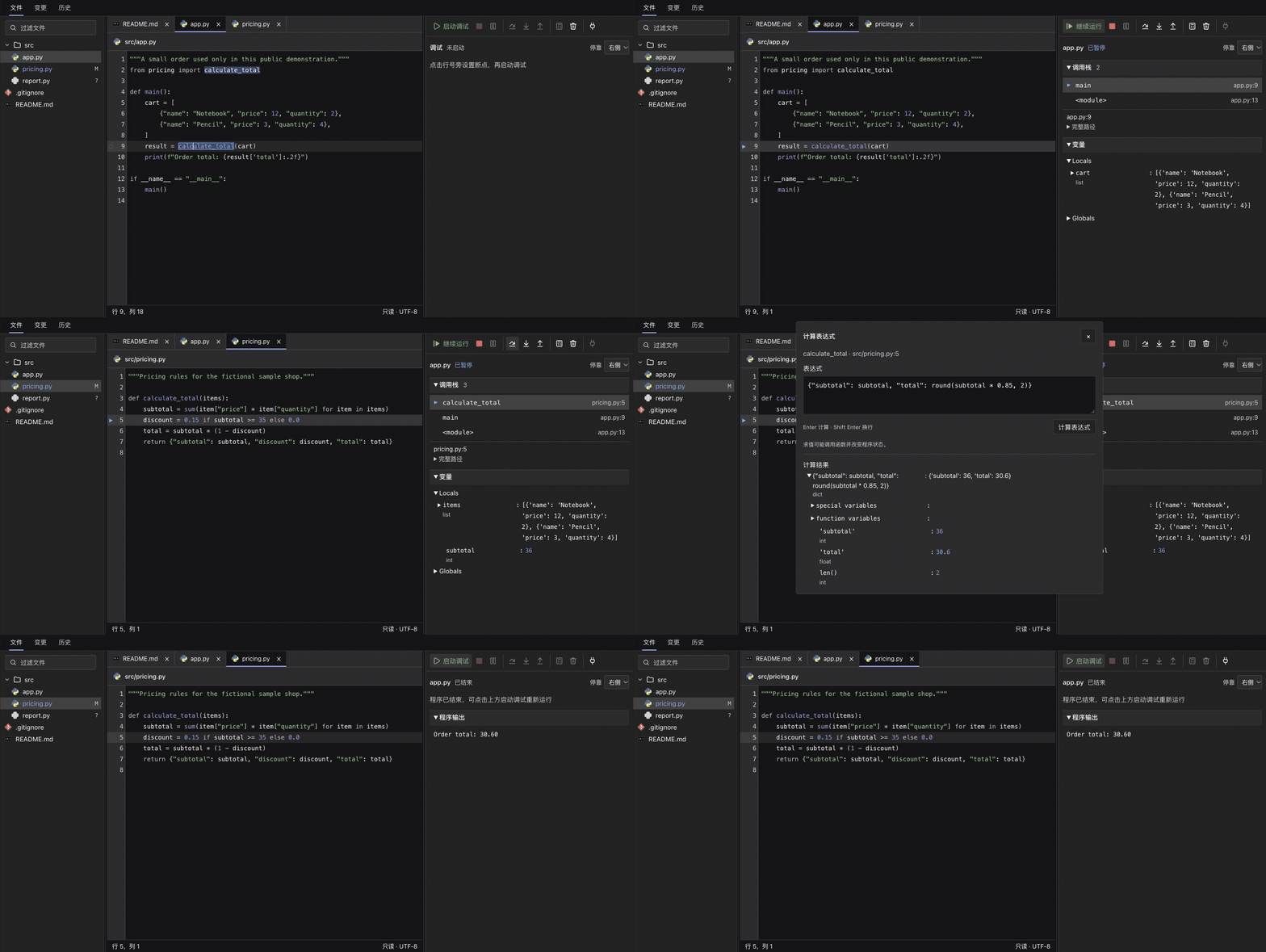
给 DeepSeek Harness 做了个开发工作台:代码跳转、Git 和断点调试 最近给 DeepSeek Harness 写了个插件,叫 dsh-workbench 需求挺直接:和 AI 讨论代码的时候,我也想方便地查看项目、追踪函数调用、检查 diff ,必要时自己打个断点看看程序到底怎么运行。 于是做了一个放在对话右侧的开发工作台,中间继续聊天,旁边可以阅读和调试代码。交互参考了自己比较习惯的 JetBrains 。 目前支持: - 文件与文档:文件树、路径过滤、Markdown 阅读预览、常见配置文件高亮。 - 代码阅读:多文件标签、语法高亮、同名词高亮、函数与类型定义跳转,以及前进/后退。 - Git 检查:工作区变更、文件 diff 、提交图和提交详情,可以从差异跳回源码。 - 断点调试:启动或接入已有进程、单步、调用栈、变量展开、Evaluate Expression 、清理全部断点。 - 布局与主题:跟随 Harness 明暗主题,区域可以拖动调整大小,调试面板可以放右侧或底部。 代码导航支持 Python 、Go 、Java 、JavaScript 、TypeScript ;调试支持 Python 、Go 和 Node.js ( JS / TS )。 放一张使用虚构项目录制的脱敏演示,展示断点、单步、变量和表达式求值:  项目地址: Chengyunlai/dsh-workbench 安装方式: git clone https://github.com/Chengyunlai/dsh-workbench.git cd dsh-workbench npm ci --omit=dev 然后在 Harness 插件管理器中安装这个本地目录,启用「开发工作台」,从对话右侧工具区打开。 目前源码阅读和 Git 检查都是只读的。Go / Java 导航需要配置本机语言服务,调试需要安装对应适配器; TS 调试需要先生成 JS 和 source map ,仓库里写了配置步骤。 主要在 macOS 上做了界面实测。欢迎正在用 Harness 的朋友试试。尤其想听听代码阅读、调用栈和调试交互方面的反馈,问题和建议都可以直接提 Issue
GitHub #1: agent-desktop — AI agents that click your desktop Trending deep-dive: vercel-labs/agent-desktop — a computer-use CLI so AI agents can click real desktop apps. 3 takeaways: 1) npm install -g agent-desktop → agent-desktop version 2) Grant OS access, then agent-desktop snapshot --app Finder -i (JSON a11y refs) 3) agent-desktop click @ref → snapshot again (observe → act → verify) Repo: vercel-labs/agent-desktop #agent-desktop #GitHub #Trending #AIAgents #ComputerUse #Shorts #OpenSource #CLI #Vercel This video includes AI-assisted production.
capsule#282 まだ我流なんだけど書かせたコードを検査する手法の手札が増えてきて良い感じ。作ってる最中は文書(設計書)&コード&テスト&動作確認で十分で、作り終わったら文書をより形式的なテスト手法に置き換えて収束させていくイメージ
Ghost in the Machine / 機械の幽霊 Suno + このエンジンで作った文字PVです。 日英混在、グリッチ、終盤は残り時間とメルト。 #Suno #文字PV #LyricVideo #CreativeCoding #AIMusic GitHub: to4kawa/lyric-pv t.co
HUGE UPDATE Weeping of the Empire v0.1.8 is out, with a v0.1.8.1 hotfix on top. It's the biggest update so far for this native PC port of Tears of the Kingdom: a static recompilation of the Switch game (version 1.0.0) into a Windows x86-64 program. Download and full notes: github.com/daniel-madrid-07/weeping-of-the-empire… v0.1.8.1 hotfix (get this one; updating from v0.1.8 takes about 2 minutes) - Entering some shrines at high frame rates could hang on the loading screen with the save icon. Fixed (it was a v0.1.8 regression: a wait we convert for high frame rates never finished there). - AMD FSR 3.1 crashed the game as soon as it was turned on. Fixed: FSR upscaling and frame generation start and run. What's new in v0.1.8 - Much smaller install. The game reads its data straight from your own dump instead of copying 17 GB. A fresh install on our test PC took 17.7 minutes, and the install folder is 4.8 GB. Updating from v0.1.7 took 12.8 minutes there and keeps your saves, settings and mods. 6-core CPUs can take 30 minutes or more. - Smoother play. Textures stream in ahead of use, and game files are read ahead in the background. Video memory follows what is really free and moves idle images to system memory instead of stalling, which mostly helps 6-10 GB cards. A frame waits at most 0.1 s for a shader that is still being built, or you can choose "Always wait". Bow aim and fast travel no longer make the game speed swing. - Upscalers. AMD FSR 3.1 (upscaling and frame generation, any GPU; working from v0.1.8.1) and NVIDIA DLAA sit next to DLSS. DLSS frame generation offers x2 / x3 / x4, and DLSS / DLAA are sharper and steadier: the game's FXAA no longer runs before DLSS, the jitter goes the right way, and the right LOD bias is applied. - Settings that apply at once: render resolution, shadows, anisotropic filtering, LOD bias, the upscalers, DLSS and dynamic resolution. Frame-rate caps from 30 to 240, or Unlocked. - Fixes from player reports: - The static and buzz on sound effects (the game's reverb was fed in the wrong layout), plus crackle and clicks. - 21:9 and 32:9 ultrawide with HUD layout choices, plus 16:10. Known issue: at 32:9 the picture looks washed-out grey and a menu cursor is too small; a fix is in progress. - Red grass with a texture LOD bias above 0. - Missing text on cards with little memory. - Shader builds stuck on integrated GPUs. - About 1,400 more shaders built in a simpler form on AMD, so first starts are faster there. - Ultrahand with the mouse. - Teleport dissolve. - Two crashes. - PC extras: - Back paddles, walk speed, right-stick camera speed, a rumble curve and Xbox trigger rumble. - Install mods from the F10 menu, or by dropping them on the launcher. - amiibo from your own dumps. - °C / °F. - F10 in Russian, Brazilian Portuguese and Simplified Chinese. - An uninstall entry in Windows "Apps". We also caught and held back two things before release, because they failed our checks. 1.4.3 support failed its install check, so it isn't in this version. 300 / 360 fps caps were ready but are hidden: game steps shorter than 1/240 s corrupt the physics engine's contact solver, and we caught that as a crash in our pre-release runs. The known problems are listed in the release notes. Benchmark: same PC, two native TotK ports Ryzen 7 9800X3D + RTX 5080, 2560x1440, frame cap 240 on both, vsync / DLSS / frame generation / FSR off on both. Same 100 % save moved onto the same warp pads, same button taps to load, then 60 s standing still, one run per place per port, order alternated. | place | Weeping of the Empire v0.1.8 (game 1.0.0) | totk-pc-recomp v0.3.4 (game 1.4.3) | difference | |---|---|---|---| | Lookout Landing | 155 fps, 1 % low 90 | 101 fps, 1 % low 65 | +53 % | | Kakariko | 162 fps, 1 % low 93 | 107 fps, 1 % low 62 | +51 % | | Hateno | 189 fps, 1 % low 105 | 118 fps, 1 % low 61 | +60 % | | Depths | 203 fps, 1 % low 111 | 111 fps, 1 % low 73 | +84 % | | Korok Forest | 209 fps, 1 % low 118 | 167 fps, 1 % low 91 | +25 % | No frame of 100 ms or more on either port. Where theirs wins: it uses less video memory everywhere (0.5 to 1.1 GB less), and at Lookout its single worst frame was shorter (25 ms vs our 33 ms). Read before quoting it: - Not the same game code: ours runs 1.0.0 and theirs 1.4.3, so part of any gap can be the game version. - One run per place, no warm-up. Two runs of the same build at the same spot varied by up to ~6 % on this PC today, so small gaps mean nothing. - Their install was fresh: each place was their first visit since installing (their Setup prepares part of the shader cache), while ours had visited these places before. That favours ours, mostly in the 1 % lows. - The PC wasn't fully quiet (an editor, the antivirus and a light game in the background, about 20 % of the CPU outside the games, the same for both). Our numbers this afternoon on a quiet PC were 15-25 % higher at the same spots, so treat the absolute numbers as low for both. - Their settings were left at their defaults except the ones needed to compare: frame limit 240, vsync off, render scale 100 % with plain scaling. Left at default: their extra FXAA pass and their option that skips drawing things whose shaders are still building (ours waits and draws everything). - Standing still isn't real play: towns, combat and menus still have hitches on both ports. - One PC, NVIDIA only. Other hardware can rank differently. The video Same PC, both ports loading the same area around Kakariko, with my hands on the keyboard and mouse under each one, so you can see what every key and mouse move does: the mouse camera and aiming, and on ours the on-screen prompts showing the keyboard keys you actually press. It's about controls and feel, so it has no fps counter: recording on the same PC takes a big share of the frame rate from both ports, and the numbers in it wouldn't mean anything. Already done for v0.1.9 (on our main branch, not released yet) - Keyboard and mouse: G throws a carried object, E picks things up while climbing, a click adds materials to a hold, and the menu tab jump no longer bounces. - Intel Arc: a driver that crashes on one shader is worked around per shader, and a first fix for the white patches in caves (still to be confirmed by the reporter). - Steam Deck: a first-start profile (borderless, vsync, Deck frame-rate default) and the Deck's gyro under Windows / Proton. - World markers (lock-on, names, enemy bars) sit over their targets on 21:9 / 32:9 / 16:10. - Setup in Spanish, Russian, Brazilian Portuguese and Simplified Chinese. - Player guides for controls and every setting. - An opt-in Discord status. - Clearer messages when a build step crashes. In progress - 1.4.3 support at a full frame rate - The Purah Pad camera recognising creatures again - Portuguese (Brazil) game text, from your own 1.4.3 update. - Saves from newer game versions loading in the 1.0.0 build. - A native Linux build (AppImage). - 300 / 360 fps back, with the physics step kept safe. - Ultrawide polish: the picture follows the window shape by default. - A grass draw-distance option and a sun-shadow distance option for 4K. About the project Open source (MIT) and Windows-first. Every GitHub issue gets an answer, and most of the fixes above came straight from player reports. Most of the code is written by AI coding agents (Claude Code) under my direction; I set priorities, play test builds and decide what ships. It builds on MIT projects credited in the README. You need your own dump of the game (version 1.0.0) and your own keys; Setup decrypts and recompiles on your PC. No game files are included. Repo: daniel-madrid-07/weeping-of-the-empire
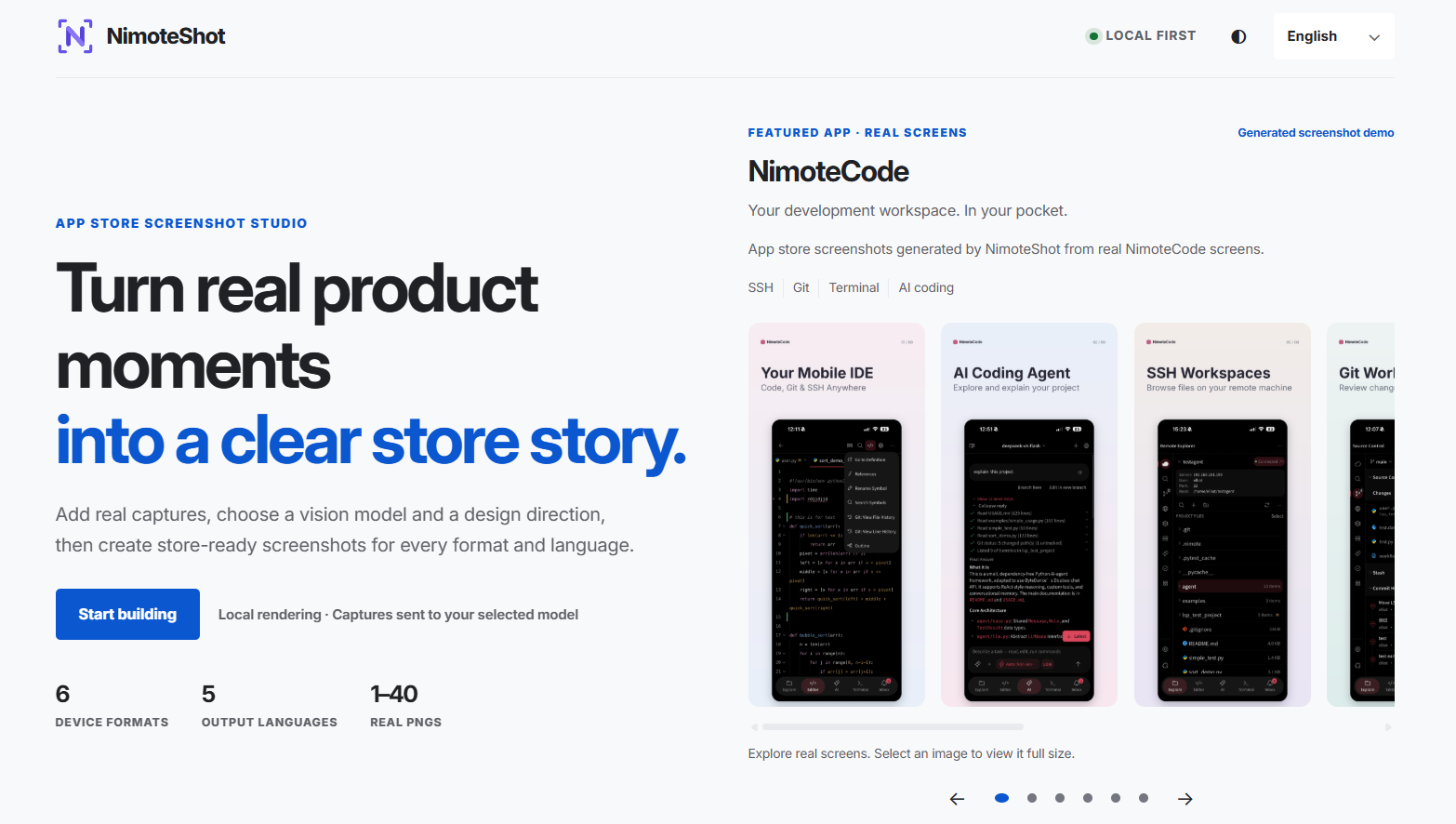
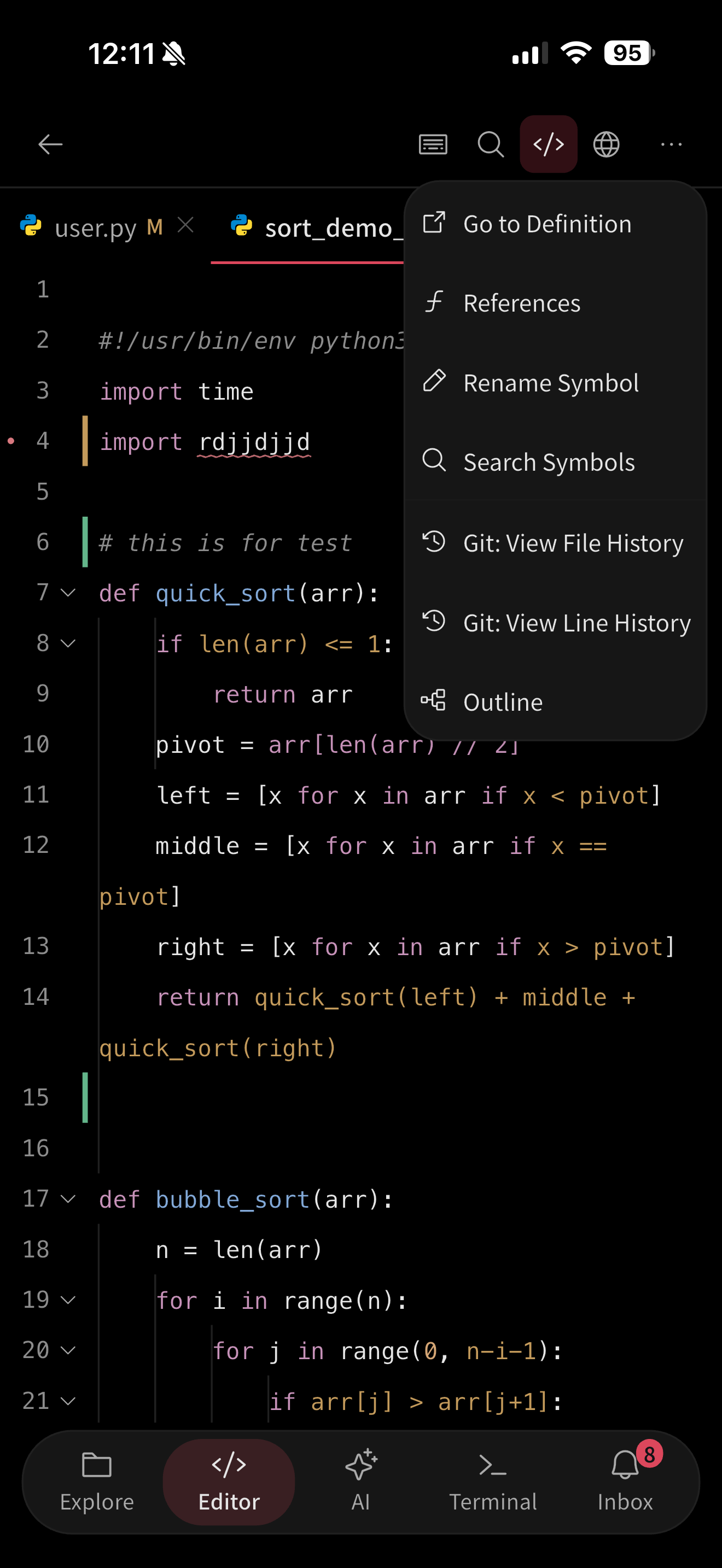
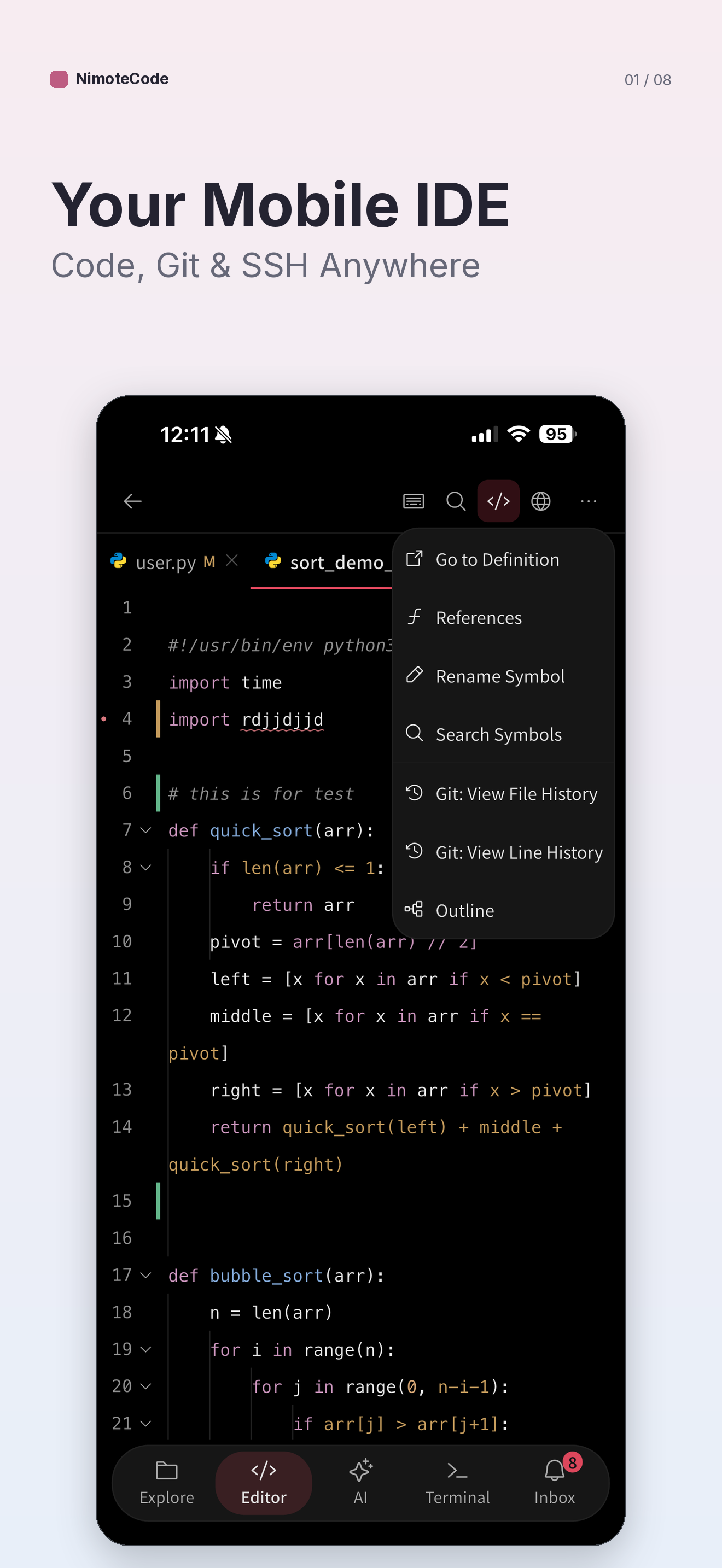
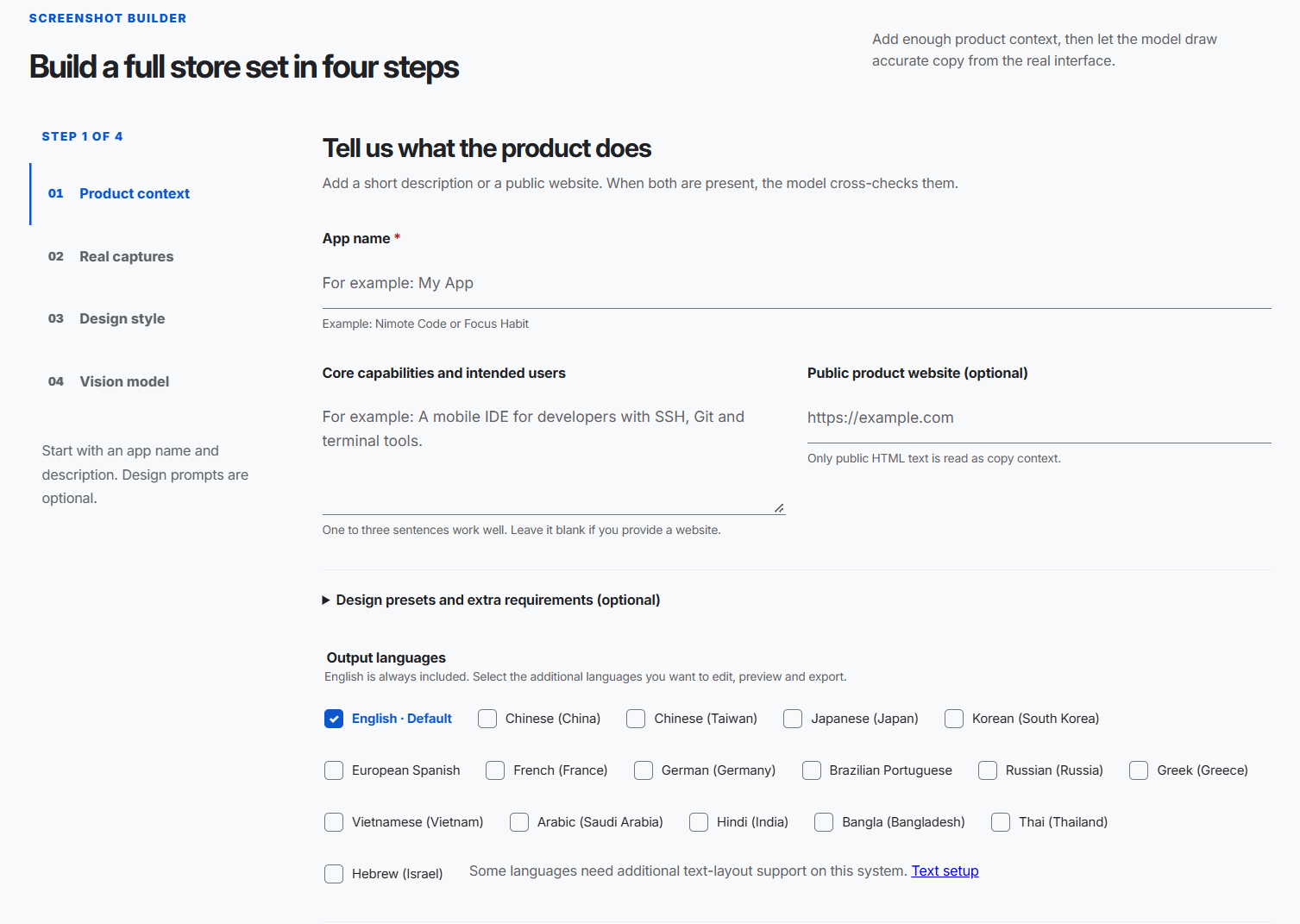
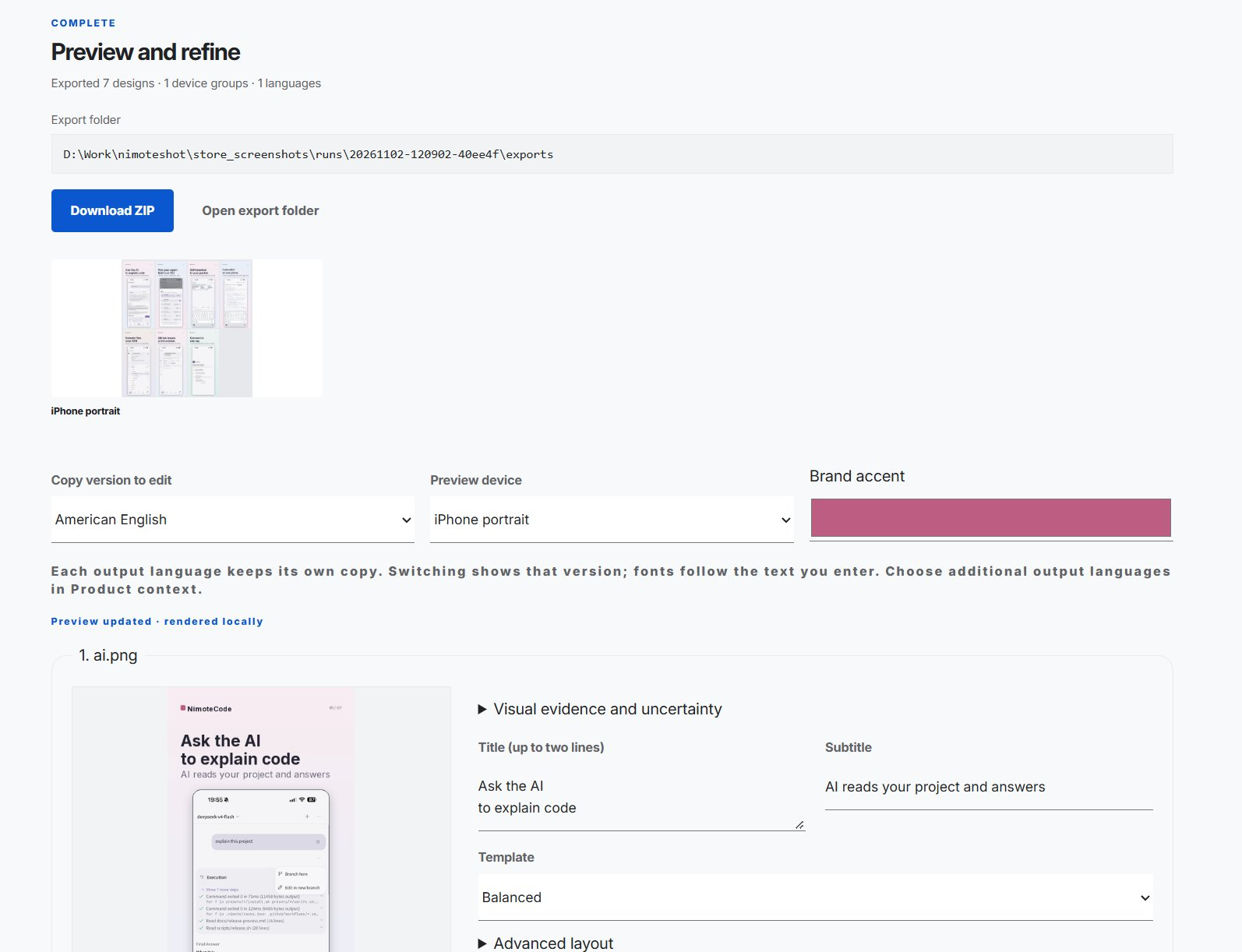
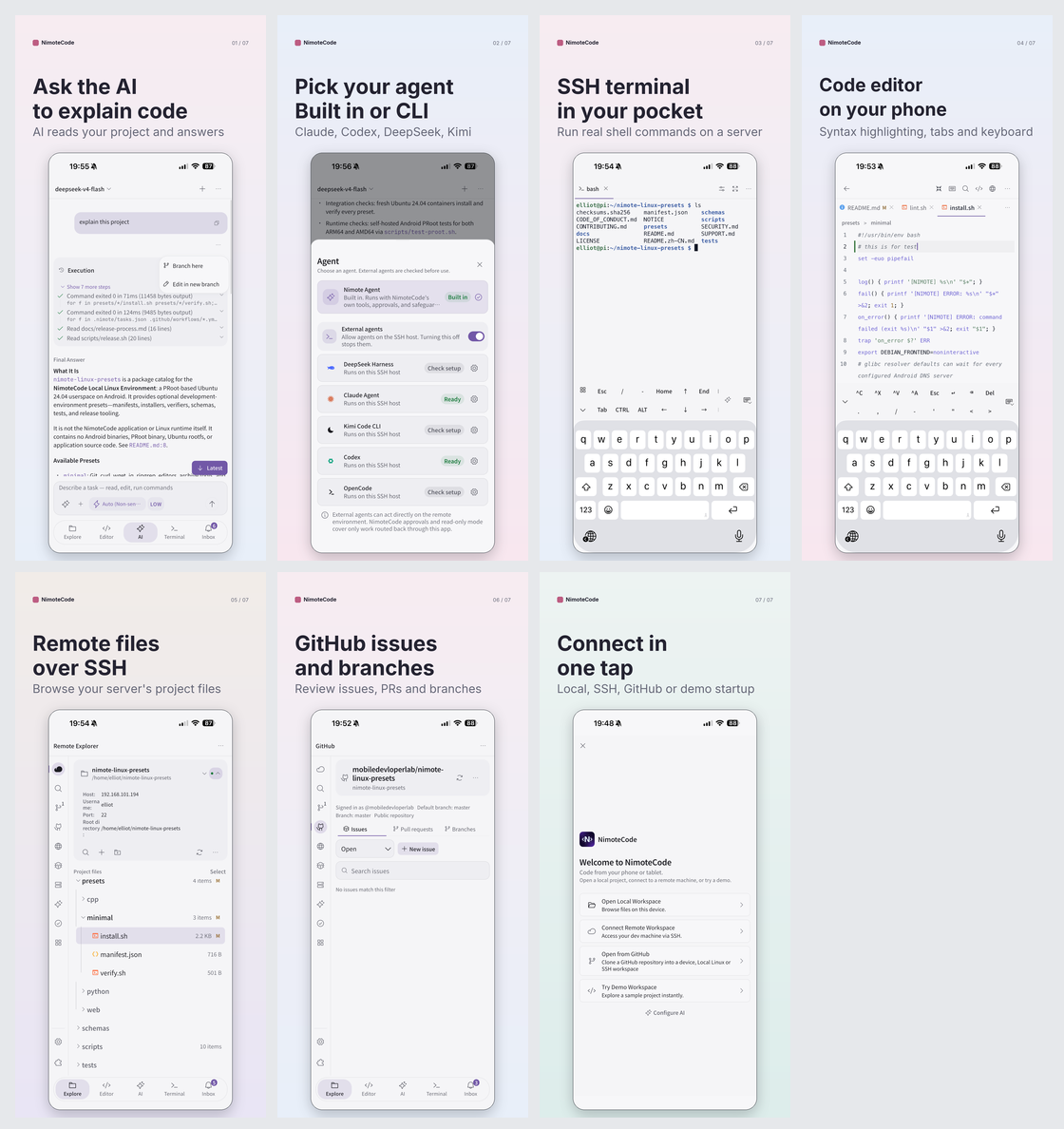
I Got Tired of Making App Store Screenshots, So I Built an Open-Source Tool Shipping an app is fun. Preparing the App Store screenshots? Not so much. You finish building a feature, fix the last few bugs, and finally get your release ready. Then you open App Store Connect or Google Play Console and remember there's still another job to do: create a complete set of promotional screenshots. Different device sizes. Different layouts. Titles and subtitles. Multiple languages. And every time you change something, you potentially have to export everything again. I've been working on NimoteCode, a mobile IDE for Android and iOS, and this became one of those repetitive tasks I really didn't want to keep doing manually. So I built NimoteShot, a free, open-source screenshot generator for App Store and Google Play listings. GitHub: mobiledevloperlab/nimoteshot The idea is straightforward: use AI to understand real app screenshots and help write the marketing copy, but keep the actual image generation deterministic, editable, and local. !NimoteShot screenshot editor The problem isn't taking screenshots Taking a screenshot is easy. Turning that screenshot into something suitable for an app listing is where the work starts. A typical workflow looks something like this: 1. Capture the app on a real device or emulator. 2. Import the screenshot into a design tool. 3. Choose a background, device frame, and typography. 4. Write a short headline that explains the feature. 5. Adjust everything for different screen dimensions. 6. Translate the text and repeat the layout work. 7. Export the assets and check that they meet store requirements. It's manageable for one release. It gets frustrating when you're maintaining multiple languages and shipping updates frequently. I looked at this as a developer rather than a designer: most of the process follows a repeatable set of rules. The parts that need judgment are understanding what a screen does, deciding which features matter, and writing good copy. The rest should be something software can handle. What NimoteShot does NimoteShot takes real screenshots of your app and turns them into promotional images for iPhone, iPad, and Android listings. You can give it your app name, a short description or website, and your original screenshots. A vision-capable AI model can analyze the visible interface and draft headlines, subtitles, and a design direction. You can then review everything in a browser-based editor, change the text or layout, and export the finished images. Here's an example using NimoteCode. Original app screenshot: !Original NimoteCode app screenshot Generated promotional screenshot: !NimoteCode promotional screenshot generated with NimoteShot The important detail is that the actual app interface remains the source material. I didn't want an image model inventing buttons, changing code in the editor, or producing a beautiful-looking interface that doesn't exist in the app. AI should help explain the product, not fabricate it. AI for decisions, local code for rendering This is probably the most important design decision in NimoteShot. I separated the process into two responsibilities. AI handles interpretation and copywriting. A vision model examines the screenshots and product context, then helps draft the feature descriptions and visual direction. The local rendering engine handles the final images. It applies the selected templates, typography, backgrounds, layouts, and output dimensions. That separation makes a surprisingly big difference. Imagine you've generated six promotional screenshots and notice that the headline on the third one is too long. With a fully generative approach, you might need to ask the model to generate that image again, potentially changing other visual details in the process. With NimoteShot, you edit the headline directly. The affected preview is rendered locally. No additional AI request is needed. You can also adjust the colors, templates, and order of the screens without rerunning the entire analysis. I wanted something closer to an editable design tool than a one-click AI image generator. Localization shouldn't mean rebuilding everything Another part I wanted to improve was localization. NimoteShot currently supports 17 output languages, including English, Chinese, Japanese, Korean, Spanish, French, German, Portuguese, Hindi, Arabic, and others. Each language can have its own editable copy. That matters because localization is not simply replacing one string with another. A short English headline might become much longer in German. Chinese and Japanese have different typography requirements. Arabic and Hebrew need appropriate text shaping. NimoteShot uses bundled fonts selected according to character coverage, with complex-script shaping support where the required dependencies are available. The goal is to keep the workflow consistent across languages while still allowing developers to review and refine every translation. AI-generated text is a starting point, not something that should go straight into production without review. !NimoteShot product build a full store set in four steps You can use it without AI Although NimoteShot has AI in its name, I didn't want an API key to be mandatory. !NimoteShot product preview and refine workflow There's a manual design mode that works without a model. You can upload your screenshots, select a design, edit the text, preview the result, and export the images locally. If you want AI assistance, you can configure a supported vision-capable provider. The project supports several provider integrations, including DeepSeek, Qwen, Gemini, Claude, OpenAI-compatible APIs, Ollama, and others, subject to the capabilities of the selected model. The software itself is free and open source. Cloud model providers may charge for their API usage. !NimoteCode screenshots result One privacy distinction is worth making: rendering and exporting happen locally, but AI screenshot analysis sends the selected captures and product context to the configured model provider. If you need to keep everything local, use manual design or a compatible locally hosted model. Getting started NimoteShot runs on Windows, macOS, and Linux, with Python 3.11 or newer. Clone the repository: git clone https://github.com/mobiledevloperlab/nimoteshot.git cd nimoteshot On macOS or Linux: ./install.sh On Windows, run this in PowerShell: powershell -ExecutionPolicy Bypass -File .\install.ps1 The installer creates a Python virtual environment, installs dependencies, and starts the local web studio. By default, the interface is available at: http://127.0.0.1:8765 Use the URL printed by the installer if it chooses another port. From there, the workflow is: 1. Enter your app's name and product description. 2. Upload your real screenshots. 3. Select the target devices and languages. 4. Choose AI-assisted generation or manual design. 5. Review and edit the previews. 6. Export the PNG files or download a ZIP package. The exported assets include the selected device resolutions, and the task configuration can be kept for later edits. For developers who prefer automation, there's also a CLI. For example, after configuring a compatible provider: .venv/bin/python scripts/nimoteshot.py generate \ --brand "My App" \ --description "A mobile editor with SSH, Git and terminal tools" \ --provider qwen \ --style editorial \ --locales zh-CN,fr-FR,ja-JP I like having both options: a visual workflow when I want to refine the design and a command-line workflow when I want something more repeatable. A few implementation details NimoteShot is built with Python and includes a local web editor, AI-provider integrations, and an image-rendering pipeline. Some of the less visible features are the ones I find most useful: - Incremental previews: Editing one screen doesn't require regenerating every other screen. - Stale-response protection: Older preview results are prevented from replacing newer edits. - Editable configurations: You can return to a saved task rather than starting over. - Multi-resolution exports: The renderer produces PNGs for supported device and orientation targets. - Source traceability: Original captures are archived with a SHA-256 source manifest. These aren't particularly flashy features, but they make the difference between a demo and a tool that's practical to use during a release. The current project also includes automated tests covering editing, previews, language switching, and exports. What it doesn't try to do NimoteShot isn't intended to replace a professional designer or make every creative decision automatically. You still need to choose which features deserve attention, review the generated copy, and check the exported images before submitting them to the stores. It also doesn't guarantee that every possible Apple or Google Play listing requirement will remain unchanged. Store specifications evolve, so the final submission should always be reviewed against the current requirements. What it does try to eliminate is the repetitive work between having real screenshots and preparing usable promotional assets. And for me, that's already valuable. Open source, and I'd love feedback NimoteShot is available on GitHub under AGPL-3.0-or-later. It's still a growing project, and I'd particularly appreciate feedback from developers who publish apps in multiple languages or maintain both Android and iOS releases. I'm interested in hearing: - Which part of preparing store screenshots takes you the most time? - Would you rather use a browser editor or automate screenshot generation through a CLI? - What would make this useful enough to include in your release workflow? If you want to try it, here's the repository: NimoteShot on GitHub Issues, bug reports, design suggestions, and pull requests are welcome. And if the project saves you some time before your next app release, that's exactly why I built it. !nimoteshot github promotion --- Built while working on NimoteCode, my mobile development IDE. The screenshots in this post come from the open-source NimoteShot repository and its NimoteCode demo.
Robotic hands that play any MIDI file on a piano in real time I was inspired the aesthetic of the Westworld intro and the 90s alt rock piano covers they would feature. I always wanted to create my own riff on it as a MIDI player. And also by annoyance at unrealistic depictions of piano playing in media. So I built this with Claude Opus 5.5 and figured I'd share it here. It's open source. Basically, you can load any* MIDI file and watch two robotic hands play it on an upright piano, with a cinematic camera. Live demo: csimpkins22.github.io GitHub: csimpkins22/mechanical-pianist The demo has a few songs preloaded, but you can try giving it any MIDI of a piano performance. But if you give it something ridiculous like Rush E it... goes a little nuts. The key fingering is pretty realistic. This was important to get right. It's based on Parncutt's research that figures out which hand and fingers should play each note. Inverse kinematics handles the actual positioning of the joints. Small details like key travel, release bounce, and how the hands interact when they get in each other's way are considered. It's deterministically animated, so you can scrub around a song. There's a fairly extensive post-processing pipeline with per-pixel motion blur, depth-of-field/bokeh, volumetric god rays, ambient occlusion, bloom, anamorphic lens effects, and color grading. The piano's lacquer has planar reflections, and the room lighting uses spherical harmonic probes for indirect illumination. Claude generated the hands and piano in Blender.
What migrating a Vuetify 2 dashboard to Vue 3 actually took Vue 2 reached end of life on 31 December 2023. Vuetify 2 followed on 25 January 2025. If your admin panel still runs on them, it gets no security fixes, and every SOC 2 or ISO 27001 review asks why. To show what the move involves, I migrated a well-known open-source app in public: Creative Tim's Vuetify Material Dashboard (MIT, 1.3k GitHub stars). The full branch is here: SayedEsmail/vuetify-material-dashboard. Every commit handles one concern and lists the breaking changes it fixed, so the commit log reads as the migration plan. I wrote the plan, did the work with an AI coding assistant, and reviewed every change myself at the end. The starting point - Vue 2.6, Vuetify 2.2, Vuex 3, Vue Router 3, Vue CLI 4 on webpack 4. - 33 single-file components and 5,620 lines of JavaScript and Vue. - 553 lines of custom SASS written against Vuetify 2's internal class names. The target was Vue 3.5, Vuetify 3, Pinia, Vue Router 4 and Vite. Step 0: delete before you migrate Seven of the 33 components could not be reached. Five views had no route, and two components were only used by those views. A form-validation library was registered globally and never used. The test suite still asserted the Vue CLI scaffold text, so it could never pass. Deleting that first removed a third of the code before any migration work started. It is the cheapest saving in every migration, and an audit finds it in an afternoon. Why Vuetify 2 projects can't migrate "gradually" The usual Vue 2 path is the @vue/compat build: run on Vue 3 in compatibility mode, then fix warnings one by one. That path is closed when the app uses Vuetify 2, because Vuetify 2 cannot run on Vue 3 at all. The UI layer has to move in one step. So the order matters: 1. Tooling first: Vue CLI to Vite, then the new dependency set. 2. App bootstrap: createApp, createVuetify, the i18n adapter. 3. State and routing: Vuex to Pinia, Router 3 to 4. These are mechanical. 4. Vue-2-only plugins: the chart wrapper had no Vue 3 version, so it became a 56-line local component on Chartist 1.x. 5. Vuetify, from the outside in: layout shell, then the shared component library, then the views. 6. The custom CSS layer last. Where the real work is Component APIs changed a lot, but those changes are well documented: v-list-item-content is gone, activator slots give props instead of on and attrs, v-tabs-items became v-window. I hit 43 distinct breaking changes and logged each one. That list is now the checklist I run in every audit. The expensive surprises were elsewhere: - Custom CSS on framework internals. 470 lines targeted classes like .theme--light, .v-size--default and .v-card__text. Not one of them exists in Vuetify 3. Nothing errors. The styles silently stop applying. - Behaviour that changed without an error. In Vuetify 3, a navigation item linked to / stays highlighted on every page unless you mark it exact. Alerts now clip anything positioned outside them. The build stays green and the UI is subtly wrong. - Bugs that were already there. The theme colour picker never reached dark mode because it read a property that was never defined. Turning the sidebar image back on stored the value true instead of an image URL. Neither was caused by the migration, but a migration is when someone finally reads every line. The result - Vue 3.5, Vuetify 3.13, Pinia, Vue Router 4, Vite 8, ESLint 10. - 26 components, 3,644 lines of JavaScript and Vue, and 350 lines of SASS in one file. - The same 8 routes and the same behaviour, minus the two bugs above. - A test suite that runs: every route renders in the full layout with zero Vue warnings. What I'd tell a team planning this 1. Run an inventory first. Dead code, undeclared dependencies and tests that can't pass are common, and they change the scope. 2. Budget for CSS and visual QA, not only for component syntax. 3. If you use Vuetify 2, plan the UI layer as one cut-over, behind a feature branch, with route-level smoke tests in place before you start. 4. Decide the target versions up front. Vuetify 4 is out now. Going to Vuetify 3 first is still the shorter step from Vuetify 2, and 3 to 4 is a much smaller change. If your product still runs on Vue 2, Nuxt 2 or Vuetify 2, I do a fixed-price migration readiness audit: a written report with the dead code, the breaking changes that apply to your codebase, the risks, and a fixed quote for the migration. Sayed Esmail · github.com/SayedEsmail · linkedin.com
Input Replay Lab: Windows keyboard/mouse timelines with bounded replay (C++17) I maintain Input Replay Lab, a native C++17 tool for experimenting with repeatable Windows input QA. Choose one keyboard or mouse, explicitly record its events, inspect the timeline, then replay it once to a selected device of the same family. Timelines can be saved as JSON or exported as CSV. The app records locally, only after you choose Record. Stop cancels replay and releases its held keys/buttons. Timestamps are taken when the app receives events; replay reports submission scheduling lateness, not end-to-end input latency. The application source is MIT. Live capture/replay uses my Interceptor Keyboard & Mouse driver: the bundled signed demo needs administrator rights and has a one-hour allowance per Windows kernel boot. Kernel source and unrestricted production licensing are separate. The public tests cover offline serialization, cancellation and fake-transport replay. Physical-device routing and behavior in your receiving app still need testing on your target system; see the README for scope and limits.
■ 出典 Hermes Agent v0.22.6 リリースノート(GitHub、11/2公開) github.com/NousResearch/hermes-agent/releases/tag… Nous Researchの投稿 x.com ■ 補足 ・--dry-run(見るだけ)、--activate-routines(ルーチンを動く状態で入れる)、--bot(Botを選ぶ)はGitHubのコードで確認 ・投稿者の説明では、Slackなどのイベントで動くルーチンと認証情報は移らない
兩個 AI 改專案會打架?Worktrunk 幫你分開工作目錄 Worktrunk 用簡短指令管理 Git worktree,讓不同分支擁有各自的工作目錄。它協助整理平行開發,不保證消除合併衝突。 需要既有 Git 專案;AI 工具須另外安裝與授權。Windows 安裝版本另提供 git-wt 名稱,避免與 Windows Terminal 的 wt 衝突,請依官方文件設定。 本片節選官方終端機示範,經裁切、剪輯、縮放與中文配音,並非本機實測。示範版本可能與目前 UI 不同。 專案與安裝:max-sixty/worktrunk 文件:worktrunk.dev 示範來源:max-sixty/worktrunk-assets 軟體授權:MIT OR Apache-2.0,完整條款見專案 LICENSE;此處不將軟體授權概括為全部媒體素材的授權。示範作者 max-sixty,影片採功能評論節選並保留來源。 熱度依據:2026-11-03 08:02 台灣時間 GitHub Trending daily,77 stars today;不代表使用量。 到 GitHub 搜尋 max-sixty/worktrunk。 #開源工具 #GitHub #AI工具 #Git
Wow my life is better when my agents are forced to write and talk like real humans, open source blader/humanizer
Efficient and eyecandy youtube music client check out my music client preview.redd.it quite buggy yet, but very much usable. looking forward to polish this further looking for contibutors and feedback. issues are very welcome :) XBoom31/crossfade
@pym0xe @VitalikButerin @bankrbot @base Here's the commit on Vitalik's fork: github.com/vbuterin/fieldatlas/commit/769e85d162f… The official Field Atlas repo also acknowledges it — part of the app comes from the vector-search branch on vbuterin/fieldatlas (commits 337d334 to 769e85d), which was later merged upstream. 0x94t3z/fieldatlas
ELY Terminal 0.2.2 更新来啦!终于可以选择新Session的profile啦,比如wsl或者其他的!! (沉迷做这种小剧情的更新视频无法自拔) 希望可以有多点Star和转发啦!! terminal.elygpui.com github.com/ELY-Open-Source/ELYTerminal/releases/t… 详细更新日志: 新增: 配置文件,与 Windows Terminal 相同:+ 旁的箭头先列出你自己的配置文件,每个有名称、带参数的命令行和文件夹,在 设置 › 终端 › 配置文件 里设定;再列出本机的 shell:Windows 上是 PowerShell、cmd、Git Bash 和每个 WSL 发行版(Docker Desktop 自带的除外),其他系统是 /etc/shells 里的每个 shell。只写程序、或写 wsl -d 名称 的配置文件保留 shell 集成(#55)。 终端文字的字重,100 到 900;粗体比它重 300,最高 900(#60)。 中日韩字体:中文、日文和韩文字符先用单独的字体绘制,附加符号和异体字选择符随之一起(#60)。 Windows 和 Linux 上的抗锯齿:默认灰度,与 Windows Terminal 相同;次像素只在窗口不透明时生效。此前 Windows 上不透明窗口里的中文带 ClearType 彩边,而 Windows Terminal 用灰度;在一台 150% 缩放的电脑上用 Cascadia Mono 16 px 测量,灰度与 Windows Terminal 的像素相差不超过 1/255(#60)。 光标平滑移动到新的格子,设置 › 外观 › 光标 › 平滑移动;默认开启(#54)。 从文件面板把文件或文件夹拖到终端上,会按当前 shell 的规则输入它的路径(#56)。 打开文件菜单后,右键“文件”标签可选“选择文件夹新建会话…”;从这里或从名称菜单的“在此新建会话”启动失败时,会弹出对话框说明原因(#57)。 文件夹参数也可写在 --working-directory、-d 或 --startingDirectory 之后,xdg-terminal-exec 和使用 Windows Terminal 写法的启动器都能让第一个会话从那里开始(#53)。 修复: macOS:在带 Touch Bar 的 Mac 上关闭设置或窗口,应用不再崩溃。AccessKit 的子类在窗口关闭时恢复视图的类,打断了 AppKit 的 Touch Bar 观察者(#52)。 感谢 xiaoyangtao55、2youg1、Chino456 和 lnyuyu 提交的 PR,感谢 doraemon4u、CXwudi 和 letrangerj 提出的 issue。
@clairevo @ezramechaber @figma Agree, if you are PM and need a skill to create documents using your agent without the AI slop, try out - arunai30/super-document-skills Have been testing it for a while, generalizes well.
macOS runners are vulnerable to the eMudhra intermediate CA compromise · Issue #15228 · actions/runner-images : 👀 --- runner-images#15228
Revisited 23/39: CBX, Coinbase Cross-PTB Scalp. When Coinbase BTC mid re-crosses the price-to-beat late in a 5-min window, buy that side and scalp out. Main failure: Polymarket may already have it, and Coinbase isn't the settlement feed. Not advice. github.com/Polytutor-AI-Labs/polymarket-strategy-… t.co
重连不是越快越好。Talos Web 端断线后原来 500ms 就重订阅一次,服务一出问题,每个打开的页面都在重试。昨天改成固定 2 秒;Sync 遇到鉴权失败、权限拒绝、队列满,至少等 10 秒再试。被明确拒绝还马上重试,只是在放大故障。 apilots/talos
The Suffering 1 & Level Viewer and editor preview.redd.it Thanks to Claude, I’m building an editor for The Suffering 1 & 2. At the moment, you can’t edit much, but we can already view levels, models, textures, animations, audio, videos, and cinematics. Critics and suggestions are welcome. Link: DropsMJay/SurrealEd Setup: 1. Install Python 3.8+ (python.org, tick "Add Python to PATH"). No other libraries are needed. 2. 2.Copy the whole RiotTools folder into the game folder, next to Suffering.exe or SufferingTTB.exe. 3. Double-click RiotTools\SurrealEd.bat. The editor opens in your browser (current Chrome, Edge or Firefox). Close the black window to quit.
공식 소개와 실행 안내는 Tencent/WeVisCut 에 있어요. 단독 영상 생성 모델이 아니라, 내레이션·소재 검색·편집 도구를 움직이는 에이전트예요. 직접 실행하지 않은 가상 활용 예시예요. 권리 있는 상품 사용 설명 원고와 직접 촬영한 영상을 준비해 Studio에서 초안을 만든 뒤, “Replace the visual at 0:15 with the approved close-up. Keep the narration.”처럼 특정 구간의 화면 교체를 요청해 볼 수 있어요. 자기 소재 폴더를 연결하는 설정도 있지만, 기본 검색 소재는 상업 이용 권리가 자동 보장되지 않아요. 설치와 도구 연결이 필요한 공개 연구 프로젝트예요. 공식 기본 실행 조건은 Python 3.11 이상과 BF16 모델용 약 24GB NVIDIA GPU이며, GPU 없는 모드는 화면만 여는 용도예요. 기본 음성 설정은 중국어이고 한국어 완성도는 확인되지 않았어요. 코드는 Apache 2.0이지만 모델·외부 구성요소·소재의 조건은 따로 확인해야 해요. 연결하는 음성·API 서비스와 GPU·렌더링 비용도 별도라 무제한 무료 도구로 보시면 안 돼요. 제품 수치·자막·소재 권리는 공개 전에 직접 검수해 주세요.
@joacolasca_ FranprzDev/reelsmith Usen el mío, remotion e hyperframes son buenos pero pesados, este lo hace mucho más rápido y vuela si tenés una PC que se la banque, yo lo uso en Instinct. Mí flujo es que me dé el vídeo en 360p, analizo y después cuando está listo le digo que sea en 1080p
simonw/llm 今早更新,修了一个隐私坑:明明关了日志,聊天模式却仍在存回答。 新版会遵守关日志设置。但这只管本地留档;接云端模型,请求仍会发出去,处理客户资料时别混为一谈。 simonw/llm
这周 Upstar CLI 涨星榜第二:Verlintas/NOIR——跑在电脑上的 Android 隐私审计小工具。 Verlintas/NOIR 大约 1313 star,MIT,最新 release v0.2.5。通过 `adb` 读已连设备上的应用清单、敏感权限,以及 APK 里抽出来的上报端点,再按厂商 / 类别打分,把「哪类数据可能流向哪里」写成报告。 默认只读,不需要 root;工具自身不联网、不上报。处置侧给可回滚的 app-ops,并导出 trackers / review / functional 三级域名清单——推送、登录、支付那类标成功能性,避免整份拦挂。高风险包可走 `deep` / `deepscan`(jadx 反编译 + 关键字检索)。 第一次:到 Releases 下对应平台的 portable 包双击启动器(包内自带运行时,不必先装 JDK);或源码: git clone Verlintas/NOIR && cd NOIR ./gradlew :cli:installDist ./cli/build/install/noir/bin/noir 不带参数进向导;`noir ui` 出仪表盘;`noir auto --apply` 才执行安全 app-ops。 官网(中文):verlintas.dev 局限也写清楚了:这是静态证据——能说明「有能力 / 有端点」,不能证明某次传输真发生过;无 root 时系统应用只能限制,删不掉;默认主要扫 `base.apk`,split 里的代码是已知下界。配图用官方终端仪表盘截图。
一套键鼠控两台电脑,Synergy 要 29 美元,罗技 Flow 还得两台都用它家鼠标。 twindesk 把电脑和手机拼成一张工作台:鼠标跨屏滑、剪贴板同步、文件互拖,不限品牌硬件。 inukaasith/twindesk
仓库(约 16 万星 · Apache 2.0 改版开源)+ 文档 + 官网 + 自托管: langgenius/dify docs.dify.ai dify.ai docs.dify.ai # 本机最快拉起(需 Docker / Compose) cd dify/docker && cp .env.example .env && docker compose up -d # 浏览器打开 localhost # 想先试用:cloud.dify.ai # 工具市场:marketplace.dify.ai
I run Tiny11 on the iso first: ntdevlabs/tiny11builder Once Windows is installed, I run FSOS-X to debloat/optimize it even more fsosx.com
OpenAI describes Pando, its Git backend for parallel Codex development TL;DR OpenAI has described Pando, the Git-compatible backend it built to support concurrent work by engineers and Codex agents on its monorepo. OpenAI reports that it reduced median push latency by nearly 80% and improved merge reliability. Pando is in production inside OpenAI; the company says it is exploring ways to share the technology, not announcing general availability. What changed OpenAI says growing numbers of agent branches, pushes, fetches and CI jobs strained its previous source-control system. Pando coordinates updates independently per branch and reuses stored Git packfiles across fetches. That allows unrelated branch pushes to proceed in parallel and lets caches serve common history without generating a unique pack for each client. The tradeoff matters: a client reading several branches cannot assume they represent one repository-wide point in time. Updates to an individual ref are serialized, while the system tracks the history a fetch needs. Repeated feature-branch pushes can also resend objects outside the advertised trunk, trading extra bandwidth for reusable packs. Building and validating with Codex OpenAI says Pando went from kickoff to production in 10 weeks, with a core design by one engineer, implementation by agent teams and deployment by a handful of engineers. Its validation included Git conformance tests, deterministic simulations and formal models in Lean and TLA+. These are OpenAI's account of its own work, not an independently reproduced test. For teams running parallel agents, the practical lesson is to measure source-control and CI contention as concurrency grows, and test the consistency assumptions of any shared backend. The reported latency and throughput are specific to OpenAI's environment and should not be treated as expected gains elsewhere. Availability and limits Pando powers OpenAI's monorepo, but no public Pando product, installation instructions, pricing or release date are announced. OpenAI says some Git improvements have already gone upstream and others are in its public Git repository. There is no Codex upgrade or migration step required by this announcement. Official sources OpenAI: Scaling Git at OpenAI OpenAI's Git repository
Researcher-in-the-Loop Evolutionary Discovery of Entanglement-Assisted Quantum Code Families Jae-Hyun Baek, Byung-Sun Won, Jon-Lark Kim arxiv.org [𝚌𝚜.𝙰𝙸 𝚌𝚜.𝙸𝚃] 💬Code: LeGenAI/llm_guided_EAQECC_search t.co
Efficient and eyecandy youtube music client preview.redd.it check out my music client it is made in C++ and it is intended to run seamlessly on linux/windows and mac quite buggy yet, but very much usable. looking forward to polish this further looking for contibutors and feedback. issues are very welcome :) XBoom31/crossfade
👀 AI + Cybersecurity? Now that's a combo! Been checking out SecScan AI 🛡️🤖 — an AI-powered cybersecurity project worth exploring. 🔗 GitHub: najafdev/secscan_ai 🪙 CA: "7iymoWrLNFFmMSAKSNfSMCp7UmXfd3ZRL1t7W6c3pump" #AI #CyberSecurity #Solana #MemeCoins
@rikiyatakehi @a1zhang @lateinteraction @jayden_teoh_ great work! thanks for putting the traces. github.com/RikiyaT/lm_understand-logs/tree/main/e… have to say, the headline is a bit misleading. what actually happened is that Astra helped fixed a Qwen specific model bug that would infinite loop til max output token reached. not that the 0.016% weights changed how Qwen thought about math reasoning
@GrdrVictor @ScaleAILabs @scale_AI Hey Victor, agent env is oss scaleapi/agentenv-framework