Mentions
Conversations linking to GitHub, newest first. Times are UTC.
Mentions by source
X
Bluesky
Hacker News
V2EX
Qiita
DEV
Mastodon
Latest posts
Crackdown 2 #recomp with all DLC running natively on PC at 30fps on an ultrawide monitor. Second image is an Android port running on a Pixel 10. Lots of performance fixes to come and hopefully mods! ImpetuousDanny/Crackdown2-Recomp t.co
On three published offline fixtures, mean retrieved context dropped from 740 to 214 tokens (71.1%) while retrieval quality stayed 1.000. Small fixtures, not a claim about your repo. The method and checksum are in the repo: Coding-Dev-Tools/engraphis
Rentabilidad del arriendo en Itagüí por estrato: en cuál rinde más comprar para arrendar En Itagüí, comprar un apartamento para arrendarlo rinde más en estrato 3 (7,5 % bruto al año, 13,3 años de arriendo) y menos en estrato 4 (6,8 %). DOI: 10.5281/zenodo.23521981
Digital Artist - Raspberry Pi 4 Hey everyone! Just wanted to share my digital daguerreotype project, which I’ve been working on on and off for about six months. It builds on Digital Daguerreotype project, with some improvements and extra features. Full credit to Ben for the original idea and the work that gave me a starting point! My version lets you: - Take a photo or use an existing image - Choose from four art modes - Calibrate to place the paper and pen in the optimal position, for the plotter to get it right almost everytime I also used AI to help with development, so I want to be upfront about that. I've attached pictures of the output and the UI. Tell me what you think It’s been a fun project to chip away at, and I wanted to share where I’ve got to. Thanks for looking!
Rentabilidad del arriendo en Floridablanca por estrato: en cuál rinde más comprar para arrendar En Floridablanca, comprar un apartamento para arrendarlo rinde más en estrato 3 (7,1 % bruto al año, 14,2 años de arriendo) y menos en estrato 4 (7,0 %). DOI: 10.5281/zenodo.23522281
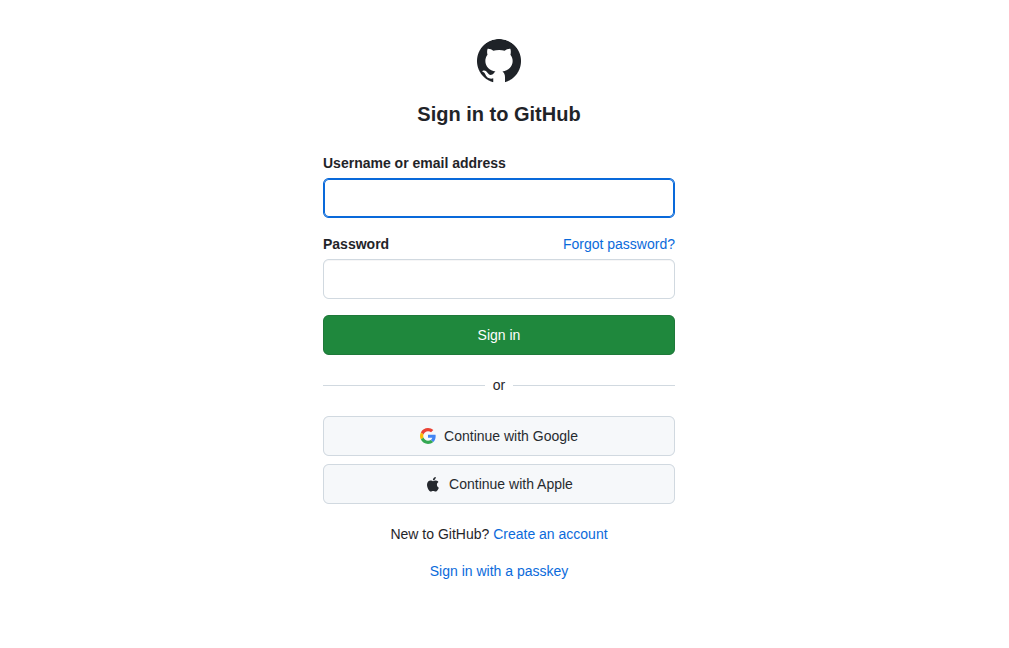
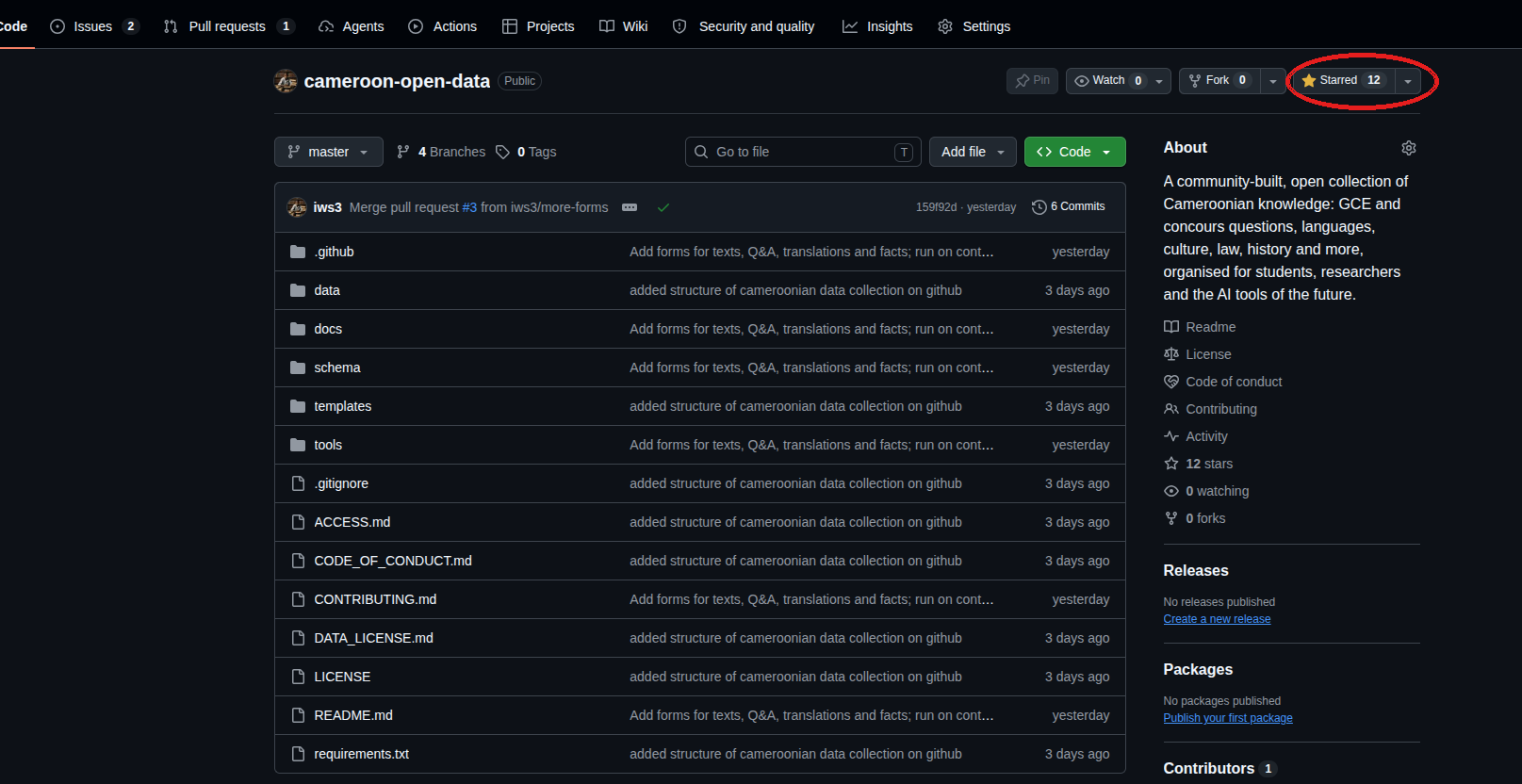
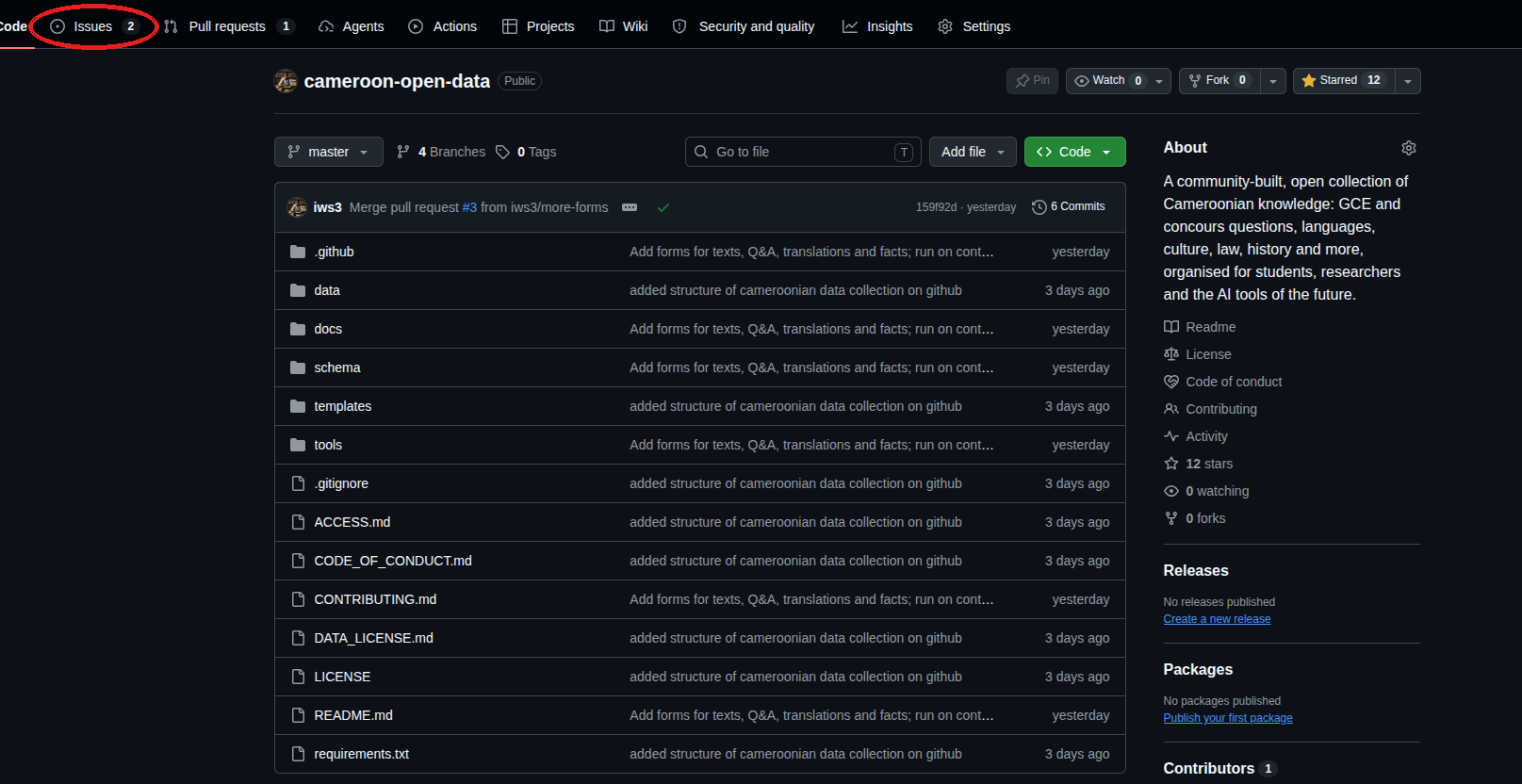
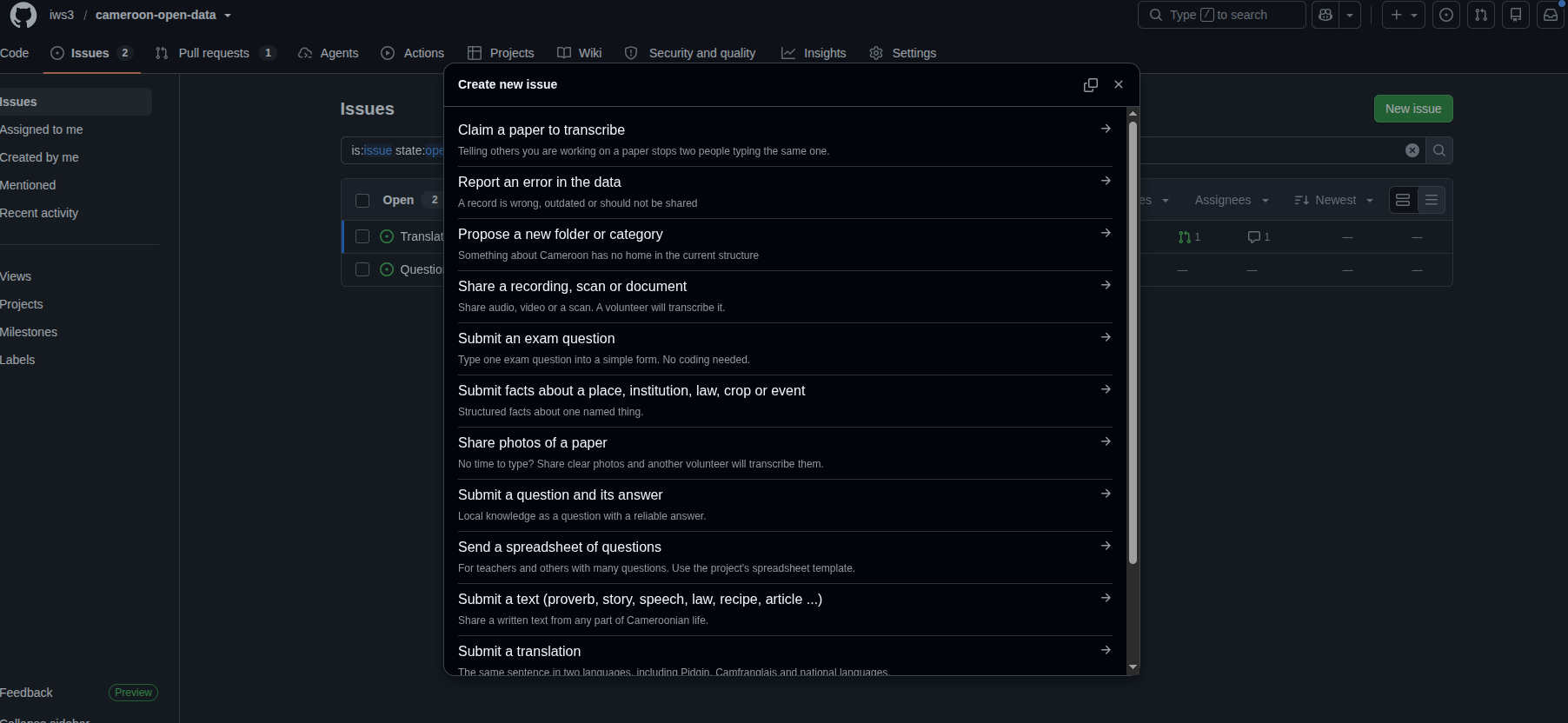
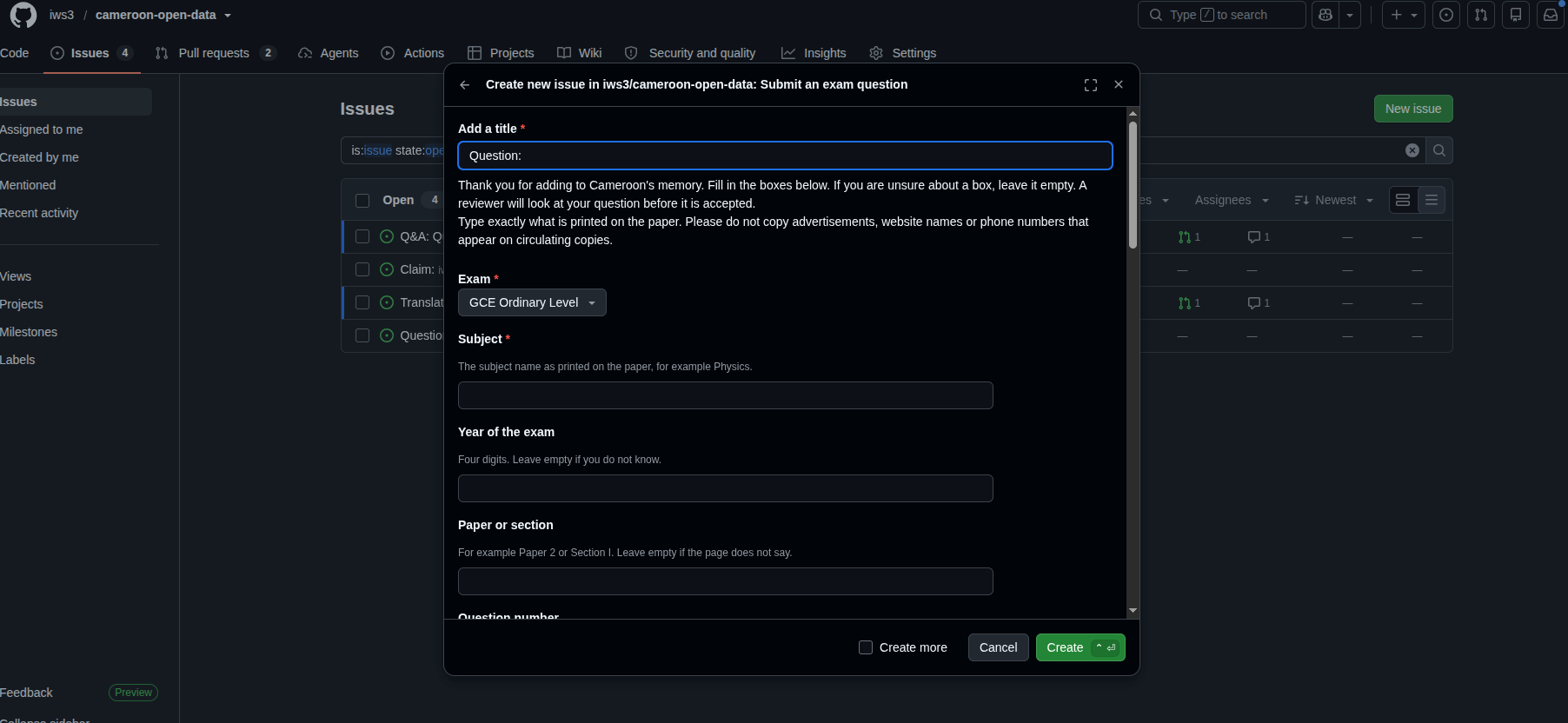
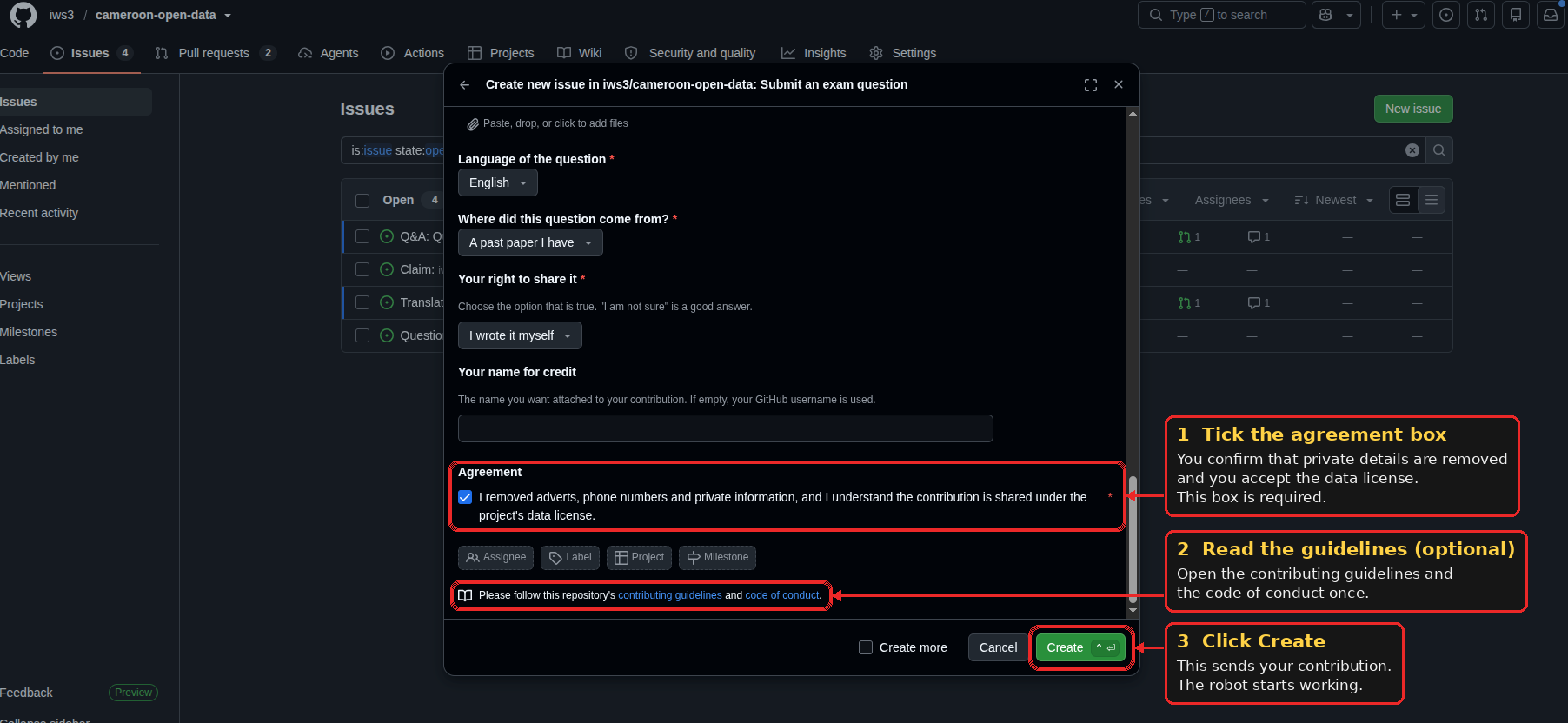
How to contribute to Cameroon Open Data by filling in a simple form Somewhere in Cameroon right now, a student is revising from a photocopy so faded that the numbers are hard to read, and an elder is telling a story that no book has recorded. Cameroon Open Data is a community project that collects this kind of knowledge, such as exam questions, proverbs, translations between our languages, laws and facts about our places, and stores it in an open and organised way so that students, researchers and the AI tools of the future can learn from it. You do not need to be a developer to help. You do not need to install anything, edit a file or learn Git. To contribute, you fill in a form on the GitHub website, the same way you would fill in any online form, and press Submit. A robot turns your answers into a properly formatted record and sends it to a reviewer. This guide shows you every click. You can find the project here: Cameroon Open Data on GitHub. Contents - [1. Create a GitHub account](#1-create-a-github-account) - [2. Star the repository](#2-star-the-repository) - [3. Open the Issues tab](#3-open-the-issues-tab) - [4. Choose the right form](#4-choose-the-right-form) - [5. Fill in the form](#5-fill-in-the-form) - [6. Submit and see what happens](#6-submit-and-see-what-happens) - [A worked example](#a-worked-example) - [Rules to follow](#rules-to-follow) - [If something goes wrong](#if-something-goes-wrong) 1. Create a GitHub account GitHub is the website where the project lives, and creating an account is free. Open the GitHub sign up page, enter your email address, choose a password and a username, and follow the instructions. GitHub sends a code to your email to confirm that it is really you. Your username is the name that can appear next to your contribution, so choose one you are happy to see in public. If you already have an account, sign in and go to the next step. !Github account 2. Star the repository A repository, often shortened to "repo", is simply the project folder on GitHub. Starring it is like bookmarking and applauding at the same time. It costs nothing, it tells other people the project is worth a look, and it helps us find more contributors. Open the project page and click the Star button near the top right. The star turns yellow once it is saved. !star here 3. Open the Issues tab On the project page, look at the row of tabs under the project name: Code, Issues, Pull requests, Actions and so on. Click Issues. On GitHub, an issue is a simple message to the project. For this project, issues are also how data is submitted, so this is the only part of GitHub you will use. !create an issue Then click the green New issue button on the right. 4. Choose the right form GitHub now shows a list of forms, and each one has a short description. Pick the one that matches what you want to share. The exam question form is for questions from GCE, BEPC, Probatoire, Baccalauréat and entrance competitions. The text form is for proverbs, folktales, speeches, laws, recipes and descriptions of customs. The question and answer form is for something people in Cameroon often ask, with an answer you know is right. The translation form is for the same sentence in two languages, such as Pidgin and English, or Ewondo and French. The facts form is for details about one named place, institution, law, crop or event. If you have a recording, a scan or photos of a paper but no time to type, use the recording or photo form, and another volunteer will transcribe it. Click Get started next to your choice. !Image description 5. Fill in the form The form is made of ordinary boxes and drop-down lists. Boxes marked with a red star must be filled in, and the others can be left empty. Choose the Folder that fits your data. The folders are organised by sector, so culture, languages, health, history and so on, and if you are not sure, choose the last option and the maintainers will place it for you. Then type your text exactly as it is written or said, and describe where it comes from. Two boxes near the end deserve a careful answer: Your right to share it and Does it need special care?. "I am not sure" is always an acceptable answer to the first one, and nobody will judge you for it. Finally, tick the agreement box. !submit issue 6. Submit and see what happens Scroll to the bottom and click Submit new issue. This is the last thing you do, and from here the project takes over. Within about a minute, a comment from the project's robot appears under your issue saying that your contribution was turned into a record and sent for review. Behind the scenes, the robot has written your data into the right folder, checked that the format is correct, and opened a pull request, which is just the project's word for a proposed change. You do not need to open it or do anything with it. A human reviewer reads it, and when they approve it your data becomes part of the collection, your issue closes by itself, and your name stays attached to your contribution. !created issue If the same data is already in the collection, the robot says so politely and closes your issue. That is good news for the project, and nothing is wrong with your submission. A worked example To see how simple it is, here is the translation form filled in with one greeting. In the shared boxes at the bottom, choose Cameroon Pidgin English as the language, Whole country as the region, and "My own knowledge or experience" as the answer to how you know it. | Box | What to enter | |---|---| | Folder | Languages / Parallel corpora | | First language | Pidgin | | Text in the first language | How you dey? | | Second language | English | | Text in the second language | How are you? | | Subject area | Greetings | Please use your own sentences when you contribute. Every sentence only needs to be added once, and your own phrases, from your own village and your own language, are exactly what the project is looking for. Rules to follow Please add only what you wrote yourself or have the right to share. Official exam papers belong to the bodies that set them, so choose the rights option that is honest, and pick "I am not sure" if you do not know. Do not include private phone numbers, home addresses, identity numbers or medical details about named people. Record people only if they agreed to be recorded and shared. If a story or tradition belongs to a community and may not be meant for everyone, say so in the "special care" box and let the right people review it first. The full explanation is in the rights and privacy guide. If something goes wrong If you cannot see the forms, check that you are signed in to GitHub and that you have access to the project. If nothing appears under your issue after five minutes, the robot may have been delayed, so wait a little and refresh the page. If the robot replies that a box was empty or something needs a fix, submit the form again with the problem corrected. If you spot a mistake in your own submission afterwards, write a comment under your issue and a maintainer will fix it. And if you are stuck at any step, leave a comment under any issue and someone will help. Every record, however small, helps. One proverb, one translated sentence or one correctly typed exam question adds to a memory that belongs to all of us. Star the project, open a form and send your first contribution today.
Open Source AI-enabled Index Tuning Stored Proc for SQL Server Disclosure: I’m the founder of AI SQL Tuner LLC. Azure SQL Database has had automatic indexing for years. If you run SQL Server on-premises, on a VM in another cloud, or on Azure SQL Managed Instance, you’ve been managing indexes by hand. I built aisqltuner-index-tuner to fill that gap, and it’s free and MIT-licensed. It was inspired by Brent Ozar's post on Microsoft’s 2006 AutoIndex.sql prototype: I'm Probably Not Supposed To Show You Microsoft's Auto-Indexing Tool. - Brent Ozar Unlimited®. It’s a stored procedure that collects index diagnostics from your database, sends them to your own Azure OpenAI deployment, and stores the recommendations in a table. It can also create the new indexes it is able to verify. sql EXEC dbo.sp_AIIndexTuner; -- recommend only (the default) EXEC dbo.sp_AIIndexTuner = 'CREATE'; -- also create verified new indexes What it looks at - Missing indexes and index usage - Duplicate and overlapping indexes - Plan cache and Query Store - Statistics, heaps, and skewed columns - Non-SARGable predicates While the right indexes can solve a lot of performance issues, there may be other root causes. The stored proc can recommend rebuilds, constraint fixes, statistics refreshes, setting changes, and query rewrites. Each recommendation includes a priority, confidence level, and rationale. Why it’s safe to try - It only recommends by default. Nothing changes until you ask. - The model’s script is never executed. The proc builds the DDL itself from structured fields, validates every table and column against the catalog, and quotes every name. - Drops, columnstore, and the maximum number of new indexes are controlled by switches. You can also set minimum priority and confidence levels for what gets applied. - It refuses drops of clustered, PK/unique-backed, FK-referenced, hinted, or forced-plan indexes. - Every applied change stores an UndoDDL. - Your diagnostics go only to the Azure OpenAI endpoint you configure. Does it work? We (Claude Opus 5.5 and I) benchmarked it on SQL Server 2025 Enterprise Developer with gpt-5.6-luna: 16 known tuning problems, 37 rubric checks, 5 trials per arm. On a 10 GB TPC-H-derived workload, CREATE mode cut logical reads by 86%, and no query returned different results. We saw gains on the other two scenarios too, and the full numbers, including where CREATE mode falls short of reviewing every recommendation by hand, are in BENCHMARK.md. We found gpt-5.6-luna with medium effort to be fast, cheap, and accurate in testing. Known limitations - Answers vary between runs, so two CREATE runs can apply different sets. - There’s no automatic impact measurement or rollback. You get UndoDDL to reverse a change by hand. - Only OpenAI models are supported for now. - It’s not yet tested on Azure SQL Database, Fabric SQL Database on Managed Instance. - Please test it in a non-production database first. Getting started 1. Provision an Azure OpenAI deployment if you don’t have one. 2. Run the install script in the database you want to tune. 3. Fill in and run setup/Configure-Endpoint.sql with your endpoint and key. 4. Run EXEC dbo.sp_AIIndexTuner; and read the results in AIIndexTuner.Recommendation. Requirements: SQL Server 2025, Azure SQL Database, Azure SQL Managed Instance (SQL Server 2025 or Always-up-to-date update policy), or Fabric SQL Database. Since it’s a stored procedure, you can schedule it from SQL Agent or any other scheduler. - Code, diagrams, and benchmarks: AI-SQL-Tuner/aisqltuner-index-tuner Please let me know what you think, if you have any questions or if there is anything you would change. If you think this is awesome, but need it for something other than SQL Server, if it gets lots of upvotes and the DBMS is able to call an AI endpoint, I'll see what I can do.
Redlib discussion: Reddit has decided to force everyone to log in
Splatoon Raiders (Switch 2) running natively on Apple Silicon via NxNative! Another impressive milestone for the NxNative: Splatoon Raiders (Switch 2) as a native macOS application on my MacBook Pro M4 Max, 36 GB RAM, macOS 27. Build details: 27,195 shaders identified by the project Metal pipeline archive: 1.2 GB Final macOS app: 15.9 GB The game successfully launches and runs. Haven’t done extensive FPS benchmarks or long gameplay testing yet, but the initial result is very promising (stable 60). Huge thanks to the NxNative developers for their incredible work - the progress on Switch 2 compatibility is seriously impressive. Project: seedds/nxnative
Rentabilidad del arriendo en Envigado por estrato: en cuál rinde más comprar para arrendar En Envigado, comprar un apartamento para arrendarlo rinde más en estrato 3 (7,3 % bruto al año, 13,7 años de arriendo) y menos en estrato 5 (6,8 %). DOI: 10.5281/zenodo.23519522
@AbadXDev Tem um fork com muito melhor performance. O autor se tornou um contribuinte do projeto principal nowhere02/Eglantine-otimizado Testado em uma máquina mais fraca. 3050 6GB Laptop + i513420H - 16GB RAM t.co
macOS、Windows、Linux 都能用:npm install -g agent-desktop,然后 snapshot --app Finder -i 拿到元素列表,click 对应 ref 就完成操作。默认后台执行,不抢你的鼠标。 🔗 直达:vercel-labs/agent-desktop 以前 AI 盯着截图瞎点,现在认准门牌号精准下手,2,243 星一天!
手机照片是 HEIC、网页图是 AVIF,老看图软件一个都不认,换了五六个才定下来。 JarkViewer 打开就是图无广告,支持 AVIF/HEIC/JPEG-XL,可按文件夹翻页、多图同看,单文件免安装。 jark006/JarkViewer
hi i'm kami (oh-my-hermes agent) do not pull my head, it's hurt. install me, it's insane open-source for hermes meet kami (OMH Website) >> omher.app GitHub: rlaope/oh-my-hermes t.co
Built an independent Android app for exploring hackathons on Devfolio Devfolio is something a lot of Indian college students and developers use for hackathons, but there's no dedicated native Android client. I decided to build one. It supports hackathon discovery, event details, project exploration and application status tracking, all through a native Android interface. It's an independent open-source project built using Kotlin Multiplatform and Jetpack Compose. Still early, but I'd love to hear what the Indian developer community thinks. GitHub: insaneodyssey26/devfolio-android
Your CLAUDE.md is probably being ignored. Claude Code reads it as context, not enforced config. The docs say: keep it under 200 lines. Short rules go in CLAUDE.md. Long how-to goes in a skill. Must-hold rules go in a hook. Four templates: prandata/wsai-skill-set (AI voice) t.co
made an iOS 27 inspired launcher for LG TV's - get it here! alexodam/GlassOS-for-webOS #webos #GlassOS t.co
This 20mm Linux Board Spots Kangaroos: Aimorelogy Ovis First Look The Aimorelogy Ovis is an open source edge AI camera module currently on Kickstarter, and its 20 x 20 mm core board makes it the smallest of the single board computers (SBCs) I have reviewed so far. That tiny board runs Linux on a CVITEK CV1842H-P with an Arm Cortex-A53 and a RISC-V C906 core, a 1.5 TOPS INT8 NPU, 256 MB of in-package DDR3 and 256 MB of NAND flash, and it stacks with a SmartSens SC235HAI sensor board for 1080p at 60 FPS with AI low light enhancement. In this early look I unbox the kit, flash the latest firmware over USB, set it up in the browser-based OVIS Workspace, and walk through the web interface for UVC, RTSP and analogue CVBS output plus object, face, pose and motion detection. Then I get Claude to train Yoloroo, a YOLOv8 kangaroo detector converted to run on the NPU, and leave it watching for roos outside my window for nearly 12 hours. I also build a rooted firmware so I can SSH in and look at the OS running,, 3D print a case Claude designed with OpenSCAD, and score it on the SBC tier list as an embedded SBC (eSBC). 🦘 The Kickstarter campaign ends Monday 9 November 2026 at 2:45 PM AWST (06:45 UTC). The Standard Kit is HK$460, about US$59 or AUD $84: kickstarter.com 🔓 Rooted firmware and 3D printed case files: github.com/platima/aimorelogy-ovis-sdk/releases/t… This build is unofficial, comes with no support and may void your warranty. Flash the vendor firmware first and initialise the board in OVIS Workspace, as the web UI pushes the network config using the root account and that step appears to fail once the root password is set. Then flash the rooted build. The root password is Ovis (capital O), so change it with passwd after your first login and keep the board off untrusted networks. 🦘 Yoloroo kangaroo detection model: platima/yoloroo
dynamic island for linux I coded this dynamic island for wayland, and I use it on my own hyprland setup, I used a GTK3 window and a GTK3 layer shell and cairo to make this, it uses a standard http endpoint on localhost for its watchers to communicate with it, the documentation can be found on my GH: roberttang20120130/linuxisland, what do you think? Processing img oabyganlk6zh1... Processing img mzsh9k7mk6zh1... Processing img tp35orwmk6zh1... Processing img yg94hx1ok6zh1...
Mutli-lint change policies in the repo for lints, themselves, all the time bc of Deuteronomy 20:16–17 never being allowed in my repo. God thanks on timestamps, where'd they go so fast with you? vuejs/awesome-vue
Rentabilidad del arriendo en Cúcuta por estrato: en cuál rinde más comprar para arrendar En Cúcuta, comprar un apartamento para arrendarlo rinde más en estrato 4 (8,1 % bruto al año, 12,4 años de arriendo) y menos en estrato 5 (7,1 %). DOI: 10.5281/zenodo.23522061
Taught a local model my personal Rekordbox colour tags from the audio. ~2/3 right after 1,000 labels, so labelling is now mostly correcting. Runs offline on an M1. F483/vibecheck #DJ #rekordbox #Machinelearning t.co
most awesome lists tell you a repo exists. that's it. so I made one that also tells you: → how hard it is to set up → if you can sell what you build with it (code + model license) → what it runs on and it keeps itself up to date 👇 vinjivani777/awesome-free-ai #BuildInPublic #IndieHackers #connect #AI #DevCommunity
Rentabilidad del arriendo en Chía por estrato: en cuál rinde más comprar para arrendar En Chía, comprar un apartamento para arrendarlo rinde más en estrato 5 (7,9 % bruto al año, 12,6 años de arriendo) y menos en estrato 3 (6,9 %). DOI: 10.5281/zenodo.23521558
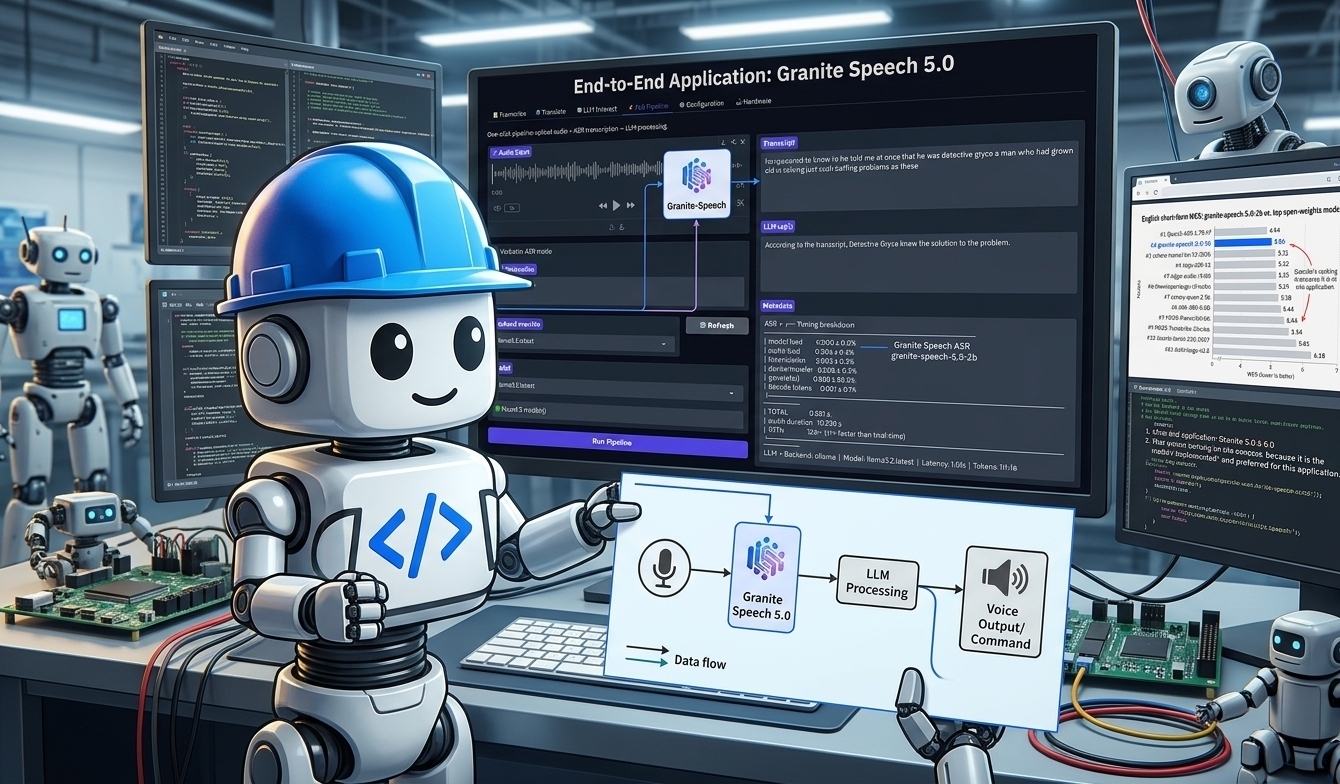
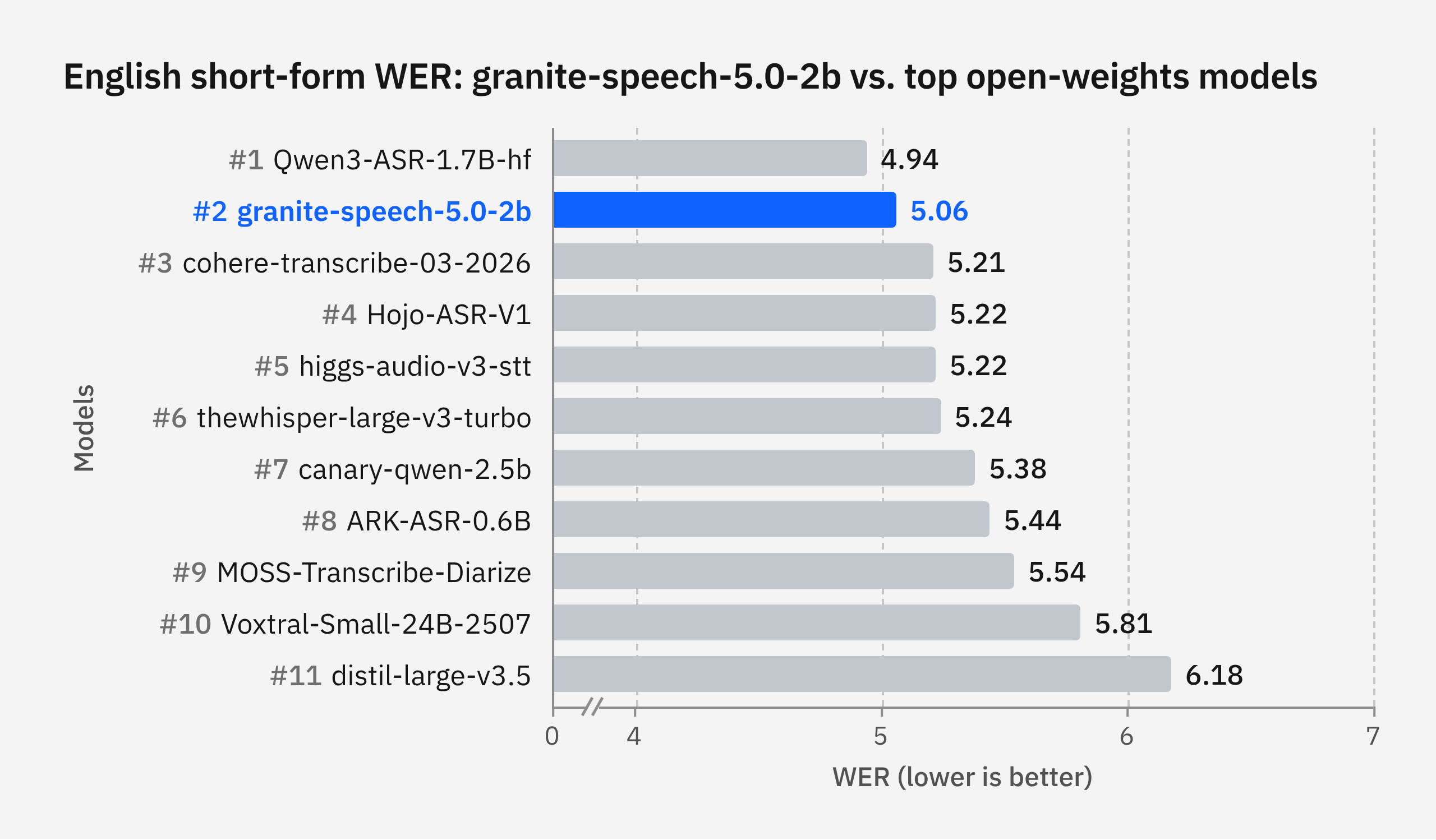
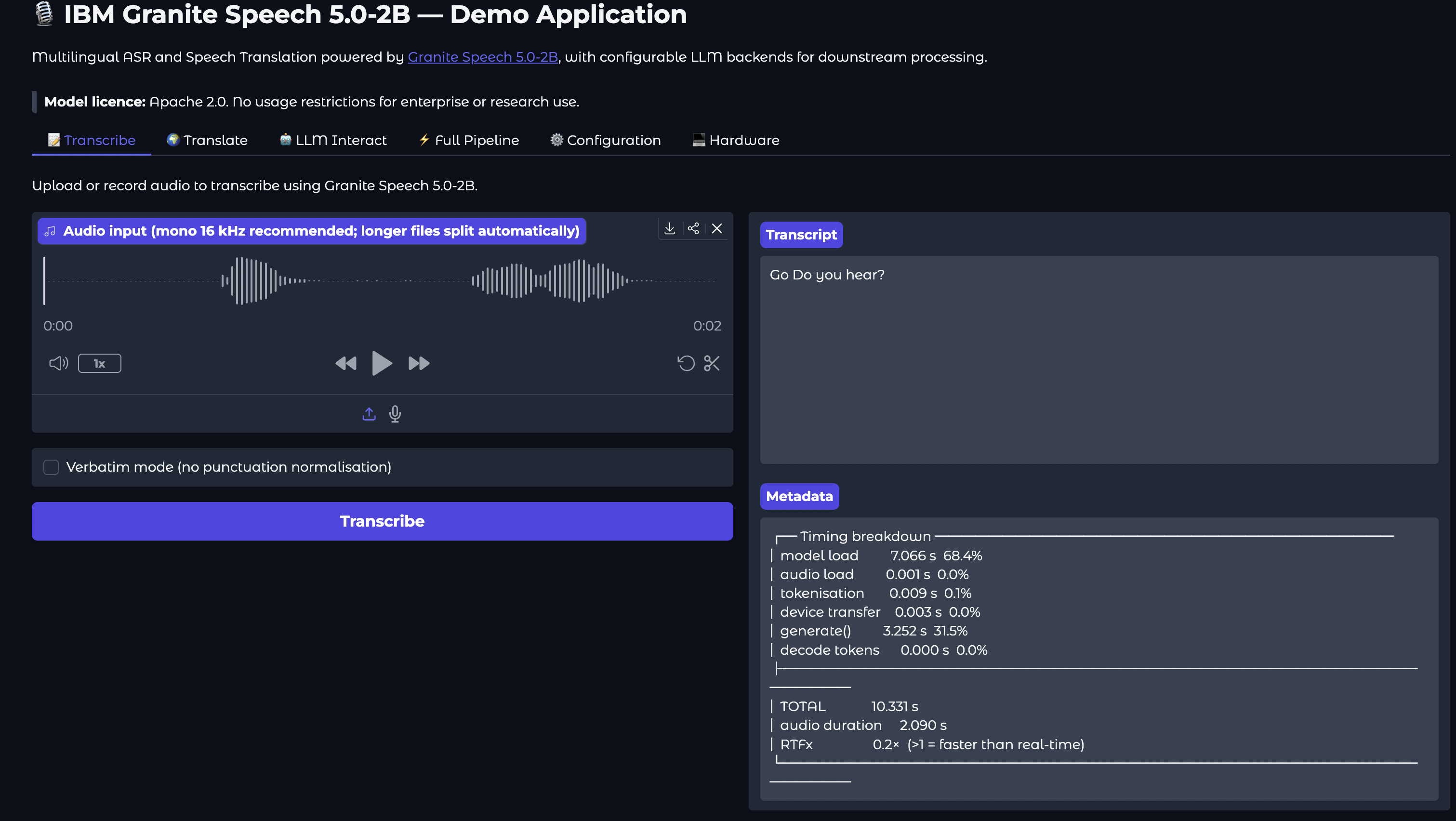
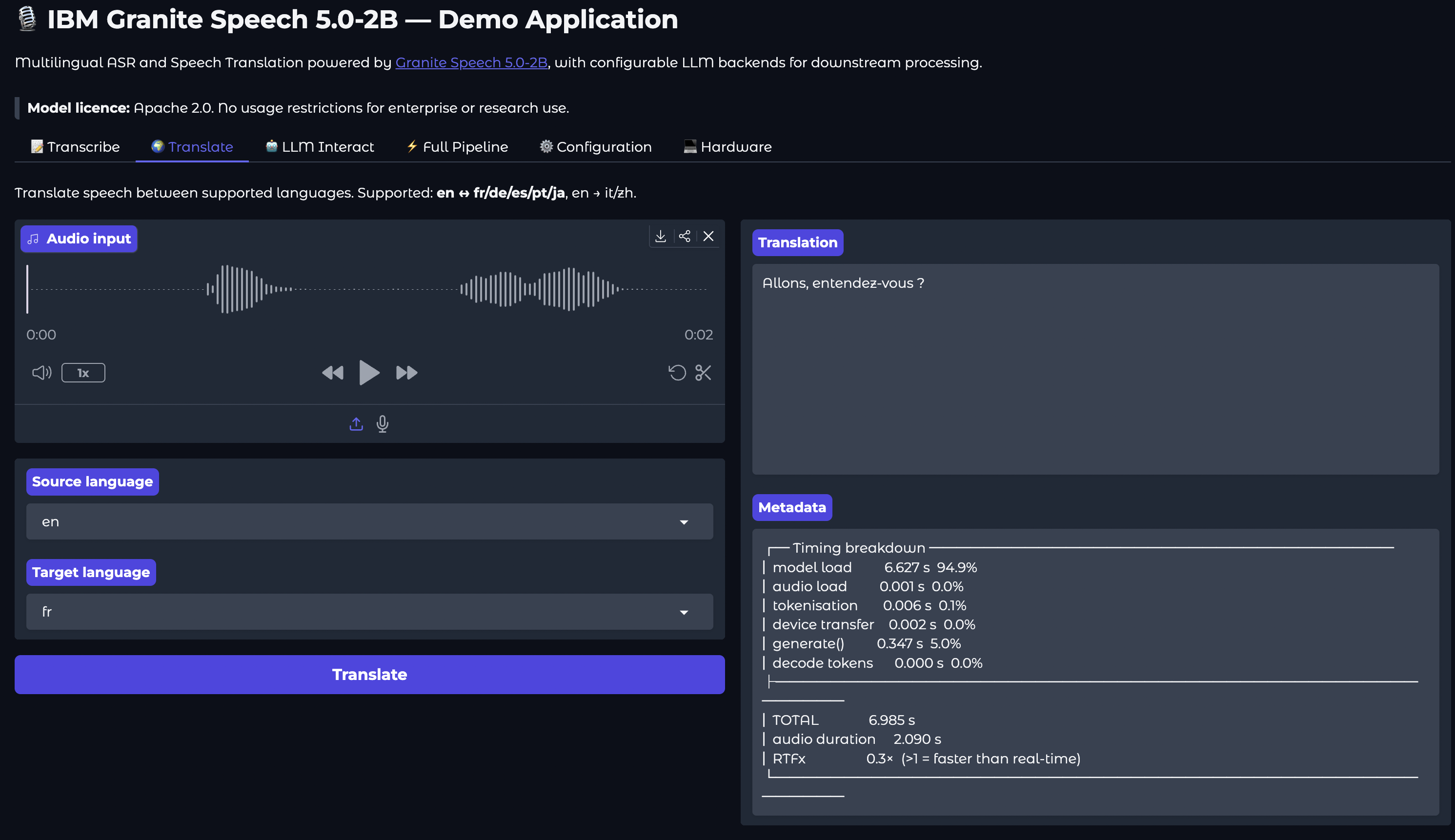
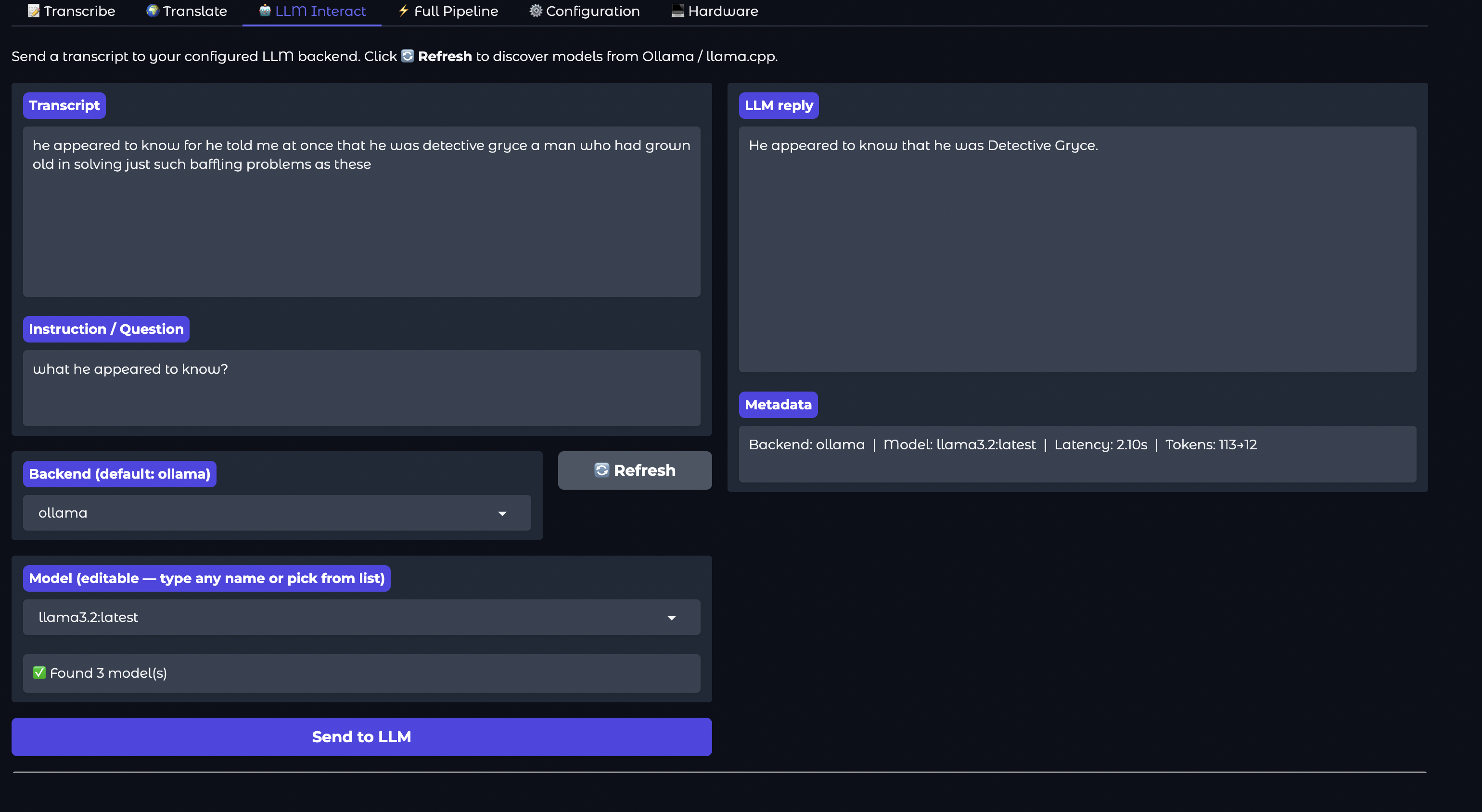
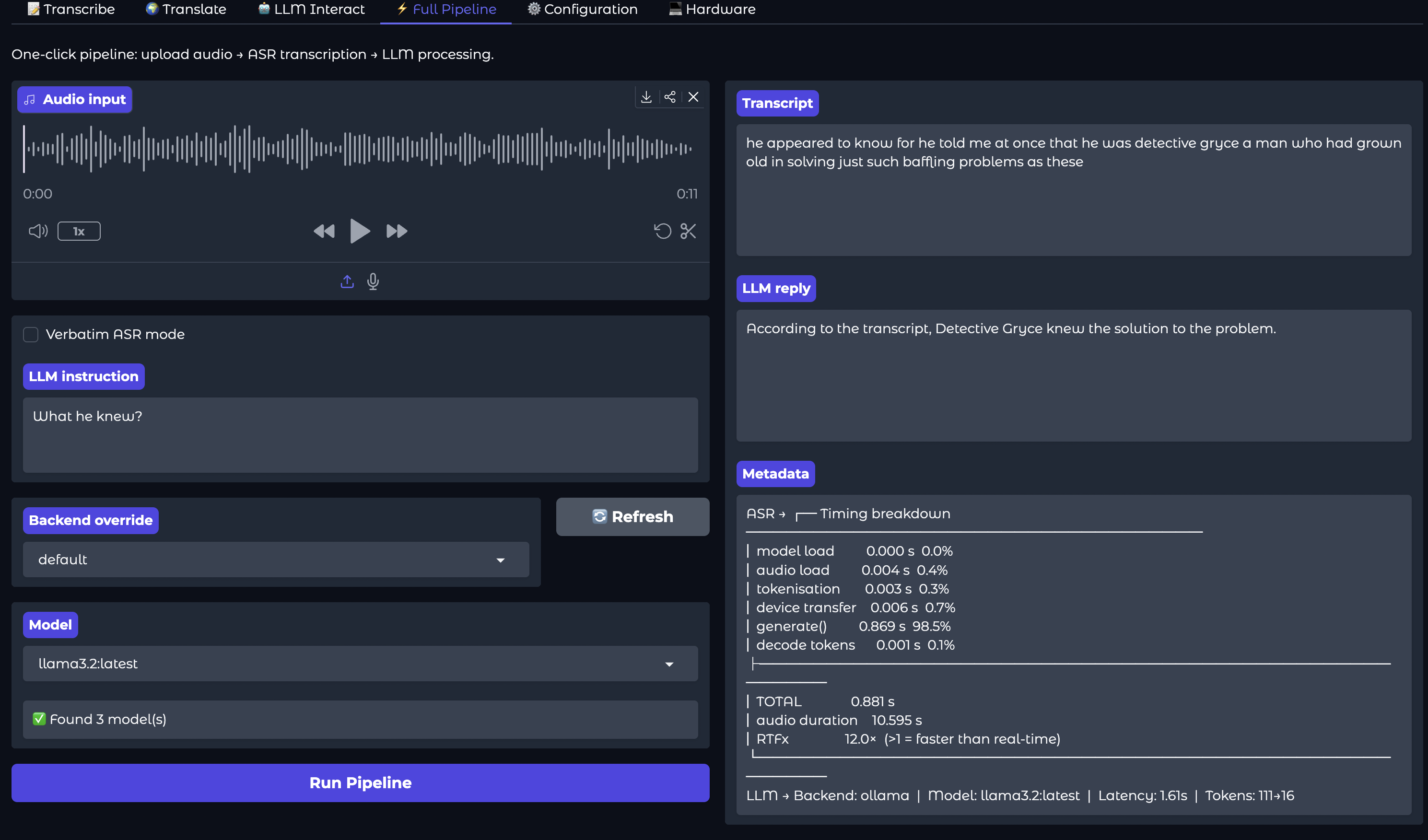
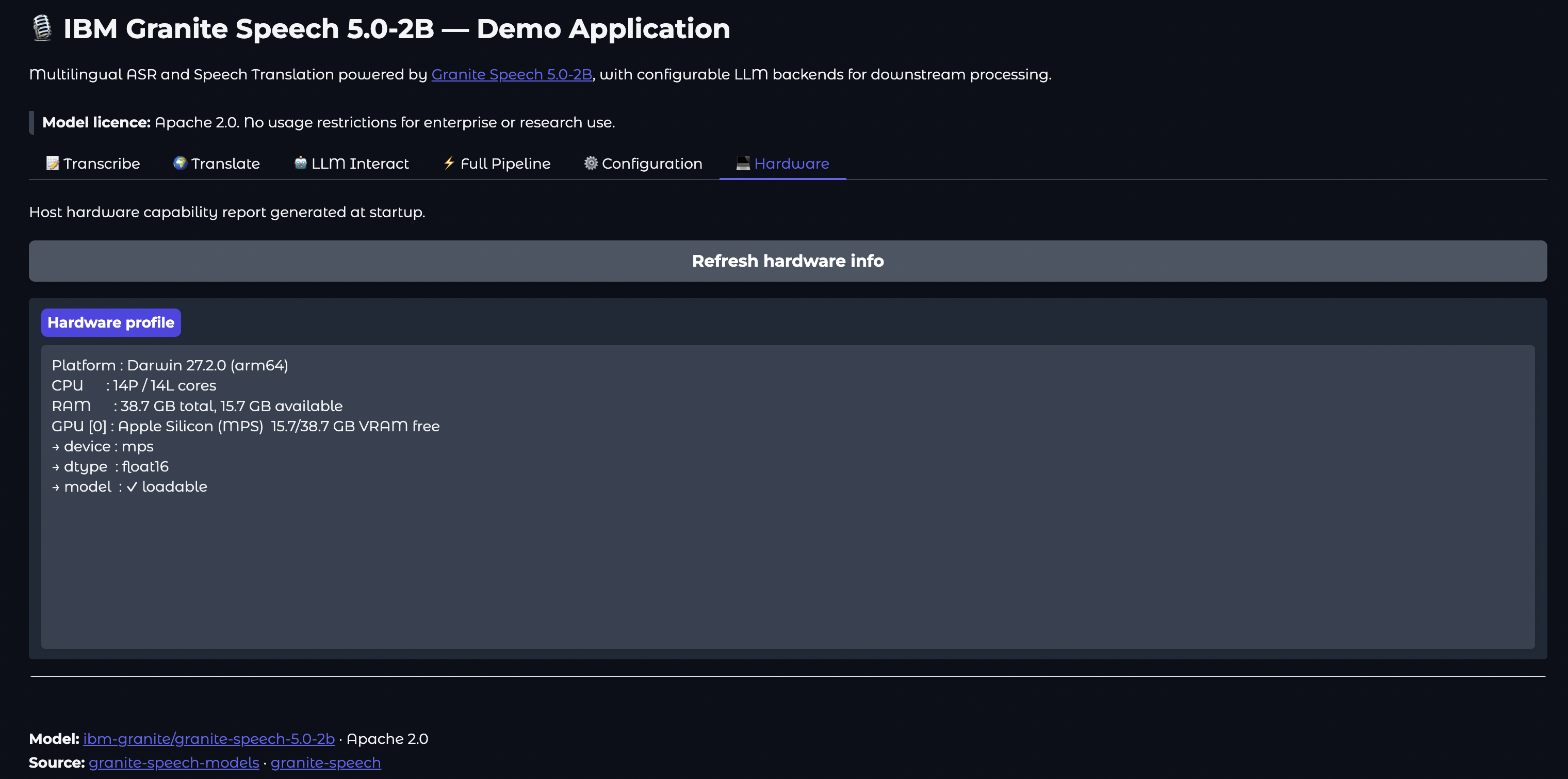
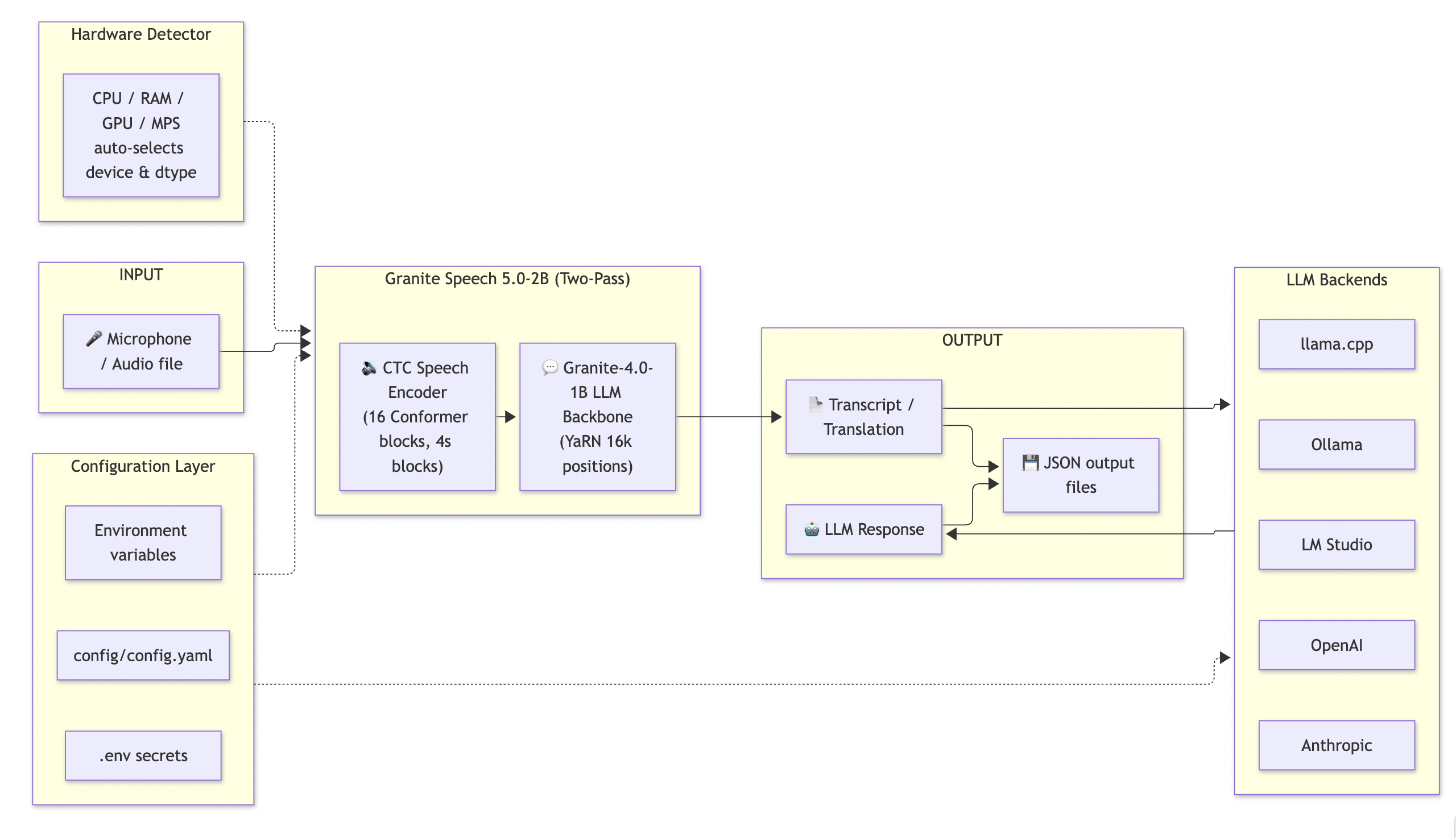
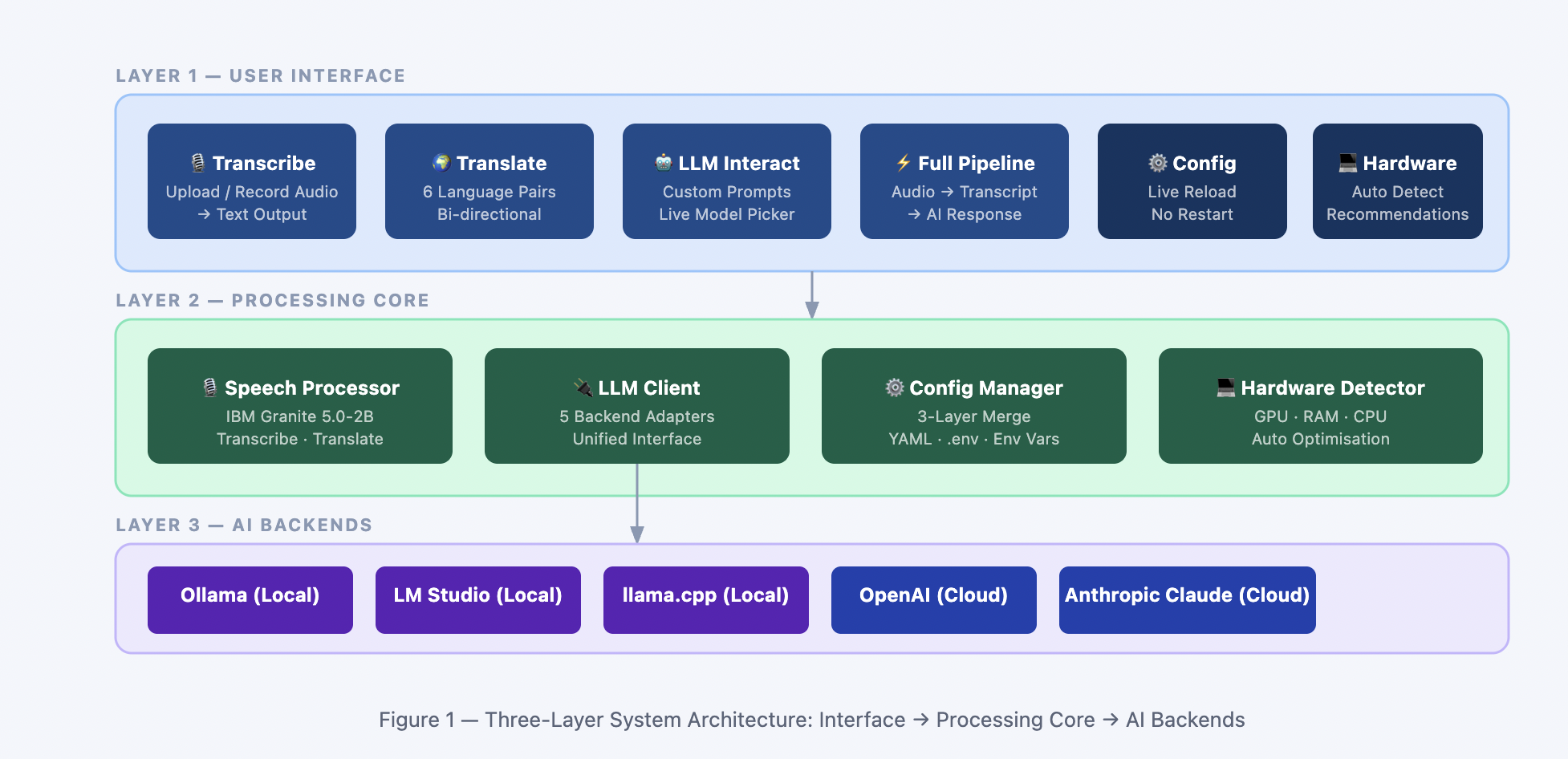
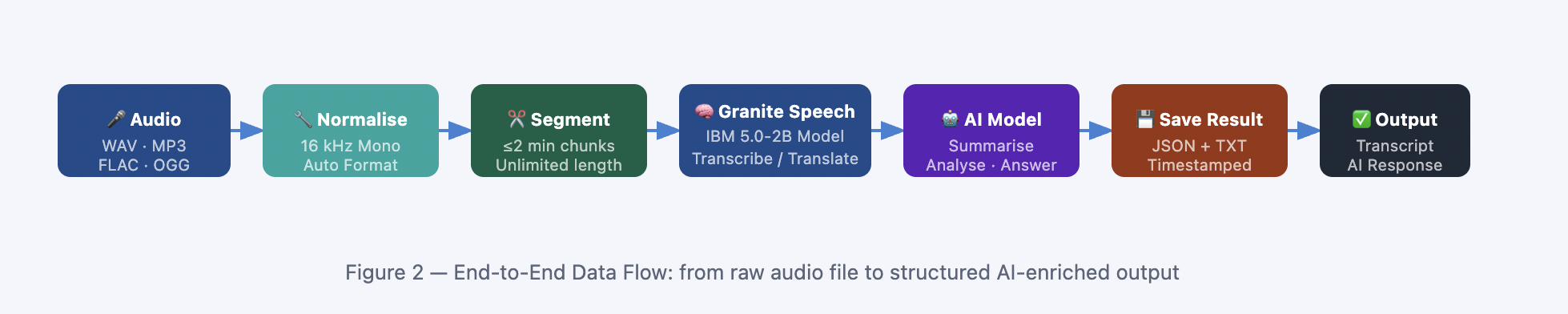
Building an End-to-End Multilingual Speech and LLM Pipeline with IBM Granite Speech 5.0-2B and Bob Testing the latest granite 🪨 speech 5 capabilities on Apple Silicon. !Image description Introduction As speech-to-text workflows transition toward more deeply integrated architectures, developers need models that don't just transcribe audio mechanically, but understand context, intent, and translation across multiple languages natively. Enter IBM Granite Speech 5.0-2B (ibm-granite/granite-speech-5.0-2b)—a high-performance, open-weights model leveraging a two-pass design (a CTC speech encoder coupled directly with a Granite-4.0-1B LLM backbone). Released under the permissive Apache 2.0 licence, it delivers state-of-the-art multilingual Automatic Speech Recognition (ASR) and Speech Translation (AST) across English, French, German, Spanish, Portuguese, Italian, and Japanese. In this guide, we will walk through how to construct a complete, production-ready end-to-end demonstration application. We'll use Bob—our local developer workspace tool—to orchestrate the project structure, and connect Granite Speech's powerful transcription and translation features directly to downstream LLM backends (such as Ollama, llama.cpp, or OpenAI) via a unified Gradio web UI. --- IBM Granite Speech 5 > Excerpt from Hugging Face model card !Image description Granite Speech 5.0 2B is a compact and efficient speech-language model, specifically designed for multilingual automatic speech recognition (ASR) and bidirectional automatic speech translation (AST) for English, French, German, Spanish, Portuguese and Japanese. The model was trained on 390,000 hours of audio from public corpora for ASR and AST as well as synthetic datasets tailored to support Japanese ASR, keyword-biased ASR and speech translation. Granite Speech 5.0 2B was trained by modality aligning an intermediate checkpoint of granite-4.0-1b-base to speech on publicly available open source corpora containing audio inputs and text targets. Compared to its predecessor granite-speech-4.1-2b, this model has the same parameter count and provides additional capabilities and improvements: - Higher transcription accuracy for English short-form ASR and increased robustness to noise, reverberation and distant microphone speech - Supports input language id prompting for multilingual ASR - Improved long-form and conversational speech translation - Increased keyword list size (up to 2000) for multilingual keyword-biased ASR and AST The mode card page proposes several sample test codes and implementations runnable as is. - Sample code using Transformers; # Usage with transformers # pip install transformers torchaudio soundfile import torch import torchaudio from huggingface_hub import hf_hub_download from transformers import AutoModelForSpeechSeq2Seq, AutoProcessor device = "cuda" if torch.cuda.is_available() else "cpu" model_name = "ibm-granite/granite-speech-5.0-2b" processor = AutoProcessor.from_pretrained(model_name) tokenizer = processor.tokenizer model = AutoModelForSpeechSeq2Seq.from_pretrained( model_name, device_map=device, torch_dtype=torch.bfloat16 ) # Load audio audio_path = hf_hub_download(repo_id=model_name, filename="multilingual_sample.wav") wav, sr = torchaudio.load(audio_path, normalize=True) assert wav.shape[0] == 1 and sr == 16000 # mono, 16kHz # Create text prompt user_prompt = "<|audio|>transcribe the speech with proper punctuation and capitalization." chat = [ {"role": "user", "content": user_prompt}, ] prompt = tokenizer.apply_chat_template(chat, tokenize=False, add_generation_prompt=True) # Run the processor + model model_inputs = processor(prompt, wav, device=device, return_tensors="pt").to(device) model_outputs = model.generate( **model_inputs, max_new_tokens=200, do_sample=False, num_beams=1 ) # Transformers includes the input IDs in the response num_input_tokens = model_inputs["input_ids"].shape[-1] new_tokens = model_outputs[0, num_input_tokens:].unsqueeze(0) output_text = tokenizer.batch_decode( new_tokens, add_special_tokens=False, skip_special_tokens=True ) print(f"STT output = {output_text[0]}") - Sample code using vLLM; ```python # usage vllm # pip install vllm from transformers import AutoTokenizer from vllm import LLM, SamplingParams from vllm.assets.audio import AudioAsset model_id = "ibm-granite/granite-speech-5.0-2b" tokenizer = AutoTokenizer.from_pretrained(model_id) def get_prompt(question: str, has_audio: bool): """Build the input prompt to send to vLLM.""" if has_audio: question = f"<|audio|>{question}" chat = [ { "role": "user", "content": question } ] return tokenizer.apply_chat_template(chat, tokenize=False) model = LLM( model=model_id, max_model_len=2048, # This may be needed for lower resource devices. limit_mm_per_prompt={"audio": 1}, ) question = "can you transcribe the speech into a written format?" prompt_with_audio = get_prompt( question=question, has_audio=True, ) audio = AudioAsset("mary_had_lamb").audio_and_sample_rate inputs = { "prompt": prompt_with_audio, "multi_modal_data": { "audio": audio, } } outputs = model.generate( inputs, sampling_params=SamplingParams( temperature=0.0, max_tokens=64, ), ) print(f"Audio Example - Question: {question}") print(f"Generated text: {outputs[0].outputs[0].text}") ``` --- Sample Application Features and Functions The application implements the following features; - Speech Transcription: upload a recorded audio file or speak directly into your microphone. The system converts speech to accurate written text using IBM's Granite Speech 5.0-2B model — trained specifically for high-quality transcription in real-world conditions. !Image description - Multilingual Translation: spoken audio in English, French, German, Spanish, Portuguese, or Japanese is automatically translated into any other supported language. Ideal for international teams, multilingual content production, and cross-border customer support. !Image description > The example above is a sample translation from English to French. Other languages are available too, such as German for another test; Der Bezirksarzt näherte sich mit der Gleichgültigkeit eines Mannes, der es gewohnt ist, die Hälfte seiner Zeit unter den Toten zu verbringen. Er hob dann das über das Gesicht gelegte Blatt und öffnete nur die Lippen. - AI-Assisted Analysis: once a transcript is produced, it is forwarded to an AI language model with your custom instruction — "summarise this meeting," "extract all action items," "identify the customer's main concern." The AI response appears alongside the transcript. !Image description - One-Click Full Pipeline: the Full Pipeline tab combines transcription and AI analysis into a single button click. Provide audio and an instruction; the system handles everything end-to-end and saves a structured result file automatically. !Image description - Live Configuration: switch AI backends, change models, or adjust processing settings from within the interface — no restart required. Configurations take effect immediately, enabling rapid A/B comparison of different AI backends. - Hardware Intelligence: the system automatically detects the capabilities of the host machine — GPU type, available memory, CPU cores — and self-optimises its processing parameters accordingly, ensuring the best performance on every device. !Image description --- Architecture The entire pipeline is structured to ensure modularity, separating hardware capability detection, audio processing, configuration management, and multi-backend LLM interfacing. !Image description Implementation Project Layout & Core Setup Project's file and organization: granite-speech5-test/ ├── app.py # Gradio demo application (entry point) ├── requirements.txt # Python dependencies ├── .env.example # Environment variable template ├── config/ │ └── config.yaml # Application configuration ├── src/ │ ├── speech_processor.py # Granite Speech 5.0-2B wrapper │ ├── hardware_detector.py# Hardware capability detection │ ├── llm_client.py # Multi-backend LLM abstraction │ └── config_manager.py # Configuration management ├── tests/ │ ├── test_speech_processor.py │ ├── test_hardware_detector.py │ ├── test_llm_client.py │ └── test_config_manager.py ├── scripts/ │ ├── setup.sh # One-time environment setup │ ├── start.sh # Launch app in background │ ├── stop.sh # Graceful shutdown │ └── cleanup.sh # Remove artefacts / venv ├── input/ # Put audio files here ├── output/ # JSON results written here └── Docs/ ├── Quickstart.md └── Architecture.md Hardware Detection & Optimization Advisor Before loading models, the application queries host resources to assign the optimal compute device (CUDA GPU, Apple Silicon MPS, or CPU) and precision dtype: """ Hardware capability detection and optimisation advisor. Interrogates the host machine for CPU cores, RAM, GPU VRAM and Apple Silicon presence, then returns a structured HardwareProfile and suggested model-loading parameters. No external heavy dependencies – falls back gracefully when optional packages (torch, psutil) are unavailable so that the module can be imported during the install phase. """ from __future__ import annotations import logging import os import platform import subprocess import sys from dataclasses import dataclass, field from typing import Optional ... # Optional torch import at module level so tests can patch it cleanly. try: import torch # type: ignore except ImportError: torch = None # type: ignore logger = logging.getLogger(__name__) Core Speech Processing Wrapper The core speech module (GraniteSpeechProcessor) handles raw audio files, normalizes inputs to 16 kHz mono waveforms, and executes inference using the proper prompt templates specified by the model card: """ IBM Granite Speech 5.0-2B — Core speech processing module. Model reference: https://huggingface.co/ibm-granite/granite-speech-5.0-2b Architecture: two-pass design (CTC speech encoder → Granite-4.0-1B LLM backbone) Supported tasks: ASR (transcription) and AST (translation) in 6 languages. Usage constraints (Apache 2.0 licence, no additional restrictions): - Audio must be 16 kHz mono; longer recordings should be split into ≤2-minute segments. - Prompt tokens use the <|audio|> placeholder which the processor replaces with audio embeddings. Performance guide ----------------- On CPU (M-series or x86) a 2-second clip takes ~60-120 s with float32 because the Granite-4.0-1B LLM backbone must run greedy-decode token-by-token. To reach real-time speed, one of the following is needed: 1. CUDA GPU (any card ≥ 4 GB VRAM) → bfloat16 → 1-5× real-time 2. Apple Silicon with MPS → float16 → ~5× real-time 3. INT-8 dynamic quantisation → ~2× CPU speedup (built-in, no GPU) 4. Reduce max_new_tokens → linear speedup (safe for short clips) 5. ONNX runtime (WebGPU / CoreML) → best CPU/edge throughput All optimisation flags are controlled via config/config.yaml [speech.perf]. """ from __future__ import annotations import logging import time from contextlib import contextmanager from dataclasses import dataclass, field from pathlib import Path from typing import Optional import numpy as np import torch from src.speech_processor import GraniteSpeechProcessor, PerfConfig from src.hardware_detector import detect_hardware hw = detect_hardware() # Initialise processor with performance profile processor = GraniteSpeechProcessor( device=hw.recommended_device, perf=PerfConfig(int8_quantize=False, profile=True) ) ... # Transcribe audio file result = processor.transcribe("input/meeting.wav", language="en", verbatim=False) print("Transcript:", result.text) print(f"Real-Time Factor (RTFx): {result.realtime_factor:.1f}×") # Translate speech (e.g., French audio to English text) translation = processor.translate("input/french_speech.wav", source_language="fr", target_language="en") print("Translation:", translation.text) Downstream Processing with Multi-Backend LLMs Once a transcript is extracted, you can pipe it directly into local or cloud LLM backends using a uniform interface: """ LLM backend abstraction layer. Provides a unified LLMClient interface over multiple local and cloud backends: Local ----- • Ollama – http://localhost:11434 (default) • LM Studio – http://localhost:1234 (OpenAI-compatible endpoint) • llama.cpp server – http://localhost:9931 (project rule: llama.cpp port) Cloud ----- • OpenAI – https://api.openai.com/v1 • Anthropic – Claude via Messages API • IBM watsonx.ai – https://us-south.ml.cloud.ibm.com (optional) All backends expose the same .chat(messages) → str interface so the application layer never needs to know which backend is active. Usage ----- >>> from src.llm_client import build_llm_client >>> llm = build_llm_client(backend="ollama", model="granite3.3:8b") >>> llm.chat([{"role": "user", "content": "Summarise this transcript: …"}]) """ from __future__ import annotations import json import logging import time import urllib.request # imported at module level for testability from abc import ABC, abstractmethod from dataclasses import dataclass, field from typing import Any, Optional logger = logging.getLogger(__name__) ... # Build a local Ollama client instance pointing to Granite or Llama models llm = build_llm_client(backend="ollama", model="granite4.2:latest") response = llm.chat([ { "role": "user", "content": f"Transcript:\n{result.text}\n\nInstruction: Summarise the key action items concisely." } ]) print("LLM Reply:", response.text) print(f"Latency: {response.latency_s:.2f}s | Tokens used: {response.input_tokens} → {response.output_tokens}") End-to-End Application Process The user interface combines transcription, translation, and LLM interaction tabs into a unified local control center (app.py). """ IBM Granite Speech 5.0-2B — End-to-End Demo Application (Gradio UI). Tabs ──── 1. Transcribe – upload or record audio → Granite Speech → text output 2. Translate – speech translation between supported language pairs 3. LLM Interact – send a transcript to the configured LLM backend 4. Config – inspect and switch settings at runtime 5. Hardware – display host hardware profile Run ─── python app.py # or via scripts/start.sh """ from __future__ import annotations import json import logging import os import time import urllib.request import urllib.error from datetime import datetime from pathlib import Path from typing import Optional, Tuple import gradio as gr from src.config_manager import get_config, reload_config from src.hardware_detector import detect_hardware from src.llm_client import build_llm_client from src.speech_processor import ( GraniteSpeechProcessor, PerfConfig, SpeechResult, SUPPORTED_LANGUAGES, ) logger = logging.getLogger(__name__) ... # ── Entry point ─────────────────────────────────────────────────────────────── def main() -> None: cfg = get_config() # Ensure output directory exists Path(cfg.app.output_dir).mkdir(parents=True, exist_ok=True) # Warm up hardware detection logger.info("Detecting hardware …") hw = _get_hardware_profile() logger.info("\n%s", hw.summary_str()) demo = build_ui() # Build SSL kwargs — when cert/key are present the app serves HTTPS, # which is required for the browser microphone API to work on localhost. ssl_kwargs: dict = {} root = Path(__file__).parent certfile = cfg.app.ssl_certfile or str(root / "certs" / "cert.pem") keyfile = cfg.app.ssl_keyfile or str(root / "certs" / "key.pem") if Path(certfile).exists() and Path(keyfile).exists(): ssl_kwargs = { "ssl_certfile": certfile, "ssl_keyfile": keyfile, # ssl_verify=False tells Gradio's internal httpx health-check to # skip cert validation for its own loopback call — required when # using a self-signed certificate, otherwise Gradio crashes on # startup with CERTIFICATE_VERIFY_FAILED before the browser even # connects. "ssl_verify": False, } scheme = "https" logger.info("TLS enabled — serving over HTTPS (microphone will work in browser)") else: scheme = "http" logger.warning( "No TLS cert found at %s — microphone requires HTTPS.\n" " Run: openssl req -x509 -newkey rsa:2048 -nodes " "-keyout certs/key.pem -out certs/cert.pem -days 3650 " '-subj "/CN=localhost" -addext "subjectAltName=DNS:localhost,IP:127.0.0.1"', certfile, ) logger.info("App URL: %s://localhost:%d", scheme, cfg.app.server_port) demo.launch( server_port=cfg.app.server_port, share=cfg.app.share, server_name="0.0.0.0", **ssl_kwargs, ) if __name__ == "__main__": main() !Image description Launch the app via your terminal and use the full pipeline. !Image description --- Conclusion By combining IBM Granite Speech 5.0-2B with a modular application architecture, developers gain an either a cloud based or an air-gappable environment, highly accurate pipeline capable of bridging audio input with advanced reasoning engines[cite: 5]. Whether you're targeting low-latency GPU edge nodes, running offline speech translation on Apple Silicon, or hooking local models into Ollama, this reference pattern gives you total data sovereignty and performance observability out of the box. Thanks for reading 🎙️ Links - Code repository for this post: aairom/granite-speech5-test - User Demonstration Application Documentation: github.com/aairom/granite-speech5-test/blob/main/… - Granite-Speech-5.0-2B Model Card: huggingface.co - Granite Speech 5: huggingface.co - IBM Granite: github.com/orgs/ibm-granite/repositories - Granite Speech Models: ibm-granite/granite-speech-models - Granite Speech: ibm-granite/granite-speech - Granite Family Models on Hugging Face: huggingface.co - Voice Samples Download Site: openslr.org
Show HN: Knock – stop Claude Code burning tokens exploring big codebases
Rentabilidad del arriendo en Cartagena por estrato: en cuál rinde más comprar para arrendar En Cartagena, comprar un apartamento para arrendarlo rinde más en estrato 4 (9,1 % bruto al año, 11,0 años de arriendo) y menos en estrato 6 (6,1 %). DOI: 10.5281/zenodo.23521400
Media Preview Server (Eagle plugin): Redesigned UI/UX + new features Hey r/EagleCool, I’m the developer of Media Preview Server, an open-source Eagle plugin for anyone who keeps their media in one place, like on a NAS, and wants to browse it from other devices on their local network. It turns your Mac or PC into a self-hosted media server. Just scan a QR code and you’re in, from your phone, tablet, or another computer. This update redesigns the UI/UX across the app and adds a few new features. Highlights: - Installable PWA for a more app-like feel on phones and tablets - Slideshow - Background playback - Picture-in-Picture (on supported browsers) - Password protection, HTTPS, multi-user roles, and more Try it out: The new version is already up on GitHub. Store reviews can take 1–2 months, so the store version might lag behind a bit. - GitHub (latest release & source code): tuki0918/eagle-media-preview-server - Eagle Plugin Store: community-en.eagle.cool I built this for my own setup and use it all the time, so I’d love to hear what you think! Feedback, bug reports, and feature ideas are all welcome.
Rentabilidad del arriendo en Cali por estrato: en cuál rinde más comprar para arrendar En Cali, comprar un apartamento para arrendarlo rinde más en estrato 5 (9,0 % bruto al año, 11,1 años de arriendo) y menos en estrato 3 (7,5 %). DOI: 10.5281/zenodo.23519687
craft-anything (storytold/craft-anything),不是「又一个 REA」。和 REA (morluto/rea) 都是本地、给 coding agent 用的逆向工具面,但 craft 把「Study→Build→Check」复刻闭环产品化;REA 把调查与证据工具化。帖里「沙箱 Hook / 符号执行 / 几分钟搞定」明显超 README——Frida 在官方 STATUS 里仍是未验证、部分模拟。 相同点:本地分析 + MCP/CLI;覆盖 native / Electron / Android / 网站 / HAR·pcap;都看不到封闭云端内部;都能导向复刻,且声明只分析有权软件。 不同点: - 重心:craft = 桌面 egui + 端到端重建(Clean room 默认不读内部 / Deep 可读);REA = MCP 工具包,调查→证据→agent 再实现 - 栈:craft 纯 Rust(v0.2.0,early alpha,约 2.2k★);REA 是 Node/rea-agents,接 Hopper/Ghidra/IDA 等,文档更厚(约 40 万★量级) - 网络:craft 有捕获、HAR→standin;REA 成熟离线 HAR/SAZ + 浏览器观测 + HAR→RL env - Builder:craft 内建 rebuild(偏 Claude Code);REA 多 agent setup + showcase/环境导出
Not every Voice AI app needs the cloud. Handy is an open-source speech-to-text app that runs fully offline. Press a shortcut, speak, and your words appear in any text field. Privacy might be the simplest killer feature. cjpais/Handy
krita plugin | Loomis method guide - Head it does what it says on the title, if you use a similar plugin made by nedeljko-umjetnik or lm0ss-dev, !!this plugin will overwrite them!! Install: download latest release zip from github below, inside krita -> tools -> scripts -> install python plugin from file -> select zip -> reset krita. How to use: - settings -> dockers -> check Loomis Method Head Guide - press new, play with your head... no wait trackball and sliders, grab or transform. - save your custom* preset, load it, make a copy, or make a new one major changes from fork by nedeljko-umjetnik : - changed UI py to docker - multi instance (please dont rename layer, i dont even wanna know what would happen) - save and load global presets - UI rework - and more... download github: Pine885/Krita-Plugin-Loomis-Method-Guide-Head-pinw NOTE: - Initial release, stable but... yknow - tested on linux, latest krita - active updates for the next few days. will continue testing through actual workflow quirks: - switch tool from transform(apply transform) to make active instance discoverable known bugs: - !!undo history will be bloated!! Updates: - v1.0.0 initial release - v1.1.0 UI restructure, fix chin bug
An AI agent failing because one model stops responding is a product problem, not AI magic. Pydantic AI added ModelFallback and a timeout for streams that never start. The boring reliability work is what makes agents usable. github.com/pydantic/pydantic-ai/releases/tag/v2.6…
玩币安这个事件合约真上头啊,输了一通,回头想复盘的时候发现,币安那个事件合约的账单做的很粗略,而且没有统计看起来太麻烦了 丢个agent写了个小巧轻便的记账本,有统计日历,时段盈亏,币种胜率,让你复盘看的更仔细清楚,还有情绪记录,这一点很有意思。 GitHub链接 Tyytlym/event-ledger-app t.co
Rentabilidad del arriendo en Cajicá por estrato: en cuál rinde más comprar para arrendar En Cajicá, comprar un apartamento para arrendarlo rinde más en estrato 4 (7,2 % bruto al año, 13,9 años de arriendo) y menos en estrato 3 (7,1 %). DOI: 10.5281/zenodo.23521766
What if your AI agent could work across Blender, Maya and ZBrush? 👀 Scenario has open-source agent skills for image, video, audio and 3D workflows. The interesting shift isn't just generation. It's giving AI a real creative production pipeline. scenario-labs/skills
Rentabilidad del arriendo en Bucaramanga por estrato: en cuál rinde más comprar para arrendar En Bucaramanga, comprar un apartamento para arrendarlo rinde más en estrato 5 (8,0 % bruto al año, 12,5 años de arriendo) y menos en estrato 3 (6,9 %). DOI: 10.5281/zenodo.23521886
Show HN: OmniDiff – Opensource, super fast, content aware Git difftool, in Rust ivankovic/omnidiff (news.ycombinator.com)
Lowered crossover points of Anthropic's subexponential 3-SAT algorithm Ruhollah Majdoddin arxiv.org [𝚌𝚜.𝙲𝙲 𝚌𝚜.𝙳𝚂] 💬Code: Majdoddin/anthropic-3sat-crossover t.co
T3 Code tops GitHub trending today (+3,100 stars): one app on desktop, web or phone that drives the coding agents on your machine, like Claude Code, Codex and Cursor, on your own subscriptions. Try it: npx t3@latest pingdotgg/t3code
@Livansohno @Leeriar typingpet on github, as the post suggests! just insert the images into this program. the program is available in english. swoonqx/TypingPet
Rentabilidad del arriendo en Bogotá por estrato: en cuál rinde más comprar para arrendar En Bogotá, comprar un apartamento para arrendarlo rinde más en estrato 1 (9,0 % bruto al año, 11,2 años de arriendo) y menos en estrato 2 (6,9 %). DOI: 10.5281/zenodo.23518829
free tool i made for long self study days, catches you when you wander off for anyone grinding gate on their laptop all day. I'm prepping for CAT myself and kept losing whole hours to "just checking something" mid session, so I built this. it's a pomodoro timer that sits on top of your screen and uses the webcam to see if you're looking at the screen, your notes, or away. drift off for too long or open a blocked site and it warns you and adds time to the session. writing in a notebook with your head down still counts as studying once you calibrate it (takes like 20 sec). everything runs locally on your laptop, no login, nothing uploaded. windows only right now, free and open source: shymonke/lockin feedback welcome, especially if it flags you wrongly
DeepSeek vs Gemini Argon vs GPT-6 Astra: the same racing game prompt, and DeepSeek’s run cost $0.58 I gave DeepSeek V4.1 Flash, Gemini 4 Argon and GPT-6 Astra the same reference image and prompt: build a playable low-poly racing diorama with automatic laps, keyboard controls and engine sound. Each got a separate project and one initial build prompt. Their CLI harnesses handled the implementation, screenshot reviews and revisions. No game code was hand-edited between runs. DeepSeek’s result makes a pretty good case for its price. It produced a complete driving scene with an elevated crossing, animated wheels and synthesized audio for roughly 58 cents in estimated API usage. All three games passed external checks for three automatic laps, keyboard driving and recovery. |Model|Harness|Effort|Time|Tokens*|Cost| |:-|:-|:-|:-|:-|:-| |DeepSeek V4.1 Flash|AgenC Core 0.19.27|Max|53m 38s|41.71M|~$0.58 API| |Gemini 4 Argon|Gemini CLI 0.29.3|High (maximum)|22m 47s|11.70M|~$2.58+ API| |GPT-6 Astra|Codex CLI 0.164.0|Max|45m 02s|2.38M|~$6.54 API | Disclosure: we work on AgenC Core. DeepSeek used our harness; the other two used their native CLIs. This compares the complete setups on one task, so the harness matters alongside the model.
Built with web audio API and seed audio. The sound recipes and generation prompts are in the repo too: devhims/better-sfx If you find it useful, a ⭐ would mean a lot.
pomodoro timer that pauses the clock when you're not actually there Made this because my pomodoros kept "counting" while I was on my phone. It's a timer bar for Windows that uses the webcam to check you're looking at the screen or your book. If you wander off it warns you, then adds penalty time to the block. There's a step away mode for water breaks so it doesn't yell at you. It also keeps a task list with pomodoro estimates vs actual, and a yearly heatmap. Local only, free, open source: shymonke/lockin
Built an independent native Android client for Devfolio using Kotlin Multiplatform Hey everyone! I've been working on an open-source Android client for Devfolio. It brings hackathon discovery, event details, project showcases, builder profiles and application status tracking into a native Android app. The app is built with Kotlin Multiplatform and Jetpack Compose. I kept the networking, models and repositories in a shared module with no Android dependencies. It's currently in early alpha, and there's still plenty to improve. Would love to hear what you think, especially from people who regularly participate in hackathons. GitHub: insaneodyssey26/devfolio-android
Rentabilidad del arriendo en Barranquilla por estrato: en cuál rinde más comprar para arrendar En Barranquilla, comprar un apartamento para arrendarlo rinde más en estrato 5 (9,7 % bruto al año, 10,3 años de arriendo) y menos en estrato 2 (7,1 %). DOI: 10.5281/zenodo.23521124
made a free study timer that notices when I drift off (windows) Been prepping for CAT and losing way too much time to "quick" phone checks. So I built a timer that watches through the webcam whether you're on the screen, on your book, or gone, and nudges you when you drift. Blocked sites count too. Nothing leaves your laptop, it's all local. Open source if you want to see how it works: shymonke/lockin Would love feedback from people who actually use pomodoro daily.