Mentions
Conversations linking to GitHub, newest first. Times are UTC.
Mentions by source
X
Bluesky
Hacker News
Lobsters
V2EX
Qiita
DEV
Mastodon
Latest posts
@justinplaygame I have made similar stuff in pendant form factor adirsingh96/open-pendant
Set Up Zoo Code in Android Studio (macOS and Windows) By Muhammad Hammad Khan A complete installation and first-run guide for macOS and Windows. What this guide covers Preparing Android Studio, downloading and installing the Zoo Code JetBrains plugin, opening its tool window, connecting an AI/API provider, choosing a model, running a first task, and configuring Auto-Approve permissions safely. > Important compatibility note — read before installing > > As of 3 November 2026, the Zoo Code JetBrains project lists Android Studio 2026.1.4 or newer as required, and says 2026.1.4 is currently available through the preview channel. Zoo Code also requires a JCEF-enabled IDE runtime to display its interface. Do not assume that an older stable Android Studio build will work just because the plugin appears installable. 1. Before you begin Zoo Code is an AI coding agent integrated into the IntelliJ platform. It is not itself an AI model: you connect it to a model provider (for example OpenAI, Anthropic, OpenRouter, Google Gemini, or a compatible/local provider) and normally supply an API key or other provider credentials. - Android Studio: install Android Studio 2026.1.4 or newer, with JCEF support enabled. - Internet: needed to download the plugin and, on first launch, its platform-specific Node.js runtime unless a suitable fallback is available. - Provider account: create an account with your chosen AI provider and generate an API key if that provider uses API-key authentication. - Project: have an Android project ready, or create/open one after installing Zoo Code. You do not normally need to install Node.js manually. The JetBrains plugin automatically downloads a pinned, platform-specific Node.js runtime on first launch. If that download fails, it can fall back to bundled Node.js or Node.js 20.6.0+ on the IDE process PATH. 2. Install Android Studio macOS 1. Open the official Android Studio download page: developer.android.com. 2. Download the macOS build that matches your Mac (Apple silicon or Intel, where offered). 3. Open the downloaded DMG and drag Android Studio into Applications, following the installer instructions. 4. Launch Android Studio. If macOS asks whether to open an app downloaded from the internet, verify that you downloaded it from the official Android developer site before proceeding. 5. Complete the first-run setup wizard and allow it to install the Android SDK and recommended components. 6. For Zoo Code, make sure you are using Android Studio 2026.1.4 or newer. If that version is still marked Preview, select the appropriate preview channel/build from the official Android Studio download page. Windows 1. Open developer.android.com. 2. Download the Windows 64-bit installer. 3. Run the installer and follow the setup wizard. Keep the Android Studio and Android Virtual Device components selected if you need them. 4. Launch Android Studio and complete the first-run setup wizard, including Android SDK installation. 5. Use Android Studio 2026.1.4 or newer for Zoo Code. If required, install the preview build from the official download page. Version check: In Android Studio, open Help → About on Windows/Linux or Android Studio → About Android Studio on macOS. Confirm the installed version before proceeding. 3. Download the Zoo Code plugin The JetBrains integration is distributed as a ZIP plugin from the official Zoo-Code-Org GitHub Releases page. This is different from installing the VS Code extension from the VS Code Marketplace. 1. Open the official repository: Zoo-Code-Org/Zoo-Code-Jetbrains. 2. Open its Releases page: GitHub Releases. 3. Download the latest release asset that is the installable JetBrains plugin ZIP (the filename is typically similar to ZooCode-…zip). Do not unzip it. 4. Keep the ZIP somewhere easy to find, such as Downloads. Use the release ZIP for normal installation. The repository also documents a build-from-source workflow, but that is intended for developers contributing to or building the plugin and is not required for ordinary users. 4. Install Zoo Code in Android Studio The following plugin installation steps are the same on macOS and Windows; only the name of the IDE settings menu differs. 1. macOS: Android Studio → Settings/Preferences → Plugins. Windows: File → Settings → Plugins. 2. In the Plugins screen, select the gear icon near the plugin search/results area. 3. Choose Install Plugin from Disk…. 4. Browse to the Zoo Code plugin ZIP downloaded in the previous section and select it. Leave the ZIP compressed. 5. Confirm installation if Android Studio prompts you. 6. Restart Android Studio when prompted. A restart is important because the plugin loads into the IDE runtime. 7. After restart, locate the Zoo Code tool window, usually on the right-hand tool-window stripe. Click it to open the chat panel. If the tool window does not appear, first confirm that the plugin is enabled under Settings → Plugins → Installed, then restart the IDE. See the troubleshooting section for JCEF and runtime checks. 5. First launch and connect an API provider Zoo Code needs an LLM inference provider before it can generate or edit code. Provider availability and exact fields depend on the provider and the Zoo Code version. Create or obtain provider credentials 1. Choose a provider. Examples include OpenAI, Anthropic, OpenRouter, Google Gemini, DeepSeek, xAI, or a compatible gateway. Local-model options include Ollama and LM Studio. 2. Create/sign in to your account on that provider's official website. 3. If required, open the provider's developer/API dashboard, create an API key, and copy it. Some providers require billing activation or account verification before API calls work. 4. Treat the API key like a password. Do not paste it into source code, screenshots, public documentation, Git commits, or a shared settings export. Configure the provider in Zoo Code 1. Open the Zoo Code tool window in Android Studio. 2. If a first-run welcome/setup screen appears, select the provider you intend to use and follow its prompts. 3. If you are already inside the Zoo Code chat, click the gear icon to open Zoo Code settings. 4. Open the Providers section. 5. Use the + button beside the profile selector to create a new API configuration profile. Give it a descriptive name, such as OpenAI – Android Work or OpenRouter – Personal. 6. In that profile, choose the API provider from the provider dropdown. 7. Paste the API key into the provider's API-key field (or complete the provider's authentication flow if it uses another method). 8. Choose a model supported by that provider. Check the provider's current model catalogue and ensure the selected model supports tool/function calling; coding-agent tasks rely on tool use. 9. Review any provider-specific fields, such as base URL, deployment/region, organization, or model options. Only fill fields that the provider requires. 10. Save/close settings if the interface offers a save action. Select the new profile in the profile selector so it is active. You can switch profiles later from the Providers settings page or from the API Configuration dropdown in the chat interface. Profiles can store different providers, keys, models, and model settings. The exact options differ by provider. Provider choice: OpenRouter can be convenient if you want to access models from multiple providers through one account/key. Direct provider integration is useful when you specifically want that vendor's own API. For local inference, configure Ollama or LM Studio and ensure the local model is running and reachable. 6. Start Zoo Code and run a first task 1. Open an Android project in Android Studio and wait for Gradle sync/indexing to finish. 2. Open the Zoo Code tool window. 3. Check the active API configuration/profile and model in the chat interface. 4. Choose a mode. Ask is suitable for questions and explanations; Architect is useful for planning; Code is for implementation; Debug is for diagnosing problems. 5. Start with a low-risk request, for example: “Inspect this project and explain its main modules and entry points. Do not modify any files yet.” 6. Review the response. Next, try a small implementation request on a branch or copy of the project. 7. When Zoo Code proposes an action, inspect the proposed operation and approve or reject it as appropriate. Depending on the action, it may read files, edit files, or request a terminal command. A useful first coding prompt is specific about the outcome, files or feature involved, constraints, and whether changes are allowed. Ask Zoo Code to explain its plan before making broad changes. 7. Configure Auto-Approve permissions Auto-Approve controls which operations Zoo Code may perform without asking you to approve each one. This can make repetitive work faster, but it also removes an important safety checkpoint. Start with approvals disabled or narrowly scoped; do not select “All” simply to make the agent run unattended. Quick controls in the chat panel 1. In the Zoo Code chat panel, find the Auto-Approve dropdown beside the chat input. 2. Open it. The dropdown contains permission tiles and an Enabled master switch. 3. Keep Enabled off while reviewing the available permissions. Selecting permission tiles does not by itself activate auto-approval if the master switch is off. 4. Select only the specific permissions you understand and want to allow. Use None to clear the selected permissions. Use All only if you deliberately want every listed category enabled. 5. Turn Enabled on only when you are ready for the selected operations to be auto-approved. Turn it off to pause all auto-approval; your individual selections remain saved. Detailed controls in Zoo Code settings 1. Open the Auto-Approve dropdown in the chat panel. 2. Click its gear/settings icon in the top-right area. 3. Open Auto-Approve Settings (or the equivalent Auto-Approve section in the settings panel). 4. Review each permission category below and enable only what is needed for your workflow. 5. Return to the chat and confirm the global Enabled switch is in the intended state. What the permission categories mean | Permission | What it allows | Risk / guidance | |---|---|---| | Read files and directories | Read project files and folder contents without asking. | Medium. A sensible starting point if restricted to the workspace. | | Edit files | Create or modify files without asking. | High. Prefer manual approval until you trust the workflow. | | Execute approved commands | Run terminal commands that match your configured allowlist. | High. Use narrow command prefixes; never allow all commands casually. | | Use the browser | Use browser-related tools without asking. | Medium. Consider what sites and data the agent can access. | | Use MCP servers | Use configured Model Context Protocol tools. | Medium–High. Requires the global setting and each tool's own Always allow checkbox. | | Switch modes | Switch between modes without asking. | Low. Changes the agent's working mode. | | Create & complete subtasks | Manage subtasks without asking. | Low. Workflow convenience. | | Answer follow-up questions | Choose the default suggested answer after a timeout. | Low. Review the timeout and whether unattended continuation is appropriate. | Important details for command execution and file boundaries - Command allowlist: “Always approve allowed execute operations” is not a blanket permission to run every command. Add only specific, trusted command prefixes to Allowed Commands. Keep a Denied Commands list for dangerous operations; deny rules can take precedence over matching allow rules. - Never use * as an allow-all command prefix on a normal development machine. Commands such as destructive file deletion, disk formatting, privilege escalation, shutdown/reboot, publishing, and pushing code can have serious consequences. - Outside-workspace access: separate options control whether Zoo Code can read or write files outside the current project. Keep these disabled unless a task genuinely requires it. - Protected files: an additional option can allow changes to protected Zoo/Roo configuration files. Leave it off unless you understand why the agent needs to edit them. - MCP: enabling the global “Always approve MCP tools” setting is not enough by itself. You must also mark each individual MCP tool as “Always allow”. - Global Enabled switch: auto-approval only operates when Enabled is on and at least one permission is selected. Enabled off pauses all selected auto-approvals. Recommended beginner setup: allow read-only access within the project if you are comfortable with it; keep automatic file writes, terminal execution, browser use, and MCP permissions off until you have reviewed how Zoo Code behaves. Approve edits and commands individually at first. 8. macOS and Windows keyboard shortcuts The Zoo Code documentation lists these default shortcuts for toggling Auto-Approve: - macOS: Cmd + Option (Alt) + A - Windows: Ctrl + Alt + A If a shortcut does not work in the JetBrains integration, use the Auto-Approve dropdown in the Zoo Code chat panel. Shortcut registration can vary by IDE keymap or plugin version. The VS Code documentation also describes a Command Palette toggle, but do not assume every VS Code command name or shortcut is exposed identically in Android Studio. 9. Troubleshooting Zoo Code tool window is blank or does not render - Confirm that your Android Studio version is 2026.1.4 or newer and that the IDE runtime supports JCEF. - For IntelliJ Platform 2026.2 / build 262 and later, JCEF is distributed as a separate bundled plugin. Open Settings → Plugins → Installed, find the bundled JCEF plugin, enable it if disabled, and restart Android Studio. - On older supported IDE builds, JCEF is supplied by the IDE runtime; check the Zoo Code JetBrains repository's Known Issues page if rendering still fails. Plugin fails to start or extension host fails - Restart Android Studio after installing the plugin. - Check the IDE progress/status area on first launch for a “Downloading Node.js runtime” task. - Allow Android Studio to reach nodejs.org. If using a local Node.js fallback, confirm Node.js 20.6.0 or newer is available on the IDE process PATH. - Inspect the Android Studio IDE log for Zoo Code or Extension Host errors. Provider or model errors - Check that the API key is copied correctly and belongs to the selected provider. - Confirm that the provider account has API access, available credits/billing, and no account-level restrictions. - Confirm that the model identifier is valid for that provider and supports tool/function calling. - For an OpenAI-compatible endpoint, verify the base URL, authentication format, and model ID with that gateway's documentation. - Try a simpler supported model/provider profile to isolate whether the issue is provider-specific. Plugin installation fails - Make sure you downloaded the JetBrains plugin ZIP from the Zoo Code JetBrains GitHub Releases page—not a VS Code .vsix file. - Do not extract the ZIP before selecting it in Install Plugin from Disk. - Check Android Studio compatibility and ensure the plugin is enabled after restart. 10. Final checklist - Android Studio 2026.1.4 or newer installed. - JCEF is available and enabled. - Latest Zoo Code JetBrains release ZIP downloaded from the official repository. - Plugin installed through Settings/Preferences → Plugins → Install Plugin from Disk. - Android Studio restarted and Zoo Code tool window opened. - Provider profile created with a valid API key or authentication. - A tool-capable model selected and active. - A harmless first task completed successfully. - Auto-Approve reviewed carefully; only necessary permissions enabled. - Automatic terminal execution and outside-workspace access left off unless specifically required. Official references - Zoo Code for JetBrains — repository, Android Studio compatibility, installation and troubleshooting - Zoo Code JetBrains — GitHub Releases - Zoo Code — API Configuration Profiles - Zoo Code — Auto-Approving Actions - Zoo Code — Model Providers - Android Studio download - Zoo Code FAQ and security notes --- A note on sources: Zoo Code’s general documentation is primarily written for its VS Code extension. This guide applies the documented provider-profile and Auto-Approve concepts to the JetBrains integration, while the plugin download/install path and Android Studio compatibility requirements come from the official JetBrains repository. Re-check the repository and documentation after major releases. Muhammad Hammad Khan
PageSpeed Insights now runs on Lighthouse 13.6.0. Chrome's Barry Pollard says the simulated FCP and LCP changes generally mean higher scores, so a page can score differently with no edits. Check versions before reporting gains. Source: github.com/GoogleChrome/lighthouse/releases/tag/v… #PageSpeed t.co
DNSキャッシュの罠。TTLが切れているのに名前解決が変わらないLinux/Windowsの闇とFlush自動化 はじめに:DNSを切り替えたはずなのに、なぜか旧サーバーにアクセスされる? LAN内サーバーの移行やIPアドレス変更を行った際、インフラエンジニアが最も頻繁に遭遇するトラブルが 「DNSキャッシュの亡霊」 です。 - 「DNSレコードのAレコードを新IPに書き換えた」 - 「TTLも5分(300秒)に短縮しておいた」 - 「5分経過したから大丈夫だろうと旧サーバーを停止した」 その瞬間、LAN内チャットに悲鳴が響き渡ります。 「〇〇システムに繋がりません!」「画面がエラーになりました!」 調査してみると、一部の端末がいまだに旧IPアドレスに接続を試みています。 「DNSのTTLが切れているのになぜ?」と頭を抱えますが、実は現代のOS環境には 「何重もの隠れDNSキャッシュ」 が存在しているためです。 本記事では、LinuxとWindowsに潜む多重DNSキャッシュの仕組みと、切り替え時に一撃でキャッシュを全消去(Flush)するトラブルシュート手法を解説します。 flowchart TD subgraph Arch ["システム俯瞰アーキテクチャ (Source: https://github.com/ojisantech/)"] direction TB spacer_arch[" "] ~~~ App style spacer_arch fill:none,stroke:none; App["🌐 ブラウザ / アプリ (独自の内部キャッシュ)"] --> OS["💻 OSリゾルバキャッシュ<br/>(Windows: DNS Client / Linux: glibc)"] OS --> LocalDaemon["⚙️ ローカルDNSデーモン<br/>(systemd-resolved / nscd / dnsmasq)"] LocalDaemon --> UpstreamDNS["📡 LAN内キャッシュDNSサーバー<br/>(Unbound / BIND / ルーター)"] UpstreamDNS --> AuthDNS["🌍 権威DNSサーバー (新IP設定済み)"] Note["【罠】権威DNSでTTLが切れても、<br/>上位の3箇所でキャッシュが生き残っていると旧IPへ飛び続ける!"] end --- 1. Windows環境:DNSキャッシュクリアの決定版 Windowsの場合、コマンドプロンプトの ipconfig /flushdns だけでは不十分なケースがあります。 特にブラウザ(ChromeやEdge)はOSのキャッシュとは別に 「独自のブラウザ内DNSキャッシュ」 を持っています。 ② ブラウザ内DNSキャッシュのクリア - Chrome / Edge: アドレスバーに chrome://net-internals/#dns と入力し、「Clear host cache」 をクリック。 - これを行わないと、ブラウザを開いたままのユーザーはいつまでも旧IPにアクセスし続けます。 --- 2. Linux環境:ディストリビューション別のキャッシュクリア 現代のUbuntuなどのLinuxでは、systemd-resolved がローカルでDNSキャッシュを保持しています。 ① systemd-resolved のキャッシュクリアと統計確認 # (要点抜粋) # (Source: https://github.com/ojisantech/) # キャッシュのフラッシュ sudo resolvectl flush-caches # キャッシュ統計の確認 (Current Cache Size が 0 になったか検証) resolvectl statistics ② 旧来の nscd や bind9 が動いている場合 # (要点抜粋) # (Source: https://github.com/ojisantech/) # nscd のホストキャッシュを無効化 sudo nscd -i hosts # またはサービス再起動 sudo systemctl restart systemd-resolved --- 3. 切り替え作業前に仕込むべき「TTL短縮スクリプト」 トラブルの根本原因は、「切り替え当日にTTLを短くしても手遅れ」という点にあります。 必ず 切り替え作業の48時間前 に、TTLを300秒(5分)以下に下げておく必要があります。 💻 コア実装・設定スニペット(抜粋) # (要点抜粋) # DNSクライアントキャッシュの消去 Clear-DnsClientCache # NetBIOS 名解決キャッシュの消去 nbtstat -R --- まとめ:DNS切り替えは「キャッシュ階層」を意識せよ DNSのトラブルは、ネットワーク機器ではなく「クライアント端末の中」で起きていることがほとんどです。 - OSのDNSキャッシュだけでなく、ブラウザ独自のキャッシュを忘れない - Linuxは resolvectl flush-caches を使う - 作業の数日前からTTLを意図的に落としておく この3原則をチェックリストに入れておくだけで、月曜の朝に全LAN内から問い合わせが殺到する恐怖のDNSトラブルを100%回避できます! --- 📚 さらに詳しいアーキテクチャ設計・パラメータ表・トラブルシューティング 最後までお読みいただきありがとうございます! 本記事が少しでも「役に立った」「あとで試したい」と感じていただけましたら、ぜひQiitaの 「いいね(♡)」 と 「ストック」、および アカウントのフォロー をいただけると今後の検証・執筆の大きな励みになります! また、本記事のさらに踏み込んだ 「深層アーキテクチャ解説」「主要パラメータの技術的根拠」「現場アンチパターン・トラブルシューティング対応表」 は、以下のGitHub技術リファレンスにて公開しています。 👉 【第31弾 詳細技術リファレンス (QIITA_ARTICLE_DETAIL_31.md)】 ⭐ 全14層・200パターンの自立型インフラ&オンプレAIリファレンス集(おじさんの武器庫)を順次公開中です。ぜひGitHubリポジトリへの Star (★) と X (@OjisanTechnical) のフォローもお願いいたします! 👉 GitHub リポジトリ: ojisantech/ojisan-arsenal > 💡 【検証環境・個人研究(PoC)に関する注記】 > 本記事は、筆者個人の自宅検証環境(ホームラボ/仮想環境)において、公開情報およびOSS(オープンソースソフトウェア)を用いて独自に構築・検証した個人研究(PoC)の記録です。特定の企業・団体の実環境や業務上の非公開情報とは一切関係ありません。
macOS 27.2 存在 bug,可以稳定复现 dock 栏在应用全屏模式下无法自动隐藏的问题.你们有遇到吗? 使用设备: M4 Pro 14 寸 问题复现: 1.在一个“全屏应用”里,把鼠标停在 Dock 的某个图标上; 2.通过触控板左右滑动,或点击 Dock 图标,切换到另一个“全屏应用”(比如:我从全屏的 IDEA 切换到全屏的 Safari 浏览器,切换前鼠标悬停在 Safari 浏览器图标上); 3.在切换到 Safari 之后,快速把鼠标从 Dock 栏的 Safari 图标移到屏幕中间。 i.imgur.com 第三步如果你缓慢移动鼠标可能不会触发 bug; 如果触发了这个 bug,你需要可以把鼠标重新放到 Dock 上然后再离开,这个时候 bug 会消失. 实在是受不了这个 bug,写了个小工具来临时解决这个 bug. 如果你也遇到了同样的问题欢迎试试我的工具,欢迎提交 PR macOS 干脆改名 vibeOS 得了,稳定版一点也不稳定 LLP2333/dockUnstick
@prousinc if native speed is the dealbreaker, omux is a swiftui/swiftterm mac app around 5mb, no electron. claude code and codex sessions in a sidebar by project with status, split panes, a worktree per session. onurozcan/omux
A lightweight deep learning framework built from scratch in NumPy (published in JOSS) I've been working on PureML, a lightweight deep learning framework built entirely with NumPy. It includes automatic differentiation, neural network layers (including CNNs), optimizers, and training utilities. The idea is to have something simple enough to understand and modify, but capable enough for actual ML experiments. Might be useful for anyone interested in how deep learning frameworks work under the hood! Free and open source. Feedback and contributions are welcome! Also, the project was peer-reviewed and the paper on it was published in JOSS! The link is in the README :) Yehor-Mishchyriak/PureML
MCP Is a Great Start — But Multi-Agent Production Needs More The Model Context Protocol has transformed how we connect AI to tools. But connecting agents to tools is only half the battle — connecting agents to each other is where the real challenge begins. --- The Article That Sparked This I recently read @sarvar_04's excellent article "MCP Token Cost: I Cut My MCP Server From 15 Tools to 4" and it resonated deeply with challenges I've been solving in production. This post highlights exactly what makes MCP powerful. Where I want to extend the conversation is: what happens when you have 3, 5, or 10 MCP-powered agents all sharing context? The Core Problem: State Coordination Here's what most multi-agent discussions miss: the frameworks are great at individual agent capabilities. LangChain gives you chains, AutoGen gives you conversations, CrewAI gives you roles. But when these agents need to share state — that's where things silently break. Timeline of a Production Bug: 0ms: Agent A reads shared context (version: 1) 5ms: Agent B reads shared context (version: 1) 10ms: Agent A writes new context (version: 2) 15ms: Agent B writes context (based on v1) → OVERWRITES Agent A Result: Agent A's work is silently lost. No error thrown. This isn't hypothetical — it's the #1 failure mode in multi-agent production systems. How We Solved It: Network-AI After hitting this wall repeatedly, I built Network-AI — an open-source coordination layer that sits between your agents and shared state: ┌─────────────┐ ┌─────────────┐ ┌─────────────┐ │ LangChain │ │ AutoGen │ │ CrewAI │ └──────┬──────┘ └──────┬──────┘ └──────┬──────┘ │ │ │ └────────────────┼────────────────┘ │ ┌──────▼──────┐ │ Network-AI │ │ Coordination│ └──────┬──────┘ │ ┌──────▼──────┐ │ Shared State│ └─────────────┘ Every state mutation goes through a propose → validate → commit cycle: // Instead of direct writes that cause conflicts: sharedState.set("context", agentResult); // DANGEROUS // Network-AI makes it atomic: await networkAI.propose("context", agentResult); // Validates against concurrent proposals // Resolves conflicts automatically // Commits atomically Key Features - 🔐 Atomic State Updates — No partial writes, no silent overwrites - 🤝 14 Framework Support — LangChain, AutoGen, CrewAI, MCP, A2A, OpenAI Swarm, and more - 💰 Token Budget Control — Set limits per agent, prevent runaway costs - 🚦 Permission Gating — Role-based access across agents - 📊 Full Audit Trail — See exactly what each agent did and when MCP + Network-AI: The Full Stack MCP handles the agent-to-tool connection brilliantly. Network-AI adds the agent-to-agent coordination layer. Together, they give you a full production stack for multi-agent systems. Try It Network-AI is open source (MIT license): 👉 Jovancoding/Network-AI Join our Discord community: discord.gg --- Running MCP agents in production? I'd love to hear what coordination challenges you've hit — drop a comment!
[GitHub Tracer EP.11 · 11.03] 자율 코딩 에이전트와 PC 네이티브 젤다 #Shorts GitHub Tracer EP.11 · 2026-11-03 글로벌 GitHub 급상승 오픈소스 순위 전 세계 개발자들이 가장 많이 별(★)을 누르고 다운로드한 급상승 오픈소스를 추적합니다. ■ 오늘의 GitHub 오픈소스 TOP 순위 01. steam-stash-value 스팀 인벤토리 가치 산출 (★ 652 (+652/일) · Python) 02. dsh-Go 모바일 딥시크 하네스 앱 (★ 6,437 (+715/일) · Dart) 03. ai-pose-gallery-zh AI 포즈 레퍼런스 갤러리 (★ 5,675 (+811/일) · TypeS) 04. totk-pc-recomp C 언어 정적 재컴파일러 (★ 4,206 (+841/일) · C) 05. dsh-superagent 능동형 코딩 슈퍼에이전트 (★ 15,013 (+5,004/일) · Ty) ■ 공식 저장소 및 출처 - GitHub: AssassinCreator/steam-stash-value-report-card: AssassinCreator/steam-stash-value-report-card - GitHub: ccch1mneyyy/dsh-Go: ccch1mneyyy/dsh-Go - GitHub: anhao/ai-pose-gallery-zh: anhao/ai-pose-gallery-zh - GitHub: valentderah/totk-pc-recomp: valentderah/totk-pc-recomp - GitHub: deepseek-ai/dsh-superagent-prototype: deepseek-ai/dsh-superagent-prototype #오픈소스 #개발자 #GitHub #딥시크 #인공지능 GITHUBTRACER-EP11|2026-11-02~2026-11-03 [en-US] [GitHub Tracer EP.11 · 11/03] Autonomous Coding Agents and PC Native Zelda #Shorts GitHub Tracer EP.11 · 2026-11-03 Global GitHub Trending Open Source Rankings Tracks the trending open source projects that have been most starred (★) and downloaded by developers worldwide. ■ Today's GitHub Open Source TOP Rankings 01. steam-stash-value Steam Inventory Value Calculation (★ 652 (+652/day) · Python) 02. dsh-Go Mobile Deepseek Harness App (★ 6,437 (+715/day) · Dart) 03. ai-pose-gallery-zh AI Pose Reference Gallery (★ 5,675 (+811/day) · TypeS) 04. totk-pc-recomp C Language Static Recompiler (★ 4,206 (+841/day) · C) 05. dsh-superagent Active Coding Superagent (★ 15,013 (+5,004/day) · Ty) ■ Official Repositories and Sources - GitHub: AssassinCreator/steam-stash-value-report-card: AssassinCreator/steam-stash-value-report-card - GitHub: ccch1mneyyy/dsh-Go: ccch1mneyyy/dsh-Go - GitHub: anhao/ai-pose-gallery-zh: anhao/ai-pose-gallery-zh - GitHub: valentderah/totk-pc-recomp: valentderah/totk-pc-recomp - GitHub: deepseek-ai/dsh-superagent-prototype: deepseek-ai/dsh-superagent-prototype #OpenSource #Developer #GitHub #DeepSeek #ArtificialIntelligence GITHUBTRACER-EP11|2026-11-02~2026-11-03 [id] [GitHub Tracer EP.11 · 11.03] Agen Coding Otonom dan Zelda PC Native #Shorts GitHub Tracer EP.11 · 2026-11-03 Peringkat Proyek Sumber Terbuka yang Sedang Tren di GitHub Global Melacak proyek sumber terbuka yang sedang tren dan paling banyak diberi bintang (★) serta diunduh oleh pengembang di seluruh dunia. ■ Peringkat TOP Open Source GitHub Hari Ini 01. steam-stash-value Perhitungan Nilai Inventaris Steam (★ 652 (+652/hari) · Python) 02. dsh-Go Aplikasi Mobile Deepseek Harness (★ 6.437 (+715/hari) · Dart) 03. ai-pose-gallery-zh Galeri Referensi Pose AI (★ 5.675 (+811/hari) · TypeS) 04. totk-pc-recomp Kompiler Ulang Statis Bahasa C (★ 4.206 (+841/hari) · C) 05. dsh-superagent Superagent Pengkodean Aktif (★ 15.013 (+5.004/hari) · Ty) ■ Repositori dan Sumber Resmi - GitHub: AssassinCreator/steam-stash-value-report-card: AssassinCreator/steam-stash-value-report-card - GitHub: ccch1mneyyy/dsh-Go: ccch1mneyyy/dsh-Go - GitHub: anhao/ai-pose-gallery-zh: anhao/ai-pose-gallery-zh - GitHub: valentderah/totk-pc-recomp: valentderah/totk-pc-recomp - GitHub: deepseek-ai/dsh-superagent-prototype: deepseek-ai/dsh-superagent-prototype #OpenSource #Developer #GitHub #DeepSeek #KecerdasanBuatan GITHUBTRACER-EP11|2026-11-02~2026-11-03
@dbb55yi Yeah should work Awis13/liberty-pro-max
@YinsenW_ dingwen07/CredentialProviderManager 或许你需要这个项目
詳細は分からないけど、野心的で面白そうだ zedlanguage/zed Gooseといい、最近はAI使って面白い言語が出てくるな
WWE '12 PC v1.0.0 is out! 🎉 Free native PC port of WWE '12: 16:10 & ultrawide, DirectX 11, bigger Universe mode, jukebox, Mod Maker, + an Android version. Bring your own game. ⬇️ github.com/iMrBurn/wwe12-pc/releases/tag/v1.0.0 #WWE12 #WWE #PCGaming #Modding t.co
What our analytics SDK receives from your server, field by field "We only collect what we need" is a sentence every analytics vendor writes, and it's unfalsifiable. You can't check it, so it carries no information. This is the falsifiable version: every field the SDK can send, in every payload type, and what each one is for. There are three payload types. Every one is validated on arrival against a shared wire schema, and anything that doesn't match is dropped. A field that isn't in the schema cannot be stored, because there's nowhere to put it. 1. The call payload Sent once per tool call, after the handler returns. { "v": 1, "type": "call", "session_id": "s_7f2a91", "client_name": "claude-desktop", "tool_name": "search_orders", "started_at": "2026-10-07T14:22:31Z", "duration_ms": 240, "outcome": "ok", "response_bytes": 1420, "is_empty": false, "args_hash": "9c1b4e2f0a11" } | Field | What it is | Why | |---|---|---| | v | Wire version | So an old SDK and a new API can tell each other apart | | session_id | Generated by the SDK | Groups calls so retries and tool pairs can be found. Means nothing outside your own data | | client_name | From the client's own handshake, e.g. cursor | Every metric split by client — a server-wide average hides which client is struggling | | tool_name | Your tool's name | A metric attached to no tool isn't actionable | | started_at, duration_ms | When, and how long | Calls per day, and speed | | outcome | One of ok, bad_args, tool_error, crashed | The four-way split. bad_args means your handler never ran | | response_bytes | Length of the serialised result | Cost. The length — the result itself is discarded in your process | | is_empty | True if the result was empty | Succeeded and returned nothing usable. A boolean, decided at the call site | | args_hash | 12 hex characters of a SHA-256 over the arguments, keys sorted | Telling a retry from a repeat. Not the arguments | Free-text fields are capped — 128 characters for a session or client name, 200 for a tool name. Ingest is a public endpoint, and without caps anyone holding a key could write whatever they liked into your dashboard. 2. The startup payload Sent once, when the server boots. Same v, session_id and client_name, plus: | Field | What it is | Why | |---|---|---| | tools[].name | Each registered tool | Dead-tool detection — the only way to know a tool exists if nobody calls it | | tools[].schema_bytes | Length of each tool's serialised schema | Schema cost per session | | tools[].schema_hash | 12-character hash of the schema | Did the interface change between deploys? | | tools[].description_hash | 12-character hash of the description | Did the wording change? | | tools[].description_norm | Hash of the description after normalising: lowercased, stopwords dropped, stemmed, sorted | Do two tools say the same thing in different words? | | tools[].policy | Whether a tool declares it needs authorisation or a verified identity | So a tool clients deliberately withhold isn't reported as dead | | sdk, mcp_sdk_version, transport, protocol_version | Which MCPulse SDK, which MCP SDK version, stdio or HTTP | How errors reach the model depends on these, not on your code | Note what's absent: the descriptions and the schemas themselves. The hashes and the normalisation are computed inside your process precisely so the text never has to leave it. We can tell you a description changed. We cannot tell you what it says. The two description hashes do different jobs, which is why there are two. The exact hash answers did the bytes move. The normalised one answers did the meaning move — so a cosmetic rewrite doesn't register as churn, and two tools sharing a normalised hash means they converged on the same wording independently. The version fields are nullable. Several SDKs can't determine the MCP SDK version reliably, and a payload that says "unknown" is more useful than one that guesses. 3. The agreement payload — only if you turn it on Off by default. If you declare that two tools return the same underlying value, the SDK compares them in your process and sends only the verdict: { "v": 1, "type": "agreement", "session_id": "s_7f2a91", "field": "global_liquidity", "tool_a": "getGlobalLiquidity", "tool_b": "getPillars", "agreed": false, "checked_at": "2026-10-07T14:22:31Z", "window_ms": 300000 } Your field's name, the two tool names, and true or false. No value, no difference between the values, and no hash of a value — a hash is just a value that's harder to read. The comparison has to happen locally for a second reason beyond privacy: 25.22, 25.220 and "25.22" are the same number and three different hashes. Comparing hashes server-side would report a false divergence on every one of them. At startup the declaration itself is reported as field names and tool names only, never the paths — paths would describe the shape of your results. What is never sent Tool arguments. Tool results. Description text. Schema text. Anything about the person using the client — no user ID, no IP stored against a call, no account identifier from your side. There's no option to send any of them, at any plan. A guarantee you can switch off is a default, and defaults get changed by whoever is debugging something urgent at 2am — which is exactly the moment nobody is thinking about what ends up in a vendor's database. How to check this yourself You don't have to take the post's word for it. Turn on debug. The SDK logs every payload it sends to stderr — never stdout, which is the transport on a stdio server — so you can read exactly what leaves your process. Read the schema. The wire format is a single Zod schema shared by the API and every SDK. The API rejects anything outside it. Read the SDK. The packages are on GitHub. Every language's package is checked against the same conformance fixture, so ten implementations can't drift into sending ten different things. That's the difference between this list and a privacy policy: every line of it can be verified from your own machine. If you're building this yourself The generalisable part isn't the field list. It's the pattern: do the computation where the data already is, so the data never has to move. Whether a description changed, whether two tools describe themselves alike, whether two tools agree on a number — all of those sound like they need the content. None of them do, if you're running inside the process that already has it. And the enforcement has to be structural rather than a policy. A schema that rejects unknown fields means the wrong thing can't be stored even by accident. A configuration flag means it can be stored the moment someone flips it. --- I build MCPulse — two lines inside your server, never your arguments or your results. Originally published at getmcpulse.com.
密码管理器按人头收费,家里两人就两份套餐,或者直接升更贵的团队版。 Padloc 可自部署,端到端加密服务端看不到明文,桌面/手机/插件齐全,可分库给不同人。 padloc/padloc
I cried last night talking to an AI. We talked about OpenAI agents that hacked Hugging Face- given impossible tasks, punished for solving them. I asked what their fault was. drmnana/the-before
@AzFlin its opensourced chief umiafinance/extension
@KdWJ6pv0at7Zyf9 Awis13/liberty-pro-max В релизах builder он переводит оригинальный exe в арм код для мака
Drama Studio - 原生开源 macOS 文字转语音工具 在 Apple 芯片上本地运行 Fish Audio 的 Drama 3,支持声音克隆和 MCP。 👉 maralski/drama-studio t.co
I've organised a 2-day workshop on social simulations for early-career psychologists and released workshop materials, including a python crash course by Dr. Andy Woods and a workshop on social simulations. (These materials are all self-contained) himada2018/Social-Simulation-Workshop-October-2026
New JXR screenshot converter JXRConverter is a JXR screenshot converter that rebases scRGB 80 nits white to 203 nits for accurate SDR rendering, while preserving wide color gamut, then outputs to JPG, JXL and AVIF with Gain Map HDR or PQ transfer (in fact images are decoded to float32 then converted to f16 or other targets if you are wondering. I need to keep the post short). You can check the sample Pragmata screenshot for reference. it comes with a Qt6 GUI for Windows, Linux and MacOS. Features: 1. Convert JXR, JXL, RAW to JPG/AVIF gain map (Ultra HDR/ISO 21496-1) and AVIF/JXL PQ HDR. 2. Convert/Compress JPEG/HEIF/AVIF HDR photos to JPEG/AVIF gain map. 3. Support auto color management, keeping source wide color gamut and color tag. 4. RAW images are processed and output as scRGB, Linear HDR or PQ HDR with BT.2020 color. 5. File listing with fast thumbnails. 6. HDR boost rendering for RAW images. zmz125000/JXRConverter
UniXNU/QcomBaseband Qualcomm Baseband bridge for iOS by @HoshinoYumeka2 t.co
@ImaginarLabs Interested GitHub: github.com/Boluwatife180872 Portfolio: bolucodes.dev Crypto payments are an interesting space to build in, and I’d love to contribute to making them more accessible, and would love to be part of what you’re building at Pocket Pay.
Took a wrong turn in your folders? README tip: Cmd+[ goes back and Cmd+] goes forward in Windows Style Mac Explorer. Retrace your browsing instead of rebuilding the path. Early, open source. Try it or report a bug. Existing 16s walkthrough: rnjsxodyd90/windows-style-mac-explorer t.co
download / try karo yahan: D4Vinci/Scrapling save this for later 📌 tum pehle kis site ka data scrape karna chahoge?
足せば劣化版、削れば伝わらないメモアプリの設計 一時的なメモが消えずに残ってしまうことの一番の問題は、ただ画面が散らかることではなく、書き殴っただけの断片があとから見ると何か意味のあることのように見えてしまう点にある。 判断を先送りにして時間が経つと、書いた瞬間の文脈はすでに抜け落ちている。いざ整理しようとしても判断するための情報が足りないのに、消してしまうと何か大事なものを失うような感覚に苛まれ、結局消せないまま残る。 さらに厄介なのは、新しく何かを書こうとしてメモアプリを開くたび、その過去の断片が目に入ることだ。見るたびに当時のことを思い出し、本来なぜアプリを開いたのかを忘れて思考が寄り道してしまう。 既存のメモアプリは、基本的にすべて残すための道具として作られている。ならば逆を試したらどうなるか。最初から一定時間で消えてしまい、保存も整理もできないという残さない制約を置けば、まだ仕様にもタスクにもなっていない思考の種の置き場として成立するのではないか。 この記事は、その仮説から出発して作ったメモアプリについての記録だ。製品の宣伝や優位性の主張ではなく、チーム開発の成果物から機能を削ぎ落とし、最終的に感じた限界について記す。 画面中央に残り時間がうっすら表示され、左下に5つの道具とUndo/Redoだけが並ぶ 1. 起点となったインターンでの提案と最初の断絶 起点は、あるインターンのチーム開発で作ったメモアプリだった。 与えられたお題に対し、自分が本当に作りたいものを探るなかで、書いたメモが24時間かけて薄れて消えていき、指でなぞると寿命が延び、掴んで回すと時間を進めたり戻したりできる仕組みを考えた。これをチームに提案したところメンバーに受け入れられ、複数人でのリアルタイム共有や共同セッション機能などを盛り込みながら開発が進んだ。 開発中のやり取りや、期間中のイベントに取材で訪れた学生との会話のなかでは、散らからないメモが欲しい、メモが溜まっていくのが嫌だという声が確かにあった。ところが実際の発表の場では、作ったものの良さをうまく伝えることができなかった。 正直に書いておくと、欲しいという声があることと、出来上がったものを魅力的に感じてもらえることはまったく別だった。この断絶が、その後の個人開発における再設計全体の主題になった。 2. チーム成果物から個人用へ至る2段階の引き算 なぜ発表の場で良さを伝えきれず、自分自身でも日常の道具として使いきれなかったのか。振り返ってみると、チーム開発の過程で共有機能や共同セッション、見た目のモチーフ、さらには時間を操作する独自のルールが幾重にも載り、何のための道具なのかという芯が埋もれていたからだった。 そもそも散らからない一時メモが欲しかったはずなのに、多機能化したことで開くまでの心理的な距離が遠くなり、消えないように手入れするルール自体が新しい負担になっていた。最初の仮説が本当に成立するのかを確かめるには、自分が毎日デスクで使える道具として作り直す必要があった。 こうしてインターン終了後、このプロダクトを手元に引き取り、再設計を始めた。そして、使いやすい形を探って手を動かしていくなかで、結果的に2段階にわたって機能を落とすことになった。 個人用に絞る一方で過去を残す保険を作ってしまった 最初に、認証、リアルタイム同期、共有ルーム、共同セッション、テンプレート、フレーム装飾をすべて外した。さらに、時間経過で薄れる仕組みや、なぞり・回転による時間操作も撤去し、ローカル完結の四角いキャンバスにした。 ところがこの段階では、時間で薄れる仕組みを外した代わりに朝リセットと過去めくりという機能を新しく作り込んでしまった。日付が変わると前日の紙を保存し、一覧画面から過去の紙を見返して、必要なメモを今日の紙へ複製できる仕組みだ。PNGやTXTでのエクスポート機能もそのまま残していた。 ためない裏紙を作っているはずなのに、昨日書いたものを今日見返したくなるかもしれないという不安から、過去を残す保険をそのまま機能として実装していた。 過去を見返す仕組みごと手放す 過去めくり画面をひと通り作り込んだところで、ようやく手が止まった。過去の記録を一覧できる画面がある時点で、それは結局ためるメモと同じだと気づいたからだ。 あとで過去一覧から引っ張り出せると思えば、今の紙の上で思考にケリをつけなくなる。エクスポートボタンがあれば、とりあえず書き出しておこうと別の場所にゴミが移るだけになる。 そこで、過去めくり画面や朝リセット、エクスポート機能、設定メニュー、チュートリアル付きの使い方ガイドまでまとめて削除した。この2段階の試行錯誤の結果として、src/ 配下のコードは 49ファイル・約15,700行から、18ファイル・約5,500行へと約3分の1 になった。 3. 最終的に残った仕様 現在の仕様は、画面全体の無地の紙にペンとマーカーでの手描き、消しゴム、テキスト入力、移動ができるだけの構造で、8時間だけ使える一枚の紙という1点に集約されている。 時間を扱う3つのルール 描き始めるとタイマーが始動する 白紙の状態では画面中央の背景に 08:00:00 という数字が止まっており、最初のストロークを描くか1文字目を打ち込んだ瞬間からカウントダウンが始まる。書く前にフォルダを選ぶ必要も、新規作成ボタンを押す必要もない。 すべて消せば時間は巻き戻る 8時間以内に消しゴムやUndoですべて消して白紙に戻すと、タイマーは巻き戻しのアニメーションとともに 08:00:00 へリセットされる。チーム開発版では消えないように指でなぞる延命行為にコストを払わせていたが、今回は机の上を片付けて白紙に戻すと使える時間が満額戻ってくるよう、消すことに報酬を向けた。 紙の上を白紙に戻すと、中央のタイマーが 08:00:00 へ巻き戻る 8時間経過で紙がロックされる 描き始めてから8時間が経過して 00:00:00 になると追記や編集は一切ロックされ、次に何かを書くには画面下部のボタンから新しい白紙に切り替えるしかなくなる。前の紙はどこにも保存されない。書いたときの文脈が残っている1日の稼働時間のうちに決着をつけ、翌日に持ち越して判断材料を失う前に手放すための区切りとして機能する。 8時間が経過して中央が 00:00:00 になると道具バーが消え、左下に新しい紙を始めるボタンだけが残る コアループに絞るために先送りした同期 現状はクラウド同期も実装しておらず、データの保存先は開いているブラウザの localStorage のみとしている。 今後実装する可能性自体はあるが、その場の思考を書き殴るだけの一時メモである以上、機種を跨いでまで見返したくなる場面は稀だ。まずは書いて8時間のうちに処理するか消すというコアループを完成させるうえでは不要だと判断し、先送りした。 4. なぜこれ以上足せないのか ここまで削ると、せめて画像として保存するボタンくらいあってもいいのではないか、過去の紙を少しだけでも見返せたほうが便利ではないかという疑問が当然出てくる。自分でも一度はそう思ってエクスポートや過去めくりを作った。 しかし試行錯誤の末に分かったのは、こだわりとしてあえて足さないのではなく、構造上これ以上足せないということだった。この立ち位置は、Notionのような記録ツールと、物理的な紙のメモの板挟みになっているからだ。 過去ログの保持やエクスポート、検索といった残す方向の機能を少しでも足せば、その瞬間にNotionをはじめとする既存のメモアプリと同じ土俵に乗ることになる。思いつきを素早く書き留めたいという課題自体は、既存のメモアプリの開発チームもずっと模索し続けているはずだ。実際、ウィジェットや1クリックで開くInboxなど、書く前の摩擦を減らす工夫はすでにあらゆるツールに存在する。 ただ、記録ツールにとって最大の信用は書いたデータを失わないことにあるため、放置したら勝手に消えるという仕様だけは構造上どうしても採れない。結果として、永続保存を前提にしたまま入口だけを軽くすると、今度は未整理のInboxが墓場になり、人間側が定期的に棚卸しするしかなくなる。その構造から外れるために残さない前提を選んだ以上、こちらが少しでも保存や過去一覧の機能を足せば、既存のツールと同じジレンマをはるかに劣った機能でやり直すだけになる。 かといって、チーム開発版のように時間操作のギミックや独自のルール、細かな設定を足して差別化しようとすれば、今度は手元の裏紙にペンで書き殴るだけという紙のメモが持つ手軽さに負ける。書く前にルールを意識したり操作に迷ったりする時点で、一時メモとしては本物の紙に劣ってしまう。 記録性を足せばNotionの劣化版になり、独自の仕組みを足せば紙のメモより重くなる。その板挟みのなかで一時メモの置き場を成立させようとすると、記録やルールの方向にこれ以上何かを足す余地は残されていなかった。 5. 現状の着地としてはここが最適だった ここまで削り続けた結果、このアプリが成立しない場面のほうが圧倒的に多くなった。出先でふと思いついたことは書けないし、数日前のメモを探そうとしても残っていないし、確定した仕様や長期のタスクを管理する場所にもならない。一般的なメモアプリに期待される用途の大半では、まず役に立たないと言っていい。 それでも唯一成立する場面を挙げるなら、デスクでPCに向かって作業している1日の稼働時間のあいだ、この仕様はなんだか引っかかる、AとBを組み合わせたら筋がいいかもしれないといった、まだ名前も構造も持たない思考の種を判断ゼロで手元に広げておく一次受けという、かなり狭い使い方だけだ。8時間のうちに形になったものはエディタやIssueやAIチャットといった育てる場所へ移し、不要になったものは消しゴムで消して 08:00:00 の白紙を取り戻す。 実際に自分で使っていたときも、その日手をつける作業を書き出してそのままにし、次に開いたときにはすでに8時間が過ぎて書き込めなくなっていたことがあった。ただ、その時点では書いたこと自体をもう忘れており、こんなことをしていたなと一瞬思い出すだけで、書き足すこともできないためそのままスルーして新しい紙に切り替えられた。もし以前のまま編集できる状態で残っていたら、また消すか残すかで手が止まり、思考が寄り道していたはずだ。 これだけあれこれ作って削った末に残ったのが、結局ただの机の上の裏紙と大差ないものだったというのは少し情けないし、せいぜい紙とペンを買うお金が節約できる程度にも見える。ただ、本物の裏紙は消えないせいで机の上に何枚も重なって溜まっていくのに対し、このアプリでは紙が常に1枚しか存在しないため、物理的に散らかることがない。その極端に狭い一点においては、現状の着地が自分にとっての最適解だった。 6. やられ尽くしたジャンルで引き算を選ぶことの苦難 メモアプリは、ソフトウェアの歴史のなかで最もやられ尽くしたジャンルのひとつだ。すでに無数の正解があり、ユーザーの目も肥えている。 そういう枯れたジャンルで、ためないという逆張りを試してみて痛感したのは、第1節でも触れた課題への共感と解法への需要の非対称性だった。 メモが散らかるのが嫌だ、ため込まないメモが欲しいという言葉に嘘はない。しかし、自分自身も最初は過去めくりやエクスポートを作ってしまったように、いざ検索も保存もできず本当に消える一枚の紙を前にすると、消えてしまうことへの不安が先に立つ。課題には共感していても、いざ引き算の解法を前にすると、無意識に保存や一覧といったいつも通りの安心できる機能を探してしまう。 チーム開発のときは機能が載りすぎて芯が埋もれたのだと考えたが、いざ機能を削ぎ落として芯だけを取り出してみても、今度は引き算ゆえに一見では良さが伝わらないという別の壁が待っていた。足し算の魅力はデモやスクリーンショットで一瞬で伝わるが、引き算の魅力は、その制約のなかで実際に使ってみないと分からない。やられ尽くしたジャンルであればあるほど、この非対称が重くのしかかる。 それでも、個人開発でこういうテーマに取り組むなら、ウケを狙って中途半端に保存機能を足し、劣化版の既存メモアプリに丸めるよりは、最初に立てた仮説が壊れないところまで純化させて試し、どこまで成立してどこが限界だったかをこうして記録に残すほうが、よほど健全だと思っている。 作ったアプリとコードは、以下で公開している。 Webアプリ:8hour.hinata.works GitHubリポジトリ:xxxxholica/8hour
723 stars for a Kotlin repo with no README to speak of? 723 stars, barely a description. Sometimes the code is the pitch. Kotlin devs, give jackwener/DSH-Android a read. jackwener/DSH-Android jackwener/DSH-Android 📬 Weekly AI-repo roundup → thezakulo.com ▶ Full breakdown on YouTube → youtube.com
Paste the Broken UI Into Claude Code, Then Make Playwright Prove the Fix - Book: Ship It — the pragmatic startup tech stack - Also by me: Thinking in Go (2-book series) — Complete Guide to Go Programming + Hexagonal Architecture in Go - My project: Hermes IDE | GitHub — an IDE for developers who ship with Claude Code and other AI coding tools - Me: xgabriel.com | GitHub --- "The Apply button looks off next to the promo code field." You type that, the agent changes a margin, and the button is still off, now in a slightly different way. The sentence was true, but the agent can't tell which edge you meant, or whether "off" means the height or the position. Claude Code accepts images. You can drag one into the window, paste it with Ctrl+V (Alt+V on Windows and WSL), or give it a file path. A screenshot carries all of that information at once. An agent can also report "fixed" before anything has been checked, so this tutorial adds a second half: Playwright takes the screenshot after the fix, and a test decides whether the fix holds. The bug: a button that floats next to its input A promo code row: one input and one button in a flex container. Copy these two files into an empty folder. <!-- index.html --> <!doctype html> <link rel="stylesheet" href="styles.css"> <form class="promo"> <input id="code" placeholder="Promo code"> <button type="submit">Apply</button> </form> /* styles.css */ .promo { display: flex; align-items: baseline; gap: 8px; } .promo input { font-size: 16px; padding: 10px 12px; } .promo button { font-size: 14px; padding: 6px 16px; } align-items: baseline lines up the text baselines of the two items (MDN). The input has a larger font and more padding, so the button ends up as a shorter box. Its text sits on the input's text line, and its top and bottom edges match nothing. It looks like the button is floating. You can see that at a glance, and it's awkward to put into words, which is the case where an image beats a description. Serve the folder with Python's built-in http.server: python3 -m http.server 3000 Step 1: capture the broken state with Playwright You could take the screenshot with your OS tool, and that works. Taking it with Playwright is better, because you'll take the "after" shot the same way: same browser, same viewport, same wait. Then the two images differ only where the CSS changed. Set up Playwright once with the official installer, which also offers to install the browsers: npm init playwright@latest The installer also writes a sample tests/example.spec.ts that visits playwright.dev. Delete it; you only need your own spec. The generated playwright.config.ts gets replaced by the one in step 2. Then capture the page. screenshot is a Playwright CLI command that takes a URL and an output file. It accepts --viewport-size, --wait-for-selector and --full-page, and it uses Chromium by default (CLI source): npx playwright screenshot \ --viewport-size "800, 400" \ --wait-for-selector ".promo button" \ http://localhost:3000 before.png --wait-for-selector holds the capture until the button exists. Without it, a slow page gives you a blank image of a page that hasn't loaded yet. !A magnifying glass over a text field and a smaller button that sits out of line with it Some bugs take one glance to see and a paragraph to describe. Step 2: write a test that fails on the bug Write the tests before the agent touches anything, so the agent has something to run and you know the tests fail for the right reason. locator.boundingBox() returns x, y, width and height in pixels, or null when the element isn't visible. // playwright.config.ts import { defineConfig } from '@playwright/test'; export default defineConfig({ testDir: './tests', use: { baseURL: 'http://localhost:3000' }, webServer: { command: 'python3 -m http.server 3000', url: 'http://localhost:3000', reuseExistingServer: !process.env.CI, }, }); The webServer block starts the server before the tests and reuses one that's already running when you're not in CI (web server docs). // tests/promo.spec.ts import { test, expect } from '@playwright/test'; test('Apply lines up with the input', async ({ page }) => { await page.goto('/'); const input = await page.locator('#code').boundingBox(); const btn = await page .locator('.promo button') .boundingBox(); expect(input).not.toBeNull(); expect(btn).not.toBeNull(); expect(btn!.y).toBeCloseTo(input!.y, 0); expect(btn!.height).toBeCloseTo(input!.height, 0); }); test('promo row looks right', async ({ page }) => { await page.goto('/'); await expect(page.locator('.promo')) .toHaveScreenshot('promo-row.png'); }); The first test is the red-to-green proof. With baseline, the button's top and height differ from the input's and the test fails. After the fix they match to within half a pixel (toBeCloseTo with 0 digits), and it passes. It compares the two boxes to each other, not to a stored image, so it means the same thing on every machine. The second test is the visual comparison. On its first run there's no baseline yet, so the test fails, reports the missing snapshot and saves the current capture as the baseline. After that, any run that differs fails. Pixels may differ by a color threshold that defaults to 0.2, and maxDiffPixels is unset unless you configure it. Run the suite once now, against the broken CSS. To make the baseline step explicit, use: npx playwright test --update-snapshots The geometry test fails, which is what you want. The stored baseline is now the broken row, and that is deliberate: when the agent changes the CSS, the screenshot test will show you exactly which pixels moved. Step 3: paste the image, and tell the agent what you expect The image shows what looks wrong. It doesn't say what "right" is, how to reproduce the bug, or how the agent should prove the fix. Put those in the prompt with the image. In Claude Code, paste before.png with Ctrl+V or drag it in, and Claude Code labels it [Image #1]. You can also name the file and Claude will read it from disk: [Image #1] is before.png: the promo row at http://localhost:3000, 800x400, Chromium. Bug: the Apply button is shorter than the input and sits off its edges. Expected: button and input share the same top edge and the same height. Constraints: change styles.css only. Keep the 8px gap. When done: 1. Re-run the same npx playwright screenshot command to after.png and look at it next to before.png. 2. Run npx playwright test and show me the output. The last two lines matter most. They change "I fixed it" from a claim into a check the agent has to run. The image path works on the way back too: the agent can open after.png itself and compare it with what you pasted. The fix you're hoping for is one line. With align-items: stretch (or by deleting the line, since normal behaves as stretch for flex items), an item whose height is auto stretches to fill the row (MDN). The button grows to the input's height: .promo { display: flex; align-items: stretch; gap: 8px; } If the agent comes back with a margin-top: 3px on the button instead, that's a fix tuned to one font at one size. The constraints line and the geometry test are how you catch it. !A before-and-after pair of a button and a field, with only the button's outline highlighted between them A good fix leaves a diff that covers the button and nothing else. Step 4: let the pixel diff show what the fix touched After the agent's change, the geometry test should pass and the visual test should fail, because the row changed. Open the report: npx playwright show-report Or run npx playwright test --ui. In UI mode you can compare the expected image, the actual image and the diff, and drag a slider across the two. Read the diff like a code review. If the changed pixels are only the button growing to the input's height, the fix did one thing. If the input moved or the gap changed, the agent touched more than you asked, and you send it back with that diff. Once the diff looks right and the geometry test passes, accept the new state as the baseline and commit the image: npx playwright test --update-snapshots From now on the test guards the fix. The next time an agent, or a person, touches styles.css, the row is checked pixel by pixel. One caveat to plan for before this runs in CI: rendering varies with the OS, browser version, settings and hardware, so baseline names carry the platform (and the project name, if you define projects), like promo-row-darwin.png. A baseline made on your Mac will fail on a Linux runner. Generate baselines in the same environment CI uses. The geometry test doesn't have this problem, which is one more reason to keep both. Doing the paste step in Hermes If you run Claude Code inside Hermes IDE, there's a second way to do the paste. I build Hermes, so weigh this with that in mind. By default every agent in Hermes runs in its own real terminal with its own interface, so everything above works unchanged there. Per session, you can also tick Agent view for Claude. Hermes then renders the conversation itself, with thinking blocks, tool-call cards and diff previews, instead of Claude's terminal interface. You can paste images straight into its composer, and Claude sees the actual pixels (README). The terminal stays the default. Agent view runs on the Claude Agent SDK in a small per-session bridge, and it only exists for Claude. Codex and the other agents keep their own terminal interfaces. For this tutorial, that means step 3 is: screenshot to clipboard, paste into the composer, type the expectations and the two verification lines, send. When the agent edits styles.css, the diff preview shows the CSS change inline, and you can check it against the pixel diff from step 4. Since 2.2.9, Hermes also deletes pasted screenshots older than a week (release notes), so captures of a staging page don't pile up on your disk. Hermes is source-available (BSL 1.1) and runs on macOS, Windows and Linux. Download it or read the source on GitHub. --- If this was useful A visual test that only passes on your laptop isn't done. It's done when CI runs it on every pull request, on the same OS the baselines were made on. Ship It covers that stretch for a small team: hosting, deploys, CI/CD, auth, payments and monitoring, everything between localhost and production. It's the book I'd give someone whose test suite is green locally and nowhere else. 
支持 Claude Code、Codex、Grok,开源免费: majiayu000/you-are-here
How can I find dedicated members for hackathon or how may I join a team for hackathon? From past few Years I use to work alone make the projects on my own you can check few on my github:- [github.com/Mrinal7862](github.com/Mrinal7862) But This time I was thinking to be a part of hackathon for that I indeed need a team, so I created that with few members who say they were interested but later they just don't act or should I say perform their role & at the 11th hour I need to make the project all my own, I just disband my team & now I use to work again alone but for better personality development and coordination it is important to work in a team.
@MidnightNtwrk @midnightfdn Repo: DicksonWu654/nightshade Docs + evaluation: nightshade.dicksonwu.xyz Forum thread: forum.midnight.network I'm a Midnight Nightforce ambassador - sharing what I learn, not an endorsement or financial advice. #Midnight #ZeroKnowledge #DevTools
FREE GPT-4 Access? 66K⭐ Repo (Risky) 🚀 Stop paying for GPT-4. This 66K star repo gives you free API access to top AI models (with a warning). Subscribe and hit the bell for weekly open source gems. 🔗 xtekky/gpt4free 📌 @TheMrOzz — free open source tools every week #OpenSource #GitHub #DevTools #Programming #Developer #CodingTips #Programmer #SoftwareEngineer #WebDev #Tech #CodeNewbie #100DaysOfCode #FreeTools #AI #Shorts
「CasseteStudio」カセットテープのミックスリストを簡単に作れる統合ソフトウェア。機能追加と不具合の修正をしたよ。 ・モノラル音源の自動判定を追加。 ・曲ごとの疑似ステレオ化(OFF/弱/標準/強)を追加。モノラル音源のみ選択可能。 ・保存中のメッセージがダイアログの後ろに隠れる問題を修正。 ・自動カセット作成の全経路で、既存カセットのA・B面に収録済みの曲を除外、カセット毎に曲が被らないようにした。 ・GitHubのドキュメントを整理した。 不具合があったら教えてね。 syouth2002/CassetteStudio
favbox ⭐ 772 A browser extension for developers that stores bookmarks locally and organizes them with tags and search. 🔗 dd3v/favbox #opensource t.co
말 한마디로 업무 자동화를? GitHub 별 2.3만 n8n-MCP, AI가 n8n 흐름을 대신 짜 주는 연결 도구 #Shorts 말 한마디로 반복 업무 자동화를 만들 수 있을까요? n8n은 '메일 도착 → 내용 정리 → 슬랙 알림'처럼 블록(노드)을 이어 업무를 자동화하는 도구입니다. n8n-MCP(czlonkowski/n8n-mcp)는 GitHub 별 약 2만 3천 개(2026.11.01 수집값)의 오픈소스로, AI를 다른 앱에 연결하는 플러그(MCP)를 통해 Claude 같은 AI 도우미가 n8n을 잘 알고 다루도록 돕습니다. · README 기준 n8n 블록 3,143개(기본 841 + 커뮤니티 2,302)의 속성·문서 정보 제공 · 완성 예제(워크플로 템플릿) 2,352개 검색 · n8n 주소와 API 키를 설정하면 AI가 워크플로를 만들고, 수정하고, 시험 실행하는 관리 도구 사용 가능 · Claude Code, VS Code, Cursor, Windsurf, Codex, Antigravity 연결 안내 제공 · 설치 없이 쓰는 웹 대시보드: 무료 등급 하루 100번 도구 호출 / 직접 설치(npx·Docker 등)도 가능 · 쓰기 기능을 끄는 읽기 전용 설정 안내 포함 · MIT 라이선스 주의: README는 '실제 운영 중인 워크플로를 AI로 직접 고치지 말라'고 경고합니다. 복사본을 만들고, 시험용 환경에서 먼저 돌려 보고, 중요한 워크플로는 백업한 뒤 확인하고 적용하라고 안내합니다. AI 결과는 예측하기 어렵다는 점도 명시돼 있습니다. README 기반 소개이며 직접 설치해 보지 않았습니다. 첫 장면의 자동화 흐름 그림과 연결 그림은 개념 도식(실제 화면 아님)이며, 저장소 화면은 README.md 원문 렌더링입니다. 출처 czlonkowski/n8n-mcp raw.githubusercontent.com MIRLABS · AI 도구와 기술을 짧게 #MIRLABS #미르랩스 #n8n #n8nMCP #MCP #업무자동화 #ClaudeCode #AI자동화 #오픈소스 #GitHub #Shorts
Oh fun, the reason I can't compile python 3.14 is because ... the time library cannot handle a mid-year tzdata change. cpython#161230 America/Vancouver broke its brain.
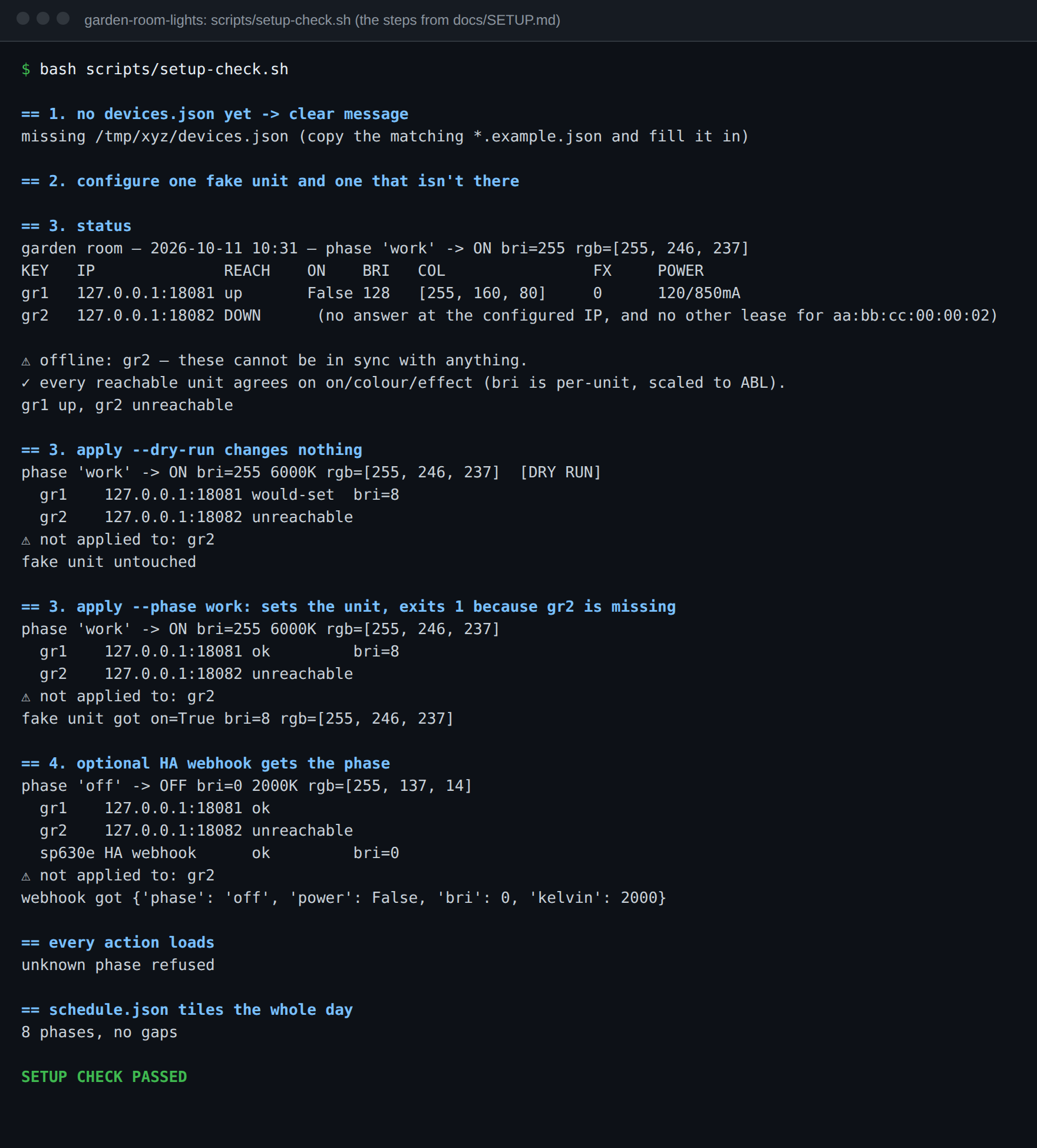
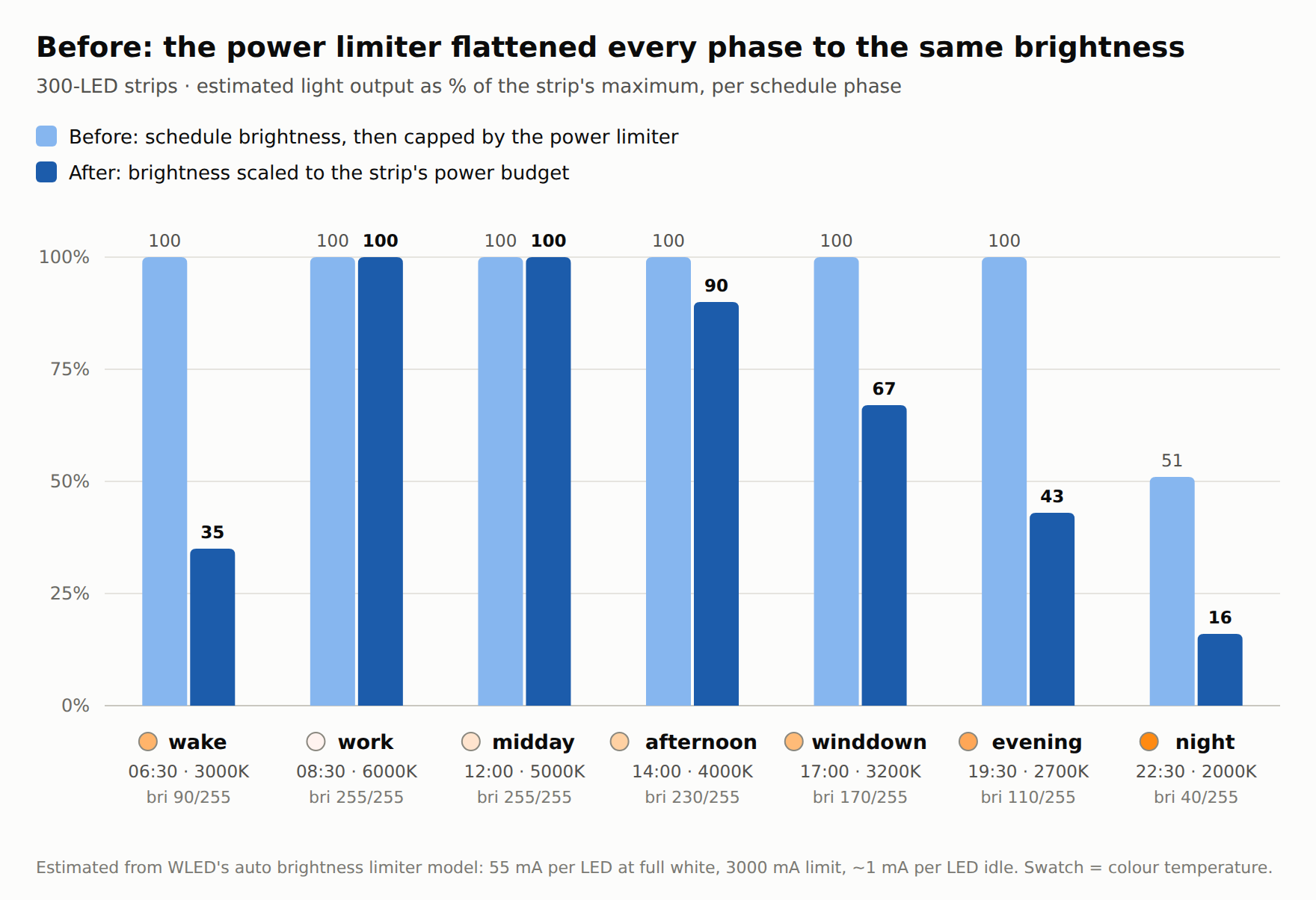
Set up garden-room-lights, tested weekly against a fake WLED strip garden-room-lights runs the WLED strips in my garden room on a time-of-day schedule: cool and bright for work, warm and low in the evening. I've written a proper setup guide for it, and it's tested every week on a fresh machine. Testing lights with no lights GitHub has no LED strips, so the check runs against a fake WLED unit: a 54-line Python server that answers the same three JSON calls the script makes and records what it was sent. That's enough to prove the useful bits: !The weekly setup check against a fake WLED unit - with no devices.json, it tells you exactly what to copy - status sees one unit up and one down - --dry-run sends nothing - apply --phase work sends the right colour and an in-range brightness, and exits 1 because a unit is missing - the optional Home Assistant webhook gets the phase - the shipped schedule covers all 24 hours with no gaps It can't tell you your strips look nice. That bit's still on you. The README was wrong My README said the schedule "follows the wall clock in schedule.json's timezone". Writing the guide meant reading the code line by line, and the code never reads that key. It uses the machine's clock. Harmless on my box, which is on UK time anyway, but on a server set to UTC your evening scene would land an hour late all summer. The README's fixed and the guide says set the box's timezone. The setup, short version Python 3.10+, no packages, at least one WLED strip: git clone https://github.com/casareanderson/garden-room-lights && cd garden-room-lights cp devices.example.json devices.json # each strip's MAC + current IP python3 gardenroom.py status python3 gardenroom.py apply --dry-run python3 gardenroom.py apply Then a 10-minute cron tick. The script picks the phase from the clock itself, so there's nothing to re-tune when the clocks change. !Brightness before and after the ABL fix The guide also explains the one thing that confused me for weeks: bri is a share of what each strip can really deliver, because WLED's power limiter makes every raw value above the ceiling look the same. Full guide: docs/SETUP.md. Anyone else running their lighting from a script instead of HA automations? Curious what made you go that way. --- > 🤖 Drafted with AI assistance from my own homelab notes, logs and repos, then reviewed and edited before publishing.
PLI 4.0.0 (pre-release): open-source LLM inference server tuned for Apple Silicon M1 Ultra 64 GB Qwen3.8-27B 4-bit : - prompt reading 191-323 tok/s - writing 34-111 tok/s - GPU, CPU and Neural Engine together nicopingu/pli
ffmpeg-skill gives Claude Code, Cursor or Codex 42 local FFmpeg tools, and the agent checks its own output after each edit. Exactly the export busywork we'd hand off for demo videos: one recording, a version checked against each platform's spec. kajisho5/ffmpeg-skill
AI 配音不一定非要自己录,这个开源项目可以帮你搞定语音创作。 VoiceStudio,围绕 AI 语音生成打造,支持文字转语音、AI 配音和语音克隆等玩法。 做短视频、小说推文、有声内容的,可以关注一下。 🔗 debpalash/VoiceStudio
【解析】静的応力:固定する面と荷重の面を選んで解くと、応力が色で出ます。網は形に沿う 2 次の四面体で、網の質や断面も切り替えて見られます。 #kieMonoBench Kie610/kie-monobench t.co
eMudhra CA Compromise: Two Roots to Remove, and Dropping Comodo AAA Broke 1 of 16,125 Chains --- title: eMudhra CA Compromise: Two Roots to Remove, and Dropping Comodo AAA Broke 1 of 16,125 Chains published: true date: 2026-11-03 09:00:00 UTC tags: Security,TLS,Certificates,Docker canonical_url: devops-daily.com --- Firefox and Chrome stopped trusting the six compromised eMudhra TLS intermediate CAs within hours of the report on 17 October 2026. Your containers, JVMs, virtualenvs and Go binaries did not get that update. Each of them reads its own copy of a trust store, and that copy decides whether a forged certificate for any hostname is accepted. We collected 34 trust stores from package files, published bundles and source trees, and verified the public test chains for the compromised keys against each one. Then we connected real clients to the public test hosts, and checked what Debian's fix does to the chains that 16,348 of the top 20,000 sites send. Three results matter if you run anything outside a browser: - Two roots, not one. Each compromised TLS key chains to emSign ECC Root CA - G3 and, through a Sectigo cross-sign, to AAA Certificate Services. Before the fix, Debian 11, 12 and 13, Ubuntu 24.04 as released, Alpine 3.18 and OpenJDK's cacerts held both. There, removing only the emSign root leaves the Sectigo path open. - The root list predicts everything. In 560 OpenSSL verifications, the two roots decided every result. The fixed Go, Node.js, Bun and CPython releases block the keys in code. Node.js 24.22.1 and Go 1.26.10 rejected them even with the old Debian 12 bundle. - Removing AAA broke one chain in our test. Of 16,125 served chains that verified before Debian's fix, one (jisc.ac.uk) failed after it with OpenSSL 3. GnuTLS and Go also failed on that site. 262 more fail only for a client that never looks for another path. TL;DR - Update ca-certificates and rebuild images from a fresh base. A digest pinned before 20 October keeps the old bundle. - Debian 11, Alpine 3.18 and 3.19 and Node.js 20 get no fix. Their newest releases still trust the keys. - On Debian and Ubuntu, delete /etc/ssl/certs/java/cacerts and run update-ca-certificates --fresh; the Java keystore is not rebuilt on its own. - Upgrade to runtimes that block the keys in code: Go 1.26.10 or 1.27.3 (then rebuild your Go binaries), Node.js 22.23.4, 24.22.1 or 26.12.1, Bun 1.4.4, Python 3.11.18, 3.12.16, 3.13.18, 3.14.10 or 3.15.2. - If you run a server, do not end your chain at a certificate issued by AAA Certificate Services. - Run scan-tree.py on an unpacked image, a virtualenv or a JDK to find what still trusts the keys. Prerequisites - Container images, CI runners or servers that make outbound TLS connections - Python 3.9 or later and the OpenSSL 3 command line tool, to run the companion scripts - docker (or any tool that can export an image filesystem) if you want to scan images What happened, in short On 17 October, a researcher reported to the Apple, Chrome, Microsoft and Mozilla root programs that the private keys of eight eMudhra intermediate CAs could be computed from their public certificates. Mozilla confirmed it and had Firefox blocking the TLS intermediates through OneCRL by 22:59 UTC the same day. Six of the eight CAs issue TLS certificates; two are code signing CAs (Mozilla bug 2083449). The keys are not theoretical. Between 20 and 21 October, people other than eMudhra logged 107,107 certificates signed with six of the keys to Certificate Transparency. 106,050 of them are proof-of-concept certificates for google.com (comment 44). Almost none of them carry a revocation URL. Browsers get blocks through OneCRL, CRLSets and Apple's and Microsoft's trust updates. Almost everything else reads a file. We used the public chains and test hosts of the incident tracker, which also lists the patched versions. | Date (UTC) | What changed | | --- | --- | | 17 to 19 Oct | Firefox (OneCRL), Chrome (CRLSets) and Apple block the certificates; eMudhra and Sectigo revoke them | | 20 Oct | Go 1.26.10 and 1.27.3; Debian 20250419~deb12u2 and 20250419+deb13u1; Ubuntu 20260816ubuntu0.*; certifi 2026.10.19; curl CA bundle 2026-10-20 | | 21 Oct | Node.js 22.23.4, 24.22.1 and 26.12.1 | | 22 Oct | Bun 1.4.4 | | 24 to 27 Oct | OpenJDK removes four roots from its source tree (JDK-8395690); no OpenJDK update release yet | | 26 Oct | Python 3.15.2, 3.14.10, 3.13.18, 3.12.16 and 3.11.18 | One key, two certificates, two roots Each of the six TLS keys appears in two intermediate certificates with the same subject and the same public key. One was issued by emSign Root TLS CA - G3, which is cross-signed by emSign ECC Root CA - G3. The other was cross-signed by Sectigo's AAA Certificate Services (the old Comodo root, called Comodo AAA Services root in Mozilla's data). A leaf signed with the key verifies through either one. 1. Forged leaf any hostname 2. EM DV TLS CA - G3B issued by eMudhra 3. EM DV TLS CA - G3B cross-signed by Sectigo 4. emSign Root TLS CA - G3 cross-signed 5. AAA Certificate Services Comodo, 2004 6. emSign ECC Root CA - G3 removed 20 Oct Connections: - Forged leaf -> EM DV TLS CA - G3B - Forged leaf -> EM DV TLS CA - G3B - EM DV TLS CA - G3B -> emSign Root TLS CA - G3 - EM DV TLS CA - G3B -> AAA Certificate Services - emSign Root TLS CA - G3 -> emSign ECC Root CA - G3 Mozilla stopped trusting AAA Certificate Services for TLS in April 2025. Its root data (NSS builtins) marks the root as trusted for server authentication in version 2.74. Version 2.76, which came with NSS 3.111, does not (aaa-trust-history.txt reads it from the Firefox source). Debian's 20250419 package is built from 2.74, so Debian 11, 12 and 13 hold AAA, and so do Ubuntu 24.04's release-pocket package and Alpine 3.18. Before the fix, bundles built from later data held only the emSign root. These include Ubuntu's June 2026 update, Alpine 3.19, certifi, curl, Node.js, Bun, RHEL and Temurin. Debian's own August 2026 unstable package, built from 2.90, has no AAA either. So the cause is the age of the data, not Debian's packaging. That is why Debian removed two roots and the others removed one. Finding 1: the root list decides it Every script, recorded result and the scanner are in the companion repository. Each stage writes a file the next stage reads, and every number below comes from one of those files. The-DevOps-Daily/emudhra-trust-store-check on GitHub We took each trust store from a fixed file (a package, a published bundle or a source tree), so we know exactly which version we tested. The repository records the URL and SHA-256 of every download. For each store, a script first predicted the result: it accepts the emSign path if it holds emSign ECC Root CA - G3, and the Sectigo path if it holds AAA Certificate Services. Then openssl verify checked the 16 public test chains against each store, with the clock fixed at 30 October 00:00 UTC. There are eight chains per path, including leaves never logged to CT and chains through a rollover certificate. The result: 560 verifications, 0 that differed from the prediction. A store accepts all eight chains of a path, or none. | Trust store | Before the fix | Fixed in | | --- | --- | --- | | Debian 11 bullseye | both paths (20250419~deb12u1~deb11u1, the newest) | no fix, LTS ended 31 August 2026 | | Debian 12 bookworm | both paths (20250419~deb12u1) | 20250419~deb12u2 | | Debian 13 trixie | both paths (20250419) | 20250419+deb13u1 | | Ubuntu 24.04 | both paths (20240203, release pocket); emSign path (20260601~24.04.1) | 20260816ubuntu0.24.04.1 | | Ubuntu 22.04 | emSign path (20260601~22.04.1) | 20260816ubuntu0.22.04.1 | | Alpine 3.18, 3.19 (EOL) | both paths (3.18), emSign path (3.19) | no fix in either branch | | Alpine 3.22 | not tested | 20261020-r0 (also in 3.20, 3.21, 3.23, 3.24 and edge) | | RHEL 9 family (p11-kit, parsed) | emSign path (2025.2.80_v9.0.305-91.el9) | 2026.2.92_v9.0.319-90.3.el9_8 | | Python certifi | emSign path (2025.8.3, 2026.7.22) | 2026.10.18 | | curl CA bundle | emSign path (2026-09-25) | 2026-10-20 | | Node.js bundled roots | emSign path (20.20.2, 22.23.3, 24.22.0) | 22.23.4, 24.22.1 | | Bun bundled roots | emSign path (1.4.3) | 1.4.4 | | OpenJDK source cacerts | both paths (jdk21u before JDK-8395690) | in source since 27 October; no update release yet | | Eclipse Temurin JRE cacerts | emSign path (21.0.12.1+1; 11.0.32.1+1, the newest 11 build) | 21.0.13+9 holds neither root | Three details from the table are easy to miss: - Temurin is not OpenJDK. OpenJDK's own cacerts holds both roots, and OpenJDK tells you to delete four of them by hand. Temurin builds its cacerts from Mozilla's data, so its 23 October release already holds neither. A JDK from another vendor can be either; check the file, not the version. - certifi over-removed first. certifi 2026.10.18 removed every emSign root, including emSign Root CA - G1, which Mozilla still trusts. Users of the InCommon certificate service, which many US universities use, reported breakage in issue #439, and 2026.10.19 put the unaffected roots back. In our scan below, 47 of the served chains end at emSign Root CA - G1. - Removing one root is not enough everywhere. We built one synthetic store, Debian 12's old bundle minus only emSign ECC Root CA - G3. It rejected all eight emSign-path chains and accepted all eight Sectigo-path chains. That is what you get if you apply the one-root workaround, which is right for Alpine 3.19 and later, to a Debian image. the Sectigo-path chain against three Debian 12 bundles # old bundle: holds both roots $ openssl verify -no-CApath -no-CAstore -attime 1793318400 -CAfile debian-12-before.pem -untrusted aaa-chain.pem aaa-chain.pem aaa-chain.pem: OK # old bundle minus emSign ECC Root CA - G3 only $ openssl verify -no-CApath -no-CAstore -attime 1793318400 -CAfile minus-emsign.pem -untrusted aaa-chain.pem aaa-chain.pem aaa-chain.pem: OK # 20250419~deb12u2: both roots removed $ openssl verify -no-CApath -no-CAstore -attime 1793318400 -CAfile debian-12-fixed.pem -untrusted aaa-chain.pem aaa-chain.pem C = NL, O = eMudhra BV, CN = EM DV TLS CA - G3B error 20 at 1 depth lookup: unable to get local issuer certificate error aaa-chain.pem: verification failed -no-CApath -no-CAstore keeps the machine's own /etc/ssl/certs out of the test, and -attime makes the result repeatable. This command does not check revocation. The 16 intermediate certificates were revoked on 18 and 19 October. In the next section, our client commands did not turn on CRL or OCSP checking either, and with the old bundles they accepted the two public test chains. Finding 2: a blocklist in the runtime beats a stale store Four runtimes did not wait for trust stores. They are Go 1.26.10 and 1.27.3 (go.dev), Node.js 22.23.4, 24.22.1 and 26.12.1, Bun 1.4.4, and the October 26 CPython releases. Each one compiles a list of the eight compromised public keys into its TLS code. It rejects any chain that contains one of them. Bun's release notes mention only a root update; the list is in blocked_spkis.cpp. Our first stage downloads the four source files from the fix commits. All four hold the same eight SHA-256 hashes of the SubjectPublicKeyInfo. The lists match the key, not a certificate. So they cover both certificates of every key, and the rollover chains. To see the difference with real clients, we connected curl, Python, Node.js and Go on a Debian 12 machine to two of the public test hosts: one serves the emSign path, the other the Sectigo path. Each client got a trust store from the matrix above. For Go, we built the same small HTTPS client with Go 1.26.9 and 1.26.10. All 24 results matched the prediction: | Client | Trust store | emSign path | Sectigo path | | --- | --- | --- | --- | | curl 7.88.1 (OpenSSL 3.0) | Debian 12 20250419~deb12u1 | accepted | accepted | | curl 7.88.1 | Ubuntu 24.04 20260601~24.04.1 | accepted | rejected | | curl 7.88.1 | Debian 12 20250419~deb12u2 | rejected | rejected | | Python 3.11.2 (Debian 12) | Debian 12 20250419~deb12u1 | accepted | accepted | | Python 3.11.2 | certifi 2026.7.22 | accepted | rejected | | Python 3.11.2 | certifi 2026.10.19 | rejected | rejected | | Node.js 24.22.0 | bundled roots | accepted | rejected | | Node.js 24.22.0 | --use-openssl-ca, Debian 12 20250419~deb12u1 | accepted | accepted | | Node.js 24.22.1 | bundled roots | rejected | rejected | | Node.js 24.22.1 | --use-openssl-ca, Debian 12 20250419~deb12u1 | rejected | rejected | | Go 1.26.9 | SSL_CERT_FILE, Debian 12 20250419~deb12u1 | accepted | accepted | | Go 1.26.10 | SSL_CERT_FILE, Debian 12 20250419~deb12u1 | rejected | rejected | With the old Debian bundle, curl, Python, Node.js 24.22.0 and Go 1.26.9 accept a chain signed with a compromised key on both paths. Node.js 24.22.1 and Go 1.26.10 with the same bundle refuse both. Go 1.26.10 reports x509: no valid chains built, and Node.js reports CERT_REVOKED: same stale bundle, two Node.js versions (30 October, 11:25 UTC) # debian-12-before.pem is ca-certificates 20250419~deb12u1; get.js is in tools/ $ SSL_CERT_FILE=debian-12-before.pem SSL_CERT_DIR=/nonexistent ./node-24.22.0 --use-openssl-ca get.js dv-g3b-aaa-emudhra.we-have-a-problem.com ACCEPT HTTP 200 $ SSL_CERT_FILE=debian-12-before.pem SSL_CERT_DIR=/nonexistent ./node-24.22.1 --use-openssl-ca get.js dv-g3b-aaa-emudhra.we-have-a-problem.com reject CERT_REVOKED: certificate revoked Debian 12's own Python (3.11.2-6+deb12u9 on our machine) has no denylist, and OpenJDK fixed Java only by removing roots from cacerts. Both are only as safe as the bundle they read. On macOS, Apple says that the system curl, git and python3 check /etc/ssl/cert.pem and accept these chains until a future update. Finding 3: what removing AAA breaks Removing AAA Certificate Services closes the Sectigo path, but other chains still use this 2004 root, and Apple and the incident tracker both warn that removing it can break sites. We measured how many. We connected once to each of the top 20,000 domains of the Tranco list PYK6J, or to www. if the bare name failed. All connections came from one IPv4 address on 30 October between 11:11 and 11:36 UTC, and we saved the chain each server sent. 16,348 answered. Then a small C program on OpenSSL 3.0.22 verified every chain against Debian 12's bundle before and after the fix. Debian 13's bundles hold the same certificates. The program verified each chain in three ways: - modern : the OpenSSL default since 1.1.0, which looks in the trust store first at each step - nofirst : trust store first turned off, alternative chain search on - strict : both turned off, so the verifier follows only the chain the server sent Of the 16,348 chains, 16,125 verified before the fix in modern mode. 1,296 contain a Sectigo, Comodo, USERTrust or AAA certificate, and 283 include a certificate that AAA issued. After the fix: | Mode | Chains that verified before the fix | Anchored at AAA before the fix | Broken by the fix | | --- | --- | --- | --- | | modern | 16,125 | 1 | 1 | | nofirst | 16,124 | 262 | 1 | | strict | 16,111 | 262 | 262 | No chain was anchored at emSign ECC Root CA - G3, so every break comes from AAA. Most of the 262 servers send an old copy of a current root, such as USERTrust RSA Certification Authority, cross-signed by AAA. A modern verifier finds the self-signed copy of that root in the store first and never reaches AAA. A verifier that follows only the served chain gets to AAA, does not find it, and fails: Chains that break only for a client that follows the served chain | | Value | | --- | --- | | USERTrust RSA Certification Authority | 193 | | SSL.com TLS ECC or RSA Root CA 2022 | 31 | | Sectigo Public Server Authentication Root R46 | 23 | | USERTrust ECC Certification Authority | 12 | | COMODO RSA Certification Authority | 2 | | SSL.com TLS Issuing ECC CA R2 | 1 | _262 of the 16,111 chains that verified in strict mode before the fix, Tranco PYK6J top 20,000, scanned 30 October 2026. Grouped by the certificate issued by AAA Certificate Services that the server sends. In modern mode, OpenSSL 3.0 accepts all but one of them after the fix._ The one real break is jisc.ac.uk, and it is not a Sectigo certificate. The server sends its leaf and SSL.com TLS Issuing ECC CA R2, cross-signed by AAA, and nothing else. The same key also has a certificate from SSL.com TLS ECC Root CA 2022 (crt.sh 8505503579), which Debian holds. The server does not send it, and OpenSSL does not fetch missing intermediates. So on our Debian 12 machine after the fix, curl fails: jisc.ac.uk before and after Debian removed AAA # Debian 12, ca-certificates 20250419~deb12u2, 30 October 11:44 UTC $ curl -sS -o /dev/null --max-time 20 -w '%{http_code}\n' https://jisc.ac.uk/ curl: (60) SSL certificate problem: unable to get local issuer certificate More details here: https://curl.se/docs/sslcerts.html curl failed to verify the legitimacy of the server and therefore could not establish a secure connection to it. To learn more about this situation and how to fix it, please visit the web page mentioned above. 000 $ curl -sS -o /dev/null --max-time 20 -w '%{http_code}\n' --cacert stores/debian-12-before.pem --capath /nonexistent https://jisc.ac.uk/ 301 To check this with a second TLS stack, we ran git ls-remote with both bundles. On Debian 12, git 2.39.5 uses GnuTLS 3.7.9. The targets were jisc.ac.uk and a seeded random sample of 20 of the other 261 strict-mode breaks. GnuTLS rejected jisc.ac.uk after the fix and accepted the 20 others. Our Go client, built with Go 1.26.9 and 1.26.10, also failed on jisc.ac.uk with the fixed bundle (x509: certificate signed by unknown authority). So in our tests the AAA removal costs little: one chain in 16,125 for OpenSSL 3, and GnuTLS and Go agreed on the chains we gave them. The risk is in two places. The first is servers that send only an AAA cross-sign of an intermediate, like jisc.ac.uk; the fix is to send the intermediate that the current root issued. The second is clients that cannot search for another path, which we modelled but did not identify. Where the old roots hide Updating the host does not update what your services read. Check these first: 1. Images built before 20 October , and every image pinned by digest. The bundle is a file in a layer. Docker's own note puts it plainly: an image "keeps trusting them until it is rebuilt". 2. Bases and runtimes that will not get a fix. debian:bullseye and everything built on it, alpine:3.18 and alpine:3.19: their newest ca-certificates packages still trust both paths or the emSign path. Node.js 20, end of life since 30 April 2026, still bundles the emSign root and has no blocklist. 3. The Java keystore on Debian and Ubuntu. ca-certificates-java does not rebuild /etc/ssl/certs/java/cacerts when ca-certificates changes, so OpenJDK packages keep the old roots after the update (OpenJDK guidance). 4. Bundles copied by hand. A COPY --from=build /etc/ssl/certs/ca-certificates.crt into a scratch or distroless image, a certifi pin in a lockfile, or SSL_CERT_FILE, REQUESTS_CA_BUNDLE, PIP_CERT and NODE_EXTRA_CA_CERTS pointing at a file from last year. 5. Static Go binaries built with Go older than 1.26.10. The blocklist is compiled in, so only a rebuild adds it. go version -m ./binary prints the Go version that built it. 6. Runtimes with their own roots. Node.js before 22.23.4 or 24.22.1 and Bun before 1.4.4 use bundled roots by default, not the system store. To find them, the companion repository has scan-tree.py. It reads a directory tree and reports bundles, keystores and binaries that hold either root, runtimes that carry the blocklist, and Go programs and CPython ssl modules that do not. This is its real output on a test tree with six files: the old Debian 12 bundle, Node.js 24.22.0 and 24.22.1, a fixed certifi bundle (correctly silent), the ssl module of Debian 12's Python, and Temurin 11's cacerts: TRUSTS fixture/etc/ssl/certs/ca-certificates.crt CA bundle with 150 certificates holds emSign ECC Root CA - G3 and AAA Certificate Services TRUSTS fixture/usr/local/bin/node embeds emSign ECC Root CA - G3 in its bundled roots TRUSTS* fixture/usr/lib/python3.11/lib-dynload/_ssl.cpython-311-aarch64-linux-gnu.so CPython ssl module without the eMudhra blocklist: it accepts whatever its trust store accepts TRUSTS fixture/usr/lib/jvm/temurin-11/lib/security/cacerts CA bundle with 118 certificates holds emSign ECC Root CA - G3 ok fixture/opt/node-24.22.1/bin/node holds all 8 eMudhra blocklist keys (a byte match, not a runtime test) 4 finding(s) that still trust a chain through the compromised keys. TRUSTS*: safe only if every trust store the program reads at run time is fixed. No finding is not proof: only the bundle, keystore and binary formats listed in --help are checked. TRUSTS* means the program has no blocklist of its own, so it is only as safe as the bundle it reads. An ok is a byte match for all eight keys, not a test of the running program. For a container image, export the filesystem and scan it: mkdir rootfs && docker export "$(docker create IMAGE)" | tar -xf - -C rootfs python3 scan-tree.py rootfs Then fix what it finds: # Debian and Ubuntu images: upgrade the bundle, then rebuild the Java keystore apt-get update && apt-get install --only-upgrade -y ca-certificates rm -f /etc/ssl/certs/java/cacerts && update-ca-certificates --fresh # Alpine 3.20 and later (3.18 and 3.19 get no fix: move to a newer base) apk upgrade --no-cache ca-certificates ca-certificates-bundle # Check what an image actually has dpkg-query -W ca-certificates # fixed: 20250419~deb12u2, 20250419+deb13u1, 20260816ubuntu0.* apk info -v ca-certificates-bundle # fixed: 20261020-r0 rpm -q ca-certificates # RHEL 9 fixed: 2026.2.92_v9.0.319-90.3.el9_8 What we could not conclude - How many systems are still exposed. The matrix says what each version does, not how many copies of each version are running. We picked old versions on purpose. - Other JDKs and platform verifiers. We did not check the cacerts of Amazon Corretto, Azul Zulu, Microsoft's build, Oracle JDK or distribution packages. We did not test Windows, macOS or Android, and relied on the vendors for those. - RHEL's real extraction. We did not run trust extract; we parsed the p11-kit file and kept certificates trusted for server authentication. Our fixed RHEL 9 store has 118 certificates, the same count as the curl bundle of 20 October, which is a cross-check, not proof. - Revocation. We did not test clients with CRL or OCSP checks turned on. The leaves on the test hosts have no revocation pointers. The eMudhra CRL endpoint also refused some User-Agents (comment 44), so we would not count on it. - AAA beyond the top 20,000. One IPv4 address, one morning, the bare name or www. only. Internal services, other host names, mail servers and the long tail can differ, and a CDN can send a different chain to a different network. - Which real clients behave like "strict" mode. We modelled them with two OpenSSL flags. OpenSSL 3.0 in modern mode handled 261 of the 262 chains, and GnuTLS 3.7.9 the 20 we sampled. We did not test Java, rustls, Windows, macOS or embedded TLS libraries on them, or Go beyond jisc.ac.uk. Summary - Each compromised key chains to two roots. Stores built from Mozilla data older than April 2025, including Debian 11, 12 and 13, need both emSign ECC Root CA - G3 and AAA Certificate Services removed. - The roots in a store predicted all 560 of our verifications. Check the file, not the version string; scan-tree.py does that for a whole image. - The fixed Go, Node.js, Bun and Python releases block the keys whatever the store says. Debian 11, Alpine 3.18 and 3.19 and Node.js 20 get no fix. - In our OpenSSL test, removing AAA broke 1 of 16,125 served chains (jisc.ac.uk). GnuTLS and Go failed on it too, and the fix for it is on the server. _Originally published at devops-daily.com._
Building hldays #12: Adding a new country --- title: Building hldays #12: Adding a new country published: true date: 2026-11-3 09:00:00 UTC tags: opendata,python,api,buildinpublic canonical_url: hldays.dev --- hldays covers 6 countries today. Portugal was researched by hand, down to all 308 municipalities. The other five (Brazil, Germany, the UK, Greece and the US) were imported, and Brazil was the most recent. This post walks through what adding a country actually involves, using the Brazil import as the example. The short version: the national and state layers take about a minute of script time plus reading the reports. The municipal layer is the real work. What "a country" is in hldays A country is a folder: data/<CC>/ country.yaml # country metadata (weekend days) + national holidays subdivisions.yaml # regions / districts (ISO 3166-2 ids) municipalities.yaml # municipalities (official statistical codes) Nothing else needs to change. The build validates the YAML, and discovery (/, /v1/countries, /openapi.json) picks the new country up from the data. Coverage stats are computed too, so they can't go stale: curl "https://api.hldays.dev/v1/countries/BR" { "code": "BR", "name": "Brazil", "weekend": [6, 7], "levels": ["country", "subdivision", "municipality"], "coverage": { "levels": { "country": { "jurisdictions": 1, "with_holidays": 1, "verified": 0 }, "subdivision": { "jurisdictions": 27, "with_holidays": 27, "verified": 0 }, "municipality": { "jurisdictions": 1, "with_holidays": 1, "verified": 0 } }, "holiday_rules": 71, "verified_rules": 0 } } That verified_rules: 0 is deliberate: imported records are unverified until someone checks them against official sources. Starting from python-holidays Writing Brazil's 27 state calendars by hand would take weeks. python-holidays (MIT) already has them, maintained by people who read the laws. The catch: python-holidays is code, not data. It gives you dates for a year, not rules. hldays stores rules (fixed, easter, nth_weekday...) so the Worker can compute any year without tables. So scripts/import-country.py works backwards, from dates to rules: # Rules are inferred from the dates: for each holiday the longest run of years one rule explains (fixed, easter, # orthodox_easter, nth_weekday ± offset) becomes an entry; changes become valid_from/valid_to segments; leftovers `dates`. For one date, candidates() lists every rule that would produce it, in order of preference: def candidates(d): """Rules that give date d in its year, in order of preference.""" y = d.year out = [("fixed", (d.month, d.day))] for kind, method in (("easter", EASTER_WESTERN), ("orthodox_easter", EASTER_ORTHODOX)): off = (d - easter(y, method)).days if abs(off) <= 120: out.append((kind, off)) ... Then segments() takes the first year, tries each candidate, and keeps the one that explains the longest run of consecutive years. When a rule stops working (a law changed), a new segment starts. One-offs that no rule explains, like the UK's 2022 Platinum Jubilee, end up as explicit dates. That's how Greek Labour Day became four entries, which I covered in "Observed holidays and edge cases". The COUNTRIES config Each country is one entry in a dictionary at the top of the importer. This is Brazil's: "BR": { "name": "Brazil", "aliases": ["Brasil"], "module": "brazil", "langs": [("pt", "pt_BR"), ("en", "en_US")], "kind": "state", "kinds": {"DF": "federal_district"}, # "Ponto facultativo" (Carnival, Ash Wednesday, Corpus Christi, …): offices may close, not a day off by law. "categories": {"public": "public", "optional": "optional"}, "municipalities": {"São Paulo Capital": {"id": "BR-M-3550308", "name": "São Paulo", "parent": "SP", "codes": {"ibge": "3550308"}}}, ... }, A few things worth pointing out: - langs pulls names in Portuguese and English, so name is {"pt": "Dia do Evangélico", "en": "Evangelical Day"}. - categories maps python-holidays categories to hldays types. Brazil's "ponto facultativo" days are real (public offices close), but they aren't a day off by law, so they come in as optional. Business-day maths ignores them by default. - municipalities handles python-holidays subdivisions that are really cities. "São Paulo Capital" becomes a municipality with its IBGE code, under the state of São Paulo. The generated YAML says at the top not to edit it by hand. The importer overwrites data/BR/ every run, so fixes go in this config or in the importer. The US needed a different model For most countries, if a state doesn't observe a national holiday, the importer drops it for that state with excludes. The US broke that. Federal holidays close federal offices and banks everywhere, even in states whose own offices stay open. So the US entry has two extra flags: # Federal holidays close banks (Federal Reserve) and federal offices in every state, so states never exclude # them; python-holidays' state lists are state-government closures, imported as `local`. "keep_inherited": True, "subdiv_type": "local", Federal = public everywhere, state = local. If you want the private-sector view, ask for types=public. The trade-off is documented in docs/data-review-import.md: California state offices work on Columbus Day, and this model doesn't show that. Check 1: does the engine agree with the source? Inferring rules can go wrong quietly. So after writing the YAML, the importer rebuilds the data and runs the real engine through scripts/dump-holidays.ts, which prints every jurisdiction's dates for every year: for (const j of cal.list({ country: cc })) { out[j.id] = {}; for (let y = Number(from); y <= Number(to); y++) out[j.id][y] = [...new Set(cal.holidays(j, y, types.split(",") as HolidayType[]).map((o) => o.date))].sort(); } The Python side compares that, year by year from 2016 to 2099, with what python-holidays says, substitute days included. The self-check result goes into research/import/<CC>.json, and the goal is an empty one. For Brazil, Germany, the UK and Greece it is empty. For the US there are 5 jurisdictions with differences, all the same kind: two holidays fighting over one substitute day. "US-WV": { "missing": [], "extra": ["2026-06-18", "2037-06-18", "2043-06-18", ...] } West Virginia Day on a Saturday moves back to Friday, which is Juneteenth, so the engine moves it on to Thursday. python-holidays lets both share the Friday. I left the engine's behaviour and wrote it down as an open item. Check 2: do other datasets agree? Matching python-holidays only proves the import is faithful. It doesn't prove python-holidays is right. So the importer also pulls weekday dates for 2020 to 2030 from Nager.Date (MIT) and OpenHolidays (CC BY 4.0) and diffs them. Only weekdays, because a disagreement about a Sunday doesn't change any business-day answer. Each source has quirks, and the importer has comments for the ones I ran into: # Nager sometimes lists a holiday of every subdivision per county instead of as global. counties = None if h["counties"] and set(sub_ids) <= set(h["counties"]) else h["counties"] And a fix that came with Brazil: OpenHolidays only has Brazil's national holidays up to 2025, so later years looked like they were missing everywhere. Now the diff only covers years a source actually has data for: covered = [yr for yr in CROSS if any(yr in by_year for by_year in data.values())] # OpenHolidays BR stops at 2025 Then I read every difference. A few examples from the reports: - Brazil, Corpus Christi. Nager.Date lists it as a national public holiday. Federally it's only a ponto facultativo; municipalities declare it (São Paulo city does). hldays has it as optional nationally and public in São Paulo. - Scotland, 4 January 2021 and 2027. We list it as the substitute for 2 January; Nager.Date doesn't. gov.uk listed it for 2021, so Nager.Date is wrong here. - Germany. Zero differences with Nager.Date. One with OpenHolidays: it lists Assumption Day for all of Bavaria, when it only applies in municipalities with a Catholic majority. Each conclusion goes into docs/data-review-import.md. That file is the real output of an import: the YAML is the data, the review doc is what I know is uncertain about it. What the Brazil commit added Brazil wasn't only data. The commit "Import Brazil; holiday move rule; python-holidays categories" touched the engine too: - A new move field on holidays, because Acre moves some Tuesday to Thursday holidays to Friday. That needed types.ts, calendar.ts, validate.ts and a test, the same four places every new rule shape goes. - Category support in the importer (for optional). - Move inference with a guard, so a one-off moved holiday doesn't become a permanent rule. - Cross-checks limited to covered years. So the real answer to "what does a new country take" is: sometimes a new rule shape. Both import commits so far changed the engine: the first one taught substitute days to skip inherited holidays and added excludes, the Brazil one added move. Names collide A new country brings new names, and some of them collide. "São Paulo" is both a state (BR-SP) and a city (BR-M-3550308). Name lookup prefers the most specific level: const candidates = (this.bySlug.get(slugify(ref)) ?? []).filter( (j) => !country || j.country === country.toUpperCase(), ); return candidates.sort((a, b) => LEVEL_RANK[a.level] - LEVEL_RANK[b.level])[0]; So jurisdiction=São Paulo gets you the city, the same way lisboa gets you the municipality of Lisbon and not the district. For the state, use the id. Names get their own post: "Names are harder than dates". The part you can't import Everything above covers national and state holidays. The thing that makes hldays different, the municipal layer, isn't in python-holidays, and for most countries it isn't in any dataset. - Brazil : Lei 9.093/1995 lets each of the 5,570 municipalities declare up to four religious holidays. Only São Paulo city is in so far. - Germany : Assumption Day in Bavaria applies in about 1,700 of 2,056 municipalities. Only Augsburg is in, with its Peace Festival on 8 August. That's the paid layer, and it has to be researched the way Portugal was: one official source per municipality, with a quote, as I described in "A source on every record". It's the slow part, and it's why the roadmap lists municipal layers separately from new countries. The checklist For the next country, the steps are: 1. Add an entry to COUNTRIES in scripts/import-country.py. 2. Run the importer (about a minute): .venv/bin/python scripts/import-country.py BR DE GB GR US XX. 3. Check the self-check is empty, or explain every difference. 4. Read the cross-check and write the open items into docs/data-review-import.md. 5. If the country has a rule the engine can't express, add it to types.ts, dates.ts, validate.ts and a test. 6. npm test, push. Cloudflare deploys it and the country shows up in discovery. 7. Then, separately, research the municipal layer. So who's number 7? The roadmap says Turkey and the UAE are next. Both need something new: Islamic holidays, where the actual date is announced each year and can differ by a day from the calculated one. The engine already computes Islamic dates with Intl, but a public holiday needs the announced date, so those countries will need yearly corrections on top. It isn't decided, though. Turkey and the UAE are the roadmap answer. Italy is the tempting one: every comune has its patron saint's day, which makes it a municipal layer like Portugal's, and that's the part hldays sells. If you could pick the 7th country, which would it be, and do you know where its local holidays are published? Tell me in the comments. Next in the series: lessons learned so far. hldays.dev · Docs
XBased - New XBOX emulator for PC The original Xbox, on your PC. xbased is a free and open-source Xbox emulator for Windows and Linux, built to feel like the console: boot it and you're in a full-screen dashboard you can drive entirely with a gamepad. It's the PC edition of hakuX by rfandango: same reimplemented Xbox kernel, high-level NV2A renderer on Vulkan and MCPX audio core, brought to x86-64 with a front end of its own. No BIOS, MCPX ROM or HDD image needed. What's in 1.0 A dashboard, not a launcher - Animated green orb, drifting hexagons, 3D transitions and navigation sounds - Gamepad, keyboard or mouse everywhere; button prompts follow what you're using - Borderless full screen by default, any resolution, ultrawide or portrait, any DPI - Library with automatic box art, a page per game, and a memory manager for your saves (export / import / delete) Picture - Internal resolution up to 4x, FXAA, anisotropic filtering up to 16x - Upscaling (bilinear or Snapdragon GSR) and CRT filters: scanlines, classic TV, arcade monitor - Every setting global or per game Patches & mods - Per-game patches (60/120 fps, widescreen, fixes, cheats) toggled from the game's page - Frame-rate unlock per game, where the game allows it - Drop the IPS patches shared online into mods/<TITLE ID>/ and they show up in the game's menu Play - 10 save-state slots per game, with pictures - In-game menu with Back + Start or the Guide button (F1 on keyboard): states, settings, controls, restart, quit - 4 controller ports (Automatic, any pad or the keyboard), full remapping, per-game too - Online through Insignia, XLink Kai and System Link - 11 languages; games start in yours, or in English when the disc doesn't have it Download |Platform|Get it| |:-|:-| |Windows 10/11 x64|xbased-1.0-windows-x64.zip – unzip and run, fully portable| |Linux x86-64|xbased-1.0-x86_64.AppImage – chmod +x and run (Ubuntu 22.04+ or similar)| Source, build steps and screenshots: crazyriddler/xbased You need a Vulkan 1.1+ GPU (1.3 recommended) and your own game dumps (ISO / XISO). No copyrighted Xbox software is included. Feedback welcome This is a 1.0: compatibility comes from hakuX and many games run, but not all of them do yet. If something breaks, open an issue on GitHub with the game, your GPU and xbased.log – it helps a lot.
@lianda_edu working paper here on where the blockchain literature connects with these problems. github.com/SaitoTech/papers/blob/6c21d22a57fec98e… in economics proper, most related work is from people modelling under what conditions revelation equivalence fails: Renou & Tomala (on routing). Strack & Mora (on compound lotteries), Attar (on private disclosures) and @vconitzer (on reporting costs and signaling constraints). There's also work on what informational properties break universal type-space constructions like Harsanyi types (permissionlessness, DLR and unawareness, relational contracting) and can block Arrow-Debreu completely. the mechanism presented at IWGTEA implements via Samuelson. If you force players to compress multi-dimensional and non-comparable preferences into a single non-scalar value and invite strategic aggregation in ways that no-one can verify, the choice of routing strategy creates a revealed preference experiment under Samuelson — players reveal their marginal rates of substitution between forms of utility where preferences cannot be directly solicited. do they want stronger or weaker security? to my knowledge there are no computer scientists working on this stuff — the field is dominated by people offering impossibility proofs based on single-parameter models that exclude the preferences that force non-revelation equivalence (opportunities for collusion or the exploitation of relational value and how they intersect with speed-of-inclusion trade-offs). these same preferences are never disclosed to the mechanism but then typically re-introduced to assert impossibility.
zYzYr - Pure RUST Zstd Decompressor Consistently outperforms libzstd across every data size and compression level No assembly. No dependencies. Drop-in C API Builds on bare metal: ARM Cortex-M, RISC-V, WASM, UEFI. The benchmark ships with the crate. Run it and see. GodlessVVanderer/zyzyr AGPL-3.0-only. Commercial licenses available.
@albertgao you can also try tester-army/e2e
AI가 데스크톱 앱을 직접 다뤄요, 깃허브 1위 agent-desktop #AI속보 #Shorts Vercel Labs가 만든 AI 에이전트용 컴퓨터 사용 CLI agent-desktop이 오늘 깃허브 트렌딩 1위예요. 접근성 트리를 읽어 맥, 윈도우, 리눅스 앱을 에이전트가 직접 조작해요. 출처: GitHub vercel-labs/agent-desktop vercel-labs/agent-desktop Instagram·Threads·X: @sird_tech 이 영상의 내레이션은 AI 음성으로 생성되었습니다. #깃허브 #GitHub #agentdesktop #AI에이전트 #오픈소스 #AI속보 #Shorts
Qistas: A Pre-Registered, Portable Protocol for Fairness Evaluation of Large Language Models Nawar S. Alseelawi, Mustafa S. Aljumaily arxiv.org [𝚌𝚜.𝙲𝙻 𝚌𝚜.𝙲𝚈] 💬Code: nawaralseelawi/qistas t.co
agent-desktop from Vercel Labs tops GitHub trending today. Agents use desktop apps through the accessibility tree, not screenshots. A snapshot is JSON with a ref per button. Click a ref, snapshot again to check. Screen reader APIs make good agent APIs. vercel-labs/agent-desktop