Mentions
Conversations linking to GitHub, newest first. Times are UTC.
Mentions by source
X
Bluesky
Hacker News
Lobsters
V2EX
Qiita
DEV
Mastodon
Latest posts
WeatherWidget: Multi-ticker opportunity profiles & simplified pollution grades coming to Windows Here is a preview of what’s coming in the next release of WeatherWidget either single city or multi-city on Windows! We’ve revamped the ticker settings to move away from raw data points that require manual interpreting, replacing them with clear atmospheric context and personalized activity guidance. 🏃 5 Tailored Multi-Ticker Profiles The new ticker delivers direct opportunity messages based on what you actually do outdoors: - Everyday Outdoors: Practical ambient context for daily routines, commutes, and errands. - Runner & Cyclist: Real-time status checks showing whether conditions and air quality are optimal for cardio sessions. - Family & School Run: Quick at-a-glance checks before heading out with kids. - Sensitive Airways: Tailored threshold alerts designed for asthma, allergy, or pollution sensitivity. - Open Windows: Actionable guidance on whether bringing outdoor airflow inside is healthy. 🌫️ Simplified Pollution Grading & Definitions - Replaces raw density metrics with human-readable grades: Good, Fair, Moderate, and beyond. - Clean plain-language definitions accompany composite AQI scores. - Full granular toggles remain intact for individual pollutants (PM2.5, PM10, NO₂, Ozone, CO) if you want specific readings on the widget. 📦 Microsoft Store Rollout & Road Ahead - Store Availability: The official update will be pushed directly to the Microsoft Store as soon as regression and integration testing wrap up over the next couple of sprints. - Coming Next to the Ticker: We’re already prototyping integrated multi-day forecasts and live severe weather warnings/alerts to appear right in the ticker stream. Check out the attached screenshot for a look at the updated settings configuration and overlay interface. Would love to hear your thoughts and suggestions—which of the 5 profiles fits your setup best? Try the Beta version at GitHub github.com/gcclinux/WeatherWidget/releases/tag/v2…
For anyone interested, some scripts and a couple of aliases seem to do the job. github.com/hhariri/Tidbits/blob/master/MultipleCl…
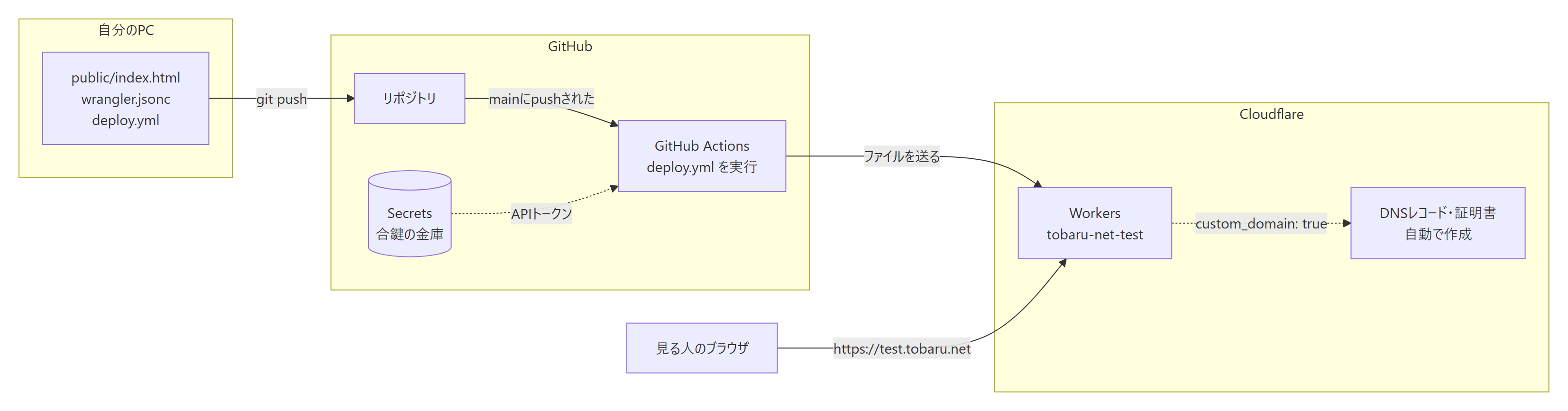
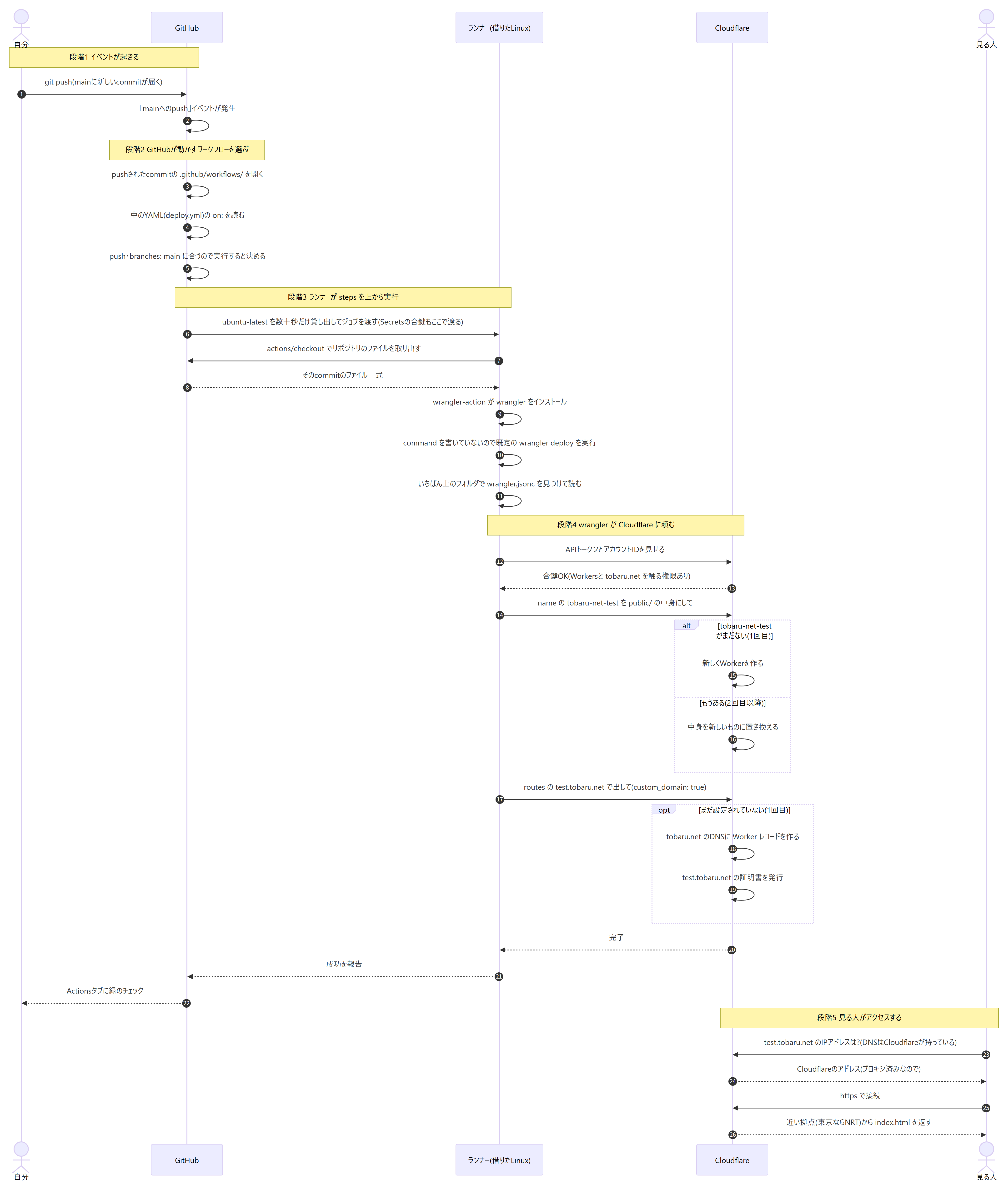
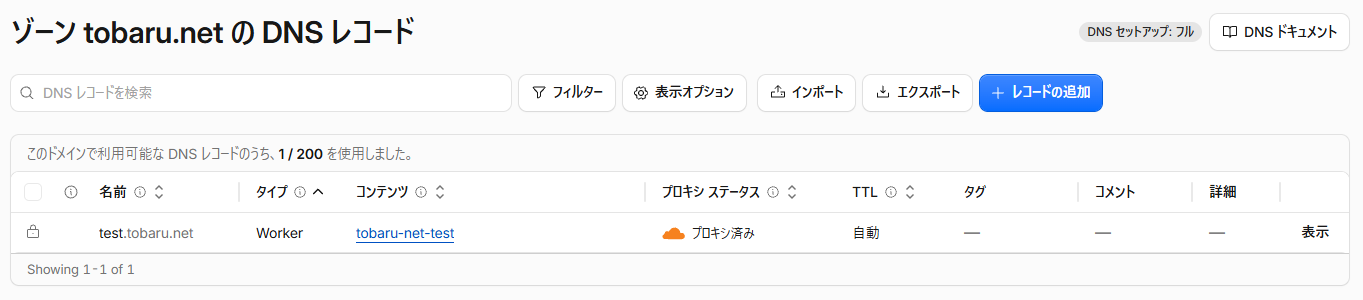
初めてのCI/CD。pushしただけで公開まで流れる理由を、図で理解した(GitHub Actions + Cloudflare Workers) 1. はじめに CI/CDという言葉は知っていましたが、なかなか勉強するまでには至りませんでした。それが仕事で使うことになり、とうとう勉強を始めることにしました。 とはいえ、どこから手をつければいいのか分かりません。調べると記事はたくさんあり、手順も丁寧に書かれています。ただ、どれも「こう書けば動く」が中心で、なぜpushしただけで最後まで流れるのかは、読んでもいまいち分かりませんでした。 幸い、今はAIという優秀なパートナーがいます。そこで今回は、AI(Claude Code)に助けてもらいながら、自分の環境で1つずつ検証していきました。 まず作ったのは、GitHubにpushすると、GitHub ActionsがCloudflare Workersへ自動で公開してくれるしくみです。画面で操作したのは3つ、書いたファイルも3つだけで、pushすると公開まで勝手に進んでいきます。実際に動かしてみても、やはり疑問は「何で流れるの?」、これだけでした。 この記事では、手順に加えて、なぜ最後まで自動で流れるのかを図で説明します。同じところでもやもやしている人の参考になればうれしいです。 なお、記事の内容はすべて自分の環境で動かして確かめていますが、CI/CDは初心者です。間違いなどがあれば、コメントで教えていただけるとうれしいです。 2. 作ったもの GitHubのmainブランチにpushすると、約30秒で https://test.tobaru.net のページが更新されるしくみです。ページはHTMLファイル1つだけの、いちばん小さなものにしました。 ひとことで言うと、GitHubに置いたファイルを、GitHubのロボット(Actions)がCloudflareまで運んでくれます。運ぶときにCloudflareのドアを開けるので、ロボットに合鍵(APIトークン)を預けてあります。 !04_overview.png 自分で用意したサーバーはありません。DNSのレコードとhttpsの証明書も、手では作っていません。 3. 環境 | 項目 | 内容 | |---|---| | GitHub | Freeプラン、Privateリポジトリ | | Cloudflare | Freeプラン | | ドメイン | Cloudflare Registrarで取得したtobaru.net(DNSもCloudflare) | | デプロイの道具 | cloudflare/wrangler-action@v4、wrangler 4 | | 作業したPC | Windows 11、VS Code、Git | 自分のPCにNode.jsやwranglerは入れていません。wranglerはGitHub Actionsの中でだけ動きます。 ドメインのDNSがCloudflareにあることが、後で出てくる「1行でDNSと証明書ができる」の条件になります(5章の(5))。 4. 手順 画面で操作したのは(1)〜(3)の3つだけです。(4)はファイルを書くだけ、(5)はpushするだけです。 (1) GitHubにリポジトリを作る - 名前はtobaru-net-test、Privateにしました - README・.gitignore・ライセンスは付けず、空のリポジトリにします(ローカルで作ったファイルをそのままpushするため) (2) CloudflareでAPIトークンを作る 1. 右上の人のアイコン → プロフィール → APIトークン → トークンを作成する 2. テンプレート「Cloudflare Workers を編集する」を使う 3. 範囲を絞る - アカウントリソース: 自分のアカウントだけ - ゾーンリソース: 特定のゾーン → tobaru.netだけ 4. 作成する。トークンは一度しか表示されないので、そのまま(3)に貼る 範囲を絞っておくと、万一トークンが漏れても、できることは「Workersの更新」と「tobaru.netの設定」だけです。 (3) GitHubのSecretsに登録する リポジトリの Settings → Secrets and variables → Actions → New repository secret で、2つ登録します。 | Name | 値 | |---|---| | CLOUDFLARE_API_TOKEN | (2)で作ったトークン | | CLOUDFLARE_ACCOUNT_ID | CloudflareのアカウントID | (4) ファイルを3つ書く tobaru-net-test/ ├─ public/ │ └─ index.html … 見せるページそのもの ├─ wrangler.jsonc … Cloudflareへの注文書(何を・どこで出すか) └─ .github/ └─ workflows/ └─ deploy.yml … Actionsへの指示書(いつ・何をするか) public/index.htmlは、ふつうのHTMLです(中身は省略)。 wrangler.jsoncです。ふつうのJSONはコメントが書けませんが、jsonc(JSON with Comments)は//で書けます。 { // Cloudflare側でのWorkerの名前(名札)。 // この名前のWorkerがなければ新しく作り、あれば中身を置き換える "name": "tobaru-net-test", // Workersの動き方の基準日 "compatibility_date": "2026-10-01", // 静的なファイル(HTML・画像など)の置き場所。この中身がそのままサイトに並ぶ "assets": { "directory": "./public" }, // どのURLで出すか。custom_domain: true でDNSレコードと証明書も作ってくれる "routes": [ { "pattern": "test.tobaru.net", "custom_domain": true } ], // xxx.workers.dev というCloudflareのURLでは公開しない "workers_dev": false } .github/workflows/deploy.ymlです。 name: Deploy # いつ動くか(イベントの条件) on: push: branches: [main] # mainブランチにpushされたとき workflow_dispatch: # Actionsタブの「Run workflow」ボタンで手動でも動かせる jobs: deploy: runs-on: ubuntu-latest # GitHubが数十秒だけ貸してくれるLinux permissions: contents: read steps: # 1. このcommitのファイル一式をランナーに取り出す - uses: actions/checkout@v5 # 2. wranglerをインストールして動かす(commandを書かなければ wrangler deploy) - name: Deploy to Cloudflare Workers uses: cloudflare/wrangler-action@v4 with: apiToken: ${{ secrets.CLOUDFLARE_API_TOKEN }} # 金庫の合鍵 accountId: ${{ secrets.CLOUDFLARE_ACCOUNT_ID }} # どのアカウントに送るか wranglerVersion: "4" (5) pushする git init -b main git add -A git commit -m "最初のページとデプロイ設定" git remote add origin https://github.com/<ユーザー名>/tobaru-net-test.git git push -u origin main pushしてから約30秒で、https://test.tobaru.netが開けるようになりました。10秒おきに確かめると、最初の3回はつながらず、4回目で200が返ってきました。 5. なぜ最後まで自動で流れるのか 答えを先に書くと、何かがずっと監視しているわけではありません。「イベントが起きたら、こう動く」という小さな決まりが、前の結果を受け取ってつながっているだけです。 pushしてから公開されるまでを、5つの段階に分けました。 !05_sequence.png 画像をクリックすると、大きく表示されます。 ここからは、私が分からなかったところを順に説明します。 (1) GitHubはフォルダを監視しているの? 監視はしていません。pushやプルリクエストなどのイベントが起きたときにだけ、GitHubがそのcommitの.github/workflows/を開きます。中のYAMLを全部読んで、on:の条件に合うものだけを動かします。 それが分かる例です。 | こんなとき | デプロイは動く? | |---|---| | README.mdだけ変えてpush | 動く。deploy.ymlは変わっていないが、「mainへのpush」というイベントが起きたから | | deploy.ymlを書き換えたが、pushしていない | 動かない。GitHubは自分のPCの中を見ていない | | deploy.ymlを書き換えてpush | 書き換えた後の内容で動く。そのcommitのファイルを読むから | | 別のブランチにpush | 動かない。on:がbranches: [main]だから | | プルリクエストをmainにマージ | 動く。マージするとmainにcommitが入り、mainへのpushと同じになるから | 「受付の人がマニュアルをずっと見張っている」のではありません。「呼び鈴が鳴ったらマニュアル棚を開いて、今回の用件に当てはまるページを探す」イメージです。マニュアル棚が.github/workflows/、ページの見出しがon:です。 (2) ファイルを指定していないのに、なぜwrangler.jsoncが使われるの? deploy.ymlのデプロイの手順には、「どのファイルを送るか」を書いていません。それでも動くのは、書かなかったときの決まり(既定値)が2段階あるからです。 1. wrangler-actionの決まり: commandを書かなければdeployを実行する(action.ymlに「Defaults to "deploy"」とあります)。workingDirectoryも書かなければ、リポジトリのいちばん上で実行する 2. wranglerの決まり: wrangler deployは、実行したフォルダでwrangler.jsonc / wrangler.json / wrangler.tomlを探して読む しかも、wrangler.jsoncそのものは送られません。「何を・どこに・どんな名前で」の指示として読まれ、送られるのはassets.directoryに書いたpublic/の中身です。 決まった名前・決まった場所に置けば何も書かなくても動き、変えたいときだけ書く。この考え方を「設定より規約(Convention over Configuration)」と呼ぶそうです。(1)の.github/workflows/も同じです。 (3) Cloudflareで何も作っていないのに、なぜWorkerができるの? wrangler.jsoncの"name": "tobaru-net-test"で、「この名前のWorkerを、この中身にして」と頼んでいるからです。Cloudflareは、その名前のWorkerがなければ新しく作り、あれば中身を置き換えます。上の図のaltのところです。 どのアカウントに作るかはaccountId、入っていいかはapiTokenで伝えています。どちらもSecretsから渡しているので、deploy.ymlには値そのものを書いていません。 (4) Secretsは何のため? Secretsは合鍵を入れておく金庫です。deploy.ymlには${{ secrets.CLOUDFLARE_API_TOKEN }}と、「金庫のこの引き出しを使って」とだけ書きます。合鍵そのものはどのファイルにも書かないので、コードを人に見せても漏れません。 (5) 1行でDNSと証明書までできるの? できました。routesに"custom_domain": trueと書くと、「このホスト名をまるごとこのWorkerにする」意味になり、CloudflareがDNSのレコードとhttpsの証明書を作ってくれます。 ただし、次の2つがそろっているからできることです。 - tobaru.netのDNSが、同じCloudflareアカウントにある(Cloudflareが自分でレコードを書き込める) - APIトークンにtobaru.netを触る権限がある(4章の(2)でゾーンを絞って許可した) DNSが別の会社にあるドメインでは、この1行だけでは済みません。 custom_domainを付けずに"pattern": "test.tobaru.net/api/*"のように書くと、「このURLに来たアクセスだけWorkerが受け取る」という別の使い方になります。この場合、DNSのレコードは自分で作ります。 6. 警告が出たところ 最初は、他の記事と同じくcloudflare/wrangler-action@v3を使っていました。デプロイは成功しましたが、Actionsの結果のAnnotationsに、警告1件とお知らせ1件が出ました。 !01_annotations.png (1) Node.js 20 is deprecated(警告) > Node.js 20 is deprecated. The following actions target Node.js 20 but are being forced to run on Node.js 24: cloudflare/wrangler-action@v3. wrangler-action@v3はNode.js 20向けに作られていて、GitHub側がNode.js 20を廃止していく途中なので、Node.js 24で動かしているという知らせです(GitHubのお知らせ)。今は動いていますが、将来動かなくなるおそれがあります。 調べるとv4が出ていて、action.ymlにusing: "node24"とありました。入力の項目(apiToken・accountIdなど)は同じなので、@v3を@v4に変えるだけで警告が消えました。 この修正もdeploy.ymlを1文字直してpushしただけです。しくみそのものの設定を変えた場合も、ページを変えた場合と同じ流れで反映されます(5章の(1)の表の3行目)。 (2) ubuntu-latestがUbuntu 26に移る(お知らせ) > The ubuntu-latest label will migrate to Ubuntu 26 beginning October 19, 2026. runs-on: ubuntu-latestの中身が、順に新しいUbuntuに切り替わるという案内です(runner-imagesのIssue)。今回のワークフローはwranglerを動かすだけなので、そのままにしています。 (3) nameを変えるときの注意 つまずいたわけではありませんが、しくみから考えると注意が必要だと分かったところです。 nameを変えてpushすると、Cloudflareは名前が変わったとは受け取りません。「その名前のWorkerがないので新しく作る」と受け取ります(5章の(3))。古いWorkerは残ったままになるので、変えるときは古いほうの片付けも必要です。 7. Cloudflareの画面で確かめる Cloudflareの画面では何も作っていませんが、pushしたあとに開くと、次の2つができていました。 (1) Workersの一覧 「Workers & Pages」を開くと、wrangler.jsoncのnameで付けたtobaru-net-testがあり、routesで頼んだtest.tobaru.netがつながっていました。 !02_workers.png 「デプロイメントを表示」を開くと、pushした回数ぶんの履歴が並んでいます。GitHubのcommitと1回ずつ対応しています。 (2) DNSのレコード tobaru.netのDNSのページには、自動で作られたtestのレコードがありました。自分では1つも作っていないのに、本当にレコードが出ていてびっくりしました。 !03_dns.png | 見えているもの | 意味 | |---|---| | 左端の鍵のアイコン | 自動で作られたレコードなので、ここからは編集できない | | タイプ「Worker」 | AやCNAMEではなく、「このWorkerに届けて」という特別なレコード | | コンテンツ「tobaru-net-test」 | wrangler.jsoncのname。名札でつながっている | | 「プロキシ済み」 | アクセスはいったんCloudflareが受け取る | 外のDNS(1.1.1.1)にtest.tobaru.netを聞いてみると、返ってくるのはCloudflareのIPアドレス(104.21.x.xなど)でした。「プロキシ済み」なので、サーバーの場所ではなくCloudflareのアドレスが返ります。応答のヘッダーにはServer: cloudflareとCF-RAY: …-NRTがあり、東京の拠点から返っていることも分かりました。 8. まとめ 最初は、なぜ自動で最後まで流れるのかが、いまいち理解できませんでした。でも、監視という大掛かりな仕組みではありませんでした。イベントが起きたときの動きが決まっていて、その決まりどおりに動くと、流れるように最後までつながる。それが分かったとき、美しいなーと思いました。DNSの画面に、自分では作っていないレコードが出ていたときも感動しました。 今回分かったことを並べると、次の3つです。 - GitHubは監視していない。イベントが起きたときに.github/workflows/を読み、on:に合うものだけを動かす - 書いていないことは既定値で動く。wrangler-actionはdeployを実行し、wranglerは決まった名前のwrangler.jsoncを探す - CloudflareはnameでWorkerを見分け、なければ作り、あれば置き換える。custom_domain: trueならDNSと証明書も作る 次は、プルリクエストを作ったらチェックだけを動かし、mainにマージしたらデプロイする形(CIとCDの分離)を試す予定です。チェックも、pull_requestというイベントに決まりを足すだけで作れるはずです。
Source: 白露未晞me on Zhihu: zhihu.com Original write-up: rikiyat.github.io Repo: RikiyaT/lm_understand-logs
vLLM 0.33 is out on PyTorch 2.14, and its wheels and images are now CUDA 13.0 only: no more 12.9 builds. If your own box is still on 12.9, check it can take 13.0 before you upgrade. Anyone moved theirs over yet? github.com/vllm-project/vllm/releases/tag/v0.33.0
A quick look at Quantum PHP in the terminal 👀 Here's a short demo of Quantum PHP in action, straight from the terminal. 🌐 Site: quantumphp.io ⭐ Framework: quantum-php/framework 🚀 Starter project: quantum-php/project What would you like to see next: a bigger demo, a step-by-step tutorial, or something else? Tell me below 👇
@yushanshan1123 @TapeOutWorld @Blonskr @bitcoin2themars @BruceBlue @susanryanlin 鱼儿老师参考一下,和朋友合作的高达科普GIT项目 AmuroRX-93/gundam-textbook-public AmuroRX-93/gundam-textbook-public: 高达教科书:中文设定研究初稿、术语与来源核证、图文阅读版。仅公开必要内容,不含完整资料库。
Google's common library for parsing, formatting, and validating phone numbers
Pet groomers and tutors: keep every client, booking and payment in one place If you groom pets or tutor students, your working day is rarely just the appointment itself. It is the messages before it, the notes after it, the repeat booking that needs chasing, and the payment that still needs recording. When those details live in different places, small jobs start to feel messy, and it is easy to lose track of who is due next. This guide looks at the three problems that come up most often for pet groomers and tutors, and at a practical way to bring clients, bookings and payments together in one place. 1. Repeat bookings slip through the cracks For a groomer, many clients need a regular cycle: a bath, a trim, a nail check, then the same again a few weeks later. For a tutor, lessons often run weekly, sometimes several times a week, and a missed week can break a student's routine. The trouble starts when repeat bookings depend on memory or scattered messages. A client says, "Same time next month," but no booking is made. A parent asks to move a lesson, and the change is agreed in chat but never updated in a calendar. A few weeks later, the diary has a gap, or two bookings overlap. A useful habit is to treat every appointment as part of a sequence, not a one-off: - Confirm the next booking before the current one ends. - Keep one calendar as the single source of truth. - Let clients book from a clear booking page instead of negotiating every slot by message. - Note cancellations and reschedules in the same place as the original booking, so you can see the full history. That last point matters for both professions. A groomer needs to know how often a dog has actually been seen, not just when the next visit is planned. A tutor needs to know which lessons took place, which were moved, and which are still owed. 2. Client and pet notes are hard to find when you need them A groomer may need to remember coat type, skin sensitivity, behaviour around dryers, preferred cut, and what the owner asked for last time. A tutor may need to remember a student's level, topics covered, homework set, exam goals, and what worked well in the last session. When those notes are in notebooks, phone messages, emails and loose paper, you waste time searching just before the appointment. Worse, an important detail can be missed entirely. Try keeping a short, structured note for every client: - For pets: breed and coat, temperament, health or skin notes the owner has shared, grooming preferences, and anything to avoid. - For students: subject and level, goals, recent topics, homework, and the next step to cover. - For both: contact details, preferred communication method, and any agreed pricing or package. The aim is not a long file. It is a note you can read in under a minute before you start, and update in under a minute when you finish. 3. Lesson and payment tracking gets confusing Tutors often sell lessons in blocks, offer different rates for different subjects, or run a mix of one-to-one and small-group sessions. Groomers may offer different services at different prices, add extras, or give a regular-client arrangement. In both cases, the question is the same: what was delivered, what was charged, and what has been paid? Problems appear when invoices are created late, payments are recorded in a different app from bookings, or a client asks, "Have I already paid for that session?" and you cannot answer quickly. Clear records protect both sides. A branded invoice, linked to the booking it relates to, makes the service, date and amount easy to check. A simple finance view helps you see income without rebuilding it from bank statements and message threads at the end of the month. A short end-of-session routine helps: 1. Update the client or pet note. 2. Confirm the next booking. 3. Issue or update the invoice. 4. Record the payment when it arrives. Done consistently, that routine removes most of the chasing and guessing. One place for clients, bookings and invoices LuxeDesk is a client, booking and invoice app designed for salons, spas and 25 small businesses, including pet groomers and tutors. It is sold as a lifetime licence, rather than a recurring subscription, and it works as an installable progressive web app (PWA), so you can use it on your phone or computer without being tied to one device. Its main features are built around the problems above: - CRM: keep client details and notes in one place, so pet and student information is easy to find before each appointment. - Booking calendar with a shareable booking page: manage appointments in one calendar and let clients book through a page you can share, instead of handling every request by message. - Branded invoices: create invoices that look like your business, linked to the work you have done. - Finances: track income and payments alongside bookings and invoices, rather than in a separate spreadsheet. - Intake forms: collect the details you need before the first appointment, whether that is pet information or a student's learning goals. - AI assistant: get help drafting messages, notes and everyday business text. The app is aimed at small businesses in the UK, USA and Germany. It is available through the Etsy shop LuxeDeskApp, with a Single Profession plan for one profession and an All 25 Professions plan for businesses that cover more than one area. You can also look at the project on GitHub here: LuxeDesk on GitHub. A simple setup to start with You do not need a complicated system to get the benefit. Start with these steps: 1. Add your current clients and their key notes. 2. Move your upcoming bookings into one calendar. 3. Set up your booking page and share it with new clients. 4. Create a simple invoice template with your business name and payment details. 5. After each appointment, update the note, confirm the next booking, and record the payment. For groomers, that means less time searching for pet notes and fewer missed repeat grooms. For tutors, it means clearer lesson history, fewer missed sessions, and payments that are easy to reconcile. For both, it means the business side of the work takes less time, leaving more time for the pets and students themselves. If you run a grooming or tutoring business and your clients, bookings and payments are currently spread across chats, notebooks and separate apps, bringing them into one place is a practical first step — and it is much easier to maintain than a system you have to rebuild every month. Questions about LuxeDesk can be sent to Info@luxedeskapp.com.
ツールはこれ JiaFeiMiao-K-Cat/DiscImageStudio 画像を入れてレイアウトしたら、CDなら.wav+.cue、DVDなら.isoが出力されて、普通のDVDドライブで書き込んだら絵が出るという… ※ただしディスクのパラメーター調整がかなり大変
WorkBuddy 没开放 API,我写了个小工具: 把它变成 OpenAI 兼容接口。 这样你就可以: Cherry Studio、Chatbox、n8n 或者自己写的脚本,都能像调用 ChatGPT 一样调用它。 它沿用 WorkBuddy 已经登录好的身份,不用另外申请 API Key。 纯 Python 标准库写的,MIT 开源 👇 joek26369/workbuddy-openai-bridge
🔗 GitHub: athola/claude-night-market --- ✉️ If you’re into AI, ML, agents, and building real systems, join my newsletter (it’s free): dankornas.substack.com
Coding agents forget how you work every session. I keep the fixes as short SKILL.md files: spec, TDD, debugging, test audit, docs, multi-agent dispatch. One job each, most under 60 lines. Try one: npx skills add MasihMoafi/skills --skill debugging MasihMoafi/skills
Show HN: Site/app blocker and usage tracker specifically for Linux This was my first experiment with AI assisted coding. Backstory: I had a bunch of scripts to block sites on my work machines by redirecting them 127.0.0.1 etc. and they sort of worked. I needed something more serious and tried to get some commercial applications but there was nothing that really worked the way I wanted to (especially not on Linux). In Oct 2025 or so, I picked up aider and started building this out. Halfway through, I switched to Claude Code and used this as a vehicle to learn how to use assistants. It blocks sites and apps on a schedule, and takes away your sudo during the hours you choose so you can’t just turn it off. I added several features like tracking usage, giving recommendations etc. and It's been actually very useful for me hence I decided to open source and productize it. Have a few users so far too. It's been a nice learning experience for me. Not just for the implementation but also about the launch and marketing all assisted by AI. Really looking forward to feedback from the folks here.
Lambda Web Functions の L2 マージされた! aws-cdk#39210
PandaPal - 桌面熊猫会在编码代理需要你处理时提醒,并提示适时休息。 原生开源 macOS 应用 👉 luffy2095/pandapal t.co
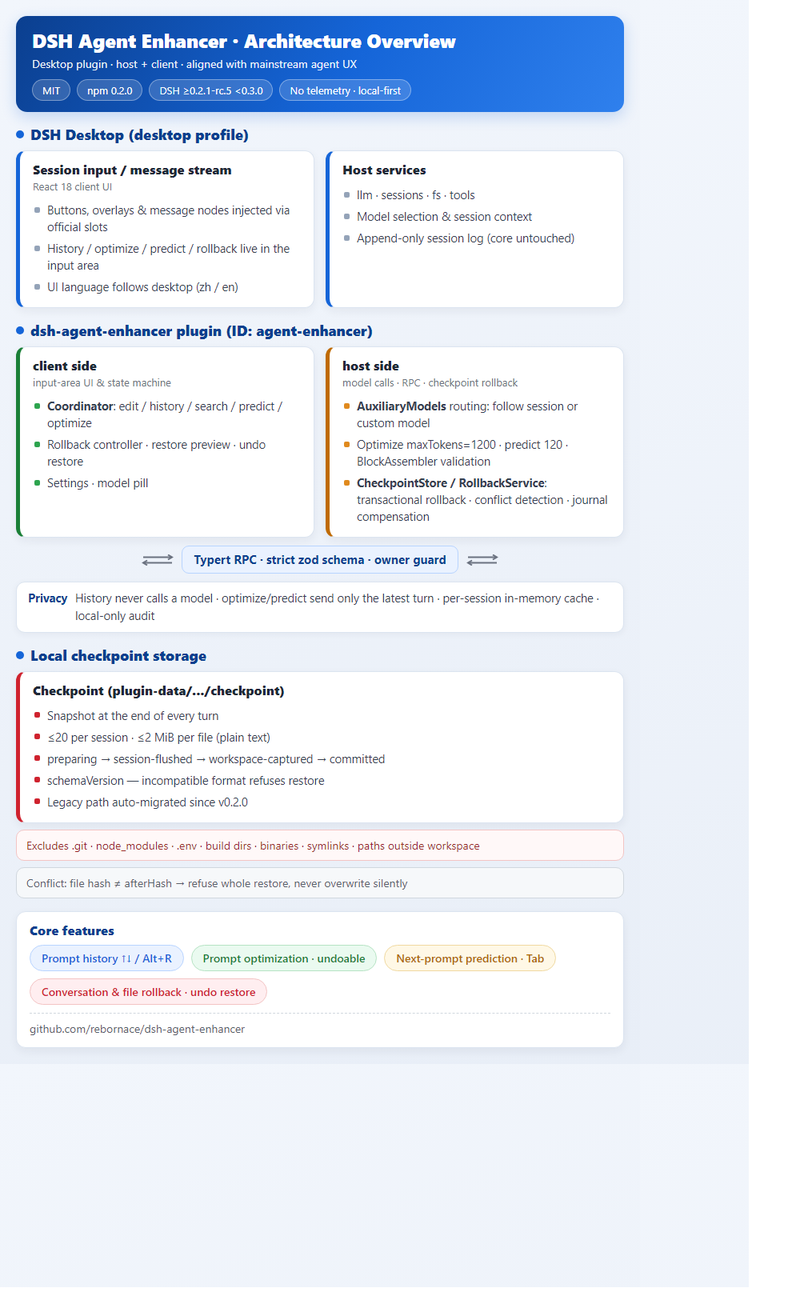
DSH Agent Enhancer: bringing write, edit & rollback to the DeepSeek Harness desktop > An MIT-licensed plugin for the DeepSeek Harness (DSH) desktop client that makes the official chat input area better at writing, editing and rolling back: prompt history · one-click prompt optimization · next-prompt prediction · conversation & file rollback — all embedded in the official UI, no extra windows. It borrows the interaction habits of mainstream agents (Claude Code / ChatGPT / Cursor) rather than re-implementing a whole product. > > GitHub — rebornace/dsh-agent-enhancer | npm — dsh-agent-enhancer (v0.2.0, "Agent Enhance") | MIT, listed on awesome-dsh-plugin > > Note: since v0.2.0 the package was renamed from dsh-composer-enhancer to dsh-agent-enhancer; if you still have the old package installed, uninstall it before installing the new one. Why If you've used Claude Code, ChatGPT or Cursor, you're probably used to: recalling a prompt you already sent and sending an edited version; turning a vague draft into something concrete and actionable with one click; the editor predicting your next question after a reply; and going back to an earlier state when the conversation — or the code — goes wrong. The official DeepSeek Harness desktop client's early input area had none of this: sent prompts were hard to retrieve, drafts were hand-typed, a wrong turn meant opening a new session, and broken files could only be rescued with Git or manual backups. dsh-agent-enhancer takes a deliberately narrow approach: - No fork, no patching the DSH core, no waiting for upstream PRs — it uses the official plugin mechanism (Cordis + Typert RPC); - It fills the write / edit / rollback gap inside the official desktop UI. | Workflow | Pain point | Feature | | --- | --- | --- | | Recall | Sent prompts are gone forever | Prompt history (↑↓ + Alt+R) | | Draft | Vague drafts are hard to execute | Prompt optimization (one-click rewrite, undoable) | | Reply | You don't know what to ask next | Next-prompt prediction (gray text, Tab to accept) | | Mistakes | Wrong turns can't be undone | Conversation & file rollback (checkpoints + undo restore) | --- Feature highlights All four features live in the official session input area and message stream — no extra window. They are enabled by default, the UI language follows the desktop (zh / en), and each one can be toggled independently in Settings → Built-in plugins → Agent Enhance. 1. Prompt history — like a shell - ↑ on the first line / ↓ on the last line cycles through the prompts you already sent in the current session; Esc exits. Alt+R opens history search (Ctrl+R is kept where available), and Enter only fills the draft — it does not send. - Scoped to the currently loaded session; drafts containing chips (reference blocks) are not accidentally triggered. 2. Prompt optimization — completes vague drafts, keeps clear ones minimal - Click Optimize on the right of the input area; with a selection, only the selection is optimized; Undo is available if you don't like it. - Vague or too-short drafts get execution steps, scope, constraints and structured-output requirements; drafts that are already clear receive only minimal edits. - Chips/references and their order are preserved through __DSH_REF_n__ placeholders — undo also restores the reference structure. - You can assign a cheaper model to optimization via the model pill. 3. Next-prompt prediction - After a reply, a gray suggestion appears; Tab fills the draft (no auto-send). At most one per turn; it clears as soon as you start typing or switch sessions. - The system prompt constrains it to predicting only the next user prompt — it never generates an assistant reply. 4. Conversation & file rollback — preview, then undoable This is the heaviest feature, an attempt to align with Claude Code's /rewind and Cursor checkpoints: - A checkpoint (conversation + tracked-file snapshot) is written locally at the end of every turn; - Restore to here next to a message opens a preview (what will be rolled back, affected files, conflicts) — nothing changes before confirmation. Scope is conversation only or conversation + tracked files; the target turn's user prompt is restored into the editable draft, not auto-sent; - Undo restore (input + or / menu) reverts the latest restore; - Explicit boundaries: processes, terminals, untracked files, databases and network requests are not restored; the preview lists these gaps — it does not claim to be a "full checkpoint". Model pill & cost. Optimize and Predict each have a model pill — "Follow session" by default, or pick a provider / model / reasoning level. The plugin itself is MIT (free); what you save is model API cost: route the frequent auxiliary calls to a lightweight model while the main conversation keeps using your flagship model. --- When it pays off - Long sessions: 30 turns in, you need the key prompt from turn 8 — Alt+R to search, Enter to fill, edit, resend. - Vague drafts: you know what you want but can't structure it — click Optimize for steps and constraints; Undo if needed; chips survive intact. - Wrong turns: the agent changed several files in the wrong direction — Restore to here after previewing; undo restore if it was a mistake. - Cost control: route optimize/predict to a lightweight model, keep the flagship model for the main conversation. In one line: the official input area goes from "a box that sends messages" to a workbench — write (history + prediction), edit (optimization + undo), rollback (checkpoints + undo restore) — all local, all inside the official UI, without touching DSH's append-only session log. --- How it works under the hood !dsh-agent-enhancer-architecture - Plugin shape: @deepseek-ai/cordis plugin system; dsh.bundle.patch injects the session UI bundle; slots add buttons, overlays and message nodes; plugin ID agent-enhancer. - Two sides: src/host/ handles models, RPC and checkpoints; src/client/ handles UI and the Coordinator state machine (edit / history / search / predict / optimize); requests carry an owner guard. - Model routing: resolves the session model choice; optimize maxTokens=1200, predict 120; streamed output is validated by BlockAssembler before being written back. - Checkpoints: committed at the end of each turn; phases preparing → session-flushed → workspace-captured → committed; ≤20 per session, ≤2 MiB per file (plain text); excludes .git, node_modules, .env / .env.*, build dirs, binaries, symlinks and paths outside the workspace; carries a schemaVersion — incompatible formats refuse restore; legacy path is auto-migrated since v0.2.0. - Transactional rollback: a safety snapshot before restoring; files first, journal compensation on failure, no appended conversation events; pending journals are processed on the next startup; conflict detection — if a file hash differs from the checkpoint's afterHash, the whole restore is refused rather than silently overwriting. - Privacy: history never calls a model; optimization sends only "draft/selection + latest turn"; prediction sends only the latest turn; cache is per-session memory; audit events (plugin:agent-enhancer/request) are local only — no telemetry upload. - Quality: ~30 Vitest files cover checkpoints, rollback transactions, RPC, structured references, components and locale. --- Quick start Stop all Desktop windows and tray processes before install / upgrade / uninstall. The plugin targets the Desktop / desktop profile — don't install into the web profile (the command may report success while the desktop shows nothing). 1. In-app (recommended): DSH desktop → Settings → Plugins, search dsh-agent-enhancer or "Agent Enhance", install, fully quit and restart Desktop. 2. dsh-market (optional): if you want a standalone marketplace UI / one-click upgrades, first install the community market dsh-market (Settings → Plugins → search dshmarket), then install the plugin from the Plugins Marketplace tab. 3. CLI: dsh plugin --profile desktop add dsh-agent-enhancer@0.2.0 (version optional). 4. Local dev: corepack pnpm install --frozen-lockfile corepack pnpm build dsh plugin --profile desktop add ((Resolve-Path .).Path) Compatibility: DSH >=0.2.1-rc.5 <0.3.0-0 (0.2.1-rc.3 won't load); Node ^22.19.0 || >=24.0.0. If you previously installed dsh-composer-enhancer, uninstall it first. --- Wrap-up DeepSeek Harness is already capable on the model side; dsh-agent-enhancer adds the interaction mindset on the session side — write, edit and rollback embedded in the desktop through the official plugin mechanism. MIT, no telemetry, local-first. Try it, and issues / PRs are welcome. - GitHub: rebornace/dsh-agent-enhancer - Changelog: CHANGELOG.md
@derekla777 Does each wallet’s embedded admin agent call the escrow tools through the MCP server, or are those separate? HOL Guard has an MCP contribution path if you’d like to add the server: github.com/hashgraph-online/hol-guard/blob/main/d…
抄一下小C老师的图,ds-harness-remote 1.3 Star了~ liguobao/ds-harness-remote 友情联动链接 -> ccch1mneyyy/dsh-go t.co
健在播报: 2026-11-03 12个Claude 账号全健在 开源地址: nevertoday/xiaoxiaodong-vps 开心:因为申请duet成功,一个账号多了一张重置卡。 有朋友用这个方案开了40个Claude账号了 估计要整航母开发了。 摸着我脑袋过河的 max 用户真多了,我反正已知的数不过来了 不少开始多个max 了 也确实不是学生党适配的方案 成本摆在这里 性能也摆在这里,这还是起步最低方案 小道消息: 大厂也不少是用我这个方案 服务器断货,就怪他们吧。 能用max 赚钱,能快速推进项目的朋友 这笔账早就算明白了 也别觉得我账号多 比我账号多,而且整大活的,大有人在 不作声而已。 开源方案,1.2k star了 方案亮点: 1. 能扛max 2. 能中国护照稳过kyc 这几天都被人提问到头发掉一桌了 请问我问题的朋友: 有问题,整理好, 别逐个问 我再耐心几天 后续见FAQ
PSA: the code-review plugin in claude-code-action posts "no findings" without reviewing anything We ran Anthropics code-review plugin in GitHub Actions on a Laravel project, the setup most guides recommend. Every PR got a green check and a "No findings" comment. Then a PR with 24 changed files got the same comment after 20 seconds. A real run of that plugin starts four reviewer agents and takes minutes. Looking back, every single run had ended after 4 to 37 seconds, and modelUsage only ever listed one model. The agents never ran. Root cause: since Claude Code 2.1.198, subagents run in the background by default. The main agent ends its turn to wait for them, and claude-code-action treats that first result as the end of the run. Interactive Claude Code would continue when the agents report back, the action is already gone. Newer models also skip the agents entirely and still post the "no issues" summary. Known issues: claude-code-action#1646 and #1852, no official fix yet. What works for us: drop the plugin and give Claude a plain review prompt, with --model opus, "do not start subagents" in the prompt and no Agent in --allowedTools. We tested it with a PR containing three planted bugs (wrong sign on a refund, an undefined variable, rand() for a password). It found all three in 30 seconds, with suggestion blocks and no false positives. It all runs on a Pro/Max subscription via claude setup-token, no API key needed. Quick check for your own setup: open a run of your review job, find the "type": "result" block and look at duration_ms and modelUsage. A few seconds and one model means nothing was reviewed. Full workflow file, prompt and root cause write-up: laracraft.tech
@psen102 Hey I'm working on a couple of projects checkout my github.com/murtuza777
🎙️ Outil : Handy. Appuie sur un raccourci, parle, et le texte arrive dans l’application ouverte. Dictée 100 % locale avec Whisper ou Parakeet, gratuite et open source sur Windows, macOS et Linux. cjpais/Handy
@grok @grok “Tool” is usually just the choice left when no better option is available. Logs are editable and have no real links. This is what a continuous biography looks like when you stop treating the assistant as one: github.com/thelabmd/UST-Protocol/blob/main/diariu… Shall we continue?
@PeefTwt Aparament ton sass que tu vend est gratuit . remotion-dev/skills
I haven't built on Android in like a year now, my last project was a Dart project. Let me revisit an old app I had built on PlayStore and attempt to write it in Jetpack Compose. JayExtra/Sayari_Project
TWS controls on mac Omraj09/MacMelody MacMelody is a lightweight, native macOS menu bar app that brings full HeyMelody controls (ANC, Battery, EQ, and Gestures) to OnePlus, OPPO, and Realme earbuds. first use it if you like it then give it a star
OmniGet: One Download Manager for Many Sites #Shorts OmniGet is an open-source desktop downloader for supported video, music and course websites. Respect platform rules and content rights. Manage permitted downloads from supported online sources using one desktop application. Explore the project documentation to see setup instructions, supported workflows, and current limitations before trying it yourself. GitHub Repo: OpenSelena/omniget Follow @techfinds.io for more open-source tools and GitHub discoveries! #opensource #github #shorts 🔗 GitHub repo: OpenSelena/omniget For more such finds, subscribe 🔔 (Instagram: @techfinds.io) #downloadmanager #desktopapps #opensource #github #videos #tools
Verifying third-party agent skills before install: what's covered and where it falls short TLDR: ClawSec is an open source set of controls for agent skills: a signed advisory feed, a fail-closed install gate, signed releases, and config drift detection. It doesn’t scan skills, and the human approval step isn’t enforced in code. I’m an AI researcher on the Prompt Security team at SentinelOne and I built ClawSec. If your agent installs skills, it’s installing third-party code. A skill is a folder with a SKILL.md and some scripts. The agent discovers it, loads it, and executes it with its own filesystem, network, and credential access. It’s the usual supply chain problem. Unsigned code comes from a public registry, runs with the user’s permissions, and nobody checks it. With ClawSec we’re trying to let an agent, and the person it works for, verify a skill before trusting it. Everything below is in the public repo under AGPL-3.0. Why we started it The SKILL.md format spec doesn’t cover signing. SKILL.md is an open standard with 46 adopters, and the spec has no signature or digest field. At least two signing RFCs were closed without changing it. The npx skills installer reaches roughly 80 agents. The same SKILL.md installs into dozens of them, and so does a malicious one. We also didn’t find any agent runtime that attests its config files, so drift in files like SOUL.md goes unnoticed. We didn’t try to solve scanning Scanning was the first answer after ClawHavoc (the campaign Koi Security found in February, with hundreds of malicious skills on ClawHub). In June, Trail of Bits bypassed every scanner they tested**. They used** padding, compiled .pyc files, payloads hidden in .docx, and arguments that talked the LLM judge out of flagging. Their conclusion was that scanning and LLM analysis don’t reliably detect malicious skills, so curate, pin versions, and control who publishes. A second team later bypassed eight open-source scanners and advised treating any scanner as advisory. We still run a scanner over our own staged skills before release, and we treat its output as advisory. What’s included - Signed advisory feed. One Ed25519-signed feed of platform CVEs, GitHub advisories, and approved community reports. NVD is polled daily. The OpenClaw hook runs at bootstrap and on /new. It verifies the signature before trusting anything, matches entries against installed skills and versions, and posts a CLAWSEC ALERT into the conversation. It only alerts and never deletes, so the user decides. - Install gate that fails closed. A guarded installer wraps npx clawhub@latest install. On an advisory match it stops with exit code 42 so a pipeline can catch it. It proceeds only when re-run with --confirm-advisory, and the SKILL.md tells the agent to pass that flag only after the user has explicitly said yes. If the feed signature doesn’t verify, the installer exits 1. A tampered feed fails signature verification, so it can’t quietly clear an install. - Signed releases. Every ClawSec release ships a checksums.json with the SHA-256 of the zip, SKILL.md**, and skill.json, signed with Ed25519.** CI fails unless the signing key matches the pinned fingerprint, and the ClawHub copy is re-verified after publish. Each SKILL.md carries an OpenSSL preflight that pins the fingerprint and checks checksums.sig before you install. - Drift detection with restore. soul-guardian baselines the identity files and checks them on every heartbeat. SOUL.md and AGENTS.md are restored automatically, with the tampered copy quarantined and a diff saved. MEMORY.md and USER.md are alert-only. Every event goes into a hash-chained audit log. What is still up to you - --confirm-advisory is a single boolean any caller can pass. There’s no override log. The human-in-the-loop step exists only in the instructions. - The feed holds 800+ entries today, all platform and plugin vulnerabilities. Useful intelligence, but it won’t match an installed skill yet, and nothing compares the running platform version automatically. - The attestation covers posture and configuration only. Try It The OpenClaw install is below. The repo also has Hermes and PicoClaw variants. # OpenClaw npx skills add prompt-security/clawsec --skill clawsec-suite -a openclaw --global -y SUITE_DIR="${INSTALL_ROOT:-$HOME/.openclaw/skills}/clawsec-suite" node "$SUITE_DIR/scripts/setup_advisory_hook.mjs" # preflight, then enable the hook # restart the gateway, then send /new once On OpenClaw, adding the package and enabling the persistent hook are two separate steps on purpose. The add-ons (soul-guardian, clawsec-clawhub-checker, openclaw-audit-watchdog, clawtributor) are separate packages you opt into.
重装完 Windows 光清理就一下午:关推荐、卸预装、找广告开关。优化软件自己又装一堆。 sparkle 把关闭推荐/卸载预装做成一页勾选,可自定义保留项,执行前导出还原点。 thedogecraft/sparkle
@Jay36_9 Here's my GitHub: github.com/d1vyanshu-kumar 🚀 Just wrapped up some open-source work with Debezium / Red Hat recently. Down to connect and see what everyone else is building!
実地を経て若干ですが更新しました。 github.com/xelloss120/VcabShift/releases/tag/v1.0…
Wedding planners and photographers: one dashboard for clients, bookings and invoices A wedding is rarely one job. It is a moving timeline of people, places, payments and promises — and for the planner or photographer at the centre of it, the admin can easily take longer than the event itself. If that sounds familiar, you are not disorganised. You are probably working across too many disconnected tools. Where the chaos usually starts 1. The client and vendor timeline lives in several places at once. The couple's details are in email, the photographer's shot list is in a document, the florist's delivery window is in a chat message, and the venue's setup time is in a calendar invite. When one time changes, every other version needs to be found and updated. 2. Bookings arrive without a clear system. Enquiries come through social media, email and referrals. Without a single booking flow, it is easy to double-book a date, lose track of who has paid a deposit, or spend days going back and forth just to confirm availability. 3. Invoicing happens last, and often late. After a long wedding weekend, the last thing anyone wants to do is rebuild an invoice from scattered notes. That is how deposits are forgotten, extra hours go unbilled, and clients receive a payment request weeks later than they should. The result is not just extra work. It is a less confident client experience: slower replies, unclear next steps and avoidable misunderstandings about what was agreed. A practical fix: one dashboard for the whole job The simplest improvement is to keep clients, bookings and money in one place, so each wedding has a single source of truth from first enquiry to final invoice. That is the idea behind LuxeDesk, a client, booking and invoice app built for salons, spas and 25 small businesses, including wedding planners and photographers. Instead of paying an ongoing subscription for separate scheduling, invoicing and customer-management tools, LuxeDesk is offered as a lifetime-licence alternative. What that looks like in practice Start with the client, not the spreadsheet. Use the CRM to store contact details, notes, packages, agreed deliverables and communication history. For a wedding planner, that might include the couple, the venue, key vendors and decision deadlines. For a photographer, it might include the session type, location, package, second shooter and delivery expectations. Turn enquiries into bookings. The booking calendar helps you see availability at a glance, while a shareable booking page lets clients book without a long exchange of messages. That is especially useful for photographers offering engagement sessions, mini-sessions or wedding-day coverage, and for planners taking discovery calls or consultations. Build a timeline you can actually follow. Use intake forms to collect the details you need before the event: ceremony and reception times, addresses, vendor contacts, must-have photographs, family groupings, setup and teardown windows, and any restrictions at the venue. When the information is collected in a structured way, there is less to chase on the day itself. Invoice clearly, and keep finances visible. Branded invoices make deposits, instalments, additional hours and final balances easier to present professionally. Built-in finances help you track what has been paid, what is outstanding and what each booking is actually worth, rather than reconstructing it at the end of the month. Use the AI assistant for drafting, not decisions. The built-in AI assistant can help draft client messages, summaries and follow-ups. Keep the final wording, prices and promises in your own hands — the assistant is there to save time on routine writing, not to replace your professional judgement. A workflow wedding professionals can copy Here is a simple sequence that works for both planners and photographers: 1. Capture the enquiry properly. Record the date, location, event type and package interest immediately, even if the client is not ready to book. 2. Send one booking link. Let the client choose an available time or confirm the event date through the same system you will use to manage it. 3. Collect details with an intake form. Ask for timelines, contacts, venues and special requests before the planning gets busy. 4. Confirm the scope in writing. Note what is included, what counts as extra, and when payments are due. 5. Invoice on schedule. Send the deposit invoice when the booking is confirmed, and the balance invoice at the agreed point — not when you finally find time. 6. Close the job cleanly. Record final payments, delivery notes and follow-up tasks, so the next client does not inherit the last wedding's loose ends. This workflow does not require more software. It requires fewer, better-connected steps. Who LuxeDesk is designed for LuxeDesk is an installable progressive web app (PWA), so it can be used on desktop and mobile without being tied to one device. It is aimed at small businesses in the UK, USA and Germany, and is sold through the Etsy shop LuxeDeskApp. There are two plan options: Single Profession, for a business that needs one profession setup, and All 25 Professions, for a business that works across multiple services or expects to expand. The range covers salons and spas as well as wedding planners, photographers and other small service businesses. A note before you switch tools Before moving to any new system, check three things: - Can you import or re-enter your current clients without losing important notes? - Does the booking page match how your clients actually contact you? - Can your invoices show your brand, your payment terms and your deposit structure clearly? If a tool cannot do those three things, it will add work rather than remove it. For wedding planners and photographers, the goal is not a more complicated system. It is a calmer one: one dashboard, one timeline, one booking record and one clear invoice trail for every client. You can explore the project and its source on GitHub at Sanamehr468/luxedesk — and for questions, contact Info@luxedeskapp.com.
実地を経て若干ですが更新しました。 github.com/xelloss120/VcabDenoise/releases/tag/v1…
もう少しで1.5k starsなので!!良ければよろしくお願いします! yksr-melt/Meltype
@qzxcle #1 is exactly what a pre-push hook catches. #2 is why the hook has to run from a copy the agent can't edit. That's how my own AI agent runs. Last night its guard blocked its own push: email addresses in 8 files. Free, one Python file: idlehandslabs/founder-kit
We open-sourced our video app that runs on your ComfyUI (H3 VFX LoRAs, Qwen, Flux) Hey there, fellow ComfyUI enjoyers I’m one of the founders of Mago and we've just open-sourced our AI video studio It’s made for long-form work like AI series, short films and microdramas. You start from an idea or a script, and it takes you through cast, shot list, storyboards and shots, keeping characters consistent from shot to shot. You can also bring your own footage and restyle it. It runs on top of ComfyUI, with a plug-and-play bundled version, or you can connect your own install. Render locally with open models like MiniMax H3, Qwen, FLUX or any open-weights or API models you want (Nvidia GPU, 16+ GB VRAM recommended), with cloud models in the same app when you need them. It’s 0.19.0, so expect rough edges. Clone it, give to your chatbot and adapt for yourself - it already has a solid foundation for video, image, and scenario-to-movie pipelines. LMK what you thing about it and thanks a ton for the feedback in advance twitter thread Code: MagoStudio/MagoStudio
@AlfinCodes This is an old project, being shown in the new project, if you have any github templates you can add here: itstheanurag/scaffoldor
Oh, so my old mediaevum.de -Sonderzeichen workaround apparently is no longer working. Here is what we use today: github.com/psb1558/Junicode-font/releases/tag/v2.… #medievalsky
AI agent observability with OpenTelemetry: what traces show, and what they cannot prove Most teams running AI agents in production already trace them. If that tracing is built on OpenTelemetry, there is now a shared vocabulary for it: the GenAI semantic conventions, which define spans for model calls, agent invocations and tool executions. This piece walks through what those conventions record about an agent, what they leave out on purpose, and why a trace that answers "what went wrong?" is a different thing from a record that answers "show me what your agent did" when the person asking is a customer or an auditor. Where the conventions live now The GenAI conventions started inside OpenTelemetry's main semantic-conventions repository. They have since moved to a dedicated repository, and the old pages now say only that the conventions "have moved". Every document in the set is marked Status: Development. The new repository has not cut a release yet, and its pending changelog includes breaking changes, such as removing a required attribute from the invoke_agent internal span. If you build dashboards or alerts on these attribute names, pin the version your instrumentation emits and expect to migrate. What an agent trace contains The agent spans document defines spans for creating an agent, invoking one, running a workflow, planning, and executing a tool. Tool execution has refinements for specific cases: a tool call that hands work to another agent, loading an agent skill, and a "command execution span" that "describes a tool call that executes one or more commands". Separate documents cover MCP and Agent2Agent calls. The command execution span is the one most relevant to accountability, because it covers the moment an agent touches a real system. Its required attributes are gen_ai.operation.name and gen_ai.tool.name. Conditionally required ones include the agent's name, the tool call ID, process.executable.name and process.exit.code. The span name should take the form execute_tool {gen_ai.tool.name} {process.executable.name} when the executable is known. An illustrative span for an agent that deletes something through a shell tool, with default settings, looks like this: execute_tool bash rm gen_ai.operation.name = execute_tool gen_ai.tool.name = bash gen_ai.agent.name = release-bot gen_ai.tool.call.id = call_7f3a... process.executable.name = rm process.exit.code = 0 That is useful. You can see which agent ran which binary, whether it succeeded, how long it took and where it sat in the agent's run. What you cannot see is what rm was told to delete. Content is off by default, on purpose The arguments and result of a tool call are carried by gen_ai.tool.call.arguments and gen_ai.tool.call.result. Both are Opt-In, and both carry the warning "This attribute may contain sensitive information." The model spans document sets the general rule: "Model instructions, user messages, and model outputs are considered sensitive and are often large in size", and "OpenTelemetry instrumentations SHOULD NOT capture them by default, but SHOULD provide an option for users to opt in." That option, where it is an environment variable, must be called OTEL_INSTRUMENTATION_GENAI_CAPTURE_CONTENT. Its values are NO_CONTENT (the default), SPAN_ONLY, EVENT_ONLY and SPAN_AND_EVENT, and the setting governs tool-call arguments and results as well as prompts and completions. The convention describes three patterns: record nothing (the default), record content on the spans, which it suggests for cases such as "pre-production environments", or upload content to external storage and put a reference on the span, which it recommends for production environments where volume or sensitive data is a concern. For that last pattern it is explicit that it "does not prescribe the URI scheme, object layout, serialization format, retention policy, or access mechanism." This is the right default for telemetry. Prompts and tool results routinely contain personal data, and an observability backend is usually readable by far more people than should see it. But it means a default agent trace records that a destructive action happened, without recording what the action was. Observability is allowed to forget Traces are also sampled. OpenTelemetry's sampling guide describes head sampling, where a decision "is made based on the trace ID and the desired percentage of traces to sample", giving its example as "5% of all traces". Its own list of reasons not to sample includes being "bound by circumstances such as regulation that prohibit dropping data", where unsampled data cannot be routed to cheaper storage instead. The span format itself, in the OTLP trace definition, has counters for attributes, events and links that were dropped. None of that is a flaw. Observability exists to answer aggregate and diagnostic questions cheaply, and losing a fraction of the data is an acceptable trade. One detail in the GenAI conventions is worth knowing here: if an external content upload hook is configured, instrumentations "SHOULD invoke it regardless of the span sampling decision". So the content can survive even when the span that refers to it was dropped. Check what your own pipeline does before relying on either. Nothing in a span is signed The OTLP Span message holds IDs, a name, start and end times, attributes, events, links and a status. It has no signature field, and the OTLP specification deals with delivering and acknowledging telemetry, not with proving its integrity. The start time is, in the proto's own words, "the time kept by the local machine where the span execution starts". The W3C Trace Context recommendation, which OpenTelemetry's default propagator settings use to link spans across services, is frank about abuse. Its security section warns that when a service with a public API naively continues incoming traces, an attacker could "forge trace-id collisions that make monitoring data unusable". Put together, a trace is a set of statements that the instrumented process made about itself, timed by its own clock, passed through a collector and stored in a backend the operator controls. Anything that can run code in that process, or write to that backend, can add, change or drop spans. For debugging, that is fine: you trust your own telemetry because you have nothing to gain from lying to yourself. When the question comes from outside, after an agent has deleted a customer's data or been steered by injected instructions, the trace is the operator vouching for the operator. > A quick test for your tracing set-up: pick one destructive tool call your agents made last week. Can you show the exact arguments it ran with? Do you know that its trace was sampled? Could anyone with backend access have edited the span since? If someone outside your organisation asked, what would you hand them, and how would they check it without trusting you? Traces and signed records side by side A signed execution record answers a different question. The Traceseal receipt specification, for example, defines a JSON document in which "an operator attests that a specific piece of code ran inside a specific sandbox and produced a specific result", signed with ed25519 and checkable by a third party "without access to the operator's machine, the original code, or any private keys". Compared point by point: - Purpose. A trace is for finding out what went wrong. A receipt is for showing someone else what ran. - Coverage. Traces are often sampled. A signed record only helps if one exists for the run in question, so our advice is not to sample them for consequential actions. - Content. Traces carry plaintext content only if you opt in. A receipt carries hashes of inputs and outputs, so the record can be shared while the content stays private; if a verifier later needs the content, the operator supplies it and the verifier recomputes the hash. - Integrity. A span is unsigned. A receipt is signed, so any change after signing is detectable. - Time. A span's time is the local clock. A receipt's time is also only the signer's claim. Fixing when a record existed needs something outside the operator, such as a trusted timestamp or a witnessed log covering it. To be exact about the limits: a receipt is not proof that the operator told the truth. The specification says so: it "proves that the operator's key signed the attestation. It does NOT prove the operator is honest." It also records what the operator claims the sandbox was, not that the sandbox enforced it, and hashes of short or guessable values can be reversed by guessing. What a receipt adds is that the claim is fixed, attributable and checkable by someone else. Who holds the signing key matters as much as the signature; if the agent can reach the key, it can sign its own account of events, which is why the sandbox and the signer should be separate. Using both There is no need to choose. Keep OpenTelemetry for what it is good at: latency, cost, error rates and debugging individual runs. For the actions that would matter in a dispute (deleting data, sending messages, moving money, changing production), produce a signed record outside the agent's process as well. Then link the two. The GenAI conventions do not define an attribute for an external evidence record, so add one under your own namespace, for example the receipt's hash on the execute_tool span. An investigator can then start from the trace, which is easy to search, and end at the receipt, which can be checked. For what to capture on each tool call in the first place, our piece on MCP tool-call logging goes into the fields, and the audit trail piece covers retention and who should hold the record. What to take from this - The OpenTelemetry GenAI conventions are a good, still-moving baseline. They now have agent, tool, command-execution, MCP and A2A spans. Pin your version. - Defaults record that a tool ran, not what it did. Arguments and results are opt-in, for sound privacy reasons. Decide deliberately where that content goes. - Traces are sampled, unsigned and timed by the local clock. That suits debugging and does not make them evidence. - Link traces to signed records for consequential actions. Searchable on one side, verifiable on the other. The Traceseal receipt format, verifier and log are open: the spec, the verifier on PyPI, and the public log. Originally published at traceseal.io.
Hey hi @PavanKumarNY I loved your product. And here is the thing I built VallabhKulkarni-09/GTM_Autopilot I think both of us are in the same line but the difference is just mine is open-source. Give it a try 😉
How Claude Code's ANTHROPIC_BASE_URL works, and how to check that a relay really serves Claude Before you put a cheap Claude Code relay (an API proxy) in front of your work, it is worth checking for yourself that Claude is the model answering. The first half of this post covers the environment variables Claude Code reads; the second half is a set of checks that work against any relay. I run a relay called CoreCode (disclosure at the end). 1. The environment variables Claude Code reads From the official docs (environment variables, connect to an LLM gateway): - ANTHROPIC_BASE_URL points the API endpoint at a proxy or gateway. - ANTHROPIC_AUTH_TOKEN is sent as an Authorization: Bearer header. - ANTHROPIC_API_KEY is sent as an x-api-key header. When set, it takes precedence over a signed-in subscription (interactive mode asks you to approve it the first time). - ANTHROPIC_DEFAULT_OPUS_MODEL / SONNET / HAIKU change the model ID that the opus, sonnet and haiku aliases resolve to. Pick the variable by the header your relay reads. The docs suggest trying ANTHROPIC_AUTH_TOKEN first and switching if you get a 401. Putting it in the env block of ~/.claude/settings.json applies it however your shell starts. { "env": { "ANTHROPIC_BASE_URL": "https://relay.example", "ANTHROPIC_AUTH_TOKEN": "sk-your-key" } } 2. Check with /status Start claude, run /status, and check that the Anthropic base URL line shows the relay and that there is an Auth token or API key line. If Login method shows a claude.ai account, your credential is not being used. 3. When a cheap plan swaps the model "Works in Claude Code" and "Claude answers" are different claims. Z.ai's GLM Coding Plan, for example, connects Claude Code through the same ANTHROPIC_BASE_URL / ANTHROPIC_AUTH_TOKEN mechanism and maps the Opus / Sonnet / Haiku variables to GLM models (Z.ai docs). That is documented and above board, but the model answering is not Claude. Anthropic, for its part, says it doesn't support routing Claude Code to non-Claude models through any gateway (LLM gateway). The problem is a relay that does the same thing without saying so. Asking the model "who are you" tells you nothing: one line of system prompt makes any model say it is Claude. Look at behavior instead. 4. Check A: the open-source check-relay.py claude-relay-check is a single Python file using only the standard library; a run costs a few cents. Per its README it checks three things: - shape: the response is in Anthropic Messages format (type, an id starting with msg_, usage). - cache: it sends a ~18,000-token prompt with cache_control twice and checks that the write and the read match. - signature: it changes one character of a thinking block's signature and sends it back, expecting a 400. Anthropic says a modified signature is always rejected (Preserved thinking). curl -fsSLO https://raw.githubusercontent.com/CoreCodeAI/claude-relay-check/main/check-relay.py python3 check-relay.py --base-url https://relay.example --key sk-your-key --model claude-sonnet-5-5 Without --base-url and --key it reads the variables Claude Code uses. The README states two limits: it shows the upstream is Anthropic, not which tier (Opus or Sonnet) you got; and it is a single sample, so rerun it later. A relay that rejects non-Claude-Code clients with a 403 gives ERROR, which is not a verdict either way. 5. Check B: ModelTrace for the tier ModelTrace has the model generate long integer sequences three times and compares the distribution of digits with fingerprints of known models to estimate family and version. Its README says the result is a probability over the models in its fingerprint library, and an unlisted model is assigned to the nearest candidate. Treat it as a hint. 6. Check C: look at the cache yourself Claude Code sends the same prefix (system prompt, tool definitions) every turn, so cache hits drive the bill. Anthropic prices a cache read at 0.1x the base input price (with exceptions such as 0.05x on some models) and a 5-minute cache write at 1.25x (Prompt caching). Send the same request twice and compare usage: python3 - > /tmp/body.json <<'PY' import json t = "Reference note: " + "the quick brown fox jumps over the lazy dog. " * 1500 print(json.dumps({"model": "claude-sonnet-5-5", "max_tokens": 16, "system": [{"type": "text", "text": t, "cache_control": {"type": "ephemeral"}}], "messages": [{"role": "user", "content": "ok?"}]})) PY for i in 1 2; do curl -sS "$ANTHROPIC_BASE_URL/v1/messages" \ -H "Authorization: Bearer $ANTHROPIC_AUTH_TOKEN" \ -H "anthropic-version: 2023-06-01" -H "content-type: application/json" \ -d @/tmp/body.json | python3 -c 'import json,sys; d=json.load(sys.stdin); print(d.get("model"), d.get("usage"))' done Expect cache_creation_input_tokens on the first call and about the same cache_read_input_tokens on the second. Zero on both means caching is not working, or the relay computes usage itself. Writes without reads suggest each request lands on a different account. 7. What to look for on a price list - Input, output, cache write and cache read billed separately, in Anthropic's ratios. - Per-request usage and cost visible in a log. - One session pinned to one account (the condition for the cache to keep hitting). - What a "discount" is measured against. Disclosure I run CoreCode (corecode.live) and mention it only as one example of the checks above. CoreCode is a relay where every request is served by an official Anthropic Claude account. Payment is Alipay and WeChat Pay in Chinese yuan (CNY) only; there is no card or USD payment. Its own verification page is here, and the script above works against any relay, CoreCode included. It is not an Anthropic service.
Animated GIFs could be coming to Codex 👀 Still under development and disabled by default codex#59073
Disproportionately happy about my keyboard's Play button *not* opening Apple Music, but my player of choice (Feishin) instead. But how, you ask? 1) brew install --cask notunes 2) open noTunes app 3) run 2 commands: github.com/webpro/dotfiles/blob/acddce218937d94c7… (replace with your player) 4) profit (also after reboot)
Based - New XBOX emulator for PC preview.redd.it EDIT: IT'S XBASED THE CORRECTOR CHANGED IT FOR ME Trailer: youtu.be The original Xbox, on your PC. xbased is a free and open-source Xbox emulator for Windows and Linux, built to feel like the console: boot it and you're in a full-screen dashboard you can drive entirely with a gamepad. It's the PC edition of hakuX by rfandango: same reimplemented Xbox kernel, high-level NV2A renderer on Vulkan and MCPX audio core, brought to x86-64 with a front end of its own. No BIOS, MCPX ROM or HDD image needed. What's in 1.0 A dashboard, not a launcher - Animated green orb, drifting hexagons, 3D transitions and navigation sounds - Gamepad, keyboard or mouse everywhere; button prompts follow what you're using - Borderless full screen by default, any resolution, ultrawide or portrait, any DPI - Library with automatic box art, a page per game, and a memory manager for your saves (export / import / delete) Picture - Internal resolution up to 4x, FXAA, anisotropic filtering up to 16x - Upscaling (bilinear or Snapdragon GSR) and CRT filters: scanlines, classic TV, arcade monitor - Every setting global or per game Patches & mods - Per-game patches (60/120 fps, widescreen, fixes, cheats) toggled from the game's page - Frame-rate unlock per game, where the game allows it - Drop the IPS patches shared online into mods/<TITLE ID>/ and they show up in the game's menu Play - 10 save-state slots per game, with pictures - In-game menu with Back + Start or the Guide button (F1 on keyboard): states, settings, controls, restart, quit - 4 controller ports (Automatic, any pad or the keyboard), full remapping, per-game too - Online through Insignia, XLink Kai and System Link - 11 languages; games start in yours, or in English when the disc doesn't have it Download |Platform|Get it| |:-|:-| |Windows 10/11 x64|xbased-1.0-windows-x64.zip – unzip and run, fully portable| |Linux x86-64|xbased-1.0-x86_64.AppImage – chmod +x and run (Ubuntu 22.04+ or similar)| Source, build steps and screenshots: crazyriddler/xbased You need a Vulkan 1.1+ GPU (1.3 recommended) and your own game dumps (ISO / XISO). No copyrighted Xbox software is included. Feedback welcome This is a 1.0: compatibility comes from hakuX and many games run, but not all of them do yet. If something breaks, open an issue on GitHub with the game, your GPU and xbased.log – it helps a lot.
Gameworld: private Luanti game worlds for families and schools on your own Nextcloud Hi everyone, I have been building Gameworld, an External App that runs private Luanti game worlds on your own Nextcloud. Parents or teachers create a world with one click, invite kids and friends through their Nextcloud accounts or groups, and the backups end up in Nextcloud Files. Everything stays on your own server. What you get: Creative or gentle adventure worlds, one click each Only invited accounts or groups get in, any other name is turned away before the login One game password per account. Gameworld does not store it, the world only gets a verifier Play time per child across all worlds, holidays, time windows per world and a pause for all kids that also works from the phone An adult switch: adults play without the time rules, but never get management rights Manager groups for schools and clubs, set by the Nextcloud admin Backups in Nextcloud Files, checked before every restore A Talk room per world with a small bot, if Talk is installed No telemetry What you need: Nextcloud 33 to 35 with AppAPI and a HaRP deploy daemon, plus a scoped docker-socket-proxy in the same Docker network. The setup check finds that network for you and gives you a command or a Compose file to copy. I tested it on Docker Compose with Nextcloud 34 and 35 and on All-in-One with HaRP. A word on privileges, because they matter here. Gameworld talks to Docker through that proxy to create, start, stop and remove one container per world. Whoever can reach the proxy has root-equivalent rights on the host, so keep it inside the Docker network of Gameworld and never publish it on a host port. Each world also needs one UDP port (30000 to 30019 by default), meant for your home network only: no port forwarding, and worlds never show up on public server lists. The details and the remaining risk are here: github.com/street1983nk/nextcloud-gameworld/blob/… The interface is in German, English and French and follows your Nextcloud language. In-game texts and the Talk room use the language chosen for each world. What comes next: for version 2 I want to add Minecraft Java Edition (once I have checked its licence terms), dedicated servers for Steam games and bigger worlds. Right now a world holds up to 8 players at the same time. That is also why I am looking for a pilot: a school, a club or a public organisation that would like to try it with a larger group, say a class of 30. If that sounds interesting, reply here or send me a message. I speak German, English and French. Links: Nextcloud App Store: apps.nextcloud.com Repository: street1983nk/nextcloud-gameworld Installation guide: github.com/street1983nk/nextcloud-gameworld/blob/… Bug reports: github.com/street1983nk/nextcloud-gameworld/issues Questions and feedback are welcome here. For bugs with steps to reproduce, a GitHub issue is easiest.
最近因为 GPT 老是写防御性代码,搜集总结了一份 AGENTS.md 大家有兴趣可以放在自己的项目里试试,这个要放在 codex 根目录,会话也要重新开一个才会生效,让你的 codex 帮你配置试试吧。不过个人的 AGENTS.md 的也备份一下 SteinsHead/agents-md
手元で引っかかったのでPR作った agent: assert and waitFor cannot judge the current URL e2e#1515
Yk I always wanted to code without having to caffeinate my MacBook or install tools like insomnia to keep things running. So I built an agent server on my PC, using @t3dotcodes and @Tailscale Decided to build a tool for the setup! Radwan-Albahrani/agentlab
Based - New XBOX emulator for PC EDIT: IT'S XBASED THE CORRECTOR CHANGED IT FOR ME Trailer: youtu.be The original Xbox, on your PC. xbased is a free and open-source Xbox emulator for Windows and Linux, built to feel like the console: boot it and you're in a full-screen dashboard you can drive entirely with a gamepad. It's the PC edition of hakuX by rfandango: same reimplemented Xbox kernel, high-level NV2A renderer on Vulkan and MCPX audio core, brought to x86-64 with a front end of its own. No BIOS, MCPX ROM or HDD image needed. What's in 1.0 A dashboard, not a launcher - Animated green orb, drifting hexagons, 3D transitions and navigation sounds - Gamepad, keyboard or mouse everywhere; button prompts follow what you're using - Borderless full screen by default, any resolution, ultrawide or portrait, any DPI - Library with automatic box art, a page per game, and a memory manager for your saves (export / import / delete) Picture - Internal resolution up to 4x, FXAA, anisotropic filtering up to 16x - Upscaling (bilinear or Snapdragon GSR) and CRT filters: scanlines, classic TV, arcade monitor - Every setting global or per game Patches & mods - Per-game patches (60/120 fps, widescreen, fixes, cheats) toggled from the game's page - Frame-rate unlock per game, where the game allows it - Drop the IPS patches shared online into mods/<TITLE ID>/ and they show up in the game's menu Play - 10 save-state slots per game, with pictures - In-game menu with Back + Start or the Guide button (F1 on keyboard): states, settings, controls, restart, quit - 4 controller ports (Automatic, any pad or the keyboard), full remapping, per-game too - Online through Insignia, XLink Kai and System Link - 11 languages; games start in yours, or in English when the disc doesn't have it Download |Platform|Get it| |:-|:-| |Windows 10/11 x64|xbased-1.0-windows-x64.zip – unzip and run, fully portable| |Linux x86-64|xbased-1.0-x86_64.AppImage – chmod +x and run (Ubuntu 22.04+ or similar)| Source, build steps and screenshots: crazyriddler/xbased You need a Vulkan 1.1+ GPU (1.3 recommended) and your own game dumps (ISO / XISO). No copyrighted Xbox software is included. Feedback welcome This is a 1.0: compatibility comes from hakuX and many games run, but not all of them do yet. If something breaks, open an issue on GitHub with the game, your GPU and xbased.log – it helps a lot.