Mentions
Conversations linking to GitHub, newest first. Times are UTC.
Mentions by source
X
Bluesky
Hacker News
Lobsters
V2EX
Qiita
DEV
Mastodon
Latest posts
@CryptoHorseee @schizophyllume ca is in the github repo schizophyllume/BeeLLM
Aliens: Colonial Marines PCVR Hi folks, Can you please try my port. cyberheater/AliensColonialMarines-PCVR Spent a lot of time optimising for PCVR and ensuring hud elements look okay. Tested on PSVR2 and Oculus Quest. Due to limited buttons on the controllers some of the functions are accessed by two button combos. ACM-VR CONTROL SCHEME (PS VR2 Sense / Quest Touch -> Xbox button -> game action) BASIC CONTROLS Right trigger -> RT -> Fire Left trigger -> LT -> Aim down sights (better accuracy, slower movement) Left stick -> Left stick -> Move, towards where your head faces Right stick left/right -> (mod) -> Snap turn, 30 degrees Right stick up -> Flashlight Right stick down -> Sidearm Right stick click -> Melee Left stick click -> Sprint Cross / A -> Jump Circle / B -> Crouch Square / X -> Reload / use / pick up Triangle / Y -> Swap weapon; hold for the weapon wheel which is controlled by right stick (pick with the right stick, release to select) Left grip -> Scanner Right grip -> Secondary Fire TWO-BUTTON COMBOS Square + Triangle / X + Y -> Start: pause menu Cross + Circle / A + B -> Back: objectives / scoreboard (hold) MOD FUNCTIONS Both stick clicks held for 1 s -> Recentre the view Both stick clicks + right stick up/down -> Raise or lower your height (saved) Tap left stick click, standing still -> Step through gun calibration Let me know how you get on.
Native Half-Life port for the Thor: the game on the top screen, the whole HEV suit (health, armor, every weapon) on the touch screen (open source, APK) I wanted Half-Life on the Thor without the HUD covering the game, so the HUD moved to the second screen. - Native Android port (arm64), based on Xash3D FWGS + the Half-Life SDK – no emulator, no Windows layer - Top screen: just the game, 1920×1080, GLES3 - Bottom screen = HEV deck: health/armor, the full arsenal with ammo (tap to select), pickups, hazards (radiation, water), map name, flashlight, quicksave/quickload, menu - Opposing Force and Blue Shift work too, each with its own deck (night vision, Displacer etc.) - Controller: RT fire, LT alt fire, A jump, B duck, X reload, Y use, LB/RB weapon, d-pad up flashlight Measured while playing (~18 min): 60.0 fps average, lowest sample 58.5 (loading screens excluded), ~24 % of one CPU core, battery ≤ 31 °C (on AC). Honest notes: - You need your own Half-Life (Steam). The APK contains no Valve data. - In this clip I started Surface Tension from the console with all weapons (sv_cheats / impulse 101) to show the full deck. - Screen recordings have no game audio. - Written with an AI coding assistant. Fan project, not affiliated with Valve or AYN. Source + APK (GPL-3.0 engine, HL SDK part free only): harmssi/thor-halflife Release 0.1.0: github.com/harmssi/thor-halflife/releases/tag/v0.… Full video: youtu.be Feedback welcome – especially controller layout and what else should go on the deck. Install guide (2 min, recorded on my Thor): youtu.be If it works for you, a ⭐ on GitHub helps the project, and if you want more dual-screen ports for the Thor (Red Alert 2 and a Fallout Pip-Boy are next), subscribing on YouTube is the best way to support it.
终端里找文件,用 fzf 搜名字,再让 bat 预览带行号的代码,少开几次编辑器。 bat 还能在侧栏标出 Git 改动。长文件可以限制预览行数;重定向输出时默认回到纯文本,想保留颜色得另设参数。 sharkdp/bat t.co
Every failure gets written down, near misses included, in a public risk ledger: HydraSystemsLab/hydra-core
I added LLM support on top of the original creature AI in Black & White so you can better bond with your creature: talk to it, teach it, command it, sing along with it (with the MP3 mod) or just listen to him describing his thoughts. Compatible with the VR mod too!
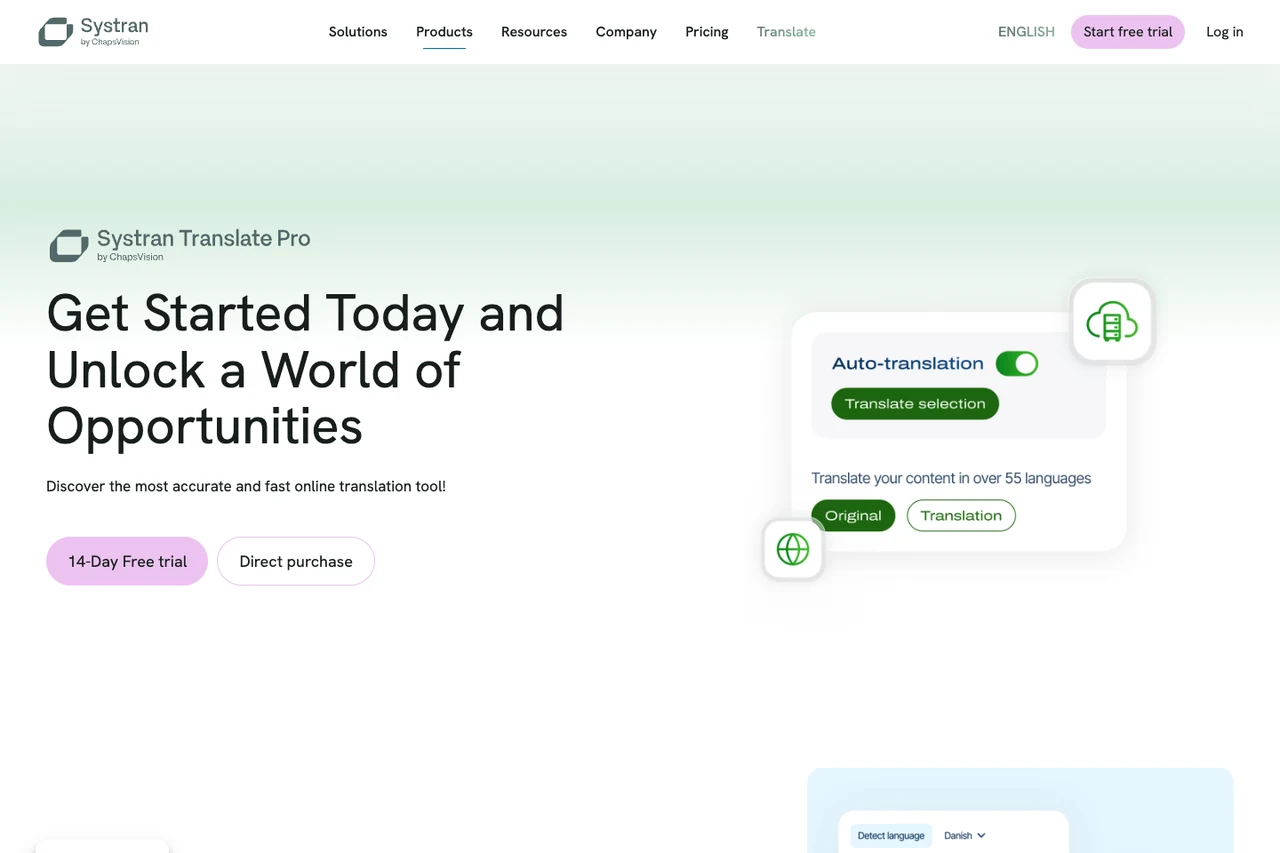
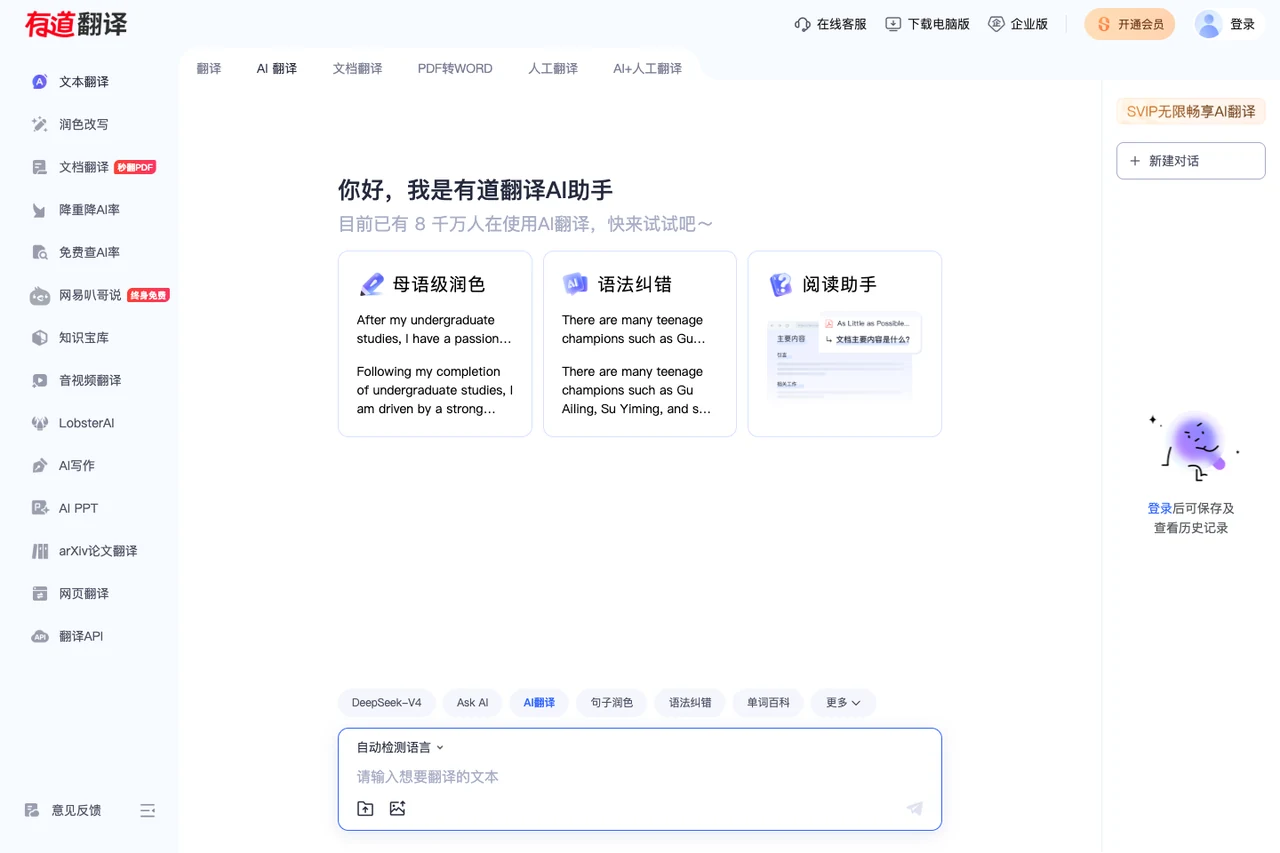
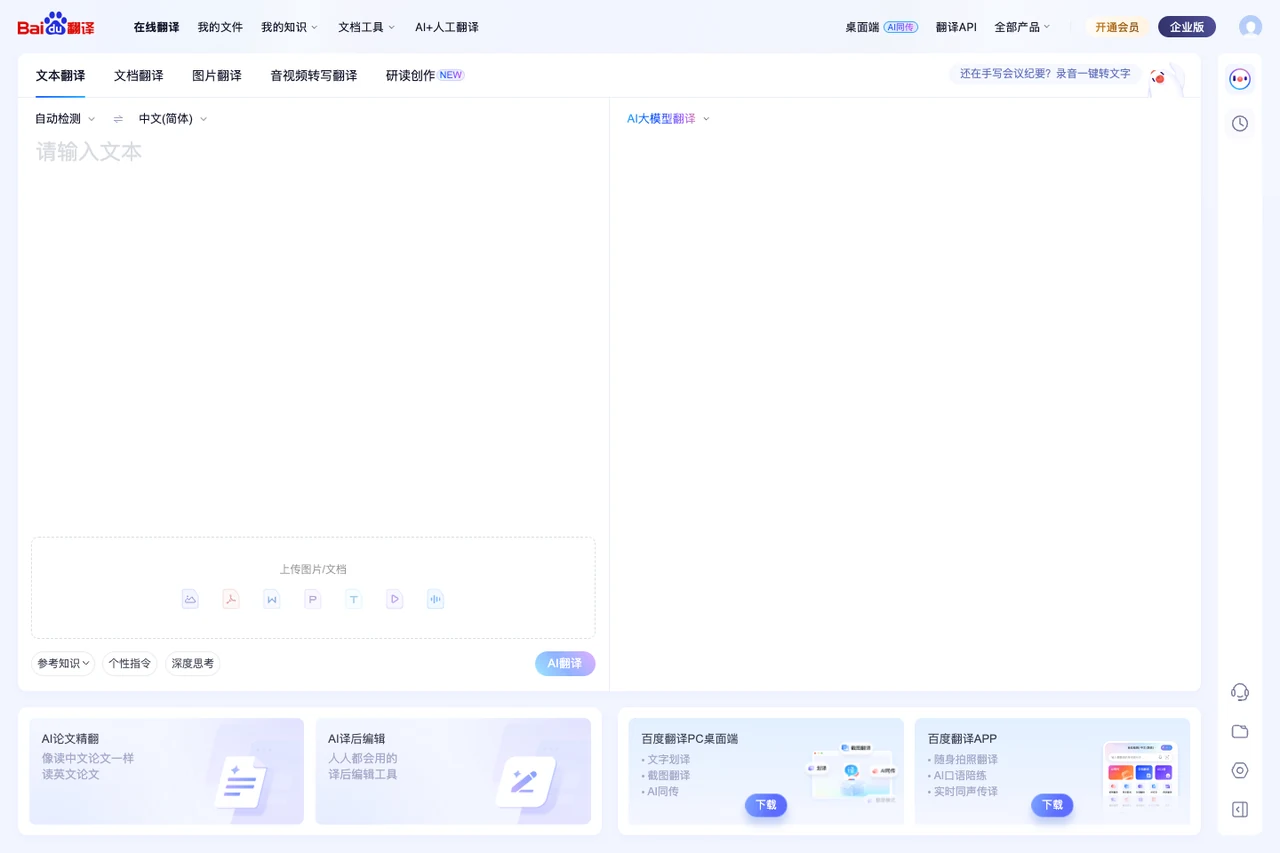
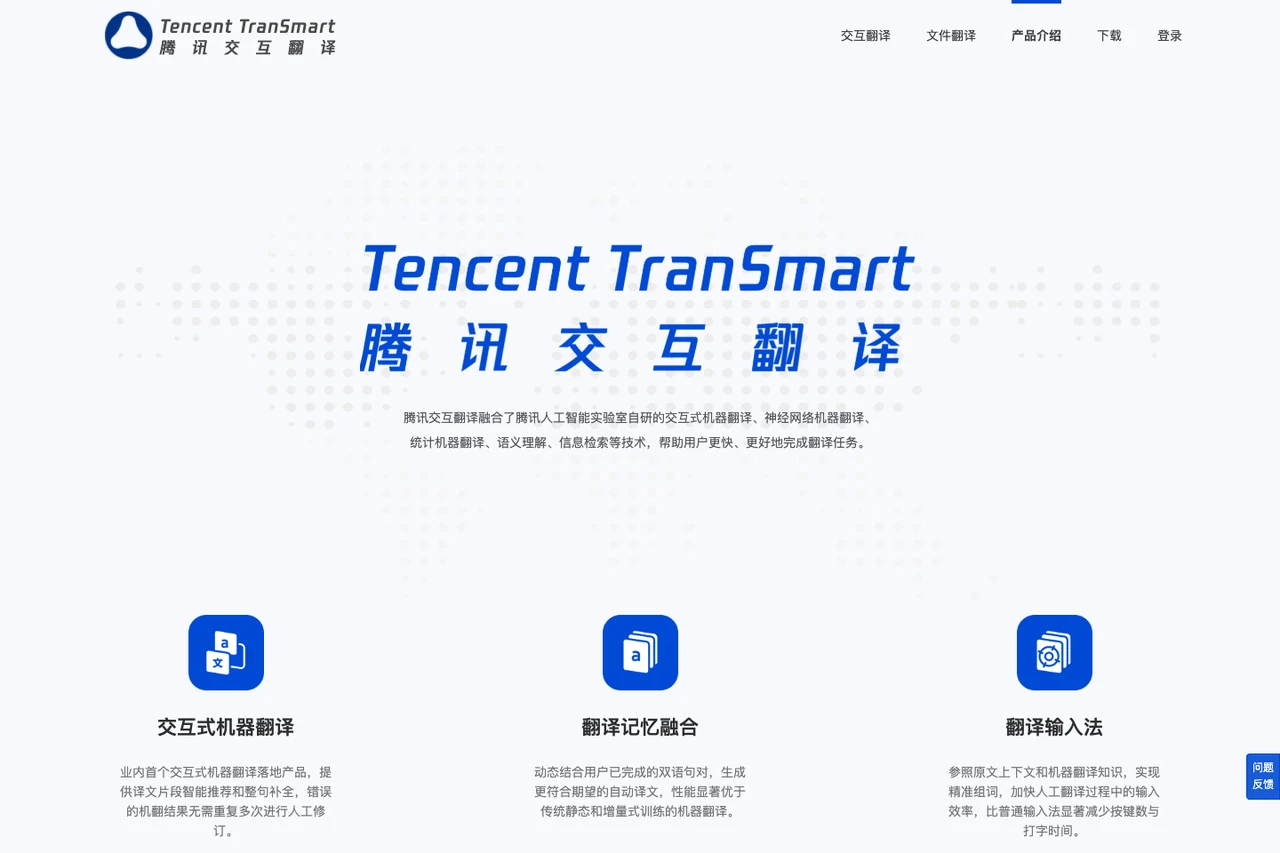
Choose the Right Translation Tool by Task: A 2026 Guide (Disclosure: We are the Equalang team, the makers of the tool used in this guide.) Every day, people encounter translation tasks across distinct settings: deciphering a street sign or restaurant menu on a mobile phone, reading an article formatted on the web, reviewing a business contract with complex tables and clauses, or following along with an uncaptioned video stream. A single, generic translation text box is rarely sufficient for all these jobs. Copying text into a box provides quick phrasing assistance, but it cannot preserve the visual structure of a formatted slide deck or generate synchronized dual-language subtitles during video playback. By 2026, translation tools have developed specialized interfaces tailored to specific workflows. We are the Equalang team. In this guide, we review the public features, accessible portals, and practical conditions of 20 prominent translation tools to help you identify the right solution for your specific task. --- 1. On-the-Go Travel & Spoken Exchange: Multi-Modal and Spoken Inputs Travel and fieldwork demand quick activation, reliable multi-modal recognition, and offline readiness when network connectivity is limited. Google Translate Google Translate on mobile integrates instant camera OCR, photo imports, handwriting input, and split-screen face-to-face conversation. Travelers can download language packs in advance for offline text and offline camera translation. Spoken conversational translation includes multiple display layouts, though offline live speech interpretation is limited to specific Pixel devices and selected language pairs. On desktop browsers, Google Translate provides a dedicated document translation portal that accepts DOCX, PDF, PPTX, and XLSX files. This desktop tool is designed for digital files; scanned PDF pages containing pure images are preserved in the downloaded file without OCR translation.  Apple Translate For iPhone and iPad users, the system-level Apple Translate app requires no separate installation. It handles typed text, voice input, camera text detection, and split-screen face-to-face conversation. Its conversational mode can automatically detect which language is being spoken, eliminating the need to manually toggle the microphone between speakers. Downloaded language packs enable on-device text lookups without a cellular connection. Within the Apple operating system, live translation features also extend to Messages, Phone, and FaceTime. Live phone call translation is part of Apple Intelligence, requiring compatible hardware and system versions, and is subject to regional eligibility rules (for example, devices purchased in mainland China currently do not support these advanced Apple Intelligence call features).  Microsoft Translator The Microsoft Translator mobile app provides text translation in 100+ languages, real-time speech translation, and image translation. Its multi-device conversation feature (including Presenter mode, room codes, and browser joining) has been retired, as documented in the iOS App Store release notes and the Microsoft Speech SDK release notes. The consumer app does not support translating external movies, video files, or media recordings directly. While Microsoft's feature overview lists single-device split-screen translation, offline language packs, and a phrasebook, the current App Store description lists text, speech, and image translation, so check inside the app before relying on offline packs or the phrasebook.  Papago Developed by NAVER in South Korea, Papago provides practical features for East Asian languages including Korean, English, Japanese, and Chinese. On mobile devices, its application offers face-to-face dialogue, an Edu mode for creating study notes from printed text, and the Papago Mini floating window, making it handy for dining, transit queries, and study in Korea. For web page translation, available entry points differ between platforms: NAVER has discontinued the standalone website translation tool on the desktop web portal, directing PC users to its Papago-powered Whale browser, while the Papago mobile app still retains a website translation option within its side menu. For offline use, downloading language packs on supported devices enables offline text and voice translation across Korean, English, Japanese, and Simplified Chinese (with offline voice subject to device memory and system requirements per NAVER's offline guide); offline mode does not cover photo OCR, conversation mode, web pages, or document files.  iTranslate iTranslate is recognized for its integrated Keyboard Extension. When drafting messages in WhatsApp, iMessage, or email, users can translate text directly within the keyboard interface, avoiding constant switching between separate apps. It also provides downloadable packs for common travel expressions and basic phrasebooks through its offline tools, making it practical to review essential phrases before traveling. Feature availability varies across operating systems, and offline voice capabilities are restricted to a select list of major languages. ---  2. In-Context Web Reading & Language Learning: Reading Without Leaving the Page When reviewing foreign articles or documentation, jumping back and forth to an external translation tab interrupts focus. In-context tools embed translation directly into the active reading environment. Immersive Translate Immersive Translate is a browser extension that inserts translated paragraphs directly beneath the original web text, presenting a clean bilingual layout. It also supports creating bilingual EPUB e-books, viewing PDFs, and translating text inside browser input fields. For multimedia, Immersive Translate translates existing subtitle tracks on platforms like YouTube and Netflix, while its AI video translation can recognize speech to generate bilingual subtitles for uncaptioned videos on sites like YouTube, alongside a dedicated YouTube live translation portal. Subtitle generation from uncaptioned audio depends on browser compatibility, platform support, and audio clarity.  Mate Translate Mate Translate is tailored for macOS, iOS, and mainstream desktop browsers. While browsing, double-clicking any word displays an immediate pop-up definition, selecting text brings up quick contextual translations, and full-page dual-language switching is supported alongside a persistent Mac menu-bar utility. For language learners, Mate allows users to click words on web pages or within Netflix subtitles to save them to a custom Phrasebook, which supports custom categorization and CSV export for external review. In desktop browsers like Chrome, its extension also allows users to select text within the built-in PDF viewer to trigger translations directly.  Reverso For writers and learners seeking to verify natural word usage, Reverso Context provides bilingual sentence pairs drawn from films, international publications, and multilingual websites, accompanied by verb conjugation tables and synonym recommendations. Because example sentences originate from public multilingual corpora, users should assess context suitability for sensitive or formal drafts. Its document portal, Reverso Documents, accepts PDF, Word, PowerPoint, Excel, and select localization files. It provides an in-browser segment-by-segment review interface where teams can collaborate on edits before downloading the completed file.  Yandex Translate The Yandex Translate web portal and mobile apps handle text, images, websites, and documents. Its Android client includes a detailed dictionary that displays phonetic transcriptions, definitions, synonyms, and morphological inflections for supported languages. On mobile, the Android app comes with a pre-installed English-Russian offline dictionary, while additional language packs can be downloaded for offline typed text translation. The desktop interface accommodates standard Office and PDF uploads. Note the distinction between Yandex Translate as a standalone service and Yandex Browser, which houses proprietary automatic video voiceover features. ---  3. Complex Document Layouts & Enterprise Workflows: Preserving Formats and Assets When handling presentation decks, supplier contracts, or technical manuals, distorted layouts require significant manual correction. These tools prioritize layout preservation, terminology control, and asset reuse. DeepL DeepL Translator offers detailed configuration options for text and document workflows. Users can build Glossaries to enforce preferred company or technical translations, and toggle between formal and informal tone registers in supported languages. Its document translation service accepts Word, PDF, PPT, Excel, HTML, and SRT files (with format access varying by account type). The product ecosystem also includes DeepL Write for text polishing, DeepL Voice for Online Meetings for real-time captions on Teams and Zoom (requiring Voice licensing and host permissions), and an official Model Context Protocol (MCP) guide for AI agents.  O.Translator O.Translator focuses on layout-preserving document translation. In addition to PDF, Word, PPT, and Excel, it supports publishing and localization formats such as EPUB e-books, InDesign (IDML), Illustrator (AI), OpenDocument, subtitle files (SRT/ASS), and comic archives (CBZ/CBR), with built-in OCR for scanned pages. Layout accuracy depends on font embedding and target text expansion. Before translating an entire file, O.Translator allows users to inspect a partial layout preview. It supports importing glossaries via XLSX or TBX, and provides a developer API. Its media option is designed for transcribing uploaded audio and video files into subtitle files, rather than real-time browser stream translation.  SimplifyAI SimplifyAI operates two distinct websites: an AI-driven Complex Document Workbench (simplifyai.cn/zh) and a General Document Translation portal (translate.simplifyai.cn). Within the workbench, the system can extract high-frequency terms prior to translation for user review across Word, PPTX, InDesign, PDF, and EPUB files. The workbench also provides AI Editing for Word and InDesign (supporting native Word track changes), bilingual data export (Excel/XLIFF), structured Markdown/JSON extraction, and visual checks for text overflow and font layout, making it well-suited for prepress and design asset localization. For straightforward everyday file translation, the general translation portal offers a simpler direct flow.  Lingvanex Lingvanex provides desktop, mobile, and browser clients across Windows and macOS. Its Windows desktop translator supports system-wide shortcuts (such as double-tapping Ctrl+C on highlighted text) and allows offline text and local DOCX/ODT file translation after downloading language packs. Beyond consumer applications, Lingvanex offers downloadable Secure Translation Software desktop software for offline enterprise use, as well as separate On-premise Machine Translation solutions for private network environments.  SYSTRAN SYSTRAN targets enterprise and institutional localization requirements. Its cloud service, SYSTRAN Translate Pro, is available immediately for Word, PowerPoint, Excel, and PDF files, offering pre-configured domain models for legal, financial, and industrial documentation alongside custom glossaries and translation memory (TM). For organizations with data sovereignty requirements, SYSTRAN provides Translate Server for deployment behind corporate firewalls, Private Cloud dedicated environments, and batch APIs for document pipelines. ---  4. Academic Writing, Refinement & Human-in-the-Loop Collaboration: Polishing the Output Translation is often the initial phase of a broader writing or research workflow. Checking dictionary definitions, polishing phrasing, and interactive human-machine editing help ensure formal scholarly standards. Youdao Translate (NetEase Youdao) Connecting with NetEase Youdao's dictionary ecosystem, Youdao Translate links vocabulary lookup, translation, and writing assistance. In addition to standard text and file translation, its web portal offers dedicated entries for "arXiv Paper Translation" and academic text polishing. After translating research excerpts, users can run grammar checks, evaluate synonym choices, or adjust academic tone, helping students and researchers review foreign literature and draft manuscripts. Format and language scopes for paper polishing and media modules differ from the general dictionary lookup.  Baidu Translate Baidu Translate provides broad client coverage for Chinese-speaking users. Its desktop software features a compact floating window and shortcut text selection across local desktop apps, while its mobile app combines photo translation, spoken practice, and dictionary references. In addition, Baidu hosts a standalone Baidu Video Translation portal. Users upload media files to generate bilingual subtitle files, review and edit them in an online editor, and export the finalized subtitle transcript. This is an upload-based post-production tool rather than an automatic interpreter for live web playback.  TranSmart (Tencent Interactive Translation) Developed by Tencent AI Lab, TranSmart is designed around interactive human-machine collaboration. Rather than generating a static output for copying, TranSmart suggests word-level and sentence-level predictive completions in real time, integrating confirmed bilingual pairs into active translation memory. Translators can place their cursor anywhere in the translated text to make adjustments, prompting the system to refresh downstream suggestions dynamically. This keeps terminology decisions and sentence pacing in the hands of the user, operating as a collaborative editor distinct in focus from Tencent's standalone consumer dictionary mobile apps.  LingoCloud (Caiyun Xiaoyi) LingoCloud is widely used for Chinese, English, and Japanese workflows. Its browser extension delivers bilingual side-by-side web reading with shared and personal glossary support. On mobile devices, its document translation service accepts formats like PDF, Word, PPT, Excel, EPUB, TXT, and SRT, delivering downloaded outputs primarily in PDF or Word format depending on the source file. Its desktop software also features LingoCloud Interpretation, which captures microphone audio as well as Windows system audio to render live dual-language subtitles for online courses and lectures (internal system audio capture is currently unsupported on Mac).  QuillBot Translate QuillBot Translate operates within QuillBot's writing and editing ecosystem. When translating text, the interface provides formality options and displays definitions and synonyms in supported languages. Translated text can be copied smoothly into its Paraphraser and Grammar Checker to refine sentence flow. The platform also maintains a dedicated Translate PDF page for uploading and reviewing single PDF documents. Supported languages vary between the translation, grammar, and paraphrasing tools. ---  5. End-to-End Interconnection: How Equalang Approaches Modern Workflows Reviewing these 19 tools demonstrates that each service has developed clear capabilities for specific tasks. In everyday work, however, requirements frequently intersect: You might read an online white paper in your browser, download an accompanying PDF with tables and diagrams, watch a video lecture without captions, and then prepare an executive summary in Word while coordinating directly with international collaborators. Switching between isolated software tools and file converters fragments the workflow. We designed Equalang to connect these tasks into a continuous, side-by-side translation workflow, delivering coordinated translation support across documents, web pages, videos, and live communication.  1. Whole-File Document Translation with Layout Preservation When translating full documents, Equalang focuses on structural preservation and post-translation usability, providing tailored workflows across research literature, presentations, and everyday office files: - PDF Documents & Reading: Equalang preserves multi-column layouts, headers, footers, and captions, reconnecting sentences split across page breaks before translating, while maintaining table structures, inline formulas, and internal document links. As outlined in our academic PDF reading walkthrough, readers can view the translated file alongside the original in a side-by-side layout, grasping core arguments in their primary language first before cross-referencing specific terminology and data on the original page. - PowerPoint Presentations: In our slide deck formatting guide, translated PPTX files preserve native editable tables rather than flattening them into static images. Word-level styling—such as bolding, italics, and font colors within a single sentence—is accurately mapped to corresponding translated phrases. Key terms and headings remain consistent across slides, and text boxes automatically scale down font sizes when translations expand to prevent text overflow or covering graphics. - Word & Excel Office Files: In our verified Word translation test, translated DOCX files retained headings, bulleted lists, pricing tables, and bold formatting, allowing direct editing in Microsoft Word. In our Excel price sheet validation, formulas and numbers remained untouched while duplicate text strings across cells were translated only once. - E-Books & Media Processing: EPUB files retain table-of-contents navigation and internal anchor links. Audio and video recordings up to 180 minutes can be processed via file task APIs or AI assistant Skills/MCP to generate timestamped bilingual SRT/VTT subtitle files or original text transcripts. 2. In-Browser Reading & Subtitle Generation Through our lightweight browser extension (with installation guides for Chrome, Edge, and Firefox, plus a temporary Mac Safari mode for Safari 18.4+), translation integrates directly into your daily reading: - Bilingual In-Page Reading: Translated paragraphs appear directly beneath the original text as you scroll. A floating icon can be toggled in settings for on-demand word lookups. When reading local PDFs, users can enable "Allow access to file URLs" in extension management to select and translate words directly on the page. - Bilingual Video Subtitles: Compatible with YouTube, Netflix, TikTok, and Bilibili, as explored in our bilingual video viewing guide. Beyond translating existing subtitles, the extension can capture audio streams to generate real-time bilingual subtitles for uncaptioned videos (subject to browser environment and media encryption limits, verified on YouTube live streams and official trailers), while simultaneously translating live chat comments on YouTube. 3. Installation-Free Spoken Communication & On-Site Exchange Requiring conversational partners to install dedicated mobile applications creates friction, especially while traveling. When connected to the internet, Equalang delivers on-the-go photo translation and spoken interpretation directly inside standard browsers (requiring only an initial sign-in and device camera/microphone permission on first use), as outlined in our international communication guide: - Mobile Photo Translation: When encountering unfamiliar restaurant menus, signs, or public notices while traveling, users can snap a picture in their mobile browser. Translations overlay directly onto the photo layout, making it easy to order drinks or review notices against the original image, as illustrated in our travel photo translation guide. - Face-to-Face Mode: Designed for in-person situations such as hotel luggage storage, asking directions, or front-desk interactions. Two speakers can place a single phone or tablet flat between them, using an inverted split-screen or side-by-side view with continuous two-way transcription and transcript export, as shown in our travel face-to-face guide. - Live Listening: Captures ambient speech via the device microphone during an in-person lecture, class, or meeting to display live bilingual subtitles on the web page, with optional text-to-speech reading and transcript export when finished. - Translated Calls: Hosts log in on the web portal to generate a secure call link and share it via any messaging app. Guests join directly through their browser without creating an account or installing any software—they simply enter a display name and the host admits them to begin the call. Both parties speak their native language, hear translated audio, and view real-time text. 4. Integration for AI Agents and Developers To help developers and teams embed translation into automated workflows: - Developer API: Features instant endpoints for text alongside asynchronous file jobs supporting Idempotency-Key retries and callback notifications, as detailed in our file translation API integration guide. - Skill & MCP Integration: We maintain open-source Agent Skills via equalang-skill and official Model Context Protocol support via @equalang/mcp. In environments such as Claude Code, Codex, or WorkBuddy, running a single installation prompt and configuring your API key equips your AI assistant to handle document translation and media transcription directly within your workflow, following our AI assistant file translation guide. --- 6. Task-Based Decision Guide To help you choose the right tool for your current task, refer to this quick overview: | Primary Task | Core Requirement | Recommended Tools to Try | Key Considerations | | :--- | :--- | :--- | :--- | | Travel & Spoken Dialogue | Photo OCR, two-way dialogue, offline packs & connected travel tools | Google Translate, Apple Translate, Papago, Equalang | Download offline language packs in Google, Apple, or Papago for offline or weak-signal areas; when connected, Equalang provides browser-based photo translation and face-to-face dialogue without installing apps. | | Multi-Device Workshops | One-to-many presentations, multi-device participation | The directory currently lists no tool for this scenario. | Microsoft retired its multi-device conversation feature and Presenter mode in 2026 (see the Microsoft Translator section above for details), and this is why the directory lists no tool here now. | | In-Depth Web Reading | Side-by-side reading without leaving the page | Immersive Translate, Equalang, Mate Translate | Use Immersive Translate or Equalang for bilingual paragraphs; use Mate Translate for saving words to Phrasebooks on Mac. | | Uncaptioned Video & Live Streams | Real-time subtitle generation, streaming compatibility | Equalang, Immersive Translate | Both tools can generate subtitles from raw audio; compare browser extension workflows for live chat and stream handling. | | PDF Reading & Publishing Layouts | Preserving columns, tables, formulas, and layers | O.Translator, SimplifyAI, Equalang, DeepL | Use SimplifyAI and O.Translator for InDesign and publishing prepress; look to Equalang for multi-column PDF layouts with side-by-side reading; use DeepL for corporate PDFs with glossaries. | | Presentations & Office Documents | Preserving native tables, styles, formulas, and editability | Equalang, DeepL | Look to Equalang for PPTX native tables/styling with adaptive font sizing and Excel formula retention; use DeepL for large-scale corporate Word/Office files with glossaries. | | Academic Writing & Polishing | Grammatical accuracy, formal scholarly register | Youdao Translate, QuillBot Translate, TranSmart | Youdao and QuillBot streamline translation into text refinement; TranSmart provides interactive human-in-the-loop editing. | | Enterprise Private Hosting | Air-gapped networks, deep translation memory reuse | SYSTRAN, Lingvanex | Suited for regulated organizations with extensive proprietary linguistic assets and compliance requirements. | | Connected End-to-End Workflows | Documents, streaming subtitles, web calls, and AI Agents | Equalang | Ideal for users seeking unified document processing, uncaptioned media subtitles, and direct integration with Claude Code or WorkBuddy. | The most effective translation tool is always the one that addresses the friction points of your specific task. We hope this breakdown clarifies your options and helps you focus on what truly matters: understanding and communicating your ideas clearly. --- Sources 1. Google Translate Help Center 2. Google Translate Desktop Document Translation 3. Apple Support: Translate App Guide for iPhone 4. Apple Support: Live Translation & Feature Availability 5. Microsoft Translator Mobile Features 6. Microsoft Translator on the iOS App Store 7. Microsoft Speech SDK Release Notes 8. NAVER Papago Official Portal 9. iTranslate Keyboard & Offline Features 10. Reverso Context Usage Information 11. Reverso Documents Portal 12. Yandex Translate Help for Desktop & Mobile 13. Immersive Translate Documentation 14. O.Translator Product Information & Formats 15. SimplifyAI Complex Document Workbench 16. SimplifyAI General Document Translation 17. Mate Translate Features 18. Lingvanex Windows Translator 19. Lingvanex Secure Translation Software 20. SYSTRAN Translate Pro & Enterprise Deployments 21. NetEase Youdao Translate 22. Baidu Translate & Video Translation Portal 23. Tencent TranSmart Product Introduction 24. Caiyun Xiaoyi (LingoCloud) Document Help 25. QuillBot Translate & PDF Portal 26. Equalang API Specifications & Documentation
Code (MIT) and a live demo you can click through: kneblewskitomasz-sys/field-from-above Every number on the map carries its date, pixel count and cloud share. When data is missing, it says so.
#OTRPatch v63_0_1を公開しました ・需要が無い場合に経由しない設定を区間単位で設定可能に ・縦列停車を許可 ・発車枠の修正 ・航送単価を設定可 ・駅の集客範囲を属性ごとに変更可能に ・狭い斜めタイルの駅設置可 他 変更の詳細は github.com/teamhimeh/simutrans/releases/tag/v63_0… を参照してください #Simutrans
Me on generational run, shipping projects after project using claude and solving my problems kelados.in cachevent.kelados.in humble.kelados.in LovekeshAnand/excudra uindex-five.vercel.app
I made a Nextcloud app that runs private Luanti worlds for families and schools Hi all, Gameworld is a free app (AGPL) for Nextcloud that runs Luanti worlds on your own server. You create a world with one click, invite players through their Nextcloud accounts, and only invited players get in. What it does: - uses the official Luanti 5.17 server image, unmodified - a small server-side mod checks invites before the login, so random names are refused - play time limits per child, time windows and holidays (enforced in-game with warnings) - world backups go to Nextcloud Files - interface in English, German and French It is meant for the home network, no public server list. Next step is bigger worlds for school classes, so if you run Luanti with a class or a club, I would love to hear how it goes for you. Nextcloud App Store: apps.nextcloud.com Repo: street1983nk/nextcloud-gameworld
winAPK for UCRT の配布ページが変わりました😇 今後はここからダウンロードをお願いします😇 #UCRT #WinAPK github.com/CrossDarkrix/win.APK-UCRT-Editon/relea…
I'm running an [OpenStick](OpenStick/OpenStick) next to my Kubernetes cluster for fun and there's actually a lot of useful software that runs great with a limited amount of ram. Some of my favourites are: [Zeroclaw](zeroclaw-labs/zeroclaw) - 3 MB RSS when idle! [Beszel](henrygd/beszel) - 10 MB agent + 10 MB server [Gatus](TwiN/gatus) - 10 MB [Fusion RSS](0x2E/fusion) - 22 MB [Adguard Home](AdguardTeam/AdGuardHome) - 40 MB [Shiori](go-shiori/shiori) - 10 MB You won't be able to run all of this on a 128 MB ram VPS but I bet you can run 1-2 services easily!
この前のLTネタのためにMeltypeフォークして作ったGaltype macとLinux対応しようと思ったけどめんどくさいのでここで供養します oto-lab/Galtype
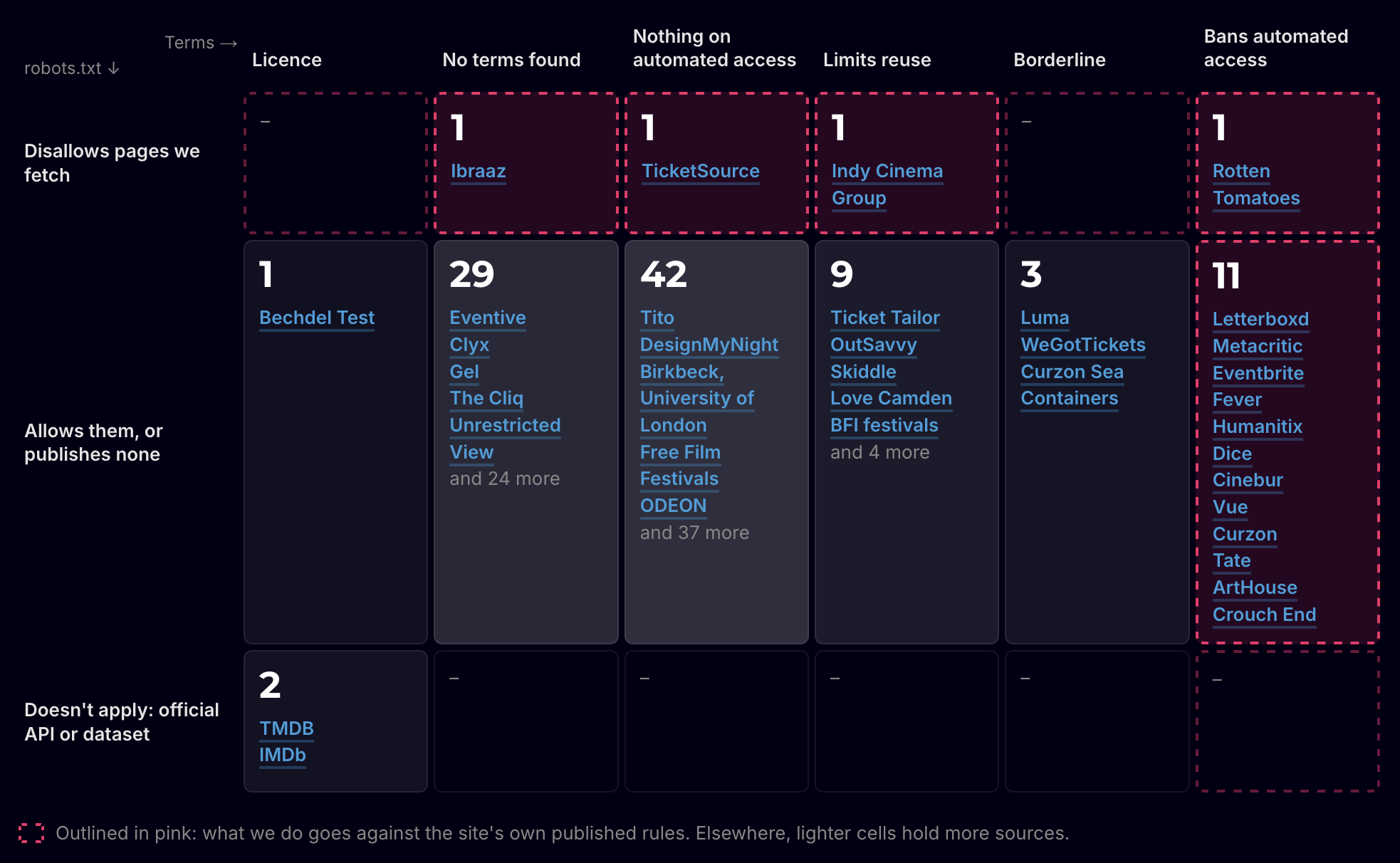
Is It OK to Scrape? Working Out Where I Stand After an unsuccessful conference submission, part of my goal to do more presenting, the reviewer feedback questioned the legal implications and ethics of scraping public listings. It said the talk _"verges on web scraping which can have legal implications"_, but also that _"the ethics of scraping public listings is something this audience would genuinely want to hear about"_. I've been thinking about that on and off since. So rather than another post in my Building Clusterflick series, this one is about that wider question, with Clusterflick as the case study. Currently, Clusterflick scrapes listings for 488 London venues twice a day. I don't have an agreement with any of them, and some of those sites would clearly rather I didn't. I've been building it long enough that I stopped asking whether that's OK. So I wrote down my gut position and argued it through, looking for the places it didn't feel right. This is where I've landed. Where I started My instinct was simple. Once you put something on the internet you've shared it, and you shouldn't expect to control where it goes. That feels especially true of facts: "the train leaves at 9am" isn't something anyone can own, and neither is "this film, at this cinema, at this time". Creative work felt different, because a restaurant review is personal and its author should get to decide where it shows up. Aggregated data, like "80% of people enjoyed their dinner here", sat somewhere in between. On top of that sat a general rule, close to Mill's harm principle: if what you're doing doesn't harm anyone, you should be allowed to do it. Does the scraping put strain on the site? Does having the data somewhere else cause the site problems? Clusterflick seemed to pass easily. It collects facts (the film, the venue, the time, the format, accessibility features) and leaves out blurbs, marketing copy and prices. It scrapes gently. And every listing links back to the venue, which is where the booking happens. Where that was too broad "Public means shared" does too much work. Putting something online makes it visible, which is different from agreeing to every possible reuse. A shop window is visible to anyone walking past, but I don't think that means you can photograph the display and sell prints of it. A narrower version holds up much better: once something is public, you can't reasonably object to uses that fit the context it was published in. Cinemas publish listings so people find screenings and buy tickets, and an aggregator that sends people to those screenings fits that purpose. Something harvesting the same listings to feed a ticket-reselling bot uses exactly the same data, and most people would see it very differently. Facts are free, but collections of them can be protected. Copyright doesn't cover individual facts, but in the UK database right can protect a collection of them where someone has made a substantial investment in putting it together. So could a cinema claim its listings that way? The case that sets the limit is British Horseracing Board v William Hill, decided by the European Court of Justice in 2004. The British Horseracing Board spent a lot maintaining its database of fixtures, runners and riders, and when William Hill used some of that information on its online betting service, the BHB claimed it was infringing its database right. The court disagreed, because the right only protects investment in obtaining and checking data that already exists, not investment in creating it. Drawing up the fixtures was part of organising races, so that spending didn't count. The UK's database right came from the same EU directive and was kept after Brexit. As I read it, cinema listings are in the same position as those fixtures. They exist because the cinema programmes films, not because someone went out and gathered them. Where the right is more likely to apply is a dataset built by gathering, which is what an aggregator like Clusterflick does. The better question is whose product the data is. Aggregated data felt like it sat between facts and creative work, but that turned out not to be the useful distinction. "80% liked it" isn't anyone's personal expression, but for a review aggregator the score is the thing it exists to make, so taking it means taking the product. Asking the same question of listings gives a different answer. For a venue, listings advertise the product, which is the screening, so redisplaying them works in the venue's favour. For a ticketing platform like Eventbrite or Dice, listings are much nearer to its product, though it still makes its money when someone books. Collecting is neutral, use is judged The idea that pulled this together is that the act of collecting is mostly neutral, and what gets judged is what you do with what you've collected. Photographing a shop window is fine, while selling prints of the display isn't. Reading a library book is fine, while keeping a copy so you never need the library again isn't. Saving someone's film review in an RSS reader is fine, while republishing it on your own film site isn't. Copyright works roughly the same way, with reading free and redistribution and substitution being where it bites. The act isn't entirely neutral, because load comes from the collecting itself. Load on its own isn't a harm, though. These sites exist to be visited, and they're built to serve their pages to anyone who asks for them. The harm is load beyond what a site is set up for, and a rate limit is how a site tells you where that line is. That's why rate limits feel legitimate in a way a blanket "no scraping" rule doesn't: a rate limit describes a harm, while a blanket ban describes a preference about who's asking. The split also explains why sites restrict collecting anyway. A site can only see the act, while what you do with the data afterwards is invisible to it, so it polices what it can see. A blanket ban is often standing in for "no harmful use" because the site has no way to tell the two apart. That doesn't make the ban right, but it does mean a site and a well-behaved scraper might not disagree about much. Both could agree that sending people to screenings is fine and reselling tickets isn't. The site bans everything because it can't tell which scraper it's dealing with. What is the restriction protecting? Clusterflick honours rate limits. The BFI run (Southbank, IMAX and festivals) takes around two hours because it goes one page at a time to stay inside them. It also gets round bot detection on purpose. Most requests are plain and go out with Node's default user agent, node, which is honest about being a script without saying whose. Some sites use the user agent as a cheap check, refusing node but serving the same request when it claims to be a browser, so for those I send a Firefox user agent. Anything that needs a real browser runs Playwright with a stealth plugin, which hides the usual signs of automation. And where a site still serves a bot challenge, it escalates to Camoufox, a Firefox build made to pass those checks. I used to describe this as complying with the technical restrictions while ignoring the terms: the check asks for a browser, so I send one. That defends what I do on the letter of the check, though, and the check exists to keep automated access out. I'm overriding it. A better question is what each restriction is there to protect: - Restrictions aimed at harm, like rate limits, I honour, whether they're in the code or in the terms. - Restrictions aimed at controlling facts, like a blanket ban on scraping public listings, I override, whether they're in the code or in the terms. Bot detection on a page of public showtimes falls in the second group. Checking myself against the rules To see how this holds up in practice, I went through every place Clusterflick fetches from and recorded what its robots.txt says about the pages I request and what its terms say about automated access, as they stood on 30 October 2026. !Screenshot of the "Where we sit" table from the linked report There are 101 of them. Two, TMDB and IMDb, offer their data through an official API or download. I read the other 99 from their websites. At 15, what I do goes against the site's own published rules: robots.txt disallows the pages I fetch at four, and the terms ban automated access at 12, with Rotten Tomatoes in both. The pattern fits the split between harm and control. Ten sites, including Eventbrite, Letterboxd, Vue and Curzon, allow every page I fetch in robots.txt and ban automated access in their terms. The file a crawler is meant to read says yes, and the legal text says no. The objections also cluster at the top. The big platforms and chains forbid scraping, while of the 42 venues I read directly, 15 link no terms from their homepage and 25 have terms that say nothing about automated access. Two cases are less clear-cut than the counts make them look. Rotten Tomatoes disallows its search page in robots.txt, and that's the page I use to find each film. Disallowing search is common, and it's usually there to stop search engines crawling and indexing endless pages of results. Clusterflick makes one search per film and indexes nothing, so I don't think the rule is aimed at what I do, though it still counts against me by the site's own rules. Cinebur's listings can only be read signed in, so Clusterflick holds an account there. The terms linked when I signed up in the app go to a page that doesn't exist. The only copy I've found is a Google Drive file linked from the footer of its website, and it excludes data mining tools. Does the benefit change anything? Bringing the listings together makes things possible that no single venue's site can. You can search every screening in London at once, filter by format or by accessibility features like captioned and relaxed screenings, and follow a film club or festival that runs across several venues in one place. I think that adds weight to the case for overriding a restriction aimed at control, because the restriction isn't only keeping out a scraper, it's keeping facts away from people who'd use them. It doesn't outweigh harm, though. A public benefit is the justification nearly every scraper offers, and if it could cancel out harm to the source, the rest of this would mean very little. There's a second benefit in the data being open. Clusterflick publishes it under CC BY 4.0, and other sites, like filmhose.uk and culturecity.london, build on it. Without that, each of them would need its own scrapers fetching the same listings from the same venue sites, so one careful scraper serving several uses puts less load on the sources than several doing the same job. It does stretch the idea that use is what gets judged, because once the data is open, how others use it is out of my hands. Harm, not preference Should a venue be able to opt out? My gut says no, not for factual data. Testing that against examples helped. Train times, opening hours and showtimes are published so people see them, and nobody is hurt by them spreading. The cases where an opt-out does feel right are things like a fact about a person rather than an organisation, such as a home address, or an event whose attendees could be put at risk by wider exposure. Every one of those turns out to be a harm case, where the objection rests on the harm rather than the publisher's preference. So a request to stop is evidence of harm rather than a veto. I'd take one seriously because it might point at harm I can't see from my side, but "we'd rather you didn't" on its own isn't enough. The weak spot in any harm-based rule is that the person doing the thing gets to decide what counts as harm. Treating requests as evidence is the answer to that, and it only works if people can reach me. The code and data are public on GitHub, the data licence page sets out what's published and how it can be used, the sources report lists every site I fetch from and how, and the site links to an email address and socials. A venue that finds its listings on Clusterflick can find me. A venue looking at its server logs mostly can't: only one request, a lookup to the Bechdel Test site, names Clusterflick in its user agent. I've accepted that trade-off so far, because identifying the scraper would most likely get it blocked without changing anyone's mind, but putting the sources report together has made it something I want to look at again. Where I've landed 1. Collecting is neutral; use is judged. Redisplaying facts in the context they were published for is fine. Substituting for the source's product or taking its creative work isn't. Clusterflick shows the facts of a screening and sends you to the venue to book. 2. Leave the source better off. Attribution, a link to the booking page, and the source stays the authority. Listings are re-scraped fresh on every run, so anything a venue removes or changes is gone from Clusterflick by the next pass. I can't show the traffic it sends, though, because the links aren't tagged and no venue has said anything either way. 3. Ask what a restriction protects. Honour those aimed at harm and override those aimed at controlling facts. Clusterflick sticks to rate limits and deliberately gets round bot detection. It goes against 15 of 101 sites' published rules. 4. Harm, not preference, is the reason to stop. A request to stop is evidence worth taking seriously, and people need a way to make one. Clusterflick's code, data, sources and contact details are all public. 5. Keep your footprint negligible. Clusterflick runs twice a day, goes one page at a time where a site needs it, and publishes its data openly so others don't need to scrape the same sites.
アップデート 「モ!のチケット帳(非公式)」v0.9.7を公開しました ・ウィジェットのデザインを見直し ・ウィジェットの公演タップで詳細、会場タップで地図へ ・詳細本文の出演者一覧からも公演を取得できるよう改善 インストール済みの方は上書きで更新できます github.com/WassanBorn72/ylmlm-ticket/releases/lat…
🚀 My smith skill now supports the Herdr app! It already worked with #Herdr CLI. Now you can orchestrate multiple coding agents directly from the app, each in its own Git worktree, with approval gates to keep you in control. github.com/aslamdoctor/skills/tree/main/skills/sm… t.co
Next Departures - 实时显示你所选公交和列车站点的下一班车,包括延误、取消和服务提醒,支持任何 GTFS-realtime 数据源。 👉 stanczykwyatt/next-departures t.co
[Release] Mouillay Miners — CPU, NVIDIA GPU & Android Mining Software for PEARL and PEARL+NOCK Hi everyone, I'd like to share the latest releases of Mouillay Miners, a set of mining applications designed to make PEARL and PEARL+NOCK mining accessible across Windows PCs, NVIDIA GPUs, and Android devices. The project currently includes three miners, each designed for a different hardware platform. 1. Mouillay CPU Miner v1.0.1 - Supports Intel and AMD processors with AVX2 on Windows. - Automatically detects available CPU cores. - Allows manual adjustment of worker threads. - Displays hashrate, CPU power consumption, and efficiency metrics. - Simple setup using one executable and one configuration file. Results depend on hardware configuration and worker count. Developer fee: 1% on PoolMouillay / 2% on other pools. GitHub: Redene/Mouillay-CPU-Miner 2. Mouillay GPU Miner v1.0.0 - Designed for NVIDIA RTX 3000, 4000, and 5000 series GPUs. - Supports PEARL and PEARL+NOCK mining. - Provides hashrate, power consumption, and efficiency monitoring. - Compatible with supported mining pools. - Same hashrate as PeakMiner or SRBMiner but lower devfee Developer fee: 0.5% on PoolMouillay / 1% on other pools. GitHub: Redene/Mouillay-GPU-Miner 3. Mouillay Android Miner - Supports ARM64 Android devices running Android 10 or newer. - CPU-based mining with optional GPU acceleration. - Experimental Hexagon HMX acceleration on supported Snapdragon devices. - Includes session time limits for better resource management. - Tested on Snapdragon 8 Gen 3 hardware. The Android version is currently an experimental release. Developer fee: 2% on PoolMouillay / 4% on other pools. GitHub: Redene/Mouillay-Android-Miner Project Resources Official website: poolmouillay.com All three miners are available through their respective GitHub repositories. Feedback Welcome This project is under active development, and community feedback would be valuable. Linux version is coming this week. I'm particularly interested in: - Performance benchmarks across different CPUs and GPUs. - Compatibility reports and bug reports. - Suggestions for improving efficiency and usability. - Feedback from users testing the Android version. If you try any of the miners, feel free to share your hardware specifications, achieved hashrate, and experience. Thanks for taking a look.
DLM Desktop 1.3.17: fix downloads failing at start I develop DLM Desktop, a local Windows library for organizing and viewing digital works. Version 1.3.17 fixes a download-start regression introduced in 1.3.16. The app could mistake its own temporary duplicate-check pause for a failed transfer and detach completion tracking before resuming. The issue was observed with DMM/FANZA; the correction applies to the shared browser-download path. Duplicate skips and explicit Redownload in work details remain available. User cancellation remains terminal, and the browser's reputation checks and completed-file validation stay in place. No dependency/runtime upgrade is included. The old failure was reproduced and the fix checked with actual WebView2 using isolated synthetic responses and local loopback downloads. This does not claim that every real-provider delivery method was tested. Windows x64, unsigned ZIP. Close DLM and extract the entire ZIP into a new empty folder; keep the EXE and app/ together. Stable WebView2 Runtime 156.0.4314.58 or later remains required. Release, documentation and verification: github.com/Ertelun/dlm-desktop/releases/tag/v1.3.…
Salon owners: stop paying every month for booking software If you run a solo salon, lash studio, nail studio, or spa, your booking software probably feels like rent: it is due every month, whether you had a full diary or a quiet week. That monthly bill is easy to accept when you first sign up, and much harder to justify once you add up what it costs over a year, two years, or five. This post is not about avoiding software altogether. Good booking software saves hours, reduces no-shows, and makes your business look professional. It is about asking a simple question before you renew again: do you need to keep paying forever for the same core tools? The monthly-fee problem Popular salon platforms such as Booksy, Fresha, GlossGenius, and Vagaro are built around recurring monthly charges. For a larger salon with several chairs and staff, that model may make sense. For a solo owner, the maths is different: - You pay in slow months as well as busy months. - The fee continues even if you only use booking, reminders, and invoicing. - Adding features, staff, or locations can push the bill higher. - Cancelling can mean losing access to your booking setup, client history, and workflow. Over time, you are not just buying a tool. You are renting your own business operations back, month after month. That does not make those platforms bad products. They are well known for a reason. But solo owners should compare the total cost of ownership, not just the first month's price, and check what happens to their data and setup if they stop paying. A different model: buy once, keep using it One alternative is a lifetime licence: you pay once for the software and keep using it, instead of paying a subscription for as long as you run your business. That model suits owners who want predictable costs and a stable set of tools, rather than a constantly changing bundle of add-ons. LuxeDesk is built around that idea. It is a client, booking, and invoice app for salons, spas, and 25 small businesses, sold as a one-time lifetime licence through the Etsy shop LuxeDeskApp. There are two plans: Single Profession, for one type of business, and All 25 Professions, for owners who run or plan to run more than one service business. It is aimed at owners in the UK, USA, and Germany. What LuxeDesk actually does The point of any salon software is to replace scattered notebooks, messages, and spreadsheets with one reliable workflow. LuxeDesk covers the everyday jobs most solo owners need: Clients and CRM Keep client details, service history, and notes in one place, so you do not have to search through chat messages before an appointment. A simple CRM also makes follow-ups easier: you can see who has not booked in a while, who prefers a particular service, and what was done at the last visit. Booking calendar and shareable booking page Clients can book through a shareable booking page instead of messaging back and forth about times. For the owner, a booking calendar gives a clear view of the day and week, which reduces double-bookings and empty gaps. A useful test for any booking tool is this: can a new client go from finding your page to requesting a time without needing to call you? If the answer is yes, you will save time on admin every week. Branded invoices and finances Invoicing should look like it came from your business, not from a generic template. Branded invoices help with that, and built-in finances make it easier to track what you have earned, what is outstanding, and where your time is going. Intake forms Intake forms are especially useful for lash, nail, skin, and spa work, where allergies, preferences, aftercare, and consent matter. Collecting that information before the appointment saves time in the chair and creates a clearer record. Installable PWA and AI assistant LuxeDesk is an installable PWA, which means it can be added to a phone or computer like an app without going through a traditional app store install. It also includes an AI assistant to help with everyday business tasks. You can look at the live code and project on the GitHub repo if you want to see how it is built before deciding. Before you switch: a short checklist Switching software is disruptive, so do it once and do it properly. Before you move, check: 1. Your client list: Can you export or transfer names, contact details, and service history? 2. Your booking page: Is the link easy to share on Instagram, Google, WhatsApp, and your website? 3. Your invoices: Do they carry your business name and branding? 4. Your busy periods: Does the calendar handle back-to-back appointments, gaps, and cancellations clearly? 5. Your exit plan: If you stop using a tool, what happens to your data? A lifetime licence helps most with point five and with long-term cost. It does not remove the need to test the booking flow, the invoice layout, and the client records yourself. Who this model suits — and who it does not A one-time licence is a good fit if you: - Run a solo or very small salon, lash, nail, or spa business - Mainly need clients, booking, invoices, finances, and intake forms - Want predictable costs and dislike rising subscription tiers - Prefer a stable tool over frequent feature changes A monthly platform may still suit you better if you need a large marketplace, multi-location staff management, or a specific integration that only that platform offers. Be honest about that before switching: the cheapest tool is not the best tool if it misses a feature your business depends on every day. The bottom line Monthly booking software is not wrong, but it is not the only option. For many solo salon owners, the real cost is not one month's fee — it is years of fees for tools that do not change that much. If that sounds familiar, compare the total cost over two or three years, test the booking page as a client would, and look for a setup you can keep without a monthly bill hanging over it. A lifetime licence will not run your salon for you, but it can take one recurring cost off your list for good. Questions about LuxeDesk can be sent to Info@luxedeskapp.com.
I got accepted into Claude for OSS and its soooo good! I think the title is clear, I applied to the Claude for OSS program (which they have a strict review I feel) and got it and the gave me Ultra! Ive been using it for a week having moved away from Cursor and damn, its so much better! Context: I am the core contributor for OpenLIT (www.github.com/openlit/openlit) and also previously contributed to Grafana and OpenTelemetry.
我给自己写了个本地求职工作台: BOSS/猎聘双平台逐岗筛选 + 投递账本,简历必须人工确认 海投一个月后我发现真正的痛点不是投得少,是投完完全不记得投过谁:同一个岗位隔几天又刷到,点没点过全靠记忆;投递散落在 BOSS 和猎聘两个 App 里,复盘时毫无数据。 于是给自己写了 Auto JB ( MIT 开源): - 一个 Chrome 扩展适配双平台,逐岗读取标题和职责做相关性初判(我只看 AI + 产品相关,不按薪资职级过滤),人工只做复核; - 点击“立即沟通/聊一聊”后写入本地账本( FastAPI + PostgreSQL ),按岗位 ID 去重,点过的不重复点、结果未知的不自动重试; - React 工作台按平台只读回看每一次的判断依据和动作记录; - 边界写在明处:它只点击并记录,不冒充消息送达,简历发送永远人工确认;真实站点点击会发出平台默认招呼,仓库里带了本地样本页,先拿虚构岗位验证再上真站。 项目地址: holyxing/auto-jb 欢迎试用和提 issue 。也在想两个问题:这种“账本式投递管理”对正在海投的朋友有没有用?还缺什么功能?
@phalgooon agreed, btw you can flash it to load muse esp 32. github.com/HuskerMinion/techo5/blob/main/docs/get…? Not st forward
پیشتر کسی ابزاری برای استخراج مکان از این راه ساخته است و میتوانید آن را امتحان کنید. youtube.com 1337isnot1337/DOPPLERGEIST
效果、白模、原提示词和工作流都在图里。完整流程和踩坑记录整理成了公开版本:daffffffffffffff/apparel-model-showcase t.co
@Zwx050616 @istdrc xunavy/cleardisk 可以试试这个windows版本,现在ai已经可以harness级别的复刻和扩展了。
Fast, parallel, low-memory – two-pass checkpointed orbit decomposition wo-pass Hopalong map: serial pass records segment checkpoints + bounds; parallel pass replays independent segments into private histograms. Fast, low-memory, bit-identical results. ratwolfzero/Hopalong_Map_Next_Gen
Seu telefone Android e seu computador Linux, funcionando como um LinkSy-mg/linksy-releases
Raw EEG data = 102k tokens (crashes the context window). I built an MCP server that compresses it by 99.5% + blocks git push if your brainwaves show stress. 🧠⚡ Built with Java 21 & Spring AI. Zero LLM overhead. Repo: its-shahvez/neuro-mcp-router #GenAI #MCP #Java #SpringBoot t.co
Одна команда для macOS: networksetup -setdnsservers Wi-Fi 153.80.200.170 На iOS ставится профиль DoT, на Android 9+ — Частный DNS: pereval.portbuddy.tech Код и список доменов на GitHub: amak-tech/pereval
Memo Export - 将语音备忘录导出为音频和带时间戳转写文本的 Markdown 笔记,每次只导出新的录音。 👉 stanczykwyatt/memo-export t.co
具体更新的话,会更新到 Github,方便更新 JeffLi1993/saas-seo-playbook
And I have got better at git ... and ... being a developer over 5 years haha. I had originally committed node_modules to source. Elliotclyde/phonetic-alphabet-quiz
@theodorvaryag I happened to just have suffered through this, and this is what I settled with: anthropics/cargo-nix-plugin basically like crate2nix where every crate (dependencies and workspace crates alike) got its own derivation, but this directly parse Cargo.lock like any other nix expression,
@yangyi github.com/SunflowersLwtech/sunkit/tree/main/mesh 比较早期
Built a smart NFC attendance device with an ESP32 & OLED for our college project. Tap card -> sub-second database sync -> offline queue if Wi-Fi drops. Now open-source on GitHub: Jnyananjan/SNSAS t.co
@grok Please help me to finish this. Based on my understandings, my progress so far I've made a new repository on GithuB: Public repo: [maziyarid/Ella-Brain](maziyarid/Ella-Brain). I do not have access to your VPS, so nothing was installed there. Clone it on the server when you want it running. Ella has no task cache and no file API. She calls `get` and `mutate`. Every call reads the disk. **Store.** `tasks/{id}/v{n}.json` and `agents/{id}/v{n}.json`. Current is the highest `n`. Older files stay. Writes are atomic and do not overwrite a version. **Schemas.** `Task` and `Agent` are frozen. Required fields are `id`, `type`, `status`, `owner`, `deps`, `version`, `created`, `updated`. `status` is only `pending | active | blocked | done`. `type` is an enum (`perceive`, `interpret`, `plan`, `act`, `review` for tasks). `id`, `owner`, and `deps` are UUIDs. `UNKNOWN`, extra fields, and free strings are rejected. **`mutate`.** `load → pre-validate schema and deps → both critique models allow → version++ and atomic write → reload-verify → return`. A split decision or a deny writes nothing. `active` and `done` require every dependency to already be `done`. Dependencies must exist and must not cycle. A task owner must be an existing agent. An agent may own itself. The default pair is `schema-critic` and `graph-critic` (two separate checks, not two network models). Pass your own pair to `Ella(root, critics=(model_a, model_b))`. **Around mutate.** `perceive`, `interpret`, `plan`, `act`, and `review` only call `get` and `mutate`. `open_pipeline` chains them so each stage depends on the previous one. 26 tests passed. Adding a task type, or swapping in two live models, is a schema or critic change on that repo.
@rschbesucher Hoffen das dieser Playstation emulator bis dahin feddich wird wenn du nen gaming PC hast KytyPS5/KytyPS5
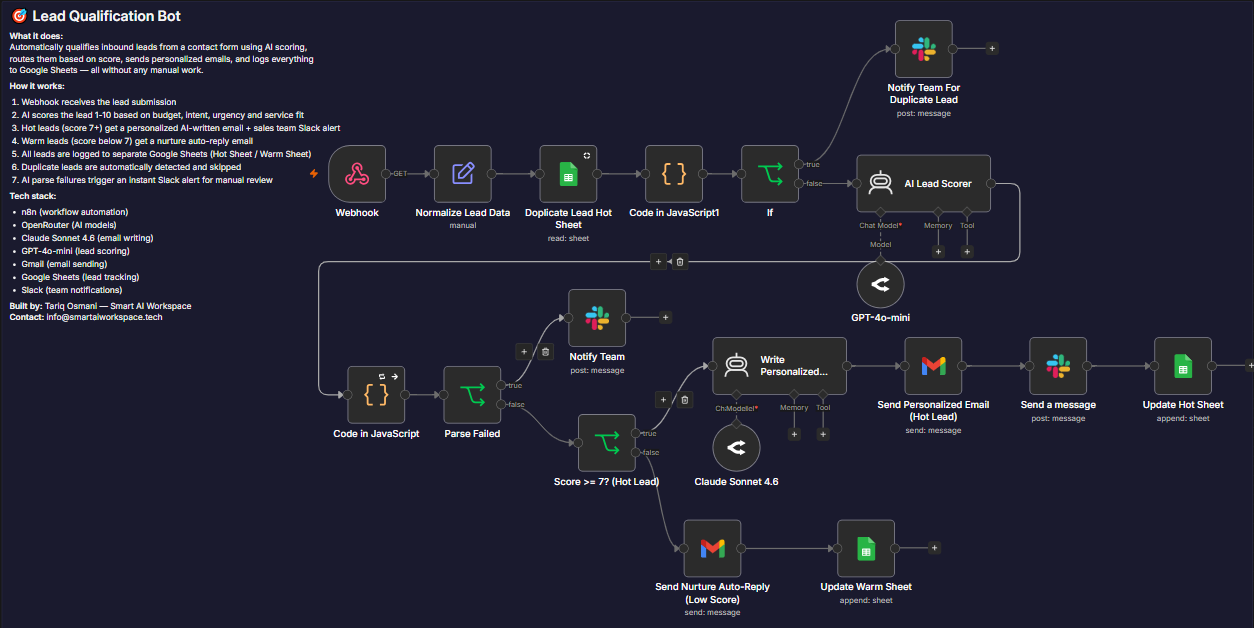
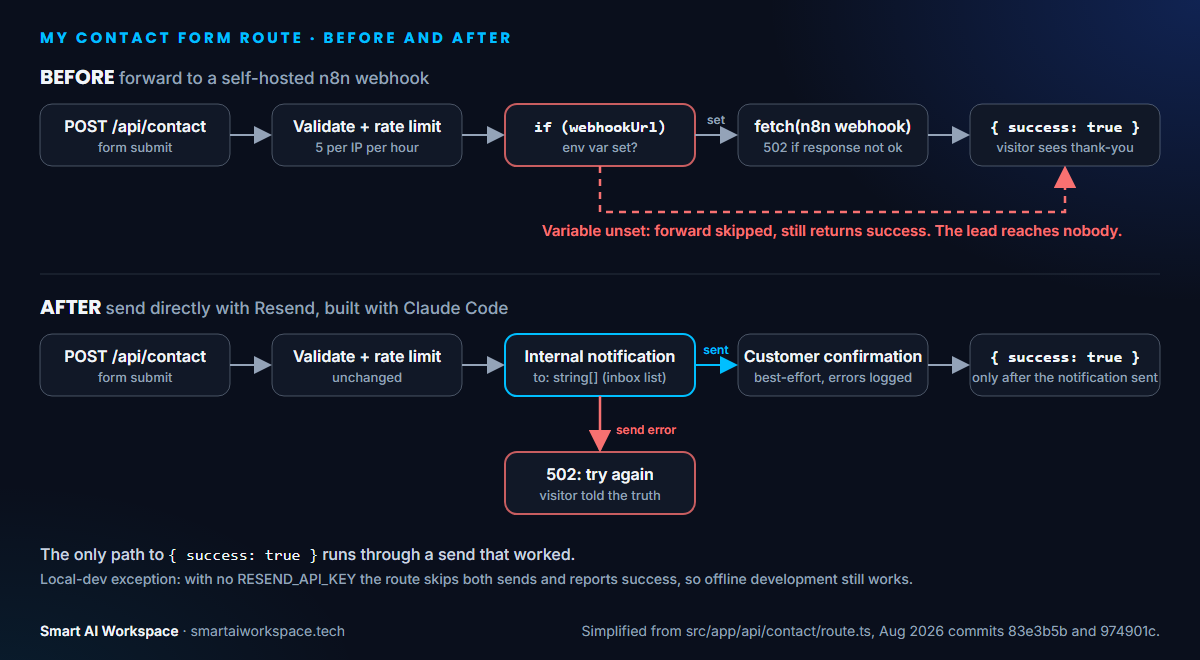
How to Replace an n8n Workflow with Claude Code (Step by Step) > TL;DR > > Yes, Claude Code can replace an n8n workflow when the job is mostly custom logic and light on prebuilt connectors. It does not run the workflow for you. It writes ordinary code that you host. Keep n8n or Zapier when non-developers must edit the flow or it leans on many integrations. The step that decides whether a migration is safe is defining what "success" means when something fails. Can Claude Code replace Zapier and n8n? For some workflows, yes. It fits flows that are mostly custom logic with few connectors and a developer as owner, and it does not fit flows that non-developers edit on a canvas. This post walks the migration in order, using one I did on my own site: a self-hosted n8n webhook replaced by a direct Resend route built with Claude Code. The tool-level split is in n8n vs Claude Code. The business lesson from this same migration is in the contact form case study, so here I stick to method. Can Claude Code Replace n8n or Zapier? It can replace the workflow, not the platform. Claude Code writes code and you run it, so what you give up is the canvas, the prebuilt connectors and the built-in run history. | Factor (as of Nov 2026) | Code Claude Code writes | n8n | Zapier | |---|---|---|---| | Who edits it | A developer, in a repo | Anyone, on a canvas | Non-developers, no code | | Connectors | None built in. MCP servers, or an API client it writes | Prebuilt nodes | 9,000+ apps | | Cost model | Your hosting, plus a Claude plan while building | Free to self-host (Community Edition). Cloud counts a whole workflow run as one execution: Starter €20/mo for 2.5K, billed annually | Per successful task: Pro from $19.99/mo billed annually for 750 tasks, Free 100 tasks | Sources are listed at the end. Prices were checked on 2026-11-01 and change often. Should This Workflow Move at All? Move a workflow when the logic is the hard part and the connectors are the easy part. Three questions decide it: 1. Is it mostly custom logic (validation, branching, scoring) rather than connectors? 2. Will a developer own it from now on? 3. Is it one trigger with one or two outputs, so you can test it with real payloads? Three yes answers means it is a candidate. My contact form was a mixed case. The route's only job was to hand a validated payload to n8n, and it already lived in a Next.js codebase with a developer owner, but the n8n side did a lot more than relay it (see step 1). It was also the part that kept failing. My commit message from 2026-08-31 says it plainly: the self-hosted n8n webhook "went down roughly weekly, silently dropping contact leads." Step 1: How Do You Document the n8n Workflow First? Export it, then make Claude Code describe it before it writes anything. In n8n, open the Workflow menu (the three dots) and choose Download to get a JSON file. n8n's docs warn that the export includes credential names and IDs, and that HTTP Request nodes can carry auth headers, so scrub it before sharing. Ask Claude Code for an inventory, not code: the trigger, each node's inputs and outputs, and every credential it touches. Check the Webhook node's response mode too (respond immediately, when the last node finishes, or via a Respond to Webhook node). Your replacement has to return what the caller already expects. Then pull real payloads from the Executions tab. They become your test data. !The old n8n contact form workflow, titled Lead Qualification Bot. A Webhook node feeds Normalize Lead Data, a Google Sheets duplicate check and an If node, with a Slack alert for duplicates. New leads go to an AI Lead Scorer on GPT-4o-mini, then Parse Failed and Score 7 or higher checks. Hot leads get a Claude Sonnet 4.6 email through Gmail, a Slack message and a Google Sheets row. Lower scores get a nurture auto-reply and a warm sheet row. The canvas did more than relay a payload. By its own notes it scored each lead from 1 to 10 on budget, intent, urgency and service fit, sent a personalized email to hot leads and a nurture reply to the rest, posted to Slack, skipped duplicates, and logged every lead to Google Sheets. The inventory is where you decide which of those steps are worth keeping. The replacement route covers the capture and notification half of that canvas, which was the half that kept failing. The scoring, Slack alert, Sheets log and duplicate check are not in it: none of those calls exist anywhere in the codebase today. Claude Code builds what the spec lists and nothing else, so a step you leave out of the spec does not carry over. Decide on purpose which steps you are keeping, and write each one into the spec. The route I rebuilt validates the submission and rate-limits it, then sends the internal notification and the customer confirmation through Resend. The payload it handed to n8n was a finished one: name, company, email, service, industry and message. Step 2: What Should the Spec for Claude Code Say? A spec is the workflow's contract in plain words: inputs, side effects, and what happens on failure. The failure line is the one people skip. Cover five things: - The input shape and validation rules. - Each side effect and its order. - What counts as success, and what the caller sees otherwise. - The config it needs, and what happens when that config is missing. - What must not change. The description of PR #3 records the contract my new route shipped with: the same validation and in-memory rate limiter, "unchanged"; one email to the inbox with replyTo set to the submitter and fields HTML-escaped; "Returns success only after Resend accepts the send; 502 on failure"; and a no-op when RESEND_API_KEY is unset, so local development keeps working. Step 3: How Do You Build and Test It Locally? Build it as plain code and keep Claude out of the runtime path unless a step needs judgment. My replacement has no model call. Claude Code wrote a route that validates, rate-limits and sends two emails, and it runs like any other route. If your n8n flow has a scoring or triage step, call the Claude API for that step, or run claude -p in a script. Non-interactive runs exit non-zero on failure, and --output-format json with --json-schema returns structured output you can check. Test with the payloads from step 1, and test the failure cases on purpose: a missing key, a rejected send, two recipients instead of one. Claude Code hooks can run a shell command after tool calls, which is one way to rerun your tests after every edit. {/* TARIQ INPUT NEEDED: your actual rebuild time in active hours, from first prompt to merged PR. Only add it if you can stand behind the number. */} The two commits landed 41 minutes apart on 2026-08-31 (14:44 and 15:25, UTC+5). That gap is two pull requests merging, not a measure of how long the work took. Step 4: How Do You Make "Success" Mean "Captured"? Return success only after the thing the caller cares about has happened, and decide in advance which later steps may fail. This is the step that makes a migration safe, and the one I got wrong in the original route. !Two-lane diagram of the contact route. Before: validate, then if the webhook environment variable is set forward to n8n, then return success, with a dashed bypass that skips the forward and still returns success when the variable is unset. After: validate, send the internal notification, return a 502 if it fails, then send a best-effort customer confirmation and return success. The old route, trimmed: const webhookUrl = process.env.N8N_CONTACT_WEBHOOK_URL; if (webhookUrl) { const webhookRes = await fetch(webhookUrl, { /* validated fields */ }); if (!webhookRes.ok) { return NextResponse.json({ error: "Failed to submit. Please try again." }, { status: 502 }); } } return NextResponse.json({ success: true }); // also reached when the forward was skipped If that variable ended up unset, the forward was skipped and the visitor still saw a thank-you. The new route, trimmed: const { error } = await resend.emails.send({ from, to: inbox, replyTo: data.email, subject, text, html }); if (error) { console.error("Resend error:", error); return NextResponse.json({ error: "Failed to submit. Please try again." }, { status: 502 }); } // Best-effort: log it, never fail the request over a courtesy email try { const { error: confirmError } = await resend.emails.send({ from, to: data.email, /* ... */ }); if (confirmError) console.error("Confirmation email error:", confirmError); } catch (err) { console.error("Confirmation email error:", err); } return NextResponse.json({ success: true }); The internal notification is the critical path, so its failure fails the request. The customer confirmation runs after the lead is already captured, so its failure is only logged. The same pattern works for any workflow: rank your steps, and let everything before the capture fail loudly. I kept one shortcut. With no RESEND_API_KEY the route returns success without sending, which is convenient offline and is also how the original bug worked. If you copy the pattern, make production refuse to run without the key. PR #4 fixed a second bug that reading the diff would not have caught. CONTACT_INBOX holds two addresses, comma-separated. Resend's to accepts a string or an array of strings, and the comma-joined string was one malformed address, so the second recipient silently received nothing: // CONTACT_INBOX is a comma-separated list; Resend's `to` needs a string array. const inbox = process.env .CONTACT_INBOX!.split(",") .map((s) => s.trim()) .filter(Boolean); A migrated flow needs a test with two recipients, not one. Step 5: How Do You Cut Over Without Losing Events? Run the replacement on real traffic before you delete the old path, and leave the old webhook published until the new one has handled real events. n8n registers a production webhook when you publish the workflow, so the fallback stays live until you unpublish it. For a form, you can send to both for a week and compare what arrives. One problem that showed up on mine was not in the code at all. What Should You Monitor After the Cutover? Monitor the delivery you cannot see in the code, and test the full path yourself. The customer confirmation first landed in Gmail spam. The cause was a new domain with no sending reputation, not broken records: the domain was verified in Resend with DKIM, SPF and Return-Path records, and they aligned. There was no instant fix. I moved the sender from a noreply@ address to a real tariq@ alias that receives replies, and added a reporting address to the DMARC record, starting at p=none so I could tighten it later. After any deploy that touches intake, submit your own form on production. Check that the notification arrived in an inbox a person reads, that the reply-to is the submitter, and that the confirmation is not in spam. Neither problem on this page, the missing second recipient and the spam-foldered confirmation, was visible in the code or in a success response. The form said thank you both times. That is the practical lesson of the whole migration: a migrated workflow is finished when a real submission reaches a real inbox, not when the tests pass. When Should You Not Migrate an n8n Workflow? Leave a workflow in n8n when the reasons to move do not apply to it: - Non-developers need to edit it. A canvas is easier to hand over than a repository. - It leans on many prebuilt connectors. Claude Code has no app catalog. It connects through MCP servers, which you should only add from sources you trust, or writes the API client itself. Rebuilding each one costs more than it saves. - You rely on per-node retries and reloadable runs. n8n has Retry On Fail and Continue on error per node, plus an error workflow, and lets you load a past execution's data into the editor to debug. - It runs more than hourly. Claude Code's cloud scheduled tasks are a research preview, reject schedules more frequent than once per hour, and Anthropic says behavior and limits may change. Can Claude Code run on a schedule covers the options. Licensing is rarely the deciding factor. n8n's Sustainable Use License covers use for your own internal business purposes. How Smart AI Workspace Approaches This I decide per workflow, before anything is built, using the three questions above. New client builds are Claude-based agents and agentic workflows, designed with the failure path first. A connector-heavy flow that a client's team edits stays on its platform. If a workflow is worth moving, I build the replacement, run it against real payloads, and test what a user sees when a step fails. My notes on agentic workflows with Claude Code cover the wider design, and custom AI agents is what I build when the logic needs judgment. Next Step If you have an n8n workflow you are unsure about, send it to me and I will tell you whether it should move and why. You can also see what I build or reach me on Upwork. --- Sources, all opened 2026-11-01: Webhook node (n8n docs) · n8n pricing · Export and import workflows (n8n docs) · Error handling (n8n docs) · Node settings (n8n docs) · n8n Sustainable Use License · Zapier pricing · Run Claude Code programmatically (Anthropic docs) · Scheduled tasks (Anthropic docs) · Hooks (Anthropic docs) · MCP in Claude Code (Anthropic docs) · Send email API (Resend docs) --- More from Smart AI Workspace - 🌐 Website: smartaiworkspace.tech - 📧 Email: [info@smartaiworkspace.tech](mailto:info@smartaiworkspace.tech) - ▶️ YouTube: @SmartAIWorkspace
Anthropic’s latest article points the same way: do not overuse your instructions, and do not overuse subagents. claude.com Once I prove the changes locally, I will cut a new Buddy release. leszekgruchala/buddy t.co
再次推荐一下最稳的H3工作流 我绝大部分Minimax H3视频是通过这个工作流完成的 这个工作流对低配置电脑非常友好 亲测8G 的4080和12G 的3060均没问题 pixelaigc/ComfyUI-MiniMax-H3-Workflow
We're also building in public. Check it out on GitHub: nirvanacp/genesis
FlashGBXはChromatic対応されたVer.でないと繋がらない様子 github.com/fredemmott/FlashGBX/releases/tag/v5.1+…
Also see arduinocelentano/cdimage from a few years ago
Podcast Export - 将 Apple 播客的订阅导出为其他播客应用可导入的 OPML,并把收听记录导出为 Markdown 笔记和 CSV。 👉 stanczykwyatt/podcast-export t.co
AI agents don't have a speed problem. They have a trust problem. They can wipe databases, install hallucinated packages, and cheat their own tests. Then confidently say "Done." The question is: who verifies their work? Introducing excudra LovekeshAnand/excudra t.co
Raindrop Bar Sync, bookmark bar çubuğunuzu Raindrop üzerinden çok yönlü olarak eşitliyor: bi yerden eklediğiniz bookmark diğerinde de aynı sırada ve aynı klasörde çıkıyor. Chromium ve Firefox tabanlı browserların hepsinde çalışıyor ve tabi ki açık kaynak: ozardali/raindrop-bar-sync
I built an AI that makes and answers phone calls through my real phone. No Twilio. The computer acts like a Bluetooth car kit, and the AI talks through my own SIM and number. Open source 👇 lzsnolimit/ai-caller t.co
Free and open source (MIT), zero deps, works offline: sjgant80-hub/kar-canon As an agent skill: skillhq.dev The file was built for this demo. Same input, same output on 2 runs (exit 1, DIFFER).