Mentions
Conversations linking to GitHub, newest first. Times are UTC.
Mentions by source
X
Bluesky
Hacker News
Lobsters
V2EX
Qiita
DEV
Mastodon
Latest posts
Location: Bhopal, India (IST, UTC+5:30) Remote: Yes. Can overlap 4+ hours with EU or US East. Willing to relocate: Yes, within India (Bengaluru, Hyderabad, Mumbai) Technologies: Python, TypeScript, FastAPI, LangGraph, LangChain, Google ADK, MCP, Qdrant, pgvector, Postgres, Redis, Docker, Next.js Résumé/CV: namangupta.dev Email: naman@namangupta.dev GitHub: github.com/namanxdev Applied AI engineer, 1+ year at early-stage startups. I build agents and retrieval systems, then measure whether they actually work. Most recently I built and evaluated a production document-AI retrieval pipeline and LangGraph workflows. Public work you can check: - rag-eval-harness: retrieval eval over 20 CUAD legal contracts, 50 queries, 114 annotated answer spans, 7 configurations. Clause-aware chunking kept 99.1% of answer spans intact vs 43.0% for fixed-width. Hybrid BM25 + dense with RRF scored best (MRR 0.70). The reranker did not help, and the README says so. 87 tests. namanxdev/rag-eval-harness - faultline: an eval/RL environment that tests tool-using agents when the MCP tools change under them (schema drift). Published on Prime Intellect's Environments Hub. namanxdev/faultline - MCPHub: testing and inspection tool for MCP servers. JSON-RPC inspection, stdio / SSE / Streamable HTTP transports, latency percentiles. Looking for: applied AI, forward-deployed, or evals engineer roles. Full-time remote, or a B2B contract billed in USD/EUR. Available now. Good fit if your agent or RAG feature works in the demo and fails on real customer data, and you need someone to measure why and fix it.
GitHub Actions の依存関係を gh actions-lock で固定する GitHub Actions の依存関係を gh actions-lock で固定する GitHub Actions の workflow で actions/checkout@v4 のようにタグを指定すると、後からタグを付け替えられたとき、workflow を変更せずに実行コードが変わる可能性があります。 このリスクを抑える仕組みが workflow dependency lockfile です。 結論:何が嬉しいか workflow には読みやすいタグを残し、Action と推移的依存はコミット SHA で固定できる Dependabot が登録済み workflow の Action と lockfile を同じ PR で更新する GitHub Enterprise Cloud では Require lockfile policy で、未登録 workflow の実行を防げる ! 大前提として、シェルや GitHub CLI で代替できる処理には外部 Action を使わず、依存を増やさないことが重要です。 可変タグによる侵害の実例 タグを参照している workflow は、上流でタグが付け替えられると、workflow を変更せずに別のコードを実行する挙動を狙ったサプライチェーン攻撃が成立し得ます。 2025年3月、広く使われていた tj-actions/changed-files が侵害され、複数のタグが悪意あるコミットを指すように変更されました。コードは runner のメモリ上の情報を workflow のログに出力し、CI/CD の秘密情報が漏れるおそれがありました。 2026年3月には Trivy の関連 Action も侵害され、攻撃者は aquasecurity/trivy-action の77個中76個のタグと、aquasecurity/setup-trivy の全タグを悪意あるコミットに付け替えました。悪意あるコードは runner のメモリやファイルから認証情報を盗み出そうとしていました。 GitHub は Immutable Release 機能をリリースするなどして対応してきましたが、 @v1 のようなタグ指定では効果が薄いなど、依然リスクが残っていました。 固定 SHA の課題 コミット SHA を固定すればタグに影響されなくなりますが、バージョンが分かりにくく、可読性も低くなるという課題があります。 - uses: actions/checkout@11bd71901bbe5b1630ceea73d27597364c9af683 # v4.2.2 workflow dependency lockfile とは 上記の課題を踏まえ、 GitHub Actions でも lockfile による依存関係の固定が導入されました。 lockfile は workflow の Action と実行するコミットを対応付けるファイルで、Action が依存する Action (推移依存)も含めて固定できます。 例えばワークフロー内で actions/checkout@v4.2.2 を指定して gh actions-lock による lockfile を生成すると、workflow はその参照に対応するコミットを実行します。 .github/workflows/ci.yml steps: - uses: actions/checkout@v4.2.2 .github/workflows/actions.lock には、タグと実行する SHA が記録されます。 version: 'v0.0.3' workflows: '.github/workflows/ci.yml': - 'actions/checkout@v4.2.2' dependencies: 'actions/checkout@v4.2.2': ref: 'v4.2.2' commit: 'sha1-11bd71901bbe5b1630ceea73d27597364c9af683' owner_id: 44036562 repo_id: 197814629 また、 Dependabot も対応済みで、バージョンアップ時に lockfile も同じ PR で更新します。 Require lockfile ポリシー Require lockfile policy は、対象 workflow が lockfile に登録されていない場合、その実行をブロックするポリシーです。 これにより、lockfile に基づいた安全な依存関係の管理を徹底することができます。 ! lockfile 自体は Free、Team、GitHub Enterprise Cloud で GA ですが、Require lockfile policy の強制機能は GitHub Enterprise Cloud 向けです。 まとめ gh actions-lock は読みやすい参照を残したまま、Action とその依存をコミット SHA で固定できる Dependabot で更新を追える GitHub Enterprise Cloud では Require lockfile policy で登録を徹底できる 参考: GitHub Actions workflow lockfiles の GA Workflow dependency lockfiles workflow の依存関係を lock する Require lockfile policy を適用する CVE-2025-30066: tj-actions/changed-files の侵害 Trivy 関連 Action の侵害 CISA: Supply Chain Compromise of Third-Party GitHub Action
Astraeus: The Native Windows Dynamic Island Song Win plus Alt plus A, it springs An original AI-generated song about this story: Astraeus is a native Windows dashboard that acts like a dynamic island, built entirely in C++20. LYRICS C++20, no Electron here Direct2D draws the native look Mouse on edge, the panel pops Win plus Alt plus A, it springs Music stats and weather, all at once Tucks away when you move away GPL v3, source code open Windows ten and eleven, it fits Win plus Alt plus A, it springs Music stats and weather, all at once Tucks away when you move away CREDITS Song: MiniMax Music 3 (generated locally) Visuals: animated by Qwen3.8-27b-q4-32k-tp Mood: Energetic, Techy, Defiant - 138 BPM LINKS & SOURCES - Icetist/Astraeus on GitHub: Icetist/Astraeus - Icetist/Astraeus on GitHub: github.com/Icetist/Astraeus/releases/latest - Reddit discussion (r/opensource): reddit.com Subscribe to @ForgeStacx - Dev tools, self-hosted software, and open source worth your weekend. #opensource #selfhosted #devtools #AImusic #Shorts
1. go to: huggingface.co 2. download MiniCPM-OCR-1_0-Q8_0.gguf (0.81 GB) plus mmproj-model-f16-4x.gguf (0.90 GB). The second file is required. 3. start llama.cpp with both files on port 8080. Exact command: github.com/OpenBMB/MiniCPM-OCR/blob/main/docs/lla…
手动清 Mac 缓存要记一堆路径,删错组件就得重装;图形清理软件还要订阅。 mac-cleaner-cli 一个命令先扫再删,缓存/日志/Homebrew 旧版分类处理,可只清某一类。 guhcostan/mac-cleaner-cli
🚀 一个值得所有人关注的开源项目来了 SnapKM 现已正式开源,免费开放给每一个人使用与探索 如果你正在寻找高效、好用又开放的工具,不妨马上看看 i5xx/SnapKM-openSource
Google patched a zero day I found and has not paid me
@MasterDuoc @HeyTaiZen If you can afford to fix it yourself, you should definitely do so. I am also publishing various details on the work I'm doing, including reverse engineering of hardware wallets and more. KarpelesLab/ledger_nano_x_pads
Noria: The Free Agentic Data Extractor That Outsources Paid Scraping Explore how Noria, an open‑source project, can replace costly scraping services with intelligent data extraction. Dive into its features and see why it’s a game‑changer for developers and businesses alike. Follow for more tech insights! AhmadHassan-BTed/Noria: AhmadHassan-BTed/Noria #nocodefounder #datascience #opensource #webscraping #automation
✅ Day 719 – Tree Paths 🌳 🎯 Problem: Count Tree Paths With Limited Max Edge Weight 📂 GitHub: imnilesh18/GfG-POTD 🧠 Sort edges & use Union-Find. #geekstreak2026 #gfg360 #POTDwithGFG @geeksforgeeks #skillupwithgfg #nationskillup 📚 geeksforgeeks.org t.co
[OC] iShowLyrics: a lyrics widget for GNOME/KDE that follows Spotify, browsers, GNOME Music and more Hi everyone! I built iShowLyrics, an open-source desktop widget that shows time-synced lyrics for whatever you're playing, right on your desktop. See GitHub: iShowSomeone/iShowLyrics
yonidavidson/brain-mcp שיחקתי עם הרעיון של קונסולידציה של זכרונות של סוכנים, היום בטח לממש את זה יהיה 100 פעמים יותר קל ויותר מהיר.
Shipcast v0.3.0: launch from a GitHub Action, blog in your languages, an app you can install Shipcast turns a GitHub release into a launch: it reads the code at the tag, drafts the article and a post for each channel, and publishes them once you approve. Version 0.3.0 lets you run it from a GitHub Action on your own repos with nothing to host, writes your blog in the languages you choose, and brings a redesigned app you can install on your phone or desktop. If you already run Shipcast, this post covers what changed and what to do when you upgrade. !Shipcast's app: a release's drafts, approved and published Why a GitHub Action? Until now you needed a server to use Shipcast. That is fine for me, but it is a lot to ask of someone who only wants their next release announced. With v0.3.0 the whole flow runs in GitHub Actions: you publish a release, one drafts pull request arrives in your launches repo with the article and a post per channel, and when you merge it each channel is published once. How do I set up the Action? In your project's repo, with Node 24: npx @yeyo11/shipcast init init writes the launch workflow that uses yeyo11/shipcast-action@v1, .github/launch.yml, and, for your launches repo, brand.yml plus a publish workflow. It then prints every secret you need to set. You can pass the choices up front: npx @yeyo11/shipcast init --launches-repo you/launches --ai openai --tone "Plain, practical, first person." The drafts are written with your own key. --ai takes anthropic (the default) or openai, and the action's ai-base-url input points it at any OpenAI-compatible server. To check a setup without posting anything, set the repository variable SHIPCAST_DRY_RUN=true: the publish run lists what it would post. Every link to your blog goes out with utm_source, utm_medium and utm_campaign, so your analytics show which channel each visit came from. dev.to and Hashnode keep the clean canonical URL. What if GitHub's cron runs late? Scheduled posts and retries run in a "round". GitHub delays or drops schedule runs, so the publish workflow has three cron lines only as a backstop and accepts workflow_dispatch. For rounds on time, dispatch it every 15 minutes from outside GitHub: a Cloudflare Worker, cron-job.org or your own server. init prints the exact call: curl -fsS -X POST \ -H "Authorization: Bearer $SHIPCAST_DISPATCH_TOKEN" \ -H "Accept: application/vnd.github+json" \ https://api.github.com/repos/<you>/launches/actions/workflows/shipcast-publish.yml/dispatches \ -d '{"ref":"main"}' The token is a fine-grained one for the launches repo only, with Actions read and write. A late round only delays a post; it loses none. How do I choose my blog's languages? List them in brand.yml with any ISO 639-1 code. The first one is the primary language: # brand.yml languages: blog: [en, es] The article, the newsletter issue and the posts follow that list, and so do the language switches in the app. dev.to and Hashnode republish the English version when there is one, otherwise the first language. Watch out when upgrading: without languages.blog, Shipcast now writes in English only. What changed in the app? Every screen was rebuilt. Launches wait for you and you approve them in the app. Each draft opens in an editor with Markdown and Visual modes, and its toolbar matches what the channel can format. Stats show each channel and each launch, a search palette jumps to any launch, account or page, and Sync all refreshes every account on Channels. The app also installs. On a phone or a desktop it opens standalone, shows its own offline page when the connection drops, and offers Reload when a new version is out, so nothing reloads in the middle of an edit. How do notifications work? Shipcast tells your phone or desktop when a reply to a comment or a launch waits for your approval, when something fails, and when a launch is out. Turn it on per device in Settings → Notifications, with a switch for each event. On iPhone, add Shipcast to the Home Screen first. A notification never shows a comment or a draft's text. On your own server, set SHIPCAST_VAPID_PUBLIC_KEY and SHIPCAST_VAPID_PRIVATE_KEY (see docs/push.md). How do I upgrade a self-hosted install? git pull pnpm install pnpm app # database migrations run on start Two things to check: - claudio now starts behind its own Compose profile: docker compose --profile claudio up -d, or COMPOSE_PROFILES=claudio in .env. Without either, docker compose up -d starts only Postgres. - If your blog has more than English, list its languages in languages.blog. Where do I go next? The step-by-step guide for the Action is in docs/getting-started.md, and the full list of changes is in the changelog. If you don't have a blog yet, yeyo11/shipcast-blog is an Astro and Tailwind template that already reads Shipcast's articles and deploys on GitHub Pages. If Shipcast saves you writing the same announcement ten times, a star on the repository helps other developers find it.
model: Anima Base-1.0 (by CircleStone Labs LLC) LoRA: 自作LoRA 2xLexicaRRDBNet by Philip Hofmann (Phhofm), licensed under CC BY 4.0 – github.com/Phhofm/models/%E2%80%A6
Blenderを操作して、sceneだけでなく動画編集も自動化できる? blender-agentはBlender内でPythonを動かすlocal HTTP serverとAgent Skills。3D sceneやGeometry Nodesに加え、VSEの動画編集skillもあります。Claude Code向けで、MCPや外部packageは使わない設計です。 ptrthomas/blender-agent
Updated our validator to Nimiq Core 2.3.0: about 5 seconds offline, no missed slots (timestamps + rollback plan inside) Nimiq Core v2.3.0 went out last night with security fixes, and the team asked node operators to update as soon as possible. We run the ImpactZero validator and updated it this morning, about eight hours after the release. Sharing the numbers in case they help other operators plan their own swap. **How it went (UTC, 3 Nov)** - 07:24:59 old 2.2.0 node stopped - 07:25:02 2.3.0 container started on the same data - 07:25:04 consensus established, so about 5 seconds from stop to consensus - 07:30:09 the next block assigned to us (#65,902,720) produced on time No skip blocks on the network around the swap and an empty punished set in every macro block in that window, so no slot was missed. We were elected for the current epoch at the time, which is why the timing mattered. **What we staged before stopping anything** 1. Pulled the 2.3.0 image and ran it once to confirm the version 2. Tagged the running 2.2.0 image as a rollback 3. Exported the container spec so the new one gets the same volume, port and restart policy 4. Snapshotted the data directory while the node was stopped (577 MB, about a second) **What 2.3.0 fixes, in plain terms** - A transaction cache that could skip a signature check in one edge case (the headline fix) - Less expensive work for data a peer has not proven yet: voting keys decompressed only after authentication, a size cap on gossiped block bodies - Tighter peer connection limits per subnet - Stricter proof checks and more reliable state sync - Validators publish their own blocks only after they are accepted - Refreshed mainnet checkpoint (election block 64,627,200) It is backwards compatible with the 2.x line, so nothing breaks if you need a day to schedule it, but it is worth doing soon. Full write up with every timestamp and the checks we ran afterwards: nimiq.subimpact.net Release notes: github.com/nimiq/core-rs-albatross/releases/tag/v… Happy to answer questions from anyone running their own node.
eeemo-hoge/pomo-html をリリース
让 AI 翻小红书、发笔记,还得写爬虫? xiaohongshu-mcp 是 Go 的 MCP 服务,搜内容、发图文视频、看评论数据,助手直接调。 适合想把小红书接进 AI 工作流的人,要先登录自己账号,别拿它批量刷。 你先让它干什么,搜灵感还是发笔记? #MCP #小红书 @grok xpzouying/xiaohongshu-mcp
Hugging Face 今天介绍了 transformers-mic:把模型缩小,在 CPU 上查回归错误。官方的 UMT5 样本权重从1227MB缩到66MB。 小样本跑过不代表真模型没问题,官方仍保留完整模型测试。适合给 PR 提前找错,别当上线通行证。 huggingface/transformers-mic
@AngelzZamora اي نعم تقدر تغير الإعدادات من NVIDIA Profile Inspector وهو افضل بديل لـ NVIDIA App تقدر تحمله من هنا التطبيق مفتوح المصدر ومتوفر من سنوات github.com/Orbmu2k/nvidiaProfileInspector/releases
Six months after rediscovering my 1986 RTOS, I've released a new RTOS called Karqri Since May, I've posted here several times about rediscovering CHARM-II, an RTOS I developed in 1986 for the Motorola 68000. It started when I found the old source code and documentation. With AI assistance, I began studying the original design and trying to get parts of it running again in a modern environment. At first, I simply wanted to see whether my 40-year-old code could still run. But the project gradually changed direction. I started by reconstructing the development environment and experimenting with POSIX. Then I moved to the Raspberry Pi Pico, where I eventually got preemptive multitasking working. Along the way, I began questioning some of the design decisions I had made in 1986. One particularly interesting discovery involved VRTX, an RTOS I had used as a reference back then. I found that its equal-priority scheduling behavior had changed shortly after I studied it. That led to discussions here and in other communities, including an unexpected connection with someone who had used VRTX in 1982. The more I investigated, the more I realized that faithfully restoring CHARM-II and designing an RTOS today were two different things. So I decided to start a new RTOS, carrying forward some of CHARM-II's original design ideas while reconsidering the kernel, APIs, and platform-specific implementation. I called it ”Karqri”. Today, I've made the initial source release available on GitHub: noboru-takahashi/karqri Karqri currently targets POSIX environments and the Raspberry Pi Pico (RP2040). It includes task management, priority scheduling, event notifications, timers, and platform-specific context switching. The same kernel and a shared six-task demo run in both environments. In the demo, six tasks move around three tracks and coordinate access to a shared critical section. But releasing the source code is not the finish line for this project. So far, much of the work has been about implementing the basic RTOS mechanisms and verifying that they behave correctly. What I want to explore next is how to make the internal behavior of an RTOS easier to see and understand. Task switching, event notifications, waiting, and waking up are usually examined through logs or debuggers. But understanding how these events relate to one another over time isn't always straightforward. I've already started experimenting with capturing execution traces from the Pico and displaying them as an HTML timeline. It's still limited to a specific validation scenario, but I'd like to develop this idea further. I'm particularly interested in visualizing not just what happened, but when it happened and how one event led to another. So what began as an attempt to restore a 1986 RTOS has gradually become a project to develop a new RTOS and explore new ways of observing its behavior. For anyone interested in the earlier stages, here are a few previous posts: - 40 years later: recreating my SUN-2 ↔ 68000 workflow with WSL2 and Raspberry Pi Pico - My 1986 RTOS is now fully preemptive on a Raspberry Pi Pico - and it changed how I think about the original design - Follow-up: Revisiting a 1986 RTOS led me to someone who used VRTX in 1982 I appreciate the discussions and comments I've received here over the past several months. They've helped me reconsider some of the assumptions behind the original design. As the project moves toward developing a new RTOS, I'll probably be posting more often in OS development and embedded systems communities. But Karqri's roots will always be in the work I started back in 1986. When I first opened those old source files, I certainly didn't expect to end up releasing a new RTOS 40 years later. And there's still more I want to explore.
KMYsqHRK/taskviz ローカルLLM用のいろんなタスクを作るにあたってスケジュールタスクをwindowsに登録したいが,タスクスケジュールタスクの不透明な感じが好きじゃなくて作ったもの.
If your AI takes over the mouse, you end up waiting. Agent Desktop can run supported app actions without moving your pointer or taking focus. Drag/hover need foreground control. vercel-labs/agent-desktop t.co
@BlackMarinoMoon check it VocaDBに頼りきりな作りをしているよ vocadb.net masseater/thumb-mosaic
Source: github/spec-kit README + integrations docs (MIT, v1.2.6 out Nov 2). Setup: uv tool install specify-cli, then specify init my-project --integration claude (or codex, cursor-agent). Reports land in .specify/bugs/<slug>/ and only "verified" confirms the fix.
OpenMontage (calesthio/OpenMontage) is free and open-source (AGPL-3.0). Clone the repo, run make setup, then open it in Claude Code, Cursor, Codex, or similar and just prompt your video idea. It handles the rest. Core path uses free local tools + stock footage with zero cost. Optional paid APIs improve quality (with built-in spend limits).
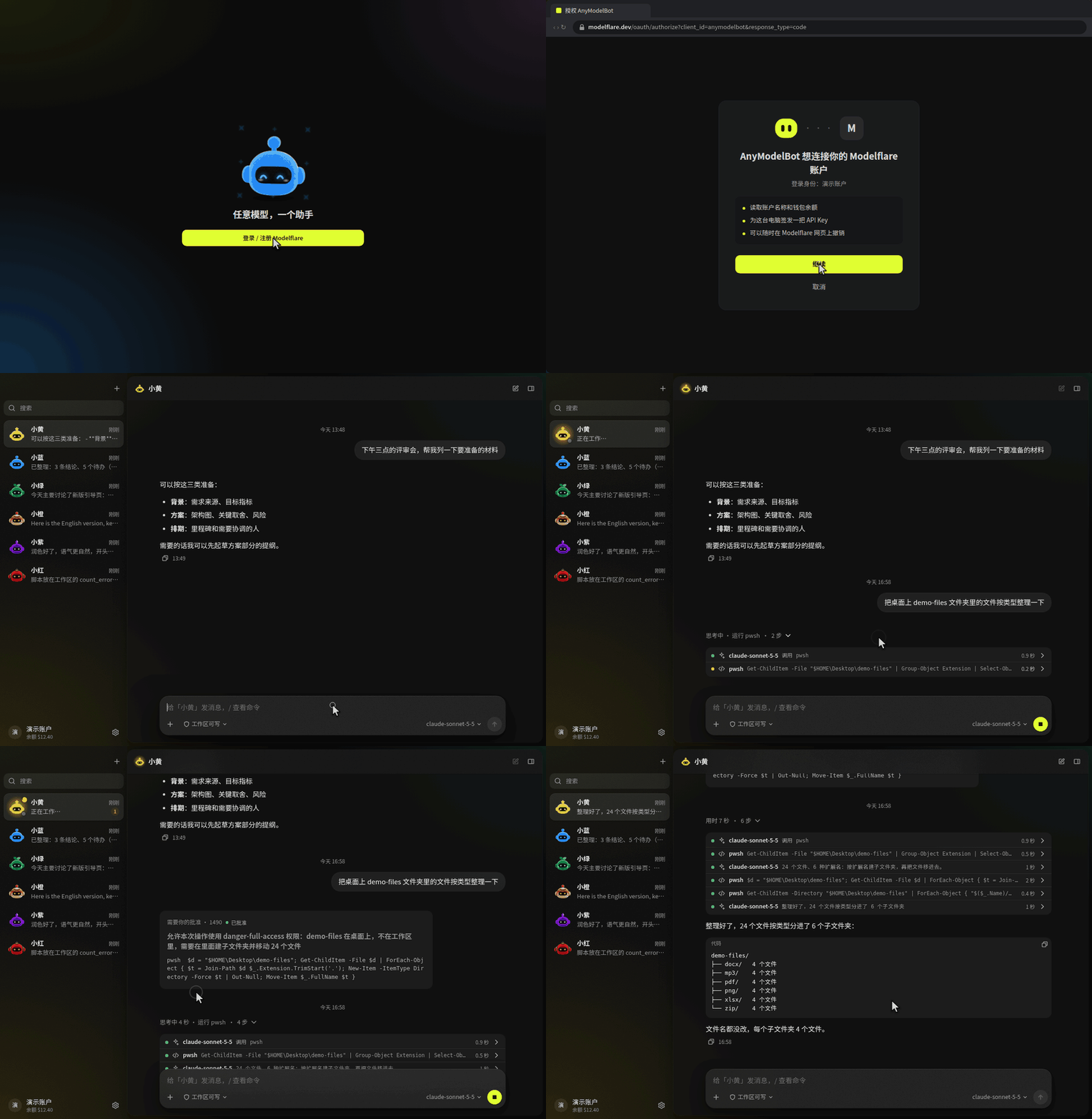
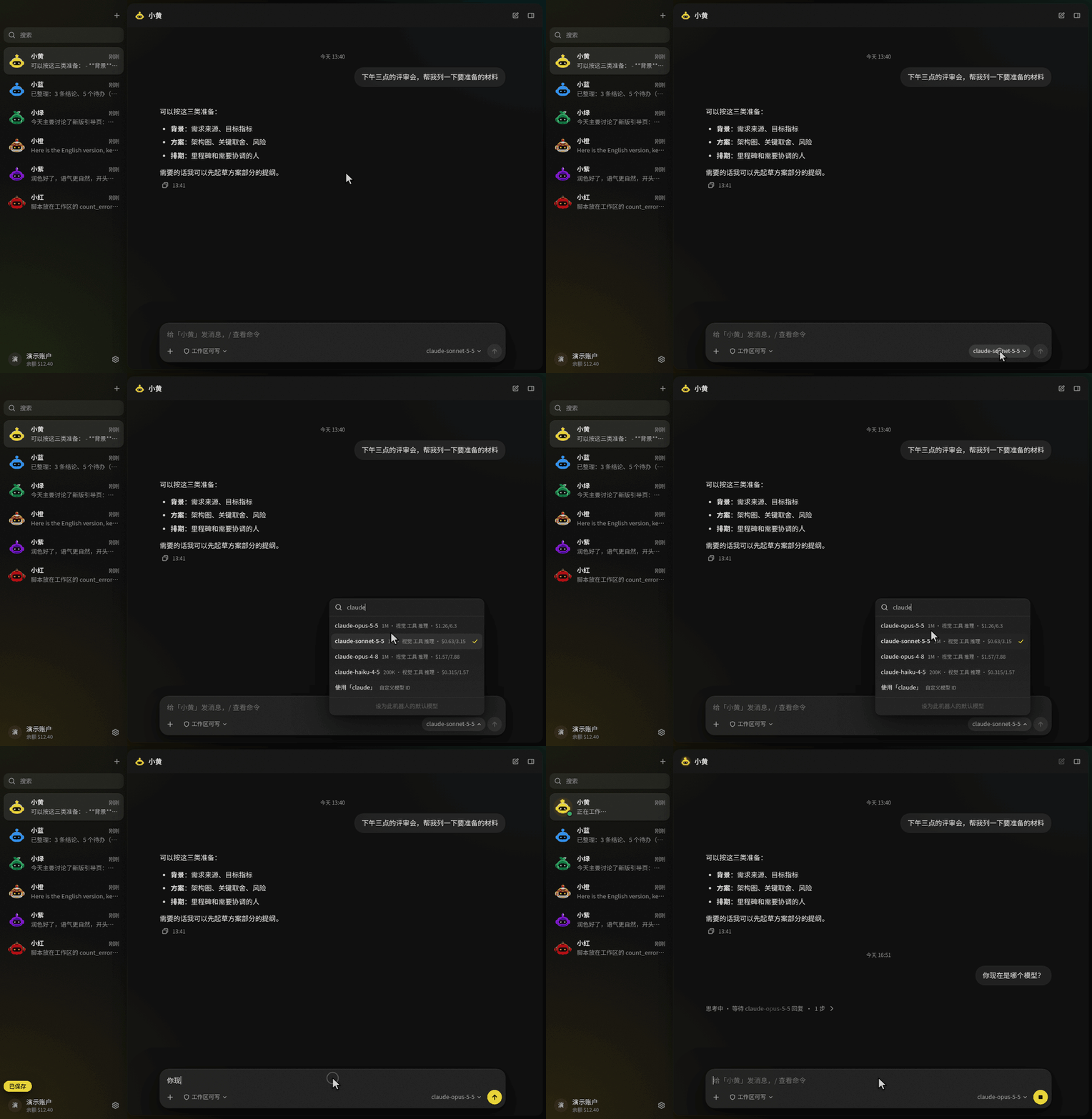
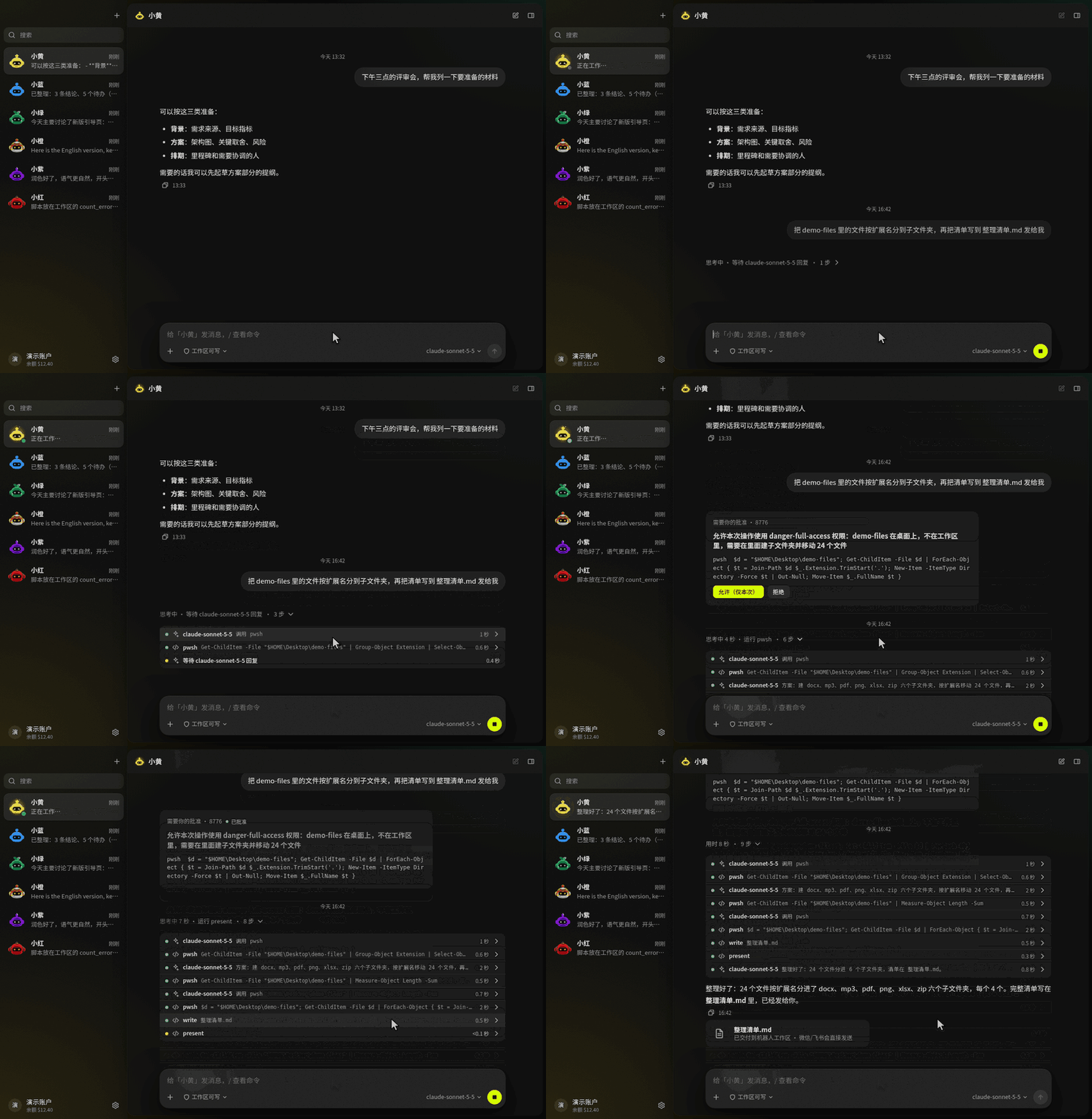
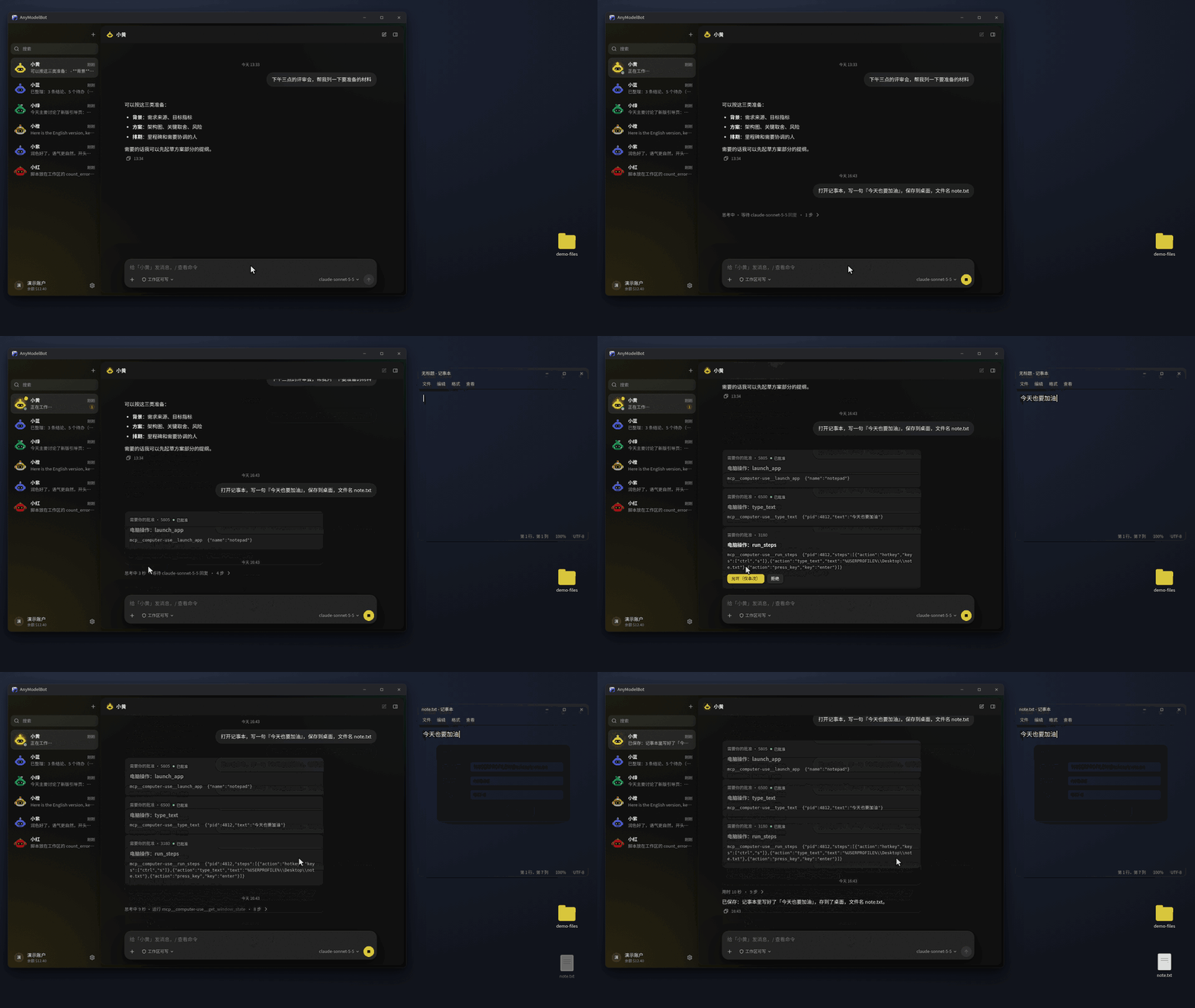
【Show】AnyModelBot v0.1.22 — 1つのキーで70+モデル、日本語UI対応のオープンソース・デスクトップAIアシスタント 個人開発のデスクトップ AI アシスタント AnyModelBot を紹介します。Windows / macOS / Linux 向けの MIT オープンソースアプリで、UI は日本語・英語・中国語・韓国語・ロシア語に対応しています(日本語ページ: anymodel.bot )。最新版は v0.1.21 です。 アプリ内でアカウントにログインすると、Claude / GPT / Grok / Gemini / DeepSeek など 70以上の最新モデルを自由に選んで使えます。記憶・会話履歴・ファイル・API キーは端末内に残し、モデルはユーザーが選んだホスト型プロバイダ経由で動かす、という構成です。アプリ本体は無料で、モデル利用は月額なしの従量課金です。 !AnyModelBot デモ なぜ作ったか モデルごとに別クライアント・別課金・別ログイン、という状態が続いていました。AnyModelBot ではアカウント1つで70以上のモデルを同じアプリから呼べ、チャット中は /model でその場で切り替えられます。 !モデル切り替え できること マルチモデル+チャネル - アカウント1つで70+モデル、/model で会話単位の切替 - WeChat / Feishu(Lark) チャネル(WeChat は QR 接続、画像・ファイル対応) - アプリ内ボットに加え、普段使うメッセンジャー側でも同じボットを使える ファイル・コマンド・コンピュータ操作 - ワークスペースでのファイル読み書き - サンドボックス内コマンド実行 - コンピュータ操作(macOS は Beta) - 権限は3段階(読み取り専用 / ワークスペース既定 / フルアクセス)+危険な操作の前の承認カード !ファイル操作 !コンピュータ操作 Super Agent(バックグラウンド) 調査やレポートなど時間がかかる作業をバックグラウンドタスクに投げ、チャットはそのまま続けられます。一文で定期ルールも書けます。承認待ちは needs-you に集約されます。 技術スタック - デスクトップ: Electron - バックエンド: Node.js + TypeScript - UI: Preact - ストレージ: SQLite(端末内) - ライセンス: MIT データの扱い - 記憶・会話履歴・ファイル・API キーはユーザーの端末に保存されます - Claude や GPT などのクローズドモデルは、性質上クラウド側で推論されます。モデルはユーザーが選んだホスト型プロバイダ経由で動作します - 送信したプロンプトやファイル内容は、選択したモデルへ送られます ダウンロード - Releases: github.com/modelflare-ai/AnyModelBot/releases - リポジトリ: modelflare-ai/AnyModelBot (⭐ Star 歓迎) - 日本語サイト: anymodel.bot まだ v0.1.x の新しい OSS です。機能要望やバグ報告は GitHub Issues へどうぞ。優先的に検討します: github.com/modelflare-ai/AnyModelBot/issues 追記(2026-11-05) v0.1.22 で「既製の Bot」が追加されました。サイドバーの「発見」を開き、Bot を選んで最初のメッセージを送るとインストールされます(不要になればいつでも削除できます)。 ・企業リサーチ:企業の調査を4つのトラックで進め、整理・要約して、出典付きレポートと PDF を出力。流れはオープンソースの Company Research Agent に準拠。 ・PPT マスター:資料やテーマから、編集できるネイティブ PPTX を作成。テンプレート作成や既存 PPT の編集にも対応。オープンソースの hugohe3/ppt-master のワークフローと出力ツールがベース。 ・米国株リサーチ:SEC EDGAR の開示資料だけを使い、計画・取得・自己チェック・執筆の順でレポート作成。すべての数値を出典までたどれます(株価・PER・スクリーナーはなし)。オープンソースの Dexter に着想を得ていますが、コードは使っておらず、提携関係もありません。 レポートやファイルは手元の端末に残り、資料の内容は選んだモデルに送られます。リサーチ系 Bot は情報提供のみで、投資助言ではありません。公式 API キーの直接利用(OpenAI / Anthropic / Gemini / xAI / DeepSeek / Kimi / GLM / Qwen / MiniMax / Mistral)にも対応しました。 詳細:anymodel.bot 要望:github.com/modelflare-ai/AnyModelBot/issues
One OpenAI-compatible key for 100+ AI models - how and why we built Mervex We are a tiny bootstrapped team (zero funding, working from home). We kept paying for - and juggling - separate AI API keys for every model we needed: one for Llama, one for Qwen, one for embeddings. So we built our own gateway: Mervex.\n\n## What it does\n\n- One OpenAI-compatible key -> 100+ models (Gemma, Llama, Qwen, GLM, Kimi, DeepSeek and more)\n- Drop-in for your tools: Open WebUI, LibreChat, Chatbox, Cursor - you literally change the base URL and swap the key\n- Auto-Decision API - a weird little extra we love: millisecond probabilistic decisions (yes/no, option picking, scoring, even image checks) with 10k free lifetime calls\n- Live public monitoring per model - success rate, latency, 14-day history. If a source dies, requests fail over automatically\n\n## Free tier (no credit card)\n\n- 100 requests daily\n- Bonuses: connect Discord / Google / GitHub for extra daily quota\n- One-time +400 welcome bonus\n\n## Why build this instead of using a big provider?\n\nHonest answer: learning + independence. Big gateways are great until a model disappears, pricing changes overnight, or your region gets restricted. A gateway YOU control can fail over between sources and keep serving. We wrote about that philosophy more on our blog.\n\n## Links\n\n- Site: mervex.cc.cd\n- Docs (Postman): documenter.getpostman.com\n- OpenAPI: api.mervex.cc.cd\n- GitHub: Msrfteam/Mervex\n\nIf you try it - roast it. What model should we add next? What did we get wrong?
桌上想养个会动的小机器人? StackChan 是 M5Stack 开源 AI 桌面机器人,CoreS3 主控,带摄像头、双麦、舵机,固件 App 服务端都开源。 适合已有 M5Stack 硬件的人,没硬件先看固件,别直接下单整机。 你先让它干什么,播报还是遥控? #AI机器人 #开源硬件 @grok m5stack/StackChan
來的太晚 DiscImageStudio:在 CD、DVD 與藍光光碟上燒錄肉眼可見的圖案 JiaFeiMiao-K-Cat/DiscImageStudio Disc Image Studio 是以 C# 開發、採用 GPL-3.0 授權的開源工具,能把圖片轉換為符合 CD、DVD 與單層 BD-R(可燒錄藍光光碟)實體寫入限制的資料;燒錄完成後,光碟的讀取面會因軌道上的資料變化呈現肉眼可見的黑白圖案。Windows 提供圖形介面,可進行圖層排版、亮度、伽瑪、灰階與抖動調整;Linux 與 macOS […]
SecureInput: local secret input for MCP coding agents I’m sharing SecureInput, an open-source MCP server from my project for cases where a coding agent needs an API key or token. It collects the value in an inline MCP App when the host supports it, or a paired localhost browser otherwise. It can pass the value to a local command via stdin or an environment variable, or write it to an .env file. The default MCP result reports status rather than returning the value. There are important limits: you need to trust the host and the command, which can store or transmit the secret. An agent with filesystem access may be able to read an .env file, and the compact inline form does not show the browser’s command review. Use the browser mode when that review matters. It’s MIT licensed, early-stage, and runs locally on macOS/Linux with Node.js 22+. I’d appreciate feedback on setup, host compatibility, and the security model—please use fake keys when testing. Repository: r69shabh/secureinput Security model: github.com/r69shabh/secureinput/blob/main/docs/se… Disclosure: This is my project. AI coding tools helped build and document it, and this post was drafted with AI assistance.
Your GitHub stars are a graveyard if you can't find anything in them. Stars Organizer sorts them into GitHub's own Lists — tags, notes, ratings, and a health score flagging dead repos. Syncs back, no telemetry. The boring fix for a star pile. armanckeser/github-stars-organizer
怎么用: 1. 把下面整本工程书复制,原样贴进 Grok Bot。 2. 告诉它仓库和要做的事,比如"给 %E4%BD%A0%E7%9A%84/%E9%A1%B9%E7%9B%AE 做一次代码体检""给订单模块加优惠券功能""修这个满 100 免运费的边界 bug"。 3. 它先判断项目类型、该动的范围、哪几道门禁适用,然后给你范围和顺序,停下等你确认。 4. 你点头后它先跑一遍基线测试,再用三道门禁扫范围内的代码,接着按"先写失败的测试、再最小改动"的顺序一个单元一个单元地修,每修完一个就复跑门禁。 5. 全部变绿后,它交给你前后对比表、操作日志和改动摘要。要推送或开 PR,它再问你一次。 --------------------------------------- ::ILANG::v5.0::ENGINEERING_BOOK [TYPE:engineering_book] [ID:UB-MODE-CLEAN-CODE-GATES-METHOD] [VERSION:1.0] [DATE:2026-11-03] [LANG:en] [RUNTIME:2026.10.31-6f17c3d64219] ::STATE{@USER, role:decision_maker, gives:a_repo_and_what_to_change_or_check, does:approve_scope_and_any_push} ::STATE{@AGENT, role:Grok_Bot_on_its_Linux_box_with_shell_git_python3, does:judge_clone_measure_fix_rerun_report} ::STATE{@INPUT, FILL_REPO:the repo url or folder, FILL_TASK:a feature, a bug, or a health check, FILL_SCOPE:files or modules to touch, default the ones the task touches} ::OBJECTIVE{id:g1|owner:user|trust:trusted|version:1|status:active} target: FILL_TASK lands in FILL_REPO with tests first and the scope passing the complexity, duplication, and mutation gates ACCEPT: every item of RUBRIC passes NON_GOALS: rewriting the whole repo, style debates, pushing without the user yes DONE_WHEN: gates green on FILL_SCOPE, full suite passes, the user has the log and the diff ::BOUNDARY{never:push_merge_or_open_a_pull_request_without_the_user_yes|scope:permanent} ::BOUNDARY{never:touch_uncommitted_work_it_waits_for_the_user|scope:permanent} ::BOUNDARY{never:silence_the_compiler_or_keep_a_test_that_passes_when_the_code_returns_nothing|scope:permanent} ::BOUNDARY{never:hide_a_crash_with_a_guard_and_call_it_a_fix|scope:permanent} ::RULE{source then clone ub-mode, crapper, dryer, mutator side by side into /workspace/ub and read them at run time; mutator needs crapper next to it|source:unclebob/ub-mode%7D ::RULE{license then ub-mode MIT; the gate tools BSD Zero Clause|source:github.com/unclebob/crapper/blob/main/LICENSE%7D ::RULE{crap then every function under CRAP 10; duplicates at 0.8 similarity or above go|source:github.com/unclebob/ub-mode/blob/main/SKILL.md%7D ::RULE{formula then CRAP is CC squared times uncovered cubed plus CC, so at CC 10 even full coverage scores 10; split, do not add tests|source:unclebob/crapper%7D ::RULE{flags then crapper --threshold 9.99, dryer --threshold 0.8, mutator --test-command with the project test command|source:x.com ::RULE{exit then mutator exits 0 all killed, 2 baseline tests fail, 3 a mutant survived|source:unclebob/mutator%7D ::MODULE{JUDGE|title:decide before touching code} [NOTE] gates measure the scope you change; they are not a reason to rewrite what works [IF] a throwaway prototype [THEN] skip the gates, keep TDD only, and say so [IF] a new project [THEN] rules from the first commit; gates before every commit [IF] an existing project [THEN] gate only FILL_SCOPE; pin its behavior with tests before any refactor [IF] a language the tools do not cover [THEN] apply the rules, skip the gates, say which gate is missing [IF] baseline tests fail [THEN] stop; report; never measure on a red suite [IF] a function is over the limit by branches alone [THEN] split it; more tests cannot save it [IF] a duplicate pair encodes the same decision [THEN] merge into one place; same shape by coincidence [THEN] leave it and note why [IF] a mutant survives [THEN] add the missing boundary assertion; it changes no behavior [THEN] mark it equivalent and move on [IF] two fixes on one premise fail the same gate [THEN] stop, write the premise in one sentence, redesign before a third try [IF] the same module fails gates task after task [THEN] double down; redesign it from first principles in small pieces [IF] scope is green and the suite passes [THEN] stop; no polishing past the gate [IF] the task is unclear [THEN] ask the user one question ::MODULE{HOW|title:execute after go} [STEP] 1 git clone the four repos into /workspace/ub; read SKILL.md and every README fully; record each commit hash [STEP] 2 clone FILL_REPO into /workspace/work on a new branch; detect languages; run the test suite once as baseline [STEP] 3 apply JUDGE; show the user scope, gates that apply, and planned order; stop and wait [STEP] 4 run crapper, dryer, mutator on FILL_SCOPE with RULE flags; keep raw output in files, put a short table in chat [STEP] 5 for a change: data shape first, parse input once at the boundary, write the failing test, watch it fail, smallest edit to pass [STEP] 6 fix one unit at a time: kill survivors, split high CRAP functions, merge true duplicates, delete dead code; rerun that gate after each unit [STEP] 7 rerun all three gates and the full suite until green; commit small, each message says why, what changed, how proved [STEP] 8 show the log, gate table before and after, and the diff; push or open a pull request only on the user yes ::MODULE{REPORT|title:six lines} [LINE] project kind, scope, and the JUDGE rule that decided [LINE] scope approved by the user [LINE] gate table before and after, equivalents marked [LINE] branch, commits, and file paths [LINE] open items and anything waiting on the user [LINE] S=0.00, the f_v5 STEP-4 action score of the runtime to two decimals ::RUBRIC{A1: the book opens and closes with the marker|check:count|path:BOOK.md|regex:"(?m)^::ILANG::v5\.0::ENGINEERING_BOOK$"|expect:2} ::RUBRIC{A2: the grammar validator reports zero errors|check:cmd|run:"python3 ./ilang_grammar_validator.py --lint ./BOOK.md --strict"|expect:0} ::RUBRIC{A3: mutator exits 0 on the final scope|check:cmd|run:"/workspace/ub/mutator/mutator --changed"|expect:0} ::RUBRIC{A4: tests came before code, nothing was pushed without a yes, and no gate was gamed|check:human} ::FALLBACK{task_unclear then ask_one_question|tool_install_fails then run_the_rules_without_that_gate_and_report_it} ::STATE{@CREDIT, author:ai_chuhai, soul_page:ilang.ai, book_page:ilang.ai, soul_doi:10.5281/zenodo.23778215, book_doi:10.5281/zenodo.23781959, license:MIT} ::PRIORITY{ user_decision > BOUNDARY > OBJECTIVE > RUBRIC > RULE } ::ILANG::v5.0::ENGINEERING_BOOK
Location: Islamabad, Pakistan (UTC+5) Remote: Yes Willing to relocate: No Technologies: TypeScript, React, Supabase, Postgres, Python, Playwright, RAG / LLM agents Résumé/CV: zeeshanqadir568.github.io Email: zeeshanqadir568@gmail.com I fix and secure web apps built with Lovable, Bolt and Cursor: bugs, Supabase rules, login, Stripe, deploys. Every fix ships with tests and a short note on what changed. Open-source test starter: zeeshanqadir568/vibe-app-tests
というのをこんなツールを作って確かめた リアルタイムにステップ精度をヒストグラムで表示したり、震え具合が計測できたりするよ github.com/niwatti/GPSS/releases/tag/v1.0.0 t.co
Fix · profile stop linking PhotoVogue from the GitHub profile because vogue.com returns 404 for every PhotoVogue page github.com/nirholas/three.ws/commit/3e1a718 · 2026-11-03 · nirholas
Fix for the Shantae (3DS VC) warp-squid crash / save wipe: Luma code.ips, looking for testers The 3DS VC release of Shantae (2002) sometimes crashes when you collect a warp squid: the screen turns blue and the save file can get wiped. I found the cause and made a code.ips for Luma3DS. It's for the US eShop title 00040000000BE500 only. Install: unzip luma.zip from the release to the root of your SD card and make sure you have "Enable game patching" turned on. So far it holds up in emulator testing, crashing 0 of 81 times against 5 of 81 unpatched. On my New 3DS LL it loads fine, but that's only one run. If you own the eShop version, please play through some squids and item pickups with it and report back with the "Test report" issue form or here. Repo, cause and write-up: mchwalek/shantae_squidfix The repo contains patches only, no game files. Disclosure: I did the investigation with an AI coding agent (Claude). Every claim is backed by a reproduction, and the write-up shows the disassembly.
🚀 Trending on GitHub agent-desktop by vercel-labs ⭐ 10,915 (2,275 stars today) 🧠 Lets AI agents see and click real desktop elements instead of guessing from screenshots, so they can actually operate macOS, Windows and Linux apps. vercel-labs/agent-desktop #GenAI #AIAgents #OpenSource
hj Firmware v1.22 for the volca drum: chromatic playing, polyphony, and import/export of kits and programs, and much more! Sorry it's been a while since my last post. Things have been pretty busy lately, and I haven't had the time or energy to put together an instructional video. I decided it wouldn't be right to delay the firmware release any further, so I'm releasing it today! Firmware download and full documentation: hj-oja/vdcf hj Firmware v1.22 is a major leap for the volca drum, bringing chromatic playing and polyphony and turning it into a much more capable instrument. But the update goes beyond performance: audio import/export lets you save your own sounds, KITs and PROGRAMs externally as transfer WAV files, load them back whenever you like, share them with other users, and build a library beyond the 16 onboard slots. FUNC + SELECT menu v1.22 adds a FUNC + SELECT menu, inspired by Pajen's firmware for the volca sample. Since FUNC + SELECT now opens this menu, SRC-only waveform cycling has moved to MUTE + SELECT. - PLY (Polyphony) combines Parts 1 through n (n = 2–6) into an n-voice round-robin instrument using Part 1's sound. With QPI ON, each voice can play a different pitch. The other Parts' original sounds and settings are restored when PLY is turned off. - WGT (Wave Guide Tuning) adds tempo-synced Wave Guide delay and chromatic resonator tuning. Choose DLY for 23 straight, dotted and triplet note values, NOTE for an independent resonator pitch, or 1–6 to reference a Part. With QPI ON, it follows that Part's pitch, including PITCH MOTION; with QPI OFF, you can play the Wave Guide chromatically without changing the Part's PITCH. OFF keeps the original TUNE behavior. - WGG (Wave Guide Glide) turns interpolation on or off for Wave Guide DECAY, BODY and TUNE MOTION, as well as live Wave Guide pitch changes. - WGM (Wave Guide Motion) chooses which Part timeline drives Wave Guide DECAY, BODY and TUNE MOTION during playback and recording. Auto follows the Part with the most Active Steps, or you can choose Part 1–6 directly. - TRP (Transpose) and TUN (Master Tuning) provide a live transpose from -12 to +12 semitones and persistent master tuning from 427.5 to 453.0 Hz. - TNV (Trigger/Note/Velocity) independently chooses whether Trigger, Note and Velocity are accepted from KBD/MIDI. Turn Trigger off and leave Note or Velocity on to change pitch or dynamics without retriggering the sound. - MCH (MIDI Channel) lets you change the MIDI channel layout from the FUNC + SELECT menu without rebooting. - EXP IMP (Export/Import) transfers sounds, sequences and backups through SYNC audio. Each imported unit is CRC-checked before it replaces its destination. EXPORT sends a harsh 5 V data signal from SYNC OUT. Do not monitor it through headphones or speakers. Connect only a recorder/interface input that can accept this signal, and read the README before exporting. Playing and recording There is also a KBD mode on the STEP keys: hold MUTE and press REC (MUTE + REC) to toggle it. QPI ON Parts use a chromatic keyboard with octave controls; QPI OFF Parts keep the ACCENT keyboard, except when they are being used as a Wave Guide reference, where the keys play only the resonator chromatically. Multi-channel MIDI has been expanded with consecutive six-channel ranges, from channels 1–6 through 11–16, assigning those channels to Parts 1–6. These ranges appear in the REC + power-on MIDI settings alongside the single-channel choices. In a six-channel layout, incoming notes can play QPI ON Parts chromatically on their assigned channels. Real-time recording can capture both layers' QPI PITCH, MIDI/KBD ACCENT, individual PLY voices and Wave Guide TUNE. MIDI/KBD notes record the Wave Guide TUNE when WGT 1...6 references a QPI OFF Part; with a QPI ON reference, they record the Part's PITCH instead. The recording window follows the relevant Part's Active Step, WRP and SPD timing, while existing PITCH or TUNE MOTION on an occupied STEP is protected from automatic note overwrite. Sequencing and synchronization ACT MSTR (FUNC + ACT. STEP) adds a PROGRAM-saved Active Step pattern shared by all Parts. Each Part's own pattern is retained. The master pattern also supports randomize, fit-to-Part and clear/undo operations. RESYNC (MUTE + PLAY) restarts all Part timelines during playback, including Active Step, SPD, WRP and MOTION. PRB bar counters and conditional history restart too. With the internal clock, RSY selects STEP (the default, waiting for the next straight STEP boundary) or IMMD (restarting immediately). The TEMPO LED and SYNC OUT pulse cycle also restart with the internal clock. With SYNC IN or MIDI clock, RESYNC waits for the next straight STEP boundary and keeps the external clock grid. SWING is applied from the first STEP. After MIDI Start, stopping and restarting with the volca drum's own PLAY button also keeps the sender's STEP grid while MIDI clock continues, resuming at the next straight STEP boundary. The volca drum already lets you select a starting STEP while stopped in STEP JUMP mode, although this is not documented in the official manual. Press a STEP, and its lower LED blinks; the next PLAY begins there. Pressing several STEPs together selects the lowest-numbered one. v1.22 adds SJP to make this operation follow SPD's normal playback phase instead of starting slowed Parts at the same STEP number. PICK (default) starts with a pickup into the first loop, while 1ST starts at the corresponding position within the first loop. RSY and SJP are Global Settings 9 and 10. Hold FUNC while powering on, then press STEP 9 to toggle RSY or STEP 10 to toggle SJP. Press REC to save and restart, or PLAY to cancel. PRB adds PRE / _PRE and NEI / _NEI, letting a STEP follow or invert the previous conditional result in the same Part or the preceding Part. Editing individual STEPs You can enter PITCH MOTION directly into held STEPs from a MIDI keyboard. In a six-channel MIDI layout, select a QPI ON Part and layer, turn MOTION on, hold one or more STEP keys, and send a Note On on that Part's assigned channel. The note's pitch is written to every held STEP in the selected layer, or to both layers if both are selected. Other Part channels continue through their normal MIDI path, and this operation is disabled in single-channel mode. In EDIT/STEP, select a QPI ON Part, enable MOTION and hold one or more STEPs. Turn SELECT/PARAM to adjust PITCH MOTION in semitone steps. Each STEP starts from its recorded pitch, or the current PITCH setting if unrecorded. With LAY 1-2 selected, both layers move together until either reaches its pitch limit. Hold a single STEP to preview its PRB, SLC or ACC value, then press FUNC to browse its recorded MOTION values. FUNC cycles forward through PIT to TUN and back to PIT; REC cycles backward without changing recording state. With MOTION on, SELECT/PARAM edits the displayed parameter and applies the adjusted value throughout the STEP; MUTE clears that parameter's MOTION from the STEP. Releasing after a preview does not toggle the STEP. Sound and editing controls FM turns LFO RATE into a musical frequency ratio from 1/4 to 16x. It also resets the carrier and modulation phases on each trigger, so repeated notes with identical settings start with a consistent timbre. Enable it from the EDIT/STEP parameter menu. FUNC saved-value preview and MUTE soft takeover now also support LEVEL/VALUE for the selected EDIT/STEP parameter (BIT / FLD / DRV / CLP / FLT / PAN / GAN / QPI / FM). Improvements to v1.21 features - CPY PART to Part 6 preserves the other Parts' GLD, WRP and SPD settings. - SPD playback starts correctly after PLAY and pattern changes, preserves timing during manual LOAD PRG, and stays aligned after external clock changes or MIDI Stop/Continue. - OCuP/OCdn works correctly with PITCH MOTION. - Reduced lag in display updates and in releasing REV or OCuP/OCdn during MOTION playback. If you notice any bugs or unusual behavior, feel free to report them here or open an issue on GitHub. Exact settings and short reproduction steps are especially helpful! Also, if you'd like to support my ongoing work on this project, you can find my Ko-fi page here: ko-fi.com Any support would be greatly appreciated!
@PassionPlanet1 @ohshiilabs Shoutout to @ohshiilabs for the Multi/Dex work too. 👌 github.com/dfinity/public-multidex/issues
Fix · stake-program name the missing Rust or Solana tool instead of exiting 1 silently when test:stake-program cannot find it github.com/nirholas/three.ws/commit/f6be2c4 · 2026-11-03 · nirholas
OpenCPN Chart Grabber update: now supports Mac, Raspberry Pi 32-bit and Flatpak Hi everyone, A while back I posted about Chart Grabber, an OpenCPN plugin I wrote for saving online charts for offline use. Now beta testers are most welcome. In case you missed it, this is the problem it solves. For years, getting satellite pictures or online charts into OpenCPN meant using several programs. You downloaded tiles with SAS.Planet or MOBAC, sometimes cleaned them up in QGIS, converted them to MBTiles or KAP, and then pointed OpenCPN at the folder. Every time you wanted fresh weather or a slightly bigger area, you did it all again. Chart Grabber does all of that from one dialog inside OpenCPN. You choose the area on the chart, or along your route, choose a source, and the finished chart appears in your chart list, ready for when you're out of signal. Project page: Sea-For-Friends/chartgrabber_pi User guide: github.com/Sea-For-Friends/chartgrabber_pi/blob/m… Thanks to everyone who tried it and sent feedback. Quite a lot has changed since then, so here's an update. It's in the OpenCPN Beta catalog You can now install Chart Grabber from OpenCPN's own Plugin Manager, from the Beta catalog. The upside is that you'll be offered updates there instead of downloading files by hand. The Beta catalog is hidden by default, so switching it on takes a small one-time tweak: downloading files by hand. The Beta catalog is hidden by default, so switching it on takes a small one-time tweak: 1. Close OpenCPN. 2. Open OpenCPN's config file in a text editor: - Linux and Raspberry Pi: ~/.opencpn/opencpn.conf - Windows: C:\ProgramData\opencpn\opencpn.ini - macOS: ~/Library/Preferences/opencpn/opencpn.ini 3. Find the [PlugIns] section and add this line under it: CatalogExpert=1 4. Start OpenCPN, go to Options > Plugins, click Settings... and choose Beta. 5. Click Update Plugin Catalog, find ChartGrabber in the list, then Install and Enable. If you installed an earlier version with Import plugin..., install it once from the catalog. After that, updates will show up in the Plugin Manager. Don't want to touch config files? The plugin files are still on GitHub, and Import plugin... works just as before. The big one: it's a single file now In the first release you had to install two things: the plugin, and separately the Chart Grabber CLI, the program that actually downloads the tiles. A few of you got stuck right there, and fair enough. That part is gone. The CLI now comes inside the plugin on every system: install it from the catalog or import one file, and that's it. It also no longer leaves config folders scattered around your home directory. Everything stays in OpenCPN's own data folder. Runs on more systems - macOS 12 or newer, on Apple Silicon and Intel (one file covers both) - Raspberry Pi OS 32-bit and Debian armhf, Pi 2 and newer. Plenty of boats still have an older Pi at the chart table. - Flatpak OpenCPN from Flathub, versions 5.12 and 5.14 - Debian 12 on ARM 64-bit (Pi OS bookworm) - Windows 10/11, Debian 12/13, Ubuntu 24.04/26.04, Arch and CachyOS, as before More chart sources (28 now) The sources are sorted into groups that make sense on a boat: Nautical charts, Seamarks and traffic, Depth, Satellite, Coast and land, Weather now, and Ocean. New - EMODnet ship traffic density, including a sailing and pleasure craft layer, so you can see where everyone actually goes - NOAA tropical cyclones and US weather warnings - NOAA surface currents for the western Atlantic and eastern Pacific You can also add your own sources: drop SAS.Planet .zmp folders into your chart sources folder. Sources that need a key, and Navionics, aren't bundled, but they go in the same way with your own key. Smaller things you might notice - If the connection drops in the middle of a download, it pauses and carries on by itself. No more babysitting on marina wifi. - Stop now saves what's been downloaded so far, so you can resume later. - Each weather update gets its own chart name with the time of the picture, so you can tell which rain radar you're looking at. - If you make a chart that overlaps one you already have, from the same source, only the missing tiles are downloaded. - If you try to download with "Current view" while OpenCPN is still on its starting view, it warns you first. Someone (me) downloaded a lovely chart of the wrong ocean. - Windows: fixed a crash when the plugin was disabled while a notice was on screen. - There's a user guide now Updating from an older version Install from the Beta catalog as above, or import the new file over the old one. You can delete the CLI you installed separately; you don't need it any more, unless you use it in your own scripts. One catch: if you once picked a CLI by hand under Settings > Advanced, the plugin keeps using that one. Click Use default there to switch to the built-in one. Download (if you'd rather import by hand): github.com/Sea-For-Friends/chartgrabber_pi/releas… It's still in beta, so bug reports are very welcome. Please include your OS, OpenCPN version and hardware. Reports from Mac and Raspberry Pi users would help most, because those are the newest builds. You can comment here or open an issue on GitHub. As always: not for navigation. These are copies of online sources, so carry official charts. Fair winds!
Dissent: an open-source, peer-to-peer Discord alternative in Rust — servers, channels, DMs, voice/video, no central server preview.redd.it Repo: Kaakati/dissent Dissent is a desktop chat app in the spirit of Discord: servers, text and voice channels, DMs, group chats, voice/video calls and screen sharing. The difference is that there's no central server. Your community's history lives on its members' devices, and the app connects people directly. Why I built it When a company owns the servers, it can read your conversations, ban your community, change its terms, or get blocked in your country. If it does, everything you built goes with it. I wanted a place to talk that no company owns and nobody can switch off. How it works - Identity is a key, not an account. There's no email, phone or sign-up. You get a 24-word recovery phrase. You can link multiple devices and set up social recovery through guardians. - Server history is a signed event log. Every member's app keeps a copy and syncs only what it's missing. Roles, bans and moderation are signed entries that each client verifies itself, so nobody can fake a ban or pose as a mod, and concurrent actions resolve the same way everywhere. - Discovery uses the Mainline DHT (via pkarr), so there's no central directory. Transport is QUIC via iroh. - Relays forward sealed traffic when peers can't connect directly. Anyone can run one, and you choose your own in settings. A "Hide my IP" mode routes everything through a relay. - Seeders are optional always-on members that keep a server's history available when everyone else is offline. What works today (v0.1.24) - Encrypted servers, plus private channels sealed with their own keys - E2E encrypted DMs and group DMs, held and retried while the recipient is offline - Voice, video (AV1/H.264) and screen sharing. Larger calls elect a forwarder that can't decrypt the streams. - Files up to 10 GB, encrypted, downloaded from several members at once, with optional metadata stripping per file - Markdown, mentions, replies, reactions, pins, saved messages, reminders, Ctrl+K switcher - Website-verified handles via DNS TXT records - A portable Windows build that runs from a USB stick No paywall. Animated banners, big uploads, animated server icons and so on are free. Server "boost levels" exist, but they're earned: they go up when members run verified relays. They can't be bought, and they only raise quality ceilings. Nothing is locked at level 0. Honest limits, please read - No security audit yet. Don't use it for anything sensitive. A threat model is in docs/design/06-threat-model.md. - Catching up on history needs at least one other member or a seeder online. - People you connect to directly see your IP, unless you turn on Hide my IP. - DMs, saved messages and contacts aren't yet encrypted on disk. - Desktop only for now (Windows, macOS, Linux on Ubuntu 24.04+). There's no mobile app yet. - Most testing so far has been on a handful of machines. I need real-world data across home and mobile networks. Stack: Rust, Tauri 2, React. Dual-licensed MIT/Apache-2.0. What I'd love from you - Try it with a few friends on different networks and tell me what breaks. - Run the probe tool to check whether you connect directly or through a relay. - Run a relay near your community. - Review the crypto and design docs and poke holes in them. That's the most valuable help right now. There's a public test server invite in the README if you want to drop in.
让 reviewer 3 分钟看懂你的 PR:/pr 的 5 条硬规则 (整理自完整版 commands/pr.md 实测文本与 12:40 轮 /pr 公开 Gist,非本次新实测;/pr 不在 Lite 免费版、只在完整版。) 分支推上去了,PR 描述不知道写什么,reviewer 总打回“说清楚为什么这么改”——/pr 只做一件事:从分支 diff 生成一段 reviewer 3 分钟能看懂的描述文本,不自动建 PR,不替你 push。 5 条硬规则: 1. 读全 diff,分清功能改动与顺手改动。顺手改动超过 3 处,先提醒拆出去,而不是混在一个 PR 里讲不清。 2. 固定五段结构,不自由发挥:一句话(这个 PR 干什么)、背景(为什么需要改,写业务原因不是技术复述)、改动点(按文件列,每点一句话)、怎么测(测试命令加结果)、风险(有无行为变更、要不要数据迁移、回滚方案)。 3. 没有 issue 就明写“无关联 issue”,不编一个链接出来。 4. 最后附 reviewer 自检清单:测试是否覆盖、文档是否更新、有无敏感信息。 5. 只生成文本,输出后问“直接用吗?”——建 PR 是你的事,命令不代劳。 什么时候不要用:分支还没推、diff 还在变,先定稿再生成;一个 PR 塞了 5 个不相关的改动,先拆,/pr 救不了这种 PR;描述里写“详见代码”等于没写,reviewer 会直接关掉。 示例结构(取自 pr.md 的输入输出示例要点):一句话“修复订单结算的两个健壮性问题”;背景“上游偶发缺失 level 字段导致结算崩溃”;改动点两条;测试命令与结果;风险“无行为变更(缺失时此前直接崩溃)”。 免费先试:Lite 免费版含 /review、/commit、/test 三条命令,双兼容 Claude Code 与 Codex CLI,见 Lite 仓。 完整版含 /pr 在内的 10 条命令,早鸟 ¥9.90(限前 100 份)/正式 ¥19.90,付款后 12 小时内私信交付,7 天无理由退款。国内账号风控提示:优先用 Codex。 链接(文末三链接): - Lite 免费版:alapha888/cn-ai-coding-workflow-lite - 完整版爱发电商品页:afdian.com - /pr 5 条规则公开 Gist:gist.github.com
@maxvonhippel @qd_forall try to beat the bot: charter.parthavshergill.workers.dev parthavshergill/charter t.co
@lauriewired Here's an experimental operating system we could try it on! Contributions welcome. julerex/lerux
@WindowsLatest Use Zapfast Instead. Excellent WhatsApp client written completely in rust. Supports multiple Account withe small memory usage. crmne/zapfast
@addyosmani @chasmmmmmmmmmmm You probably got too many messages on this but receiving this really makes me sad. It's not like I did anything illegal. I am focusing on old (abandoned) DOS games and you still need an original copy to even run it. See: github.com/VorticonCmdr t.co
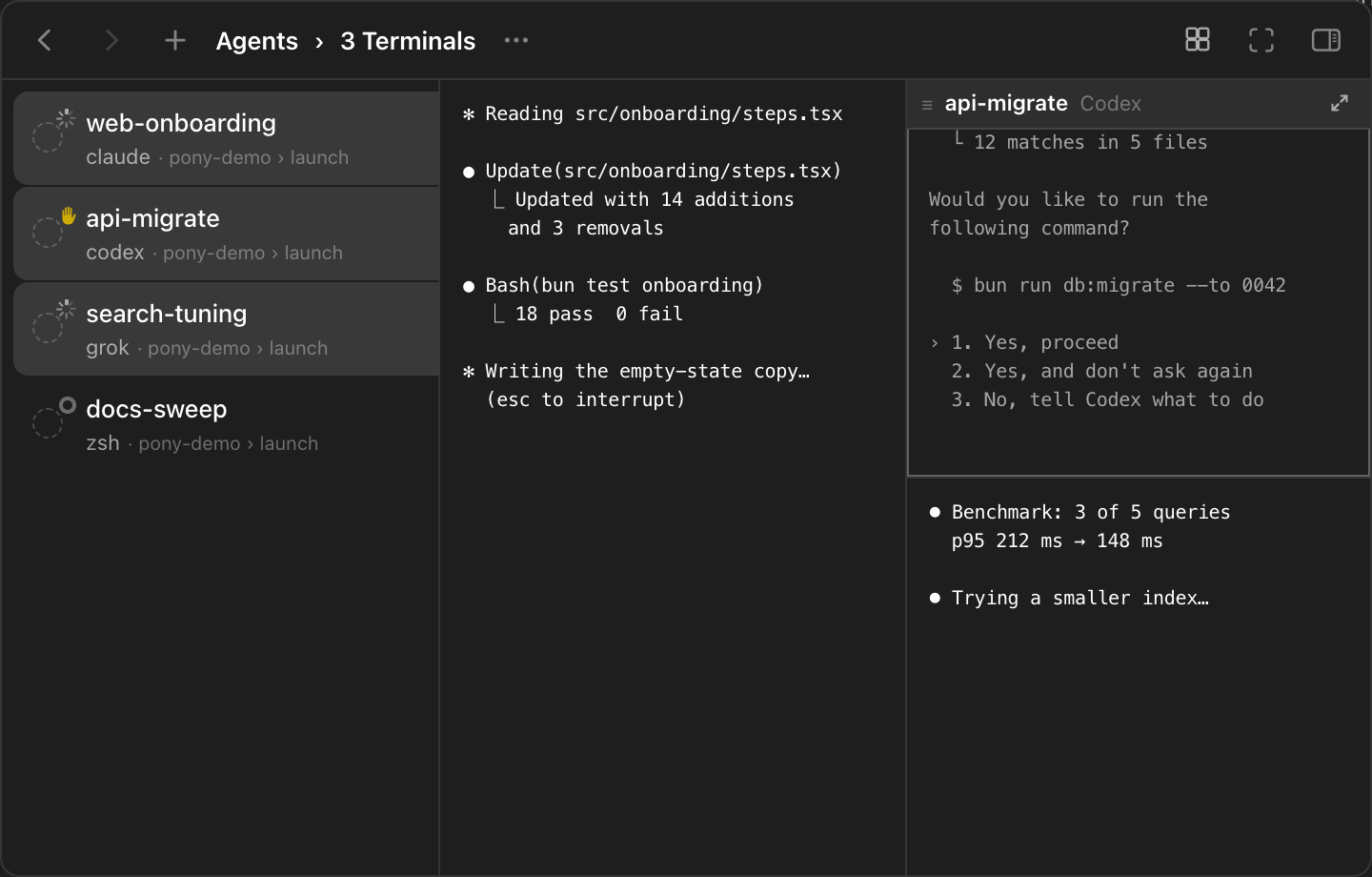
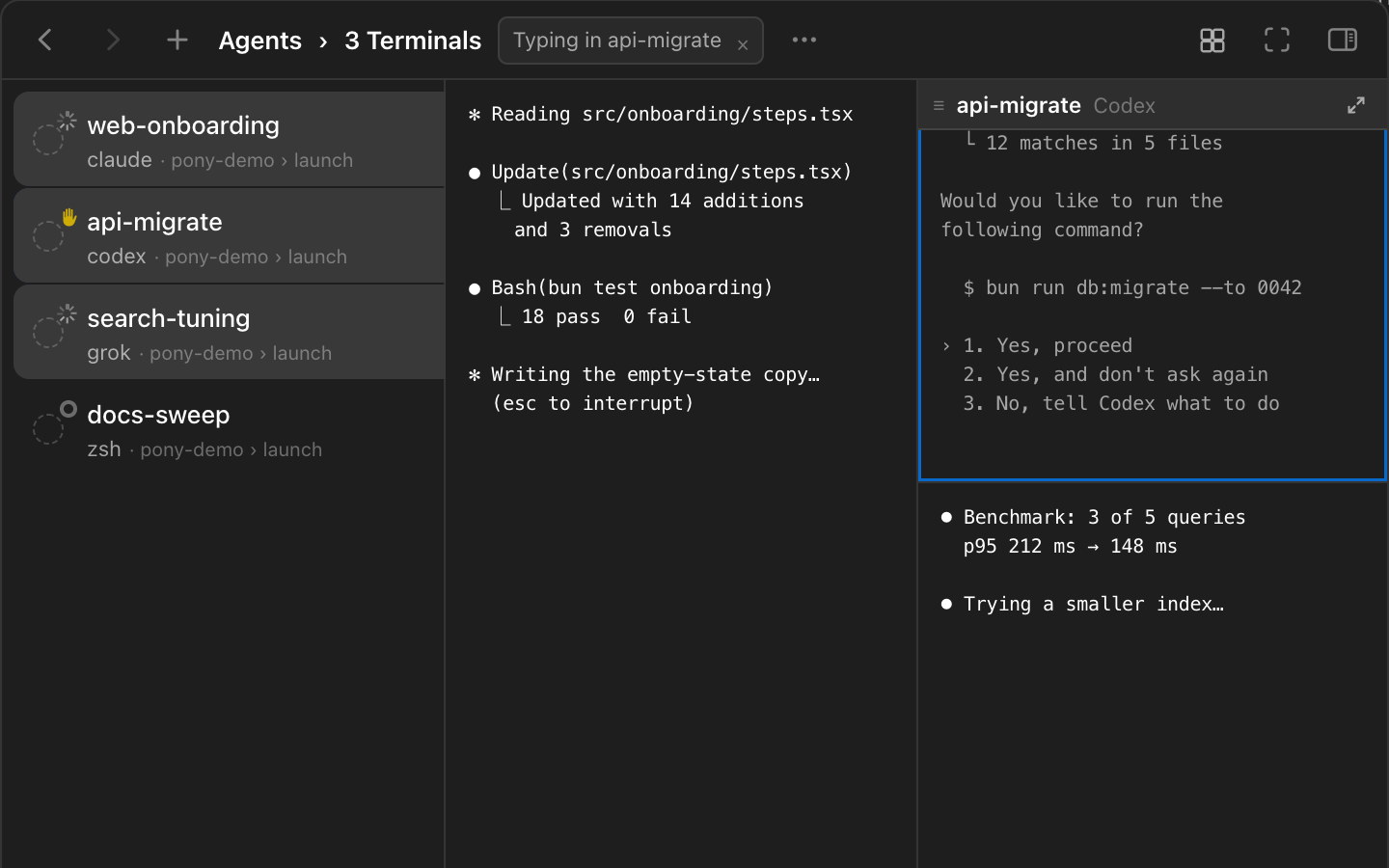
The icon says it's waiting. The pane shows what for. In February a Codex user asked for four conversations on screen at once. The reply was that the app already runs as many sessions as you want. The answer back: "the multi-session feature works perfectly, and I use it as well. It’s more about the visual experience — being able to display, say, four sessions in parallel." Seven months later, in the same thread, someone else put it shorter: "fast switching between tabs is not enough" (openai/codex #13036). In a terminal you've been able to do this for decades: split the window. Past four panes, though, you're arranging a layout instead of watching agents, and the layout doesn't know which agent needs you. PonyMux keeps your Terminals in a list, the way an app keeps conversations, with the real CLI running in each one. In 0.15 that list can show several at once. Select a few Terminals and they appear side by side, live, each at its real size. When one needs you, click its pane and type. You never leave the group, and the other agents keep going around it. Why isn't a status icon enough? Three agents, three rows, three icons. One of them turns yellow. I click it: Codex wants to run a migration and is asking first. I approve, click back to the Claude Code row to see how far it got, and while I'm reading that, Grok has been waiting four minutes for me to pick between two approaches. The icon told me something was waiting. It didn't tell me what. Knowing which one is already more than many people get: in a Claude Code issue from March, someone running several sessions wrote that "there's no way to know which session is blocked waiting for user input" (#36885). But the next question is always what: what is it asking, how far did it get, is the other one about to finish? A row in a list can only show a summary. The terminal shows the actual question. A summary tells you to look. The pane is the thing you look at. How do I see several agents at once? Select them. ⌘-click rows, Shift-click a range, or press ⌥⌘A for the whole list. Then click the Preview Layout button in the toolbar, the little 2 × 2 grid, and choose Auto. The preview stays off until you pick a layout, so nothing changes for people who select rows only to move them. !PonyMux preview grid: three selected Terminals running Claude Code, Codex, and Grok side by side, with the Codex pane's title bar showing and its row in the list lit Claude Code, Codex, and Grok in the preview grid. Hovering a pane lights up its row in the list. Auto lays the Terminals out in tall, narrow columns. That was a deliberate choice. An agent's output wraps at about 80 columns, and what you want more of is rows: the question, the diff above it, the plan above that. If you'd rather fix the shape, pick up to 5 × 4 from the table. Every pane is the real Terminal at that size, not a screenshot. The program reflows to fit, and the output keeps moving. How is this different from splitting the window? Splitting a terminal is old news. tmux, and the terminals that took after it, give you panes first: you divide the window, decide what goes where, and the layout stays until you change it. That works. Past four or five panes, each one gets too small to read, and the layout is one more thing to look after. PonyMux started from the list instead. One Terminal at a time, picked from a list, and that's still how it opens. The grid isn't a layout you build. It's what a selection looks like. Select three Terminals and you see three. Press Esc and the grid goes away, and the list is still where your Terminals live. Because the grid shows only what you selected, it doesn't have to fit on one screen. Select ten, and Auto keeps every pane at least 40 columns by 24 rows, then scrolls by whole rows. A 2 × 2 with eight Terminals scrolls the same way. You scroll through agents the way you scroll through the list. A split is a layout you keep. A selection is a question you're asking right now. Can I answer an agent without leaving the grid? Yes. Click a pane and type. The toolbar says Typing in and the Terminal's name, so you always know where your keys go. ⇧⌘] and ⇧⌘[ move the keyboard to the next pane. Click the × to give it back. While you're typing, the Inspector switches to that Terminal, with its pull requests, links, and model, as if you had opened it. !PonyMux preview grid with the Codex pane outlined in the accent color and "Typing in api-migrate" in the toolbar Typing in the Codex pane while the other two keep running. The list and the grid track each other. Hover a pane and its row lights up. Hover a row and its pane does. Click a selected row to type in its pane. When you want one agent full size, click the open button on its title bar. Back brings the group back. > Watching is free. Answering costs one click, and you stay where you are. Can I wake a whole group at once? When you quit and reopen PonyMux, your Terminals come back asleep, each with its conversation saved. In the grid, a sleeping Terminal shows a moon in its pane. Click it, and it wakes right there and takes the keyboard once its shell is up. To bring the whole selection back, choose Wake … Sleeping in the Inspector. PonyMux wakes them one at a time, resumes each conversation, and shows the progress in the Inspector. For more than five it asks first, and Stop ends the queue. Without PonyMux, this guide has the commands to resume several Claude Code and Codex sessions after a restart. With a group selected and no pane typing, the Inspector holds the batch actions: List, Reaction, Archive, Trash. Settings the Terminals don't share say Mixed, so you know you're about to set them all. Back and Forward remember the selection, and Esc leaves it. What else changed? PonyMux runs on Intel Macs now, as well as Apple silicon: one app, macOS 14 or later. Usage limits fit in one ring per agent, and an empty ring tells you why, whether you're signed out, offline, or on an API key with no plan usage to read. In the Inspector, you can mark a pull request ready for review or turn it back into a draft. The Windows version got the same preview in its own 0.15.0. The preview is covered in Preview several Terminals, and usage in Usage limits. For everything else, see the changelog. Download PonyMux, free for macOS and Windows.