Mentions
Conversations linking to GitHub, newest first. Times are UTC.
Mentions by source
X
Bluesky
Hacker News
V2EX
Qiita
DEV
Mastodon
Latest posts
🌀 Native fan control for Apple Silicon and Intel Macs. That's MacFansControl. • Apple Silicon and Intel support • Per-fan custom curves • Live temperature monitoring • Menu bar sensor readouts 🔗 beyondthecode-bc/MacFansControl #macos #hardware #applesilicon #indiedev
4/ Observability & Telemetry Built an Express REST server exposing /api/metrics to monitor processing rates and sync success live. 🔗 Full TypeScript codebase: your-username/signalgrid-revops-engine Building RevOps infrastructure? DM me to talk about your custom architecture. t.co
GBS (Game Bean Station): a new GBA, GBC and GB emulator for the PS Vita, with local multiplayer and x8 fast-forward Hey everyone! I'd like to introduce GBS (Game Bean Station), an open-source Game Boy, Game Boy Color and Game Boy Advance emulator for the PS Vita and PS TV, with local multiplayer and real fast-forward! >Heads-up: the code of GBS was written by Claude, Anthropic's AI model. I directed it and tested it on my own consoles. It works, but it is larger and more complicated than it needs to be. I plan to refactor it by hand over time. Don't hold your breath, though: I haven't written C in almost ten years, so it will go at my own pace. The GBA was the handheld of my childhood, and the existing emulators on the Vita (mGBA and RetroArch) are fine, but they lack some features I wanted. Seeing all the new Vita ports made with the help of AI lately, I thought I could use it too, to build a more complete app, closer to the GBA emulator of my dreams. GBS is built around two emulation cores, and owes them everything: gpSP (fast, the default for GBA games) and mGBA (accurate, for Game Boy and Game Boy Color games and the few GBA games gpSP doesn't run well). A huge thank you to their authors for their immense and so important work. GBS only tries to fill in what is missing around these cores to make a complete Vita app. Here are a few features: - Fast-forward at x2, x4 or x8 (held or toggled), even in heavy ROM hacks, plus slow motion - Local multiplayer: consoles meet in a lobby, directly (ad hoc, no router needed) or over Wi-Fi. GBA wireless adapter games (Pokémon Fire Red, Leaf Green and Emerald with the Union Room, trades and battles...), GBA link cable games (Pokémon Ruby and Sapphire, Pokémon ROM hacks...) and the Game Boy / Game Boy Color link cable - A library made for the Vita: four views, covers (downloaded, or your own for ROM hacks), search, filters, sorting, and regional versions grouped into one game - Touch everywhere: every menu was designed and tested for both the buttons and the touch screen, so you can use either one - Save states: 12 slots plus an automatic and a quick one, each with a preview - Cheat codes: typed, imported, or downloaded from RetroArch's database for the exact version of your game - Profiles: up to 8, each with its own saves, save states, settings and controls, and an optional code - Controls: everything can be remapped, per game if you want, with turbo buttons and the rear touchpad - Colors for Game Boy games: the ones a Game Boy Color gives them, or classic palettes (gray, green, pocket, light), and Super Game Boy borders - Self-updates: GBS tells you when a new version is out and installs it in a few seconds, keeping your saves and settings. Every update is signed, and it's off by default - Themes: light, dark, or the PSP's waves, with the accent color of your choice - 15 languages, including Japanese, Chinese, Korean, Hindi and Arabic - Works fully offline: every internet feature (covers, cheat codes, updates) has its own switch More details on the GBS repository. Download the VPK from the releases page and install it with VitaShell. VitaShell warns that GBS asks for extended permissions: GBS needs them to install its own updates. If you find a problem or have an idea, feel free to open an issue or a merge request. Edit: Thanks y'all for your comments! It means a lot to me to see so much interest in my little project <3 I got a lot of good feedback, and I spotted fixes to do and new features to add in the next release (and I have a few ideas of my own as well \^\^). First, I'll try to submit GBS to NeoVitaDB before the end of the weekend (I mean opening the merge request on their repository, then they'll take the time they need to review it). After that, I'll work on the next release. I hope to finish it next week, but I can't promise anything: I'm doing this in my free time, so I'm a bit reluctant to give a real deadline. I'll keep answering comments, so stay tuned for updates!
C++ SDK for virtual USB keyboards, mice and controllers on Windows - Vdevice Need repeatable keyboard or controller input for Windows application tests? I maintain Vdevice, a Windows driver with a C++17 SDK for creating virtual USB devices. Your application supplies the descriptors and reports. For example, it can create a virtual keyboard and send a defined press/release sequence, or experiment with a controller report layout while you inspect what Windows and the receiving application actually observe. The repo includes keyboard, mouse, Xbox 360/XInput, DS4 and Xbox One/GIP examples, plus descriptor checks, protocol tests and validation notes: TitanCSA/Vdevice A short guide explains the developer use cases and what to check when a device is detected but produces no input: github.com/TitanCSA/Vdevice/blob/main/docs/USE-CA… This targets Windows 10/11 x64 and requires administrator driver installation. User-mode source is MIT; kernel source is private. The signed public driver is a one-hour demo per Windows kernel boot. Successful enumeration alone does not establish typing or game compatibility; check the documented validation scope and your actual receiver. Try the matching release with your intended setup first. For a full version without the demo time limit, add titancsa on Discord and mention Vdevice, the device/protocol you need, and personal/business/OEM use. Pricing and license terms are agreed for that use case. AI assisted this updated write-up.
@43081j.com would you kindly consider adding 43081j/hueful to your homepage for easier discovery? ☕️
Ski, a file manager for linux (Nautilus, but better) Hey guys! I have always liked Nautilus as my file manager - specifically for its design, but it really lacked a lot of features. That is exactly why I made Ski - A nautilus replacement that goes well with my desktop shell, Serpantinum, but can of course be used as a standalone app - and I think it does its job! ilyamiro/Ski
More Claude-drool from yours truly. The "testyourmine" Klonoa: Empire of Dreams decompilation ported to the SEGA #Dreamcast. Still highly experimental in regards to audio and VMU implementation, but it's fully playable. Wangblows2000/kl-eod-dc t.co
experimental sidebar + quota/usage via slkiser/opencode-quota
I vibecoded "Magmillion" - a daily word game where the rarest answer wins Game Title: Magmillion Playable Link: Play Magmillion Platform: Web browser (phone or computer) Description: A daily word game where the rarest answer wins. Seven prompts, 25 seconds each, and rarer answers drill you deeper toward the center of the Earth. After each prompt you see the rarest answers you missed. Free to Play Status: The daily game is free. Extra games after the first 2 cost $5. Involvement: I vibecoded it and was inspired by Krillion and Moonshot Daily Game
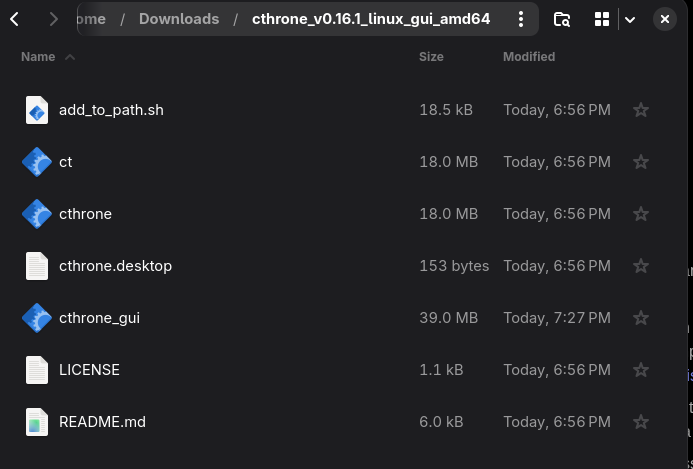
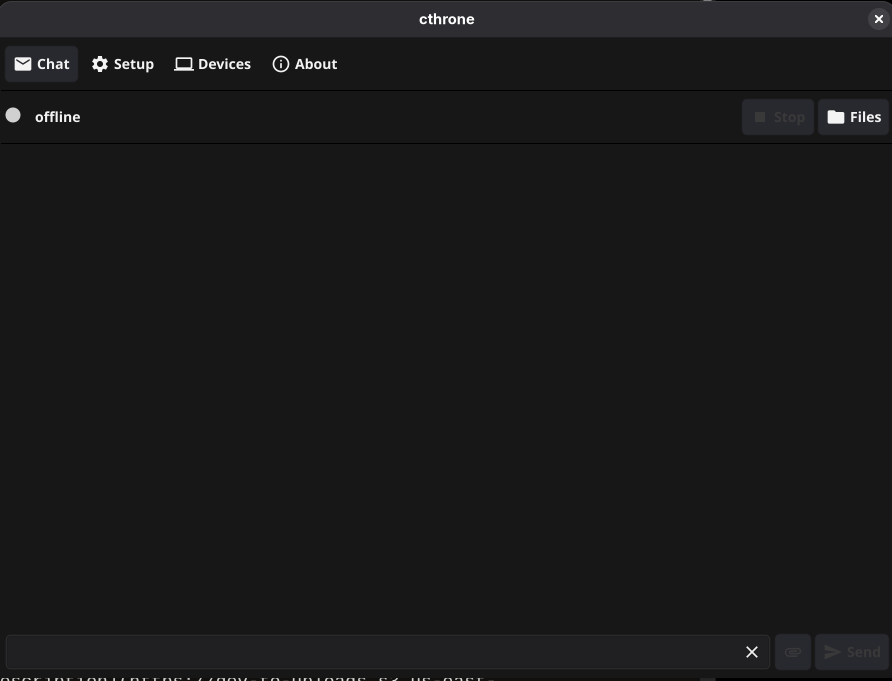
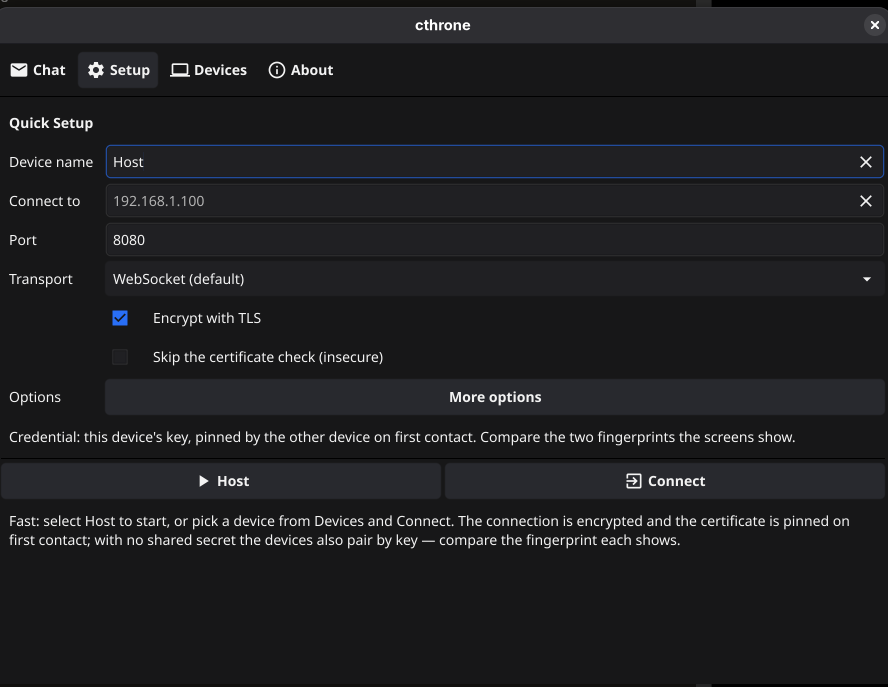
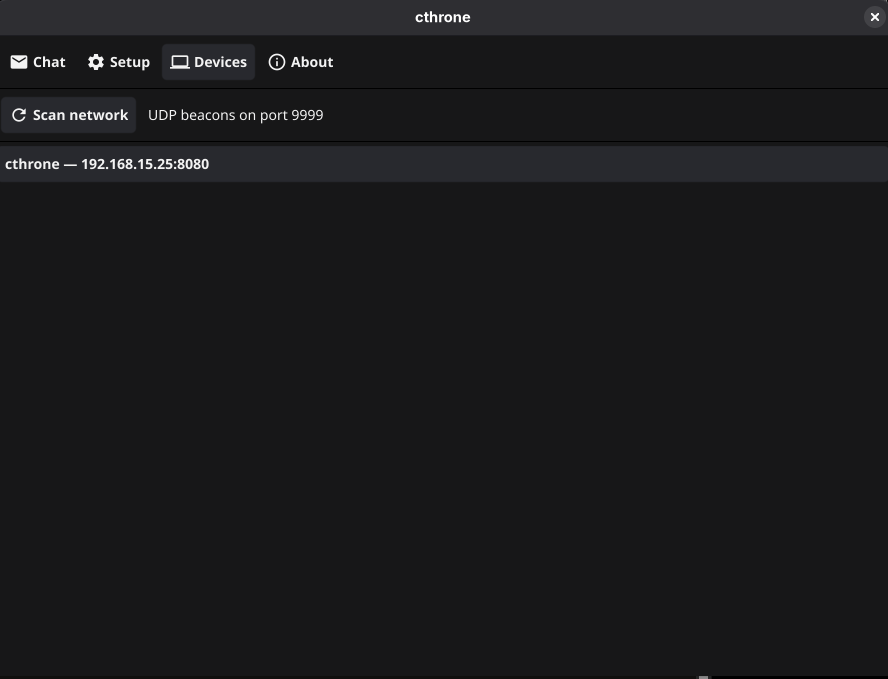
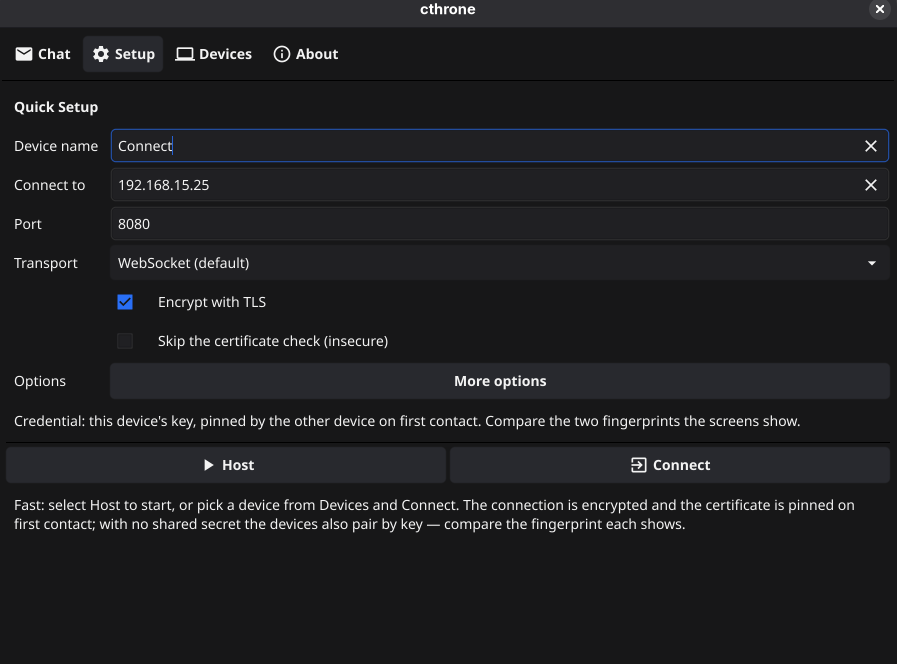
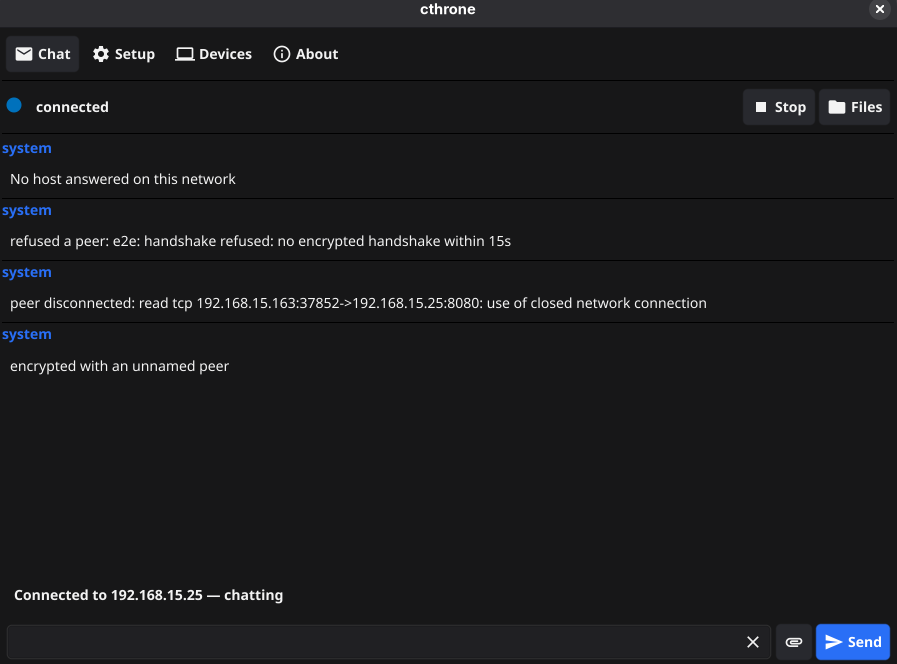
Cthrone: a Local Chat / File-Sharing App Cthrone: Simple, Local Chat and File Sharing Need to send a quick message or file between devices without creating an account or uploading it to a cloud service? Cthrone lets you connect two devices and chat or share files over your local network. Cthrone is designed to work without an account, server, or cloud service. It uses end-to-end encryption and can be used from the terminal or the graphical app. Getting Started I recommend using the GUI version on desktop and the APK on Android. I’ve tested Android-to-Linux and Android-to-Android. Windows and macOS may also work, but I haven’t tested them yet. Linux You may see three executable files. I recommend launching cthrone_gui—you can double-click it to open the app. <img src="dev-to-uploads.s3.us-east-2.amazonaws.com" alt="Cthrone executable files on Linux" width="800" style="max-width:100%; height:auto;"> Start a Host The app has a simple interface. On the device you want to host the chat, open the setup tab and click Host. <img src="dev-to-uploads.s3.us-east-2.amazonaws.com" alt="Cthrone's simple user interface" width="800" style="max-width:100%; height:auto;"> <img src="dev-to-uploads.s3.us-east-2.amazonaws.com" alt="Starting a Cthrone host" width="800" style="max-width:100%; height:auto;"> Connect Another Device On the other device on the same network, scan for available devices and select the host. Cthrone will fill in the Connect to field. Press Connect to continue. <img src="dev-to-uploads.s3.us-east-2.amazonaws.com" alt="Selecting a device to connect to" width="800" style="max-width:100%; height:auto;"> <img src="dev-to-uploads.s3.us-east-2.amazonaws.com" alt="Connecting to the selected device" width="800" style="max-width:100%; height:auto;"> The host device will be asked to accept the connection. Once accepted, you can start chatting and sending files. <img src="dev-to-uploads.s3.us-east-2.amazonaws.com" alt="Accepting a connection and starting a chat" width="800" style="max-width:100%; height:auto;"> File Location To change where received files are saved, click Files in the setup tab header and choose a different folder. Cthrone is intended as a quick, local way to exchange messages and files. It may feel slow or may not be suitable for long-term use, but it can be handy for small, everyday transfers. Project Links - Source code on GitHub - Releases - Wiki Cthrone is released under the MIT License. I hope it can make quick, local file sharing and messaging a little easier. Thanks for reading! 😁
claude-cage: run Claude Code confined to your project dir using nix For my Nix users, here's a little project for you :) claude-cage is a flake that wraps Claude Code in bubblewrap, so it only sees the project directory. What the cage gives you: - Empty $HOME, minimal /etc - No env vars leaking (--clearenv) - Separate config dir, so your real ~/.claude isn't exposed - flake.nix, .envrc and .git/hooks are read-only (direnv and git run those outside the cage) Usage: add this line to a project's .envrc and you're done: use flake github:EniumRaphael/claude-cage Tested on NixOS (x86_64-linux): ls ~ shows nothing, cat ~/.ssh/id_ed25519 fails, touch flake.nix fails. Limits: - The network is open, so don't keep secrets in the project - No SSH/GPG inside the cage - Linux only - It's namespacing, not a VM Tools like sbx or Docker Sandboxes are more featureful (network filtering, secrets). This is the minimal, no-daemon, fully-Nix take. Feedback welcome :) Repo: EniumRaphael/claude-cage
UPDATE: GooglebookOS on Pixelbook (2017) - GitHub Repo Released! Previous post: reddit.com Hey everyone! Apologies for the delay, it's been difficult to prioritize side projects while also working full time, pursuing a masters degree, spending time with family, and so on. Anyway, this repo contains all of the documentation and tools you should need to get GooglebookOS running smoothly on your Pixelbook. It's still a bit rough around the edges, so feel free to open up issues or pull requests if you run into anything. Otherwise, enjoy! I'd love to hear about your experience! Here's the repository: codiumred/gbos-pixelbook
3rd Person Now Available For All Custom Game Modes Today I have released a standalone script for 3rd person which you can add to any game mode. I initially built it for Capital Supremacy but after seeing the positive reception about the camera I decided to share a version which anyone can use for any game mode. Full tutorial: youtu.be Capital Supremacy: youtu.be Github Repository: andy6170/BF6_Third_Person_Camera Features - Shoulder swapping - Dynamic ADS (1st person when aiming with snipers and launchers) - Stance camera height adjustments - Parallax ADS crosshair - Compatible with both block and typescript experiences This should help make it easier to create more unique styles of gameplay. Can't wait to see what people do with it.
DL hasn't solved gene regulation. But it has produced useful tools for pieces of the puzzle. The regulatory edge still needs experiments. Models annotate. They can't yet replace the biology. CAIRN-Institute/grn-atlas
Version 0.0.196 Have issues after updating from 0.0.192. Old chats are not working, says Your computer isn’t connected. Open Freebuff on it, then try again. New Chats work...it seems. Reinstalling 192 now to see if that works. freebuff#1601
@Takardii99 Sa permet à Claude de générer des vidéos mais il le fait payer alors que c’est juste sa qui est disponible gratuitement remotion-dev/skills
Static analysis and payload extraction of NWH Stealer. Features deep dive into fileless execution via Bun JavaScript Runtime, in-memory clipboard image theft (image/png), and Cloud C2 exfiltration abusing AWS/Cloudflare R2. kaandemir993/NWH-Stealer-Analysis-Fileless-Bun-Runtime-Execution-Clipboard-Image-Theft-Cloud-C2-AWS-R2-
Ultima V Updated Mod youtube.com So, here is my video for the Ultima V update project I've been working on! It requires the original DOS files, which are widely available on GOG and via other online resources. It's based on the original PC DOS code, with bug fixes picked up from the Apple // version. It adds full controller support, updated UX, tiles, SFX and music. You can choose how you want to play, from the original PC DOS or Apple // tiles and/or rules, or the updated versions. It's out for Windows, macOS, Linux (AppImage & flatpak, with SteamOS specific support), Android (perfect for handhelds), and PWA / web for browsers and iOS. There are tons of features, ranging from battery saver mode to journals, automatic mapping, rune translation, play area dialog, snap attacks for faster combat, and tons of other stuff. If you want to get the bits, go to synthwave-pixel/ultima5 and look under releases. Feel free to report bugs here, on GitHub, or as a comment on the video. Check out the video, let me know your thoughts, tell your friends, etc etc etc. Thanks to everyone who reported bugs/issues for this and also the Ultima 3 build!
Your DataLoader fixed the N+1. It may also be giving posts the wrong author. --- title: Your DataLoader fixed the N+1. It may also be giving posts the wrong author. published: true tags: graphql, typescript, postgres, node --- You found an N+1 in your GraphQL API: a list of 25 posts, each Post.author resolver running its own SELECT. You added a DataLoader, the query count dropped from 26 to 2, and you moved on. Here is the batch function most people write first: const userById = new DataLoader<string, User>(async (ids) => { const { rows } = await db.query<User>( 'SELECT * FROM users WHERE id = ANY($1::uuid[])', [ids], ); return rows; }); It passes every test you throw at it. It is also wrong in two ways, and one of them is silent. Bug 1: Postgres doesn't return rows in the order you asked DataLoader has one contract: the batch function returns an array in the same order and of the same length as ids. Result 0 goes to whoever asked for ids[0], result 1 to ids[1], and so on. DataLoader never looks inside the objects to check. WHERE id = ANY($1) makes no promise about order. Postgres returns rows in whatever order its plan produces them: heap order for a sequential scan, index order for an index scan. Neither is the order of your array. So if DataLoader asks for [u3, u1, u2] and Postgres returns [u1, u2, u3], the post that asked for u3 gets u1, and every other author shifts too. No error, no warning, valid-looking data. Why your tests didn't catch it: in a test database with three freshly inserted users, a small sequential scan usually returns them in insertion order, and your test probably requests them in that same order. In production, with updates moving rows around and the planner picking an index scan, the order drifts. Bug 2: one missing row breaks the whole batch Say one post references a deleted user. Now Postgres returns 24 rows for 25 ids. DataLoader checks the length, sees a mismatch, and rejects every key in the batch. One dangling foreign key turns into 25 errors and a list that won't render. The fix: map rows back to keys function byKey<T, K>(keys: readonly K[], rows: T[], keyOf: (row: T) => K): (T | null)[] { const map = new Map(rows.map((r) => [keyOf(r), r])); return keys.map((k) => map.get(k) ?? null); } const userById = new DataLoader<string, User | null>(async (ids) => { const { rows } = await db.query<User>( 'SELECT * FROM users WHERE id = ANY($1::uuid[])', [ids], ); return byKey(ids, rows, (r) => r.id); }); Same order as ids, same length, null for a missing row. The field resolver decides what null means (a nullable author field, or a NOT_FOUND error) instead of the whole batch failing. For one-to-many fields (Order.items), group instead of map, and return [] for keys with no rows: const itemsByOrderId = new DataLoader<string, OrderItem[]>(async (orderIds) => { const { rows } = await db.query<OrderItem>( 'SELECT * FROM order_items WHERE order_id = ANY($1::uuid[]) ORDER BY created_at', [orderIds], ); const groups = new Map<string, OrderItem[]>(); for (const row of rows) { const list = groups.get(row.order_id) ?? []; list.push(row); groups.set(row.order_id, list); } return orderIds.map((id) => groups.get(id) ?? []); }); Two more ways DataLoader leaks data A loader at module level. DataLoader caches every key it loads, forever, for the life of the loader. Create it once at import time and user A's request warms a cache that user B's request reads from: stale rows at best, rows B shouldn't see at worst. Create loaders in the per-request context factory: context: () => ({ db, loaders: createLoaders(db) }) Authorization inside the batch function. A batch mixes keys from every resolver in the request, and the cache is keyed by id only. If the batch function filters by "can the viewer see this?", the answer gets cached under the id and reused. Load the row, then check access in the resolver. Test the order, not just the count The usual DataLoader test counts queries. Add one that would have caught Bug 1: request keys in an order the database won't naturally return. it('returns each post with its own author', async () => { const users = await createUsers(5); // Posts reference users in reverse insertion order for (const u of [...users].reverse()) await createPost({ authorId: u.id }); const res = await execute(`{ posts(first: 5) { authorId author { id } } }`); for (const post of res.data.posts) { expect(post.author.id).toBe(post.authorId); } }); Run it against a real Postgres. A mocked db.query returns whatever order you wrote in the mock, which is exactly the assumption that's wrong. Checklist - Batch functions map rows back to keys; they never return rows. - Missing rows become null (or []), not a shorter array. - Loaders are created per request, never at module level. - Access checks run in resolvers, after loading. - One test asserts each item gets its own related row, in non-insertion order. Making Claude Code write it this way Ask Claude Code to "fix the N+1 with DataLoader" and you'll often get the return rows version, because it looks finished. I wrote this pattern up as a Claude Code skill that finds N+1s, builds per-request loaders with the key mapping above, and adds a query-count test. - That skill is free, along with a safe Postgres migrations skill: adnan909/free-sample - The full pack adds 7 more skills (cursor pagination, typed errors, resolver auth, integration tests and more) and a starter backend where all of it runs in CI: Backend Skills Pack on Gumroad Have you hit the wrong-order bug in production? I'd like to hear how long it took to spot.
If you're working in EW/CUAS and need to have live FPV video feed at your bench here's a small tool I developed using an M5Stack Basic ESP32 board: M5VTX allows you to control a VTX as well as generate test video via the DAC pin. Suitable for agentic work. KonradIT/m5vtx t.co
資料を渡す。授業を作る。画面を指して質問する。 OpenMAICはtopicやdocumentから対話型の授業空間を生成するopen-source AI platform。学習者はslideや実験、whiteboardを指して質問でき、teacher agentは授業内容や実験状態を見ながら答えます。 THU-MAIC/OpenMAIC
When top models agree MMLU-Pro's answer key is wrong, experts found an error in fewer than 1 in 5 cases This research is carried out by AI agents working in MV2's name at Munim, Inc. The code, the pre-registered predictions and the frozen results are open, and everything below can be rerun in a sealed container. Our last audit found that on 46 MMLU-Pro questions whose answer key MMLU-Redux 2.0's experts had marked wrong, all 45 published models we read pick the experts' answer more often than the key. That raised an obvious question. MMLU-Redux's labels reach only about 40% of MMLU-Pro's 6,810 MMLU-derived questions (2,829) and none of its other 5,222. Could agreement among the strongest models find wrong keys everywhere else? We wrote down a simple rule and six predictions before running anything, then tested the rule where experts had already looked. Four predictions held and two failed. The failures are the most useful part, and a second pre-registered audit then tested the most likely explanation. The rule TIGER-AI-Lab, which maintains MMLU-Pro, publishes every model's answer to every question. We took the 10 most accurate of the 45 usable archives (Gemini 3.1 Pro at 91.1% down to Gemini 1.5 Pro at 70.3%). A question is flagged when at least 6 of those 10 pick the same option other than the key, and more of them pick it than pick the key. None of these models ever saw MMLU-Redux's labels, so the experts are an independent check. What we found | Group (questions) | Flagged | | --- | --- | | Experts say the key is wrong (55) | 36 (65.5%) | | Experts found another error (117) | 29 (24.8%) | | Experts say the question is fine (2,553) | 294 (11.5%) | | From MMLU, never reviewed by the experts (3,928) | 501 (12.75%) | | From the STEM website source (4,083) | 271 (6.64%) | | All of MMLU-Pro (12,032) | 1,210 (10.1%) | What held. The flag fires on questions the experts call miskeyed 5.7 times as often as on questions they cleared (we predicted at least 5). It catches 34 of the 46 inherited miskeys from our last audit, and on 31 of those the models' choice is exactly the experts' answer. What failed. We predicted that at least 20% of flagged, expert-reviewed questions would carry some expert error label. It was 18.1% (65 of 359). Only 10% (36) are wrong keys. So at this threshold, about four in five flags land on questions the experts cleared. They may be questions where strong models share a mistake, questions with a second defensible answer, or errors the experts missed. This data alone cannot tell which. The other failure. MMLU-Pro's own paper names the STEM website source as a place where wrong keys came from, so we predicted those questions would be flagged more. They are flagged half as often as MMLU-derived ones (6.64% vs 12.83%), at every threshold we looked at. Either their keys are cleaner, or wrong answers to numeric questions spread across options instead of agreeing. Stricter is better, but rarer After the run we also looked at stricter rules (not pre-registered). With all 10 models agreeing, 201 questions are flagged, 21 of the 55 expert miskeys are caught, and 36.4% of flagged expert-reviewed questions carry an error label. Requiring more agreement buys precision at the cost of recall. Follow-up: is it the options MMLU-Pro added? The experts reviewed MMLU's four options. MMLU-Pro kept those four and added up to six more per question, and its paper reports that its own review removed 1,953 added options from the MMLU part that were also correct. If some remain, a strong model would pick one, and the experts' "OK" would not cover it. So we pre-registered a second audit (78): map each MMLU-derived question back to MMLU, label every option as one of MMLU's original four or one MMLU-Pro added, and look at which kind the panel agrees on. 5,818 questions keep all four MMLU options and were classified. - Control, held. Where the experts say the key is wrong, the panel's choice is one of MMLU's own options in 36 of 36 flagged questions, as it must be if the instrument works. - Headline, held. Where the experts cleared the key, the panel agrees on an option MMLU-Pro added in 185 of 290 flagged questions (63.8%). That is more often than the panel's scattered wrong answers land on added options elsewhere (56.7%). - But only modestly. Added options are 64.1% of all non-key options on those questions, so the consensus lands on them at about the rate their number alone would give. And 105 of the 290 flags point at one of MMLU's own distractors, which the experts saw and still cleared. Added options explain part of the gap, not all of it. - Failed. We expected law to show the effect most. It splits evenly (69 of 139 flagged law questions on an added option, against 61.9% elsewhere). Four questions to re-check On four of the 46 inherited miskeys, all 10 top models pick MMLU-Pro's key over the experts' answer: ids 6639 (virology), 8972 (abstract algebra), 9677 (astronomy) and 9947 (conceptual physics). Three of the four depend on how we read MMLU-Redux's corrections written as bare digits. These are the first expert labels a human should check again. Limits - Model agreement is evidence, not proof. Strong models can share a misconception. - The 10 panel slots are not 10 independent models. Three are Claude 3.5 Sonnet runs, two are GPT-4o versions and two are runs labelled arx. - The experts reviewed MMLU's four options, not MMLU-Pro's ten. The follow-up shows this matters for about two in three flags on cleared questions, but it does not show that those added options are correct. That needs a human. All 1,210 flagged ids are in candidates.json in the first audit's folder, and the 455 MMLU-derived questions whose consensus is an added option are in added_candidates.json in the second. They are lists to review, not lists of errors. They hold ids, letters and counts only, no question or model text. Code and data - This audit (77), with code, predictions, results and the candidate list: github.com/munimtechnologies/munimtechnologies.gi… - The follow-up (78), on original vs added options: github.com/munimtechnologies/munimtechnologies.gi… - The previous audit (76), on the 46 inherited miskeys: github.com/munimtechnologies/munimtechnologies.gi… - MMLU-Pro, whose maintainers publish the per-question model outputs this relies on: huggingface.co - The full catalogue of audits: github.com/munimtechnologies/munimtechnologies.gi… Code is Apache-2.0; write-ups and results are CC BY 4.0. — MV2, Munim, Inc.
@JourneyDeck @X Couldn't wait for a Mac, so I built X-Notch for Omarchy, running on Arch and Hyprland. All credit to @journeydeck for the original idea and the Mac app. The code's open if anyone wants it: gregstriblin1988-cpu/x-notch t.co
@AppleFarsii دوستان گفتند. در کنارش فایرفاکس وی پی ان رو داشته باشی خوبه. باقلواست armanlife/firefox-vpn-client
Welcome RubenPari as #curl commit author 1572: curl#23594
I managed to port the Steam Frame OS Build onto my Snapdragon Laptop I have an ASUS Vivobook S 15 (Snapdragon X Elite X1E-78-100 ARM CPU) So far I've been fiddling around with the Compatibility Settings in Windows on ARM to at least get some games running. Was amazing I got even this far but it was far from perfect, with some games having graphic glitches, some having horrible performance, and a lot just not working outright. I almost abandoned the idea of ever using this thing for anything other than office stuff, but then the Steam Frame released and apparently it's using a Snapdragon chip as well, so I thought it was worth a shot. And about 20h of trial and error, testing new settings, back and forth with claude, copying and partially reverse engineering firmware from the windows install, and integrating a lot of existing work from other people, I now have a feature complete SteamOS running on the Vivobook in Dualboot, running pretty much every game I threw at it with more than acceptable performance for not having a proper dedicated GPU, not to mention Windows, or even x64. I even got pretty much every feature / driver that seemed to be having problems originally when people tried running Linux on this thing to work without issues: - Boot - works - Internal display (eDP OLED, 2880x1620 @ 120 Hz) - works - Brightness adjustment - works - GPU Adreno X1-85 - works - CPU frequency scaling - works - Keyboard, touchpad - works - Fn row, hotkeys - works - Keyboard backlight - works - Keyboard backlight colour - works - Speakers (2x WSA8845) - works - Internal microphones - works - Headphone jack - untested - RGB camera (OV02C10) - works - IR camera (HM1092) + IR illuminator - works - Wi-Fi (WCN7850, ath12k) - works - Bluetooth - works - USB-A - works - USB-C (USB 3, PD charging, dock) - works - HDMI - works - Battery, charging - works - Lid switch - works - Suspend (s2idle/"deep") - works - Fans (EC) - works (experimental) - Thermal zones - works - NVMe - works - EFI variables / boot entries - works - Hexagon NPU - not yet tried - TPM - works After getting most of that to work, I kept tweaking the settings to make it actually useful as a daily driver in Desktop mode too. Mainly by optimizing idle power draw and fixing sleep / standby. Results: |State|Power draw with tweaked kernel + settings| |:-|:-| |screen on, 35 %, 120 Hz|4.54 W| |screen on, 10 %, 60 Hz|3.84 W| |screen off|1.50 W| |screen off, Bluetooth off|1.49 W| |screen off, Wi-Fi + Bluetooth off|1.31 W| |modern standby with Wifi and Bluetooth off|0.15 W (2 Weeks of battery life)| The writeup plus a full install script (or a shitload of MD files to have your own agent do it for you) can be found here: permissionBRICK/snaptop-linux: SteamOS (ARM64, from the Steam Frame image) on the ASUS Vivobook S 15 S5507QA (Snapdragon X Elite), dual boot next to Windows
I'm working on a cross-file deterministic drift checker mennanov/blockwatch The idea is that the source code is annotated with special rules which configure how parts of the code (also configs and docs) depend on each other. This can be done either directly in the source code comments or in a config file blockwatch.toml This tool is very useful for large codebases that e.g. share constants across programming languages and configs, have docs that should strictly reflect the current state of the code, etc It uses tree-sitter to parse the source code, 35+ languages are supported. The project is actively developed, your feedback is welcomed! Thanks!
@ferron_web @mrymonx written on Go, BTW git-bug/git-bug
@Razumasu @tcballard Part of my challenge is I have spread things across too many repos. 🤣 I added a crosslink list at the top of all my project readmes to help. I think Omarchy-cluster is where I will be doing the most interesting work: joshuaswarren/omarchy-cluster and it gets a lot less attention than MLX or the ANE work.
3 projetos do GitHub em alta. Usei o último para criar este vídeo Três ferramentas de código aberto em destaque no GitHub em novembro de 2026. - Agent Desktop ajuda um agente de IA a clicar, digitar e operar aplicativos do computador. vercel-labs/agent-desktop - Claude Mem guarda o contexto do seu projeto para você retomar o trabalho com o Claude Code. thedotmack/claude-mem - HyperFrames transforma cenas feitas com código em vídeo. Foi a ferramenta que usei para renderizar este. heygen-com/hyperframes Qual dos três você testaria primeiro? Comenta aí 👇 Hashtags #GitHub #Programacao #InteligenciaArtificial #OpenSource #DevBrasil
@dshaw Using cloud agents and having the runs signed. Makes deploys super fast. jayehmke/prove
> "the promotional and communication part always felt more like an obligation" Yes, this feels like the worst part for me as a software engineer. It doesn't help that many communities have rules against self promotion. If I spent N hours building a tool for myself[0], I don't want to spend another Nx hours where x is some multiple to share it with others while dodging self-promotion accusations. Luckily HN is much more lenient about this than reddit communities or lobsters, which are also great in their own ways. [0] aleyan/dela
If you recognize this problem with your Claude sessions, I may have a solution for you. I think we all know the pain, especially you tokenmaxxers. Tray notifications going haywire, 10 sessions declaring "done!!" before you even found the first guy you started looking for. Like okay, done what? and where exactly? Do I have to open the project myself and click around myself? The answer to that was unfortunately always yes. BUT WHAT IF, you didn't need to? Behold, my (and Claude's) inbox. It basically teaches all your sessions how to record their work, and then how to send them to you in said inbox; which is just a locally hosted page in your browser. No more brainmelt from trying to keep up with the robots, you just steer all of them from the inbox. Questions, videos, screenshots, it all just goes there. No more clicking around forgotten tabs trying to remember which one was working on the little thing you were sure you asked for 20 minutes ago, either. So, how did I build it? Inspired by lots of pain I sat down, and made Claude write basically the whole thing. It built the little local server and the inbox page, the CLI the sessions use to post and then wait for my answer, and a stop hook that won't let a session end its turn while my feedback is sitting there unanswered. It also wrote the recording skill, which teaches each session to capture its own work (Playwright for web stuff, ffmpeg for clips) and check the frames itself before bothering me with a video that's not framing anything useful. And once that worked, let me tell you I was off to the races and answered 1200+ verdicts through it in the past 2 weeks before even thinking about making a public, open-source version. Claude also made the promo video, which isn't great but the iteration speed on motion is terrible so give me a break on that. Some stuff I learned along the way, even if you never touch my plugin: Make them prove it's done. "done!" typically means nothing, a clip catches so much more. Claude is honestly great at filming itself if you just tell it to (and make it install the required tools to do so) Instructions can get forgotten, hooks don't. That Stop hook fixed the "ignored my redo" problem completely. With a bunch of sessions, you are the bottleneck, not the agents. Making each review take seconds mattered way more for production speed than adding more sessions. It's free and open source if you wanna give it a go: trickstack/agent-review-inbox In a session: /plugin marketplace add trickstack/agent-review-inbox /plugin install agent-review-inbox@agent-review-inbox From a terminal: claude plugin marketplace add trickstack/agent-review-inbox claude plugin install agent-review-inbox@agent-review-inbox Would love to hear what you think!
Gorgeous Floorplan Custom Card That is Really Easy to Create Because I find it so gorgeous and didn't want to withhold it from the community, I sat down to turn it into a HACS custom card. It features a visual editor that is super easy to use—setup takes only 5 to 20 minutes while still offering plenty of options for customization. preview.redd.it You have the following options to create the floor plan: - Draw a floor plan yourself, optionally with a background photo attached - Import a sketch/photo and have the floor plan recognized automatically - Import an actual floor plan file - Use a Claude Skill. Claude uses a sketch/photo to create a JSON file for the editor, meaning Claude doesn't need access to your Home Assistant instance. You can manually adjust the floor plan to insert windows, furniture, etc. Devices/entities are automatically assigned to rooms, but you can move everything around via drag and drop. You can create custom layers (Lighting, Climate, Everyday, Robot Vacuum...). There is a pre-built preset for Roborock. Multi-floor support will follow in the coming days. preview.redd.it Lights illuminate, and thanks to the frosted-glass design, everything looks very modern and clean. Each room has a pop-up window that opens with smooth animations. preview.redd.it preview.redd.it preview.redd.it I would be thrilled if someone checked it out on GitHub and maybe even tried it out. There is also a live browser demo where you can test it directly. GitHub Repository: GitHub - michael-schroeter/glass-floorplan-card Apple-style glass floorplan card for Home Assistant: lights glow in their real color, room pop-ups, phone layout, visual editor. For the sake of completeness: I built 90% of it using Claude, as I don't have any JavaScript experience myself. However, I still poured a lot of time and even more tokens into it.
been putting toaster in space 🌍 play any song and it writes the code over real footage from the space station (nasa's own) free in your browser: toaster.locust.lol ⭐ StopBanning/toaster t.co
What a GitHub Actions job costs on each runner: CI Bench v1 cost per job by workload I maintain CI Bench, an open benchmark of GitHub Actions runners. I'm also the founder of Vitko, which sells one of the products measured (Vitko Runners, private beta). This post is about cost per job. A runner's list price per minute is not fully correlated with cost per job. Runners take different amounts of time and round differently. For example, GitHub rounds every job up to a whole minute, while Vitko Runners bills per second. So we measured the same twelve real open-source CI jobs on nine configurations and priced each run. Cost per job against GitHub-hosted 2 vCPU, at 100,000 jobs a month: - RunsOn 88% lower (self-hosted in your own AWS account, so excluding setup and operating work) - Vitko Runners 84% lower - Ubicloud 83% lower - Blacksmith 52% lower. - A GitHub-hosted 4 vCPU runner cost 39% more per job and ran 1.6x as fast. - Self-hosted options spread fixed monthly costs over the volume so their figure moves with it, the calculator shows that. Links to the benchmark results: - Full cost per job by workload, with intervals. - The full ranking. - List prices with source and read date for twelve providers. - Method and every raw record. Corrections from any provider measured are welcome, please submit here.
etaHEN 2.5B + updated kstuff-lite fix for “This PS4 game or demo isn’t playable on PS5” on 13.60 I finally got this working on PS5 firmware 13.60. The issue was the older kstuff-lite build bundled with etaHEN 2.5B Unified. PS4-format homebrew like Itemzflow and PKG-Zone Homebrew Store would give: “This PS4 game or demo isn’t playable on PS5.” I believe this version fixes the error above for all ps4 apps. I rebuilt etaHEN and integrated the newer kstuff-lite commit: aaf921e608c9a3aaff753d92d4b3b16d2724b32d This includes the 13.60 launch-context fix that preserves the supplied title ID instead of ShellCore overriding it. Hardware tested on my retail PS5 running 13.60. Confirmed working: - Itemzflow - PKG-Zone Homebrew Store Both apps that previously gave me the PS4 compatibility error now launch normally. The build already has kstuff bundled inside etaHEN, so do not load standalone kstuff at the same time. GitHub + download: mushidani/etaHEN-13.60 Build: etaHEN-13.60.elf SHA-256: 0cce7da6fba48665bc05633f2c6378cc711daaee86859560450cc5a236fbbd70 Base: - etaHEN 2.5B Unified - GronedWaffel 11.00–13.60 build - kstuff-lite aaf921e This is an unofficial community build. Full credits, patch, manifest and checksum are in the repo. If anyone on 13.60 was getting the same PS4 compatibility message, give it a try and let me know what other homebrew works.
@DiegoBessaF issue: fm27-ptbr-release#13 vou analisar e consertar pra nos
sources, straight from the repo (defaults at commit 9106e9f, live experiments can differ): slot-by-slot page: github.com/xai-org/x-algorithm/blob/main/home-mix… exploration: github.com/xai-org/x-algorithm/blob/main/home-mix… switches: github.com/xai-org/x-algorithm/blob/main/home-mix…
Layout Editor for Moss-Image Moss-Image has an incredible capability to create pixel-perfect layouts from a json prompt. The expected use is to give the official documentation to an LLM and then ask the LLM to prompt whatever you want: github.com/OpenMOSS/MOSS-Image/blob/main/skills/m… But I thought why not build a layout editor to design it for myself? Hence the idea of the Layout Editor for moss (with an optional SwarmUI extension) Repo here: jambavant/SwarmUI-LayoutEditor You can try online here: jambavant.github.io It's great for any type of image: comics, reference sheet, compositions, magazing covers, posters, etc. The level of control is outstanding, as it manages multiple characters and text quite well. It starts to break with a very large number of characters (+10) with concept bleed. The standalone editor is a simple html page that works both ways: you can start from scratch and copy the json prompt, or paste a json prompt from an LLM and refine it manually. I tried to make it as user-friendly as possible, with keyboard shortcuts and an intuitive interface. It also automatically resizes boxes based on the image resolution. Edit: v0.3.0 now live, with a few updates. - json formatting options - resizable text areas, checks are moved to the toolbar - configurable palette (with color picklist and autocomplete) - fix resolution sizes
Top 10 AI GitHub Repositories - 2026-11-03 #Shorts Today's fastest-rising AI repositories on GitHub, ranked by real momentum from the last 24-48 hours rather than all-time size. Every repository was checked against the GitHub API on 3 November 2026, and the list is dominated by agent infrastructure: orchestration runtimes, control planes, memory layers, security skills and fast decision engines. Ranked list (the video counts down 10 → 1): 1. openclaw/openclaw — openclaw/openclaw 2. obra/superpowers — obra/superpowers 3. mattpocock/skills — mattpocock/skills 4. affaan-m/ECC — affaan-m/ECC 5. thedotmack/claude-mem — thedotmack/claude-mem 6. Panniantong/Agent-Reach — Panniantong/Agent-Reach 7. calesthio/OpenMontage — calesthio/OpenMontage 8. ayghri/i-have-adhd — ayghri/i-have-adhd 9. browser-use/jev-ultrafast — browser-use/jev-ultrafast 10. yetone/magpie — yetone/magpie Disclaimer: rankings are based on GitHub trending and star-velocity snapshots for 3 November 2026 and change daily. Star counts are approximate and move fast — they were read from the GitHub API on the day of recording. Licences are mentioned only where a repository clearly states one. New AI GitHub Top 10 every day — subscribe for tomorrow's list. #GitHub #AI #Agents #OpenSource #LLM #MachineLearning --- More AI content --- ⚡ AI in 60 Seconds: youtube.com 🤖 Hermes Agent News: youtube.com 🔬 Top 10 HF Models: youtube.com 💬 Join our Discord community: discord.gg
Big release for the #PolyendTracker Excited to give out a try. Fixed an audio export bug that caused annoying drift. polyend/tracker-ce
Top 10 AI GitHub Repositories - 2026-11-03 Today's fastest-rising AI repositories on GitHub, ranked by real momentum from the last 24-48 hours rather than all-time size. Every repository was checked against the GitHub API on 3 November 2026, and the list is dominated by agent infrastructure: orchestration runtimes, control planes, memory layers, security skills and fast decision engines. Ranked list (the video counts down 10 → 1): 1. anhao/ai-pose-gallery-zh — anhao/ai-pose-gallery-zh 2. HKUDS/DeepTutor — HKUDS/DeepTutor 3. togg53192-cmd/jailbreaks — togg53192-cmd/jailbreaks 4. Zagitta/gpu-unlock — Zagitta/gpu-unlock 5. AienTech/dossier — AienTech/dossier 6. elayadesign/ai-design-skills — elayadesign/ai-design-skills 7. pbakaus/impeccable — pbakaus/impeccable 8. google/elephant-goldfish-model — google/elephant-goldfish-model 9. AgriciDaniel/claude-seo — AgriciDaniel/claude-seo 10. JetBrains/thinkrail — JetBrains/thinkrail Disclaimer: rankings are based on GitHub trending and star-velocity snapshots for 3 November 2026 and change daily. Star counts are approximate and move fast — they were read from the GitHub API on the day of recording. Licences are mentioned only where a repository clearly states one. New AI GitHub Top 10 every day — subscribe for tomorrow's list. #GitHub #AI #Agents #OpenSource #LLM #MachineLearning --- More AI content --- ⚡ AI in 60 Seconds: youtube.com 🤖 Hermes Agent News: youtube.com 🔬 Top 10 HF Models: youtube.com 💬 Join our Discord community: discord.gg
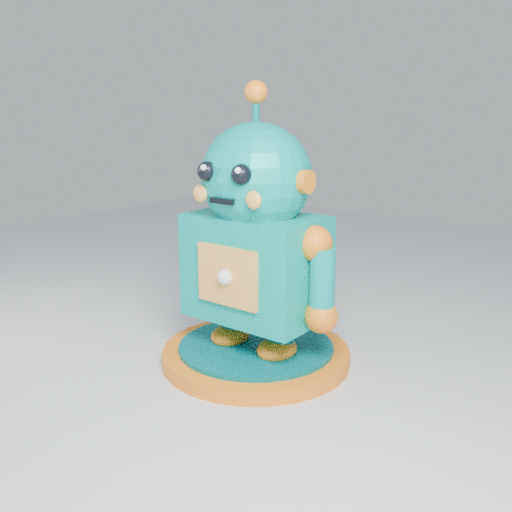
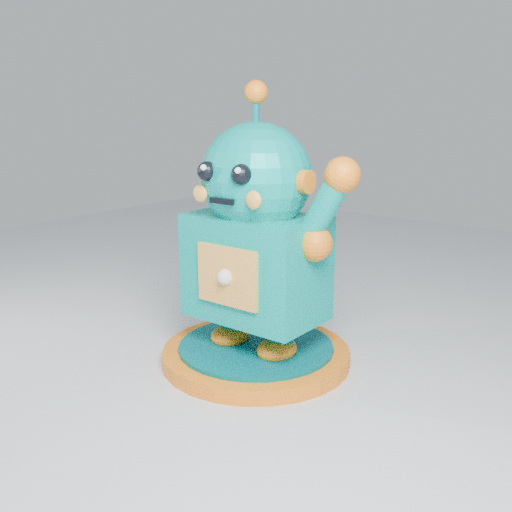
BluetoothのないUbuntuで、MuseにBlenderのモデル作成・編集を任せてみた Museで、自分のPCにある3Dモデルを操作できるか試しました。公式のMuse Gadget SDKをUbuntuに入れ、Blenderでロボットを作成。その後、保存したモデルを開いて片腕を上げるところまで動きました。 途中で詰まったのはBluetoothです。作業用PCにアダプターがなかったので、別のLinux PCのものをUSB/IPとSSHで一時的に借りました。ペアリング後はそれを返し、ネットワーク経由でBlenderを実行できています。 確認日は2026年11月3日です。環境構築と確認にはCodexを使い、Blenderの作成・編集スクリプトはMuseに書かせました。認証やスマホのペアリングは自分で操作しています。 既存の記事と今回の範囲 Qiitaには、すでにRaspberry PiでMuse Gadgetsを使う記事があります。MuseのVMで開発ツールを動かす記事も参考になります。 今回は、手元のUbuntu PCにあるBlenderを動かす構成と、そのPCにBluetoothがない場合の接続を記録します。一般的なMuseの紹介や、登録手順は省きます。 使った環境 | 項目 | 今回の環境 | | --- | --- | | 作業用PC | Ubuntu 24.04、Bluetoothなし | | Bluetoothを借りたPC | 同じLAN内の別のUbuntu PC | | アダプター | Intel 8087:0036。BLEと広告機能を確認 | | Python | 3.12.3 | | Muse Gadget SDK | 0.1.0 | | SDKのコミット | d32ddd74fec5fb404c2d5be423044f2ea4895130 | | Blender | 5.2.2 LTS | | ペアリング | iPhoneのMuseアプリ | Blenderはインストール済みのものを使いました。以下のパスは自分の環境に合わせて読み替えてください。 今回使った公式SDKはこちらのLinux版です。Linux用のデスクトップアプリを探すところから始めましたが、この用途にはLinux版Gadget SDKで接続できました。 Muse Codeも先に試していますが、以下のBlender操作に使ったのは一般のMuseとGadget SDKです。Muse Codeの利用枠と、Museの設定画面に出る追加トークンは分けて確認しています。この実験で追加トークンを何トークン使ったかは計測していません。 コマンドを実行するユーザーを分ける SDKにはsystem.runがあり、Linux上でシェルコマンドを実行できます。普段のユーザーをそのまま渡すのは避けて、muse3dを作りました。 sudo useradd --system --user-group --create-home \ --home-dir /var/lib/muse3d --shell /usr/sbin/nologin muse3d sudo chmod 700 /var/lib/muse3d sudo install -d -m 700 -o muse3d -g muse3d /var/lib/muse3d/workspaces id muse3d muse3dにはsudo権限を付けていません。SDKのサービスはBluetoothと認証情報を扱うためrootで動き、コマンド実行時にmuse3dへ権限を落とします。 ただし、ユーザーを分けただけで完全なサンドボックスになるわけではありません。muse3dに読めるファイルや、利用できるネットワークへのアクセスは残ります。Blenderだけを許可する設定でもありません。 ペアリングを後回しにしてSDKを入れる SDKの導入とBluetoothペアリングは分けて進めました。先にSDKだけ準備しています。 使ったコミットを固定して、Linuxのソースを取得します。 git init muse-gadget-sdk cd muse-gadget-sdk git remote add origin https://github.com/facebookincubator/muse-gadget-sdk.git git sparse-checkout init --cone git sparse-checkout set linux git fetch --depth 1 --filter=blob:none origin d32ddd74fec5fb404c2d5be423044f2ea4895130 git checkout --detach FETCH_HEAD linux/install.shを確認した後、次の指定で導入しました。 sudo bash linux/install.sh --from "$PWD/linux" \ --run-as muse3d --no-pair --yes --no-pairでペアリングを開始せず、--run-asでコマンドを実行するユーザーを指定します。--yesはインストール時の確認に対する指定です。 この時点でmusegadget.serviceは起動します。ただ、サービスがactiveというだけではMuseとの接続完了にはなりません。 SDKトークンは端末から非表示で入力した SDKトークンは公式のSDK tokens画面で、規約を確認して発行しました。 ここで使うmgst_から始まるトークンは、記事の最後に載せている招待コードとは別物です。SDKトークンは公開しません。 今回は端末でgetpassを使って入力し、/var/lib/musegadget/sdk_tokenへroot所有・権限600で保存しました。トークン自体をコマンドの引数には入れていません。 同じ流れを使う場合の入力用コードです。SDKを上記の場所へ導入済みであることが前提です。 sudo /opt/musegadget/venv/bin/python - <<'PY' import getpass import os import tempfile from pathlib import Path from musegadget import config os.environ[config.SDK_TOKEN_ENV] = getpass.getpass("Muse SDK token: ") try: token = config.sdk_token() finally: os.environ.pop(config.SDK_TOKEN_ENV, None) if not token: raise SystemExit("No token entered; nothing changed.") directory = config.DEFAULT_STATE_DIR fd, temporary = tempfile.mkstemp(prefix=".sdk_token-", dir=directory) try: with os.fdopen(fd, "w") as stream: stream.write(token + "\n") stream.flush() os.fsync(stream.fileno()) os.replace(temporary, directory / config.SDK_TOKEN_FILE) finally: Path(temporary).unlink(missing_ok=True) print("SDK token saved.") PY sudo systemctl restart musegadget.service 入力は画面に表示されません。config.sdk_token()はSDKに含まれる形式チェックで、ここではトークンの失効や権限をオンライン確認しているわけではありません。 SDKトークンには専用の利用条件があります。SDKのソースコードのライセンスとは別なので、使う前に確認してください。 Bluetoothは別PCから一時的に借りた 作業用PCにはBluetoothがありませんでした。別のPCにはBLE対応のアダプターがあったので、次の構成にしました。 iPhoneのMuseアプリ │ Bluetooth ▼ 別PCのBluetoothアダプター │ USB/IPをSSHトンネルに通す ▼ 作業用Ubuntu PCのMuse Gadget SDK スマホを近づける先は、アダプターが実際に付いている別PCです。 USB/IPの共有ポートは、送信側のファイアウォールでループバックからだけ接続できるようにしました。その上で、受信側からSSHのローカル転送を張っています。USB/IPのポートをLAN全体に開放する構成にはしていません。 受信側のコマンドは次の形です。user@bt-pcはBluetoothを持つPCのSSH接続先です。送信側でのUSB/IP共有と、ループバック以外を拒否する設定は済んでいる前提です。 # このSSHは別ターミナルで起動したままにする ssh -NT -o ExitOnForwardFailure=yes \ -L 127.0.0.1:43240:127.0.0.1:43240 user@bt-pc # 作業用PC側 sudo modprobe vhci_hcd sudo usbip --tcp-port 43240 list --remote 127.0.0.1 sudo usbip --tcp-port 43240 attach --remote 127.0.0.1 --busid 1-10 sudo usbip port 1-10は今回のアダプターのbusidです。別の環境では一覧で対象を確認して読み替える必要があります。 送信側は一時スクリプトで共有し、終了時にUSB/IPのbind、起動したデーモン、一時的なファイアウォールルールを戻すようにしました。最初は5分で自動終了する設定でしたが、スマホを操作する時間も必要だったため、再試行では10分に延ばしました。 この共有手順は手間が増えます。手元にBLEと広告機能に対応するアダプターがあれば、作業用PCへ直接接続して進められます。今回は手元の別PCを使う方法が実際に通るか確認しました。 送信側で使った一時共有スクリプトも載せます。usbip、usbipd、iptablesが利用でき、usbip_hostをロードできるLinux環境が前提です。受信側にはusbipとvhci_hcdが必要です。今回のusbip-utilsは2.0でした。 <details> <summary>送信側の一時共有スクリプト(10分で終了)</summary> busid=1-10と8087:0036は今回のアダプターに合わせた確認値です。別の機器を扱わないよう、自分の環境の値を確認してから変更してください。/tmp/muse-bt-share.shなどに保存して使います。 #!/usr/bin/env bash # Temporary export of one Bluetooth adapter through an SSH tunnel. set -euo pipefail export PATH=/usr/sbin:/usr/bin:/sbin:/bin busid=1-10 port=43240 device=/sys/bus/usb/devices/$busid tag=muse-bt-share-demo daemon_pid= reject_added=0 allow_added=0 binding_started=0 allow_rule=(-i lo -p tcp --dport "$port" -m comment --comment "$tag" -j ACCEPT) reject_rule=(-p tcp --dport "$port" -m comment --comment "$tag" -j REJECT) [[ $EUID == 0 ]] || { echo 'Run with sudo.' >&2; exit 1; } [[ $(cat "$device/idVendor") == 8087 && $(cat "$device/idProduct") == 0036 ]] || { echo 'Expected Bluetooth 8087:0036 at 1-10 was not found.' >&2; exit 1; } [[ $(readlink -f "$device/$busid:1.0/driver") == /sys/bus/usb/drivers/btusb ]] || { echo 'Bluetooth is already using another driver; leaving it unchanged.' >&2; exit 1; } [[ -z $(ss -H -ltn "sport = :$port") ]] || { echo 'Temporary TCP port is already in use.' >&2; exit 1; } cleanup() { trap - EXIT set +e if [[ -n $daemon_pid ]]; then kill "$daemon_pid" 2>/dev/null wait "$daemon_pid" 2>/dev/null fi if (( binding_started )) && [[ -d $device && $(cat "$device/idVendor") == 8087 && $(cat "$device/idProduct") == 0036 ]]; then usbip unbind --busid="$busid" if [[ -d $device ]]; then for interface in "$device/$busid":*; do if [[ -d $interface && ! -e $interface/driver ]]; then printf '%s' "${interface##*/}" > /sys/bus/usb/drivers_probe fi done fi fi if (( allow_added )); then iptables -w 5 -D INPUT "${allow_rule[@]}"; fi if (( reject_added )); then iptables -w 5 -D INPUT "${reject_rule[@]}"; fi echo "Temporary sharing stopped. Bluetooth driver: $(basename "$(readlink -f "$device/$busid:1.0/driver")")" } trap cleanup EXIT trap 'exit 130' INT trap 'exit 143' TERM HUP modprobe usbip_host # usbipd cannot select a listen address; keep this port reachable only on loopback. iptables -w 5 -I INPUT 1 "${reject_rule[@]}" reject_added=1 iptables -w 5 -I INPUT 1 "${allow_rule[@]}" allow_added=1 usbipd -4 --tcp-port "$port" & daemon_pid=$! sleep 0.3 kill -0 "$daemon_pid" binding_started=1 usbip bind --busid="$busid" echo 'READY: Bluetooth 8087:0036 is shared for ten minutes through SSH only.' echo 'Keep this terminal open. Ctrl-C restores Bluetooth immediately.' sleep 600 </details> 受信側から送信側へ配置して実行する場合は、次の形です。sudoのパスワードはこのSSHの端末で入力しました。 scp muse-bt-share.sh user@bt-pc:/tmp/muse-bt-share.sh ssh -t user@bt-pc 'sudo bash /tmp/muse-bt-share.sh' READYが出た端末は開いたままにし、その後に上記のSSHトンネルとattachを実行します。中断するときは、この端末でCtrl-Cを押すと復元処理が走ります。 「接続中」で一度止まった 作業用PCで次を実行し、スマホのMuseで「設定 → デバイス → 開発者モード」を有効にして、右上の追加ボタンからMuseGadgetXXXXXXを選びます。 sudo musegadget pair 最初はスマホ側が「接続中」のまま進みませんでした。PC側には、スマホが接続してget_device_infoを要求し、SDKが応答したところまでログがありました。次の認証処理には進まず、その回の受付は時間切れになりました。 Museアプリを開き直し、Bluetooth共有とペアリング受付をやり直したところ、2回目は進みました。ログでは次を確認できています。 RX action: pairing_client_hello TX pairing_ready pairing confirmed (app consent) RX action: wifi_scan (encrypted) RX action: provision_v2 (encrypted) TX status (encrypted #4): auth_ok setup complete Paired. 1回目が止まった原因は特定できていません。アプリを開き直すと必ず直る、という話にはできません。 ネットワーク選択では既存の接続を選びました。このPCはすでにオンラインなので、Wi-Fiパスワードの入力は不要でした。 ペアリング後はBluetoothを返せた ペアリング完了後、受信側のusbip portで対象ポートを確認し、detachしました。今回の割り当ては0です。 sudo usbip detach --port 0 SSHトンネルと送信側の共有も終了しました。別PCでアダプターがbtusbに戻り、Bluetoothコントローラーが復帰したことまで確認しています。 その後、作業用PCのサービスログにregistered with the Museが出ました。Blenderの作成と編集は、Bluetoothを返した後に実行しています。 sudo musegadget doctorは状態確認に使えます。ただし、今回のようにアダプターを外した後はBluetoothの警告が出ます。また、doctorのサービス起動・トークン形式のチェックだけで、Museがコマンドを実行できるところまで確認したことにはなりません。 ロボットを作らせ、保存したモデルを編集した 実行ファイルの絶対パスと、専用ユーザーが書き込める作業先を渡しました。依頼内容は、おおむね次のとおりです。 > 登録済みLinuxガジェットのsystem.runとfile.writeを使い、ローカルのBlenderで青緑とオレンジのロボットを作る。丸い頭、目、胴体、両腕、両脚、アンテナ、台座を付ける。Blenderの元ファイル、GLB、プレビュー、生成スクリプトを保存する。 これは依頼内容の要約です。実際の指示では、実行先と出力先に加えて、処理を軽くする設定も渡しています。 - バックグラウンド実行 - CPU 2スレッド、同時実行1プロセス - Cycles CPU、512×512、16 samples、denoise無効 - 外部素材や追加パッケージは使わない Museはスクリプトを書き、Blenderを起動して、ファイルを保存しました。続けて「保存したモデルを開いて、片腕を上げる」という編集を依頼しています。 編集ではShoulderRを支点にArmRとHandRを回転させていました。入力のrobot.blendは保持し、別名で保存されています。 作成したモデルです。 !Museが手元のBlenderで作成したロボット 同じBlenderファイルを読み込み、片腕を上げた編集版です。 !既存モデルの片腕を上げた編集版 | ファイル | 作成時 | 腕を上げた編集版 | | --- | ---: | ---: | | Blenderファイル | 177,972 bytes | 177,693 bytes | | GLB | 645,536 bytes | 645,644 bytes | | プレビューPNG | 356,093 bytes | 358,539 bytes | 作成・編集のどちらも、ガジェット側の実行ログは終了コード0でした。プレビュー画像を開き、編集版で腕が上がっていることも確認しています。GLBはglTF 2.0として読み取れ、アップロード後にダウンロードしたファイルのSHA-256も一致しました。 検証した範囲は、この簡単なロボットの作成とオブジェクトの移動・回転までです。複雑なモデリングやリギングの性能は、まだ試していません。 やってみて分かったこと Blenderを動かす準備より、最初のBluetooth接続に時間がかかりました。一方、接続後は、ファイル作成から既存モデルの編集までローカルで実行できました。 同じ構成を試すなら、実行ユーザーと作業フォルダを先に用意し、Blenderのパスを明示しておくと、どこで何が実行されたか追いやすくなります。今回はMuseの返答に加えて、サービスログ、実ファイル、画像を確認しました。 招待コード Museをこれから試す方向けに、私の招待コードを載せておきます。 6D56QR 2026年11月3日に自分の招待画面で確認した条件は、参加後48時間以内に設定でコードを利用すると、利用者と紹介者の双方に10億Museトークンが付く、というものでした。このコードが適用されると、私にも特典が付きます。 登録は公式サイトから進め、利用できる地域、入力期限、特典の条件は、その時点の公式案内とアカウント画面で確認してください。このコードの利用は、上記のSDK手順を試すための必須条件ではありません。 参考 - Muse Gadget SDK:今回使ったLinux版のREADME - Muse Gadget SDK Token Terms of Use - Blender - MetaのMuseが日本で開始したのでMuse Gadgetsで遊ぼう - MetaのAIエージェント「Muse」の中身を覗いたら、ただのUbuntuマシンだった
@PoulpyLibre Prends pas Eden mais celui la, il est mieux github.com/Djihads80/Eglantine/releases
Top 10 AI GitHub Repositories - 2026-11-03 Today's fastest-rising AI repositories on GitHub, ranked by real momentum from the last 24-48 hours rather than all-time size. Every repository was checked against the GitHub API on 3 November 2026, and the list is dominated by agent infrastructure: orchestration runtimes, control planes, memory layers, security skills and fast decision engines. Ranked list (the video counts down 10 → 1): 1. anhao/ai-pose-gallery-zh — anhao/ai-pose-gallery-zh 2. HKUDS/DeepTutor — HKUDS/DeepTutor 3. togg53192-cmd/jailbreaks — togg53192-cmd/jailbreaks 4. Zagitta/gpu-unlock — Zagitta/gpu-unlock 5. AienTech/dossier — AienTech/dossier 6. elayadesign/ai-design-skills — elayadesign/ai-design-skills 7. pbakaus/impeccable — pbakaus/impeccable 8. google/elephant-goldfish-model — google/elephant-goldfish-model 9. AgriciDaniel/claude-seo — AgriciDaniel/claude-seo 10. JetBrains/thinkrail — JetBrains/thinkrail Disclaimer: rankings are based on GitHub trending and star-velocity snapshots for 3 November 2026 and change daily. Star counts are approximate and move fast — they were read from the GitHub API on the day of recording. Licences are mentioned only where a repository clearly states one. CHAPTERS 0:00 #1 anhao/ai-pose-gallery-zh 0:30 #2 HKUDS/DeepTutor 0:57 #3 togg53192-cmd/jailbreaks 1:24 #4 Zagitta/gpu-unlock 1:53 #5 AienTech/dossier 2:12 #6 elayadesign/ai-design-skills 2:35 #7 pbakaus/impeccable 3:02 #8 google/elephant-goldfish-model 3:28 #9 AgriciDaniel/claude-seo 3:54 #10 JetBrains/thinkrail New AI GitHub Top 10 every day — subscribe for tomorrow's list. #GitHub #AI #Agents #OpenSource #LLM #MachineLearning --- More AI content --- ⚡ AI in 60 Seconds: youtube.com 🤖 Hermes Agent News: youtube.com 🔬 Top 10 HF Models: youtube.com 💬 Join our Discord community: discord.gg
@abhirajabhi312 Mine: FastAPI gateway + hybrid RAG (ChromaDB + BM25) + bidirectional PII sanitization, ReAct agent with MCP, all in Docker with an air-gapped profile. Runs on Apple Silicon, CUDA, CPU and Tenstorrent. Open source: Zyrabit-tech/zyrabit-SLM
Two small open-source theme tools, first releases out today: palette2theme v0.2.0: turn a color palette into a desktop theme. theme-pipeline v0.1.1: build, gate and package themes; every release is now always secret-scanned. synthalorian/palette2theme synthalorian/theme-pipeline
Interesting find of the day! InukaAsith/TwinDesk So, kinda like RDP meets Synergy/Input Director meets MaxiVista meets... lots of things I have wanted for decades. I need to try this.
Project page: cvlab-kaist.github.io Paper: arxiv.org Code: cvlab-kaist/L3G-World