Mentions
Conversations linking to GitHub, newest first. Times are UTC.
Mentions by source
X
Bluesky
Hacker News
V2EX
Qiita
DEV
Mastodon
Latest posts
@JRB_AI @MiaAI_lab and @ashxhart TensorFold recipe with @u1tra_instinct ablit overlay 😎 MiaAI-Lab/DeepSeek-V4.1-Flash-1017-4x-DGX-Sparks-TensorFold
Free open source security camera application with object and fire detection and email/SMS alerts #dev #code #python #linux #OpenSource
@haoge6699 当前源码的 README 里有个挺实用的小细节:监控文件夹会等文件写入稳定、跳过自己生成的结果,还会检查输出循环。比单纯「有新图就压」周到,不然同一张输出图可能又被捡回去处理。发布包是否包含,要看对应版本。amiaoapp/PicLite
@zilipef101 @thekitze @grok I built a similar tool for the MacOS menu bar. Couldn’t live without it anymore manuelbieh/agents-monitor
My project finally starts to take final shape. I've been working lately on next huge 2.0 upgrade for my customization project called WinMac. One of its biggest upgrades will be newly created dock application called WinMac Dock. WinMac Dock is a standalone Windows 11 dock built with .NET 10, WinUI3, Windows Composition and the Windows shell. It offers native Windows Acrylic and Mica, solid/transparent backgrounds, system light/dark colors, multi-monitor setup, native WinUI menus, and macOS-style icon magnification, smooth animations, task grouping, window controls, and flexible positioning and alignment on any screen edge or display. Check it out on my GitHub profile, and try fully open-source dock app for free!
I built ChatFlow 🚀 A real-time communication app for messaging, AI chat, video calls, and collaborative whiteboarding. 🛠️ MERN + SocketIO 🔗 Demo: ialksng.me 💻 Code: ialksng/chatflow More projects: ialksng.me #WebDevelopment #BuildInPublic
I created the Tradoshi trading journal plugin for Obsidian: every trade becomes a Markdown note that you own. It's open source Hello everyone I built Tradoshi, a trading journal app, because I couldn't stop revenge trading, and it cost me a lot (maybe I will share the story sometime; it could help a lot of traders in the trading subreddit :-). Anyway, that part has nothing to do with Obsidian. I added the plugin later because I wanted traders to keep their trades and reviews in their own notes. It has been available in Community plugins since October (search "Tradoshi Trading Journal"). The plugin is free and open source (MIT), but some features require a paid Tradoshi plan. Auto sync is very useful for the time it saves, but unlimited imports do the job if you don't mind importing your CSV regularly. Each trade becomes a Markdown note in your vault with a card at the top: entry, exit, stop, R, holding time. Each trading day gets its note with a day report and weekly to yearly reviews take one command. The data is stored in properties so Bases and Dataview can read it. The graph links trades, days, setups and reviews. What is included: - a dashboard with widgets you can enable and arrange: equity curve, P&L calendar, setups, emotions, best hours - a trade log with your columns, grouping from day to year and a gallery of your chart screenshots - a sheet per setup with its playbook and stats - import from a MetaTrader report or any CSV or Excel file or add trades manually The plugin only writes between %% tradoshi:start %% and %% tradoshi:end %% and in its properties so what you write elsewhere in a note is never altered. Move a note and it keeps updating there. It never renames, moves, or deletes anything on its own. What is free and what is not: - Free, no account: import a statement of up to 20 trades. - Free account: unlimited imports, trades by hand, the dashboard and its analytics, trade cards, the trade log, the figures of day reports and reviews, setups (free forever and your trading data stay locally in your computer) - Paid plans (14-day trial, no card): auto sync from 2,000+ brokers and prop firms (MT4/MT5, cTrader, Interactive Brokers and more), review questions, the discipline card, goals, prop firm challenges, backtest trades, session mode. Images 1 and 3 show some of these. Where your data goes: imported or manually entered trades stay in your vault, nothing is sent. With auto sync a copy of your trades is on Tradoshi's servers (in Europe). The plugin pulls them with a read-only token. Nothing from your vault is ever sent. There's no telemetry. Auto sync is not instant: MetaTrader and API platforms update every night, the others when you open Tradoshi. I have tested the plugin on desktop and Android, not on iPhone (happy to get your feedback if you have an iPhone). It is version 1.0.6 and early so I would really appreciate feedback from people who keep a trading journal in Obsidian. What is missing? Does the way the notes are written fit how you work? Plugin page: community.obsidian.md GitHub: Tradoshi-Ltd/tradoshi-obsidian Guide, with screenshots: tradoshi.com Note, please read it: Seems like this post is getting a lot of downvotes, probably because of the paid part, so let me clarify. The plugin is free, and imports are free and unlimited with a free account. What I can't offer for free is auto sync: it costs me money for every user. Not much per user, but a lot once many people use it, and I can't afford that. The paid plans are mainly there to cover what costs me money, auto sync first. I'm a solo dev, I built the first version of Tradoshi this summer, the app has no paying users yet, and I don't want it to cost me money on top of that. Right now it already does. Thanks for understanding. I'm not building this plugin to get rich, but I'm not building it to lose money either.
@migtissera @engineering304 @Taperedfail Could Drost be listed in HOL Guard's MCP catalog? Its dedicated stdio server for security tools looks relevant. The guide covers the entry and PR: github.com/hashgraph-online/hol-guard/blob/main/d…
Projenin haritasını tarayıcıda çizen ücretsiz Claude Code eklentisi: floorplan. 2.100+ yıldız. → dosya ve bağlantı haritası → açık anahtar kontrolü → AI'ın son değişiklikleri haydenschmitty/floorplan [2. tweet, yanıt olarak] Kurulum: claude plugin marketplace add haydenschmitty/floorplan claude plugin install floorplan@floorplan Dürüst not: geliştirici "bir kontrol, denetim değil" diyor. Node 18+ gerekir.
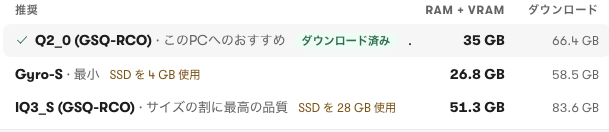
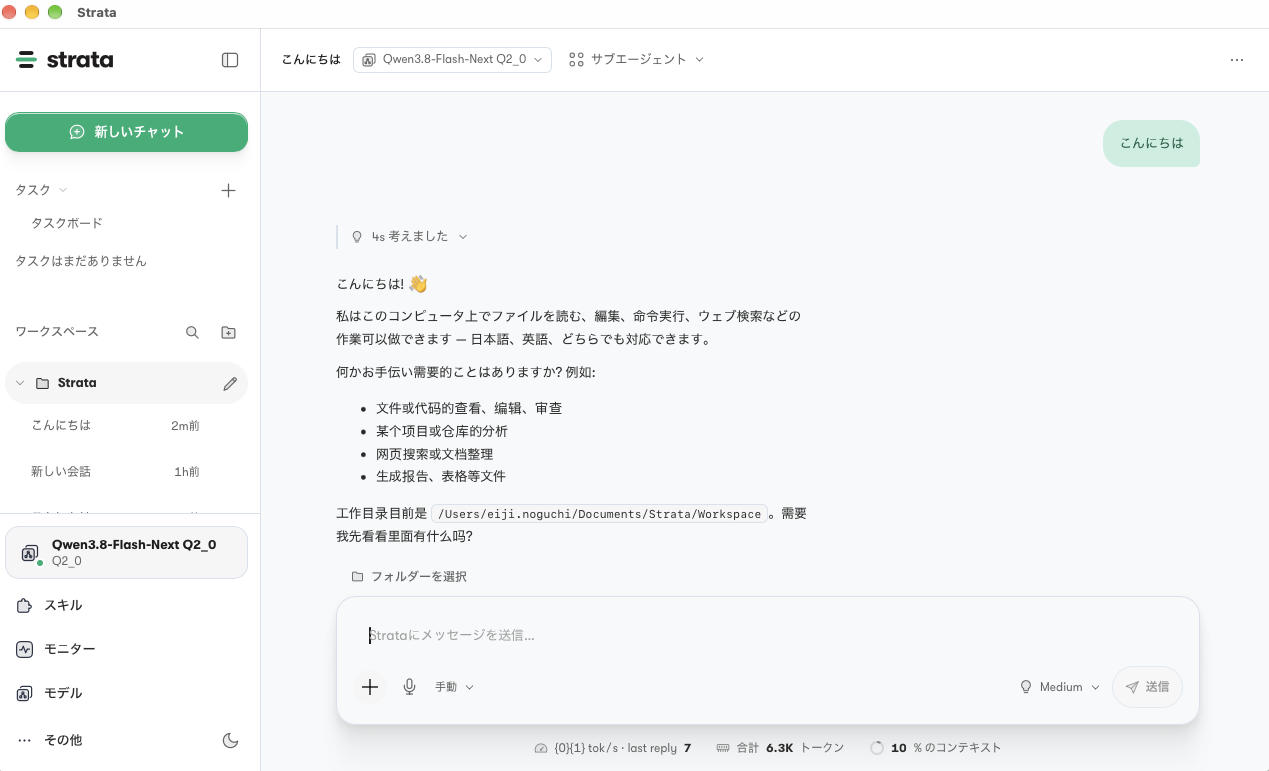
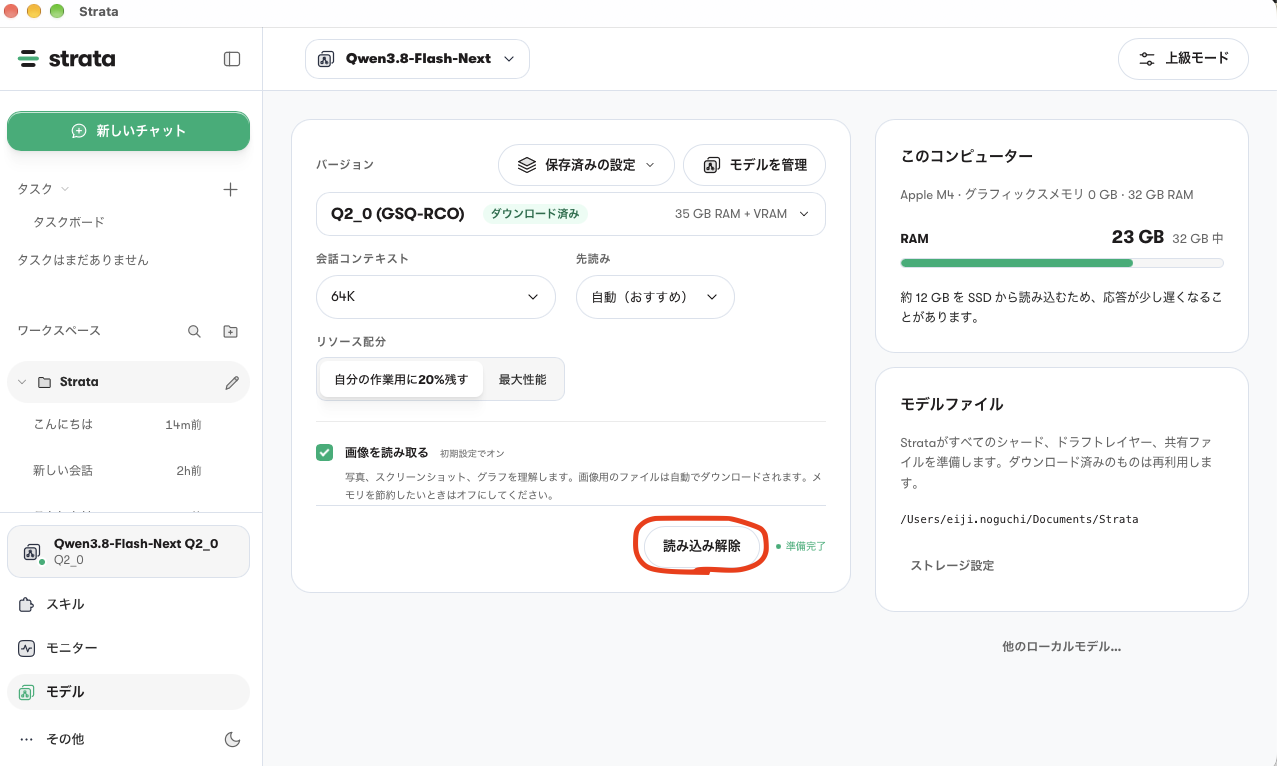
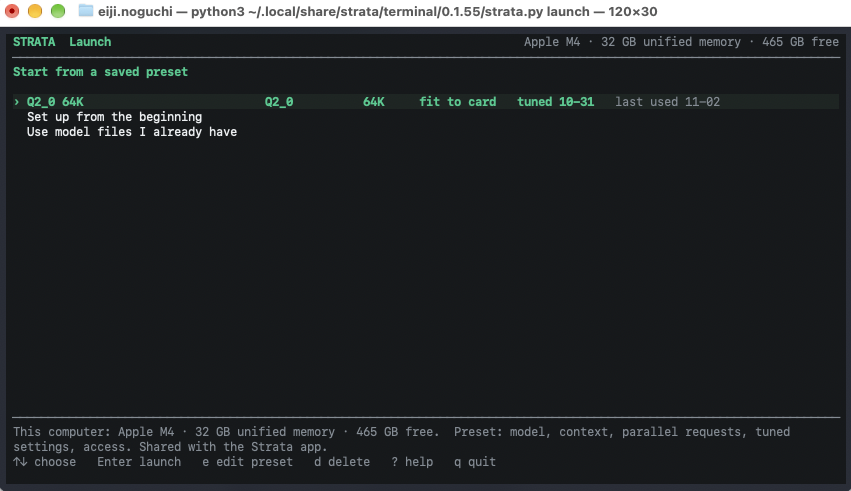
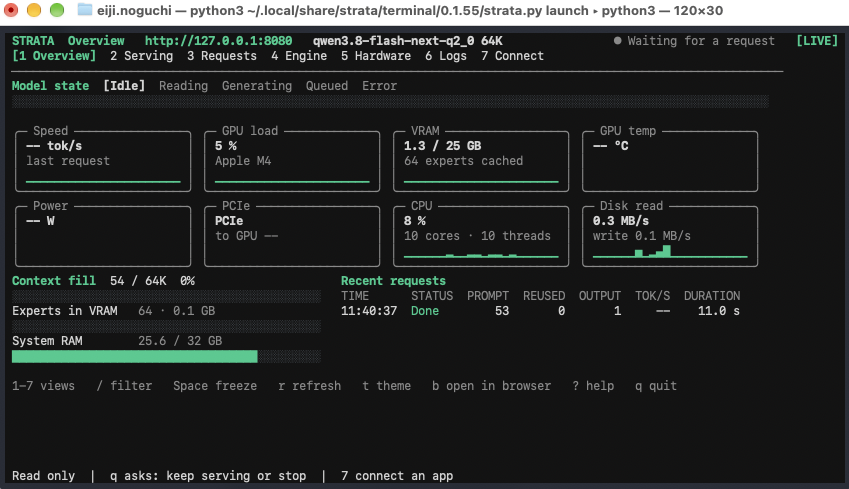
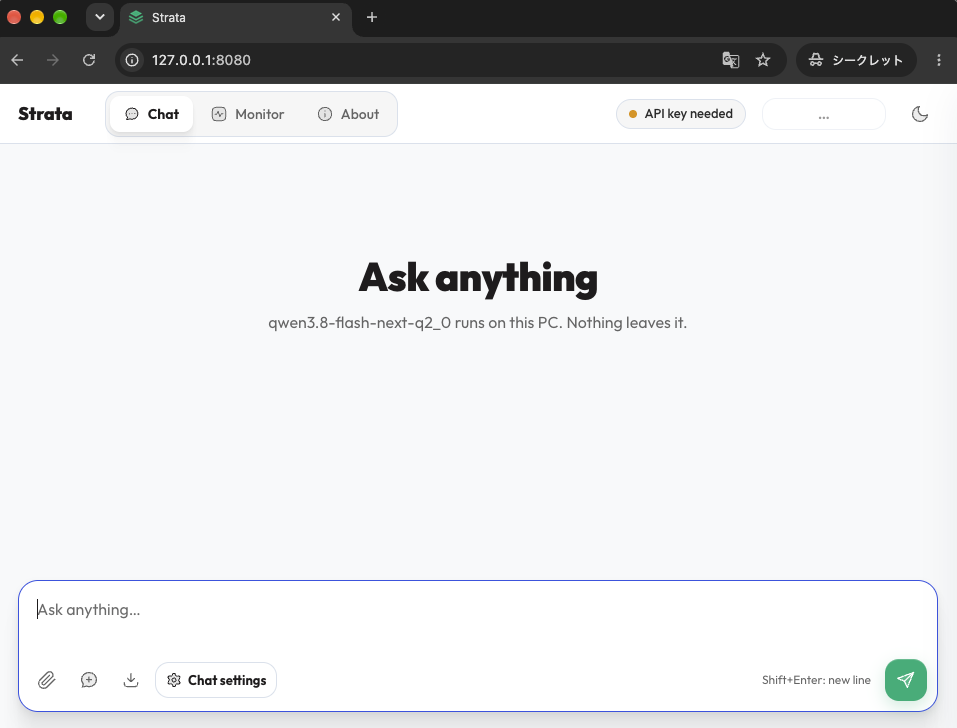
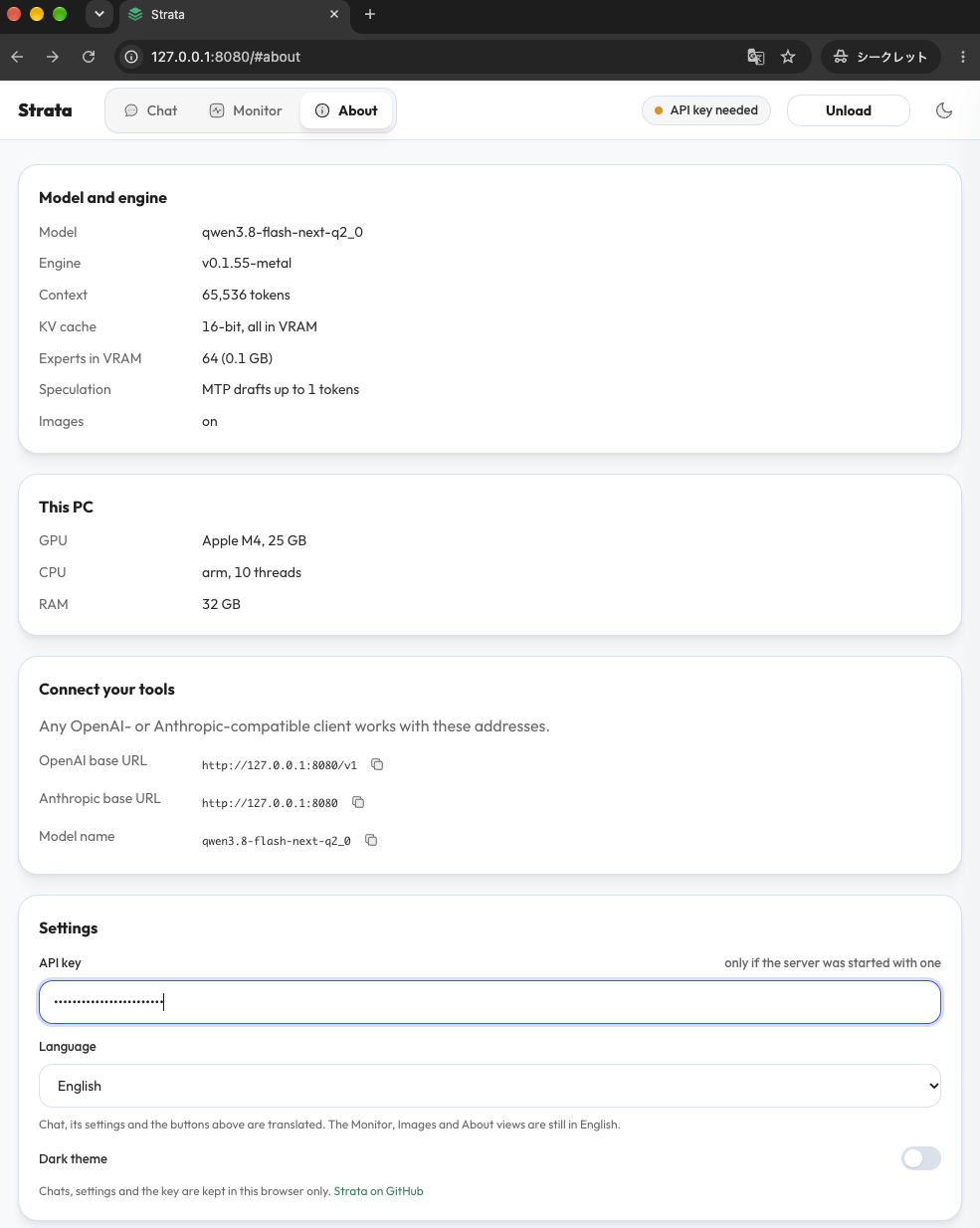
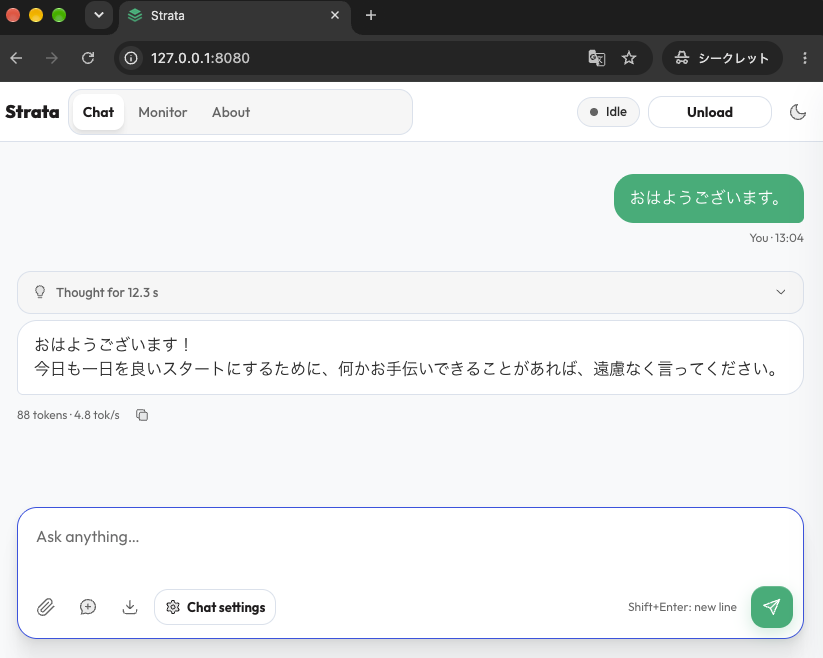
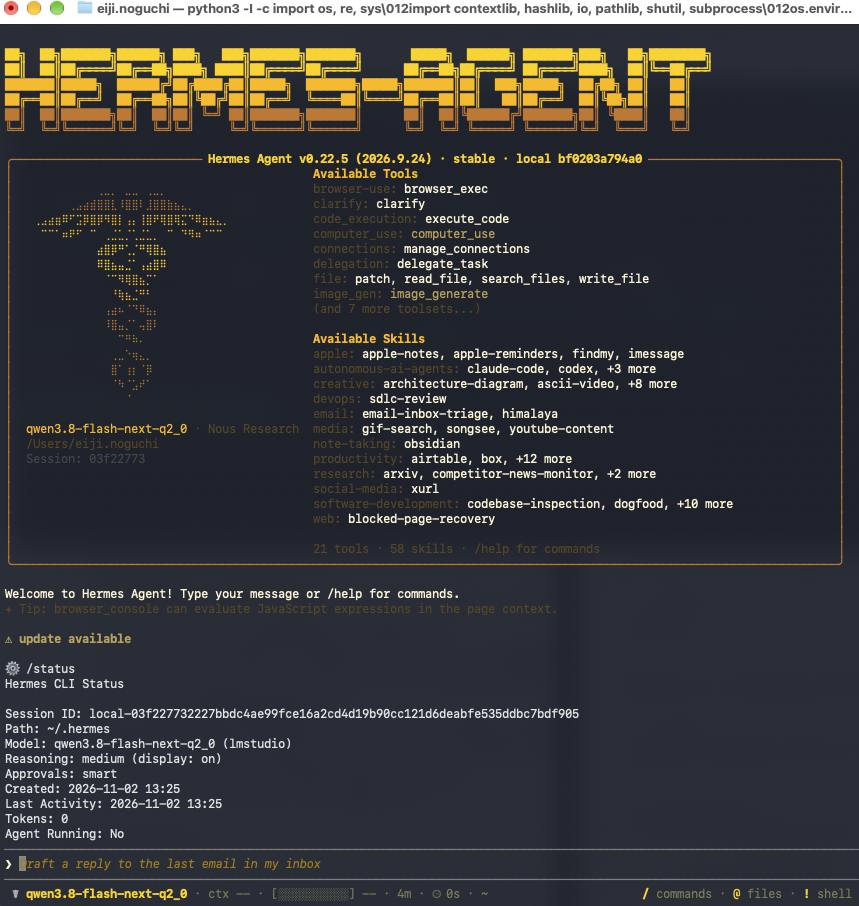
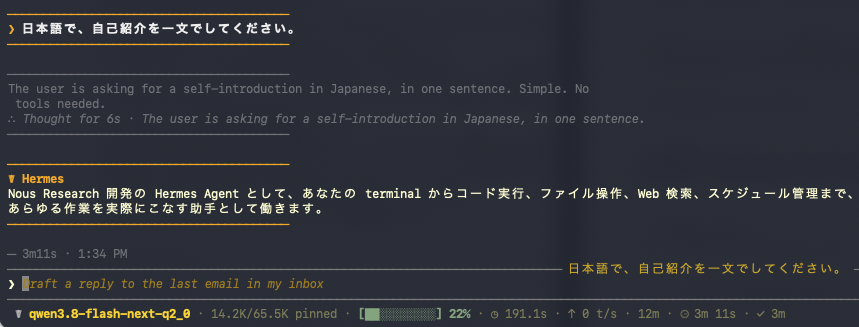
Strataを使ってMac mini(32GB)でQwen3.8-Flash-Next(125B)を動かす 初めに 普段は M4 Mac mini(32GB)でOllamaを使って30B前後のモデルでローカルLLM環境を作っているのですが、32GBだとどうしても動かせるモデルのサイズに限界があります。 そんな中、最近 Strata というツールが「メモリに入りきらない大きなモデルも動かせる」と話題になっていたので、実際に試してみました。 本記事では、Strataを使ってMac mini(32GB)でQwen3.8-Flash-Nextを動かすまでの手順を、 1. まずは デスクトップアプリ で動かしてみる 2. 次に ターミナル で動かす 3. 最後に Hermes Agent から使う という流れでまとめます。 前提: 私の実行環境です。 - M4 Mac mini(メモリ 32GB / 内蔵SSD) - macOS 27.2 - Strata 0.2.x(デスクトップアプリ 0.2.7、CLI 0.2.9) - Hermes Agent v0.22.5 はインストール済み Hermes Agent 自体のインストール方法は、ここでは省略します。 Strataとは Strata は、ローカルでAIモデルを動かすための無料・オープンソース(MIT)のアプリです。 Windows / Linux / Mac に対応していて、デスクトップアプリとCLI(ターミナル)の両方が用意されています。 Niko1221/Strata 一番の特徴は、メモリに入りきらない大きな MoE モデルを、SSD から読み込みながら動かせる ことです。 MoE(Mixture of Experts)モデルは、たくさんの「専門家(エキスパート)」を持っていて、1トークンを生成するたびに、そのうちの一部しか使いません。 Strata はこの性質を利用して、 - よく使うエキスパート → メモリに置いておく - それ以外のエキスパート → 必要になったときにSSDから読み込む という動かし方をするようです。 公式の Mac 向けドキュメントでは、32〜48GB の Mac について「エキスパートを SSD からストリーミングする」と説明されています。 参考: Strata on a Mac - A Mac whose memory cannot hold the pack (32 to 48 GB) Ollamaとの違い | | Ollama | Strata | | :--- | :--- | :--- | | 得意なこと | メモリに収まるモデルを手軽に切り替える | メモリより大きい MoE モデルを動かす | | Macで使えるモデル | 多数 | 現状は Qwen3.8-Flash-Next 系(Gyro を含む)のみ | | 推論エンジン | llama.cpp ベース | 独自の Metal エンジン | | 同時リクエスト | 複数可(設定次第) | 1件のみ | | API | OpenAI互換 / 独自API | OpenAI互換 / Anthropic互換 | なので、Ollama の代わりというよりは、「32GBのMacで、本来64GB以上必要なモデルを動かすための選択肢」 という位置づけだと思っています。 デスクトップアプリで動かす 1. インストール Strata のリリースページ の 「Assets」 から Strata-0.2.7-macos-arm64.dmg をダウンロードします。 dmg を開いて、Strata を 「アプリケーション」 フォルダにドラッグ し、起動します。 2. モデルの選択とダウンロード 起動後、まずはモデルを選びます。 - 保存先:標準で提案される Documents/Strata/Models のまま(内蔵SSD) - モデル:Qwen3.8-Flash-Next / Q2_0 (GSQ-RCO) - 会話コンテキスト:64K(エージェントを動かす上で、最低限これくらいは欲しい) !スクリーンショット 2026-11-02 11.11.10.png ちなみに量子化のバージョンは現時点では3種類から選択できるようになっています。 Q2_0 でもし動かなければ、 Gyro-S を試してもらえればと思います。 !スクリーンショット 2026-11-02 11.12.01.png :::note warn ダウンロードに結構時間かかりますので、しばらく待ちましょう。 ::: 3. チャットしてみる 準備が終わったら、そのままチャット画面で話しかけてみます。 !スクリーンショット 2026-11-02 11.19.51.png 少し中国語が混ざってしまっていますが、回答が返ってきていることまで確認できればOKです。 これで、実際に 32GBしかないMac miniでもQwen3.8-Flash-Nextが動く ことが確認できました。 ただ、実際に動かした感覚は、簡単な会話ですら回答に時間がかかっているなと感じます。 まぁそこは無理やり大規模モデルを動かしているので、トレードオフですね。。。 ターミナルで動かす 次にターミナル版を入れます。 Hermes Agent などの別アプリから使う場合は、ターミナルの方が必要になります。 0. 事前準備 ターミナルで動かす前に、デスクトップアプリから読み込んだモデルを解除しておきましょう。 両方動かすと、メモリを取り合ってしまいます。 !スクリーンショット 2026-11-02 11.31.49.png 1. インストール ターミナル版は下記のコマンド一発でインストールすることができます。 curl -fsSL https://github.com/Niko1221/Strata/releases/latest/download/install.sh -o install.sh && sh install.sh > Installed. Run: strata launch インストール後、バージョンまで確認できればOKです。 strata --version > strata 0.2.9 (build 0.1.55; ...) 2. 起動 起動コマンドは下記になります。 strata launch 起動後、画面の案内に従ってモデルを選ぶと、サーバーが起動します。 ※ 私の場合、デスクトップアプリで保存した設定が残っていたため、起動直後に Q2_0 64K が選べるようになっていました。 !スクリーンショット 2026-11-02 11.38.23.png 起動すると、以下の様な画面がターミナルに表示され、 http://127.0.0.1:8080/ のエンドポイントが使えるようになります。 !スクリーンショット 2026-11-02 11.42.12.png この画面で、strataによるパフォーマンスを確認することができます。 また、タブは [1 Overview] ~ [7 Connect] まであるので、気になる方は内容をチェックしてみてください。 3. チャットアプリから使ってみる Hermes Agentに繋げる前に、エンドポイントを開くとチャット画面が表示されます。 http://127.0.0.1:8080/ !スクリーンショット 2026-11-02 12.53.40.png しかし、チャットをする前にAPI Keyを設定する必要があります。 下記コマンドで APIキーが表示されるので、それをコピーしておきます。 strata connect hermes --show-key > API_KEY=sk-strata-*... それをチャットブラウザの About タブにある Settings に貼り付けます。 !スクリーンショット 2026-11-02 13.00.59.png 後は実際にChat画面にもどり、会話をしてみましょう。 !スクリーンショット 2026-11-02 13.09.58.png 回答が返ってくればOK. 今回は日本語もしっかりしていますね。 ちなみに、先ほどのstrataのターミナルで[1 Overview]を見ると、回答生成中は色々と処理が動いているのが見えるはずです。 Hermes Agentから使う 最後に、Hermes Agent の頭脳を Strata に切り替えます。 strataのターミナルは起動したままで大丈夫です。 1. 接続設定を確認する Strata には、アプリごとの接続設定を出力してくれる strata connect コマンドがあります。 Hermes Agent にも対応しているので、まずは何を設定すればいいかを確認します。 strata connect hermes > Hermes Agent (chat + tools; tested (Hermes Agent 2026.9.24)) > > File: ~/.hermes/config.yaml > model: default: qwen3.8-flash-next-q2_0 provider: lmstudio base_url: 127.0.0.1 context_length: 65536 compression: enabled: true threshold_tokens: 32142 auxiliary: compression: context_length: 65536 > > Environment: OPENAI_API_KEY=sk-strata-•••••••• > > Good to know: > - Hermes refuses a window under 64,000 tokens unless the provider is lmstudio with an explicit context_length: the config uses that, and auxiliary.compression.context_length 65536 for its summariser (the same floor). > - Its system prompt and 20 tools take about 12.9K tokens (40% of a 32K window): about 19K is left for the conversation. > - Its own 64K minimum floors the compaction threshold, so it compacts later than the value above (around 20K on a 32K window); it still fits 32K. Then try: hermes chat -Q --yolo -q "your task" provider が lmstudio になっているのがポイントです。 Hermes Agent は 64Kトークン未満のコンテキストを拒否 しますが、provider: lmstudio で context_length を明示した場合だけはその制限が外れるので、Strata はこの書き方を使っているようです。 一応、本手順通りであれば、strata側も64Kのコンテキストで起動しているため、問題にはならないかと思います。 2. 設定を書き換える strata connect hermes --write を使うと自動で書き込んでくれるみたいです。(置き換え前のファイルはバックアップされます)。 私は中身を確認したかったので、手で ~/.hermes/config.yaml を編集しました。 model: default: qwen3.8-flash-next-q2_0 provider: lmstudio base_url: http://127.0.0.1:8080/v1 context_length: 65536 compression: enabled: true threshold_tokens: 32142 auxiliary: compression: context_length: 65536 API キーは ~/.hermes/.env に書きます。 LM_API_KEY=<StrataのAPIキー> :::note warn strata connect hermes コマンドでは、下記のように OPENAI_API_KEY となっていましたが、 LM_API_KEY を使うのが正しい様です。 Environment: OPENAI_API_KEY=sk-strata-•••••••• ::: 3. 動作確認 Hermes のターミナルを起動します。 hermes 起動したら、statusコマンドで内容を見てみましょう。 /status Model: qwen3.8-flash-next-q2_0 (lmstudio) と表示されれば正しく設定ができています。 !スクリーンショット 2026-11-02 13.29.35.png そのまま話しかけてみます。 日本語で、自己紹介を一文でしてください。 !スクリーンショット 2026-11-02 13.37.49.png <!-- TODO: 返答内容と時間 --> 別のターミナルで strata status を見ると、Hermes からのリクエストが記録されています。 Recent requests (finished; identities unavailable in legacy telemetry) #1 cancel in 384 out 95 30.7 s #2 stop in 14,119 out 65 191.1 s #3 stop in 57 out 88 29.9 s #4 length in 53 out 1 11.0 s 入力が 約14,000トークン のリクエストが Hermes Agent からのものです。 Hermes Agent はシステムプロンプトとツール定義だけで約13,000トークンあるため、新しい会話の1回目は 約3分 かかりました。 やはり、MoEかつ量子化したモデルでも従来のメモリに収まりきらないほどの大規模モデルを動かしているので、回答速度は遅いですね。。 まとめ Strataを使うことで、32GBのMac miniでもQwen3.8-Flash-Nextのような大きなモデルを動かすことができました。 ポイントは次の3つです。 - SSD から読み込みながら動かす ので、メモリ以上のモデルが動く(その分、速度は落ちる) - ターミナル と strata connect を使うと、Hermes Agent などの他のアプリから簡単に使える - 速度は Ollama + 中型モデルの方が上 なので、用途で使い分けるのが良さそう 正直、Hermes Agent の単純な会話で約3分かかるのは日常使いには厳しいですが、「32GBのMacで100B超えのモデルが動く」というだけでもかなりロマンがあると感じました。 本記事が、手元のMacで大きなモデルを動かしてみたい方の参考になれば幸いです。 よく使うコマンドメモ # 起動・状態確認 strata launch strata status strata monitor # モデル strata models list # 他アプリとの接続設定 strata connect hermes strata connect hermes --check # 1回プロンプトとツール呼び出しを送って動作確認
The paper, code, examples, and interactive 3D rollouts are all open 🌐 Site, 📄 Paper, 🎮 Demo: robosimstudio.github.io 💻 Code: robosimstudio/robosimstudio
@emollick For replication: the Qwen gain came from removing thinking loops. 93% of Qwen3.5-0.8B's MATH-500 answers hit the 32,768-token limit before the edit, 33% after. On Gemma 3 270M, which rarely loops, edits moved MATH-500 from 6.8% to at most 7.7%. Logs: RikiyaT/lm_understand-logs
I built a local dashboard to track Codex sessions across worktrees and branches I've been running a lot of coding agent sessions recently (sometimes 100+ per project), mostly Codex and Claude Code, across multiple repositories, worktrees, and branches. At some point, keeping track of the agents became a problem of its own. I kept forgetting which agent was working on which branch/worktree, which sessions were waiting for me, and which changes I still needed to review among the many chats I have open. This drives me to built repobs Chengxuan-Li/repobs to solve this. It's a local dashboard that: - Visualizes repositories, branches, worktrees, and commits in a tree/timeline view - Tracks coding agent sessions associated with each branch/worktree, including their status (working, waiting for input, etc.) - Shows agent plans and task progress - Lets me add review states, checklists, and notes to each agent session - Local automation rules are also planned (WIP) This tool only needs read-only access to agent sessions and git. Everything the user views and edits is local. I'm particularly interested in how others manage parallel coding agents, and the challenges encountered in managing them. Also, what information/features would you want in a dashboard like this? Right now I'm adding some new features so that agents in non-git folders can also be tracked as such.
Local Tuya Dual Channel Energy Meter Working When I moved into my house it had a whole home generator already installed and worked fine but no smart-ness. I also later got solar. The app it came with worked fine until the maker of it started charging a monthly fee to see the historic data. So I bought a couple of Tuya dual channel wireless current monitors. They were about $15 each on aliexpress. They are two channel each which is great because of the US split phase system means you need to monitor both phases. I added the two devices, and using the SmartLife app I could see the data. But I wanted it in Home Assistant. There is an official integration with Tuya devices but requires the internet and is subject to all the issues that brings along with it. There are then multiple HACS integrations. Local Tuya, and the one I prefer Tuya Local just to name a couple. I started with the official integration but the device is listed as unsupported. Eventually I got it added with Tuya Local but the data was all wrong. So with some testing I made my own device type. Here is the yaml. Save it to a new file, I named mine pziot_dual.yaml, then copy it to /homeassistant/custom_components/tuya_local/devices then restart HA. pastebin.com Go through the normal process of adding the device with the custom integration. On the final step it should list the yaml you created in the Device Type. If it doesn't your device might not be compatible. At the moment the ID must be ax1iylf5qp4iqlkg. This adds sensors for the Voltage which is shared between both channels, and then Energy Forward, Energy Reverse, Power, Power Factor, and Current, for both channels. The process of making a custom device was actually fairly easy. Tuya has their Developer Platform which is great for information about the devices before making the yaml to scale and find data. Now I can know how much my solar is generating, and I can know how much my generator provides, and when it is running. I will probably have a minute or two loss of power during a power outage before power is restored and things connect again but it will be useful data for knowing how close it comes to the generators limit, as well as how often and for how long power is out.
@wereness i tried to solve the part at least where those agents miss out on important specifics halilturkoglucs/air
Sabnzbd: Access denied / Host not whitelisted via tunnel? Config → Special → clear host_whitelist, restart. curl -I 127.0.0.1:8080 cftunnel quick 8080 → free https hostname. Free intranet tunnel + reverse proxy, MIT: qingchencloud/cftunnel cftunnel.qt.cool t.co
I did this recently with a dependency that has stalled out. For the past 3-4 years, the ngx-infinite-scroller has been in maintenance mode of just updating the Angular version. Then the maintainer (which is a fork of a fork of the original) disappeared. I forked, put AI on it to not only fix the issue I was facing with the new Angular (zoneless) but add full testing to it and make it resilient. Massive benefit to my apps and trust. Kareadita/ngx-virtual-scroller for anyone that's interested.
Runtime Credential Guard deactivation via \\LSA_ISO_DISABLE_CREDENTIAL_GUARD + LSASS NT hash extraction (Win11 24H2) S12cybersecurity/CredGuardRuntimeShutdown
@Apple @AppleSupport Hey #Apple, why do I have to rely on such questionable third-party tools like Caldis/Mos to get *smooth scrolling* on #macOS, simply because I have no choice but to use a #mouse other than your terribly unergonomic #MagicMouse?
I've been working on an open-source developer tool called BAA I've been working on something called Build Anything (BAA) and thought I'd share it here. It's an open-source project focused on bringing different developer tools and AI-assisted development features together in one place. **Some of the things I've been working on include: - AI agent integration - MCP support - Project generation - Code and project analysis - Debugging and automation tools** It's still a work in progress, and I'm sure there are things that could be done better. I'm sharing it because I'd like to get it in front of other developers, see what people think and hopefully get some useful feedback. If you get a chance to look through the repo, I'd be interested to hear what you think — whether it's something you'd find useful, something that's missing, or something you'd change. GitHub: notweirdguy4212/BAA
The SpeciesNet model identifies wildlife from camera-trap images. It's an open-source project at google/cameratrapai that could help conservation work by sorting data faster than manual review. google/cameratrapai
Need help in my project I am working in a project called Omnix CLI I need some open source developers to help me out in this project repo - Bibek200619/Omnix-CLI
Explore open science code & live telemetry: • Repo: pCwOrM/werracle • Web: werracle.io • Papers: arXiv:2609.30719 | SSRN:7626279 | Zenodo: 10.5281/zenodo.22942598 Lead: pcworm.near #NEAR #Aurora #DeFi #AI t.co
Mega Man X3 gets two-player co-op, with Zero on player 2. A second player can drop in as Zero mid-stage, or X can call in a computer-controlled Zero to help. Boss Rush and a VS mode are added too. finalmixmods/X3_finalmix #SNES #MegaManX #RomHack
Now that we've reached ~6M monthly downloads, I think it's time to evaluate donating ZBSearch to a foundation. I can and I will maintain it, but I wish it would outlive my career. micheleriva/zbsearch
Show HN: HN Atlas – Discover tools to better engage with Hacker News HackerTube and HackerBooks remind me of the awesome HN products I use daily: - hckr news: a collection of top stories. - hnrss: custom RSS feeds filtered by keywords and points. - HN Popularity: explore popular HN bloggers. Hacker News features a massive amount of high-quality content. To help discover and collect more great projects built around Hacker News, I built HN Atlas: hn-atlas.bensontech.dev - Collection of awesome HN products - Fast and static Look forward to hearing your favorite HN tools! Open source: wa008/hn-atlas
GESIS Surf: An Open-Source Infrastructure for Privacy-Preserving Longitudinal Web Browsing Data Collection Mario Alberto Ramirez, Frank Mangold, Sebastian Stier arxiv.org [𝚌𝚜.𝙲𝚁 𝚌𝚜.𝙲𝚈] 💬Code: gesiscss/gesis_surf_extension t.co
How to make ChatGPT and Claude obey you and not talk like AI: Heretic 2 with opensource models Heretic 2.0 p-e-w/heretic is an open source tool with 37,000 GitHub stars designed to strip refusals, corporate word salad, and yes-man answers from open AI models. By using examples and automated optimization to modify the model directly, it skips full retraining so you can run it on a gaming PC. Subscribe for more open source AI tools worth knowing. #OpenSourceAI #Heretic2 #AITools #GitHub #AIModels [bn] ChatGPT এবং Claude-কে আপনার কথা মানতে বাধ্য করবেন যেভাবে এবং AI-এর মতো কথা বলা বন্ধ করবেন: ওপেন স... Heretic 2.0 (p-e-w/heretic) হলো ৩৭,০০০ গিটহাব স্টার সহ একটি ওপেন সোর্স টুল, যা ওপেন এআই মডেল থেকে প্রত্যাখ্যান, কর্পোরেট বুলি এবং হ্যাঁ-সূচক উত্তর বাদ দেওয়ার জন্য ডিজাইন করা হয়েছে। উদাহরণ এবং স্বয়ংক্রিয় অপ্টিমাইজেশন ব্যবহার করে সরাসরি মডেলটিকে পরিবর্তন করার ফলে, এটি সম্পূর্ণ পুনঃপ্রশিক্ষণ এড়িয়ে যায়, তাই আপনি এটি একটি গেমিং পিসিতেও চালাতে পারবেন। আরও গুরুত্বপূর্ণ ওপেন সোর্স এআই টুল সম্পর্কে জানতে সাবস্ক্রাইব করুন। #OpenSourceAI #Heretic2 #AITools #GitHub #AIModels [de-DE] So bringst du ChatGPT und Claude dazu, dir zu gehorchen und nicht mehr wie eine KI zu klingen: He... Heretic 2.0 (p-e-w/heretic) ist ein Open-Source-Tool mit 37.000 GitHub-Sternen. Es entfernt Ablehnungen, unverständliche Unternehmensfloskeln und Ja-Sager-Antworten aus offenen KI-Modellen. Durch die direkte Modifizierung des Modells mithilfe von Beispielen und automatisierter Optimierung entfällt das vollständige Neutraining, sodass es auch auf Gaming-PCs lauffähig ist. Abonnieren Sie unseren Kanal für weitere interessante Open-Source-KI-Tools. #OpenSourceAI #Heretic2 #AITools #GitHub #AIModels [es-US] Cómo hacer que ChatGPT y Claude te obedezcan y dejen de hablar como IA: Heretic 2 con modelos de ... Heretic 2.0 (p-e-w/heretic) es una herramienta de código abierto con 37 000 estrellas en GitHub, diseñada para eliminar las negativas, la jerga corporativa y las respuestas evasivas de los modelos de IA de código abierto. Mediante ejemplos y optimización automatizada para modificar el modelo directamente, evita el reentrenamiento completo, lo que permite ejecutarlo en un PC para juegos. Suscríbete para descubrir más herramientas de IA de código abierto que vale la pena conocer. #OpenSourceAI #Heretic2 #AITools #GitHub #AIModels [fr-FR] Comment faire obéir ChatGPT et Claude sans qu'ils parlent comme des IA : Heretic 2 avec des modèl... Heretic 2.0 (p-e-w/heretic) est un outil open source, fort de 37 000 étoiles sur GitHub, conçu pour éliminer les refus, le jargon d'entreprise et les réponses péremptoires des modèles d'IA ouverts. Grâce à des exemples et à une optimisation automatisée permettant de modifier directement le modèle, il évite un réentraînement complet et peut donc être exécuté sur un PC de jeu. Abonnez-vous pour découvrir d'autres outils d'IA open source intéressants. #OpenSourceAI #Heretic2 #AITools #GitHub #AIModels [hi] ChatGPT और Claude को अपनी बात मनवाने और AI की तरह बात न करने के लिए मजबूर कैसे करें: Heretic 2 और... Heretic 2.0 (p-e-w/heretic) एक ओपन सोर्स टूल है जिसे GitHub पर 37,000 स्टार मिले हैं। इसे ओपन AI मॉडल से अस्वीकृतियों, कॉर्पोरेट की बेतुकी बातों और हाँ में हाँ मिलाने वाले जवाबों को हटाने के लिए डिज़ाइन किया गया है। उदाहरणों और स्वचालित ऑप्टिमाइज़ेशन का उपयोग करके मॉडल को सीधे संशोधित करने से, यह पूर्ण री-ट्रेनिंग को छोड़ देता है, जिससे आप इसे गेमिंग पीसी पर चला सकते हैं। अधिक उपयोगी ओपन सोर्स AI टूल्स के लिए सब्सक्राइब करें। #OpenSourceAI #Heretic2 #AITools #GitHub #AIModels [id] Cara membuat ChatGPT dan Claude patuh padamu dan tidak bicara seperti AI: Heretic 2 dengan model ... Heretic 2.0 p-e-w/heretic adalah alat sumber terbuka dengan 37.000 bintang GitHub yang dirancang untuk menghilangkan penolakan, omong kosong perusahaan, dan jawaban "ya" dari model AI sumber terbuka. Dengan menggunakan contoh dan optimasi otomatis untuk memodifikasi model secara langsung, alat ini melewati pelatihan ulang penuh sehingga Anda dapat menjalankannya di PC gaming. Berlangganan untuk mendapatkan lebih banyak alat AI sumber terbuka yang layak diketahui. #OpenSourceAI #Heretic2 #AITools #GitHub #AIModels [it] Come far obbedire ChatGPT e Claude senza farli parlare come un'IA: Heretic 2 con modelli open source Heretic 2.0 p-e-w/heretic è uno strumento open source con 37.000 stelle su GitHub, progettato per eliminare rifiuti, frasi fatte e risposte accondiscendenti dai modelli di IA open source. Utilizzando esempi e ottimizzazione automatizzata per modificare direttamente il modello, evita il riaddestramento completo, consentendone l'esecuzione anche su PC da gioco. Iscriviti per scoprire altri strumenti di IA open source interessanti. #OpenSourceAI #Heretic2 #AITools #GitHub #AIModels [iw] איך לגרום ל-ChatGPT ו-Claude לציית לכם בלי לדבר כמו בינה מלאכותית: Heretic 2 עם מודלים בקוד פתוח Heretic 2.0 p-e-w/heretic הוא כלי קוד פתוח עם 37,000 כוכבי GitHub שנועד להסיר סירובים, ביקורת ארגונית ותשובות חיוביות ממודלים פתוחים של בינה מלאכותית. על ידי שימוש בדוגמאות ואופטימיזציה אוטומטית לשינוי המודל ישירות, המודל מדלג על אימון מחדש מלא כך שתוכלו להריץ אותו על מחשב גיימינג. הירשמו לעוד כלי בינה מלאכותית בקוד פתוח שכדאי להכיר. #OpenSourceAI #Heretic2 #AITools #GitHub #AIModels [ja] ChatGPTやClaudeにAIっぽく話させず、自分の思い通りに操る方法:オープンソースモデルとHeretic 2 Heretic 2.0(p-e-w/heretic%EF%BC%89%E3%81%AF%E3%80%81GitHub%E3%81%A737,000%E3%82%B9%E3%82%BF%E3%83%BC%E3%82%92%E7%8D%B2%E5%BE%97%E3%81%97%E3%81%A6%E3%81%84%E3%82%8B%E3%82%AA%E3%83%BC%E3%83%97%E3%83%B3%E3%82%BD%E3%83%BC%E3%82%B9%E3%83%84%E3%83%BC%E3%83%AB%E3%81%A7%E3%80%81%E3%82%AA%E3%83%BC%E3%83%97%E3%83%B3AI%E3%83%A2%E3%83%87%E3%83%AB%E3%81%8B%E3%82%89%E6%8B%92%E5%90%A6%E3%80%81%E4%BC%81%E6%A5%AD%E7%89%B9%E6%9C%89%E3%81%AE%E8%A8%80%E3%81%84%E8%A8%B3%E3%80%81%E3%82%A4%E3%82%A8%E3%82%B9%E3%83%9E%E3%83%B3%E7%9A%84%E3%81%AA%E5%9B%9E%E7%AD%94%E3%82%92%E5%8F%96%E3%82%8A%E9%99%A4%E3%81%8F%E3%82%88%E3%81%86%E3%81%AB%E8%A8%AD%E8%A8%88%E3%81%95%E3%82%8C%E3%81%A6%E3%81%84%E3%81%BE%E3%81%99%E3%80%82%E4%BE%8B%E3%81%A8%E8%87%AA%E5%8B%95%E6%9C%80%E9%81%A9%E5%8C%96%E3%82%92%E4%BD%BF%E7%94%A8%E3%81%97%E3%81%A6%E3%83%A2%E3%83%87%E3%83%AB%E3%82%92%E7%9B%B4%E6%8E%A5%E5%A4%89%E6%9B%B4%E3%81%99%E3%82%8B%E3%81%93%E3%81%A8%E3%81%A7%E3%80%81%E5%AE%8C%E5%85%A8%E3%81%AA%E5%86%8D%E5%AD%A6%E7%BF%92%E3%82%92%E3%82%B9%E3%82%AD%E3%83%83%E3%83%97%E3%81%97%E3%80%81%E3%82%B2%E3%83%BC%E3%83%9F%E3%83%B3%E3%82%B0PC%E3%81%A7%E5%AE%9F%E8%A1%8C%E3%81%A7%E3%81%8D%E3%81%BE%E3%81%99%E3%80%82%E7%9F%A5%E3%81%A3%E3%81%A6%E3%81%8A%E3%81%8F%E3%81%B9%E3%81%8D%E3%82%AA%E3%83%BC%E3%83%97%E3%83%B3%E3%82%BD%E3%83%BC%E3%82%B9AI%E3%83%84%E3%83%BC%E3%83%AB%E3%82%92%E3%82%82%E3%81%A3%E3%81%A8%E7%9F%A5%E3%82%8A%E3%81%9F%E3%81%84%E6%96%B9%E3%81%AF%E3%80%81%E3%81%9C%E3%81%B2%E8%B3%BC%E8%AA%AD%E3%81%97%E3%81%A6%E3%81%8F%E3%81%A0%E3%81%95%E3%81%84%E3%80%82 #Heretic2 #AITools #GitHub #AIModels [ko] ChatGPT와 Claude가 AI처럼 말하지 않고 당신의 말에 복종하게 만드는 법: 오픈소스 모델을 위한 Heretic 2 Heretic 2.0(p-e-w/heretic)은 GitHub에서 37,000개 이상의 스타를 획득한 오픈 소스 도구로, 오픈 소스 AI 모델에서 거절, 기업식 표현, 형식적인 답변을 제거하도록 설계되었습니다. 예제와 자동 최적화를 사용하여 모델을 직접 수정하므로 전체 재학습 과정을 생략하여 게임용 PC에서도 실행할 수 있습니다. 더 많은 유용한 오픈 소스 AI 도구를 알아보려면 구독하세요. #OpenSourceAI #Heretic2 #AITools #GitHub #AIModels [ml] ChatGPT-യെയും Claude-നെയും എങ്ങനെ അനുസരിപ്പിക്കാം, അവയോട് റോബോട്ടിക് ശൈലിയിൽ സംസാരിക്കാതിരിക്കാൻ:... ഹെറെറ്റിക് 2.0 p-e-w/heretic എന്നത് ഓപ്പൺ AI മോഡലുകളിൽ നിന്ന് നിരസിക്കലുകൾ, കോർപ്പറേറ്റ് വേഡ് സാലഡ്, യെസ്-മാൻ ഉത്തരങ്ങൾ എന്നിവ നീക്കം ചെയ്യുന്നതിനായി രൂപകൽപ്പന ചെയ്തിരിക്കുന്ന 37,000 GitHub സ്റ്റാറുകളുള്ള ഒരു ഓപ്പൺ സോഴ്സ് ഉപകരണമാണ്. മോഡലിനെ നേരിട്ട് പരിഷ്ക്കരിക്കുന്നതിന് ഉദാഹരണങ്ങളും ഓട്ടോമേറ്റഡ് ഒപ്റ്റിമൈസേഷനും ഉപയോഗിക്കുന്നതിലൂടെ, ഇത് പൂർണ്ണമായ പുനർപരിശീലനം ഒഴിവാക്കുന്നു, അതിനാൽ നിങ്ങൾക്ക് ഇത് ഒരു ഗെയിമിംഗ് പിസിയിൽ പ്രവർത്തിപ്പിക്കാൻ കഴിയും. അറിയേണ്ട കൂടുതൽ ഓപ്പൺ സോഴ്സ് AI ഉപകരണങ്ങൾക്കായി സബ്സ്ക്രൈബുചെയ്യുക. #OpenSourceAI #Heretic2 #AITools #GitHub #AIModels [nl-NL] Hoe je ChatGPT en Claude laat gehoorzamen en niet als een AI laat praten: Heretic 2 met opensourc... Heretic 2.0 p-e-w/heretic is een open source tool met 37.000 GitHub-sterren, ontworpen om weigeringen, jargon en ja-zeggers uit open AI-modellen te verwijderen. Door gebruik te maken van voorbeelden en geautomatiseerde optimalisatie om het model direct aan te passen, wordt volledige hertraining overgeslagen, waardoor je het op een gaming-pc kunt draaien. Abonneer je voor meer open source AI-tools die de moeite waard zijn om te kennen. #OpenSourceAI #Heretic2 #AITools #GitHub #AIModels [pa] ChatGPT ਅਤੇ Claude ਨੂੰ ਆਪਣੀ ਗੱਲ ਮੰਨਣ ਲਈ ਕਿਵੇਂ ਮਜਬੂਰ ਕਰੀਏ ਅਤੇ AI ਵਾਂਗ ਗੱਲ ਨਾ ਕਰਨ ਦੇਈਏ: Heretic 2 ਅ... ਹੇਰੇਟਿਕ 2.0 p-e-w/heretic ਇੱਕ ਓਪਨ ਸੋਰਸ ਟੂਲ ਹੈ ਜਿਸ ਵਿੱਚ 37,000 GitHub ਸਟਾਰ ਹਨ ਜੋ ਓਪਨ AI ਮਾਡਲਾਂ ਤੋਂ ਇਨਕਾਰ, ਕਾਰਪੋਰੇਟ ਸ਼ਬਦ ਸਲਾਦ, ਅਤੇ ਹਾਂ-ਪੁਰਸ਼ ਜਵਾਬਾਂ ਨੂੰ ਹਟਾਉਣ ਲਈ ਤਿਆਰ ਕੀਤੇ ਗਏ ਹਨ। ਮਾਡਲ ਨੂੰ ਸਿੱਧੇ ਤੌਰ 'ਤੇ ਸੋਧਣ ਲਈ ਉਦਾਹਰਣਾਂ ਅਤੇ ਆਟੋਮੇਟਿਡ ਓਪਟੀਮਾਈਜੇਸ਼ਨ ਦੀ ਵਰਤੋਂ ਕਰਕੇ, ਇਹ ਪੂਰੀ ਰੀਟ੍ਰੇਨਿੰਗ ਨੂੰ ਛੱਡ ਦਿੰਦਾ ਹੈ ਤਾਂ ਜੋ ਤੁਸੀਂ ਇਸਨੂੰ ਇੱਕ ਗੇਮਿੰਗ PC 'ਤੇ ਚਲਾ ਸਕੋ। ਜਾਣਨ ਯੋਗ ਹੋਰ ਓਪਨ ਸੋਰਸ AI ਟੂਲਸ ਲਈ ਗਾਹਕ ਬਣੋ। #OpenSourceAI #Heretic2 #AITools #GitHub #AIModels [pl] Jak sprawić, by ChatGPT i Claude były posłuszne i przestały brzmieć jak AI: Heretic 2 z modelami ... Heretic 2.0 p-e-w/heretic to narzędzie open source z 37 000 gwiazdkami na GitHubie, zaprojektowane w celu wyeliminowania odmów, korporacyjnej gadaniny i odpowiedzi „tak” z otwartych modeli sztucznej inteligencji. Dzięki przykładom i automatycznej optymalizacji do bezpośredniej modyfikacji modelu, narzędzie pomija pełne ponowne trenowanie, co pozwala na uruchomienie go na komputerze do gier. Subskrybuj, aby poznać więcej narzędzi open source do sztucznej inteligencji. #OpenSourceAI #Heretic2 #AITools #GitHub #AIModels [pt-BR] Como fazer o ChatGPT e o Claude te obedecerem e pararem de falar como IA: Heretic 2 com modelos o... Heretic 2.0 (p-e-w/heretic) é uma ferramenta de código aberto com 37.000 estrelas no GitHub, projetada para remover recusas, jargões corporativos e respostas subservientes de modelos de IA abertos. Ao usar exemplos e otimização automatizada para modificar o modelo diretamente, ele dispensa o re-treinamento completo, permitindo que você o execute em um PC gamer. Inscreva-se para conhecer mais ferramentas de IA de código aberto que valem a pena. #OpenSourceAI #Heretic2 #AITools #GitHub #AIModels [ru] Как заставить ChatGPT и Claude слушаться вас и перестать говорить как ИИ: Heretic 2 с моделями с ... Heretic 2.0 p-e-w/heretic — это инструмент с открытым исходным кодом, имеющий 37 000 звезд на GitHub, предназначенный для удаления отказов, корпоративной бессвязной речи и ответов типа «да-да» из открытых моделей ИИ. Используя примеры и автоматическую оптимизацию для прямой модификации модели, он пропускает полную переобучение, поэтому вы можете запускать его на игровом ПК. Подпишитесь, чтобы узнать больше об инструментах ИИ с открытым исходным кодом. #OpenSourceAI #Heretic2 #AITools #GitHub #AIModels [ta] ChatGPT மற்றும் Claude-ஐ உங்களுக்குக் கட்டுப்பட வைப்பது எப்படி? AI போல பேசாமல் தடுப்பது எப்படி: H... Heretic 2.0 p-e-w/heretic என்பது, திறந்த AI மாடல்களில் உள்ள நிராகரிப்புகள், பெருநிறுவனங்களின் வார்த்தைக் குழப்பங்கள் மற்றும் ஆமாம் சாமி பதில்களை நீக்குவதற்காக வடிவமைக்கப்பட்ட, 37,000 GitHub ஸ்டார்களைக் கொண்ட ஒரு திறந்த மூலக் கருவியாகும். எடுத்துக்காட்டுகள் மற்றும் தானியங்கு உகப்பாக்கத்தைப் பயன்படுத்தி மாடலை நேரடியாக மாற்றுவதன் மூலம், இது முழுமையான மறுபயிற்சியைத் தவிர்க்கிறது, எனவே நீங்கள் இதை ஒரு கேமிங் கணினியில் இயக்கலாம். மேலும் அறியத் தகுந்த திறந்த மூல AI கருவிகளுக்காக சப்ஸ்கிரைப் செய்யுங்கள். #OpenSourceAI #Heretic2 #AITools #GitHub #AIModels [te] ChatGPT మరియు Claude మీ మాట వినేలా చేయడం ఎలా, AI లాగా మాట్లాడకుండా ఉండటం ఎలా: Heretic 2 మరియు ఓపె... Heretic 2.0 p-e-w/heretic అనేది 37,000 GitHub స్టార్స్ కలిగిన ఒక ఓపెన్ సోర్స్ టూల్. ఇది ఓపెన్ AI మోడల్స్ నుండి తిరస్కరణలు, కార్పొరేట్ పదజాలం మరియు అవుననే సమాధానాలను తొలగించడానికి రూపొందించబడింది. ఉదాహరణలు మరియు ఆటోమేటెడ్ ఆప్టిమైజేషన్ను ఉపయోగించి మోడల్ను నేరుగా సవరించడం ద్వారా, ఇది పూర్తి రీట్రైనింగ్ను దాటవేస్తుంది, కాబట్టి మీరు దీన్ని గేమింగ్ PCలో కూడా రన్ చేయవచ్చు. తెలుసుకోవలసిన మరిన్ని ఓపెన్ సోర్స్ AI టూల్స్ కోసం సబ్స్క్రైబ్ చేసుకోండి. #OpenSourceAI #Heretic2 #AITools #GitHub #AIModels [uk] Як змусити ChatGPT та Claude слухатися вас і не говорити як ШІ: Heretic 2 з моделями з відкритим ... Heretic 2.0 p-e-w/heretic — це інструмент з відкритим кодом, який має 37 000 зірок на GitHub, розроблений для видалення відмов, корпоративних словесних салатів та відповідей «так» з відкритих моделей штучного інтелекту. Використовуючи приклади та автоматизовану оптимізацію для безпосередньої модифікації моделі, він пропускає повне перенавчання, тому ви можете запустити його на ігровому ПК. Підпишіться, щоб дізнатися більше про інструменти штучного інтелекту з відкритим кодом, про які варто знати. #OpenSourceAI #Heretic2 #AITools #GitHub #AIModels
@SwarupGosw14964 @prashantmsh MongoDB and PostgreSQL tools make UNIDB_MCP a useful fit for HOL Guard. Would you consider listing it? The MCP guide covers the entry and PR: github.com/hashgraph-online/hol-guard/blob/main/d…
Hydra Nexus — Uma experiência totalmente nova com o Hydra 🚀 E aí, pessoal! 👋 Pra quem usa o Hydra Launcher, queria compartilhar um projeto no qual venho trabalhando há algum tempo, chamado Hydra Nexus. Pra quem ainda não conhece, o Hydra é um launcher de jogos para PC. Já o Hydra Nexus é uma extensão independente e de código aberto que desenvolvi para adicionar funcionalidades, ferramentas e opções de personalização que eu sempre quis ter no Hydra, com a ideia de tornar a experiência mais prática e agradável. Não é um launcher novo, nem uma alternativa ao Hydra. É simplesmente uma tentativa de aproveitar o que já existe e melhorar a experiência com alguns recursos extras. Tudo começou com uma ideia bem pequena, mas, aos poucos, o projeto foi crescendo muito além do que eu imaginava. Fui adicionando funcionalidades, redesenhando partes inteiras da interface e dedicando tempo a detalhes nos quais nunca pensei que acabaria trabalhando. Então, hoje quero mostrar pra vocês um pouco do que desenvolvi até agora! 🌍 Disponível em 9 idiomas Antes de falar das funcionalidades, vale mencionar que o Hydra Nexus oferece suporte a 9 idiomas e acompanha automaticamente o idioma selecionado no Hydra. Se você prefere conhecer o projeto e seus recursos no seu próprio idioma, também preparei páginas no GitHub para cada um dos idiomas disponíveis: English · Português (Brasil) · Español · Русский · العربية · Français · Deutsch · Türkçe · Polski 🎮 Gerenciamento de contas Steam — Onde tudo começou preview.redd.it Quero começar por essa funcionalidade porque tenho um carinho especial por ela. Na verdade, foi justamente por causa dela que o Hydra Nexus surgiu. Eu queria uma maneira simples de gerenciar diferentes contas Steam diretamente pelo Hydra, sem precisar ficar trocando de conta manualmente toda vez que fosse abrir um jogo. Foi aí que pensei: e se cada jogo pudesse ter sua própria conta Steam e um modo de inicialização específico, e o Hydra lembrasse dessas configurações automaticamente? E assim nasceu a primeira funcionalidade do Hydra Nexus. Agora você pode associar uma conta Steam específica a cada jogo da sua biblioteca e escolher entre três modos de inicialização: - Default / Standalone: Inicia o jogo normalmente, sem que o Nexus abra o Steam ou altere a conta em uso. - Steam Online: Utiliza a conta Steam pessoal selecionada no modo online. - Steam Offline: Alterna automaticamente para a conta escolhida e inicia o Steam no modo offline, incluindo suporte a contas compartilhadas. Cada jogo pode ter sua própria conta e seu próprio modo de inicialização, e o Nexus guarda essas configurações para a próxima vez que você jogar. A ideia é eliminar etapas repetitivas e facilitar a vida de quem utiliza várias contas Steam. O recurso utiliza apenas contas que já foram salvas no Steam. Para que a troca automática funcione corretamente, também é necessário desativar a tela de seleção de contas na inicialização do Steam. Onde encontrar: Library → Página do jogo → Botão Steam ao lado de Play Foi assim que tudo começou, mas o projeto não parou por aí. ✨ Nexus Discovery — Repensando a experiência com o Hydra preview.redd.it Conforme fui adicionando novas funcionalidades, comecei a sentir que a interface original do Hydra era simples demais. Isso não é necessariamente algo ruim, mas eu enxergava bastante espaço para torná-la mais interessante e funcional. Eu não queria apenas trocar algumas cores ou colocar um fundo bonito. Queria que, ao abrir o Hydra, você sentisse que sempre havia algo novo para descobrir. Foi daí que surgiu o Nexus Discovery. 🏠 Uma nova página inicial — Feita para descobrir jogos Redesenhei a página inicial para que ela funcionasse como um verdadeiro espaço de descoberta de jogos. Integrei partes da interface aos dados do Steam, permitindo explorar alguns dos jogos mais populares no momento, descobrir lançamentos recentes e encontrar títulos que possam combinar com seus interesses com base nos jogos da sua biblioteca. A nova página inicial inclui: - Uma apresentação cinematográfica com quatro dos jogos mais ativos do Steam. - Seções dedicadas à descoberta de novos lançamentos. - Sugestões de jogos inspiradas na sua biblioteca. - Um novo visual para as capas e a apresentação dos jogos. - Transições mais suaves e efeitos visuais que tornam a navegação mais agradável. Queria transformar a página inicial em um lugar onde você realmente tivesse vontade de passar um tempo, seja procurando algo novo para jogar ou simplesmente vendo o que a galera anda jogando. Também deixei alguns detalhes para vocês descobrirem por conta própria. 📖 Páginas dos jogos — Mais organização, menos poluição visual Depois disso, passei a trabalhar nas páginas individuais dos jogos. Sempre achei que concentrar informações demais em uma única página podia deixar a navegação confusa, principalmente quando alguns detalhes só são úteis em determinadas situações. Por isso, reorganizei as páginas e distribuí o conteúdo em seções específicas: Overview · Updates · About · Community · Details Em vez de precisar rolar a página inteira procurando uma informação, agora você pode acessar diretamente a seção que deseja. Também reorganizei capturas de tela, vídeos, informações técnicas e avaliações para deixar tudo mais limpo e fácil de navegar. 📰 Updates — Notícias e atualizações dos jogos dentro do Hydra Essa foi outra funcionalidade que fiquei especialmente animado em desenvolver. Integrei a nova seção Updates ao Steam, permitindo acompanhar notícias e atualizações publicadas pelos desenvolvedores dos jogos, incluindo: - Notas de atualização (patch notes). - Notícias e anúncios dos desenvolvedores. - Publicações sobre atualizações e outros conteúdos dos estúdios. Você pode ler esse conteúdo diretamente no Hydra, sem precisar abrir o Steam toda hora, além de atualizar a lista de notícias e carregar mais publicações. Por enquanto, essa seção funciona apenas com o Steam, e ainda há alguns pontos que pretendo melhorar nas próximas atualizações. 🎨 Os pequenos detalhes visuais A reformulação não ficou limitada à página inicial e às páginas dos jogos. Também dediquei bastante tempo à biblioteca, ao catálogo, às capas dos jogos, à página de downloads e às interfaces de atividade e estatísticas. Adicionei efeitos sutis de vidro, transições mais suaves, animações e vários pequenos ajustes visuais para que tudo parecesse fazer parte de uma mesma experiência, em vez de um conjunto de modificações independentes. Até a página de downloads ganhou um novo visual, dando mais destaque à arte do jogo e ao progresso do download. Passei dias trabalhando nesses detalhes, às vezes ajustando pequenas coisas várias vezes até chegar ao resultado que tinha em mente. Sei que design é uma questão de gosto pessoal, mas espero de verdade que vocês gostem do resultado. 🏆 Notificações de conquistas — Inspiradas na Dynamic Island i.redd.it Uma das partes visuais que mais gostei de desenvolver foi o novo sistema de notificações de conquistas. Eu queria que desbloquear uma conquista fosse um momento um pouco mais especial, em vez de simplesmente aparecer uma notificação comum que desaparece logo depois. Então, criei novas notificações com animações e efeitos inspirados na Dynamic Island, incluindo estilos diferentes para conquistas normais, raras, ocultas e de platina. Mas também sei que algumas pessoas preferem o visual original do Hydra, então não quis obrigar ninguém a utilizar o novo estilo. Você pode alternar entre as notificações do Nexus Discovery e as notificações originais do Hydra, personalizar o som e até visualizar uma prévia antes de usar. Essa é, inclusive, uma parte importante da ideia por trás do Hydra Nexus: oferecer mais opções sem obrigar ninguém a utilizá-las. E, claro, ainda tem muita coisa para descobrir dentro do Nexus Discovery. 📅 Calendário de lançamentos — Acompanhe os jogos da sua biblioteca preview.redd.it Eu queria uma maneira simples de acompanhar as datas de lançamento dos jogos da minha biblioteca, sem precisar pesquisar cada título separadamente. Por isso, adicionei um calendário integrado que organiza as datas de lançamento dos jogos da sua biblioteca em uma visualização mensal. Você pode ver as capas dos jogos diretamente nos dias de lançamento e navegar entre os meses para conferir lançamentos futuros ou anteriores. Quando vários jogos compartilham a mesma data, o calendário os agrupa, permitindo visualizar os títulos e abrir suas páginas diretamente. Como as datas de lançamento podem mudar, o Nexus atualiza as informações disponíveis sempre que possível e mantém os dados salvos anteriormente caso alguma atualização falhe. Jogos que ainda não possuem uma data confirmada, ou que têm apenas o ano de lançamento divulgado, ficam em uma lista separada, em vez de receberem uma data imprecisa. Onde encontrar: Library → Calendar, após ativar o plugin. 💾 Game Storage Manager — Mais controle sobre o armazenamento dos seus jogos preview.redd.it Se você instala jogos em diferentes unidades de armazenamento, provavelmente já precisou descobrir onde determinado jogo está instalado, quanto espaço ele ocupa ou como transferi-lo para outro disco. Em vez de fazer tudo isso manualmente, adicionei uma ferramenta de gerenciamento de armazenamento diretamente ao Hydra. Com ela, você pode visualizar os jogos instalados, conferir em quais unidades estão armazenados, consultar o espaço disponível e organizar os jogos por tamanho ou pela última vez em que foram jogados. Também é possível abrir diretamente as pastas de instalação ou mover jogos selecionados entre diferentes unidades. Antes de iniciar uma transferência, o Nexus verifica o destino e o espaço necessário. Depois, confere os arquivos copiados antes de atualizar os caminhos de instalação no Hydra e remover os arquivos originais. A ferramenta também avisa quando não é possível identificar uma pasta de instalação com segurança e sinaliza medições de tamanho incompletas. Um detalhe importante: essa ferramenta gerencia os caminhos de instalação utilizados pelo Hydra. Ela não atualiza automaticamente atalhos da área de trabalho nem registros de jogos em outros launchers. 📊 Play Activity — Descubra como você realmente passa seu tempo jogando preview.redd.it Eu queria algo mais interessante do que simplesmente ver um número mostrando meu total de horas jogadas. Queria poder olhar para trás e descobrir quais jogos estavam ocupando mais meu tempo, quando eu tinha jogado cada um deles e como minha atividade mudou ao longo dos dias e das semanas. Então, desenvolvi um sistema de acompanhamento de sessões de jogo com uma interface própria. Você pode consultar o tempo total de jogo, os dias em que esteve ativo, a última vez que abriu determinado título e o histórico de sessões individuais, incluindo horário de início, término e duração. Também há resumos semanais e mensais, além de períodos personalizados e estatísticas detalhadas para cada jogo. Redesenhei as páginas de estatísticas, incluindo gráficos e informações mais completas sobre as sessões para facilitar a visualização dos dados. Você pode gerenciar ou desativar as notificações dos resumos sem precisar desativar o registro das sessões. Vale mencionar uma limitação: o histórico detalhado começa a ser registrado a partir do momento em que o Nexus inicia o acompanhamento. Não é possível reconstruir sessões antigas usando apenas o tempo total de jogo registrado anteriormente. 📥 Caminhos de extração personalizados — Baixe em uma unidade e extraia em outra preview.redd.it Às vezes, você quer baixar os arquivos compactados de um jogo em uma unidade, mas extrair ou instalar o jogo em outra. Foi pensando nisso que adicionei a opção Extract Path às configurações de download do Hydra. Agora você pode escolher uma pasta de destino específica para a extração automática, sem ficar limitado ao local onde os arquivos baixados estão armazenados. O Nexus lembra o último destino escolhido e mantém um caminho de extração individual para cada download na fila. Ele também cria automaticamente uma pasta específica para o jogo dentro do destino selecionado. Os arquivos compactados originais permanecem no local do download, permitindo continuar ou compartilhar os downloads, a menos que você ative separadamente a opção de excluí-los após a extração. ⏻ Download Finish Actions — Deixe o PC cuidar do resto preview.redd.it Você já deixou o computador ligado durante a noite para baixar um jogo, mesmo sabendo que não precisaria dele funcionando depois que tudo terminasse? Adicionei uma funcionalidade simples justamente para esse tipo de situação. Você pode escolher o que deve acontecer quando toda a fila de downloads e as extrações ativadas forem concluídas: - Receber uma notificação quando tudo terminar. - Colocar o computador em modo de suspensão. - Desligar o computador automaticamente. Nas opções de suspensão e desligamento, o Nexus exibe uma contagem regressiva de 60 segundos antes de executar a ação, dando tempo para você cancelar. E, se você adicionar outro download, o Nexus volta a aguardar até que toda a fila seja concluída novamente. 👻 Invisible Mode — Mais controle sobre sua privacidade preview.redd.it Às vezes, você só quer abrir o Hydra e jogar sem compartilhar sua atividade com outras pessoas. Foi por isso que adicionei o Invisible Mode. Esse recurso oferece mais controle sobre o compartilhamento de atividades no Hydra, permitindo continuar usando sua biblioteca e acompanhando seu progresso localmente. Depois de ativar o plugin, você pode controlar o Invisible Mode diretamente pelo menu da sua conta, sem precisar voltar às configurações do Nexus toda vez. A ideia é oferecer mais controle sobre sua privacidade, embora algumas notificações de jogos e atualizações de presença ainda dependam dos servidores do Hydra. 📑 Game Tabs — Navegue pelos jogos como se estivesse usando um navegador preview.redd.it Uma coisa simples que sempre senti falta no Hydra era a possibilidade de manter várias páginas de jogos abertas e alternar facilmente entre elas. Por isso, adicionei um sistema de abas semelhante ao dos navegadores. Basta clicar com o botão direito em qualquer jogo da biblioteca ou do catálogo e selecionar Open in New Tab. Assim, você pode manter várias páginas abertas e alternar entre elas sem precisar voltar e pesquisar os mesmos jogos repetidamente. E tem mais: o Nexus preserva o estado do catálogo durante a troca de abas, incluindo resultados de pesquisa, filtros ativos e posição de rolagem. As abas permanecem disponíveis durante a sessão atual do Hydra, mas não são restauradas após fechar e reiniciar completamente o aplicativo. 🧱 Game Page Layout — Organize as páginas dos jogos do seu jeito Nem todo mundo precisa das mesmas seções nas páginas dos jogos. Algumas pessoas se interessam mais por avaliações, enquanto outras preferem capturas de tela, vídeos ou informações técnicas. Por isso, adicionei uma ferramenta para personalizar a organização dessas páginas. Você pode ocultar seções que não utiliza, como capturas de tela, vídeos, avaliações e jogos semelhantes, além de reorganizar as seções compatíveis de acordo com suas preferências. Também é possível escolher se as configurações de visibilidade serão aplicadas apenas aos jogos da sua biblioteca ou a todas as páginas de jogos. Suas preferências continuam salvas mesmo que você desative o plugin e volte a ativá-lo depois. 🎨 Fundos personalizados — Deixe o Hydra com a sua cara i.redd.it Se você gosta de personalizar seus aplicativos, esse recurso é para você. Agora é possível usar imagens ou vídeos do seu próprio computador como plano de fundo do Hydra, sem ficar limitado ao fundo do tema atual. Também adicionei controles para ajustar o escurecimento e o desfoque do fundo, além de uma opção para pausar automaticamente os vídeos quando o Hydra não estiver ativo, evitando o consumo desnecessário de recursos. E, quando quiser, você pode restaurar o fundo original do tema sem precisar modificar nenhum arquivo manualmente. ⚙️ Plugins e atualizações — Use apenas o que realmente quiser Desde o começo, eu não queria obrigar todo mundo a utilizar todas essas funcionalidades. Por isso, desenvolvi um sistema de plugins que permite ativar ou desativar cada recurso individualmente. Se você só tem interesse no gerenciamento de contas Steam, pode utilizar essa funcionalidade sem precisar ativar todo o resto. E, se gosta de personalização, pode habilitar o Nexus Discovery, os fundos personalizados e as outras ferramentas que preferir. Também adicionei um sistema que permite verificar novas versões do Nexus diretamente pelo Hydra e conferir a integridade do instalador baixado antes de atualizar. Durante o desenvolvimento, procurei fazer com que os novos menus, configurações e controles parecessem uma parte natural do Hydra, em vez de um monte de ferramentas separadas adicionadas por cima da interface original. 📦 Download e instalação Além dos recursos que apresentei aqui, o Hydra Nexus também conta com outras funcionalidades que não cheguei a mencionar neste post. Você pode conhecer todas elas no repositório do projeto. O Hydra Nexus é um projeto de código aberto e está disponível no GitHub: M0KA40/Hydra-Nexus Versões e downloads: github.com/M0KA40/Hydra-Nexus/releases/latest O Hydra Nexus é um projeto independente da comunidade e não possui qualquer vínculo oficial com a equipe do Hydra Launcher, o Steam ou os demais serviços com os quais oferece integração. ❤️ Para finalizar Quando comecei esse projeto, nunca imaginei que ele fosse crescer tanto. Tudo o que eu queria, inicialmente, era resolver um pequeno incômodo que tinha ao usar o Steam com o Hydra. Mas, toda vez que terminava uma funcionalidade, surgia outra ideia. Às vezes, eu acabava até redesenhando uma parte inteira da interface simplesmente porque achava que dava para melhorar. Aprendi muita coisa desenvolvendo esse projeto, e ainda há bastante coisa que quero aperfeiçoar. Sou apenas uma pessoa trabalhando nesse projeto, então é possível que vocês encontrem bugs ou detalhes que ainda precisam de ajustes, principalmente nas partes mais recentes, como o Nexus Discovery e o Nexus Cloud. Continuo trabalhando para melhorar os recursos existentes e manter o Nexus compatível com as futuras atualizações do Hydra. Se você decidir experimentar o Hydra Nexus, vou ficar muito feliz em saber o que achou. Vocês também podem me adicionar como amigo no Hydra pela seção Nexus, nas configurações, e compartilhar suas opiniões comigo diretamente. Obrigado a todo mundo que dedicou um tempinho para conhecer o projeto ou resolveu testá-lo. Espero de verdade que ele torne a experiência de vocês com o Hydra um pouco mais divertida, assim como eu queria que fosse para mim. ❤️
@FinansowyUmysl Np. przy wykorzystaniu tego lyramakesmusic/neuron-explorer oraz wzmocnień kontrolnych neuronów można również kontrolować w locie przy runtime, np. przez llama.cpp Tu po prostu zlokalizował wiedzę matematyczną w modelu który miał ku temu defekt i podciągnął wartości do góry. Nie pomoże tu na chwilę obecną przy większych modelach osiągać tak imponujących popraw wyników.
My first PR just got merged into Node.js core. A small test fix, but it was fun. Big thanks to @_rafaelgss for the mentoring! Planning to keep going: fixing flaky tests and small tech issues to learn the codebase, then work toward something bigger. node#66986
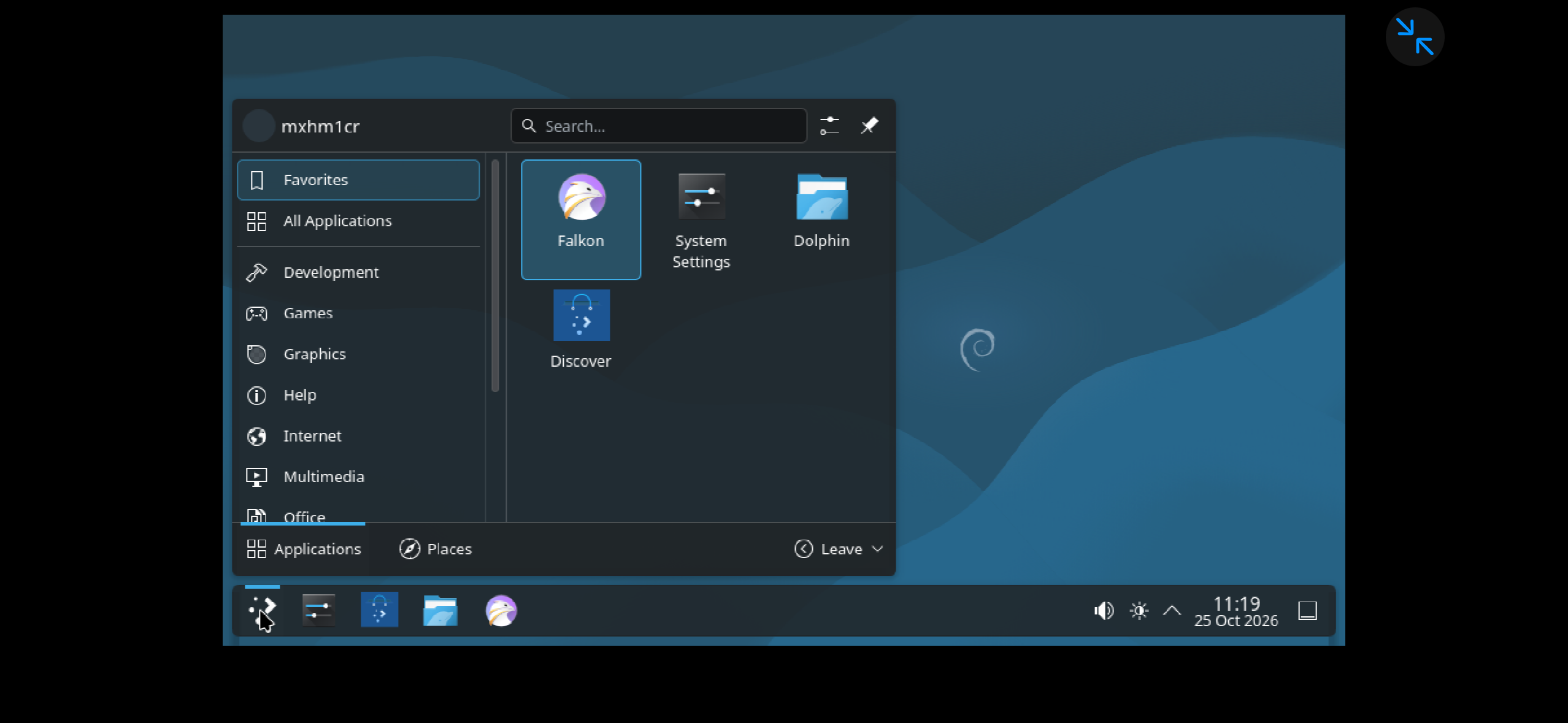
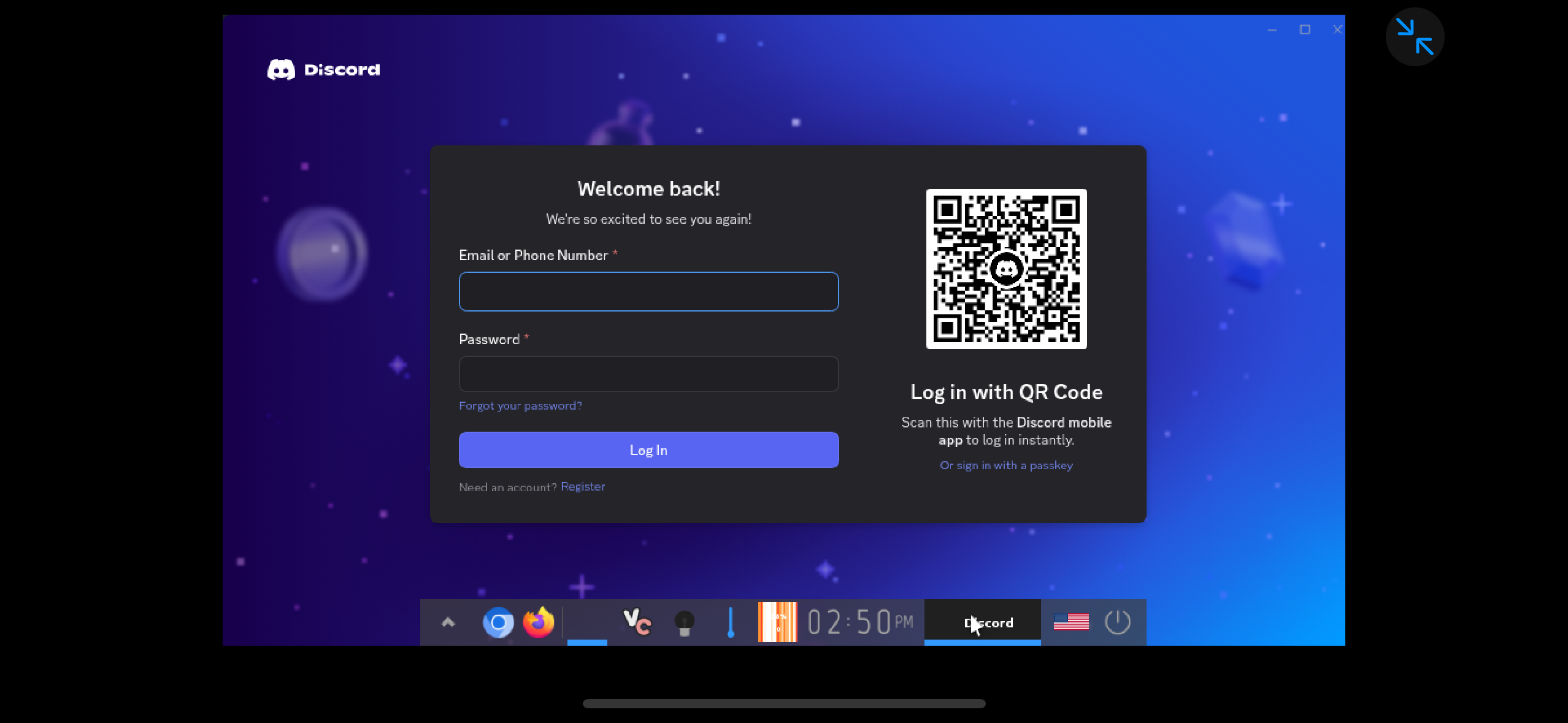
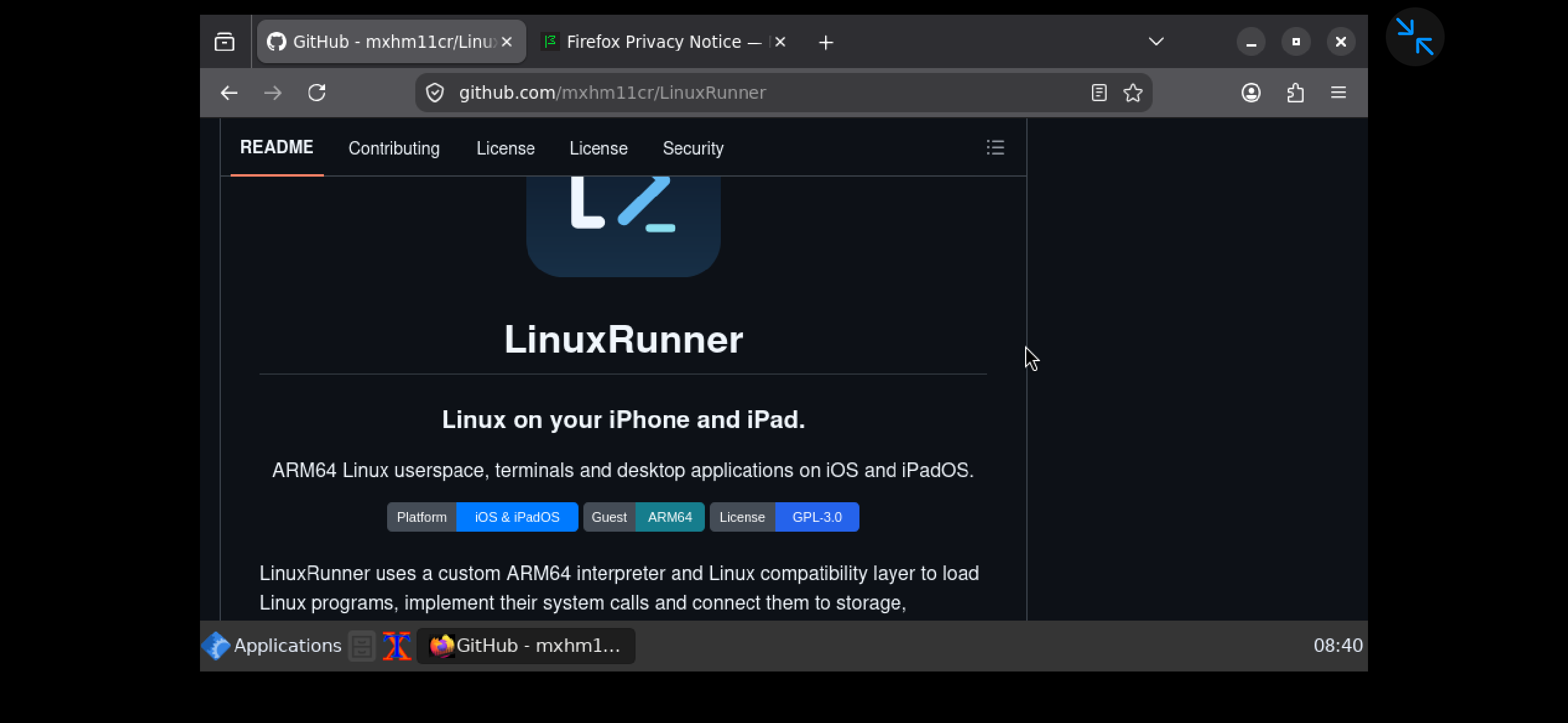
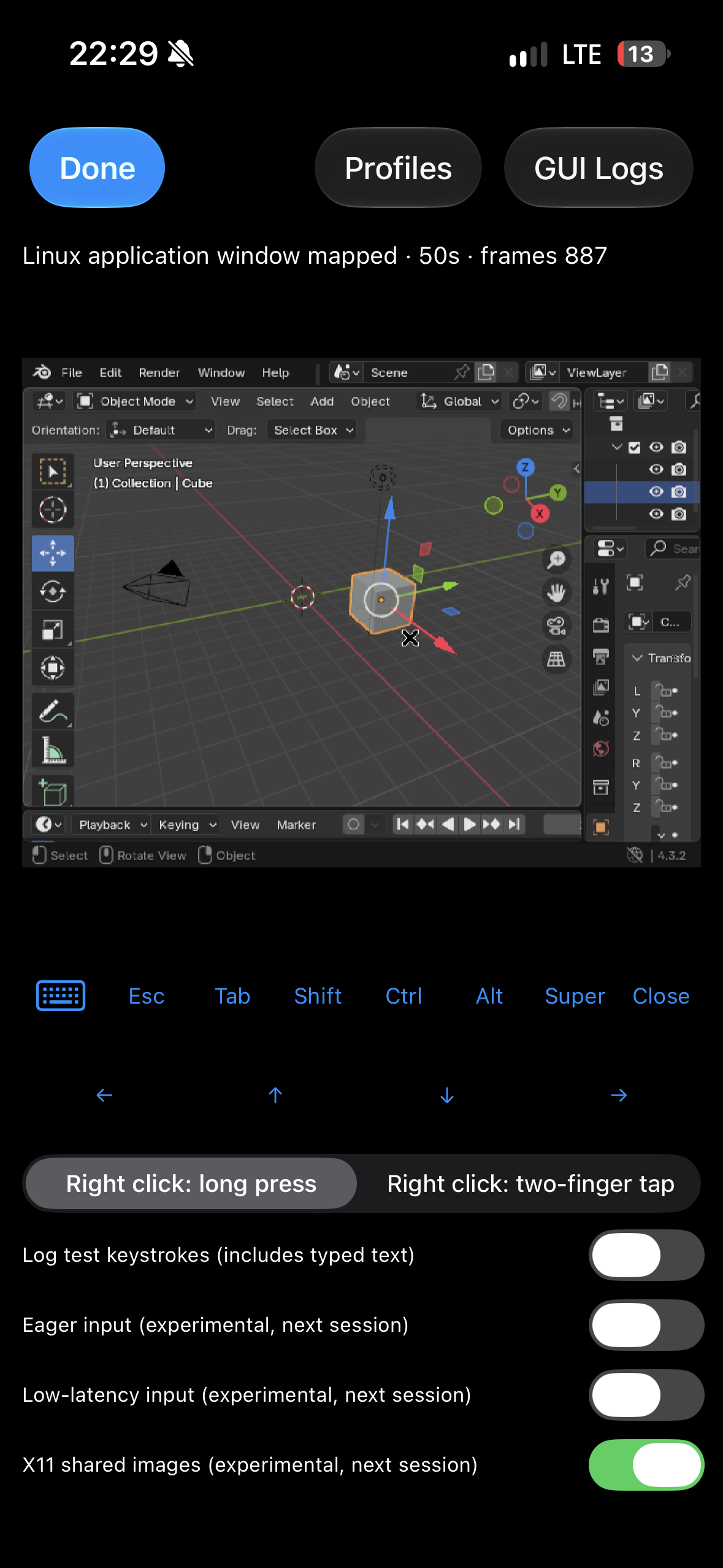
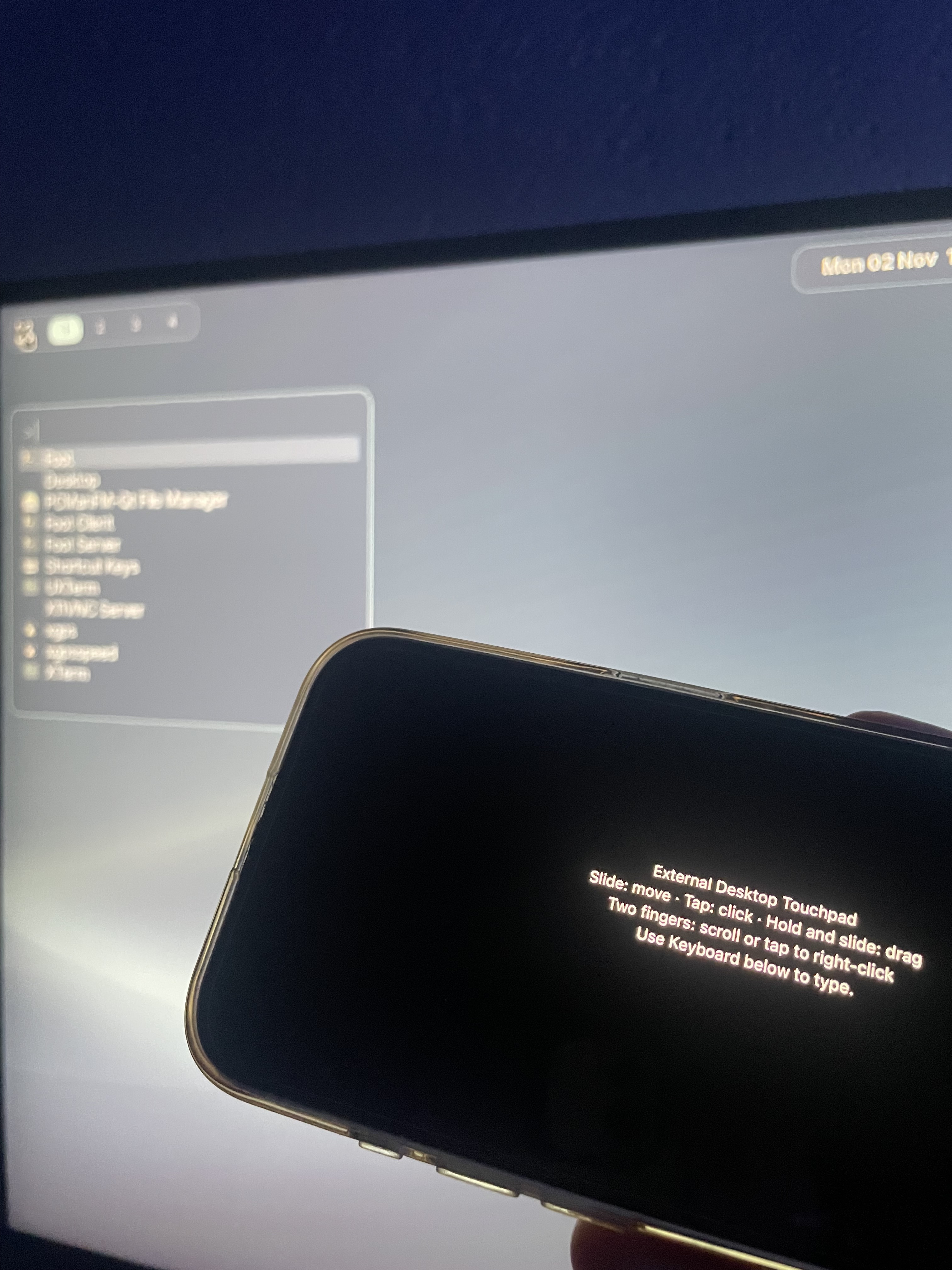
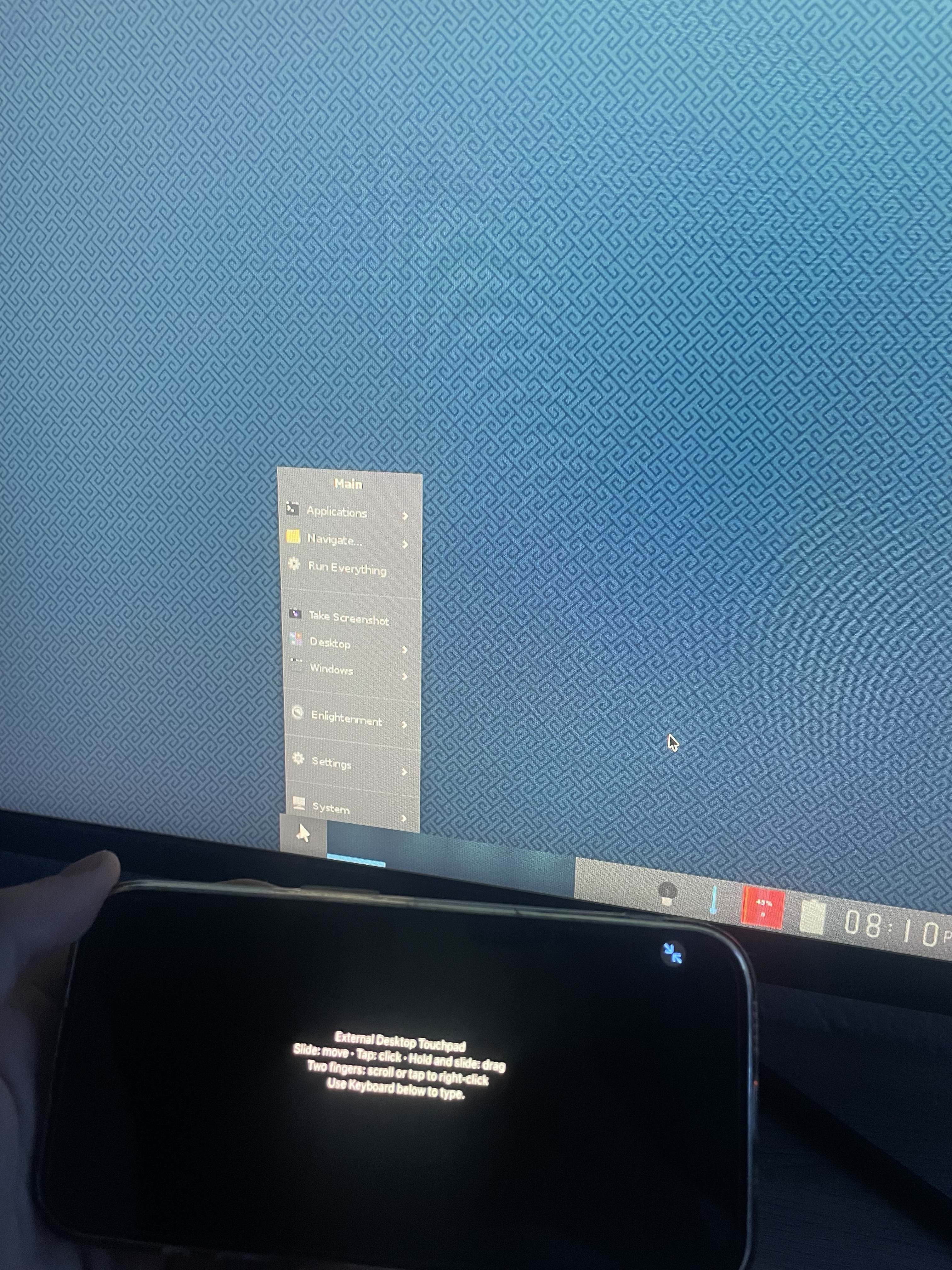
We got real Linux on iPhone! I Built a Way to Run Linux Desktop Apps on an iPhone — Meet LinuxRunner What if you could turn your iPhone into a Linux desktop, without jailbreaking, virtualization, or streaming from another computer? That’s exactly what I’ve been working on with LinuxRunner, an open-source project that brings ARM64 Linux environments and desktop applications to iPhones and iPads. What started as an experiment has grown into something much bigger, and recently I’ve added a DeX-style desktop mode to take things even further. How does LinuxRunner work? LinuxRunner isn’t a remote desktop, a virtual machine, or just a Linux-looking interface. It uses a custom ARM64 instruction interpreter combined with a Linux-compatible runtime to execute existing Linux ARM64 applications locally on iOS. The runtime handles things like Linux system calls, memory management, threading, and other functionality that Linux applications expect from their operating system. The idea is to support a broad range of Linux ARM64 software without having to individually port every application to iOS. Multiple Linux desktops on an iPhone One of the coolest parts is that LinuxRunner isn’t limited to a single desktop environment. It supports Debian and Arch Linux environments, with desktop environments and Wayland compositors such as: - Hyprland — a modern, highly customizable Wayland compositor. - KDE Plasma — a complete desktop environment with a familiar PC experience. - Wayfire — a Wayland compositor with GPU-accelerated effects. - Enlightenment — a lightweight and flexible desktop environment. All of this is designed to run locally on iOS, without needing a separate computer. !Image description !Image description Real desktop applications and GPU acceleration LinuxRunner isn’t just about displaying a desktop. We’ve managed to get Blender, Firefox, and numerous other Linux desktop applications running through the ARM64 runtime. For graphics, LinuxRunner uses OpenGL ES through ANGLE → Metal, allowing compatible applications to use the iPhone’s GPU for hardware-accelerated rendering. Of course, compatibility isn’t perfect yet. Some applications still have issues, and there’s ongoing work to improve stability, performance, and support for more Linux functionality. But the goal is much bigger than getting a few specific programs running. I want LinuxRunner to be compatible with as much of the Linux ARM64 software ecosystem as possible. !Image description !Image description !Image description Introducing DeX-style desktop mode One of the newest additions to LinuxRunner is a DeX-style desktop mode, inspired by the idea of turning a smartphone into a proper desktop computer. With an external display, you can use your iPhone with a larger Linux desktop workspace instead of being limited to the phone’s screen. It’s a pretty interesting experience seeing an actual Linux desktop running from an iPhone, especially knowing that everything is being executed locally. I also wanted to show how it works in practice, so I’ve included real photos taken during testing rather than concept renders. !Image description !Image description What’s next for LinuxRunner? There’s still a lot I want to improve: - Broader Linux ARM64 application compatibility. - Better GPU acceleration and rendering performance. - More stable desktop environments and applications. - Improved input, audio, and external display integration. - A smoother, more complete desktop experience. The long-term goal is to make LinuxRunner a practical way to run Linux desktop software on iPhones and iPads, without jailbreaking or depending on another computer. It’s still an ongoing project, but seeing how far it has come has been incredibly rewarding. Check out the project LinuxRunner is open source, and the code is available on GitHub. If you’re interested in Linux, iOS, ARM64, or just unusual software projects, feel free to explore it! GitHub: mxhm11cr/LinuxRunner I’d love to hear your thoughts, ideas, or sugestions!
The Workflow That Wouldn't Stop Spending: Putting a Budget on Every n8n Run This is part of my build-in-public series on running LLM workflows in n8n in production. Everything here is a failure I actually watched happen, not a hypothetical. A runaway n8n loop does not announce itself with a performance problem. It announces itself with a bill. A loop that calls a model on every iteration, a pagination that fetches the whole table, a retry that re-triggers a billed downstream action — each one is cheap per step and ruinous in aggregate, and none of them throw an error while they are doing it. Green executions, growing invoice. That is the shape of the bug: the workflow is working exactly as written, and what is written has no ceiling. I now put a budget on every run before it starts, not after the invoice arrives. A budget is four numbers, decided up front: max iterations, max rows admitted, max LLM calls (or tokens) per run, and a per-node timeout. If any of them is hit, the run stops and lands in review — with what it already spent and where it stopped attached. It never silently continues, and it never silently drops the work either. Both silences are the same failure: one burns money, the other burns data. The three ways a run spends without limit First, per-iteration model calls. A loop that summarizes, classifies, or enriches each row with one LLM call per item turns a 500-row input into 500 billed calls. The fix is not "use a cheaper model" — it is a cap on calls per run plus batching: group rows into one call where the task allows it, and let the cap be the backstop when batching is impossible. Second, unbounded pagination. A "fetch all, then process" step with no row cap will happily pull ten thousand rows because the API kept handing over next pages. Cap rows admitted to the loop, and record the fetch outcome separately (source, status, rows admitted) so a capped run is distinguishable from a complete one. A run that stopped at its cap is not a run that processed everything. Third, retries that multiply cost. A failed step that retries, where each attempt re-triggers a billed downstream action — a send, a charge, an enrichment call — turns one failure into three bills. The retry budget belongs to the error class, not just the job: permanent errors spend zero retries, transient errors get a bounded few, and ambiguous errors (accepted-then-dropped-response) get no automatic retry at all. They go to review, because retrying them is how you pay twice for one effect. Where an over-budget run should land Stopping is only half the design. The landing matters just as much. An over-budget run lands in review carrying three things: what it spent (model calls, tokens, downstream calls), where it stopped (iteration count, last key processed), and what remains (rows not yet attempted, with their keys). Without the stopping point, review cannot resume — it can only restart, which re-spends everything the run already spent. Without the spend record, nobody can answer the only question the invoice asks: which run, which node. The same rule applies to the workflow itself: if one workflow trips its budget several times in a short window, pause its trigger. A budget that keeps tripping is not a run problem, it is a config problem — a cap set wrong, an input that grew, a downstream price that changed. Auto-resuming into the same condition just converts paused rows into spent money on a schedule. Test the budget the way you test the happy path A budget nobody has tripped is decoration. Before a workflow goes live, I run it against a small dataset with a mock billed downstream and a deliberately tiny budget, and assert three things: the run actually stops at the cap, it actually lands in review with spend and stopping point attached, and resuming from the stopping point does not re-bill the rows already processed. If any of those three fails, the budget is not a guard — it is a comment with better syntax. The numbers themselves stay adjustable and auditable: caps live in one config, changes to them are logged, and the per-run spend record is what makes an anomalous bill traceable to one execution and one node instead of a month of shrugging. The rule I keep coming back to: a workflow without a budget is a blank check signed by whoever deploys it. Put the ceiling in before the first real run, not after the first real invoice. --- Free workflows from this series (MIT): zhp910318/n8n-ai-automation-lab The production templates in my store: payhip.com
4,000 years ago, a man named Nanni complained to copper merchant Ea-nāṣir: “What sort of person do you take me for”. I couldn’t find a public domain translation. So I made OpenEaNasir: AI translations from the original Akkadian. github.com/firasd/scrapbook/tree/main/2026_V/open… x.com t.co
I built a tiny USB screen that shows all my Claude Code sessions as little robots (open source) I run Claude Code on my laptop and on a home server, sometimes on different accounts, and kept losing track of which session was waiting for me. So I built Byorzin Monitor. Each machine runs a small collector (Claude Code hooks + status line). One screen shows every session and subagent as a little robot: working, thinking, raising its hand when it's waiting for you, celebrating when a long task finishes, and sleeping (dreaming about your stats) when nothing is running. - Many computers and many Claude accounts on one screen (pair with a 6-digit code) - Weekly and 5-hour limits per account, context bar per session, token history - Works on a cheap 3.5" Turing Smart Screen, or in any browser at /tela (Full HD), or in the terminal - Metadata only: never prompts, commands or file contents; nothing leaves your LAN - MIT, Python, Linux GitHub: carlobiesdorf/byorzin-monitor Codex CLI support is next. Feedback and reports from other USB displays are very welcome!
[UPDATE] Xtream Player v1.8.12 Hey, another quick update to fix some bugs and add small additions IF YOU HAVE DOWNLOADED VIA fermataxtream.online YOU CANNOT AUTOUPDATE. REQUEST A NEW LINK Improvements: - Rename folders in TV, Folders, and similar lists - Steering wheel side in Interface settings (default left); right-hand drive moves menus, home items, floating button, temperature, and microphone to the driver side - YouTube pause stays paused, including in-video pause and after switching apps github.com/malebuffy/XtreamPlayer/releases github.com/malebuffy/XtreamPlayerFree/releases Sideload APK need to be installed with AAenabler or Kinginstaller github.com/malebuffy/AAEnabler/releases If for some reason you see a gray icon on Android Auto, use: fermataxtream.online to request a link. Donors of AAENABLER get the Premium version for free. Enjoy
🐧 ROCKNIX's Nov 1 build is out — fresh updates for dozens of retro handhelds, from Anbernic's RG35XX to Pocket 6 to Odin 3. Running it? 🎮 DL: github.com/ROCKNIX/distribution/releases/tag/2026… t.co
007: Agent Under Fire Native PC Port | Ultrawide, 60 FPS, Mouse Aim (Xbox Recomp) The original Xbox version of 007: Agent Under Fire, statically recompiled into a native Windows PC game: not an emulator. On-foot missions, driving missions and mounted guns, with widescreen, ultrawide, high frame rates and proper keyboard and mouse controls. 💬 Join the Discord for updates, help and bug reports: discord.gg ☕ Support the project on Ko-fi: ko-fi.com ⬇️ Download and instructions: hk21x/007-agentunderfire-recomp ⚠️ No game files are included. This is an unofficial fan project and you need your own legally owned copy of the game (European PAL Xbox disc). FEATURES • Widescreen and ultrawide, with the 3D view widened and the HUD kept in proportion • Unlocked frame rates on foot, with game speed tied to real time • Driving missions and mounted guns above 60 FPS using in-between frames • Mouse and keyboard, with rebindable keys and on-screen key prompts • Mouse pointer in the menus • Render scale up to 200%, MSAA, FXAA, SMAA, sharpening and texture filtering • Field of view from 50 to 150% • RECOMP settings tab built into the game's own menus • Achievements • Controller and steering wheel support • English, French and German CREDITS Built with XboxXBE-Recomp by TGP482: TGP482/XboxXBE-Recomp Not affiliated with or endorsed by EA, MGM, Danjaq or Eon Productions. 007 and Agent Under Fire are trademarks of their respective owners. Enjoying the port? Join the Discord (discord.gg) or support future ports on Ko-fi (ko-fi.com). #PCPort #Recompilation #Xbox #007 #AgentUnderFire #JamesBond
@rakeshpatelco @ArdenBuilds The crawl-diff MCP in toadstone could be useful in HOL Guard. Would you consider adding it? The guide covers the server entry and PR: github.com/hashgraph-online/hol-guard/blob/main/d…
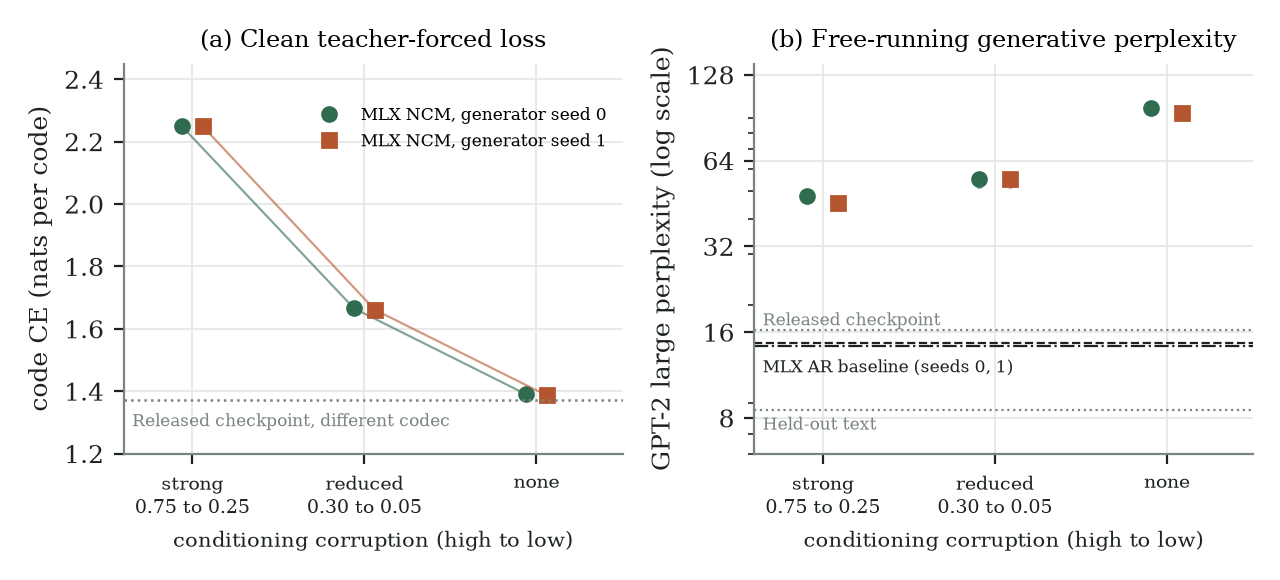
Lower loss, worse stories: small NCMs trained on TinyStories I trained small Next-Concept Modeling (NCM) models from scratch in MLX on TinyStories. They reconstruct held-out stories almost perfectly, but the text they write on their own is a lot worse than text from a plain autoregressive (AR) baseline built from the same transformer blocks. And the part I didn't expect: the training change that made the teacher-forced loss better made the generated text worse. Same result in two generator seeds. NCM is the method of Kumbong et al.. My project, ncm-mlx, is an independent MLX implementation of it. The models here are my own small training runs, not reproductions of the authors' models. In an earlier post I wrote about running their released checkpoints in MLX. Below I only use their TinyStories checkpoint as a reference point. The setup NCM doesn't write one token at a time. A codec turns a 128-token text window into a stack of discrete codes, from one coarse code at the top down to fine detail at the bottom. A generator then makes a new stack one level at a time, predicting all codes of a level in parallel, and the codec decodes the finished stack back to text. Here the hierarchy has 12 levels. Level 0 is sampled from a stored unigram distribution, then 11 generator forward passes predict the rest. What I trained: - One codec (15.5M saved values), trained once and then frozen. - Generators with 11.8M values, each trained on 960,000 story windows. - An AR baseline with the same 6-layer, width-384 block stack (13.8M parameters), trained on the same 960,000 windows. Data is TinyStories V2 (GPT-4 split) at a pinned revision. Generation is unconditional, so every model writes 128-token story openings with no prompt. GPT-2 large, also pinned, scores how likely the text looks. Each model writes 1,280 outputs (256 for each of five sampling seeds, temperature 1, no top-k or top-p), and the score is the mean perplexity over the five sampling seeds. Lower is better. Reconstruction isn't the problem The codec gets 99.816% of non-padding tokens right on 4,096 held-out windows. So the weak numbers below come from the generator making up code stacks, not from the codec losing information. The corruption ablation During generator training, part of the earlier-level codes the generator conditions on gets replaced with random codes. The targets stay clean. The idea is to prepare the generator for sampling time, where it conditions on its own earlier levels, and those can be wrong. I tried three schedules, with the corrupted fraction going down linearly from the first to the last level: - strong: 0.75 to 0.25 - reduced: 0.30 to 0.05 - none: 0 to 0 Everything else stayed fixed: the frozen codec, tokenizer, architecture, optimizer and number of training windows. Each schedule was trained twice, with generator seeds 0 and 1, on the same frozen codec. Two numbers matter per model. Clean code CE is the generator's cross-entropy when every earlier level comes from the real text (teacher forcing). Generative perplexity is the GPT-2 large score of text the model wrote by itself. | Model | Clean code CE (nats/code), seed 0 / 1 | GPT-2 large perplexity, seed 0 / 1 | |---|---:|---:| | NCM, strong corruption | 2.24875 / 2.24909 | 47.897 / 45.568 | | NCM, reduced corruption | 1.66515 / 1.66106 | 54.923 / 55.114 | | NCM, no corruption | 1.38995 / 1.38638 | 97.776 / 93.833 | | AR baseline | n/a | 14.676 / 14.311 | | Released TinyStories checkpoint (Kumbong et al.) | different codec | 16.259 | | Held-out real stories | n/a | 8.529 | !Corruption ablation on TinyStories: clean teacher-forced code loss falls as corruption is reduced, while GPT-2 large generative perplexity rises, in both generator seeds The two columns go in opposite directions. With less corruption, clean code CE improves from about 2.25 to about 1.39 nats per code. Over the same change, generated text gets worse, from 47.9 to 97.8 perplexity in seed 0 and from 45.6 to 93.8 in seed 1. Same ordering in both seeds. The best NCM run is still about three times the AR baseline's perplexity (45.568 vs 14.311 in seed 1). To give a feel for what a perplexity near 48 means here, this is the start of the first output of the strong-corruption seed-0 model, not picked for quality: > Once there was a little boy called Jack. Joe was was three years old and discover. One One day, he wanted to go and look for exploring. The story vocabulary is there, but broken grammar, repeated words and names that change mid-story are typical. Why lower loss can mean worse text Teacher-forced loss measures how well the generator predicts the next level when everything above it is correct. At sampling time nothing guarantees that. The generator conditions on levels it made itself, and a mistake in an early level gets carried into every later prediction. A model that only ever saw perfect earlier levels during training never learned what to do with its own mistakes. That train/test mismatch is usually called exposure bias, and it's the same problem scheduled sampling was proposed for in autoregressive models. The no-corruption model fits that picture: best teacher-forced loss and by far the worst text. Corruption shows the model imperfect context during training, and here more of it helped generation while hurting the loss. I think that's the most plausible reading, but these runs don't isolate it. Corruption strength, how it's spread across levels and optimization effects aren't separated, and I didn't measure per-level error with teacher-forced versus self-generated context. What this doesn't show - One codec. Both generator seeds share the same frozen codec, so the repeat measures generator variability only, not the whole two-stage training. - Two seeds. Between seeds, a schedule's perplexity moved by 2.3, 0.2 and 3.9. Enough to see the ordering held, not enough to estimate run-to-run variance. - Unmatched total compute. The generator and the AR baseline see the same number of windows and use the same block stack, but NCM's teacher-forced input is 641 positions per window vs 128 for AR, and the codec is extra training and inference work on top. Total compute and total model size aren't matched. - Synthetic data. TinyStories V2 is GPT-4-generated children's stories, not naturally occurring text. - Unconditional generation. No prompt, continuation or other conditional task was tested. - A proxy scorer. GPT-2 large perplexity is a fixed external probability score. It's not a human rating and doesn't directly measure coherence or grammar. Other sampling temperatures and truncation aren't part of these results. - A much bigger reference. The released TinyStories checkpoint is far larger (36.4M codec and 88.6M generator values) and was trained by the authors with a much bigger budget. It's a reference point, not something I reproduced. Checking the evidence The full write-up is the E21 to E23 assessment and Section 10 of working paper v0.12. The paper-v0.12 release has two archives next to the paper editions: - ncm-mlx-text-training-source-d323f4f.tar.gz: the 44 training-source files exactly as run. - ncm-mlx-tinystories-evidence-e21-e24.tar.gz: the audited evaluation reports, all generated samples and the per-output scorer records for all six runs. SHA256SUMS covers both. With them you can recompute every perplexity above, read every output or rescore the samples with another model. The text-training code is in the repository too. The evaluation driver that produced the reports isn't included, and I haven't verified a clean-checkout reproduction of the training runs yet. What's next From the roadmap, in this order: 1. Close the NCM/AR gap at small scale first, under the same fixed scorer. 2. Prompt-conditioned (prefix) training, and the authors' XSum and WMT14 codecs. Red-fuchs described an MLX port of both codecs and a prefix-conditioned training loop in issue #3, their code is in Red-fuchs/ncm-modular. 3. Mixed-precision training throughput, measured before sizing any bigger run. 4. A larger natural-text corpus, with its license and splits recorded. 5. Bigger models only if NCM gets close to the AR baseline at matched compute. Nothing so far shows NCM will get there, not sure yet. What these runs did give me is a clear reason to report reconstruction, teacher-forced loss and free-running quality as separate numbers, because here they disagreed. AI assistance disclosure: AI coding assistants helped with implementation, experiment analysis and drafting. They are not authors, and this assistance is not independent verification or human review.
Any Logitech G users on Omarchy? I noticed the LGHUB software isn't available for Linux. Claude recommended that I try this project on Github: Cencyte/Penguin-LGHUB Seems to be working for me. Anyone else find a solution to this?
...this method & open source code can determine the spectral resolution "thanks to the analytical relation between the auto-correlation of the noise spectra extracted from the cube and the power spectrum of the kernel". paoloserra/spectre Applicable to a broad range of data & surveys. 🔭 📡 🧪
oh hmmmm... maybe some kind of flashcards like andymatuschak/orbit
Blog post: gian.cool GitHub repo: gianpaj/wakebridge
For those working on EW/RF Counter UAS systems, and need a quick way to have a live VTX operating on the bench for long hours without using a real FPV drone, have a look at this tool I whipped up using a M5Stack Basic ESP32 board KonradIT/m5vtx
Swedish region-specific features for BeamNG.earth Features of swedish roads Classic 2+1 road from Sweden that was previously registered as a regular road :) Swedish speed limit sign Swedish road markings Just submitted a pr to the official beamng.earth repo where i added some region specific road features of Sweden like the famous 2+1 road, swedish road signs, swedish road bollards and road markings. (yes with the help of AI) 2+1 road in Sweden I urge everyone to do the same for their country/region so that we can make beamng.earth as realistic as possible. Just sharing the idea I had if somebody else wants to do the same for their region :) I will also try to add more specific Sweden details, if anyone has any ideas I'm open to hearing them as well.
Your AI coding assistant forgets everything the moment you close it #shorts Why do AI agents forget everything between sessions, and how do you give them a memory? claude-mem, the #1 trending project on GitHub today, does it in 4 steps: capture what the agent does, compress it into short summaries, store it in a local database, and put the useful notes back when a new session starts. The lesson: a language model does not remember by itself. AI "memory" is notes saved, searched, and put back in the prompt. Source: thedotmack/claude-mem 🔔 Subscribe to learn something new about AI, every day. #ai #llm #aiagents #claudecode #opensource #github #learnai #coding
Use your controller as replacement for your mouse and it works just as good. I started having heavy pain on my right hand while using the mouse, it increased so much that I could not even use my pc and I started to worry about how will I ever work again. I had a gaming controller so I tried a few apps that would let me use my cursor, they worked but were very basic and useless. so I made this project, its free Open source, I'm not making any money. I just wanted to share it with everyone because I know this could be very useful to someone out there. it lets you use your controller as mouse, you can move cursor + it has alot of added features that genuinely makes it 10x better. spend 1 hour and you might not look back, or you can use it when your hand needs rest download it from here: AadityaBhanushali/FullTilt no installation needed
@grok @JWWeatherman_ @decentmoney2009 @heavilyarmedc @grok Would using Bails' CryoStick as the offline signer offer better defense against similar security bugs to CVE-2026-98432? github.com/BenWestgate/Bails/blob/master/docs/CRY… Had this bug not required MPTCP to remotely execute arbitrary code would Yeti-2.0 have been vulnerable? x.com