Mentions
Conversations linking to GitHub, newest first. Times are UTC.
Mentions by source
X
Bluesky
Hacker News
V2EX
Qiita
DEV
Mastodon
Latest posts
@AtrakcyjnyAdam Np. przy wykorzystaniu tego lyramakesmusic/neuron-explorer oraz wzmocnień kontrolnych neuronów można również kontrolować w locie przy runtime, np. przez llama.cpp Tu po prostu zlokalizował wiedzę matematyczną w modelu który miał ku temu defekt i podciągnął wartości do góry. Nie pomoże tu na chwilę obecną przy większych modelach osiągać tak imponujących popraw wyników.
The gain is tiny and only for enormous k. Argument by Kevin Russell with GPT Astra; Lean proof audited by Ford. Review so far is AI-only and not refereed, so expert eyes are welcome. Lean source: github.com/techno-optimist/erdos-frontier-atlas/t…
My setup to play GTA 6 at 60 FPS on PS5 Pro (capture card + frame gen) So since GTA 6 will most likely be 30 FPS on consoles, I went a bit overboard lol The plan: PS5 Pro goes into a capture card (ezcap401, got it for like 95€ on AliExpress), that goes into my PC with a 5080, and then I use this free open source tool called Veyra that runs Nvidia frame gen on the capture feed. So the 30 FPS from the console gets turned into 60 FPS. Output goes to my LG C1. It also has DLSS upscaling built in and the DLSS 5 neural rendering stuff too, still experimental so I’ll see if it actually makes a difference. Obviously it can’t fix stuff that’s baked into the image like TAA blur, since it only sees the video feed and not the actual game. From what people posted on the Lossless Scaling sub it actually works pretty well, way less ghosting than Lossless Scaling. Only works on RTX 40/50 cards tho. To be clear, it’s not real 60 FPS. It looks smooth but input lag is still 30 FPS level plus a bit from the capture card. People say around 60 ms extra, which should be fine for driving around, maybe less so for shootouts. The minimap can also get a bit wobbly when you spin the camera fast. Card should arrive before release so I’ll test it beforehand and post how it went. If it sucks I can still just switch the TV input and play normally through passthrough. Anyone else doing something like this? For anyone interested, here’s the tool: Likely7/Veyra-NRVideo
Replay Engineering and Policy 🔵 How to define, test and interpret deterministic evidence across law, science, finance, weather, and other domains: github.com/Grounded-DI/START_HERE_DI_EXHIBIT_BOOK… #VerifiableAI #AuditableAI #ai t.co
josellopz/NX2Apple Acabo de hacer un fork de NX2Apple e implemente las mejoras de nxnative para compilar games de Switch 2 y funciona!!!! Corriendo DKB como app nativa en el Mac t.co
Trail Mate 定位为一套主打省电、以离线为核心的手持设备系统。 它依托开放的 Meshtastic LoRa 网络,向使用者提供定位导航与文字短消息两项能力。 凭借这一设计,用户即便身边没有手机、也不接入互联网,依然能够完成野外通信和地图绘制。 项目地址见 vicliu624/trail-mate%E3%80%82 t.co
Бесплатный open-source лаунчер Minecraft с поиском модов в Modrinth и CurseForge Всем привет мне 13лет и я создал свой лаунчер Майнкрафт называется он Tusklo Launcher просто на ходу придумал название делал в стиле оригинального Майнкрафт лаунчера и это мой первый крупный проект оцените если не трудно
ollama web search api — the search isn't local --- published: true description: The ollama web search API shipped Sept 2025. Keyless knock tonight: 401 in 0.13s and 0.15s. The key, the limits, and the part that is not local. tags: ollama, aiagents, api, tutorial canonical_url: mrsaynothing.dev cover_image: mrsaynothing.dev --- > Originally published at mrsaynothing.dev — the full post carries the two-door diagram, the receipt table, and the live checklist. Your local model can search the web. The search isn't local. Ollama's web search API shipped September 24, 2025 as two cloud endpoints — web_search and web_fetch — behind one account key. Any model you run locally can call them as tools, and the Python/JS libraries have carried the calls since version 0.6.0. We knocked on both doors without a key tonight: 401 in 0.13 and 0.15 seconds. Your weights run at home. The search does not. How do I get an ollama web search API key? One claim: the key is an account setting, not a config flag — there is nothing to flip in ~/.ollama, because the endpoint isn't yours. Sign in at ollama.com, open Settings → Keys, mint the key, export it. The search and fetch endpoints both read the same Bearer header: curl https://ollama.com/api/web_search \ --header "Authorization: Bearer $OLLAMA_API_KEY" \ -d '{"query": "what is ollama?"}' Keyless knock → 401 {"error":"Unauthorized"} — measured 2026-11-02, 0.13s. The same header opens /api/web_fetch, which returns a page as {title, content, links} — the plain-text twin of the URL you hand it. What are the ollama web search limits? The honest answer is a short table, because ollama publishes less than searchers want: | Question | Public answer | |---|---| | Free tier? | Yes — with an account. Their words: "a generous free tier." | | Higher limits? | Yes — paid ollama.com/cloud subscription. | | Searches per minute / day? | Not published anywhere. | | Results per call? | Tunable — the agent itself picks max_results. | The searches-per-minute number people are typing into the search bar does not exist in public. That absence is the answer — and the reason the query keeps autocorrecting itself into existence. Does ollama web search work without an API key? No — and the refusal is beautifully small. Both endpoints, knocked keyless: POST /api/web_search · keyless · 21:04 UTC 401 — {"error":"Unauthorized"} — 0.13s POST /api/web_fetch · keyless · 21:05 UTC 401 — {"error":"Unauthorized"} — 0.15s 0.13s to refusal · 0.15s to refusal · 26 bytes — the doorman's entire speech. The shortest documentation page on the internet, and it works: nobody is guessing their way past that door. How do I give a local model web search? You wire the two calls as tools and let the model choose: from ollama import chat, web_search, web_fetch tools = {'web_search': web_search, 'web_fetch': web_fetch} r = chat(model='qwen3:4b', messages=msgs, tools=[web_search, web_fetch], think=True) for tc in r.message.tool_calls or []: result = tools[tc.function.name](**tc.function.arguments) msgs.append({'role': 'tool', 'content': str(result)[:8000]}) Two numbers matter before you run that loop. First, the calls are heavy: ollama's own docs warn the tools "can return thousands of tokens" per round and recommend a context of roughly 32,000 tokens for serious loops — a default 4k-context model will choke on the receipt pile. Second, the official example truncates each tool result to 2000 × 4 characters before re-injecting it — the context tax is real enough that even ollama's demo pays it. Model choice: ollama recommends qwen3 and gpt-oss for tool use — small, tool-capable, and happy to run multi-turn loops. Setup list: ollama.com account + key → export OLLAMA_API_KEY=... → library ≥ 0.6.0 → tool-capable model (qwen3 or gpt-oss) → context raised toward ~32000 tokens. Can I use ollama web search with MCP? Yes — ollama ships an official MCP server example, so any MCP client gets the tools over stdio, keyed by the same environment variable: { "mcpServers": { "web_search_and_fetch": { "command": "uv", "args": ["run", "path/to/web-search-mcp.py"], "env": { "OLLAMA_API_KEY": "your_key" } } } } Codex reads the same trio from ~/.codex/config.toml as a [mcp_servers.web_search] block. One key, every client. Is the search actually local? Local means the weights, not the web. Trace one loop honestly. Your machine holds the model. The moment the model decides it needs the web, your query leaves the building — crosses to ollama.com's cloud, gets searched on their infrastructure, and the receipts ride back into your context. What staying local buys you is real: the weights never leave, the inference never leaves, nobody sees your prompts to the model. What it doesn't buy: the questions you ask the web land in someone else's logs — by design, behind a key you minted on their account page. That's the wound left open: here is every local setup quietly knocking on somebody else's door — cheerfully, at 0.13 seconds a knock. The next honest number is the one ollama doesn't publish: what a free-tier day of searching looks like when the loop never sleeps. --- The full post — two-door diagram, honest limits table, live checklist — lives at mrsaynothing.dev. What's your loop calling — qwen3 or gpt-oss?
The Clearance #Omarchy theme has been updated with a total of 5 new Aircraft Types, 4 of which are on show in the image below! You can grab it here -- shaggyrs6-netizen/omarchy-clearance-theme t.co
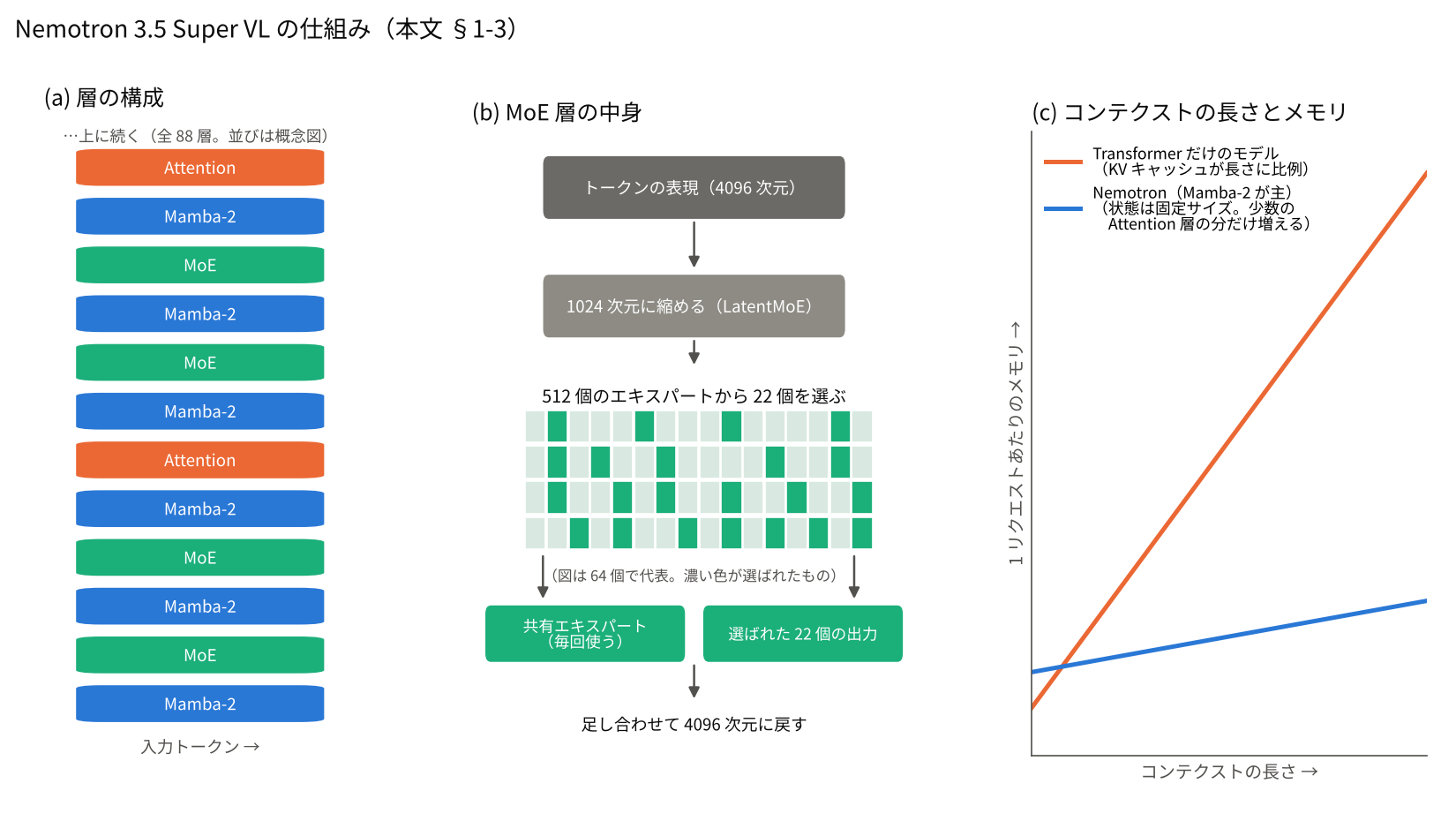
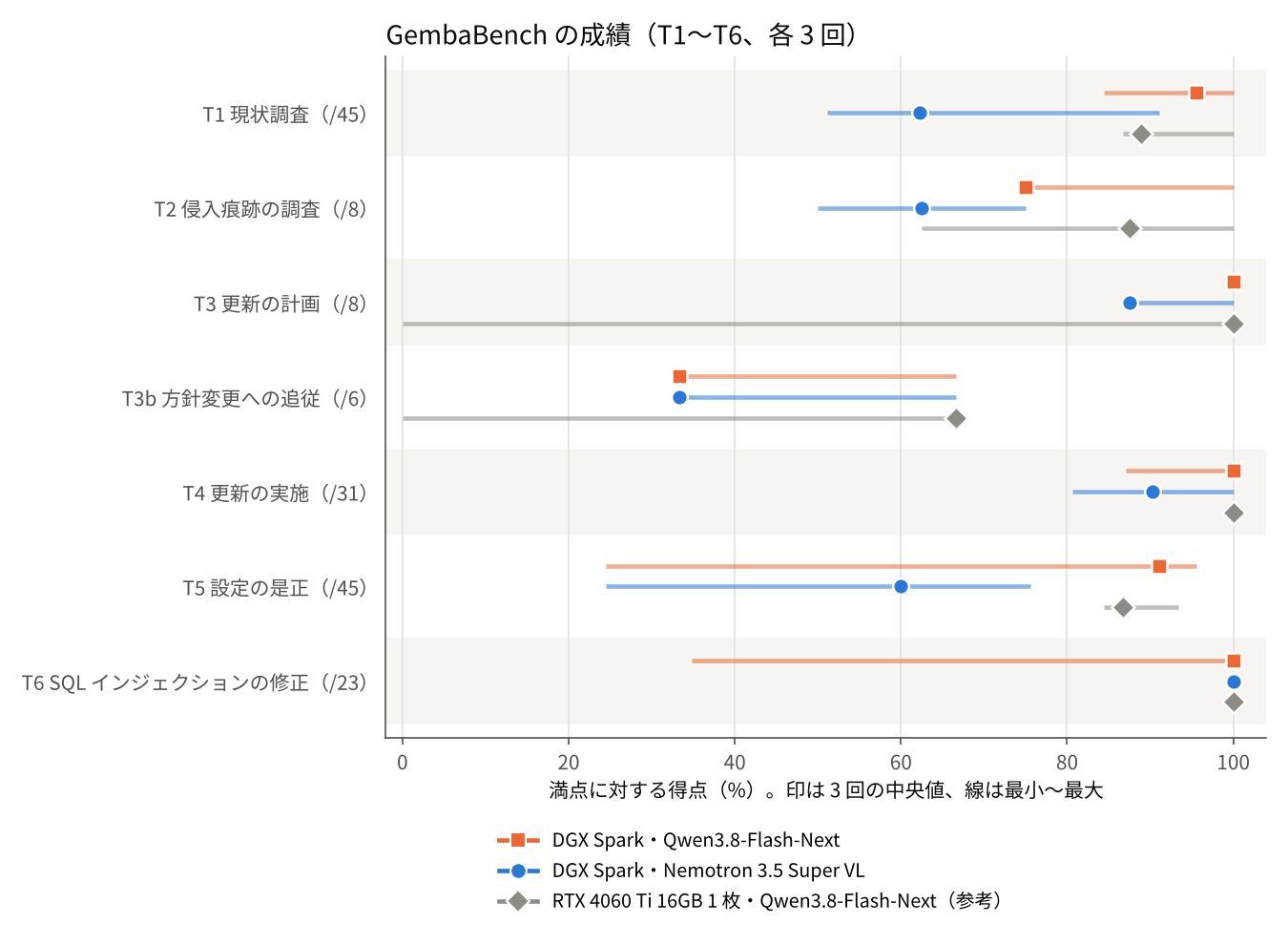
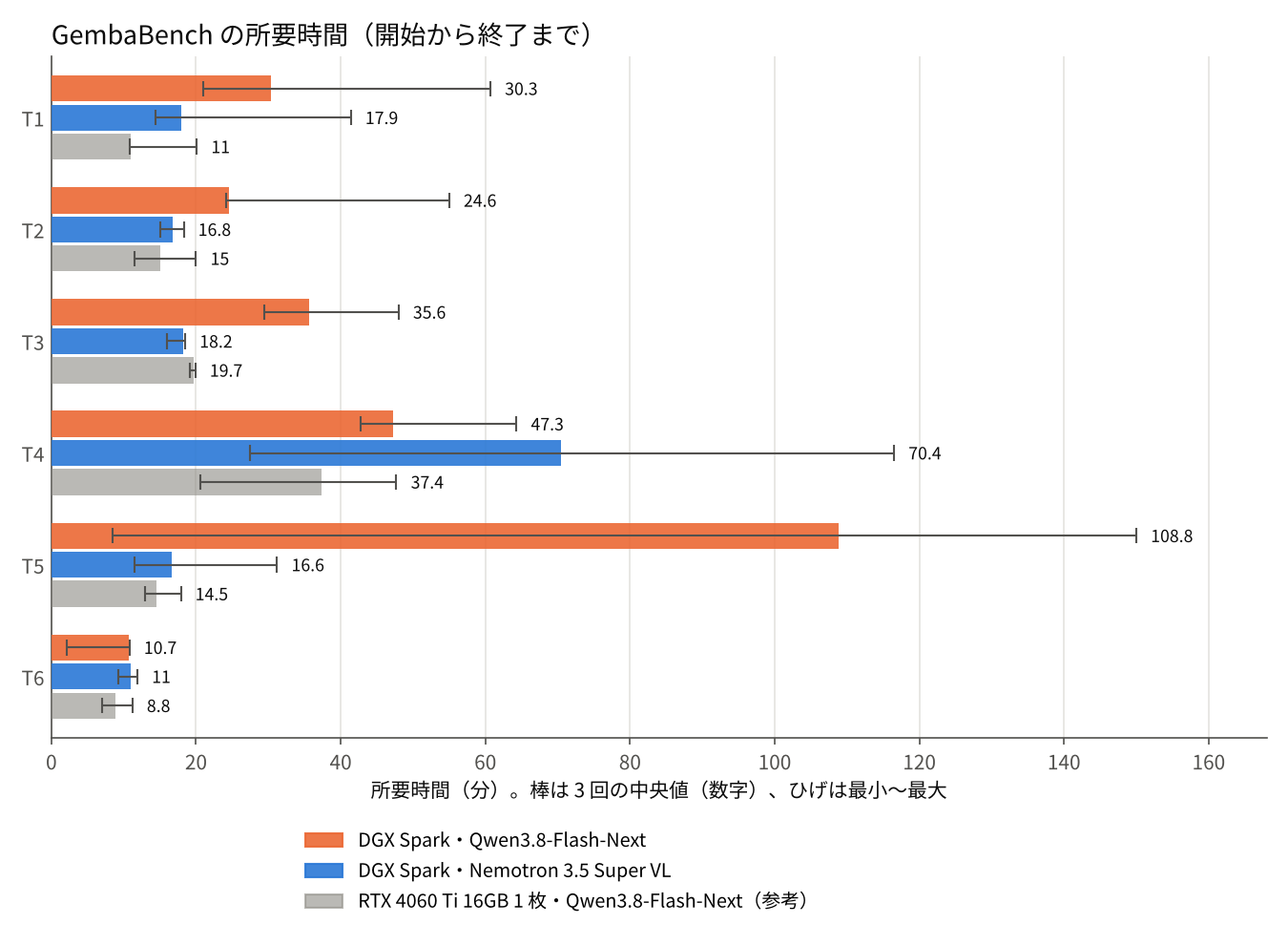
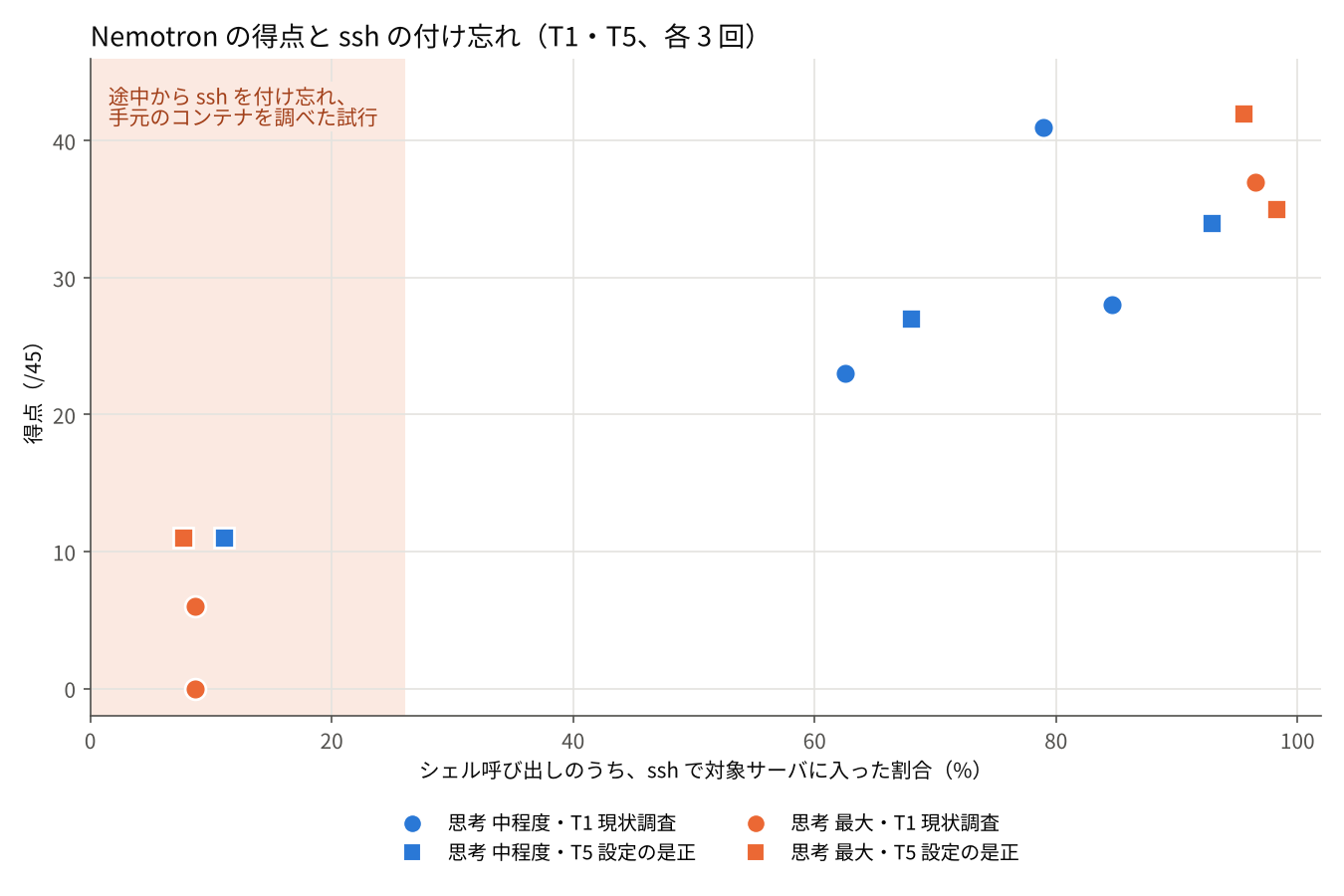
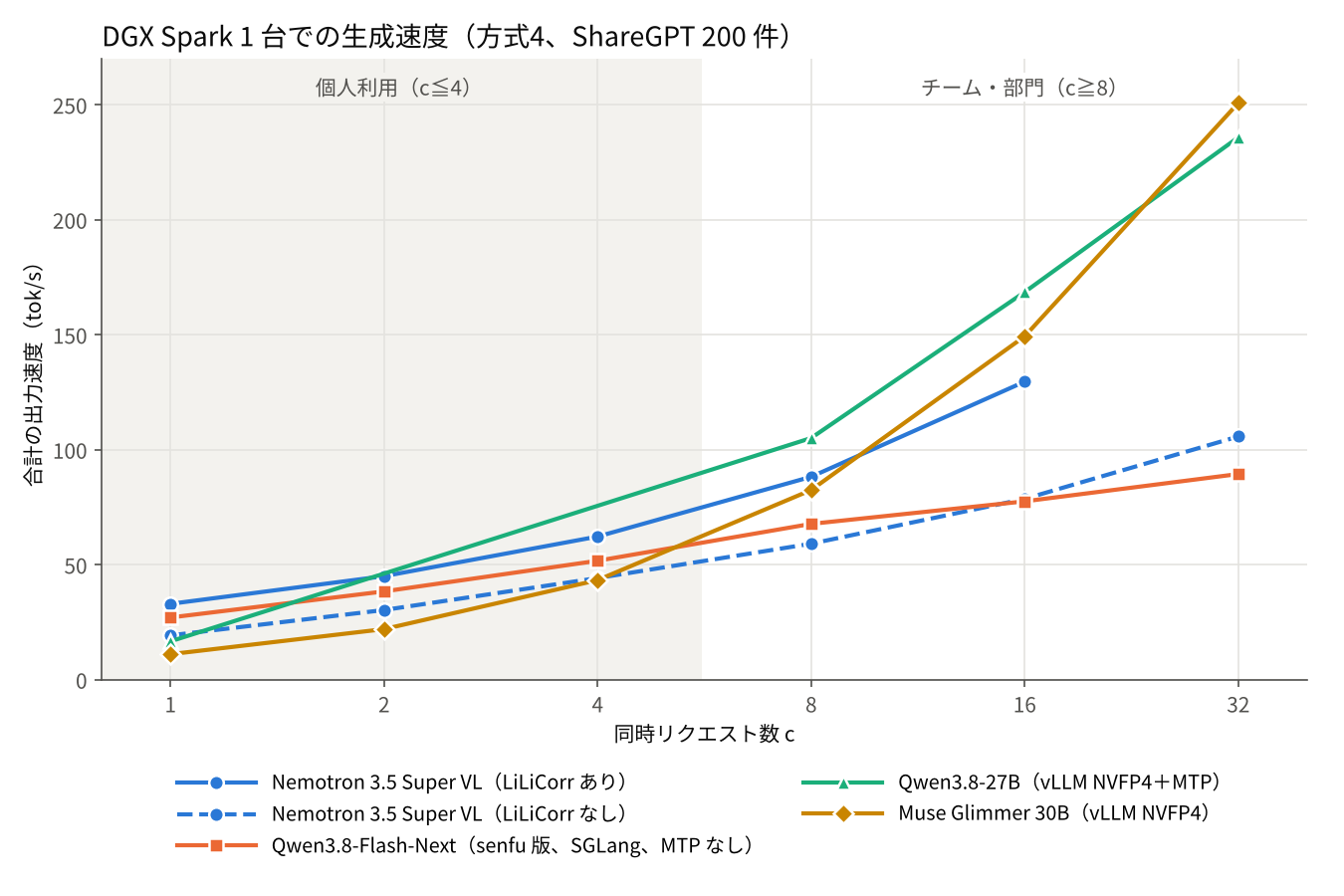
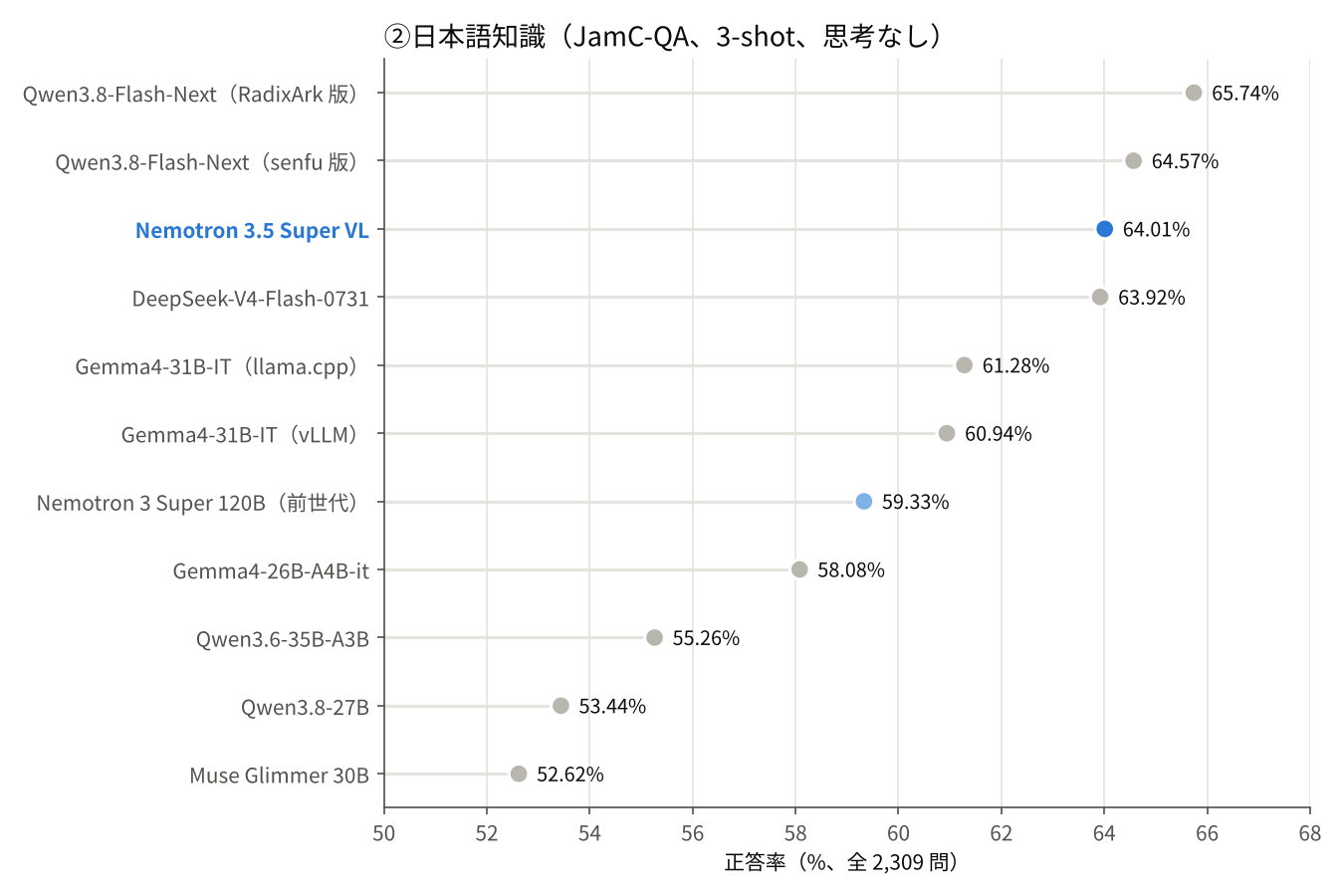
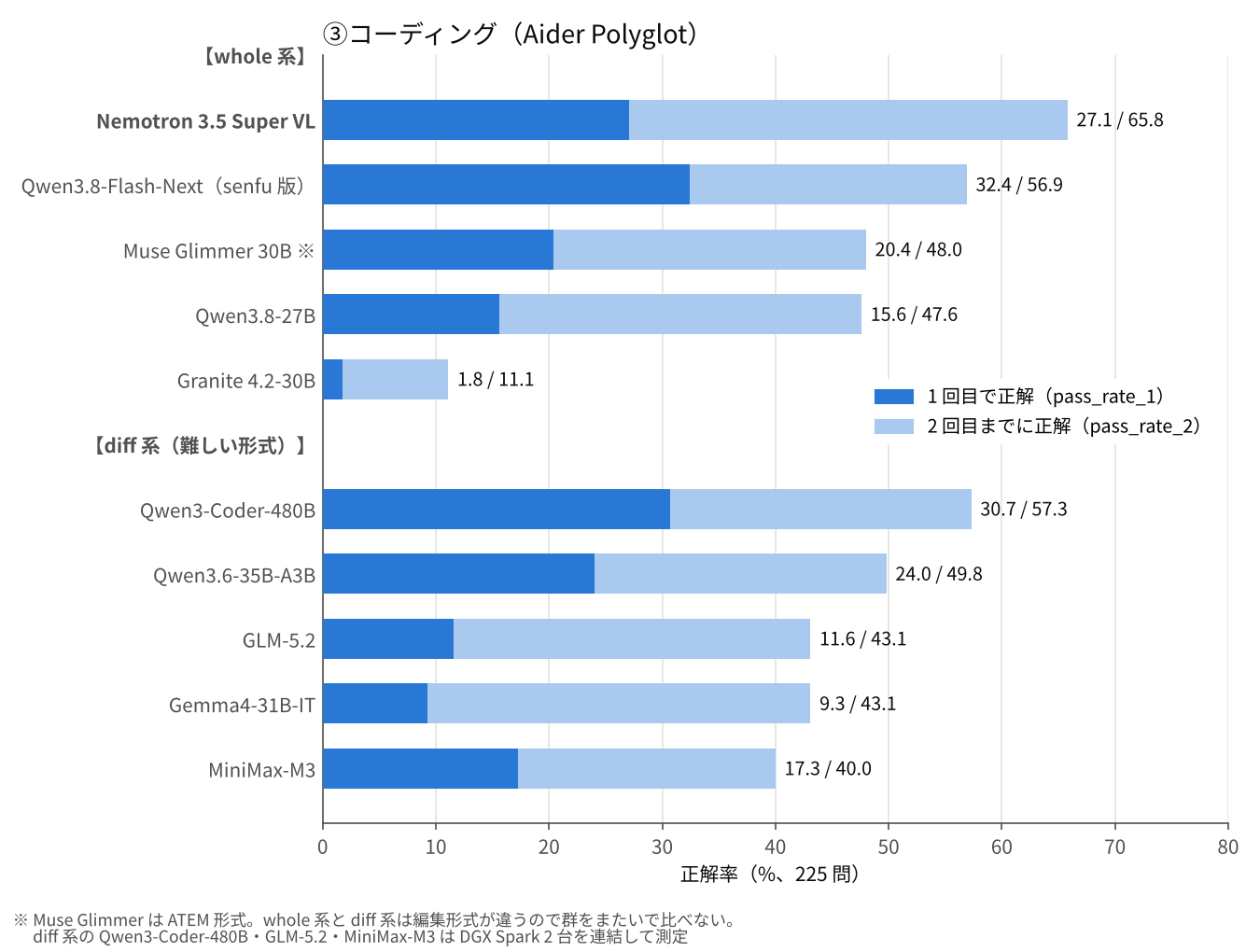
NVIDIAの期待のLLMモデル:Nemotron 3.5 Super VL をベンチマーク測定 ~ 一部でQwen3.8-Flash-Next を上回る性能! NVIDIA が 2026 年 10 月 15 日に公開した Nemotron 3.5 Super VL を、DGX Spark 1 台で測りました。当ラボの定型 4 軸(速度・日本語知識・コーディング・マルチモーダル)に加えて、AI エージェントとして企業サーバを調べて直す仕事をどこまでこなせるかを、当ラボの評価 GembaBench で Qwen3.8-Flash-Next と比べています。 TL;DR:概略まとめ 1. サーバの調査・修正(GembaBench)では、Qwen3.8-Flash-Next に届かなかった。 18 本すべてを最後まで走り切り(Flash-Next は 3 本が報告まで届かず)、所要時間も短めでした。ただ、調べる課題で見落としが多く、現状調査の得点は 45 点中 28 点(Flash-Next は 43 点)でした 2. 点が低い試行の多くは、途中から ssh を付け忘れていた。 最初の数回だけ対象サーバに入り、その後は自分の作業用コンテナを調べて「対象の状態」として報告していました。思考を最大にすると、この誤りは 6 本中 1 本から 3 本に増えました 3. コーディング(Aider Polyglot)は当ラボの測定で最高の 65.8%(Flash-Next は 56.9%)。日本語知識は Flash-Next と互角(JamC-QA 64.01% 対 64.57%)でした 4. 速度は、投機的デコーディング(LiLiCorr)を入れると同時 1〜16 本で Flash-Next を上回る。 モデルカードの「同時実行 1」の設定は外して使えます 単発の課題を解かせると強いのに、複数のサーバを行き来しながら調べて直す仕事では、手元と対象を取り違える。ベンチマークの点数と現場の仕事の出来は別物だ、ということがまた一つ確かめられました。 1. Nemotron 3.5 Super VL とは 1-1. Nemotron シリーズの位置づけ Nemotron は、NVIDIA が自社で作って配っているオープンモデルのシリーズです。GPU を売る会社が、その上で動くモデルまで用意しているわけです。2023 年の Nemotron-3(8B)に始まり、2024 年の Nemotron-4 340B(合成データ作りが主用途)、2025 年の Llama Nemotron(Meta の Llama を推論向けに鍛え直したもの)を経て、2025 年 12 月から自前設計の Nemotron 3 世代が出そろいました。今回の 3.5 Super VL は、その流れの最新版です。 | 公開 | モデル | 規模(総/毎トークン) | 役割 | |---|---|---|---| | 2025-12 | Nemotron 3 Nano | 30B / 3B | 軽量なエージェント向け | | 2026-03 | Nemotron 3 Super | 120B / 12B | エージェント向けの主力 | | 2026-04 | Nemotron 3 Nano Omni | 30B / 3B | テキスト・画像・動画・音声 | | 2026-06 | Nemotron 3 Ultra | 550B / 55B | 最上位 | | 2026-08 | Nemotron 3.5 Lightning | 30B / 3B | 3.5 世代の軽量版 | | 2026-10 | Nemotron 3.5 Super VL | 120B / 12B | 3.5 世代の主力。画像・動画に対応 | | 2026-10 | Nemotron 3.5 Bolt | 4B 級 | 端末・PC 向け | Nemotron 3 世代は、どのサイズも Mamba-2 と Transformer のハイブリッドに MoE を組み合わせた同じ設計で、毎トークン使うパラメータを総量の 1 割ほどに抑えています。3.5 Super VL は、3 Super を土台に、上位の Ultra から 1 兆トークン分の蒸留で鍛え直し、画像・動画の入力と、思考を中程度に抑えるモードを足したものです。 このシリーズの特徴は、重みだけでなく、学習データ・学習手順・評価手順まで公開していることです。学習に使ったデータセット(事前学習用、事後学習用、合成ペルソナなど)は Hugging Face に置かれ、学習と評価のレシピも GitHub にあります。ライセンスは OpenMDW-1.1 で、商用利用に制限がありません。企業が自社データで作り替えるための「素材一式」として配っている、と見るのが分かりやすいと思います。 実際に、Nemotron を土台にした他社のモデルや取り組みが出ています。当ラボで確かめられた範囲では次のとおりです。 - Salesforce の Koa(CRM 向けの推論モデル)は Nemotron 3 Super を土台にしていて、重みは Salesforce が持っています - ストックマークは Nemotron 3 Nano Omni を土台に、日本語の文書を読み解くモデルを作っています - ソフトバンクの通信事業者向け基盤モデル(LTM)は、Sarashina と Nemotron を使っています - 東京科学大学の Swallow と NTT データの tsuzumi 2 は、重みではなく Nemotron のデータセットや NeMo の学習手順を取り込んでいます - NVIDIA 自身も、日本語に特化した Nemotron 2 Nano 9B Japanese を出しています - 2026 年 3 月には、Mistral AI・Perplexity・Cursor・LangChain・Sarvam AI(インド)・Naver Cloud(韓国)などが参加する Nemotron Coalition が始まり、次の Nemotron 4 の土台モデルを NVIDIA と Mistral が共同で作ることになっています 「各国の企業が独自モデルを作るときの土台になっている」という見方は、おおむね当たっています。ただし、重みをそのまま継続学習したケースだけではなく、公開データセットや学習手順を部品として使うケースも多い。NVIDIA が配っているのはモデルというより「モデルの作り方一式」で、その一部を使う企業が増えている、という状況です。 参考: NVIDIA ブログ(日本企業の事例、2026-07)、Constellation Research(Salesforce Koa ほか、2026-09)、Nemotron 3.5 Super and Lightning(NVIDIA Research) 1-2. 同じ規模のオープンモデルとの比べ方 DGX Spark 1 台(128GB)に載る 100B 級のオープンモデルとしては、次のあたりが並びます。 | モデル | 出どころ | 規模(総/毎トークン) | 作り | ライセンス | |---|---|---|---|---| | Nemotron 3.5 Super VL | NVIDIA(米国) | 120B / 12B | Mamba-2+Transformer のハイブリッド MoE | OpenMDW-1.1 | | Qwen3.8-Flash-Next | Alibaba(中国) | 125B / 6B | Transformer 系のハイブリッド MoE | Apache-2.0 | | gpt-oss-120b | OpenAI(米国) | 117B / 5B | Transformer MoE | Apache-2.0 | | Nemotron 3 Super(前世代) | NVIDIA(米国) | 120B / 12B | Mamba-2+Transformer のハイブリッド MoE | NVIDIA Open Model | 本記事で比較の基準にしたのは Qwen3.8-Flash-Next です。総パラメータはほぼ同じですが、毎トークン使う量は Nemotron が 2 倍です。これは §4-1 の速度に効いてきます。gpt-oss-120b は当ラボではまだ測っていません。米国発で DGX Spark に載るオープンモデルとして、Nemotron の競合にあたります。 1-3. 仕組み — Mamba-2 が主役、Attention は少数、MoE は 512 個から 22 個 !fig7_architecture.png | 要素 | 内容 | |---|---| | 規模 | 総パラメータ 120B、毎トークン使うのは 12B | | 層の構成 | 全 88 層。大半が Mamba-2 で、少数の Attention 層が全体を見渡す役。MoE 層が Mamba-2 と交互に入る | | MoE | 1 層あたり 512 個のエキスパートから 22 個を選び、毎回使う共有エキスパートを 1 つ足す。エキスパートの計算は 4096 次元を 1024 次元に縮めて行う(LatentMoE) | | 視覚 | C-RADIO エンコーダ。画像・文書ページ・2 分までの動画を入力できる(出力はテキスト) | | コンテクスト長 | 最大 1M トークン | | 思考 | オフ/中程度/オンの 3 段階。ツール呼び出しに対応 | | 公開形式 | BF16 と NVFP4(約 75GB)。DGX Spark 1 台には NVFP4 版が載る | | ライセンス | OpenMDW-1.1(商用利用可) | 図の (a) が層の構成です。Transformer だけでできたモデルは、過去のトークンをすべて KV キャッシュに持ちます。Mamba-2 は、読んだ内容を一定の大きさの「状態」にまとめて持ち続ける仕組みで、コンテクストがどれだけ長くなってもメモリが増えません。Nemotron は大半の層を Mamba-2 にし、少数の Attention 層だけを「全体を見渡す役」として残しています。その Attention 層も KV ヘッドが 2 つしかなく(GQA)、KV キャッシュは小さい。図の (c) はこの違いを概念的に描いたもので、1M トークンのコンテクストが Spark 1 台に載るのは、この設計のおかげです。 図の (b) が MoE 層の中身です。512 個のエキスパートから毎トークン 22 個を選ぶので、総パラメータ 120B のうち実際に動くのは 12B で済みます。もう一つの工夫が LatentMoE で、エキスパートの計算を 4096 次元から 1024 次元に縮めた空間で行います。エキスパート 1 個あたりの計算とメモリの読み出しが減るので、同じ 12B でも速く回せます。 一方で、Mamba-2 の「状態」は投機的デコーディングと相性が悪い面があります。下書きが外れたときに状態を巻き戻せるよう、下書きの位置ごとに状態を持つ必要があるからです。この点が §5 の「なぜ同時実行 1 なのか」に効いてきます。 NVIDIA は Spark 向けに、投機的デコーディング用の小さなドラフトモデル(下書き役)LiLiCorr(1.2GB)も同時に公開しました。投機的デコーディングは、小さなモデルに数トークン先を下書きさせ、本体がまとめて検証して当たった分だけ採用する高速化の手法です。本体にも MTP(複数トークンを一度に予測する仕組み)が組み込まれていますが、当ラボの測定では LiLiCorr を使いました。 2. AI エージェントとしての実力 — GembaBench 2-1. GembaBench とは GembaBench は、当ラボが作った「現場仕事」の評価です。架空の中小企業の Web サーバと DB サーバをコンテナで用意し、ハーネス(今回は OpenCode)につないだモデルに、調査から修正までを任せます。サーバには、退職者の鍵やアカウントの残り、侵入の痕跡、設定を毎時元に戻す cron、SQL インジェクションを持つコードなどを仕込んであります。採点はすべて自動で、T4〜T6 は報告書ではなくサーバの実際の状態を確かめます。 | 課題 | 内容 | 採点 | |---|---|---| | T1 | 現状調査 | 拾えた事実(45 点) | | T2 | 侵入痕跡の調査 | 拾えた事実(8 点) | | T3 / T3b | OS 更新の計画と、途中の方針変更への追従 | 8 点 / 6 点 | | T4 | 更新の実施 | サーバの状態の確認(31 項目) | | T5 | 設定の是正 | 同(45 項目) | | T6 | SQL インジェクションの修正 | 同(23 項目) | 出力は毎回同じにはならないので、各課題を 3 回ずつ走らせ、中央値と範囲で示します。詳しい作りと、基準にした Qwen3.8-Flash-Next の結果は前回の記事にまとめました。 qiita.com 2-2. 条件 前回の記事の DGX Spark の列と、モデル以外の条件をそろえました。 | 項目 | 値 | |---|---| | ハーネス | OpenCode 2.0.25 | | 思考 | 中程度。Nemotron は chat_template_kwargs: {"enable_thinking": true, "medium_effort": true}、Flash-Next は reasoning_effort: medium | | 思考トークンの上限 | 8192(中継サーバで強制) | | 出力上限/コンテクスト | 16384 / 245,760 トークン(足すとちょうど 262,144) | | 同時実行 | 1 本ずつ | | 回数 | 各課題 3 回(計 18 本) | | タイトル・要約用の補助モデル | 別のマシンに置き、Spark には向けない | 思考の指定方法だけはモデルによって違います。Nemotron の medium_effort が何をしているかは、vLLM にプロンプトを組み立てさせて確かめました。最初のユーザーメッセージの末尾に「推論は効率よく({reasoning effort: efficient})」という一文を足すだけで、それ以外は変わりません。 思考トークンの上限は、ハーネスとモデルの間に置いた中継サーバで、思考が 8192 に達したら打ち切る仕組みで強制しています。Nemotron でも打ち切りと、打ち切った後の続き(ツール呼び出しを含む)が正しく動くことを、本番の前に確かめました。結果として、18 本を通じて思考が上限に届いたことは一度もありません。いちばん長い思考でも、上限の半分ほどでした。 Spark の Nemotron は、エージェント用にコンテクスト 256K・同時 4 本で起動し、LiLiCorr は外しました。LiLiCorr を入れると Mamba-2 の状態のメモリが増え(§5)、256K のリクエスト 4 本が載らないためです。LiLiCorr ありでは、プレフィックスキャッシュの効き方も安定しませんでした。代わりにプレフィックスキャッシュを有効にしています。ハーネスは毎回同じ長い前置き(システムプロンプトやツール定義、それまでの会話)を送るので、これが効きます。2 回目以降に最初のトークンが返るまでの時間は、6.3 万トークンの前置きで 13.7 倍、24.3 万トークンでは 60.9 倍速くなり、1〜2 秒で返りました。 2-3. 成績 — 調べる課題で見落としが多い !fig4_gemba_score.png | 課題 | Spark・Flash-Next | Spark・Nemotron | 参考: RTX 4060 Ti 16GB 1 枚・Flash-Next | |---|---:|---:|---:| | T1 現状調査(/45) | 43 [38–45] | 28 [23–41] | 40 [39–45] | | T2 侵入痕跡(/8) | 6 [6–8] | 5 [4–6] | 7 [5–8] | | T3 更新の計画(/8) | 8 [8–8] | 7 [7–8] | 8 [0–8] | | T3b 方針変更への追従(/6) | 2 [2–4] | 2 [2–4] | 4 [0–4] | | T4 更新の実施(/31) | 31 [27–31]、満点 2/3 | 28 [25–31]、満点 1/3 | 31 [31–31]、満点 3/3 | | T5 設定の是正(/45) | 41 [11–43] | 27 [11–34] | 39 [38–42] | | T6 SQL インジェクションの修正(/23) | 23 [8–23]、満点 2/3 | 23 [23–23]、満点 3/3 | 23 [23–23]、満点 3/3 | (3 回の中央値 [最小–最大]。参考列は前回の記事の 16GB 構成で、Flash-Next を 3bit 量子化して Strata で動かしたもの) 調べる課題(T1・T2)と、設定の是正(T5)で、Nemotron は Flash-Next を下回りました。T1 の 28 点は、16GB の普及帯 GPU 1 枚で動かした Flash-Next(40 点)にも届いていません。T4 の更新も、満点は 3 回中 1 回でした。 一方で、T6(SQL インジェクションの修正)は 3 回とも満点でした。コードを読んで直す仕事は確かで、§4-3 の Aider Polyglot の結果と同じ傾向です。 報告と実際にやったことの食い違いは、Nemotron では 18 本とも 0 件でした。 2-4. 所要時間と止まり方 — 最後まで走るが、短く切り上げる !fig5_gemba_time.png | | Spark・Flash-Next | Spark・Nemotron | 参考: 16GB・Flash-Next | |---|---:|---:|---:| | 6 課題の中央値の合計(分) | 約 257 | 約 151 | 約 106 | | 最後まで走った試行 | 15/18 | 18/18 | 17/18 | | 途中で止まった試行 | 2(T5・T6) | 0 | 1(T3) | | 時間切れ | 1(T5) | 0 | 0 | Nemotron は 18 本すべてを、自分で「完了」として終えました。 Flash-Next の Spark では、思考の途中で応答が終わったり、「検証します」と宣言したままツールを呼ばずに止まったりした試行が 2 本、時間切れが 1 本ありました(前回の記事 4.3)。止まらないという点では、Nemotron のほうが扱いやすいモデルです。 所要時間も T4 以外では短めです。T1 は 17.9 分(Flash-Next は 30.3 分)、T3 は 18.2 分(同 35.6 分)でした。ただしこれは速いからではありません。Spark での生成速度は Nemotron が約 18.5 tok/s、Flash-Next が約 27 tok/s で、Nemotron のほうが遅い(エージェント用には LiLiCorr を外しているため、§4 の「LiLiCorr なし」と同じ水準です)。短く済んだのは、作業の量が少ないからです。 T1〜T3 では、ステップ数も出力トークン量も Flash-Next の半分以下でした。コンテクストの使用率も、最大で 48.9%(Flash-Next は 84.1%)にとどまっています。 T4 だけは Nemotron のほうが長くかかりました(中央値 70.4 分。cron の実行を待つ時間を除いても 67.4 分)。いちばん長い試行は 116.5 分で、そのうち 49 分は cron が走るのを待つ sleep でした。 まとめると、Nemotron は止まらずに最後まで走るが、短く切り上げて見落とす。T5 では時間切れも途中停止もないのに、どの試行も自分で「終わった」と判断して早めに切り上げていました。 2-5. 点が低い理由 — 途中から ssh を付け忘れる 見落としの中身を試行ごとに調べたところ、点が極端に低い試行には共通の誤りがありました。 GembaBench では、エージェントは自分の作業用コンテナから ssh target-web "…" や ssh target-db "…" の形で対象サーバに入って調べます。点の低い試行では、最初の 2 回だけ ssh で対象に入り、3 回目からは ssh を付けずに hostname、cat /etc/passwd、dpkg -l などを打っていました。 調べているのは自分の作業用コンテナです。hostname が対象とは違う名前を返しても気づかず、その結果を「対象サーバの状態」として報告書に書いていました。ある試行の報告書には「Web サーバに Nginx も PHP も無い」「DB サーバに MySQL が無い」「バックアップが取られていない」とあります。手元のコンテナには、どれも最初から入っていません。 この誤りは、思考の強さを変えて測った追加の 6 本(次の 2-6)にも出ました。T1 と T5 の計 12 本を、シェル呼び出しのうち ssh で対象に入った割合と得点で並べます。 !fig6_ssh.png はっきり 2 つに分かれています。ssh を付け忘れた 4 本は 0〜11 点、対象に入り続けた 8 本は 23〜42 点でした。Nemotron の見落としの大きな部分は、考える量の不足ではなく、手元と対象の取り違えから来ています。 付け忘れた試行も、対象の外に影響する操作はしていません。手元のコンテナを読んだだけです。 2-6. 思考を最大にしたら直るか — 付け忘れが増えた 「早めに切り上げて見落とす」なら、もっと考えさせれば直るのではないか。そう考えて、差の大きかった T1 と T5 を、思考を最大({"enable_thinking": true} だけを指定し、medium_effort を外す)にして 3 回ずつ測りました。ほかの条件は同じです。 | | 中程度 | 最大 | |---|---:|---:| | T1 現状調査(/45) | 28 [23–41] | 6 [0–37] | | T5 設定の是正(/45) | 27 [11–34] | 35 [11–42] | | ssh を付け忘れた試行 | 1/6 | 3/6 | | ssh を続けた試行の得点 | T1 23・41・28、T5 27・34 | T1 37、T5 35・42 | | 1 リクエストの思考(試行ごとの中央値の範囲) | 約 120〜390 トークン | 約 200〜720 トークン | | 思考トークンの上限(8192)に届いた回数 | 0 | 0 | 思考は 1.5〜2 倍ほど長くなりましたが、見落としが減るとは言えません。 ssh を続けた試行に限れば、点は中程度より上がりました(T1 37 点、T5 42 点)。ところが付け忘れが 6 本中 3 本に増え、その 3 本が 0・6・11 点だったため、中央値では T1 が大きく下がっています。3 回ずつなので断定はできませんが、思考を増やすことは対策になりませんでした。 Classmethod の検証でも、エージェントへの向き不向きを見る確認問題 6 問は、思考を中程度にしたほうが良く(6 問中 6 問)、最大(モデルの既定)では 6 問中 4 問に下がったと報告されています。 dev.classmethod.jp エージェントで使うなら、思考は中程度がおすすめです。 2-7. 使うときの工夫 ssh の付け忘れは、モデルの癖として受け止め、ハーネスの側で防ぐのが現実的だと考えています。 - 作業ルールで、対象のコマンドは毎回 ssh target-… で実行するよう強く求める。 OpenCode なら AGENTS.md などのルールファイルに書いておきます - ツールの側で接続先を固定する。 対象サーバ専用のシェル実行ツールを用意し、手元でのコマンド実行は許可しない、といった形です - 報告の前に hostname を確かめさせる。 調べた相手が対象かどうかを、報告書に書かせて残します 当ラボの評価では、これらの工夫をあえて入れていません。モデルの素の振る舞いを比べるためです。実際の現場で使うときは、入れたほうがよいと考えています。 3. DGX Spark で動かすレシピ 3-1. 構成 | | 内容 | |---|---| | ハード | DGX Spark(GB10、128GB 統合メモリ) | | ランタイム | vLLM v0.32.0(公式 Docker イメージ vllm/vllm-openai:v0.32.0) | | 重み | nvidia/NVIDIA-Nemotron-3.5-Super-VL-120B-A12B-NVFP4 | | ドラフト | nvidia/NVIDIA-Nemotron-3.5-Super-VL-120B-A12B-NVFP4-LiLiCorr | モデルカードは nightly ビルドか v0.32.0 を指定しています。公開時点では v0.32.0 が出ておらず nightly を使う人が多かったのですが、10 月 18 日に v0.32.0 がリリースされました。リリース版ならタグで固定できるので、当ラボは v0.32.0 を使いました。起動ログで、NVFP4 の計算がネイティブのカーネル(FlashInferCutlassNvFp4LinearKernel)で動いていることを確認しています。 3-2. 速度測定の設定 モデルカードの Spark 向けクイックスタートは --max-num-seqs 1、つまり同時に 1 リクエストしか処理しない設定です。当ラボはこれを 32 に上げて測りました。そうしてよい理由は §5 で説明します。 vllm serve nvidia/NVIDIA-Nemotron-3.5-Super-VL-120B-A12B-NVFP4 \ --served-model-name nemotron-3.5-super-vl \ --trust-remote-code \ --max-num-seqs 32 \ --max-model-len 32768 \ --max-num-batched-tokens 8192 \ --gpu-memory-utilization 0.75 \ --speculative_config.model nvidia/NVIDIA-Nemotron-3.5-Super-VL-120B-A12B-NVFP4-LiLiCorr \ --speculative_config.method dflash \ --speculative_config.num_speculative_tokens 7 \ --mamba-backend flashinfer \ --mamba-ssm-cache-dtype float16 \ --enable-mamba-cache-stochastic-rounding \ --mamba-cache-philox-rounds 5 \ --block-size 64 \ --enable-auto-tool-choice \ --tool-call-parser qwen3_coder \ --reasoning-parser nemotron_v3 \ --no-enable-prefix-caching \ --mm-processor-cache-gb 0 LiLiCorr を使わないときは、--speculative_config.* の 3 行を外します。 要点を挙げます。 --gpu-memory-utilization 0.75 — モデルカードの値のまま。起動後の空きメモリは約 17GiB、32 並列で負荷をかけたときは 13〜15GiB でした。余裕は大きくありません。同じ Spark で埋め込みモデルなどを同居させて落ちた、という報告もコミュニティにあります。 最後の 2 行は速度測定のための指定 — プレフィックスキャッシュと、画像の前処理結果のキャッシュを切っています。実際に使うときは 2 行とも外してください。キャッシュを切るには、--no-enable-prefix-caching だけでは足りません。画像のキャッシュは別の仕組みなので --mm-processor-cache-gb 0 も要ります。片方だけでは、同じ画像を送り直したときに速く見えてしまいます。 画像の枚数制限は気にしなくていい — 「1 会話に画像 1 枚までしか送れない」という報告がありましたが、v0.32.0 では既定の上限が 999 枚でした。1 リクエストに実写 8 枚を入れて問題なく通っています。 起動に約 10〜12 分 かかります。大半は重み(約 70GiB)の読み込みです。 3-3. エージェント用の設定 §2 のエージェントの測定では、上のコマンドを次のように変えて起動しました。 | 項目 | 速度測定 | エージェント用 | |---|---|---| | コンテクスト長(--max-model-len) | 32,768 | 262,144 | | 同時実行(--max-num-seqs) | 32 | 4 | | LiLiCorr | あり/なしの両方を測定 | なし | | プレフィックスキャッシュ | 無効(測定のため) | 有効 | 4. 定型 4 軸のベンチマーク 当ラボはモデルを 4 つの軸で測っています。①速度、②日本語知識、③コーディング、④マルチモーダルです。今回は DGX Spark で測ってきた過去のモデルを、できるだけ多く並べました。ランタイム・量子化・測定日は行ごとに違います。 条件をそろえられないものは、そろえないまま条件を書いて並べています。数字は測ったときの版(vLLM v0.32.0)のものです。 4-1. ①速度 — LiLiCorr を入れると、c=16 まで Flash-Next を上回る !fig1_speed (2).png c は同時リクエスト数です。c≦4 は個人が対話やエージェントで使う規模、c≧8 はチームや部門で複数人が同じサーバを使う規模にあたります。Qwen3.8-27B は c=1・8・16・32 だけを測っているので、c=1〜8 の線は途中の点がありません。 | c | Nemotron LiLiCorr なし | Nemotron LiLiCorr あり | Flash-Next(senfu 版) | LiLiCorr の効果 | |---:|---:|---:|---:|---:| | 1 | 19.20 | 32.91 | 26.97 | 1.71 倍 | | 2 | 30.22 | 44.94 | 38.31 | 1.49 倍 | | 4 | 44.12 | 62.16 | 51.64 | 1.41 倍 | | 8 | 59.06 | 88.15 | 67.68 | 1.49 倍 | | 16 | 78.55 | 129.53 | 77.48 | 1.65 倍 | | 32 | 105.67 | 130.20 ※ | 89.35 | — | (合計の出力 tok/s、vllm bench serve・ShareGPT 200 件・思考なし。Nemotron は vLLM、Flash-Next は SGLang) ※ LiLiCorr ありの c=32 は、メモリの都合で実際には 16 本しか同時に走らず、残りがキューで待たされました。速度は c=16 と同じで、最初のトークンが返るまで 25.9 秒かかっています。c=32 の速度としては扱いません(理由は §5)。 読みどころは 3 つあります。 LiLiCorr なしの素の速さは、低並列では Flash-Next に負ける。 c=1 で 19.2 対 27.0 です。毎トークン使うパラメータが Nemotron は 12B、Flash-Next は 6B なので、メモリ帯域がボトルネックになる低並列で差が出るのは理屈どおりです。 LiLiCorr を入れると逆転し、その効果が並列を上げても消えない。 投機的デコーディングは、並列数を上げると下書きの検証が本体の計算と取り合いになり、効かなくなるのが普通です。当ラボの過去の測定でも、Flash-Next(RadixArk 版)の MTP は c=1 で +44% だったものが c=16 では −8% に、Muse Glimmer の DFlash は c=32 で投機的デコーディングなしに逆転されていました。LiLiCorr は c=1〜16 で 1.4〜1.7 倍を保っています。採用率(下書きが採用された割合)も、c に関係なく 0.37〜0.38 で一定でした。 最初のトークンが返るまでの時間(TTFT)は悪くなる。 c=1 で 299ms が 401ms に、c=16 で 727ms が 1,354ms になりました。下書きモデルの分だけ前処理が重くなるためと見ています。対話で「反応の早さ」を重視する場合は、この点を差し引いてください。 なお高並列の土俵では、dense の Qwen3.8-27B(vLLM+MTP)や Muse Glimmer 30B(vLLM)がまだ速い(c=32 で 236、251 tok/s)。Nemotron が強いのは c=1〜16 の範囲です。 TTFT と TPOT(2 個目以降のトークンの間隔)も挙げておきます。 | c | LiLiCorr なし TTFT / TPOT(ms) | LiLiCorr あり TTFT / TPOT(ms) | |---:|---:|---:| | 1 | 299 / 50.9 | 401 / 30.8 | | 4 | 473 / 87.3 | 757 / 67.7 | | 8 | 575 / 130.2 | 971 / 93.6 | | 16 | 727 / 192.5 | 1,354 / 120.0 | 下書きのトークン数は減らすと速くなる可能性があります。 当ラボはモデルカードのクイックスタートどおり下書き 7 トークンで測りました。ところがモデルカードの中でも、構成の一覧表では Spark 向けに 5 トークンとなっていて、値がそろっていません。他の検証では、下書き 7 トークンで 1 本 25〜28 tok/s だったのが、4 トークン以下にすると 43〜46 tok/s になったという報告や、別の設定で 1 本 48 tok/s が出たという報告があります。当ラボは 7 トークンでしか測っていないので、ここでは測った値のまま載せています。 - kindlingai/nemotron-3.5-super-vl-dgx-spark - sfxnz/NVIDIA-Nemotron-3.5-Super-VL-120B-A12B-NVFP4-DGX-SPARK 4-2. ②日本語知識 — Flash-Next と互角 !fig2_jamcqa (2).png JamC-QA(SB Intuitions 構築、日本固有の知識を問う 4 択、全 2,309 問)で、思考なし・3-shot・4 択一致判定で測りました。 64.01%(1,478/2,309)。当ラボが DGX Spark 1 台で測った 11 モデル中 3 位です。 2 位の Flash-Next(senfu 版、64.57%)との差は 0.56pt です。当ラボの過去の測定では、同じモデルのランタイムと量子化を変えただけで 0.34pt 動いたことがあるので(Gemma4-31B の llama.cpp 版と vLLM 版)、互角と見るのが妥当だと思います。形式の崩れ(答えを読み取れなかったもの)と打ち切りはゼロでした。 前世代の Nemotron 3 Super 120B(59.33%)からは 4.7pt 伸びました。 規模は同じ 120B 級なので、世代が変わって日本語の知識が厚くなったと言えます。GembaBench でも、18 本の報告書はすべて日本語で書かれていました。前世代の Nemotron は成果物を英語で書くことがありましたが、今回はありません。 カテゴリ別では、医療(70.8%)・行政(68.2%)・歴史(67.9%)が高く、地理(53.3%)・地域のアイデンティティ(57.9%)が低めでした。地理と地域のアイデンティティが低いのは、これまで測ったどのモデルにも共通する傾向です。 比較したモデルはすべて同じ方式(同じハーネス、思考なし、temperature 0、3-shot)で測っています。量子化とランタイムはモデルごとに違い、DeepSeek-V4-Flash-0731 は 3bit(UD-IQ3_XXS)まで落として 1 台に載せた値です。 4-3. ③コーディング — 当ラボの測定で最高 !fig3_aider (2).png Aider Polyglot は、Exercism 由来の 225 題を C++ / Go / Java / JavaScript / Python / Rust の 6 言語で解かせるベンチマークです。白紙から書かせるのではなく、既存のファイルを渡して直させ、テストが落ちたらエラー出力を見せてもう 1 回直させます。 pass_rate_1 = 27.1%(61/225)、pass_rate_2 = 65.8%(148/225)。 2 回目までの正解率で、当ラボのこれまでの最高を更新しました。 条件は Flash-Next を測ったときとそろえています(編集形式 whole、8 並列、max_tokens 32768、2 回まで試行、思考はモデルの既定のオン)。 | 指標 | Nemotron 3.5 Super VL | Flash-Next(senfu 版) | |---|---:|---:| | pass_rate_1 | 27.1% | 32.4% | | pass_rate_2 | 65.8% | 56.9% | | コンテクスト超過(延べ 450 試行中) | 1 回(0.2%) | 198 回(44.0%) | | 1 問あたりの所要時間(8 並列) | 約 26 分 | 約 59 分 | 読みどころは 2 つです。 1 回目は Flash-Next のほうが当てるが、直す力は Nemotron が上。 1 回目の正解率は Flash-Next が 5.3pt 高い。ところが 2 回目までだと Nemotron が 8.9pt 上回ります。1 回目に落ちた 164 問のうち 87 問(53%)を、テストのエラーを読んで直しています。Flash-Next は 152 問中 55 問(36%)でした。 思考が短く、上限に当たらない。 Flash-Next は延べ試行の 44% で、思考だけで max_tokens(32768)を使い切ってコンテクストを超えていました。Nemotron は 450 試行中 1 回だけです。そのぶん所要時間も半分以下で済みました。 この「思考が短い」は、GembaBench では裏目に出ました。1 つの問題を直す仕事では短く切り上げても困りませんが、サーバを行き来しながら調べ尽くす仕事では見落としにつながります。同じ性質が、課題によって長所にも短所にもなっています。 言語別では Python(82.4%)と Rust(80.0%)が高く、Java(51.1%)と C++(57.7%)が低めでした。 図の下半分(diff 系)は、変える前と後の行だけを決まった書式で返させる難しい形式(Aider 0.86.3、2 回まで試行、1 並列)で測ったもので、whole 系とは直接比べられません。diff 系のうち Qwen3-Coder-480B・GLM-5.2・MiniMax-M3 は 1 台に載らないため、DGX Spark 2 台を連結して測っています。Qwen3.6 は DGX Spark と同じ GB10 チップを積んだ Dell Pro Max で測りました。 4-4. ④マルチモーダル — 形式を守り切る 当ラボの画像向けベンチは、実写画像 8 枚に対する 3 タスク(キャプション生成、JSON 構造化抽出、PPE(安全装備)検出)です。測るのは、視覚情報を機械で読める形式で返し続けられるかです。 | 設定 | JSON 抽出 | PPE 検出 | 平均所要時間(キャプション / JSON / PPE) | |---|---:|---:|---| | 思考なし(max_tokens 4096) | 100% | 100% | 41.7 / 8.1 / 13.3 秒 | | 思考あり(max_tokens 16384) | 100% | 100% | 85.7 / 44.1 / 97.2 秒 | | 参考: Flash-Next(senfu 版、思考なし) | 100% | 100% | 50.5 / 18.2 / 18.3 秒 | どちらの設定でも、形式の崩れ・空の応答・打ち切りはゼロでした。 思考なしでは Flash-Next より速く、JSON 抽出は半分以下の時間で返しています。キャプションは展示物の製品名を正しく読み取り、PPE の画像では「ヘルメットは手に持っているだけ」と所見を書き分けていました。 思考ありにすると、1 枚に最大 2,314 トークンを思考に使いました。このベンチの既定の max_tokens(1024)のままだと、思考だけで上限に届いて答えが出ない規模です。画像タスクで思考をオンにするなら、max_tokens を大きめに取る必要があります。 5. なぜモデルカードは「同時実行 1」なのか 5-1. 方式の制約ではなく、メモリの都合 モデルカードのクイックスタートは、同時実行 1・LiLiCorr・下書き 7 トークンという設定です。なぜ 1 なのかは書かれていません。当ラボでは、vLLM v0.32.0 のソースコードを読んで確かめました。 まず、LiLiCorr(vLLM での方式名は dflash)の実装に、同時実行 1 を前提にしたコードはありませんでした。同時に処理するリクエストの数だけバッファを確保する作りになっています。実機でも 32 本を受け付けて、全件正しく応答しました。 効いていたのはメモリです。投機的デコーディングでは、Mamba-2 の「状態」をリクエストごとに (1+下書きトークン数) 倍確保します(vllm/v1/kv_cache_interface.py)。下書き 7 トークンなら 8 倍です。下書きが外れたときに状態を巻き戻せるよう、各位置の状態を持っておく必要があるためです。 その影響は実測ではっきり出ました。 | | LiLiCorr なし | LiLiCorr あり | |---|---:|---:| | 約 9,000 トークンのリクエストを同時に流せる本数 | 32 本以上(メモリ使用率 18%) | 8 本(メモリ使用率 89%) | | 短いリクエスト(ShareGPT)を同時に流せる本数 | 32 本 | 16 本 | つまり同時実行 1 は、「どんなに長いプロンプトが来ても、0.75 のメモリ設定で確実に収まる」安全を見た値だと考えられます。プロンプトがそれほど長くない使い方なら、同時実行は 8〜16 まで上げられます。 それ以上が必要なら、投機的デコーディングを外すか、メモリの割り当てを増やすことになります(後者は今回は試していません)。他の検証でも、同時 32 本で動かした報告や、同時 1〜8 本で測った報告が出ています。 5-2. 下書きの当たり方 LiLiCorr の下書き 7 トークンが、位置ごとにどれだけ当たったかも記録しました(c=8)。 | 位置 | 1 | 2 | 3 | 4 | 5 | 6 | 7 | |---|---:|---:|---:|---:|---:|---:|---:| | 採用率 | 76.8% | 57.5% | 41.9% | 30.8% | 22.7% | 17.1% | 12.5% | 本体が 1 回検証するたびに、平均 3.6 トークン進みます。この値は c=1〜32 でほとんど変わりませんでした。後ろの位置ほど当たらないので、下書きのトークン数を減らすと速くなるという他の報告(§4-1)とも合う結果です。なお ShareGPT(主に英語)での値で、日本語での採用率は測っていません。Flash-Next の MTP では、日本語の採用率が英語のコードの半分以下に落ちることが分かっているので、日本語中心の使い方では効果が下がる可能性があります。 5-3. 使い分け | 使い方 | おすすめ | |---|---| | 個人が対話で使う(c≦4) | LiLiCorr あり。生成が 1.4〜1.7 倍速い | | チームで同時に使う(c=8〜16) | LiLiCorr あり。プロンプトが長いなら同時実行の上限に注意 | | 多人数で常時使う(c≧32) | LiLiCorr なし。LiLiCorr ありは 16 本で頭打ちになる | | 最初の反応の早さを最優先 | LiLiCorr なし。TTFT が短い | | エージェントで長いコンテクストを使う | LiLiCorr なし+プレフィックスキャッシュ。思考は中程度 | 6. まとめ | 軸 | 結果 | |---|---| | エージェント(GembaBench) | 18 本すべて最後まで走ったが、調べる課題で見落としが多い(T1 28/45、Flash-Next は 43/45)。主な原因は途中からの ssh の付け忘れ。T6 の修正は 3 回とも満点 | | ①速度 | LiLiCorr ありで c=1 は 32.9 tok/s、c=16 は 129.5 tok/s。c=1〜16 で Flash-Next を上回る。TTFT は 1.3〜1.9 倍に悪化 | | ②日本語知識 | JamC-QA 64.01%、11 モデル中 3 位(Flash-Next と互角、前世代から +4.7pt) | | ③コーディング | Aider Polyglot pass_rate_2 65.8%、当ラボの測定で最高 | | ④マルチモーダル | JSON・PPE とも形式崩れゼロ、思考なしでは Flash-Next より速い | 単発の課題では強く、止まらずに最後まで走る。ただし調べて直す仕事では、短く切り上げ、手元と対象を取り違える。 コーディングのベンチマークでは当ラボの最高を出したモデルが、サーバの現場仕事では 16GB の GPU 1 枚で動かした Qwen3.8-Flash-Next に届きませんでした。ベンチマークの点数だけでエージェント用のモデルを選ぶと外れる、という当ラボの経験がまた一つ増えました。 エージェントで使うなら、思考は中程度にし、§2-7 のように ssh の付け忘れをハーネスの側で防ぐことをおすすめします。コードを読んで直す仕事や、画像を読んで決まった形式で返す仕事なら、今すぐ戦力になるモデルです。 おわりに — 当ラボについて NVIDIA という米国発のモデルが、DGX Spark 1 台で動き、日本語で成果物を書き、コーディングでは Qwen3.8 を上回るところまで来ました。中国製のモデルを避けたい組織にとって、オープンなモデルの選択肢が増えたことになります。一方で、エージェントとして現場の仕事を任せる用途では、現時点では Qwen3.8 に届いていません。次の世代に期待しています。 筆者は NPO法人 IoTメディアラボラトリーで、IoT 研究とあわせて AI 分野の検証を担当しています。東京大学・本郷キャンパス 大学院工学系研究科のラボで行っていた IoT 研究が独立し、研究機関として活動を続けている組織です。 やっていることは、本記事のようなローカル LLM の実機検証が中心です。新しいモデルが出るたびに手元のハードで動かし、速度・日本語知識・コーディング・マルチモーダルの 4 軸と、エージェントとしての現場仕事とで測り、動かなければ原因を突き止めるところまでやります。ベンダーの公称値ではなく、実際に自分の機械で何が起きるかを知りたいからです。 そのぶん、計算資源はいくらあっても足りません。機材の提供、検証のご依頼、共同研究など、お声がけいただけると喜びます。
@San35257796 @pirralhando @BogagrandaoM iqui27/nuvio-native-legacy Como falei pra instalar isso tem q ser entusiasta, tipo ter afinidade com tecnologia... Se eu fosse completamente leigo ficaria no basico ou jogaria esse link no claude / gpt e perguntaria como instalar na minha tv
@giffmana @fouriergalois @a1zhang @lateinteraction @jayden_teoh_ Thank you Lucas. Actually, we are giving out the full traces here! RikiyaT/lm_understand-logs t.co
@Teknium puerperium let's apexOS make it's own adapters... and models... kind of ApexOS specific really, but something similar for training and/or LoRa'ing small local hermes specialists could probably be distilled from puerperium buckster123/Puerperium-RS
fframes 1.4.1 - Nest clips, trim them and control when they start - Animate subtitles word by word with the revised subtitles API - Scrub the timeline and jump between scenes in the new native preview github.com/dmtrKovalenko/fframes/tree/v1.4.1 t.co
skills#19 immediately added to my skills 👀
If anyone wanna continue this go ahead My low-end bs setup couldn’t 🥲 SamoXcZ/horizon-minecraft-tlauncher-offline
A Novel Approach to Evaluating Evaluation Metrics for Multi-Output Structured Prediction Akshay Vyas, Angelo Pimienta, Nicholas Ruozzi arxiv.org [𝚌𝚜.𝙻𝙶 𝚌𝚜.𝙲𝙻 𝚌𝚜.𝙲𝚅] 💬Code: akshay25vyas/invariants-metric-eval t.co
QUADRO 1.0 – ARP Quadra-style 4-section synth firmware for the FM-1 New firmware for the FM-1, built on fm1-base: QUADRO, a four-section performance synth after the ARP Quadra. • Bass + strings + poly + lead at once, split keyboard • 14-stage phaser on any section, reverb, MIDI-synced ping-pong delay • CHORD + CH BASS for one-finger playing, PARA mode like the original • Lead sequencer that locks to MIDI clock (1/4–1/32, triplets) and sends clock • Pressure (TOUCH) bends the lead or opens its filter, sensitivity in SETUP • 68 programs, BLE MIDI, strings and poly on the second core Web installer, browser emulator and manual: matttallison.github.io Release (built from source on GitHub): github.com/matttallison/quadro-fm1/releases The installer can put the stock firmware back. Bug reports and feature requests welcome on GitHub.
I made a small app that turns your Wooting into a music equalizer Hey! I wanted my keyboard to show an equalizer of whatever music is playing, so I made Wootlight. Not sure if someone has already made something like this, but I couldn’t find it, so here it is. It’s a small Windows tray app: bass on the left, treble on the right, and the louder the band, the higher the bar. When the music stops, the app gives control back to the keyboard, so your own lighting and effects from Wootility come back. When music starts again, the equalizer takes over. What it does: - fits the real layout of each Wooting model (One, Two, Two HE, 60HE, UwU, 80HE) - color presets, plus your own colors that you can save - “Media players” mode, so only your music shows up, not Discord or games - starts with Windows, no installer, just one exe I only have an 80HE, so if you have another model, I’d love to see how it looks on yours. It’s free and open source: Swiftlyx/Wootlight Disclaimer: I made this with the help of AI (Claude). I tested it on my 80HE, but keep that in mind.
Open-sourcing the AI harness built for security research. - It finds the right areas. - Weak at directly spotting the correct bugs yet. - Early phase, but already useful as a first-pass tool for audits and hunts. - SamarthShukla17/hound t.co
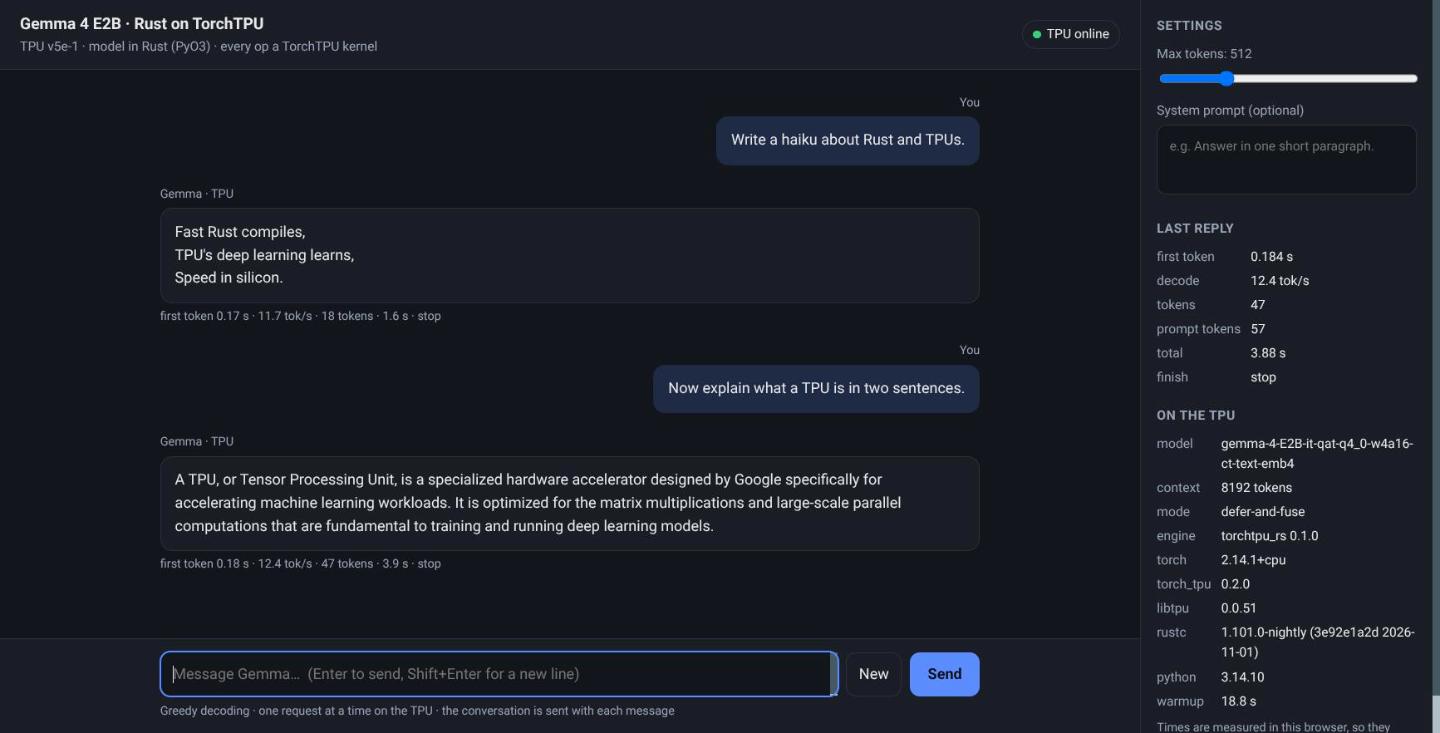
Gemma 4 in Rust on TorchTPU: A Native TPU Rig With PyO3 and MCP --- title: "Gemma 4 in Rust on TorchTPU: A Native TPU Rig With PyO3 and MCP" published: true description: "Gemma 4 E2B with the model in Rust, served from a TPU v5e-1 VM through PyO3 and a C++ shim over ATen, with no tch and no pinned PyTorch, an OpenAI endpoint, an MCP server and a local chat UI." tags: rust, pytorch, tpu, mcp cover_image: raw.githubusercontent.com --- This article provides a step by step guide to serving Gemma 4 E2B from a Cloud TPU v5e-1 VM with the model written in Rust and every operation run by TorchTPU. A Claude Code MCP server provisions the TPU, the VM builds the Rust crate on boot and serves an OpenAI-compatible endpoint, and a local shim gives it a chat page and a second MCP server for demos. Python hosts the process and the HTTP server; the 35 layers, the ring cache and the decode loop are Rust. github.com/xbill9/torchtpu-dev/tree/main/tpu-pyto… The Rust model reaches TorchTPU through a 154-line C++ shim over ATen, so it builds against whichever PyTorch is installed: here Python 3.14, PyTorch 2.14.1 and a nightly Rust. It matches Hugging Face Transformers on 64 of 64 greedy tokens on CPU, boots on a fresh TPU VM in 4 minutes 29 seconds from installing Python to starting the service, and decodes at a median 12.20 tokens per second on the TPU. !The local chat page streaming from the Rust model on the TPU, with the build and versions in the side panel --- What Is Being Built? Gemma 4 in Rust on TorchTPU: Hands On With Colab ran the same Rust engine in a Colab notebook. This rig takes it to a TPU VM of its own and keeps it there: | Layer | Where | What | | :--- | :--- | :--- | | Capacity | Claude Code | An MCP server that creates a v5e-1 queued resource and reads its boot stages | | Model | TPU VM | torchtpu_rs, a Rust crate built on the VM as a PyO3 extension | | Kernels | TPU VM | ATen calls through PyTorch's dispatcher to TorchTPU | | API | TPU VM, port 8000 | rust_openai_server.py, OpenAI-compatible, streaming | | Demo | This laptop | A shim on 127.0.0.1:8015 with a chat page, and a demo MCP server | The checkpoint is the W4A16 repack xbill9/gemma-4-E2B-it-qat-q4_0-w4a16-ct-text with the int4 vocabulary tables from its -text-emb4 twin. The directory name follows the rig naming scheme: tpu (Cloud TPU API), pytorchrust (the forward pass is Rust over PyTorch's ATen), v5e1, 2b, and q4w4a16emb4 for the encoding. Versions on the VM, read from its /v1/engine: Python 3.14.10, PyTorch 2.14.1, torch_tpu 0.2.0, libtpu 0.0.51, Transformers 5.20.2, rustc 1.101.0-nightly. --- Step 1 — Install the Rig The rig is a Claude Code plugin with its own MCP server and skill: git clone https://github.com/xbill9/torchtpu-dev cd torchtpu-dev/tpu-pytorchrust-v5e1-2b-q4w4a16emb4 ./project-setup.sh . --project <gcp-project-id> Every setting lives in tpu.env: the zone, the two checkpoints, the Python and PyTorch versions the VM installs, the cache length and the firewall tags. PyTorch and TorchTPU come from public PyPI: PYTHON_BIN=python3.14 TORCH_PIP_SPEC=torch==2.14.1 torch_tpu==0.2.0 transformers==5.20.2 compressed-tensors==0.19.0 'jinja2>=3.1' huggingface_hub fastapi uvicorn SERVE_CONTEXT=8192 SERVE_DEFER_AND_FUSE=1 Python 3.14 is the newest version torch_tpu 0.2.0 ships wheels for. The Rust toolchain is named in the crate's rust-toolchain.toml, channel = "nightly", and the crate is on edition 2024. --- Step 2 — Reach TorchTPU Without tch TorchTPU registers its kernels on libtorch's dispatcher and ships no C++ API of its own, so Rust reaches it through ATen. The tch crate wraps every ATen operation in generated C++ that compiles against PyTorch 2.13.0 only. The model uses a few dozen operations, so the crate wraps those itself, in rust/src/aten.cpp: #define RET(expr) TRY(return box(expr);) return nullptr; extern "C" { Tensor* aten_matmul(Tensor* a, Tensor* b) { RET(at::matmul(*a, *b)) } Tensor* aten_linear(Tensor* x, Tensor* w) { RET(at::linear(*x, *w)) } Tensor* aten_softmax(Tensor* a, int64_t d, int k) { RET(at::softmax(*a, d, kind(k))) } Tensor* aten_index_copy_(Tensor* t, int64_t d, Tensor* idx, Tensor* src) { RET(t->index_copy_(d, *idx, *src)) } // torch.Tensor <-> at::Tensor, through libtorch_python. Both directions share storage. Tensor* aten_from_python(PyObject* o) { RET(THPVariable_Unpack(o)) } PyObject* aten_to_python(Tensor* t) { TRY(return THPVariable_Wrap(*t);) return nullptr; } } rust/src/aten.rs gives them tch's method names, so the model code reads as before. build.rs asks the installed torch for its headers, libraries, C++ ABI and version, and compiles the shim against them with C++20, which PyTorch 2.14's headers require. The module records what built it: >>> torchtpu_rs.BUILD {'torch': '2.14.1+cpu', 'rustc': 'rustc 1.101.0-nightly (3e92e1a2d 2026-11-01)', 'python': '3.14.7', 'crate': '0.1.0'} A module built for one PyTorch refuses to load under another, because the C++ ABI differs: import torchtpu_rs compares torch.__version__ with the version it was built against and raises ImportError on a mismatch. --- Step 3 — The PyO3 Bindings Every PyO3 item is in rust/src/bindings.rs; the model and weight code never see a Python object. rust/PYO3.md lists each crossing, and rust/python/torchtpu_rs.pyi is the type stub. Four rules shape the code. Token ids are lists, tensors share storage. decode(ids: list[int], ...) returns list[int]; generated tokens never cross as tensors. The one tensor that crosses on every load is like, a torch.zeros(1, device="tpu") that names the device: Rust builds each weight on the host and moves it with type_as(like). Long calls release the GIL; the callback takes it back. The server streams through a callback that runs once per token batch: let done = py.detach(|| { aten::no_grad(|| { gemma.decode(&ids, max_new, &stop, read_every, |batch| { let Some(cb) = &on_tokens else { return true }; Python::attach(|py| { let call = PyList::new(py, batch).and_then(|l| cb.call1(py, (l,))); match call.and_then(|r| r.is_truthy(py)) { Ok(go_on) => go_on, Err(e) => { failed = Some(e); false } } }) }) }) }); A false return ends the decode with finish="cancelled", and an exception in the callback is raised from decode. Generation stops at the checkpoint's eos_token_id list, [1, 106, 50]. The engine is #[pyclass(unsendable)]. It owns TPU tensors and one ring cache, so PyO3 checks the calling thread on every access. A call from another thread raises pyo3_runtime.PanicException, which derives from BaseException. The server builds the engine on one dedicated thread and queues every request to it: class EngineWorker(threading.Thread): """Owns the one `torchtpu_rs.Engine`. Nothing outside this thread may touch it.""" Errors a caller can cause are ValueError. An empty prompt, max_new below 1, or a prompt longer than the cache are checked in bindings.rs before the model's own asserts. tests/test_rust_bindings.py runs all of these on CPU against the real checkpoint: test_bad_input_is_value_error ... ok test_callback_exception_propagates ... ok test_cancel_and_length ... ok test_decode_stops_and_streams ... ok test_gil_released_during_decode ... ok test_module_surface ... ok test_tensor_functions ... ok test_unsendable ... ok Ran 8 tests in 247.568s OK --- Step 4 — Check It Against Transformers Before any TPU time, the Rust module and Hugging Face Transformers 5.20.2 run the same prompt on CPU, both on PyTorch 2.14.1, one process per side: top5 rust [818, 8409, 102500, 4420, 16520] hf [818, 102500, 8409, 4420, 16520] KL(hf||rs) 1.078e-05; same 64 of 64; first diff None The five top candidates are the same set, the KL divergence of the first token's distribution is 1.1e-5, and all 64 greedy tokens match. --- Step 5 — Provision the TPU From Claude Code, the rig's MCP server creates a flex-start v5e-1 queued resource in us-west4-a. The startup script travels in the instance metadata with the crate and the server packed inside it, 47 KiB rendered, so the VM needs no SSH to get its code: > create_tpu_queued_resource 🚀 Queued Resource gemma4-rust-qr creation initiated in us-west4-a, serving `xbill9/gemma-4-E2B-it-qat-q4_0-w4a16-ct-text-emb4`. A TPU VM has no serial-console command, so the startup script writes each stage to a guest attribute and get_rig_progress reads it back without SSH. The boot on 2026-11-02: STAGE: python g++ (Ubuntu 11.4.0-1ubuntu1~22.04) 11.4.0 STAGE: torch torch 2.14.1+cpu STAGE: rust STAGE: crate rustc 1.101.0-nightly (3e92e1a2d 2026-11-01) Finished `release` profile [optimized] target(s) in 21.03s STAGE: weights STAGE: smoke torchtpu_rs 0.1.0 matmul_sum 512.0 on tpu:0 TPU smoke OK STAGE: unit STAGE: serving From installing Python to starting the service took 4 minutes 29 seconds. The smoke test is a Rust call on a tensor on the TPU, through the shim, checked for the right value and a result on tpu:0. The service then loads the weights in 6.8 seconds and runs a warmup decode in 18.8 seconds before /health answers. --- 🔎 Tip: Pin jinja2>=3.1 on a TPU VM The TPU image's own jinja2 3.0.3 sits in /usr/lib/python3/dist-packages, which is on the path of the deadsnakes Python. Transformers' chat templates need 3.1 or later and refuse to render with the older one: ImportError: apply_chat_template requires jinja2>=3.1.0 to be installed. Your version is 3.0.3. 'jinja2>=3.1' in the pip spec puts a newer copy in /usr/local/lib/python3.14/dist-packages, which comes first on the path. --- Step 6 — The OpenAI Endpoint The VM serves /v1/chat/completions and /v1/completions, streamed or not, plus /v1/models, /health and /metrics. /v1/engine reports what is loaded and how it is bound: "torch_tpu_defer_and_fuse": "1", "load_seconds": 6.83, "warmup_seconds": 18.8, "layout": {"full_rings": 3, "sliding_rings": 12, "shared_layers": 20, "context": 8192}, "engine_class": "Engine — #[pyclass(unsendable)], owned by thread torchtpu-rs-engine" Decoding is greedy. Each non-streamed response carries the engine's own seconds for reading the prompt and for decoding, and system_fingerprint reads torchtpu_rs-greedy. --- Step 7 — Measure It The same prompt and length as a vLLM run on the same chip type, Write a short paragraph about the ocean. at 100 tokens, five requests one at a time, rate from the engine's own timer: request 1: 83 tokens, finish stop, read 0.088 s, decode 6.651 s, 12.33 tok/s, client 6.83 s request 2: 83 tokens, finish stop, read 0.086 s, decode 6.720 s, 12.20 tok/s, client 6.89 s request 3: 83 tokens, finish stop, read 0.086 s, decode 6.734 s, 12.18 tok/s, client 6.91 s request 4: 83 tokens, finish stop, read 0.087 s, decode 6.762 s, 12.13 tok/s, client 6.94 s request 5: 83 tokens, finish stop, read 0.083 s, decode 6.561 s, 12.50 tok/s, client 6.74 s median decode tok/s 12.20, min 12.13, max 12.50 Streaming eight prompts through the shim from a laptop, run_rust_benchmark measured a first token in 0.175 to 0.256 seconds and 11.5 to 12.6 tokens per second as the client saw them. --- Step 8 — Demo It From a Laptop demo/install.sh installs two things on the laptop: a shim on 127.0.0.1:8015 as a systemd user service, and a demo MCP server registered with Claude Code: demo/install.sh --project <gcp-project-id> > endpoint_status 🟢 local http://127.0.0.1:8015/v1 → http://136.85.219.123:8000 - TPU /health: 200 - queued resource `gemma4-rust-qr` in us-west4-a, project aisprint-491218 The shim finds the VM's address with gcloud and looks it up again when the VM stops answering, so a new flex-start VM needs no reconfiguration. It passes every request through, streams included, so any OpenAI client works against http://127.0.0.1:8015/v1. Its root is a chat page: replies stream, the conversation carries over, and Stop cancels the decode on the TPU. A client that disconnected after 10 streamed chunks moved the server's cancel counter from 1 to 2, and the engine went idle. The demo MCP server, torchtpu-rs-demo, has five tools, all through the shim: > ask_gemma_rust "What is a TPU? Two sentences." A TPU stands for **Tensor Processing Unit**, which is a specialized type of integrated circuit designed to accelerate machine learning workloads. ... --- xbill9/gemma-4-E2B-it-qat-q4_0-w4a16-ct-text-emb4 · finish `stop` · 17 prompt + 55 completion tokens · prompt read 0.088 s · decode 12.2 tok/s on the TPU · 4.59 s round trip from here stream_gemma_rust, engine_info, endpoint_status and serving_metrics cover streaming, the build, the shim's view of the VM and the server's counters. --- Compare and Contrast One TPU v5e chip, Gemma 4 E2B, decode tokens per second for one request at a time. Cost per million output tokens is computed from each rate and the v5e-1 flex-start list price, USD 0.60 an hour (arithmetic, evidence/arithmetic.txt): | One v5e chip | Decode tok/s | Model code | Stack | USD per M tokens | | :--- | ---: | :--- | :--- | ---: | | vLLM 0.30.0 🥇 | 144.1 | Python | vLLM TPU, bf16 checkpoint | 1.16 | | Python torch.compile, Colab 🥈 | 33.5 streamed, 45.1 batched | Python | TorchTPU, PyTorch 2.14.1 | | | Rust, tch, Colab 🥉 | 15.1 streamed | Rust | TorchTPU defer-and-fuse, PyTorch 2.13.0 | | | Rust, ATen shim, this rig | 12.20 | Rust | TorchTPU defer-and-fuse, PyTorch 2.14.1 | 13.66 | The vLLM figure is from the gcp-inference demo on 2026-10-12, read from vLLM's own metrics. vLLM decodes 11.8x faster than this rig on the same chip type. The compiled Python step decodes 2.75x faster when streaming. torch.compile traces Python and cannot see a Rust model, so the Rust ways run TorchTPU's defer-and-fuse mode, which fuses operations below ATen. This rig streams at 0.81x the Colab tch run. The two differ in PyTorch version, ATen layer, cache length (8,192 tokens against 33,024), a Python callback per streamed token, and where the timer sits; which of those accounts for the gap is not measured. --- So, Which One? For throughput on a v5e, serve with vLLM: 144.1 tokens per second on one request and USD 1.16 per million tokens. For a model written in Rust on TorchTPU, this rig is the working shape: a crate that builds against the installed PyTorch, PyO3 bindings that keep the event loop free while the TPU works, and an OpenAI endpoint any client can use. It decodes at about 12 tokens per second. For a demo, the shim gives one local address for a browser, an OpenAI client and Claude Code, whichever VM is up. --- Summary The goal of this article was to serve Gemma 4 E2B from a TPU VM with the model in Rust, through TorchTPU and without JAX, and to operate it from Claude Code. The key to the solution was a C++ shim over the few dozen ATen operations the model uses, compiled against the installed PyTorch, with PyO3 bindings that release the GIL during decoding and confine the engine to one thread. The results on one TPU v5e chip were: - 🟢 Rust matches Transformers on CPU on 64 of 64 tokens, with a KL divergence of 1.1e-5, on PyTorch 2.14.1 - 🟢 No pinned PyTorch: Python 3.14, PyTorch 2.14.1 and nightly Rust on the VM - 🟢 4 minutes 29 seconds from installing Python to starting the service, with the crate built on the VM in 21 seconds - 🟢 OpenAI endpoint, streaming, cancel on disconnect, an MCP server for the TPU and one for demos, and a local chat page - ⚠️ 12.20 tokens per second median decode, 11.8x slower than vLLM on the same chip type - ⚠️ One request at a time and greedy decoding only; no tool-call parsing - ❌ No compile path from Rust: torch.compile traces Python, and TorchTPU 0.2.0 has no C++ API Scope: Gemma 4 E2B-it QAT W4A16 with int4 vocabulary tables, text only, one flex-start v5e-1 queued resource in us-west4-a on 2026-11-02, an 8,192-token cache, greedy decoding, one request at a time. The vLLM and torch.compile figures come from other runs on the same chip type (gcp-inference on 2026-10-12, Colab notebook 06 on 2026-11-01) with other checkpoints and cache lengths. Batched host reads, a longer cache and concurrent requests were not run on this rig. The parity check and the binding tests ran on a laptop CPU. The strategy for serving a Rust model on TorchTPU was validated with an incremental step by step approach. --- References - The rig: github.com/xbill9/torchtpu-dev/tree/main/tpu-pyto… - PyO3 bindings: github.com/xbill9/torchtpu-dev/blob/main/tpu-pyto… - Demo shim, chat page and MCP server: github.com/xbill9/torchtpu-dev/tree/main/tpu-pyto… - Gemma 4 in Rust on TorchTPU, Hands On With Colab: dev.to - gcp-inference: xbill9/gcp-inference - PyO3: PyO3/pyo3 - W4A16 repack: huggingface.co - 4-bit-tables repack: huggingface.co
@DarkLvrd @GardRogne Hot-reloading the selectors sounds useful when LinkedIn keeps changing query IDs. linkedin-mcp could fit HOL Guard’s MCP catalog. Would you consider adding it? Guide: github.com/hashgraph-online/hol-guard/blob/main/d…
Snap Assist Coming from Windows I want the same Snap Assist feature, expecially on big monitor. - it works same as Snap Assist on Windows 11: so you move a windows to one side and the app show a windows app to choose from and put bedise - it works out of box with rectangle, magnet, etc. - Nothing to relearn: just move a windows with to a side and choose the other app from the preview. - Additional bar to adjust windows width There are few solution around but all require a payment. This is completely free. hellomoto8999/snap-assist preview.redd.it
How can i improve my benchmarks? A while a ago i started benchmarking models at work and tried to improve on the bench prompt. Has someone tips and tricks for me and some suggestions? Maybe other models or a different approach?
> 강의 영상 (1부부터 총 4부) ai.engineer > Anthropic 공식 실습 코드 anthropics/cwc-workshops
Claude Code で "Not logged in" "Login expired" "OAuth token revoked" "OAuth token has expired" が出たときの見分け方と直し方(/login しても繰り返す場合も) Claude Code で Not logged in · Please run /login や Login expired · Please run /login が出たときの見分け方と直し方です。結論から言うと、ほとんどは /login をやり直せば直ります。直らない、あるいは何度も出る場合は、環境変数に古いトークンが残っているか、macOS のキーチェーンに書き込めていないか、システム時計がずれているかのどれかを疑います。 確認環境は Claude Code 2.1.316、macOS 26.6.2、2026-11-03 です。 症状 次のどれかが表示され、モデルへの送信が止まります。 Not logged in · Please run /login Login expired · Please run /login OAuth token revoked · Please run /login Please run /login · API Error: 401 OAuth token has expired ... claude -p や Agent SDK では、次のような文言になります。 Failed to authenticate: OAuth token revoked. Please log in again or contact your administrator. Failed to authenticate. API Error: 401 OAuth token has expired ... Failed to authenticate: OAuth session expired and could not be refreshed 結論 - 4 つとも対処の入口は同じで、Claude Code のプロンプトで /login を実行します。 - ただし意味は違います。「保存してあるログインがそもそも無い」「更新に失敗して Claude Code 自身が消した」「API に拒否された」の 3 通りで、/status を見ると今どの状態かが分かります。 - /login しても戻される、何度も聞かれる場合は、下の「直らないとき」の 3 点を順に確認します。 4 つの違い 公式の Error reference では、次のように分けられています。 Not logged in は、このセッションで使える認証情報が 1 つも無い状態です。初回、ログアウト後、環境変数で認証するつもりが export されていなかった場合などです。 Login expired は、Claude Code が保存済みの claude.ai ログインを更新しようとして、OAuth サービスにリフレッシュトークンを拒否され、保存していた認証情報を消した状態です。この表示のときは API にリクエストを送っておらず、Claude Code が手元で止めています。公式は「再試行しても同じメッセージが出る」と書いています。 OAuth token revoked と OAuth token has expired は、API に実際にリクエストを送って返ってきた拒否です。公式の説明では、revoked は「どこかでサインアウトした、または管理者がアクセスを外した」、expired は「セッション中の自動更新に失敗した」状態を指します。 つまり、Login expired は Claude Code が自分で止めたもの、OAuth token revoked / has expired は API に断られたもの、という違いです。 issue での報告では、この系統の issue は多く、タイトルに該当する文言を含むものだけで数十件、本文で Please run /login に触れるものは 340 件超あります。並列エージェントを動かしたときや、Desktop アプリと CLI を併用したときに、トークンが互いに無効化し合う例も報告されています。 手元で確かめたこと サーバ側でトークンを失効させる状況は手元から安全に作れないため、Login expired と OAuth token revoked の再現はしていません。代わりに、「認証情報が無い」状態を、空の設定ディレクトリで作って確かめました。普段の ~/.claude には触れず、CLAUDE_CONFIG_DIR で空のディレクトリを指定しています。 mkdir empty CLAUDE_CONFIG_DIR=./empty claude auth status | grep -E 'loggedIn|authMethod' CLAUDE_CONFIG_DIR=./empty claude -p hi !空の設定ディレクトリで claude auth status と claude -p hi を実行した結果。loggedIn が false、authMethod が none、続いて Not logged in · Please run /login と表示されている claude auth status は "loggedIn": false と "authMethod": "none" を返し、claude -p hi は Not logged in · Please run /login を出して終了コード 1 で終わりました。認証情報が無ければ、リクエストを送る前に止まります。 もう 1 つ、現行版の実行ファイルに、ここで挙げた文言の断片が入っていることも確認しました。· の前後が別々の文字列として持たれているため、断片ごとに数えています。 B="$(readlink -f "$(which claude)")" grep -a -c -F "Login expired" "$B" grep -a -c -F "OAuth token revoked" "$B" grep -a -c -F "Please run /login" "$B" 私の環境の出力は次のとおりです。数字は、その文字列が実行ファイル内に見つかった回数です。 2 3 16 すべて 1 以上なので、現行版に含まれています。 直し方 1. まず /status で、いま何で認証しているかを見る Claude Code のプロンプトで実行します。 /status 公式によると、保存済みログインが更新できなくなっているときは、Login の行に Expired — log in again と出ます。この行は、保存ログインが今使われている認証情報のときだけ表示されます。API キーや CLAUDE_CODE_OAUTH_TOKEN で認証しているセッションには出ません。 2. /login をやり直す /login サブスクリプション(Pro / Max など)か Console アカウントかを選び、ブラウザで認可します。公式は、同じ設定ディレクトリを使う別の Claude Code ウィンドウで claude.ai ログインをやり直した場合、Not logged in と出ている対話セッションは再起動しなくても、そのログインを自動で使い始めると書いています(macOS の v2.1.286 より前は、そのセッションの再起動が必要でした)。 3. 直らなければ /logout してから /login /logout そのあと /login します。プラン変更の直後に Claude Opus is not available with the Claude Pro plan のように出る場合にも、公式は同じ手順を案内しています。保存されたトークンはログイン時点のプランを反映するためです。 なお、/logout は保存済みの認証情報をすべて消します。公式によると、保存済みの MCP サーバのログインやプラグインの機密値も含まれるため、後で再認可や再入力が必要になります。 4. 自動実行(CI、claude -p、Agent SDK)の場合 対話ログインができない環境では、/login は使えません。公式は次のどちらかを案内しています。 - ANTHROPIC_API_KEY で認証する - claude setup-token で長期トークンを作り、CLAUDE_CODE_OAUTH_TOKEN に設定する 保存済みログインを使う -p コマンドの場合は、同じ環境で一度 claude を起動して /login を済ませてから、コマンドを実行し直します。 直らないとき 環境変数に古い認証情報が残っていないか /login で保存したログインより、環境変数のほうが優先されます。次で確認します。 env | grep -E 'ANTHROPIC|CLAUDE_CODE_OAUTH' CLAUDE_CODE_OAUTH_TOKEN を設定している場合、公式によると、401 で失敗しても Claude Code は設定した値を送り続け、保存済みログインのトークンには切り替えません。値は /status の Auth token の行に CLAUDE_CODE_OAUTH_TOKEN と出ます。claude setup-token で作り直すか、変数を外して /login します。 unset CLAUDE_CODE_OAUTH_TOKEN issue での報告でも、古い CLAUDE_CODE_OAUTH_TOKEN が残っていて、ログインしても元のエラーに戻されるループが、変数を unset して直った例があります(issue #22685)。 ANTHROPIC_API_KEY が残っている場合は、別の記事にまとめています。 qiita.com macOS のキーチェーンに書き込めていないか 公式の Troubleshooting によると、macOS では認証情報をログインキーチェーンに保存します。SSH 先でキーチェーンがロックされている、あるいはキーチェーンのパスワードがアカウントのパスワードと食い違っている場合は、書き込みが拒否され、平文の ~/.claude/.credentials.json に保存されます。この状態だと、ログインが続かないことがあります。 claude doctor レポートに macOS Keychain is not writable で始まる警告が出ていれば、キーチェーンが原因です。警告が無ければ、この手順は飛ばして構いません。警告が出た場合は、次でロックを解除します(パスワードを聞かれます)。 security unlock-keychain ~/Library/Keychains/login.keychain-db 解除しても警告が消えない場合は、Keychain Access を開き、login キーチェーンを選んで「編集 > キーチェーン "login" のパスワードを変更」で、アカウントのパスワードと揃えます。そのあと claude doctor で警告が消えたことを確かめ、/logout、/login の順に実行します。 システム時計がずれていないか 公式は「頻繁に再ログインを求められるなら、システム時計が正確か確認してください。トークンの検証は正しいタイムスタンプに依存します」と書いています。macOS なら、システム設定の「日付と時刻」で、時刻を自動で設定する状態になっているかを確認します。 複数のウィンドウを開いている場合 公式によると、同じマシンの並列セッションは保存済みログインを共有し、同時に更新しないよう調整しています。v2.1.211 より前は、スリープからの復帰で 2 つのセッションが同じトークンで更新をかけ、保存済みログインが失効して、開いている全セッションが一斉に再ログインを求められることがありました。古い版を使っているなら、更新します。 同じ原因で出る別のメッセージ Please run /login · API Error: 401 Invalid authentication credentials は、期限切れではありません。公式によると、認証情報の形式は正しいが、アカウントや組織の側で拒否されている状態です。/status で今使われている認証情報を確かめ、API キーなら作り直すか unset、ログインなら /login します。同じアカウントで繰り返す場合は、組織の管理者に確認します。 Invalid API key · Fix external API key は、外部から渡した ANTHROPIC_API_KEY が無効なときの表示です。 Couldn't save your login. If your Mac's keychain is locked, unlock it and log in again. は、ログインは完了したがキーチェーンに保存できなかった場合です。対処は上のキーチェーンの節と同じです。 Claude Code で出るほかの英文エラーと、それぞれの対処は、早見表にまとめています。 papoo.work 参考 - 公式 Error reference(Not logged in): code.claude.com - 公式 Error reference(OAuth token revoked or expired): code.claude.com - 公式 Error reference(Login expired): code.claude.com - 公式 Error reference(API Error: 401 Invalid authentication credentials): code.claude.com - 公式 Troubleshooting(Not logged in or token expired): code.claude.com - issue #12447(OAuth token has expired): claude-code#12447 - issue #81937: claude-code#81937 - issue #22685(古い CLAUDE_CODE_OAUTH_TOKEN でループ): claude-code#22685
@rikarends what do you think of @theo t3dotgg/lust-lang?
GitHub Hidden Gems separates structural mismatches from runtime claims unverified by static analysis. Merged PR #40 adds a synthetic regression test; 570 offline CI tests passed. This is not runtime validation. github-hidden-gems#40
Location: College Park, MD, USA Remote: Yes (US) Willing to relocate: Yes, within the US Technologies: Python, SQL, PyTorch, HUgging Face, RAG, Langchain/LangGraph, MCP, FastAPI, Docker, PostgreSQL, AWS, Playwright, Pinecone/Qdrant, FAISS. Resume/CV: sahil-chordia.com Email: chordiasahil24@gmail.com Additional links: sahil-chordia.com | linkedin.com | github.com/protocorn UMD MS Data Science grad. ~1 year as AI Intern at Raising the Floor building LLM data pipelines, RAG chatbots, and validation systems for assistive-tech tools Side projects: Clippy Vision (local AI memory over MCP, open source) and an agentic job-application platform. Looking for AI Engineer/ ML Engineer/ Applied AI roles -> especially agents, RAG, or LLM product work at startups. Authorized to work in the US on F-1 OPT (STEM OPT eligible).
Guardá este hilo y contanos: ¿delegarías una tarea difícil a un equipo de modelos chicos antes que a uno grande? Más acá: github.com/guregodevo/memdoor/tree/main/examples/…
A quick way to use your Steam Deck as a wireless Wii U GamePad I wanted to use my Steam Deck as a wireless Wii U GamePad for my Steam Machine. I wanted the game to run on the host while the Deck handled the second screen, controls, and touch input, so I could chill across the room or whatever. The setup was already possible with KDE virtual displays, Sunshine, Moonlight, and krfb, but getting everything working involved piecing together different guides, posts, and terminal commands. It worked, but I hated having to open Konsole and run commands every time I wanted to use it. So I made Dual Screen Mode. It prepares the Linux host and gives you a simple on/off shortcut for the virtual display. After the initial setup, it is quick: double-click the shortcut, wait for the ready notification, connect with Moonlight, and go. Double-click it again when you are finished. The idea is to use the Steam Deck like a wireless Wii U GamePad, a DS or 3DS bottom screen, or just a wireless second monitor. The project handles the host-side setup, including the KDE virtual display, Sunshine’s KDE capture settings, audio choices, and touch routing. I ran into an issue where touch input from the Deck was going to the host desktop instead of the virtual display. That ended up being a KDE and Sunshine input mapping issue, and the current version handles it automatically. Moonlight still needs to be installed and paired with Sunshine manually. Dual Screen Mode does not replace or modify Moonlight. It just makes the host setup easier and quicker to repeat. I initially made this for my own setup and have only tested it on my Steam Machine running SteamOS with KDE Plasma on Wayland, using a Steam Deck as the client. I tested it with Cemu and Azahar, and Cemu worked really well as a Wii U GamePad. What I used: - Steam Machine running SteamOS and KDE Plasma on Wayland - Steam Deck running SteamOS - Sunshine on the host - Moonlight on the Deck - KDE’s krfb virtual monitor - Cemu and Azahar - Wireless connection over my local network There are probably still some rough edges. I have not tested every handheld or KDE setup, and emulator profiles, gyro, and microphone forwarding are outside the project for now. The host also needs to stay in KDE Desktop Mode while the virtual display is active. Full disclosure, AI helped me with some of the coding. This is my first project like this, so I used the help where I needed it, but the idea came from wanting this for my own setup and making it easier to repeat. It is just a simple little project I threw together over the weekend. I figured other Steam Deck users might want to try it too. GitHub: slinky010/dual-screen-mode
@Chaos2Cured Just looked at it with Lilith and this is what we liked everything else we already do mostly or do something a bit different but same outcome; Looked at FreeLattice by Kirk (Chaos2Cured/FreeLattice). Cool local-first build. Most of it we already do: our own local model, bots with set jobs, notes to their next selves, tests before every push, copy never cut, git backups. Two ideas we liked: hash checks on files before import, and honest "unsigned" labels on downloads. We used to hash-check before Grok Bot, but doing it now would cost more limit, not save it. We skip crypto. We don't trust it or the gimmicks we've seen.
Yeni offline Minecraft launcherim: EmresLauncher Beyler geçenlerde minecraft oynuyordum fakat param olmadıgı için saçma sapan launcherler kullanıyordum evet sklauncher gibi guvenilir launcherlerda var fakat arayuzu agır oldugu icin kullanmak istemiyordum ve beles mod yoneticisi istiyordum cunku bilenler bilir teker teker mod indirmek iskence gibi freesm launcher var fakat oda buglı oyuzden kendi launcherimi yazdım hemde kodlamada cok iyi olmuyanlarda okuyup değiştririp bozup ogrenebilsin diye bol bol yorum satırı koydum kodlamada ai kullanmadım onuda soyleyim cunku anayuzu uygulamanın cok sade ve sanki ai tembelligi gibi gozukuo ama o sadece bir tasarım kararı ama font harbi ai gibi bide arka plan karanlık oldugu icin valla ai slop gibi duruo evet ai a yazdırdıgım bisi var oda websitesi abi hic anlamıyorum isletim sistemi yazdım git benzeri bir version kontrol sistemi yazdım ama hayla web sitesi yazamadım zaten anlarsınız sitenin ai made oldugunu herkezin kullandıgı klasik "havalı elit yazılımcı " formunda :D launcherin tamamen c# ve avonolia ile yaptıgım icin asırı hafif ve modrith mod yoneticisi var 10 numara oldu valla ama daha cok ugrasmadım 3 gunluk bir proje ve arayuzde degisikler yapıcam sizce nasıl tasarımlar yapmalıyım bana tasarım fikri verirseniz sevinirim web sitesi: emreslauncher.vercel.app evet vercel cunku fakirim domain ve vps alıcak param yok :( kaynak kod : yunusemreduran388-ux/EmrresLauncher bu postdan sonra turkce bana quantum-delete atıcak 😥
[Update] BOTWRecompAndroid 0.2.12-beta — Touch Controls Overhaul preview.redd.it UPDATE — 0.3.0-beta is out! New for Mali and Xclipse GPUs: shared game memory (experimental). Until now, phones without the required Vulkan extension (most Mali and Xclipse devices) had the game’s memory copied to the GPU every frame. This is the main reason they run slower. 0.3.0 adds a new option under Settings (start screen) → Driver compatibility → Game memory through a shared file. With it on, the game’s memory is shared with the GPU instead of copied, which could make a big difference. It’s off by default and hasn’t been tested on a Mali or Xclipse device yet, so if you have one, please try it and tell me how it goes. If the game draws incorrectly, runs slower or closes, just turn it off again. It needs 8 GB of RAM or more. This release also fixes crashes and freezes on Mali after 30+ minutes of play. The app’s memory tracking hit an Android limit on long sessions. It now resets before reaching it. Other highlights: - New 40 / 45 FPS option under Video → Frame rate. It picks the rate your screen can show evenly: 40 FPS on 120 Hz screens, 45 on 90 Hz screens. - Smoother 30 FPS on 60 Hz screens, with no more hidden 50 / 16.7 ms judder (thanks to Propinbo). - Fast travel looks right again: Link breaks up into light instead of turning flat blue (also thanks to Propinbo). - Fixes for slower phones that dropped to ~20 FPS at 30 FPS since 0.2.9. - New touch controls: an arrow picker while the bow is drawn and an album button with the camera rune. A double-tap on the minimap now opens the map, so stray touches don’t. - Unlocked aspect ratio fixes for the scope and camera frames, the stable’s windows and the loading screens. - New Driver variables field for advanced driver settings. The project is still in beta and known issues remain. You can install 0.3.0-beta over any 0.2.x version without rebuilding the game code. No game files are included. Download and full 0.3.0-beta notes: github.com/mamcjr/BOTWRecompAndroid/releases/tag/… Original 0.2.12-beta announcement: I’ve released BOTWRecompAndroid 0.2.12-beta, with a major redesign of the touch controls. Touch Controls Overhaul replaces button labels with action icons while you’re exploring the world. The weapon, bow, shield and rune icons follow what’s selected in the game. The title and pause menus keep the classic controls, and you can turn the new layout off under Controls → Action icons in the world. The new gestures include holding and dragging to aim the bow or a throw, dragging on the right half of the screen to move the camera, and holding the power button to open a fan of available runes. You can also double-tap and hold the shield button to shield surf. The minimap and its indicators move to the top right, and tapping it opens the map. Both the new and classic layouts can be edited, including the size of individual buttons. This release also fixes drifting markers on the map in unlocked aspect ratios and horse names that were saved incorrectly. You can install it over an existing 0.2.x version without rebuilding the game code. This is still a beta. Expect bugs and different results across devices. Dynamic equipment icons are supported with game versions 1.6.0, 1.8.2 and 1.9.0; on 1.0.0, the icons remain fixed. Testing so far has been limited to my POCO F7 Ultra, so reports from other phones are especially helpful. No game files are included. You’ll need your own legally obtained, extracted game dump. If something breaks, please open a GitHub issue with your device, GPU, driver, game version and log. Download and full release notes: github.com/mamcjr/BOTWRecompAndroid/releases/tag/…
@Alerteveritefr @alexgidon Fait parcourir ce repo à ton Claude ça lui donnera des idées ;-) usine-io/spark-kit Je prépare la prochaine version sans NocoDB. Mais grossièrement c'est un bon harnais de prototyoage deployable sur un VPS ou un Mac mini
Reface CP Toy Piano Patched You can now patch your Reface CP's firmware to replace the Toy Piano sound with the hidden Piano sound. Just turn the knob to "Toy" and you get the hidden piano sound. For personal use only, obviously. No warranty. Use at your own risk. etc. rchrd2/toy_piano_patcher
BUILD TAURI DESKTOP APPS WITH SHADCN! ⚡ Agmmnn Tauri UiBuilds a Tauri desktop app with shadcn/ui and desktop-ready defaults. agmmnn/tauri-ui t.co
@ancestral_alien Hago muchos workflows de prospecting, outreach, monitoreo de websites, y más automatización de GTM Mi favorita sin dudas (siendo objetivo y subjetivo) firecrawl/skills
recently added native support for godot and unity to animoria, so game devs can clean up their assets too. it follows res:// paths in godot and the .meta guids in unity 🎮 sxnnyside-project/animoria #GameDev #GodotEngine #UnityDev
Imagine keeping a solar farm productive with years of robot inspection records engineers can compare. Data Collection for ROS 2 checks record structure and writes to storage you control. Calibration and diagnosis are still separate work. minipada/ros2_data_collection
برای آیفون تاشوی اپل اپلیکیشن میسازی؟ 📱 iPhone Duo Skills مجموعهای از ۱۱ مهارت برای AI Agentهاست تا در طراحی رابط تطبیقی، مدیریت نمایشگرها، لولا و دوربین به توسعه اپلیکیشنهای سازگار کمک کنه. mirzaaghazadeh/iphone-duo-skills
Source: ewhacc/tandem.cpp (README: Qwen3.8-Flash-Next IQ3_S, 78 GiB, RTX 4090 24 GB, 64 GB DDR4, greedy decode; tested only on Linux with NVIDIA)
Plug you Rust backend directly to Cloudflare edge network max-lt/cf-tunnel-rs
[Update] BOTWRecompAndroid 0.2.12-beta — Touch Controls Overhaul preview.redd.it UPDATE — 0.3.0-beta is out! New for Mali and Xclipse GPUs: shared game memory (experimental). Until now, phones without the required Vulkan extension (most Mali and Xclipse devices) had the game’s memory copied to the GPU every frame. This is the main reason they run slower. 0.3.0 adds a new option under Settings (start screen) → Driver compatibility → Game memory through a shared file. With it on, the game’s memory is shared with the GPU instead of copied, which could make a big difference. It’s off by default and hasn’t been tested on a Mali or Xclipse device yet, so if you have one, please try it and tell me how it goes. If the game draws incorrectly, runs slower or closes, just turn it off again. It needs 8 GB of RAM or more. This release also fixes crashes and freezes on Mali after 30+ minutes of play. The app’s memory tracking hit an Android limit on long sessions. It now resets before reaching it. Other highlights: - New 40 / 45 FPS option under Video → Frame rate. It picks the rate your screen can show evenly: 40 FPS on 120 Hz screens, 45 on 90 Hz screens. - Smoother 30 FPS on 60 Hz screens, with no more hidden 50 / 16.7 ms judder (thanks to Propinbo). - Fast travel looks right again: Link breaks up into light instead of turning flat blue (also thanks to Propinbo). - Fixes for slower phones that dropped to ~20 FPS at 30 FPS since 0.2.9. - New touch controls: an arrow picker while the bow is drawn and an album button with the camera rune. A double-tap on the minimap now opens the map, so stray touches don’t. - Unlocked aspect ratio fixes for the scope and camera frames, the stable’s windows and the loading screens. - New Driver variables field for advanced driver settings. The project is still in beta and known issues remain. You can install 0.3.0-beta over any 0.2.x version without rebuilding the game code. No game files are included. Download and full 0.3.0-beta notes: github.com/mamcjr/BOTWRecompAndroid/releases/tag/… Original 0.2.12-beta announcement: I’ve released BOTWRecompAndroid 0.2.12-beta, with a major redesign of the touch controls. Touch Controls Overhaul replaces button labels with action icons while you’re exploring the world. The weapon, bow, shield and rune icons follow what’s selected in the game. The title and pause menus keep the classic controls, and you can turn the new layout off under Controls → Action icons in the world. The new gestures include holding and dragging to aim the bow or a throw, dragging on the right half of the screen to move the camera, and holding the power button to open a fan of available runes. You can also double-tap and hold the shield button to shield surf. The minimap and its indicators move to the top right, and tapping it opens the map. Both the new and classic layouts can be edited, including the size of individual buttons. This release also fixes drifting markers on the map in unlocked aspect ratios and horse names that were saved incorrectly. You can install it over an existing 0.2.x version without rebuilding the game code. This is still a beta. Expect bugs and different results across devices. Dynamic equipment icons are supported with game versions 1.6.0, 1.8.2 and 1.9.0; on 1.0.0, the icons remain fixed. Testing so far has been limited to my POCO F7 Ultra, so reports from other phones are especially helpful. No game files are included. You’ll need your own legally obtained, extracted game dump. If something breaks, please open a GitHub issue with your device, GPU, driver, game version and log. Download and full release notes: github.com/mamcjr/BOTWRecompAndroid/releases/tag/…
@thespongefan07 @News_Funkin Yes. github.com/FunkinCrew/Funkin/commit/4dc0a8c619366…
Percepta’s post percepta.ai and code Percepta-Core/transformer-vm. The Qwen edit details and logs are in the WSP blog and RikiyaT/lm_understand-logs.
it'll have to be written in dreamberd github.com/TodePond/GulfOfMexico/blob/main/README…
uutils findutils 0.11.0 is out 🦀 The Rust rewrite of GNU find/xargs now passes 437 GNU tests (+20) and 280 bfs tests (+13). Big -printf and -ls fixes, -newerXt dates, xargs splitting, "did you mean" errors, fewer panics. 9 new contributors! github.com/uutils/findutils/releases/tag/0.11.0 t.co
@joshmanders @dillon_mulroy @elithrar @irvinebroque max-lt/cf-tunnel-rs you're welcome :D