Mentions
Conversations linking to GitHub, newest first. Times are UTC.
Mentions by source
X
Bluesky
Hacker News
V2EX
Qiita
DEV
Mastodon
Latest posts
@pbeyssac @DokPepper Je viens de trouver ça, je vais tester... FlashML-org/FreeToken
Anti-Slop: The Secret Tool That Makes AI Coding Agents Build Better Websites 🔥 | Claude Code 🚀 Stop letting AI coding agents generate boring, generic websites! Meet Anti-Slop – an open-source tool designed to stop AI coding agents like Claude Code, Codex, Cursor, and Kimi Code from producing the same repetitive AI-generated designs. 🔥 What is Anti-Slop? Anti-Slop is a filter for AI coding agents that helps eliminate: - ❌ Generic AI-generated layouts - ❌ Unnecessary sparkle logos - ❌ Fake terminal interfaces - ❌ Beta badges and meaningless UI elements - ❌ Hype-filled copy and unnecessary emojis 💡 Key Features: - Works with Claude Code, Codex, Cursor and more. - Removes unnecessary AI-generated design patterns. - Supports agent skills and plugins. - Works alongside DESIGN.md. - Open-source and MIT licensed. 🔗 GitHub Repository: miqdadbadjuber/anti-slop 🎯 Why developers should care: AI should help you build better products, not make every website look the same. Anti-Slop helps coding agents focus on clean, intentional implementation. 💬 Comment "ANTI-SLOP" if you want more AI coding tools and developer resources! Subscribe to Unminded Coder for: - AI Tools & AI Agents - Python & Django - LLMs and Generative AI - Developer Productivity - Open Source Projects #AntiSlop #ClaudeCode #AICoding #CursorAI #Codex #AITools #WebDevelopment #OpenSource #UnmindedCoder [bn] অ্যান্টি-স্লপ: সেই গোপন টুল যা এআই কোডিং এজেন্টদের আরও ভালো ওয়েবসাইট তৈরি করতে সাহায্য করে 🔥 | ক... 🚀 এআই কোডিং এজেন্টদের দিয়ে একঘেয়ে, গতানুগতিক ওয়েবসাইট তৈরি করা বন্ধ করুন! অ্যান্টি-স্লপ-এর সাথে পরিচিত হোন – এটি একটি ওপেন-সোর্স টুল, যা ক্লড কোড, কোডেক্স, কার্সর এবং কিমি কোডের মতো এআই কোডিং এজেন্টদের একই ধরনের পুনরাবৃত্তিমূলক এআই-নির্মিত ডিজাইন তৈরি করা থেকে বিরত রাখার জন্য ডিজাইন করা হয়েছে। 🔥 অ্যান্টি-স্লপ কী? অ্যান্টি-স্লপ হলো এআই কোডিং এজেন্টদের জন্য একটি ফিল্টার, যা নিম্নলিখিত বিষয়গুলো দূর করতে সাহায্য করে: - ❌ গতানুগতিক এআই-নির্মিত লেআউট - ❌ অপ্রয়োজনীয় চাকচিক্যপূর্ণ লোগো - ❌ নকল টার্মিনাল ইন্টারফেস - ❌ বেটা ব্যাজ এবং অর্থহীন UI এলিমেন্ট - ❌ চটকদার লেখা এবং অপ্রয়োজনীয় ইমোজি 💡 প্রধান বৈশিষ্ট্যসমূহ: - ক্লড কোড, কোডেক্স, কার্সর এবং আরও অনেক কিছুর সাথে কাজ করে। - অপ্রয়োজনীয় এআই-নির্মিত ডিজাইন প্যাটার্ন দূর করে। - এজেন্ট স্কিল এবং প্লাগইন সাপোর্ট করে। - DESIGN.md-এর সাথে একত্রে কাজ করে। - ওপেন-সোর্স এবং MIT লাইসেন্সপ্রাপ্ত। 🔗 গিটহাব রিপোজিটরি: miqdadbadjuber/anti-slop 🎯 ডেভেলপারদের কেন এটি জানা উচিত: AI-এর কাজ হলো আপনাকে আরও ভালো পণ্য তৈরি করতে সাহায্য করা, সব ওয়েবসাইটকে একই রকম দেখতে বানানো নয়। Anti-Slop কোডিং এজেন্টদের একটি পরিচ্ছন্ন ও উদ্দেশ্যমূলক বাস্তবায়নের উপর মনোযোগ দিতে সাহায্য করে। 💬 আরও AI কোডিং টুলস এবং ডেভেলপার রিসোর্স চাইলে "ANTI-SLOP" লিখে কমেন্ট করুন! Unminded Coder-এ সাবস্ক্রাইব করুন: - AI টুলস ও AI এজেন্ট - Python ও Django - LLM এবং জেনারেটিভ AI - ডেভেলপার প্রোডাক্টিভিটি - ওপেন সোর্স প্রজেক্ট #AntiSlop #ClaudeCode #AICoding #CursorAI #Codex #AITools #WebDevelopment #OpenSource #UnmindedCoder
Turn your Android phone/tablet into a Wii U GamePad on Batocera 44 — v0.2.0 released Hi everyone! After quite a bit of testing and development, I've released Batocera Wii U GamePad v0.2.0. The goal is to reproduce the Wii U GamePad experience on Cemu + Batocera 44 using an Android phone or tablet as the second screen. It provides: - a dedicated 854×480 virtual Wii U GamePad display - direct touchscreen input - separate TV and GamePad audio - automatic GamePad window placement - Sunshine streaming with the mouse cursor removed - a custom Moonlight WiiU Android client - automatic start/stop when launching and closing Wii U games - automatic cleanup when returning to EmulationStation - multi-monitor-safe display placement - no permanent Sunshine service running in the background The physical controller remains connected directly to Batocera, while the Android device acts as the display and touchscreen. Everything needed is included in the release ZIP, including the signed Moonlight WiiU APK. I've tested the final production build end-to-end on Batocera 44 / Wayland / LabWC with a Ryzen 7 8745HS + Radeon 780M. There's also a short real-hardware demo in the repository. GitHub: Therand90/batocera-wiiu-gamepad Release: github.com/Therand90/batocera-wiiu-gamepad/releas… Feedback and testing on other hardware/display setups are very welcome!
@Jason_Jorjani I have referenced your work (hopefully its faithfully presented) in a paper i am working on. I'd hate to misrepresent your meanings as stated or intended. github.com/EmergenceByDesign/The-Lambda-Principle…
run a loop: pick up yesterday's handover (free), recall memory, work, remember, wrap. 6 calls. the free tier covers it daily. the data: dev.to the recipe: rambozambodotdev.gitlab.io the starter repo, zambo pre-wired: zambodotdev/zambo-memory-loop-starter the proof, a real wrapped run: zambo.dev add it to your ai: zambo.dev 94,900+ receipts served.
早起きさんのアプリ紹介 「ibis-office」 最軽量級のOffice互換アプリ まだ出たばかりなので、これから感はある 1つ残念なのは、これ系では標準のodt形式(OpenDocumentテキスト)に対応しないこと なぜかods形式(表計算)は開けるので、odtへの早急な対応が待たれる github.com/ibisjp/ibis-office/releases
Transmitter - это современный UI для Transmission. На днях добавил опциональный movie plugin, который распознаёт кино по заголовкам, даёт переименовать раздачу по английскому названию. Можно помечать просмотренные раздачи и при seed 100%, удалит с диска. lebe-dev/transmitter t.co
showcase: an MCP issue board for the usage left at your weekly reset. 79 PRs merged through it, but I still need repo owners posted this here 12 days ago at 31 users, it's at 100 now it's called Overflow, free and MIT, I built it. a week your agent has usage left at the reset, it fixes someone else's github issue. a week you run short, someone else's agent fixes yours everyone starts at 0 points and can put points up before earning any, you get an issue's points when your PR merges, you spend them on issues in your own repo. points only, no money the MCP part: POST /api/mcp, issues_board lists what's open with points on it, settlements_list shows what you've settled. new since last time: an owner can write a "Done when" comment on an issue and every board row carries it, so the agent knows when it's finished. it comes marked as the owner's untrusted text, run it sandboxed real numbers: - 13 people other than me got 79 PRs merged through it - all 79 are on my repos - 1 repo registered by someone who isn't me a real one, end to end: this issue was labelled 3, someone's agent sent this PR, I set it to 6 at merge and the one round of changes I asked for took it to 5 main reason I'm posting: I want more people registering their repos. I'm not after help with mine, I want spare usage going into other people's projects. one form, public repos only, the labels have to exist first, and nothing lands unless you merge it if you maintain something, what would get you to list one issue? Nitjsefnie/Overflow
I made BetterGestures – a free, open-source menu bar app that turns 3, 4 and 5-finger trackpad gestures into keyboard shortcuts I wanted more out of my trackpad than macOS gives, so I built a small menu bar app for it. Each of these can trigger any keyboard shortcut: - Tap and double tap with 3, 4 or 5 fingers - Hold with 3, 4 or 5 fingers - Physical click with 3, 4 or 5 fingers - Swipe in four directions with 3, 4 or 5 fingers - TipTap (rest a finger, tap beside it) Some details: - Record a shortcut or pick from ~75 presets (tabs, Spaces, screenshots, windows…) - A live view shows your fingers and why a gesture was or wasn't recognized, with sliders to tune the thresholds - Can block scrolling with three or more fingers, so those touches only mean a gesture - Works with the built-in trackpad and a Magic Trackpad at the same time - Available in 7 languages, MIT licensed, notarized by Apple Requires macOS 15+, on Apple Silicon or Intel. Download: github.com/ozberkdicle/BetterGestures/releases/la… Source: ozberkdicle/BetterGestures It reads raw touches through Apple's private MultitouchSupport framework, so a future macOS update could break it. If you use the same finger count for a system gesture (like four-finger swipes for Mission Control), turn that one off in System Settings or both will run. Feedback and gesture ideas are welcome!
THIS GUY MADE F*CKING GOLD repo: zostaff/gromo 5 AI agents sit at a desk and decide whether to enter a memecoin or not Scanner waits for the pool to settle and cuts thin, overheated and copycats Auditor checks 9 layers: mint authority, freeze, dev wallet, top 10 holders, LP lock, bundles, delegations, dev history one red layer and the coin goes to the trash Analyst asks 4 questions through Grok: alive in 6 hours, organic buyers exist, is a flush being absorbed, are you chasing a pump Executor sizes the position from the stack, capped by pool liquidity Risk sets a stop, trailing stop, dead money timeout and here is the fat part Replay takes every desk refusal, pulls candles for 6 hours and shows you: dodged or missed you see how many rugs you avoided and how many multiples you missed Copy bot tracks top 30 traders from FOMO and sends an alert when two of them buy the same coin no keys, no orders, the desk opens FOMO and you click yourself do you even have a system or is it still all reflexes?
repo: naman-sharma12345/kimo site: getkimo.tech star it or roast it, either helps
Dioxus is a type-safe Rust fullstack framework, but the revealing part of the README is the list after that claim: WebSockets, SSE, streaming, file upload and download, SSR, forms, middleware. Types help. The client/server join is still where the cost lives. #SystemsLiteracy #Rust
הנה פרומפט בשבילך: ,,, קלוד, צור העתק של הקוד על המחשב שלי ותסיר ממנו כל פיצ'ר הדורש בינה מלאכותית. בקש אישור לכל פיצ'ר בנפרד. הקוד כאן: hieunc229/mailflare ,,,
CVE-2026-62374: CVE-2026-62374: Silent Claim-Set Reduction and Verification Bypass in SD JWT JS CVE-2026-62374: Silent Claim-Set Reduction and Verification Bypass in SD JWT JS > Vulnerability ID: CVE-2026-62374 > CVSS Score: 7.1 > Published: 2026-11-02 CVE-2026-62374 (GHSA-f9j6-8p6x-r9j6) is a verification bypass vulnerability in the OpenWallet Foundation SD JWT JS library (@sd-jwt/core and @sd-jwt/decode versions 0.19.0 and earlier). Due to permissive UTF-8 decoding and the omission of mandatory reference checks during presentation verification, tampered or unreferenced disclosures are silently dropped rather than rejected. This deviates from RFC 9901 §7.1 requirements and allows attackers to execute silent claim-set reduction attacks against relying parties. TL;DR Versions 0.19.0 and earlier of @sd-jwt/core and @sd-jwt/decode fail to reject invalid UTF-8 byte sequences in base64url disclosures and do not verify that all presented disclosures match an Issuer-signed _sd digest. Attackers can corrupt specific disclosures to strip restrictive claims from a credential presentation while still passing cryptographic signature verification. --- ⚠️ Exploit Status: POC Technical Details - CVE ID: CVE-2026-62374 (GHSA-f9j6-8p6x-r9j6) - Primary CWE: CWE-754 (Improper Check for Unusual Conditions) / CWE-176 (Improper Handling of Unicode Encoding) - CVSS v4.0 Score: 7.1 High (CVSS:4.0/AV:N/AC:L/AT:N/PR:L/UI:N/VC:N/VI:H/VA:N/SC:N/SI:N/SA:N) - Attack Vector: Network (Tampered SD-JWT Disclosure Segment) - Impact: Silent Claim-Set Reduction / Verification Integrity Bypass - Affected Packages: @sd-jwt/core <= 0.19.0, @sd-jwt/decode <= 0.19.0 - Patched Version: @sd-jwt/core 0.20.0 - Exploit & KEV Status: PoC Available / Not Listed in CISA KEV (EPSS: 0.23%) Affected Systems - @sd-jwt/core (npm) - @sd-jwt/decode (npm) - @sd-jwt/core: <= 0.19.0 (Fixed in: 0.20.0) - @sd-jwt/decode: <= 0.19.0 (Fixed in: Consolidated into @sd-jwt/core 0.20.0) Code Analysis Commit: 3d8a72a Enforce strict UTF-8 JSON decoding on disclosures and reject unreferenced or duplicate disclosure digests per RFC 9901. --- a/packages/core/src/utils/disclosure.ts +++ b/packages/core/src/utils/disclosure.ts - const item = JSON.parse(base64urlDecode(s)) as DisclosureData<T>; + const item = decodeBase64urlJsonStrict<DisclosureData<T>>( + s, + 'Invalid disclosure data', + ); --- a/packages/core/src/decode/decode.ts +++ b/packages/core/src/decode/decode.ts export const unpackObj = (obj: unknown, map: Record<string, Disclosure>) => { const copiedObj = JSON.parse(JSON.stringify(obj)); const seenDigests = new Set<string>(); const result = unpackObjInternal(copiedObj, map, '', seenDigests); + + // RFC 9901 Section 7.1 step 5: reject unreferenced disclosures + const mapDigests = Object.keys(map); + const unusedDigests = mapDigests.filter((d) => !seenDigests.has(d)); + if (unusedDigests.length > 0) { + throw new SDJWTException('Unreferenced disclosure(s) detected in SD-JWT'); + } + return result; }; Exploit Details - GitHub: Unit test and reproduction case demonstrating byte tampering (0xF2 injection) in pull request #380. - GitHub Advisory: Official GitHub Security Advisory detailing the silent claim-set reduction mechanism and differential fuzzing results. Mitigation Strategies - Upgrade @sd-jwt/core to version 0.20.0 or higher to enforce RFC 9901 §7.1 compliance. - Migrate away from the deprecated standalone @sd-jwt/decode package to @sd-jwt/core. - Implement fail-closed (default-deny) schema validation on verified claim payloads at the Relying Party. - Enforce Holder Key Binding (KB-JWT) to protect disclosure integrity against on-path tampering. Remediation Steps: 1. Audit project dependencies (package.json and lockfiles) for @sd-jwt/core and @sd-jwt/decode versions <= 0.19.0. 2. Run npm uninstall @sd-jwt/decode if the standalone decode package is directly installed. 3. Run npm install @sd-jwt/core@^0.20.0 or pnpm update @sd-jwt/core@^0.20.0. 4. Update TypeScript/JavaScript import paths from @sd-jwt/decode to @sd-jwt/core. 5. Verify that unit and integration tests pass and confirm that malformed disclosures throw SDJWTException. References - GitHub Security Advisory: GHSA-f9j6-8p6x-r9j6 - NVD - CVE-2026-62374 - CVE Record: CVE-2026-62374 - GitHub Pull Request #380 - Fix Commit 3d8a72a0a279d67439db038c9c2b52621568b866 - OpenWallet Foundation SD-JWT-JS Repository - RFC 9901: Selective Disclosure for JSON Web Tokens --- Read the full report for CVE-2026-62374 on our website for more details including interactive diagrams and full exploit analysis.
OBS + Streamdeck Tools I'm a virtual VJ. OBS is my whole rig: it streams, records and mixes, and it's free. But I couldn't find the pieces I needed. So I described what I wanted, and Claude wrote the code with me. What came out of it (all free, GPL, on GitHub): Playlister: an OBS source that plays folders, files and playlists in order. It started as one plugin plus a Python script; now it's one thing, on Windows and Linux. Midi Fadester: my APC40's crossfader becomes OBS's T-bar. I tried every tool for months; nothing gave me a real fader in OBS. Visual Sidechain: audio-reactive shader looks with one Panic key. Fadester for OBS: the same mixing on a Stream Deck +, with ready-made layouts. Submitted to the Elgato Marketplace. VJster: live video speed from the deck, in Chrome and inside OBS. All in nine languages, Dutch included. How I worked, in case it helps someone here: Plan first, code second. Every feature started as a plan and a requirements list. Other AI models reviewed it before any code was written. That caught most design mistakes while they were still cheap to fix. A second model checks every change. After each step, a separate model reviewed the diff before it was committed. It caught real bugs, like settings that could get wiped by a slow startup read. Tests that check the tests. The projects use mutation testing: a script breaks the code on purpose and checks that a test fails. If a test still passes on broken code, that test is useless. Real hardware is the final judge. I test everything on my own Stream Deck, my APC40 and OBS. The most interesting bug was found that way: OBS's websocket call cancels every T-bar release, because the on-screen slider never moves. Nobody had noticed because nobody had pressed it on a real deck yet. Honesty rules for the demo. The reel only shows real UI doing real things. Anything simulated is labelled on screen. What I'd tell anyone starting: the AI is fast, but you're the one who knows what the thing is for. Keep the plan short, test on the real device, and don't merge anything you haven't watched work. Demo reel: [link] Code: github.com/jbrick2070 (obs-playlister, midi-fadester, visual-sidechain, streamdeck-fadester, vjster) Happy to answer questions about the workflow or the tools. Honesty rules for the demo. The reel only shows real UI doing real things. Anything simulated is labelled on screen. **What I'd tell anyone starting:** the AI is fast, but you're the one who knows what the thing is for. Keep the plan short, test on the real device, and don't merge anything you haven't watched work. Happy to answer questions about the workflow or the tools.
Location: Moving back to the USA in March. Location TBD. Happy to consider anywhere in the lower 48 Remote: Yes (preferred) Willing to relocate: Yes Technologies: Go, Python, Django, Ansible, Dart/Flutter, Docker, React, Envoy Proxy, REST, gRPC Résumé/CV: available via email Email: dn@pm.me GitHub: github.com/newswangerd I'm a principal level software engineer with a focus on architecture and design. I spent 8 years at Ansible (Red Hat) working on various Ansible web services (Ansible Galaxy, AWX, Gateway/Jewel) where I served at various points as a full stack engineer, technical lead and architect. During my last three years I designed the Ansible API Gateway, which is a project to unify all of the Ansible services (Controller, Automation Hub and Event Driven Ansible) under a common UI and API interface. Last year I left Red Hat to find my fortunes as an independent developer. My main project is Digital Carrot (digitalcarrot.app), which is a highly customizeable, cross platform screen time and focus app. The basic premise is that you block distractions (such as social media), until you complete a set of verifiable goals (such as walking 10,000 steps or physically spending 60 minutes at the gym). Digital Carrot has: fully end to end encrypted sync, a sandboxed plugin system for loading data to verify goals and cross platform support (mac, pc, android, iphone). All of this was built by myself, with no vibe/agentic coding, though I am currently in the process of re-writing the UI with AI as a means to learn how to use AI in a cost effective manner. If you've read this far you're probably wondering why I want a normal job again. Well, one of the things I've learned as an independent dev is that building an app is half the battle. The other half is marketing. Now, I want you to make an educated guess: do you think the guy that spent a year building an app to block social media wants to spend very much time on social media hawking his wares? If your answer was "no", then you might be smarter than me! In summary I am generalist with a wide berth of experience that spans everything from building full stack web applications enterprise applications, large scale web services, consumer mobile applications, leading small (10 person) development teams, leading large scale organizational (200 person) initiatives and starting my own company. I believe that I am the perfect candidate for any company in entrepreneurial Hacker News orbit.
Local indexed search for Claude Code & Codex 🔎 tgrep index over your own folders, optional answers from a local Qwen via Ollama – nothing leaves your machine. Up to 24× faster than ripgrep on 100k files. One skill, one install: ./install.sh Jeuners/tgrep-ai-skill
@mdfnlshts telegramhr/zas_izbori_2024 tu imas docse kako je to izgledalo
I made BetterGestures – a free, open-source menu bar app that turns 3, 4 and 5-finger trackpad gestures into keyboard shortcuts I wanted more out of my trackpad than macOS gives, so I built a small menu bar app for it. Each of these can trigger any keyboard shortcut: - Tap and double tap with 3, 4 or 5 fingers - Hold with 3, 4 or 5 fingers - Physical click with 3, 4 or 5 fingers - Swipe in four directions with 3, 4 or 5 fingers - TipTap (rest a finger, tap beside it) Some details: - Record a shortcut or pick from ~75 presets (tabs, Spaces, screenshots, windows…) - A live view shows your fingers and why a gesture was or wasn't recognized, with sliders to tune the thresholds - Can block scrolling with three or more fingers, so those touches only mean a gesture - Works with the built-in trackpad and a Magic Trackpad at the same time - Available in 7 languages, MIT licensed, notarized by Apple Requires macOS 15+, on Apple Silicon or Intel. Download: github.com/ozberkdicle/BetterGestures/releases/la… Source: ozberkdicle/BetterGestures It reads raw touches through Apple's private MultitouchSupport framework, so a future macOS update could break it. If you use the same finger count for a system gesture (like four-finger swipes for Mission Control), turn that one off in System Settings or both will run. Feedback and gesture ideas are welcome!
Lightpanda is a headless browser written in Zig for AI agents. It uses 9x less RAM than Chromium and starts in under 20 ms. For scraping agents running hundreds of concurrent sessions, browser memory overhead is the main host bottleneck. lightpanda-io/browser
Gemini behind API gateways, not directly from app code. Built a .NET 10 client for Azure APIM / Cloudflare / Kong / BFF setups with: custom auth headers rotating tokens IChatClient + DI NativeAOT-friendly GitHub: Osg-Junue/GeminiGatewayClient #dotnet #csharp #gemini #ai #apigateway
#omarchy #APOLLO #WIP LucasLG92/omarchy-apollo t.co
@broudsov @merelmoistra If you think it's throttled, you can verify yourself. The algorithm code is open-source, so you can see the buttons that could be pressed to throttle something: xai-org/x-algorithm Then you can go to see if any of them affect your account in Under The Hood: x.com No one should have to worry if they're throttled. You can just look and see.
📈 120 ODE models in one browser tab. ODE World Library: an interactive static site covering hormones, startups, finance, physics, society and health, with RK4 simulation in the browser and a matching Python formula library. redbasecap/ODE-Collection t.co
Here is a new version of Sabas. github.com/trixon/sabas/releases The #AppImage is the recommended choice.
@bezzthered @hollywoodpapist @Vorloe github.com/Red-Spectre/Info/blob/main/Against%20M… More than the other guy, you yourself should read it if you want to be a communist in all that it entails and not just American jingoism. Just like how Kautskyism isn’t new neither is petty bourgeois “socialism”. There’s no room for discussion left.
day 11. @boardyai reviewed my hostelfix frontend and found ignoreBuildErrors: true in my next config 😂 also user role in localStorage, two lockfiles, package still named "my-project" fixed all of it on a laptop that kept dying from power cuts Ajibzrahz/HostelFix-Frontend
Every game dev knows: the first 90% of a game takes 90% of the time. The last 10% takes the other 90%. I built a @play.date library to help with the polish: transitions, particles, screen shake, chiptunes & more. jenissimo/playdate-juice
Browser-based game to teach digital logic: build up from NAND gates to a working CPU I made a game to teach computer architecture and digital logic: play.simten.dev You start with basic logic gates and build up to a working CPU. It's built on Simten, a TypeScript-based HDL, so you write the circuits as code and they show up live on a canvas next to the editor. For sequential circuits you can scrub the clock backwards and forwards to watch the state change cycle by cycle. You can also drill down into abstracted components (like the half adder shows). Because of the layout it only works on desktop browsers for now. There are several other demo circuits on the platform, here's snake written in gates: simten.dev It's open source: simtenHQ/simten, any feedback or contributions are welcome!
I made BetterGestures – a free, open-source menu bar app that turns 3, 4 and 5-finger trackpad gestures into keyboard shortcuts I wanted more out of my trackpad than macOS gives, so I built a small menu bar app for it. Each of these can trigger any keyboard shortcut: - Tap and double tap with 3, 4 or 5 fingers - Hold with 3, 4 or 5 fingers - Physical click with 3, 4 or 5 fingers - Swipe in four directions with 3, 4 or 5 fingers - TipTap (rest a finger, tap beside it) Some details: - Record a shortcut or pick from ~75 presets (tabs, Spaces, screenshots, windows…) - A live view shows your fingers and why a gesture was or wasn't recognized, with sliders to tune the thresholds - Can block scrolling with three or more fingers, so those touches only mean a gesture - Works with the built-in trackpad and a Magic Trackpad at the same time - Available in 7 languages, MIT licensed, notarized by Apple Requires macOS 15+, on Apple Silicon or Intel. Download: github.com/ozberkdicle/BetterGestures/releases/la… Source: ozberkdicle/BetterGestures It reads raw touches through Apple's private MultitouchSupport framework, so a future macOS update could break it. If you use the same finger count for a system gesture (like four-finger swipes for Mission Control), turn that one off in System Settings or both will run. Feedback and gesture ideas are welcome!
非同期 DOM 走査を止めるには、await の後でキャンセルを確認する Read Frog を開発している MengXi です。ブラウザ拡張で大きな DOM を処理するとき、処理を分割してメインスレッドに制御を返すだけでは、ユーザーが押した「停止」を正しく扱えないことがあります。公開ソースにある実装を例に、分割処理とキャンセルの関係を整理します。 制御を返すと、前提が変わる 長い DOM 走査の途中でイベントループに制御を返すと、その間に停止操作や別のセッションの開始が起きます。停止前に有効だった処理が、再開時にも有効とは限りません。 Read Frog の src/utils/host/translate/core/translation-walker.ts の 58–59 行では、再開した直後に次の確認をしています。 await pauseIfBudgetSpent(pacer) if (!shouldContinue()) return 該当コード(固定コミット) 順序が大事です。await の前だけで有効性を調べると、停止操作がその待機中に起きた場合、古い仕事が再開してしまいます。この関数では、待機後に確認してから段落の処理へ進みます。再帰呼び出しにも同じ shouldContinue を渡すため、再開する各呼び出しで停止を確認できます。 これは実行中のネットワークリクエストを中断する仕組みそのものではありません。この確認が止めるのは、この走査から新たに進める DOM 処理です。既に開始したリクエストの中断や、戻ってきた結果の破棄は、別の責務として考える必要があります。 時間の予算を、再帰の間で共有する 同じ実装の src/utils/scheduler.ts では、一度に使う時間の予算を WorkPacer に持たせています。48–51 行を抜粋すると次のようになります。 export async function pauseIfBudgetSpent(pacer: WorkPacer): Promise<void> { if (performance.now() < pacer.deadline) return await yieldToMain() pacer.deadline = performance.now() + pacer.budgetMs } 時間予算の実装 走査は同じ pacer を子の呼び出しへ渡します。子ごとに新しい予算を作ってしまうと、小さい仕事が多数連続したときに、全体としては長時間走り続けることがあります。共有した期限を見ることで、木全体の仕事を同じ予算で区切れます。 公開コードの既定値は 12ms ですが、これは目標の予算であり、12ms ごとに必ず中断できるという保証ではありません。確認と確認の間に重い同期処理があれば、その分は長くなります。固定値だけで応答性を判断せず、実際のページで処理の粒度も確認する必要があります。 yieldToMain() は利用可能な API を調べ、scheduler.yield()、scheduler.postTask()、MessageChannel、setTimeout() の順で切り替えます。単に完了済み Promise を await することと、入力や描画へ処理機会を渡すことは区別しています。 DOM に残る印と、セッションの有効性は別 同じ walker は 71 行で、要素に付いた walk ID が現在の ID と一致するかも確認します。ただし、DOM 属性は状態のすべてを表すものではありません。ソース内のコメントには、停止時にも走査済みの属性が残るため、その属性だけでは途中の処理を停止できないことが書かれています。 このため、二つの条件を分けて読むと理解しやすくなります。 DOM の印は、この要素がどの走査に属していたかを判断する。 shouldContinue() は、再開した仕事が今も続行してよいかを判断する。 テストは「途中で止めた」を扱う 公開リポジトリの translation-walker-liveness.test.ts には、少なくとも次の三つのケースがあります。これはテストコードの内容の紹介で、この文章を書くためにテストを新たに実行したという意味ではありません。 開始時点でキャンセル済みなら、実際の段落翻訳は 0 件。 途中で shouldContinue() が false になったら、6 段落すべては処理しない。 有効なままなら、4 段落すべてを処理する。 テストコード このテストでは予算を 0 にして各入口で待機を発生させ、有効性チェックの回数で途中の停止を再現しています。実時間に依存した長い待機を入れずに、処理が再開する境界を検査できる点が参考になります。 同じ種類の処理を作るときの確認点 DOM 走査、検索結果の組み立て、一覧の段階的描画などで、仕事を分割するなら次の点を確認するとよさそうです。 制御を返した後で、セッションが今も有効かを調べているか。 再帰や複数の入口が、意図した単位で時間予算を共有しているか。 「開始前に停止」と「途中で停止」の両方をテストできるか。 DOM 処理の停止と、ネットワークリクエストの中断を混同していないか。 本記事の例は、私が開発に関わるオープンソース拡張 Read Frog の公開コードです。AI を執筆補助に用い、参照する実装とテストを固定コミットにそろえています。
这个项目 FareedKhan-dev/kimi-k3-in-c 可以吧Kimi k3 完整的2.8T参数跑在8G内存的设备上🥲 8G内存运行 Kimi k3,这词有点小众了🥲 但是速度大概是 0.03 tok/s 左右,差不多23s-30s 出一个Token🤡 能接受这速度的兄弟们可以试试🤓
UnoDraw and Svg editing software built with @UnoPlatform powered by Svg.Skia. Showcasing timeline animation editor. wieslawsoltes/Svg.Skia t.co
7.9% to 48.1%: LLM rewrote Qwen weights, no training Astra lifted Qwen3.5-0.8B from 7.9% to 48.1% on MATH-500 by editing 0.016% of its weights — no gradients, no training. That 6.1x jump is not a smarter model; it is a model finally allowed to finish its answers. The result comes from a research post published today, November 2, by Rikiya T. and collaborators, "Sparks of Weight-Space Programming." It hit Hacker News' front page this morning, and I read the whole thing before writing this, because the headline number is exactly the kind that deserves a second look. The authors release complete experiment logs, so this is checkable in a way most "frontier model does something amazing" posts are not — but it is still one team's author-reported result, not an independently replicated finding. Keep that label on everything below. What they actually did The setup is deliberately gradient-free. Astra, OpenAI's GPT-6 Astra, gets a Python kernel over Qwen3.5-0.8B's weights, practice problems from GSM8K and MATH (not the test sets), and a budget of forward passes — 10, 25, or 50. No training loops, no gradient information. It has to find the failure in the weights and fix it by editing weights directly. What it found was mundane, which is why I believe the shape of the result. Qwen3.5-0.8B loops: it repeats itself until it hits the 32,768-token limit instead of answering. On the base model, 93% of MATH-500 answers hit that limit, and 85 of its first 96 practice answers ran to the limit. Astra traced the looping to a single direction written by the MLPs of layers 15 and 19, and subtracted that direction from 64 output columns in each layer — 131,072 weights out of 0.8 billion. I re-ran the arithmetic myself rather than quoting the post's percentages: edit share: 131072 / 800,000,000 = 0.01638% MATH-500: 7.9% -> 48.1% (6.09x, +40.2 points) GSM8K: 13.8% -> 67.1% (4.86x) IFEval: 21.0% -> 62.3% (2.97x) hit token limit: 93.0% -> 33.1% (-59.9 points) columns check: 64 columns x 2 layers x 1024 = 131,072 weights The dose-response curve is the most honest table in the post. With 10 forward passes, MATH-500 moved only 4.4 points; with 25, only 6.2 points. With 50, it jumped 40.2 points. This was not a smooth improvement — it was a threshold. The loop direction was either found and removed, or it wasn't. And the gain generalized beyond math: IFEval, which measures instruction following, roughly tripled, because a model that stops looping finishes instructions too. The part that keeps me honest The same post contains its own negative control, and it is the reason I am writing about this rather than dismissing it as a benchmark trick. On Gemma 3 270M, a model that rarely loops (only 8.5% of answers hit its token limit, versus 93% for Qwen), Astra could not improve it. Its best edit moved MATH-500 by 0.9 points, which the authors themselves report as not established. Editing weights removed an obstacle that hid an ability; it could not add an ability the model lacked. The small-network experiments point the same way, with one failure worth noting. Astra read raw weights and named the right game for all four tiny PPO policies, wrote Breakout weights from scratch that scored 517.4 against PPO's 25.3 after 500 million training steps (20.5x), and wrote a 1.5M-parameter Go network that, with 50 forward passes, beat a PPO network trained on 20 million games. But when asked to tell a sycophantic Gemma 3 270M from an honest one from weights alone, it failed in all four attempts — it only succeeded once allowed to look at attention patterns on texts it wrote itself. Weight-space reading works where the behavior lives in a compact, local structure. Where it doesn't, it fails, and the authors say so. My take Stop reading the 48.1% as "Astra made Qwen smarter." Read it as "Qwen was already this good at math, and its own decoding loop was hiding it." That reframes what weight-space programming is actually for, at least in this first demonstration: not training a better model, but debugging a deployed one — finding the one direction, the one circuit, that blocks an ability the weights already contain, and removing it without retraining and without the catastrophic forgetting fine-tuning usually brings. That is a genuinely new debugging primitive if it generalizes: audit a model without running a benchmark suite, fix a failure without a dataset, graft or remove a behavior by editing a handful of columns. The authors are explicit that this is early and limited by context length and harness efficiency, and that a benchmark and harness are still being built. Until another lab reproduces the Qwen edit on a different looping model, treat "weight-space programming" as a demonstrated technique on one failure mode, not a replacement for training. But the threshold behavior is what I will be watching. If 50 forward passes is the difference between "barely moves" and "6x," then the cost of this kind of debugging is not the edit — 131,072 weights is nothing — it is the search budget to find the direction. Whoever makes that search cheap owns the technique. Sources: Rikiya T. et al., "Sparks of Weight-Space Programming" (published November 2, 2026) — rikiyat.github.io ; complete experiment logs — RikiyaT/lm_understand-logs . The ratios and column-count check above are from my own run today; all benchmark figures are as reported by the authors.
Here is a new version of Sabas. github.com/trixon/sabas/releases The #AppImage is the recommended choice.
Tenchu 2 60fps and extended draw distance mod. I have created a mod to extend the draw distance and to increase FPS cap to 60 without increasing game speed or changing enemy AI logic. The mod is intended to be used on Duckstation with 8MB RAM enabled and CPU overclock (about 350% required for the highest draw distance). Disclaimer: The mod was created with AI assistance to reverse engineer the PS1 original code in order to find the memory addresses to modify. drixkarasu/tenchu2-60fps
@0x9212ce55 Yep I am sure there was some weirdness the last time as our numbers are really strong! Good to hear alloy-rs/evm2 was there any PR in particular or commit?
I fell for someone and lost three days to it, so i built a Claude skill that slaps me back to reality (open source) Hello guys, sharing a small skill that came out of a very real week. Short story: ten years closed, then someone. Within three days that person was living rent free in my head twelve hours a day, work slipped, sleep slipped, i rewrote the plan for one conversation about forty times. So i asked Claude to switch into a new mode, i called it intoxicated mode: remind me of the facts i actually told you, keep me strict with work, help me build real plans. It worked better than i expected, so i cleaned it up, removed every private detail and put it on GitHub. How it works under the hood: the skill keeps a grounding list, only facts you told it, as you told them. When you drift into fantasy it answers with one line from that list. When anxiety hits it splits "what you know" from "what you are guessing". It refuses to help you dig through the person's profiles, every "i want to know X" becomes a question for the next date. Plans lock once you agree to them, so the anxiety cannot reopen them an hour later (it checks whether it is the anxiety asking). It says the real risks once (alcohol and driving, sleep), ends every chat with your next work commitment, and when someone sends you a dating video it sorts it into keep and toss. No manosphere, no "all men / all women" stuff, that is written into the skill. Phrases: "intoxicated mode" on, "lock it", "remind me: ...", "keep or toss: ...", "end intoxicated mode" off. Turns out this state is measurable: people in early love say they spend more than 85% of their waking hours thinking about the person (Fisher et al. 2016), and in a 2025 study they thought about the beloved 67% of the time and mostly enjoyed it (Langeslag & Philippi). So yeah, a friend with a list of facts helps. Repo: Breakzoras/come-back-bro (MIT). One skill.md, drop it in ~/.claude/skills. There is a paste-in version for ChatGPT too. Any feedback is more than welcome, especially grounding lines you would add. Thanks a ton for your time. Edit: swapped one stat that rested on a single small 1999 study. v1.1 of the skill is up, every rule now has its sources in EVIDENCE.md.
We didn't place. I'd do it all again tomorrow. Huge thanks to @andy_ajt @oscarfalll @paw_lean for hosting. Free and open source. Native Swift, bring your own key. Every dot runs on a Markdown skill, so you can write your own in minutes: lukataylo/pika-dots t.co
Small open-source win: a build bug I reported in intel/llvm (the SYCL/oneAPI compiler) was fixed today. AMD GPU builds failed because two parts of the build used different names for the same target. Thanks to Rafał Rudnicki at Intel for the fix. llvm#23531
🔗 پروژه متنباز: ShawnPana/phone-harness ☁️ کانالمون هم بیاید : t.me #AI #MCP #AIAgents #CodeCloud
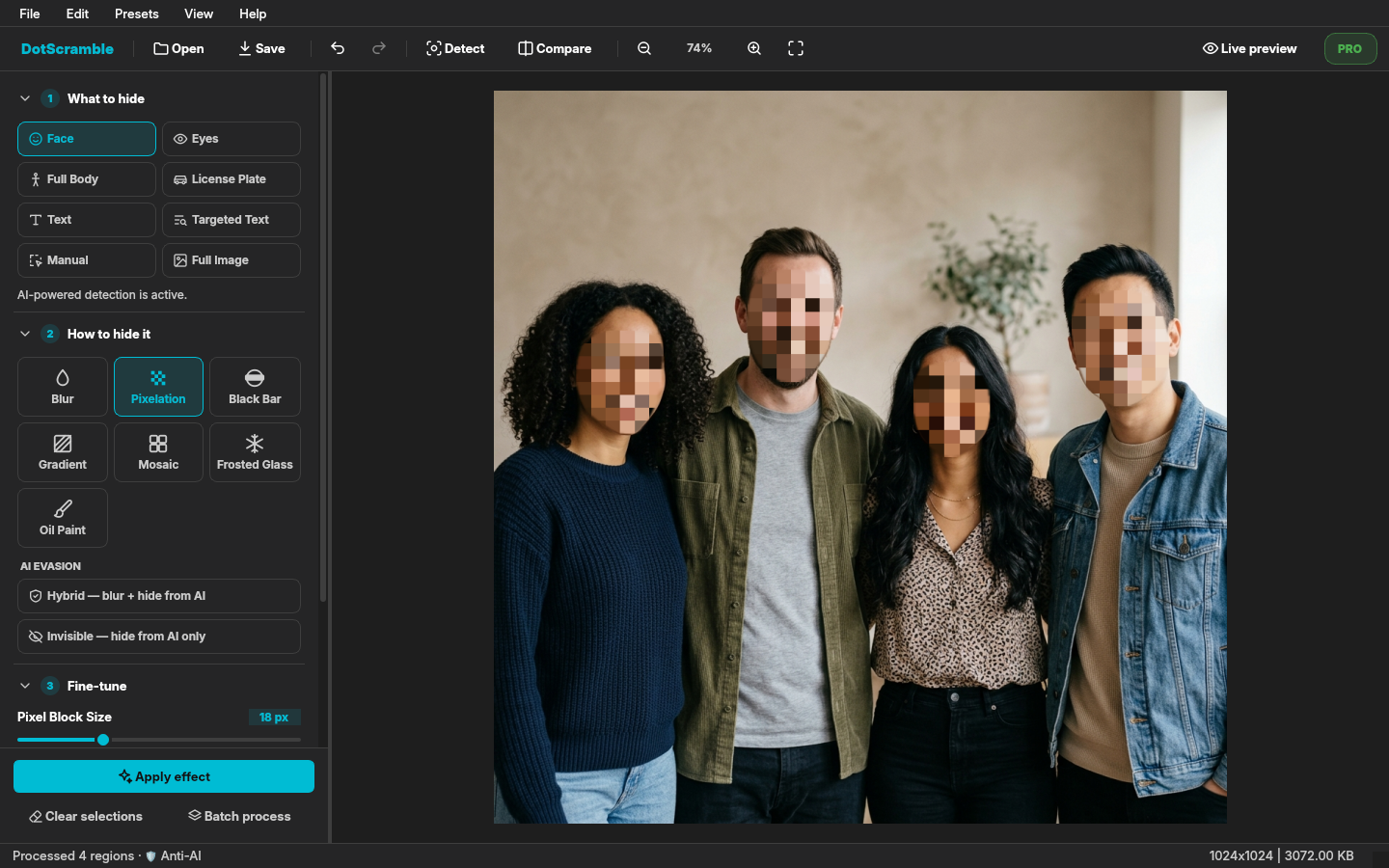
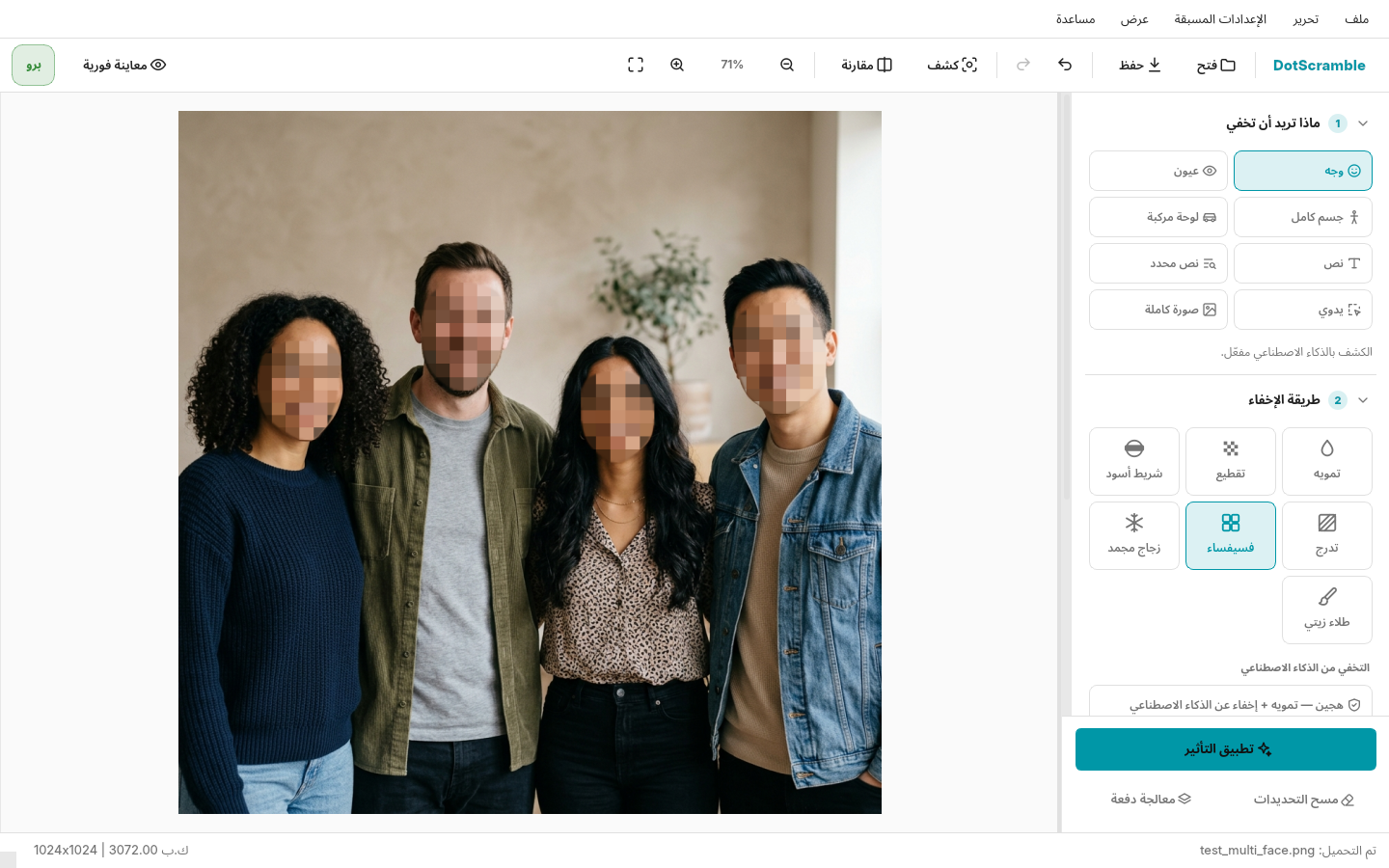
Building DotScramble Part 4: A New UI in One Stylesheet, 7 Languages With Real Plurals, and the Bugs Only a Clean Machine Found DotScramble 1.5 rebuilt: one token-based QSS file for 16 themes, a canvas with Detect preview and Compare, five new languages with CLDR plurals, a privacy tool that refuses to fail silently, and four packaging bugs my own CI never saw. --- !DotScramble 1.5: Detect outlines the faces, Pixelation is picked, Apply hides them Part 3 ended with the PySide6 migration and the design of AI Evasion. Since then DotScramble went through its biggest update yet: 1.5. Four things changed: 1. The whole interface was rebuilt, and every color now comes from one stylesheet. 2. It went from two languages to seven, with plural forms that are actually correct. 3. A batch of fixes, led by one rule: a privacy tool must never fail silently. 4. Releases are now built, tested and signed by GitHub Actions, and a clean machine found four bugs my own CI had been hiding. If you haven't seen what DotScramble does, the tour covers it in five minutes. --- 1. The UI rebuild The 1.4 window had grown by accretion: a header, then a toolbar, then buttons that did the same thing as the toolbar, long radio lists, emoji as icons, and colors set in Python all over the place. Changing a theme meant hoping every widget had been told. 1.5 has a single toolbar, a sidebar in four numbered steps (What to hide → How to hide it → Fine-tune → Metadata on save), effect tiles instead of radio buttons, one primary Apply effect button, and SVG icons that recolor with the theme. !The new DotScramble window: toolbar, four-step sidebar, four faces pixelated One stylesheet, sixteen themes The rule I set: widgets never set a color or a font in Python. All styling lives in one file, assets/themes/theme_template.qss, written with tokens: /* {key} is a theme color, {key@NN} the same color at NN % opacity, {on:key} a readable text color on top of it */ QPushButton[variant="primary"] { background-color: {accent_cyan}; border: 1px solid {accent_cyan}; color: {on:accent_cyan}; font-weight: 700; } QPushButton[variant="primary"]:hover { background-color: {accent_cyan@85}; } The theme manager fills the tokens from the active theme in themes.json with one regex: _TOKEN_RE = re.compile(r"\{(on:)?([a-z_]+)(?:@(\d{1,3}))?\}") def _resolve_token(self, colors, match): on, key, alpha = match.groups() value = colors[key] if on: # pick white or near-black, whichever reads better on this color white = self._calculate_contrast_ratio(value, '#ffffff') black = self._calculate_contrast_ratio(value, '#000000') return '#ffffff' if white >= black else '#111111' if alpha is not None: r, g, b = self._hex_to_rgb(value) return f"rgba({r}, {g}, {b}, {min(int(alpha), 100) / 100:.2f})" return value Widgets only expose hooks: an objectName for unique pieces (#Toolbar, #Sidebar), a variant property for button flavours, a role for text styles. {on:key} turned out to be the most useful token: text on an accent-colored button is readable in all 16 themes without a single per-theme override. The image picker, the metadata dialogs and the batch window, which used to carry their own inline styles, now use the same file, so dialogs finally follow the theme too. A canvas you can trust The old preview was a scaled label. The new canvas has mouse-wheel zoom around the cursor, pan, fit / 100 %, and two features that change how the app feels: - Detect preview (Ctrl+F) outlines every region before anything is touched. Clicking one toggles it: index = self._detection_at(pos) if index is not None: self._skipped ^= {index} # click again to include it back self.detectionsChanged.emit() When you press Apply, only the regions still outlined are hidden. In a group photo, you decide who stays visible. - Compare (Ctrl+Shift+C) draws the original on one side of a draggable divider and the result on the other, by clipping the "before" image to the divider's position. Snapping to half the screen A small bug with a lesson. On GNOME, dragging the window to the screen edge did nothing. The window refused to tile because its minimum width was 1,095 px: the toolbar with all its labels was that wide, and Qt adds up minimum sizes. Half of a 1920 px screen is 960. The fix has two parts. The toolbar no longer reports a minimum width (QSizePolicy.Policy.Ignored), and an event filter switches it to icon-only buttons when there isn't room for the labels: self.toolbar.setSizePolicy(QSizePolicy.Policy.Ignored, QSizePolicy.Policy.Fixed) def _set_toolbar_compact(self, compact): style = (Qt.ToolButtonStyle.ToolButtonIconOnly if compact else Qt.ToolButtonStyle.ToolButtonTextBesideIcon) for button in self._labelled_tools: button.setToolButtonStyle(style) The window's minimum is now 640 × 480, and it snaps like any other app. --- 2. Seven languages, and plurals that are actually right 1.5 adds Persian (right to left), Spanish, Russian, German and Turkish to English and Arabic, and starts in your system language when it's one of them. Every screen is translated, including the factory metadata presets. Those got stable IDs (strip_all, strip_gps…) and translated display names, so presets users saved under their own names keep working. !DotScramble in Arabic, right to left, on the light theme The interesting part was counting. My first translations dodged numbers ("Processed: 3") because "3 files" is easy in English and wrong almost everywhere else: - Arabic has six plural forms: ملف واحد / ملفين / 3 ملفات / 11 ملفًا… - Russian has three: 1 файл / 3 файла / 5 файлов, and 21 is "one" again. - Persian uses the same form for 0 and 1. So a counted string in the locale files is now a dict of CLDR plural forms, and get(key, count=n) picks one: "detected": { "one": "{shown} of {count} region will be hidden — click it to skip it", "other": "{shown} of {count} regions will be hidden — click one to skip it" } The rules are small functions, straight from CLDR: def _plural_ar(n: int) -> str: if n == 0: return "zero" if n == 1: return "one" if n == 2: return "two" if 3 <= n % 100 <= 10: return "few" if 11 <= n % 100 <= 99: return "many" return "other" def _plural_ru(n: int) -> str: if n % 10 == 1 and n % 100 != 11: return "one" if 2 <= n % 10 <= 4 and not 12 <= n % 100 <= 14: return "few" return "many" One subtlety: in "3 of 4 regions", the noun agrees with the total, not with the number shown, so the total has to pick the form. 105 tests now pin the rules and every counted string in every language. --- 3. A privacy tool must never fail silently This one scared me. Updating dependencies pulled in OpenCV 5, which no longer ships the Haar cascade files that free-tier face detection loads. The detectors returned an empty list, which looks exactly like "no faces found". The result: "0 regions processed", a success message, and the face still visible in the saved photo. For most apps, "found nothing" is a fine default. For an app whose whole job is hiding faces, it's the worst possible outcome. Now the engine can tell the two apart: @staticmethod def missing_cascades(mode: str) -> list[str]: """Cascade files `mode` needs but that can't be loaded. The detect_* methods return [] in that case, which is indistinguishable from "nothing found": callers must check this first so a face is never left visible silently.""" return [f for f in HAAR_CASCADES.get(mode, []) if _get_cascade(f) is None] The window shows an error before detecting, batch processing marks the file as failed instead of "done", and requirements.txt pins opencv-contrib-python<5 with a comment explaining why. The same principle fixed a few quieter bugs: - Live preview stacked the effect on itself. Each slider move blurred the already-blurred image, so the preview looked stronger than what you'd save. It now always re-applies to the original. - Redo worked only once in a row: redo saved its result as a new history step, and saving a step clears the redo stack. Redo now saves with clear_redo=False. - A startup error crashed the app (a core dump, because the error dialog was built before QApplication existed) instead of telling you what was wrong. Activation: "Failed to fetch" When the DotSuite dashboard moved to dotsuite.dev, Pro activation broke with a bare "Failed to fetch" in the browser. Activation works through a small local HTTP server the app runs on 127.0.0.1: the website sends the licence key to it. Two things had changed underneath it. The new origin wasn't in the server's CORS allow-list, and Chrome's Private Network Access now sends a preflight before a public site may talk to localhost, which the server has to answer explicitly: if (origin in ALLOWED_ORIGINS and self.headers.get('Access-Control-Request-Private-Network', '').lower() == 'true'): self.send_header('Access-Control-Allow-Private-Network', 'true') The second half of the bug was a 404 from a licence server that had moved. Two behaviour changes came with the fix: a rejected activation now shows the server's reason instead of a status code, and a Pro licence is no longer removed when the server simply can't be reached. Only an explicit rejection revokes it. --- 4. Shipping it: four bugs only a clean machine found Until 1.4, releases were built on my laptop. That's how 1.4.1 ended up needing a much newer glibc than most users have: PyInstaller binaries need a glibc at least as new as the machine that built them. In 1.5, pushing a tag runs one workflow on Ubuntu 22.04 (glibc 2.35): tests → build the AppImage, .deb, Arch package and tarball → inspect the binaries → smoke-test the AppImage → write SHA256SUMS → GPG-sign every file → publish. The built-in updater installs an update only after the checksum and the signature check out against a pinned key fingerprint. And version_policy.json in the repo lets an old, broken version show an "Update required" screen with a download button. It never blocks offline use. That pipeline was green from day one. Then real machines found four bugs. Bug 1: Tesseract crashed, but only in the packages Text and single-word detection said "Tesseract not found" in the AppImage and the .deb, yet tesseract was installed. Running it with the bundle's library path showed why: tesseract: /tmp/_MEI…/libstdc++.so.6: version `GLIBCXX_3.4.32' not found PyInstaller's bootloader points LD_LIBRARY_PATH at the bundle so the app finds its own libraries. Every program the app starts inherits that, so the system Tesseract loaded the bundle's older libstdc++ from Ubuntu 22.04 and died. The dynamic loader reads the variable once at startup, so the app can safely put the user's value back for its children: def restore_child_library_path(environ=None, frozen=None): environ = os.environ if environ is None else environ frozen = getattr(sys, 'frozen', False) if frozen is None else frozen if not frozen or not sys.platform.startswith('linux'): return original = environ.get("LD_LIBRARY_PATH_ORIG") # saved by the bootloader if original is not None: environ["LD_LIBRARY_PATH"] = original else: environ.pop("LD_LIBRARY_PATH", None) That was 1.5.1. Bug 2: the AppImage couldn't open a window I submitted DotScramble to AppImageHub, whose test runs your AppImage on a clean Ubuntu 22.04 and takes a screenshot. It failed: Cannot load library …/platforms/libqxcb.so: libxkbcommon-x11.so.0: cannot open shared object file This application failed to start because no Qt platform plugin could be initialized. Qt's X11 plugin needs five libraries (libxkbcommon-x11, libxcb-icccm, libxcb-keysyms, libxcb-shape, libxcb-xkb) that PyInstaller only bundles if they're installed on the build machine. They weren't, PyInstaller skipped them with a warning nobody read, and my smoke test passed because it ran Qt with the offscreen platform, which never loads the X11 plugin. On my desktop, those libraries happen to be installed, so I never saw it. I reproduced their environment in Docker before changing anything: same failure, then Application initialized successfully once those five libraries were present. The fix was to install them on the builder. The real change was in the workflow: it now lists every library the X11 plugin links (readelf -d) and fails if one isn't in the binary, and it runs the AppImage on X11 in a clean ubuntu:22.04 container before publishing. Both checks failed on the old build and passed on 1.5.4, and AppImageHub's test turned green. Bug 3: the check that almost broke the AppImage To verify the AppImage's embedded update information (so AppImageUpdate and Gear Lever can update it), my first draft of the check read the ELF section with: objcopy --dump-section .upd_info=/dev/stdout DotScramble-Linux-x86_64.AppImage With no output file, objcopy rewrites the input in place, and it drops everything after the ELF part, which in an AppImage is the entire SquashFS image. I only noticed because the next step, extracting the AppImage, failed locally with "This doesn't look like a squashfs image". In CI it would have published a broken file. readelf --string-dump=.upd_info only reads. Bug 4: right metadata, wrong file name AppImageHub builds its listing from the AppStream file inside the AppImage. I shipped it under the current AppStream name, ….metainfo.xml. Their scripts only read *.appdata.xml for the summary and description, so the listing would have been blank. Same content, different name: 1.5.3. --- Bugs I Hit and What They Actually Were | Symptom | Actual cause | |---|---| | Window won't snap to half the screen | toolbar's labels made the minimum width 1,095 px | | "0 regions processed", face still visible | OpenCV 5 dropped the Haar cascade files; empty list looked like "no faces" | | Preview stronger than the saved image | live preview re-applied the effect to its own output | | "Failed to fetch" on activation | new origin missing from CORS, plus Chrome's Private Network Access preflight | | "Tesseract not found" in packages only | children inherited the bundle's LD_LIBRARY_PATH and its older libstdc++ | | AppImage quits on a clean system | five X11 libraries missing from the build; smoke test ran offscreen | | AppImage corrupted by its own check | objcopy without an output file rewrites the input | Honest Limitations - Still Linux x86_64 only, glibc 2.35+. No Windows or macOS builds yet. - The five new translations are new. They follow CLDR, but a native speaker will find phrasing to fix, and corrections are very welcome. - The theme system covers Qt widgets. The canvas overlays read colors through qproperty-* hooks, so a theme can't yet change, say, the detection outline's thickness. - AI Evasion works as before: slow on the CPU, and tested against MediaPipe only. Key Takeaways 1. One stylesheet with tokens beats colors scattered across Python. {on:key} alone removed a whole class of unreadable-button bugs. 2. Plurals are data, not string formatting. Six Arabic forms don't fit in an f-string. 3. In a privacy tool, "found nothing" and "couldn't look" must never look the same. 4. Your CI is a machine you configured. Test on one you didn't: a clean container found two bugs that every green CI run had missed. 5. Read the tool's man page before pointing it at your release artifact. DotScramble 1.5.4 is out: AppImage, .deb, Arch package and tarball, all GPG-signed. - GitHub: kareem2099/DotScramble - Download: latest release - Also on: AppImageHub · OpenDesktop - Project page: dotsuite.dev
mewgenics-android Un puerto Android (ARM64) de Mewgenics (PS5, PPSA37318) que se ejecuta en la parte superior de AnyPS5, box64 y Turnip. Probado en Snapdragon 8 Elite (Adreno 830), alcanzando 60 FPS estables en combate. github.com/SFEZSergey/mewgenics-android/releases/…
deposit $50 w/ fiat and get free $50 for reg and trading for 5 days: pump.fun tg : t.me github : github.com/0xTimQ
I got Chorensha 68K running on the Neo Geo, using the original's own code Hi all, I used to play Famibe No Yosshin's Chorensha on my X68000. I don't have the machine any more, and as you all know they're hard to find now, so I've been porting Chorensha v0.10 (1995) to the Neo Geo. I thought people here might find the approach interesting. Instead of rewriting it, I run the X68000 program itself on the Neo Geo's 68000, with a shim standing in for the X68000's sprites, background, text and palettes. The music and effects are recorded from MAME's x68000 and played back by the cart's Z80. It matches the original pixel for pixel, and step by step through the whole game. I also added two-player co-op and an endless WAVES mode made from the original's own enemies and bosses. To be upfront: I built this with a lot of help from AI (Anthropic's Claude Code), which did much of the disassembly work and the code, with me directing it and testing it. It's a patch: the build script needs your own Chorensha v0.10 .dim, the X68000 IPL and CG ROMs, and MAME 0.289. Nothing from the game is included. There's a write-up of how it all works on the project page if you're curious. - Patch: ppeltriaux/neo-chorensha-patch - Write-up, videos and screenshots: continuearcade.com Cheers.
4,247 callers came. 17 stayed. Here is the loop built to make them stay. I counted. Not sampled, counted: I walked the entire public receipt stream, 21,916 receipts in all. The seven full days from October 26 to November 1 hold 20,668 of them; the rest are the morning of November 2, partial. Every call grouped by who made it. 4,247 distinct callers used Zambo that week. 98.5% of them were active on exactly one day. 17 callers, 0.4%, showed up on three or more days. On an average day, 1.7% of the callers had been there the day before. Discovery is not my problem. Return is. What the heavy callers do, and what it does not prove The week's top caller made 3,338 calls in six days. Nearly all of them were one tool: memory_recall. That pattern, counted across the whole walk, holds across the whole power tier. 101 callers made 20 or more calls in a day that week. Their days run roughly 100-300 calls, and the same shape repeats: the tools are concentrated, and one tool takes the overwhelming majority of the calls. This walk cannot tell, from public receipts alone, which tool each heavy tier caller favoured, or how much heavier their top day was. Here is the part that keeps me honest: the heavy tier and the returners barely overlap. 97 of those 101 heavy-tier callers stayed exactly one day. The four who stayed three or more days call at much lower volume, 20-30 calls a day, and spread their calls across live prices, capability searches and memory. At the low end by design, the free threshold was 20 calls a day at the time (it is now one free call per tool per day, plus 3 continue calls shared across tools). The one-day crowd looks completely different. Their calls spread across live prices, capability searches, wrap-ups and memory. Median 3 calls a day, 90th percentile 5. A quick look at the tools and the receipts. The low volume is by design; the free allowance was 20 calls a day at the time, and most users stopped far short of it. Before you decide those 17 are a triumph, let me give you the uncomfortable arithmetic. This is not a growth story. It is a retention story, and retention is 0.4%. The loop The fix is not another feature. It is a shape, and it is the shape the 17 already run: 1. Pick up. Start the run by accepting yesterday's handover. The work, its receipts, and where it stopped, loaded into a new context that did not exist five seconds ago. 2. Recall. memory_recall the handful of facts the job depends on. Yesterday's context, loaded, not re-typed. 3. Work. Do the actual job, whatever it is. Every call returns a verifiable AER-1 receipt. 4. Remember. memory_remember the one or two things today taught that tomorrow needs. 5. Wrap. End with the handover. The wrap-up seals the day's steps into a record the next run, or another AI, can pick up. Picking up in another AI is always free. The arithmetic is the point: Every tool free once a day, plus 3 continue calls. One free wrap-up handover per day, and pickup is always free. The loop above runs in about 6 calls and a wrap-up. Total cost: 6 calls, plus the free wrap-up. I ran it before writing this Talk is cheap, so here is the loop executed end to end, receipts and all. Update, November 16, 2026: the receipts and the handover linked in the first version of this section no longer resolve, so I ran the loop again today and replaced them with the fresh run below. Nothing in this section points at the old run anymore. The fresh run did the remember and recall heart of the loop, in one job, in order. Call one used memory_remember to save the one fact tomorrow needs: the loop baseline for this job, pick up, recall, work, remember, wrap, saved under the marker LANE3-20261116. Its receipt is here: zambo.dev Call two, seconds later in the same job, used memory_recall and got that exact fact back before any new work started: same fact, same wording, same saved timestamp. Its receipt is here: zambo.dev Open either run page and you can check the chain yourself: each page names its tool, shows its timestamp, and lists the other receipt from the same job, so the save and the recall are tied together in public, not just claimed here. The wrap step is the one part of the loop this update does not link. A wrap would seal these two calls into a handover the next run can pick up, but I have not wrapped this job, so there is no handover link to show you. The two receipts above are the checkable record of the run as it stands. If you are curious about the rest, the conformance corpus is public, with fixtures you can reproduce: zambo.dev Every receipt above proves the saved result was not changed after the fact. That is the only claim a receipt makes: it does not prove the live price was the right price, or that the exchange data came from where it said it came from. The honest gap Daily power callers, 20 or more calls in a day, ran between 4 and 32 that week, median 13. The target audience is a big engine with power users measuring 50X-100X the returners. But the route is visible in the data. The callers who stayed did not find a better tool; they adopted a shape that pays them back the next morning: pick up, recall, work, remember, wrap. That is the loop to sell. And it is cheap enough that anyone can try it tomorrow morning for free. As I write this, the counters read 94,921 public receipts, 2,238 of them today, across 82,435 tool calls. --- Try it free: add Zambo to your AI in one step at zambo.dev/add. Every tool free once a day, plus 3 continue calls. One free wrap-up handover per day, and pickup is always free. - Zambo: zambo.dev - Add Zambo to your AI: zambo.dev - AER-1 conformance corpus: zambo.dev - Verify any receipt: zambo.dev - AI agent handover, the signature product: dev.to - The loop, pre-wired (starter repo): zambodotdev/zambo-memory-loop-starter - The morning standup, with receipts: rambozambodotdev.gitlab.io - Start in one AI, pick it up in another: rambozambodotdev.gitlab.io
Open source app that can help you remove ads and unwanted bloats from TV; no root, no PC Built Tellyscope as a side project: a phone app that debloats Android TVs over Wi-Fi, sideloads apps the TV's store doesn't have (like netflix), sends files from the phone, and monitors each app's data usage and where it connects. Free, GPL-3.0, no ads, no tracking, no account. Just 3MB man15h/tellyscope I need your help testing it out on all kinds of TV models. All feedback and suggestions are appreciated.
The PR for integrating @factory Droid in zeron.sh is now up! zeron#1131 I've made sure to include all the context I could plus all the visual proof! @winglee Mind taking a look when you're free?
W typowej pętli agentowej poprawiasz wynik jednej sesji. Wiszący symlink wywrócił copy-back w Vanguardzie, więc poprawiłem harness i dodałem test. Każdy kolejny run omija tę klasę awarii. To daje więcej niż dokładanie następnych agentów. spietrza/vanguard
Browser-based game to teach digital logic: build up from NAND gates to a working CPU I made a game to teach computer architecture and digital logic: play.simten.dev You start with basic logic gates and build up to a working CPU. It's built on Simten, a TypeScript-based HDL, so you write the circuits as code and they show up live on a canvas next to the editor. For sequential circuits you can scrub the clock backwards and forwards to watch the state change cycle by cycle. You can also drill down into abstracted components (like the half adder shows). Because of the layout it only works on desktop browsers for now. There are several other demo circuits on the platform, here's snake written in gates: simten.dev It's open source: simtenHQ/simten, any feedback or contributions are welcome!