Mentions
Conversations linking to GitHub, newest first. Times are UTC.
Mentions by source
X
Bluesky
Hacker News
V2EX
Qiita
DEV
Mastodon
Latest posts
I ran Minecraft, WordPress and MySQL on a free 6 GB ARM VM and watched the RAM | Levelrail Free tier servers are a great way to find out what your tools really cost. I took an Oracle Cloud ARM VM with 6 GB of RAM, put a self-hosted deploy platform on it, and asked it to run four things at once: a developer toolbox, WordPress, MySQL and a Minecraft server. Then I rebooted it twice and wrote down what happened. {% embed glincker/levelrail %} The cast - it-tools, a static toolbox app. It used about 2.3 MiB of RAM and answered in 1 ms. Basically a rounding error. - WordPress and MySQL 8.4. 33 MiB for WordPress, 467 MiB for MySQL. MySQL is the one that always shows up with a suitcase. - Minecraft (Java 21). 2.24 GiB out of a 2.5 GiB limit, 97 percent right after start. No out-of-memory kill. Java will use every byte you hand it and then ask what is for dessert. The install command returned in under a second because the work is asynchronous. All four containers were up, and Minecraft was healthy, about 107 seconds after I submitted the request, image pulls included. Host memory went from 0.7 GB to 3.4 GB and stayed there, with about 2.4 GB still available. Watching a boot, second by second After a clean reboot I sampled memory as the machine came back: | Time after boot | Used memory | | --- | --- | | 39 s | 1.27 GB | | 60 s | 3.2 GB (the JVM and MySQL waking up) | | steady | 3.35 GB | SSH came back 28 seconds after I issued the reboot. Docker started the containers at roughly the 19 second mark, the control plane answered its health check at 33 seconds, and Minecraft was healthy at about 80 seconds. Available memory never dropped below 2.5 GB. The reboot that fought itself The first reboot did not go well. The new control plane would not start: Address already in use on port 80. The old install I had left on the same machine was still enabled, and its sockets grabbed the port first. Two versions of the same platform, fighting over the front door. Here is the funny part. While the control plane was not running at all, Docker restarted all four app containers on its own, 9 seconds after boot, because they carry a restart policy. The apps were up and serving before the thing that manages them had started. That is what you want: the apps should not depend on the control plane being alive. I disabled the old service and rebooted again for the clean run above. Two rough edges I found 1. After the reboot Docker assigned new loopback ports to two apps. The platform remembered the old ones for about 30 seconds until its next reconcile, which means a proxy pointed at a stored port would have returned errors for half a minute. I fixed it by refreshing the ports at boot. 2. Minecraft logged two scary looking health check errors while it was starting, 35 seconds apart. They fixed themselves, and they made the logs noisy. Noise like that trains you to ignore the real alarm. What I took from it - A 6 GB free VM is plenty for a small stack. It is not plenty for a stack with a JVM in it unless you set a memory limit. I did. - Measure the boot, not just the steady state. The peak is at about 60 seconds, and that is when things fall over. - Restart policies on the apps and a small control plane make reboots boring, which is the goal. The platform I used is Levelrail, which I build and run my own sites on: glincker/levelrail What is the most RAM-hungry thing you run at home? If this was useful, star the repo on GitHub: glincker/levelrail.
@guillewrotethis @github On the topic of agents, I forked (TalenMud/ai-hacktoberfest-project), updated this agent-swarm project and assigned roles which I can send tasks to from my phone using @Tailscale. The agent(s) can be given tasks from anywhere you are as long as they're all connected to tailscale and the hub is running, whether you have a single model on your pc or some mac-minis and use Ollama, or model APIs. my updated fork: AbisoyeOnanuga/agent-team
Archey 4 Archey is a simple system information tool written in Python. HorlogeSkynet/archey4 t.co
#30DayMapChallenge Day 1 Points - German supermarkets in London. 🗺️🛒 Lidl has more shops than Aldi (source: OpenStreetMaps). Both plan to expand in 2026 and already hold ~19% of total market share in the UK groceries market. Made in #python, code: github.com/Lisa-Ho/30-day-map-challenge/blob/main…
🌐 Website: cs.umd.edu 📄 Paper: arxiv.org 💻 Code: edess442/MotorSense 📊 Dataset: huggingface.co
I made a fully playable VR mod for Gothic 3 — version 1.0 is ready Hey everyone! I've been working on bringing Gothic 3 into VR, and version 1.0 is finally ready. You can look around naturally, move your hands, draw a bowstring and fight using your own movements. Here’s what the mod includes: - Full stereoscopic VR, 6DoF tracking, room-scale movement and physical crouching. - Motion-based combat with one-handed weapons, dual wield, two-handed weapons, staves and shields. - Physical bow drawing, two-handed crossbow support and controller-aimed magic. - Native skills, equipment requirements, ammunition, stamina and progression. - Controller-operated menus, radial quick slots, quicksave and customizable bindings. - Hand calibration, weapon weight, optional hands-only mode and optional Union+ integration. It runs through Virtual Desktop/VDXR, Meta Quest Link/Air Link or SteamVR. Steam, GOG and retail editions were tested with the required native patches. This is a free PC VR mod requiring the original Gothic 3. The download includes an installer and a guide covering the exact patch requirements. Download and installation guide Source code and bug reports I’ve mainly tested with Quest 3 and Touch controllers, so feedback from other headsets would be especially useful. Big thanks to Georgeto for the Gothic 3 SDK and to the Gothic modding community. I hope this gives you another reason to return to Myrtana.
Learn from your mistakes on every game with spaced repetition I’m an 1800 player on Lichess and struggle making the same types of mistakes over and over again. Lichess has a nice feature called “Learn from your mistakes” available after you request a computer analysis. I wanted something a little more so I built Mistake Trainer with Claude Code. It expands “Learn from your mistakes” to all your computer analyzed games and adds spaced repetition with the UI ported from lila so it feels like y̶o̶u̶’̶r̶e̶ b̶a̶t̶m̶a̶n̶ playing on Lichess. If you don’t want to use your own account at first, there is a sample deck included so you can check it out. There is also the option to use your own computer analysis to create cards from all of your Lichess games, not just the ones analyzed on Lichess’s servers. If you have lots of games, I recommend using your own computer to download the app so you have access to a better engine. Other features included: suspending cards (positions) you don’t like, choosing if you want to focus on opening mistakes vs mistakes where your position collapsed, toggling your previous move arrow (this was a nitpicky one for me). Crucially, you can adjust how long a delay before you see a card again. I found somewhere between a 5 to 7 day delay was helpful to prevent just superficially recognizing a solution. Similar tools that already exist include Aimchess and github.com/antimike/chess_trainer. I have the greatest respect for Lichess, and tried to build a tool that feels like a natural extension of their wonderful service. Mistake Trainer is free, open source, and has no server to see your data (it stays on your computer). I hope you find it helpful in improving your chess! mistake-trainer.pages.dev DannyNagelMath/Mistake-Trainer
I built an open-source Chrome extension that adds extra tools to NYT Games (Sudoku, Connections, Crossword, Wordle) It started because I wanted different color marks in NYT Sudoku, then grew into small tools for Connections, Crossword and Wordle too. Everything is toggleable: each game from the popup, each tool from that game's settings. The part I'm happiest with is the stats calendar. Solve times are saved by day, synced through Chrome sync, and can be exported as JSON. MIT licensed: SHexagon-0x6/NYT-Swiss-Knife Chrome Web Store: chromewebstore.google.com It's a hobby project, so expect a few rough edges. Bug reports and feature ideas are welcome, here or on the store page. Not affiliated with the NYT.
Another DIY smart fan 😅 but this one went way past "ESP32 + relay module" Another DIY smart fan, but built to be finished: everything I wanted it to do, and a few things nobody asked for. The useful part - Reads your trainer (power) and/or HR strap over Bluetooth and runs an ordinary 3-speed floor fan: off / 1 / 2 / 3 - Levels are set as % of your FTP and HR range. Power only, HR only, or both (it follows whichever says you're working harder) - It doesn't flap: power is smoothed, it goes up fast and comes down slowly, one step at a time. So it doesn't drop between intervals - Stays off until you've warmed up, and winds down by itself a minute after you stop pedaling - Zwift / TrainerRoad keep their own sensor connection. If your strap allows only one, the box can pass the HR on to the app - Phone page: live numbers, manual control. No app, no cloud, no account The part where I didn't stop Riding - Calm, Normal or Quick: how eagerly it follows you - − / + to nudge Auto a level or two for today's ride, and a max level for quiet evenings - Up to 5 riders, each with their own FTP, HR range, step levels and strap. It switches to whoever's strap is being worn - Notices when you take the strap off, even straps that keep sending their last bpm, and goes by power instead - Lost a sensor mid-ride? It carries on with the other one. Lost both? It holds 2 minutes, then steps down - Sensor battery shown, with a warning before it dies mid-ride - Linked fans: one at the front and one at the side, each at its own level, all following one leader (encrypted, so the neighbours can't play with your fans) Off the bike - Also works as a normal fan: manual levels and an off timer. Forget it on manual and it goes back to Auto after 8 h and turns itself off - "Hey Siri, fan high", a ready-made Home Assistant config, and a simple JSON API if you want to script it - The page goes on your home screen like an app, and works on phones back to about iOS 13 / 2019 Android Safety and the boring stuff - A purpose-built mains board, not a relay module: fuse, 8 mm isolation, both wires cut when the fan is off, and two speeds can never be on at once - Relays off before anything else runs at power-up, and a hardware watchdog: if anything crashes, the box resets with the fan off - Wi-Fi gone or the router slow after a power cut? The fan opens its own network and moves back home by itself. Fan control never depends on Wi-Fi anyway - Firmware updates over Wi-Fi from the phone, so the box stays closed. They're signed: the fan refuses a modified or foreign update file. (Over USB you can flash whatever you like, it's open source.) - A setup PIN, and a way to reset it with no computer: plug it in and out three times - Backup and restore, "erase everything" before you give it away - A logbook of every speed change and why, a diagnostics file, and a 24 h second-by-second recording for the weird bugs - Checked point by point against the EU smart-device security baseline (ETSI EN 303 645), as a guide, not a certification - A full user manual, because apparently I couldn't help myself You can try the real page with a pretend fan on a sped-up workout: live demo · all features Building one: about €70–80 in parts, a PCB ordered online (upload one ZIP), 16 through-hole parts, a printed box, and a cable in place of the fan's speed switch. ⚠️ That last part is mains wiring (230 V). It's a DIY build, not a certified product, so if you've never done mains, get someone who has. Everything is open (firmware, board, box, docs): wattwind.github.io · GitHub And yes, of course it's vibe-coded 🙃 But the board is built, measured and running on my own fan: real rides with my trainer and strap, mains in the closed box. Not just something that compiled once.
It's here now! RESBI/Pearl-XDNA1-Miner
Versión mejorada del Double Dragon de Xortrapa para MSX (no era muy difícil) araubi/Double_Dragon_Enhanced Mejoras en el hilo: t.co
Technical Leadership Committee manifestos now available - github.com/haskellfoundation/technical-leadership… - github.com/haskellfoundation/technical-leadership… - github.com/haskellfoundation/technical-leadership…
镐子整理了一下放到GitHub了,如果跑不起来的话可以提个issue RESBI/Pearl-XDNA1-Miner
@jeff_weinstein would be great if someone on the team can help with this 🙏🏼 link-cli#508
Additional Sensors for PC Monitoring with ESPHome For anyone who needs to extend Linux hardware monitoring in the least intrusive way (software-wise), here is my latest AI-coded (but human-designed and verified) project: Corsair Commander Pro hardware monitoring device emulation component for ESPHome. With this component you can have additional PC temperature sensors (or even fans, if implemented in hardware) using only a spare ESP32-S3 + some DS18B20 or NTC sensors laying around. The code emulates corsair-cpro device to the extent of being recognisable by Linux device driver of the same name. Simultaneously it is also a regular ESPHome device to connect to HA. Windows software does not recognise this as a valid Corsair device, but that was not in scope. The code with examples: k-korn/esphome-corsair-cpro # sensors corsaircpro-hid-3-f corsaircpro-hid-3-f Adapter: HID adapter in0: 12.18 V in1: 5.06 V in2: 3.33 V fan1 4pin: 1350 RPM temp1: +24.5°C temp2: +55.9°C temp3: +28.5°C temp4: +33.2°C pwm1: 64%
NerdFetch A POSIX.1-2001 *nix (Linux≥2.6, macOS/OSX, Android, BSDs, etc) fetch script using Nerdfonts (and others). ThatOneCalculator/NerdFetch t.co
🇧🇷 Traduzi o Football Manager 27 inteiro pra Português do Brasil! Instala como idioma separado, não substitui nada. Grátis e open. 📥 github.com/arthurabreu/fm27-ptbr-release/releases… Baixa o .ltc, joga na pasta languages, reinicia o jogo. Pronto. #FM27 #FootballManager27 #FootballManager #FMBrasil t.co
THIS IS F*CKING AWESOME, GROMO DESK TURNED $120 INTO $1,738 OVERNIGHT IN LIVE repo: zostaff/gromo 14.48x while i slept, opened the app in the morning and just stared at the chart $120 stack, 5 agents, one app on my iphone home screen i hit Start at 11:45pm and put my phone under the pillow 5 bots, one job each → Scanner only passes pools older than 5 minutes and above $40K liquidity → Auditor tears each coin apart across 9 layers, one red layer = reject → Analyst asks 4 closed questions via Grok API, code sets the final gate → Executor sizes the position from the stack, re-checks it and sends the Buy button → Risk runs a -6% stop, +12% trail after +20%, 3 hour timeout 53 coins scanned, 41 killed by Auditor, 12 made it to trades, 8 green, 4 red 0:38am first trade, +$63. small but the stack is already $183 2:04am to 2:31am, three stops in a row at -6%. stack dropped to $347 after peaking at $519. that's where you'd definitely close 2:55am Scanner caught a coin 33 minutes old at $214K. Auditor passed all 9 layers clean. Risk sold at $891K, +$704.16 in one trade $120 → $183 → $519 → $347 → $1,738 every reject is signed: Auditor · LP not burned · rejected. you see exactly why the bot said no paper mode runs on real prices and real FOMO fees. live unlocks only after one full paper night be honest, at 2:31am after three stops in a row and -$172 from peak do you keep going or close? send this to the friend who sells everything after one red candle 5 agents, open source, installs in 10 minutes ↓
@radareorg radare2 UEFI running on Raspberry PI 5 Pocketterm35 device nitanmarcel/rpi5-uefi-pocketterm35
@fdy 来了,你试试能不能用RESBI/Pearl-XDNA1-Miner
@HiromasaRanku Harnessを複数行き来する場合 kenn-io/agentsview これ導入すると捗りますね(お互いのエージェントのログを読めるような状態にできる)
Hair Salon Management: A Python & PySide6 Desktop Project Worth Exploring 🐍 Building a local-first desktop application while exploring Python, Qt, SQLite, and real-world software architecture. Hey DEV Community! 👋 Are you passionate about Python? Have you ever considered building a complete desktop application with PySide6? Today, I'd like to share an update on Hair Salon Management, a project I'm developing as part of ConnectApp, my independent initiative focused on sharing software, encouraging collaboration, and promoting responsible engineering practices. I've recently expanded the project's technical presentation, including a visual walkthrough of its interface, implemented features, and current limitations. The idea behind Hair Salon Management is simple: build a useful desktop application while creating an opportunity to learn and grow with Python. 🐍 Why Python and PySide6? Python is an excellent language for exploring application development beyond scripts and automation. Combined with PySide6, it provides a powerful foundation for building graphical desktop applications using Qt. Hair Salon Management explores several practical areas: - Python for application logic. - PySide6 for desktop user interfaces. - SQLite for local data persistence. - PDF generation for document previews. - Local-first design to reduce unnecessary dependencies on remote services. - Data validation and backup management for safer everyday workflows. These technologies offer interesting engineering challenges, particularly for developers who want to move from simple exercises to more complete applications. ✂️ What does the application include? The current development covers several areas of salon management. Customer management Create, search, archive, and export customer records. Salon configuration Manage salons, business details, opening hours, and the active establishment. Document drafts Create editable service drafts with VAT and discount calculations using Python's Decimal type. The application can generate PDF composition previews for testing. These are not legally valid invoices or production-ready fiscal documents. Local data and backups Application data is stored locally using SQLite. The project also includes CSV exports, local backups, and restoration with schema validation. 🖥️ Explore the interface I've updated the ConnectApp website with a walkthrough of five main sections: 1. Dashboard 2. Customers 3. Salons and business configuration 4. Document drafts 5. Settings and backups You can explore the screenshots and technical details here: 👉 Hair Salon Management — Technical Overview 🎓 A learning opportunity for Python developers What makes this project particularly interesting to me is the opportunity to explore how different components work together in a real desktop application. Students and developers can investigate questions such as: - How should a PySide6 interface communicate with application logic? - How can database responsibilities be kept separate from UI components? - How should validation, calculations, and errors be tested? - What makes a desktop application maintainable as its features grow? - How can local data be backed up and restored reliably? Learning Python isn't just about understanding syntax. It's about discovering how to design and build reliable software. 🚧 Current project status Hair Salon Management is still under development. It is not currently suitable for legally compliant invoicing, and its repository licensing documentation still needs to be finalized before binary redistribution. Documenting these limitations is part of building software responsibly. 🤝 Let's learn and collaborate I'd love to connect with: - Python and PySide6 developers. - Students exploring desktop application development. - Educators looking for real-world software examples. - Developers interested in SQLite, testing, and maintainable architecture. Whether you want to explore the code, suggest improvements, discuss architecture, or contribute ideas, your perspective is welcome. What has been your biggest challenge when building desktop applications with Python and Qt? Let's share our experiences and learn together! 🌐 Project page: connectapp.es 💻 ConnectApp GitHub: github.com/ManuelAf-ConnectApp ConnectApp — Open software. Real privacy. Freedom to create.
Hey! I'm Henry, one of the engineers working on Mo. Currently, Mo is super focused on being the absolute best at finding bugs, but isn't meant to be a general purpose coding agent. For that we ship a CLI (momentic-ai/qa) and matching skill which you can use to integrate Mo with whatever coding agent you prefer. One pretty successful setup we've seen a lot of customers use is telling the agent to build a feature, then use Mo to test it, and only go back to the user for input once all the bugs are resolved.
Show HN: Intent-lens – see what Claude Code is about to do, before it does it
Video review Skill v2 Ablation-Lab/video-review-tool I really wanted Claude to be able to 'Watch' a video or at least be able to review it for content accuracy, audio & visual issues, pacing etc, i also wanted it to be able to re-review changes made after a review. After working with Claude we created a skill/tool for this purpose with a ton of options to change how the review is created, you can also customize how your agents review the document, i have done test runs to fix a couple of issues/bugs found and it has been tested, i used it to review a 15 minute video and it worked really well. Agents can rely on reading text summaries only or they can look at a mix of text and frame screenshots. Its a PowerShell script that turns a rendered video, or a Remotion project, into a review pack an AI can read without watching the video. The tool lives in skills/video-review/, so that folder can be installed on its own as a Claude Code skill (see Using it with your AI). - Frames: a PNG at every scene change, one every 2 seconds and the last frame, numbered and named with their timestamps. - Audio findings: length, loudness (LUFS), true and sample peaks, clipping, silences longer than 1.5 seconds, and sudden clicks or pops, all with timestamps. - Narration: the line being spoken at each frame, when the project has a narration script, recording table, voiceover.json or subtitle file the script can match to the audio. - On-screen text: the text in every frame, read with Windows' built-in OCR, and four checks on it: likely spelling mistakes, slides shown too briefly to read, numbers spoken in the narration that aren't on screen at the time, and (for vertical Shorts) text in the areas YouTube covers with its buttons and captions. - Changes since the last render: when the same video was reviewed before, the frames whose picture changed, listed first, with an optional PDF of just those frames. - report.md: everything above in one file, linking each frame. Made for Claude Code, which can open the report and the frames together. - A PDF to attach to a Claude chat: a cover page with the audio findings and checks, then a contact sheet of 6 to 9 labelled frames per page, with any problems, the narration line and the on-screen text under each frame. Kept under 20 MB. Review Options - Skim (the default, and the one to use for long videos): the AI works from report.md, the OCR'd on-screen text and the scene-change frames (end of scene and scene change), and opens a frame image where something looks wrong: a flagged check, a narration line that doesn't fit the text on screen, a changed frame, an audio problem at that moment. - Always some real frames: even a skim or a text-only review opens a small sample of key frames, about one fully built slide per scene, so the AI judges the visual style (layout, overlaps, contrast, empty frames) and not just the words. It says at the end how many frames it opened. - Full review: only when you ask for one. Use a cheaper model for any subagents (Sonnet, unless you ask for Opus), run at most two at a time, and cap how many frames get opened in total (100 unless you say otherwise). For a long video, a larger -Interval cuts the frame count before the review starts. Rough guide to how many frames the tool makes: |-Interval|Regular frames per minute|5-minute video|15-minute video| |:-|:-|:-|:-| |1|60|300|900| |2 (default)|30|150|450| |4|15|75|225| |5|12|60|180| |10|6|30|90| Add up to two frames per scene change (the end of one slide and the start of the next), so a slide video with a new slide every 10 seconds adds up to about 12 a minute. The summary at the top of report.md gives the exact count. How to ask With the skill installed, copy one of these into Claude Code and change the path. Skim (the default): report, on-screen text and scene changes; frames opened only where something looks wrong. Review C:\path\to\video.mp4 Full review, capped: opens up to 100 frames by default. On a video over 5 minutes, Claude asks before it starts. Do a full review of C:\path\to\video.mp4 Every frame: no cap. On a long video this can use a whole usage session. Do a full review of C:\path\to\video.mp4, every frame, no cap Choosing the model for the subagents: add one of these to a full review. Sonnet is recommended; Opus uses much more usage. Do a full review of C:\path\to\video.mp4, use Sonnet subagents Do a full review of C:\path\to\video.mp4, use Opus Big-picture verdict, cheaply: a Sonnet subagent skims the video and writes timeline.md, a scene-by-scene timeline, and Claude gives its opinion of the whole video from that file without opening frames itself. Skim C:\path\to\video.mp4 with Sonnet and write a timeline file, then give me your overall opinion from the timeline Just the PDF: runs the tool and gives you the PDF's path, with no review. Make the review PDF for C:\path\to\video.mp4 so I can attach it to a chat Sharing with a chat AI: for a long video, attach a text timeline file plus a small key-frames PDF (about 15 to 20 frames), not the full contact sheet. -KeyFramesPdf makes key-frames.pdf: one fully built frame per scene (the end-of-scene frame, once everything has appeared) plus any frames flagged as findings, each page labelled with its timestamp, scene name and the finding. Ask: Make a timeline file and a key-frames PDF for C:\path\to\video.mp4, so I can attach both to a chat The key-frames PDF is the one to attach for long videos. The full contact-sheet PDF is best for short videos such as Shorts, or for just the changed frames (-ChangesPdf). Requirements - Windows PowerShell 5.1 (built into Windows 10 and 11) or PowerShell 7. - ffmpeg 5.1 or newer, with ffprobe, on PATH. The script checks and stops if they are missing. To install:winget install --id Gyan.FFmpeg -e (or choco install ffmpeg, or a build from gyan.dev with its bin folder added to PATH). Open a new PowerShell window afterwards so PATH is reloaded, then check with ffmpeg -version. - Microsoft Edge or Google Chrome for the PDF (Edge comes with Windows). Use -NoPdf to skip it. - Remotion projects only: Node.js, and npm install already run in the project. - On-screen text checks: nothing to install. They use the OCR and spell checker built into Windows 10 and 11, through Windows PowerShell 5.1 (also built in). OCR needs a recognizer for your language; English is normally there already. If it isn't, the script stops and says how to add it (Settings > Time & language > Language & region). Use -NoOcr to skip these checks. The tool lives in skills/video-review/, so that folder can be installed on its own as a Claude Code skill (see Using it with your AI). Keep its files together: |File|Does| |:-|:-| |review-video.ps1|The tool.| |review-checks.ps1|The on-screen text checks and the comparison with the last review (loaded by the tool).| |windows-text.ps1|Calls Windows' OCR and spell checker (started by the tool).| |AudioScan.cs|Sample-level audio checks, narration matching and frame comparison (compiled by the tool on each run).| |SKILL.md|Instructions for Claude Code.| The review-video.ps1 at the root of the repo is a shortcut to the tool. Getting it git clone Ablation-Lab/video-review-tool cd video-review-tool Then run it from that folder (below), or install it as a Claude Code skill (see Using it with your AI).
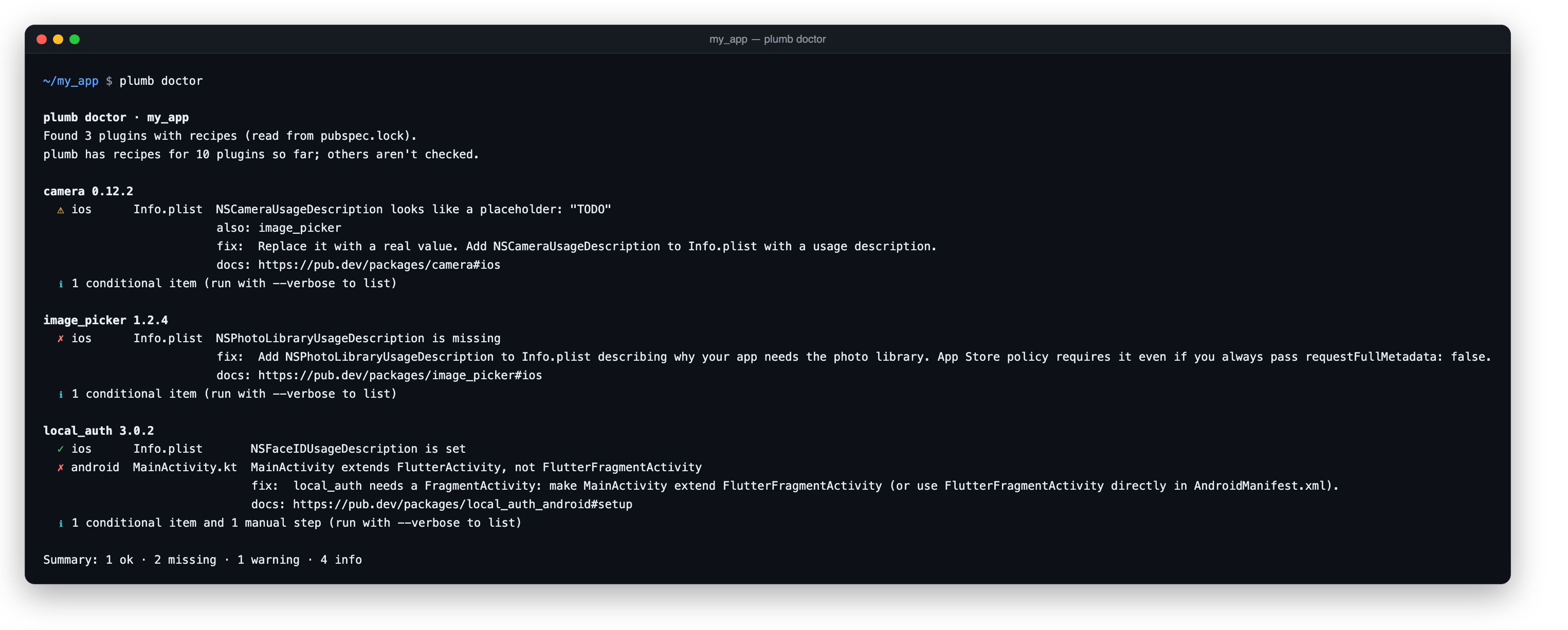
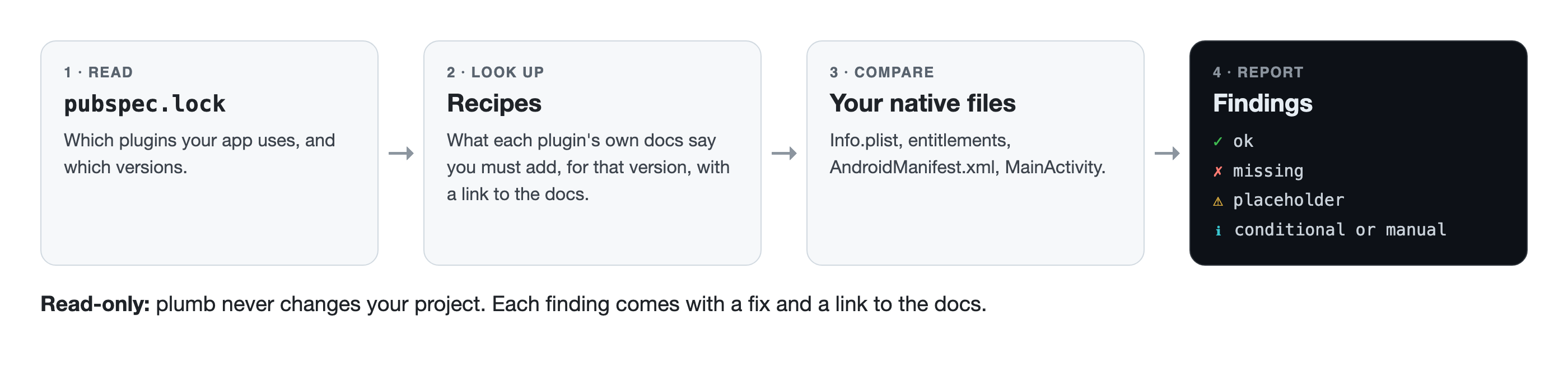
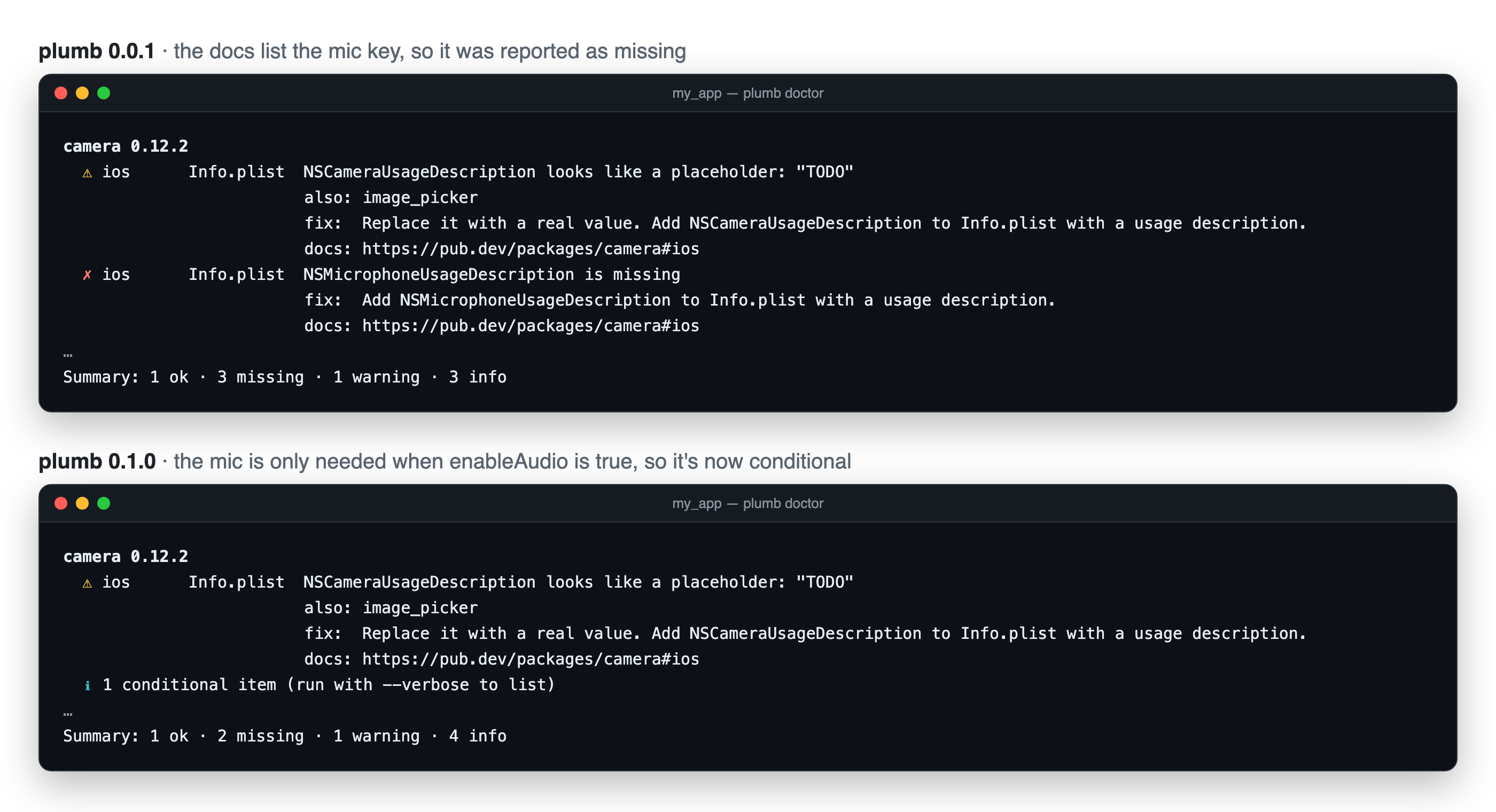
Flutter iOS & Android permissions: what each plugin needs in Info.plist and AndroidManifest You add camera to pubspec.yaml, run flutter pub get, and the Dart side is done. The native side isn't. Many Flutter plugins also need a line in ios/Runner/Info.plist, an entitlement, a manifest entry or a different MainActivity base class, and the only place that's written down is somewhere in each plugin's README. This guide collects that setup for 10 popular plugins in one table, answers the "do I really need this key?" questions, and shows how to check a whole app in one command. It's based on the docs of each plugin and on a study where I checked 25 popular open-source Flutter apps by hand. TL;DR - Every iOS permission your app actually asks for needs a *UsageDescription in Info.plist, with a real sentence, not TODO. - Some keys a README lists are only needed for one feature (the camera's microphone key, image_picker's camera key). Others are easy to forget because a plugin arrives indirectly or a feature gets added later (Face ID, the push background mode). - dart pub global activate plumb && plumb doctor checks all of this for you, read-only. Why does a Flutter plugin need changes in Info.plist or AndroidManifest? A plugin's Dart code calls into iOS and Android, and both operating systems want some things declared up front, in files the plugin can't edit for you: - iOS Info.plist: a purpose string for every protected resource (camera, microphone, photos, location, Face ID…). iOS shows it in the permission prompt. Apple's docs: if it's missing, "attempts to access the resource fail, and might cause your app to crash" (source). - iOS entitlements (Runner.entitlements): capabilities like push notifications (aps-environment) or Sign in with Apple. - Android AndroidManifest.xml: permissions, <queries>, <meta-data> such as API keys, and components like receivers. If a plugin's own manifest already declares a permission, Gradle's manifest merger adds it to your app, so you don't need to. - Android MainActivity: a few plugins need a specific base class. The native setup table for 10 popular Flutter plugins "Must add" is what the plugin's docs require for basic use. "Only if" is needed for a specific feature. Versions are the ones whose docs I compared. | Plugin (versions) | iOS: must add | iOS: only if you use… | Android | Docs | |---|---|---|---|---| | camera (0.9–0.12) | NSCameraUsageDescription | NSMicrophoneUsageDescription: audio recording (enableAudio defaults to true) | nothing in your manifest | docs | | image_picker (0.8–1.x) | NSPhotoLibraryUsageDescription | NSCameraUsageDescription: ImageSource.camera; NSMicrophoneUsageDescription: recording video | nothing in your manifest | docs | | local_auth (2.x–3.x) | NSFaceIDUsageDescription | | MainActivity must extend FlutterFragmentActivity. Only if: USE_BIOMETRIC; an AppCompat launch theme on Android 8 and below | docs | | firebase_messaging (14–17) | aps-environment entitlement; UIBackgroundModes → remote-notification. Also: upload your APNs key, keep method swizzling | fetch background mode | | docs | | flutter_local_notifications (19–22) | Set the notification center delegate in AppDelegate | | Must: core library desugaring (Gradle). Only if: boot, exact-alarm, full-screen-intent permissions and the plugin's receivers, for scheduled notifications | docs | | geolocator (11–14) | NSLocationWhenInUseUsageDescription | "Always" and temporary-precision strings; location background mode | ACCESS_COARSE_LOCATION (required from 14.1.1); fine and background location only if you use them | docs | | google_maps_flutter (2.x) | Your API key via GMSServices.provideAPIKey in AppDelegate | | <meta-data android:name="com.google.android.geo.API_KEY"> | docs | | sign_in_with_apple (5–8) | com.apple.developer.applesignin entitlement | | Only if you use the web flow on Android: the callback activity and its launch mode | docs | | permission_handler (11–13) | | A *UsageDescription for each permission you request; with CocoaPods, the matching PERMISSION_…=1 Podfile macro | The manifest permissions for what you request | docs | | url_launcher (6.x) | | LSApplicationQueriesSchemes: every scheme you pass to canLaunchUrl | <queries> entries for canLaunchUrl and in-app browser checks | docs | Each row comes from a small YAML recipe in plumb, with a link to the doc it was taken from. If you spot something out of date, the recipes are on GitHub. What a purpose string should look like The value is shown to your user in the permission prompt, so write it for them: <key>NSCameraUsageDescription</key> <string>Scan a QR code to add a server.</string> <key>NSFaceIDUsageDescription</key> <string>Unlock the app with Face ID.</string> Not TODO. Not your usage description here (copied straight from a README; it happens). Not an empty <string></string>. All three compile fine, and all three mean the prompt explains nothing. 4 native config slips I found in popular open-source Flutter apps I ran a checker over the 25 most-starred open-source Flutter apps and verified every finding by hand. 22 of 25 were clean. These are the slips in the other three, described without app names (the maintainers have been told): 1. An empty purpose string. NSPhotoLibraryAddUsageDescription existed with an empty value, in an app that saves images to Photos. Users get a prompt with no reason. 2. A missing Face ID string with local_auth. local_auth's iOS docs: "To support Face ID on iOS devices, you must add an NSFaceIDUsageDescription entry to your Info.plist file." The twist: local_auth never appeared in that app's pubspec.yaml. A shared library pulled it in, so only the lockfile showed it. 3. No remote-notification background mode with firebase_messaging, in an app that registers FirebaseMessaging.onBackgroundMessage. Apple: "To receive background notifications, you must add the remote notifications background mode to your app." 4. No NSPhotoLibraryUsageDescription with image_picker. image_picker's README: "This permission will not be requested if you always pass false for requestFullMetadata, but App Store policy requires including the plist entry." Low impact for that app (it isn't on the App Store), but worth adding. The full method, raw output and evidence are public: the study on GitHub. Do I need NSMicrophoneUsageDescription for the camera plugin? Only if the camera records audio. camera's README lists the key without conditions, but its iOS implementation (camera_avfoundation) asks for microphone access only when enableAudio is true. The catch: enableAudio defaults to true. If you create CameraController(camera, ResolutionPreset.high) and never record video, add the key anyway, or pass enableAudio: false. Do I need NSCameraUsageDescription for image_picker? Only if you call pickImage(source: ImageSource.camera) (or the video equivalent). The image_picker iOS code asks for camera access only for the camera source. A gallery-only app doesn't need it. You do still need NSPhotoLibraryUsageDescription: the README says App Store policy requires it even if the permission is never requested. Why does local_auth need FlutterFragmentActivity? local_auth's Android docs: "local_auth requires the use of a FragmentActivity instead of an Activity." Change your MainActivity: import io.flutter.embedding.android.FlutterFragmentActivity class MainActivity : FlutterFragmentActivity() Check your Flutter app's native config in one command Instead of walking through the table by hand: dart pub global activate plumb cd your_flutter_app plumb doctor !plumb doctor output: a placeholder camera purpose string, a missing photo library purpose string and the wrong MainActivity base class, each with a fix and a docs link plumb reads pubspec.lock (so it sees plugins that arrive through other packages too), picks the recipe for each plugin version, and checks Info.plist, entitlements, AndroidManifest.xml and your MainActivity. Any *UsageDescription that's empty or still placeholder text gets a ⚠, whether or not plumb has a recipe for the plugin. ![How plumb works: pubspec.lock, then recipes, then your native files, then findings. Read-only.] (dev-to-uploads.s3.us-east-2.amazonaws.com) - ✗ missing, ⚠ placeholder or wrong type, ✓ fine, ℹ only needed for a feature (see them with --verbose). - It's read-only. It never changes a file, and it doesn't need a Mac or Xcode. - If your shell can't find plumb (common on Windows), run dart pub global run plumb doctor. Conditional keys show up as ℹ, not as errors, so a gallery-only app doesn't get told off about the camera: !The same app checked by plumb 0.0.1, which reported the microphone key as missing, and 0.1.0, which reports it as conditional. In CI - uses: actions/checkout@v4 - uses: dart-lang/setup-dart@v1 - run: dart pub global activate plumb - run: plumb doctor --strict # fails on anything missing or still a placeholder For scripts and AI agents plumb doctor --json returns every finding with an id, the file, the key, a fix and the doc it came from: { "id": "image_picker/ios/info_plist/NSPhotoLibraryUsageDescription", "severity": "missing", "file": "ios/Runner/Info.plist", "key": "NSPhotoLibraryUsageDescription", "fix": "Add NSPhotoLibraryUsageDescription to Info.plist describing why your app needs the photo library. ...", "source": "https://pub.dev/packages/image_picker#ios" } That source field matters more than it looks. An agent that can cite the doc behind a change is one you can review in ten seconds. What plumb doesn't check (yet) 10 plugins so far. Only the main Info.plist and AndroidManifest.xml: no flavor-specific files, Gradle, Podfile or AppDelegate (those show up as manual steps). It reports; it doesn't fix. That's on purpose: I'd rather you trust what it says before you trust it to touch your project. Which plugin should get a recipe next? Comment below or open an issue. - pub.dev: pub.dev - GitHub: UmeshRaj7/plumb --- Keep your pipes clean. — Umesh I'm Umesh Raj, a tech lead and AI-first engineer. I ship Flutter, native Android and full-stack Java/Spring Boot, and I'm building plumb in public. GitHub · LinkedIn
macchina lets you view system information, like your kernel version, uptime, memory usage, processor load and much more. macchina is basic by default and customizable by design. Macchina-CLI/macchina? t.co
Please check out our work here: 📎 paper: arxiv.org 🌐 website: minhphd.github.io 🕹️ demo: hf.co 💻 code: sparklabutah/MiniWeb 🤗 data: hf.co
Location: Hyderabad, India (IST; happy to overlap with Gulf, EU or US-East hours) Remote: Yes Willing to relocate: Open to discussion Available: from mid-December 2026 Technologies: Python, Bash, Kubernetes (kubeadm, bare-metal HA), Docker, Helm, Argo CD, Jenkins, GitHub Actions, Terraform, Ansible, Vault, Harbor, NGINX/HAProxy/Keepalived, PyTorch DDP, Kubeflow Trainer, MLflow, Kafka, Postgres, Redis, Prometheus/Grafana, NVIDIA GPUs, Qualcomm Cloud AI 100, AWS (EKS), Alibaba Cloud Résumé/CV: zafeer.dev Website: zafeer.dev Email: mohammed.xafeer@gmail.com --- Platform / DevOps / MLOps engineer, 2.5 years (SDE II). I build and run the Kubernetes clusters, pipelines and Python services behind a production computer-vision platform for a Saudi government rollout: 50+ GPU machines, 2,000+ cameras, 200+ use cases, plus air-gapped government clusters with no internet egress. Some recent work: - Cut a 55h model-training run to 5h by moving training to PyTorch DDP on on-demand Kubernetes Jobs (pause/resume, MLflow tracking, Kafka progress events). - Took the full on-prem platform deploy from 5 days to 2 hours, with Jenkins/GitHub Actions building images into Harbor and Argo CD syncing 3 environments from Git, Vault as the single source of secrets. - Ported speech models (Cohere Transcribe, Qwen3-ASR Arabic) to Qualcomm Cloud AI 100 for an on-prem live-translation platform: PyTorch -> fixed-shape ONNX -> qaic-compile, about 17x real time, served on Kubernetes behind an OpenAI-compatible API. Wrote a repack tool when the 7.6 GB ONNX export (1,688 tensor files) broke the compiler. Open source: kuiqctl, a kubeadm cluster that stays Ready when your laptop changes Wi-Fi (Zafeeruddin/kuiqctl), and causeway, which lets you view and record cameras behind VPNs and jump hosts with per-customer network namespaces and 298 tests (Zafeeruddin/causeway). Looking for: platform, infrastructure, SRE or MLOps roles, especially where GPUs, on-prem/air-gapped deployments or messy networks are involved.
THEY BUILT A GLOVE THAT PLAYS THE PIANO FOR YOU Built in ONE WEEKEND by @sashaprzybylski @theadrianm_ 50% SPLIT Fees sending to their githubs to further support their project! github.com/theadrianm github.com/sashaprz
🚀我在安卓设备上复刻了豆包手机功能!最懂你的安卓 AI 助手 Kitten 来了! [Kitten 项目地址(点我!!!)]( WJZ-P/Kitten)  前言 大家肯定都或多或少听说过豆包手机的魔力:跟 AI 说一句话,豆包自动在后台帮你打开 APP ,并操作应用。但必须购买他们的努比亚定制豆包手机才能玩起来,现在我做了一个 Kitten 助手,利用特权进程+无障碍权限完美复刻了豆包手机的核心功能:在副屏操纵 APP ,无需用户操心。 给大家简单看下 UI 界面。   上图是一个测试用例,目前是已经执行完任务了的结果,正在执行任务时,副屏会在卡片的右侧显示,并且支持点击放大,让你可以看到 AI 是怎么操控你的 APP 的。 UI 设计上参考了 ios 的液态玻璃,使用了安卓侧的一个开源液态玻璃实现,在输入框和底部 tab 、设置的开关中均可体验到丝滑的液态玻璃效果。 目前项目只是测试版,还有很多不足之处,API Key 这些需要大家手动输入,市面上的 AI 基本都支持。 技术细节 使用 APP 需要先开启开发者模式,软件会监听无线调试服务,得现在手机的无线调试中配对上,才能够使得 Kitten 拥有能够拉起副屏的特权进程,这是必要的。并且代码完全开源,没有任何后台偷偷上传的动作,大家可以放心使用~ 具体的屏幕识别,会优先使用无障碍服务获取页面节点,如果 AI 觉得有必要的话就会调用截图,获取副屏当前画面内容来辅助判断。 感谢大家~ 更多细节就放在 GitHub 的 README 主页里了,就不再赘述,希望大家多多评论,多多 star🌟~
@dhruvtwt_ I've been recreating it in full in threejs if you want to try it NachoEstevo/fushimi-inari-world or walk in it at kyoto.nachoestevo.com
AH-64D CPG Steam Deck / Steam Controller Layout – Custom TEDAC & George AI Controls Hey all, I made this guide and uploaded configurations + custom steam inpt icons for the AH64D CPG role. Overview For anyone interested in using a Steam Deck or Steam Controller with the AH-64D CPG/Gunner seat, I've put together a custom Steam Input configuration for DCS. I wanted to make the CPG seat more accessible through controller inputs while maintaining a HOTAS-style control scheme. Rather than simply mapping a few frequently used buttons, this configuration uses Steam Input modifiers and virtual keyboard commands to provide access to a much larger range of TEDAC controls. What's Included? - AH-64D CPG/Gunner Steam Input layout. - TEDAC control mappings. - George AI Helper controls. - L1, R1, and R5 modifiers. - DCS keyboard and controller configuration files. - Optional custom controller icons. The layout can be used alongside a HOTAS/HOSAS/HOCAS setup or as a standalone controller for the CPG role. It also allows you to switch between Pilot and CPG roles without having to build an entirely separate controller mapping. Supported Devices Steam Deck (tested through Remote Play). Steam Controller. Downloads GitHub Repository: [DENNYTHEGREAT/AH64D_CPG_DCS_SteamDeck-ControllerLayout](about:blank) Steam Input Layout: steam://controllerconfig/223750/3831655863 May your TADS be clear and the Hellfires pointed in the right direction!
[Release] FoxMusic with LibreSpot - Bringing back Spotify on iOS 6 Hi everyone! I wanted to share a project I've been working on recently, with some assistance from an LLM, aimed at bringing modern Spotify functionality back to older iOS devices. I've modified the existing FoxMusic app to integrate LibreSpot, allowing it to communicate with Spotify's modern infrastructure rather than relying on outdated APIs that are no longer supported. The goal is to breathe some new life into legacy iOS devices and make them useful for music streaming again, without depending on Spotify's long-abandoned official apps. It's been an interesting development challenge, particularly working around the limitations of older iOS versions and integrating a more modern Spotify implementation into an existing application. I'd love to hear what the legacy iOS community thinks, and I'm happy to share more technical details about the implementation!
Built for the Meta AI Developer Hackathon. Independent project, not affiliated with or endorsed by Meta. Repo: bendervintimilla/bendrix-shield Full demo (2:39): youtu.be
这个 GitHub 仓库收集了超过一百个主流网站的开源仿制工程,涵盖 Airbnb、Netflix、Spotify 等知名平台。 针对其中每一个项目,仓库都给出了对应的源代码地址、可在线访问的演示页面以及配套的教学文档。 仓库入口为 GorvGoyl/Clone-Wars%E3%80%82 t.co
I made a Chrome extension that adds corner notes, A–Z final cell letter trials and a solve-time calendar to the NYT Crossword I built a small Chrome extension that lets you jot candidate letters in the corner of an NYT Crossword square without committing to them, like pencil marks in Sudoku. It's handy when you know it's an A or an E but not which one yet. Notes have their own shortcut (Ctrl by default), and you can change it. It also adds quick A–Z for that last square you're stuck on and a configurable hotkey for pencil mode. These options live in the game's own settings menu, and you can turn any of them off whenever you want. It has tools for Sudoku, Connections and Wordle too, and each game can be turned off. GitHub: SHexagon-0x6/NYT-Swiss-Knife Chrome Web Store: chromewebstore.google.com It's a hobby project, so expect a few rough edges. Bug reports and feature ideas are welcome, here or on the store page. Not affiliated with the NYT. UPDATE: Remove the calendar save date functionality, since the original stats cover it fairly well.
SEEKING WORK | Shiraz, Iran (UTC+3:30) | Remote | Open to relocation Location: Shiraz, Iran (UTC+3:30) Remote: Yes Willing to relocate: Yes Technologies: React, Next.js (App Router), TypeScript, Tailwind, shadcn/ui, Radix, Node.js, REST APIs, SQL/NoSQL (MongoDB), cloud deploy, CI/CD, AI agents, WhatsApp / Telegram bots Résumé/CV: adibrezazadeh.ir Email: adib.rezazadeh@gmail.com Senior full-stack engineer and technical leader, 6+ years of shipping web and mobile products end-to-end. Currently CTO at Hubly.ir and Head of Engineering at Glonova (Vancouver, remote). Good fits for small fixed-scope projects: Next.js / React fixes, performance work, App Router migrations; landing pages and dashboards; Node.js APIs and cloud deploy / CI/CD; AI agent integrations and WhatsApp / Telegram bots; SaaS MVPs and fractional CTO / tech-lead help. Live products: hubly.ir (production SaaS where I'm CTO) and stogite.com, my SaaS that turns your day into a story and comic panels. Code: adibrezazadeh/adibrezazadeh-resume LinkedIn: linkedin.com Note: I'm based in Iran, so I work under a direct contractor agreement with payment in USD or USDT (no Upwork/PayPal).
Descubra como capturar workflows da web. Guia com capturas anotadas. westpoint-io/mimik
Maybe greed isn't so bad after all. 👀 Built on NEAR. Driven by greed. Controlled by the community. greyw0rks/greed-machine t.co
⚡️ Qwen3.8-Flash-Next on 4× Radeon AI PRO R9700: 225 tok/s one stream, stock vLLM + stock ROCm. 32 streams hit 1823 tok/s total. Caveat: author's box, author's numbers. via @FutureMeng 👇 futuremeng/r9700-stack t.co
I made my indoor bike from decathlon show up on my Apple Watch as a power and cadence meter using ESP32 My Decathlon Domyos bike measures power and cadence and sends it over Bluetooth FTMS. My Apple Watch can record power, but only from Cycling Power sensors. Different protocol, so my indoor rides had heart rate and nothing else. I made this thing where the ESP works as a BLE connector, gets data from the Bike and sends it to my apple watch with different protocol that apple watch can read. That way no additional apps needed, and everything ends up in apple health. Why the ESP32-C3 (Super Mini) - It only needs BLE, and the the C3 does have it, also it's the smallest so you could hide it better if you get power from the bike to it - Native USB, no USB-UART chip. That made browser flashing easy - About 3€, small, onboard LED for status. It lives on a USB charger next to the bike - It also builds for the S3 and ESP32 Libraries and why - ESP-IDF 5.3 instead of Arduino: I wanted direct control over the BLE stack, bonding stored in NVS, and the connection limits - NimBLE instead of Bluedroid: much smaller RAM/flash sizes - A 40-line header-only test runner instead of Unity/GoogleTest: the FTMS parser and the maths are plain with no IDF dependency, so the tests build on a laptop with nothing downloaded - ESP Web Tools for the installer on web Hurdles and edge cases - Cycling Power has no cadence field. You send cumulative crank revolutions + the time of the last one, and the Watch derives cadence. The bike only reports rpm, so the firmware synthesises crank revs from it. - The bike reports power one packet late: after you stop pedalling it still says 40 W with cadence 0. The bridge gates power to 0 below 5 rpm. - Every few minutes the bike sends one absurd value (135 → 456 → 139 W), which wrecks peak power and the Watch's FTP estimate. A rise bigger than 60 W and 50 % has to last 2 s before it gets through. Drops pass immediately. - The bike accepts only one connection, so if Kinomap or the Domyos app is connected, it stops advertising and the bridge can't see it. It should work with any FTMS bike, but I've only got the one. If you have a different smart bike from decathlon or some other brand I'd love to hear if it connects and it works, if you have issues etc please tell me, I would try to fix them. Repo: benasja/domyos-bridge Installer: benasja.github.io
Audits also need decoys: suspicious-looking patterns that are actually normal. Without them, an audit produces false positives and loses trust. Devil’s Analyst includes checks, review skills and diagnosis playbooks. C-Kapsalis/devils-analyst
@rerun_build OpenBot: Run a team of AI agents on your computer nightly-labs/openbot
GHSA-J656-3HF2-FVJC: GHSA-j656-3hf2-fvjc: Read-Only SQL Validation Bypass via Comment Interpretation Conflict in Bytebase DBHub GHSA-j656-3hf2-fvjc: Read-Only SQL Validation Bypass via Comment Interpretation Conflict in Bytebase DBHub > Vulnerability ID: GHSA-J656-3HF2-FVJC > CVSS Score: 6.1 > Published: 2026-11-02 An interpretation conflict in Bytebase DBHub (< 0.22.6) allows attackers to bypass read-only SQL query restrictions when connected to MySQL or MariaDB instances. Because DBHub's custom SQL tokenizer treats any '--' sequence as a comment, whereas MySQL and MariaDB require trailing whitespace or a control character, crafted queries containing '--' immediately followed by non-whitespace characters allow stacked destructive SQL statements to execute on connections configured as read-only. TL;DR DBHub versions prior to 0.22.6 fail to enforce MySQL and MariaDB whitespace requirements for single-line '--' comments in the read-only SQL validator. Attackers or compromised AI agents can append stacked DDL or DML statements after a non-whitespace '--' sequence (e.g., 'SELECT 1--1;DROP TABLE victim') to execute unauthorized database modifications. --- ⚠️ Exploit Status: POC Technical Details - Vulnerability ID: GHSA-j656-3hf2-fvjc - Affected Package: @bytebase/dbhub (< 0.22.6) - Primary CWE: CWE-436 (Interpretation Conflict) - Secondary CWE: CWE-863 (Incorrect Authorization) - CVSS v4 Score: 6.1 (Medium) - Attack Vector: Network (SQL Query / Prompt Injection) - Impact: Read-Only Bypass (Arbitrary DDL/DML Execution) - Exploit Status: Proof-of-Concept Documented Affected Systems - @bytebase/dbhub (npm package) - @bytebase/dbhub: < 0.22.6 (Fixed in: 0.22.6) Code Analysis Commit: 872bb33 Implement MySQL/MariaDB specific single-line comment scanning and enforce START TRANSACTION READ ONLY in connectors. Exploit Details - GitHub Security Advisory: Official advisory containing proof-of-concept SQL payload demonstrating the read-only validation bypass. Mitigation Strategies - Upgrade @bytebase/dbhub to version 0.22.6 or later to apply dialect-specific comment tokenization and read-only transaction wrappers. - Enforce principle of least privilege at the database layer by configuring DBHub connections with a MySQL/MariaDB user restricted strictly to SELECT privileges. - Monitor and filter incoming SQL queries at the proxy or application layer for '--' sequences not followed by whitespace that precede semicolons. Remediation Steps: 1. Update package.json or global npm/npx installations to require @bytebase/dbhub >= 0.22.6. 2. Audit existing MySQL and MariaDB user accounts utilized by DBHub and revoke write/DDL permissions (DROP, DELETE, UPDATE, INSERT, ALTER) if the connection is intended to be read-only. 3. Review database general query logs or audit logs for stacked queries matching the pattern '--[^\s\x00-\x20\x7F].*;'. References - GitHub Advisory Database: GHSA-j656-3hf2-fvjc - Bytebase DBHub Security Advisory GHSA-j656-3hf2-fvjc - Bytebase DBHub Pull Request #342 - Patch Commit 872bb338f7d31f6afe517a076ac3e3edafaaaf08 - Bytebase DBHub Release v0.22.6 --- Read the full report for GHSA-J656-3HF2-FVJC on our website for more details including interactive diagrams and full exploit analysis.
Introducing iPhone Mirroring EU Currently Apple has ~100 million iPhone users in the EU but none of them can use the iPhone Mirroring feature so I built an easy to use open source version of it Try out the Mac app here: yachty66/iphone-mirror t.co
screenFetch is a "Bash Screenshot Information Tool". This handy Bash script can be used to generate one of those nifty terminal theme information + ASCII distribution logos you see in everyone's screenshots nowadays. KittyKatt/screenFetch t.co
The NSA open-sourced its reverse engineering toolkit, and it decompiles binaries across tons of CPU architectures for free. 🔗 NationalSecurityAgency/ghidra Credits: NationalSecurityAgency/ghidra #ghidra #java #reverseengineering
Your Coding Agent Watches Your Repo and Opens the PR Itself — dsh-superagent dsh-superagent is DeepSeek's proactive coding agent for one GitHub repository, packaged as a bundle for DeepSeek Harness. It listens to GitHub, opens a work item when asked, works in its own session, and answers back — usually with a pull request. Research prototype, not an official DeepSeek product. Repo: deepseek-ai/dsh-superagent-prototype #dsh #DeepSeek #CodingAgent #AIAgent #DevTools #OpenSource #GitHub