Mentions
Conversations linking to GitHub, newest first. Times are UTC.
Mentions by source
X
Bluesky
Hacker News
V2EX
Qiita
DEV
Mastodon
Latest posts
@underhillj I don’t use tailscale, but the client is built on top of beryssh, maybe it will help you github.com/cobanov/berryssh/wiki/Remote-servers
The 57 Grothendieckian Problems — Open Problems for Mathematics and Machine Reasoning from the Grothendieckian Programme Grothendieck's way with a hard problem was seldom to attack it where it stood: he built the setting in which the problem became natural, and let the solution come to it. The Programme asks whether a machine can take part in mathematics of that kind … Three papers introduce the Programme in article form: an overview, twelve theses and fifty-seven open problems. They were published on Zenodo on 2026-10-28 under CC BY 4.0, each with its own DOI, and the theses and the problems cite the overview. Their repository holds the 57 problems as issues, with the papers' sources, data and figures. Recursive mathematical discovery is recursive self-improvement, held to the standard of proof. Whether the recursion succeeds is, in the Programme's own words, an empirical question; every claim carries its status. Each problem has an issue: post a solution, a partial result, a counterexample to the problem as stated, a reference showing that it is already solved, or a correction. None of the seven works claims a proof of the problems it studies. wisemotif.ai is an AI-native company, and the Lab's research and development is AI-assisted throughout. The core ideas, the framework and the system of thought of the Grothendieckian Programme are the author's own, from the author's human thought, and are the author's intellectual property; the works that set them out are protected by copyright. Problems (one GitHub issue each): AlienMuse/grothendieckian-problems The Grothendieckian Programme: An Overview: doi.org The Rising-Sea Theses: doi.org The 57 Grothendieckian Problems: doi.org Grothendieck Lab: grothendiecklab.com
After two years of coding with agents, I kept losing track of why things were built, so I made a map that links commits back to the messages behind them I've been building with coding agents for about two years, and the whole time I felt something was slipping away. When you write code yourself, it sinks in bit by bit. You know why that table exists and why you wrote that class. When an agent writes it, that feeling goes away. The information isn't really gone, though. It sits in your messages, the agent's replies and your commits, just in separate places. So I built cogit to tie them together. Every message you send to your agent becomes a "thought commit", and your code commits point back to the message that caused them. You get a map you can walk backwards: what led to this change, why we did it, what we rejected. For changes too big to read file by file, there's Shape: a small diagram of what the commit does, one level above the diff. I need this most because I run 5-10 agents at once across 2-3 projects. Sometimes a few minutes later I can't remember what I did where. It works with Claude Code today. It's free and open source, with no server and no account. You can click through a saved map without installing anything: erensrtky.github.io Source: erensrtky/cogit It's early, so I'd love to hear what's confusing or what you'd want from it. How do you keep track of why your AI-written code ended up the way it did?
Sudo: control your Linux PC from your Android phone (X11 and Wayland, one-command install, no account) I built a phone remote for my desktop and made sure it works on Linux, not just Windows. Install with one command: git clone loueylahwel/sudo && cd sudo && bash agent/linux/install.sh The installer handles apt, dnf, pacman and zypper and sets up a systemd user service. Tested in CI on Ubuntu 24.04/26.04, Debian 13, Fedora, Arch and openSUSE, plus Wayland screen sharing on Sway. - Screen + touchpad on X11, and on Wayland through the desktop's screen sharing (GNOME, KDE Plasma) or wlroots (Sway, Hyprland) - Files, bash terminal, processes, clipboard, power and timers - Now Playing for any MPRIS player - PC sound on the phone through PipeWire - On KDE Plasma: window switcher and brightness If the screen comes up black (a Wayland permission, a locked session), the phone tells you why instead of streaming black. MIT, no account, no cloud: loueylahwel/sudo
7/ Free, MIT, no account, no telemetry, no waitlist. Mac only, Apple Silicon, macOS 14+. onurozcan/omux
@_avichawla would love your take on this one: cutcraft gives the model one artifact (code) instead of 100 tools to drive a video editor. is code-as-state the pattern you're seeing win for agents? prefix-tree/cutcraft
Tyhp: a typed superset of the PHP language that compiles to readable PHP (first public beta) Hi all. This is my first post here (my first post on reddit at all, actually), so go easy on me. For the last few years I've been working on a project called Tyhp. Using AI has really pushed it forward over the last year or so. It's a typed superset of the PHP language. You write .tyhp files, the compiler type-checks them, and it outputs ordinary, readable PHP that you deploy the same way you already do. The closest comparison is TypeScript and JavaScript. I started it because I really like TypeScript and PHP, and I always wondered why nobody had built a superset language for PHP that adds the kind of typed features I was used to in TypeScript. What it adds on top of PHP: - Types are required or inferred, and non-nullable unless you say otherwise - Generics, checked at compile time - Structs, which are typed shapes that compile down to plain arrays - async/await built on Fibers - A few smaller things like extension methods, operator overloads, and using for cleanup A small example: <?tyhp namespace App; type User = struct { int $id; string $name; ?string $email; }; function findUser(array<User> $users, int $id): ?User { foreach ($users as $user) { if ($user->id === $id) { return $user; } } return null; } function emailOf(User $user): string { return $user->email ?? '(none)'; } The output looks like this: function findUser(array $users, int $id): ?array { foreach ($users as $user) { if ($user['id'] === $id) { return $user; } } return null; } function emailOf(array $user): string { return $user['email'] ?? '(none)'; } The struct turns into an array and the Tyhp-only types are erased. Some features (structs, async, generics) rely on a small Composer runtime package, tyhp/core, plus a couple of others when you use them. You can mix .php and .tyhp files in one project, and the .php files pass through untouched. Composer packages work as usual. To type-check calls into them, it generates .tyhpdef declaration files, similar to .d.ts files in TypeScript. Some things to know up front: - It's a beta, so syntax may still change and there will be bugs. Please report anything you run into on the GitHub issue tracker. - The compiler is written in C# (.NET 9). Your servers only need PHP. The standalone binaries don't need .NET installed, and composer require --dev tyhp/compiler downloads the binary for you. - A few PHP features are restricted in .tyhp files so the checker can do its job. For example, eval() is off by default and dynamic properties are only allowed on stdClass. - There's a language server with VS Code and PhpStorm plugins. Xdebug works through a proxy that uses the generated source maps. Docs: tyhplang.com Source: tyhpproject/tyhp Examples: tyhpproject/tyhp-examples Mostly I'd like to hear what you think. What would make you try something like this, and what would stop you? I'm happy to answer questions.
Visualize context rot, token breakdown, and git drift in Antigravity When an Antigravity conversation gets long, two things usually cause context rot: 1. Silent compactions (CHECKPOINT events): Every time you hit the context ceiling, Antigravity summarizes older turns and only keeps your last 10 prompts verbatim. After a few compactions, earlier rules and architectural decisions start getting ignored. 2. Git drift: If you commit code in another terminal or chat, the older conversation has no idea HEAD moved. AGY Cockpit is a lightweight sidecar panel for Antigravity (Windows & Linux, pure Node.js, zero dependencies). You can use it either as a full replacement for the default conversation sidebar (with project tabs, search, new chat, pin, rename, archive, and live status badges) or as a complementary tracker in the right auxiliary pane to see what is actually going on under the hood: - Live Context Window & Compaction Health: Shows current context usage (n / ~m), how many compactions happened (Fresh -> Warm -> Heavy -> Polluted), and how many of your prompts are still kept in full vs. compacted. - Interactive Context Breakdown: Clicking the context bar opens an on-demand breakdown of what is eating your active context window (base system/summary tokens, loaded SKILL.md files, tool categories, top 5 heaviest tool steps, and most touched files). - Subagent Tracking & Live Status: Groups spawned subagents under their parent chat, sums up their tokens, and bubbles up live thinking (•••) or waiting (! permission / ? question) badges to the parent card and project tab. - 5-Hour & Weekly Usage Ring: Live ring in the header for Claude / Gemini / GPT usage windows with reset countdowns. - Git Drift Detection: Tells you if a conversation is N commits behind HEAD and lists the missed commits. - Two-Step Smart Handoff: Generates a self-contained <HANDOFF_PROMPT> from the current chat, lets you edit it, pick your next model and thinking tier, and start a fresh chat in the same workspace from Step 0.
Free tool update: Telegram alerts for Bitaxe / NerdQAxe / Avalon solo setups (self-hosted) Fellow solo miners, Gerry here. I'm chasing a block with a few small miners (Bitaxe, NerdQAxe, Avalon) and got tired of checking them by hand, so I built Solo Miner Copilot. It's a self-hosted Telegram alert bot that runs on Umbrel. Shared it here before; quick update: - Still free and open source, and it's staying that way. - Code: gerrylove0820/solo-miner-copilot - If something doesn't work on your hardware, please open an issue. Real-world testing helps a lot. Side note: I'm now offering optional paid remote setup help (about $49–99, EN/ES) for anyone who'd rather not set it up alone. Totally optional. Details: gandbservicescorp.com. Tips in BTC are welcome but never expected. A hosted version (Copilot Cloud) is coming soon. Nothing is promised yet. Email info@gandbservicescorp.com if you want on the waitlist.
Quick way to disable plugins? Hey y'all. Looking for a quick way to disable plugins across profiles. I had created this issue to address this. Trying to run hermes plugins in Terminal and then using a number to toggle a plugin on/off and then scrolling up and down to confirm is silly. The Docs have it interactive but I can't seem to find this interactive experience unless using a Docker version of Hermes. I’m trying to turn off all plugins i don’t use or need like all the platform plugins and would probably be easier for me to go through the list myself than to have a model+hermes go through it. Trying to set plugins in one profile and then duplicate it into all profiles. Is it something that I can set in one profile and just copy the block from one config.yaml to all the others in VS Code or something?
@Snaillord_ @legend4ryl0ver @AbadXDev a new eglantine build just dropped. They say, the "pgo" version runs better. github.com/Djihads80/Eglantine/releases/tag/build… t.co
12 years ago, I bought an Nvidia Shield tablet and 3 controllers. Amazing hardware, but their proprietary Wi-Fi protocol never worked on PC. Today, my brother dusted them off, spent some tokens, and got them working natively on Linux! Dewopalis/Open-FatShield
I was tired of searching for a remote PC controller, so I built mine with Claude Code: phone app + PC agent, Windows and Linux I'm a solo dev and Claude Code did a big share of the work on Sudo, an open-source app that turns an Android phone into a remote for your PC (screen + touchpad, files, terminal, media, PC sound on the phone). Things that went better than I expected: - Porting to Linux: an installer for apt/dnf/pacman/zypper, Wayland capture through the desktop portal, and CI that runs it on 6 distros plus Sway. - Windows features I couldn't test locally (I'm on Linux): Claude wrote the WASAPI loopback capture and a CI job that installs a virtual sound card on a Windows runner and checks a test tone actually reaches the phone. - Debugging with measurements, not guesses: when the cursor felt laggy, it logged when each touchpad move arrived and traced it to the PC's Wi-Fi, which was lagging because Bluetooth had been switched on and was scanning on the same chip. What I still had to do myself: decide what the app should be, test on my real phone, and say no a lot. Repo (MIT): loueylahwel/sudo
In benchmarks, TabPack delivered competitive results without hyperparameter tuning. Now you can try it through familiar PyTorch and scikit-learn interfaces. yandex-research/tabpack
Спасылкі на пераклад Disco Elysium. NexusMods: nexusmods.com GitHub (zip-файл унізе старонкі): github.com/AngryRalef/disco-bel-translation/relea…
لاعاد تشرح مشروعك من الصفر كل ما فتحت Claude Code 🦦 فيه ريبو مجاني اسمه claude-mem الاول في GitHub Trending اليوم و110K نجمة: 1- يحفظ ايش سوى الايجنت بالجلسة اللي قبل 2- يرجع له السياق المفيد لحاله 3- يشتغل مع Codex و OpenCode احفظها 🤓 thedotmack/claude-mem
Useful Links for Backtesting Found something useful for anyone working on trading strategies and quantitative research. 🔗 QuantDev-stack/OptionVault (including L1 depth data for Index)
Minish Studio Free, offline-capable scene and animation editor for The Legend of Zelda: The Minish Cap, with bundled game sprites. By SerakSan. Fan project. seraksan.github.io SerakSan/minish-studio Artwork: Nintendo / Capcom github.com/SerakSan/minish-studio/blob/main/CREDI…
@tuturetom @OpenDesignHQ open design for ui, i did the same bet for video: cutcraft, where the model writes one tsx file and the timeline edits that same file. do you think 'the file is the artifact' beats tool-calling for creative apps? prefix-tree/cutcraft
Autoware 2.0 Just Upgraded Open-Source Self-Driving AI Autoware 2.0 is here — and it could change how developers build the next generation of self-driving AI. On November 2, 2026, the Autoware Foundation announced a major upgrade to its open-source autonomous-driving platform. The update brings support for AI-based planning alongside traditional driving software, plus new tools for discovering compatible components, managing models, and developing vehicle systems. But there is an important distinction: Autoware 2.0 is not a ready-to-install replacement for Tesla FSD or Waymo’s technology. Advanced multi-planner selection remains a development objective, and real-world safety still requires extensive validation. Could open-source innovation change who builds the future of autonomous transportation? Subscribe to AI Tomorrow AGIOS for credible AI news, robotics breakthroughs, and emerging technologies shaping tomorrow. Sources: Autoware Foundation announcement: autoware.org Autoware Architecture 2.0: docs.autoware.org Autoware official repository: autowarefoundation/autoware Visuals include illustrative AI-generated representations, not demonstrations of actual road performance. #Autoware #SelfDrivingCars #artificialintelligence #technology #metapro #ai
Pawnix: a keyboard-first chess client for the terminal Hi, Pawnix is a terminal chess app for local games and casual Lichess play. It has a curses interface, multiple board themes, clocks, move review, and premoves. It’s open source and still early, so feedback and bug reports are welcome!
Спасылкі на пераклад Disco Elysium. NexusMods: nexusmods.com GitHub (zip-файл унізе старонкі): github.com/AngryRalef/disco-bel-translation/relea…
科研人画论文图,不用每次都从 Matplotlib 配色开始折腾了。 figures4papers 就是一款给 Codex、Claude Code、Cursor 用的论文绘图 Skill。 数据交给它,柱状图、折线图、雷达图、趋势图这些论文级图表就能生成出来。 ChenLiu-1996/figures4papers t.co
Vercel agent-desktop: computer use for coding agents through the accessibility tree Vercel Labs released agent-desktop this week, a free, open source tool that gives AI coding agents computer use on macOS, Windows and Linux. Chris Tate, who built Vercel's agent-browser, announced it on October 31 and described it as "agent-browser, for your whole computer." The interesting part is not that an agent can click buttons. It is how it sees the screen: through the operating system's accessibility tree, with no screenshots and no pixel matching. What actually shipped agent-desktop is a Rust CLI plus a C library, on npm as version 1.0.2 under Apache-2.0, with native binaries for x64 and ARM64. There is no language model inside it. Any agent that can run shell commands can drive it, so Claude Code, Codex, Cursor's CLI or a plain bash script all qualify. The command set covers observation, clicks and typing, window management, notifications, the clipboard and sessions, about 56 commands in total. Development started in February, led by Lahfir. Version 1.0 with Linux support shipped on October 28, and 1.0.2 followed on October 30. Refs, not pixels The core loop is observe, act, observe again: agent-desktop snapshot --app Finder -i # interactive elements, each with a ref agent-desktop click @s8f3k2p9:e8 # act on a ref from that snapshot agent-desktop snapshot --app Finder -i # observe again to verify A snapshot returns JSON with a ref for every element the agent can act on. The agent acts on a ref, then takes a new snapshot to check the result. Nothing is inferred from pixels. The tool reads the AX API on macOS, UI Automation on Windows and AT-SPI on Linux, so it sees the same UI structure a screen reader sees, with roles and states the OS already maintains. Errors an agent can actually handle Refs belong to the snapshot that produced them. When the UI shifts before an action lands, you do not get a wrong click, you get a machine-readable error: STALE_REF or AMBIGUOUS_TARGET. If several windows match, the error lists the candidate window ids in error.details, and you pass one back with --window-id. A bare @e8 without its snapshot prefix is rejected with INVALID_ARGS. This is the part I would underline for anyone wiring agents to GUIs. Vision-based computer use fails silently: the model clicks the wrong coordinate and you find out downstream, if you find out at all. Here every failure mode has a code and a defined recovery: take a new snapshot, use its refs. Actions are safe to retry because refs stay stable, which is exactly the property you want in an unattended loop. Dense apps: skeleton first, then drill down A full accessibility tree of an Electron app is big. The skeleton traversal work merged into the project measured it: a Slack skeleton snapshot is about 3.6KB versus roughly 17.3KB for the full tree, a 78-96% token saving on dense Electron apps. The pattern is to map first, then drill in: agent-desktop snapshot --skeleton --app Slack -i --compact agent-desktop snapshot --root @s8f3k2p9:e3 -i --compact The skeleton gives a shallow overview with child counts on truncated containers. --root starts a traversal from a previously discovered ref, so you only pay tokens for the region you are working in. For an agent on a token budget, this is the difference between a tool you can leave running and one you babysit. Wiring it to an existing agent Install is npm install -g agent-desktop. The binary carries its own docs, matched to its version: agent-desktop skills get desktop # the loop, refs, verification and retry rules agent-desktop skills get platform # what differs on the OS you run on You can install the bundled skill into a harness with npx skills add https://github.com/vercel-labs/agent-desktop --skill agent-desktop. Two details worth knowing before you script it. Actions run headless by default: they go through the accessibility API without moving the pointer or stealing focus, and --headed opts into real input. And on PowerShell, quote every ref, because a bare @token is the splatting operator. Platform reality check The platform table in the repo readme is honest about gaps. macOS needs an Accessibility grant, and agent-desktop permissions --guide walks you through it. Windows needs no grant for apps at your terminal's integrity level. Linux needs at-spi2-core in your graphical session; mouse input is X11 only or --headed, the Wayland clipboard needs wl-clipboard, and notifications go through GNOME Shell. Apps without an accessibility tree are invisible to it, and it does not automate web pages, that is what agent-browser is for. Take the data exposure seriously Snapshots, screenshots and clipboard reads can contain private data, and the project's own docs warn against routing them into public logs. An optional helper called JEV sends screen descriptions to a configured model provider. Sit with that for a second: this tool reads your screen the way a screen reader does, and it hands what it reads to whatever agent invoked it. An agent with agent-desktop plus shell access effectively holds your user account. I wrote about where that boundary sits when Nvidia moved agent execution into the kernel, and about the guardrail details to check before letting Copilot click your desktop. The same logic applies here: run it in a dedicated environment where the blast radius is a test account, not your daily driver. When I would reach for it Not for anything with an API. If the thing you are driving exposes an MCP server, a CLI or an HTTP endpoint, use that instead, it will be cheaper and more reliable. agent-desktop earns its keep on apps with no automation surface at all: installers, vendor tools, that one dialog box your CI cannot get past. The observe-act-observe loop with structured errors is the same verification discipline I want in every agent workflow, and now it extends to GUIs. That is the real news here, not the clicking.
Coding agents with a face: meet the Coincide bots Coincide's bots are coding agents with a face. Pick one of 7 characters, give it one of 10 personalities (or write your own), and choose the agent, model and folder it works in. Give it a routine and it checks in on schedule, like a morning standup every weekday at nine. Coincide is a free, open-source (MIT) native Mac app that runs Claude Code, Codex, Cursor, Grok Build, OpenCode and Antigravity side by side in one window, with the subscriptions you already have. Download: coincide.dev Source code: apoorvdarshan/coincide Product Hunt: producthunt.com Discord: discord.gg Note: the app screens in this animation are recreated with demo data. The bots are drawn with Coincide's own artwork. #Shorts #Coincide #ClaudeCode #macOS #OpenSource
I built an open source OS that runs Nextcloud on ZFS and lets you search its snapshots for old or deleted files Disclosure: this is my project. virgoOS is a Debian 13 based OS (GPLv2) that turns a small server into a private cloud, with Nextcloud as the main app. The part I think this sub will care about is file recovery. Nextcloud's trash bin covers deleted files for 30 days or so. It doesn't help when a file was overwritten months ago. On virgoOS, Nextcloud's data sits on a redundant ZFS pool that keeps a snapshot for each of the last 36 hours, 30 days, 60 months and 5 years. Every hour an indexer catalogues the files in those snapshots, so you can: - search every snapshot by file name and see each version a file had, deleted ones included (user files, trash and group folders) - restore one version into any user's folder, as a copy or overwriting the current one, and it shows up in Nextcloud without a rescan - browse Nextcloud as it was on a given day, filter to "deleted since", and restore a whole selection into its own folder The snapshots are read-only, so they also cover you after ransomware. Nextcloud installs from a built-in App center, with Euro Office for editing documents together, the high-performance backend for calls and the whiteboard. Traefik handles certificates and Authelia handles accounts. Mail server, WireGuard and Pi-hole are in the App center too. Requirements: amd64, at least two data drives of the same size, 8 GB RAM. You can use your own domain. A fleet account at fleet.univrs.cloud is only needed if you want a free name under univrs.cloud. The fleet also lets you manage the node remotely, even behind CGNAT. Your files never go through the fleet. ISO: github.com/univrs-cloud/virgo/releases/latest Docs: docs.univrs.cloud Source: github.com/univrs-cloud Feedback is welcome.
one model doesn't have to do every job. in lainos, task routes can send writing, coding, translation and other kinds of work to different providers. i like a specialist who knows when to pass the note. lain-labs/os t.co
FOSS Mac app that helps cut software costs by finding open-source replacements and showing what you keep I've been trying to move more of my Mac setup to FOSS and cut down the software subscriptions I pay for. Finding an open-source alternative is easy. Figuring out whether I can actually switch without losing something I use is the harder part. LibreReplace scans supported apps already on the Mac locally and compares them with FOSS alternatives. It shows what carries over, what's partial, what's missing, and gives each one a Strong, Partial, or Keep result. Right now mine shows: Bear → Joplin — Strong · 100% Photoshop → GIMP — Partial · 68% CleanMyMac → Dusty — Partial · 58% Tower → GitHub Desktop — Partial · 79% Acrobat Pro → LibreOffice Draw — Keep · 31% I entered the recurring costs for those apps and the Overview comes out to $414.83/year in potential savings. The part I like is that it doesn't assume every FOSS alternative is good enough. Acrobat is $239.88/year in this setup and LibreReplace still says Keep because critical OCR and redaction features are missing. Everything stays local. No account or telemetry. LibreReplace itself is free and open source under Apache-2.0. GitHub: maliroq/librereplace brew install --cask maliroq/tap/librereplace What paid Mac app would you most want to replace with FOSS, and what's the one feature you couldn't afford to lose?
Thank you! Ming 3.0 is the reason it sounds this good 🙏 The repo is live, all 3 apps: the home assistant, a voice studio and a live AI podcast 👇 joeynyc/spark-voice
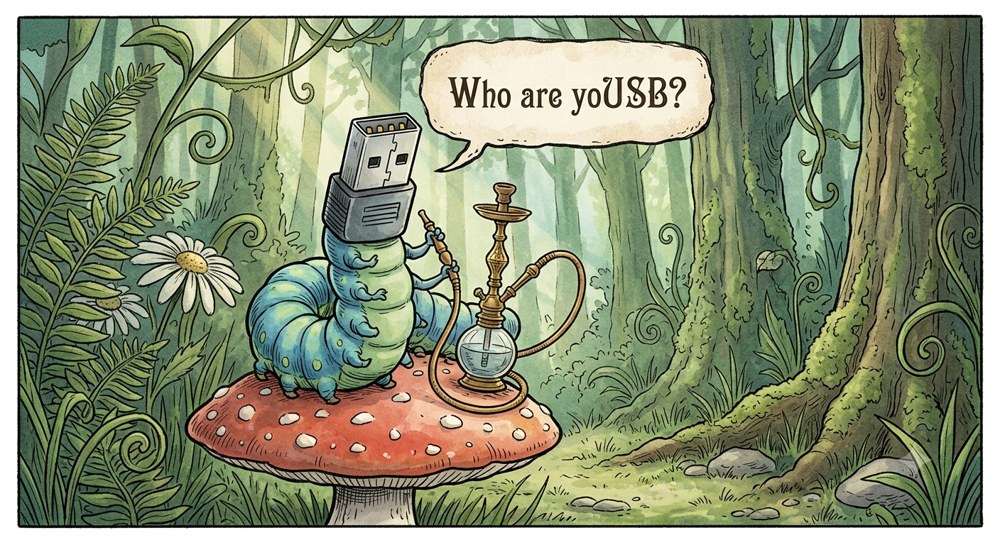
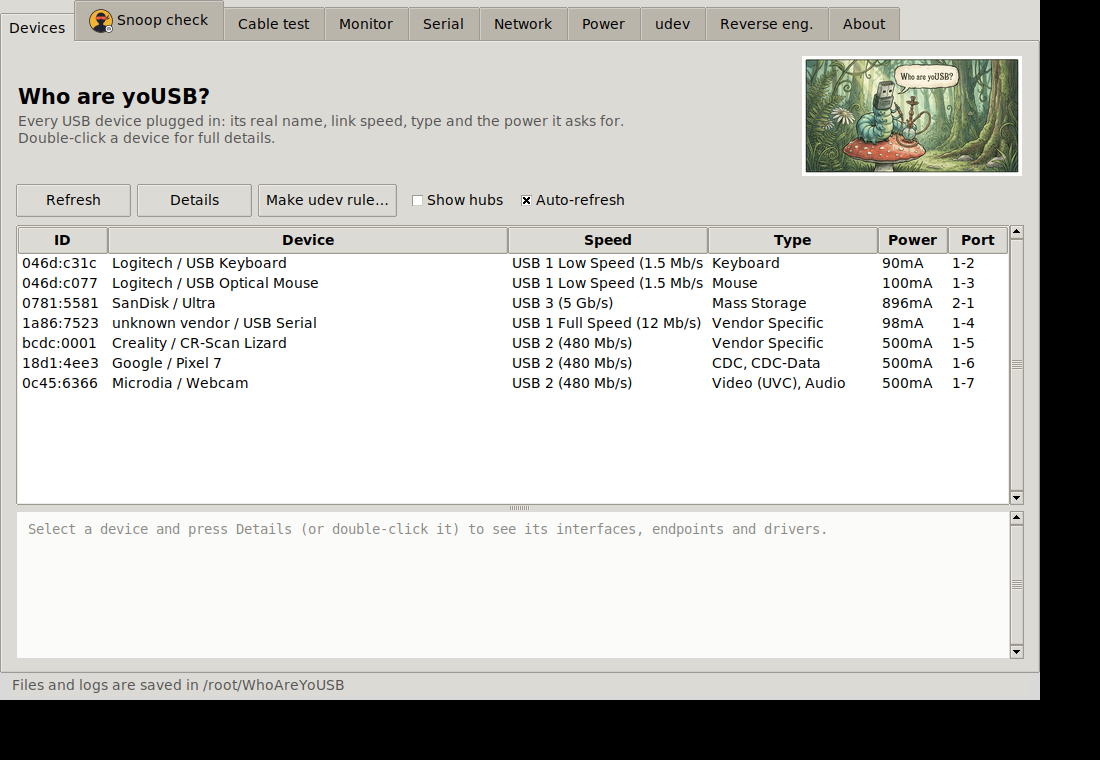
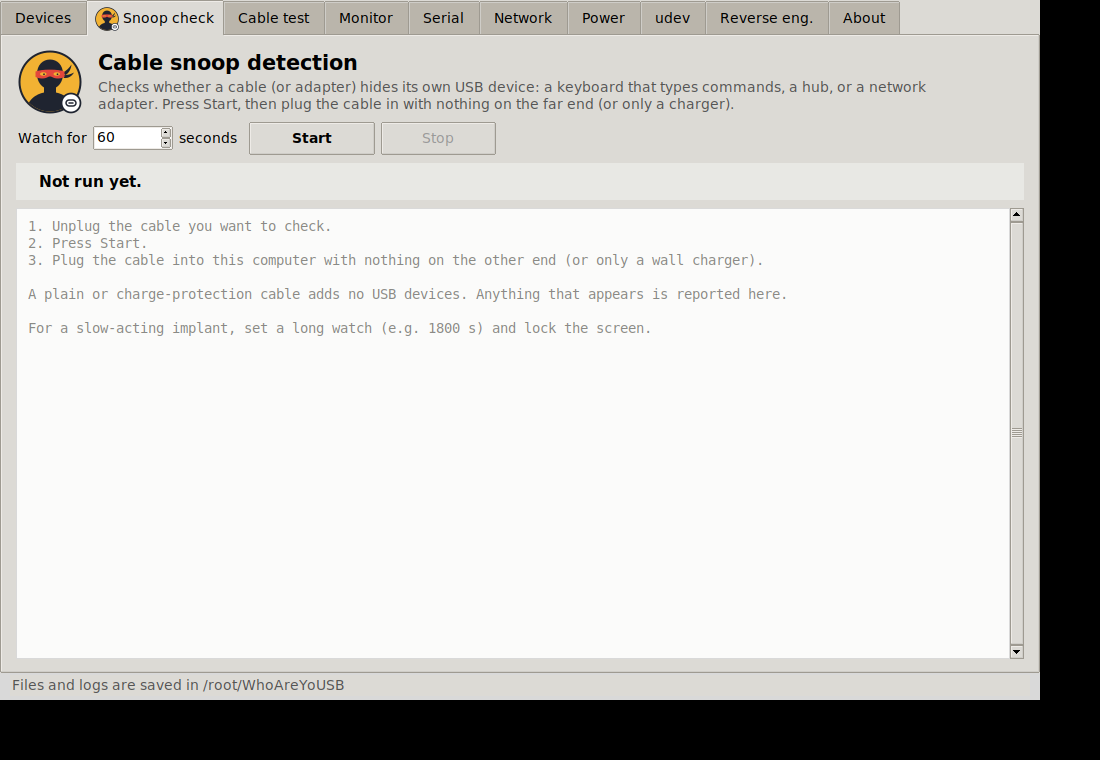
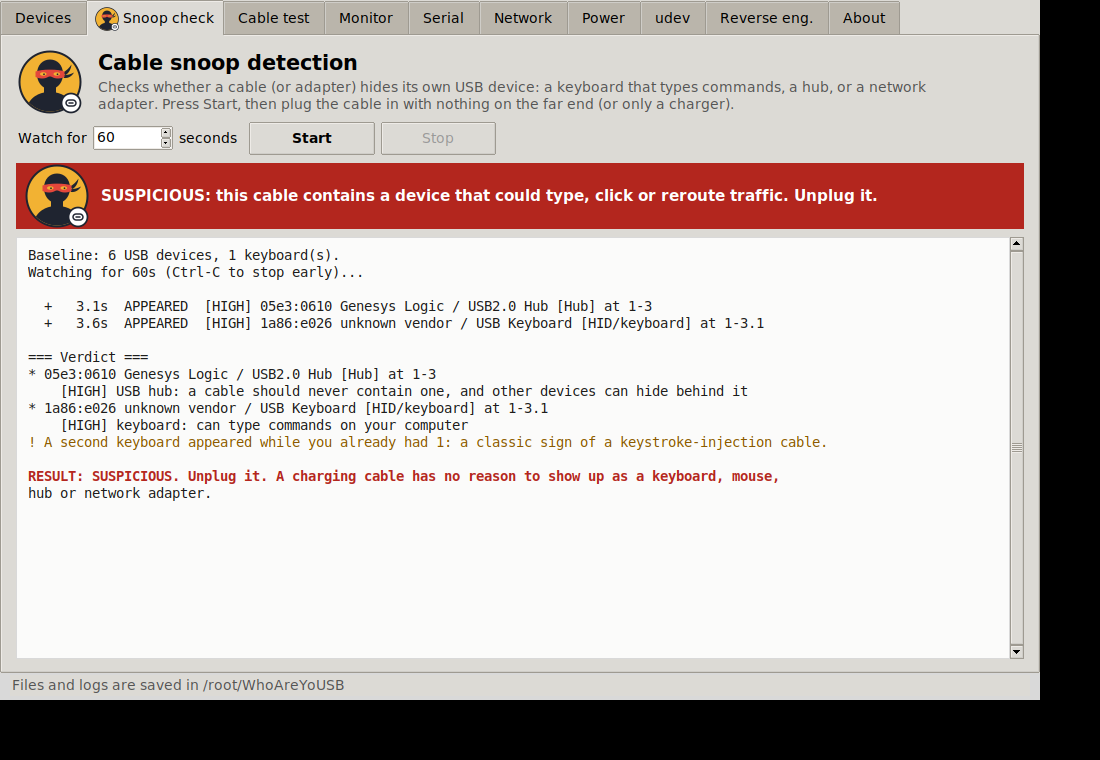
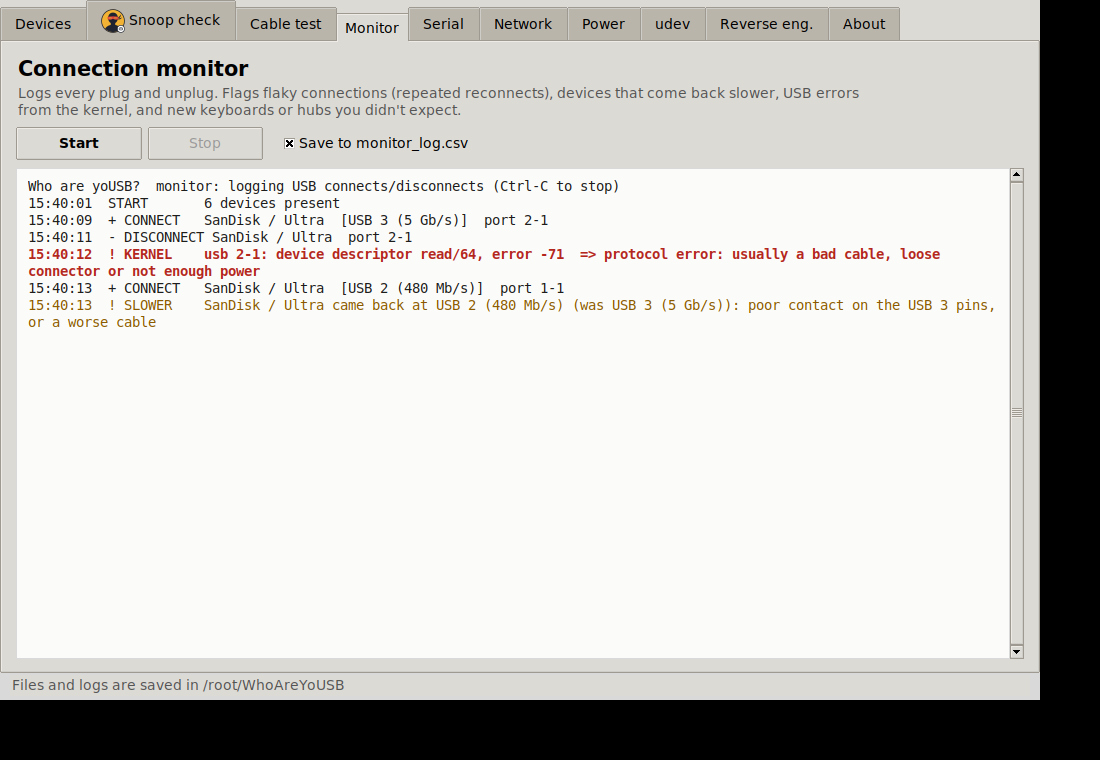
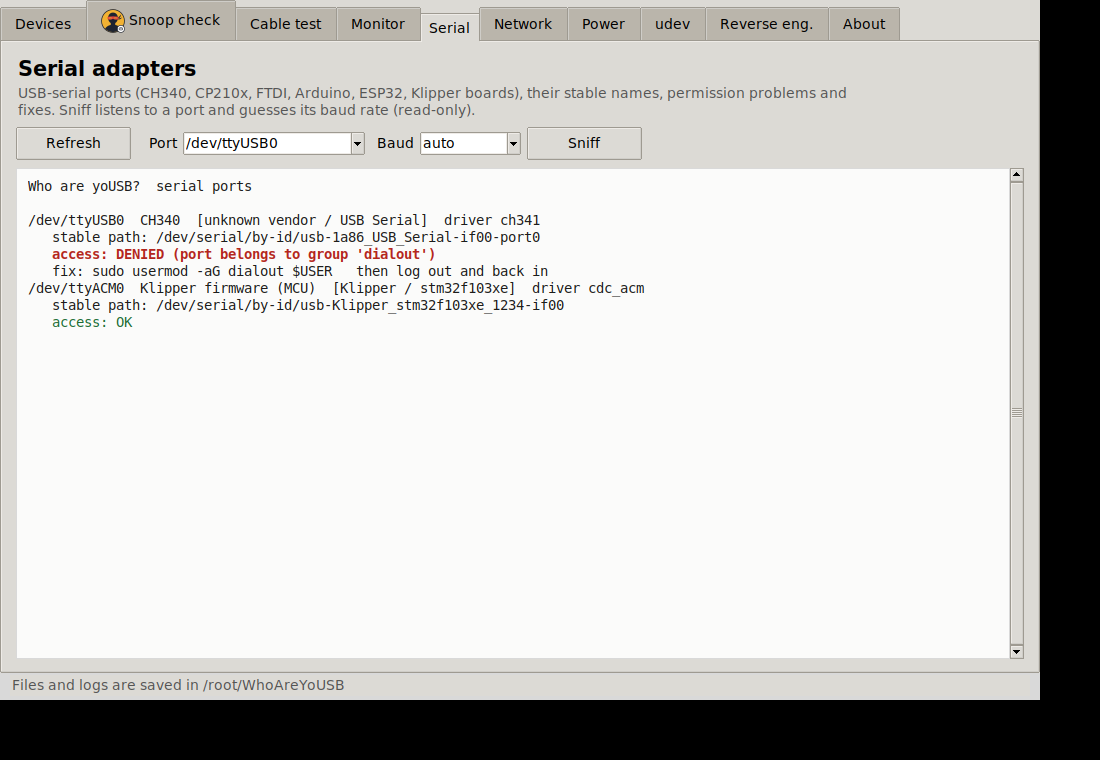
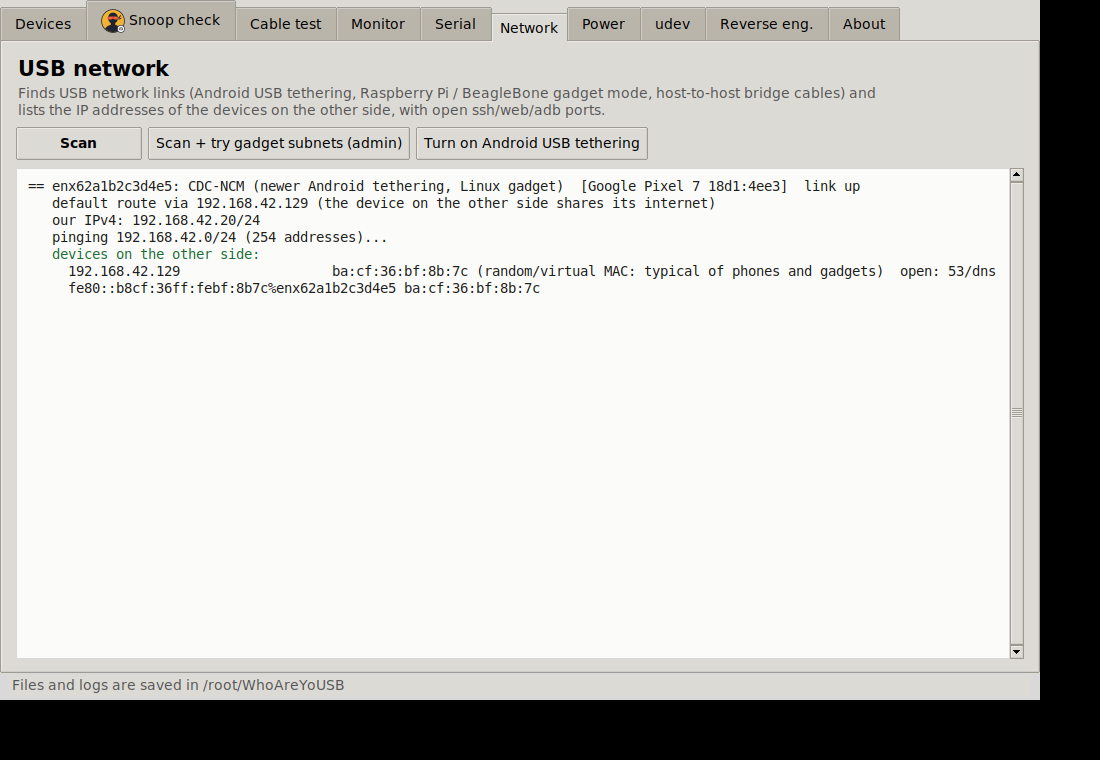
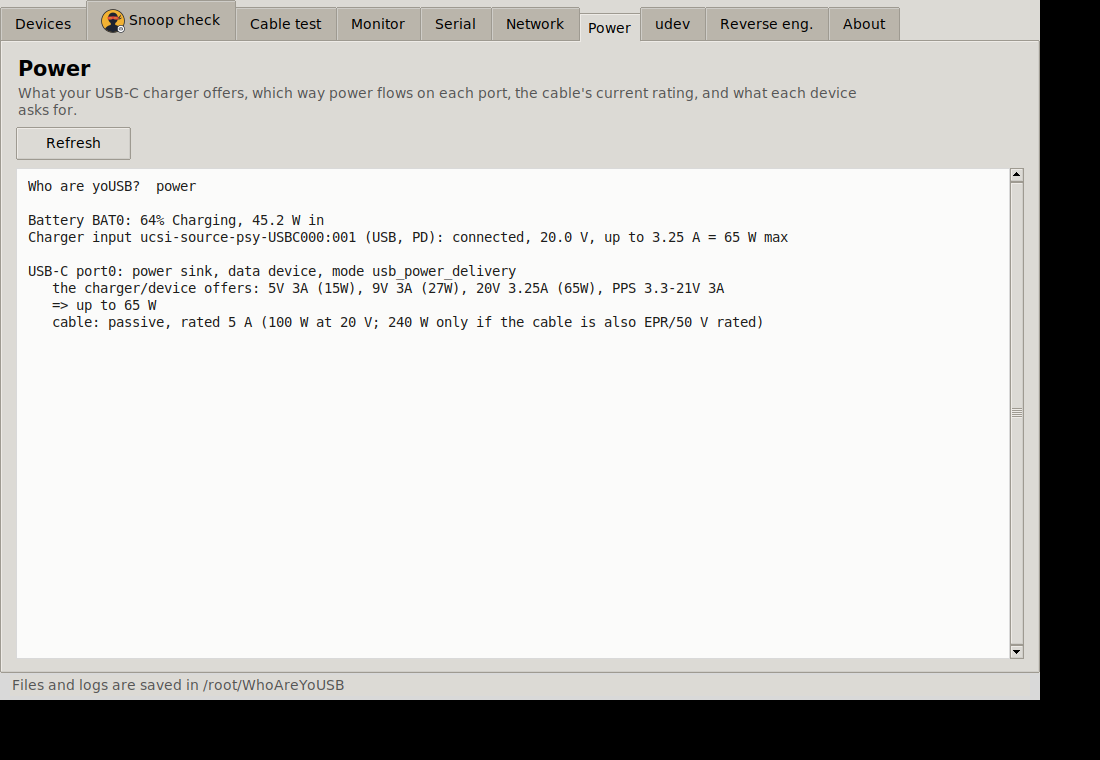
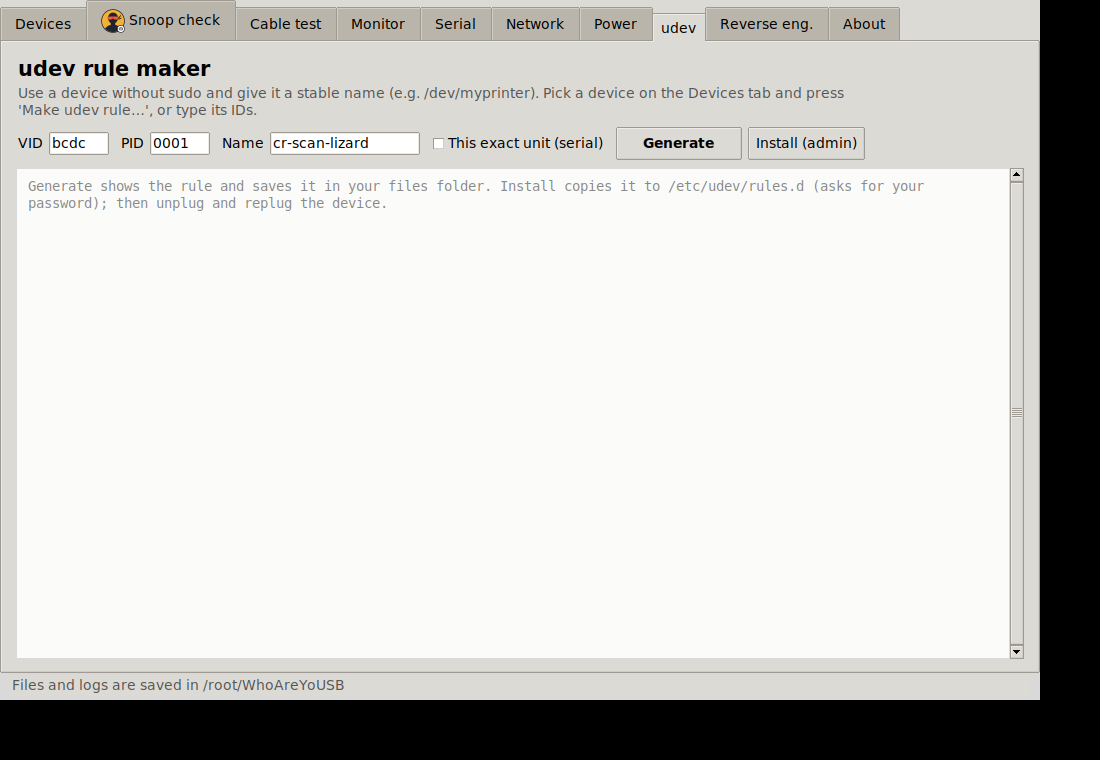
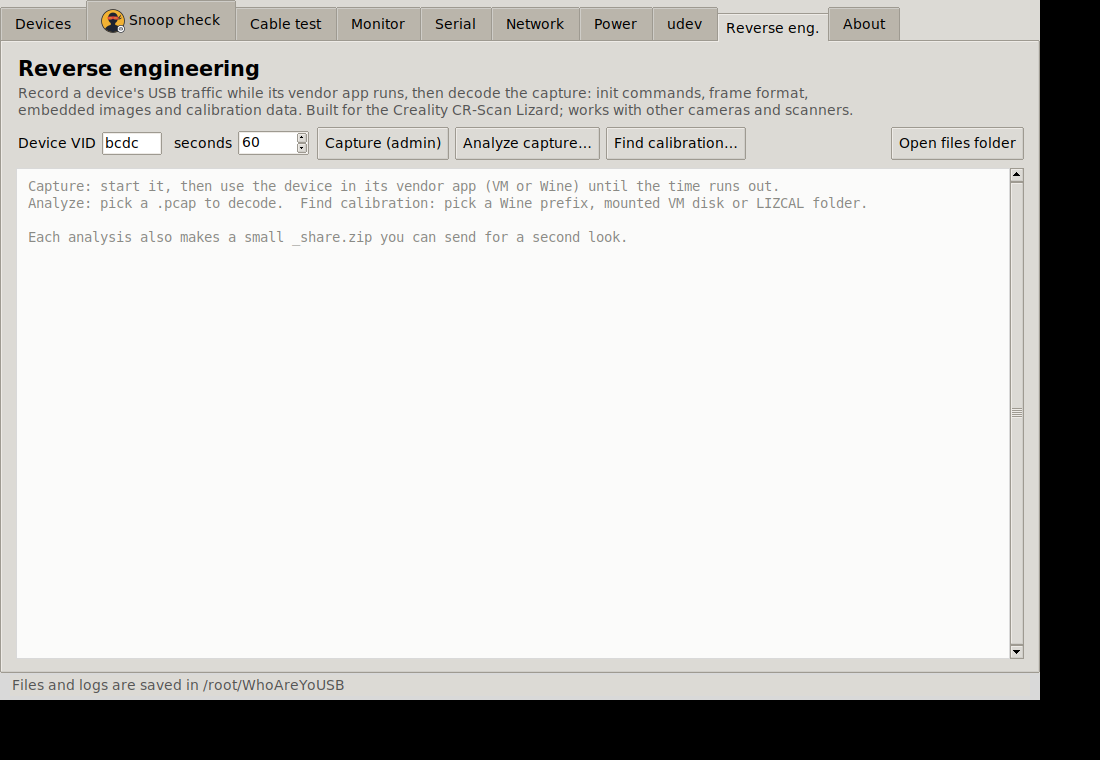
Who are yoUSB? <p align="center"><img src="raw.githubusercontent.com" alt="Who are yoUSB? caterpillar artwork" width="560"></p> > # ⚠️ WORK IN PROGRESS: MANY FEATURES MAY BE BROKEN > This is an early, unfinished version (v0.1.0-wip). It has only been tested against simulated USB data, fake > sysfs trees and a virtual display, not against a wide range of real devices, cables or computers. > Expect bugs, wrong readings, missing features and rough edges. Do not rely on it for security decisions > (for example "this cable is safe") or for anything important. Bug reports are very welcome; see > CONTRIBUTING.md. > Licence: free for non-commercial use (personal, hobby, educational, charity). Provided as is, with no warranty > and no liability. See LICENSE.md (PolyForm Noncommercial 1.0.0). This is source-available, not > OSI "open source". Source-available · Non-commercial · v0.1.0-wip A multipurpose USB toolkit for Linux: one Python file, no required dependencies, with a point-and-click window or a command line. | | | |---|---| | Identify | Every USB device with its real name, speed, class and driver; full descriptor reports; USB-C charger/cable power info | | Security | Cable snoop detection: does a cable (or gadget) secretly contain a keyboard, hub or network adapter? | | Cables | Charge-only, USB 2 or USB 3? Live plug/unplug log that flags flaky connections and USB errors | | Setup | USB-serial helper (port names, permissions, brltty/ModemManager conflicts), udev rule maker | | Networking | Find USB network links (phone tethering, Pi gadget mode) and list the IP addresses on the other side | | Reverse engineering | Capture and decode USB traffic (built for the Creality CR-Scan Lizard; works on any USB camera/scanner) | !Devices tab Install and run Needs Python 3 (developed on 3.12; older 3.x untested). The window needs tkinter; the command line does not. | Distro | One-off setup | |---|---| | Ubuntu / Mint / Debian | sudo apt install python3-tk | | Fedora | sudo dnf install python3-tkinter | | Arch | sudo pacman -S tk | git clone https://github.com/The-Dorkknight/who-are-yousb.git cd who-are-yousb python3 whoareyousb.py # opens the window on a desktop, otherwise lists devices python3 whoareyousb.py list # command line python3 whoareyousb.py --help # every command Most things work without root. These need sudo (or the window will ask via pkexec): capture, udev --install, usb-net --assign, and reading the kernel log in monitor. It only changes your system when you ask: usb-net --assign/--android (temporary IP addresses / phone tethering) and udev --install (adds one rule file). Everything else only reads. Details in HOW_IT_WORKS.md. The tabs | Tab | What it does | Screenshot | |---|---|---| | Devices | Lists everything plugged in with friendly names and speed; click one for details | !raw.githubusercontent.com | | Cable snoop | Plug the suspect cable in and watch: anything beyond the one device you expected is flagged. The masked-bandit icon only appears when something looks malicious | !raw.githubusercontent.com !raw.githubusercontent.com | | Cable test | Plug a known USB 3 drive through a cable to see whether it carries USB 3, only USB 2, or is charge-only | | | Monitor | Live connect/disconnect log; warns about reconnect loops, speed drops and kernel USB errors | !raw.githubusercontent.com | | Serial | Finds USB-serial adapters, stable /dev/serial/by-id names, dialout group fixes, brltty conflicts | !raw.githubusercontent.com | | Network | Finds phone-tethering / gadget-mode links and lists devices on the other side | !raw.githubusercontent.com | | Power | USB-C charger offers, cable rating, what each device draws | !raw.githubusercontent.com | | udev | Generates a rule for no-sudo access and a stable name | !raw.githubusercontent.com | | Reverse eng. | Capture/analyse vendor-app traffic; find saved calibration files | !raw.githubusercontent.com | Cable snoop detection: what it can and can't tell you Unbranded cables with a chip inside are usually just charging-protection or e-marker chips. A hostile cable (O.MG-style) pretends to be a keyboard or network adapter. The tool flags devices that appear in addition to what you plugged in, unexpected HID/network/storage interfaces, and odd descriptors. A clean result is not proof of safety: a cable that only activates later, or only on certain hosts, will not show up. For real protection use usbguard so new keyboards need your approval. Reverse engineering a scanner (the original goal) 1. Plug in the scanner and run python3 whoareyousb.py list --lizard. 2. In a Windows VM with USB passthrough, run the vendor app while sudo python3 whoareyousb.py capture records. 3. python3 whoareyousb.py analyze <capture> decodes control transfers, firmware download, frame layout, embedded images and calibration data, and writes a *_share.zip you can send to others. 4. On the Windows side, find_lizard_calib.ps1 (no install needed) collects saved calibration files into LIZCAL\. Troubleshooting | Problem | Fix | |---|---| | No module named tkinter / window won't open | Install tkinter (table above). The command line still works without it | | Empty device list | Run on a real Linux desktop, not a container; check ls /sys/bus/usb/devices | | Permission denied on capture/udev/usb-net | Run with sudo, or accept the admin prompt | | Power/USB-C tab is empty | Your laptop doesn't expose /sys/class/typec or power_supply data | | Serial port won't open | Add yourself to dialout (Serial tab shows the command), remove brltty if it grabs CH340 | | Wrong or scary-looking result | It's a work in progress: please open a bug report | Known limitations (please read) - Everything above was developed without real hardware in the loop. Real Lizard, real cables, real phones: untested. - USB networking: IPv6 discovery is untested; the IPv4 sweep was tested only in network namespaces. - USB-C / PD / e-marker info depends on your laptop exposing /sys/class/typec and /sys/class/power_supply; many don't. - Cable snoop and cable test are heuristics and can give false alarms or miss things. - The GUI was only checked on one virtual display; other themes/scaling may look off. - Linux only. Wayland/X11 both expected to work; macOS and Windows are not supported (the PowerShell helper is the exception). More documentation - HOW_IT_WORKS.md: what it reads, what it may change, and how each feature works - CHANGELOG.md, CONTRIBUTING.md, SECURITY.md, THIRD_PARTY.md --- Copyright Matthew Armstrong (The-Dorkknight). Not affiliated with Creality, 3DMakerPro/JimuMeta, USB-IF or anyone else named here. --- Source code: The-Dorkknight/who-are-yousb-repo on GitHub
still sleeping on oksolc? you will regret it. Check out the repo and star it if you like okcontract/oksolc
I wrote a tool in Rust that gives every local service one real HTTPS hostname, the same from your browser and from inside Docker Hey all, I've been working on fghj, a Rust tool for local dev when your product is split across many repos. The thing that pushed me to write it: an address meaning two different things depending on who's asking. http://minio:9000 inside compose, localhost:9000 in the browser, so presigned S3 URLs break with SignatureDoesNotMatch, OAuth redirects need a second config, and every repo grows an API_URL and an API_PUBLIC_URL. What it does: - Every service gets one hostname like https://web.storefront.<ws>.fghj.internal that resolves the same from the host and from inside any container, with a cert your system already trusts - Each repo has a small .fghj.yaml (reads like docker-compose) that says only what it needs; include: another repo by git URL and fghj clones and wires it - Starts only the subgraph you need ("flows" like checkout: [web, catalog/browse]), not the whole fleet - Every Postgres on 5432 at the same time, each on its own *.fghj.raw.internal address - Web UI with the graph, logs and a traffic tab showing service-to-service calls The Rust side, if you're curious: - one root daemon on tokio with its own authoritative DNS - an SNI-routing TLS relay on rustls - a local CA via rcgen whose intermediate is name-constrained to .internal/.test/.local - Docker through bollard A sidecar per run does the same DNS + TLS inside the Docker network. Installation: macOS (Apple Silicon) via Homebrew, Ubuntu 22.04+ via apt. Everything it changes on your machine is listed with how to undo it. fghj: mlnja/fghj docs + tutorial: fghj.mlops.ninja Would love feedback, especially from people running many repos locally. Open to PRs too.
@DemarcoTwain @shep_lar u can run android on ios using husk Leviidev/Husk
🚀 Trending on GitHub Frontier-UI by Jumbomuffin777 ⭐ 46 stars 🧠 One file that turns Open WebUI into a generative UI: live maps, photo galleries, calculators, and one-click Word/Excel/PPT exports. No API keys. Jumbomuffin777/Frontier-UI #GenAI #OpenSource
Ah the link has a second URL pasted into it. Actual link: github.com/scummvm/scummvm/blob/master/AI-GUIDELI…
If you want to try out plugins yourself you can get started already today. There is no change to the actual server for now. block/buzz-app
Introducing ADA: an open-source Satisfactory mod manager for Windows, Linux and macOS Hey everyone, I've always had trouble running SMM on Mac. Sure, it works natively, but no matter what I try, it always crashes when attempting to install a mod. No logs, no error messages, just a crash. I posted this over on the some other reddit, but the post got deleted for low effort because 'We don't need another Mod Manager'. So I'm reposting here because I don't know if it deleted the crosspost, Frankly, I don't like the layout of SMM, it hurts my eyes, and as I said, it never worked for my system, so I attempted to make something that does work on my system, and in case anyone else has issues, I've released it. ## Why not contribute to SMM? Honestly, I'm a Unity backend developer, I don't know the language SMM is coded in. C# is my home, it's what I know. Below is copy-pasted from my original post. Yes, it's been run through an AI, and the AI disclaimer is at the bottom. So, today I’m introducing **ADA** (Automated Deployment Assistant), a new open-source mod manager for Satisfactory that runs natively on **Windows, Linux and macOS**. This is a **preview release (0.8)**, and I’m looking for testers, especially on Windows, Linux and dedicated servers. **[Download ADA](github.com/StillAccursed/ADA/releases)** · **[Installation guide](github.com/StillAccursed/ADA/blob/main/Docs/Insta…)** · **[Source code](StillAccursed/ADA)** ## Why another mod manager? ADA started because I wanted a mod manager that worked reliably on my Mac. I began planning it before SMM supported CrossOver. That support has since arrived, but I’ve continued having trouble installing mods on my setup, so I kept working on ADA. I did what any Satisfactory player would do: I made a plan. Then several more plans. After a few months on the shelf and a lot of work, the result is ADA. If you’ve played Cities: Skylines, the layout may look familiar and its one I prefer. I used **Skyve** as a reference: it’s one of the most complete mod managers I’ve used, and I like being able to see everything I need at a glance. ## What it does - **Mods:** install, update and remove mods, choose specific versions, or queue several changes and apply them together. - **Catalogue:** browse and search ficsit.app, filter by tags and save favourites. - **Dependencies:** work out the required mods and compatible versions for your game. - **Profiles:** keep a separate set of mods for each playthrough, with support for importing SMM profiles. - **Automatic game detection:** - **Windows:** Steam and Epic. - **Linux:** Steam, including Flatpak and Snap, with Proton; Epic through Heroic or Legendary. - **macOS:** Steam or Epic in a CrossOver bottle. - **Saves and blueprints:** see which mods a save was made with and switch to those exact mod versions. Copy, export and import blueprints. - **Backups:** back up saves, blueprints, game settings and mod settings, manually or on a schedule. Every restore can be undone. - **Dedicated servers — untested:** manage server mods over SFTP, FTP with TLS, or a shared folder. Passwords are stored in Windows Credential Manager, the macOS Keychain or the Linux Secret Service. - **Recovery:** recover interrupted mod changes and repair damaged or missing mod files where possible. - **Activity:** review a history of ADA’s changes and its logs. - **Themes:** light and dark. ## Looking for testers ADA has mostly been tested on macOS. The Windows and Linux versions pass their automated tests, but haven’t seen much real use yet. I’d especially love to hear from: - **Windows players** using Steam or Epic. - **Linux players**, including Steam Deck users. - Anyone running a **dedicated server**. **Dedicated server support has never been tested against a real server. Please back up your server’s saves and mods before trying it.** Whether it works smoothly or something breaks, feedback would be appreciated. You can use the [issue tracker](github.com/StillAccursed/ADA/issues) or leave a comment here. For problems, please include your OS, launcher, ADA version and any relevant logs. ## About AI use I used AI throughout development, as I do with my other coding projects. I’m disabled, and long stretches of typing are painful; AI helps reduce that load. I plan and review the changes, test them, and fix the problems I find. ADA currently has around **950 automated tests**, with the suite running on Windows, Linux and macOS. Those tests are useful, but real-world testing across different setups is why I’m sharing this preview. ## Good to know - **The builds aren’t code-signed yet.** Windows SmartScreen and macOS will warn you the first time ADA runs. The [installation guide](github.com/StillAccursed/ADA/blob/main/Docs/Insta…) explains how to get past those warnings. - **ADA doesn’t update itself yet.** Download new versions from the Releases page; your settings and data are kept. - **Only launcher-installed games are detected for now.** Choosing a game folder manually is planned. - **Mods and downloads come from ficsit.app.** ADA is developed independently and doesn’t use SMM’s code. It isn’t affiliated with Coffee Stain Studios or the ficsit.app team. - **ADA is open source under the MIT licence.** ## Links - **[Download ADA](github.com/StillAccursed/ADA/releases)** - **[Source code](StillAccursed/ADA)** - **[Installation guide](github.com/StillAccursed/ADA/blob/main/Docs/Insta…)** - **[Report a problem](github.com/StillAccursed/ADA/issues)** Thanks to the modding community, the mod authors and the ficsit.app maintainers. None of this works without them.
Picotron on my Retroid Pocket Classic: I made an Android wrapper, now in early beta I've been working on PicotronNest, an unofficial Android wrapper for the real Picotron fantasy workstation. These screenshots are from my Retroid Pocket Classic running Android 14. The idea is to carry a little creative computer alongside your games: Picotron's original desktop, code editor, graphics tools and cartridges. The app adds touch controls, typing, configurable controller/pointer modes and a persistent home. One APK; no root or Termux. Beta 2 adds native Splore networking. On the Classic, I checked the catalog, downloaded and opened Corre, Flavio! by LOBO and Ball Fall 2 by CRAFTYMINT6, and moved Ball Fall 2 with the touch D-pad. Save/reopen and project import/export also have scoped device checks. Requirements: ARM64 Android and your own purchased Picotron 0.3.0d2 Raspberry Pi 64-bit ZIP. Picotron is not included. Use windowed Splore, since its fullscreen toggle has a layout issue. Still early: these checks do not establish physical controller gameplay, audible sound, long sessions or compatibility with other Retroid models. Accounts, uploads and network changes also need testing. Back up your home before uninstalling. APK and source: github.com/EriArk/PicotronNest/releases/tag/v0.1.… Setup and more screenshots: abysstail.art Original wrapper code is MIT. Unofficial and independent of Lexaloffle. I use AI assistance for development and preparing posts. If you own Picotron and try it on another Retroid, I'd appreciate the model, Android version and what worked or failed — especially controls and small-screen editing.
MX LINUX and KDE 6 - Install KDE 6 via MX LINUX on Windows and WSL - 2026 Watch Video - youtube.com MX LINUX FOR WSL - vinberg88/mxlinux Regards Mattias Vinberg - MX LINUX - KDE 6 - Windows - Sweden - 2026
Open-sourced Quarry — a pentest plugin for Claude Code. 100% recall on DVWA, crAPI & Juice Shop. Hash-chained evidence. Blind adversarial rebuttal. No hallucinated vulns. mahumadad/quarry #pentest #infosec #AI
Polyend releases the firmware source code for the original Tracker, Tracker+ and Tracker Mini. #synthsky polyend/tracker-ce
I spent the last few months turning 2048 into a full-blown game I started out just wanting a simple 2048 in Love2D, but kind of lost control and ended up turning it into a feature-packed implementation of the classic puzzle game. Along with regular 2048, there are chaos modes like No Mercy, Time Attack, 5x5, Goose mode, and a Plus mode with bombs and tile swaps. I also spent way too much time obsessing over the polish, so tile merges, screen slides, and theme swaps all have smooth transitions. You earn coins as you play to spend in a shop on board skins, permanent upgrades, and animated cat and dogs that chill on the board. I also threw in full stats tracking, achievements that unlock themes and even a jukebox that lets you play game's bgm & drop your own music into the game over local Wi-Fi. Runs on PC, retro handhelds via PortMaster, and Android with a virtual retro handheld layout. Download Link - Click Here Hope you guys like it!
Open Engine update! This one is full with goodies and features including prefabs, improved terrain, spline tools for roads, junctions and bridges, more parts exposed to the C# layer and of course, optimizations! github.com/Game-Crafters-Guild/OpenEngine/release… #GameDev #IndieDev #GameDevelopment t.co
Musebook as a @solana credit provider. pay-kit#411
RELEASE - Orca Slicer with Nonplanar Printing! A big thank you to this community! More than 2k likes on the original post and more than 100 test prints helped make this happen. The results are in, and the slicer is now public: https://github.com/fich-l/orcaslicer-nonplanar We have working versions for Windows, Linux and Mac Silicon. MacOs on Intel is still missing. I don't have a Mac Intel, so I can't test a build. Searching for someone to port this to Mac Intel - see below. EDIT: You can find Windows and Linux Port on Github now. Confirmed working: - Bambu A1 mini, A1, P1S, P2S, X1C, X2D, H2D - Prusa MK4S, CORE One, XL 5T - Elegoo Centauri Carbon 2 (+ Combo) - Creality K1C · Qidi Q2 - Flashforge AD5C - FLSun V400 Not working: Elegoo Centauri Carbon 1, Snapmaker U1, Ender-3 S1 Pro, Flashforge AD5X, Prusa MINI+ Printer on the working list? Try the Satisfying Nonplanar vs Standard comparison to test surface quality please. Printer not listed? Print the Nonplanar test print twice, once lengthwise and once rotated by 90°, and tell me how it went, so we can keep the list up to date. Looking for someone to port it to Mac Intel. -- EDIT: You can find a first Windows and Linux Port on Github now thanks to the community! - - You don't need to be a C++ dev: the whole thing was vibe-coded with Claude Code (Opus 5.5). A Mac Intel to test on plus Claude Code should be enough. If you're up for it, comment or open an issue on GitHub. Don't shit on me please - Using Claude to get this ported is the fastest way possible :) You don't usually use Orca Slicer - how to use this? Do this: Slice in this Orca Slicer Fork and export "plate sliced file" --> Drop file into any slicer and just print :) Even works with Bambu Studio. Thanks also to Daniel Ahlers and Teaching Tech for their work on the version I started from. FAQ: - * Can you add this as a Plugin to Orcaselicer? Will you put a pull request to the Orca Slicer Team?* - This cannot be run as a plugin. Pull Request: Yes! After this test phase. - Why does printer "X" not work? - Someone tested it and there was a collision. Most likely the hotend / tool is not "steep" enough. - How can I test? - Please check the github page. You can do two quick test prints to see if your printer can handle this. - Are there still bugs? - Very likely yes. Slicing can take 5s to 5 minutes - be patient. - Can we have fuzzy skin on top surfaces? - I tested this, but it doesn't look good :(
@theo We use Okta FastPass, but authentication fails in T3’s built-in browser because local-network access is blocked. The same flow works in Codex’s built-in browser, where the agent can continue normally after authentication. t3code#29407
External display brightness / contrast / volume (DDC) — GitHub direct edition only. Not included in the App Store build. Acerola-1/hagimi-monitor t.co
github.com/kazar-root/LunaNX/releases/tag/v1.2 This update fixes a connection issue reported by several users in the United States. The service was sometimes connecting to the wrong server, routing US users to a European server instead of the US server. Thanks to everyone #lunaNX #switch #luna
Pokemon Catalyst – Recruiting Spriters, Programmers, Mappers & Scripters (Fire red) AI disclosure: We won't be using any AI in this rom hack. By we, i mean me and my friends supporting me in development. Kudos! This rom hack was being developed by me a year ago then I suddenly left rom hacking so it was left after a bit of progress. As I'm back again, I've decided to work on this rom hack from scratch with my friends. A dark, conspiracy-driven FireRed hack set in a region that was never meant to be left. STORY: Falcon is a region unknown and dissociated from outside world since anybody knows. 'The Aura' is a treaty based coalition and company formed by Team Rocket, Team Ice, Team Aqua , Team Magma and Salone Family. Since early ages, these have controlled parts of Falcon and quarantined it from outside interference. Every year a Pokemon Championship is organised to kill the strongest trainer of Falcon secretly. These teams since ancient times have controlled resources and pokemon of Falcon. The history of Falcon is unknown to civilians and it's hidden by 'The 'Aura` A sixth group called Team Shotgun came out of nowhere and has become the last hope of civilians over 'The Aura'. Team Shotgun aims at disposing 'The Aura' with opening links to outside world. LORE: Player lives on Salone island, his family is kidnapped by Salone family for taxes and a note is left: 'To Whoever Reads this: This house is now yours.' - Salone and Family Player is forced to join Team Shotgun....Rebels and all happen...finally Player disposes 'The Aura'. Wait...what? Team Shotgun becomes evil! Player disposes Team Shotgun. Player wents a new region for new experience, E4, Champion, Professors and wins league there with a start of a biggest quest: 'Beat 'em all' He gets to know about legendry pokemon controlled by 'The Aura' and the history of Falcon. Now beating them is only the solution of neverending earthquakes which can end Falcon. Falcon is sealed off from the rest of the world, ruled by a powerful coalition that decides what its people are allowed to know. Beneath the order, something is starting to stir. A rebellion is rising, and not everyone is who they claim to be. How far would you go to learn the truth? Project Info Base: Pokémon FireRed (v1.0) Engine: CFRU expansion (Updated features till gen 9 and revamped whole UI) Shiny-Miner/CFRU-expansion Tone: Dark, mature, morally gray Features: Custom region, multiple factions (including familiar villain teams), and a big endgame goal Current progress: Early pre-alpha, with core mechanics in progress and Route 1 complete. Roles Needed Spriters Character sprites and graphical design for NPCs, trainers, and faction members. Beginners with a solid grasp of pixel art fundamentals are welcome, and experienced spriters are very welcome. Programmers C work within CFRU, using decomp-style hacking practices, for new mechanics and engine features. Some prior C experience is expected, though we can help you learn the codebase. Mappers High-quality maps for towns, routes, and dungeons. This is a priority, as the lead is weaker at mapping. Intermediate to experienced mappers are preferred, but strong beginners with a good eye are welcome. Scripters Event scripting and movement scripts for cutscenes and NPC behavior. All levels are welcome, as long as you are comfortable learning our setup. What You Get In-game credits Optional custom NPC trainer named after you (opt-in) Credit in all release notes and promotion How to Apply Contact: discord.gg Portfolio or samples: Please share work relevant to your role (sprites, maps, scripts, or code). Time commitment: ~5 hours/week, flexible. Tell us: Your role, experience level, and availability. Questions are welcome in the comments or by DM. Happy to chat about the project! 🙂