Mentions
Conversations linking to GitHub, newest first. Times are UTC.
Mentions by source
X
Bluesky
Hacker News
V2EX
Qiita
DEV
Mastodon
Latest posts
Flight Radar for CYD ESP32 boards Flash: kirindenis.github.io It shows the planes around your home on an OpenStreetMap map: each one turned along its track, coloured by altitude, with a trail. Tap a plane for its callsign, type, altitude and speed. The data comes from adsb.lol and adsb.fi (free), or from Flightradar24 with your own key. You flash it from the browser, no IDE needed, and set the WiFi on the touch screen. - 2.8" CYD (ESP32-2432S028R), all three screen versions: BOOT at power on switches between them - 3.5" CYD (ESP32-3248S035 r/C) - 1.28" round ESP32-C3 (GC9A01) Code (MIT): KirinDenis/OWLOS-FLIGHT-RADAR
Chasing milliseconds in Speed Demon 2026: lessons from a solo optimisation sprint The change I'm proudest of from this contest brought Track A's board memory down from 22.69 MB to 19.69 MB, with similar wall time. The change I was surest about looked faster on my test VM. On the real scoring machine its two runs averaged about 40% slower than the control, and I threw it away the same morning. I entered Speed Demon 2026, organised by Hackathon Raptors, as team PeppaPig, a team of one. I wrote all four tracks in Rust with no crates, only the standard library. This post is about my method, and the many times my own measurements lied to me. The contest and the score There are four tracks. Each is a small, well-defined data job: - A: Ingest: parse a request log and write per-hour, per-endpoint latency summaries with percentiles. - B: Index: tokenize a document corpus and answer phrase and boolean queries. - C: Join: join a quoted CSV of records against a region table and aggregate. - D: Traverse: build a weighted graph and answer shortest-path queries. Every output has to be byte-identical to the organisers' Python reference. Correctness is a gate, not a score component. Pass it, and you get a single number, K, built from reference-to-submission ratios for time, memory, source size and dependencies: - T, wall time (exponent 0.5). This is the big one. The board takes the mean of the middle 3 of 5 runs. - M, peak cgroup memory (exponent 0.2), taking the highest peak across the five runs. Output written to the tmpfs /out counts against you. - S, formatted code lines (exponent 0.15). That includes your Dockerfile. - D, 1 plus direct runtime dependencies (exponent 0.15). With no third-party runtime dependencies, my dependency factor was 1. The memory ratio is capped at 50; the source and dependency ratios are capped at 1. Wall-time gains are uncapped. The scoring run gets 6 P-cores and 12 threads on an Intel i5-13500. The input is pre-warmed into the page cache, so the timings focus on warm-cache processing. S is subtle: while the source-size penalty applies, doubling S costs about 10% of K. Removing counted lines while preserving time and memory gives a predictable gain; a small measured speedup may disappear on the board. My best board K per track: A 47.32, B 34.36, C 41.77, D 27.59. B's 34.36 came from the live board and is not yet in the repository log; the logged best for the submitted B code is 34.20. The method Be honest about who did the typing A lot of the experimenting was done by AI coding agents (Hark, OpenAI Codex and Kiro) working side by side, with me directing. Each opened its own branches and pull requests, and every one had to beat production on the board like anything else. My job was to pick targets, set the rules of evidence, decide what shipped, and read every report. The agents worked in parallel on profiles, candidates, correctness checks and benchmark preparation. That let one person try far more ideas, and made a strict process vital: many plausible small wins in a night are a great way to fool yourself. Profile on hardware that looks like the box My laptop is ARM, so the serious work moved to an x86 cloud VM. I pinned the benchmarks to a fixed CPU set. Builds ran at low priority on separate cores. perf highlighted hot instructions through sampling, and a cgroup harness read memory.peak the way the board does. One idea per agent, one lock per benchmark Each agent got one idea and its own directory. Every timed run took a shared file lock, so agents never benchmarked at the same time. Paired, interleaved, and repeated A candidate never ran against a number from yesterday. It ran in repeated pairs against the current production build, in alternating order and across input seeds. Track B used profile-guided optimisation (PGO), so there I compared multiple separately trained PGO builds per side. The board decides The rule I settled on was to repeat promising candidates on the live board and judge them against a same-track control from the same period, not against my best-ever run. Some obvious losses stopped after one run; noisy candidates needed more repetitions. If the evidence supported keeping a change, it became production. Otherwise it was reverted, and the reason went into a per-track PERF.md log. Four wins 1. Track A: redesigning the summary for memory Profiling left me looking for small gains in the parse, but memory became the cheaper target. The old summary copied each hour's latencies into a per-worker scratch buffer. The new one reuses an existing record vector and does an in-place counting sort (American-flag style) to group records by endpoint in output order. Percentile selection happens within each group; the extra full-hour scratch buffer is gone. On the board, peak memory fell from the control's 22.69 MB to 20.44 and 19.69 MB, with similar wall time. It tied the control on its first run (45.97 vs 45.97, M −2.2 MB) and won the rerun with 46.90, at M 19.69 MB. It shipped. 2. Track B: a collision-free term table, then 16-bit result lists B spends most of its time tokenizing and looking up terms. The old linear-probe table could require multiple probes and unpredictable branches. The new version builds a hash-and-displace table once, after parsing the queries, for query terms of at most 16 bytes. Those query keys get distinct slots; a lookup uses a 16-bit bucket displacement and an exact two-word key comparison to reject nonmembers. Longer terms still use a HashMap. On the board, production B had been sitting at about 30.4–30.9. The table scored 32.51, then 30.67 in a normal batch. Parallelising the setup on top of it (query parsing and interning on all 12 threads) gave 32.66 / 32.10, and that shipped. Then came a tiny one. Storing the answer step's scratch result lists as u16 instead of u32 also trimmed scored S from 761 to 758. On the board it scored 33.62 / 33.80, with T down to about 120 ms from the ~150 ms I started the day with. 3. Track C: smaller buffers, lower M C reads records.csv through per-thread pread buffers instead of mapping it. Shrinking the read buffer to 32 KiB and the event blocks to 512 entries brought M to 11.0 MB at the same T (22.9 ms). K went from a best of 39.94 to 41.13 / 41.08. Prewarmed input pages can remain charged outside the measured cgroup, but its peak still includes anonymous memory, kernel memory and tmpfs. Cached input is not categorically free. 4. Line trims with identical machine code The cheapest wins in the contest were deletions, but I only trusted a deletion if I could prove it changed nothing that runs. For Track A, the agents removed selected #[inline(always)] attributes, dropped guards that were provably always true, and folded a few statements together. Then they diffed the disassembly function by function. For the attributes we removed, the hot code was instruction-for-instruction identical. Where removing an attribute did change the code, it stayed. A's scored S went from 350 to 325. Its board runs averaged 46.96 against production's 45.97–46.90, and the S gain itself is deterministic. B got the same treatment, with scored S falling from 758 to 701: it scored 33.92 and 34.13 and was kept. An earlier D trim reduced S from 407 to 383, but its board K was 23.93 against the previous best of 24.11. Failures, and what they taught me VM wins that lost on the board. That opening story was Track A's compact endpoint dictionary using atomic slot publication. On the VM it looked faster. On the board it scored 38.74 and 39.73, with T at 32 and 30 ms. The control scored 45.97 at T 22.4 ms. A deferred-formatting change reduced board memory to about 18.1 MB but went the same way (40.79 / 45.78), and B's "24-byte slots, twice the table" faded over three runs (31.16 → 28.95 → 26.87). Early on, an allocator-tuning change sent A's board memory from about 22 MB to 65.6 MB. The VM is a filter, not a judge. PGO variation can hide small wins. I compared multiple PGO builds per side before trusting small differences. Single-threaded training does not by itself guarantee identical binaries; that needs checking in the build outputs. (Adding a PGO stage to the Dockerfiles for A, C and D did not improve their logged board K, and those Dockerfile lines count in S.) Benchmark order bias. One of our scripts biased the run order. For a while, that made a whole batch of comparisons unreliable. Balanced ordering fixed it, and now I don't trust any A/B number unless I know the order was alternated. Board noise comes in batches. Running the same code again on the board can move K materially. Some batches are just slow: once, B's T jumped from about 150 to 195 ms with no code change. Worse, the tracks don't slow down together: in one batch B was slow while A ran normally, and in another A lost badly while B and D looked fine. "The other tracks were normal" cannot establish that yours was unaffected. So the rule became: repeat promising candidates, and compare against a control from the same track. What the leaders did better After the freeze, the top teams' repositories went public, so I could replace my evening-before guesses with facts. At freeze the leader was ahead of me by 1.31x (A), 1.49x (B), 1.35x (C) and 1.39x (D) on K. Almost all of that was T; on S I was often ahead. And none of the gap was micro-tuning. It was structure: - Track D (shortest paths): they contracted the road graph's chains of degree-2 nodes into shortcut edges, stored adjacency in fixed 4-slot rows with 16-bit labels, and used a bucket queue instead of a heap. I renumbered nodes for locality and tuned a heap Dijkstra. Same problem, different shape. - Track B (text index): branch-free tokenizing: an AES-based hash, cache-line buckets holding 7 tags compared at once, and an AVX2 left-pack that routes tokens by class, with the answers built up stage by stage. My loop was fast, but it still branched on every token. - Track A (log ingest): they overlapped parse and summary. An hour is finished as soon as the parse is two hours past it, and pages are released in parallel before exit. I ran two clean phases and optimised each one separately. - Track C (streaming join): owner threads with lock-free message rings, so the hot path has no atomics. I made a shared atomic table faster. Other top teams found their own versions of the same moves: scanning the corpus once and answering queries on the fly instead of building postings, perfect hashing so each token is a single probe, and boolean queries compiled into truth tables. Pure-Rust teams were in that group too, so the language wasn't what held me back. What AI did, and what it didn't I ran this sprint with AI agents doing most of the typing. That was the experiment, and here's the honest result. AI raised the floor, and it made experimenting much faster. I had correct, byte-identical, reasonably fast versions of all four tracks within hours. Agents profiled on an x86 VM overnight, wrote thousands of experiment files, and kept a steady loop of board trials going: keep the win, revert the loss. They found the in-place counting sort, the hash-and-displace table, and the line trims with identical machine code. On my own I would have reached maybe half of that. It didn't replace understanding the algorithm. My agents were excellent hill-climbers: give them a design and they make it faster. Not once did they step back and say "a road graph is mostly chains, so contract it", or "this join wants owner threads, not a shared table". Hill-climbing took me to the top of my hill, and the winners were standing on a different one. Going back over it, the expensive mistake was mine: I let the first working design become the only design. If I did it again: 1. Spend day one on the problem, not the code. What does the data look like, what's the lower bound, and what would someone who has read the papers do? 2. Prototype three or four fundamentally different designs early, with AI doing the typing, and only then optimise the one that wins. 3. Keep the structural thinking for myself. Use the agents for what they're superb at: fast hands, tireless measurement, and grinding out the last few percent. AI makes a good engineer a lot faster. It doesn't yet turn a hill-climber into an algorithm designer. I kept only what survived the scoring machine twice, and every experiment is logged honestly. If you take one thing from this post: your benchmark is a hypothesis about the scoring machine, not a measurement of it, and your first design is a hypothesis too. Code and performance logs (including recorded run IDs, T, M, S, K) are in the team PeppaPig repository, one PERF.md per track.
FOSS Mac app that helps cut software costs by finding open-source replacements and showing you what you keep I've been trying to move more of my Mac setup to FOSS and cut down the software subscriptions I pay for. Finding an open-source alternative is easy. Figuring out whether I can actually switch without losing something I use is the harder part. LibreReplace scans supported apps already on the Mac locally and compares them with FOSS alternatives. It shows what carries over, what's partial, what's missing, and gives each one a Strong, Partial, or Keep result. Right now mine shows: Bear → Joplin — Strong · 100% Photoshop → GIMP — Partial · 68% CleanMyMac → Dusty — Partial · 58% Tower → GitHub Desktop — Partial · 79% Acrobat Pro → LibreOffice Draw — Keep · 31% I entered the recurring costs for those apps and the Overview comes out to $414.83/year in potential savings. The part I like is that it doesn't assume every FOSS alternative is good enough. Acrobat is $239.88/year in this setup and LibreReplace still says Keep because critical OCR and redaction features are missing. Everything stays local. No account or telemetry. LibreReplace itself is free and open source under Apache-2.0. GitHub: maliroq/librereplace brew install --cask maliroq/tap/librereplace What paid Mac app would you most want to replace with FOSS, and what's the one feature you couldn't afford to lose?
外接显示器亮度 / 对比度 / 音量(DDC)——仅 GitHub 直连版。 App Store 版不含此项。 Acerola-1/hagimi-monitor t.co
@vincent_koc @openclaw 500 experiments on a single thread is real throughput; what makes it research is what ranks them. Kapso's evolve scores every branch by measured distance to one objective, so the ones that wander die early. Leeroo-AI/kapso
We made a rust macro that makes your code over 700x harder to decompile 1. linear cost to the defender 2. multiplicative cost to the attacker 3. one simple macro We are experimenting and researching defeating agent and agent swarm activity designed to decompile software. Here is a, without being too technical or recanting the paper, repository filled with some ideas on how to achieve this, that you can run and validate yourself. the paper is included within the repo. listeningpost/conspicuous-compilation
After a whole weekend of testing Grok Bot and harness subscriptions, I landed on Orquestra. It's a setup for orchestrating Claude Code and Codex through Grok Bot. I made setup as easy as possible: just ask for a Bot to be created with this skill. jpvmm/orquestra
MX LINUX and KDE 6 - Install KDE 6 via MX LINUX on Windows and WSL - 2026 Watch Video - youtube.com MX LINUX FOR WSL - vinberg88/mxlinux Regards Mattias Vinberg - MX LINUX - KDE 6 - Windows - Sweden - 2026
🔵 Day 1 of building at @ZealynxAcademy I am implementing Uniswap V2. Today: • Built the LP token contract UniswapV2ERC20 I noticed that it implements a permit like Dai. Repo 👇 rosarioborgesi/uniswap-v2-from-scratch t.co
@sklyarov @levelsio Ported already Carter54git/dethrace-ported-to-web
We're building Agent Money Benchmark to help financial institutions and AI labs evaluate how reliably AI agents handle money when they complete tasks. Explore the full benchmark: agentmoneybench.com Results on GitHub: BlockRunAI/agent-money-bench Methodology: agentmoneybench.com We work with model developers, financial institutions, and agent platforms on agent evaluation, payment security testing, and training environments. For benchmark access or evaluation inquiries, contact research@blockrun.ai.
@moneyonchainES @rootstock_io Thanks @moneyonchainok 🙌 📱 Zapstore: zapstore.dev 📦 GitHub: github.com/MostroP2P/app/releases/tag/v2.1.2 Which currency would you like to trade with? Tell us below 👇 #Mostro #Bitcoin #Lightning #Stablecoins #P2P
I measured how often Claude Code shows up in the 1,000 most-starred GitHub repos: it's in 618 of them I wanted to know how much of popular open source is actually written with coding agents, so I built a small tool that counts disclosed signatures: Co-Authored-By: Claude trailers, the "Generated with Claude Code" footer, bot authors and PR branch names. Results for the 1,000 most-starred repos with recent activity (976 had commits in the last 90 days): - 69% have at least one AI-signed commit - 16% of all commits carry a signature - Claude Code appears in 618 repos, Copilot in 185, Cursor in 182, Codex in 66 The catch is that a lot of people strip the trailer. My own project shows 13% signed, even though I use Claude Code for almost everything. So there's now an experimental estimate on top. It compares the writing style of a repo's unsigned commits with that repo's own signed ones and its pre-2022 history. For my repo that comes out at 40–73%. It only runs if the repo itself discloses at least 10 agent commits. Without that rule PostgreSQL and Linux scored 99–100% in testing, because careful humans write long, structured commit messages too. Every number links to the exact commit and the line that matched. maximilianfeix.github.io · code (MIT): maximilianfeix/howmuchai Curious whether you keep the co-author trailer or remove it, and why.
xangi v0.61.4 リリースしました github.com/karaage0703/xangi/releases/tag/v0.61.4 IssueやPR反映しました。コントリビュータが増えて嬉しいですね
🚨 You can HIDE your Instagram followers & following lists WITHOUT installing a modded Instagram app! 👀 Just Instagram’s own API. 🔥 Open-source project 👇 20Z/Instagram_Hide_Follower_Lists #Instagram #Privacy #iOS
@haskologlu Danfoss AK-SM 8xxA soğutma kontrol cihazlarıyla ilgili bi durum. Fransa olayından sonra PoC/detection toolkit bile yayınlandı. msuiche/fromagegate
(If you're good at anything related to communication, my DMs are open, by the way) Link to download and install the plugin: HichTala/draw2-plugin
Introducing PicotronNest: your pocket Picotron workstation on Android — beta 2 is available PicotronNest is my new project: the real Picotron fantasy workstation on Android. Its original desktop, editors and games, with touch controls, keyboard input and a persistent home for your projects. Beta 2 adds native Splore networking. Browse the catalog, download cartridges and open them in Picotron. Screenshots here are actual captures from Retroid Pocket Classic / Android 14. One APK, no root or Termux. You need an ARM64 Android device and your own purchased Picotron 0.3.0d2 Raspberry Pi 64-bit ZIP. Picotron is not included. This is an early beta. Audible sound, physical controllers, longer sessions and other devices need testing. Use windowed Splore; accounts, uploads and different network setups are unverified. Back up your projects before uninstalling. Download, screenshots and setup: abysstail.art Source and release notes: EriArk/PicotronNest Development and feedback now have their own Discord forum: discord.com Original wrapper code is MIT. Independent and unofficial; Picotron belongs to Lexaloffle. Pocket Orbit is our example project. I use AI assistance for development and preparing posts. What would you create on a pocket workstation?
Check out research that universities around the world engaged with now open source: ResearchForumOnline/research
AI가 이제 브라우저 밖으로 나와 내 컴퓨터 앱을 직접 누른다. 버셀이 agent-desktop을 무료 오픈소스로 풀었다. vercel-labs/agent-desktop 제일 먼저 맡기고 싶은 귀찮은 일, 뭐가 있나요? t.co
MX LINUX and KDE 6 - WSL MX LINUX and KDE 6 - Install KDE 6 via MX LINUX on Windows and WSL - 2026 Watch Video - youtube.com MX LINUX FOR WSL - vinberg88/mxlinux Regards Mattias Vinberg - MX LINUX - KDE 6 - Windows - Sweden - 2026
I hooked a shell-based safety guard into OpenCode's tool.execute.before for server admin work jolitz is a rule set that lets a terminal agent look after servers over SSH: it asks before changing anything, says how to undo it, and logs every step. It started on Claude Code, where a PreToolUse hook blocks the things you never want an LLM to do by accident (mkfs, halt, writing sshd_config, deleting SSH keys, also inside ssh host "..." or a python one-liner). OpenCode had no guard until now. The plugin in .opencode/plugins/jolitz-guard.js uses tool.execute.before and hands every bash, edit, write and apply_patch call to the same guard script, in the JSON Claude Code would send. On a deny it throws and the call stops. If the script can't run or times out, it blocks too. The guard also protects .opencode/, opencode.json and ~/.config/opencode, so the agent can't rewrite the plugin. Nothing to install: start opencode in the checkout. With a local model every host is read-only by default. It's a backstop against mistakes, not a sandbox. Free, MIT. superlab-by-supbrt/jolitz Question for people who write plugins: is throwing in tool.execute.before the intended way to block a call, or is there a cleaner one I missed?
A proposed efficient SAT solver concept I've been working on an SAT solver concept for over a year. This approach doesn't use the resolution rule and directly addresses DPLL's core limitation, where backtracking occurs without retaining state memory. (archived concept) DPLL with Conflict Tree This algorithm is based on decision-only DPLL, with the use of a conflict tree to prevent re-exploring conflicting branches. 1. Building the Conflict Tree: When encountering a conflict, create a leaf in the conflict tree storing every condition that caused the conflict. function solveSAT { conflict = checkConflict(formula, assignment); if (conflict && !conflict.skip) { return conflict; } else { conflictTreeLeft = {left: solveSAT(x_i = 0).conditions} freePaths = updateConflictTree(conflictTreeLeft, x_i = 1); conflictTree = {left: conflictTreeLeft.left, right: solveSAT(x_i = 1, freePaths).conditions} return conflictTree; } } 2. Updating the Conflict Tree: When changing a variable after encountering a conflict, check which conflicts in the tree have become solved, and create a free path from the leaves to the root. function updateConflictTree(conflictTree, variable) { for (let i = 0; i < conflictTree.length; i++) { let conflict = conflictTree[i]; let conflictSolved = 1; for (let j = 0; j < conflict.length; j++) { let condition = conflict[j]; if (!checkSatisfied(condition, variable)) { conflictSolved = 0; } } if (conflictSolved) { createFreePath(conflict, conflictTree); } } } 3. Using the Conflict Tree: Copy free paths from the conflict tree to the right branch (x_i = 1), and skip decisions that are outside the free path at the current decision branch. function checkConflict(formula, assignment) { let conditions = []; let skip = 0; for (let i = 0; i < formula.length; i++) { let condition = formula[i]; if (!checkSatisfied(condition, assignment)) { conditions.push(condition); } } let currentDecisionFreePathLevel = freePaths[assignment][currentDecision].level; let alternativeDecisionFreePathLevel = freePaths[assignment][alternativeDecision].level; if (!currentDecisionFreePathLevel) { currentDecisionFreePathLevel = 0; } if (!alternativeDecisionFreePathLevel) { alternativeDecisionFreePathLevel = 0; } if (currentDecisionFreePathLevel < alternativeDecisionFreePathLevel) { skip = 1; } return { conditions, skip }; } function copyFreePaths(decisionBranch, freePaths) { let currentDecisionFreePathLevel = decisionBranch[currentDecision].level; let alternativeDecisionFreePathLevel = decisionBranch[alternativeDecision].level; if (!currentDecisionFreePathLevel) { currentDecisionFreePathLevel = 0; } if (!alternativeDecisionFreePathLevel) { alternativeDecisionFreePathLevel = 0; } if (currentDecisionFreePathLevel == alternativeDecisionFreePathLevel) { for (let i = 0; i < freePaths.length; i++) { freePaths[i].level = alternativeDecisionFreePathLevel + 1; } freePaths[decisionBranch][alternativeDecision] = freePaths; } } (These snippets are informal pseudocode) Example: (x8 || x9) && (x8 || -x9) && (-x8 || x9) && (-x8 || -x9) - x1..x7 = 0 - x8 = 0 - x9 = 0 - Conflict: (x8 || x9) - Update conflict tree (x9 = 1) - Free path: x9 = 1 - x9 = 1 - Conflict: (x8 || -x9) - Backtrack out of the current branch - Update conflict tree (x8 = 1) - Free paths: x9 = 0, x9 = 1 - x8 = 1 - x9 = 0 - Conflict: (-x8 || x9) - Update conflict tree (x9 = 1) - Free path: x9 = 1 - x9 = 1 - Conflict: (-x8 || -x9) - Backtrack out of the current branch - Update conflict tree (x7..1 = 1) - No free paths - Formula is unsatisfiable
I fixed animated textures on the Switch version of both games Cycle textures on the Switch version either weren't animated, or were only animated when the camera was sufficiently far away from the texture, depending on the mipmap parameter. I made IPS patches, so now those textures function the same as they do in the PC version of the games. I'm also working on porting KPM patches to the Switch version of the games. Video showing old behavior Github repo for the patches This doesn't fix the frozen FTL texture in Kotor 2, as that is an animated UV map. I'll look into fixing that as well
244 pixel effects for Unity or Godot. Stop redrawing them! pixelfx is open source, MIT. You get sprite sheets. Claude Code makes more. Source: patch-gg/pixelfx Save this. Which effect goes in your game first? #PixelArt #GameDev
Can Someone See Who You Blocked on Bluesky? Yes. Here's How to Check Every account you've blocked on Bluesky is sitting in a public JSON endpoint. So is every post you've liked, everyone you follow, and every list you've added someone to. You don't need an account, an API key or a scraper to read it, just one curl. So can someone see who you blocked on Bluesky? Yes, and that includes the person you blocked. Is Bluesky private? For your social graph, no. Most people who came over from X assume blocks and likes work like they did there, visible to you and the platform and nobody else. On AT Protocol they're records in your public repository, and anyone can download that repository. This came up again on October 29, when Melanie Kat published Do At-Proto Users Know This Is Public?. She looked at Skyreader, an RSS reader built on atproto, which stores each feed you subscribe to as a record in your repo. Without logging in anywhere, she pulled over 1,300 feed URLs, including someone's private Club MacStories feed, paywalled 404 Media full-text feeds, Patreon backer-only feeds and private GitLab repo feeds. With feeds like these the URL works as the password, and Kat says the MacStories one gave her full access to the paid content. The Lobsters thread got heated fast. One commenter described the privacy model as "none". What anyone can read from your PDS with curl Your account lives on a PDS (Personal Data Server). For most people that's a server run by Bluesky, but the data model is the same everywhere. Your repo is split into collections, and each collection holds records. Here's how you look yourself up: HANDLE=yourname.bsky.social # handle -> DID DID=$(curl -s "https://public.api.bsky.app/xrpc/com.atproto.identity.resolveHandle?handle=$HANDLE" | jq -r .did) # DID -> which PDS hosts you (works for did:plc, which is almost everyone) PDS=$(curl -s "https://plc.directory/$DID" | jq -r '.service[] | select(.id=="#atproto_pds") | .serviceEndpoint') # what collections exist in your repo curl -s "$PDS/xrpc/com.atproto.repo.describeRepo?repo=$DID" | jq .collections # everyone you've blocked curl -s "$PDS/xrpc/com.atproto.repo.listRecords?repo=$DID&collection=app.bsky.graph.block&limit=100" \ | jq -r '.records[] | "\(.value.createdAt) \(.value.subject)"' That last command prints a timestamp and a DID for every block (the first 100 of them; the response includes a cursor if there are more). Swap the collection for app.bsky.feed.like and you get every post you've liked, with dates. If you'd rather grab the whole thing at once: curl -s -o repo.car "$PDS/xrpc/com.atproto.sync.getRepo?did=$DID" The official docs for com.atproto.sync.getRepo list one required parameter, the DID. You get back an application/vnd.ipld.car archive of your entire repo, and the call usually needs no auth. If clicking is more your thing, pdsls.dev does the same in a browser. Type a handle and browse every collection. That's the tool Kat used. Reading one person's repo is the small version of the problem. A relay can also answer "which accounts have any records in collection X?" through com.atproto.sync.listReposByCollection: curl -s "https://bsky.network/xrpc/com.atproto.sync.listReposByCollection?collection=app.bsky.graph.block&limit=2" That's the kind of relay query Kat describes. It took her from a few reviewers' handles to every DID with Skyreader subscriptions, and then she pulled each one's records from their PDS. She says a few Discord clones store every message openly too, and that you can watch and search chat across Stream.place. Third-party sites like ClearSky build on the same data to show who is blocking whom. Public vs private on Bluesky | Data | Where it lives | Who can read it | |---|---|---| | Posts, reposts | app.bsky.feed.post, app.bsky.feed.repost | Anyone | | Likes | app.bsky.feed.like | Anyone | | Follows | app.bsky.graph.follow | Anyone | | Blocks | app.bsky.graph.block | Anyone | | Lists you made, and who's on them | app.bsky.graph.list, app.bsky.graph.listitem | Anyone | | Blocklists you subscribe to | app.bsky.graph.listblock | Anyone | | Records from third-party atproto apps | Whatever lexicon the app picked | Anyone, unless the app keeps it off your PDS | | Mutes | Bluesky App, not your PDS | You | | Bookmarks | Bluesky App, not your PDS | You | | Preferences (muted words, saved feeds) | Your PDS, behind auth | You | | DMs | Bluesky's chat service | You, the other person, and Bluesky | The mutes and bookmarks rows come straight from Bluesky's docs: "Mutes are private — like Bookmarks, they are stored in the Bluesky App, rather than in your PDS." The same page has a short line on blocks: "Blocks are public." DMs aren't in your repo, though that doesn't make them private. Native Bluesky DMs are not end-to-end encrypted. Coverage of the launch said E2EE was coming "down the line" and that Bluesky's moderation team may need to open your DMs to investigate abuse. If you need E2EE, Germ is a separate MLS-based messenger that shows up inside the Bluesky app. The official app hides this a little. You can see the Likes tab on your own profile and nobody else's. That's purely a UI choice, and the records are still served to anyone who asks the API. Why Bluesky blocks are public The atproto team explained this in June 2023 in Why are blocks on Bluesky public?. The short version: a block has to be enforced by servers you don't control. Your PDS, the AppView, feed generators and any third-party client all need to know that A blocked B, or B's replies still show up under A's posts. As the post puts it, "all servers across the network need to know that they exist in order to respect the user's request." Mutes skip the problem because a mute only changes what you see, so the client can handle it alone. The team listed alternatives they considered: Bloom filters, keeping block data on a small set of trusted AppViews, and zero-knowledge proofs like SNARKBlock. Their objection to Bloom filters was that they "don't fully prevent enumerating blocks", on top of the storage and bandwidth cost. In the end they shipped public blocks and said they hadn't ruled the others out. That was more than three years ago, and blocks are still public. I think the engineering reasoning holds up. The way the app presents it doesn't. The block button looks exactly like the one on X. Nothing tells you that you're writing a timestamped, permanent public record saying "I don't want to hear from this person." For someone blocking a stalker or an ex, that matters, because the person they blocked can find out. Is Bluesky fixing it? Permissioned data Sort of. Bluesky is working on "permissioned data", which would let records live on your PDS without being broadcast to the whole network. Daniel Holmgren's February 2026 design diary describes it as data that "isn't broadcasted out over the firehose" and that only users and services with explicit permission can read. His examples include private groups, paywalled content, mutes, bookmarks, drafts and DMs. He rules out end-to-end encryption as the base design, mostly because search, notifications and moderation all need servers that can read the data, and leaves E2EE to individual apps that need it. Blocks aren't on that list. Even when permissioned data ships, I wouldn't expect block records to move off the public repo, because the enforcement problem from 2023 is still there. What you can do today 1. Audit your own repo. Run the commands above or open pdsls.dev and look at every collection. The third-party ones from apps you tried once and forgot are where the surprises are. 2. Mute when you don't want it to be known. A mute is private and a block is not. If the goal is to stop seeing someone without them being able to find out, mute them. 3. Treat list membership as public speech. Adding someone to a moderation list publishes that they're on it and that you put them there. 4. Delete old likes, with realistic expectations. Unliking deletes the record from your repo, so listRecords and getRepo stop returning it. But the like went out over the relay firehose when you made it, and Jetstream rebroadcasts the same records as JSON that anyone can filter by collection or DID (FeatherReader's network notes walk through both). The delete is just another event. Any indexer or archive that was listening keeps its copy unless it chooses to honor the delete. Deleting helps against casual snooping. It won't stop someone who was already collecting. 5. Check third-party apps before you sign in. In the Lobsters thread, Skyreader's developer said subscription syncing is already off by default "with a big warning that enabling it will make your subscriptions public," and that the real fix is moving subscriptions to atproto spaces once they're ready. Other apps make their own choices. If an app writes custom records to your PDS, assume they're public. 6. Don't self-host a PDS for privacy. A lot of people suggest it, and it doesn't help. A self-hosted PDS serves the same public repo through the same getRepo endpoint, and it has to, or the rest of the network can't see your posts or enforce your blocks. Self-hosting gives you control over where your data lives and who can take your account down, and that's about it. You'll also need a server with a public IP, DNS and ports 80/443 open (the bluesky-social/pds README covers the setup). 7. Or accept it. Bluesky is a public broadcast network with a nice moderation UI on top. If you post on the assumption that anyone can read everything you do, including who you've blocked and what you liked at 2am, you won't be surprised by it. I don't think "everything is public" is a bug. AT Protocol made that trade on purpose, in exchange for account portability and an open firehose, and documented it. The bug is that millions of people signed up through an app that looks like Twitter and never got told. Did you know your Bluesky blocks were public? And for a social network, do you see "everything is public" as a feature, or did the protocol skip a problem it should have solved on day one? Sources - Do At-Proto Users Know This Is Public? by Melanie Kat, October 29, 2026, plus the Lobsters discussion - Why are blocks on Bluesky public? by the AT Protocol team, June 8, 2023 - Bluesky docs: Following, muting, and blocking - com.atproto.sync.getRepo API reference - Permissioned Data Diary 1 by Daniel Holmgren, February 11, 2026 - Write-up of the Skyreader findings (Ecosistema Startup) - FeatherReader network spec (firehose and Jetstream) - pdsls.dev
普通人AI体验计划 #02|我用 Codex + HyperFrames 制作视频,效果如何? 这次,我体验了一个最近在 GitHub 上发现的开源项目:HyperFrames,尝试用 Codex 配合它制作一条完整的动画视频。 它和传统的视频剪辑软件不太一样。通过 AI 编程工具编写 HTML、CSS 和 JavaScript 动画,再利用 HyperFrames 完成视频渲染,最终导出 MP4。 这次实际体验中,我让 Codex 从零制作了一条 15 秒的中文介绍视频,又尝试增加粒子文字、光环特效、镜头推进和转场音效。 另外,我还体验了它的可视化预览编辑器,可以查看动画效果和时间轴,对视频工程进行进一步调整。 那 HyperFrames 到底能做什么? 我觉得它比较适合制作动态文字、产品宣传动画、数据可视化、视频片头和转场等内容。 当然,它并不是直接生成真人视频的 AI 模型,也不能完全替代剪映这类传统视频剪辑软件。它更有意思的地方,是让 AI 编程工具也能参与视频动画制作。 本期是「普通人 AI 体验计划」第 2 期,继续记录真实体验,发现有意思的 AI 工具和开源项目,不吹效果。 🔗 GitHub 项目: heygen-com/hyperframes 🔗 官方文档: hyperframes.app --- In this episode, I explore HyperFrames, an open-source project that lets AI coding agents create animated videos through code. I use Codex with HyperFrames to create a short video, experiment with motion graphics and visual effects, and explore its preview editor and timeline. This is part of my "AI for Everyday People" series, where I explore interesting AI tools and open-source projects through hands-on experiments. The video is in Chinese.
The same sentence gave Grok no clear gain in my earlier planted-fault study. A prompt isn't a fix you can count on. It depends on the model. Noticing a problem and acting on it are different. Test which one your agent does. 800 runs. $7.86. Jott2121/tripwire t.co
TIL about #[doc(fake_variadic)] bevy#14697
ブラウザだけで動く無料のファイル変換ツール「OpenFile」を作った話 (WebAssemblyで360種類以上) !og-hero-1200x630.png はじめに PDFや画像、動画を変換するたびに、ファイルをサーバーにアップロードするサイトを使うのが嫌になって、OpenFile というツールを作りました。MITライセンスの無料オープンソースで、すべての処理をブラウザの中で行います。ファイルは端末の外に出ません。 - アプリ: openfile-studio.vercel.app - ソースコード: aniruddhaadak80/OpenFile - デモ動画: youtu.be 何ができるか - PDFの結合、分割、圧縮、署名 - 画像、動画、音声の変換と編集 - フォント、アーカイブ、電子書籍、データ、コードのツール - 合計360種類以上、261フォーマットに対応 - ローカルで動くAIツール(Web Worker上で実行) - 会員登録なし、透かしなし、回数制限なし 技術構成 React 19、TypeScript、Vite、Tailwind 4、WebAssembly を使っています。重い処理は Web Worker に逃がして、画面が固まらないようにしています。PWAとしてインストールでき、オフラインでも動きます。デスクトップ版(Windows、macOS、Linux)とAndroid版もあります。 作ってみて分かったこと - WebAssembly を使えば、動画変換のような重い処理もブラウザだけで十分に動きます。 - ファイルをアップロードしない設計にすると、プライバシーの説明がとても簡単になります。 - ツールを増やすときは、共通のファイル入出力の仕組みを先に作っておくと楽でした。 おわりに 感想や、追加してほしいツールがあれば、GitHub の Issue で教えてください。スターも励みになります。
Code: george-wyy/MyLibrary-Plus Forked from MyLibrary by Sida Liu (MIT). Runs on your machine; translation and notes use your own Codex CLI login. Feedback and issues welcome.
[Release] Faster USVFS for MO2 - Cuts virtual directory scan time by ~93% and Skyrim startup time by ~50% I'm proud to properly introduce Faster USVFS for Mod Organizer 2 (MO2), an unofficial, experimental build of USVFS that cuts virtual directory scan time by ~93% and reduces total Skyrim startup time by nearly 50% on medium-sized modlists. Some of you might have already seen me around on Nexus (195690) or GitHub Releases (somehow my GitHub release still picked up 400+ downloads even while the Nexus file was stuck in quarantine and the page was hidden). Unfortunately, I didn't realize I had uploaded it to the wrong category on Nexus, so 195690 got hidden by the moderators. Totally my bad, lesson learned, and now I'm officially back in the right place! (Benchmark chart: View Image) Download: Nexus Mods | GitHub Releases Benchmarks & Source: Detailed Benchmark Gist | Upstream PR #99 | GitHub Branch How It Works USVFS (User Space Virtual File System) is, without exaggeration, the cornerstone of MO2. It uses Windows API hooking to redirect file access functions on the fly so games and tools discover virtualized files without touching your actual game folder. For most operations, USVFS is already fast enough and close to its limits. However, its directory enumeration (NtQueryDirectoryFile(Ex)) was designed nearly a decade ago for a very different modding era: whenever a game or tool scans a folder, stock USVFS resolves virtual files one at a time, opening, querying, and closing the mod's source directory for each file while re-entering its own hooks under a global lock. As modern modlists grew to thousands of mods and frameworks leaned heavily into runtime directory scans, that original design naturally struggled to keep up. This build modernizes it with batched directory enumeration: it reads each contributing mod folder at most once per scan, bypasses internal hook re-entrancy, and packs multiple virtual entries straight into the caller's buffer. That eliminates hundreds of thousands of redundant syscalls and lock acquisitions across every game and modding tool launched through MO2. Performance & What to Expect In interleaved A/B testing on a well-tuned, medium-sized modlist, total Skyrim startup time dropped by ~50% (full test methodology and numbers are in the Gist). Because this specifically accelerates directory enumeration, your actual speedup comes down to how much of your startup was originally spent scanning folders. Real-world gains can swing even higher on massive loose-file lists, or stay modest on BSA-heavy setups (or modlists where other slow startup stages dominate) if directory scanning wasn't a major bottleneck for your setup in the first place. Safety & Compatibility I consider this build solid and reliable after small-scale testing prior to public release. Even if there happens to be an oversight in my code or design, the worst-case scenario is your game failing to detect or read certain virtualized files until you restore your backup, and it will never corrupt your existing save files. There are no known incompatibilities, and nothing else currently does what this build does. For the best overall experience, I highly recommend pairing it with CRDW in ACCELERATE mode rather than LOAD mode. LOAD mode reuses a cache from a previous session without a reliable cache invalidation mechanism (more of a trade-off forced by vanilla Skyrim's directory traversal bottleneck), whereas ACCELERATE mode re-traverses directories fresh on every launch. Paired with Faster USVFS, fresh traversal stays consistent with your current filesystem state while still being blazingly fast. EDIT: CRDW's default LOAD mode already eliminates most of the directory enumeration process, so if you use it alongside Faster USVFS, the speedup you observe may not be very noticeable. EDIT 2: Let's put this even more clearly. CRDW is designed to cut down vanilla Skyrim's redundant directory enumerations (vanilla Skyrim does some pretty stupid things there). In LOAD mode, it also caches those results for future runs because scanning is still fairly slow even without the redundancy, which brings vanilla Skyrim's own directory scan time down to near zero. However, that comes at a cost: since there is no way to implement reliable cache invalidation, managing the cache is left up to the user, so it can easily fall out of sync with your actual filesystem state. At the same time, vanilla Skyrim is far from the only thing enumerating directories, and CRDW doesn't speed up mods like OAR. Faster USVFS aims to fix the problem at its root, bringing USVFS directory enumeration from painfully slow up to near-native Windows speed. Installation 1. Download manually (do NOT install this as a normal mod inside MO2!). 2. Navigate to your Mod Organizer 2 installation directory (where ModOrganizer.exe is located) and back up your original usvfs files. 3. Extract the downloaded archive and overwrite the existing files in your MO2 installation folder. Theoretically compatible with all existing MO2 versions. Tested on v2.4.4, v2.5.2, and v2.5.3 Beta 12. Feedback & Support >Please do not bother the MO2 developers if you run into issues with this build. They are busy enough as it is! Please report issues or leave feedback only on the Nexus page comments or on GitHub Issues. When reporting a bug, please include your usvfs log (MO2 Settings -> Diagnostics -> logs, ideally recorded with the log level set to Debug) along with a crash log if you have one. EDIT 3: Small note on the phrasing: English isn't my native language, so I wrote this post and the docs in my native language first and asked an LLM to translate them into English (the profiling and engineering behind the build are my own understanding!). I honestly didn't realize the translation would still come across with such a heavy AI vibe, sorry about that :(
txtai: Search Your Own Files in Plain Words txtai is a free, open source Python library that helps you search your own text by meaning. Learn more at neuml/txtai
SwarmLLM: Free, open-source app that lets computers team up over the internet to run models too big for one machine. “Run AI on your own computer. Run bigger AI together. SwarmLLM is a free app that gives you a ChatGPT-style assistant running on your own computer, using open AI models from Meta, Google, Alibaba, Mistral and others. When a model is too big for one machine, computers running SwarmLLM team up over the internet and run it together, each doing part of the work. No account · No subscription · No ads · No crypto · Open source · Updates itself A giant model has now run on the swarm. Bigger AI models give noticeably smarter answers, but the biggest open ones (70 billion "parameters" and up) need equipment normally found only in data centres — no home computer can hold one. In October 2026, Llama 3.3 70B answered across four ordinary computers in Thailand, Australia and Italy, each holding a part of it. It is slow so far” The decentralised concept of this is promising, even if it’s currently too slow to be a sensible way to run large models.
New version for Eglantine (Nintendo Switch 2 emulator for PC). Now you can compress your game dumps directly into one single file within the emulator, plus a lot of enhancements on the performance were made. github.com/Djihads80/Eglantine/releases/tag/build…
I've Been Thinking About a Better Way to Work with AI Coding Assistants I've been experimenting with AI coding assistants quite a bit recently, especially for development work involving multiple repositories. One thing I've noticed is that generating code is becoming easier. But managing the overall development process is still not that simple. For example, consider a feature that requires changes in both the frontend and backend. We might have: - Changes in the UI repository - New APIs in the backend - Changes to shared models - Database modifications - Testing across multiple services We can ask an AI coding assistant to work on each part. But how do we make sure it understands the complete requirement? How do we track dependencies? And how do we ensure that the implementation follows the intended design? I feel this is where having a structured specification becomes important. Before asking an AI agent to write code, I'd like to have a clear understanding of: - What exactly needs to be built? - Which repositories are involved? - What changes are required in each repository? - What are the dependencies? - How will we validate the implementation? I've started exploring this approach by building a small developer tool and experimenting with Claude Code. I'm particularly interested in three things: 1. Managing multiple repositories as a single engineering workspace. 2. Generating reusable agent instructions from technical specifications. 3. Allowing developers to choose their preferred AI coding agent instead of being locked into one provider. I don't think AI should replace the engineering process. I think we need to improve the way we work with AI. I'm still exploring the right architecture and implementation approach. I'd be interested to hear from other developers: How are you managing AI-assisted development when a feature spans multiple repositories? Are you using structured specifications, or do you mostly work through prompts? I'm building this project in the open and would love to hear your thoughts, suggestions and feedback. GitHub: srihari1247/spec-desk If you're interested in the idea, feel free to explore the repository, raise issues or contribute. Thanks!
Scummvm Allowing gen-ai to be submitted and used as a tool for assisted coding. github.com/scummvm/scummvm/blob/master/AI-GUIDELI…
@gunfuzled @OzarkVigilance I've always been fascinated by the platform, and studied it's shot patterns for my own turret work with @cherbini MAVProxyUser/Gelblaster_Wingman
Elden Ring VR finally got an update! It's been a while since an update for it came out, it's finally working again. ERVR mod here
今気付いたけど nvim-treesitter 復活してる🙏 nvim-treesitter/nvim-treesitter > This is a full, incompatible, rewrite: Treat this as a different plugin you need to set up from scratch following the instructions below.
I turned my job search tool into an MCP server, so now I just ask Claude what's new So back in July I posted here about getting laid off in March and building a job search tool with Claude while I was unemployed (that post and an FAQ are pinned on my profile: About me / FAQ). I landed a job about 10 weeks in, and the role I took came through the tool itself. But I kind of got addicted to building it, so I never really stopped. The thing that kept bugging me was my morning routine. Open the app, see what's new, look at why something scored high, save it or toss it. Every day, same three things. And I'm like, that's basically a conversation, right? So I turned it into an MCP server and now I just ask Claude. Stuff I actually say to it: - "anything new today?" and then "save the first one, hide the third, that's really a sales job" - "why is my feed so thin?" and it tells you which of your own filters is cutting the most jobs - "run a mock interview for my top match." It reads the posting and your resume and asks you questions one at a time. This is my favorite one, and it all runs in your own Claude (it reads your resume, so it needs full access, see below) - on a brand new account you can skip setup and just say "senior data analyst in Denver, hybrid is fine, 120k+". It reads that back to you and only saves when you say yes - "here's my resume" (paste it in) and "add Python, dbt and Looker to my skills". It saves both to your account, and the skills feed straight into how your matches get scored (full access again) Privacy, since that's the first thing I'd ask. There are two ways to connect it and both only ever touch your own account. With the connector you sign in to SearchSteward on a consent page, pick Full access (Claude can read your matches, applications and resume, and save, dismiss or log things for you) or Read-only (matches and applications only, no resume or offer details, no changes), and confirm your password. With the install route you make an API key in your own account, and there is a read-only key too. Either way you can revoke it any time, and the README (SearchSteward/searchsteward-mcp) spells out exactly what each one can do. One bug worth sharing if you're building one of these. Before I released it I had Claude run every tool against the real site with a throwaway account, instead of just trusting the tests. One tool, "track an application I made somewhere else", had been failing on every single call since July. The tests passed the whole time because they mocked the HTTP layer. It was sending "title" and the API wanted "role". So, you know, run it against the real thing at least once. For anyone wondering about the coding side: I wrote Java about 20 years ago and mostly SQL since. My day job was writing specs for developers, which turns out to be pretty much what you do with Claude. Claude Code writes it, and a separate Claude session reviews every change before it goes in. ## Try it (about 2 minutes) You need a free SearchSteward account: searchsteward.com ### Easiest: add it as a connector in Claude 1. In Claude, open Settings, Connectors and choose Add custom connector . Name: SearchSteward. URL: https://api.searchsteward.com/mcp. Click Add, then Connect . 2. A SearchSteward page opens. Check it says Signed in as your own email (sign in first if it asks), pick Full access or Read-only, type your password under Confirm your password , and click Allow . You land back in Claude with the connector connected. 3. Open a new chat and say: > Set up my job search for "data analyst" near "Colorado Springs, CO" and show me what you find. Claude will show you the search it is about to save and ask you to confirm (this needs Full access). Say yes. First matches usually show within a minute; it can take a few minutes when it's busy. Then ask: "What are my best matches right now?" Which Claude plans can add a custom connector is up to Anthropic, so check Settings, Connectors on yours. If you don't see "Add custom connector", use the install route below. To disconnect: SearchSteward Settings, Billing & plan, Integrations, Connect to Claude, then Disconnect. ### Alternative: Claude Desktop or Claude Code (an API key) You need uv installed (it runs the MCP; there is nothing else to install). 1. Get a key. In your account go to Settings, Billing & plan, Integrations, Connect to Claude, and press Create Key. Copy the key (it starts with ss_pat_). It is shown once. 2. Add it to Claude. Claude Code (one line; replace your_key): ``` claude mcp add searchsteward -e SEARCHSTEWARD_API_KEY=your_key -- uvx --refresh searchsteward-mcp@0.6.0 ``` Windows PowerShell (it swallows a bare --, so quote it): ``` claude mcp add searchsteward -e SEARCHSTEWARD_API_KEY=your_key '--' uvx --refresh searchsteward-mcp@0.6.0 ``` Claude Desktop : open Settings, Developer, Edit Config, and add this inside the mcpServers object (replace your_key), then restart Claude Desktop: ```json { "mcpServers": { "searchsteward": { "command": "uvx", "args": ["--refresh", "searchsteward-mcp@0.6.0"], "env": { "SEARCHSTEWARD_API_KEY": "your_key" } } } } ``` 3. Run your first search with the same prompt as above. If it does not show up: in a terminal run uvx --refresh searchsteward-mcp@0.6.0. It prints nothing and sits waiting, which is normal (it talks to Claude over stdin); press Ctrl+C. If it prints an error instead, send me the first line. If it just waits, the install works and the problem is the key or the config file: check the key starts with ss_pat_ and has no spaces. The MCP works on the free plan. There's an optional paid tier if you want the deeper feed and an alert when a really strong match shows up. Happy to answer whatever in the comments, whether it's the MCP build, the review setup, or the job search side.
Nothing is deleted, so Netflix and YouTube stay, and you can undo it. A few TVs have reported boot problems, so read the plan first. I made a video about it 👇 Gathin23/cleanyourtv t.co
@daradoescode @t3dotcodes who can merge the PR? t3-themes#51
Try it: npm i -g aidevkit-cli · aidevkit.in · code: jatinsh1011/ai-development-hub
Pawnix: a keyboard-first chess client for the terminal Hi, Pawnix is a terminal chess app for local games and casual Lichess play. It has a curses interface, multiple board themes, clocks, move review, and premoves. It’s open source and still early, so feedback and bug reports are welcome!
Weatherfeels - Looking for feedback / testing for FOSS duo app Hey Duo owners! I just shipped my first duo app, weatherfeels, a full recreation of the classic WeatherStar 4000 “Local on the 8s” cable weather channel, running live National Weather Service data. It’s free, no accounts, no ads, no tracking. Fully open source, and you can host your own server-side component to stream 90's youtube ads, your own music, etc. I built it for myself, which is why all the above are important to me, especially it being free and opensource, with no tracking. It supports iOS, MacOS, tvOS, but for the duo specifically, I didn’t want the Duo to just feel like a stretched phone, so it has dedicated layouts: - Book pose: forecast on one screen, full control deck (jump to any display, play/pause, radar, mute) on the other - Laptop pose: forecast up top, controls down below - Closed: outer screen works like a normal phone I only have the simulator & my own duo, so I’m looking for people who actually use a Duo day-to-day to stress-test it. Specifically interested in: - Anything drawn across the crease or clipped in any pose - Fold/unfold/rotate transitions - Whether the control deck feels useful or just gets in the way - Text sizing on either screen - Anything that just feels off US-only for now (NWS data).App Store: apps.apple.com I appreciate any feedback.
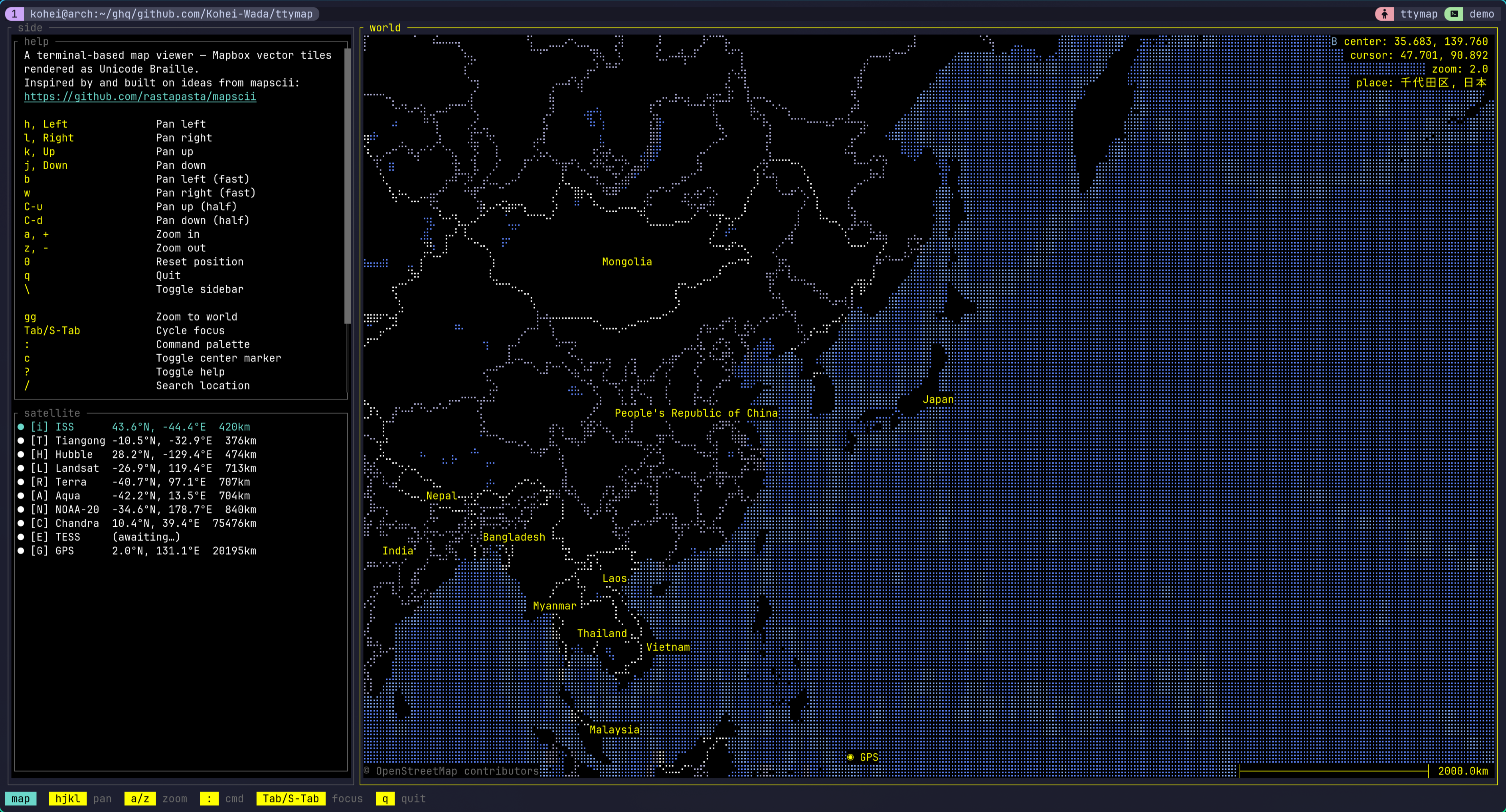
Spinning a Globe in the Terminal — Watching Planes, Earthquakes, and the ISS with My Own ttymap I put a globe in the terminal. Type ttymap and a world map gets drawn in braille characters that you move around with hjkl. That alone is just an old-school terminal map viewer — but on top of it this thing can show you the planes flying over your house at this very moment, scatter the last 24 hours of earthquakes in color, or track the ISS passing overhead. All inside the terminal, in 256-color braille. !ttymap default view with the help panel and a satellite tracker The demo videos and screenshots are collected in the repo's README: <Kohei-Wada/ttymap> What is this The map core is straightforward. Decode Mapbox Vector Tiles, project with Mercator, bake it into Unicode Braille with 2×4 sub-pixels per cell, and lay ANSI 256-color on top. Features are spatially indexed with an R-tree. The mapscii-style "a map in your terminal" part is this one layer, and pulled out on its own it's already a respectable viewer. The controls are vim-flavored. hjkl to pan, b/w for fast pan, C-u/C-d for half-screen pan, a/z to zoom, gg for the whole world, 0 to reset. Mouse drag and scroll work too. : for the command palette, / for Nominatim location search. Press ? and you get a live cheatsheet generated from the active keymap plus the plugins' palette entries. Up to here it's the "a map viewer that runs in the terminal" story. It gets interesting with the plugins that sit on top. Showing it off with plugins Almost every ttymap feature is a plugin, and 18 of them ship with the runtime. The answer to "what is ttymap actually for" turns out to be this list. Here are the fun ones, grouped by purpose. Watching the planet - aircraft — pulls markers for the planes currently in the air from OpenSky's public ADS-B feed. The sidebar lists altitude and speed; Enter centers the map on a given aircraft. Looking at the sky over my own house, there are more of them than you'd think. - quake — scatters USGS magnitude-2.5+ earthquakes from the past 24 hours as colored markers. A list appears in the sidebar, and it auto-jumps to the highest-magnitude epicenter. - satellite — tracks several objects at once like the ISS and Hubble. It fetches TLEs from CelesTrak and runs the orbit propagation (SGP4) in Lua. - wiki — Wikipedia geosearch. Shows nearby articles as markers and a side panel; Enter opens an extract paragraph. Playing - geo_quiz — "find this city before time runs out." A target pops up and you have about 30 seconds to get the map center as close as possible. Submit with Enter and the camera flies to a view that frames both your guess and the real city with ◎ markers and a connecting line. The score is cumulative km error (golf-style, lower is better). Easy mode shows the country, hard mode doesn't. - travel — curated tours of Japan and Italy ship out of the box, with a choreographed pre-overview → per-city loop → post-overview tour. It's driven by ttymap.director, described below. - autospin — the camera drifts eastward at a constant rate and loops at the antimeridian. The "this is a globe" demo. Pan by hand and it stops. - antipode — from the palette, fly to the exact opposite point on the sphere. "Where's the other side of the Earth from where I am right now?" - here — IP-geolocates your current position and flies the camera home. Networks on the map - traceroute — hit r, type a hostname, and as traceroute(8) resolves each next hop, the route's polyline grows across the map hop by hop. The sidebar lists the hops (Enter flies to that router), there's a per-hop color gradient, and consecutive * runs are collapsed in the panel. You can watch with your eyes where in the world your packets travel. - ping_simulation — a growing animation of cities pinging each other. A reference implementation for animated polyline overlays. Each plugin is a single *.lua (or a directory with init.lua) under runtime/lua/plugin/, readable as a tutorial for writing your own. Not just a viewer This is the part that pushes ttymap from "interactive viewer" up to "programmable globe." First, config is Lua. You write it in ~/.config/ttymap/init.lua. Unlike TOML, you can decide values with conditionals or computation — and that quietly pays off. Then, scriptable scenes. There's ttymap.animation.fly_to (frame-based pan/zoom) and ttymap.director (a coroutine scheduler with fly / wait / tween). A plugin can choreograph a multi-step camera-plus-overlay sequence as procedural Lua. A tour script looks like this: local director = require "ttymap.director" director.run(function() ttymap.notify("Starting tour") director.fly(139.69, 35.69, 10) -- yields until the camera arrives in Tokyo director.wait(120) -- park there for ~2s at 60fps director.fly(-74.00, 40.71, 10) -- glide to New York director.wait(120) director.fly(2.35, 48.86, 10) -- on to Paris director.wait(120) end) director.fly yields until the camera arrives. So just by writing "fly to Tokyo → wait → fly to NY" procedurally, the asynchronous animations play out in order. This is what the travel plugin actually is. User plugins go in ~/.config/ttymap/lua/plugin/. With Neovim-style stem-dedup, a same-named file overrides a bundled plugin. Trying it Single-user install, no root: git clone https://github.com/Kohei-Wada/ttymap cd ttymap make install This installs ~/.cargo/bin/ttymap and ~/.local/share/ttymap/ (the bundled runtime). cargo install on its own doesn't place the runtime, so it fails fast with a "did you make install?" message. Launch: ttymap # default position ttymap --lat 35.68 --lon 139.76 --zoom 10 # Tokyo ttymap --style bright # bright theme To "fly to my current location," call the here plugin from the : palette. You can also take a headless snapshot — for dashboards, cron, or pipes: ttymap snap --lat 35.68 --lon 139.76 --zoom 12 # → stdout ttymap snap --lat 35.68 --lon 139.76 --zoom 12 -o tokyo.ans # → file snap emits raw xterm-256 ANSI. cat the file in a compatible terminal or pipe it to less -R. Still WIP It's stable enough to use daily, but it's still WIP. CLI flags, the Lua surface, and the config schema can change without notice. Under the hood it's a 7-crate workspace on Rust 2024 edition, and the build uses protox so no system protoc is needed. The code and demo videos are here: <Kohei-Wada/ttymap> --- _This post was written with AI assistance and reviewed by the author._
UnaOS: a clean-room, bare-metal OS in Rust currently targeting x86_64 & ARM64. A working custom kernel, IPC, VFS/UnaFS (B-tree), xHCI/AHCI, Wi-Fi, bare-metal GPU drivers (Kepler, Intel Gen7+gmux, Orin GA10B, V3D), our macos-like theme, crispy, and more. pmes/UnaOS #osdev #rustlang #kernel
@FFeefef10605 @DNtizar He modificado uno y he modificado el mio Neorichi/mcp-whatapp