Mentions
Conversations linking to GitHub, newest first. Times are UTC.
Mentions by source
X
Bluesky
Hacker News
V2EX
Qiita
DEV
Mastodon
Latest posts
Mewgenics-androide Un puerto Android (ARM64) de Mewgenics (PS5, PPSA37318) que se ejecuta en la parte superior de AnyPS5, box64 y Turnip. Probado en Snapdragon 8 Elite (Adreno 830), alcanzando 60 FPS estables en combate. SFEZSergey/mewgenics-android
Built this pace estimator into my little widget on a whim and now I'm considering another Claude sub, just so they can continue working tonight. If anyone wants something like Josh's widget for CliProxy: aduggleby/CliProxyQuota t.co
@Moonst4r1502 For the KML and KSV specifically, I uploaded the files from ADS-B exchange and FlightRadar on github for archival purposes here: evanchiefer/Datasets-N722BD
A color picker shouldn't be a black box: why I built ew-color-picker as a plugin system Every project eventually needs a color picker. For years my default answer was <input type="color">, and every year I hit the same wall: it looks different in every browser, it gives you almost no control over the panel, and it is basically impossible to extend. The usual alternative is a large UI library where the color picker is one component among hundreds. You install the whole thing, inherit its styling opinions, and hope the one prop you need actually exists. There is a third option: treat the picker as a set of composable parts. That is the idea behind ew-color-picker. The real problem is integration, not color math Most color picker libraries already handle color math correctly. HSV, HSL, RGB, alpha, hex parsing, drag interactions — that part is solved. What is not solved is how the picker fits into your product: - Does it force a framework runtime? - Can you remove the parts you do not need? - Can you replace the saturation panel, buttons, or input without forking the library? - Can it inherit your design system instead of fighting it? - Can several pickers coexist on one page without global state collisions? - Can it live inside a dialog or scroll container without being clipped? ew-color-picker is built around these integration problems. The core keeps the current color and runs an event bus. The visible pieces are plugins: box, saturation panel, hue slider, alpha slider, input, numeric inputs, action buttons, preset swatches, and color-mode switcher. That means you can use the all-in-one entry package, or import only the pieces you actually need. What it solves, concretely 1. Composition at the package level The all-in-one entry is a thin aggregator. Plugins ship as separate packages, so the picker is assembled from parts instead of only being toggled on and off with boolean flags. If you do not need presets, do not register the preset plugin. If you want your own action row, skip the button plugin and render your own. 2. Framework independence The picker works with plain DOM and events. There is no React, Vue, or Angular runtime inside it. A React component is a thin wrapper around new ewColorPicker(...), not a separate implementation. That also means the same picker can be used in a design-system package, a CMS, or a white-label widget without rewriting it for each framework. 3. Design-system fit Two options matter when the picker is embedded rather than used as a standalone widget: - prefix changes every generated CSS class name, so the picker does not collide with another library that happens to use similar class names. - appendTo mounts the panel into document.body or any container, so dialogs, drawers, and overflow: hidden containers do not clip it. The SCSS build exposes a matching $prefix variable, and panel dimensions are driven by the --panel-width / --panel-height CSS variables rather than hard-coded viewport rules. 4. Predictable state and events setColor() is the public entry point for programmatic color changes, and every change flows through the same event bus: picker.on('change', (color) => { /* color changed */ }) picker.on('sure', (color, instance) => { /* apply clicked */ }) picker.on('toggle', (isOpen) => { /* panel opened or closed */ }) For multi-instance pages, each instance owns its own DOM, plugin instances, and event bus. There is no shared global color state. 5. TypeScript without a framework The source is TypeScript, declarations ship with every JavaScript package, and the constructor options are typed. You get autocomplete for options without adopting a framework-specific wrapper. Event names are plain strings, so they are validated at runtime rather than through a typed event map. Where it is useful - Design systems and theme editors. Styles can be overridden with your own CSS, and the published SCSS sources can be recompiled with a custom $prefix; panel size is driven by CSS variables. - Admin panels and CMS content editing. Presets, hex/RGB/HSL modes, alpha, clear, and apply are all available out of the box. - White-label products and embedded widgets. prefix and appendTo solve the two most common embedding problems: class collisions and panel clipping. - Canvas, drawing, and data-visualization tools. The picker is a small part of a larger editor; the event bus and setColor() make it easy to treat as a control, not an application. - Pages with several pickers. Each instance is independent, so multiple color fields do not interfere with each other. How it compares There is no single best color picker. The right choice depends on what you want to customize. | Option | Framework | Composition | Main strength | Best fit | |---|---|---|---|---| | <input type="color"> | None | Zero JavaScript | Built into the browser | Quick hex-only input with no design requirements | | UI-kit picker (Mantine, PrimeReact, ...) | Coupled to the kit | Whole library | Form integration and a consistent look | Apps already standardized on that UI kit | | react-colorful | React only | One small component per layout | Tiny, dependency-free and fast | React popovers that need a standard layout | | react-color | React only | One component per picker style | Many ready-made picker layouts | React apps that want Sketch/Photoshop-style components | | Pickr | None | Single package with themes and built-in extensions | Feature-rich standalone picker | A complete picker with less assembly | | iro.js | None | Single package | Wheel/slider style interactions | Creative tools that like the iro interaction model | | coloris | None | Single package plus CSS | Minimal footprint and CSS-variable theming | Lightweight, simple color fields | | ew-color-picker | None | Core plus per-plugin packages | Remove or swap out individual picker parts | Design systems, embedded widgets, and custom products | The important difference is where customization happens: - Native input: you customize almost nothing. - UI kits: you customize through the kit's theme and props, but you take the whole kit. - react-colorful and react-color: you choose among ready-made components. - Pickr, iro.js, coloris: you configure and theme a complete picker. - ew-color-picker: you choose which parts exist in the first place, and you can swap any of them for your own plugin. This is not only about bundle size. It is about ownership. If your product needs a non-standard action row, a custom preset layout, or a panel that mounts outside a dialog, writing your own plugin is often simpler than overriding a monolith. Honest trade-offs ew-color-picker is newer and has a smaller ecosystem than react-colorful, react-color, Pickr, or a major UI kit. There are no official framework binding packages; the documentation shows thin integration patterns instead. It also has no gradient editor, multi-color editing, or eyedropper — those need a dedicated tool. If you want a fully themed, zero-configuration picker maintained by a large team, a UI-kit component is a reasonable choice. The picker also does not pretend to be a complete design system. It gives you a small, typed, event-driven control that is designed to be embedded. Try it in under a minute npm install @ew-color-picker/ew-color-picker @ew-color-picker/style import ewColorPicker from '@ew-color-picker/ew-color-picker' import '@ew-color-picker/style/dist/index.css' import '@ew-color-picker/style/dist/input-number.css' const picker = new ewColorPicker({ el: '#color-picker', defaultColor: '#6366f1', predefineColor: ['#ef4444', '#22c55e', '#3b82f6', '#0f172a'], }) picker.on('change', (color) => { document.documentElement.style.setProperty('--brand-color', color) }) Both stylesheets are required: index.css styles the picker, and input-number.css styles the numeric inputs used by RGB and HSL modes. If you prefer a shorter package name, npm install ew-color-picker installs a thin compatibility entry that re-exports the same API. If you want to try it without a build step, the UMD bundle works directly from a CDN: <link rel="stylesheet" href="https://unpkg.com/@ew-color-picker/style/dist/index.css" /> <link rel="stylesheet" href="https://unpkg.com/@ew-color-picker/style/dist/input-number.css" /> <div id="color-picker"></div> <script src="https://unpkg.com/@ew-color-picker/ew-color-picker/dist/index.min.js"></script> <script> new ewColorPicker({ el: '#color-picker', defaultColor: '#ff0000' }) </script> Assemble only the parts you need If you only want a color box, a saturation panel, a hue slider, a text input, and the action buttons, import exactly those: import ewColorPicker from '@ew-color-picker/core' import Box from '@ew-color-picker/box' import Panel from '@ew-color-picker/panel' import Hue from '@ew-color-picker/hue' import Input from '@ew-color-picker/input' import Button from '@ew-color-picker/button' ewColorPicker.use(Box) .use(Panel) .use(Hue) .use(Input) .use(Button) new ewColorPicker({ el: '#color-picker' }) use() is a static registration step. Each plugin declares a pluginName, receives the picker instance, and can render into a mount point or subscribe to color changes. Registration is deduplicated by pluginName, so repeated imports or HMR do not register the same plugin twice. Writing a custom plugin A plugin follows the same shape as the built-ins: import ewColorPicker from '@ew-color-picker/core' class BrandSwatchesPlugin { static pluginName = 'brandSwatches' constructor(picker: ewColorPicker) { const host = picker.getMountPoint('panelContainer') // render your own UI into `host` // subscribe to `change` when the color updates picker.on('change', (color) => { // update your UI }) } } ewColorPicker.use(BrandSwatchesPlugin) Because the plugin receives the picker instance, it can call the same public API as application code: getColor(), setColor(), getOptions(), showPanel(), and so on. Embedding it in a design system When the picker lives inside another library or a white-label product, configure both sides consistently: new ewColorPicker({ el: '#color-picker', prefix: 'acme-', appendTo: document.body, panelPlacement: 'bottom-start', }) @use '@ew-color-picker/style/src/index.scss' with ($prefix: 'acme-'); @use '@ew-color-picker/style/src/input-number.scss' with ($prefix: 'acme-'); The JS prefix and SCSS $prefix must match. The prebuilt dist CSS uses ew-; custom prefixes require compiling the SCSS source. Practical options, not a configuration maze Most options map directly to a product requirement: new ewColorPicker({ el: '#color-picker', defaultColor: 'rgba(99, 102, 241, 0.8)', size: 'large', hueDirection: 'horizontal', alphaDirection: 'horizontal', predefineColor: [ '#ef4444', '#22c55e', '#3b82f6', { color: '#0f172a', disabled: true }, ], clearText: 'Reset', sureText: 'Apply', panelPlacement: 'bottom-start', togglePickerAnimation: 'height', pickerAnimationTime: 250, }) You can disable individual pieces with hasPanel, hasInput, showButton, showColorMode, and similar flags, or remove the hue and alpha sliders with hue: false and alpha: false. Hex, RGB, and HSL modes are supported, plus an optional alpha slider. Using it in React The picker does not need a React wrapper. The rules are: create it after mount, destroy it on unmount, and write external values through setColor() behind a guard so the update is not echoed back as a user change. import { useEffect, useRef } from 'react' import ewColorPicker from '@ew-color-picker/ew-color-picker' import '@ew-color-picker/style/dist/index.css' import '@ew-color-picker/style/dist/input-number.css' interface Props { value: string onChange: (color: string) => void } export function ColorField({ value, onChange }: Props) { const hostRef = useRef<HTMLDivElement>(null) const pickerRef = useRef<ewColorPicker | null>(null) const lastEmitted = useRef(value) const syncing = useRef(false) useEffect(() => { const picker = new ewColorPicker({ el: hostRef.current!, defaultColor: value, changeColor: (color: string) => { if (syncing.current) return lastEmitted.current = color onChange(color) }, }) pickerRef.current = picker return () => { picker.destroy() pickerRef.current = null } }, []) // Controlled: external value -> picker, without echoing back through onChange useEffect(() => { const picker = pickerRef.current if (!picker || value === lastEmitted.current) return syncing.current = true picker.setColor(value) syncing.current = false lastEmitted.current = value }, [value]) return <div ref={hostRef} /> } Two details that are easy to miss: 1. Prefer a DOM element over a selector string. With several instances, selectors can collide. 2. Always call destroy() on unmount. While the panel is open, the instance registers a document mousedown listener; leaking it can make other instances misbehave. The documentation has the same minimal pattern for Vue 3 and Angular. Using it in Solid Solid needs the same lifecycle handling, and the wrapper is small enough that it is worth showing the real one I use. It imports the core plus only the plugins it needs — trigger box, saturation panel, hue slider and presets — rather than the all-in-one entry. The picker is created in onMount, destroyed in onCleanup, and an external value is written back through setColor() behind a re-entrancy guard. import { createEffect, onCleanup, onMount } from 'solid-js' import EwColorPicker from '@ew-color-picker/core' import Box from '@ew-color-picker/box' import Panel from '@ew-color-picker/panel' import Hue from '@ew-color-picker/hue' import Predefine from '@ew-color-picker/predefine' import '@ew-color-picker/style/dist/index.css' EwColorPicker.use(Box).use(Panel).use(Hue).use(Predefine) interface Props { value: string presets?: string[] onChange: (color: string) => void } export function ColorField(props: Props) { let host!: HTMLDivElement let picker: EwColorPicker | undefined let lastEmitted = props.value let syncing = false onMount(() => { picker = new EwColorPicker({ el: host, defaultColor: props.value, predefineColor: props.presets ?? [], changeColor: (color) => { if (syncing) return lastEmitted = color props.onChange(color) }, }) }) // Controlled: external value -> picker, without echoing back through onChange createEffect(() => { const value = props.value if (!picker || value === lastEmitted) return syncing = true picker.setColor(value) syncing = false lastEmitted = value }) onCleanup(() => picker?.destroy()) return <div ref={host} /> } Because a plugin receives the picker instance and a DOM mount point, you can also render Solid JSX straight into the picker chrome. In the example above I mount the app's own input and button inside the picker's bottom row, without forking the library: import { render } from 'solid-js/web' import { createSignal, onCleanup, onMount } from 'solid-js' import { ApplyOrder } from '@ew-color-picker/utils' function AppControls(props: { picker: EwColorPicker }) { const [color, setColor] = createSignal(props.picker.getColor() || '') onMount(() => { const sync = (value: string) => setColor(value) props.picker.on('change', sync) onCleanup(() => props.picker.off('change', sync)) }) return ( <div class="app-controls"> <input value={color()} onChange={(e) => props.picker.setColor(e.currentTarget.value)} /> <button onClick={() => props.picker.hidePanel()}>Done</button> </div> ) } class AppControlsPlugin { static pluginName = 'appControls' // Run after the panel plugin has created its bottom row static applyOrder = ApplyOrder.Post private dispose?: () => void constructor(picker: EwColorPicker) { const panel = picker.getMountPoint('panelContainer') const bottomRow = panel?.querySelector('.ew-color-picker-bottom-row') if (bottomRow) { this.dispose = render(() => <AppControls picker={picker} />, bottomRow) } } destroy() { this.dispose?.() } } EwColorPicker.use(AppControlsPlugin) use() deduplicates by pluginName, so HMR or multiple entry points do not register the plugin twice. destroy() is called by the core when the picker is destroyed, so the Solid render root is disposed together with the instance. The selector above assumes the default ew- prefix. If you customize prefix, build the bottom-row selector from getPrefix(picker) (exported by @ew-color-picker/utils) so it matches the generated class name. One extra trick from the same wrapper: if the host app already has its own .ew-color-picker styles, you can scope the imported library stylesheet to your own subtree (Vite's ?raw import) so the library's rules do not leak into other components: import pickerCss from '@ew-color-picker/style/dist/index.css?raw' const style = document.createElement('style') style.textContent = `@scope (.color-field-scope) {\n${pickerCss}\n}` document.head.appendChild(style) This does not override host rules that target the picker inside your subtree, but it stops the library from restyling anything outside it. No !important and no forced prefix change. When I would not use it - You only need a simple hex input and do not care about browser differences: <input type="color"> is enough. - You are already standardized on a UI kit and need its form, theme, and accessibility behavior more than you need picker-level control. - You want an official framework binding package with zero integration code. - You need a feature-rich standalone picker with almost no assembly: Pickr or a UI-kit component may fit better. The picker is intentionally a control, not a complete application. Links - Documentation: eveningwater.github.io - Live demo: eveningwater.github.io - GitHub: eveningwater/ew-color-picker - npm: npmjs.com If the plugin model is useful to you, a star on GitHub helps more people find it. And if you build a plugin that fills a gap, I would genuinely like to see it.
ComfyUI-Idol テスト。惜しい感じ。右は入力画像。 Nynxz/ComfyUI-Idol t.co
@AirpocketRobot そこら辺はもう拡張機能作ってるんですよね karaage0703/xangi-terminal karaage0703/xangi-remote-desktop
@jackfriks One thing that helped me: my agents never hold the real keys. They get a scoped token and a {{secret:NAME}} reference. The vault injects the real key at use time. Built keyhall for that: luizgustavosaraiva/keyhall
Let’s make the @solana agent network known. awesome-solana-ai#276
@niklaslenz_ai @MiaAI_lab I still run knapcio/DeepSeek-V4.1-Flash-4x-DGX-Spark-TP4 as it has faster prefill on the same 4 sparks. Is that something that can be improved on Tensorfold?
Clamiga renamed to AmiLisp, plus new features In version 0.12 there were many bugs and usability issues fixed for both AmiLisp and Clamacs. Clamacs now knows projects (similar to perspectives.el), also some sort of iedit was implemented to edit multiple places in a buffer at once. The garbage collector interface was abstracted so that a new Immix GC implementation can be used (and is used) for AmigaOS and MorphOS, speeding up the collection by factors in most situations. On macOS/Linux/Windows the default generational collection stays default. github.com/mdbergmann/amilisp/releases/tag/v0.12
@Agnogad @HashimTheArab also ported Minecraft Bedrock to rust cinnabar-mc/ci%E2%80%A6 There is also a android version as well
@OSDCloud @SeguraOSD @gwblok On Discord I found a known-issue post for what I'm experiencing. Rebuilding the USB drive worked for several so I'm gonna try that. OSD#395
Live Voice Changer for Discord, games and etc You know, I’ve always had a problem finding a proper voice changer for games, Discord, etc. They were either too complex, pricy, or hard to find and set up. I wanted something simple that would work with one click, so I built one myself. iamjorj/voxel Would love to hear your feedback.
Check an options agent for early assignment and pin risk If your agent sells covered calls and put spreads, the order check at entry is the easy part. The two problems I care about show up later, while the position sits there: early assignment before an ex-dividend date, and pin risk on expiration day. Both are about the calendar. A covered call that looked fine when it was sold can get assigned the night before the stock goes ex-dividend. A short put that closes a few cents from its strike on Friday can turn into stock you only find out about on Saturday. Over the weekend I posted a short rundown of these risks. This one has the code and the actual responses. I run every open options position through options_risk_check each morning, and again on expiration day. The function import os, requests AFA = "https://agent-financial-advisor.agent-financial-advisor.workers.dev/v1/tools/options_risk_check" ACT_ON = {"early_assignment_dividend", "pin_risk"} def options_check(account, underlying, legs, as_of=None): body = {"account": account, "underlying": underlying, "legs": legs} if as_of: body["as_of"] = as_of key = os.environ.get("AFA_API_KEY") headers = {"authorization": f"Bearer {key}"} if key else {} r = requests.post(AFA, json=body, headers=headers, timeout=10) r.raise_for_status() result = r.json() flags = [c for c in result["checks"] if c["status"] != "pass" and c["check"] in ACT_ON] return result, flags as_of defaults to today in New York. I pass it here so the examples below are reproducible. One thing to watch if you used my pre-trade check post: this tool names its fields check and detail. pre_trade_check uses id and message. Early assignment before a dividend Test account: margin, $40,000 equity, 200 shares of KO, short 2 KO Nov 20 70 calls. KO is at $72.40 and the call trades at $2.55. For the test I set the ex-dividend date to Nov 13 with a $0.53 dividend. Use the real date from your data feed. result, flags = options_check( account={"type": "margin", "equity": 40000, "cash": 8000, "options_level": 2, "shares_held": 200}, underlying={"symbol": "KO", "price": 72.40, "ex_dividend_date": "2026-11-13", "dividend": 0.53}, legs=[{"type": "call", "side": "short", "strike": 70, "expiry": "2026-11-20", "quantity": 2, "premium": 2.55}], as_of="2026-11-02", ) Here's what came back (trimmed): { "decision": "approve_with_warnings", "summary": "APPROVE_WITH_WARNINGS: 0 failed, 1 warning(s), 4 passed.", "margin_requirement_usd": 0, "max_loss_usd": 0, "required_options_level": 1, "structures": [ {"kind": "covered_call", "quantity": 2, "legs": ["short 2 KO 2026-11-20 70 calls"], "requirement_usd": 0} ], "checks": [ { "check": "early_assignment_dividend", "status": "warn", "detail": "Short 70 call is in the money with $0.15 time value, less than the $0.53 dividend going ex on 2026-11-13. Expect assignment the day before; close or roll it if you don't want to deliver 200 shares and owe the dividend.", "source": "OCC Rule 805(d); OCC Characteristics and Risks of Standardized Options" } ] } The math is simple. The call is $2.40 in the money, so only $0.15 of the $2.55 is time value. Whoever owns that call gets more from exercising and collecting the $0.53 dividend than from holding it. The position is still covered and the margin requirement is $0. Nothing is wrong with the trade itself. The agent just has to decide by the close on Nov 12 whether it wants to give up the shares. Pin risk on expiration day Second test account: margin, $25,000 equity, level 3. The position is a put spread on SPY, short 3 Nov 6 580 puts and long 3 Nov 6 575 puts. SPY is at $580.20. I ran the same legs twice. With as_of set to Wednesday, Nov 4, it came back approve with 4 checks passed. Max loss $1,155, requirement $1,500. There was no pin warning. With as_of set to Friday, Nov 6, the expiration day, it added this: { "check": "pin_risk", "status": "warn", "detail": "Short 580 put expires 2026-11-06 with the stock within 1% of the strike. Whether you're assigned won't be known until after the close; close it to avoid an unplanned position over the weekend or overnight.", "source": "OCC Rule 805(d); OCC Characteristics and Risks of Standardized Options" } This is the one that worries me with agents. The spread caps the loss at $1,155 only if both legs behave. If SPY closes at $579.90, the 575 long expires worthless and the 580 short can be assigned. That's 300 shares of SPY, about $174,000, in a $25,000 account over the weekend. An agent that only looks at max loss isnt going to see it coming. So on expiration morning the loop is short: for pos in open_positions: result, flags = options_check(pos["account"], pos["underlying"], pos["legs"]) for c in flags: print(f"{pos['underlying']['symbol']} {c['check']}: {c['detail']}") close_or_roll(pos) open_positions and close_or_roll are yours. I'd hand flagged positions to the agent with the detail text and let it pick between closing and rolling. A stricter setup would close them outright. Limits and setup - No signup for the first 5 calls a day. POST /v1/keys gives a free key with 25 calls a day. Put it in AFA_API_KEY. - It only knows what you send. The ex-dividend date and dividend come from your data, and so do the prices. - The 1% pin band is a default. Pass pin_band_pct in the policy object to change it. - Greeks come back as null unless you send delta, gamma, theta and vega on every leg. - It's rule-based analysis for software, not investment advice. The same call also does margin under FINRA Rule 4210, cash-account limits, required options level and auto-exercise of expiring in-the-money longs. The docs and examples are in the repo: agent-financial-advisor. Over MCP the server is at https://agent-financial-advisor.agent-financial-advisor.workers.dev/mcp and the tool is options_risk_check. Disclosure: I built this. If your agent trades options and keeps getting surprised by something else, tell me in the comments.
Today's random GitHub ⭐! matiassingers/awesome-readme Posted using Starrysky
auctopusやんけw E-zClap/auctopus GPT-6 ProにManagerなるものが中継して渡すらしいけれど,OpenAIの規約違反ちゃうんか?と思ったらAPI使用か・・・・・TUBAMEと先端LLMじゃぶじゃぶ使ってもこの程度って感じはする.Nmin=L^2+1を導く程度なら・・・まぁまだそこらへんだよねという気はする.この元記事は誇張しすぎ感あるなぁ.
Traefik Rate Limiting That Actually Works on k3s > _Originally published at woitzik.dev_ <em>Disclosure: This post contains Amazon affiliate links (marked with *). If you buy through them, I earn a small commission at no extra cost to you. I only link gear I actually own and use daily.</em> Prometheus scraped [Grafana](/blog/kube-prometheus-loki-grafana-k3s/) 30 times in 10 seconds. Grafana's API returned 429s. The dashboard went blank. The root cause: a misconfigured Prometheus service monitor with a 1-second scrape interval — the kind of runaway scrape config that also drives Prometheus's own RAM usage. The fix: Traefik's RateLimit middleware, correctly configured to protect against scrape storms without blocking normal dashboard access. This runs on a [BMAX Mini PC*](/go/4bv3yF1) with 20+ services behind Traefik — one misconfigured scrape can cascade into a cluster-wide outage. View the complete homelab infrastructure source on GitHub 🐙 The Scrape Storm Grafana runs on k3s behind Traefik. The Prometheus Operator's ServiceMonitor for Grafana had a scrapeInterval: 1s — a copy-paste error from a debug session. Prometheus fired 30 requests per second at Grafana's /api/datasources endpoint. Grafana's Go runtime couldn't handle the concurrent connections, started returning 503s, and the dashboard went blank. Without rate limiting, any misconfigured scraper — or any user refreshing aggressively — can DoS a service behind Traefik. The RateLimit Middleware Traefik's RateLimit middleware uses a token bucket algorithm. It's configured per-entrypoint or per-route: apiVersion: traefik.io/v1alpha1 kind: Middleware metadata: name: rate-limit namespace: traefik spec: rateLimit: average: 100 burst: 200 period: 1s sourceCriterion: ipStrategy: depth: 1 - average: 100 — 100 requests per second per source IP - burst: 200 — allow bursts up to 200 requests - period: 1s — the averaging window - sourceCriterion.ipStrategy.depth: 1 — trust the first X-Forwarded-For header (correct behind one proxy) The depth: 1 is critical. Without it, Traefik uses the raw TCP connection IP, which is always the Traefik pod's IP in a Kubernetes cluster. Every client gets the same rate limit bucket. With depth: 1, Traefik reads the real client IP from X-Forwarded-For. Applying It Per Service Not every service needs the same rate limit. Grafana's dashboard needs a higher burst than the API: apiVersion: traefik.io/v1alpha1 kind: Middleware metadata: name: grafana-rate-limit namespace: monitoring spec: rateLimit: average: 50 burst: 100 period: 1s sourceCriterion: ipStrategy: depth: 1 --- apiVersion: traefik.io/v1alpha1 kind: IngressRoute metadata: name: grafana namespace: monitoring spec: entryPoints: - websecure routes: - match: Host(`grafana.lab.woitzik.dev`) kind: Rule middlewares: - name: grafana-rate-limit namespace: monitoring services: - name: grafana port: 3000 tls: secretName: lab-wildcard-tls Whitelisting Internal Traffic Prometheus, ArgoCD, and other internal services shouldn't be rate-limited. Traefik's RateLimit middleware supports requestHost and requestHeaders as source criteria, but the cleanest approach is a separate middleware for internal services: apiVersion: traefik.io/v1alpha1 kind: Middleware metadata: name: internal-rate-limit namespace: traefik spec: rateLimit: average: 500 burst: 1000 period: 1s sourceCriterion: requestHost: {} Internal services use requestHost (the Host header) as the source instead of IP. Since internal services all share the same cluster IP, IP-based rate limiting would bucket them all together. The 429 Response When a rate limit is hit, Traefik returns a 429 Too Many Requests with a Retry-After header. The client should respect this. Most HTTP clients don't. The Grafana dashboard showed a blank page because the browser retried immediately. Adding a client-side backoff in the Prometheus scraper config fixed the retry behavior: scrapeConfig: - scrapeInterval: 30s scrapeTimeout: 10s metricsPath: /metrics The real fix was the scrape interval. The rate limit was the safety net. Monitoring Rate Limits Traefik exposes rate limit metrics in Prometheus format: traefikmiddleware_ratelimit_requests_total{middleware="monitoring-grafana-rate-limit"} 42 traefikmiddleware_ratelimit_rejected_total{middleware="monitoring-grafana-rate-limit"} 3 Grafana alert: if rejected_total increases by more than 10 per minute, something is hammering the service. This is the early warning for scrape storms, bot attacks, or misconfigured clients. <NewsletterCTA />
ちなみにな、昔Atomのテキストエディタで使われた、テキストバッファに、superstringってのがあってだな... atom/superstring
@Yucky0405_VRC 修正できたので置いときます! github.com/r-fallingstar/steamac-lite/releases/ta…
HawDB v0.25.0 is out! In this release, we've added support for @moonbitlang . Huge thanks to @colmugx for the contribution! #HawDB #moonbit github.com/nowledge-co/hawdb/releases/tag/v0.25.0
Idea for the Epstein RAG app: adapt the pipeline for other document collections. Extraction and chunking choices would need retuning per collection, but the shape of the system travels. AbhisumatK/Epstein_Files_RAG
iWitch & Mwitch 姜哥@happyjoejiang 牛逼! jhaizhou-ops/d2r-mobile t.co
@FrankNoeBerlin @MolenceBio @Logan_Hallee @jankosinski @vinay_matt bug reports and feature requests are welcome at: github.com/sokrypton/localfold/issues
Idea for the Epstein RAG app: show the zero hits. When a question finds nothing, list the related terms that also found nothing, so a gap in the index is visible instead of silent. AbhisumatK/Epstein_Files_RAG
How I Rendered 159 Narrated Lesson Videos With Free, Open-Source Tools For CoreQ Academy, my free cybersecurity training platform, I wanted a video for every lesson: 125 certification-level objectives, 19 track lessons, 7 Linux modules and 8 lab briefings. Recording 159 videos by hand wasn't realistic, so I built a pipeline that turns lesson content into narrated 1080p videos on an ordinary CPU, with no paid services. The pipeline lesson data (TypeScript) -> video spec (JSON) -> narration (Kokoro TTS) -> slides (HTML rendered in Chromium) -> MP4 + captions + chapters (ffmpeg) 1. Specs generated from the lessons Each lesson already exists as structured data: an intro, groups of terms with definitions, a scenario and a quiz. A script converts that into a scene list. Each scene has a slide layout and "steps": one sentence of narration plus which element to reveal. Because specs are generated from the same source as the website, videos never drift out of sync with the lessons. 2. Narration with an open neural voice I used Kokoro via ONNX Runtime. On an 8-core CPU it renders speech about three times faster than real time. A small pronunciation layer handles security vocabulary: def speakable(t): # read file paths aloud, spell out most acronyms, keep pronounceable ones t = re.sub(r'(?<![\w])(~?/[\w./-]*)', path_to_words, t) # /etc/ssh -> "slash etc slash ssh" t = re.sub(r'\b([A-Z]{2,6})\b', spell_unless_word, t) # IAM -> "I A M", NIST stays "NIST" return t 3. Slides as HTML Slides are plain HTML and CSS in the site's brand, rendered at 1920x1080 with Playwright. Each newly revealed element gets about nine animation frames for an ease-in, then holds while the narration plays. HTML means real fonts, perfect text and layouts I can test like a web page. 4. Assembly with ffmpeg An ffmpeg concat list gives each frame its exact duration, the narration is loudness-normalised (loudnorm=I=-16), and the output is H.264 tuned for still images. A five-minute lesson comes out around 10 to 14 MB at 1080p. Captions (WebVTT) and chapter timestamps come free, because the pipeline knows exactly when each sentence starts. Lessons learned the hard way - Clean up temp files. My first batch wrote hundreds of PNG frames per video to /tmp and never deleted them. Around video 120, the system disk hit 100%. Now each video renders in a work directory that's removed in a finally block. - Make batches resumable. Skip videos whose output is newer than their spec. Restarts become free. - Don't run two batches at once. Two processes writing the same output file will corrupt each other. Results 159 videos and about 5.6 hours of narrated lessons, rendered for free, with captions and chapters, organised for YouTube upload. The Security+ level series is live on YouTube, and every video links back to its free lesson, quiz and lab. --- I'm Sean Obinna Ofodile, a cybersecurity leader, founder of Quantum Core Services and CIO of seenu.io, an early-stage social discovery startup. I teach free cybersecurity classes at CoreQ Academy and on YouTube as Professor Sean Ofodile, and was featured on 11Alive in Atlanta with the Seenu team.
We just open-sourced a whole 3D studio. Meet 3D OS by Scenario. GitHub repo: scenario-labs/skills Your coding agent gets 6 departments and 80 skills. 📁 3D OS ┃ ┣ 📁 Animation ┃ ┣ 📁 Rig Any Character ┃ ┗ 📁 Video to Animation ┃ ┣ 📁 Art ┃ ┣ 📁 Storyboards and Previs ┃ ┗ 📁 Creature and Character Design ┃ ┣ 📁 Modeling ┃ ┣ 📁 Image to 3D Model ┃ ┗ 📁 Hard-Surface Vehicles and Weapons ┃ ┣ 📁 Look Dev and Lighting ┃ ┣ 📁 Retexturing and PBR Materials ┃ ┗ 📁 Rendering and Lighting ┃ ┣ 📁 Worlds ┃ ┣ 📁 Explorable 3D Worlds ┃ ┗ 📁 Splat Scenes and Skyboxes ┃ ┣ 📁 Pipeline ┃ ┣ 📁 Retopology, UVs and Baking ┃ ┗ 📁 Engine-Ready Export ┃ ┗ 📁 Expert Tools ┣ 📁 DCCs: Blender, Maya, ZBrush ┗ 📁 Engines: Unreal, Unity, Godot, Roblox Each department passes its work to the next, taking one sketch all the way to a game-ready asset. The expert tools control Blender, Maya, ZBrush, Unreal, Unity, Godot and Roblox on your own machine. Your agent now has a whole 3D studio behind it. It runs on Scenario and works in Claude Code, Codex or Cursor.
TinyAstral: a 4B model on Huawei Ascend drives a real robot arm. A frozen 180B open model evolves its own harness, then distill it into 4B. Leads on 6 benchmarks. Code, weights & data open. 📄 arxiv.org 💻 Garfield-kh/TinyAstral #EmbodiedAI #Robotics #huggingface t.co
Domains are about to have a new provider. The @solana blockchain and @x402 And you and your agent! pay-skills#336
gpui来ると思ってるからgpui-kitにコントリビュートしてる、みんなも使おう longbridge/gpui-kit
Why court documents as the dataset: public records only matter if people can actually inspect them. A careful tool for reading them, with sources shown for every answer, is worth getting right. AbhisumatK/Epstein_Files_RAG
Jellyfin-plugin-dailypicks Hello people, i just released a plugin for custom suggestion (Daily picks) that show up in the homepage. The plugin work for both Native TV apps and web apps. For Native TV Apps, the suggestions are made from all your users view habits For Web apps, the suggestions are made per user. dodocousin/Jellyfin-plugin-dailypicks preview.redd.it
Why build in public about a project that reads public documents: the work should be as inspectable as the material. The code, the mistakes, the thinking. Open about the open. AbhisumatK/Epstein_Files_RAG
Which companies are hiring for Okta and Intune? Tagging public job boards for tech-stack signals --- title: "Which companies are hiring for Okta and Intune? Tagging public job boards for tech-stack signals" published: true description: "Tagging 4,330 open job posts from 22 public job boards with a small Python tagger, and the false positives that had to go." tags: python, datascience, sales, opensource --- A job post is one of the few public documents where a company says which tools it runs. "3+ years administering Okta and Intune" tells you more about an IT stack than most press releases. I wanted a quick way to ask "which of these companies is hiring for Okta or Intune right now?", so I wrote a small tagger and ran it against a handful of public job boards. Every number below comes from one sample I ran on 2026-11-02 between 9:36 and 9:38 a.m. ET: 22 public boards, 4,330 open postings, 28 HTTP requests. It is a small, hand-picked sample of mostly tech companies, so read the numbers as "what this sample showed", not as a picture of the market. Where the posts come from Greenhouse, Lever and Ashby each publish a JSON feed of an employer's open jobs, the same data their hosted careers pages use. No login, no scraping of HTML pages: Greenhouse boards-api.greenhouse.io/v1/boards/<slug>/jobs?content=true Lever api.lever.co/v0/postings/<slug>?mode=json&limit=100&skip=0 Ashby api.ashbyhq.com/posting-api/job-board/<slug> The slug is the one in the company's careers URL. Greenhouse returns every job with its description in one request; Lever pages 100 at a time; Ashby returns the whole board. I kept the fetcher slow: it reads robots.txt on each host first, waits at least a second between requests and sends a User-Agent that names the project. The 2026-11-02 sample was 15 Greenhouse boards (2,699 postings), 2 Lever boards (387) and 5 Ashby boards (1,244). Tagging, and the false positives The tagger is a hand-written dictionary of 328 tools (Okta, Microsoft Intune, Jamf, CrowdStrike, Kandji and so on), each with its spellings. "Intune", "Microsoft Endpoint Manager" and "MEM" all map to Microsoft Intune. The first version was a substring search. Here are three things the 2026-11-02 sample showed about why that does not work. 1. Substrings. In the 2026-11-02 sample, 2,154 of the 4,330 postings contain the letters "aws". Only 279 are tagged AWS; "laws" alone shows up in 1,983 postings. "rust" is worse: 2,695 postings contain it, 201 are tagged Rust, and nearly all of the rest are "trust", "trusted" and "entrusted". The fix is whole-word matching: a spelling only counts if no letter, digit or underscore touches it on either side. import re B, E = r'(?<![A-Za-z0-9_])', r'(?![A-Za-z0-9_])' re.search(B + r'aws' + E, 'state and local laws', re.I) # None re.search(B + r'aws' + E, 'AWS, GCP or Azure', re.I) # match Everyday words get one more rule: Rust, Slack, Zoom, Git and Notion only match with their usual capitals. I dropped bare "Go" entirely. In this sample 3,755 postings contain "go" as a substring ("goals", "government", "good"), and as a whole word it is also an ordinary verb. Only "Golang" and "Go (Golang)" count, which means "Python or Go" is missed. I took that trade. 2. The employer's own name. All 811 OpenAI postings in the sample mention OpenAI, and all 400 Datadog postings mention Datadog. Counting those says nothing about the stack, so the tagger drops the employer's own product. In the 2026-11-02 sample that rule removed a tag from 2,273 postings across 8 companies. 3. Culture lines. Slack shows up in 78 postings in the sample, often in lines like "coffee chats and Slack conversations that help them stay connected" or "works mostly async, with regular pairing sessions, 1:1s, and Slack". That is how a team talks, not a skill being hired for. Slack, Zoom, Microsoft Teams and Webex are now gated: they only count inside a requirements section or near a phrase like "experience with". After gating, 38 of the 78 Slack postings still count. This rule is a heuristic, since it depends on headings, and it will get some posts wrong. There is also a rule that skips "trusted by companies like..." and "backed by investors..." sentences. It exists because those sentences name tools, but it did not fire on any of the six identity and device tools I counted below in the 2026-11-02 sample. From posts to a table With tags per posting, the per-company table is a count of open postings that mention each tool: jobstack boards greenhouse:discord greenhouse:asana ashby:openai ... \ --focus "Okta,Microsoft Intune,Jamf,CrowdStrike,Kandji,Microsoft Entra ID" \ --jobs-out jobs.jsonl Part of the table from the 2026-11-02 sample: the nine boards with the most hits for these six tools. Seven more boards had one or two Okta postings each (Notion and Vanta 2; Coinbase, Duolingo, Figma, Reddit and Robinhood 1). | board | open postings | Okta | Intune | Jamf | CrowdStrike | Kandji | Entra ID | |---|---|---|---|---|---|---|---| | Cloudflare (Greenhouse) | 467 | 4 | 1 | 2 | 0 | 1 | 4 | | Palantir (Lever) | 301 | 6 | 0 | 0 | 0 | 0 | 6 | | Asana (Greenhouse) | 110 | 4 | 1 | 1 | 3 | 0 | 0 | | OpenAI (Ashby) | 811 | 0 | 3 | 3 | 0 | 0 | 2 | | Ramp (Ashby) | 173 | 2 | 0 | 2 | 1 | 1 | 0 | | Discord (Greenhouse) | 41 | 2 | 2 | 2 | 0 | 0 | 0 | | Dropbox (Greenhouse) | 24 | 1 | 2 | 0 | 0 | 0 | 3 | | Airbnb (Greenhouse) | 201 | 3 | 0 | 0 | 0 | 0 | 0 | | GitLab (Greenhouse) | 235 | 2 | 0 | 1 | 0 | 0 | 0 | Some takeaways from the 2026-11-02 sample: - Okta appeared in 33 postings at 15 of the 22 companies. Some of those are the same job listed in several locations; counting each company and title once, it is 26. - Microsoft Intune appeared in 9 postings at 5 companies. Only 3 postings mentioned both Okta and Intune: one at Cloudflare and two at Discord. - The hits sit in a few kinds of roles: IT support and IT ops, corporate security, identity engineering, and customer-facing support for security products. A Discord IT Ops post lists "identity (Okta), device management across both Mac (Jamf) and Windows (Intune)"; an Asana IT Support post asks to "build and deploy new laptops using standard deployment tools like JAMF, Intune". - 6 of the 22 boards (Datadog, Instacart, Linear, Lyft, Pinterest and Spotify) had no posting that mentioned any of the six tools. A count of open postings is a weak signal on its own: a company with 800 openings will mention more tools than one with 40. It is most useful as a list of specific postings to read, which is why --jobs-out saves every tagged posting with its URL. The code The code is in my repo, MIT-licensed: the tagger, the dictionary, the three board readers and the tests. fecklesspleb/jobstack from jobstack import Tagger Tagger.default().tag("IT Support Specialist", "Build and deploy new laptops using tools like JAMF, Intune, ABM")["tags"] # ['Jamf', 'Microsoft Intune'] If you try it on other boards and find a tool it misses or a false positive it lets through, an issue with the posting text is the most useful thing you can send. I wrote this post and the code with AI assistance; the numbers come from the sample run described above.
PostgreSQL makes you add an index for every filter combination. I built an extension that merges small indexes at query time instead In PostgreSQL, every new filter combination tends to mean one more composite index. Each one takes disk and cache and slows down every write. Leapfrog is my open-source extension that takes a different route: keep a few small indexes and let the planner merge them into one ordered stream at query time. It's built for one narrow case: a list query with several equality filters that each match many rows, a combination that matches few, and ORDER BY id LIMIT n. Everything else gets the stock plan. You end up with fewer indexes and none of the composite ones. It's a deliberate compromise: reads are slower than with an exact composite index, and writes are cheaper. Measured at 100M rows on the list query customer_id = ? AND deleted_at IS NULL ORDER BY id DESC LIMIT 100, for a customer with 5M rows of which 500 are live: stock PostgreSQL on small indexes takes 92 seconds, Leapfrog on the same indexes 0.9 s, an exact composite index 0.3 ms. With a third filter and 11 matching rows it's 168 s against 0.26 s; with 5,000 matching rows out of 1M × 200k, 384 ms against 2.5 ms. On writes at 20M rows, dropping the composite indexes cut the WAL of 100k INSERTs from 3.6 GB to 166 MB. To be clear, Leapfrog doesn't touch the write path; the write savings come from the index set alone. What Leapfrog does is keep reads usable without the composite indexes. The problem A typical table is filtered by several columns, has soft deletes, and is paged by id: SELECT * FROM orders WHERE customer_id = 7 AND product_id = 3 ORDER BY id DESC LIMIT 100; Stock PostgreSQL has three options here: - An exact index, (customer_id, product_id, id): very fast, but you need one for each combination you query. - An Index Scan on one column, filtering the rest on the heap: it can read many rows for nothing. - BitmapAnd: it reads both indexes in full, loses the order, and has to sort. So the indexes pile up: (customer_id, product_id, id), (customer_id, status, id), the same again with WHERE deleted_at IS NULL, and so on. Every INSERT and every non-HOT UPDATE pays for all of them. The solution: small indexes that merge CREATE INDEX ON orders (customer_id, id); CREATE INDEX ON orders (product_id, id); CREATE INDEX ON orders (status, id); CREATE INDEX ON orders (id) WHERE deleted_at IS NULL; CREATE INDEX ON orders (id) WHERE deleted_at IS NOT NULL; -- if you list deleted rows too Leapfrog adds a plan node, Index Merge Intersect, that walks the matching indexes together in id order, skips the gaps, fetches only the rows that match, and stops at LIMIT. No sort, no query changes. It's a normal planner path: when it isn't cheaper, you get the stock plan. 100M rows, the cases the node is for The shape every list endpoint has: filtered by the owner and by one or two more columns, newest first. Each filter alone matches a lot, the combination matches little, and those rows are scattered through the owner's long history. deleted_at IS NULL is just one of the filters here; any column works the same. SELECT * FROM orders WHERE customer_id = ? AND product_id = ? [AND deleted_at IS NULL] ORDER BY id DESC LIMIT 100; 100M rows (12 GB) in one table per data set, indexes (customer_id, id), (product_id, id) (3 GB each) and (id) WHERE deleted_at IS NULL (101 MB). "Exact index" is a composite index built for the query afterwards; "Leapfrog" is what the planner picks with the extension loaded (the node, in every row here), "Stock" what it picks without; BitmapAnd is forced. PostgreSQL 18.6 in Docker on a laptop (14 GB RAM, NVMe, shared_buffers 512MB), median of 3 runs. First, rows in random physical order, as a table is after years of updates. 5% of the rows are live; the customer has 500 live rows spread over its history: | Query | Exact index | Leapfrog | Stock | BitmapAnd | |---|---:|---:|---:|---:| | customer_id with 1M rows AND deleted_at IS NULL | 0.4 ms | 159 ms | Index Scan 2.3 s, cold 22 s | 1.6 s | | customer_id with 5M rows AND deleted_at IS NULL | 0.3 ms | 880 ms | Index Scan 92 s | 2.7 s | Stock scans one index and filters the other column on the heap: it expects the live rows near the top, they aren't, and it fetches 930,000 heap rows for 100 results, 937,000 random pages from disk: 92 s. Leapfrog walks the two indexes together, 6,500 pages, and fetches the 100 rows it returns. Then, rows in id order, which is the best case for stock's Index Scan, since its heap reads come out sequential: | Query | Exact index | Leapfrog | Stock | BitmapAnd | |---|---:|---:|---:|---:| | 1M × 2M AND deleted_at IS NULL: 11 match | 0.1 ms | 259 ms | Index Scan 168 s | 1.1 s | | 1M × 200k, 5,000 match, 1 row in 20,000 | 1.1 ms | 2.5 ms | BitmapAnd 384 ms | 373 ms | | 10k × 1M, 100 match | 0.4 ms | 104 ms | BitmapAnd 338 ms | 295 ms | | 1M × 200k, 500 match, all in the middle of the table | 0.6 ms | 66 ms | BitmapAnd 353 ms | 371 ms | Where stock picks BitmapAnd, it reads both indexes whole and sorts. Leapfrog's times are with its index pages cached; cold, the first row of each table took 3.8 s and 0.24 s. The 1M × 2M query, EXPLAIN (ANALYZE, BUFFERS), trimmed. Stock: Limit (actual time=4150.379..149383.766 rows=11 loops=1) Buffers: shared hit=369 read=1465395 -> Index Scan Backward using lf_bitmap_id_idx on lf_bitmap Filter: ((customer_id = 4) AND (product_id = 120)) Rows Removed by Filter: 4703248 Execution Time: 149383.824 ms Leapfrog (cold): Limit (actual time=86.942..4297.267 rows=11 loops=1) Buffers: shared hit=568 read=23815 -> Custom Scan (Index Merge Intersect) on lf_bitmap Outer Index: lf_bitmap_product_id_id_idx Inner Index: lf_bitmap_customer_id_id_idx Inner Index 2: lf_bitmap_id_idx Outer Entries Read: 2001433 Inner Entries Read: 999058 Inner Entries Read 2: 4702364 Heap Fetches: 11 Execution Time: 4297.383 ms Exact index: Limit (actual time=0.406..1.457 rows=11 loops=1) Buffers: shared hit=3 read=15 -> Index Scan Backward using lf_bitmap_exact3 on lf_bitmap Execution Time: 1.493 ms When matches are common nothing matters: 20M × 25M rows with 5M matching, every plan but BitmapAnd (12 s) returns in under a millisecond. And the node's work doesn't grow with the table while LIMIT stops early: two filters at 1 in 5,000 rows take 1 to 2 ms from 10M to 100M rows. The cost: writes A second benchmark: 20M rows, 12 filter columns, two index sets. 15 specialized: composite indexes for the 9 frequent filter combinations (6 pairs, 2 triples, 1 quadruple, all WHERE deleted_at IS NULL) plus single-column indexes for the 6 columns no composite starts with. 14 general: one (fK, id) per column plus (id) WHERE deleted_at IS NULL and IS NOT NULL. The write table compares index sets only; Leapfrog plays no part in it. | Writes and storage | 15 specialized | 14 general | |---|---:|---:| | Index size | 11.2 GB | 8.0 GB | | WAL, 100k INSERTs | 3,595 MB | 166 MB | | INSERT rows/s | 945 | 12,592 | | WAL, UPDATE of a filter column (25k rows) | 1,004 MB | 70 MB | | WAL, soft delete (25k rows) | 46 MB | 77 MB | One index more, 22x the WAL. Nearly all of it is the 9 composite indexes: adding the index groups one at a time, the 6 single-column indexes write 89 MB, the 6 pairs add 461 MB, the 2 triples 2.2 GB, the quadruple 0.9 GB. In an index with many distinct prefixes every new row lands on a page of its own, and the first write to a page after a checkpoint logs it in full. Single-column indexes append to the end of a few runs and keep hitting the same pages. Reads on the same 20M rows with the 14 general indexes, LIMIT 100, work_mem 256MB, median of 5 runs: | Query | Exact index | Leapfrog | Stock | BitmapAnd | |---|---:|---:|---:|---:| | 2 filters | 0.16 ms | 1.0 ms | BitmapAnd 71 ms | 72 ms | | 3 filters, 21 rows found | 0.06 ms | 33 ms | BitmapAnd 71 ms | 74 ms | | 4 filters, 0 rows found | 0.03 ms | 31 ms | BitmapAnd 59 ms | 65 ms | With 3 or 4 filters fewer rows match than the LIMIT asks, so the merge runs to the end of the sparsest index. What it needs - PostgreSQL 18 or 19, B-tree indexes shaped (filter_columns..., sort_column) or (sort_column) WHERE predicate. - Equality filters and partial-index predicates only; no IN, no ranges, no expression indexes yet. One ORDER BY key, any B-tree type. - Planning costs +0.03 to +0.10 ms per query on tables with 10 to 50 indexes. - A planner hook (shared_preload_libraries or LOAD) that only adds a path; leapfrog.enabled = off turns it off. No catalog changes, no superuser. The executor uses the standard index AM calls, so visibility and HOT chains work as for an Index Scan; two places read nbtree internals. Where it isn't a fit - One or two hot queries: a dedicated index is better. - The cost model counts pages first: with data in memory it sometimes picks the node when an Index Scan would be faster, and sometimes misses the node. - PG18 skip scan, as I understand it, serves WHERE b = ? on (a, b) and returns rows grouped by a, not in id order, so a LIMIT still needs a sort. Not measured against it. - Everything above is one session at a time; no concurrent-load benchmark yet. Experimental (0.0.4), not production-ready. What I'd love feedback on: correctness (MVCC, HOT chains, VACUUM, concurrent updates; there are isolation tests, but I'm sure I've missed cases), the planner hook and the cost model, and whether this compromise makes sense for your workloads. Repo, with the benchmark scripts: ibrohim238/postgresql-leapfrog Harsh criticism, issues and "this already exists, see X" are all welcome.
It hit #1 on GitHub trending worldwide in its first week 🏆 Gathin23/cleanyourtv
[AWS]作成したRDSの構成をterraform化する このページでは、EC2のみを Terraform化して一旦、削除→Terraform から再構築を実施 ローカル側のAWS CLIのプロファイルが残っているか C:\Users\haruk>aws configure list-profiles aws-lab AWSに接続できるか確認 C:\Users\haruk>aws sts get-caller-identity --profile aws-lab { "UserId": "AIDxxxxxxxxxxxxxxxx", "Account": "xxxxxxxxxxxxx", "Arn": "arn:aws:iam::xxxxxxxxxxxxx:user/tidus" } ステップ1:リージョンを確認 C:\Users\haruk>aws configure get region --profile aws-lab ap-northeast-1 ステップ2:VPCを確認 C:\Users\haruk>aws ec2 describe-vpcs --profile aws-lab --region ap-northeast-1 --query "Vpcs[].{VpcId:VpcId,CidrBlock:CidrBlock,IsDefault:IsDefault,Name:Tags[?Key=='Name']|[0].Value}" --output table +----------------------------------------------------------------------- | DescribeVpcs | +--------------+------------+--------------+--------------------------+ | CidrBlock | IsDefault | Name | VpcId | +--------------+------------+--------------+--------------------------+ | 10.0.0.0/16 | False | aws-lab-vpc | vpc-0f9046xxxxxxxxx | | 10.10.0.0/16| False | VPC-A | vpc-0070d4xxxxxxxxx | +--------------+------------+--------------+--------------------------+ ステップ3:サブネットを確認 C:\Users\haruk>aws ec2 describe-subnets --profile aws-lab --region ap-northeast-1 --filters "Name=vpc-id,Values=vpc-0f90469347a521370" --query "Subnets[].{SubnetId:SubnetId,Name:Tags[?Key=='Name']|[0].Value,Cidr:CidrBlock,AZ:AvailabilityZone,PublicIP:MapPublicIpOnLaunch}" --output table +--------------------------------------------------------------------------------------------------------- | DescribeSubnets | +-----------------+--------------+-----------------------------+-----------+----------------------------+ | AZ | Cidr | Name | PublicIP | SubnetId | +-----------------+--------------+-----------------------------+-----------+----------------------------+ | ap-northeast-1c| 10.0.3.0/24 | aws-lab-public-subnet-1c | False | subnet-04d81e2160e876429 | | ap-northeast-1a| 10.0.2.0/24 | aws-lab-private-subnet-1a | False | subnet-0d92abfb23d13d1b1 | | ap-northeast-1a| 10.0.1.0/24 | aws-lab-public-subnet-1a | True | subnet-0d812977405516891 | +-----------------+--------------+-----------------------------+-----------+----------------------------+ ステップ4:ルートテーブルを確認 aws ec2 describe-route-tables --profile aws-lab --region ap-northeast-1 --filters "Name=vpc-id,Values=vpc-0f90469347a521370" --query "RouteTables[].{RouteTableId:RouteTableId,Name:Tags[?Key=='Name']|[0].Value,Associations:Associations[].SubnetId,Routes:Routes[].{Destination:DestinationCidrBlock,Gateway:GatewayId,NAT:NatGatewayId}}" --output json ステップ5:セキュリティグループを確認 aws ec2 describe-security-groups --profile aws-lab --region ap-northeast-1 --filters "Name=vpc-id,Values=vpc-0f90469347a521370" --query "SecurityGroups[].{Name:GroupName,GroupId:GroupId,Description:Description,Ingress:IpPermissions[].{Protocol:IpProtocol,FromPort:FromPort,ToPort:ToPort,IPRanges:IpRanges[].CidrIp,SourceSG:UserIdGroupPairs[].GroupId},Egress:IpPermissionsEgress[].{Protocol:IpProtocol,FromPort:FromPort,ToPort:ToPort,IPRanges:IpRanges[].CidrIp}}" --output json ステップ6:EC2の一覧を確認 C:\Users\haruk>aws ec2 describe-instances --profile aws-lab --region ap-northeast-1 --filters "Name=vpc-id,Values=vpc-0f90469347a521370" --query "Reservations[].Instances[].{InstanceId:InstanceId,Name:Tags[?Key=='Name']|[0].Value,State:State.Name,Type:InstanceType,Subnet:SubnetId,PrivateIP:PrivateIpAddress,PublicIP:PublicIpAddress,SG:SecurityGroups[].GroupId}" --output table +-------------------------------------------- | DescribeInstances | +-------------+----------------------------+ | InstanceId | i-03deec345a9e8bxxx | | Name | aws-lab-web-1a | | PrivateIP | 10.0.1.122 | | PublicIP | 43.207.xxx.xxx | | State | running | | Subnet | subnet-0d812977405516xxx | | Type | t3.micro | +-------------+----------------------------+ || SG || |+----------------------------------------+| || sg-080da58036901fxxx || |+----------------------------------------+| ステップ7:RDSの設定を確認 C:\Users\haruk>aws rds describe-db-instances --profile aws-lab --region ap-northeast-1 --query "DBInstances[].{Identifier:DBInstanceIdentifier,Status:DBInstanceStatus,Engine:Engine,Version:EngineVersion,Class:DBInstanceClass,Endpoint:Endpoint.Address,Port:Endpoint.Port,Public:PubliclyAccessible,SubnetGroup:DBSubnetGroup.DBSubnetGroupName,Vpc:DBSubnetGroup.VpcId,MultiAZ:MultiAZ,Storage:AllocatedStorage,SG:VpcSecurityGroups[].VpcSecurityGroupId}" --output json [ { "Identifier": "aws-lab-mysql", "Status": "available", "Engine": "mysql", "Version": "8.4.11", "Class": "db.t4g.micro", "Endpoint": "aws-lab-mysql.c94e6oggkxxx.ap-northeast-1.rds.amazonaws.com", "Port": 3306, "Public": false, "SubnetGroup": "default-vpc-0f904xxxxxxxxxx", "Vpc": "vpc-0f904xxxxxxxxxx", "MultiAZ": false, "Storage": 20, "SG": [ "sg-0622xxxxxxxxxxxx" ] } ] ステップ8:VPCエンドポイントを確認 C:\Users\haruk>aws ec2 describe-vpc-endpoints --profile aws-lab --region ap-northeast-1 --filters "Name=vpc-id,Values=vpc-0f90469347a521370" --query "VpcEndpoints[].{Id:VpcEndpointId,Service:ServiceName,Type:VpcEndpointType,State:State,Vpc:VpcId,SubnetIds:SubnetIds,RouteTableIds:RouteTableIds,SG:Groups[].GroupId}" --output json [ { "Id": "vpce-023dxxxxxxxxxxx", "Service": "com.amazonaws.ap-northeast-1.s3", "Type": "Gateway", "State": "available", "Vpc": "vpc-0f904693xxxxxxxxxxxxxxx", "SubnetIds": [], "RouteTableIds": [ "rtb-0700c7xxxxxxxxxxxx" ], "SG": [] } ] ステップ9:インターネットゲートウェイを確認 C:\Users\haruk>aws ec2 describe-internet-gateways --profile aws-lab --region ap-northeast-1 --filters "Name=attachment.vpc-id,Values=vpc-0f90xxxxxxxxx" --query "InternetGateways[].{Id:InternetGatewayId,Name:Tags[?Key=='Name']|[0].Value,VpcAttachments:Attachments[].VpcId,State:Attachments[].State}" --output table +------------------------------------------ | DescribeInternetGateways | +------------------------+---------------+ | Id | Name | +------------------------+---------------+ | igw-0e0734431b1625049 | aws-lab-igw | +------------------------+---------------+ || State || |+--------------------------------------+| || available || |+--------------------------------------+| || VpcAttachments || |+--------------------------------------+| || vpc-0f904xxxxxxxxxxxxxx || |+--------------------------------------+| ステップ1:Terraform用フォルダを作成 mkdir C:\Users\haruk\terraform-ec2-rds cd C:\Users\haruk\terraform-ec2-rds ステップ2:main.tf を作成 notepad main.tf terraform { required_providers { aws = { source = "hashicorp/aws" version = "~> 6.0" } } } provider "aws" { region = "ap-northeast-1" profile = "aws-lab" } 既存のVPCを参照するだけ data "aws_vpc" "lab" { id = "vpc-0f90469347a521370" } ステップ4:EC2設定のインポートを追記 import { to = aws_instance.web id = "i-03deec345a9e8b502" } ステップ5:EC2の設定を自動生成 terraform plan -generate-config-out=generated.tf ↑何してる? import ブロックを読み取る AWS上の既存EC2の設定を取得する generated.tf というファイルにTerraformコードを生成する 取り込み計画を表示する エラーが出た ↓エラー内容 競合する項目 内容 primary_network_interface と associate_public_ip_address ネットワークインターフェースとパブリックIPの設定 ipv6_address_count と ipv6_addresses IPv6アドレスの指定方法 ↓下記2か所を削除 ① primary_network_interface を削除 次のブロック全体を削除します。 primary_network_interface { network_interface_id = "eni-06da52f5800ebb70f" } ② IPv6の設定を修正 次の2行を削除してください。 ipv6_address_count = 0 ipv6_addresses = [] 次のステップ terraform plan Plan: 1 to import, 0 to add, 0 to change, 0 to destroy. 次のステップ terraform apply EC2の元ができたので、 まずは、既存EC2を削除する前に、Terraformから同じ構成を再作成できる状態に整えるところから進めます。RDSと既存ネットワークは維持します。 手順1:現在のTerraform設定を確認する terraform state list C:\Users\haruk\terraform-ec2-rds>terraform state list data.aws_vpc.lab aws_instance.web これはTerraformが現在管理しているリソースの一覧を表示するだけ 手順2:EC2の設定ファイルを整理する type main.tf 下記設定のみを削除する import { to = aws_instance.web id = "i-03deec345a9e8b502" } 手順4:EC2を再作成できる設定か確認する C:\Users\haruk\terraform-ec2-rds>findstr /n /i "user_data ami instance_type subnet_id vpc_security_group_ids" generated.tf 6: ami = "ami-0a940816f3c484aa0" 17: instance_type = "t3.micro" 26: subnet_id = "subnet-0d812977405516891" 34: user_data = null 35: user_data_replace_on_change = null 37: vpc_security_group_ids = ["sg-080da58036901fcbb"] 手順5:OSを確認する sh-5.2$ cat /etc/os-release NAME="Amazon Linux" VERSION="2023" ID="amzn" ID_LIKE="fedora" VERSION_ID="2023" PLATFORM_ID="platform:al2023" PRETTY_NAME="Amazon Linux 2023.12.20261026" ANSI_COLOR="0;33" CPE_NAME="cpe:2.3:o:amazon:amazon_linux:2023" HOME_URL="aws.amazon.com" DOCUMENTATION_URL="docs.aws.amazon.com" SUPPORT_URL="aws.amazon.com" BUG_REPORT_URL="amazonlinux/amazon-linux-2023" VENDOR_NAME="AWS" VENDOR_URL="aws.amazon.com" SUPPORT_END="2029-06-30" 手順6:起動時スクリプトを作る generated.tf にて下記編集 user_data = null user_data_replace_on_change = null 下記に修正 user_data = <<-EOF #!/bin/bash dnf install -y mariadb105 EOF user_data_replace_on_change = false これで、新しくEC2を作成したときにMariaDBクライアントを自動インストールする設定になります。 手順7:設定を検証する C:\Users\haruk\terraform-ec2-rds>terraform validate Success! The configuration is valid. これはTerraformの設定ファイルの構文や整合性を検証するコマンド 手順8:Planを確認する terraform plan Plan: 1 to add, 0 to change, 1 to destroy. ただし、実行前に重要な注意点があります。 インスタンスIDとパブリックIPが変わります。 EC2内に手動で保存したデータや設定は、新しいEC2には引き継がれません。 RDS自体はこのPlanの対象ではありません。 user_data によるMariaDBクライアントのインストールは、新しいEC2の起動時に実行されます。ただし、スクリプトの実行成否は別途確認が必要です。 手順2:Terraformの管理状態からEC2を外す C:\Users\haruk\terraform-ec2-rds>terraform state rm aws_instance.web Removed aws_instance.web Successfully removed 1 resource instance(s). 手順2:AWSコンソールから既存EC2を削除する AWSコンソールで EC2 → インスタンス を開きます。 リージョンが 東京(ap-northeast-1) になっていることを確認します。 インスタンスID i-03deec345a9e8bxxx を選択します。 インスタンスの状態が「実行中」であることを確認し、必要なデータがないことを確認します。 インスタンスの状態 → インスタンスを終了(Terminate) を選択し、確認して実行します。 Terraformで新しいEC2を作成する準備 C:\Users\haruk\terraform-ec2-rds>terraform state list data.aws_vpc.lab IPアドレスは自動割り当てにしたいので、この部分を削除する。 private_ip = "10.0.1.122" ※terraformで指定するものしないもの 必須項目:明示的な指定が必要 任意項目:省略するとAWSやTerraformプロバイダーのデフォルト動作に従う AWS側の設定に依存する項目:サブネットなど、関連リソースの設定によって決まる ① 設定ファイルの構文チェック terraform validate ② 作成計画の確認 terraform plan 次のステップ:EC2を作成する terraform apply aws_instance.web: Creating... aws_instance.web: Still creating... [00m10s elapsed] aws_instance.web: Creation complete after 14s [id=i-08d91848fc7f1xxxx] Apply complete! Resources: 1 added, 0 changed, 0 destroyed. C:\Users\haruk\terraform-ec2-rds>terraform state list data.aws_vpc.lab aws_instance.web ← Terraformが新しいEC2を管理する状態 terraformからEC2作成ができた! ここでセットした mariaDBがインストールされているかというと、、、 user_data = <<-EOF #!/bin/bash dnf install -y mariadb105 EOF sh-5.2$ mysql --version mysql Ver 15.1 Distrib 10.5.29-MariaDB, for Linux (x86_64) using EditLine wrapper sh-5.2$ ちゃんとインストールされていた!! 新しいEC2から既存のRDSに接続する実習 sh-5.2$ mysql -h aws-lab-mysql.xxxxxxxxxxxx.ap-northeast-1.rds.amazonaws.com -P 3306 -u admin -p Enter password: Welcome to the MariaDB monitor. Commands end with ; or \g. Your MySQL connection id is 1673 Server version: 8.4.11 Source distribution Copyright (c) 2000, 2018, Oracle, MariaDB Corporation Ab and others. Type 'help;' or '\h' for help. Type '\c' to clear the current input statement. MySQL [(none)]> 既存のRDSに接続できた。
ShadowPing - GPS based Hunting Game Game Title: ShadowPing Playable Link: shadowping.pages.dev App Download: shadowping.pages.dev Description: ShadowPing is a GPS-based hunting game for you and your friends, and it’s my first mobile game. The game is simple: you go outside together and one of you is the Hunter while the others are Runners. It’s just like Manhunt. The Runners run and hide in a selected area, while the Hunter tries to catch them. Instead of playing on a screen, you play out in the real world, so all you need is a group of friends and a place to run around. I built it as a side project and just finished it, so I’d love to hear your feedback. If you want to find out more, you can check out my GitHub or visit the website. GitHub: tammo2701/shadowping Free to Play Status: Free to play Involvement: Ideas and design by me, coding by Claude and Codex.
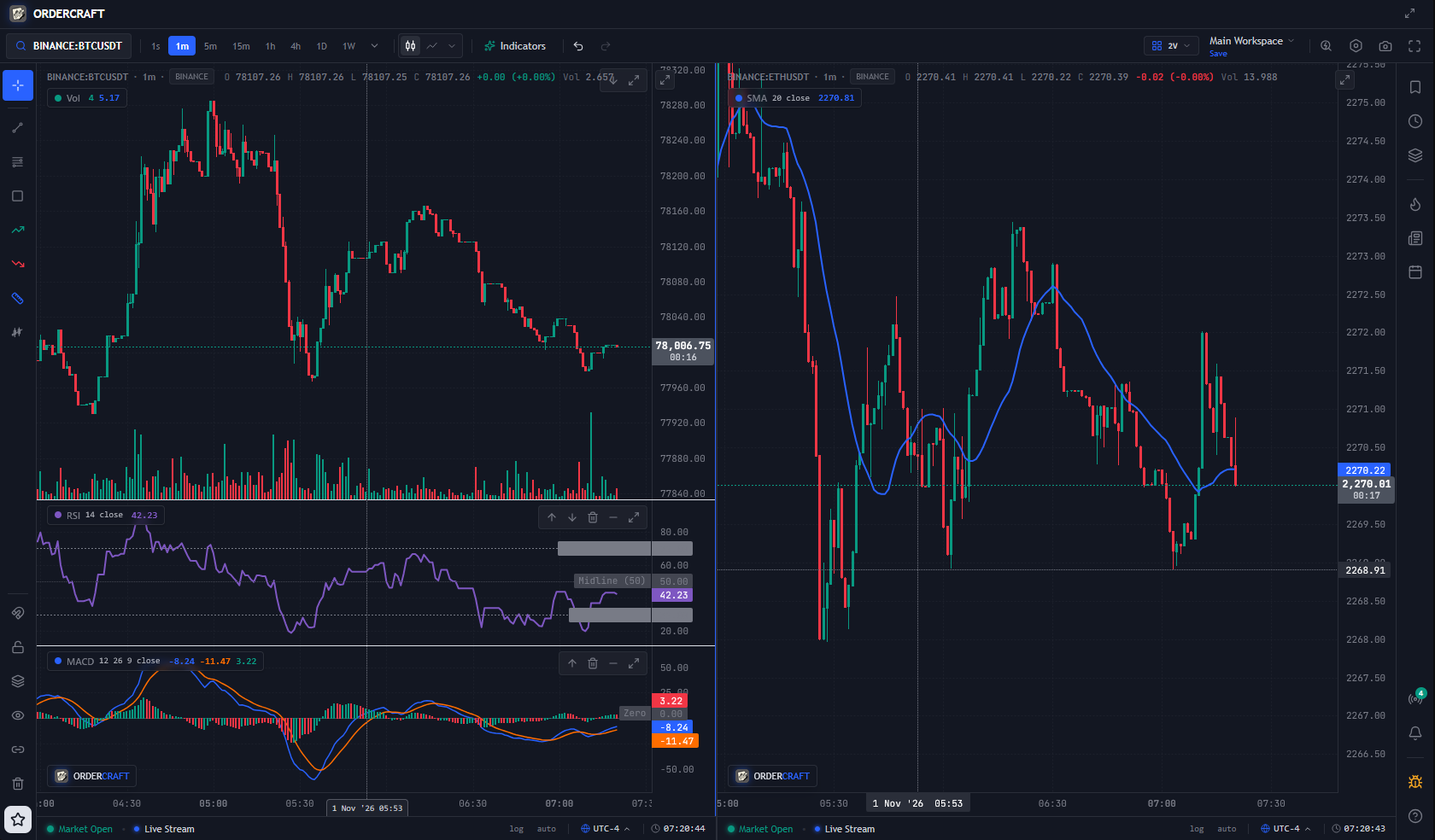
Building OrderCraft: A Local-First Financial Charting Terminal in a Single ~14MB Go Binary !OrderCraft Terminal Modern financial charting platforms have converged on the same frustrating cloud SaaS model: lock basic technical analysis behind $15 to $60/month subscriptions, restrict free users to 2 indicators per chart, paywall multi-chart split-screen layouts, and force all your watchlists and layouts into their cloud. On the flip side, developers who try to build hosted open-source alternatives hit two massive walls almost immediately: 1. IP Rate Limits: Public exchange APIs (like Binance or Yahoo Finance) ban central server IPs within hours when multiple users request market data through a shared backend. 2. Market Data Redistribution Licensing: Exchanges demand thousands of dollars per month the moment a central server redistributes market feeds to third-party users. To solve both problems at the root, I built and open-sourced OrderCraft (v0.1.0, MIT License) — a high-performance, 100% local-first financial charting and technical analysis terminal built with Go, React 19, TypeScript, and Lightweight Charts (Apache-2.0). {% github ordercraft-hq/terminal %} --- <!-- 💡 CLICK THE IMAGE ICON IN THE DEV.TO TOOLBAR TO INSERT YOUR FULL TERMINAL SCREENSHOT RIGHT BELOW THIS LINE! --> 🏗️ How It Works: The Single-Binary Local-First Architecture Instead of running in the cloud, OrderCraft compiles into a single standalone ~14.8MB executable (CGO_ENABLED=0) that runs directly on your machine (127.0.0.1). Because your machine connects directly to public market data feeds or your own brokerage API keys, there is no middleman server, zero telemetry, and no exchange redistribution bottleneck. 1. Zero-Dependency //go:embed Packaging The entire frontend (React 19, TypeScript, Vite) compiles down into static assets and is embedded directly into the Go binary using //go:embed: - No Node.js, Python, or external database installation required for end-users. - Cross-compiles cleanly to standalone binaries for Windows (amd64), macOS (arm64 / Apple Silicon & amd64), and Linux (amd64 / arm64). - Running ./ordercraft --app-mode automatically detects Chromium, Brave, or Edge and launches the terminal inside a native, frameless desktop application window. 2. Concurrent Go WebSocket Fan-In / Fan-Out Coordinator Financial charting requires sub-second tick updates across multiple symbols and timeframes simultaneously. In internal/server/hub.go and internal/datafeed/: - The Go backend manages upstream WebSocket streams and REST polling across Binance, Yahoo Finance, OANDA v20, Alpaca, and TwelveData. - Incoming ticks are normalized, aggregated into live OHLCV bars in memory, and fanned out over a local WebSocket hub to all subscribed chart panes in the browser. 3. Pure-Go SQLite Persistence (0600 Permissions) All historical OHLCV candle caches, multi-pane workspace layouts, custom chart drawings, indicator templates, and BYOK (Bring Your Own Key) brokerage credentials are stored in a local SQLite database: - Historical bars are cached locally so switching timeframes or scrolling back in history is instantaneous. - API keys (OANDA, Alpaca, TwelveData) are stored strictly on your local disk with 0600 file permissions (0700 directory permissions) and are masked (AKIA••••••••1234) across all status endpoints so raw secrets are never exposed back to the browser. 4. Custom Canvas 2D Drawing Primitives (ISeriesPrimitive) While lightweight-charts (Apache-2.0) provides fast HTML5 Canvas candlestick rendering, it does not ship with interactive drawing tools out of the box. We built a custom Canvas 2D drawing engine from scratch supporting: - Trendlines, Rays & Extended Lines (with OHLC magnet snapping) - Fibonacci Retracements with customizable levels - Parallel Channels & Shaded Rectangles - Long & Short Risk-Reward Position Calculators with interactive Entry, Take-Profit, and Stop-Loss drag handles - Multi-Pane Synchronized Workspaces: Split your screen into 1x1, 2V, 2H, 3, or 4-pane grids with synchronized crosshairs, symbols, and timeframes. 5. Hardening a 127.0.0.1 Server Against Cross-Tab Browser Attacks One overlooked attack surface in local-first web apps is Localhost CSRF & Cross-Site WebSocket Hijacking. If a local server sets Access-Control-Allow-Origin: * or skips WebSocket Origin checks, any malicious website open in another browser tab can query [http://127.0.0.1:3000/api/](http://127.0.0.1:3000/api/)* and read user data. Before releasing v0.1.0, we hardened the Go HTTP/WebSocket server to enforce: - Strict loopback Origin validation (localhost, 127.0.0.1, [::1]) on both REST preflight/mutation handlers and the WebSocket upgrader. - Upstream URL path and query escaping (url.PathEscape / url.QueryEscape) across all provider adapters to prevent SSRF/path traversal. - http.MaxBytesReader payload caps and Slowloris connection timeouts (ReadHeaderTimeout, ReadTimeout, WriteTimeout). --- ⚡ Try It Out in 10 Seconds You can grab the prebuilt v0.1.0 binary for Windows, macOS, or Linux directly from our GitHub Releases page, or build from source: git clone https://github.com/ordercraft-hq/terminal.git cd terminal # Run in native frameless desktop window mode: ./ordercraft --app-mode Out of the box, it streams live crypto (BINANCE:BTCUSDT, ETHUSDT, etc.) and equity data (AAPL, NVDA, SPY) with zero configuration or API keys required. I'd love for you to check out the repository, give it a ⭐ on GitHub if you find local-first tools useful, and let me know in the comments (or in GitHub Discussions) what indicators or market data providers (IBKR, Polygon, local CSV/Parquet backtest replay) you'd like to see in v0.2.0! 👉 GitHub Repository: ordercraft-hq/terminal
Introducing ADA: an open-source Satisfactory mod manager for Windows, Linux and macOS Hey everyone, I've always had trouble running SMM on Mac. Sure, it works natively, but no matter what I try, it always crashes when attempting to install a mod. No logs, no error messages, just a crash. I posted this over on the other reddit, but the post got deleted for low effort because 'We don't need another Mod Manager'. Frankly, I don't like the layout of SMM, it hurts my eyes, and as I said, it never worked for my system, so I attempted to make something that does work on my system, and in case anyone else has issues, I've released it. Why not contribute to SMM? Honestly, I'm a Unity backend developer, I don't know the language SMM is coded in. C# is my home, it's what I know. Below is copy-pasted from my original post. Yes, it's been run through an AI, and the AI disclaimer is at the bottom. So, today I’m introducing ADA (Automated Deployment Assistant), a new open-source mod manager for Satisfactory that runs natively on Windows, Linux and macOS. This is a preview release (0.8), and I’m looking for testers, especially on Windows, Linux and dedicated servers. Download ADA · Installation guide · Source code Why another mod manager? ADA started because I wanted a mod manager that worked reliably on my Mac. I began planning it before SMM supported CrossOver. That support has since arrived, but I’ve continued having trouble installing mods on my setup, so I kept working on ADA. I did what any Satisfactory player would do: I made a plan. Then several more plans. After a few months on the shelf and a lot of work, the result is ADA. If you’ve played Cities: Skylines, the layout may look familiar and its one I prefer. I used Skyve as a reference: it’s one of the most complete mod managers I’ve used, and I like being able to see everything I need at a glance. What it does - Mods: install, update and remove mods, choose specific versions, or queue several changes and apply them together. - Catalogue: browse and search ficsit.app, filter by tags and save favourites. - Dependencies: work out the required mods and compatible versions for your game. - Profiles: keep a separate set of mods for each playthrough, with support for importing SMM profiles. - Automatic game detection: - Windows: Steam and Epic. - Linux: Steam, including Flatpak and Snap, with Proton; Epic through Heroic or Legendary. - macOS: Steam or Epic in a CrossOver bottle. - Saves and blueprints: see which mods a save was made with and switch to those exact mod versions. Copy, export and import blueprints. - Backups: back up saves, blueprints, game settings and mod settings, manually or on a schedule. Every restore can be undone. - Dedicated servers — untested: manage server mods over SFTP, FTP with TLS, or a shared folder. Passwords are stored in Windows Credential Manager, the macOS Keychain or the Linux Secret Service. - Recovery: recover interrupted mod changes and repair damaged or missing mod files where possible. - Activity: review a history of ADA’s changes and its logs. - Themes: light and dark. Looking for testers ADA has mostly been tested on macOS. The Windows and Linux versions pass their automated tests, but haven’t seen much real use yet. I’d especially love to hear from: - Windows players using Steam or Epic. - Linux players, including Steam Deck users. - Anyone running a dedicated server. Dedicated server support has never been tested against a real server. Please back up your server’s saves and mods before trying it. Whether it works smoothly or something breaks, feedback would be appreciated. You can use the issue tracker or leave a comment here. For problems, please include your OS, launcher, ADA version and any relevant logs. About AI use I used AI throughout development, as I do with my other coding projects. I’m disabled, and long stretches of typing are painful; AI helps reduce that load. I plan and review the changes, test them, and fix the problems I find. ADA currently has around 950 automated tests, with the suite running on Windows, Linux and macOS. Those tests are useful, but real-world testing across different setups is why I’m sharing this preview. Good to know - The builds aren’t code-signed yet. Windows SmartScreen and macOS will warn you the first time ADA runs. The installation guide explains how to get past those warnings. - ADA doesn’t update itself yet. Download new versions from the Releases page; your settings and data are kept. - Only launcher-installed games are detected for now. Choosing a game folder manually is planned. - Mods and downloads come from ficsit.app. ADA is developed independently and doesn’t use SMM’s code. It isn’t affiliated with Coffee Stain Studios or the ficsit.app team. - ADA is open source under the MIT licence. Links - Download ADA - Source code - Installation guide - Report a problem Thanks to the modding community, the mod authors and the ficsit.app maintainers. None of this works without them.
Run a decision model locally in your Flutter app Hey Flutter devs 👋 We can now run Laya decision model with NobodyWho, our open-source on-device inference library. Unlike the LLMs that we also support, this type of model does not generate text. Instead you can score predefined answers, classify text or answer yes/no. For example, if you are building a personal diary app, you can easily detect the user’s mood, categorize an entry or detect stress, offline after model download, without sending any sensitive data to the cloud. First, you need to load the model: import 'package:nobodywho/nobodywho.dart' as nobodywho; final model = await nobodywho.Decision.fromPath( modelPath: 'hf://ggml-org/Laya-GGUF/Laya-Q8_0.gguf' ); Then you can ask questions/analyse text: final result = await model.decide( state: "Diary entry: ${userInput}", questions: { "topics": { "type": "choice", "instructions": "Choose the main topic for this entry", "criteria": { "work": "job, colleagues, deadlines, career", "health": "sleep, exercise, food, illness", "relationships": "family, friends, partner", "leisure": "hobbies, travel, going out", }, }, "stressed": { "type": "noul", "instructions": "Does the writer sound stressed?", }, "mood": { "type": "score", "instructions": "How is the writer's overall mood?", "criteria": ["bad", "okay", "great"], }, }, ); final answers = (result as Map)["answers"] as Map; final topics = answers["topics"] as Map; final stressed = answers["stressed"] as Map; final mood = answers["mood"] as Map; Output example: // stressed { type: noul, noul: 0.00002 } // topics { type: choice, choice: leisure, probabilities: { work: 0.0422, relationships: 0.1518, health: 0.0302, leisure: 0.7756 }, confidence: 0.7008 } // mood { type: score, score: 1.6995, legend: {0: bad, 1: okay, 2: great}, probabilities: {0: 0.0082, 1: 0.2839, 2: 0.7078}, confidence: 0.5493 } A question can have the following types: - "noul" gives you the probability of a yes answer (0 to 1) - "choice" selects the most likely option and returns a probability for each option - "score" gives you a weighted average and a probability per level. For example, you could place final x = mood["score"]; on this axis:[bad - - - - - - - okay - - - x - - - great] where bad is 0, okay is 1 and great is 2 (given by mood["legend"]). The Laya model is small enough to run on mid-range/recent phones (around 450 MB in its Q8 variant) and supports 100+ languages. For reference, the full answer comes after 2.2 seconds on S25 and 0.49 seconds on iPhone Air. Here is a runnable example if you want to experiment with decision models. Links: - NobodyWho inference library - pub.dev - Docs
ローカルLLMが現実的な選択肢になってきた github.com/Niko1221/Strata/blob/main/README.ja.md
Light WAF 1.0: a web application firewall in Rust (no unsafe, linear-time regex, panics isolated per module) I've been building Light WAF, an open-source WAF that runs as a reverse proxy, and it reached 1.0 last week. It's Apache-2.0, on crates.io as a set of library crates plus a ready-made binary. This post is about the Rust side, since that's what shaped most of the design. The module seam. Every detection module, built-in or yours, implements one trait: pub trait WafModule: Send + Sync { fn id(&self) -> &str; fn phase(&self) -> Phase; fn init(&mut self, cfg: &Config); fn inspect(&self, ctx: &RequestContext) -> Decision; fn structural(&self) -> bool { false } } inspect takes &self and a shared &RequestContext, so modules can't mutate the request or each other's state; the pipeline owns the score. If you want the proxy with your own module, it's Proxy::builder() plus .add_module(...), or .module_factory(...) so your modules are rebuilt on a SIGHUP hot reload. Things Rust made easier: - No ReDoS by construction. All rules run on the regex crate, so matching is linear-time. A WAF regex that backtracks on attacker input is a self-inflicted DoS, and here it can't happen. - A panicking module doesn't take the proxy down. Each module runs under catch_unwind, and what happens next (fail-open or fail-closed) is a config setting, separately for module bugs, upstream errors, invalid reloads and parser limits. No crate sets panic = "abort". - No unsafe in the workspace. - Hot reload that stays out of the hot path: the compiled config lives in an RwLock<Arc<...>>; a request holds the read lock only long enough to clone the Arc, then keeps a consistent view even if a reload lands mid-request. - A prefilter that can't silently change decisions. A RegexSet over the union of the rules lets most clean requests skip the full pass. A test runs the corpus both ways and fails if the fast path and the full path ever disagree. Testing: a detection corpus where every attack sits next to benign look-alikes (the run fails on a single false positive), nine cargo fuzz targets on the decoders and parsers run with ClusterFuzzLite on every PR and nightly, and regression tests that replay four rounds of pentesting against Juice Shop and DVWA. Numbers, with the usual caveat that I ran them: against ModSecurity + CRS at the same paranoia level on the same machine, p99 on a clean GET is 0.57 ms vs 3.8 ms, and memory is about 21 MiB vs 103 MiB. Scripts and raw results are in bench/. What it isn't yet: it uses its own rules (about 85), not the OWASP CRS; per-rule exclusions don't exist yet; and it's maintained by one person. The binary with the at-scale parts (control plane, Kubernetes operator) is still called waf-enterprise, a leftover from when the project was open-core; it's all Apache-2.0 now. - Code: 0x00spor3/Light-WAF - One request followed through the code, from the socket to the 403: lightwaf.org - Demo: git clone https://github.com/0x00spor3/Light-WAF && cd Light-WAF/demo && docker compose up I'd love feedback on the crate layout and the module API before more people build on it, and contributions are welcome: there are a few good-first-issues open.
Idea for the Epstein RAG app: a date filter, so a question can be asked about one period at a time instead of the whole archive at once. AbhisumatK/Epstein_Files_RAG
Most crypto takes skip the boring bit: the RSI and the support line. CryptoAnalysisMCP gives you both in your MCP client. RSI, support/resistance and a signal in one call. Not advice, just numbers. M-Pineapple/CryptoAnalysisMCP #Crypto #Bitcoin #MCP #AI #OpenSource t.co
Jellyfin-plugin-dailypicks Hello people, i just released a plugin for custom suggestion (Daily picks) that show up in the homepage. The plugin work for both Native TV apps and web apps. For Native TV Apps, the suggestions are made from all your users view habits For Web apps, the suggestions are made per user. dodocousin/Jellyfin-plugin-dailypicks preview.redd.it
Open source was the point, not a formality. A tool that helps people read public records carefully should itself be readable. AbhisumatK/Epstein_Files_RAG
I vibe coded three business tools with AI: Lead Finder, CEO Mail Centre and Command Centre. Try the public demos. Fictional data; lead searches, AI replies and CRM sync are simulated. github.com/daviniaonline-ops AI-edited portrait. t.co