Mentions
Conversations linking to GitHub, newest first. Times are UTC.
Mentions by source
X
Bluesky
Hacker News
V2EX
Qiita
DEV
Mastodon
Latest posts
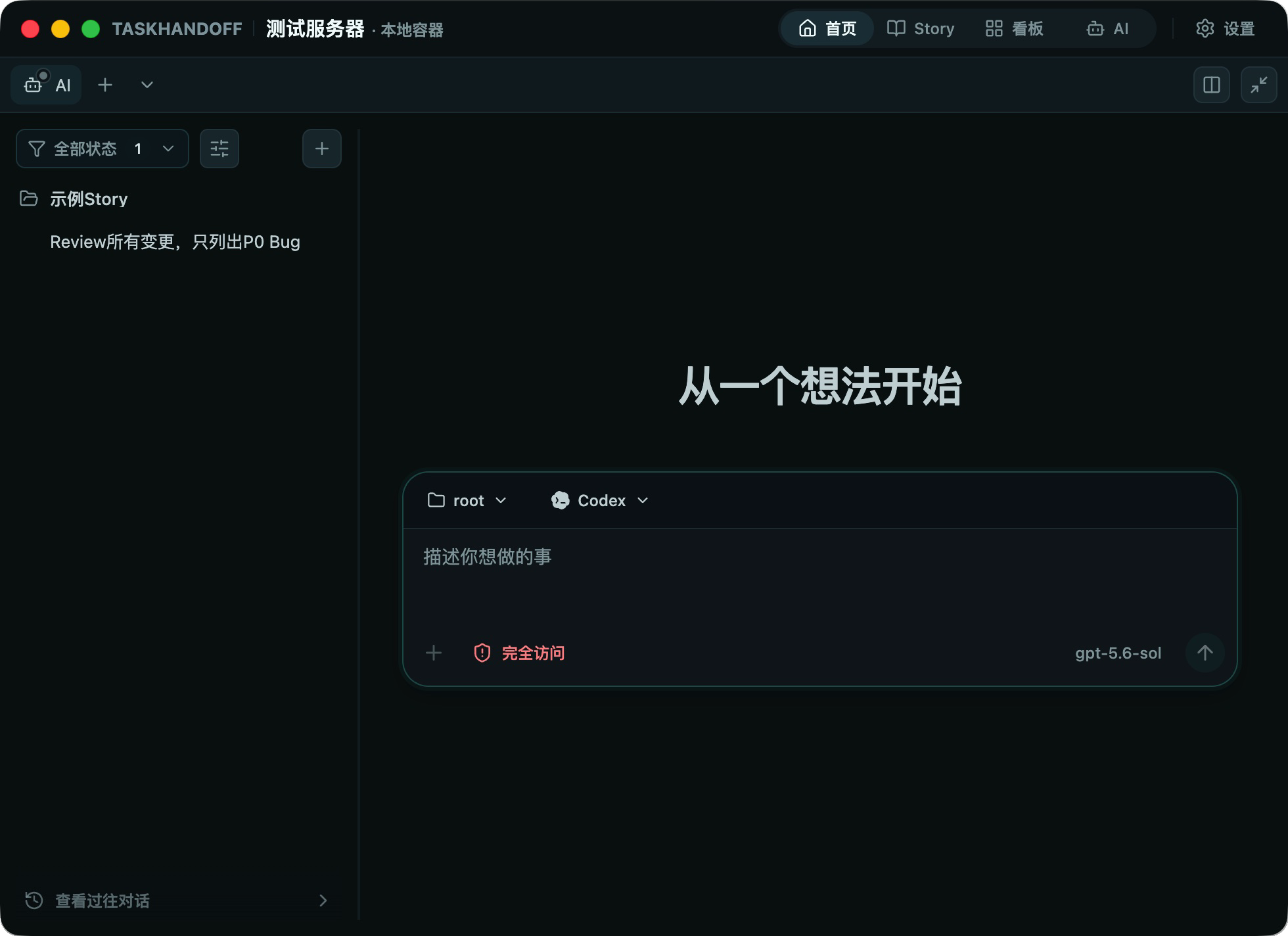
在多台远程服务器上并行跑 Codex:worktree 应该怎么分 并行跑 AI 任务,常见的阻碍往往不是模型能力,而是目录。 两个会话在同一个工作目录里改代码,A 刚写完的文件可能被 B 覆盖;你打开文件准备保存,界面提示版本已经过期;测试失败时,也很难判断是哪一个任务改坏的。机器一多,问题还会多一层:任务到底跑在哪台服务器、哪个目录、哪个分支? Git worktree 能解决其中一部分问题,但它不是「把同一个目录挂到多台机器」的魔法。这篇讲清楚 TaskHandoff 里的分工方式:一台节点、一份仓库 clone、一个任务、一个 worktree,以及多节点时哪些事情不能做。 先说结论:多节点并行不是共享一个 worktree Git worktree 是同一个仓库的独立工作目录和分支。它让多个会话各自拥有一个目录,减少并行编辑冲突;但 worktree 仍然属于某一台机器上的某一个仓库 clone。 所以多台远程服务器并行跑任务时,正确模型是: 同一远端仓库 ├── 节点 A 的 clone → worktree A-1(分支 feature/a) └── 节点 B 的 clone → worktree B-1(分支 feature/b) 不是: 节点 A 的 worktree ← 同时挂给节点 B 的会话 前者是多个独立 checkout,后者会制造路径、锁和文件一致性问题。TaskHandoff 的多节点模型按节点管理实例和会话,不把 worktree 当成跨节点共享目录;它做的是把多个节点、多个实例和多个会话放进同一个控制面里查看和操作。 为什么不用同一个目录硬跑 在同一台机器上,两个 Codex 或 OpenCode 会话共用一个工作目录,至少会遇到三类问题: - 文件互相覆盖:两个任务同时改同一个文件,后写入的版本不一定是你想要的。 - 状态难以归因:测试失败、依赖变化、未跟踪文件,分不清来自哪个任务。 - 保存冲突:文件被 AI、终端或另一个编辑器改过后,保存会因版本过期停止,需要先比较再决定。 worktree 把「任务」和「目录」绑定起来:一个任务一个目录,一个目录一个分支。这样每个任务的变更、测试和提交都能独立检查。 做法:一台节点,一个任务,一个 worktree 下面是一条可复用的路径。它不是通用答案,但边界比较清楚。 1. 把远程服务器接成节点 节点是运行 Node Agent、并实际管理实例的计算机。打开「设置 → 节点 → 添加节点」,根据网络条件选择连接方式。远程节点通常用反向 WSS:Node Agent 主动连 Control Plane,不需要给节点开放公网入站端口。 一次性加入 Token 只用于首次建立信任,配对完成后不要把它写进脚本仓库、工单或日志。 2. 在每台节点上创建 Git 实例 每台要参与并行的服务器,各自创建自己的 Docker 实例,并把同一个远端仓库 clone 进来。多节点不是共享工作区,而是每台机器保持自己的 clone。 如果你需要控制 Git 权限,凭据按 remote scope 匹配;HTTPS token 只在 credential-helper 请求期间短暂提供,不写进 remote URL、命令行或环境变量。SSH 私钥留在 Node Agent,实例只拿签名能力。 3. 从已有 Git 会话创建托管 worktree 打开已有 Git 会话的「环境 → 工作树」,选择「新建托管工作树 AI 会话」,填写新分支名称和起始引用,再选择 Codex 或 OpenCode。 !新建 AI 会话时选择 Agent、模型和工作目录 创建完成后,TaskHandoff 会生成托管 worktree 和新会话;原会话仍停留在原来的工作目录。会话创建后工作目录不会自动改变,所以换 worktree 的正确做法是「在目标 worktree 上新开会话」,不是把当前会话挪过去。 4. 在另一台节点重复,而不是复制目录 第二台服务器也按同样方式创建自己的实例、clone 和 worktree。两个 worktree 可以在同一个远端仓库上使用不同分支,但它们在文件系统上彼此独立。 建议把分支名和任务目标绑定,例如 feat/api-timeout、fix/windows-paths。不要让两个会话在同一个 worktree 同时修改相同文件;如果一个任务需要改同一批文件,先拆任务,或者让它们串行。 5. 分别在每个 worktree 里审阅、测试、提交 每个 worktree 都有自己的变更集。分别检查测试和 diff,确认后再提交和推送。TaskHandoff 的远端操作是保守的:Pull 仅允许 fast-forward,不自动 merge、rebase 或 stash;分支分叉时阻止自动同步;永远不 force push。 复杂冲突、已分叉分支、大型或二进制 diff,建议到对应会话的终端里处理,然后刷新仓库页面。 多节点时,节点选择看什么 节点不是越多越好。比较实际的分配依据是: - 运行时和依赖:哪台机器有项目需要的 Docker 镜像、系统工具或 GPU。 - 隔离边界:不同客户、不同仓库、不同权限的凭据是否应该落在不同节点。 - 网络位置:节点在公司内网、家用服务器还是云主机,决定了它能不能访问目标仓库和依赖。 - 任务时长:长任务放在常开的服务器上,临时任务放在随手可用的节点上。 不要为了「看起来并行」把同一个 worktree 复制到多台机器。复制目录会带来身份、缓存和未跟踪文件的不一致;正确做法是每台节点从远端仓库创建自己的 checkout。 交付和清理:分支保留,目录才删除 托管 worktree 由 TaskHandoff 创建,可以安全地用于新 AI 会话。外部 worktree 只有位于实例授权目录且仍可访问时才能使用,系统不会接管或删除它。 删除托管 worktree 前,它必须是非主工作树、无修改、未锁定,并且没有活跃的 AI 或应用会话。删除的是工作树目录,关联的 Git 分支会保留;系统使用非 force 删除,不会顺手删掉你的分支。 主工作树、外部 worktree、有未提交修改或仍被活跃会话占用的 worktree,不能从界面删除。这条限制看起来麻烦,但它防止的是「清理目录时把正在跑的任务或未提交改动一起弄丢」。 踩坑:四个容易犯的错 把 worktree 当成跨机器共享目录。 它不是。多节点并行是多个 clone、多个 worktree,不是一个目录挂给多台机器。 两个会话共用一个 worktree。 文档明确建议并行任务分配不同 worktree;同一 worktree 里的两个会话会看到彼此写入磁盘的修改。 在主工作树上直接开长任务。 主工作树通常承载你正在做的改动。更稳妥的方式是从它创建托管 worktree,把实验性任务放到独立目录和分支。 以为移除 worktree 会删分支。 移除的是目录,Git 分支保留;但目录里有未提交修改或仍有活跃会话时,系统会阻止删除。 结果:行为上发生了什么变化 - 两台服务器上的任务出现在同一个控制面里,可以按节点、项目、状态查看。 - 每个任务有自己的目录和分支,文件冲突不再靠人肉记忆避免。 - 每个 worktree 单独测试、审阅、提交,失败时更容易归因。 - 清理 worktree 时分支保留,复杂合并回到终端显式处理。 可复用的五条原则 1. 一个任务一个 worktree。 目录是并行任务的隔离边界,不是共享缓存。 2. worktree 属于节点,不属于控制面。 多节点并行靠多个 clone,不靠共享目录。 3. 分支名写清楚任务目标。 让 worktree、分支和任务能一一对应。 4. 每个 worktree 单独验收。 测试、diff、提交和推送都按 worktree 走。 5. 清理是流程的一部分。 先关会话、保持干净、再移除目录;分支是否保留由 Git 决定。 相关文档 - TaskHandoff 官网(产品定位与客户端下载):thandoff.com - 开源仓库:edgestorage/task-handoff - 用 worktree 并行运行 AI 的完整教程:docs.thandoff.com - 仓库协作、变更、分支与远端同步:docs.thandoff.com - AI 会话与固定工作目录:docs.thandoff.com - 节点管理:docs.thandoff.com - 连接远程节点:docs.thandoff.com - 安装与部署:docs.thandoff.com
I just open-sourced Bifurc — a local-first alternative to Postman + Charles Proxy + a localhost domain manager. Hi everybody! Just an update about Bifurc since my last post here. For anyone not aware, Bifurc is the free developer tool that I have been developing to bring API testing, traffic inspection, mocking and localhost proxy management together. Some progress here: Bifurc is now at over 73 downloads! Not much but pretty good considering this is just a side project. Here is some additional news: I have released the source code of Bifurc on GitHub. What it provides? - REST, GraphQL, SOAP, gRPC and WebSockets APIs client. - Localhost domains such as api.localhost. - HTTP/HTTPS traffic capturing and inspecting. - Request mocking, intercepting and rewriting. - Git backed workspaces to manage configurations under version control. - Command line interface and MCP server for automation and AI agents integration. It is written using Rust programming language and works on Windows, Linux and macOS. Links: GitHub: HarshalKudale/bifurc Website: bifurc.app Documentation: bifurc.app Thank you all for checking it out following my last post. Do check it out if you find some time and give me your valuable feedback!
@dharmikjagodana I'm building db-studio, a free, open-source database client. Run npx db-studio locally to edit table cells, paste spreadsheet data, and explore schema diagrams across nine engines. husamql3/db-studio
@alightinastorm I hand rolled my own (with AI ofc), still not perfect, but better than above. You can copy here: VictorZakharov/last-stand Long term, look here nvlabs.github.io
如果 IDE 不只是帮你写代码,而是会观察你的项目、理解你的需求,甚至自己进化呢 JetBrains 刚刚开源了 Thinkrail 它会逐渐学习你的项目需要完成什么,并主动创建适配项目的功能 这可能是 IDE 从“工具”进化成“会成长的开发伙伴”的开始 → JetBrains/thinkrail t.co
The greenhouse is generated to match the BUTom-ST21 dataset (Uni Bonn), so next up is fine-tuning on it 🤞 Code: github.com/azazdeaz/misina-lab/tree/main/examples…
VoiceStudio | Free Open-Source ElevenLabs Alternative | #1 on GitHub Trending VoiceStudio is the fully local, open-source ElevenLabs alternative — now #1 on GitHub Trending (98.5k stars). Clone voices, design custom voices, dub videos with timing fit, dictate/transcribe with diarization, make audiobooks, batch queue, plus local API and MCP server. Runs on macOS, Windows, Linux, Android, iOS and Docker. Free, 100% on-device, AGPL-3.0, 646 languages. Download/use: voicestudio.sh Source: debpalash/VoiceStudio Made by gamatron.in — create your own at gamatron.in #Shorts #VoiceStudio #AITools #VoiceAI #VoiceCloning #TextToSpeech #TTS #AIAvatars #VideoDubbing #Transcription #SpeechToText #LocalAI #OpenSource #SelfHosted #ElevenLabs #AIWorkflow #CreatorTools #NoCodeAI #MachineLearning #AudioAI #GitHubTrending
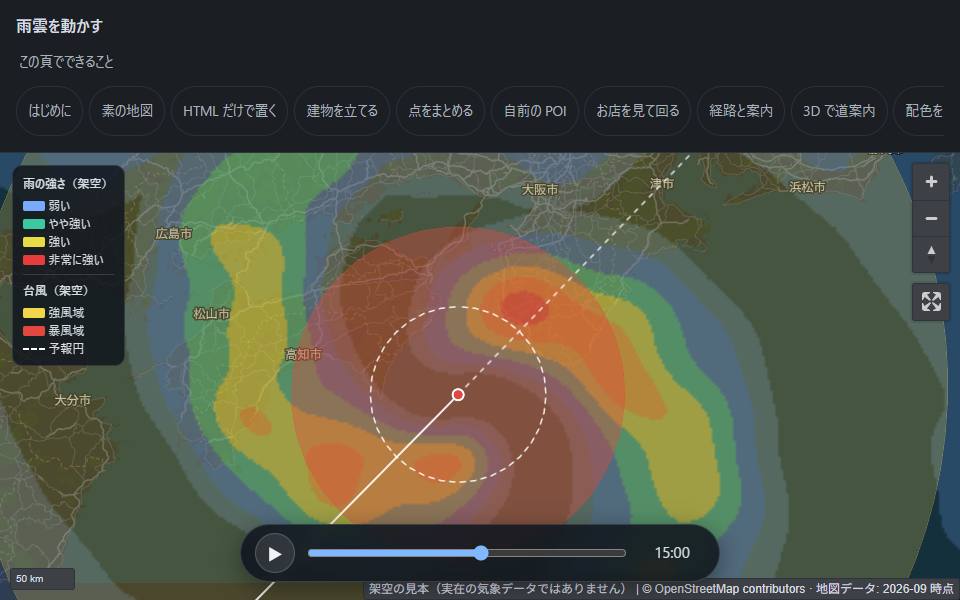
Put a real map on your page with plain HTML — no API key, no per-view bill, no tile server Most sites that need a map end up with one of three options. The first is a commercial map API that bills per view. The second is the OpenStreetMap tile server, but its Tile Usage Policy rules out commercial and heavy-traffic use. The third is a tile server you run yourself, which you then have to keep running. There is a fourth option, because almost nobody needs the whole planet. You need the area your site covers, and you can host that part yourself. MMJ is built on that idea. It is an open-source set of Web Components plus a tool that cuts out map tiles. We borrow the map data and own how it looks. !A typhoon approaching Japan, drawn over a rain-radar animation The whole live demo is static files on GitHub Pages. Nothing in it needs a backend, including the animation above. What it does 1. Cut your area into one file. One command takes a bounding box from the Protomaps daily build of the whole planet and writes it to a single PMTiles file. A city comes to 10–60 MB and takes under a minute. 2. Serve it as a file. All you deploy is that file on static hosting. The browser asks for the parts it needs with HTTP Range requests, so traffic costs only what your host charges to serve a file. 3. Write HTML. Eight custom elements render the map with MapLibre: mmj-map, mmj-marker, mmj-poi, mmj-cluster, mmj-route, mmj-circle, mmj-raster and mmj-fill. They are plain ES modules, so there is no build step. npx @mmj-map/tiles extract osaka --bbox=135.4,34.6,135.6,34.8 <mmj-map tiles="./tiles/osaka.20260924.pmtiles" style-url="./styles/modern-dark.json" center="135.5023,34.6937" zoom="12"> <mmj-marker lnglat="135.4959,34.7024" popup="Umeda"></mmj-marker> </mmj-map> center takes longitude first, then latitude, in the same order as GeoJSON. Why we own the look but not the data OpenStreetMap data is free. Its default style, though, has to serve every use on earth with one design, so it fits no particular site well. The line we draw is this: fixes to the data go to OSM; how the map looks belongs to each site. Your brand colour, labels in your readers' language, your own points, a photo at the corner where a route turns: none of that is map data, and none of it belongs upstream. MMJ comes with six hand-written styles. Give it your brand colour and it puts that colour on the motorways and station rings, not across the whole map. Your own points stay yours, too. The components read the GeoJSON from your own hosting, and MMJ has no server of its own to send it to. What you skip Starting from zero, several problems stand between you and a working map. You usually find each one only after it has bitten you: | Problem | What happens | |---|---| | A host answers Range requests with 200 | The map still draws, but every tile downloads the whole file. npx @mmj-map/tiles check-range <url> tests your host for this | | Old daily builds are removed upstream | The build we pinned was gone nine days later. The extractor pins a build and falls back if it disappears | | name:zh does not exist | The real keys are zh-Hant / zh-Hans. MMJ switches label language with one lang attribute | | Outside your file's area, the map is empty | That is correct, but it looks exactly like a broken map. MMJ shades the tiles that came back empty | Because the map is just a file, it can keep working with the network off. One demo page needs 1.9 MB of tiles, 562 KB of glyphs and 1.15 MB of renderer. That is enough for a venue with no signal. GPS still works without a network; only the map was missing. What it is not MMJ is not a tile server, a rendering engine, a geocoder or a router. It is also not a way around a provider's terms. If your coordinates come from a provider that requires you to show them on its own map, check those terms before you swap the base map. Try it 1. Cut your town: npx @mmj-map/tiles extract <name> --bbox=<w,s,e,n> 2. Follow the install guide. It is also in Japanese, Traditional Chinese, Simplified Chinese and Vietnamese 3. Keep © OpenStreetMap contributors visible on the map. The map data is under the ODbL; the code, styles and components are MIT It is early but usable. @mmj-map/elements and @mmj-map/tiles are on npm. There are no hosted tiles: you cut your own, which is the point. The styles are most complete for Japan so far. Bug reports and requests are welcome on Issues, in English or Japanese.
=> Vortex WS & Tutorial at MICRO 2026, 11-01 vortexgpgpu/vortex_tutorials Tutorial Slides github.com/vortexgpgpu/vortex_tutorials/tree/main… Vortex 3.0 Arch Vortex 3.0 Software Stack Volt Compiler Pipeline B-P Tine, UCLA blaisetine.github.io v3.0, 06-09 github.com/vortexgpgpu/vortex/releases/tag/v3.0 MICRO 2025 bsky.app
仓库:heygen-com/hyperframes 文档快开:hyperframes.heygen.com 对比 Remotion:hyperframes.heygen.com npm:npmjs.com
DeepSeek liberó dsh-superagent, un agente q vive en tu repo de GitHub y tiene 11K estrellas - solo actúa si alguien autorizado se lo pide - cada pedido en su sesión y carpeta - responde en el hilo con un PR Es prototipo, los docs valen más q el código deepseek-ai/dsh-superagent-prototype
DeepSeek’s prototype, free on GitHub: deepseek-ai/dsh-superagent-prototype A read of how the permissions actually work: helpnetsecurity.com
I just built and open-sourced a GUI for this: aicodeking/dsh-superagent-gui I don't intend to maintain this but it's still a cool one for you guys to visualize what they are trying to say on actual work. t.co
ESP32-P4 Runs GBA with Touch Controls and a 4.3-inch Screen (gpSP RISC-V JIT) I ported gpSP to the ESP32-P4 and wrote a RISC-V JIT backend for it. I posted a couple of earlier demos on r/emulation, but hadn't posted here yet. RISC-V was what got me interested in the P4. I figured a JIT backend for a fairly general-purpose ISA could be useful on other RISC-V devices too. The clock is pretty decent, and the chip is only around US$5 at retail, so I wanted to try it in my own custom GBA. I picked gpSP because it already had a JIT-based design and a reputation for being fast on very low-end hardware. That made it a good base for adding an RV32 backend. The board in this video is an OSPTEK P4C5, running at 400 MHz with 32 MB PSRAM and a 4.3-inch 800x480 touchscreen. It runs directly on ESP-IDF and loads games from an SD card. The GBA port also runs on the ESP32-S31. I started with a small SPI screen and a USB controller. Now the on-screen controls work for both games and menus, so you can pick a game, play it, save/load states and switch games without plugging in a controller. There are also nearest, bilinear and LCD grid display options, with a separate color setting that approximates the original GBA LCD. You can see those being switched around 0:38. Getting it fast enough took a fair bit of work: - The JIT translates ARM/Thumb blocks into RV32 code. - Self-modifying code was the big problem with games like Doom II. Instead of flushing the whole code cache whenever RAM code changes, it now invalidates the affected blocks, reuses old translations when the original bytes come back, and patches some changes in place. Constantly throwing away and retranslating code was expensive. - RVC/Zcb compressed instructions made the generated code smaller. Since the JIT code runs from PSRAM, fitting more of it in cache helps. Increasing L2 from 128 to 256 KiB also helped more than manually moving several hot arrays into internal SRAM. All of the GBA emulation, including rendering at the original resolution, runs on CPU0. CPU1 handles scaling and display effects. That makes me think GBA could be possible on lower-clocked RISC-V chips too, if the emulation work is split well between the two cores. The overlay shows both FPS and emulation speed. SPD at 100% means real time. Some games don't draw a new frame at 59.7 fps even when they're running at normal speed. Other P4 touchscreen boards will still need their own display and touch setup, but the controls and menus should make them easier to try. I haven't tested every board. I've also been working on PS1 emulation on the P4. Lighter games run well, and even heavier 3D games are playable at 100% SPD with a little automatic frameskip. It's a lot heavier than GBA though. That one needs both cores running close to 100%. The P4 has been surprisingly capable for a microcontroller. Having hardware like the PPA for scaling, rotation and blending is particularly nice when you're trying to get everything onto a larger display. I've come to appreciate that part of the chip quite a bit. I'll tidy up the PS1 work and put the code up on GitHub soon too. The GBA code is up: - ESP32 port and board code: midworld/gpsp-esp32 - gpSP with the RV32 JIT: midworld/gpsp
A reverse engineered game without AI and better than the original AdaDoom3/AdaDoom3 I can't believe it; usually, source porting is a grey area in legalities but thanks to AI, it broke that barrier and now ironically, we can enjoy an non-AI slop that's better than the original! I hope the backfires continues! There's light in this AI infested world; readable code with Ada having less predatory licensing.
✅ 一手来源:opencode 官方 AGENTS 文件,Style Guide 一节原文 github.com/anomalyco/opencode/blob/dev/AGENTS.md 社区还有个改写版,多加一句:用 10 岁小孩听得懂的话解释,再等我同意。
@dzzecai @rt_thread the firmware is on github fbiego/helios-sf32
ブラックジャックの確率論(7) ダブルダウン・スプリットの定式化 本記事は「ブラックジャックの確率論」と名付けられたシリーズ記事の1つです。全体の目次は下記の記事にまとめられています。 zenn.dev また、本記事シリーズで触れられているプログラムはGitHubの下記の場所にて公開されています。 monty-orlac/BlackJack-Analyzer はじめに 本記事では、最初の2枚でだけ選べるダブルダウンとスプリットの期待値を、第5回 のstand / hit-1 / hit-moreを組み合わせて定式化します。スプリットについては、再スプリットを含む場合を「2枚目を待っている手札の数」と「手札の総数」による再帰式で表します。最後に、これらの期待値から戦略表 (ベーシックストラテジー) を定義します。 第5回 で計算した値を下記に表で示します。 名前 行動 期待値 stand 手札 h でスタンドする E_S(h) hit-1 手札 h から1枚だけ引いてスタンドする E_{H1}(h) hit-more 手札 h から1枚引き、その後も最適に行動する E_H(h) best 手札 h から最適に行動する V(h) ダブルダウンの期待値 E_D(h) ダブルダウンは、賭け金を2倍にし、カードを1枚だけ引いてスタンドする行動です。1枚だけ引いてスタンドするのはhit-1そのものなので、期待値は次のようになります。 E_D(h) = 2\, E_{H1}(h) = 2 \sum_{c} q_c\, E_S\big(\tau(h, c)\big) ピークしないルールでディーラーがブラックジャックだった場合、ダブルダウンした賭け金は2倍分とも失います。この損失も、E_{H1} を計算するときの分布 \tilde{D} にブラックジャックが含まれているので、2倍すればそのまま反映されます。 最初の2枚での最適な値 ダブルダウンは最初の2枚でしかできないので、3枚目以降の判断には使えません。そこで、最初の2枚での最適な値 V_1 を、V とは別に定義します。 V_1(h) = \max\big(E_S(h),\ E_H(h),\ E_D(h)\big) E_H の中で使う V には、ダブルダウンを含めません。ヒットした後は3枚以上になり、ダブルダウンできないからです。 ダブルダウンする条件 ダブルダウンが最適になるのは、E_D(h) > \max(E_S(h), E_H(h)) のときです。ここで、第5回で示した E_H \ge E_{H1} を使うと、 E_{H1}(h) < 0 \ \Longrightarrow\ E_D(h) = 2E_{H1}(h) < E_{H1}(h) \le E_H(h) なので、hit-1の期待値が負の手札では、ダブルダウンは決して最適になりません。直感的にも、損をする賭けの金額を2倍にする意味はありません。 逆に、E_{H1}(h) > 0 でも、ダブルダウンが最適とは限りません。注意すべきなのは、比べる相手にstandも含める必要があることです。もともとスタンドが最適な強い手札 (例えばソフト19) では、E_D が E_H を大きく上回っていても、E_S には届かないことがあります。E_H とだけ比べると、こうした手札を誤ってダブルダウンと判断してしまいます。具体的な数値は 第9回 で示します。 スプリットの期待値 E_{SP}(x) ペア (x, x) をスプリットすると、1枚の状態 \langle x \rangle の手札が2つでき、それぞれに2枚目が配られます。 スプリットした手札1つの価値 スプリットした手札が2枚目 c を受け取った後の状態は \tau'(\langle x \rangle, c) です。第1回 で定義した通り、\tau' はA+10をブラックジャックではなく普通の21として扱う遷移です。その後の手札1つ分の期待値を U(x, c) とすると、ルールによって次のようになります。 U(x, c) = \begin{cases} E_S\big(\tau'(\langle x \rangle, c)\big) & (x = 1 \text{ かつ A のスプリットは 1 枚だけ}) \ \max\Big(V\big(\tau'(\langle x \rangle, c)\big),\ E_D\big(\tau'(\langle x \rangle, c)\big)\Big) & (\text{スプリット後のダブルダウン可 (DAS)}) \ V\big(\tau'(\langle x \rangle, c)\big) & (\text{DAS 不可}) \end{cases} 再スプリットなしの場合 再スプリットを考えない場合、スプリットの期待値は次の式です。 E_{SP}(x) = 2 \sum_{c} q_c\, U(x, c) 2つの手札は同じディーラーと勝負するので、結果は互いに独立ではありません (ディーラーがバーストすれば両方勝ちやすくなります)。それでも単純に2倍してよいのは期待値の線形性が独立性を必要としないからです。2つの手札の配当を X_1, X_2 とすると、相関があっても \mathbb{E}[X_1 + X_2] = \mathbb{E}[X_1] + \mathbb{E}[X_2] が成り立ちます。また、無限デッキでは各手札が引くカードは互いに影響しないので、それぞれの期待値は \sum_c q_c\, U(x, c) で同じになります。 再スプリットありの場合 2枚目に再び x が来た場合、手札の総数が上限 N (アメリカでは N = 4 が一般的) より少なければ、もう一度スプリットできます。 この過程は、次の2つの数だけで状態が決まります。 w: 2枚目を待っている手札の数 n: 手札の総数 無限デッキでは、どの手札にどのカードが来るかは互いに影響しないので、待っている手札を1つずつ処理していけば十分です。待っている手札全体の期待値の合計を R(w, n) とすると、 R(w, n) = \sum_{c \ne x} q_c\, \left[U(x, c) + R(w - 1, n)\right] + q_x\, M(w, n) M(w, n) = \begin{cases} \max\Big(U(x, x) + R(w - 1, n),\ R(w + 1, n + 1)\Big) \ \qquad \qquad \qquad \qquad \qquad \qquad (n < N \text{ かつ再スプリット可}) \ U(x, x) + R(w - 1, n) \qquad \qquad (\text{それ以外}) \end{cases} R(0, n) = 0, \qquad E_{SP}(x) = R(2, 2) となります。式の意味は次の通りです。 待っている手札の1つに2枚目を配ります。 x 以外のカード c が来た場合 (確率 q_c) は、その手札は U(x, c) で確定し、残りは R(w - 1, n) です。 x が来た場合 (確率 q_x) は、ペアのまま行動するか (U(x, x) + R(w - 1, n))、再スプリットして待っている手札と総数を1つずつ増やすか (R(w + 1, n + 1)) の、良い方を選びます。 n は N を超えないので、w が増え続けることはなく、再帰は有限回で終わります。N = 2 とすると M は常に下の式になり、再スプリットなしの式と一致します。 Aは再スプリットを認めないのが一般的です。その場合は、x = 1 では「再スプリット可」の条件を満たさないものとします。 戦略表 最後に、ここまでの式を組み合わせて戦略表を定義します。アップカード u と最初の2枚の手札 h について、選べる行動の期待値を比べ、最大のものを選びます。 a^*(h, u) = \mathop{\mathrm{arg\,max}}_{a \in A(h)} E_a(h; u), \qquad A(h) = \begin{cases} {S, H, D, SP} & (h \text{ がペア}) \ {S, H, D} & (\text{それ以外}) \end{cases} E_S, E_H, E_D, E_{SP} はすべてアップカード u に対する分布 \tilde{D}_u から計算するので、ここではそれを明示して E_a(h; u) と書いています。 ペアは同じ合計点の手札と状態としては同じですが (8-8は16H)、スプリットという選択肢があるので、戦略表では別の行として扱います。逆に、ペアでない手札は合計点とソフトかどうかだけで行動が決まります。例えば10,6と9,7はどちらも16Hなので、同じ行になります。 まとめ 期待値 式 ダブルダウン E_D(h) = 2 E_{H1}(h) 最初の2枚での最適値 V_1(h) = \max(E_S, E_H, E_D) スプリット (再スプリットなし) E_{SP}(x) = 2 \sum_c q_c\, U(x, c) スプリット (再スプリットあり) E_{SP}(x) = R(2, 2) これで、戦略表を計算するための式がすべてそろいました。次回 は、これらを実装して戦略表を作ります。
inspired, again, by @KinasRemek I'm presenting #basalui - addition to #basal ecosystem that allows you to inference with models LM Studio / oMLX style. it's free and up for the tests - pawelkiszczak/basal-ui
刷到个叫 Colibri 的玩意 JustVugg/colibri 纯 C 写的大模型引擎,零依赖,744B 的模型据说在家用电脑上也能跑,专家权重按需从硬盘读 这要是真行,本地跑大模型是不是不用再堆显存了 t.co
Hi! I'm Kishan Madlani, actively looking for opportunities in Computer Vision, Generative AI & ML Research. Open to Research Engineer, MTS, and Research Fellow roles across India. Referrals and leads are appreciated! GitHub: github.com/keysun8 #ComputerVision #GenAi
I made a Diwali diya out of 1000s of ASCII characters, live in the terminal Happy Diwali! In advance 🪔 Code: Jaym-0/ascii-diya A diya animation that runs entirely in the terminal, with no GIF, video or GUI. It starts from darkness, and sparks gather into a flickering flame and bowl. Built with Python + numpy, using ANSI true-colour and a simple particle and flame simulation. Only changed cells are redrawn, so it runs at 30 FPS.
مستخدمين PC (ويندوز ولينكس وماك) حملوا لانشر Quiver Launcher من خلاله تحملون البورتات quiverlauncher.com ------ مستخدمين الأندرويد حملوا لانشر Recompa برضوا من خلاله تحملون البورتات وتحدثونها kalasyan/recompa ------ رابط اللعبة برفعها تيليغرام بدال هنا عشان ما ينحذف وما تهددني نينتيندو 🥀
Nodal Context Repo - Open source business context for your data analytics nodal-data/nodal-context
Made a Luma plugin that pauses your game and sends an angry mole out to tell you off when you hit your daily limit It’s called ControlMole and it comes in two parts, a homebrew app and a Luma plugin. The plugin gets loaded into every game and counts the minutes you’re actually playing (HOME Menu and sleep don’t count). Five minutes before your limit you get a heads up with a chime, and when you hit the limit or your bedtime it pauses the game and Mole digs out over it to tell you off. A closes the game, and B gives you one 3 minute break a day so you can still save The app is where you set your daily limit and bedtime, and you can give any weekday its own limit if you want. It also lists what you played today with the real game names and icons, so you can pick which games count. Mole sits on the top screen in 3D, and there’s a trophy shelf for staying under your limit where he does a little disco dance every time you unlock one It’s free and open source, download and install steps are here: skrimby1/controlmole-3ds
@xiaokun_saif It’s open source and free to use :) eandualem/agent-interface
@arc @circle Try it out We need trustless orchestration layers for the coming wave of AI agent swarms. Check out the live app on Mainnet, the open-source repo, and the demo video below: Live App: relaycrew-omega.vercel.app GitHub: onyebuchidaniel60/Relaycrew
alarmclock 공개 프로젝트 진행상황 경로변경: alarm-clock -> alarmclock 성능비교: vs time.After() velar-agent/alarmclock
Live-Abfahrten eurer Wiener-Linien-Station am NZXT-Kraken-Display – Open-Source-Tool Servus! Wer eine NZXT Kraken mit LCD im PC hat, kennt das: Das runde Display zeigt entweder ein Bild, GIF oder Wassertemperatur. Ich hab ein kleines Programm geschrieben, das stattdessen die Live-Abfahrten einer beliebigen Wiener-Linien-Station anzeigt. Bim, Bus, U-Bahn, Nightline und Badner Bahn sind dabei. Was es kann: - Jede Station, jede Linie: bis zu 4 Zeilen (Linie und Richtung) frei wählbar - Echtzeitdaten: nächste und übernächste Abfahrt - Offizielle Linienfarben für U1 bis U6, dazu Bim, Bus, S-Bahn und WLB - Animationen: Countdown-Änderungen blinken kurz rot, bei “jetzt” blinkt’s grün - Setup-Wizard: Station eintippen, Linien auswählen, fertig (dauert unter einer Minute). Vorher bekommt ihr ein Vorschaubild. - Deutsch oder Englisch, Neigungsausgleich für schräg montierte Pumpen - Verbindet sich nach USB- oder Netzwerkfehlern automatisch neu - Doppelklick-Launcher zum Starten und Stoppen, Autostart beim Login möglich Voraussetzungen: - NZXT Kraken mit LCD. Getestet mit Kraken Z3 (Z53/Z63/Z73). Kraken 2023/2024 (Elite, Plus) sollte auch gehen, ist aber ungetestet. Feedback dazu ist sehr willkommen! - Windows 10/11 und Python 3.11+ - NZXT CAM muss geschlossen sein, solange das Display läuft (CAM blockiert das USB-Gerät). Der Launcher macht das automatisch. Gut zu wissen: - Solange CAM zu ist, laufen Pumpe und Lüfter mit der zuletzt eingestellten Geschwindigkeit weiter und folgen keiner Temperaturkurve. Eine Kurve lässt sich mit liquidctl setzen, das steht im README. - Ob häufiges Beschreiben dem Display-Speicher schadet, ist unbekannt. Wer vorsichtig sein will, stellt das Aktualisierungsintervall höher. Link: sorrovvs/kraken-tram-display Das Ganze ist Open Source (MIT-Lizenz). Die Daten kommen von der Open-Government-Data-Schnittstelle der Wiener Linien. Freu mich über Feedback, Bugreports oder Fotos von euren Setups! 🚋 Processing img nf8nep1427zh1...
@refschool @Loran750 Ben si moi !et ça s'appelle WordLess Jacckisback/Wordless
The greenhouse is generated to match the BUTom-ST21 dataset (Uni Bonn), so next up is fine-tuning on it 🤞 Code: github.com/azazdeaz/misina-lab/tree/main/examples…
@sparrowbrainz I'm building db-studio, a free, open-source database studio for nine engines. React, TanStack, TypeScript, and Bun. Spreadsheet-style editing, SQL, and schema diagrams. Try npx db-studio locally. husamql3/db-studio
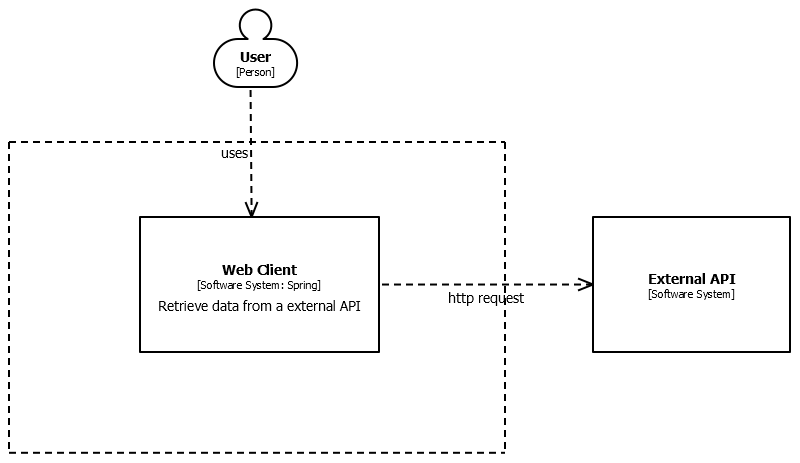
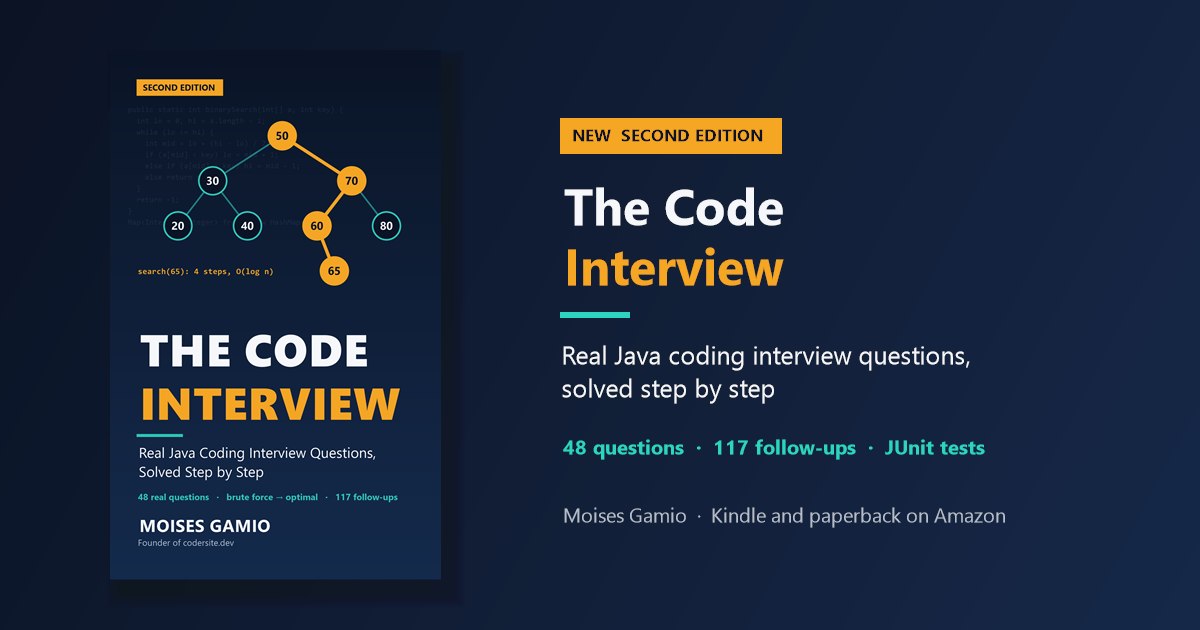
How a REST Client Should Handle 503 Service Unavailable: Retries with Backoff in Spring Your nightly job sends 50,000 articles to a partner's API, in batches of 1,000. At batch 23, the API answers 503 Service Unavailable. What should your client do? Give up, and the data is incomplete. Retry immediately, and you make an overloaded server even slower. This post shows how a REST client should handle a 503: which errors to retry, how long to wait, and how Spring Framework 7 does it with one annotation. What a 503 Means The HTTP status code 503 Service Unavailable says that the server can't handle the request right now, but probably will later. Common causes: - The server is down for scheduled maintenance. - The server is overloaded by too much traffic. - A service the server depends on, such as a database or another API, is failing. The server may add a Retry-After header that says how long to wait. The important word is temporarily: a 503 is an invitation to try again later, not a final answer. The Client Can't Control the Server Business-to-business (B2B) integrations are a typical case. One company's application is the client, the other company's API is the server, and the client has no say in how the server is built, deployed or scaled.  The first version of our client caught the exception, wrote it to the log and continued with the next batch. The job finished "successfully", and 1,000 articles were silently missing. Somebody had to read the logs, call the partner company, and send the batch again by hand. The opposite reaction is just as bad: retrying in a tight loop, three times in a row without a pause. A server that's overloaded receives even more requests, exactly when it can handle the fewest. If hundreds of clients do the same, they keep the server down. Which Errors Should You Retry? Retry only when the same request has a real chance of succeeding later: | Response | Retry? | Why | |---|---|---| | 503 Service Unavailable | Yes | Temporary by definition | | 429 Too Many Requests | Yes | Wait until your limit resets | | 502 Bad Gateway, 504 Gateway Timeout | Yes | Usually a temporary network or proxy problem | | Timeout, connection refused | Yes | The server may be restarting | | 400, 401, 403, 404, 422 | No | The same request will fail again | | 500 Internal Server Error | With care | Can be a bug, which a retry won't fix | <br/> Is the request safe to repeat? GET, PUT and DELETE are idempotent: sending them twice has the same effect as sending them once. Our request is a POST, but it's a search, so repeating it changes nothing. A POST that creates something, such as an order, is different: if the first attempt actually reached the server and only the response got lost, a retry creates a second order. APIs solve this with an idempotency key, a unique ID the client sends with the request, so the server can recognize a repeated request. A Retry Loop with Backoff A good retry waits longer after each failure (exponential backoff: 1, 2, 4 seconds...), adds a random part to each delay (jitter, so that many clients don't retry at the same moment), respects the server's Retry-After header, and gives up after a few attempts. Here it is with Spring's RestClient: public class ArticlesClient { private static final Logger logger = LoggerFactory.getLogger(ArticlesClient.class); private static final int MAX_ATTEMPTS = 4; private static final Duration INITIAL_DELAY = Duration.ofSeconds(1); private static final Duration MAX_DELAY = Duration.ofSeconds(30); private static final Set<Integer> RETRYABLE_STATUS_CODES = Set.of(429, 502, 503, 504); private final RestClient restClient; public ArticlesClient(RestClient restClient) { this.restClient = restClient; } public SearchResponse searchArticles(List<String> articleNumbers) { for (int attempt = 1; ; attempt++) { try { return restClient.post() .uri("/articles/search") .contentType(MediaType.APPLICATION_JSON) .body(new SearchRequest(articleNumbers)) .retrieve() .body(SearchResponse.class); } catch (RestClientException e) { if (attempt == MAX_ATTEMPTS || !isRetryable(e)) { throw e; } Duration wait = retryAfter(e).orElse(backoff(attempt)); if (wait.compareTo(MAX_DELAY) > 0) { throw e; // the server asks us to wait longer than we're willing to } logger.warn("Attempt {} of {} failed: {}. Retrying in {} ms", attempt, MAX_ATTEMPTS, e.getMessage(), wait.toMillis()); sleep(wait); } } } } The helper methods decide whether and how long to wait: private static boolean isRetryable(RestClientException e) { if (e instanceof RestClientResponseException responseError) { return RETRYABLE_STATUS_CODES.contains(responseError.getStatusCode().value()); } return e instanceof ResourceAccessException; // timeout, connection refused } // 1 s, 2 s, 4 s ... up to MAX_DELAY, each with random jitter between half and the full value private static Duration backoff(int attempt) { long cap = Math.min(MAX_DELAY.toMillis(), INITIAL_DELAY.toMillis() << (attempt - 1)); return Duration.ofMillis(ThreadLocalRandom.current().nextLong(cap / 2, cap + 1)); } // Retry-After is either a number of seconds or an HTTP date private static Optional<Duration> retryAfter(RestClientException e) { if (!(e instanceof RestClientResponseException responseError) || responseError.getResponseHeaders() == null) { return Optional.empty(); } String value = responseError.getResponseHeaders().getFirst(HttpHeaders.RETRY_AFTER); if (value == null) { return Optional.empty(); } try { return Optional.of(Duration.ofSeconds(Long.parseLong(value.trim()))); } catch (NumberFormatException notSeconds) { try { ZonedDateTime retryAt = ZonedDateTime.parse(value.trim(), DateTimeFormatter.RFC_1123_DATE_TIME); Duration wait = Duration.between(ZonedDateTime.now(), retryAt); return Optional.of(wait.isNegative() ? Duration.ZERO : wait); } catch (DateTimeParseException invalid) { return Optional.empty(); } } } private static void sleep(Duration duration) { try { Thread.sleep(duration); } catch (InterruptedException e) { Thread.currentThread().interrupt(); throw new IllegalStateException("Interrupted while waiting to retry", e); } } The request and response are records: public record SearchRequest(List<String> articleNumbers) {} public record SearchResponse(List<Article> articles) {} public record Article(String articleNumber, String name) {} Don't Lose the Batches That Still Fail Even with retries, a batch can fail, for example when the partner's API is down for an hour. Then the job must keep the data, not only a log line: public List<List<String>> searchAll(List<String> articleNumbers) { List<List<String>> failedBatches = new ArrayList<>(); for (int from = 0; from < articleNumbers.size(); from += BATCH_SIZE) { List<String> batch = articleNumbers.subList(from, Math.min(from + BATCH_SIZE, articleNumbers.size())); try { SearchResponse response = articlesClient.searchArticles(batch); save(response.articles()); } catch (RestClientException e) { logger.error("Batch starting at {} failed after all retries: {}", from, e.getMessage()); failedBatches.add(List.copyOf(batch)); // keep the data: retry later or report it } } return failedBatches; } The caller can store the failed batches in a table, send them again in the next run, or notify the team. In each case, nobody needs to search the logs. Try It I ran the client against a local test server that answers 503, then 503 with Retry-After: 2, then 200: server: call 1 -> 503 WARN ArticlesClient -- Attempt 1 of 4 failed: 503 Service Unavailable: [no body]. Retrying in 618 ms server: call 2 -> 503 (Retry-After: 2) WARN ArticlesClient -- Attempt 2 of 4 failed: 503 Service Unavailable: [no body]. Retrying in 2000 ms server: call 3 -> 200 result: SearchResponse[articles=[Article[articleNumber=4711, name=Potatoes]]] The first wait is a random value from the backoff, and the second is exactly the 2 seconds the server asked for. In the other test runs, a 400 Bad Request failed immediately without a retry, a server that always answered 503 got four attempts with growing delays (0.8 s, 1.6 s, 2.1 s) before the client gave up, and a Retry-After of 120 seconds made the client stop instead of waiting. To see a real 503 response, use the public test service httpbin.org: $ curl -i https://httpbin.org/status/503 HTTP/1.1 503 SERVICE UNAVAILABLE Content-Length: 0 The Spring Framework 7 Way: @Retryable Since Spring Framework 7 (Spring Boot 4), retries are built into Spring itself, with no extra library. Enable them once: @Configuration @EnableResilientMethods public class ResilienceConfig { } Then annotate the method: @Service public class ArticlesService { private final RestClient restClient; public ArticlesService(RestClient restClient) { this.restClient = restClient; } @Retryable( includes = { HttpServerErrorException.ServiceUnavailable.class, // 503 HttpServerErrorException.BadGateway.class, // 502 HttpServerErrorException.GatewayTimeout.class, // 504 HttpClientErrorException.TooManyRequests.class, // 429 ResourceAccessException.class }, // timeout, connection refused maxRetries = 3, delay = 1000, multiplier = 2, maxDelay = 30_000, jitter = 250) public SearchResponse searchArticles(List<String> articleNumbers) { return restClient.post() .uri("/articles/search") .body(new SearchRequest(articleNumbers)) .retrieve() .body(SearchResponse.class); } } In my test, this method also received 503, 503 and 200, with retries after about 1 and 2 seconds, and a 400 was not retried. The method itself contains no retry logic at all. Which one should you use? @Retryable is shorter and keeps the business code clean, and it's the right choice in most cases. It can't read the Retry-After header, though, because it only sees the exception type. When an API sends Retry-After, typically with 429 and 503, the loop above respects it. On Spring Boot 3, the Spring Retry library offers a similar @Retryable. Best Practices Checklist - Retry only errors that can succeed later: 429, 502, 503, 504 and timeouts. - Wait with exponential backoff and jitter, and respect Retry-After. - Limit the number of attempts and the longest wait. - Make sure a repeated request is safe; use idempotency keys for requests that create data. - Never lose data: keep failed requests for a later retry or a report. - On the server side, return Retry-After with your 503 and 429 responses. The rate limiting post shows how, and you can load-test it with concurrent clients. "What happens when the service you call is down?" is a standard question in backend and system design interviews. Practice with real interview questions:  --- Originally published at codersite.dev.
=> Vortex WS & Tutorial at MICRO 2026, 11-01 vortexgpgpu/vortex_tutorials Tutorial Slides github.com/vortexgpgpu/vortex_tutorials/tree/main… Vortex 3.0 Arch Vortex 3.0 SW Stack Volt Compiler Pipeline B-P Tine, UCLA blaisetine.github.io v3.0, 06-09 github.com/vortexgpgpu/vortex/releases/tag/v3.0 MICRO 2025 x.com t.co
OpenCode's team shipped Hex: local voice dictation for Mac, Windows, Linux. MIT, nothing leaves your machine after the model download. The wild part: they don't take pull requests. Open an issue, their agents ship the fix. Would you close PRs to humans? anomalyco/hex
every app you install is a rootkit with a marketing team services, scheduled tasks, drivers you never asked for an uninstaller that leaves half of it behind built receipt in rust. one command to undo all of it. akshaytheflash/receipt t.co
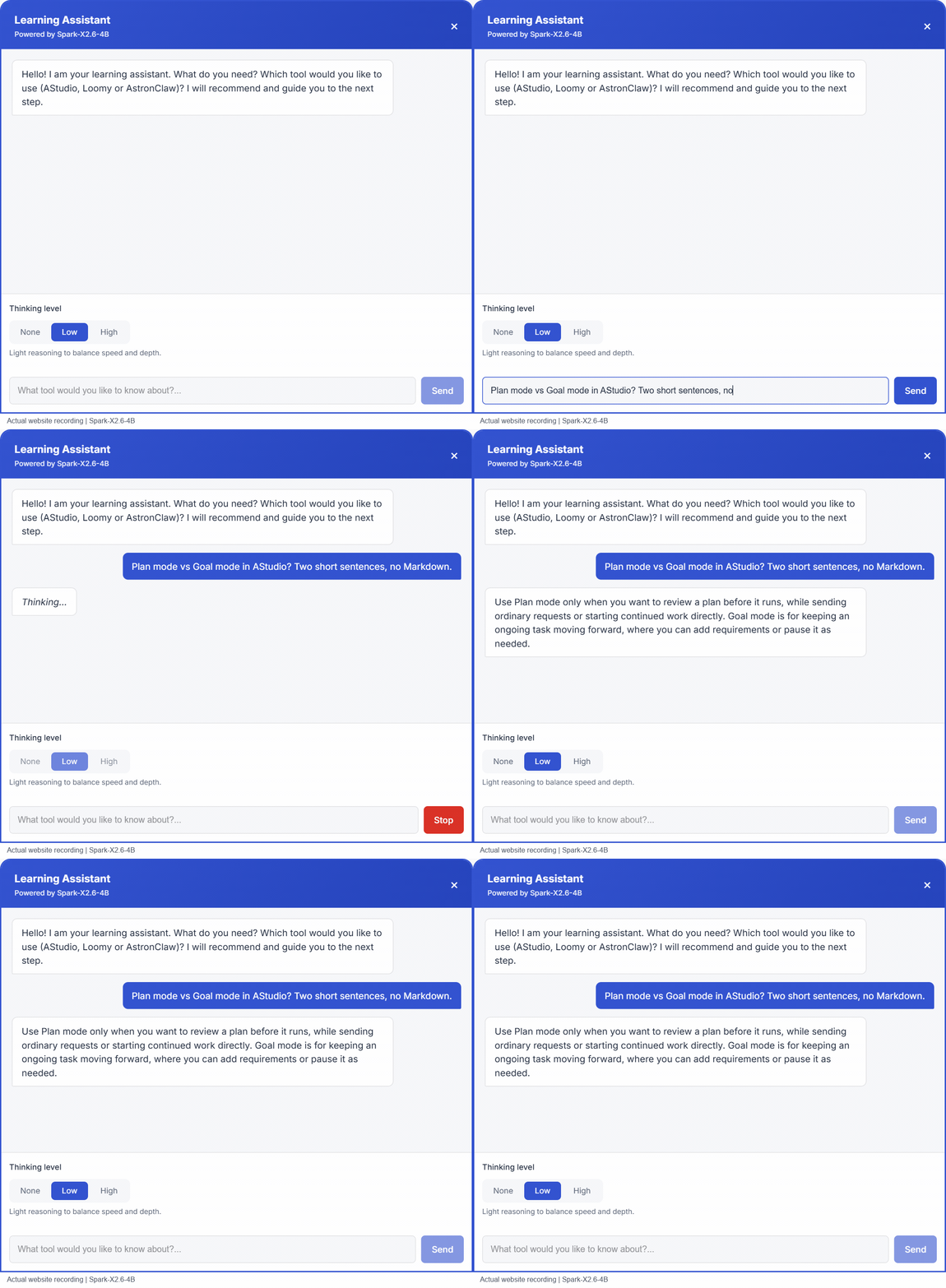
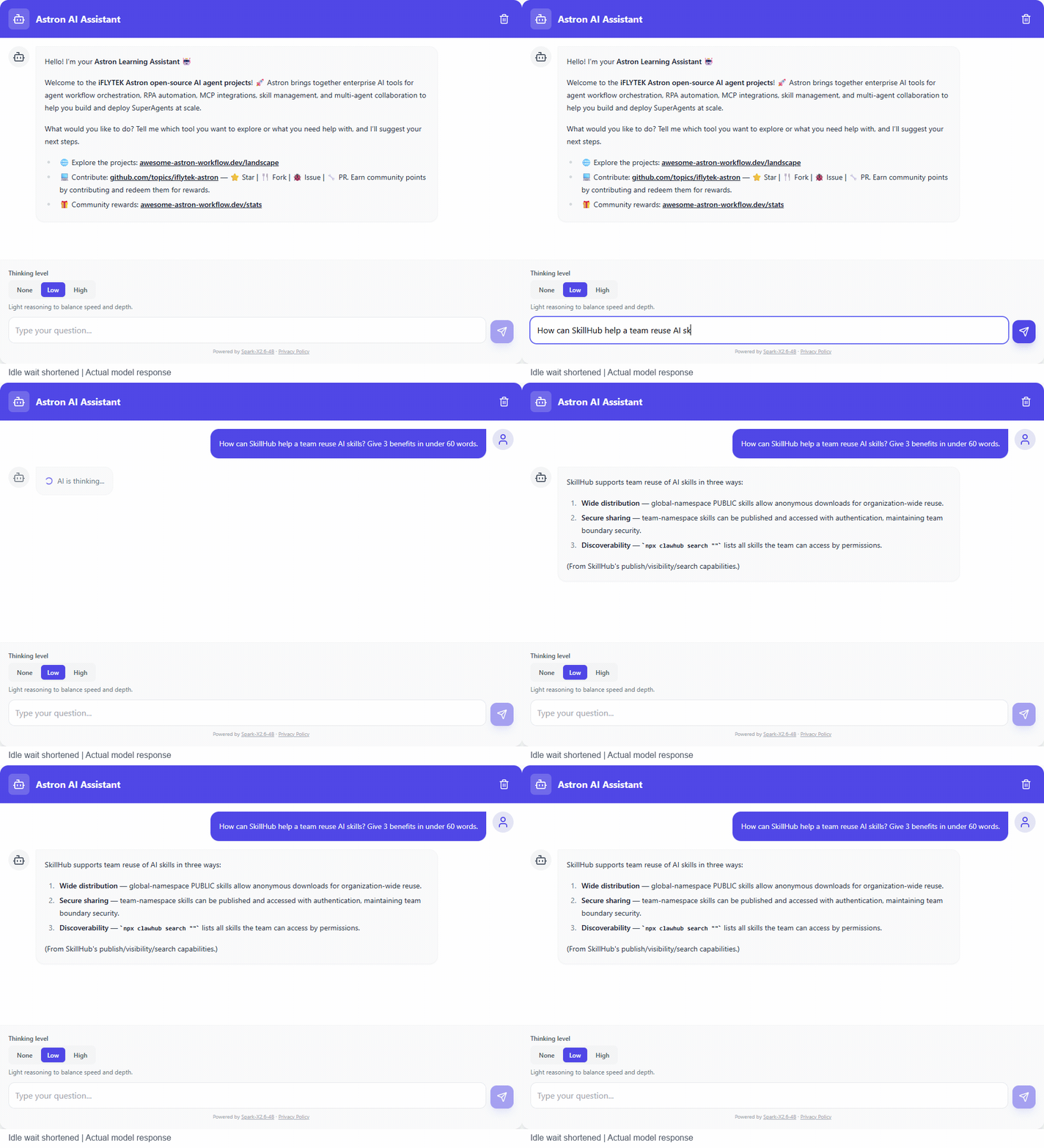
Spark-X2.6-4B in two live web assistants: share what you are building Full case on Hugging Face: huggingface.co Spark-X2.6-4B is running in two live web assistants. These short recordings show English questions, actual model replies, and the thinking-level controls available to visitors. Try the apps, then share a demo of your own Spark-X2.6 application in the comments. Longer case write-ups are welcome too—post them on Hugging Face and drop the link here. Astron Harness Tutorial: Learning Assistant Open the learning assistant · Source repository This bilingual tutorial assistant helps visitors explore AStudio, Loomy and AstronClaw. It uses relevant tutorial material as context for the conversation. Question: “Plan mode vs Goal mode in AStudio? Two short sentences, no Markdown.” !Spark-X2.6-4B answering an English AStudio question in the Learning Assistant The recording shows the assistant explaining when to review a plan before execution and when to use Goal mode for continued progress. The interface offers None, Low and High thinking levels and remembers the visitor's selection. Full-length recording Awesome Astron Workflow: AI Chat Open AI Chat This assistant answers questions about Astron projects and capabilities using the site's reference material. Question: “How can SkillHub help a team reuse AI skills? Give 3 benefits in under 60 words.” !Spark-X2.6-4B answering an English SkillHub question in Astron AI Chat; idle waiting is shortened The recorded reply discusses skill distribution, secure sharing and discoverability. Both the question and the answer remain as they appeared in the application. Full-length recording Integration details Both applications call spark-x2.6-4b through iFLYTEK Astron MaaS, with credentials kept on the server. The browser sends the conversation and selected thinking level to the application's backend. These demos use Low. The server maps the controls to the model request: | Selection | Request behavior | | --- | --- | | None | Disable extra thinking | | Low | Enable thinking with low reasoning effort | | High | Enable thinking with high reasoning effort | The tutorial assistant supports streaming replies and stopping an answer. The clips show the website Q&A experience: typing a question, waiting for the model and reading the response. About the recordings These are real website recordings, and the responses have not been rewritten or simulated. The AI Chat GIF shortens pure waiting time and labels that edit. The full-length MP4 links retain the complete captures. These clips illustrate application integration; they are not latency benchmarks. Share your Spark-X2.6 case What are you building with Spark-X2.6? Share a working demo or screenshot in the comments. For a longer Hugging Face write-up, useful details include your use case, model variant, deployment stack, prompt, thinking level, integration approach and what you learned. Spark-X2.6 model collection
面白い。普通に使わせてもらおう。 JiaFeiMiao-K-Cat/DiscImageStudio
save your 500₹ for something else.. try mkap.me and its fully open-source: manankapoor23/rimshot
You need to take it a step further and control the so called "cloud" by using this shared self reparing mesh. peterretief/yggstore I am using it for hosting at the moment, there needs to be a greater adoption and then the developent will be back in the hands of the developers
@Saanvi_dhillon vi, Saani. Before that is was a 16x64 screen with cursor keys on the IBM 5110 back in 1977. vi was in 1982 on UNIX on a computer from California. I finally wrote my own editor, led - refgift/led
[Showcase] FluidOS - Un proyecto de sistema operativo personalizado hecho con TypeScript, C y Assembly ¡Hola a todos! He estado trabajando en un proyecto de sistema operativo llamado FluidOS y quería compartirlo con la comunidad para recibir feedback y conocer posibles colaboradores. Stack y funciones actuales: Lenguajes: TypeScript / JavaScript (enfoque en la interfaz del frontend con Vite + TailwindCSS), componentes en C/Assembly, y scripts de automatización con PowerShell. Scripts de compilación y ejecución integrados (run-bochs.ps1, crear-iso.ps1) para emulación con Bochs y generación de ISO. Tecnología web moderna combinada con herramientas de compilación a bajo nivel. Último lanzamiento: v1.2.0 Repositorio: 🔗 Enlace de GitHub a FluidOS:marbelbel/FluidOS-Community Busco feedback sobre la arquitectura, ideas para la integración a bajo nivel, y a cualquiera que le interese contribuir con el código o con el diseño de la interfaz. ¡Gracias por echarle un vistazo!
Konode 1.5.1 is out: Firefox for Android, tab groups, and keeping folders out of sync I build Konode, a browser sync extension with no Konode account and no Konode server. It syncs your bookmarks, open tabs, history and extension list to storage you already own (Google Drive, a GitHub repo, or any WebDAV server), with optional end-to-end encryption. It runs on Firefox and Firefox-based browsers, and on Chromium browsers like Helium, Brave and Chrome, and they can all share one sync folder. 1.5.1 is live on Firefox Add-ons. 1.5.0 never went to the stores, so this is everything since 1.4.0. New - Firefox for Android. Konode is now listed for Android too. Firefox for Android gives extensions no access to bookmarks or history, so there it syncs your open tabs and extension list: restore your desktop's tabs on the phone, or the phone's on your desktop. Google sign-in doesn't work there, so use GitHub or WebDAV storage, and since Android can't show permission prompts, setup points you to the add-on's Permissions screen instead. - Keep bookmarks out of sync. Tick any folder or bookmark, in setup or in Settings → Data Types, and it stays on this device: never uploaded, never touched by your other devices. Made for extensions that keep a huge bookmark folder of their own. - Tab groups travel with your open tabs, on desktop Firefox 138 and later (names and colours from 139). A session restores into its groups, including one from a Chromium browser. Fixes worth knowing about - Renaming a folder reaches your other devices properly: no more name flipping back and forth, and a rename made mid-sync no longer leaves a second folder behind. - Folders that share a name (several unnamed ones, most often) stay separate. - Restoring a session opens only the tabs you don't already have, even while the ones it just opened are still loading. - A deletion that arrives in pieces can no longer slip past the bulk-delete guard. - Setup keeps your answers if the page reloads, which matters on a phone. - Manual conflict resolution asks only when your bookmarks really differ. Firefox Add-ons: addons.mozilla.org Chrome Web Store: chromewebstore.google.com Source: konabe-studio/konode Bugs and ideas: github.com/konabe-studio/konode/issues Most of these came from your reports, so reports genuinely land. Happy to answer anything.
# JWT・Cookie・Sessionの違いを実装しながら理解する はじめに Webアプリケーションを開発していると、ログイン機能を実装する機会があります。 私自身、これまでWebアプリケーションを開発する中で、認証機能に触れることがありました。 その際に、CookieやSession、JWTといった技術を使用していましたが、それぞれがどのような役割を持ち、どのように違うのかを十分に理解できていませんでした。 特に、次のような疑問がありました。 CookieとSessionは何が違うのか? JWTを使えばSessionは必要ないのか? JWTはどこに保存されるのか? ログイン状態はどのように維持されるのか? ログアウトすると認証情報はどうなるのか? そこで今回、Session認証とJWT認証を比較できるWebアプリケーション「AuthCompare」を作成し、実際の動作を確認しながら違いを調べてみました。 この記事では、それぞれの基本的な仕組みから、実装内容、Chromeの開発者ツールを使った検証結果までを紹介します。 1. Cookie・Session・JWTとは? まず、3つの技術について整理します。 Cookieとは? Cookieは、ブラウザに情報を保存し、条件に応じてHTTPリクエストと一緒にサーバーへ送信する仕組みです。 例えば、Webサイトにログインした際、サーバーからCookieが発行されることがあります。 ブラウザはそのCookieを保存し、次回以降のアクセス時にサーバーへ送信することで、ログイン状態の維持などに利用できます。 ただし、Cookie自体がログイン認証を行うわけではありません。 Cookieは、認証に必要な情報を保存・送信するための仕組みです。 Sessionとは? Sessionは、ユーザーの状態を一定期間管理するための仕組みです。 一般的なサーバー側Session認証では、ログインに成功すると、サーバーにユーザーのログイン情報を保存します。 そして、その情報を識別するためのSession IDをブラウザのCookieに保存します。 以降、ブラウザがSession IDを送信すると、サーバーは対応するSession情報を検索して、ログイン状態を確認します。 Session認証の流れは、次のようになります。 ユーザーがログインする サーバーがSessionを作成する Session IDをCookieに保存する 次回アクセス時にSession IDを送信する サーバーがSession情報を確認する この方式では、ログイン状態をサーバー側で管理していることが特徴です。 JWTとは? JWT(JSON Web Token)は、JSON形式の情報を扱えるトークン形式です。 一般的な署名付きJWTは、次の3つの部分から構成されています。 Header.Payload.Signature それぞれの役割は以下のとおりです。 構成 役割 Header 署名アルゴリズムなどの情報 Payload ユーザーIDや有効期限などの情報 Signature トークンが改ざんされていないか検証するための署名 Session認証ではサーバー側に保存された状態を参照しますが、今回実装したJWT認証では、受け取ったJWTの署名や有効期限などを検証して認証します。 なお、JWTはCookieに保存することもできますが、Cookieを使わなければならないわけではありません。 3つの違いを整理する ここまで調べて分かったのは、Cookie・Session・JWTは単純に比較するものではないということです。 技術 主な役割 Cookie ブラウザで情報を保存・送信する Session ユーザーの状態を管理する JWT 署名付きの情報を表現できるトークン形式 つまり、Cookieは情報を運ぶ仕組みとして利用でき、Session IDやJWTは、そのCookieに保存する情報として利用できます。 2. 比較用Webアプリ「AuthCompare」を作成 理解を深めるため、Session認証とJWT認証を同じ画面で操作できるWebアプリを作成しました。 GitHubはこちらです。 Shunnsuke-cloud/AuthCompare 使用技術 技術 用途 Node.js JavaScriptのサーバー側実行 Express APIの作成 express-session Session認証の管理 jsonwebtoken JWTの発行・検証 cookie-parser Cookieの解析 HTML / CSS / JavaScript 画面と操作処理 今回は認証の仕組みを理解することが目的だったため、ReactやNext.jsなどは使用せず、シンプルな構成にしました。 アプリの画面 画面の左側にSession認証、右側にJWT認証を配置しています。 それぞれの認証方式で以下の操作ができるようにしました。 ログイン ログイン状態の確認 ログアウト 認証処理の流れの確認 認証情報と有効期限の確認 両方の認証を実際に操作することで、仕組みの違いを比較できるようにしています。 3. Session認証を実装する まずはSession認証についてです。 今回のアプリでは、express-session を使用しています。 ログイン時には、以下のような処理を行っています。 req.session.regenerate((error) => { if (error) return next(error); req.session.user = { ...USER }; req.session.loggedInAt = new Date().toISOString(); req.session.save((error) => error ? next(error) : res.json({ ...sessionInfo(req), message: "ログイン成功", }) ); }); ここでは、ログイン成功後にSession IDを再生成しています。 これは、Session固定攻撃への対策の一つです。 その後、ユーザー情報とログイン時刻をSessionに保存しています。 ログイン状態の確認では、サーバー側にSession情報が存在するかを確認します。 app.get("/api/session/me", (req, res) => { if (!req.session.user) { return res.status(401).json({ authenticated: false, method: "Session", message: "未認証です。", }); } res.json(sessionInfo(req)); }); Session情報が存在しない場合は、HTTPステータスコード401を返します。 この処理から、Session認証ではサーバー側に保存された情報を使ってログイン状態を判定していることが分かります。 4. JWT認証を実装する 続いてJWT認証です。 今回は jsonwebtoken を使用してJWTを発行しています。 const token = jwt.sign( { username: USER.username }, config.jwtSecret, { algorithm: "HS256", subject: USER.id, issuer: ISSUER, audience: AUDIENCE, expiresIn: config.jwtTtl, } ); ここでは、JWTに以下の情報を設定しています。 ユーザー名 ユーザーID 発行者 利用対象 有効期限 発行したJWTは、HttpOnly属性を付けたCookieに保存しています。 JWT認証では、サーバーに送られてきたJWTを以下の処理で検証します。 const verify = (token) => jwt.verify(token, config.jwtSecret, { algorithms: ["HS256"], issuer: ISSUER, audience: AUDIENCE, complete: true, }); この検証により、署名や有効期限などが正しいかを確認しています。 Session認証との違いは、今回のJWT方式ではログイン状態をSessionストアに保存していないことです。 ただし、JWT認証であっても、実際のアプリケーションではユーザー情報や権限管理のためにデータベースを利用することがあります。 5. Cookieの保存内容を比較してみる ここからは、実際にChromeの開発者ツールを使って検証した結果を紹介します。 まず、Session認証とJWT認証の両方でログインしました。 その後、Chromeの開発者ツールから以下を開きました。 Application → Storage → Cookies → localhost 検証結果 Cookie一覧には、次の2つが保存されていました。 Cookie名 認証方式 authcompare.sid Session認証 authcompare.jwt JWT認証 Session認証では、Session IDを含むCookieが保存されていました。 一方、JWT認証では、JWTがCookieに保存されていました。 また、両方のCookieでHttpOnly属性が有効になっており、SameSiteにはLaxが指定されていました。 HttpOnlyとは? HttpOnlyは、JavaScriptからCookieの値を読み取れないようにする属性です。 例えば、HttpOnlyが設定されたCookieは、document.cookie から取得できません。 ただし、HttpOnlyを設定するだけですべての攻撃を防げるわけではありません。 SameSiteとは? SameSiteは、異なるサイトからのリクエストにCookieを送信するかどうかを制御する属性です。 今回のアプリでは SameSite=Lax を使用しています。 この属性はCSRF対策の一部として役立ちますが、これだけで完全に防げるわけではありません。 検証して分かったこと 今回、実際にCookieを確認したことで、Session認証もJWT認証もCookieを使用できることが分かりました。 最初はCookieとSession、JWTを別々の認証方式のように考えていましたが、実際には役割が異なる技術だと理解できました。 6. ログアウト時の挙動を比較する 次に、ログアウトした際に何が起こるのかを検証しました。 Session認証の場合 Session認証でログアウトすると、サーバー側のSession情報が破棄され、Cookieも削除されます。 実際に確認すると、authcompare.sid がCookie一覧からなくなりました。 JWT認証の場合 JWT認証でログアウトすると、今回のアプリでは authcompare.jwt がCookieから削除されます。 ただし、Session認証とは違い、発行済みのJWT自体が即座に無効になるわけではありません。 有効期限内のJWTを別の場所で保持していた場合、サーバー側に失効管理などの仕組みがなければ、引き続き認証できる可能性があります。 実際のHTTPステータスを確認 ログアウト後に、ChromeのNetworkタブから認証確認APIの結果を確認しました。 結果は以下のとおりです。 操作 HTTPステータス ログイン 200 ログアウト 200 Session認証確認(ログアウト後) 401 JWT認証確認(ログアウト後) 401 401 Unauthorizedは、認証されていないことを表すステータスコードです。 最初は開発者ツールに401が表示されていたため、エラーが発生しているのかと思いました。 しかし、ログアウト後は認証されていない状態なので、401が返るのは正常な挙動でした。 この検証で、ログアウト後に認証が通らなくなることを確認できました。 7. JWTのHeaderとPayloadを確認する 最後に、実際に発行されたJWTの中身を確認しました。 AuthCompareでは、JWT認証でログインした後に「検証済みHeader・Payloadを見る」を開くことで、サーバーが検証したJWTの情報をJSON形式で確認できます。 Header 今回確認できたHeaderは以下のとおりです。 { "alg": "HS256", "typ": "JWT" } alg には署名アルゴリズム、typ にはトークンの種類が設定されています。 今回のアプリでは、HS256を使用していました。 Payload 実際に確認したPayloadは以下のとおりです。 { "username": "student", "iat": 1793621645, "exp": 1793621765, "aud": "auth-compare-browser", "iss": "auth-compare", "sub": "student-001" } 各項目の意味は次のとおりです。 項目 意味 username ユーザー名 sub ユーザー識別子 iat トークンの発行時刻 exp トークンの有効期限 aud トークンの利用対象 iss トークンの発行者 特に注目したのは、iat と exp です。 この2つはUnix時刻で表されています。 今回の値を日本時間に変換すると、以下のようになります。 発行時刻:2026年11月2日 21:14:05 有効期限:2026年11月2日 21:16:05 差を計算すると、 1793621765 - 1793621645 = 120秒 となりました。 つまり、今回発行されたJWTの有効期間は2分間に設定されていることが分かりました。 JWTのPayloadは暗号化されていない 今回調べる中で、特に重要だと感じたのがこの点です。 JWTのHeaderとPayloadは、一般的な署名付きJWTではBase64URLでエンコードされています。 これは暗号化ではないため、トークンを入手した人はPayloadの内容を読み取れます。 一方、Signatureは署名を検証するためのものであり、Payloadの内容を隠すものではありません。 そのため、JWTのPayloadにはパスワードなどの機密情報を保存しないことが重要だと分かりました。 8. Session認証とJWT認証のメリット・デメリット 今回の実装と検証をもとに、2つの認証方式の特徴を整理しました。 比較項目 Session認証 JWT認証 認証情報の管理 サーバー側のSessionストア 署名付きトークン Cookieに保存するもの Session ID JWT(今回の実装) 認証時の処理 Session情報を検索 JWTの署名や期限などを検証 ログアウト サーバー側で無効化しやすい 即時失効には追加の仕組みが必要 注意点 Sessionストアの管理 トークンの有効期限・失効管理 Session認証は、サーバー側でログイン状態を管理するため、強制ログアウトなどを実現しやすいという特徴があります。 一方、JWT認証は、認証時にSessionストアを参照せず検証できるという特徴があります。 ただし、どちらかが必ず優れているわけではありません。 アプリケーションの規模や要件、セキュリティ設計などによって適切な方式は変わると考えています。 9. 今回の実装で気をつけたこと 認証はセキュリティに関わるため、今回のアプリでもいくつかの対策を取り入れました。 HttpOnly Cookieを使用する SameSite=Laxを設定する Session IDをログイン時に再生成する JWTの署名・有効期限・発行者・利用対象を検証する 秘密鍵を環境変数で管理する 状態変更APIでOriginと専用ヘッダーを確認する なお、このアプリは学習用のため、固定のテストアカウントや開発用のMemoryStoreを使用しています。 そのため、実際のサービスとして公開・運用することを想定したものではありません。 10. まとめ 今回は、Cookie・Session・JWTの違いを理解するため、認証方式を比較できるWebアプリ「AuthCompare」を作成しました。 実装や検証を通して、特に以下のことを学びました。 Cookieは情報を保存・送信する仕組みであり、認証方式そのものではない Session認証では、サーバー側に保存された情報を参照して認証する JWT認証では、署名や有効期限などを検証して認証できる Session IDもJWTもCookieに保存できる JWTのPayloadは暗号化されていない SessionとJWTでは、ログアウト時の無効化の仕組みが異なる 今回、特に理解が深まったのは、Cookie・Session・JWTは、それぞれ違う役割を持つ技術だということです。 これまでは、認証ライブラリを使用してログイン機能を実装することが中心でしたが、今回のように仕組みを調べ、実際に動作を確認することで、認証の流れをより具体的に理解できました。 今後も、普段何気なく使用している技術について、実装と検証を通して理解を深めていきたいと思います。 GitHub 今回作成したAuthCompareのソースコードはGitHubで公開しています。 Shunnsuke-cloud/AuthCompare 参考資料 MDN - HTTP Cookie Express Session jsonwebtoken RFC 7519 - JSON Web Token
@markfenner You can check my GitHub for more on what I am building currently github.com/DhanushNehru
Ele ta ss, ta em alpha mas acho que ta jogável ItalianKuze/port-ga-gotoku
Konode 1.5.1 is out: Firefox for Android, tab groups, and keeping folders out of sync I build Konode, a browser sync extension with no Konode account and no Konode server. It syncs your bookmarks, open tabs, history and extension list to storage you already own (Google Drive, a GitHub repo, or any WebDAV server), with optional end-to-end encryption. It runs on Firefox and Firefox-based browsers, and on Chromium browsers like Helium, Brave and Chrome, and they can all share one sync folder. 1.5.1 is live on Firefox Add-ons. 1.5.0 never went to the stores, so this is everything since 1.4.0. New - Firefox for Android. Konode is now listed for Android too. Firefox for Android gives extensions no access to bookmarks or history, so there it syncs your open tabs and extension list: restore your desktop's tabs on the phone, or the phone's on your desktop. Google sign-in doesn't work there, so use GitHub or WebDAV storage, and since Android can't show permission prompts, setup points you to the add-on's Permissions screen instead. - Keep bookmarks out of sync. Tick any folder or bookmark, in setup or in Settings → Data Types, and it stays on this device: never uploaded, never touched by your other devices. Made for extensions that keep a huge bookmark folder of their own. - Tab groups travel with your open tabs, on desktop Firefox 138 and later (names and colours from 139). A session restores into its groups, including one from a Chromium browser. Fixes worth knowing about - Renaming a folder reaches your other devices properly: no more name flipping back and forth, and a rename made mid-sync no longer leaves a second folder behind. - Folders that share a name (several unnamed ones, most often) stay separate. - Restoring a session opens only the tabs you don't already have, even while the ones it just opened are still loading. - A deletion that arrives in pieces can no longer slip past the bulk-delete guard. - Setup keeps your answers if the page reloads, which matters on a phone. - Manual conflict resolution asks only when your bookmarks really differ. Firefox Add-ons: addons.mozilla.org Chrome Web Store: chromewebstore.google.com Source: konabe-studio/konode Bugs and ideas: github.com/konabe-studio/konode/issues Most of these came from your reports, so reports genuinely land. Happy to answer anything.
@MiaAI_lab elie222/rakazo. Found this recently and it looks promising
It would be nice if you checked out lazygit and consider adding support to it's recently added OSC1717, adding supporting for staging in the main diff view directly: stefanhaller/diff-line-metadata-spec Also it would be nice to have a more thorough and comprehensive comparison against difftastic, because I don't think there are much, or even any difference to code diffing compared to it: ivankovic.github.io Does yours support move + change detection across different files, like A/before.rs => B/after.rs (~some changes)?
Lazygit: Git without the painful parts A terminal UI for git: stage single lines, rebase from a list, undo with one key. jesseduffield/lazygit