Mentions
Conversations linking to GitHub, newest first. Times are UTC.
Mentions by source
X
Bluesky
Hacker News
V2EX
Qiita
DEV
Mastodon
Latest posts
Konode 1.5.1 is out: Firefox for Android, tab groups, and keeping folders out of sync I build Konode, a browser sync extension with no Konode account and no Konode server. It syncs your bookmarks, open tabs, history and extension list to storage you already own (Google Drive, a GitHub repo, or any WebDAV server), with optional end-to-end encryption. It runs on Firefox and Firefox-based browsers, and on Chromium browsers like Helium, Brave and Chrome, and they can all share one sync folder. 1.5.1 is live on Firefox Add-ons. 1.5.0 never went to the stores, so this is everything since 1.4.0. New - Firefox for Android. Konode is now listed for Android too. Firefox for Android gives extensions no access to bookmarks or history, so there it syncs your open tabs and extension list: restore your desktop's tabs on the phone, or the phone's on your desktop. Google sign-in doesn't work there, so use GitHub or WebDAV storage, and since Android can't show permission prompts, setup points you to the add-on's Permissions screen instead. - Keep bookmarks out of sync. Tick any folder or bookmark, in setup or in Settings → Data Types, and it stays on this device: never uploaded, never touched by your other devices. Made for extensions that keep a huge bookmark folder of their own. - Tab groups travel with your open tabs, on desktop Firefox 138 and later (names and colours from 139). A session restores into its groups, including one from a Chromium browser. Fixes worth knowing about - Renaming a folder reaches your other devices properly: no more name flipping back and forth, and a rename made mid-sync no longer leaves a second folder behind. - Folders that share a name (several unnamed ones, most often) stay separate. - Restoring a session opens only the tabs you don't already have, even while the ones it just opened are still loading. - A deletion that arrives in pieces can no longer slip past the bulk-delete guard. - Setup keeps your answers if the page reloads, which matters on a phone. - Manual conflict resolution asks only when your bookmarks really differ. Firefox Add-ons: addons.mozilla.org Chrome Web Store: chromewebstore.google.com Source: konabe-studio/konode Bugs and ideas: github.com/konabe-studio/konode/issues Most of these came from your reports, so reports genuinely land. Happy to answer anything.
GenOffice:免費開源的 AI Office,Excel、簡報、PDF 跟 AI 說就好 #shorts 免費的 Office,會自己做簡報。GenOffice 是開源的辦公軟體,旁邊內建 AI:打開檔案、跟 AI 說你要什麼就好,不用再貼去聊天機器人、再貼回來自己排版。 ✅ Excel:一整張訂單明細,叫它整理各區營收,它多開一頁摘要表、連長條圖都畫好,用的是真的公式,訂單一改總計自己跟著變 ✅ 簡報:打一句「幫智慧家居新創做募資簡報」,它一頁一頁做出來,存成可以繼續改的 PPT ✅ PDF:裡面的字可以直接點進去改,要大改就存成 Word ✅ 用 Claude Code 的話,裝好它的 skill,說一句「做一份太陽系簡報」,PPT 檔就直接出來 ✅ AI 每改一次都留一個存檔點,越改越糟也不怕,按一下就回到改之前 開源不到三個月,GitHub 就破了一萬顆星。支援 macOS、Windows、Linux。 🔗 GenOffice:genspark-ai/genoffice 🔗 官網:genoffice.ai 畫面來源: - GenOffice 官方 README:genspark-ai/genoffice #GenOffice #AI工具 #開源 #Office
CONTROL PER APP VOLUME ON MACOS! 🔊 Kyleneideck BackgroundmusicBackground Music controls per-application volume on macOS and automatically pauses Spotify. kyleneideck/BackgroundMusic t.co
The useful bit here is that EVOLV builds an AI agent system that distributes tasks, tools, and context during execution. Try it: # with Go toolchain dxn111/EVOLV
4/4 Bonus: when a server dies, its arcs are spread across the others instead of dumping everything on one neighbour. More: minianon/System-Design Where have you seen this used?
Open Source Doesn't Mean Free, Part 3: Open Source vs Open Weights Open source doesn't mean free, part 3: open source vs open weights, and the licenses on AI models. Are "open" models like Llama and MiniMax really open source? What open weights actually give you, why MiniMax M2.7 now needs written permission for commercial use, and whether an AI rewrite of chardet can change its license. Parts 1 and 2 covered the licenses that run the software world and what happened when Redis and HashiCorp changed theirs. This one takes the same questions to AI: models that call themselves open, a library rewritten with AI to get a new license, and five things you can do so a license never surprises you. Who am I? I'm Rahul Bharati, a full-stack engineer with 7+ years of building production apps, now focused on AI engineering, security and risk. I've run my own software studio, built software for financial services, and I'm studying AI risk and governance alongside an Executive MBA. On this channel I test the tools developers build on, on real projects, and show what works, what it costs, and where it breaks. Who is this video for? Developers, tech leads and founders who build products on "open" AI models like Llama or MiniMax, or who ship code written with AI coding assistants like Claude Code or GitHub Copilot. If you watched parts 1 and 2, this is where the series lands. What you'll gain from watching this video? • The difference between open weights and open source, and what an "open" model really gives you • What Llama's license asks of you, and what MiniMax's M2.7 change means for a paid product • Why a license change usually applies to new releases, not the ones you already have • The clean-room idea, the chardet AI-rewrite debate, and why "whose code is it?" is still open • Five practical steps: read the LICENSE file, run a license scanner in your build, check the model card on every upgrade, block public-code matches in Copilot, and know when to ask a lawyer Part 1 (MIT, Apache, GPL): youtu.be Part 2 (AGPL, SSPL, Redis and Terraform): youtu.be ⏱️ Chapters 0:00 Parts 1 and 2 in a minute 1:12 AI models: open weights, not open source 2:01 The license on the weights: Llama 2:32 MiniMax changes its license 4:14 What it means for you 4:54 chardet 5:23 The clean room 5:52 Blanchard's case 6:46 Who's right? 7:15 Five things you can do 8:32 The one thing to remember ✏️ Clarifications • MiniMax M2.5 shipped as MIT plus a rule to credit MiniMax in commercial products, not exactly M2's terms. • MiniMax first labelled M2.7's license "modified MIT", then dropped the label and called it a poor choice of framing. • Dan Blanchard agrees the chardet rewrite wasn't a classic clean room; he argues the result is independent anyway. • Simon Willison, who wrote the case up, leans towards the rewrite being legitimate. • chardet has since moved from MIT to 0BSD (from 7.3.0). 📚 Sources • Llama 4 Community License: llama.com • OSI on the Llama license: opensource.org • MiniMax M2.7 announcement: minimax.io • MiniMax M2.7 license: huggingface.co • MiniMax on why it changed (Ryan Lee): x.com • MiniMax on the "modified MIT" label: huggingface.co • chardet 7.0.0: github.com/chardet/chardet/releases/tag/7.0.0 • Dan Blanchard's account: chardet#327 • Simon Willison on chardet: simonwillison.net • Compaq's clean room (Rod Canion): internethistorypodcast.com • Copilot, suggestions matching public code: docs.github.com • license-checker: npmjs.com • pip-licenses: pypi.org 🔗 Find me: rahulbharati.com · LinkedIn linkedin.com · GitHub github.com/rahul-bharati · X x.com · Instagram instagram.com 🛠️ I built Run Hound, open source testing for AI-built apps: run-hound.rahulbharati.com Views are my own and not those of my employer. Not legal advice. Licenses and their interpretation can change; check the actual LICENSE file and, for anything that matters, a lawyer. 👉 That's the series. Subscribe for more on AI engineering, security and risk. #OpenSource #AI #LLM
#4. Tự động hóa CI CD Deploy Spring Boot và NextJs với GitHub Actions và Docker Compose Nếu các bạn quan tâm đến các gói VPS trên Hostinger có thể dùng link này để có mã giảm giá 10% nhé: hostinger.com (mã giảm giá: DEVTERIA10, giảm 10%) Trong video này, Devteria sẽ hướng dẫn bạn cách thiết lập quy trình CI/CD tự động hoàn chỉnh để deploy ứng dụng full-stack gồm Spring Boot (Backend) và Next.js (Frontend) lên server bằng GitHub Actions và Docker Compose. Chúng ta sẽ học về: Tổng quan về kiến trúc CI/CD và luồng triển khai Thiết lập GitHub Actions workflow tự động build, test và push Docker image Cấu hình SSH và tự động deploy lên VPS/Server Quản lý biến môi trường (Environment Variables) và Secrets an toàn 📌 Nội dung chính của video: 0:00: Giới thiệu tổng quan 1:20: Mô hình CI/CD với Github Actions 02:15: Xây dựng file github workflow cho backend Java Spring Boot 06:30: Cấu hình bước CI 12:20: Cấu hình bước CD 17:30: Xây dựng file github workflow cho Front End NextJS 20:00: Cấu hình mội trường và các biến môi trường trên Github Actions 27:30: Trigger thử CI/CD và kiểm tra kết quả 25:00: Kiểm tra kết quả của việc cấu hình domain, SSL và Nginx, cấu hình dọn dẹp lại các port không cần thiết 33:30: Tổng kết Danh sách các video trong playlist: #1. Hướng dẫn Deploy ứng dụng Spring Boot lên VPS bằng Docker: youtu.be #2. Hướng dẫn Deploy ứng dụng Spring Boot và NextJs lên VPS bằng Docker Compose: youtu.be #3. Quản lý domain với Cloudflare, cài đặt và cấu hình Nginx với Docker Compose: youtu.be #4. Tự động hóa CI CDvới GitHub Actions và Docker Compose youtu.be Video liên quan: - Hướng dẫn cài đặt Docker youtu.be - Build và Push Image lên Docker Hub youtu.be youtu.be = Link Github để tải về source code: devteria/docker-deployment-guidelines branch: 4.ci-cd-github-actions Các bạn có thể đăng ký trở thành hội viên để hỗ trợ kênh và tiếp cận những video đặc biệt dành riêng cho hội viên: youtube.com Group on Facebook: www.facebook.com/groups/devteria/ Support me: buymeacoffee.com Đừng quên like và subscibe để theo dõi các video tiếp theo của mình nhé. Cảm ơn các bạn. #hostinger #docker #deploy #vps [en-US] #4. Automating CI CD Deployment for Spring Boot and NextJs with GitHub Actions and Docker Compose If you're interested in VPS packages on Hostinger, you can use this link to get a 10% discount code: hostinger.com (discount code: DEVTERIA10, 10% off) In this video, Devteria will guide you on how to set up a complete automated CI/CD process to deploy a full-stack application including Spring Boot (Backend) and Next.js (Frontend) to a server using GitHub Actions and Docker Compose. We will learn about: Overview of CI/CD architecture and deployment flow Setting up a GitHub Actions workflow to automatically build, test, and push Docker images Configuring SSH and automatically deploying to VPS/Server Managing environment variables and secrets securely 📌 Main content of the video: 0:00: Overview 1:20: CI/CD model with GitHub Actions 02:15: Building a GitHub workflow file for the Java Spring Boot backend 06:30: Configuring the CI step 12:20: Configuring the CD step 17:30: Building a GitHub workflow file for the NextJS frontend 20:00: Configuring the environment and environment variables on GitHub Actions 27:30: Triggering CI/CD and checking results 25:00: Checking the results of domain, SSL, and Nginx configuration, configuring cleanup of unnecessary ports 33:30: Summary End List of videos in the playlist: #1. Guide to deploying a Spring Boot application to a VPS using Docker: youtu.be #2. Guide to deploying a Spring Boot and NextJs application to a VPS using Docker Compose: youtu.be #3. Domain management with Cloudflare, installing and configuring Nginx with Docker Compose: youtu.be #4. Automating CI CDs with GitHub Actions and Docker Compose youtu.be Related Videos: - Docker Installation Guide youtu.be - Building and Pushing Images to Docker Hub youtu.be youtu.be = Github link to download source code: devteria/docker-deployment-guidelines branch: 4.ci-cd-github-actions You can register to become a member to support the channel and access special videos exclusively for members: youtube.com Group on Facebook: www.facebook.com/groups/devteria/ Support Me: buymeacoffee.com Don't forget to like and subscribe to follow my next videos! Thank you. #hostinger #docker #deploy #vps
Repomix: Stop Pasting Files Into AI One by One. Pack the Whole Repo #OpenSource #AICoding Repomix is an open-source CLI that packs your entire repository into one AI-friendly file, with token counts per file. Full guide: youtu.be Copying files into an AI chat one by one? Run one command in your project folder instead. What this Short covers: - npx repomix@latest writes repomix-output.xml in your current folder - it respects .gitignore, counts tokens and uses Secretlint to leave out files matching known credential formats (per the README) - --compress keeps the key code structure with fewer tokens - --remote packs a GitHub repo from its URL - check the token count before you paste: it's your code going to the AI Repo: yamadashy/repomix License: MIT. Created and maintained by yamadashy and contributors; all credit to them. Not affiliated with InsiderBites. Star count (over 29,000) and last update checked via the GitHub API on 30 Oct 2026. Commands taken from the project README. #opensource #shorts #aicoding #developertools
That's the journey: 3 projects taken to production on free tiers, from failed builds to live apps. I'm looking for AI/ML, software and full-stack roles. If your team is hiring, reply or message me. All my code: github.com/Arunbalaji6768
バイブコーディングにハマるとはこういうことなんだな ToYama170402/Voice2OTIO4Podcast
ポートが1つ開いてるだけで乗っ取られる? VPSを守る基本 先に、3行で 2026年10月に公開されたLinuxカーネル(OSの中心にあたる部分)の脆弱性 CVE-2026-98432 は、外から届くTCP接続の受付処理にある。条件がそろうと、認証なしでroot権限(サーバーを何でも操作できる、いちばん強い管理者の権限)のコマンド実行に至る実証まで公表された。 対策の本筋は、修正済みカーネルへの更新と再起動。そのうえで、インターネットに開いた窓口(ポート)を減らすと、狙われる入口そのものが小さくなる。 SSHはTailscaleの中だけ、WebはCloudflare Tunnel経由にすると、公開の受信ポートをなくせる。ただし、アプリの脆弱性やアカウントの乗っ取りまでは防げない。 Xで流れてきた「1つのポートで乗っ取り」 2026年11月、Xで次のような投稿が広がりました。 levelsioさんは「だからVPSのポートは全部閉じておくべきと言った」「SSHはTailscaleの中だけ、WebはCloudflare Tunnelで受ける」と書き、「インターネットにTCPポートが1つ開いているだけで、どんなLinuxマシンも乗っ取られうる」と続けました。応急処置としてMPTCPの無効化にも触れています。levelsioさんの投稿 Mike Kiprutoさんは、CVE-2026-98432 について、認証なしでrootとしてコマンドを実行されうる、CVSS(脆弱性の深刻さを0〜10で表す点数)は9.8、MPTCP関連の緩和策は一時的なもの、と紹介しました。Mike Kiprutoさんの投稿 tamosanさんは、piyologのまとめ記事を紹介しています。tamosanさんの投稿、piyolog:CVE-2026-98432 についてまとめてみた 強い言葉が並ぶときほど、一次資料で確かめます。 公式情報で確認できたこと 項目 内容(出典) 何の問題か IPv4のTCP接続を受け付ける処理で、解放済みのメモリを使ってしまうuse-after-free。CVEレコード きっかけ 認証なしの相手が、IPv4のオプション(Record RouteまたはTimestamp)付きの接続要求(SYN)を、接続を待ち受けているサーバーへ送る。CVEレコード 深刻度 LinuxカーネルのCVE採番機関(CNA)の評価はCVSS 3.1で9.8(Critical)。Linuxカーネル CVEチームの告知 影響範囲 4.4以降のLinuxカーネル。修正版は 5.10.272、5.15.223、6.1.190、6.6.159、6.12.113、6.18.56、7.2.10、7.3(確認日時点。10月15日の最初の告知では 6.12.113、6.18.56、7.2.10、7.3 の4系列で、ほかはあとから追加)。同告知 IPv6 主な経路(1つ目の問題)はIPv6には影響しない、と説明されている。CVEレコード 実証 報告したAnthropicは、MPTCP(マルチパスTCP)の待ち受けがあるLinuxサーバーに対し、認証なしでrootとして任意のコマンドを実行する実証を公表。PoC(実証用の攻撃コード)では、カーネルの位置情報の漏えいに48分、そこからコマンド実行まで5分。Anthropic(2026年10月27日) CNAの記述そのものは、カーネルのメモリ内容の漏えい、境界外への書き込みと制御の乗っ取りの可能性、カーネル停止を挙げています。「rootでのコマンド実行」は、AnthropicがMPTCPの待ち受けがある条件で実証したことです。 Go言語のセキュリティチームは、次の2点を案内しています。いちばんの対策は修正済みカーネルへの更新だ、とも書いています。Go Security Team(oss-security経由) Go 1.24以降は、Linuxで待ち受けにMPTCPを既定で使うこと。 「バグ自体はMPTCP専用ではなく、MPTCPがなくても似た攻撃が成り立つ可能性がある」こと。 正確には、MPTCPが既定で有効になるのは、go.modのGoバージョンが1.24以上のプログラムの、待ち受け側だけです。カーネル側でMPTCPが使えない場合(net.mptcp.enabled=0。AlmaLinuxは既定でこの状態)は、普通のTCPで待ち受けます。Go:GODEBUG、Goのソースコード:mptcpsock_linux.go、Linuxカーネル:MPTCP Sysfs variables、AlmaLinuxブログ 評価や対応状況は、配布元ごとに違う 同じCVEでも、配布元(ディストリビューション)によって評価や修正の出方が違います。確認日時点の例です。 Debian:bookworm(security)の 6.1.190-1、trixie(security)の 6.12.113-1 などで修正済み。Debian Security Tracker Ubuntu:優先度High。26.10、26.04 LTS、24.04 LTS、22.04 LTSの標準カーネルは「Vulnerable(修正作業中)」の表示でした。Ubuntu CVEページ Red Hat:Critical、CVSS 9.8と評価し、2026年11月1日(UTC。日本時間では11月2日早朝)にRHEL 8/9/10向けの修正カーネルを公開しました(RHSA-2026:93412〜93415)。Red Hat CVEページ 修正前の緩和手順(IPオプション付きのTCPを、Linuxのファイアウォール機能であるnftablesで落とす)はセキュリティ速報 RHSB-2026-016 にありますが、Red Hat自身が「パッチの代わりにはならない」「カーネルの更新だけが完全な解決策」としています。Red Hat:RHSB-2026-016 AlmaLinux:8・9・10向けの修正カーネルをテスト用リポジトリで公開。再起動できない間の一時策として、IPv4オプション付きTCPを落とすnftablesの設定を示しています。AlmaLinuxブログ(2026年10月30日) piyologの10月30日時点のまとめでは、Red Hatの評価はImportant、8.1でした。piyolog 評価や修正の状況は数日で変わります。公開の前に、自分の使う配布元のページを見直してください。 Xの言い方と、確認できたことの差 「どんなLinuxマシンも、TCPポート1つで乗っ取られる」は、公式資料より強い言い方です。levelsioさんが引用していた元の投稿には「MPTCPが有効なら」という条件がありましたが、引用した側の文ではその条件が落ちています。確認できたのは、①修正前のカーネルで、②IPv4のTCPで待ち受けている、という条件で攻撃が届きうること。そして③rootでの実行は、MPTCPの待ち受けがある条件で実証されたことです。 それでも「インターネットからTCPの待ち受けに届くこと」が攻撃の入口だという点は、公式の説明と一致しています。ここから、ポートの話に進みます。 ポートは「建物の受付窓口」 サーバーを、大きな建物だと考えます。住所にあたるのがIPアドレス、建物の中の受付窓口にあたるのがポート(番号つきの通信の受け口)です。Webなら443番、SSH(サーバーを遠隔操作するための接続)なら22番、のように窓口が分かれています。 窓口が開いていて、係(プログラム)が座っている状態を「待ち受け(listen)」と呼びます。外から来た人は、開いている窓口にだけ話しかけられます。 たとえには限界があります。 実際の建物なら、窓口の前に立つ前に受付の人が顔を見ます。今回の脆弱性は、係が話を聞き始める前、建物の入口の仕組み(カーネル)で起きます。アプリにログイン機能があっても、その手前で問題が起きるのです。 窓口の番号を22から別の数字に変えても、窓口が開いていることは変わりません。番号を変えるのは「看板を外す」くらいの効果で、閉じたことにはなりません。 窓口を減らすと、なぜ安全になる? 外から話しかけられる窓口が多いほど、攻撃者が試せる入口が増え、どこか1つに見落としがあれば、そこから入られます。 この「攻撃者が触れられる場所の広さ」を、攻撃対象領域(アタックサーフェス)と呼びます。使っていない窓口を閉じれば、その窓口の係やカーネルの受付処理に未知の問題があっても、外からは届きにくくなります。 今回のCVEに当てはめると、こうなります。ここからは公式資料ではなく、私の推論です。 インターネットから届くTCPの待ち受けがなければ、攻撃者は問題の処理を起こすための接続要求を、直接そのサーバーへ送りにくくなる。 ただし、同じネットワークの中の機械や、同じサーバー上のコンテナからは届きうる。参考までに、AlmaLinuxは自社が出した一時策のnftablesルールについて、同じホスト上のコンテナ間の通信では効かない場合があると注意しています(oss-securityでも紹介)。AlmaLinuxブログ、oss-security(2026年10月31日) だから、窓口を閉じるのは更新の代わりではなく、更新が終わるまでの時間と、まだ知られていない問題に備える守りです。 SSHはTailscaleの中だけ、WebはCloudflare Tunnel経由にすると levelsioさんが勧めていた構成を、公式ドキュメントで確かめます。 SSH:Tailscaleの中からだけ入る Tailscaleは、自分の端末どうしを暗号化された専用のネットワーク(tailnet)でつなぐサービスです。 公式ガイドは、サーバーへの接続をTailscale経由だけ受け付け、それ以外のインターネットからの通信は無視するのが一番よい、と説明しています。手順は、ufw(Ubuntuで通信の通す・通さないを決める、ファイアウォールの設定ツール)で受信を既定で拒否し、tailscale0 からの受信だけを許可し、22番の許可を消すというものです。Tailscale:ufwでUbuntuサーバーを守る Tailscaleは、ほとんどの場合ファイアウォールのポートを開ける必要がない、と説明しています。NAT(ルーターなどが行うアドレスの付け替え)を越える工夫で端末どうしをつなぎ、直接つながらない場合は中継サーバー(DERP)を使います。Tailscale:開けるべきポート Web:Cloudflare Tunnel経由で受ける Cloudflare Tunnelは、サーバー側の cloudflared というプログラムが、Cloudflareへ外向きの接続だけを張る仕組みです。 公開されたIPアドレスへ通信を受ける必要がなく、ファイアウォールでは外向きの接続だけを許可し、受信はすべて拒否できる、と説明されています。Cloudflare Tunnel 必要なのは、Cloudflareの7844番ポートへの外向き通信(TCPとUDP)です。トンネルの設定に書いたサービスだけが外に見える、とも書かれています。Cloudflare:Tunnel with firewall 建物にたとえると、表の窓口をすべて閉め、職員が自分から外の配達センターへ電話をつないでおく形です。お客さんの用件は配達センター経由で届き、建物の前に直接立つ人はいなくなります。 何が変わる? 変更前 変更後 SSH インターネットから22番に届く tailnetの端末からだけ届く Web 80・443番に誰でも直接届く Cloudflareを経由した通信だけがアプリに届く 公開の受信ポート あり なし(ファイアウォールで受信を既定で拒否) 今回のCVEで考えると、インターネットの攻撃者が、VPSのTCPの待ち受けへ接続要求を直接送る道がなくなります。Webの接続を最初に受けるのはCloudflare側になるからです。ただし、これは私の推論で、TailscaleやCloudflareがこのCVEへの効果として説明しているものではありません。 それでも守れないもの 窓口を閉じても、次のものは残ります。 アプリの脆弱性:Cloudflare Tunnel経由でも、Webアプリには外からの要求が届きます。SQLインジェクション(第1回)やXSS(第2回)のような問題は、そのまま狙われます。 TailscaleやCloudflareのアカウント:Tailscaleは、ログインに使うID提供元でMFA(第22回)を有効にし、アクセス制御で最小権限にすることを勧めています。Tailscale:tailnetを守るベストプラクティス Cloudflareのダッシュボードで管理するトンネル(リモート管理トンネル)のトークンは、持っている人なら誰でもそのトンネルを動かせます。Cloudflare:Tunnel permissions 鍵の管理は第14・15回と同じ考え方です。 tailnetの中の端末:手元のパソコンが乗っ取られれば、そこからtailnet経由でサーバーに届きうる、と私は考えています(推論)。Tailscaleも、アクセス制御で「誰がどこへ接続できるか」を最小限に絞ることを勧めています。Tailscale:Define access control policies 外向きの通信:Cloudflareの手順は「外向きは許可、受信は拒否」です。サーバーが外へ通信できること自体は残るので、侵入されたあとの外部への送信は、この構成だけでは止まりません。 設定の抜け道:Dockerでコンテナのポートを公開すると、通信がufwの設定より前に振り分けられ、ufwの設定が実質的に無視される、とDockerの公式ドキュメントにあります。Docker:Packet filtering and firewalls カーネルの修正そのもの:古いカーネルが動いている状態は変わりません。 初心者向けチェックリスト ここに書くコマンドは、公式ドキュメントにある例です。筆者は実行・動作確認をしていません。 SSHの設定やファイアウォールを変えると、自分も締め出されることがあります。VPS事業者の管理画面のコンソールなど、別の入り方を確保してから、自分が管理するサーバーで試してください。 1. いま開いている窓口を見る 未実行・未検証:TCPで待ち受けているポートと、そのプログラムを表示する sudo ss -tlnp -t はTCP、-l は待ち受け中のもの、-n は名前に変換せず番号で、-p はプロセスを表示するオプションです。ss(8) 0.0.0.0 や [::] で待ち受けているものは、すべての通信の口から受けている可能性があります。一つずつ「これは何のための窓口?」と説明できるか確かめます。 2. ファイアウォールを「既定で拒否」にする 未実行・未検証:ufwの状態と既定の方針を確認する sudo ufw status verbose Ubuntuのufwは、初期状態では無効です。Ubuntu Server:Firewalls Tailscaleのガイドは、受信を既定で拒否(default deny incoming)、送信を既定で許可にしてから、必要な許可だけを残す手順です。Tailscale:ufwの手順 nftablesを直接使っている場合は、sudo nft list ruleset で設定を確認できます。 VPS事業者の管理画面にファイアウォール機能があれば、そちらでも受信を絞れます。Cloudflareのドキュメントも、クラウドのVMなら事業者側のファイアウォールで受信を全部拒否する方法を挙げています。Cloudflare:Cloud VM firewall 3. 更新を止めない。カーネルは再起動まで含める 未実行・未検証:いま動いているカーネルのバージョンを表示する uname -r Ubuntuでは unattended-upgrades が既定で入っていて、セキュリティ更新を1日1回自動で適用します。ただし、更新を完全に反映するのに再起動が必要な場合があり、自動再起動の設定(Automatic-Reboot)は既定で無効です。Ubuntu Server:Automatic updates つまり、新しいカーネルが入っていても、再起動するまでは古いカーネルが動き続けます。uname -r の結果を、配布元が示す修正版と比べてください。 配布元がまだ修正版を出していない場合は、その配布元の案内に従います。この記事で紹介したMPTCPの無効化やIPオプション付きSYNの遮断は、配布元や専門家が「一時的なもの」として示した例で、修正の代わりではありません。 4. SSHは鍵で入る OpenSSHでは、パスワード認証(PasswordAuthentication)も公開鍵認証(PubkeyAuthentication)も、既定で「許可」です。sshd_config(5) 鍵でログインできることを確かめてから、パスワード認証を無効にします。鍵の秘密の側は、自分の端末から出しません。 チェック表 ss -tlnp で見えた待ち受けを、すべて説明できる。 ファイアウォールが「受信は既定で拒否」になっている。 Dockerなどで、ファイアウォールを迂回するポート公開をしていない。 uname -r が、配布元の示す修正済みカーネルになっている(再起動済み)。 セキュリティ更新が自動で入り、再起動の予定を決めている。 SSHは公開鍵でログインし、パスワード認証を無効にした。 Tailscale・Cloudflareのアカウントに、MFAを設定した。 よくある勘違い 「ポートを閉じたから、更新しなくていい」 → 閉じるのは入口を小さくする工夫です。カーネルの修正と再起動が本筋です。 「Cloudflare Tunnelなら、アプリが安全になる」 → 届く経路が変わるだけで、アプリへの要求は届きます。 「SSHのポート番号を変えれば閉じたのと同じ」 → 窓口は開いたままです。 「Xで9.8と言っていたから9.8」 → CNAは9.8ですが、配布元の評価は時期によって違いました。自分の配布元のページを見ます。 窓口を減らし、残った窓口の係(アプリ)と建物の土台(カーネル)を最新に保つ。どれか1つではなく、重ねて守ることが大切です。 参考にした一次資料 一次資料(公式発表・公開メーリングリスト) CVE Program:CVE-2026-98432 NVD:CVE-2026-98432 Linuxカーネル CVEチーム:CVE-2026-98432 の告知(mbox) linux-cve-announce:最初の告知(2026年10月15日) Linuxカーネル:修正コミット e3f33b0a1d89 Debian Security Tracker:CVE-2026-98432 Ubuntu:CVE-2026-98432 Red Hat:CVE-2026-98432・RHSB-2026-016 AlmaLinux:CVE-2026-98432: Patched kernels available in testing(2026年10月30日) Anthropic:Discovering and exploiting vulnerabilities in critical, real-world software with Claude(2026年10月27日) oss-security:Go Security Teamの案内(2026年10月30日)・MPTCPの無効化についての返信・追加の緩和策についての投稿(2026年10月31日) Tailscale:Use ufw to lock down an Ubuntu server・What firewall ports should I open・Best practices to secure your tailnet Cloudflare:Cloudflare Tunnel・Tunnel with firewall・Tunnel permissions Go:GODEBUG(multipathtcp)・mptcpsock_linux.go Linuxカーネル:MPTCP Sysfs variables Ubuntu Server:Automatic updates・Firewalls Docker:Packet filtering and firewalls ss(8)・sshd_config(5) 二次資料・話題のきっかけ piyolog:Linuxカーネルの脆弱性 CVE-2026-98432 についてまとめてみた(2026年10月30日) levelsioさんの投稿・Mike Kiprutoさんの投稿・tamosanさんの投稿 2026年11月2日 10時45分ごろ(日本時間)の時点で、JPCERT/CCの注意喚起、IPAの重要なセキュリティ情報、JVNのVU一覧に本件は見当たりませんでした(JVN iPediaは一時停止中のため未確認)。 公式資料確認日:2026-11-02(Red Hat・Ubuntu・JPCERT/CC・IPA・JVNは同日10時台に再確認) この記事は学習用の説明です。コマンドの実行や、実サーバーでの設定変更・動作試験は行っていません。「推論」と書いた部分は、公式資料に直接の記述がない筆者の考えです。
Konode 1.5.1 is out: keep folders out of sync, tab groups, and an Edge Add-ons listing on the way I build Konode, a browser sync extension with no Konode account and no Konode server. It syncs your bookmarks, open tabs, history and extension list to storage you already own (Google Drive, a GitHub repo, or any WebDAV server), with optional end-to-end encryption. It runs on Chromium browsers like Helium, Brave, Chrome and Edge, and on Firefox, and they can all share one sync folder. 1.5.1 is live on the Chrome Web Store. 1.5.0 never went to the stores, so this is everything since 1.4.0. New - Keep bookmarks out of sync. Tick any folder or bookmark, in setup or in Settings → Data Types, and it stays on this device: never uploaded, never touched by your other devices. Made for extensions that keep a huge bookmark folder of their own, which used to freeze the browser while Konode worked through it. - Tab groups travel with your open tabs. Restoring another device's session puts its tabs back into their groups, with names and colours if you allow it. - Microsoft Edge Add-ons: a listing is in review, with the same package as the Chrome Web Store. Until it is live, Edge installs from the Web Store just fine. Fixes worth knowing about - On Edge 142 and later, bookmarks from your other devices no longer all land in "Other favorites". - Renaming a folder reaches your other devices properly: no more name flipping back and forth, and a rename made mid-sync no longer leaves a second folder behind. - Folders that share a name (several unnamed ones, most often) stay separate. - Restoring a session opens only the tabs you don't already have. - A deletion that arrives in pieces can no longer slip past the bulk-delete guard. - Setup keeps your answers if the page reloads. - Manual conflict resolution asks only when your bookmarks really differ. Chrome Web Store: chromewebstore.google.com Firefox: addons.mozilla.org Source: konabe-studio/konode Bugs and ideas: github.com/konabe-studio/konode/issues Most of these came from your reports, so reports genuinely land. Happy to answer anything.
@Teknium @rishdotblog Look up NOSTR-VPN by @marttimalmi -- it does the same thing as Tailscale and requires no login or id mmalmi/nostr-vpn
@Dhanush_Nehru better to have some guardrails then safedep/pmg
Pixel Museum | PlayStation 5 Launch Trailer | Now available The first digital interactive museum of gaming history. Pixel Museum is a free, independent interactive museum for PlayStation 5 that brings together videogames and the culture around them. Explore two connected timelines spanning games, consoles, creators, films, music and historical events. Look through photographs and artwork, revisit familiar soundtracks and voices, collect pins, and try playable experiences and creative workshops. This project means a lot to me. It brings together months of research, writing and design, and a lifelong passion for videogames. I hope it brings back a few memories and helps you discover stories you hadn’t come across before. It supports every single DualSense feature, it's up to you to discover how. Download it from the Pixel Museum official site or from ProsperoStore (leave a like if you enjoy it 😊). If you’d like to support the work behind Pixel Museum, a donation on Ko-fi is always appreciated. Support Pixel Museum on Ko-fi GitHub repository GitHub repository If you guys have a jailbroken PS5 you can try it now, and yes I will work on a PC version too!
Just built and released A free Android Music streaming Application Features: -Music streaming -Offline downloads -no ads -Custom theme - Synced lyrics GitHub: ravinder9280/zetroit_music Download: github.com/ravinder9280/zetroit_music/releases/la… Contributions & feedback welcome! #OpenSource #android t.co
Vantiva EGA225CTRN3 / GENT-R için ACS Lab Studio: web arayüzünden admin yetkisi, root parolası ve LAN SSH yönetimi. macOS’ta test edildi. Linux ve Windows deneysel. 🔗 bucagdas/acs-lab-studio
@SzymonRybus że co? TaxHacker#5
Higgsfield Genjutsuの無料ローカル版が出てる👀 「Openjutsu」 動画+キャラ画像1枚で、動画の人物をまるごと差し替え カメラワーク・動き・音はそのまま ✅ オープンソース(ComfyUIベース) ✅ 複数人の差し替え、服や髪だけの差し替えもOK D3voz/openjutsu ローカル勢、これ試す?
@lightsilver323 Tool to optimize token usage while using claude code: HasanGilani/knock
Yes, @theo, we've got Neo. Install Omarchy 4.5.0 RC3 with the native macOS installer 👇 github.com/omacom/omarchy-mac-installer/releases/…
MHXX Nintendo Switch Ver. - HD Pixel Pack Converter + English Patch For the 4 people that still play MHXX on the switch or emulator, I made a script that converts the MHGU HD Pixel Pack to work with XX's file structure. There is also an English patch that is automatically installed alongside the conversion. Download and other information here: theyloveslay/HD-Pixel-Pack-Converter Not sure how many people will actually care for this, but the more options the better. Credits to the original creators of the HD texture pack and the English Patch that was originally for XX 3DS. preview.redd.it preview.redd.it preview.redd.it
@MouriNaruto It would be fun to port Devolutions/IronRDP to those restricted environments
I've released a new update for DLSS Unlocked This release unlocks DLSS 5 official implementations on unsupported RTX GPUs and contains fixes for XeMFG and Metro 2033/Last Light Redux. Now available on both GitHub and NexusMods 1. github.com/ShyVortex/dlss-unlocked/releases/tag/N… 2. nexusmods.com t.co
@NoahNoah724470 Replaced the old save with this, although I recommend making a different user to backup that old save just in case if it's useful alula/switch-artemis-launcher
これを試したいのだがなあ...。 ucsandman/sidetap
开源自托管播放器 wildstring,纯 AI 协助写的前端,求反馈 最近用 AI 辅助写了一个开源自托管播放器 wildstring ,目前还在持续打磨中。项目地址: qingmuhy744/wildstring 主要特点: 1. 自托管,数据完全自己掌控 2. 支持常见媒体格式播放 3. 前端大部分是 ChatGPT 协助写的,代码结构比较清晰 4. 轻量,部署相对简单 目前还在 demo / 早期阶段,功能还在完善。欢迎大家提意见及 star ,有类似需求的朋友可以看看有没有用。 也欢迎直接提 issue / PR 。
Pixel Museum | PlayStation 5 Launch Trailer | Now available The first digital interactive museum of gaming history. Pixel Museum is a free, independent interactive museum for PlayStation 5 that brings together videogames and the culture around them. Explore two connected timelines spanning games, consoles, creators, films, music and historical events. Look through photographs and artwork, revisit familiar soundtracks and voices, collect pins, and try playable experiences and creative workshops. This project means a lot to me. It brings together months of research, writing and design, and a lifelong passion for videogames. I hope it brings back a few memories and helps you discover stories you hadn’t come across before. It supports every single DualSense feature, it's up to you to discover how. Download it from the Pixel Museum official site or from ProsperoStore (leave a like if you enjoy it 😊). If you’d like to support the work behind Pixel Museum, a donation on Ko-fi is always appreciated. Support Pixel Museum on Ko-fi GitHub repository
Kaya: a free, open-source, no-internet app for the Noise REP band, with honest calories, sleep stages and live heart rate I own a Noise REP band and stopped trusting the NoiseFit app. A 30-minute walk would show 500–600 kcal, steps came in while I was sitting on a bus, and some data went missing. So I built my own app: Kaya (काया, "the body"). It's free, open source, and has no internet permission at all. What it does Talks to the band directly over Bluetooth: live heart rate every ~2 s, steps, sleep, SpO2, stress, HRV, breathing, skin temperature Honest calories: lab equations (ACSM walking/running, Mifflin–St Jeor) instead of heart-rate guesses, which roughly double walking calories for heavier people. After ~2 weeks of food and weight logs it works out your real burn. Sleep stages from a model tested on real sleep-lab nights, with every point of the sleep score explained Weight plan for losing, gaining or maintaining, with your target date next to a realistic one, a daily calorie target that adjusts, and a fitness age (VO2max model from the HUNT study) Food diary by meal with 120 common Indian and international foods offline, macros, and "what can I eat?" suggestions Discipline tools: habits with streaks, a Craving SOS (10-minute reset), focus timer, challenges, weekly review Stats page: 35+ numbers worked out from your data (heart-rate recovery, night-time heart-rate dip, WHO active minutes, sleep regularity, an early "strain" check…), each with the research behind it Home-screen widget, reminders, and backups to your own Google Drive Privacy: no account, no server, no ads, no tracking. The app literally can't go online. Your data stays on your phone and in a backup file you choose. How to install ▎ 1. On your Android phone (Android 9+), open the release page: github.com/AletiAdarsh/kaya-health/releases/latest ▎ 2. Under Assets, tap Kaya-x.x.x.apk to download it (about 4.5 MB) ▎ 3. Open the downloaded file. If asked, allow "install unknown apps" for Chrome or your file manager ▎ 4. Google Play Protect will say it hasn't seen this app before. Tap Scan app; it comes back "looks safe", then tap Install. This happens for any app installed outside the Play Store. ▎ 5. Open Kaya. Setup takes a minute: about you → allow Bluetooth, Health Connect and notifications → choose a backup (Google Drive recommended) → a short tour ▎ 6. Keep your band on and near the phone. Kaya finds it by itself. Using it alongside NoiseFit: both can share the band. When NoiseFit is syncing, Kaya shows "Band busy" and saves the data that passes by. Kaya never tells the band to delete anything. Honest limits: only tested on the Noise REP; other Noise models may not work. Sleep stages and the Stats numbers are estimates, best for tracking trends. Not a medical device, and not affiliated with Noise. Feedback: in the app, go to Settings → Feedback & requests, or open an issue on GitHub. Code: AletiAdarsh/kaya-health
I Ported Windows 11 ARM64 to the OnePlus Open (Native!) Windows 11 ARM64 running natively on my OnePlus Open This foldable form factor is so cool to run full Windows on! Having a handheld full Windows device that can be folded away into your pocket is surprisingly cool. Currently set the UI to 300% scale and it is genuinely really good, feels perfect. Got UFS, Touch, RAM (full 16GB), CPU (all 8 cores), and KDNET USB debugging for development. Since there aren't any native Windows devices running this hardware a lot is from scratch/adapted from other Snapdragon SoC's. WiFi currently enumerates under Windows and it can detect SSIDs but no connectivity yet. No GPU acceleration yet either but working on that in parallel (even with software rendering Windows is already fast on this device!) Here's the GitHub repo if anyone would like to try it out themselves or contribute: kevinshroff/oneplus-open-windows If you'd like to keep up with progress: x.com youtube.com
Konode 1.5.1 is out: keep folders out of sync, tab groups, and an Edge Add-ons listing on the way I build Konode, a browser sync extension with no Konode account and no Konode server. It syncs your bookmarks, open tabs, history and extension list to storage you already own (Google Drive, a GitHub repo, or any WebDAV server), with optional end-to-end encryption. It runs on Chromium browsers like Helium, Brave, Chrome and Edge, and on Firefox, and they can all share one sync folder. 1.5.1 is live on the Chrome Web Store. 1.5.0 never went to the stores, so this is everything since 1.4.0. New - Keep bookmarks out of sync. Tick any folder or bookmark, in setup or in Settings → Data Types, and it stays on this device: never uploaded, never touched by your other devices. Made for extensions that keep a huge bookmark folder of their own, which used to freeze the browser while Konode worked through it. - Tab groups travel with your open tabs. Restoring another device's session puts its tabs back into their groups, with names and colours if you allow it. - Microsoft Edge Add-ons: a listing is in review, with the same package as the Chrome Web Store. Until it is live, Edge installs from the Web Store just fine. Fixes worth knowing about - On Edge 142 and later, bookmarks from your other devices no longer all land in "Other favorites". - Renaming a folder reaches your other devices properly: no more name flipping back and forth, and a rename made mid-sync no longer leaves a second folder behind. - Folders that share a name (several unnamed ones, most often) stay separate. - Restoring a session opens only the tabs you don't already have. - A deletion that arrives in pieces can no longer slip past the bulk-delete guard. - Setup keeps your answers if the page reloads. - Manual conflict resolution asks only when your bookmarks really differ. Chrome Web Store: chromewebstore.google.com Firefox: addons.mozilla.org Source: konabe-studio/konode Bugs and ideas: github.com/konabe-studio/konode/issues Most of these came from your reports, so reports genuinely land. Happy to answer anything.
Monday tip: give your AI agent one job description first: who it helps, what good looks like, one example. Free skill: lilnickyai/claude-code-skills-samples Weekly free skills: lil-nicky-ai.kit.com Pack $19: littlenova5.gumroad.com
My first hackathon: I’m learning AI by building a game where Twitch chat picks AI-created fighters This is my first hackathon entry. I’m taking part in the Codex x TwitchCon Hackathon with a project called ODDBOUT Twitch Cup, and learning a lot about AI while trying to make it work as an actual game. The idea is simple: describe a fighter to an agent, review its appearance and animations, validate and register it, then let Twitch chat put it into a tournament. A viewer types something like !join velora. Four fighters fill the bracket, the host presses Start cup, and two semifinals and a final play out. I wanted the character to have somewhere to go after generation. Making an image is one thing; watching that character move and fight on stream is another. The part I’ve found most challenging is that generated animation isn’t automatically a usable game asset. A walk can look fine in a video and still slide against the ground, change size, or jump at the loop seam. Timing and foot contact need review. I’ve also had to think about late responses and retries: an old result shouldn’t replace a newer choice or advance the wrong match. There are still rough edges. The creator reviews the assets, and the broadcaster handles Twitch, OBS, and starting the cup. AI helps create the fighters; the game’s deterministic fight engine decides who wins. Here’s the demo: youtu.be The public code is split into the creator kit and the tournament client: - Creator kit: jeonghwanko/oddbout-starter - Twitch Cup: jeonghwanko/oddbout-twitch-cup If you’ve entered a hackathon before, what do you wish you’d known the first time? What’s the first thing you’d improve? Thanks for taking a look—and wish me luck!
galleryv1.4リリース! github.com/sandolpin/Gallery/releases/tag/V1.4 ミニプレビューを追加しました。簡単に写真をすばやく切り替えできます。 t.co
GitHub 热榜 Worktrunk 一行命令开 worktree 好几个 agent 并行改同一仓库 互不踩脚 你还在一个分支上排队等 agent 吗 max-sixty/worktrunk t.co
macOS also supports account switching through a Codex restart, including a quota-triggered policy. Still a preview: builds are unsigned and Windows testing is ongoing. Feedback and contributions welcome. github.com/GruffDuck/codex-manager/releases
Frame Generation tool without needing Lossless Scaling Hello everyone!! Created a frame generation tool with the help of AI that doesn't need Lossless Scaling to be bought or installed. The project is named vkIFrames or Vulkan Interpolated Frames. Different from lsfg-vk and mako since those two need lossless scaling. Released an alpha since the project is working and quality is passable enough at default values. There is still work to be made, though. It hooks itself at the end before Game Mode's fps overlay so you can see fps go up. Installation is ready for Desktop mode users but you'll have to set values via Launch Options or adding the config file. Game Mode users can install via Decky Loader and it has live sliders and toggles. No per-game config yet. The project is in GitHub as vkIFrames. You can check the README and the ROADMAP if you want. Senor-F/vkIFrames Edited: "shaders" to "sliders"
I hope what I will say is not off-topic as I'm not an asyncio expert but I wanted to mention some points. --- We had a similar discussion about time.sleep(0) in cpython#125997 where people complained that it was too slow (and they used time.sleep(0) for relinquishing the CPU). I wrote cpython#128274 but then abandoned that proposal for reasons explained there. However, unlike time.sleep, we document asyncio.sleep as follows: > sleep() always suspends the current task, allowing other tasks to run. > > Setting the delay to 0 provides an optimized path to allow other tasks to run. This can be used by long-running functions to avoid blocking the event loop for the full duration of the function call. The reason why time.sleep(0) was special is that it depends on the platform. On Windows, it effectively does what people wanted to do, but on Unix, it's different (and it depends on the distribution as well). A more robust way to emulate Windows' sleep behavior on Unix is to use the scheduler. Now, with asyncio.sleep, the documentation doesn't seem to distinguish the underlying platform, and documents asyncio.sleep(0) as a special case. I believe we should keep it as is or offer an alternative that doesn't make asyncio.sleep(0) special anymore (like a scheduler, but we just removed the asycnio's policies...).
Show HN: Orca Style Workspaces for Herdr
Pixel Museum | PlayStation 5 Launch Trailer | Now available The first digital interactive museum of gaming history. Pixel Museum is a free, independent interactive museum for PlayStation 5 that brings together videogames and the culture around them. Explore two connected timelines spanning games, consoles, creators, films, music and historical events. Look through photographs and artwork, revisit familiar soundtracks and voices, collect pins, and try playable experiences and creative workshops. This project means a lot to me. It brings together months of research, writing and design, and a lifelong passion for videogames. I hope it brings back a few memories and helps you discover stories you hadn’t come across before. It supports every single DualSense feature, it's up to you to discover how. Download it from the Pixel Museum official site or from ProsperoStore (leave a like if you enjoy it 😊). If you’d like to support the work behind Pixel Museum, a donation on Ko-fi is always appreciated. Support Pixel Museum on Ko-fi GitHub repository
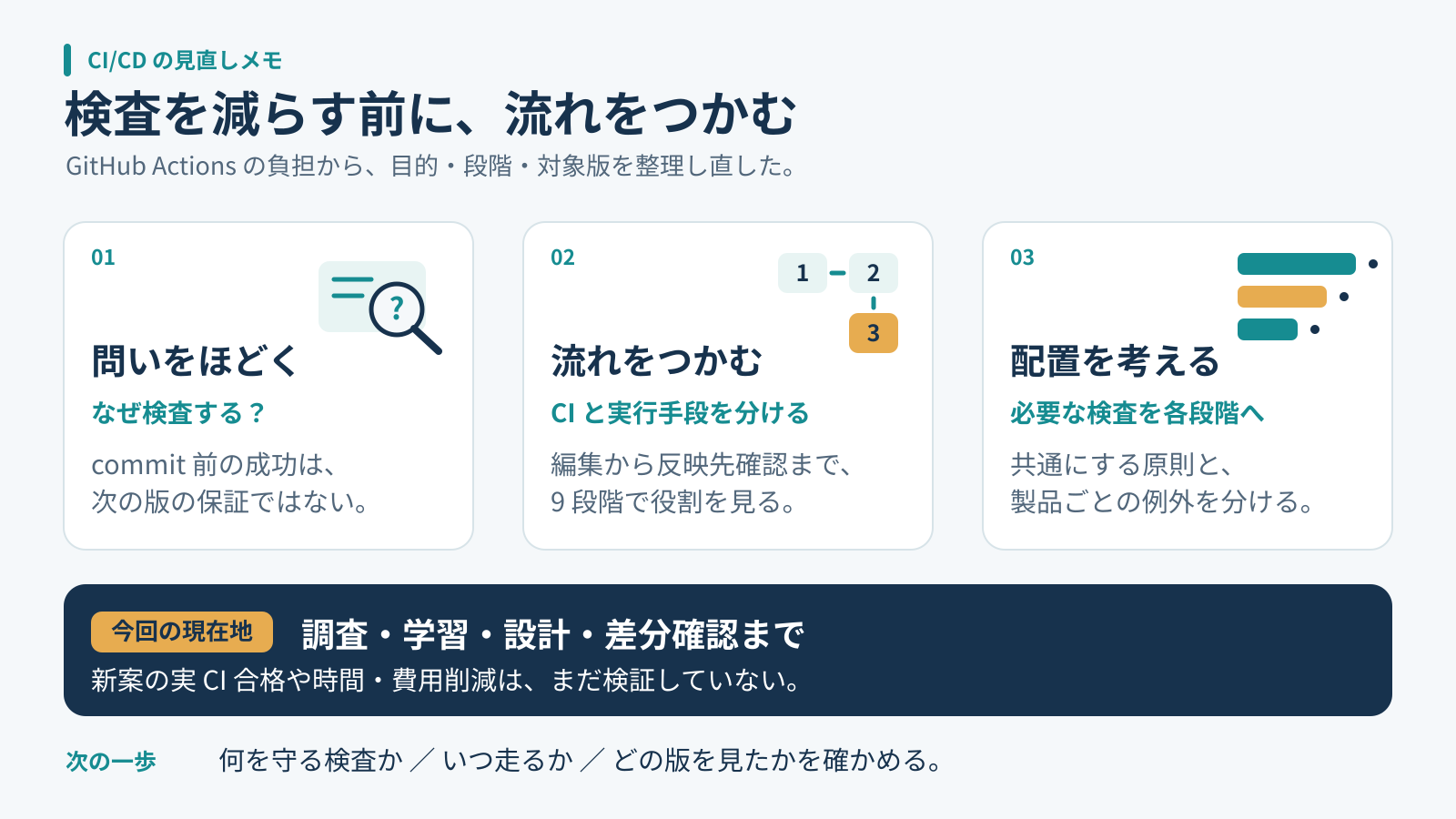
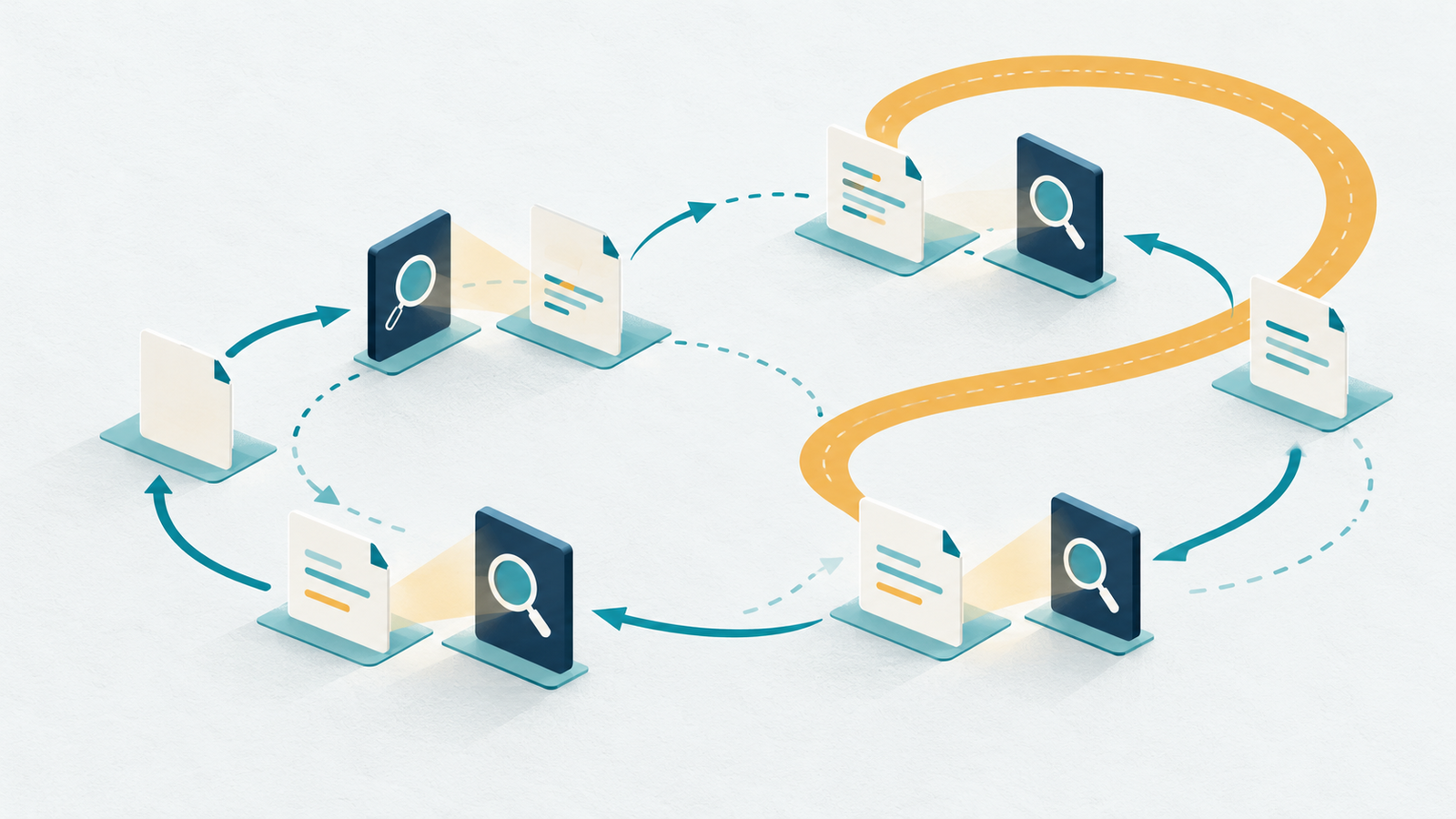
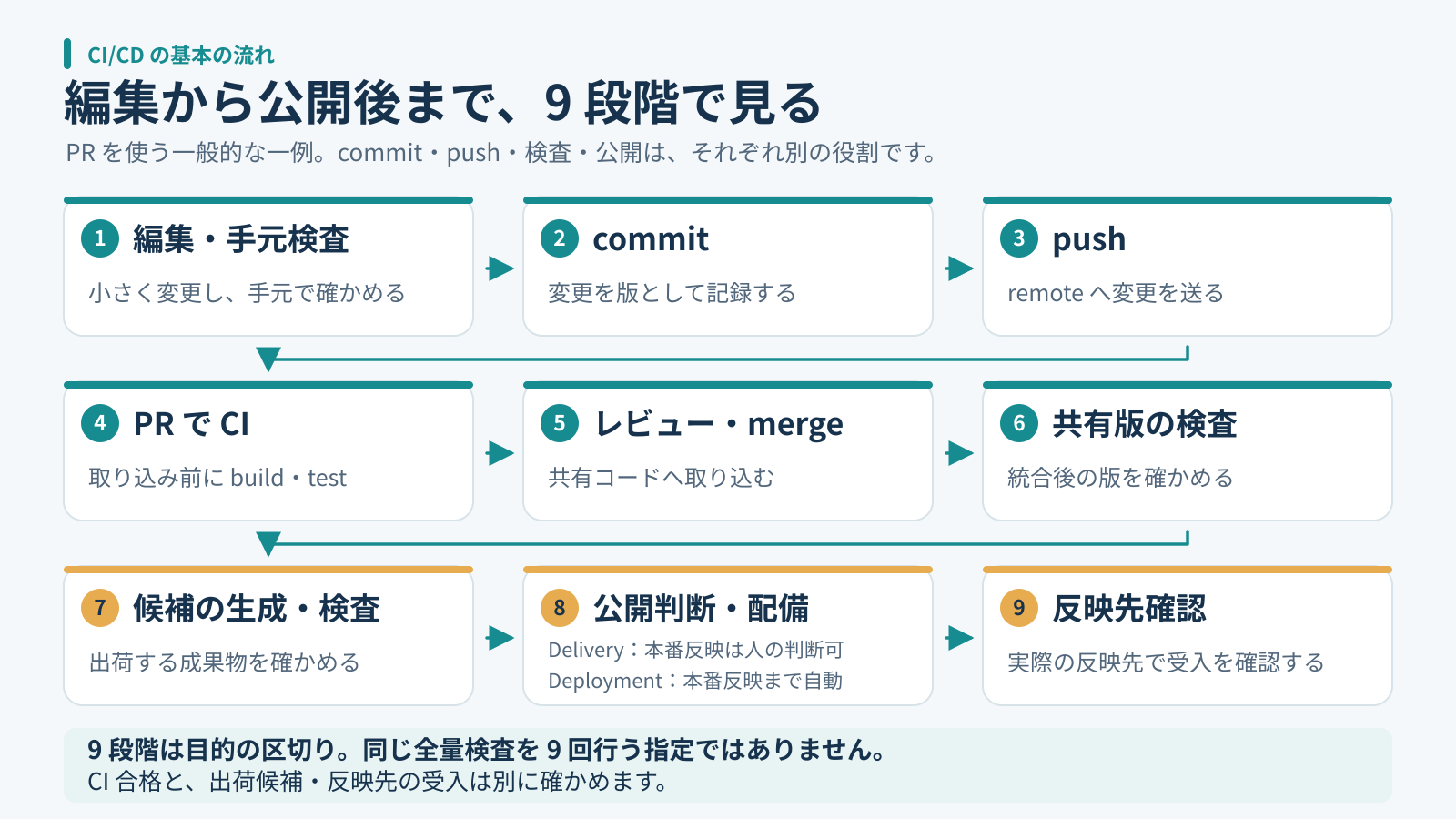
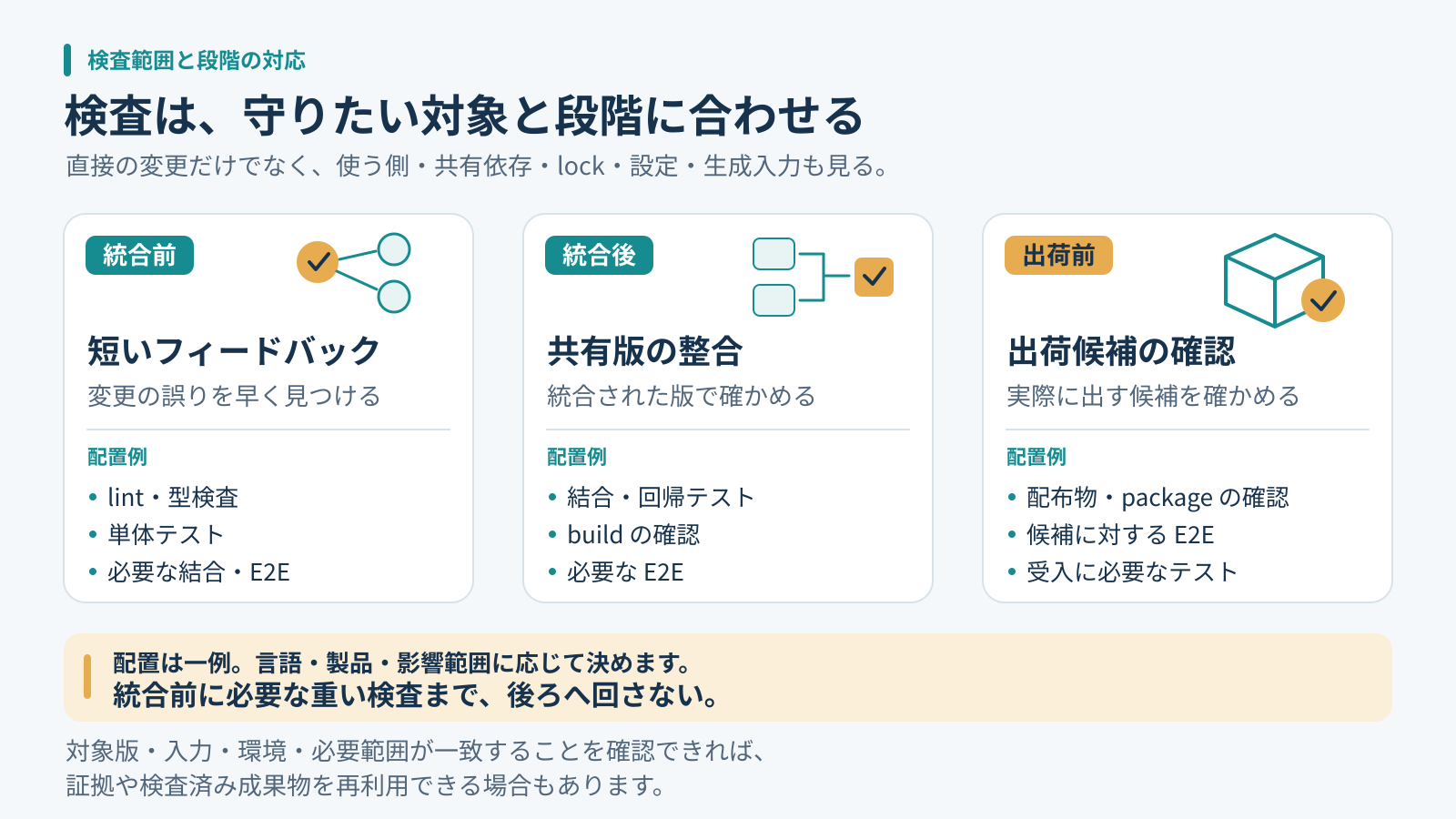
GitHub Actionsの検査を見直す前に、CI/CDの流れを整理した !GitHub Actionsの検査を見直す前に、CI/CDの流れを整理した 先に、結論を3行で書きます。 検査を減らす前に、何を、どの版で、いつ確かめるかを整理しました。 CI/CDの流れをつかむと、共通にする原則と個別に決める部分が見えてきました。 今回は設計と変更案の確認までで、実運用の高速化や本番移行はまだ検証していません。 !検査の目的、段階、対象版を整理する記事全体の要約 - 少し忙しい人向け:5分で読める要約版(個人サイト) - もっと深掘りしたい人は、このまま本文へどうぞ。 そもそも、何のためにこんなに検査しているのか 複数のリポジトリでGitHub Actionsを動かしていると、検査の負担が気になってきます。そこで最初に考えたのは、検査をどう減らすかでした。変更のたびに似た処理が並ぶと、同じことを繰り返していないか、という疑問が出てきます。 commitする前のコードが正しかったなら、新しく変えたところだけを確認すればよいのではないか。毎回全部を検査しているのか。手元で開発を終えてからまとめてpushすれば、検査も一度で済むのではないか。自動実行をやめて、必要なときだけ手動で動かす方法も考えました。 ただ、その判断をするには、自分が何を省こうとしているのかを理解する必要がありました。Actionsに処理を任せていても、それぞれの検査がどの段階を守っているのかまでは、十分に整理できていなかったのです。 今回は設定をすぐ書き換える前に、CI/CDの言葉と一般的な流れから確認し直しました。検査時間の話として始めたのに、途中から、検査結果をどう判断に使うかという話へ変わっていきました。 !複数のカードが繰り返し検査を通る様子を表した概念イラスト 同じように見える検査が並んでいても、何を確かめるための処理なのかはまだ分かりません。まずは、それぞれの役割をほどくところから始めました。 commit前に成功していたら、どこまで信用できるのか まず、commitはコードの版を記録する操作です。テストに合格したという証明が、commitそのものに付くわけではありません。pushも、変更をremoteへ送る操作です。pushしたら何が実行されるかは、workflowの設定によります。この二つを検査や公開とまとめて考えないようにしました。Gitのcommit説明とpush説明で、操作の役割を確認できます。 手元での成功にも意味はあります。ただし、その結果は、そのときのコード、依存、設定、環境、実行した検査についての結果です。後から別の変更が合わさったり、lockファイルが変わったりした場合まで、そのまま保証するものではありません。 たとえば共通関数を一つ直したとします。変更したファイルのテストが通っても、その関数を使う画面や処理が期待どおりとは限りません。直接編集していない利用側にも影響は広がります。DORAも、小さく見える単一ファイルの変更が全体に副作用を持ち得ることを、CIが扱う問題として説明しています。DORAのCI解説 ここで、変更行だけを見ればよい、とは言えなくなりました。一方で、どんな変更でもすべての検査を無条件に繰り返す、と決める材料にもなりません。どこまで影響する変更なのか、以前の結果と今の入力が同じなのかを、先に分けて考えます。 CIとActionsを分けると、流れを追いやすい CIはContinuous Integration、継続的インテグレーションです。共有するコードへ小さく頻繁に変更を合わせ、自動buildやtestで早く検証する実践として捉え直しました。GitHub Actionsは、それを実行するために使える仕組みの一つです。Actionsが動いていることだけで、統合を小さく頻繁にできているとは限りません。GitHubのCI説明 Martin Fowlerの説明でも、変更を頻繁に統合し、その統合を自動buildとtestで確かめる点が中心です。そこで、手元に変更を長くためて最後に一度だけ確認する案は、実行回数が減るとしても、問題を見つけるタイミングを遅らせる可能性があると考えました。Continuous Integration 個人開発なら、いつでも他人の変更と衝突するわけではありません。それでも、一度に多くの変更を加えた後の失敗では、どの変更が原因なのかを追う範囲が広がります。自分の作業量に対して、短い確認をどこに置くと戻りやすいか。その視点を残しておきたいと思いました。 編集から公開後まで、何を順番に確認するのか 全体像は、PRを使う一般的な例として、次の九段階に整理しました。PRは説明のための一例で、CIの定義に必須の手続きではありません。以下はすべての組織に同じ手順を強制する標準ではなく、自分の検査を置く場所を考えるための整理です。 !編集から反映先確認までの九段階。PRを使う一般的な例 最初は、編集と手元の検査です。書いた直後に小さな間違いを見つけられれば、原因を探す範囲も小さくできます。次にcommitで変更を記録し、pushで共有先へ送ります。ここまでを行っただけでは、取り込みや公開が完了したことにはなりません。 四段階目は、PRでのCIです。提案した変更について、統合前に必要な検査を行います。五段階目でレビューし、必要な条件を満たした変更をmergeします。六段階目では共有版を検査します。統合前の候補と、ほかの変更も入った共有版では、確かめる対象が変わり得ます。 七段階目は、出荷候補を生成して、その候補を検査することです。ソースのテストが通るかに加え、配るファイルや動かす形を確認します。八段階目で公開の判断と配備を行い、九段階目で反映先を確認します。処理が終了したことと、利用者が使う場所で期待した版になっていることも、分けて見ます。 九段階に分けたのは目的を追うためで、九回の独立した検査を要求するためではありません。各段階で同じ全量検査を繰り返す図にもしていません。たとえば、検査した版と後で使う版、依存や生成入力、環境条件、必要な範囲が一致し、その一致を確かめられるなら、既存の結果を使える場合があります。 検査済みの成果物を後段へ渡すなら、途中で別の入力から作り直していないかも確認します。反対に、統合によって対象が変わった場合は、以前の緑をそのまま移せません。名前の似た検査が二つあるというだけで重複と決めず、対象が同じかを見てから整理するつもりです。再利用を無条件に認めることも、毎回ゼロからやり直すことも、先に決めないようにしました。検査したpackageと配備するpackageを同じにする考え方は、Continuous Deliveryのパターンも参考になります。 この流れの中で、build、test、配備などを自動化できるのがActionsです。workflowはイベント等で起動し、jobやstepとして処理を組み立てます。どのタイミングに何を配置するかは、その仕組みの上で設計することになります。GitHub Actionsの構成要素 CDも確認しました。Continuous Deliveryは、必要な確認を経て、出荷できる状態を保つ考え方です。公開の判断を人に残す運用もできます。Continuous Deploymentは、条件を満たした変更の本番反映まで自動化します。毎回人が本番反映を承認する説明は、こちらには含めません。検査を自動化する話から、いきなり本番も自動で変える話へ飛ぶ必要はありません。Continuous Deliveryの説明、DeliveryとDeploymentの区別 全部手動にすれば、負担は減るのだろうか 必要なときだけ実行する案には、分かりやすさがあります。ただ、誰が、どの版に対して、何を忘れずに実行するかを、別に支える必要が出てきます。自動起動を外した分だけ、確認の責任が消えるわけではありません。 GitHub Actionsには、workflow_dispatchによる手動実行があります。一方、その実行でjobが成功したことを、そのままPRのrequired checkの代用品にはできません。現行の公式説明では、workflow_dispatchで起動したworkflowのjobが報告したcheckは、PRのrequired status checkを満たさないとされています。手動実行、必須チェックの説明 また、画面に緑が並んでいても、必要な検査が本当に走ったかは見ます。GitHubが取り込み条件として認める状態と、テストを実行して成功したという事実は同じとは限りません。skipを実行成功と数えず、対象の版、起動条件、実行内容を確認する方針にしました。 検査が動いていることと、失敗した変更の取り込みを実際に防げることも分けます。結果を見るだけの運用なのか、必要なcheckを取り込み条件として設定しているのか。同じ成功表示でも、その先の扱いは違います。手動化を考えるときは、ボタン一つの置き換えではなく、この判断までつながるかを確認したいと思いました。 そのため、全検査を手動化することを共通の答えにはしませんでした。まず短い自動検査を残し、重い検査や例外の置き場所を考える。手動で動かす処理を設ける場合も、それがどの判断を支えるものかを書いておく、という順番です。 約3時間の一例を、どこまで深掘りするか 調べた中には、Test stepが約3時間かかった実行例がありました。ただし、確認したのは一例です。毎回そうなのか、平均がどの程度なのか、費用にどう響くのかは集計していません。短縮した実績もありません。 長い数字を見ると、そこから直したくなります。しかし、もし例外的で頻度や影響が小さいなら、深掘りする優先度は下げてもよいと考えました。これは、まれだと証明できたという意味ではありません。頻度が未確認であることを残したうえで、何から調べるかの判断です。 そこで、一件の長時間実行の原因分析と、全リポジトリの検査の考え方をそろえる作業を分けました。前者には実行内容や待ち時間などの追加調査が必要です。後者は、検査の目的、対象、段階が説明できるかを先に整理できます。一つの数字から全体の設定を変えないようにしました。 共通にするのは、同じYAMLより判断の仕方 全体を見直すといっても、言語も製品の形も違います。そこで、共通の原則、言語や製品ごとの実装、実行条件、個別の例外を分けました。同じYAMLを配ることや、独自の差分判定エンジンを作ることは、出発点にしません。 短い検査一式が十分速いなら、それを流す方が単純です。差分を細かく選ぶ仕組みを入れると、今度はその選び方が必要な検査を落とさないかを確かめる仕事が増えます。依存の取得をcacheで省くことと、以前のテスト合格を再利用することも、別の判断として扱います。 !散らばったカードを検査の段階ごとに並べ直す概念イラスト 検査の役割は、名前からもう一度確認しました。lintや型の検査は記述や接続の問題、単体テストは小さな処理の振る舞い、結合テストは組み合わせ、E2Eは利用者の操作の流れ、buildや配布物の確認は出荷する形を見ます。どれか一種類の成功で、ほかも済んだとは扱いません。GitHubの検査例やDORAのテスト自動化の説明を参考に、役割を分けて整理しました。 配置を考えるときは、共有前に早く返したい検査、共有版の組み合わせを確認する検査、出荷候補に必要な検査を対応させました。これは重いものを全部merge後へ送るという話ではありません。取り込み前に必要な重い検査は、その前に置きます。DORAも統合前後の自動検査を説明しています。DORAのCI解説 !統合前、統合後、出荷前に置く検査と、直接変更以外の影響範囲 自分の運用では、画像や文書だけの軽い変更は一度目視し、テストやCIを追加実行しないという選択も持っています。これは一般の強制規則ではありません。生成処理、認証、権限などに影響するなら、拡張子だけで軽い変更と決めないようにします。共通化を理由に個別の運用を無断で上書きしないことも、今回の整理に含めました。 レビューでは、検査の後にも別の確認が残ると分かりました。たとえば公開処理を順番に動かすだけでは、古い候補が遅れて公開される可能性まで消せません。最新の候補だけを出す運用にするなら、公開直前にも、その候補を今出してよいか確認する必要があります。これは今回の設計上の指摘で、実際に事故が起きたという話ではありません。 公開の結果が分からない場合と、外部への変更は確認できたけれど、利用者の目線ではまだ確かめていない場合も分けました。前者を失敗と決めて同じ操作を重ねるのも、後者を受入完了にするのも早すぎます。検査を通過した記録だけでなく、その先に何が分かっていて何が未確認かを残す。自分の案では、この状態の違いも共通化する対象にしました。 こうして見ると、共通にしたいのはjobの数や一律の実行頻度より、判断に必要な情報でした。個別の製品に合わせて検査内容が違っても、何を確かめた結果なのかが読めれば、例外を設けた理由も後から確認できます。 AIに改善案を頼む前に、流れを共有しておけばよかった 今回、AIが作った資料は、共通差分や代表的なpatchの説明に寄っていました。変更案はあっても、一般的なCIの流れが抜けていたのです。そのままでは、何を変える案なのかを判断する土台が足りませんでした。 不足を伝え、編集から公開までの九段階を資料の冒頭に加えて説明し直しました。これは、説明を長くすればよいという話でもありません。今回なら、検査を減らす判断の前に、検査が入る場所を理解する必要があったということです。 資料の見栄えが整っていても、読む側が判断に使えるとは限らない。この点は、コードの改善案とは別に持ち帰ったことです。変更内容だけ詳しくしても、今の流れとのつながりが見えなければ、採用する理由も保留する理由も説明しづらくなります。 次に同じ種類の依頼をするときは、最初に通常の流れを示し、そのうえで、現状のどこを変えるのか、何を残すのか、まだ分からないことは何かを並べてもらおうと思います。完成した差分だけを見るより、判断の順序を合わせてから比較する方が、自分には使いやすそうです。 次は、一つの検査の役割から確認する 自分のリポジトリを見直すなら、まず既存のworkflowと実行結果を読み、次の問いを一つずつ確かめるところから始められます。設定変更や全量の再実行を、最初の作業にする必要はありません。 - この検査は、何の失敗を見つけるためにあるか。 - 手元、提案中の変更、共有版、出荷候補のどれを見ているか。 - どの変更やイベントで走り、何がskipされるか。 - 取り込みや公開を止める条件として、実際に結び付いているか。 - 結果が不明だったとき、成功と決めずに何を確認するか。 この棚卸しで、似た検査が本当に重複しているのか、違う対象を確かめているのかを見分けたいと思います。短くできそうな場所が見つかっても、先に成功条件を決めます。省いた後に困らないかを確かめる対象が決まれば、改善案を試す範囲も小さくできます。 今回済んだのは、設定や経路の読取調査、学習資料と全体標準案の整理、代表的な変更用・戻し用patchの準備です。固定したコピーで適用と復元、構文を確認し、別担当の独立レビューも行いました。 まだ、新案を製品のworkflowへ適用していません。実際のCIでの動作、出荷候補や本番の受入、全体移行、時間や費用の削減も未検証です。したがって、この記事の到達点は、検査を速くできたことではなく、見直すための考え方を整理したところまでです。 次は、一つの検査について、目的と対象の版を自分の言葉で説明できるかを確認します。そこで説明が途切れる場所が見つかれば、先に調べる場所も決めやすくなりそうです。 --- ※ ヘッダー画像は AI(画像生成)で作成しています。 ※ 本文の挿絵も AI(画像生成)で作成しています。 書いた人: ishizakahiroshi 群馬の北部で、保護猫2匹と暮らす、在宅エンジニア(何でも屋) ishizakahiroshi.com github.com/ishizakahiroshi X(業務委託・各種相談はこちら): x.com バックエンド・インフラ・AI連携まわりで、業務委託のご相談を受け付けています。フルリモートです。スポットや週2〜3時間からでも歓迎で、いろんな案件に携われたらうれしいです。こんな相談、歓迎です。 <!-- dots-article:ci-cd-learning-20261102 -->
Multiple Codex accounts. One place to manage them. I built Codex Manager for saved logins, quota tracking and browser sign-in. Windows + macOS preview. Free for noncommercial use. GruffDuck/codex-manager #Codex #BuildInPublic t.co
Komga 出门后手机 App 连不上? 本地网页正常,App 还在打 192.168.x。 设置 → Server URL 改成隧道 https。 本地先确认: curl -I 127.0.0.1:25600 cftunnel quick 25600 → 免费 https 域名。 免费内网穿透 + 反向代理,MIT: qingchencloud/cftunnel cftunnel.qt.cool t.co
Virtua Fighter 2 Recomp now has a fighter randomizer - play offline or online as some freaky monsters Every random fighter is 3 of the cast stitched together. Head, body, arms and legs from different people, and the moves get split up by button too. So you get stuff like Sarah's head on Jeffry's body throwing Shun's kicks, or Dural's chrome head on Lion. New colours every game, and they all get a stupid name like JACPAIWOLF. It's all the arcade's own models and textures, nothing new drawn. The game just thinks it's one of its own characters, so the select screen, the intro, rankings etc all work with it. There's 678 of them. If you find one you like, the name's on the energy bar, type it into Seed and you get the exact same freak again on any machine. Full list (24 with pics): github.com/mr-finster/vf2-recomp/blob/main/docs/S… Works online with the rollback netcode too. Normal players can still play people on the old version, so nobody's forced to update. Turn it on in Menu → Cheats → Player 1 / Player 2 fighter → Random (or Seed). Random opponents does the CPU too. Online it's Online → Settings → Your fighter. Also made a page that shows who's playing VF1/2/3 online right now and where from: vf-online.pages.dev Free on Windows, Mac, Steam Deck and Linux, bring your own vf2.zip: vf2-recomp.pages.dev Source: mr-finster/vf2-recomp
GitHub 一天冲到 500+ star:UNCUT。 无损、无界面的 coding agent harness。一个约 7 MB 的静态二进制,四个工具,纯 stdin/stdout;没有 TUI、没有遥测、也不会悄悄砍上下文。Go 写的,MIT。 Balanov/uncut
기어스 오브 워 E-Day VR MOD 얼리 억세스 시작. 원래 3인칭 게임이지만 1인칭에서의 체인소 박력이 대단할 것 같긴 하다. VR이 없어서 해보지는 못하겠지만. 스팀 뿐만 아니라 MS 스토어에서도 설치 가능하다고 함. youtu.be github.com/paultaran00/GoWEDay-VR/releases t.co
Claude CodeでWindows版Emacs用にMozcをスタンドアロン化:エンジン内蔵helperをw64devkitでビルド WindowsでGNU Emacsを使うとき、日本語入力はtr-imeを通してWindowsのIMEを使ってきました。GUIではそれほど困らないのですが、emacs -nwではIMEをEmacsの入力メソッドとして扱いづらく、C-\で切り替える本来の使い方ができません。そこで、MozcをC-\の入力メソッドとして、GUIでも-nwでも同じように使えるようにしました。Google日本語入力もMozcのインストールも要りません。 作業をほぼすべてClaude Codeに任せ、1日(およそ6時間)で、変換エンジンと辞書を内蔵したhelperをw64devkitのgccだけでビルドできるようになり、GitHubで公開し、タグを打てばGitHub Actionsがリリースを作るところまで来ました。 GitHub - kurouna/mozc-emacs-standalone 最初の質問は「Lispだけでできないか」 最初にClaude Codeへ投げたのは「MozcをEmacsからC-\で使えるようにしたいが、Lispだけでできないか。」という相談でした。 答えは「Lispだけでは現実的ではない」でした。Mozcの変換エンジン(辞書、コスト計算、最適経路探索)はC++で書かれていて別プロセス(mozc_server)で動き、公式のEmacsクライアントもhelperという中継プログラムを介してそれと話しています。 公式のEmacsクライアント(mozc.el)はLispで、register-input-methodでjapanese-mozcを登録するので、C-\はそのまま使える ただし中継役のmozc_emacs_helperは、Windows向けには配布されていない 変換エンジンそのものをLispに移植するのは非現実的 そこでexeが1つ増えるのは受け入れることとし、あえてGoogle日本語入力の変換サーバーにつながずに、「Mozc本体をビルドして直接mozc.elと対話させる方式」に切り替えました。 アーキテクチャ 公式のhelperは、別プロセスのmozc_serverにIPCでつなぐ中継役です。今回作ったhelperは、サーバーの中で動いているSessionHandlerを自分の中に持ち、変換を自分で行います。mozc.elとのやり取り(標準入出力のS式)は公式と変わらないので、Emacs側は公式のmozc.elをそのまま使えます。 項目 公式のhelper 今回のhelper 変換する場所 mozc_server(別プロセス) helperの中 前提 Mozc / Google日本語入力のインストール exeが1つ(約26MB、うち辞書約19MB) 常駐 変換サーバーが常駐 Emacsで使ったときだけ起動し、Emacsと一緒に終わる 学習・ユーザー辞書 サーバーが管理し、ほかのアプリと共通 helper専用(%USERPROFILE%\AppData\LocalLow\Mozc\) helperの本体はライセンス表記を除いて150行ほどです。標準入力からS式を読み、SessionHandler::EvalCommandに渡し、結果をS式で返します。S式の解析と出力はMozc側の部品をそのまま使っています。 mozc::SessionHandler handler(mozc::EngineFactory::Create().value()); while (std::getline(std::cin, line)) { ParseInputLine(line, &event_id, &session_id, command.mutable_input()); // mozc.el のセッションIDは32ビット、エンジンは64ビットなので対応表で引く command.mutable_input()->set_id(sessions[session_id]); handler.EvalCommand(&command); PrintMessage(command.output(), &buffer); } mozc.elとのやり取りではセッションIDが32ビット、エンジン内部は64ビットなので対応表を持たせました。また、Windows版のMozcはセッションをIMEオフの状態で始めます。mozc.elはLinux版と同じくオンの状態を前提にしているので、セッションを作った直後にオンにしています。 BazelもMSVCも使わずにビルドする Mozc公式のビルドはBazelとMSVCです。今回はw64devkitのgccだけでビルドしています。 Bazelのビルド定義をPythonで読む Bazelを入れる代わりに、Claude CodeはMozcのビルド定義(Starlark)をPythonとして評価し、ninjaのビルドファイルを書き出すスクリプトを書きました。select()をWindowsのOSSビルドとして解決し、ライブラリ・実行ファイル・protobuf・genrule(辞書データの生成)を必要な分だけたどります。約720行で、Bazelのごく一部だけを実装したものです。 辞書は完成品をダウンロードするのではなく、Mozcのリポジトリにある単語の一覧から、Mozcの生成ツールで毎回作るようにしました。 MinGWで通すための修正 Mozc本体へのパッチは2ファイル、追加11行(うち2行は既存行の置き換え)です。 問題 対応 __try / __except(MSVC専用の構文) MSVC以外では普通の関数呼び出しに std::ifstream::openにstd::wstringを渡している(MSVCの拡張) std::filesystem::pathを経由 サンドボックスの処理がATLに依存(MinGWにATLは無い) 使われている3関数だけの代替実装に差し替え aux_ulibがMinGWに無い 「不明」を返すスタブ WIL v1.0.230629.1がgccで通らない gccで通る新しいコミットのWILに固定 ATLやaux_ulibの代替はMozcのソースを書き換えず、ビルド時に追加のパッケージとして差し込み、ビルド定義を評価するときに参照先だけを差し替えています。Mozcを更新するときにパッチが当たらなくなるのを避けるためです。 見落としていた用例辞書 一通り動いたあと、確認用のコマンドの出力にmisaligned data is passed. returns an empty span.というエラーログが出ていました。Claude Codeがログを足して調べると、原因はアドレスのずれではなく、用例辞書のデータが空だったことでした。用例辞書はビルド時に外部から取ってくるファイルで、ビルド定義を読むスクリプトが「手元に無い外部ファイル」を黙って読み飛ばしていました。取得するようにしたうえで、同じことが起きないよう、手元に無い外部ファイルがあればエラーで止まるようにしています。 init.elに組み込む Releasesのzipには、helperのexe、同じ版の公式mozc.el、後で触れるユーザー辞書の編集用のel、ライセンス文一式が入っています。~/.emacs.d/mozc/に置いた場合、init.elには次のように書きます。 (add-to-list 'load-path (expand-file-name "mozc" user-emacs-directory)) (require 'mozc) (setq mozc-helper-program-name (expand-file-name "mozc/mozc_emacs_helper.exe" user-emacs-directory)) (setq default-input-method "japanese-mozc") (require 'mozc-user-dict) ; 任意: ユーザー辞書の編集 これでC-\でオン・オフできます。 tr-imeと併用すると干渉がありました。tr-imeはWindowsのIMEの状態とEmacsの入力メソッドの状態を同期させていて、「IMEが閉じているのに入力メソッドが有効」を食い違いとみなし、Mozcをオフにしてしまいます。Mozcを使っている間は同期処理を差し替え、半角/全角キーでWindowsのIMEが開いたら、すぐ閉じてMozcを切り替えるようにしました。 (with-eval-after-load 'tr-ime-sync (advice-add 'tr-ime-sync--setopenstatus :around (lambda (orig) (if (not (equal default-input-method "japanese-mozc")) (funcall orig) (tr-ime-hook-check) (when (tr-ime-openstatus-get-mode) (tr-ime-openstatus-force-off) (toggle-input-method)))))) mozc.elもhelperもGUIに依存しないので、-nwでも同じように動きます。 ユーザー辞書をEmacs Lispだけで編集する 使い始めてすぐ「ユーザー辞書は使えるか」という疑問が出ました。エンジンはユーザー辞書を読みますが、Mozc公式の辞書ツールはQtで作られた別のGUIアプリで、今回はビルドしていません。コマンドラインから辞書を操作する手段も見当たりませんでした。 調べると、辞書ファイルは暗号化もヘッダも無い、protobufのメッセージをそのまま書いたものでした。辞書ファイルで使われているのはvarint、文字列、入れ子のメッセージだけなので、Emacs Lispでバイト列を読み書きできます。 (defun mozc-user-dict--varint (n) (let (bytes) (while (progn (push (if (>= n #x80) (logior (logand n #x7f) #x80) n) bytes) (setq n (ash n -7)) (> n 0))) (apply #'unibyte-string (nreverse bytes)))) 読み込んだメッセージはフィールドの並びとして持ち、知らない項目も読んだまま書き戻します。Mozcの版が上がって項目が増えても壊さないためです。書き換えたらhelperを再起動し、mozc.elは再起動を検知してセッションを作り直します。 M-x mozc-user-dict-add:単語・よみ・品詞(Mozcと同じ45種類から補完)を聞いて登録 M-x mozc-user-dict-list:一覧。aで登録、dで削除 M-x mozc-user-dict-import:Microsoft IMEのテキスト辞書(UTF-16)も取り込める 「えまっくすもずく」は登録前は「エマックスもずく」にしかなりませんが、「Emacs+Mozc」を登録すると候補の先頭に出ます。 公開と配布 ライセンスを確かめてから配布する 「Mozc本体と辞書」を配布してよいかを確認すると、条件を守れば配布できることがわかりました。 含まれるもの 条件 Mozc、protobuf BSD 3-Clause。著作権表示と条文を添える 辞書データ(IPAdic・沖縄辞書) どのコピーにも著作権表示と条文を含める 用例辞書 BSD 2-Clause abseil-cpp Apache License 2.0 WIL MIT MinGW-w64のランタイム 表示が必要 よって、ライセンス文一式を入れたzipをリリースしています。 タグでリリースする GitHub Actionsのワークフローは、vで始まるタグをpushすると、w64devkitを用意してビルドし、zipを作り、helperで「かんじ」を変換・確定できるかを確かめてからリリースを作ります。 残っている制限 Mozcは「変換サーバーは1つ」という前提で作られていて、学習データにプロセスをまたいだ排他制御がありません。今回の方式ではEmacsごとにhelperが起動するので、複数のEmacsで同時に使うと学習の一部が別のEmacsの分で上書きされることがあります。ファイルの形式は壊れない作りなので、READMEに制限事項として書くだけにしました。システム辞書もexeに組み込まれるため、増やすにはMozc本体と同じくビルドし直しが必要です。 おわりに コードもドキュメントも全てClaude Codeが書きました。BazelもMSVCも使わないMozcのビルド、エンジン内蔵のhelper、ユーザー辞書の編集、タグでのリリースまでが約6時間で揃っています。私がしたのは方針を決めることと、動かして気になった点を伝えることだけで、用例辞書の抜けのように私が気づいていなかった問題もClaude Codeが見つけて直しました。この記事もClaude Codeに作業の記録とgitログを読ませて下書きしています。 GitHub - kurouna/mozc-emacs-standalone ! このプロジェクトはGoogleとは関係のない、個人によるものです。 ! 開発中のエディタ「elecxzy」について elecxzyでは、サクサク動くEmacsっぽいキーバインドのエディタを目指して開発を続けています! Repository: GitHub - kurouna/elecxzy Download: Releases X (Twitter): @elecxzy 興味があればぜひ触ってみてください!
i reach hermes agent memory x 2 performance long term memory optimization just landed now rlaope/oh-my-hermes
Hes asking for donations Why u guys buying the wrong one ?? This is his github : github.com/recurshawn This is the right coin: B7Cj19ke2F8S6fazbBvGMxHYNNMYuDaAn3Sn2Zikpump t.co
Omarchy supports Apple Silicon! Download the latest macOS native installer 👇 github.com/omacom/omarchy-mac-installer/releases/…