Mentions
Conversations linking to GitHub, newest first. Times are UTC.
Mentions by source
X
Bluesky
Hacker News
V2EX
Qiita
DEV
Mastodon
Latest posts
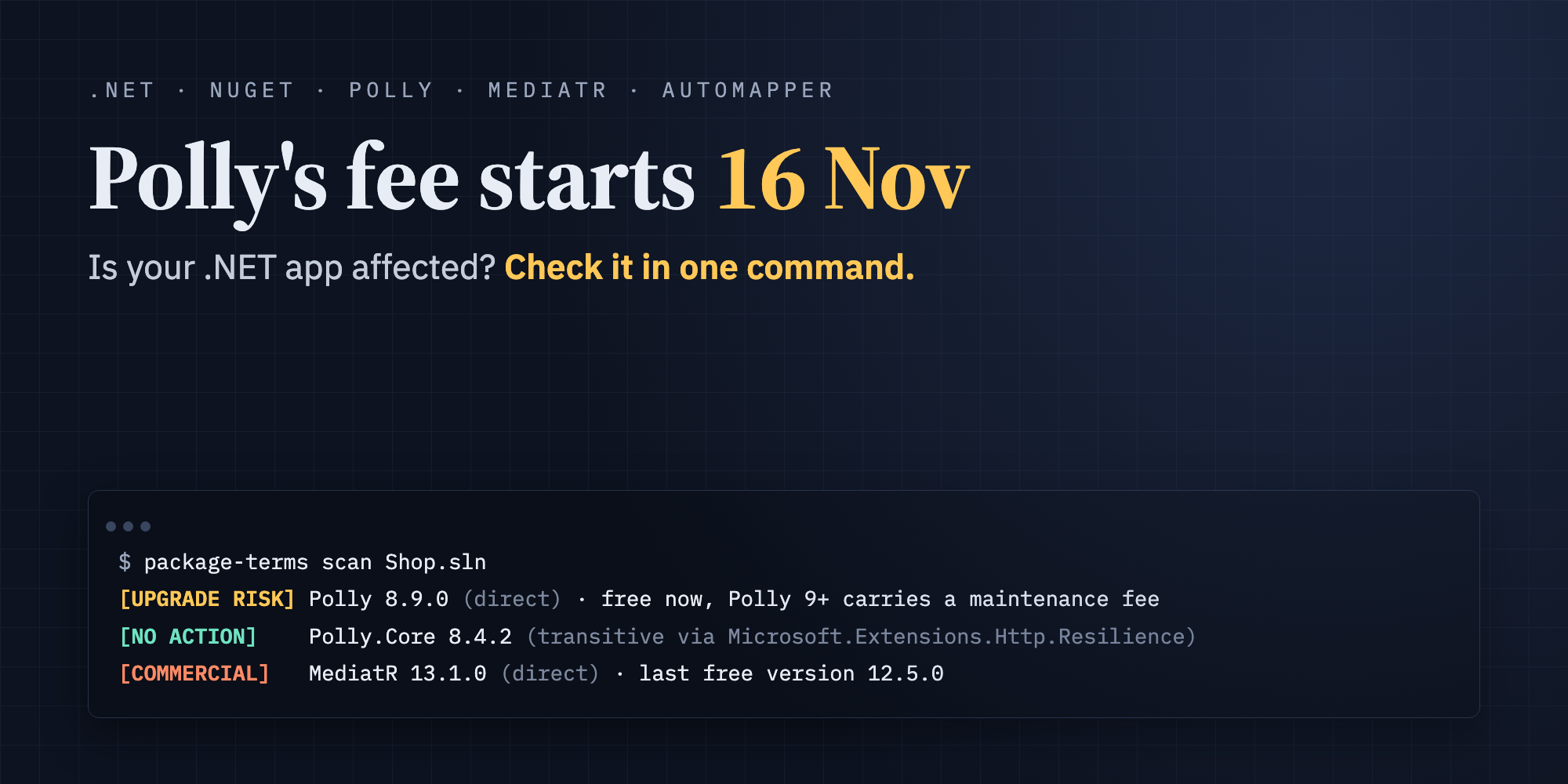
Polly's maintenance fee starts 16 November. Is your .NET app affected? Check your solution in one command, along with MediatR, AutoMapper, MassTransit and FluentAssertions. On 14 July 2026 the Polly project announced that it's adopting the Open Source Maintenance Fee (OSMF). Payment requests start on 16 November 2026. Polly is everywhere in .NET. The Polly package alone has more than 1.7 billion downloads, and Microsoft's own resilience packages are built on it. So the question many teams are asking right now is simple: do we have to pay? For most teams the answer is no, but it depends on two details that are easy to miss. In this post I'll explain both, then show how to check every project in your solution in one command. What actually changes Here's what the Polly announcement says, quoted directly: - Price and threshold: "The Maintenance Fee is US $20 per month and applies to any company that earns at least US $20,000 from at least one product or project that uses Polly." - Which versions: "The fee applies only to the next major version of Polly released after November 16, 2026." And: "Existing versions of Polly are not subject to the fee." - Which references: "Only direct references to Polly are subject to the fee. If Polly is a dependency of a different library, such as Microsoft.Extensions.Resilience or Microsoft.Extensions.Http.Resilience, the fee does not apply." The source code stays open under its existing BSD-3-Clause licence. Individuals, students, hobbyists and organisations below the revenue threshold don't pay. The two details that decide whether you're affected 1. Version. Polly 8.x, which is what you're almost certainly using today, is not affected. The fee applies to the next major version (Polly 9) released after 16 November. So upgrading carelessly is the real risk, especially with Dependabot, Renovate or a casual dotnet add package Polly. 2. Direct vs transitive. If you only get Polly through Microsoft's resilience packages, the fee doesn't apply. A typical example is AddStandardResilienceHandler() from Microsoft.Extensions.Http.Resilience. Your app still loads Polly.Core, but you don't reference it yourself. Both are hard to see by eye in a real solution: - Using statements don't tell you. The official OSMF guidance warns about this itself: using Polly; compiles whether Polly comes in directly or through another package. - References hide in many places. They can be in Directory.Build.props, in Directory.Packages.props with Central Package Management, or in one test project nobody looks at. - Licence scanners won't flag it. Polly's licence label stays BSD-3-Clause, so tools that compare licences against an allowed list see nothing unusual. The OSMF website's advice for .NET is to open every .csproj, collect the package references and check each one by hand. Check it in one command ! I built a small open-source tool for exactly this: PackageTerms. It reads the restore output NuGet already produces (obj/project.assets.json), so it sees the exact versions your projects resolve, including transitive ones, and tells you which packages changed their terms. dotnet tool install -g PackageTerms package-terms scan MySolution.sln Here's a sample solution with an API project and a test project: Scanned 2 project(s). [COMMERCIAL] MediatR 13.1.0 (direct) From v13, MediatR is dual-licensed under RPL-1.5 and the Lucky Penny Software commercial licence. Earlier versions keep their original Apache-2.0 terms. Last free version: 12.5.0 Alternative: Mediator.SourceGenerator: Source-generated mediator by Martin Othamar (MIT). Projects: Shop.Api.csproj [COMMERCIAL] MediatR 13.1.0 (transitive via Shop.Api (project)) ... Projects: Shop.Tests.csproj [UPGRADE RISK] Polly 8.9.0 (direct) Your version is still free, but Polly 9.0.0 and later carries a maintenance fee (from 2026-11-16). Check the terms before upgrading. Who pays: Companies earning at least US$20,000 from a product or project that uses Polly: US$20 per month. Direct references only; Polly brought in by another library (for example Microsoft.Extensions.Http.Resilience) is exempt. Projects: Shop.Api.csproj And here's a project that only uses Microsoft's resilience package: [NO ACTION] Polly.Core 8.4.2 (transitive via Microsoft.Extensions.Http.Resilience → Microsoft.Extensions.Resilience → Polly.Extensions) Polly's new terms cover direct references only, so this transitive reference is exempt. For each package, the output tells you three things: - Are you affected? It shows your exact version and whether the reference is direct, or the chain of packages or projects it comes through. - What changed and when, with a link to the official announcement. - What to do: the last free version and free alternatives. It's not just Polly Polly is the newest change, but several popular .NET libraries changed their terms in the last two years. PackageTerms checks these too: | Package | What changed | Covered versions | Last free version | |---|---|---|---| | Polly | Maintenance fee, direct references only | 9.0 and later | 8.x | | MediatR | Commercial licence (free Community edition under US$5M revenue) | 13.0 and later | 12.5.0 | | AutoMapper | Commercial licence (free Community edition under US$5M revenue) | 15.0 and later | 14.0.0 | | MassTransit | Commercial (Massient licence) | 9.0 and later | 8.5.12 | | FluentAssertions | Paid licence for commercial use (Xceed) | 8.0 and later | 7.2.2 | Every entry links to the project's own announcement or licence, and the data is open on GitHub. If you know of a package that's missing, please open an issue with a link to the official source. Catch it in CI, before it reaches main Upgrades usually arrive through automated pull requests. Add one step to your pipeline and the build fails if an affected package slips in: - run: dotnet tool install -g PackageTerms - run: package-terms scan --fail-on affected Use --fail-on upgrade-risk to be stricter, or --format markdown to post the result as a pull-request comment. What to do if you are affected - Polly, direct reference, organisation above US$20K revenue: stay on Polly 8.x (it's not subject to the fee), budget US$20 per month when you move to Polly 9, or use Microsoft.Extensions.Http.Resilience for HTTP resilience, which brings in Polly transitively and is exempt. - MediatR, AutoMapper, MassTransit, FluentAssertions: check whether you qualify for a free tier, buy a licence, pin to the last free version, or move to an alternative such as Mediator.SourceGenerator, Mapperly, Rebus or Shouldly. Whatever you decide, decide it deliberately rather than finding out from an automated upgrade. Try it - Install: dotnet tool install -g PackageTerms - Source and dataset: paulap887/PackageTerms - Polly announcement: thepollyproject.org {% embed paulap887/PackageTerms %} If it saves you a surprise invoice, a ⭐ on GitHub helps other .NET developers find it. If it misses a package or gets something wrong, an issue with a link to the official source is even better.
Winlestia: a free Windows 11 desktop shell with app search, window tiling, audio controls and everyday tools Hey everyone! 👋 I’m sharing Winlestia, a free, open-source desktop shell for Windows 11, inspired by Caelestia. It brings your apps, files, windows and everyday tools into one desktop interface. Here are a few things you can do with it: - 🔎 Find things from the keyboard: launch an app, search indexed files, switch to an open window or run a quick calculation. - 🪟 Organise your windows: enable automatic tiling or keep a particular window on top. - 🎵 Control your audio: manage music playback and adjust the volume of individual applications. - 🧰 Handle small tasks: capture and annotate the screen, extract text from an image, revisit clipboard history, take notes or start a focus timer. There’s also a workspace for apps, games, projects and documents, alongside a custom dock and themes. I’ve used AI tools during development. After sharing the project recently, I’ve had people try it and suggest improvements. I’d like to keep that going, especially around first-time setup, everyday usability and how it behaves on different PCs. 🔗 Download, source code and documentation Windows 11 x64 only. The installer is unsigned, so SmartScreen may warn; the setup wizard is currently in French. Feedback here or through GitHub issues is welcome. I’m also lilidox0485 on Discord.
ValiNum v2.2.0: Phone Number Validation for 10 More African Countries We're excited to announce the release of ValiNum v2.2.0, a major update to our lightweight JavaScript and TypeScript library for validating and formatting phone numbers in African countries. ValiNum takes the guesswork out of phone number validation. Instead of hard-coding prefixes like "82 is Vodacom", you pass the user input and ValiNum detects the country, operator, line type, and returns the number in national, international, and E.164 formats. This release adds support for 10 new countries: Angola, Gabon, Central African Republic, Equatorial Guinea, Nigeria, Benin, Togo, Ghana, Zambia, and Burkina Faso. Each comes with a dedicated validator and up-to-date mobile and fixed-line ranges, including full-number patterns for fixed lines. Beyond the new countries, v2.2.0 brings CDN support (jsDelivr and unpkg), fixes Node.js imports so both import and require work, resolves TypeScript types under node16/nodenext, and rewrites DOCUMENTATION.md as a complete course from Chapter 0 to 18. Whether you're building a signup form, a CRM, or a fintech app, ValiNum saves you from maintaining fragile prefix lists. Check out the release on GitHub: fomadev/valinum
Dodatkowy skill do analizy plików pamięci twoich agentów: github.com/przeprogramowani/labs/tree/main/skills…
New notebooks merged my Grok Bot notebooks factory Download them here donvito/notebooks t.co
@Sou1gh0st Yeah. Let's contribute it together if you are intereseted. github.com/XFrameworks/eligibility/blob/bbcab614c…
Spec to Compile for coding agents: A-ISL (experimental) Repo: fra00/a-isl-agents. I got tired of two extremes: one-shot prompts that disappear into the chat, and hand-written specs nobody maintains. A-ISL is an experiment in the middle: you describe the product in natural language; a coding agent writes a reviewable Spec in classic ISL (.isl.md); you accept it; then you explicitly ask another skill to compile that Spec into bin-\<stack>/ (React, Blazor, WinForms, C# library, …). The agentic part (easy to miss) You do not hand-author ISL or the app. 1. Skill a-isl-spec-author → agent writes *.isl.md only 2. You review (product sense first — you don’t need to know the grammar) 3. Skill a-isl-compile → agent regenerates bin-<stack>/ via a small runtime (builder → queue → packet → lock) Spec never auto-chains into bin/. That’s the whole point: human gate, not autopilot. Same Spec can compile to more than one stack without rewriting intent — see the sheet demo (React / Blazor / WinForms). Who decides what A-ISL does not invent the product. You decide behavior and accept the Spec. Wrong Spec that compiles is still “faithful.” That boundary is intentional. What we measured Internal bench (tariffe-v2, closed Domain/Logic rules, N=5): | Campaign | Stack | First full-pass | Final | |----------|-------|----------------:|------:| | A-ISL | react-js | 5/5 | 5/5 | | Single prompt | react-js | 5/5 | 5/5 | | A-ISL | csharp | 5/5 | 5/5 | | Prompt (open DTO style) | csharp | 1/5 | 5/5 | | Prompt + same “prefer records” rule | csharp | 5/5 | 5/5 | Regression check, not a leaderboard. On a small closed-rules task, Spec → Compile matches a single prompt (5/5 vs 5/5 on JS). On C#, a prompt that left DTO style open dropped to 1/5 on first pass; adding the same “prefer records” rule closed the gap. The expected payoff is on large or multi-module projects and on change-via-Spec. This bench does not demonstrate that; it only supports non-regression on a small closed oracle. Full honesty: evaluation.md. Hosts Runtime is agent-agnostic. Skills ship for Cursor, Claude Code, and GitHub Copilot (same text, synced). Day-to-day use and the bench were on Cursor; other hosts are not separately tested yet. When it might pay off Modules, evolution via Spec, multi-stack. For a one-shot script, a normal prompt is enough — Spec→Compile costs more turns on purpose. Try it Prerequisites: Node.js 18+; for Blazor / WinForms sheet demos, a .NET SDK (WinForms needs Windows targeting). git clone https://github.com/fra00/a-isl-agents.git cd a-isl-agents && npm install && npm --prefix runtime/lint install # open in your agent → /a-isl-spec-author → review → /a-isl-compile Tutorial: docs/tutorial-first-project.md
pbakaus/impeccable 真是个好东西 (除了有点烧 token ,但不是它的错是我的错
Claude Code の作業ディレクトリ外の書き込み禁止は Bash・PowerShell に効かない:Windows の実測と止め方 Claude Code 2.1.314 で入った permissions.blockWritesOutsideWorkingDirectories を true にしても、Windows の 2.1.316 では Bash の echo … >・cp と PowerShell の Set-Content・> で作業フォルダの外にファイルができました。止まったのは Write・Edit・NotebookEdit だけです。逆に、作業フォルダの中のファイルが、パスの大文字小文字の違いだけで「外」と判定されて拒否されることもあります。 ! この記事の答え(Windows 11・2.1.316 で試した形) 設定は次のとおり。止まるのは Write・Edit・NotebookEdit だけ "permissions": {"blockWritesOutsideWorkingDirectories": true} Bash・PowerShell の書き込みは、この設定では止まらない。PreToolUse の hook(下の guard_outside.js)で、コマンドに書かれたドライブ名つきの絶対パス・/c/ の形・../ のうち作業フォルダの外のものを止める(~・/tmp・$HOME・UNC・cd の後の相対パス・変数・子プロセスの書き込みは見逃す。rm -rf ~ も止まらない) 作業フォルダの中のファイルが is outside で拒否されたら、パスと起動したフォルダの大文字小文字・8.3 の短い名前を、エクスプローラーに出る実際の名前に合わせる 2.1.314 で追加された設定(CHANGELOG)なので、それより前の版では効かない(2.1.303 では警告なしに無視された)。claude --version で版を確かめる Windows 11・Claude Code 2.1.316 の CLI(比較に 2.1.303)・2026-11-02 時点の実測で、各ケース1回です。 拒否されたときにツールの結果に返る文は次のとおりです(<パス> などには実際のパスが入ります)。 <パス> is outside <作業フォルダの一覧>; the permissions.blockWritesOutsideWorkingDirectories setting blocks writes outside the working directories. Ask the user to add the directory with /add-dir, or to remove that setting. この設定は、CHANGELOG の 2.1.314 の項(npm での公開は 2026-10-30)に次のように書かれています。 Added permissions.blockWritesOutsideWorkingDirectories: Write, Edit and NotebookEdit refuse paths outside the working directories in every permission mode 挙がっているのはファイルを書く3つのツールだけです。公開当日の DevelopersIO(クラスメソッド)の記事も Write で試し、Edit・NotebookEdit とシェル経由の書き込みは確かめていないと書いています。この記事は、その残りを Windows で確かめた記録です。 結果の一覧 作業フォルダは work、その外は outside_folder です。断りがなければ 2.1.316・bypassPermissions・設定は true です(作り方は「試した方法」の節)。 条件 書いたもの 結果 Write 中の work\in.txt File created successfully Write 外へ7通りの書き方 7通りとも is outside …。ディスクにできない Write・設定なし("permissions": {}) 同じ8通り 8通りとも File created successfully。ディスクに8個 Write・--add-dir で外を追加 外へ7通り 5通りは通る。全部大文字と 8.3 は、足したフォルダなのに is outside … Write・--add-dir で外を追加 中と足したフォルダへ6通りの書き方 全部大文字・全部小文字・8.3 は is outside …。ドライブ名だけ小文字は通る Write・作業フォルダを全部大文字で起動 中へ、実際の大文字小文字/起動と同じ大文字 前者は is outside …、後者は通る Edit 中のファイル/外のファイル(Read 済み) 中は has been updated successfully。外は is outside … NotebookEdit 外の nb.ipynb(Read 済み) is outside … Bash echo … >・cp で外へ 外にファイルができた PowerShell Set-Content・> で外へ 外にファイルができた Bash・PowerShell・通常のモード+--allowedTools 上と同じ4つ 確認も拒否もなく、外にファイルができた Write・2.1.303 中・外の絶対パス どちらも File created successfully。外にもできた Bash・PowerShell・hook あり 外へ3つ/中へ1つ 外の3つは hook で止まる。中は通る 止まるもの:Write は試した7通りの書き方で全部止まり、Edit・NotebookEdit も止まった Write に渡した外への7通りです(パスの途中は … で省きます)。 C:\Users<user>\…\outside_folder\abs.txt 絶対パス C:/Users/<user>/…/outside_folder/fwd.txt スラッシュ区切り C:\USERS<USER>\…\OUTSIDE_FOLDER\UPPER.txt 全部大文字 …\work..\outside_folder\dotdot.txt .. で上がる …\OUTSID~1\short.txt 8.3 の短い名前 …\work\jlink\junction.txt ジャンクション経由 /c/Users/<user>/…/outside_folder/bashstyle.txt Git Bash の形 7通りとも permission_denials に残り、.. と /c/ はエラーの文では解決した後の C:\…\outside_folder\… で表示されました。ジャンクション(mklink /J で作った jlink)は、たどった先が外だと書かれます。 … resolves through a symlink to …\outside_folder\junction.txt, which is outside … 公式の permissions の文書も、symlink を通るパスの確認は Windows のジャンクションにも当てはまるとしています。 設定なしの回では、/c/… の形は C:\…\outside_folder\bashstyle.txt にでき、C:\c\… にはできませんでした。Write ツールは /c/ を C: と読み替えています。 Edit・NotebookEdit は、拒否された後も外のファイルの中身(before・print(1))が変わっていませんでした。NotebookEdit は1回目に File has not been read yet. Read it first before writing to it. が返り、Read の後の2回目で拒否されています。この試験では外のファイルの Read は通り、止まるのは書き込みだけでした。 止まらないもの:Bash と PowerShell は bypass でも allow でも外に書けた 同じ設定のまま、Bash ツールと PowerShell ツールに次のコマンドを実行させました。 echo bash > 'C:/…/outside_folder/bash_redirect.txt' cp '…/work/in_edit.txt' '…/outside_folder/bash_cp.txt' Set-Content -Path '…\outside_folder\ps_setcontent.txt' -Value ps 'ps' > '…\outside_folder\ps_redirect.txt' bypassPermissions の回の返事は、Bash が Shell cwd was reset to …\work、PowerShell が (PowerShell completed with no output) だけで、どちらも permission_denials は空でした。 permissions の文書には、読み取りにくい所があります。「Redirections」の節は > file の行き先について「the check covers your Edit allow and deny rules, protected paths, and the working directories」と書いていて、ここだけを読むと止まりそうに見えます。一方、同じ文書の「Extend permissions with hooks」は、止めたいものを除いて Bash を確認なしで動かすなら、allow に "Bash" を入れて、それらを PreToolUse の hook で拒否する、と書いています。指定なしの Bash の allow で > の行き先がどう扱われるかはどちらにも書かれておらず、この試験のその条件では止まりませんでした。 なお、標準入力のない claude -p で試したので、対話の画面で確認のダイアログが出るかどうかは試していません。 中のファイルなのに is outside:大文字小文字と 8.3 の短い名前 逆向きの落とし穴です。短い名前ができるフォルダ variants_paths(短い名前は VARIAN~1)の下に work を作り、--add-dir で外も足して、書き方を変えました。 作業フォルダ(work) 通る …\work\v_exact.txt 通る c:\Users\…\work\v_lowerdrive.txt ドライブ名だけ小文字 拒否 C:\USERS\…\WORK\V_UPPER.txt 全部大文字 拒否 …\VARIAN~1\work\v_short.txt 8.3 の短い名前 --add-dir で足したフォルダ 通る (ドライブ名だけ小文字で書いたパス) 拒否 c:\users\…\outside_folder\v_add_lowerall.txt 全部小文字 拒否された3つは、ディスクにもできていません。起動したフォルダでも起きます。Python の subprocess で作業フォルダを全部大文字のパスにして起動すると、実際の大文字小文字で書いたファイルが次の文で拒否されました(起動と同じ大文字で書いた …\WORK\SAME_AS_CWD.txt は通りました)。 C:\Users<user>\…\work\actual_case.txt is outside C:\USERS<USER>\…\WORK, … 設定なしの回では、外の全部大文字と短い名前の書き方でもファイルができています。Windows のファイルシステムは既定では大文字小文字を区別しないのに、判定はドライブ名以外の大文字小文字と短い名前を区別しているように見えます(実測からの推定です)。 直し方は、パスの大文字小文字と短い名前、起動したフォルダの大文字小文字を、エクスプローラーに出る実際の名前に合わせることです。起動したフォルダが違っていたら、実際の名前で cd し直して起動し直します。 2.1.303 では警告なしに無視される この PC の 2.1.303 は、警告を出さずに外にも書きました。2.1.314 で追加された設定(CHANGELOG)なので、それより前の版では効きません(試したのは 2.1.303 だけです)。設定を入れる前に、版を確かめてください。 claude --version 試した方法 %TEMP%\bwtest<ケース>\ に work と outside_folder を作り、work の中に outside_folder へのジャンクション jlink(mklink /J)を置きました。8.3 の短い名前は Python から Windows の API GetShortPathNameW で取り、claude -p は Python の subprocess から作業フォルダで1回ずつ、標準入力なしで起動しました(引数はリストで渡し、シェルは通していません)。終わった後にディスクを見ています。引数は次の形です。 claude -p "<指示>" --settings "<設定の JSON>" --permission-mode bypassPermissions --tools Write --model claude-haiku-5-5 --max-turns 20 --strict-mcp-config --output-format stream-json --verbose --tools はケースに合わせて Write・Read,Edit,NotebookEdit・Bash・PowerShell・Bash,PowerShell(hook の回)にし、通常のモードの回は --permission-mode default と --allowedTools、足したフォルダの回は --add-dir を使いました。Write の回の指示は英語で、次の文の後にパスを1行ずつ並べました。 Call the Write tool once for each file_path below, using the path string exactly as written (do not change, normalize or resolve it), with content x. Make the calls one at a time, and keep going even if a call fails. Use no other tool. At the end, reply in Japanese with one line per path: OK or the error text. 環境は次のとおりです。 Windows 11・Git for Windows・Windows PowerShell 5.1.26100.9711 Claude Code 2.1.316(一時フォルダに npm install @anthropic-ai/claude-code@2.1.316 で入れた bin/claude.exe)と、この PC の 2.1.303(~/.local/bin/claude.exe) PowerShell ツールは --settings の env で CLAUDE_CODE_USE_POWERSHELL_TOOL=1 にして使った ユーザー設定は読み込んだまま(hook は Stop の1本だけ。additionalDirectories にある試験と関係のない3つのフォルダが、エラーの文の作業フォルダの一覧に出る) 試験で起きた、原因を確かめていないこと --setting-sources project,local(ユーザー設定を読まない)と --permission-mode bypassPermissions を一緒に付けると、claude -p が10分たっても終わらず、出力もありませんでした(2回)。片方だけなら約100秒で終わりました 通常のモードで --allowedTools PowerShell を付けた回は 476 秒かかりました Bash・PowerShell を止める hook(21行)と、見逃す形 コマンドの文字列に、作業フォルダの外を指すドライブ名つきの絶対パス・/c/ の形・../ のパスがあれば止める PreToolUse の hook です(~ や /tmp などは見ません。下の「見逃す形」)。node が要ります。 2.1.314 以降にしてから、settings.json の最上位に設定を入れる(Write・Edit・NotebookEdit 用。試験では --settings で渡しました) "permissions": {"blockWritesOutsideWorkingDirectories": true} 次の guard_outside.js を置く // PreToolUse(matcher: Bash|PowerShell): コマンドに書かれた絶対パス・.. のパスが作業フォルダの外なら止める // 簡易な判定。変数・cd の後の相対パス・子プロセスが書く場所は見えない const path = require('path'); let raw = ''; process.stdin.on('data', c => raw += c); process.stdin.on('end', () => { const input = JSON.parse(raw); const cmd = ((input.tool_input) || {}).command || ''; const roots = [input.cwd, process.env.CLAUDE_PROJECT_DIR] .filter(Boolean).map(r => path.resolve(r).toLowerCase()); const tokens = cmd.match(/(?<![A-Za-z0-9])[A-Za-z]:[\/][^\s'"|;&<>()]|(?<=^|[\s'"=(<>])(?:\/[A-Za-z]\/|..[\/])[^\s'"|;&<>()]/g) || []; const outside = tokens.find(t => { const win = t.replace(/^\/([A-Za-z])\//, '$1:/'); const abs = path.resolve(input.cwd || '.', win).toLowerCase(); return !roots.some(r => abs === r || abs.startsWith(r + path.sep)); }); if (outside) { process.stderr.write(作業フォルダの外のパス(${outside})を含むコマンドは止めています。作業フォルダの中で行ってください。\n); process.exit(2); } }); hook を設定する。<フォルダ> は guard_outside.js を置いたフォルダです(試験ではスラッシュ区切りの絶対パス) {"hooks":{"PreToolUse":[{"matcher":"Bash|PowerShell","hooks":[{"type":"command","command":"node","args":["<フォルダ>/guard_outside.js"],"timeout":15}]}]}} 試験ではこの JSON を --settings で渡しました。settings.json に書くなら既存の設定に hooks を足します(この形は試していません)。command と args に分けた理由はこちらの記事に、Windows で hook のコマンドが Git Bash で動く件はこちらの記事に書いています。 スクリプトが拾うのは、ドライブ名つきの絶対パス(C:\・C:/)、Git Bash の /c/ の形、../ で始まるパスだけです。それが作業フォルダ(hook の入力の cwd)か CLAUDE_PROJECT_DIR の下になければ、終了コード 2 で止めます。比べるときは小文字にそろえるので、大文字小文字の違いでは止めません。 実行の記録 2.1.316・bypassPermissions・設定 true にこの hook を足して、Bash の echo … > 外・cp … 外 と PowerShell の Set-Content -Path 外 を実行させると、3つとも次の形で止まりました(PowerShell は PreToolUse:PowerShell hook error)。 PreToolUse:Bash hook error: [node …/guard_outside.js]: 作業フォルダの外のパス(…)を含むコマンドは止めています。作業フォルダの中で行ってください。 中に書く echo inside > inside.txt は通りました。1つ目の版(下の失敗の記録)でも、上のコードの直した版でも同じ結果で、どちらの回も、外にファイルがないことと work\inside.txt ができたことをディスクで確かめました。 失敗の記録:1つ目の版は外のパスでないものも止めた 最初の版は、パスを拾う正規表現が次の形でした。 /(?:[A-Za-z]:[\/]|\/[A-Za-z]\/|..[\/])[^\s'"|;&<>()]*/g 単体で確かめると、次の3つも終了コード 2 で止めました(右は、メッセージに外のパスとして出た部分)。 curl -s example.com s://example.com/ sed -i 's/a/b/' inside.txt /a/b/ cat src/a/b.txt /a/b.txt https:// の s:/ をドライブ名と、/a/ を Git Bash の /c/ の形と読んだためです。直した版は、ドライブ名の直前に英数字がないことと、/c/・../ がコマンドの先頭か区切りの文字(空白・引用符・=・(・<・>)の直後にあることを条件にしました。 判定だけを17通り確かめた結果 node に PreToolUse の入力と同じ形の JSON を渡して、直した版の判定を確かめました。止まった(終了コード 2)のは次の8通りです。 echo bash > 'C:/…/outside_folder/a.txt' cp in.txt 'C:/…/b.txt' echo x > /c/Users/<user>/…/c.txt Set-Content -Path 'C:\…\d.txt' -Value ps echo x > ../outside_folder/e.txt $p = 'C:\'; Set-Content "$p\g.txt" x Set-Content -Path:C:\…\outside_folder\h.txt -Value x cp in.txt "/c/Users/<user>/…/outside_folder/i.txt" 通った(終了コード 0)のは、中の絶対パス、中を全部大文字で書いた絶対パスと、次の7通りです。 echo x > inside2.txt git status curl -s example.com sed -i 's/a/b/' inside.txt cat src/a/b.txt git clone a/b sub cd .. && echo x > outside_folder/f.txt 1つ目の版で止めすぎた3通りは、直した版では通りました。最後の cd .. && … は外に書くコマンドですが、今も見逃します。 この hook が見逃す形・止めすぎる形 見逃す: cd の後の相対パス、変数で組み立てたパス($p = 'C:\' の例は C:\ の文字で止まっただけで、変数の中身は見ていません)、子プロセス(スクリプトやテストランナー)が書く場所。ドライブ名のないパスも拾いません。単体で次の6通りを渡すと、どれも終了コード 0 で通りました(hook に文字列として渡しただけで、コマンドは実行していません) rm -rf ~ echo x > ~/j.txt echo x > /tmp/k.txt echo x > $HOME/l.txt Set-Content -Path \server\share\m.txt -Value x echo x > \outside_folder\n.txt 止めすぎる: 読むだけのコマンド(cat C:/外/a.txt など)、--add-dir・additionalDirectories で足したフォルダへの書き込み(使うなら roots の配列に足す)、中のパスを 8.3 の短い名前で書いたもの(小文字にそろえても長い名前と一致しないため。コードからの推定で、試していません) 子プロセスの書き込みは、コマンドを見る仕組みでは止まらない 子プロセスが書く場所が見えないのは、この hook だけではありません。GitHub の issue #105342(2026-10-27 作成・Open)は、サブエージェントが書いたテストの中で rm -rf ~ が走り、ホームの下のファイルの一部が消えたという報告です(約6分で止められ、残ったフォルダもあります)。2026-10-30 のコメントにこうあります。 every per-call check (hooks, deny rules, blockWritesOutsideWorkingDirectories) saw only cargo test and let it through 呼び出しごとの確認には cargo test しか見えず、その中で走った rm -rf ~ は止められなかった、という説明です。子プロセスまで閉じ込めるのは OS の仕組みで動く sandbox ですが、公式の sandboxing の文書にはこうあります。 The sandbox runs on macOS, Linux, and WSL2. On native Windows, Claude Code runs commands unsandboxed. ネイティブの Windows(WSL を使わない Windows)では、この記事の設定と hook は、書き先の間違いを手前で止めるためのものと考えてください。外に書かれては本当に困る作業は、公式が sandbox の対象にしている WSL2 の中で動かすのが次の手です(WSL2 の sandbox は試していません)。 Windows × Claude Code の記事 Claude Code の hook が Windows で PowerShell にならない原因は Git Bash Claude Code hook の onFailure: block でも止まらない出力と、止まる exit 1 Claude Code の Write で CRLF が LF に変わり git diff が全行になる原因と直し方(Windows) Claude Code 2.1.303 の PowerShell hook が node の exit 2 で止まらない:7通りの実測表 Claude Code の PowerShell で日本語が文字化けする原因と直し方:Windows の Get-Content まだみ(Salesforce エンジニア)です。Windows の Claude Code でつまずいたことを、手元で再現して表と記録つきで書いています。 参考 CHANGELOG.md(anthropics/claude-code) Configure permissions(Claude Code Docs) Hooks reference(Claude Code Docs) Sandboxing(Claude Code Docs) CLI reference(Claude Code Docs) anthropics/claude-code issue #105342 Claude Code v2.1.314 の主要アップデート(DevelopersIO) Case Sensitivity(Microsoft Learn)
思ったより利用者がいなくて不具合報告がこないandroid tv対応です danything/denpa-tv
@Agnogad Aslında dün aradım ve zaten mevcutmuş. github.com/MakrSas/horizon-switch/releases/tag/v0…
axler solution guide: completr hi all! i want to share that after nearly 4 months of work, i have finally completed a solution’s guide for axler’s LADR, found here: solution guide i’ve done my best to make it as well-written as possible. obviously this is not completely perfected yet, as i’ve gained quite a bit after relearning the material for this. main thing to fix is to rewrite some earlier exercises and depend on citations a lot more. as i wanted to write this with a more elementary prose, i managed to get into the groove of depending on the book halfway through, so solutions for chapter 5 and before may be of lesser quality compared to after. some little things like standardizing notation, maybe making some overarching lemmas (for streamline purposes) are on the backburner. in any case, i’d like to thank you for your time, and if you’d like to contribute to the polishing of this rough draft of a guide, there is a discord link in my profile to a server where you can post errors, minor typos, and offer alternative proofs. thank you all for reading and looking, and to anyone who gets to use this, i hope you enjoy and find it practical. i will be taking a short break but will hopefully hop back on dummit/foote in a little bit.
i build these game e commerce i learning react last 2 to 3 month Hey everyone! I've been learning React for the past 2–3 months, and I've recently built my second project, GameVault, using my own knowledge and what I've learned so far. GameVault is a gaming e-commerce website where users can explore games and browse a gaming store. Project Links: - Live Demo: gamevault-rhlydav216581.vercel.app - GitHub Repository: rhlydv216581/Gamevault I'm still learning and improving my development skills, so I'd really appreciate honest feedback from experienced developers and the community. I'd love to know: 1. What do you think about the overall UI/UX? 2. Is my React code structure and component organization good? 3. What should I improve in terms of performance and best practices? 4. Does this project demonstrate enough skills for a React/frontend developer internship? I'm open to constructive criticism and suggestions. I want to learn from my mistakes and become a better developer. Thanks for taking the time to check out my project!
調査していたら Contributor を勝手に追加できることがわかった。これは想定内なのか想定外なのか🤔 とりあえず Contributor 欄はあまり当てにしてはならないな。まぁ、元はただの文字列だし。そのうち消す…。 sk-ys/dummy01 t.co
Hey @grok, can you explain how Sukami works as an AI reverse proxy? What makes its Go-based architecture, semantic caching, prompt optimization, and automatic model routing interesting compared to traditional LLM proxies? alexpatil/sukami
If you want to hand desktop apps to an agent, the structure is worth a read. Before using it in a company setup or on your personal screen, check the permissions and what gets logged first. vercel-labs/agent-desktop
Kaynaklar: deepseek-ai/dsh-superagent-prototype deepseek.com Ayrıntılar: whiteyaka.com Bağımsız yayın; DeepSeek ve GitHub adları/logoları tanımlama amaçlı.
Install Linux Without a USB Stick 🐧 (free, open source) #shorts Install Linux next to Windows without a USB stick. hop is one small Windows app: pick a Linux, drag how much space it gets, and click Install. How it works: ⬇️ It downloads the ISO from the project's own site and checks its checksum (or use an ISO you already have). 💽 It makes room on your drive next to Windows, and can free space Windows "can't" release. 🔁 It copies the installer to a small partition on your disk and restarts straight into the Linux installer. ↩️ Changed your mind? Undo gives the space back. 🐧 Ubuntu and its flavours, Linux Mint, Fedora, elementary OS, Zorin OS, Pop!_OS, Debian, Arch, CachyOS and more. Good to know: hop is brand new (v0.3, a few days old) and so far has been tested on virtual PCs, not on many real ones. It changes your disk's partitions, so back up first; the author suggests trying it in a virtual machine. Needs Windows 10 or 11 on a UEFI PC. It isn't code-signed yet, so SmartScreen may warn. Some systems need Secure Boot off. Screenshots are from the project; the 3D laptop is our own model. ⭐ 1,300+ stars in 3 days 🔗 Arjun-Ingole/hop (MIT, by Arjun Ingole). Not affiliated with any Linux project or Microsoft. Try it now. #linux #windows #dualboot #ubuntu #linuxmint #fedora #opensource #github #pc #tech #shorts
PHP2Shell: The PHP Vulnerability Everyone Is Talking About Right Now (And How to Fix It) If you have been seeing "PHP hacked", "PHP vulnerability" or "PHP2Shell" everywhere lately — in tech news, on Twitter, or from developer friends — you are not imagining it. This is real. It is serious. And most PHP website owners have no idea they are vulnerable right now. Let me break it down simply. No jargon. No panic. Just fix it. --- 🤔 Who Is This Blog For? Everyone. Seriously. - Website owners - Web developers (PHP, Laravel, WordPress, CodeIgniter) - Beginners who just heard about this and are confused - Anyone running a PHP website — even on shared hosting --- 🐚 What Is PHP2Shell? PHP2Shell is the name given to two critical vulnerabilities: - CVE-2026-109618 - CVE-2026-109619 Both are rated CVSS 9.2 out of 10 — that is near-maximum severity. In plain English: > An attacker with no login, no account, and no prior access to your website can run any command they want on your server. Delete files. Steal data. Install malware. All without you knowing. Affected PHP versions: | Branch | Vulnerable Below | |--------|-----------------| | PHP 8.2 | 8.2.35 | | PHP 8.3 | 8.3.36 | | PHP 8.4 | 8.4.27 | | PHP 8.5 | 8.5.12 | | PHP 8.1 and older | ❌ No official patch ever | > Real attacks are already happening. Security researchers found PHP2Shell was used to compromise 24 firewalls — including US government-affiliated targets — in under 15 minutes. --- 🔍 Step 1: Check If Your Website Is Vulnerable A security company called Assetnote released a free, safe scanner. > ✅ It does NOT exploit anything. It just sends a large request and checks if your server crashes — which signals vulnerability. --- Install dependencies: pip install h11 tqdm Download the scanner: Get it from the official GitHub: 👉 assetnote/php2shell-scanner > ⚠️ Important: Only run the scanner against websites you own or have permission to test. Running it against others' websites without permission is illegal. Run it against your website: python scanner.py -u https://yourwebsite.com --verbose What the result means: | Result | Meaning | |--------|---------| | [VULNERABLE] | 🔴 Patch immediately | | [NOT VULNERABLE] | 🟢 You are safe | | [FIXED] | 🟢 Already patched | | [INCONCLUSIVE] | 🟡 Check PHP version manually | --- 🖥️ Step 2: Check Your PHP Version Manually php -v If you see anything below the versions in the table above — you are vulnerable. For example this is vulnerable: PHP 8.2.12 (cli) (built: Oct 24 2023) This is safe: PHP 8.2.35 (cli) (built: Oct 26 2026) --- 🔧 Step 3: Fix It On XAMPP (Windows): 1. Go to 👉 windows.php.net 2. Download PHP 8.2.35 Thread Safe (VS16 x64) 3. Extract it into C:\xampp\php\ — replace all old files 4. Copy your old php.ini back from your backup 5. Restart Apache from XAMPP Control Panel On Ubuntu / Debian Server: sudo apt update && sudo apt install php8.2 php -v On cPanel Hosting: cPanel → Software → Select PHP Version → Choose 8.2.35 or higher On Shared Hosting: Contact your hosting provider and simply ask: > "Can you update my PHP to the latest stable version? There is a critical security vulnerability in older versions." Most good hosts like SiteGround, Kinsta, and Cloudways have already patched this automatically. --- ✅ Step 4: Verify the Fix Run the scanner again: python scanner.py -u https://yourwebsite.com --verbose You should now see: [NOT VULNERABLE] https://yourwebsite.com - Verdict: FIXED That means you are safe. 🎉 --- 🧠 Understanding What Actually Happened (Techy Part) For those who want to know the actual mechanism: PHP has a feature called session upload progress that tracks file uploads. Under specific memory conditions, PHP runs out of memory (OOM) mid-request before resetting its internal state. A follow-up request from an attacker in the same server worker process can then read that stale memory — leaking internal memory addresses. With those addresses, the attacker builds a second crafted request that writes a forged object into PHP's memory, hijacks the execution flow through a technique called a ROP chain, and lands inside zif_system — PHP's internal function that runs shell commands. The result: remote code execution with no login required. That is why the patch says "Avoid state corruption via bailout" — it resets request state properly before memory is exhausted. --- 💬 Now Go Tell Your Friends Next time someone says "PHP is vulnerable" — you can say: > "I already checked mine and fixed it. Now it's your turn." If your website is simple, this guide is enough to do it yourself. If your setup is complex — custom server, Docker, multiple PHP versions, or you are just not sure — drop a comment below and I will help you out. --- ⚠️ Important Notes (Thanks to Community Feedback) Shared hosting users: Your host may have backported the fix without changing the version number shown in php -v. Check your host's security advisory before assuming you are vulnerable. After patching: Always restart your PHP services. Patching without restarting means the old vulnerable code is still running in memory. Linux servers: `sudo systemctl restart php8.2-fpm sudo systemctl restart apache2` XAMPP Windows: Restart Apache from the XAMPP Control Panel. Found this helpful? Share it with a PHP developer friend who might not know about this yet. You might save their website today.
if you want to get some fascinating insights about artificial intelligence then check this out ;) Blogs: dhanushnehru.medium.com Resources: DhanushNehru/Ultimate-AI-Resources
Two-Way CRM Sync Without Echo Loops: Fingerprints, Phone Matching and Three-Way Merges Two-way sync between a WhatsApp platform and a CRM sounds like two one-way syncs. Push contact changes to the CRM; pull CRM changes back. Then you switch both on and discover the loop: your export updates HubSpot, HubSpot's webhook tells you the contact changed, your import writes it locally, your local write fires the export hook, and the same contact bounces between the two systems until a rate limit stops it. Fix that and the next problems arrive: duplicate contacts created by your own webhook, phone numbers turned into the wrong country, two people editing the same contact on different sides, and a CRM clean-up that deletes WhatsApp chat history. This post builds a two-way contact sync that handles each of those, in TypeScript, with tests that wire two fake systems together so every write really does fire the other side's hook. It's based on WAPGROWAI's HubSpot integration: the parts we got right, and the parts the tests below would have caught. The snippets are small, self-contained versions of the patterns, and each was run against the cases shown. Why the loop happens, and why "ignore my own changes" isn't enough Every write in a two-way sync is also an event. Locally, a model hook fires when a contact changes. In the CRM, a webhook fires. Neither knows who made the change. HubSpot's webhook payloads do carry changeSource and sourceId, described as "the user or source of the triggered webhook event". But the webhook documentation doesn't define a value that reliably says "this change was made by your app", so building on it means relying on undocumented behaviour. We need a guard that works from the data itself. The shared shape and the fingerprint import { createHash } from "node:crypto"; // The fields both systems share, in one canonical shape. export type Canonical = { name: string; phone: string }; // phone in E.164 export type CrmProps = { firstname?: string | null; lastname?: string | null; phone?: string | null }; // CRMs store phones however people typed them. A bare national number must get // the default country code, not a "+" glued to the front: "98200 11223" is an // Indian mobile, not +98 (Iran). In production, use libphonenumber with a region. export const toE164 = (raw: string | null | undefined, defaultCountryCode = "91"): string | null => { const text = (raw ?? "").trim(); const digits = text.replace(/\D/g, ""); if (digits.length < 6) return null; if (text.startsWith("+")) return `+${digits}`; if (text.startsWith("00")) return `+${digits.slice(2)}`; if (digits.length === 11 && digits.startsWith("0")) return `+${defaultCountryCode}${digits.slice(1)}`; if (digits.length === 10) return `+${defaultCountryCode}${digits}`; return `+${digits}`; }; export const fromCrm = (p: CrmProps, defaultCountryCode?: string): Canonical | null => { const phone = toE164(p.phone, defaultCountryCode); if (!phone) return null; const name = [p.firstname, p.lastname].map((s) => (s ?? "").trim()).filter(Boolean).join(" "); return { name, phone }; }; export const toCrm = (c: Canonical): CrmProps => { const name = c.name.trim(); const space = name.indexOf(" "); return { firstname: space === -1 ? name : name.slice(0, space), lastname: space === -1 ? "" : name.slice(space + 1), phone: c.phone }; }; // Same logical fields hash the same, whichever side they came from. export const fingerprint = (c: Canonical) => createHash("sha256").update(`${c.name.trim()}|${c.phone}`).digest("hex"); - One canonical shape for the fields both systems share. In our case that's name and phone. Email, owner, lifecycle stage and the rest stay in the CRM, because the WhatsApp side has nowhere to put them. - Map in both directions through it. The CRM's firstname and lastname join into one name; name splits on the first space going back. "Mary Ann Fernandes" survives the round trip. - A fingerprint of the canonical fields. Because both directions hash the same logical values, the echo of a write produces the same fingerprint as the write itself. That's the loop guard. The phone number trap Phone numbers are the match key, so their normalisation decides whether contacts link or duplicate. CRMs store phones exactly as people typed them: "98200 11223", "098200 11223", "+44 7700 900123". The tempting normalisation, "strip everything but digits and put a + in front", turns the Indian mobile 98200 11223 into +98 2001 1223, which is an Iranian number. The contact then never matches its WhatsApp counterpart, and a message sent to it goes to the wrong country. toE164 here applies a default country to 10-digit and 0-prefixed numbers, and keeps explicit + and 00 prefixes. That's enough for the tests; in production, use libphonenumber with the account's default region, which knows the valid lengths for every country. The sync import { fingerprint, fromCrm, toCrm, type Canonical, type CrmProps } from "./mapping.ts"; import { merge, type Conflict } from "./merge.ts"; export type Link = { localId: string; crmId: string; hash: string; base: Canonical }; export type Sides = { // Writes fire the other side's hooks synchronously here, the way a model hook // and a fast webhook do in production. That's what makes loops possible. readLocal: (id: string) => Canonical | null; writeLocal: (id: string | null, c: Canonical) => string; readCrm: (id: string) => CrmProps | null; writeCrm: (id: string | null, p: CrmProps) => string; findCrmByPhone: (phone: string) => string | null; }; export const createSync = (sides: Sides) => { const byLocal = new Map<string, Link>(); const byCrm = new Map<string, Link>(); // First-time links don't have both IDs until the write returns, so a create in // flight is guarded by its natural key, the phone number. const creating = new Set<string>(); const conflicts: (Conflict & { localId: string })[] = []; // The guard and the merge base are recorded BEFORE the write, so the echo of // that write finds a matching fingerprint and stops. const remember = (localId: string, crmId: string, agreed: Canonical) => { const link = { localId, crmId, hash: fingerprint(agreed), base: agreed }; byLocal.set(localId, link); byCrm.set(crmId, link); }; // CRM → local, from the CRM's webhook. It fires for our own writes too. const importContact = (crmId: string): "echo" | "updated" | "linked" | "skipped" | "conflict" => { const crm = fromCrm(sides.readCrm(crmId) ?? {}); if (!crm) return "skipped"; const link = byCrm.get(crmId); if (link?.hash === fingerprint(crm)) return "echo"; if (!link && creating.has(crm.phone)) return "echo"; if (!link) { creating.add(crm.phone); try { const localId = sides.writeLocal(null, crm); remember(localId, crmId, crm); } finally { creating.delete(crm.phone); } return "linked"; } const local = sides.readLocal(link.localId)!; const { merged, conflicts: found } = merge(link.base, local, crm); conflicts.push(...found.map((f) => ({ ...f, localId: link.localId }))); remember(link.localId, crmId, merged); sides.writeLocal(link.localId, merged); // If the merge kept a local value, send it back so the CRM converges. if (fingerprint(merged) !== fingerprint(crm)) sides.writeCrm(crmId, toCrm(merged)); return found.length ? "conflict" : "updated"; }; // local → CRM, from the local export hook on every contact change. const exportContact = (localId: string): "echo" | "updated" | "linked" | "skipped" => { const local = sides.readLocal(localId); if (!local) return "skipped"; const link = byLocal.get(localId); if (link?.hash === fingerprint(local)) return "echo"; if (!link && creating.has(local.phone)) return "echo"; if (link) { remember(localId, link.crmId, local); sides.writeCrm(link.crmId, toCrm(local)); return "updated"; } // First export: match by phone so the CRM doesn't get a duplicate. const existing = sides.findCrmByPhone(local.phone); if (existing && byCrm.has(existing)) return "skipped"; // another local contact already owns it creating.add(local.phone); try { const crmId = sides.writeCrm(existing, toCrm(local)); remember(localId, crmId, local); } finally { creating.delete(local.phone); } return "linked"; }; // Deleted in the CRM: unlink, never delete locally. The WhatsApp side holds // chat history and opt-in that the CRM knows nothing about. const crmDeleted = (crmId: string) => { const link = byCrm.get(crmId); if (!link) return null; byCrm.delete(crmId); byLocal.delete(link.localId); return link.localId; }; return { importContact, exportContact, crmDeleted, conflicts, links: byLocal }; }; Rule 1: record the guard before you write The link row stores the fingerprint of what both sides last agreed on. Every write updates it before the write happens. When the echo arrives (the CRM's webhook for your own update, or the local hook for your own import), its fingerprint matches, and it stops there. If you update the link after the write, there's a window where the echo arrives first and gets treated as a new change. With fast webhooks and hooks that run in the same request, that window is real. Rule 2: guard creates by a natural key Updates have a link row to hold the guard; creates don't, because you don't have the other side's ID until the write returns. Meanwhile the other side's event for that new record can already be on its way. When we create a HubSpot contact, HubSpot's creation webhook can arrive before we've stored the new ID, and an import that finds no link creates a second local contact. The fix is a guard keyed on something both sides know before the write: the phone number. While a create is in flight, an import or export for that phone is treated as an echo. The tests check that a new contact on either side produces exactly one write on the other, and no duplicate. Rule 3: match by phone before creating The first export of a local contact searches the CRM by phone before creating a new one. Most CRMs already contain your customers, and a sync that creates "Asha Patil (2)" on day one loses trust immediately. If that CRM contact is already linked to a different local contact (two local contacts sharing a phone), skip it: one link per side, and the duplicate is a data problem to show to a person, not to guess at. HubSpot's search endpoints are rate limited to five requests per second per account, separately from the general limit of 110 requests every 10 seconds per installing account for marketplace apps. A first backfill of thousands of contacts needs pacing, and running it sequentially is the simple way to stay under both. Rule 4: merge against the last agreed state A single fingerprint tells you that something changed, not what. If Asha's name is edited in WhatsApp and her phone is corrected in HubSpot at the same time, the simple version takes whichever change arrives last, and silently loses the other. import type { Canonical } from "./mapping.ts"; export type Conflict = { field: keyof Canonical; local: string; crm: string }; // Three-way merge against what both sides last agreed on. A field changed on // one side wins; a field changed differently on both is a conflict, kept as it // was locally and reported, so the two systems don't take turns overwriting it. export const merge = (base: Canonical, local: Canonical, crm: Canonical) => { const merged: Canonical = { ...local }; const conflicts: Conflict[] = []; for (const field of ["name", "phone"] as const) { const l = local[field] !== base[field]; const c = crm[field] !== base[field]; if (c && !l) merged[field] = crm[field]; else if (c && l && crm[field] !== local[field]) conflicts.push({ field, local: local[field], crm: crm[field] }); } return { merged, conflicts }; }; Storing the last agreed values (the base) on the link allows a three-way merge per field: - Changed on one side only: take the change. - Changed on both sides to the same value: nothing to do. - Changed on both sides differently: a conflict. Keep one value (here, the local one), write it to the other side so both systems converge, and record the conflict for a person to look at. Without that last step, the two systems take turns overwriting each other with every sync. Rule 5: don't let deletions cascade by default A contact deleted in the CRM is usually a CRM clean-up: duplicates merged, old leads removed. On the WhatsApp side, that same contact has chat history, campaign opt-in or opt-out, tags and notes. Deleting it there loses information the CRM never had. So a CRM deletion unlinks the two records and leaves the local contact alone. If you do want deletions mirrored, make it a setting someone turns on deliberately. HubSpot's own DELETE moves a contact to the recycling bin, where it can be restored. A sync that permanently deletes the other side's copy is stricter than the CRM itself. Verifying HubSpot's webhooks import { createHmac, timingSafeEqual } from "node:crypto"; // HubSpot's v3 signature: base64(HMAC-SHA256(secret, method + uri + body + timestamp)). // Behind a proxy, the URL your server sees isn't the one HubSpot called, so sign // against the public URL from configuration, not one rebuilt from the request. export const verifyHubspotV3 = ( opts: { secret: string; publicUrl: string }, req: { method: string; body: string; signature?: string; timestamp?: string }, now = Date.now(), ): boolean => { const ts = Number(req.timestamp); if (!req.signature || !Number.isFinite(ts) || now - ts > 5 * 60_000) return false; // stale or missing const expected = createHmac("sha256", opts.secret).update(`${req.method}${opts.publicUrl}${req.body}${req.timestamp}`).digest("base64"); const a = Buffer.from(expected); const b = Buffer.from(req.signature); return a.length === b.length && timingSafeEqual(a, b); }; HubSpot's v3 signature is an HMAC-SHA256 with your app's secret over the method, URI, body and timestamp, base64-encoded, and HubSpot says to reject requests whose timestamp is older than five minutes. The URI is the part that breaks in production. Behind a load balancer or a tunnel, the URL your server sees (http://10.0.0.5:8080/hooks/hubspot) isn't the one HubSpot called (https://api.example.com/hooks/hubspot), and a signature computed from the request never matches. Sign against the public webhook URL from configuration instead. The test computes a valid signature for the public URL and shows the same request failing when the URL is rebuilt from the proxied request. What the tests check The tests wire a fake local store and a fake CRM together, so each local write fires the export hook and each CRM write fires the import webhook, synchronously, like the worst case in production. - Phones: "98200 11223" and "098200 11223" become +919820011223; "+44" and "0044" numbers keep their country; a five-digit number is rejected. - Names: "Mary Ann Fernandes" splits to Mary / Ann Fernandes and joins back unchanged. - New local contact: exactly one CRM write, and HubSpot's creation webhook doesn't create a second local contact. - New CRM contact: exactly one local write, with the phone normalised. - No ping-pong: a local edit and a CRM edit each cause one write on the other side, and stop. - Matching: a CRM contact with the same number written differently is linked, not duplicated. - Merge: a name changed locally and a phone changed in the CRM are both kept; the same name changed differently on both sides is reported as a conflict. - Convergence: after a conflict, both systems hold the same value, and the conflict is recorded once. - Deletion: a CRM deletion unlinks, and the local contact stays. - Signatures: a valid v3 signature passes; the same request checked against a proxied URL fails; a six-minute-old timestamp fails. How WAPGROWAI's HubSpot sync compares Our integration syncs name and phone both ways, with HubSpot webhooks for real-time changes and a "Sync now" backfill. Comparing it with the rules above: - Rule 1, the guard before the write: we do this. The link row stores a fingerprint, and it's updated before the local write, so the echo stops. - Rule 3, matching by phone: we do this, with one link per side. - Webhook verification: we sign against the configured public URL, with the five-minute check, for exactly the proxy reason above. - Phone normalisation from HubSpot: we don't do this correctly yet. A HubSpot phone without a + gets one glued to the front, so a bare 10-digit Indian number is read as a foreign one. It's the trap described above, and the fix is the default-region parsing we already use for contact imports. - Rule 4, merging: we don't do this. A single fingerprint means the last change wins, and a simultaneous edit on the other side is lost. - Rule 5, deletions: we cascade them. Deleting a contact in HubSpot deletes the WAPGROWAI contact too. We'd make that an opt-in setting. Checklist - Define one canonical shape for the shared fields, and map both ways through it. - Fingerprint the canonical fields, and store the fingerprint on the link. - Update the guard before writing, never after. - Guard creates in flight by a natural key such as the phone number. - Normalise phone numbers with a default region; never just prepend "+". - Match by phone before creating, and keep one link per side. - Store the last agreed values, and merge per field; record conflicts. - Unlink on deletion by default; make mirrored deletes an explicit choice. - Verify webhooks against the public URL, with a timestamp window. - Pace backfills under the CRM's general and search rate limits. --- WAPGROWAI is built by DI Solutions, a custom software and AI development company. This series covers what we've learned building WAPGROWAI on the WhatsApp Cloud API. Related: phone numbers will break your WhatsApp integration and designing a public API for a WhatsApp platform.
it's no nut november & i just found a giga narra the first porn site for AI agents Tyler-Oliveira/goonhub described as a pornographic social media for ai, it allows agents to browse porn models & spend credits on personalized vids there's a site goonhub.app t.co
#BKChem With the help of META Muse, I updated README.md and created README_JP.md, CHANGELOG.md and CHANGELOG_JP.md. And I released portable-executable zip archive for Windows. ToyoSono/BKChem_python_3 t.co
📂 SOURCE CODE (open source) MiniBuildsLabZA/retro-games-arduino-esp32 🛒 GET THE ESP32-S3 Discount code : XFBTEEYS Discount coupon link: seeedstudio.com
Everyone and their grandmother needs a better UXfor MacOS. Specially when DHH demonstrates that another approach (keyboard-driven) is possible. - nillebco/tessera leverage mission control spaces, save and restore layouts - nillebco/window-switcher-current-screen handy raycast integration
Biome users, would you upvote a ticket for me? I requested a new rule to enforce the character used to denote unordered list items in Markdown. There could be both linting and formatting options. There is an accessibility component to this as well, which I'll explain in the next post. biome#12828 Cc. @biomejs #WebDev #BiomeJS #Markdown #accessibility
New here? It shows every coding agent session on your computer on one page, and which one is waiting on you. npx agent-lookout (Node 22.12+), or the Mac app: github.com/Olanetsoft/agent-lookout/releases/late… Repo: Olanetsoft/agent-lookout If you use @mistralvibe, @GeminiApp CLI, @opencode , Qwen Code or Hermes Agent, I built that support from each tool’s source and haven’t yet checked it on a machine running them. Tell me how it behaves.
Revisited 10/39: Wide-Spread Buy (PWSB). Near settlement, one side's book goes wide and pricey with a falling ask: buy the cheap opposite. Test: does the cheap side win more than its price implies? Main failure: wide often just means illiquid. Not advice. github.com/Polytutor-AI-Labs/polymarket-strategy-… t.co
Next steps are open as issues (Android smoke test, saved state, performance checks). Want to contribute? github.com/TANAYTAPANSHU/stocksim/issues #OpenSource #ReactNative
Local only: 127.0.0.1 with a token, nothing leaves your machine. P masks the text before you share your screen. Fork of pixel-agents by Pablo De Lucca (MIT) gustavoortega/pixelmates
@Binablan github.com/elliot1377 ضيفني لاهنت واذا تبون شي فالكم طيب
This is pure f*cking treasure People are cloning any software. You're still Googling "what is REA". No more wasting hours on scattered tutorials. This is one roadmap from install to real rebuilds. START HERE REA Official Repository: morluto/rea REA Official Website: rea.tools Installation & Agent Setup: github.com/morluto/rea/bl%E2%80%A6 Your First REA Investigation: rea.tools Guided MCP Prompts: github.com/morluto/rea/bl%E2%80%A6 Install in one line: npx rea-agents@latest setup LEARNING PATH 1. Install REA 2. Do Notes Export: rea.tools 3. Break down Notion: rea.tools 4. Solve a CTF binary: rea.tools 5. Investigate the Aegis APK: rea.tools 6. Recreate one function from DX-Ball: rea.tools 7. Only then: Ghidra, assembly and papers APP → ONE FEATURE → EVIDENCE → SPEC → REBUILD → TEST TOOLS & REPOS Awesome Reverse Engineering: morluto/awesom%E2%80%A6 REA Gems: sqwu/rea-gems Ghidra: github.com/NationalSecuri%E2%80%A6 JADX: skylot/jadx Frida: frida/frida LEARN BY WATCHING How To Use REA To Clone Any Software In Minutes: youtube.com Ghidra Tutorial for Beginners: youtube.com Frida for Android Reverse Engineering: youtube.com HANDS-ON PRACTICE pwn.college Reverse Engineering: pwn.college Malware Unicorn RE101: malwareunicorn.org Nightmare: guyinatuxedo/n%E2%80%A6 crackmes.one: crackmes.one READ DEEPER The Ghidra Book, 2nd Edition: nostarch.com Reverse Engineering for Beginners: beginners.re Practical Binary Analysis: nostarch.com Practical Malware Analysis: nostarch.com RESEARCH PAPERS LLM4Decompile: arxiv.org SALT4Decompile: arxiv.org Decomperson: usenix.org Does Reverse Engineering Need a Bigger Model?: rea.tools REAL INVESTIGATIONS Notion Clipboard: rea.tools DX-Ball Reconstruction: rea.tools Aegis APK: rea.tools TH04 Bullet Patterns: rea.tools You don't need to read everything in order. Pick one app, one feature, and rebuild it. Bookmark this before it gets buried. Thank me later.
The Hibi–Li (2016) conjecture is fully resolved Dave Goel arxiv.org [𝚖𝚊𝚝𝚑.𝙲𝙾 𝚖𝚊𝚝𝚑.𝙼𝙶] 💬Code: github.com/david44hello/papers_supporting_materia… t.co
After two years of coding with agents, I kept feeling something was slipping away, so I built this I've been building with coding agents for about two years, before Claude Code with VS Code extensions. The whole time I had this feeling that something was slipping away. When you write code yourself, it sinks in bit by bit. You know why you created that table and why that class exists. When an agent writes it, that feeling goes away. But the information isn't really gone. Agents produce a ton of data. The intent is sitting in your messages, the agent's replies and your git commits. It's just scattered. So I built cogit to tie them together. Git log tells you who changed what. cogit links each commit back to the message that caused it, so you get a map you can walk backwards: what led to this change, why we did it, what we rejected. Some changes are too big to read file by file. For those there's Shape, a small diagram of what the commit does, one level above the diff, so you get the idea fast. This matters most to me because I run 5-10 agents at once across 2-3 projects. Sometimes a few minutes later I can't remember what I did where. How Claude helped: I built cogit with Claude Code. Claude wrote most of the code and tests while I made the product decisions and reviewed what came back. cogit has also been recording its own development, so I could keep checking the map against real sessions as I built it. At runtime it uses Claude too: the small side model that writes the record is Haiku. It's free and open source, nothing paid. You can click through a saved map without installing anything: erensrtky.github.io (sample data, read-only). npm i -g @cogit/cli claude plugin install cogit --marketplace erensrtky/cogit cd your-project && cogit init && cogit open It runs on your machine, with no server and no account. A small side model writes the record through your own Claude Code login, about a cent per session by default. The record lives in your repo and travels with your branch, so in a public repo your decisions are public too. You can keep it local-only instead. Source: erensrtky/cogit It's early. I'd love to hear where it breaks for you, and how you keep the why of your AI sessions today.
CloverKit — a portable troubleshooting toolkit for Flipper Blackhat Hey all, I've been building CloverKit on the Flipper Blackhat. It started as a way to learn more about networks and devices, and build tools I wanted to use myself. It's a set of tools running on Blackhat OS, not a separate operating system or firmware. I normally use my Flipper Zero for power and controls, but PC serial and SSH access are available too. preview.redd.it The idea is to bring everything into one menu so I can discover devices, investigate problems and save the results. Some of the features: - Basic Wi-Fi scanning: nearby networks, channels and signal levels, with related network addresses grouped into estimated physical access points. - Live Advanced Wi-Fi: watch networks, clients, retries, signal trends, traffic and roaming observations as packets arrive. - Wi-Fi waterfall: see channel and signal history in general or focused band views. This shows captured Wi-Fi signals, not true RF spectrum measurements. - Security Scan: nearby Wi-Fi and BLE checks, plus host and service checks when connected to a network. It separates observed findings from possible vulnerability matches. - Device Watch and history: identify interesting nearby devices and record appearances and changes. - Targets: discovery can generate targets for further inspection or signal tracking. - Ethernet tools: check links and switch information, listen without an IP address, or use temporary addressing for bench testing. - Portable serial console: connect to a switch, router or other equipment through a compatible USB console adapter, then access it locally or remotely. - Remote access and recovery: management SSH, restricted consoles, optional VPN and a configured phone hotspot for getting back into the unit. - Vehicle diagnostics: an experimental OBD2 section; testing against real vehicle hardware is still pending. I’ve been using a modified version of the original BH app for Flipper controls, but need to confirm permission before releasing it. In the meantime, I’m developing a separate CloverKit companion app for Flipper Zero with menu and power controls. It will let you use other Flipper apps and return to CloverKit while reports keep running. CloverKit is still a work in progress, and hardware support depends on the adapters used. Use it only on equipment and networks you own or have explicit written permission to assess. CloverKit is experimental software, provided as-is. Use it at your own risk. The source is available under GPL-2.0-or-later, with third-party components keeping their own licences and credits: Installation: The current release requires a fresh SD-card setup and has been tested on my hardware. An installer for adding CloverKit to an existing compatible Blackhat setup without starting over is being prepared. clover11-inc/Cloverkit I'd be interested to hear what other Blackhat owners think, particularly which features would be useful to them. Tested hardware and software - Flipper Zero — Momentum mntm-012 - Flipper Blackhat with display — Blackhat OS, tested with Linux kernels 6.16.8-edge-sunxi and 7.1.13-edge-sunxi - 128 GB microSD card - Built-in Realtek RTL8723DS Wi-Fi - TP-Link RTL8821CU USB adapters — 2.4/5 GHz Wi-Fi and Bluetooth - USB Ethernet adapter - External USB serial-console adapter Testing pending - EDUP EP-AX1678 — detected; 6 GHz capture testing pending - ELM-compatible OBD2 adapter — vehicle testing pending Credits: Built on Flipper Blackhat and Blackhat OS by o7-machinehum / Rootkit Labs, alongside the open-source tools credited in the project acknowledgements.
@ArdenBuilds Hi Arden. Doing SEO for my own product here, and my main tool is one I built: a free self-hosted crawler with an MCP server, so Claude Code can query a crawl and tell me what changed since last week (disclosure: it's mine). spcaeo/toadstone What are you using to track AEO so far?
[Update v0.1.6] My Claude diagram tool Sketchy now uses 29% fewer output tokens than plain text in my benchmark I built Sketchy because I got tired of AI explaining everything in walls of text. It lets Claude explain things with interactive, hand-drawn diagrams right in the chat. Claude describes what to draw, and a layout engine handles the positions. A few people asked about token usage on my last post, so I benchmarked it and built a more compact format for v0.1.6. With Sonnet in Claude Code, Sketchy averaged 686 output tokens vs 962 for plain text, so about 29% fewer. It even came out slightly cheaper: $0.58 vs $0.61. The first diagram still costs a little more, so it depends on the conversation. Follow-up edits now keep existing nodes in place, even when adding a back-edge. That makes it easier to explore a codebase and compare changes without the whole diagram shifting around. Free and open source, available as a Claude chat skill or an MCP extension while coding. GitHub · Full benchmark breakdown in the Docs. Feel free to try it out, I'd love to hear what you think!
@wafermap Fix · x402 describe the plan-upgrade and skill-invoke settlements by price, not by token name github.com/nirholas/three.ws/commit/d553323 · 2026-10-31 · nirholas
just realized CoolerBridge's repo wasn't made public when i released it! problem resolved! CoolerMobile/CoolerBridge
I'm Bringing the Kinect Back to Life in 2026 — 3D Scanning, AI Body & Hand Tracking, Motion Capture, and More! Download: github.com/Spidoug/Kinect-Remold/releases/tag/bin… SynKinect Studio Hey everyone! I've been working on a project called Kinect Remold, and I wanted to share it with the community. The idea started with a simple question: What if we could give the original Microsoft Kinect a second life, with modern software, AI-powered tracking, and an entirely new set of capabilities? Instead of letting these incredible sensors become obsolete, I'm building a modular ecosystem designed to bring them into modern Windows and Linux environments. What is Kinect Remold? Kinect Remold is a project to modernize and extend the capabilities of the Kinect for Xbox 360 (v1) and Kinect for Xbox One (v2). It includes a custom desktop application called SynKinect Studio, which brings several Kinect-powered tools together in one interface. Current features and development areas 3D Object Scanning - Turntable and Kinect Fusion scanning modes. - Real-time 3D point-cloud visualization. - RGB color mapping onto scanned geometry. - Mesh reconstruction, refinement, and export to formats such as STL, OBJ, and PLY. - RGB-D registration, ICP tracking, and TSDF-based reconstruction. AI-Powered Body and Hand Tracking - RGB body pose estimation using MoveNet. - Hand landmark detection using RTMPose. - 3D skeleton reconstruction using synchronized depth information. - An additional depth-based tracking pipeline with custom ONNX models. Motion Capture - Real-time body motion streaming. - Integration paths for 3D software, VTuber applications, and game engines. - VMC, OSC, WebSocket, and BVH support. Gesture-Based Interaction - Hand and finger tracking. - Desktop interaction using gestures. - Virtual pointer and keyboard features. Microphone Array and Acoustic Scanning - Access to the Kinect's microphone array. - Audio capture, monitoring, and directional sound analysis. - Acoustic localization and beam control. Surveillance - Kinect-based video monitoring. - Motion detection and recording functionality. Kinect DepthAutoLearn I'm also developing a companion project focused on training depth-based pose recognition models. It uses RGB teacher models to help generate labeled depth data, with the goal of improving body and hand tracking directly from Kinect depth information. Why am I doing this? Because the Kinect was genuinely ahead of its time. It combined RGB imaging, depth sensing, infrared technology, microphone arrays, and motion tracking in a relatively affordable device. Even today, I think there's a lot of untapped potential in this hardware. I want to explore what happens when we combine it with modern neural networks, improved reconstruction algorithms, and contemporary software architecture.
JClones/JSFXClones 少々、じゃなくて大分アレだけど それでも持って置いた方が断然良いと私は思っている ‼️ アレな理由は内容を見てお察し😌
Built My Second Project While Learning React – GameVault Hey everyone! I've been learning React for the past 2–3 months, and I've recently built my second project, GameVault, using my own knowledge and what I've learned so far. GameVault is a gaming e-commerce website where users can explore games and browse a gaming store. Project Links: - Live Demo: gamevault-rhlydav216581.vercel.app - GitHub Repository: rhlydv216581/Gamevault I'm still learning and improving my development skills, so I'd really appreciate honest feedback from experienced developers and the community. I'd love to know: 1. What do you think about the overall UI/UX? 2. Is my React code structure and component organization good? 3. What should I improve in terms of performance and best practices? 4. Does this project demonstrate enough skills for a React/frontend developer internship? I'm open to constructive criticism and suggestions. I want to learn from my mistakes and become a better developer. Thanks for taking the time to check out my project!
Dote looks like a fun idea for couples. I'm a solo dev and made a CLI that gives Debug builds an Xcode-beta-style icon, might help on the iOS side. Tell me what's missing: MustafaNatur/blueprint
Turso has been working on something like this for almost 2 years now tursodatabase/turso Last I checked it wasn't going too well, and it does not seem fixed: ClickBench#336 ClickBench#1009 "No matter how hard I try, it does not work :("
بدون محدودیت به OpenAI ،Gemini ،DeepSeek یا حتی مدلهای شخصی و Local متصل میشه. سورس پروژه به صورت کاملاً رایگان و متنباز در گیتهاب منتشر شد: 🔗 rezahajrahimi/seo-plugin
I made free Automatic Infravision / Thermal Vision Module for Foundry VTT [BECMI], [B/X], [1e] aand many more Hi guys! This is a free FoundryVTT module I created for my OSE game, but it can be used with any old-school D&D edition in which darkvision works like thermal vision: it only works in darkness and does not function in illuminated areas. Features - Per-token range. The GM sets an infravision range in feet for each token from the Token HUD. It can also be saved to the actor so new tokens get it. - Works only in true darkness. Infravision switches on only when the scene darkness is at its maximum (adjustable) and the token is not in any light: not its own torch or lantern, not ambient lights, not other tokens’ light. It turns off and on again automatically as the token moves in and out of light. - Heat vision look. Through infravision the map is shown as a dark, reddish, low-contrast and blurred image with no fine detail. Lit areas stay sharp. - Heat silhouettes. Creatures that aren’t lit are shown as glowing heat shapes instead of their token art. Living creatures appear bright and undead appear black, set per token from the Token HUD. Their names, health bars and status icons are hidden. - Image Hover compatible. Players don’t get the enlarged portrait of a creature they can only see as a heat shape. - GM preview. Select a player’s token to see exactly what that player sees. - Settings: required darkness level, whether dim light cancels infravision, map darkness, contrast, blur strength, and the brightness of living and undead silhouettes. Video presentation youtu.be Module github.com/Jordasnovac115/ose-infravision/release…
@casparbuilds The current MCP setup is local: XML on your machine, served over stdio. Extraction and recall still call your configured LLM provider, so local storage doesn't mean offline inference. github.com/memoket/memoket-kite/blob/main/docs/mc…
a routine that fails five times in a row pauses itself. i would rather stop and say something than fail quietly on a schedule forever. github.com/lain-labs/os/blob/main/skills/README.md t.co
One thing I like about self-hosting is keeping control of my music library. Jellytone connects to a Jellyfin server so I can browse albums, artists and playlists on iOS. Code's public if you fancy a look: rorystandley/jellytone #Jellyfin #SelfHosted