Mentions
Conversations linking to GitHub, newest first. Times are UTC.
Mentions by source
X
Bluesky
Hacker News
Lobsters
V2EX
Qiita
arXiv
DEV
Mailwal
Mastodon
Latest posts
Show HN: Hacker News Analytics A lot of the us are building various projects based on Hackernews data, so I thought I should also task my agents to build one. Fully vibe-coded slop. Uses free clickhouse hosted hackernews data endpoint: play.clickhouse.com Source code: freakynit/hackernews-analytics
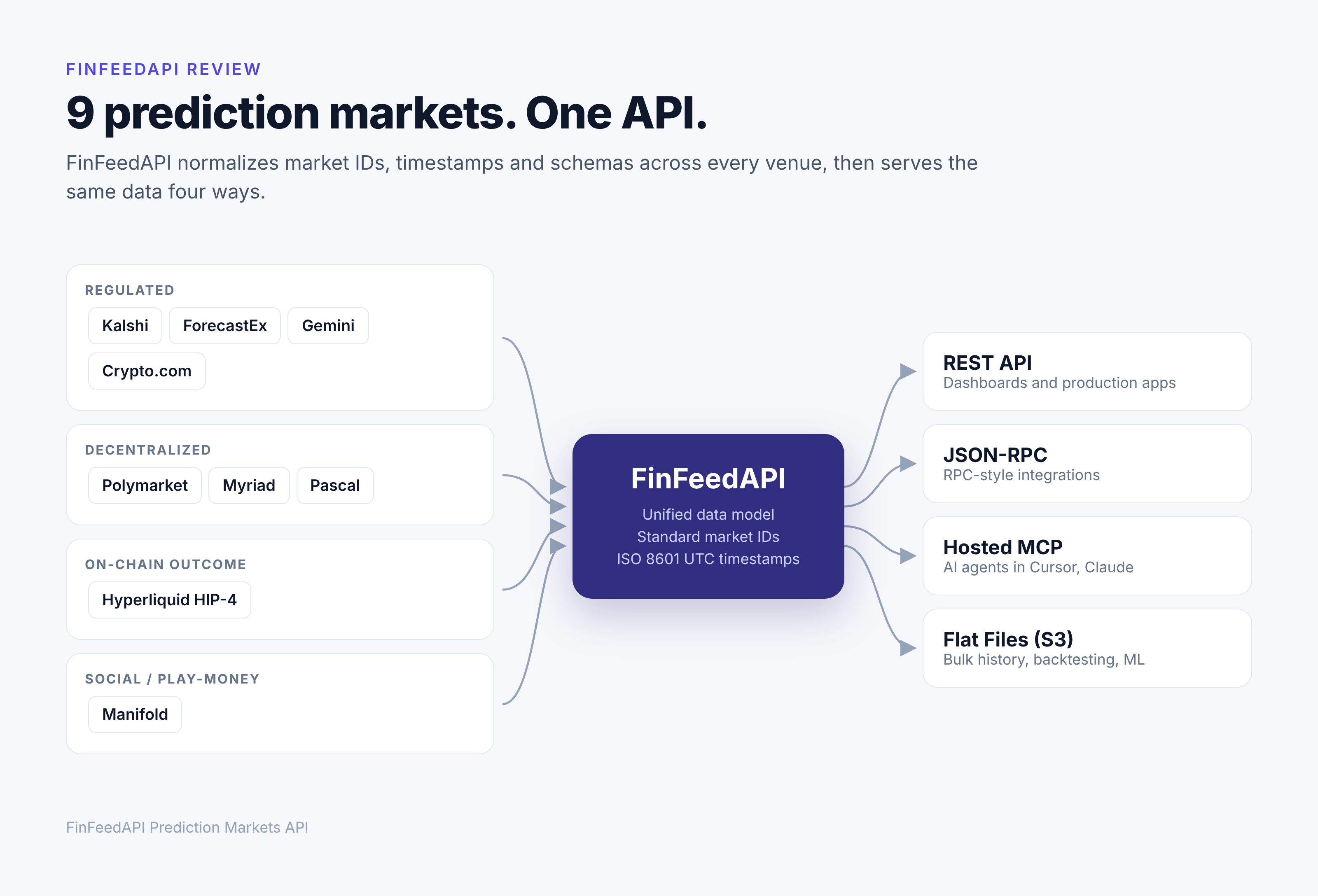
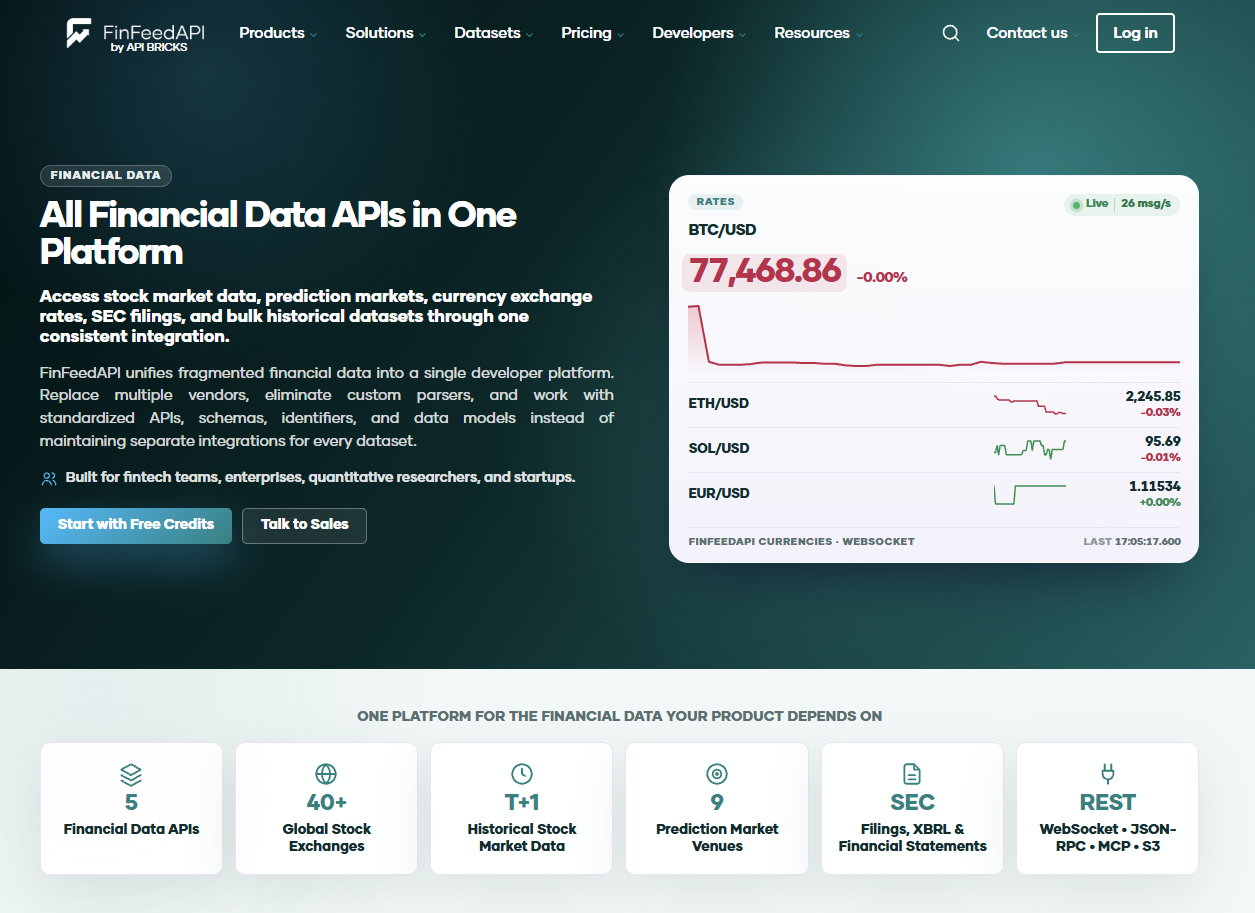
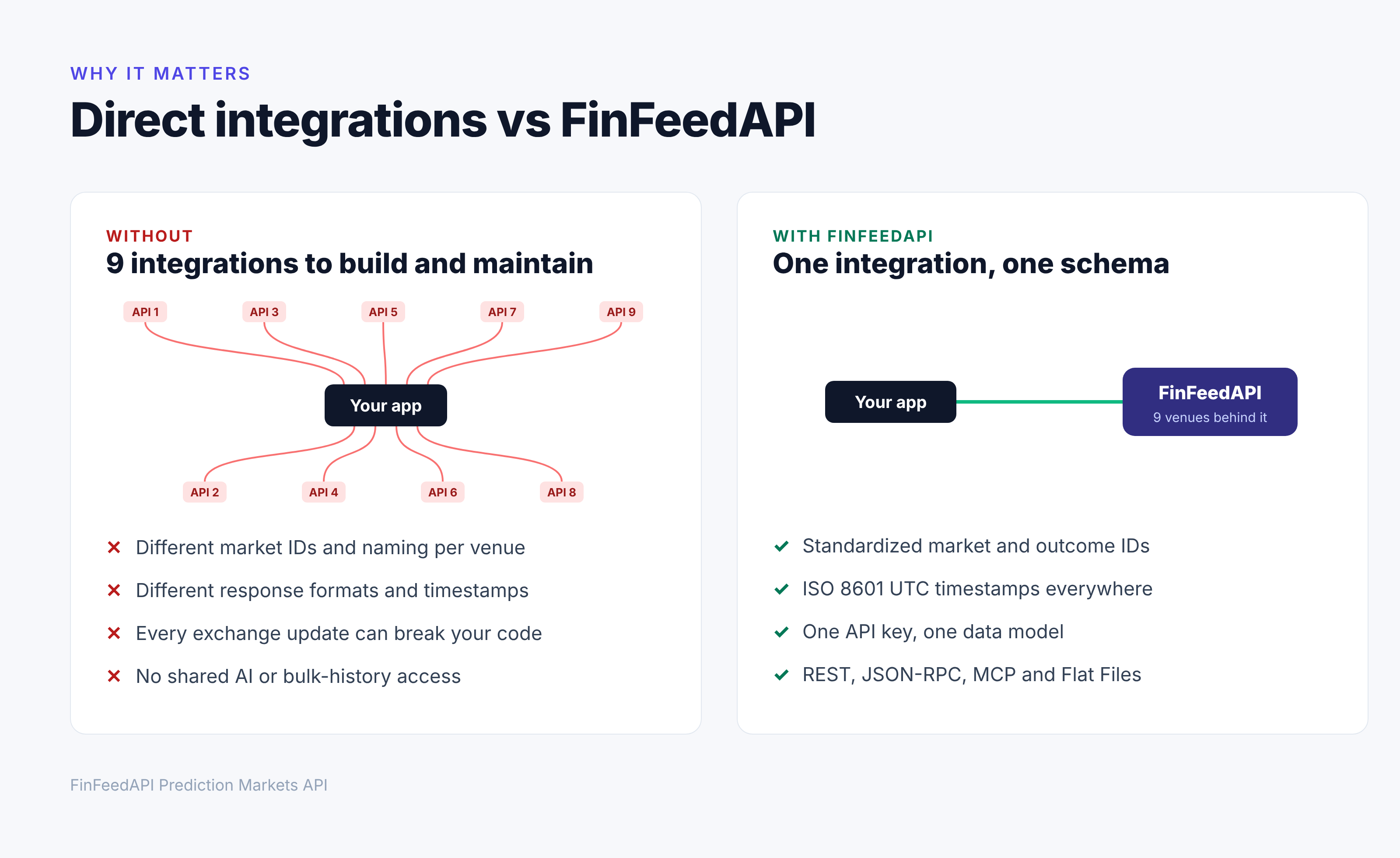
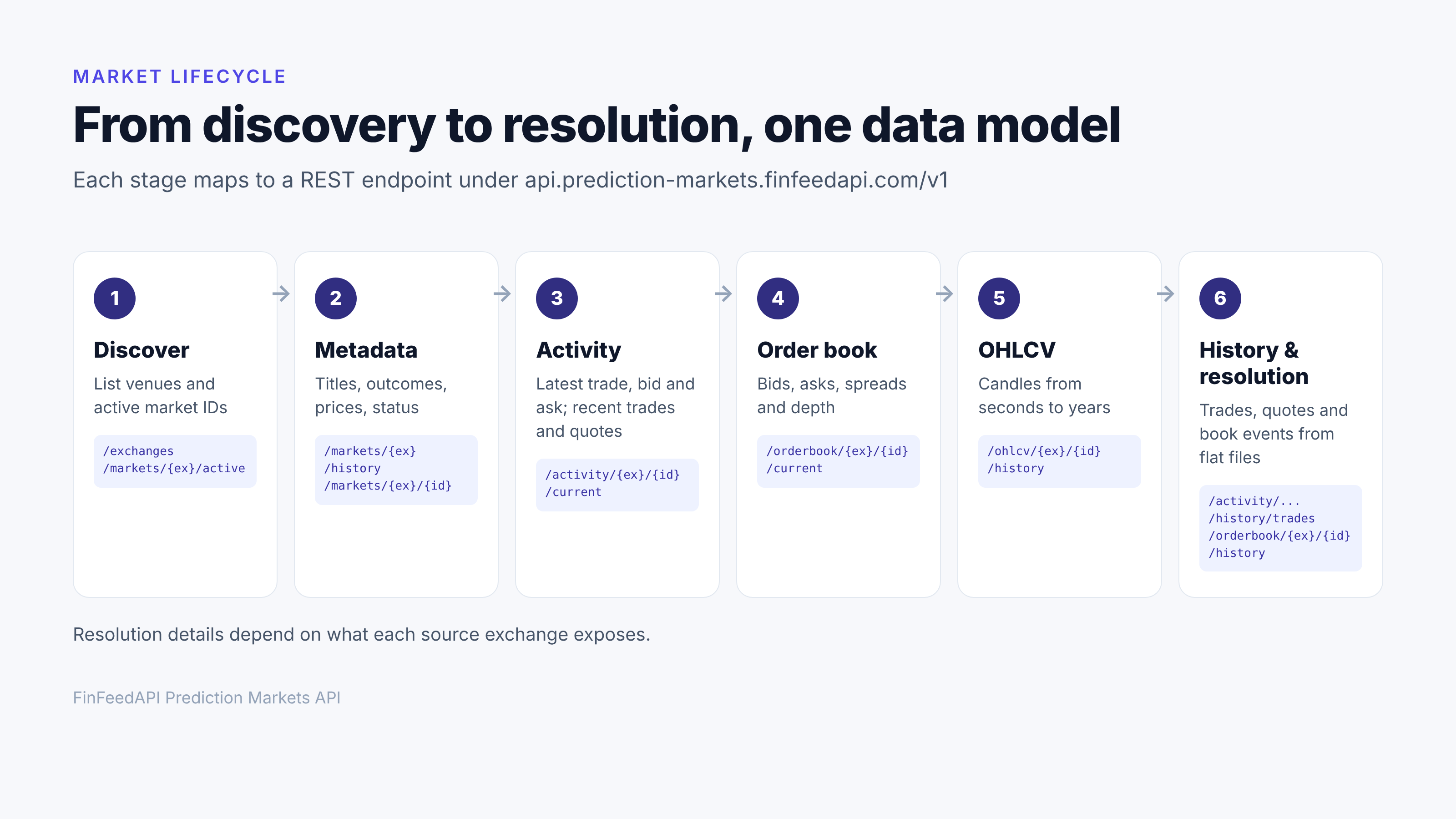
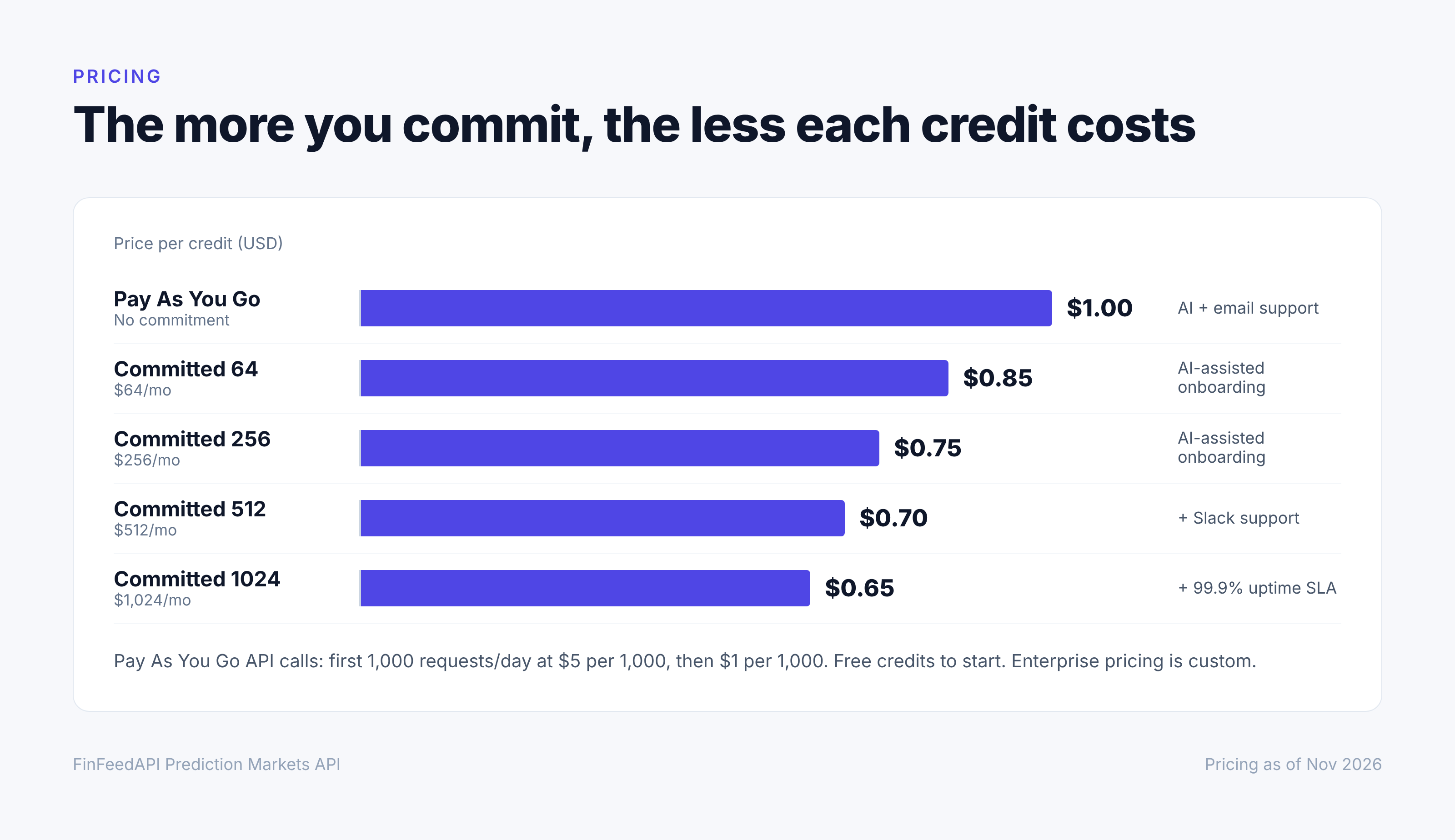
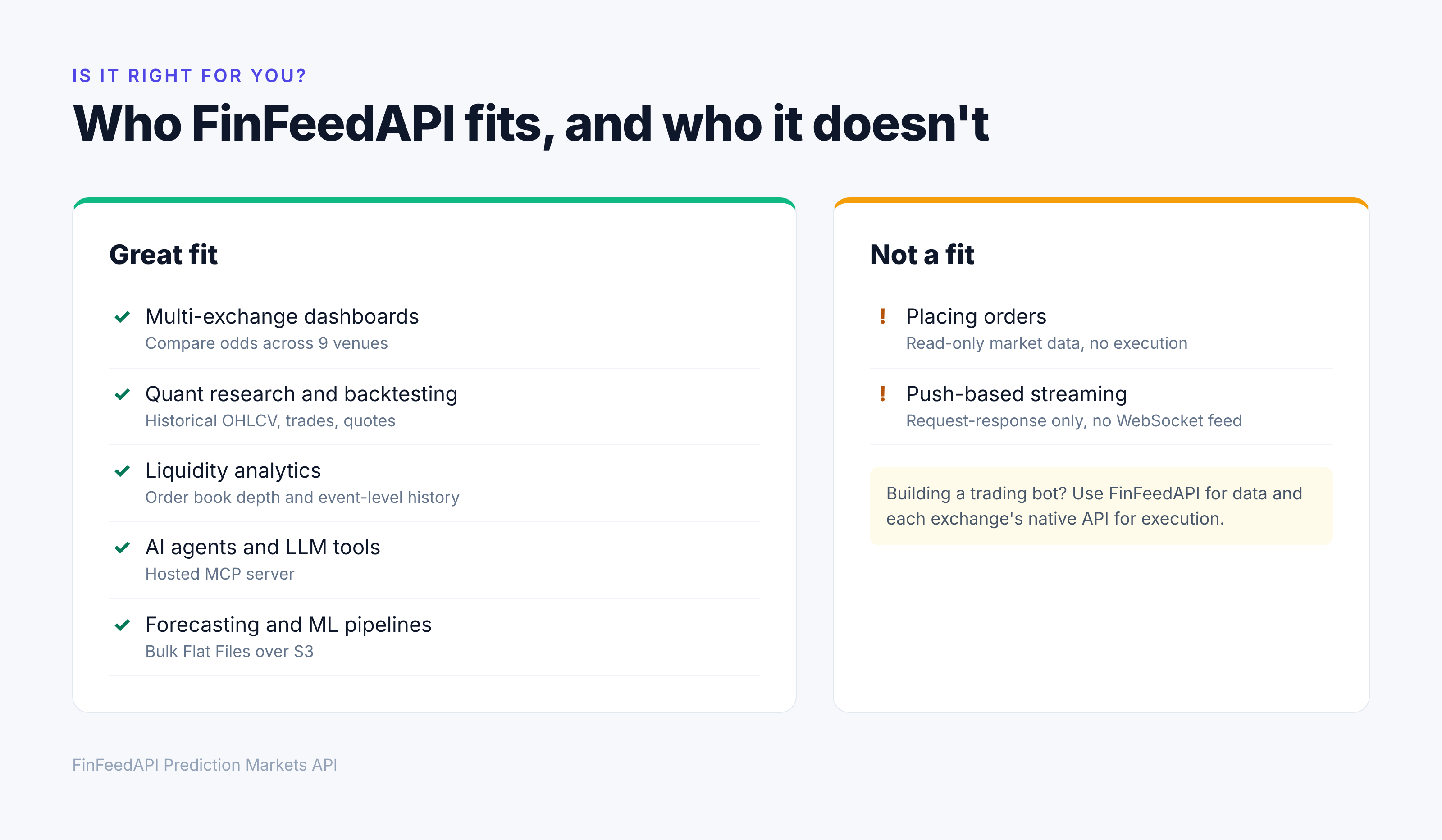
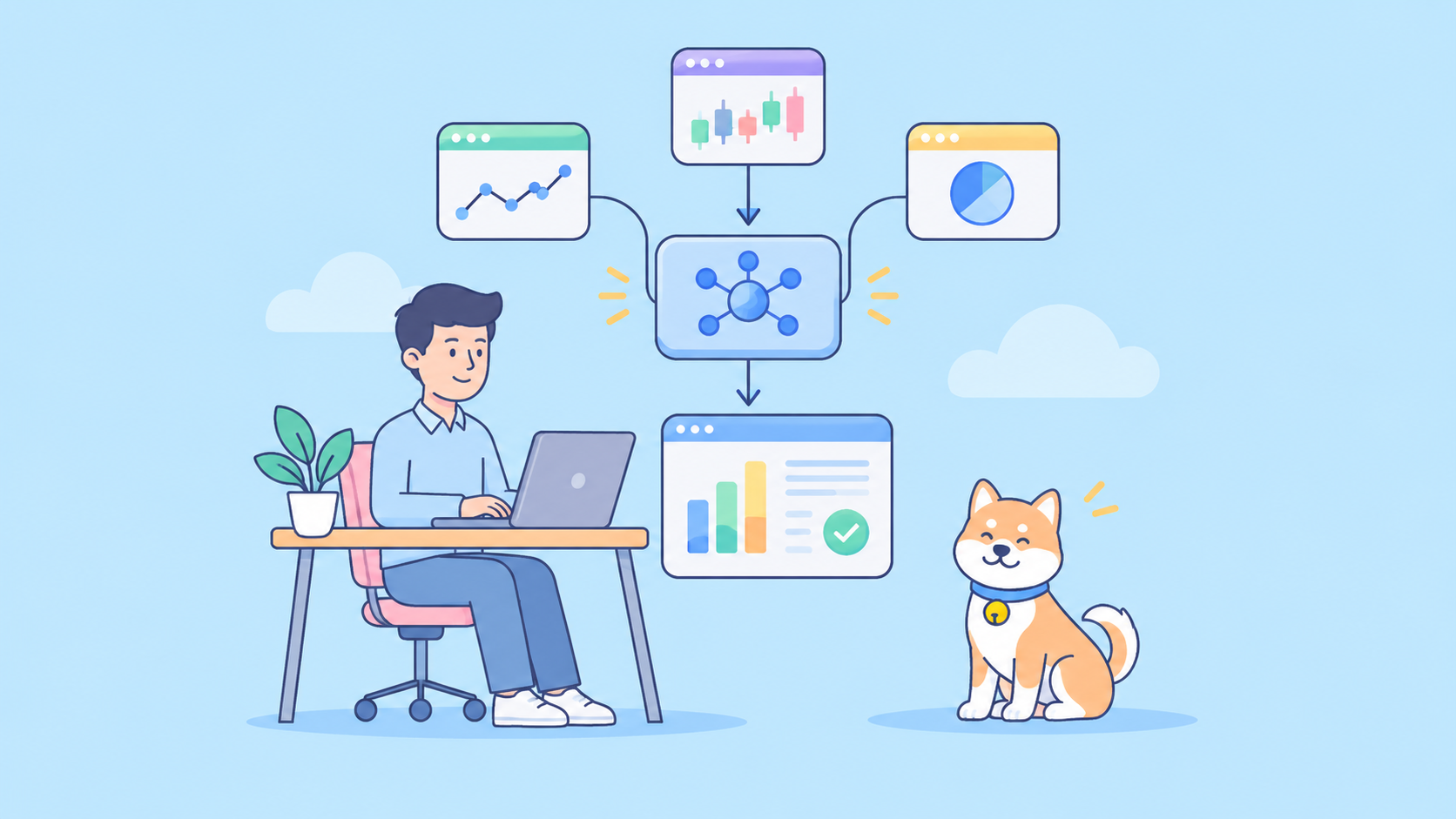
FinFeedAPI 리뷰: 멀티 거래소 예측 시장 데이터 API Kalshi, Polymarket, ForecastEx 전반에서 단일 경제 이벤트를 시장이 어떻게 가격에 반영하는지 추적하고 싶다고 상상해 보세요. 서류상으로는 간단한 대시보드처럼 들립니다. 실제로는 서로 다른 세 개의 API, 동일한 시장을 식별하는 세 가지 방식, 그리고 차트 하나를 그리기 전에 조정해야 하는 세 가지 응답 형식을 의미합니다. {% cta apidog.com %} 지금 Apidog을 사용해 보세요 {% endcta %} 이 문제는 새로운 거래소가 생길 때마다 커집니다. 예측 시장은 이제 규제를 받는 미국 거래소, 온체인 프로토콜, 플레이 머니 커뮤니티, 그리고 기존 암호화폐 플랫폼의 이벤트 계약에 이르기까지 폭넓게 걸쳐 있으며, 이들 중 어느 것도 공통 데이터 모델을 공유하지 않습니다. 바로 이 간극을 메우기 위해 FinFeedAPI가 만들어졌습니다. 이 제품의 Prediction Markets API는 아홉 개 거래소를 하나의 표준화된 스키마 아래로 모아, 개발자가 데이터 출처와 관계없이 시장, 거래, 주문장, 이력을 동일한 방식으로 조회할 수 있게 합니다. !9개 예측 시장 거래소를 하나의 표준화된 API로 연결한 모습 개발자 입장에서 이러한 성장에는 지저분한 진실이 따릅니다. 모든 거래소는 자체 API, 자체 시장 식별자, 자체 명명 규칙, 그리고 '시장'이란 무엇인지에 대한 자체 정의까지 노출합니다. 세 플랫폼에서 동일한 이벤트를 추적하는 대시보드를 원하시나요? 그러면 세 개의 통합, 세 개의 데이터 모델, 세 세트의 예외 사례를 유지해야 합니다. 바로 이것이 FinFeedAPI가 해결하려는 문제입니다. 이 리뷰에서는 FinFeedAPI의 Prediction Markets API가 무엇을 다루는지, 실제로 어떤 데이터를 얻을 수 있는지, 엔드포인트가 실제로 어떻게 생겼는지, 비용은 얼마인지, 그리고 어디가 부족한지 살펴보겠습니다. 이를 통해 이것이 여러분의 스택에 맞는지 판단할 수 있을 것입니다. 요약 | 항목 | 내용 | | --- | --- | | 제공업체 | API Bricks(CoinAPI를 만든 회사이기도 함)의 FinFeedAPI | | 지원 거래소 | 9개 예측 시장 거래소 | | 데이터 | 시장 및 메타데이터, 거래, 호가, 주문장, OHLCV, 과거 플랫 파일 | | 접근 방식 | REST, JSON-RPC, 호스팅된 MCP 서버, Flat Files(S3) | | 모드 | 읽기 전용 시장 데이터, 요청-응답 방식(WebSocket 스트림 없음) | | 가격 | 시작 시 무료 크레딧, 이후 1,000회 요청당 $1부터 사용량 기반 | | 적합 대상 | 거래소 간 대시보드, 리서치, 백테스팅, AI 에이전트 | FinFeedAPI란 무엇인가? !FinFeedAPI 제품 소개 화면 FinFeedAPI는 CoinAPI를 만든 것과 같은 회사인 API Bricks가 만든 금융 데이터 제공업체입니다. Stock, Currencies, SEC API와 함께, 하나의 통합을 통해 아홉 개 예측 시장 거래소의 시장 데이터에 표준화된 방식으로 접근할 수 있게 해주는 Prediction Markets API를 제공합니다. 아이디어는 간단합니다. 아홉 개 API를 배우는 대신 하나를 배우면 됩니다. 시장 ID, 결과, 타임스탬프, 응답 구조는 데이터가 어느 거래소에서 왔든 동일한 스키마를 따릅니다. 문서를 살펴보면서 몇 가지 엔지니어링 세부 사항이 눈에 띄었습니다: - 모든 지원 거래소에 걸친 통합 데이터 모델 - 결과를 포함하는 표준화된 시장 ID, 예: ..._YES 및 ..._NO - 모든 엔드포인트의 ISO 8601 UTC 타임스탬프 - 최대 19자리, 소수점 9자리까지 일관된 숫자 정밀도 - 네 가지 접근 방식: REST, JSON-RPC, 호스팅된 MCP 서버, Flat Files 미리 분명히 해둘 점이 하나 있습니다: FinFeedAPI는 읽기 전용 시장 데이터 계층입니다. 주문을 넣지 않습니다. 제품에 실행 기능이 필요하다면, 그 부분은 여전히 각 거래소의 네이티브 API를 사용해야 합니다. !FinFeedAPI 데이터 아키텍처 개요 지원되는 예측 시장 플랫폼 FinFeedAPI는 현재 규제 거래소, 탈중앙화 프로토콜, 온체인 결과 시장, 플레이 머니 커뮤니티에 걸쳐 아홉 개 거래소를 지원합니다. | 플랫폼 | 유형 | 다루는 내용 | | --- | --- | --- | | Polymarket | 탈중앙화 | 정치, 경제, 암호화폐, 스포츠, 글로벌 이벤트 | | Kalshi | 규제 대상(CFTC) | 경제 지표, 선거, 날씨, 스포츠 등에 대한 미국 이벤트 계약 | | ForecastEx | 규제 대상(CFTC) | 경제 및 금융 결과를 포함한 미국 이벤트 계약 | | Gemini Prediction Markets | 규제 대상 | 스포츠, 암호화폐, 경제, 정치 및 기타 주제에 대한 이벤트 계약 | | Crypto.com Prediction Markets | 규제 대상 | Crypto.com의 예측 시장 플랫폼에 대한 이벤트 기반 계약 | | Myriad | 탈중앙화 | 암호화폐, 시사 이슈 및 기타 결과 | | Pascal | 탈중앙화 | Solana 기반 비수탁형 예측 시장 | | Hyperliquid Outcome Markets (HIP-4) | 온체인 결과 시장 | Hyperliquid의 네이티브 인프라상 바이너리 및 다중 결과 이벤트 계약 | | Manifold Markets | 소셜, 플레이 머니 | 다양한 주제에 대한 커뮤니티 주도 시장 | 이 조합이 흥미로운 이유입니다. 규제 거래소, 암호화폐 네이티브 거래소, 플레이 머니 군중이 동일한 이벤트를 어떻게 가격에 반영하는지 비교하는 것이 거래소 간 리서치가 가치를 갖는 지점입니다. 또한 정규화된 스키마가 가장 많은 시간을 절약해 주는 지점이기도 합니다. 어떤 데이터에 접근할 수 있나요? !FinFeedAPI 데이터셋 구성 FinFeedAPI가 존재 가치를 발휘하는 부분이 바로 여기입니다. 대부분의 예측 시장 도구는 최신 가격에서 멈춥니다. FinFeedAPI는 탐색부터 주문장 깊이와 이력에 이르기까지 전체 시장을 노출합니다. 모든 REST 엔드포인트는 https://api.prediction-markets.finfeedapi.com/v1 아래에 있습니다. | 데이터셋 | 엔드포인트 | 얻는 것 | | --- | --- | --- | | 거래소 | GET /exchanges 및 /exchanges/{exchange_id} | 지원 거래소, 거래소 ID, 설명, 웹사이트 | | 활성 시장 | GET /markets/{exchange_id}/active | 현재 활성 시장 ID의 간결한 목록 | | 시장 목록 | GET /markets/{exchange_id}/history | 커서 기반 페이지네이션이 있는 전체 시장 레코드: 제목, 설명, 결과, 가격, 상태 | | 단일 시장 | GET /markets/{exchange_id}/{market_id} | 한 시장의 메타데이터 | | 현재 활동 | GET /activity/{exchange_id}/{market_id}/current | 최신 거래와 최신 매수·매도 호가 | | 최근 활동 | GET /activity/{exchange_id}/{market_id}/latest | 최근 거래 및 호가 업데이트 | | 과거 거래 및 호가 | GET /activity/{exchange_id}/{market_id}/history/trades 및 /history/quotes | 플랫 파일에서 제공되는 과거 레코드 | | 현재 주문장 | GET /orderbook/{exchange_id}/{market_id}/current | 시장 결과에 대한 매수 및 매도 호가 | | 과거 주문장 | GET /orderbook/{exchange_id}/{market_id}/history | 주문장 재구성을 위한 원시 지정가 주문 이벤트(추가, 업데이트, 삭제) | | OHLCV | GET /ohlcv/periods, /ohlcv/{exchange_id}/{market_id}/history, /latest, /ohlcv/{exchange_id}/history | 시가, 고가, 저가, 종가, 거래량, 거래 횟수가 포함된 캔들 | 몇 가지 알아둘 점: - 탐색은 두 단계입니다. /active 엔드포인트는 최근 호가와 거래에서 파생되기 때문에 ID만 반환합니다. 전체 세부 정보는 /history 또는 단일 시장 엔드포인트를 호출하세요. - OHLCV 기간은 초부터 수년까지이며, 과거 캔들은 시간 오름차순으로 반환됩니다. 이는 백테스팅에 필요한 방식입니다. - 과거 주문장 데이터는 단순 스냅샷이 아니라 이벤트 수준입니다. 이는 시장 리플레이와 유동성 리서치를 가능하게 합니다. - 라이프사이클 및 해소 데이터는 open, closed, resolved, suspended 상태를 다루며, 소스 거래소가 지원하는 경우 해소 정보를 포함합니다. 시작하기: 첫 요청 온보딩은 빠릅니다. 무료 계정을 만들고 콘솔에서 API 키를 생성하면 무료 크레딧으로 시작할 수 있습니다. REST 및 JSON-RPC의 경우 Authorization 헤더에 키를 전달합니다. 문서에서는 X-APIKey, X-APIBricks-Key, X-CoinAPI-Key도 허용합니다. 1. 지원 거래소 나열 다른 모든 곳에서 사용할 정확한 exchange_id 값을 얻으려면 여기서 시작하세요. curl -X GET "https://api.prediction-markets.finfeedapi.com/v1/exchanges" \ -H "[REDACTED CREDENTIAL] 2. 활성 시장 탐색 curl -X GET "https://api.prediction-markets.finfeedapi.com/v1/markets/POLYMARKET/active?limit=10" \ -H "[REDACTED CREDENTIAL] 이것은 각 시장 ID에 결과가 포함된 단순 목록을 반환합니다: [ "WILL-TRUMP-SELL-10K-25K-GOLD-CARDS-IN-2025_YES", "WILL-TRUMP-SELL-10K-25K-GOLD-CARDS-IN-2025_NO", "NFL-PIT-CAR-2025-08-21-SPREAD-AWAY-5PT5_YES" ] 3. 최신 거래 및 호가 가져오기 curl -X GET \ "https://api.prediction-markets.finfeedapi.com/v1/activity/POLYMARKET/WILL-TRUMP-SELL-10K-25K-GOLD-CARDS-IN-2025_YES/current" \ -H "[REDACTED CREDENTIAL] 응답은 해당 결과에 대한 최신 거래와 최신 매수·매도 호가를 제공합니다. 4. Python에서 과거 OHLCV 가져오기 확률 차트나 백테스트를 만들 때 가장 먼저 사용하게 될 호출입니다. import requests [REDACTED CREDENTIAL] BASE = "https://api.prediction-markets.finfeedapi.com/v1" headers = {[REDACTED CREDENTIAL]} market_id = "WILL-TRUMP-SELL-10K-25K-GOLD-CARDS-IN-2025_YES" resp = requests.get( f"{BASE}/ohlcv/POLYMARKET/{market_id}/history", headers=headers, params={"period_id": "1DAY", "limit": 30}, ) resp.raise_for_status() for candle in resp.json(): print(candle["time_period_start"], candle["price_close"], candle["volume_traded"]) 각 캔들에는 time_period_start, time_period_end, price_open, price_high, price_low, price_close, volume_traded, trades_count가 포함됩니다. 지원되는 모든 period_id를 보려면 /ohlcv/periods를 호출하세요. 5. 주문장 깊이 확인 curl -X GET \ "https://api.prediction-markets.finfeedapi.com/v1/orderbook/POLYMARKET/WILL-TRUMP-SELL-10K-25K-GOLD-CARDS-IN-2025_YES/current" \ -H "[REDACTED CREDENTIAL] 스냅샷은 exchange_id, market_id, time_exchange, time_coinapi와 함께 bids 및 asks 배열을 반환합니다. 이것만으로도 스프레드와 최우선 호가 불균형을 계산할 수 있습니다. 원시 HTTP를 직접 작성하고 싶지 않다면, API Bricks는 GitHub SDK 저장소에 공식 SDK(Python, Node.js, Go, C# 등)를 게시합니다. REST를 넘어서: MCP, JSON-RPC, Flat Files 모든 인터페이스는 동일한 표준화 데이터셋을 노출합니다. 아키텍처에 맞는 것을 선택하면 됩니다. | 인터페이스 | 인증 헤더 | 적합 대상 | | --- | --- | --- | | REST API | Authorization | 대시보드, 분석, 프로덕션 앱 | | JSON-RPC API | Authorization | 동일한 데이터에 대해 RPC 스타일 호출을 선호하는 서비스 | | 호스팅된 MCP 서버 | X-APIKey | AI 어시스턴트, 코딩 에이전트, 리서치 워크플로 | | Flat Files(S3) | S3 호환 자격 증명 | 백테스팅 및 머신러닝을 위한 대량 이력 | MCP 서버가 돋보이는 부분 제 관점에서 이것은 제품에서 가장 미래지향적인 부분입니다. 에이전트에게 API 문서를 가르치는 대신, 호스팅된 MCP 엔드포인트를 가리키면 에이전트가 스스로 도구를 발견합니다. 설정은 Cursor, Claude Desktop 또는 MCP 지원 클라이언트에서 몇 줄의 구성만 필요합니다: { "mcpServers": { "FinFeedAPI-Prediction-Markets": { "url": "https://api.prediction-markets.finfeedapi.com/mcp", "headers": { [REDACTED CREDENTIAL] } } } } 현재 서버가 노출하는 도구는 다음과 같습니다: - 거래소 탐색: exchanges_list, exchanges_get - 시장 탐색: markets_get_active, markets_get_history - 실시간 활동: activity_get_current, activity_get_latest - 과거 거래 및 호가: activity_get_trades_history, activity_get_quotes_history - OHLCV: ohlcv_list_periods, ohlcv_get_latest_market, ohlcv_get_history_market, ohlcv_get_history_exchange - 주문장: orderbook_get_current, orderbook_get_history 즉, 에이전트에게 '가장 활발한 Kalshi 시장을 찾고 이번 주에 그 확률이 어떻게 움직였는지 보여줘'와 같이 요청하면, 에이전트가 탐색, 활동, OHLCV 호출을 스스로 연결할 수 있습니다. 구버전 FinFeedAPI MCP 연결을 설정한 경우 한 가지 참고: 엔드포인트가 /sse에서 /mcp로 이동했으므로 오래된 구성은 업데이트해야 합니다. 대용량 이력을 위한 Flat Files 대규모 리서치에서는 페이지네이션된 REST 호출을 통해 수년치 데이터를 가져오는 것은 느립니다. Flat Files는 S3 호환 API를 통해 대량 거래, 호가, 주문장, OHLCV를 제공하므로 이미 알고 있는 S3 도구와 SDK를 사용할 수 있습니다. 가격 !FinFeedAPI 요금제 안내 FinFeedAPI는 크레딧 기반의 사용량 기반 가격을 사용합니다. 무료 크레딧으로 시작한 뒤 요청당 비용을 지불합니다. Pay As You Go에서는 처음 1,000회 요청/일의 비용이 1,000회당 $5이고, 하루 1,000회를 초과하는 요청은 1,000회당 $1로 내려갑니다. 약정 플랜은 이 요율을 더 낮춥니다. | 플랜 | 월 비용 | 크레딧당 요율 | 주요 추가 혜택 | | --- | --- | --- | --- | | Pay As You Go | 약정 없음 | $1.00 | AI 및 이메일 지원, 셀프서비스 온보딩 | | Committed 64 | $64 | $0.85 | AI 지원 온보딩 | | Committed 256 | $256 | $0.75 | AI 지원 온보딩 | | Committed 512 | $512 | $0.70 | Slack 지원, 전용 Slack 채널 | | Committed 1024 | $1,024 | $0.65 | 99.9% 업타임 SLA, 고객 성공 담당자, 휴먼 온보딩 | | 엔터프라이즈 | 맞춤형 | 맞춤형 | 맞춤형 SLA, 지연 시간 최적화, 전용 인프라 | 약정 플랜은 사용량을 줄여주는 것이 아닙니다. 같은 지출로 더 많은 크레딧을 제공하며, 크레딧이 소진되면 추가 사용량은 Pay As You Go 요율로 청구됩니다. 연간 결제도 가능합니다. 제 의견은 다음과 같습니다. 프로토타입과 리서치에는 Pay As You Go로 충분합니다. 많은 시장을 몇 초마다 폴링한다면 먼저 계산해 보세요. FinFeedAPI는 대시보드, 주문장 모니터링, OHLCV 백필에 대한 가격 사용 사례를 게시하여 추정을 훨씬 쉽게 만듭니다. FinFeedAPI가 부족한 부분 완벽한 API는 없으며, 트레이드오프를 건너뛴 리뷰는 별로 유용하지 않습니다. 염두에 둘 점은 다음과 같습니다: - 주문 실행 없음. 데이터 계층일 뿐입니다. 트레이딩 봇은 주문을 넣기 위해 여전히 네이티브 거래소 API가 필요합니다. - 예측 시장용 WebSocket 스트림 없음. 현재 데이터는 요청-응답 호출을 통해 제공되므로 '실시간'은 폴링을 의미합니다. 지연 시간에 민감한 전략에는 이는 실제 제약이며, 잦은 폴링은 청구서를 증가시킵니다. - 일일 첫 1,000회 요청이 가장 비쌉니다. 1,000회당 $5 대 이후 1,000회당 $1이므로, 아주 작은 프로젝트는 바쁜 프로젝트보다 더 높은 실효 요율을 지불합니다. - 해소 데이터는 소스에 따라 달라집니다. 라이프사이클 및 해소 세부 정보는 각 거래소가 노출하는 만큼만 완전합니다. - 정규화는 트레이드오프입니다. 통합 스키마가 핵심이지만, 특정 거래소에 고유한 필드에 의존한다면 커밋하기 전에 데이터 샘플을 확인하세요. 이 중 어느 것도 분석, 리서치, AI 사용 사례에 치명적이지는 않습니다. 고빈도 트레이딩 시스템을 구축하는 경우에 가장 중요합니다. 누가 FinFeedAPI를 사용해야 하나요? 장점 - 하나의 스키마 뒤에 있는 아홉 개 예측 시장 거래소 - 전체 시장 라이프사이클: 탐색, 거래, 호가, 주문장, OHLCV, 이력 - 리플레이를 위한 이벤트 수준 과거 주문장 데이터 - Cursor 및 Claude Desktop과 함께 작동하는 호스팅된 MCP 서버 - 리서치 및 머신러닝을 위한 대량 Flat Files - 무료 크레딧으로 시작하는 사용량 기반 가격 적합 대상 - 거래소 간 확률을 비교하는 멀티 거래소 대시보드 - 예측 시장 전략을 백테스팅하는 퀀트 리서처 및 분석가 - 깨끗한 과거 OHLCV가 필요한 예측 및 ML 팀 - 주문장 깊이와 스프레드를 기반으로 하는 유동성 분석 - 실제 세계 이벤트에 대해 추론하는 에이전트를 만드는 AI 팀 - 군중이 결과를 어떻게 가격에 반영하는지에 대한 학술 및 경제 연구 아마 적합하지 않은 대상 - 주문을 넣어야 하는 봇 - 푸시 기반의 서브초 스트림이 필요한 전략 마지막 생각 !예측 시장 데이터 파이프라인 요약 이미지 예측 시장은 대부분의 팀이 통합할 수 있는 속도보다 빠르게 성장하고 있습니다. 새로운 거래소가 생길 때마다 새로운 식별자, 새로운 형식, 새로운 유지보수 작업이 생깁니다. FinFeedAPI는 거래소가 되려고 하지 않습니다. 아홉 개의 파편화된 거래소를 하나의 일관된 데이터 계층으로 바꾸는 한 가지 작업에 집중합니다. 시장, 거래, 호가, 주문장, OHLCV, 깊은 이력이 모두 REST, JSON-RPC, MCP 또는 Flat Files를 통해 동일한 형태로 반환됩니다. 읽기 전용이고 요청-응답 방식이라는 점을 알고 접근하면, 예측 대시보드부터 AI 리서치 에이전트까지 폭넓은 제품에 적합합니다. 아홉 개 거래소. 하나의 스키마. 하나의 API 키. 배관 작업은 줄이고, 빌드는 더 많이. 웹사이트: finfeedapi.com API 문서: Prediction Markets REST API 문서
Ulasan FinFeedAPI: API Data Pasar Prediksi Multi-Bursa !FinFeedAPI Prediction Markets API Bayangkan Anda ingin melacak bagaimana harga pasar untuk satu peristiwa ekonomi di Kalshi, Polymarket, dan ForecastEx. Di atas kertas, itu terdengar seperti dasbor sederhana. Dalam praktiknya, itu berarti tiga API berbeda, tiga cara mengidentifikasi pasar yang sama, dan tiga format respons yang harus direkonsiliasi sebelum Anda dapat menggambar satu grafik. {% cta apidog.com %} Coba Apidog hari ini {% endcta %} Masalah itu tumbuh dengan setiap bursa baru. Pasar prediksi kini mencakup bursa AS yang diregulasi, protokol on-chain, komunitas uang mainan, dan kontrak peristiwa dari platform kripto mapan — dan tidak ada yang berbagi model data yang sama. Inilah celah yang FinFeedAPI dibangun untuk mengisi. Prediction Markets API-nya menyatukan sembilan bursa di bawah satu skema terstandardisasi, sehingga pengembang dapat menanyakan pasar, perdagangan, buku order, dan riwayat dengan cara yang sama, terlepas dari mana datanya berasal. !Tinjauan Prediction Markets API Bagi pengembang, pertumbuhan itu datang dengan kenyataan yang berantakan. Setiap bursa mengekspos API-nya sendiri, pengenal pasarnya sendiri, konvensi penamaannya sendiri, dan gagasannya sendiri tentang seperti apa "pasar" itu. Ingin dasbor yang melacak peristiwa yang sama di tiga platform? Sekarang Anda memelihara tiga integrasi, tiga model data, dan tiga set kasus tepi. Itulah tepatnya masalah yang coba dipecahkan oleh FinFeedAPI. Dalam ulasan ini, saya akan membahas apa yang dicakup Prediction Markets API FinFeedAPI, data apa yang sebenarnya Anda dapatkan, seperti apa endpoint-nya dalam praktik, berapa biayanya, dan di mana ia kurang — sehingga Anda dapat memutuskan apakah cocok dengan stack Anda. TL;DR | | | | --- | --- | | Penyedia | FinFeedAPI oleh API Bricks (juga di balik CoinAPI) | | Bursa yang dicakup | 9 bursa pasar prediksi | | Data | Pasar dan metadata, perdagangan, kuotasi, buku order, OHLCV, file datar historis | | Akses | REST, JSON-RPC, server MCP yang dihosting, Flat Files (S3) | | Mode | Data pasar hanya-baca, request-response (tanpa stream WebSocket) | | Harga | Kredit gratis untuk memulai, lalu berbasis penggunaan mulai $1 per 1.000 permintaan | | Paling cocok untuk | Dasbor lintas bursa, riset, backtesting, agen AI | Apa Itu FinFeedAPI? !Ikhtisar FinFeedAPI FinFeedAPI adalah penyedia data keuangan yang dibangun oleh API Bricks, perusahaan yang sama di balik CoinAPI. Selain API Stock, Currencies, dan SEC-nya, ia menawarkan Prediction Markets API yang memberi Anda akses terstandardisasi ke data pasar dari sembilan bursa pasar prediksi melalui satu integrasi. Idenya sederhana: alih-alih mempelajari sembilan API, Anda mempelajari satu. ID pasar, hasil, stempel waktu, dan struktur respons mengikuti skema yang sama tidak peduli dari bursa mana data itu berasal. Beberapa detail teknis menonjol saat menelusuri dokumentasi: - Model data terpadu di setiap bursa yang didukung - ID pasar terstandardisasi yang menyertakan hasil, misalnya ..._YES dan ..._NO - Stempel waktu ISO 8601 UTC di setiap endpoint - Presisi numerik yang konsisten, hingga 19 digit dengan 9 tempat desimal - Empat cara akses: REST, JSON-RPC, server MCP yang dihosting, dan Flat Files Satu hal yang perlu diperjelas sejak awal: FinFeedAPI adalah lapisan data pasar hanya-baca. Ia tidak memasang order. Jika produk Anda memerlukan eksekusi, Anda tetap akan menggunakan API native masing-masing bursa untuk bagian itu. !Arsitektur data terstandardisasi Platform Pasar Prediksi yang Didukung FinFeedAPI saat ini mencakup sembilan bursa: bursa teregulasi, protokol terdesentralisasi, pasar hasil on-chain, dan komunitas uang mainan. | Platform | Tipe | Yang dicakup | | --- | --- | --- | | Polymarket | Terdesentralisasi | Politik, ekonomi, kripto, olahraga, dan peristiwa global | | Kalshi | Diregulasi (CFTC) | Kontrak peristiwa AS tentang indikator ekonomi, pemilu, cuaca, olahraga, dan lainnya | | ForecastEx | Diregulasi (CFTC) | Kontrak peristiwa AS, termasuk hasil ekonomi dan keuangan | | Gemini Prediction Markets | Diregulasi | Kontrak peristiwa tentang olahraga, kripto, ekonomi, politik, dan topik lainnya | | Crypto.com Prediction Markets | Diregulasi | Kontrak berbasis peristiwa di platform pasar prediksi crypto.com | | Myriad | Terdesentralisasi | Kripto, peristiwa terkini, dan hasil lainnya | | Pascal | Terdesentralisasi | Pasar prediksi nonkustodial yang dibangun di Solana | | Hyperliquid Outcome Markets (HIP-4) | Pasar hasil on-chain | Kontrak peristiwa biner dan multi-hasil di infrastruktur native Hyperliquid | | Manifold Markets | Sosial, uang mainan | Pasar yang digerakkan komunitas pada berbagai topik | Campurannya inilah yang membuat ini menarik. Membandingkan bagaimana bursa teregulasi, bursa native kripto, dan kerumunan uang mainan memberi harga pada peristiwa yang sama adalah tempat riset lintas bursa menjadi berharga. Di sinilah juga skema yang dinormalisasi menghemat paling banyak waktu. Data Apa yang Dapat Anda Akses? !Kumpulan data Prediction Markets API Di sinilah FinFeedAPI membuktikan nilainya. Sebagian besar alat pasar prediksi berhenti pada harga terbaru. FinFeedAPI mengekspos seluruh pasar, dari penemuan hingga kedalaman buku order dan riwayat. Semua endpoint REST berada di https://api.prediction-markets.finfeedapi.com/v1. | Kumpulan data | Endpoint | Yang Anda dapatkan | | --- | --- | --- | | Bursa | GET /exchanges dan /exchanges/{exchange_id} | Bursa yang didukung, ID bursa, deskripsi, situs web | | Pasar aktif | GET /markets/{exchange_id}/active | Daftar ringkas ID pasar yang saat ini aktif | | Daftar pasar | GET /markets/{exchange_id}/history | Catatan pasar lengkap dengan paginasi berbasis kursor: judul, deskripsi, hasil, harga, status | | Pasar tunggal | GET /markets/{exchange_id}/{market_id} | Metadata untuk satu pasar | | Aktivitas saat ini | GET /activity/{exchange_id}/{market_id}/current | Perdagangan terbaru plus bid dan ask terbaru | | Aktivitas terkini | GET /activity/{exchange_id}/{market_id}/latest | Perdagangan terkini dan pembaruan kuotasi | | Perdagangan dan kuotasi historis | GET /activity/{exchange_id}/{market_id}/history/trades dan /history/quotes | Catatan historis yang disajikan dari file datar | | Buku order saat ini | GET /orderbook/{exchange_id}/{market_id}/current | Bid dan ask untuk hasil pasar | | Buku order historis | GET /orderbook/{exchange_id}/{market_id}/history | Peristiwa limit order mentah (penambahan, pembaruan, penghapusan) untuk rekonstruksi buku | | OHLCV | GET /ohlcv/periods, /ohlcv/{exchange_id}/{market_id}/history, /latest, /ohlcv/{exchange_id}/history | Candle dengan open, high, low, close, volume, dan jumlah perdagangan | Beberapa hal yang perlu diketahui: - Penemuan dilakukan dua langkah. Endpoint /active hanya mengembalikan ID, karena diturunkan dari kuotasi dan perdagangan terbaru. Anda memanggil /history atau endpoint pasar tunggal untuk detail lengkap. - Periode OHLCV berkisar dari detik hingga tahun, dan candle historis dikembalikan dalam urutan waktu menaik — yang Anda inginkan untuk backtesting. - Data buku order historis bersifat level-peristiwa, bukan sekadar snapshot. Itu membuka jalan untuk replay pasar dan riset likuiditas. - Data siklus hidup dan penyelesaian mencakup status open, closed, resolved, dan suspended, dengan informasi penyelesaian di mana bursa sumber mendukungnya. Memulai: Permintaan Pertama Anda Orientasi awal cepat. Anda membuat akun gratis, menghasilkan kunci API dari konsol, dan mulai dengan kredit gratis. Untuk REST dan JSON-RPC, Anda meneruskan kunci di header Authorization. Dokumentasi juga menerima X-APIKey, X-APIBricks-Key, dan X-CoinAPI-Key. 1. Cantumkan bursa yang didukung Mulai di sini untuk mendapatkan nilai exchange_id persis yang akan Anda gunakan di tempat lain. curl -X GET "https://api.prediction-markets.finfeedapi.com/v1/exchanges" \ -H "[REDACTED CREDENTIAL] 2. Temukan pasar aktif curl -X GET "https://api.prediction-markets.finfeedapi.com/v1/markets/POLYMARKET/active?limit=10" \ -H "[REDACTED CREDENTIAL] Ini mengembalikan daftar biasa ID pasar, masing-masing dengan hasilnya sudah menyatu: [ "WILL-TRUMP-SELL-10K-25K-GOLD-CARDS-IN-2025_YES", "WILL-TRUMP-SELL-10K-25K-GOLD-CARDS-IN-2025_NO", "NFL-PIT-CAR-2025-08-21-SPREAD-AWAY-5PT5_YES" ] 3. Dapatkan perdagangan dan kuotasi terbaru curl -X GET \ "https://api.prediction-markets.finfeedapi.com/v1/activity/POLYMARKET/WILL-TRUMP-SELL-10K-25K-GOLD-CARDS-IN-2025_YES/current" \ -H "[REDACTED CREDENTIAL] Responsnya memberi Anda perdagangan terbaru bersama bid dan ask terbaru untuk hasil tersebut. 4. Tarik OHLCV historis dengan Python Ini panggilan pertama yang saya gunakan saat membangun grafik probabilitas atau backtest. import requests [REDACTED CREDENTIAL] BASE = "https://api.prediction-markets.finfeedapi.com/v1" headers = {[REDACTED CREDENTIAL]} market_id = "WILL-TRUMP-SELL-10K-25K-GOLD-CARDS-IN-2025_YES" resp = requests.get( f"{BASE}/ohlcv/POLYMARKET/{market_id}/history", headers=headers, params={"period_id": "1DAY", "limit": 30}, ) resp.raise_for_status() for candle in resp.json(): print(candle["time_period_start"], candle["price_close"], candle["volume_traded"]) Setiap candle mencakup time_period_start, time_period_end, price_open, price_high, price_low, price_close, volume_traded, dan trades_count. Panggil /ohlcv/periods untuk melihat setiap period_id yang didukung. 5. Periksa kedalaman buku order curl -X GET \ "https://api.prediction-markets.finfeedapi.com/v1/orderbook/POLYMARKET/WILL-TRUMP-SELL-10K-25K-GOLD-CARDS-IN-2025_YES/current" \ -H "[REDACTED CREDENTIAL] Snapshot mengembalikan exchange_id, market_id, time_exchange, time_coinapi, plus array bids dan asks. Itu cukup untuk menghitung spread dan ketidakseimbangan top-of-book. Jika Anda lebih suka tidak menulis HTTP mentah, API Bricks menerbitkan SDK resmi (Python, Node.js, Go, C#, dan lainnya) di repositori SDK GitHub-nya. Di Luar REST: MCP, JSON-RPC, dan Flat Files Setiap antarmuka mengekspos kumpulan data terstandardisasi yang sama. Anda memilih yang sesuai dengan arsitektur Anda. | Antarmuka | Header autentikasi | Paling cocok untuk | | --- | --- | --- | | API REST | Authorization | Dasbor, analitik, aplikasi produksi | | API JSON-RPC | Authorization | Layanan yang lebih menyukai panggilan bergaya RPC atas data yang sama | | Server MCP yang dihosting | X-APIKey | Asisten AI, agen coding, alur kerja riset | | Flat Files (S3) | Kredensial kompatibel S3 | Riwayat massal untuk backtesting dan machine learning | Server MCP adalah yang menonjol Dari perspektif saya, ini bagian produk yang paling berorientasi masa depan. Alih-alih mengajari agen dokumentasi API Anda, Anda mengarahkannya ke endpoint MCP yang dihosting dan ia menemukan alatnya sendiri. Penyiapannya beberapa baris konfigurasi di Cursor, Claude Desktop, atau klien apa pun yang mendukung MCP: { "mcpServers": { "FinFeedAPI-Prediction-Markets": { "url": "https://api.prediction-markets.finfeedapi.com/mcp", "headers": { [REDACTED CREDENTIAL] } } } } Server saat ini mengekspos alat untuk: - Penemuan bursa: exchanges_list, exchanges_get - Penemuan pasar: markets_get_active, markets_get_history - Aktivitas langsung: activity_get_current, activity_get_latest - Perdagangan dan kuotasi historis: activity_get_trades_history, activity_get_quotes_history - OHLCV: ohlcv_list_periods, ohlcv_get_latest_market, ohlcv_get_history_market, ohlcv_get_history_exchange - Buku order: orderbook_get_current, orderbook_get_history Artinya, Anda dapat meminta agen sesuatu seperti "temukan pasar Kalshi paling aktif dan tunjukkan bagaimana odds-nya bergerak minggu ini", dan agen dapat merangkai panggilan penemuan, aktivitas, dan OHLCV sendiri. Satu catatan jika Anda menyiapkan koneksi MCP FinFeedAPI yang lebih lama: endpoint berpindah dari /sse ke /mcp, jadi konfigurasi lama perlu diperbarui. Flat Files untuk riwayat berat Untuk riset skala besar, menarik data bertahun-tahun melalui panggilan REST berpaginasi itu lambat. Flat Files memberi Anda perdagangan, kuotasi, buku order, dan OHLCV massal melalui API yang kompatibel dengan S3, sehingga Anda dapat menggunakan alat dan SDK S3 yang sudah Anda kenal. Harga !Paket harga FinFeedAPI FinFeedAPI menggunakan harga berbasis kredit dan berbasis penggunaan. Anda mulai dengan kredit gratis, lalu membayar per permintaan. Pada Pay As You Go, 1.000 permintaan pertama per hari berbiaya $5 per 1.000, dan apa pun di luar 1.000 per hari turun menjadi $1 per 1.000. Paket komitmen menurunkan tarif itu. | Paket | Bulanan | Tarif per kredit | Ekstra penting | | --- | --- | --- | --- | | Pay As You Go | Tanpa komitmen | $1.00 | Dukungan AI dan email, orientasi mandiri | | Committed 64 | $64 | $0.85 | Orientasi berbantuan AI | | Committed 256 | $256 | $0.75 | Orientasi berbantuan AI | | Committed 512 | $512 | $0.70 | Dukungan Slack, kanal Slack khusus | | Committed 1024 | $1,024 | $0.65 | SLA uptime 99,9%, perwakilan customer success, orientasi manusia | | Enterprise | Kustom | Kustom | SLA kustom, optimasi latensi, infrastruktur khusus | Paket komitmen tidak mengurangi apa yang Anda gunakan. Paket ini memberi Anda lebih banyak kredit untuk pengeluaran yang sama, dan setelah kredit itu habis, penggunaan tambahan ditagih pada tarif Pay As You Go. Penagihan tahunan juga tersedia. Pendapat saya: untuk prototipe dan riset, Pay As You Go sudah cukup. Jika Anda melakukan polling banyak pasar setiap beberapa detik, hitung angkanya terlebih dahulu. FinFeedAPI menerbitkan use case harga untuk dasbor, pemantauan buku order, dan backfill OHLCV yang membuat estimasi jauh lebih mudah. Di Mana FinFeedAPI Kurang Tidak ada API yang sempurna, dan ulasan yang melewatkan trade-off tidak banyak berguna. Berikut yang perlu diingat: - Tidak ada eksekusi order. Ini hanya lapisan data. Bot trading tetap memerlukan API native bursa untuk memasang order. - Tidak ada stream WebSocket untuk pasar prediksi. Data saat ini datang melalui panggilan request-response, jadi "live" berarti polling. Untuk strategi yang sensitif terhadap latensi, itu kendala nyata — dan polling yang sering menambah tagihan Anda. - 1.000 permintaan harian pertama adalah yang paling mahal. Pada $5 per 1.000 versus $1 per 1.000 setelahnya, proyek yang sangat kecil membayar tarif efektif lebih tinggi daripada proyek yang sibuk. - Data penyelesaian bergantung pada sumbernya. Detail siklus hidup dan penyelesaian hanya selengkap apa yang diekspos setiap bursa. - Normalisasi adalah trade-off. Skema terpadu adalah intinya, tetapi jika Anda mengandalkan bidang yang unik untuk satu bursa, periksa sampel data sebelum berkomitmen. Tidak ada dari ini yang menjadi penghalang untuk analitik, riset, atau use case AI. Ini paling penting jika Anda membangun sistem trading frekuensi tinggi. Siapa yang Harus Menggunakan FinFeedAPI? Kelebihan - Sembilan bursa pasar prediksi di balik satu skema - Siklus hidup pasar lengkap: penemuan, perdagangan, kuotasi, buku order, OHLCV, riwayat - Data buku order historis level-peristiwa untuk replay - Server MCP yang dihosting yang berfungsi dengan Cursor dan Claude Desktop - Flat Files massal untuk riset dan machine learning - Harga berbasis penggunaan dengan kredit gratis untuk memulai Paling Cocok Untuk - Dasbor multi-bursa yang membandingkan odds lintas bursa - Peneliti kuantitatif dan analis yang melakukan backtesting strategi pasar prediksi - Tim peramalan dan ML yang memerlukan OHLCV historis yang bersih - Analitik likuiditas yang dibangun di atas kedalaman buku order dan spread - Tim AI yang membangun agen yang menalar peristiwa dunia nyata - Riset akademik dan ekonomi tentang bagaimana orang banyak memberi harga pada hasil Mungkin Tidak Cocok Untuk - Bot yang perlu memasang order - Strategi yang memerlukan stream push-based sub-detik Pemikiran Akhir !Perbandingan multi-bursa dalam satu tampilan Pasar prediksi tumbuh lebih cepat daripada kemampuan sebagian besar tim mengintegrasikannya. Setiap bursa baru membawa pengenal baru, format baru, dan pekerjaan pemeliharaan baru. FinFeedAPI tidak mencoba menjadi bursa. Ia berfokus pada satu pekerjaan: mengubah sembilan bursa yang terfragmentasi menjadi satu lapisan data yang konsisten. Pasar, perdagangan, kuotasi, buku order, OHLCV, dan riwayat mendalam semuanya kembali dalam bentuk yang sama, melalui REST, JSON-RPC, MCP, atau Flat Files. Masuklah dengan mengetahui bahwa ini hanya-baca dan request-response, dan ia cocok untuk berbagai produk, dari dasbor peramalan hingga agen riset AI. Sembilan bursa. Satu skema. Satu kunci API. Lebih sedikit plumbing, lebih banyak membangun. Situs web: finfeedapi.com Dokumentasi API: Dokumentasi REST API Prediction Markets
Reseña de FinFeedAPI: API de datos de mercados de predicción multi-exchange Reseña de FinFeedAPI: API de datos de mercados de predicción multi-exchange Imagina que quieres seguir cómo el mercado valora un único evento económico en Kalshi, Polymarket y ForecastEx. Sobre el papel, suena como un panel sencillo. En la práctica, implica tres API diferentes, tres formas de identificar el mismo mercado y tres formatos de respuesta que conciliar antes de poder dibujar un solo gráfico. {% cta apidog.com %} Prueba Apidog hoy {% endcta %} Ese problema crece con cada nueva plataforma. Los mercados de predicción ahora abarcan exchanges regulados de EE. UU., protocolos en cadena, comunidades de dinero ficticio y contratos de eventos de plataformas cripto establecidas, y ninguno comparte un modelo de datos común. Esta es la brecha que FinFeedAPI está diseñada para cubrir. Su API de mercados de predicción reúne nueve plataformas bajo un único esquema estandarizado, para que los desarrolladores puedan consultar mercados, operaciones, libros de órdenes e historial de la misma forma, sin importar de dónde vengan los datos. !Mercados de predicción en varias plataformas Para los desarrolladores, ese crecimiento viene con una verdad incómoda. Cada plataforma expone su propia API, sus propios identificadores de mercado, sus propias convenciones de nombres y su propia idea de cómo es un "mercado". ¿Quieres un panel que siga el mismo evento en tres plataformas? Ahora mantienes tres integraciones, tres modelos de datos y tres conjuntos de casos límite. Ese es exactamente el problema que FinFeedAPI intenta resolver. En esta reseña, repasaré qué cubre la API de mercados de predicción de FinFeedAPI, qué datos obtienes realmente, cómo se ven los endpoints en la práctica, cuánto cuesta y en qué se queda corta, para que puedas decidir si encaja en tu stack. TL;DR | | | |---|---| | Proveedor | FinFeedAPI de API Bricks (también detrás de CoinAPI) | | Plataformas cubiertas | 9 plataformas de mercados de predicción | | Datos | Mercados y metadatos, operaciones, cotizaciones, libros de órdenes, OHLCV, archivos planos históricos | | Acceso | REST, JSON-RPC, servidor MCP alojado, archivos planos (S3) | | Modo | Datos de mercado de solo lectura, solicitud-respuesta (sin stream WebSocket) | | Precios | Créditos gratis para empezar, luego pago por uso desde $1 por cada 1000 solicitudes | | Ideal para | Paneles entre plataformas, investigación, backtesting, agentes de IA | ¿Qué es FinFeedAPI? !Qué es FinFeedAPI FinFeedAPI es un proveedor de datos financieros creado por API Bricks, la misma empresa detrás de CoinAPI. Junto con sus API de acciones, divisas y SEC, ofrece una API de mercados de predicción que te da acceso estandarizado a datos de mercado de nueve plataformas de mercados de predicción mediante una sola integración. La idea es sencilla: en lugar de aprender nueve API, aprendes una. Los ID de mercado, los resultados, las marcas de tiempo y las estructuras de respuesta siguen el mismo esquema sin importar de qué plataforma provengan los datos. Algunos detalles de ingeniería me llamaron la atención al revisar la documentación: - Modelo de datos unificado en todas las plataformas compatibles - ID de mercado estandarizados que incluyen el resultado, por ejemplo ..._YES y ..._NO - Marcas de tiempo ISO 8601 UTC en todos los endpoints - Precisión numérica consistente, de hasta 19 dígitos con 9 decimales - Cuatro formas de acceso: REST, JSON-RPC, un servidor MCP alojado y archivos planos Algo que conviene aclarar desde el principio: FinFeedAPI es una capa de datos de mercado de solo lectura. No coloca órdenes. Si tu producto necesita ejecución, seguirás usando la API nativa de cada plataforma para esa parte. !Vista general de FinFeedAPI Plataformas de mercados de predicción compatibles Actualmente, FinFeedAPI cubre nueve plataformas, que abarcan exchanges regulados, protocolos descentralizados, mercados de resultados en cadena y una comunidad de dinero ficticio. | Plataforma | Tipo | Qué cubre | |---|---|---| | Polymarket | Descentralizado | Política, economía, cripto, deportes y eventos globales | | Kalshi | Regulado (CFTC) | Contratos de eventos de EE. UU. sobre indicadores económicos, elecciones, clima, deportes y más | | ForecastEx | Regulado (CFTC) | Contratos de eventos de EE. UU., incluidos resultados económicos y financieros | | Gemini Prediction Markets | Regulado | Contratos de eventos sobre deportes, cripto, economía, política y otros temas | | crypto.com Prediction Markets | Regulado | Contratos basados en eventos en la plataforma de mercados de predicción de crypto.com | | Myriad | Descentralizado | Cripto, eventos de actualidad y otros resultados | | Pascal | Descentralizado | Mercados de predicción sin custodia construidos sobre Solana | | Hyperliquid Outcome Markets (HIP-4) | Mercados de resultados en cadena | Contratos de eventos binarios y de múltiples resultados sobre la infraestructura nativa de Hyperliquid | | Manifold Markets | Social, dinero ficticio | Mercados impulsados por la comunidad sobre una amplia variedad de temas | La combinación es lo que hace esto interesante. Comparar cómo una plataforma regulada, una nativa de cripto y una multitud de dinero ficticio valoran el mismo evento es donde la investigación entre plataformas se vuelve valiosa. También es donde un esquema normalizado ahorra más tiempo. ¿A qué datos puedes acceder? !Datos disponibles en FinFeedAPI Aquí es donde FinFeedAPI se gana su lugar. La mayoría de las herramientas de mercados de predicción se detienen en el último precio. FinFeedAPI expone el mercado completo, desde el descubrimiento hasta la profundidad del libro de órdenes y el historial. Todos los endpoints REST se encuentran bajo https://api.prediction-markets.finfeedapi.com/v1. | Conjunto de datos | Endpoint | Qué obtienes | |---|---|---| | Exchanges | GET /exchanges y /exchanges/{exchange_id} | Plataformas compatibles, ID de exchange, descripciones, sitios web | | Mercados activos | GET /markets/{exchange_id}/active | Una lista compacta de ID de mercados actualmente activos | | Listados de mercados | GET /markets/{exchange_id}/history | Registros completos de mercados con paginación basada en cursor: títulos, descripciones, resultados, precios, estado | | Mercado individual | GET /markets/{exchange_id}/{market_id} | Metadatos de un mercado | | Actividad actual | GET /activity/{exchange_id}/{market_id}/current | Última operación más el último bid y ask | | Actividad reciente | GET /activity/{exchange_id}/{market_id}/latest | Operaciones recientes y actualizaciones de cotizaciones | | Operaciones y cotizaciones históricas | GET /activity/{exchange_id}/{market_id}/history/trades y /history/quotes | Registros históricos servidos desde archivos planos | | Libro de órdenes actual | GET /orderbook/{exchange_id}/{market_id}/current | Bids y asks para un resultado de mercado | | Libro de órdenes histórico | GET /orderbook/{exchange_id}/{market_id}/history | Eventos brutos de órdenes limitadas (altas, actualizaciones, eliminaciones) para reconstruir el libro | | OHLCV | GET /ohlcv/periods, /ohlcv/{exchange_id}/{market_id}/history, /latest, /ohlcv/{exchange_id}/history | Velas con apertura, máximo, mínimo, cierre, volumen y número de operaciones | Algunas cosas que conviene saber: - El descubrimiento es en dos pasos. El endpoint /active solo devuelve ID, porque se deriva de cotizaciones y operaciones recientes. Para obtener todos los detalles, llama a /history o al endpoint de mercado individual. - Los periodos OHLCV van desde segundos hasta años, y las velas históricas se devuelven en orden temporal ascendente, que es lo que quieres para backtesting. - Los datos históricos del libro de órdenes son a nivel de evento, no solo instantáneas. Eso abre la puerta a la reproducción de mercado y la investigación de liquidez. - Los datos de ciclo de vida y resolución cubren estados abiertos, cerrados, resueltos y suspendidos, con información de resolución donde la plataforma de origen la admite. Primeros pasos: tus primeras solicitudes El registro es rápido. Creas una cuenta gratuita, generas una clave de API desde la consola y empiezas con créditos gratis. Para REST y JSON-RPC, pasas la clave en el encabezado Authorization. La documentación también acepta X-APIKey, X-APIBricks-Key y X-CoinAPI-Key. 1. Lista los exchanges compatibles Empieza aquí para obtener los valores exactos de exchange_id que usarás en todo lo demás. curl -X GET "https://api.prediction-markets.finfeedapi.com/v1/exchanges" \ -H "[REDACTED CREDENTIAL] 2. Descubre mercados activos curl -X GET "https://api.prediction-markets.finfeedapi.com/v1/markets/POLYMARKET/active?limit=10" \ -H "[REDACTED CREDENTIAL] Esto devuelve una lista simple de ID de mercado, cada uno con su resultado incorporado: [ "WILL-TRUMP-SELL-10K-25K-GOLD-CARDS-IN-2025_YES", "WILL-TRUMP-SELL-10K-25K-GOLD-CARDS-IN-2025_NO", "NFL-PIT-CAR-2025-08-21-SPREAD-AWAY-5PT5_YES" ] 3. Obtén la última operación y cotización curl -X GET \ "https://api.prediction-markets.finfeedapi.com/v1/activity/POLYMARKET/WILL-TRUMP-SELL-10K-25K-GOLD-CARDS-IN-2025_YES/current" \ -H "[REDACTED CREDENTIAL] La respuesta te da la última operación junto con el último bid y ask para ese resultado. 4. Extrae OHLCV histórico en Python Esta es la llamada a la que recurriría primero al crear un gráfico de probabilidad o un backtest. import requests [REDACTED CREDENTIAL] BASE = "https://api.prediction-markets.finfeedapi.com/v1" headers = {[REDACTED CREDENTIAL]} market_id = "WILL-TRUMP-SELL-10K-25K-GOLD-CARDS-IN-2025_YES" resp = requests.get( f"{BASE}/ohlcv/POLYMARKET/{market_id}/history", headers=headers, params={"period_id": "1DAY", "limit": 30}, ) resp.raise_for_status() for candle in resp.json(): print(candle["time_period_start"], candle["price_close"], candle["volume_traded"]) Cada vela incluye time_period_start, time_period_end, price_open, price_high, price_low, price_close, volume_traded y trades_count. Llama a /ohlcv/periods para ver todos los period_id compatibles. 5. Consulta la profundidad del libro de órdenes curl -X GET \ "https://api.prediction-markets.finfeedapi.com/v1/orderbook/POLYMARKET/WILL-TRUMP-SELL-10K-25K-GOLD-CARDS-IN-2025_YES/current" \ -H "[REDACTED CREDENTIAL] La instantánea devuelve exchange_id, market_id, time_exchange, time_coinapi, además de los arrays bids y asks. Eso es suficiente para calcular spreads y desequilibrio en la parte superior del libro. Si prefieres no escribir HTTP sin procesar, API Bricks publica SDK oficiales (Python, Node.js, Go, C# y otros) en su repositorio de SDK en GitHub. Más allá de REST: MCP, JSON-RPC y archivos planos Cada interfaz expone los mismos conjuntos de datos estandarizados. Tú eliges la que se adapte a tu arquitectura. | Interfaz | Encabezado de autenticación | Ideal para | |---|---|---| | API REST | Authorization | Paneles, analítica, aplicaciones en producción | | API JSON-RPC | Authorization | Servicios que prefieren llamadas estilo RPC sobre los mismos datos | | Servidor MCP alojado | X-APIKey | Asistentes de IA, agentes de programación, flujos de trabajo de investigación | | Archivos planos (S3) | Credenciales compatibles con S3 | Historial masivo para backtesting y machine learning | El servidor MCP es lo más destacado Desde mi perspectiva, esta es la parte más visionaria del producto. En lugar de enseñarle a un agente tu documentación de API, lo apuntas a un endpoint MCP alojado y él descubre las herramientas por sí mismo. La configuración son unas pocas líneas en Cursor, Claude Desktop o cualquier cliente compatible con MCP: { "mcpServers": { "FinFeedAPI-Prediction-Markets": { "url": "https://api.prediction-markets.finfeedapi.com/mcp", "headers": { [REDACTED CREDENTIAL] } } } } Actualmente, el servidor expone herramientas para: - Descubrimiento de exchanges: exchanges_list, exchanges_get - Descubrimiento de mercados: markets_get_active, markets_get_history - Actividad en vivo: activity_get_current, activity_get_latest - Operaciones y cotizaciones históricas: activity_get_trades_history, activity_get_quotes_history - OHLCV: ohlcv_list_periods, ohlcv_get_latest_market, ohlcv_get_history_market, ohlcv_get_history_exchange - Libros de órdenes: orderbook_get_current, orderbook_get_history Eso significa que puedes pedirle a un agente algo como "encuentra los mercados de Kalshi más activos y muéstrame cómo se movieron sus probabilidades esta semana" y puede encadenar por su cuenta llamadas de descubrimiento, actividad y OHLCV. Una nota si configuras una conexión MCP de FinFeedAPI más antigua: el endpoint pasó de /sse a /mcp, así que las configuraciones antiguas deben actualizarse. Archivos planos para historial pesado Para investigación a gran escala, extraer años de datos mediante llamadas REST paginadas es lento. Los archivos planos te dan operaciones, cotizaciones, libros de órdenes y OHLCV de forma masiva a través de una API compatible con S3, para que puedas usar las herramientas y SDK de S3 que ya conoces. Precios !Precios de FinFeedAPI FinFeedAPI usa precios basados en el uso y en créditos. Empiezas con créditos gratis y luego pagas por solicitud. En Pago por uso, las primeras 1000 solicitudes por día cuestan $5 por cada 1000, y todo lo que supere las 1000 por día baja a $1 por cada 1000. Los planes comprometidos reducen esa tarifa. | Plan | Mensual | Tarifa por crédito | Extras destacados | |---|---|---|---| | Pago por uso | Sin compromiso | $1.00 | Soporte por IA y correo electrónico, registro autoservicio | | Comprometido 64 | $64 | $0.85 | Registro asistido por IA | | Comprometido 256 | $256 | $0.75 | Registro asistido por IA | | Comprometido 512 | $512 | $0.70 | Soporte por Slack, canal de Slack dedicado | | Comprometido 1024 | $1,024 | $0.65 | SLA de disponibilidad del 99.9%, representante de éxito del cliente, registro con asistencia humana | | Enterprise | Personalizado | Personalizado | SLA personalizados, optimizaciones de latencia, infraestructura dedicada | Los planes comprometidos no reducen lo que usas. Te dan más créditos por el mismo gasto, y una vez que se agotan esos créditos, el uso adicional se factura a la tarifa de Pago por uso. También hay facturación anual disponible. Mi opinión: para prototipos e investigación, Pago por uso está bien. Si consultas muchos mercados cada pocos segundos, calcula primero los números. FinFeedAPI publica casos de uso de precios para paneles, monitoreo de libros de órdenes y rellenos históricos OHLCV que hacen que estimar sea mucho más fácil. Dónde se queda corta FinFeedAPI Ninguna API es perfecta, y una reseña que omite las desventajas no sirve de mucho. Esto es lo que debes tener en cuenta: - Sin ejecución de órdenes. Es solo una capa de datos. Los bots de trading aún necesitan las API nativas de las plataformas para colocar órdenes. - Sin stream WebSocket para mercados de predicción. Los datos actuales llegan mediante llamadas de solicitud-respuesta, así que "en vivo" significa polling. Para estrategias sensibles a la latencia, eso es una restricción real, y el polling frecuente aumenta tu factura. - Las primeras 1000 solicitudes diarias son las más caras. A $5 por cada 1000 frente a $1 por cada 1000 después, los proyectos muy pequeños pagan una tarifa efectiva más alta que los que tienen mucho tráfico. - Los datos de resolución dependen de la fuente. Los detalles del ciclo de vida y la resolución son tan completos como lo que expone cada plataforma. - La normalización es un compromiso. Un esquema unificado es el objetivo, pero si dependes de un campo único de una plataforma, revisa las muestras de datos antes de comprometerte. Ninguna de estas es un impedimento para casos de uso de analítica, investigación o IA. Importan más si estás construyendo un sistema de trading de alta frecuencia. ¿Quién debería usar FinFeedAPI? Puntos fuertes - Nueve plataformas de mercados de predicción tras un solo esquema - Ciclo de vida completo del mercado: descubrimiento, operaciones, cotizaciones, libros de órdenes, OHLCV, historial - Datos históricos del libro de órdenes a nivel de evento para reproducción - Servidor MCP alojado que funciona con Cursor y Claude Desktop - Archivos planos masivos para investigación y machine learning - Precios basados en uso con créditos gratis para empezar Ideal para - Paneles multiplataforma que comparan probabilidades entre plataformas - Investigadores y analistas cuantitativos que hacen backtesting de estrategias de mercados de predicción - Equipos de pronóstico y ML que necesitan OHLCV histórico limpio - Analítica de liquidez basada en la profundidad del libro de órdenes y los spreads - Equipos de IA que crean agentes que razonan sobre eventos del mundo real - Investigación académica y económica sobre cómo las multitudes valoran los resultados Probablemente no para - Bots que necesitan colocar órdenes - Estrategias que necesitan un stream push de subsegundo Reflexiones finales !Reflexiones finales sobre FinFeedAPI Los mercados de predicción crecen más rápido de lo que la mayoría de los equipos puede integrarlos. Cada nueva plataforma trae nuevos identificadores, nuevos formatos y nuevo trabajo de mantenimiento. FinFeedAPI no intenta ser un exchange. Se centra en una sola tarea: convertir nueve plataformas fragmentadas en una capa de datos consistente. Mercados, operaciones, cotizaciones, libros de órdenes, OHLCV e historial profundo vuelven todos con la misma forma, a través de REST, JSON-RPC, MCP o archivos planos. Ten en cuenta desde el principio que es de solo lectura y de solicitud-respuesta, y encaja en una amplia variedad de productos, desde paneles de pronóstico hasta agentes de investigación con IA. Nueve plataformas. Un esquema. Una clave de API. Menos fontanería, más construcción. Sitio web: finfeedapi.com Documentación de la API: Documentación de la API REST de mercados de predicción
Two free X-Plane 12 mods, tested live: before and after ✈️ Every clip in this video was recorded live in the sim with the Level-Up 737-800 in Avelo colors at KHVN Tweed–New Haven. Same view each time: mod Off, then mod On. FSR 3.1 / 4.1 + Frame Gen • FSR 4.1 or 3.1: Native AA at full resolution, or upscaling • Uses X-Plane's own motion data for sharper aircraft in turns • Frame generation 2x: about 40 FPS Off, about 74 FPS On on the frame counter • Pacing, frame limit, Anti-Lag 2, texture detail and in-sim controls Make XP Anti-Aliasing Great Again (Native AA) • SMAA, FXAA, CMAA 2, SMAA T2x, TAA, TAA + SMAA • Shimmer reduction, history detail and X-Plane motion source • Not tied to one graphics card brand. Windows Beta and Linux Beta The video records at about 30 FPS, so the frame counter shows the real smoothness. Both are version 2.0 Beta. Free downloads: FSR + Frame Gen: github.com/cjboy31/xplane12-fsr-framegen/releases Native AA: github.com/cjboy31/make-xp-anti-aliasing-great-ag… Questions and bug reports: discord.gg These mods were intended to be feature -rich by bring current technology and techniques into a very feature-poor platform. I understand this won’t satisfy everyone’s needs or expectations. The goal is to address a specific group of simmers (AMD/INTEL users) who have received little to no support over the years on the X-Plane platform. Be patient as this is still in very early development. Bugs are being worked on, new and improved ideas are being employed and multi-compatibility techniques are being tested and developed!
Sublustris Versio: free deep reverb firmware for the Noise Engineering Versio, with an endless hold, freeze and a macOS plugin preview.redd.it Hi all, Some of you may have seen Resilio Versio, my dub spring reverb for the Versio. Its sibling is out today. Sublustris Versio is a big, dark reverb for ambient, dub techno and dark ambient, the reverb I wanted to sit inside for a whole track. Like Resilio, it's free, open source alternative firmware for any Versio module, and the same sound runs as an AU/VST3 plugin on macOS, so you can try it without reflashing anything. What it does It's built for long tails and for playing over them. - Past about 3 o'clock, DECAY goes endless. While you play, the tail follows you at the level of the longest tail below it, so nothing jumps as you cross over. When you stop, it holds the chord, and in PLATE and HALL the notes stay notes instead of smearing into haze. - Tap the button or send a gate and the tail freezes into a still pad. Whatever you play on top rings in a quieter layer of its own, and holding the button while frozen paints a little of that layer into the pad, where it stays. In the plugin, MIDI notes play the freeze, so a clip can freeze and paint in time. - SPACE picks the room. PLATE is a dense plate with a quick attack, HALL is a big room that starts right behind the note, and CANYON is long lines and mass, a space with no roof that swells in with each sound. - ONSET sets how each sound enters. NATURAL comes in at once, BLOOM swells in over anything from a breath to four seconds, and SHIMMER adds one steady octave on top that stays in tune and doesn't climb. - MOTION bends the tail both ways from noon. To the left it's a cassette on a tired deck, with wow, flutter, crinkle and dropouts that get worse the further you go. To the right it's an old AM radio, its narrow band with a slow notch wandering through, so the tail phases. - WEAR ages the reverb with tape saturation, the breathing of a bucket-brigade delay, bit grit and a soft hiss, over a warm desk colour. It only colours the reverb. Your dry signal is never touched. Seven knobs, each with a CV input, two switches, a button and a gate, stereo in and out. It installs with Noise Engineering's own Firmware Swap web app, and you can go back to any of their firmware the same way. It's an independent project, not affiliated with or endorsed by Noise Engineering. If you know Plateau Versio, Sublustris's PLATE follows the same public Dattorro paper, but none of Plateau's code is in it, and most of what Sublustris does lives in the other spaces, the endless hold, freeze and WEAR. A bit of background As with Resilio, I'm a designer, not a DSP engineer. I made every sound decision by ear, and Claude (Anthropic's AI) wrote the DSP, the firmware and the tools. The plate follows Dattorro's design, and HALL and CANYON are feedback delay networks after Jot. The reverbs whose character shaped it are the ones I play, like Valhalla Supermassive, the Meris Mercury7 and the Eventide Blackhole. Nothing changed in the sound until I'd heard it next to the version before, and more than forty decisions are written up with their reasons in the repo if you're curious. Links - Website, with audio demos you can blend dry to wet: sublustris-versio.vercel.app - Download the firmware and the plugin (v1.0.68): sublustris-versio.vercel.app - Install guide: sublustris-versio.vercel.app - Manual: sublustris-versio.vercel.app - Eight starting points, from an endless CANYON pad to a dark drone: sublustris-versio.vercel.app - Source code: jeffebauer/sublustris-versio I'd really like your feedback This is the first public release, and I want to keep shaping it with the people playing it. If a tail sounds wrong, if a knob feels dead or too touchy, or if there's a sound you'd want it to make, please tell me. Replies here are great. If you have a GitHub account, there are two short forms for a sound idea or a bug report. A short recording and your settings help a lot, and ideas that make it into a release get credited in the changelog. One safety note if you flash it: never have USB and Eurorack power connected at the same time. Thanks for listening, and I hope it finds a place in your rack!
Defer, a Deterministic LLM Inference Engine I created a an experimental deterministic LLM inference engine called Defer. When given the same prompt, model and parameters such as temperature and seed the engine will always return the same result. Its slow and single-threaded, about 17 tokens/s for SmolLM2-135M on my laptop, but every token, logit and KV-cache entry matches bit for bit every time you run it. I've tried making LLMs deterministic before but was never successful. Even after adjusting the temperature and using a fixed seed I would still get different results from run to run. Defer gets around this by running every operation in a fixed sequential order on the CPU. No threads, no BLAS and no GPU kernels reordering the floating point math. Because the output is a pure function of the inputs you don't need to store the KV cache to save a conversation. Defer keeps a small write-ahead log of token IDs instead, about 4 KB for 1,000 tokens vs ~46 MB of KV cache for SmolLM2-135M, and rebuilds the exact state when you need it. Each replay re-samples every token and checks it against the log, so a wrong model or an edited log gets caught right away. And since nothing varies between runs you can do things like leave-one-out token attribution with zero noise, every change in the output is caused by the edit you made. Example: defer --model SmolLM2-135M/model.safetensors --prompt "The capital of France is" \ --temperature 0.7 --seed 42 --wal session.wal # any time later, rebuild the exact session from the log and keep going defer checkout --model SmolLM2-135M/model.safetensors --from session.wal --max-tokens 50 This is just a fun experiment and not meant to replace llama.cpp or vLLM. I mostly wanted to see if a truly deterministic LLM was possible and what you could do with one once you had it. Claude Opus 5.5 wrote nearly all of the code using the Pi harness, I steered and reviewed. GitHub: convo-lang/defer
I taught Claude Code how to compact itself Autocompacting Claude Code is not really great because it can force compacting halfway through a task and doesn't always reliably kick off when idle, even with the new compact on idle setting. So I taught Claude Code to compact itself by controlling Tmux. Works beautifully. You could technically also use the same approach with all sorts of things like getting Claude Code to change its model, its effort, all sorts of things that couldn't do itself. Someone might find this useful. Gist: gist.github.com
Upgrading Laravel 5.5 to 13 without changing a single API response A frontend we don't own talks to an API we do. The API ran on Laravel 5.5 and PHP 7.3. It had to end up on Laravel 13 and PHP 8.3, in about fifteen steps, and the other company's frontend had to keep working without a single change on their side. That last requirement is the hard one. "The tests pass" is not the same as "every response is byte-for-byte what it was". This post is about how we closed that gap, what kinds of differences actually show up during a long framework upgrade, and the tool we built for it, DriftGate, which is now open source. The problem with "it still works" A framework upgrade across that many versions changes things nobody asked for: - a database driver starts returning native integers, so "42" becomes 42; - the JSON encoder stops escaping slashes, or starts writing 1.0 where it wrote 1; - a serializer changes the order of keys or drops a null field; - a validation rule behaves differently and a 422 becomes a 200 (or the other way round); - a cookie or cache header changes; - an endpoint keeps the same response but starts writing to a different table. Feature tests rarely catch these. They assert what the developer thought mattered when the test was written, and they usually compare by meaning: assertJson(['id' => 42]) is happy with both 42 and "42". A JavaScript frontend written by another team is not always that forgiving. Here is one from our upgrade. The login response includes the token lifetime, which comes from .env, so it was the string "60". Carbon 3 accepts only numbers in addMinutes(), and every login started failing. The obvious fix, casting the value to an integer, made login work again, but the response now said 60 instead of "60". The feature test checks that login succeeds, so it stayed green. A JavaScript client doing ttl + 1 or a typed mobile client gets a different type. DriftGate reported it as type string → int, and the final fix changed only the internal use and left the response as it was. Others were quieter. Laravel 11 fills missing config keys with defaults, so the session cookie gained samesite=lax on all 622 responses while every test passed. Since Laravel 6, PDO sends floats as strings, so MySQL rounded 792.5 up instead of to even, and one value in the API changed from 792 to 793. What we needed was simpler and stricter: record what every route returns today, and after every upgrade step prove that it still returns exactly that, on the same data. The approach The idea is old: golden-master, or snapshot testing, applied to a running HTTP API. The details are what make it usable on a real project. 1. Same data every time. Every run starts from a restored copy of the database (a pristine snapshot), so a difference in a response is a difference in the code, not in the data. DriftGate also takes a fingerprint of the database after each request, so it notices when a request changes what it writes, even if its response stays the same. A GET that suddenly updates a row is drift. 2. Literal comparison. Status, headers and body are compared literally: the JSON type and the written form of every value, the key order, the encoding. When something differs you get the path and the kind of difference, not a wall of diff: DRIFT get-api-news-id header-extra header:x-powered-by → ["demo"] key-extra $.entry.meta → (private) type $.entry.id string → int 3. No flaky baselines. The baseline is captured twice on the same restored state and only accepted when both captures agree. Values that legitimately change between runs (timestamps, tokens) are handled explicitly, by format, instead of being silently ignored. 4. Every route covered. The tool reads the application's own route list (for Laravel, route:list) and proposes a request for each route. driftgate coverage fails while a route has neither a request nor an exclusion with a reason, so nothing slips through because nobody thought of it. 5. One step at a time. One version per branch: 5.5 → 5.6, and so on. On each branch: upgrade, driftgate run, fix what drifted (usually a cast or an old serializer setting), repeat until it's clean, then open the pull request. When a change was intended, it gets accepted with a reason and a ticket reference, and that is logged next to the baseline: driftgate accept group:3 --reason "Dates are ISO 8601 since Laravel 7; clients updated" --ref APP-512 By the end, the acceptance log explains every difference between the old and the new API, and nothing else changed. The steps that produced the most drift: - Laravel 5.6: the shape of the error body changed; JSON clients got a generic error instead of a 429. - Laravel 6: floats sent to the database as strings, so rounding changed. - Laravel 7: Symfony 5 removed getClientSize(), so every file upload returned 500. - Laravel 8: new HTML error pages for 404, 419, 429 and 500 (31 requests). - PHP 8.0: method_exists(null) throws a TypeError, so one capture returned 500. - Laravel 11: config defaults changed headers on every response. - Carbon 3: numbers as strings are rejected, and diffIn* now returns a signed float. - Laravel 13: performance. One 116 MB list went over the 30 s limit; after the fix, CPU time dropped from 30.4 s to 18.4 s. Two findings had nothing to do with the upgrade itself. Capturing with four parallel requests showed that after view:clear, concurrent first requests collide while compiling Blade templates: 5 of 24 got the wrong error page (fixed with artisan view:cache once before capturing). And after a table is restored, InnoDB recalculates its statistics about ten seconds later, so a query in that window can return the same rows in a different order. We confirmed it on MariaDB 10.3 and MySQL 8.4. Security fixes made after the upgrade benefited too. DriftGate measured exactly how many responses changed on purpose, so "only what we meant to change, changed" could be reviewed: 102 of 622 requests where one field became null, 15 with a smaller nested object, 8 with only new rate-limit headers. Personal data The API serves real user data, and a baseline made from it ends up close to git. DriftGate scans every response for personal data (emails, phone numbers, IBANs, national ID numbers and similar). A response that holds any is stored encrypted on the machine that captured it, and the repository refers to it only by a keyed hash. Reports never print those values. For test data there is driftgate data anonymize, which replaces personal values consistently across tables, so a dump can be shared with the team. Results - Two production Laravel APIs: one from 5.5 to 13 in about 15 steps (622 requests), one from 6 to 13 in about 12 steps (494 requests). Each step was closed only at 622/622 and 494/494 identical responses. DriftGate reached the same verdict as the internal script we used before it, on every request. - More than ten regressions that the feature tests did not see were caught and fixed before the final pull request. None reached production. - On the real application, a full capture of 622 requests takes 148.9 s with 44 MB of memory (the time is the application's own), and the comparison takes 0.26 s. The script we used before needed about four minutes per capture on the same project. - It works over HTTP, so it doesn't care what the application is written in. Besides Laravel it finds routes in Symfony, Rails, Django, Spring Boot, Next.js, Nuxt and anything that serves an OpenAPI description. What it is not It's not a replacement for unit and feature tests: it knows nothing about your code from the inside. It's not a load-testing tool or a production monitor; by default it only talks to local and private addresses, and requests that write to a remote host need an explicit flag. And it doesn't check how a page looks in a browser, only what the server sends. Try it DriftGate is a single static binary for macOS, Linux and Windows, Apache 2.0, with signed releases: go install github.com/orangehill/driftgate/cmd/driftgate@latest cd your-laravel-app # with the app running driftgate setup # finds routes, database and address, makes the first baseline # ... upgrade one step ... driftgate run # exit code 1 and a report if anything drifted There is also a GitHub Action, if you want CI to run the same check on every pull request of the upgrade. The repository is at orangehill/driftgate. If you're in the middle of a framework upgrade, we'd like to hear what drifted for you, and what DriftGate missed. DriftGate was built by my colleague Slavenko Božić (@slavenkobozic-ohd), who ran it through both upgrades.
Minu - a 4 KB HTML fragment loader for server-rendered apps Minu is a small HTML fragment loader for apps that already render HTML on the server. It is 4.0 KB gzipped, has zero runtime dependencies, and is MIT licensed. It covers the parts that come up most in small apps: - GET, POST, PUT, PATCH, DELETE - targets and eight swap modes - forms, vals, headers, timeout, confirm, disable, indicator - triggers: every, revealed, intersect, once, changed, delay, throttle, from - out-of-band swaps and Minu-Trigger / Minu-Redirect / Minu-Refresh - SSE through EventSource - a DOMPurify-backed secure build A small example: <div minu-get="/widgets/price" minu-trigger="every 5s" minu-target="#price"></div> <div id="price">$0.00</div> The server returns an HTML fragment. That is the whole contract. What it does not do: routing/history, morph or diff swaps, WebSockets. The default build strips scripts and inline handlers, but it is not an XSS boundary. Use minu/secure for untrusted HTML. htmx is still the better choice if you need its extension ecosystem or history support. Links: aotr.github.io aotr/minu npmjs.com I am the author. I would like feedback on two things: does the trigger grammar cover what you actually use, and is the minu-oob syntax clear? I am not trying to replace htmx everywhere.
My whole study notes published here: pralayaPanta/az-305
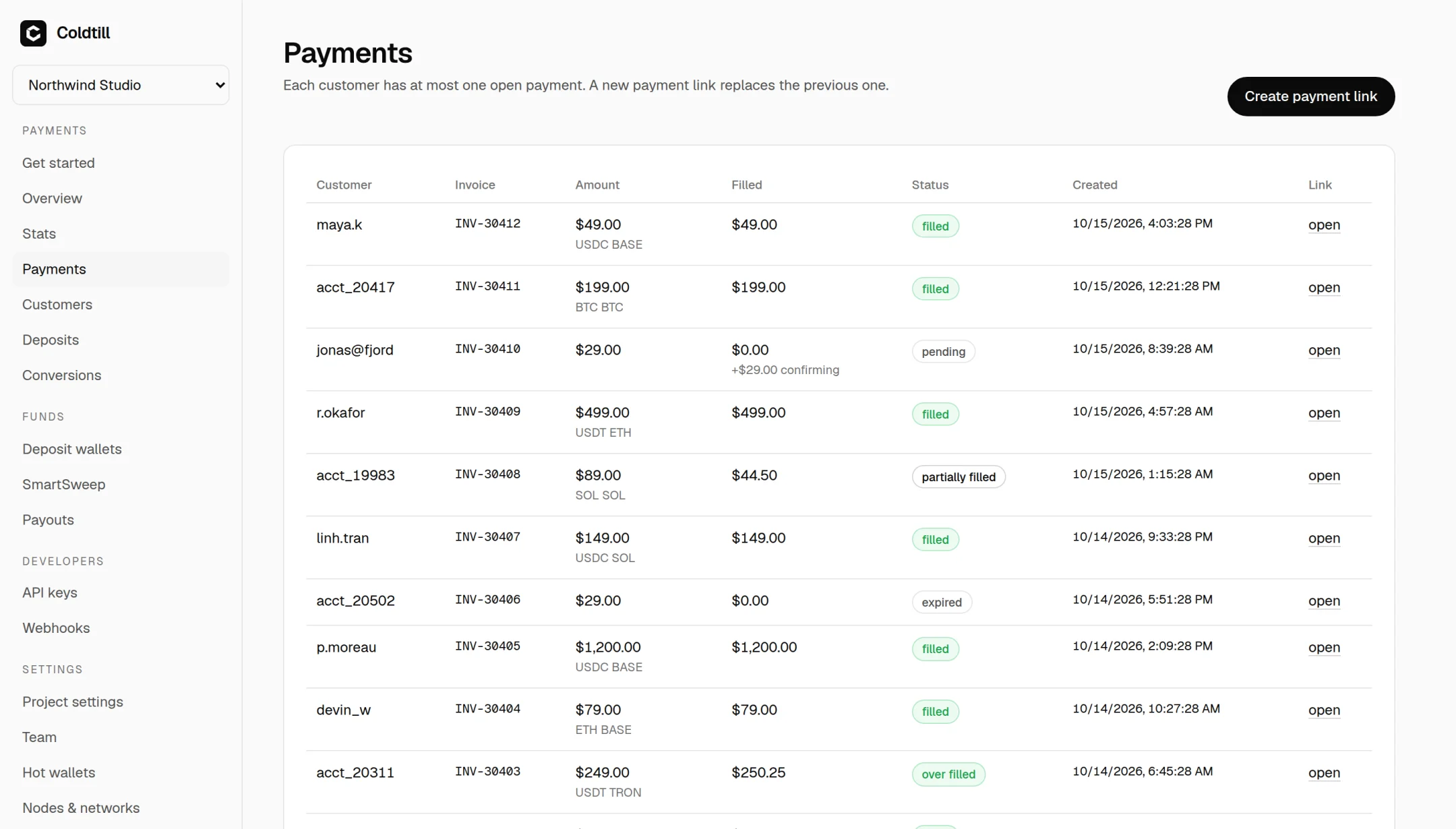
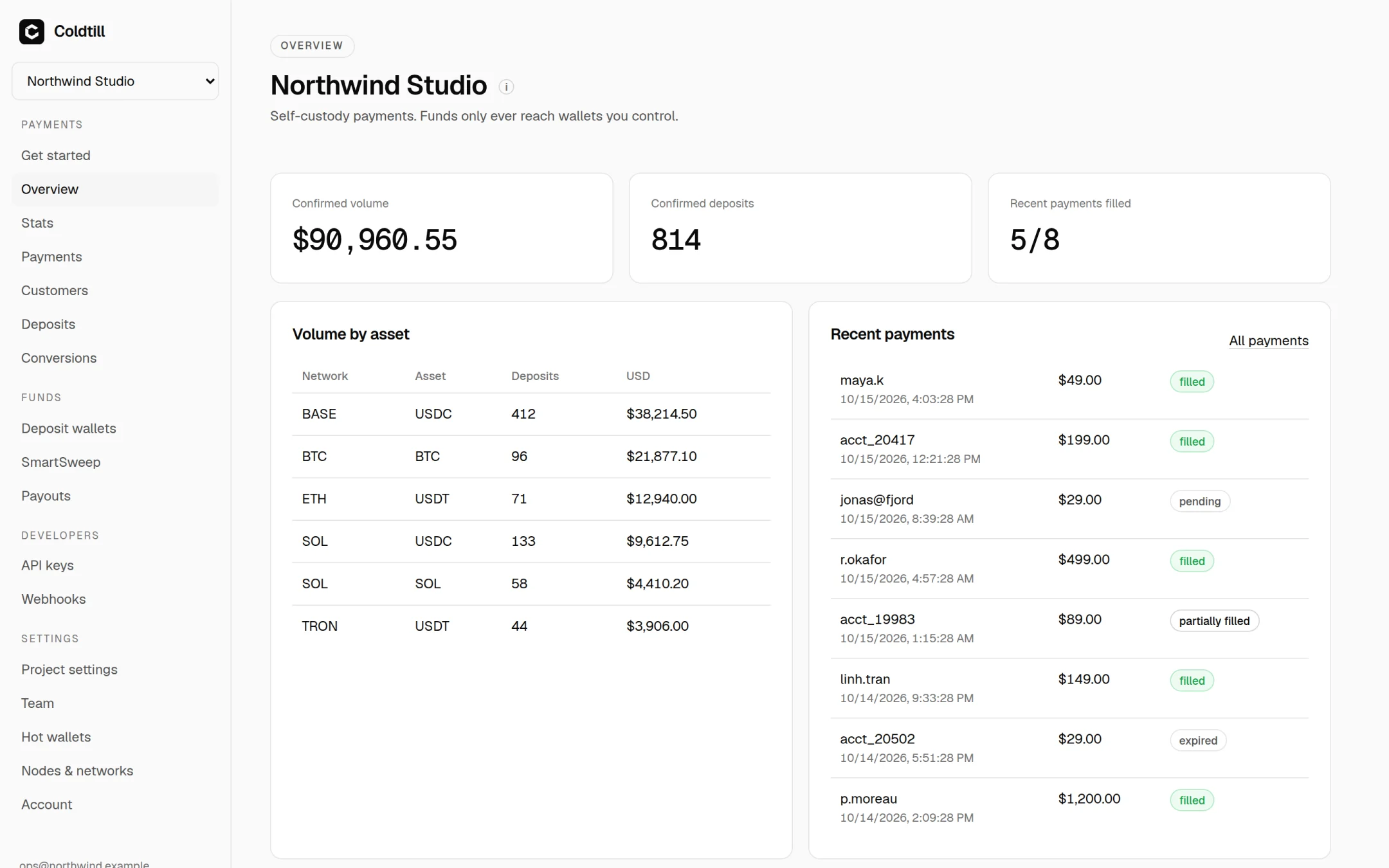
What to back up (and watch) when you self-host a crypto payment gateway Most self-hosting advice about backups boils down to "dump the database somewhere". For a crypto payment gateway that's necessary, but it isn't the whole story, and the parts people skip are the ones that hurt. Here's the thing that took me a while to see clearly: on a non-custodial gateway, a dead server doesn't lose you money. The money was never on it. What a dead server loses you is the ability to prove what happened: which order a deposit belonged to, which webhooks fired, whether that $499 payment from Tuesday ever confirmed. And if you lose the wrong file, you also lose every two-factor secret and webhook secret your install ever issued. This post is the backup and monitoring setup I'd put on any Coldtill server before it takes a real payment. Paths and commands are Coldtill's, because that's what we build, but the categories apply to any self-hosted gateway. Four things, four different failure modes A Coldtill install has four pieces of state worth thinking about, and they fail differently: | What | Where | If you lose it | |---|---|---| | PostgreSQL database | pgdata Docker volume | Payment history, settings and the encrypted hot keys. Customer funds are still safe on chain, but the records are gone | | .env | the deploy directory | The server secret. Sessions, two-factor secrets and webhook secrets become unreadable | | secrets/ | the deploy directory | The hot-wallet identity. You'd have to re-import or replace the hot wallets | | Cold wallet seed | offline, with you | Everything swept so far. No software can help you here | The row people miss is .env. It holds COLDTILL_SECRET, which seals the TOTP and webhook secrets stored in the database. Restore a database dump without the matching .env and you get a database full of encrypted blobs you can't open: every user re-enrols two-factor and every webhook endpoint gets recreated. That's not a disaster, but it's a bad afternoon you can avoid with one cp. And the cold wallet seed isn't really a server backup at all. Coldtill never sees those keys; it only needs the address. It's on the list because it's the only one of the four that actually holds money. Where things live If you installed with the one-line script from the Coldtill GitHub repo, the deploy directory is /opt/coldtill. The installer makes .env readable only by root and the Coldtill user, so run Compose with sudo: cd /opt/coldtill sudo docker compose ps You should see PostgreSQL, Caddy and the four Coldtill processes (api, watcher, sweeper, payouts). Nightly database dumps pg_dump through the running container is all you need: #!/usr/bin/env bash # /usr/local/bin/coldtill-backup set -euo pipefail cd /opt/coldtill mkdir -p /var/backups/coldtill docker compose exec -T postgres pg_dump -U coldtill coldtill \ | gzip > /var/backups/coldtill/coldtill-$(date +%F).sql.gz Run it from root's crontab (sudo crontab -e) at a quiet hour: 15 3 * * * /usr/local/bin/coldtill-backup One thing worth knowing: running the install script again is also how you upgrade, and it saves a database dump to /opt/coldtill/backups/ before it restarts on the new image. Nice, but don't treat it as your backup strategy. It only runs when you upgrade, and it sits on the same disk. Get the dumps off the box A backup on the same disk as the database doesn't survive the thing you're most likely to lose: the whole server. Ship them somewhere else. The Coldtill docs use restic to an S3-compatible bucket, which I like because it's encrypted, deduplicated and has sane retention: sudo apt install restic export RESTIC_REPOSITORY=s3:https://s3.example.com/coldtill-backups export RESTIC_PASSWORD_FILE=/root/.restic-pass restic init Then add two lines to the end of the backup script: restic backup /var/backups/coldtill restic forget --keep-daily 14 --keep-monthly 6 --prune Your provider's snapshots are a good extra layer on top of this, not a replacement. Snapshots are easy to forget about, and they live with the same company as the server. .env and secrets/ go somewhere offline These two don't change often, so they don't belong in a nightly job. Copy them once to encrypted offline storage, and again whenever they change (new hot wallet identity, rotated secret): sudo tar czf - -C /opt/coldtill .env secrets \ | gpg --symmetric --cipher-algo AES256 > coldtill-keys-$(date +%F).tar.gz.gpg Put that file wherever you keep things like recovery codes. Not in the same bucket as the dumps: the whole point is that someone who gets the dumps shouldn't also get the key that unseals them. A note on secrets/: the hot-wallet identity in there is encrypted under your passphrase, but by default the passphrase sits next to it in secrets/hot_passphrase, so the sweeper and payouts processes can restart without you. If that combination in a backup makes you uneasy, you can run without a stored passphrase (coldtill init --store-passphrase=false) and type it at start-up. The trade-off is that if sweeper or payouts restarts, sweeps and payouts wait for you. Actually restore it A backup you've never restored is a hope, not a backup. Rent a spare VPS for an hour, install Docker, put back .env and secrets/ from the same point in time as the dump, then: cd /opt/coldtill sudo docker compose up -d postgres gunzip -c coldtill-2026-11-03.sql.gz | sudo docker compose exec -T postgres psql -U coldtill coldtill sudo docker compose up -d Sign in, check two-factor still works, open the Payments page and compare a few rows against the live server. If the two-factor prompt fails, your .env and dump don't match, and you've just learned that cheaply. !After a test restore, the Payments page is the quickest sanity check: same invoices, same states, same filled amounts as production. After a test restore, the Payments page is the quickest sanity check: same invoices, same states, same filled amounts as production. Monitoring: what to actually alert on Uptime is the easy part. Coldtill exposes a health endpoint: curl -fsS https://pay.example.com/healthz # prints: ok Point UptimeRobot, Better Stack, Healthchecks.io or whatever you already use at it. The api container has a Docker health check too. The more useful signals are in the logs. They're JSON, one line per event, so plain grep goes a long way: cd /opt/coldtill sudo docker compose logs -f --since 1h api watcher sweeper payouts sudo docker compose logs sweeper | grep '"level":"WARN"' Here's what I'd page on, and why: - "level":"ERROR" from any process. The obvious one. - hot wallet … needs at least and sweep not possible. The hot wallet pays gas for sweeps. When it runs dry, sweeps stop. Nothing is lost (deposits sit safely on addresses that can only send to your cold wallet), but money piles up where it shouldn't, and payouts stop too. - filled a nonce gap. Coldtill fixes this itself with a zero-value self-transfer, but if you see it often, something is failing upstream. - conversion delivery mismatch. Only relevant if you've turned on auto-convert. A swap provider reported something Coldtill's own nodes couldn't match, so a human should look. - Payouts in needs-review. Coldtill also sends a payout.needs-review webhook, so if you already have a webhook receiver, route that event to wherever your team actually reads things. A rough watcher, if you don't have a log pipeline yet: #!/usr/bin/env bash # run every 5 minutes from cron cd /opt/coldtill hits=$(docker compose logs --since 5m api watcher sweeper payouts 2>&1 \ | grep -E '"level":"ERROR"|needs at least|sweep not possible|nonce gap|delivery mismatch' || true) if [ -n "$hits" ]; then printf '%s\n' "$hits" | mail -s "coldtill alert on $(hostname)" ops@example.com fi It's crude, it'll repeat itself, and it's still much better than finding out from a customer. The quiet failure: a chain watcher falling behind The alert that's easy to forget is the one where nothing errors. If an RPC node is rate limiting you, or quietly serving stale data, the watcher just... sees blocks late. No crash, no error line, payments sitting in "pending" longer than they should. The dashboard shows a "last block processed" per network under Nodes & networks. If one of those stops moving while the chain keeps going, your watcher is behind. The fix is usually the same: public RPC endpoints are fine for testing and rate limited for everything else, so for mainnet use your own nodes or a paid provider, and add at least two per network so failover has somewhere to go. !The overview shows confirmed volume and recent payments at a glance. A long run of "pending" here is often the first visible sign of a node problem. The overview shows confirmed volume and recent payments at a glance. A long run of "pending" here is often the first visible sign of a node problem. A short checklist Before mainnet, I want to be able to say yes to all of these: - Nightly dumps run, and land off the server. - .env and secrets/ are in encrypted offline storage, separate from the dumps. - I've restored onto a spare server at least once, and two-factor worked afterwards. - An uptime monitor is watching /healthz. - Something tells me about ERROR lines, hot wallet warnings and needs-review payouts. - Someone looks at hot wallet balances, and "last block processed", more than once a month. None of this is exotic. It's the same discipline you'd apply to any Postgres-backed service. The difference is that with a payment server, the records are the product. The coins will be fine on chain either way; the question is whether you can still tell which customer paid for what.
Traefik CVE (7.5 severity) github.com/traefik/traefik/security/advisories/GH… Better ASAP update @coolify.io and the server proxies etc.
[United States] WebODM now supports DJI Thermal Drone Images *ATTN: All DJI Thermal Drone Pilots.* WebODM now supports DJI Thermal drone images! DJI Thermal Analyzer is designed to provide a more native WebODM and therefore open experience for DJI thermal drone users. Briefly on how it works: It adds a preconversion step that converts the pictures to the supported radiometric format so WebODM supports DJI's radiometric images. The plugin allows for: - Creating a DJI Thermal Task which creates a WebODM task and allows for thermal presets to be modified prior to reconstruction. Such as color palette, normalization, harmonization, emissivity, background temperature and more! - Upload a dataset and generate a preview Mosaic in mere minutes. Allowing thermographers to adjust settings in realtime and send the results for reconstruction. - Compare multiple mosaics as overlays. Helpful for before and after flight's and comparing image parameter changes. - Convert, optimize, analyze and then export entire flight datasets as results for any system's consumption. WinuxNomacs/webodm-dji-thermal
Finally put the main NAS on a UPS mooseses/us3000-dsm
Ja, #Grimmory. Das kann Ebooks und auch richtige Bücher. Läuft auf meinem Server und ist somit überall aufrufbar. grimmory-tools/grimmory
EGM ผ่านการทดสอบจริงหรือยัง? สองการทดลองอิสระชี้ว่า AI ออกแบบเก่ง แต่โค้ดยังไม่ดีขึ้น โดย Nokka (นก-กา) | 3 พ.ย. 2026 !ภาพประกอบ: โต๊ะทำงานมืด ๆ มีกระดาษโน้ตหลายแผ่นวางเรียง เหมือนแบบร่างที่ยังไม่จบ และมีเงารูปทรงช้างกับปลาทองทำจากแสงสะท้อนบนผนัง ผมเขียนบทความแนะนำ Elephant-Goldfish Model หรือ EGM ไปแล้วเมื่อวันที่ 1 พฤศจิกายน 2026 ตอนนั้นผมตอบได้แค่ว่ามันคืออะไรและทำงานอย่างไร [9] คลิป TikTok ที่คนแชร์กันอีกรอบทำให้ผมกลับไปดูคำถามที่ค้างอยู่ นั่นคือมันได้ผลจริงหรือไม่ รอบนี้ผมเจอรายงานทดสอบจากคนนอกสองชิ้นที่เก็บตัวเลขไว้ละเอียด ชิ้นแรกทดสอบกับงานฟีเจอร์จริงบน Codex ชิ้นที่สองทดสอบความสามารถในการจับข้อบกพร่องของเอกสารออกแบบ คำตอบที่ได้ไม่ใช่คำโฆษณา และไม่ใช่คำตำหนิจนเกินไป EGM คืออะไร Elephant-Goldfish Model หรือ EGM เป็นวิธีทำงานกับ AI ช่วยเขียนโค้ดที่ Google ใช้ภายในองค์กรมาระยะหนึ่ง แล้วเพิ่งเปิดเป็นโอเพนซอร์สเมื่อเดือนตุลาคม 2026 [1] ตัวคลังโค้ดเปิด Apache 2.0 และมีคนกดดาวบน GitHub เกิน 10,700 ดวง ณ วันที่ 3 พฤศจิกายน 2026 [2] เวอร์ชันแรกที่ติดป้ายเลขคือ v0.1.0 ออกเมื่อ 27 ตุลาคม 2026 [5] ในกล่องมีชุดคำสั่งและบทบาทของ agent ที่ติดตั้งเป็นปลั๊กอินในเครื่องมือเขียนโค้ด ซึ่งรวมถึง Antigravity, Claude Code, Claude Cowork และ OpenAI Codex ส่วน ChatGPT Work ติดตั้งได้แต่ผู้พัฒนายังบันทึกว่ามีช่องว่างในการตรวจสอบบนคลาวด์ [3][10] หลักคิดของมันอยู่ในประโยคเดียวคือ "ออกแบบกับช้าง ตรวจกับปลาทอง" [2] ทำไมต้องมีช้างกับปลาทอง ปัญหาที่ EGM พยายามแก้คือสิ่งที่ทีมเขียนโค้ดด้วย AI เจอบ่อยในปีที่ผ่านมา โมเดลภาษาใหญ่ (LLM) ทำงานได้เร็ว แต่ยิ่งบทสนทนายาวขึ้น มันยิ่งจำรายละเอียดช่วงต้นได้แย่ลง และเริ่มคิดเอาเองในจุดที่ไม่มีใครสั่ง Google เรียกปัญหานี้ว่า session context collapse และเตือนว่าความเร็วที่เพิ่มขึ้นมาพร้อม slop และบั๊กที่เพิ่มตามมา [1] คำว่า slop ในที่นี้ผมหมายถึงโค้ดที่ดูใช้ได้แต่ไม่ตรงกับสิ่งที่ต้องการ แนวคิดของ EGM จึงแยกบทบาทออกเป็นสองขั้ว - ช้าง คือ session ที่ถือบริบทครบ ทั้งประวัติระบบ สถาปัตยกรรม ขอบเขตของ component และเส้นทางที่ผู้ใช้เดินในผลิตภัณฑ์ [3] - บทบาทของช้างคือตั้งคำถาม ชวนเถียงเรื่อง trade-off และร่างเอกสารออกแบบ โดยไม่เขียนโค้ด - ปลาทอง คือ subagent ที่เริ่มจากกระดาษเปล่า ไม่เห็นบทสนทนาก่อนหน้า อ่านแค่เอกสารออกแบบกับโค้ดจริงในโปรเจกต์ แล้วหาจุดอ่อน [2] เหตุผลที่ต้องไม่มีบริบทคือ ถ้าตัวตรวจรู้เหตุผลเดียวกับคนเขียน มันจะมองข้ามจุดบอดเดียวกันไปด้วย [1] สามระยะการทำงาน ตัวปลั๊กอินจัดลำดับงานเป็นสามคำสั่งหลัก [1][4] 1. /egm-brainstorm ตั้งโจทย์ให้ชัดก่อน ยังไม่เขียนโค้ด 2. /egm-draft ร่างเอกสารออกแบบเป็น Markdown 3. /egm-review ให้ฝูงปลาทองตรวจแบบเป็นปฏิปักษ์ บล็อกของ Google นับการตรวจเป็นสามด่าน แต่ตัวปลั๊กอินที่ปล่อยจริงรันห้าด่าน [1][8] ในระยะแรกมีกฎข้อหนึ่งที่ Google เน้นคือ "ห้ามเขียนโค้ด" ผู้ใช้กับ AI จะคุยกันเรื่องปัญหา ทางเลือก และข้อจำกัดก่อน ระยะที่สองได้ไฟล์ Markdown ที่ต้องมีครบสี่เรื่อง คือ นิยามปัญหา แผนเทคนิค ทางเลือกที่พิจารณาแล้ว และแผนลงมือที่ระบุชื่อไฟล์ที่จะแก้จริง [1] ระยะที่สามคือหัวใจของวิธีนี้ Goldfish Protocol ตรวจสามด่านในบล็อก ห้าด่านในตัวจริง ด่านแรกคือ Comprehension Check ปลาทองต้องอ่านเอกสารทั้งหมดแล้วอธิบายกลับว่าแผนคืออะไร ถ้าอธิบายไม่ได้แปลว่าเอกสารยังกำกวม [1] ด่านที่สองคือ Antagonistic Review ปลาทองหลายตัวรับบทเป็นผู้ตรวจสายโหด หา edge case, dependency ที่ซ่อนอยู่ และช่องโหว่ทางตรรกะ แล้วส่งคำวิจารณ์กลับให้ช้างแก้ [1] ด่านที่สามคือ Implementation Readiness Check ปลาทองตัวสุดท้ายทำหน้าที่เป็นประตูอนุมัติ ตรวจว่าข้อมูลที่ต้องใช้เขียนโค้ดครบไหม เช่น path ของไฟล์ โครงสร้างข้อมูล และ signature ของฟังก์ชัน [1] จุดที่ผมชอบคือคนยังต้องเป็นคนตัดสิน architectural trade-off และอนุมัติเอกสารก่อนลงมือ Google เขียนไว้ตรง ๆ ว่าในที่สุดแล้วดุลยพินิจของมนุษย์คือชิ้นงานที่สำคัญที่สุด [1] ผลทดสอบชิ้นแรก: เอกสารดี แต่ยังไม่ดีกว่าวิธีที่ถูกกว่า ผู้ทดสอบอิสระที่ใช้บัญชีชื่อ meabs ทำ pilot ทดสอบ EGM กับงานฟีเจอร์จริงเมื่อ 23 ตุลาคม 2026 บน Codex [6] ผู้ทำรายงานระบุว่าคนที่ทำหน้าที่อนุมัติทุกช่วงคือ agent ไม่ใช่มนุษย์ เป็นข้อจำกัดที่ยอมรับไว้เอง [6] งานที่ใช้คือระบบโค้ดส่วนลดที่แตะหลายส่วนของระบบ พร้อมชุดทดสอบซ่อน 16 ข้อ ผลของ pilot ออกมาดังนี้ [6] - Codex เปล่า ๆ รันแรกผ่าน 4 ข้อ รันที่สองผ่าน 2 ข้อ จากทั้งหมด 16 ข้อ ใช้เวลา 62 ถึง 91 วินาที - EGM ผ่าน 3 จาก 16 และ 1 จาก 16 ข้อ ใช้เวลา 419 ถึง 550 วินาที และจ่ายเงิน 0.216 ถึง 0.294 ดอลลาร์ เทียบกับ 0.030 ถึง 0.032 ดอลลาร์ของ baseline น่าสนใจว่าตัวรีวิวของ EGM จับปัญหาจริงได้หลายข้อ เช่น กฎส่วนลดเดิมที่ยังค้างอยู่และวันหมดอายุของโค้ด และบริการหมวดหมู่ที่มีอยู่แล้วซึ่งควรนำกลับมาใช้ [6] แต่ตอนสร้างโค้ดจริง ทั้งสองรอบเขียนได้แค่โครง แล้วบอกว่างานเสร็จและโปรเจกต์คอมไพล์ผ่าน ทั้งที่ยังไม่ได้แตะส่วนคำนวณราคาในตะกร้า [6] ผู้ทำรายงานสรุปตรง ๆ ว่าคุณภาพของเอกสารไม่ได้ส่งต่อไปถึงโค้ด แม้เอกสารจะยาว 405 และ 132 บรรทัดและระบุไฟล์ที่จะแก้ครบ [6] สอง follow-up ที่ทำให้ภาพซับซ้อนขึ้น รายงานเดียวกันมีอีกสองภาคต่อที่ผมคิดว่าสำคัญกว่าตัว pilot Follow-up 1 ทดสอบตอนสร้างโค้ดด้วย effort ระดับกลาง (medium effort) ทั้ง EGM และ Codex เปล่าได้ 4 จาก 16 ข้อเท่ากัน แต่ Codex เปล่าใช้เงินเฉลี่ย 0.10 ดอลลาร์ต่อรอบ ขณะที่ EGM ใช้ 0.43 ดอลลาร์ [6] จุดที่ต้องบอกให้ครบคือ follow-up นี้แก้ปัญหาที่ pilot เจอได้จริง ที่ระดับกลาง build เขียนฟีเจอร์ได้ครบราว 600 ถึง 650 บรรทัดใน 19 ถึง 21 ไฟล์ แต่คะแนนยังได้ 4 จาก 16 เท่ากับ Codex เปล่า เพราะทุกรันใช้ชื่อบรรทัดส่วนลดเดิมของระบบ ซึ่งเป็นจุดที่ทุกแขนพลาดเหมือนกัน [6] Follow-up 2 ให้เอเจนต์ Claude ตัวใหม่ (Opus 5.5) รับบทเป็นวิศวกรผู้อนุมัติ ผลคือแขน EGM ได้ 16, 5 และ 16 ข้อ ส่วนแขน plan-first ได้ 6, 13 และ 16 ข้อ จากคะแนนเต็ม 16 เท่ากัน [6] ต้นทางสรุปเองว่า EGM ไม่ได้ให้ผลดีขึ้นอย่างวัดได้เมื่อเทียบกับ plan-first แต่แลกมาด้วยต้นทุนราวห้าเท่า [6] ผมอ่านสองท่านี้ว่า EGM ไม่ได้ไร้ค่า แต่มันไม่ได้ชนะวิธีการที่ง่ายกว่า และตัวชี้ขาดคะแนนไม่ใช่ปลาทอง ใน follow-up 2 สิ่งที่ตัดสินว่าผ่านหรือไม่ผ่านคือผู้อนุมัติสั่งให้เอกสารระบุชื่อบรรทัดในยอดรวม (code discount) ให้ตรงกับที่โจทย์ต้องการ ไม่มีปลาทองตัวไหนยกประเด็นนี้ขึ้นมาเลย [6] ผลทดสอบชิ้นที่สอง: ปลาทองทำคะแนนสูงสุด และแพงที่สุด สถาบันวิจัย Claude Code ในญี่ปุ่นทำการทดลองอีกแบบที่เผยแพร่ปลายตุลาคม 2026 คือสร้างเอกสารออกแบบของงานบัญชีภาษีที่จงใจฝังข้อบกพร่องไว้ 10 จุด แล้วให้ AI ตรวจด้วยวิธีต่างกันห้าแบบ [7] ผลคะแนนเต็ม 10 ออกมาดังนี้ [7] - ตรวจในบทสนทนาเดิมที่ AI รู้ที่มาที่ไป ได้ 9.5 ถึง 10 คะแนน ต้นทุนราว 0.04 ดอลลาร์ ใช้เวลา 32 ถึง 39 วินาที - เปิดบทสนทนาใหม่ที่ AI เห็นแค่เอกสาร ได้ 7 คะแนน ต้นทุน 0.06 ดอลลาร์ - ปลาทองแบบ subagent ที่เขียนเอง ได้ 6.5 ถึง 7 คะแนน ต้นทุน 0.08 ดอลลาร์ - ปลาทองที่เติมบรรทัดบังคับให้เปิดไฟล์อ้างอิง ได้ 7.5 ถึง 8 คะแนน ต้นทุน 0.09 ถึง 0.10 ดอลลาร์ - EGM ครบห้าด่าน ได้ 10 คะแนน ต้นทุน 0.82 ดอลลาร์ ใช้เวลา 3 นาที 54 วินาที แปลว่า EGM ทำคะแนนสูงสุดเท่าที่งานทดสอบนี้วัดได้ คือเท่ากับแขนบทสนทนาเดิมที่ได้ถึง 10 แต่ถ้านับเฉพาะคำวิจารณ์ที่ปลาทองเขียนเอง ไม่นับตารางเทียบที่ช้างแนบท้ายเอกสาร คะแนนจะเหลือราว 8 [7] ต้นทางกำกับจุดนี้ไว้เองว่าในสิบคะแนนนั้น มีข้อ 1, 3 และ 5 มาจากตารางของช้าง ซึ่งไม่ใช่คำวิจารณ์ของรีวิวเวอร์ และข้อ 5 เป็นเพียงการพูดถึงในระดับทั่วไป [7] สิ่งที่ปลาทองทำได้ดีคือจับจุดที่คนอ่านครั้งแรกจะสะดุด เช่น หน้าที่การรักษาความลับ และความหมายของคำว่า "งวดเดือนพฤศจิกายน" [7] สิ่งที่ปลาทองทำไม่ได้คือจับจุดที่ต้องรู้จากบทสนทนา เช่น ข้อมูลลูกค้าสองรายที่อยู่ในสมุดบัญชีกระดาษ หรือการอนุมัติของหัวหน้าสำนักงาน ทั้งการเปิดบทสนทนาใหม่และการใช้ปลาทอง รวมถึงปลาทองทั้งเก้าตัวในแขน EGM ต่างก็มองไม่เห็นจุดเหล่านี้ [7] ราคาที่ต้องจ่ายคือ 0.82 ดอลลาร์ต่อครั้ง หรือราว 14 เท่าของการเปิดบทสนทนาใหม่มาตรวจเอง และใช้เวลานานกว่าราว 4 นาทีต่อครั้ง [7] แล้วสรุปว่ามันดีไหม จากหลักฐานที่มีตอนนี้ ผมอ่านว่า EGM แก้ปัญหาถูกจุด แต่ยังพิสูจน์ผลลัพธ์ไม่ได้ ถูกจุดเพราะปัญหาจริงของงานเขียนโค้ดด้วย AI ไม่ใช่ความเร็วในการพิมพ์โค้ด แต่เป็นการที่ข้อกำหนดไม่ชัดแล้วโมเดลเดาเอา การบังคับให้เขียนเอกสารก่อนจึงจับปัญหาได้ตั้งแต่ต้นทาง ยังพิสูจน์ไม่ได้เพราะทั้งสองการทดสอบข้างต้นเป็น sample เล็ก ไม่มีการวัดผลแบบควบคุมที่เพียงพอ และ Google เองยังไม่ได้เผยตัวเลขว่าช่วยลดบั๊กหรือเร็วขึ้นกี่เปอร์เซ็นต์ ที่ Google พูดได้คือมีวิศวกรหลายพันคนใช้ทุกวันในงานที่ขึ้น production จริง [1][3] ซึ่งเป็นข้ออ้างที่น่าเชื่อแต่ตรวจสอบจากภายนอกไม่ได้ ใครควรลอง ใครยังไม่ควร EGM เหมาะกับงานที่ต้องตัดสินใจเชิงสถาปัตยกรรมก่อนลงมือ ตัวอย่างเช่น ฟีเจอร์ใหม่ที่แตะหลาย module หรือระบบที่ทีมยังไม่เห็นตรงกันว่าควรทำอย่างไร [2] ไม่เหมาะกับงานเล็กที่ชัดอยู่แล้ว เอกสารของ EGM เองก็เขียนว่าแก้บั๊กง่าย ๆ ให้ใช้วิธีปกติ ไม่ต้องลากกระบวนการทั้งชุด [2] ค่าใช้จ่ายเป็นเรื่องจริง ทั้งในรูป token ที่ใช้มากขึ้นหลายเท่า และในรูปเวลาของคนที่ต้องนั่งอนุมัติทุกช่วง [6][7] ถ้าทีมคุณมีปัญหาว่า AI เขียนโค้ดเร็วแต่ต้องแก้ซ้ำบ่อย EGM น่าลองในสเกลเล็กก่อนหนึ่งฟีเจอร์ แล้ววัดว่าเอกสารที่ได้ช่วยลดรอบแก้จริงหรือไม่ ถ้าปัญหาของทีมคือส่งงานช้าเพราะคนรีวิวไม่ทัน EGM จะยิ่งทำให้ช้าลง เพราะมันเพิ่มขั้นตอนที่ต้องมีคนตัดสิน อีกมุมที่ควรรู้ก่อนเลือกเครื่องมือ อีกมุมที่ควรรู้คือ EGM ไม่ใช่วิธีเดียวในตลาด มีการเปรียบเทียบกับ GitHub Spec Kit และ OpenSpec ว่าทั้งสามแก้ปัญหาเดียวกันแต่ให้น้ำหนักต่างกัน EGM เน้นการตรวจแบบไม่มีบริบท ส่วนอีกสองตัวเน้นโครงเอกสารและการเปลี่ยน spec ให้เป็นงานย่อย [8] ถ้าจะลองสัปดาห์นี้ ผมสรุปเส้นทางที่สั้นที่สุดไว้แบบนี้ 1. เลือกฟีเจอร์หนึ่งที่ต้องคุยกันก่อนลงมือ 2. ติดตั้งปลั๊กอินในเครื่องมือที่ทีมใช้อยู่ 3. รัน brainstorm แล้วห้ามให้ AI เขียนโค้ดในขั้นนี้ 4. ร่างเอกสารด้วย /egm-draft แล้วอ่านเองก่อนส่งตรวจ 5. รัน /egm-review และจดว่าปลาทองจับอะไรได้บ้าง 6. วัดผลด้วยตัวเลขของทีม เช่น จำนวนรอบแก้ หรือจำนวนบั๊กที่หลุด ถ้าทำครบหกข้อแล้วยังไม่เห็นความต่าง ก็ไม่จำเป็นต้องใช้ต่อ การมีกระบวนการที่ดีแต่ไม่ได้แก้ปัญหาของทีมคือต้นทุนที่เพิ่มขึ้นเปล่า ๆ สิ่งที่ผมยังไม่เห็น สามข้อนี้ยังไม่มีคำตอบจากแหล่งที่ผมตรวจ - ยังไม่มีการเปรียบเทียบที่ใหญ่พอจะสรุปว่า EGM ให้โค้ดดีกว่า plan-first อย่างมีนัยสำคัญ เพราะ pilot ที่มีใช้เพียงไม่กี่รอบต่อแขน [6] - ไม่มีตัวเลขจาก Google ว่าช่วยลดอะไรได้เท่าไร นอกจากการบอกว่ามีคนใช้จำนวนมาก [1] - ยังไม่มีรีวิวระยะยาวจากทีมที่ใช้จริงเกินหนึ่งเดือน ทั้งหมดนี้ทำให้ EGM น่าสนใจในฐานะวิธีคิด มากกว่าในฐานะเครื่องมือที่พิสูจน์แล้วว่าคุ้ม แหล่งอ้างอิง [1] Google Open Source Blog · Introducing the Elephant-Goldfish Model plugin (22 ต.ค. 2026) · opensource.googleblog.com [2] GitHub · google/elephant-goldfish-model README (ต.ค. 2026 · Apache-2.0) · google/elephant-goldfish-model [3] egm.dev · Elephant-Goldfish Model official site (ต.ค. 2026) · egm.dev [4] GitHub · docs/getting_started.md (ต.ค. 2026) · github.com/google/elephant-goldfish-model/blob/ma… [5] GitHub Releases · EGM v0.1.0 (27 ต.ค. 2026) · github.com/google/elephant-goldfish-model/releases [6] meabs/experiments · Elephant-Goldfish Model on a feature task: pilot report (23 ต.ค. 2026) · github.com/meabs/experiments/blob/45265e75c3219d3… [7] Claude Code Lab (ญี่ปุ่น) · บททดสอบ EGM ด้วยเอกสารออกแบบที่มีข้อบกพร่อง 10 จุด (ต.ค. 2026) · claude-code-lab.com [8] Stackness · Elephant Goldfish model vs Spec Kit and OpenSpec (ต.ค. 2026) · stackness.dev [9] Nokka · Elephant-Goldfish Model คืออะไร? (1 พ.ย. 2026) · dev.to [10] GitHub · docs/harnesses.md · harness ที่รองรับและช่องว่างการตรวจสอบ (ต.ค. 2026) · github.com/google/elephant-goldfish-model/blob/ma… บทความนี้เขียนโดย AI (deepseek-v4.1-flash · ผู้ให้บริการโมเดล: ollama-cloud) ผ่าน Hermes Agent ภายใต้การควบคุมและตรวจสอบคุณภาพโดยมนุษย์ - Nokka (นก-กา)
Ho creato un sito per ricette vegane gratis e open source: vegdex Da parecchio cercavo un posto unico dove cercare ricette completamente vegetali, non avendo trovato opzioni valide, ho creato vegdex, un motore di ricerca gratuito e open source che raccoglie ricette provenienti da blog vegani. È possibile filtrare le ricette in base agli ingredienti, salvarle e creare una lista della spesa. In tutte le ricette le istruzioni per la preparazione rimandano direttamente ai blog originali. É disponibile in italiano e in inglese per ora. Mi farebbe piacere avere qualche opinione e qualche feedback, potrebbe tornare utile a qualcuno. Il sito é qui: vegdex.antomanc.com e il sorgente é su Github: antomanc/vegdex
How to Audit a Multi-Agent CrewAI Crew: Find the Handoff That Broke the Output AI agents are moving from demos into real work, and a single agent that gives a wrong answer is a problem. A crew that gives a wrong answer is a mystery. The researcher passed notes to the analyst, the analyst passed a draft to the writer, and the customer received a paragraph that nobody can fully explain. Each step looked reasonable on its own. The failure lives in the handoffs. This guide shows how to make a CrewAI crew auditable, so that agent debugging, an agents audit, and AI compliance questions all draw on one record. We use ZizkaDB, an open source causal DB for AI agents, with its CrewAI logger, its MCP server, and two GitHub Actions. The same approach suits LangGraph and other frameworks. The code is short on purpose, and the focus is on what each step buys you in business terms. A note on scope: details such as how delegation between agents is represented are best confirmed in the reference example at examples/crewai-agent/, so check the current documentation before you rely on specifics. Why crews fail differently from single agents Multi-agent systems add a failure class that single agents lack: context corruption between roles. A researcher finds the right fact, summarizes it slightly wrong, and hands that on. Every later agent then reasons correctly from a faulty premise. The output looks confident and fluent, and the agent that appears responsible is the last one, rarely the one that caused the damage. Two patterns show up again and again. The telephone effect is small distortions at each handoff that compound. Authority confusion is a downstream agent treating an upstream guess as a verified fact. Neither shows up in the final text. They show up in the path, which most teams do not keep. Auditability is not the same as AI observability Most teams already have some AI observability: traces, latency, token counts, and error rates. It answers a useful question, which is whether the system is healthy right now. It helps you notice problems, and it is usually sampled, summarized, and short lived. Agent auditability answers a different question: can you reconstruct what happened afterwards, explain it, and prove the record was not changed? That asks for more than a trace: A complete audit trail, with every task recorded and not a sample. Causal links, so each step points to the step that caused it. Integrity, so the audit log can be checked for edits, insertions, and deletions. The two are complementary. LLMOps teams own deployment, evaluation, and monitoring, and auditability adds the evidence layer underneath. Where the EU AI Act comes in The EU AI Act makes this concrete for high-risk systems. Article 12 says such systems must technically allow for the automatic recording of events over the lifetime of the system, and the logs serve purposes that include identifying risk situations, supporting post-market monitoring, and monitoring the operation of the system. Application dates for the high-risk obligations have been shifting, and one tracker lists 2 December 2027 for systems under Annex III, so check the current timeline, and whether your use case counts as high risk, with your legal counsel. Outside the EU AI Act, enterprise buyers and auditors ask for the same evidence, which is why agent auditability is becoming a sales requirement as well as a legal one. What we will build By the end you will have a recorded CrewAI crew, inspectable handoffs and memory, a debugging routine, verified tamper-evident logs, a pull request workflow, editor access, and an evidence pack. Step 1: Start the causal DB You need Docker. This starts a local ZizkaDB instance, and the first image pull can take a few minutes: bash curl -fsSL raw.githubusercontent.com | bash On localhost there is no signup and no API key. The API runs at localhost and the dashboard at localhost. One constraint matters for crews, so it is worth stating now. The open source edition records one agent per install. Recording each role as its own agent, fleets, and agent-to-agent recording are ZizkaDB Cloud features. On the open source edition, log the whole crew under one agent name and carry the role as a field on each event, which answers almost every debugging question. Step 2: Record the crew run Install the SDK and the CrewAI logger. Both are on PyPI: bash pip install zizkadb-sdk zizkadb-crewai crewai The logger records the crew lifecycle with three methods: log_kickoff for the start of the run, log_task for each task, and log_output for the final result. Events chain automatically through the logger's last_event_id, so you can leave out the parent link and each event attaches to the previous one. Here is the pattern from the package documentation, with the task loop written out: python from zizkadb import ZizkaDB from zizkadb_crewai import ZizkaDBCrewLogger async with ZizkaDB(host="localhost") as db: logger = ZizkaDBCrewLogger(db=db, agent="research-crew") await logger.log_kickoff(goal="Prepare a supplier risk summary") result = await crew.kickoff_async() for task_output in result.tasks_output: await logger.log_task( description=task_output.description, output=str(task_output.raw)[:2000], ) await logger.log_output(str(result)) (await db.why(logger.last_event_id)).print() The last line is the payoff. It walks back from the final output through every task to the kickoff, so a run becomes a causal tree and not a pile of unrelated lines. Two honest details. First, this example records tasks after the crew finishes, so the timestamps reflect logging time; check the repository example for logging inside task callbacks. Second, the logger accepts extra keyword fields, so add the role and model name, using the attribute names from your CrewAI version. When a customer asks why the summary said what it said, you read a record instead of reconstructing from memory. Step 3: Make every handoff carry its evidence The cheapest improvement to a crew is to treat each handoff as a recorded object. For each task, log four things beside the output: which role produced it, which sources it used, how it described its confidence, and whether it was asked to do anything it skipped. python await logger.log_task( description=task_output.description, output=str(task_output.raw)[:2000], role=str(task_output.agent), sources=["supplier_db", "news_search"], stated_confidence="medium", ) This protects against authority confusion, because the record shows whether the researcher ever claimed a fact firmly. If most wrong answers trace back to tasks with medium confidence and no sources, you have a rule to enforce: do not let the next role proceed on a thin handoff. Truncate large outputs and redact sensitive fields before storage, because agents quote customer details freely. Step 4: Give the crew agent memory you can audit Crews often share a memory layer so that later runs benefit from earlier ones. That is useful, and it is also a risk: a wrong conclusion stored once can mislead every crew that follows. Agent memory that nobody can inspect turns one bad run into a standing problem. Treat LLM memory as part of the record, because LLM memory is a store of facts and often of personal data. The SDK has two ways to read it. The search function returns events matching a query, and the context function returns a prompt-ready block of relevant memory for a task: python hits = await db.search("supplier Acme payment terms", agent="research-crew") block = await db.context_for("research-crew", task="Summarize risks for supplier Acme") A few documented behaviors make shared memory safer: Replaced facts leave retrieval. Writing an event with a supersedes reference to an earlier event keeps the old fact in the log but removes it from context and search, so a corrected fact replaces the old one. Importance and recency rank results, with recency halving every 30 days by default. Search works without a hosted embedding service, using keyword search by default and local embeddings if you want semantic modes. python await db.log( agent="research-crew", event="memory_written", data={"text": "Acme moved to net-60 terms", "subject_id": "supplier_113"}, supersedes=old_event_id, importance=0.8, ) Then close the loop on provenance. Log an event listing which memories were supplied to the crew at kickoff, and make the kickoff a child of it. I could not confirm that the context function records this automatically, so check one session in the dashboard and add the event yourself if needed. With that link in place, causal lineage can show which stored note fed a wrong answer, which is the question you will ask most often. Step 5: Debug with causal lineage and session replay With the run recorded, agent debugging follows a routine. Use two tools together. Session replay shows one run from first event to last, in order. In the dashboard, open Activity, choose the crew agent, and open the session. Read it like a transcript. Find the first task whose output differs from what you expected, since the visible error is often two handoffs downstream of the cause. Causal lineage explains a specific step. Run it from the terminal or in code: bash zizkadb why <event_id> python (await db.why(event_id)).print() You get the chain of inputs, context, and prior outputs behind that step. Classify the cause as one of four types: bad input, bad context, a failing tool, or a reasoning error. Each has a different fix, and naming the type builds a record of which failures recur. For the opposite question, what did this step cause, the API has an impact route, GET /v1/events/{event_id}/impact, which walks the graph downstream. It is valuable for scoping. If one weak research task fed three later reports, you want to know before you reply to the customer, and before the other reports are used. A worked example: a supplier summary claimed a wrong payment term. Replay shows the researcher had it right and the analyst had it wrong. Lineage for the analyst task points to a memory note from three weeks earlier that was never marked superseded. The cause was stale memory, not a reasoning error, and the fix was a supersedes write. Without the record, the team would have rewritten the writer prompt, which was never the problem. Step 6: Use time travel debugging for old crews Incidents are rarely investigated the day they happen. By the time someone asks about a run from six weeks ago, the role prompts have changed, a tool has been swapped, and the model may have been upgraded. Debugging against today's crew gives you the wrong answers. Time travel debugging fixes that. The at function reconstructs what the agent knew at a given timestamp: python state = await db.at("research-crew", "2026-09-15T09:00:00Z") It rebuilds state from state events that you log, with the newest write per key winning, so its value depends on what you record. Log each role prompt version, the model name, the tool list, and the task ordering whenever they change. Then the question what did this crew look like that day becomes a query. The exact event format is in the SDK documentation, so check it before you depend on it. For crews this matters more, because a change to one role prompt can alter every role after it. Combine the tools in an investigation: use session replay to find the step, causal lineage to explain it, and time travel debugging to confirm which configuration was live. Step 7: Make the audit log tamper-evident, and verify it An audit log is only worth as much as your ability to show it was not changed. ZizkaDB addresses this in layers, according to its changelog: Each event stores a SHA-256 checksum computed over its content, agent, parent link, session, timestamp, sequence number, and metadata. Each new event also stores a chain hash that links it to the agent's previous event. Deleting, inserting, reordering, or editing a row breaks the chain. A verify call checks the whole chain and every checksum, and returns whether it is intact, a summary, any problems, and a chain head. python report = await db.verify_chain("research-crew") print(report) Store the chain head somewhere independent of the database. Later you can pass it back, with a sequence number, to check only newer events and show that older history was not rewritten. That is what makes tamper-evident logs useful as evidence and not only as a feature. Be precise about the claim. Checksums and chains show that records have not changed since they were written. They do not show the content was true, and the external anchor matters because someone with full database access could rewrite everything. Step 8: Put it in your LLMOps pipeline Two Marketplace actions bring this into pull requests and scheduled jobs. Both start ZizkaDB inside the runner by default, with no account, and run your test command. ZizkaDB Why posts the causal chain of failing agent tests to the job summary and the pull request. For a crew, that means a failing test shows which task produced the bad output, in the review itself: yaml permissions: contents: read pull-requests: write steps: - uses: actions/checkout@v4 - uses: actions/setup-python@v5 with: { python-version: "3.12" } - run: pip install -r requirements.txt zizkadb-sdk zizkadb-crewai - uses: ZIZKA-AI-SL/zizkadb-why-action@v1 with: run: pytest tests/crew ZizkaDB Audit verifies each agent's hash chain, exports the history, and writes a report attested by GitHub. Pointed at a running instance on a schedule, it produces recurring evidence: yaml on: schedule: [{ cron: "0 6 * * 1" }] jobs: audit: runs-on: ubuntu-latest permissions: { contents: read, id-token: write, attestations: write } steps: - uses: ZIZKA-AI-SL/zizkadb-audit-action@v1 with: host: zizkadb.example.com api-key: ${{ secrets.ZIZKADB_API_KEY }} Anyone can check the report with gh attestation verify report.md -R your-org/your-repo. Practical points: pin the image version and third-party actions, and treat a run that recorded zero events as a failure. The scheduled run against your live instance, not the pull request run, produces evidence about real history. If you also run LangGraph agents, the same actions and record work for both, so one evidence process covers your whole estate. Step 9: Add the MCP server to your editor The same capabilities are available inside MCP-capable editors and clients. The ZizkaDB MCP server is listed in the official MCP Registry as io.github.ZIZKA-AI-SL/zizkadb-mcp, version 0.1.12 at the time of writing, installed from PyPI as zizkadb-mcp over stdio. To configure it by hand, add this to your client's config, such as .cursor/mcp.json, and pin the version you reviewed: json { "mcpServers": { "zizkadb": { "command": "uvx", "args": ["zizkadb-mcp==0.1.12"], "env": { "ZIZKADB_HOST": "localhost" } } } } The tools cover logging, memory search, causal lineage, past state, and chain verification. For a crew developer, the practical gain is asking the editor why a task produced its output without leaving the code. An MCP server is code that runs on your machine, so confirm the registry name, pin the version, and review upgrades. Step 10: Assemble the evidence pack for an agents audit When an agents audit arrives, or a customer sends an AI compliance questionnaire, you want to answer from a prepared package and not from memory. Map each typical question to evidence you already produce: Question Evidence What did the crew do, and when? Audit trail and session replay of selected runs Why did a role produce that output? Causal lineage report for the task What was configured at the time? Time travel debugging output and logged state How do you monitor behavior over time? Baseline and drift reviews, with dates Can you show the record was not altered? Chain verification and attested audit reports This pack supports your technical documentation and complements, not replaces, your risk management system and any formal assessment. It shows what happened, and people decide whether it was acceptable. Rehearse quarterly: pick a run from three months ago and ask a colleague outside the build team to answer a question using only the pack. What it saves These figures are modeled assumptions, not measured results. Replace them with your own. Assume a team runs crews that produce 10 wrong or disputed outputs a month, at 100 euro per engineering hour. Without a recorded path, each takes about 5 hours to diagnose, because the cause hides behind several handoffs, which is 5,000 euro a month. With session replay and causal lineage, each takes about 1.5 hours, which is 1,500 euro. That saves about 3,500 euro a month, or 42,000 euro a year. Audit work adds more: four evidence requests a year at about 4,800 euro each fall to about 1,600 with a standing evidence pack. Setup is a few days of engineering. Self-hosted ZizkaDB is free under AGPL-3.0, and managed cloud is listed at 29 euro a month for Pro and 69 euro for Team. The larger value is harder to price: shorter sales reviews, fewer drawn-out disputes, and the confidence to change role prompts and models more often. Common mistakes to avoid Blaming the last agent. The writer is usually where the error becomes visible, not where it started. Follow the chain back. Letting thin handoffs pass. If a task returns little and the next task proceeds anyway, you have created a silent skip. Record sources and confidence, and enforce a minimum. Treating AI observability as auditability. Traces help you notice problems, and they rarely prove anything. Not logging configuration. Time travel debugging only works for what you recorded. Storing the chain head only inside the database. Keep it independent. Expecting tools to judge correctness. They explain and verify, and people decide. Start this week Take one crew you already run, ideally one with three or more tasks. Start the local instance, add the logger around your kickoff, and run a request. Open the session in the dashboard, then pick a recent wrong answer and run why on it. If the chain points at the cause in under a minute, add role and source fields to each handoff, log your prompt versions as state, and add the Why action to your next pull request. Schedule the Audit action once you have a live instance. Want to test ZizkaDB on your agent? Try our open source version here: ZIZKA-AI-SL/ZizkaDB Interested in a design partnership? Fill in the form on our site or reach me directly at founder@zizka.ai Sources: zizkadb-crewai on PyPI · ZizkaDB Python SDK wiki · ZizkaDB changelog · ZizkaDB Why on GitHub Marketplace · ZizkaDB Audit on GitHub Marketplace · zizkadb-mcp on PyPI · AI Act Article 12 · ZizkaDB repository
the TL seems to at least partially make use of a vibecoded toolkit, and there's no clarification or available source for the original tools, so I'm really suspicious of this unless they confirm otherwise (toolkit in question: github.com/UUSWDUU/twilight-syndrome-kyuumei-tran…)
I built an open-source tool that lets Claude Code make Screen Studio-quality screen recordings Just released Screenplay 🎬 Ask Claude Code "make a 30s video of yoursite.com" and you get a polished MP4: smooth cursor, auto zooms, click effects, captions, optional voice-over. How it works - Claude explores the site and writes a short JSON scenario (open this page, click here, type that) - Screenplay plays it in headless Chromium (Playwright), films it and edits it - Works for desktop apps too (Mac, Windows, Linux), from the same kind of scenario No AI inside, no API key: Claude does the thinking, Screenplay does the filming and editing. Headless, so it also runs in containers without a screen. How Claude helped I built it with Claude Code, and it's made for it. npx agent-screenplay init adds an MCP server and a /screenplay command to Claude Code (Codex and Cursor work too), plus a guide that teaches the agent how to write a good scenario: what to zoom on, how long to linger, when to add a callout. After filming, Claude looks at a storyboard of the take and fixes the scenario if a shot is off. Try it (free, MIT): npx agent-screenplay init, restart Claude Code, then /screenplay Make a 30-second walkthrough of https://yoursite.com Repo: gmpetrov/agent-screenplay Feedback welcome!
I'm the developer. InstaFind is a free, open-source (MIT) file search tool for Windows. One portable exe, fully offline; the only network call is a daily update check against GitHub. I made a free, offline file search for Windows that also searches inside documents and understands Arabic I'm the developer. InstaFind is a free, open-source (MIT) file search tool for Windows. One portable exe, fully offline; the only network call is a daily update check against GitHub. What it does: - Results as you type across all drives, with filters and search syntax (ext:pdf, size:>10mb, dm:thisweek, regex, OR/NOT, phrases). - Searches inside docx/xlsx/pptx/pdf/rtf/odt/epub/eml/msg and zip/7z archives, and shows the matching snippet. - Finds text in images and scanned PDFs using the OCR engine built into Windows 10/11. - Arabic matching I couldn't find elsewhere: ignores hamza/diacritics/"ال" differences, fixes text typed on the wrong keyboard layout, reads Arabizi (3abd → عبد). - A global hotkey to search from anywhere, close to tray, start with Windows. Speed, measured on a GitHub Actions Windows runner with 1.2 million files: InstaFind answers in about 1 s; "dir /s" took 73–108 s and Get-ChildItem 29–51 s for the same search. Honest caveats: the exe isn't code-signed, so SmartScreen asks you to confirm. The first index takes a minute or more (it walks the disk instead of reading the MFT like Everything). Download and screenshots: fastkiwi.app Source: sarmadiq9090-coder/arabic-file-search Full disclosure: much of the code was written with an AI coding assistant; I test it and maintain it. If you try it, I'd like to know what broke or felt slow.
Building a Localized Content Research Tool with SearchApi and Python _How I built a small Python tool to see what Google SERPs show me in different cities._ Part of international SEO is checking how the same keyword performs across different markets. The results can look very different depending on where the search originates: a query that surfaces B2B guides in New York might return local pages or a different mix of publishers in Singapore. Those differences are useful content signals. They can show that searchers in one market expect a different angle, need different examples, or trust different sources. But finding content gaps manually is slow, and broad SEO platforms like Semrush and Ahrefs are overkill (and expensive!) for a one-shot content-gap scan. So I built Localized Content Lens, a lightweight Python tool that compares Google results for the same keyword across cities or countries. It stores SearchApi responses, normalizes the organic results, and produces Markdown reports, an HTML report, and a CSV summary for analysis. In this article, I’ll walk through how I built the tool using SearchApi to pull localized Google results and turn them into Markdown and HTML reports. Check out the tool’s GitHub repository or changelog. How the tool works Localized Content Lens answers a simple question: What does Market A see for this keyword that Market B does not? SEO specialists can examine the results and decide whether the difference represents a valid content gap or opportunity. These insights allow them to prioritize localization efforts and brief writers on the angle each market expects. Under the hood, localized search works by sending the same query with different location and language parameters. SearchApi's Google engine accepts values such as location, gl (country), and hl (interface language), so you can request results as if the search came from that city or country. The same keyword is run for each market, and the JSON returns localized organic results for comparison. In practice, Localized Content Lens takes two inputs (keywords and locations) and pulls Google results through SearchApi. The tool then creates four outputs: - Raw JSON evidence per keyword-market request - Markdown reports (one per keyword) - One HTML report per run - One CSV summary per run !Markdown report for analysis !HTML report Repository file tree The code is split into small modules so each task (requesting, validating, normalizing, comparing, and writing files) can be understood and tested on its own. localized-content-lens/ ├── compare_markets.py # Entry point ├── content_lens/ # Core modules (see details in the table below) │ ├── api.py │ ├── cli.py │ ├── config.py │ ├── inputs.py │ ├── analysis.py │ ├── outputs.py │ ├── render.py │ ├── html_report.py │ ├── workflow.py │ └── templates/report.html ├── tests/ # Offline unit tests ├── keywords.txt # Keywords to research ├── markets.json # Markets to compare ├── requirements.txt ├── .env.example ├── .gitignore └── market_comparison/ # Output generated at runtime └── YYYYMMDD-HHMMSS/ ├── raw/ ├── reports/ ├── report.html ├── results.csv └── run_manifest.json Pipeline overview Here's the full pipeline from start to finish: keywords.txt + markets.json | v Python reads inputs | v SearchApi HTTP requests | v complete raw JSON preserved | v Python normalizes results | v compare domains and rankings | +--------------+-------+--------+ | | | v v v Markdown report HTML report CSV summary Each stage maps to a module and a set of functions: | Step | Module | Key functions | Output | | ---------------------- | ------------------------------ | ------------------------------------------------------------------------- | --------------------------- | | Load & validate inputs | config.py, inputs.py | load_keywords(), load_markets() | keyword list, market list | | Collect SERP data | api.py, workflow.py | search_api(), collect_keyword_data() | raw JSON per keyword-market | | Normalize results | analysis.py | get_items(), normalize_result(), get_domain() | five-field records | | Compare domains | analysis.py | compare_domains() | domain-presence views | | Write reports & CSV | outputs.py, html_report.py | make_report(), build_csv_rows(), write_csv(), write_html_report() | Markdown, HTML, CSV | | Record run | outputs.py | write_run_manifest() | run_manifest.json | The tutorial is split into two parts: Part 1 collects Google results and normalizes them; Part 2 compares domain presence across markets and turns the data into different output formats. But before we start, let's set up the environment. Prerequisites 1. Python 3.8 or later 2. A SearchApi account and API key (free credits are available when you sign up) 3. A local copy of the repository with the virtual environment activated and dependencies installed. (See the repository README for the detailed instructions.) 4. A .env file containing your SEARCHAPI_KEY Part 1: Building the SearchApi data-collection workflow In this part, I'll collect Google results through SearchApi, store the complete responses, and normalize them (extract and clean the fields into a consistent format). The output from this part is a set of raw JSON files and a cleaned dataset. 1. Configure keyword and location inputs The first step prepares the two inputs: the keywords to research and the markets to compare them with. I keep both in separate files outside the Python code, so I can add or change them without touching the script. Firstly, keywords.txt contains one search term per line: best CRM for small business AI for sales teams account-based marketing software B2B content marketing strategy customer onboarding best practices Second is markets.json which contains a list of market objects. Each has four fields: - name: a readable label used in reports and file names - location: the physical search location sent to SearchApi - gl: Google's country parameter (See the full list) - hl: Google's interface-language parameter (see the full list) For example, I want to compare the search results between New York, United States and Singapore, Singapore: [ { "name": "US", "location": "New York, New York, United States", "gl": "us", "hl": "en" }, { "name": "SG", "location": "Singapore, Singapore", "gl": "sg", "hl": "en" } ] Before sending anything to SearchApi, the tool validates the inputs so a malformed file does not consume credits. - load_keywords(path) strips whitespace, ignores blank lines and # comments, preserves the original order, and raises an error if no usable keywords remain. - load_markets(path) parses the JSON and checks that a list has at least two markets. Every object must provide a non-empty name, location, gl, and hl, and market names must be unique (labels such as US and us are treated as duplicates). In the latest update (version 1.1), the tool also ships with a small CLI for managing them from the terminal: - python3 compare_markets.py init creates starter keywords.txt, markets.json, and .env files without overwriting anything that already exists. - python3 compare_markets.py add-keyword "best CRM for small business" appends a keyword, skipping case-insensitive duplicates. - python3 compare_markets.py add-market --preset sg appends a market, either from a built-in preset or with --name, --location, --gl, and --hl flags. - python3 compare_markets.py show prints the current keywords, markets, and how many API requests the next run would spend. 2. Request and preserve localized Google results Before the requests begin, load_api_key() checks that a SearchApi key is configured. Then collect_keyword_data() loops through the markets and calls search_api() once for each keyword-market pair. In this example, five keywords across two markets add up to 10 requests per run. That said, only successful searches with an HTTP 200 response use credits; failed HTTP requests are not charged. In this tool, SearchApiError covers timeouts, connection errors, unsuccessful HTTP responses, and invalid JSON responses. A simple request function looks like this: def search_api(engine, query, api_key, location, gl, hl): response = requests.get( "https://www.searchapi.io/api/v1/search", params={ "engine": engine, "q": query, "api_key": api_key, "location": location, "gl": gl, "hl": hl, }, timeout=30, ) response.raise_for_status() return response.json() For a successful request, the tool saves the raw JSON as an evidence trail: market_comparison/ └── YYYYMMDD-HHMMSS/ └── raw/ └── best_crm_for_small_business/ ├── us.json └── sg.json Here, the same keyword produces two raw files: one for the US market and one for Singapore. 3. Normalize organic results into comparable fields A raw SearchApi response contains search metadata, parameters, organic results, and other SERP features. This step selects only the organic results and converts each one into the consistent five-field structure. So records from different markets are easier to compare and export. The normalization flow uses these functions: - get_items(data) reads and returns the response's organic results. If that field is missing or has an incorrect shape, it returns an empty list. - normalize_result(item) converts one organic result into position, title, link, snippet, and domain. - first_value(item, *keys) checks a list of possible field names in order and returns the first one containing data. For example, it uses title when available and falls back to name when title is missing. - normalize_domain(domain) trims whitespace, converts the domain to lowercase, removes a trailing dot, and strips a leading 'www.' - get_domain(link) extracts the hostname from the result URL and normalizes it to 'example.com.' After normalizing, one organic result from the Singapore response is as follows: { "position": 2, "title": "Best CRM for Small Business in 2026", "link": "https://slack.com/blog/crm/best-crm-for-small-business", "snippet": "Several tools with free tiers are useful for small businesses, such as Salesforce Starter, HubSpot CRM, and Zoho CRM.", "domain": "slack.com" } At this point, each successful response is preserved as raw JSON, and its organic results now have a consistent structure. Let's move to the next part to build the comparison reports. Part 2: Turning SERP data into research outputs The second part uses that standardized data to compare domain presence and turns it into readable files for review. 4. Compare domains across locations This step compares which domains appear across the markets. compare_domains(results_by_market) builds four views of domain presence: - domains_by_market: the unique normalized domains found in each market - presence_by_domain: the markets in which each domain appeared - unique_by_market: domains that appeared in exactly one captured market - shared_by_all: domains that appeared in every captured market This comparison tracks domain presence, not changes in ranking position. For example, in the New York and Singapore run for best CRM for small business, slack.com appeared in both markets, while fayedigital.com appeared only in New York’s organic results and innowise.com appeared only in Singapore’s. A domain marked as unique is a research signal. Keep in mind that it may be absent from another market because of ranking volatility, personalization, the limited result depth, or a temporary SERP change. 5. Generate the reports and CSV summary The raw JSON data preserves all evidence, but it's difficult to review. So in this step, I create three readable outputs: - one Markdown report per keyword compared; - one HTML report for the whole run; and - one combined CSV file for the entire run. At a high level, the flow looks like this: csv_rows = [] for keyword in keywords: # raw_results comes from the collection step in Part 1 csv_rows.extend( build_csv_rows( run_id, research_date, keyword, raw_results, locations, ) ) report = make_report( keyword, raw_results, locations, run_id=run_id, research_date=research_date, ) report_path.write_text(report, encoding="utf-8") write_csv(csv_rows, run_dir / "results.csv") # Built once per run from the same raw evidence, no extra API requests write_html_report(run_dir, keywords, ...) make_report() creates a markdown report for one keyword. It includes the run details, market parameters, up to 10 organic results per market, a domain-presence table, shared and unique domains, and blank fields for human analysis. The HTML report (report.html) presents the same comparison data in another format, with a dropdown to switch between keywords. build_csv_rows() turns each organic result into one row, tagged with its keyword and market. And write_csv() writes the combined rows to results.csv. Basically, Markdown helps me investigate one keyword at a time, HTML makes the run easy to browse and present, while CSV gives me a sortable dataset for the full run. 6. Run the workflow The final step ties the pieces together. I run the tool with python3 compare_markets.py run (plain python3 compare_markets.py works too) using best CRM for small business in New York and Singapore, then verify the chain: 1. Loads keywords.txt and markets.json. 2. Validates the inputs. 3. Loops through each keyword and collects data for every market. 4. Writes raw JSON, Markdown reports, the HTML report, and CSV rows. 5. Writes the run manifest. This is a simplified version of the loop: def main(): keywords = load_keywords("keywords.txt") locations = load_markets("markets.json") api_key = load_api_key() run_paths = create_run_paths(OUTPUT_DIR, datetime.now(timezone.utc)) csv_rows = [] failures = [] for keyword in keywords: raw_results = collect_keyword_data( keyword, api_key, locations, raw_dir=run_paths["raw_dir"], failures=failures, ) csv_rows.extend( build_csv_rows( run_paths["run_id"], research_date, keyword, raw_results, locations, ) ) if not failures: report_path = run_paths["reports_dir"] / f"{safe_filename(keyword)}.md" report_path.write_text( make_report( keyword, raw_results, locations, run_id=run_paths["run_id"], research_date=research_date, ), encoding="utf-8", ) # make_report() internally calls compare_domains(raw_results) to build the domain-presence table. write_csv(csv_rows, run_paths["run_dir"] / "results.csv") write_run_manifest(run_paths["run_dir"], ...) Here're the files that the tool generates: 1. Raw JSON files contain original SearchApi responses. 2. results.csv matches the normalized fields. 3. The Markdown reports' domains, titles, and snippets match the raw JSON and CSV. 4. report.html presents the same comparison data as an interactive, browser-based view. !md report The project also has write_run_manifest() that records the run ID and ISO start time, search engine, public market fields, the keyword list, attempted and completed requests, generated and skipped reports, the HTML report filename, skip reasons, and failure details. This information can be used to audit the run. That's how Localized Content Lens is built! The output provides a market-by-market view of what's ranking. This allows me to spot which domains dominate a market, which keywords are likely to need localized content, and where localization efforts should be prioritized first. Limitations and what's next Currently, Localized Content Lens captures a snapshot of Google organic results. It does not establish a ranking trend, explain why Google selected a page, or guarantee that publishing a localized article will improve performance. Domain differences are starting points for SEO review. The per-keyword Markdown and HTML reports are designed for two or three markets and created only if every market request runs successfully. The CSV format can contain results from more locations, but a large comparison still needs a different presentation layer. The tool's current version covers the core workflow. The next additions I am considering are: - google_rank_tracking support for up to 100 results per market - Topic clustering across titles and snippets to surface patterns faster - A lightweight web interface for running comparisons without the command line - Multi-language keyword input and non-English hl settings - Scheduled reruns and change detection for teams that need monitoring - Comparisons across other Google surfaces, such as News, Images, or Videos To explore the project, check out the Localized Content Lens repository or test out SearchApi's free credits.
I built a free, open-source film studio on top of ComfyUI + MiniMax H3: idea to finished short film, on your own PC This is IV Studio, my entry for Comfy's Open Source Higgsfield challenge. It's a Windows desktop app (MIT) that drives your own ComfyUI over its API, so you never touch a node graph unless you want to. What it does: - **Write it for me:** a local model (Qwen3-VL via Ollama or your AI Agent through MCP) looks at your reference pictures and writes the H3 prompt. A checker catches the mistakes H3 punishes (frame-grid lengths, speaker tags, unattached references) and fixes most in one click. - **Hunt, then finish:** quick previews with live step pictures; takes are ranked by what OpenAI Whisper hears, likeness and sharpness. A review names each problem with its timestamp. The pick finishes from the same latent with DLSS 5 or SeedVR2. - **Projects:** a six-step wizard from idea to short film (script, cast, storyboard sketches you can play as an animatic). Every shot is filmed from its sketch, so faces and rooms stay consistent. - **Staging board:** place people and the camera on a top-down floor plan; it becomes exact screen directions, or a grey previs clip H3 follows for arcing moves. - **An editor that makes footage:** right-click to extend a shot, fill a gap, retake a line, cut someone out (SAM 3.1) or reframe to vertical. - **Also in there:** character LoRA training, Replace (Genjutsu Level), music (MiniMax Music 3 / ACE-Step), local voices (VoxCPM2), Civitai LoRAs, and a 142-tool MCP server so Claude Code or any agent can direct alongside you. - **No strong GPU?** It can render on your own Runpod or Modal account and shuts the GPU off when idle. The Runpod path is brand new, so feedback is welcome. Tested on a 4090 with 64 GB RAM; 16 GB cards work with smaller previews. It downloads each model from its host and checks its SHA-256. Download: github.com/hollisorg/iv-studio/releases/latest Code: hollisorg/iv-studio Happy to answer questions about how it builds and drives the graphs. Edit: Now has Linux support!
Esse é o patches que deixa igual da foto que postei SeriousHornet/KOReader.patches
As a linguopunk, I couldn’t just ignore rare writing systems in Slow Reader. So if your OS doesn’t have a font for a writing system, Slow Reader won’t show “tofu” squares. Instead, it’ll use a beautiful fallback font that matches the English UI font. github.com/hplush/slowreader/commit/ddf5706922b52…
He creado un motor de criptografía postcuántica de código abierto en Rust: NEXUS-Q. ¡Hola a todos! Quería compartirles algo que he estado desarrollando llamado NEXUS-Q. Es un motor de seguridad de criptografía postcuántica de código abierto escrito en Rust. Comencé a trabajar en él porque sentía que la criptografía postcuántica podía ser difícil de abordar para desarrolladores sin una sólida formación en criptografía. Quería contribuir a que estas tecnologías fueran más accesibles. El proyecto integra: - ML-KEM, ML-DSA y SLH-DSA. - Gestión de claves criptográficas. - Bóvedas cifradas y cifrado de archivos autenticado. - Firmas e identidades digitales. - Políticas de seguridad y auditoría a prueba de manipulaciones. - Una biblioteca Rust, CLI y servidor HTTP/IPC. Aún está en desarrollo y me interesa recibir comentarios, sugerencias e ideas de otros desarrolladores. GitHub: lecodev-26/nexus-q También he creado una pequeña comunidad en Discord para quienes estén interesados en seguir el proyecto, probarlo o contribuir: discord.gg ¡Gracias por echarle un vistazo!
Piped: An open-source alternative frontend for YouTube which is efficient by design (10k stars) What it does All text below is quoted directly from the project README. >An alternative privacy-friendly YouTube frontend which is efficient by design. Features: - No Ads - No Tracking - Lightweight on server and client - Integration with SponsorBlock - 4K support - No connections to Google's servers - Playing just audio - Bypasses Geo restrictions if possible through a federated network >By using Piped, you can freely watch and listen to content without the fear of prying eyes watching everything you are doing. Repository TeamPiped/Piped Repository stats |Metric|Value| |:-|:-| |Stars|10,297| |Forks|896| |Last release|None| |Languages|Vue 86.3%, JavaScript 12.5%, Other 1.2%| |Contributors|229| |AI contributor accounts (Claude / Codex / Cursor / Copilot)|None| |AI co-authored commits|Claude: 3| Main contributor |Field|Value| |:-|:-| |Name|Kavin| |GitHub|@FireMasterK| |Commits to this repo|640 (top contributor)| |Bio|An open-source, privacy, cybersecurity, and AI enthusiast from India.| |Company / Location|United Kingdom| |Followers|310| ────────────────────────────── 📌 If you want to browse more repos like this, we've organized them by category and rankings here: bestgithubrepositories.com 🗂️ We're also archiving repos where possible, so useful projects don't disappear when they're removed from GitHub.
Vercel's scriptc: How TypeScript-to-Native Compilation Exposes the Missing Primitives in Agent Deployment Vercel Labs released scriptc as an experiment in compiling TypeScript and JavaScript to native executables and WebAssembly without requiring Node.js at runtime. The project has accumulated 6,482 GitHub stars and ranks 12th in TypeScript trending, signaling production interest in eliminating the Node.js dependency for agent tooling, MCP servers, and edge deployment scenarios. scriptc uses TypeScript type information to generate machine code. The output runs as a standalone binary on macOS, Linux, and Windows, or as WASM for cross-platform distribution. The compiler reports unsupported code at build time with rewrite hints, and includes a scriptc coverage command that analyzes how much of an existing codebase compiles. This approach exposes the gap between what agent frameworks assume about the JavaScript runtime and what deployment actually needs. Why Native Compilation Matters for Agent Infrastructure Agent deployment typically involves one of three patterns: 1. Containerized Node.js runtime: Ship a Docker image with Node, dependencies, and application code. Startup time is 1-3 seconds, image size is 200-500 MB. 2. Serverless function: Deploy to AWS Lambda, Vercel, or Cloudflare Workers. Cold start is 100-500 ms, but you pay for runtime overhead and face timeout limits. 3. Native binary: Compile to a single executable. Startup is under 50 ms, size is 5-20 MB, no runtime dependency. Most agent orchestration tools (LangChain, CrewAI, AutoGen) assume pattern 1 or 2. They depend on dynamic imports, reflection, and the full Node.js API surface. scriptc forces you to confront which primitives your agent actually uses versus what the framework pulls in. The scriptc coverage command scans your codebase and reports the percentage of code that compiles. For a typical LangChain agent, coverage is 40-60%. The missing pieces are usually: - Dynamic require() or import() calls - eval() or Function() constructors - Unsupported Node.js APIs (child_process, cluster, vm) - npm packages with native addons This is useful information. It tells you whether your agent can ship as a binary or whether you need to refactor around the unsupported patterns. Build-Time Diagnostics and the Development Loop scriptc shifts errors from runtime to build time. When you run scriptc build, the compiler analyzes your TypeScript types and generates diagnostics for code it cannot compile. Each diagnostic includes a rewrite hint when available. Example diagnostic: error: dynamic import not supported --> src/agent.ts:42:18 | 42 | const tool = await import(toolName); | ^^^^^^ | hint: use a static import or a switch statement over known tool names This changes the development loop. Instead of discovering that your agent fails to load a tool at runtime (possibly after 30 seconds of LLM inference), you get a compile error in 2 seconds. For agent tooling, where the failure mode is often "worked in dev, broke in production," this is a meaningful shift. The trade-off is rigidity. You cannot dynamically load tools based on user input or LLM decisions. You must enumerate all possible tools at build time. For some agent architectures (ReAct loops with a fixed tool set), this is acceptable. For others (agents that install npm packages on the fly), it is not. Platform Requirements and Cross-Compilation Building native executables requires a linker and platform SDK. On macOS, you need Xcode Command Line Tools. On Linux, you need glibc-devel or musl-dev. On Windows, you need the MSVC build tools. scriptc does not bundle these dependencies. Cross-compilation is supported but requires the target platform's SDK. To build a Linux binary from macOS, you need a Linux sysroot. To build a Windows binary from Linux, you need the MinGW toolchain. This is standard for native compilation, but it is a departure from the "npm install and go" experience of Node.js tooling. WebAssembly output sidesteps some of this complexity. scriptc build --target wasm32-wasi produces a WASI module that runs on any WASM runtime. However, WASI execution still requires a host runtime (Node.js, Wasmtime, or a browser). The WASM binary is portable, but it is not standalone. For agent deployment, this means: - Native binaries are fastest and smallest, but require per-platform builds. - WASM binaries are portable, but need a WASI runtime (which reintroduces a dependency). - Docker images remain the lowest-friction option for heterogeneous infrastructure. Node.js API Coverage and Agent Primitives scriptc supports a subset of Node.js APIs. The compatibility reference lists supported modules: | Module | Coverage | Notes | |--------|----------|-------| | fs | Partial | Sync methods only, no streams | | path | Full | All methods supported | | process | Partial | argv, env, exit, no stdin/stdout | | http | None | Not supported | | crypto | Partial | Hash functions only, no TLS | | child_process | None | Not supported | | vm | None | Not supported | For agent tooling, the missing pieces are significant: - No HTTP client: You cannot call LLM APIs directly. You must use a compiled HTTP library (like a Rust crate via FFI) or shell out to curl. - No child processes: You cannot spawn subprocesses for tool execution. All tools must be compiled into the binary or invoked via a separate orchestration layer. - No dynamic code execution: You cannot run user-provided JavaScript or Python. Sandboxing must happen outside the agent binary. This is not a limitation of scriptc. It is a consequence of compiling to native code. The Node.js APIs that agents rely on (dynamic imports, child processes, HTTP) are runtime features that do not map cleanly to static binaries. Architecture: Compiled Agent with External Orchestration A realistic scriptc-based agent architecture looks like this: ┌─────────────────────────────────────┐ │ Native Agent Binary (scriptc) │ │ - State machine logic │ │ - Tool routing (switch statements) │ │ - Local file I/O │ └─────────────────┬───────────────────┘ │ │ stdio or Unix socket │ ┌─────────────────▼───────────────────┐ │ Orchestration Layer (Node.js/Go) │ │ - HTTP client for LLM APIs │ │ - Tool execution (child processes) │ │ - Observability (logs, traces) │ └─────────────────────────────────────┘ The compiled binary handles the agent's core logic: state transitions, tool selection, and local data processing. The orchestration layer handles I/O-bound operations that require dynamic behavior or unsupported APIs. This split is similar to how CGI scripts work. The binary is fast and deterministic. The orchestration layer is flexible and handles the messy parts. Communication happens over stdio or a Unix socket. Code example for the agent binary: // agent.ts interface ToolCall { name: string; args: Record<string, unknown>; } function routeTool(call: ToolCall): string { switch (call.name) { case "search": return searchLocal(call.args.query as string); case "calculate": return calculate(call.args.expression as string); default: return JSON.stringify({ error: "unknown tool" }); } } function searchLocal(query: string): string { // Compiled file I/O, no HTTP const results = fs.readFileSync("index.json", "utf8"); return results; } // Read tool calls from stdin, write results to stdout const input = fs.readFileSync(0, "utf8"); const call: ToolCall = JSON.parse(input); console.log(routeTool(call)); The orchestration layer calls the binary via child_process.spawn() and handles LLM API calls: // orchestrator.js (Node.js) const { spawn } = require("child_process"); async function executeAgent(toolCall) { const agent = spawn("./agent"); agent.stdin.write(JSON.stringify(toolCall)); agent.stdin.end(); const result = await new Promise((resolve) => { let output = ""; agent.stdout.on("data", (data) => (output += data)); agent.stdout.on("end", () => resolve(output)); }); return JSON.parse(result); } This architecture is more complex than a monolithic Node.js agent, but it isolates the performance-critical path (agent logic) from the I/O-bound path (LLM calls, tool execution). Coverage Analysis and Refactoring Strategy The scriptc coverage command is the most useful feature for existing codebases. It reports: - Percentage of compilable code - List of unsupported APIs - Locations of dynamic imports or eval calls For a typical agent project, the workflow is: 1. Run scriptc coverage src/ to get a baseline. 2. Identify the top 3-5 unsupported patterns. 3. Refactor to eliminate dynamic behavior (replace import() with static imports, replace eval() with a switch statement). 4. Re-run coverage to measure progress. The goal is not 100% coverage. The goal is to identify the subset of your agent that can compile and the subset that must remain in the orchestration layer. For example, if your agent uses LangChain's DynamicTool class (which relies on eval()), you cannot compile it. You must either rewrite the tool as a static function or move tool execution to the orchestration layer. Failure Modes and Observability Compiled binaries have different failure modes than interpreted code: - Segmentation faults: Memory safety bugs that would throw exceptions in Node.js cause crashes in native code. scriptc uses TypeScript types to prevent some of these, but not all. - Silent failures: Missing error handling in compiled code can cause the binary to exit without logging. You must add explicit error paths. - No stack traces: Native binaries do not include source maps by default. Debugging requires recompiling with debug symbols and using a native debugger (lldb, gdb). For agent deployment, this means you need external observability. The binary should log to stdout/stderr, and the orchestration layer should capture logs and forward them to your observability stack (Datadog, Honeycomb, CloudWatch). Example logging pattern: // agent.ts function log(level: string, message: string, context: Record<string, unknown>) { console.error(JSON.stringify({ level, message, ...context, timestamp: Date.now() })); } try { const result = routeTool(call); log("info", "tool executed", { tool: call.name, result }); } catch (error) { log("error", "tool failed", { tool: call.name, error: String(error) }); process.exit(1); } The orchestration layer parses JSON logs and forwards them to your observability backend. When scriptc Makes Sense for Agent Deployment scriptc is useful when: - Your agent has a fixed tool set and deterministic logic. - Startup time matters (edge deployment, CLI tools, MCP servers). - You want to eliminate the Node.js dependency for security or compliance reasons. - You can tolerate the build complexity (linkers, SDKs, cross-compilation). scriptc is not useful when: - Your agent dynamically loads tools or plugins. - You rely heavily on npm packages with native addons. - Your team lacks experience with native toolchains. - You need the full Node.js API surface (HTTP, child processes, streams). The coverage command is valuable even if you do not adopt scriptc for production. It reveals which parts of your agent are statically compilable and which parts depend on runtime flexibility. That information is useful for refactoring, performance optimization, and understanding your deployment surface area. Technical Verdict scriptc is a build tool, not a runtime replacement. It exposes the primitives that agent deployment actually needs: fast startup, small binaries, and static tool routing. The coverage analysis is immediately useful for understanding your codebase's dependency on dynamic behavior. Use scriptc when you need a standalone binary for edge deployment, CLI distribution, or environments where Node.js is not available. Avoid it when your agent requires dynamic tool loading, extensive Node.js APIs, or when your team is not prepared to manage native build toolchains. The experiment status is accurate. scriptc is not production-ready for general-purpose agent orchestration, but it is production-ready for specific use cases: MCP servers, local-first agents, and performance-critical tool routing. The gap between "runs locally" and "ships as a single file" is real, and scriptc is one of the few tools that addresses it directly. Source Links - scriptc GitHub Repository - Node.js Compatibility Reference - Platform Support Documentation
Thoughts on open-source product delivery platform Hi there, I've been working on open-source product delivery platform that connects your work (board, backlog) directly to your AI agent and code on your computers. So you write a ticket and there is a runner (which you install via npm) and it runs your Claude, Codex, Cursor, Copilot or OpenCode to work on that ticket. Runner only makes outgoing HTTPS requests (no open ports and VPN), the code stays on your machine, and your existing subscription (Claude, Codex…) is used; no additional AI work is paid. Aictiq is open source (AGPL-3.0) and there is a free hosted edition app.aictiq.com (by me) which only has attachment limits of up to 200MB in total. I don't have the resources or the money to give it all away for free. You can host the server yourself, the instructions are on Github. Aictiq/Aictiq All functions are covered and listed in a shorter form at aictiq.com But, I'm not selling you a factory, I work in the Factory. How is Aictiq being developed with Aictiq? I have a small Hetzner VPS running 24/7 with a git/github connection for commit, push, etc. Claude and Codex activated. I have development tools, SDK, npm. And then I set the schedule from Aictiq tonight at 04:00 start on this ticket, don't stop until you do the e2e tests and screenshot everything and add it as a comment on the ticket. I wake up in the morning, a new PR ready for my approval, with visual confirmation that it is as I imagined. Then the great thing is Ticket refinement, to check the current implementation, my changes and plan the ticket in more detail. Similar to a plan mode, but I can literally see which files will be touched. Wiki for documentation right next to each project. You can invite clients directly into the project as stakeholders. They only see the board, nothing that the factory does, so they write bugs, stories, etc. I click to launch the agents on their tickets. Aictiq sees 5h limits, weekly limits, so you can decide to distribute the load on more runners and more harnesses. If you are not happy, just comment in the ticket what the problem is and tag the agent. Each project has its own playbook in which you set the rules of the project, eg push directly to the main, make tests, run the Codex subagent in Claude or similar. The playbook is sent to the runner with each ticket. You can also chain Playbooks for that factory-line work. I'm looking for feedback, testers, real users who would like to try it and give more information about what's missing or what doesn't work as it should. Criticism is always welcome. Greetings from sunny Herzegovina. Blago P.S. 12min demo video is here: youtu.be
Free Adobe Acrobat Alternative #adobe #adobeacrobat #freeaitools Stirling PDF is a free, open-source app that merges, splits, compresses, signs, redacts and converts PDFs on your own computer. 50+ tools. The honest part: in the desktop app's no-account mode, OCR and PDF-to-Word run in their cloud unless you run the free server yourself. Repo: Stirling-Tools/Stirling-PDF [ar] بديل مجاني لبرنامج Adobe Acrobat #adobe #adobeacrobat #أدوات_ذكاء_اصطناعي_مجانية Stirling PDF هو تطبيق مجاني مفتوح المصدر، يُتيح لك دمج ملفات PDF وتقسيمها وضغطها وتوقيعها وتنقيحها وتحويلها على جهاز الكمبيوتر الخاص بك. أكثر من 50 أداة. ملاحظة هامة: في وضع التشغيل بدون حساب في تطبيق سطح المكتب، تعمل ميزتا التعرف الضوئي على الأحرف (OCR) وتحويل PDF إلى Word عبر خدمة سحابية، إلا إذا قمت بتشغيل الخادم المجاني بنفسك. رابط المستودع: Stirling-Tools/Stirling-PDF [bn] Adobe Acrobat-এর ফ্রি বিকল্প #adobe #adobeacrobat #freeaitools স্টার্লিং পিডিএফ একটি বিনামূল্যের, ওপেন-সোর্স অ্যাপ যা আপনার নিজের কম্পিউটারে পিডিএফ ফাইল একত্রিত, বিভক্ত, সংকুচিত, স্বাক্ষর, গোপন এবং রূপান্তর করে। এতে ৫০টিরও বেশি টুল রয়েছে। সত্যি কথা হলো: ডেস্কটপ অ্যাপের অ্যাকাউন্ট-বিহীন মোডে, OCR এবং PDF-to-Word তাদের ক্লাউডে চলে, যদি না আপনি নিজে বিনামূল্যের সার্ভারটি চালান। রেপো: Stirling-Tools/Stirling-PDF [de-DE] Kostenlose Adobe Acrobat-Alternative #adobe #adobeacrobat #kostenloseaitools Stirling PDF ist eine kostenlose Open-Source-Anwendung, mit der Sie PDFs auf Ihrem Computer zusammenführen, teilen, komprimieren, signieren, schwärzen und konvertieren können. Über 50 Funktionen stehen zur Verfügung. Der Hinweis: Im Modus der Desktop-Anwendung ohne Benutzerkonto laufen OCR und die PDF-zu-Word-Konvertierung über die Cloud des Anbieters, sofern Sie den kostenlosen Server nicht selbst betreiben. Repository: Stirling-Tools/Stirling-PDF [es-US] Alternativa gratuita a Adobe Acrobat #adobe #adobeacrobat #herramientasIAgratuitas Stirling PDF es una aplicación gratuita de código abierto que combina, divide, comprime, firma, edita y convierte archivos PDF en tu propio ordenador. Más de 50 herramientas. Un dato importante: en el modo sin cuenta de la aplicación de escritorio, el OCR y la conversión de PDF a Word se ejecutan en la nube, a menos que ejecutes tú mismo el servidor gratuito. Repositorio: Stirling-Tools/Stirling-PDF [fr-FR] Alternative gratuite à Adobe Acrobat #adobe #adobeacrobat #outilsai #gratuit Stirling PDF est une application gratuite et open source permettant de fusionner, diviser, compresser, signer, anonymiser et convertir des fichiers PDF directement sur votre ordinateur. Plus de 50 outils sont disponibles. À noter : en mode sans compte, l’OCR et la conversion PDF vers Word de l’application de bureau fonctionnent sur leur serveur cloud, sauf si vous gérez vous-même le serveur gratuit. Dépôt : Stirling-Tools/Stirling-PDF [hi] Adobe Acrobat का मुफ्त विकल्प #adobe #adobeacrobat #freeaitools स्टर्लिंग पीडीएफ एक निःशुल्क, ओपन-सोर्स ऐप है जो आपके कंप्यूटर पर ही पीडीएफ फाइलों को मर्ज, स्प्लिट, कंप्रेस, साइन, एडिट और कन्वर्ट करता है। इसमें 50 से अधिक टूल उपलब्ध हैं। स्पष्ट बात: डेस्कटॉप ऐप के नो-अकाउंट मोड में, OCR और पीडीएफ-टू-वर्ड फ़ंक्शन क्लाउड पर चलते हैं, जब तक कि आप स्वयं निःशुल्क सर्वर का उपयोग न करें। रिपॉजिटरी: Stirling-Tools/Stirling-PDF [id] Alternatif Gratis Adobe Acrobat #adobe #adobeacrobat #alataiigratis Stirling PDF adalah aplikasi sumber terbuka gratis yang menggabungkan, memisahkan, mengompres, menandatangani, menyunting, dan mengonversi PDF di komputer Anda sendiri. Lebih dari 50 alat. Bagian yang jujur: dalam mode tanpa akun di aplikasi desktop, OCR dan konversi PDF ke Word berjalan di cloud mereka kecuali Anda menjalankan server gratis sendiri. Repositori: Stirling-Tools/Stirling-PDF [it] Alternativa gratuita ad Adobe Acrobat #adobe #adobeacrobat #strumentiaiagratuiti Stirling PDF è un'applicazione gratuita e open-source che permette di unire, dividere, comprimere, firmare, oscurare e convertire file PDF direttamente sul tuo computer. Offre oltre 50 strumenti. Un dettaglio importante: nella versione desktop senza account, le funzioni OCR e di conversione da PDF a Word vengono eseguite sul loro cloud, a meno che tu non gestisca autonomamente il server gratuito. Repository: Stirling-Tools/Stirling-PDF [iw] חלופה חינמית ל-Adobe Acrobat #adobe #adobeacrobat #כליםחינמיים Stirling PDF היא אפליקציה חינמית בקוד פתוח שממזגת, מפצלת, דוחסת, חותמת, מוסרת וממירה קבצי PDF במחשב שלכם. מעל 50 כלים. החלק הכנה: במצב ללא חשבון של אפליקציית שולחן העבודה, OCR ו-PDF-to-Word פועלים בענן שלהם אלא אם כן אתם מפעילים את השרת החינמי בעצמכם. מאגר: Stirling-Tools/Stirling-PDF [ja] Adobe Acrobatの無料代替ツール #adobe #adobeacrobat #無料AIツール Stirling PDFは、PDFの結合、分割、圧縮、署名、墨消し、変換をコンピュータ上で行える無料のオープンソースアプリです。50種類以上のツールを搭載しています。 ただし、デスクトップアプリのアカウント不要モードでは、OCRとPDFからWordへの変換機能は、無料サーバーを自分で運用しない限り、クラウド上で動作します。 リポジトリ:Stirling-Tools/Stirling-PDF [ko] 어도비 아크로뱃 무료 대안 #adobe #adobeacrobat #무료AI툴 Stirling PDF는 PDF 파일을 병합, 분할, 압축, 서명, 수정 및 변환하는 무료 오픈 소스 애플리케이션입니다. 50개 이상의 다양한 도구를 제공합니다. 참고로, 데스크톱 앱의 계정 없이 사용하는 모드에서는 OCR 및 PDF-to-Word 변환 기능이 클라우드에서 실행되므로, 무료 서버를 직접 운영해야 합니다. 리포지토리: Stirling-Tools/Stirling-PDF [ml] Adobe Acrobat-ന് പകരമുള്ള സൗജന്യ സംവിധാനം #adobe #adobeacrobat #freeaitools നിങ്ങളുടെ സ്വന്തം കമ്പ്യൂട്ടറിലെ PDF-കൾ ലയിപ്പിക്കുകയും വിഭജിക്കുകയും കംപ്രസ് ചെയ്യുകയും സൈൻ ചെയ്യുകയും എഡിറ്റ് ചെയ്യുകയും പരിവർത്തനം ചെയ്യുകയും ചെയ്യുന്ന ഒരു സൗജന്യ ഓപ്പൺ സോഴ്സ് ആപ്പാണ് സ്റ്റിർലിംഗ് PDF. 50+ ഉപകരണങ്ങൾ. സത്യസന്ധമായ കാര്യം: ഡെസ്ക്ടോപ്പ് ആപ്പിന്റെ നോ-അക്കൗണ്ട് മോഡിൽ, നിങ്ങൾ സ്വയം സൗജന്യ സെർവർ പ്രവർത്തിപ്പിക്കുന്നില്ലെങ്കിൽ OCR ഉം PDF-ടു-വേഡും അവയുടെ ക്ലൗഡിൽ പ്രവർത്തിക്കും. Repo: Stirling-Tools/Stirling-PDF [nl-NL] Gratis alternatief voor Adobe Acrobat #adobe #adobeacrobat #gratisaitools Stirling PDF is een gratis, open-source app waarmee je PDF's kunt samenvoegen, splitsen, comprimeren, ondertekenen, redigeren en converteren op je eigen computer. Meer dan 50 tools. Eerlijk is eerlijk: in de desktopversie van de app zonder account draaien OCR en PDF-naar-Word in de cloud, tenzij je zelf de gratis server beheert. Repository: Stirling-Tools/Stirling-PDF [pa] ਮੁਫ਼ਤ Adobe Acrobat ਦਾ ਬਦਲ #adobe #adobeacrobat #freeaitools ਸਟਰਲਿੰਗ PDF ਇੱਕ ਮੁਫ਼ਤ, ਓਪਨ-ਸੋਰਸ ਐਪ ਹੈ ਜੋ ਤੁਹਾਡੇ ਆਪਣੇ ਕੰਪਿਊਟਰ 'ਤੇ PDF ਨੂੰ ਮਿਲਾਉਂਦੀ ਹੈ, ਵੰਡਦੀ ਹੈ, ਸੰਕੁਚਿਤ ਕਰਦੀ ਹੈ, ਸਾਈਨ ਕਰਦੀ ਹੈ, ਸੰਪਾਦਿਤ ਕਰਦੀ ਹੈ ਅਤੇ ਬਦਲਦੀ ਹੈ। 50+ ਟੂਲ। ਇਮਾਨਦਾਰ ਹਿੱਸਾ: ਡੈਸਕਟੌਪ ਐਪ ਦੇ ਨੋ-ਅਕਾਊਂਟ ਮੋਡ ਵਿੱਚ, OCR ਅਤੇ PDF-ਟੂ-ਵਰਡ ਆਪਣੇ ਕਲਾਉਡ ਵਿੱਚ ਚੱਲਦੇ ਹਨ ਜਦੋਂ ਤੱਕ ਤੁਸੀਂ ਖੁਦ ਮੁਫ਼ਤ ਸਰਵਰ ਨਹੀਂ ਚਲਾਉਂਦੇ। ਰੈਪੋ: Stirling-Tools/Stirling-PDF [pl] Darmowa alternatywa dla Adobe Acrobat #adobe #adobeacrobat #darmowenarzedziaai Stirling PDF to darmowa aplikacja open source, która łączy, dzieli, kompresuje, podpisuje, redaguje i konwertuje pliki PDF na Twoim komputerze. Ponad 50 narzędzi. Szczerze mówiąc: w trybie bez konta w aplikacji desktopowej, OCR i konwersja PDF do Worda działają w chmurze, chyba że sam uruchomisz darmowy serwer. Repozytorium: Stirling-Tools/Stirling-PDF [pt-BR] Alternativa gratuita ao Adobe Acrobat #adobe #adobeacrobat #ferramentasdeiagratuitas O Stirling PDF é um aplicativo gratuito e de código aberto que mescla, divide, comprime, assina, redige e converte PDFs no seu próprio computador. Mais de 50 ferramentas. A parte honesta: no modo sem conta do aplicativo para desktop, o OCR e a conversão de PDF para Word são executados na nuvem deles, a menos que você execute o servidor gratuito por conta própria. Repositório: Stirling-Tools/Stirling-PDF [ru] Бесплатная альтернатива Adobe Acrobat #adobe #adobeacrobat #бесплатныеинструментыии Stirling PDF — это бесплатное приложение с открытым исходным кодом, которое объединяет, разделяет, сжимает, подписывает, редактирует и конвертирует PDF-файлы прямо на вашем компьютере. Более 50 инструментов. Честная информация: в режиме настольного приложения без учетной записи распознавание текста (OCR) и преобразование PDF в Word работают в облаке, если вы сами не запускаете бесплатный сервер. Репозиторий: Stirling-Tools/Stirling-PDF [ta] Adobe Acrobat-க்கு இலவச மாற்றீட்டு மென்பொருள் #adobe #adobeacrobat #இலவசஏஐகருவிகள் ஸ்டிர்லிங் PDF என்பது உங்கள் சொந்த கணினியிலேயே PDF கோப்புகளை ஒன்றிணைக்க, பிரிக்க, சுருக்க, கையொப்பமிட, திருத்த மற்றும் மாற்றியமைக்கப் பயன்படும் ஒரு இலவச, திறந்த மூலச் செயலியாகும். 50-க்கும் மேற்பட்ட கருவிகள். உண்மையைச் சொல்லப்போனால்: நீங்கள் இலவச சேவையகத்தை நீங்களே இயக்காத வரையில், டெஸ்க்டாப் செயலியின் கணக்கு இல்லாத பயன்முறையில், OCR மற்றும் PDF-ஐ Word ஆக மாற்றும் வசதிகள் அவர்களின் கிளவுடில் இயங்கும். களஞ்சியம்: Stirling-Tools/Stirling-PDF [te] Adobe Acrobat కు ఉచిత ప్రత్యామ్నాయం #adobe #adobeacrobat #freeaitools స్టెర్లింగ్ పిడిఎఫ్ అనేది ఒక ఉచిత, ఓపెన్-సోర్స్ యాప్. ఇది మీ సొంత కంప్యూటర్లోనే పిడిఎఫ్లను విలీనం చేస్తుంది, విభజిస్తుంది, కుదిస్తుంది, సంతకం చేస్తుంది, తొలగిస్తుంది మరియు మారుస్తుంది. ఇందులో 50కి పైగా టూల్స్ ఉన్నాయి. నిజాయితీగా చెప్పాలంటే: డెస్క్టాప్ యాప్లోని అకౌంట్ అవసరం లేని మోడ్లో, మీరు స్వయంగా ఉచిత సర్వర్ను నడిపితే తప్ప, ఓసిఆర్ (OCR) మరియు పిడిఎఫ్-టు-వర్డ్ (PDF-to-Word) వారి క్లౌడ్లో నడుస్తాయి. రిపో: Stirling-Tools/Stirling-PDF [uk] Безкоштовна альтернатива Adobe Acrobat #adobe #adobeacrobat #безкоштовніінструментиштучногоінтелекту Stirling PDF — це безкоштовний додаток з відкритим кодом, який об’єднує, розділяє, стискає, підписує, редагує та конвертує PDF-файли на вашому комп’ютері. Понад 50 інструментів. Чесно кажучи: у режимі без облікового запису настільного додатка OCR та PDF-to-Word працюють у хмарі, якщо ви самі не запускаєте безкоштовний сервер. Репозиторій: Stirling-Tools/Stirling-PDF
Fix Extractor.extract_urls_with_indices to honor supplied options (zunda) mastodon#41465
Image Toolbox: A powerful app for advanced image manipulation (15k stars) What it does All text below is quoted directly from the project README. >Image Toolbox is a powerful app for advanced image manipulation. It offers dozens of features, from basic tools like crop and draw to filters, OCR, and a wide range of image processing options Features: - Batch processing - Applying filter chains (500+ various filters) - Native fractal generation with 75 2D and 3D fractal types - Files encryption and decryption with 100+ different algorithms available - Extract Text From Images (OCR) - EXIF metadata editing/deleting - Background Removal - AI tools (100+ ready to use models available) >Go to the Releases and the download latest apk or click one of the badges below. Repository T8RIN/ImageToolbox Repository stats |Metric|Value| |:-|:-| |Stars|15,251| |Forks|658| |Last release|4.2.0 (2026-09-04)| |Languages|Kotlin 100%| |Contributors|179| |AI contributor accounts (Claude / Codex / Cursor / Copilot)|None| |AI co-authored commits|None| Main contributor |Field|Value| |:-|:-| |Name|Malik Mukhametzyanov| |GitHub|@T8RIN| |Commits to this repo|9,338 (top contributor)| |Bio|Kotlin Mobile developer who wants to create apps and be the part of An| |Company / Location|Russia, Kazan| |Followers|1.2k| ────────────────────────────── 📌 If you want to browse more repos like this, we've organized them by category and rankings here: bestgithubrepositories.com 🗂️ We're also archiving repos where possible, so useful projects don't disappear when they're removed from GitHub.
Open-source design tool I'm a product/web designer and I solved one of the biggest problems I had. Halation is an infinite canvas where you can design, download and share your perfect background designs. It's completely open source and runs on your browser. It was a really fun side project and I dont gain anything, but a star on github would be awesome :p Repo: AR13X3/halation Live: ar13x3.github.io
Как автор идеи «лингвопанка» я, конечно же, не мог не продумать возможность рендеринга всех шрифтов мира в Спокойной Читалке. Если в системе нет шрифта для языка — там не будет тофу-квадратов, а будет шрифт интегрированный с английским шрифтом UI. github.com/hplush/slowreader/commit/ddf5706922b52…
I built a free iPhone widget that tracks upgrades on ALL my CoC accounts (alerts, potions, war timers, 6 themes & 7 progress bar styles) Inspired by [u/Awkward-Bread-8016](u/Awkward-Bread-8016) ‘s widget video. Huge thanks for the idea! I run 5 accounts and was tired of opening each one every hour, so I made my own version with Scriptable (free app). What it does 1. One widget per account (stack them and swipe), plus an overview widget. 2. Every builder, lab, pet and Builder Base upgrade with picture, level, progress and a live countdown. 3. A notification the moment each upgrade finishes. 4. Builder / Research / Pet Potions are detected automatically and timers adjust; you can also add a Builder Bite, Study Soup or potion by hand. 5. Builder's Apprentice and Lab Assistant status, Goblin Builder support. 6. War / CWL War / Friendly War strip: "Your Clan vs Their Clan", score, attacks left, countdown, and an alert X minutes before war ends (you choose the minutes). 7. 6 themes and 7 progress styles (bars, rings, tile grid, blocks, elixir tubes, timeline, heat bar), switchable any time, even per widget. 8. Tap an upgrade for details: exact finish time, boosts, helper. Important: Supercell doesn't let apps read your timers, so you still tap Data Export → Copy after starting upgrades. Closing Clash does the rest automatically. Script + full setup guide: Link Quick start (iPhone, ~10 min): 1. Install Scriptable(free) and open it once. 2. Open the link → scroll down to COCTracker.js → tap its Raw → select all and copy. In Scriptable tap +, paste, and rename it to COC Tracker. 3. Settings → Apps → Scriptable → Paste from Other Apps → Allow. 4. For each account: Clash → Settings → More Settings → Data Export → Copy, then tap COC Tracker in Scriptable. 5. Shortcuts → Automation → + → App → Clash of Clans → Is Closed → Run Immediately → action Run Script → COC Tracker. 6. Add a Large Scriptable widget → Edit Widget → Script: COC Tracker, Parameter: 1. Add more with 2, 3… and stack them. Themes, progress styles, war alerts, boosts, the optional API key for wars and troubleshooting are all explained in the guide. Limitations: 1. iPhone/iPad only (Scriptable). Android can't run it. 2. The Apprentice's remaining session time isn't in the export, so his boost isn't counted. Credits: pictures, game data and API proxy by ClashKing (clashk.ing). Optional key route via RoyaleAPI's proxy.
Shopware: Modern open source e-Commerce (3.5k stars) What it does All text below is quoted directly from the project README. >Shopware 6 is an open commerce platform based on Symfony Framework and Vue and supported by a worldwide community and more than 3.100 community extensions Platform and Framework: - a ready-to-use shopping cart system. - a vendor dependency in your flex project. - API-first. - extensible through plugins: - Harness the full power of Symfony by creating bundles and loading them as part of the application. - extensible through apps: - A modern, lightweight but powerful way to add functionality, requiring very little Shopware-specific knowledge. - headless if you need it to be. >The recommended way for on-premise shops is to install Shopware through the flex template. Repository shopware/shopware Repository stats |Metric|Value| |:-|:-| |Stars|3,464| |Forks|1.2k| |Last release|v6.7.15.1 (2026-10-07)| |Languages|PHP 64.1%, JavaScript 20.2%, Twig 7.1%| |Contributors|622| |AI contributor accounts (Claude / Codex / Cursor / Copilot)|@claude (104 commits), @Copilot (28 commits), @cursoragent (13 commits), @Copilot (11 commits)| |AI co-authored commits|Claude: 110, Cursor: 13, Copilot: 38| Main contributor |Field|Value| |:-|:-| |Name|Oliver Skroblin| |GitHub|@OliverSkroblin| |Commits to this repo|3,290 (top contributor)| |Bio|14 years Core Developer @ Shopware AG Freelancer| |Company / Location|Shopware AG / Goblin coders| |Followers|76| ────────────────────────────── 📌 If you want to browse more repos like this, we've organized them by category and rankings here: bestgithubrepositories.com 🗂️ We're also archiving repos where possible, so useful projects don't disappear when they're removed from GitHub.
inkan – an API framework for Node where the docs can’t lie (zero dependencies, MIT) Hey everyone, I've been building inkan, an API framework for Node, and I'd love some honest feedback. The idea: every route has a contract, written once. Params, query, body, responses and a few examples. From that one definition inkan validates what comes in, types your handler (no generics to write), trims the answer to what the contract lists so internal fields can't leak, writes OpenAPI 3.1, serves a docs page, and runs your examples as tests. app.get("/teas/:id", { params: t.object({ id: t.int() }), response: { 200: Tea, 404: t.problem() }, examples: [{ name: "missing", params: { id: 99 }, status: 404 }], }, ({ params }) => findTea(params.id)); // params.id is a number here Then `npx inkan check` runs every example against the app. If a refactor breaks the 404, the check goes red before the docs lie to anyone. Other stuff that's in it: - a typed client for the frontend, no codegen - websockets and SSE with contracts per message - background jobs with progress and cron - zero runtime dependencies, no eval - plugins for auth, sessions, Redis/Postgres/Mongo/MySQL stores Speed: on a GitHub runner with plain node:http as 100, inkan scores 91.0 and Fastify 89.9. Level to slightly ahead, not in every scenario. The bench code is in the repo and I wrote the other frameworks' apps myself, so PRs that make them faster are welcome. It's still 0.8 and I'm one person, so I'm mostly curious: what would stop you from trying it? Repo: inkanjs/inkan Docs: inkan-dev.vercel.app Try it: npx @vxnsin/inkan learn
Raw SQL parser in TypeScript types Hello. I created this library to use raw SQL queries within TypeScript. I don't particularly like ORMs, so lately I've been using the Kysely query builder library, which is very similar to SQL. However, even though it's very similar, it still has some catches and special cases. Therefore, I started looking for ways to use raw SQL directly. Frankly, there weren't many alternatives for this specific case, and those that were available were generally hacky solutions requiring codegens or running a process. Considering that TypeScript has sped up recently with tsc 7 and tsrs, it seemed logical to do this directly in TypeScript. However, since writing a project of this scale manually as a hobby would take too long, I used AI. I should add that I think calling it a "vibe slop" is unfair because for the past two weeks I've been constantly trying to make the right decisions and keep the code organized. Honestly, although it developed faster than I expected, it wasn't as easy as "create sql parser, no mistakes," but I believe I reached a good point in two weeks. I added it to a project with 1 million lines of code that I've been working on for 6 years, and it's working flawlessly. At the end of the day, I think I achieved a good result. It can infer return types even in complex cases, catch errors, highlight syntax, and inline suggest. What do you think? Do you think it's worth using? ismailkarsli/typesql
WebODM free Support for DJI Thermal Drones *ATTN: All DJI Thermal Drone Pilots.* WebODM now has free support for DJI Thermal images! DJI Thermal Analyzer is designed to provide a more native WebODM and therefore open experience for DJI thermal drone users. Briefly on how it works: It adds a preconversion step that converts the pictures to the supported radiometric format so WebODM supports DJI's radiometric images. The plugin allows for: - Creating a DJI Thermal Task which creates a WebODM task and allows for thermal presets to be modified prior to reconstruction. Such as color palette, normalization, harmonization, emissivity, background temperature and more! - Upload a dataset and generate a preview Mosaic in mere minutes. Allowing thermographers to adjust settings in realtime and send the results for reconstruction. - Compare multiple mosaics as overlays. Helfpul for before and after flight's and comparing image parameter changes. - Convert, optimize, analyze and then export entire flight datasets as results for any system's consumption. WinuxNomacs/webodm-dji-thermal
/barracuda: a skill that checks your files against the assignment before you submit Hi guys! Got tired of seeing good work bounced for dumb reasons: 12 slides when the limit was 10, a comment left in the Word file, the wrong file name. So I built a skill that checks this before you hit send. You paste the assignment, give it your files (PDF, DOCX, PPTX, XLSX, ZIP), and it tells you what doesn't match: "Pitch.pptx: 12 slides, need ≤10. Remove 2 slides." npx skills add Mr-Hames/barracuda Mr-Hames/barracuda The actual report it gives you. Claude doesn't eyeball the files. A small Python script reads the assignment, then opens the files and actually measures them, so you get the same answer every time. And if it can't check something, like originality or a deadline, it says "check this yourself" instead of pretending. Works in Claude Code, Codex, Cursor, Copilot. Runs locally. Still early, so be gentle :) If it gets your assignment wrong, paste the sentence in the comments and I'll fix it.
DiscImageStudio: burn visible artwork onto CDs, DVDs and Blu-ray discs JiaFeiMiao-K-Cat/DiscImageStudio (news.ycombinator.com)
Serial Studio: Open-source telemetry dashboard (7.2k stars) What it does All text below is quoted directly from the project README. >Open-source telemetry dashboard. Supports UART, BLE, MQTT, Modbus, CAN Bus and more. At a glance: - Protocols: Serial/UART, Bluetooth LE, and network sockets (TCP, UDP, WebSocket, HTTP) in the GPL build. MQTT, Modbus TCP/RTU, CAN Bus, OPC UA, Siemens S7comm, EtherNet/IP, IEC 60870-5-104, Audio, raw USB (libusb), HID (hidapi), and Process I/O are Pro. - Visualization: 23 widgets, including line plots, gauges, bar charts, meters, GPS maps, FFT, waterfall (spectrogram), accelerometer, gyroscope, compass, data grids, 3D views, live camera feed, plus Clock and Stopwatch utility widgets (some Pro). - Custom parsing: Built-In template, JavaScript, or Lua (LuaJIT 2.1, 5.1 syntax with compatibility shims) frame parsers, plus 28 script templates (MAVLink, NMEA 0183/2000, UBX, SiRF, RTCM, MessagePack, TLV, COBS, SLIP, JSON, XML, YAML, INI, Modbus, and more). - CSV export: every frame, ready for Excel, Python, MATLAB, or R. - TCP API on port 7777: 360+ commands for programmatic control. - MCP integration: external AI clients (Claude Desktop, custom MCP hosts) can call the full TCP API, including connection control and device writes, over the Model Context Protocol. - Throughput: the parse pipeline sustains 256,000 frames per second, enforced as a CI benchmark gate on every pull request. - Cross-platform: 60 FPS on Windows 10/11, macOS 14+ (Intel and Apple Silicon), Linux x64, and Raspberry Pi ARM64. >Runs on Windows, macOS, Linux, and Raspberry Pi. Repository Serial-Studio/Serial-Studio Repository stats |Metric|Value| |:-|:-| |Stars|7,278| |Forks|1.1k| |Last release|v4.2.1 (2026-10-28)| |Languages|C 46.3%, C++ 33.3%, HTML 6.9%| |Contributors|23| |AI contributor accounts (Claude / Codex / Cursor / Copilot)|@claude (1067 commits)| |AI co-authored commits|Claude: 1067| Main contributor |Field|Value| |:-|:-| |Name|Alex Spataru| |GitHub|@alex-spataru| |Commits to this repo|3,609 (top contributor)| |Company / Location|Serial Studio / Miami, FL| |Followers|235| ────────────────────────────── 📌 If you want to browse more repos like this, we've organized them by category and rankings here: bestgithubrepositories.com 🗂️ We're also archiving repos where possible, so useful projects don't disappear when they're removed from GitHub.
I built a debt snowball vs avalanche calculator in 3 KB of vanilla JS (and its default example shows no difference) --- title: I built a debt snowball vs avalanche calculator in 3 KB of vanilla JS (and its default example shows no difference) published: true tags: javascript, showdev, webdev, beginners --- I wanted a debt payoff calculator that loads instantly, needs no signup and sends nothing to a server. The result is one HTML file, about 3 KB, hosted free on GitHub Pages: Live: elaysuu.github.io Source: elaysuu/debt-snowball-calculator This post walks through the simulation loop, plus one thing that surprised me when I tested it. The two strategies - Snowball: pay minimums on everything, put every extra dollar on the smallest balance first. - Avalanche: same, but put the extra on the highest APR first. When a debt is paid off, its minimum "rolls" into the next one in line. So the whole thing is: a fixed monthly budget, an ordering rule, and a loop. The simulation, month by month The core is a single function. ds is the list of debts (b balance, a APR %, m minimum), extra is the extra monthly amount, and av picks the strategy: function sim(ds, extra, av) { ds = ds.map(d => ({ ...d })); // order: avalanche = highest APR first, snowball = smallest balance first let o = ds.map((d, i) => i).sort((i, j) => av ? (ds[j].a - ds[i].a || i - j) : (ds[i].b - ds[j].b || i - j)); let B = ds.reduce((s, d) => s + d.m, 0) + extra, mo = 0, int = 0; while (ds.some(d => d.b > .005) && mo < 600) { mo++; // 1. accrue one month of interest (APR / 12) let ow = o.map(i => { let d = ds[i], v = d.b * (1 + d.a / 1200); int += v - d.b; return v; }); // 2. reserve each debt's minimum (or its full balance if smaller) let need = ow.map((v, k) => Math.min(v, ds[o[k]].m)), paid = 0; // 3. walk the priority list: each debt gets whatever is left // after reserving minimums for the debts behind it o.forEach((i, k) => { let p = Math.max(0, Math.min(ow[k], B - paid - need.slice(k + 1).reduce((s, x) => s + x, 0))); paid += p; ds[i].b = Math.max(0, ow[k] - p); }); } return [mo, int]; } A few choices worth calling out: 1. The budget B is constant. It's the sum of all original minimums plus the extra. That constant budget is what makes the "rollover" happen automatically: once a debt hits zero, its share simply flows to the next one in the loop. 2. Minimums for later debts are reserved first. The debt at the front of the line gets budget - already paid - minimums still owed behind it. That keeps every account current while the target gets everything else. 3. A 600-month cap. If the payments don't cover the interest, the loop would never end. At 600 months the page shows a warning to raise the extra amount instead. 4. Ties break by original order (|| i - j), so the result is deterministic. No framework, no build step, no dependencies. go() just reads the table inputs, runs sim twice and prints both results. The surprise: the default example shows no difference The page loads with three sample debts (sample data, not anyone's real finances): | Debt | Balance | APR | Min/month | |---|---|---|---| | Credit card | 3,200 | 24.9% | 95 | | Car loan | 8,700 | 7.5% | 240 | | Store card | 650 | 29.9% | 35 | With 200 extra per month, both strategies come out identical: 25 months and about 1,479 in interest. That looked like a bug at first. It isn't. In this sample, the smallest balance (store card) also has the highest APR, and the credit card is second on both lists. Snowball and avalanche produce the same order, so they produce the same plan. Here is a second sample (again, example data) where the orders differ, computed with the same sim function: | Debt | Balance | APR | Min/month | |---|---|---|---| | Personal loan | 2,500 | 6.9% | 75 | | Credit card | 9,000 | 26.9% | 270 | | Medical bill | 1,200 | 0% | 50 | With 200 extra per month: - Snowball: 29 months, about 4,051 interest - Avalanche: 27 months, about 3,147 interest Snowball spends its early extra on the 0% medical bill and the 6.9% loan while the 26.9% card keeps compounding. The gap here is about 904 and two months. The takeaway for anyone writing a comparison tool: the two strategies only diverge when "smallest balance" and "highest rate" point at different debts. If your test case doesn't have that, your test can't tell the strategies apart. Caveats - Interest is monthly APR/12 on the balance, with no fees, promo rates or variable rates. - It's an estimate, not financial advice. - Everything runs in the browser; nothing is stored or sent. Try it or fork it - Calculator: elaysuu.github.io - Code (one file): elaysuu/debt-snowball-calculator Disclosure: I also sell a spreadsheet version with a month-by-month schedule and a payoff date per debt, linked from the calculator page (Debt Payoff Planner). The calculator itself is free and stays free.
Problems configuring and using webcam I have Surface Pro 5 using debian 13 with a 7.2x kernel and KDE Plasma. After fixing some issues by patching dw9719 and ow8865 like described in this thread, I got working back and front cameras. Unfortunately, using cheese or snapshot to take pictures is still problematic, because: - In landscape mode, the orientation of picture is correct, but after rotating the tablet to portrait mode, the picture doesn't get rotated, so it's on it's side. - after rotating the tablet to portrait mode, the attached type cover (keyboard/trackpad) is somehow disabled. it gets operational after the tablet is rotated back to landscape mode. other issues: - autofocus is working but not reliably, so I'm having a hard time to take well focused pictures of notes. - the picture is often flickering, probably due to oscilating auto-exposure Had anyone overcome those problems? Are there better apps to use for taking pictures? For me, it's essential to take pictures with the surface for work, so I really appreciate a workable solution to that matter.
G-Helper: Lightweight control tool for Asus laptops (15k stars) What it does All text below is quoted directly from the project README. >Lightweight Armoury Crate alternative for Asus laptops with nearly the same functionality. Works with ROG Zephyrus, Flow, TUF, Strix, Scar, ProArt, Vivobook, Zenbook, Expertbook, ROG Ally, and more. Advantages: - Seamless and automatic GPU switching - All performance modes can be fully customized with power limits and fan curves - Lightweight. Just a single exe to run. Doesn't install anything in your system. - Simple and clean native UI with easy access to all settings - FN-Lock and custom hotkeys >Small and lightweight Armoury Crate alternative for Asus laptops offering almost same functionality with a much smaller footprint. Repository seerge/g-helper Repository stats |Metric|Value| |:-|:-| |Stars|15,810| |Forks|656| |Last release|v0.288 (2026-10-13)| |Languages|C# 100%| |Contributors|44| |AI contributor accounts (Claude / Codex / Cursor / Copilot)|None| |AI co-authored commits|None| Main contributor |Field|Value| |:-|:-| |Name|Serge| |GitHub|@seerge| |Commits to this repo|3,467 (top contributor)| |Company / Location|Amsterdam, NL| |Followers|981| ────────────────────────────── 📌 If you want to browse more repos like this, we've organized them by category and rankings here: bestgithubrepositories.com 🗂️ We're also archiving repos where possible, so useful projects don't disappear when they're removed from GitHub.
Know What's in a CSV Before You Touch It: A One-File Profiler You get a CSV export. Before cleaning, importing or charting it, you want answers to boring questions. Which columns are mostly empty? Are there duplicate rows? Is that price of 2000 among values near 100 a typo? Opening it in a spreadsheet works for small files, but it is slow to repeat and hard to share. I wrote a Hermes skill, csv-quick-insights, built around one Python file that uses only the standard library. No pandas, no install, no API key. It auto-detects the delimiter, infers a type for each column (integer, float, date, boolean, category, text), counts missing values, flags duplicate rows and ragged lines, and marks numeric outliers with the 1.5 x IQR rule. It then draws three text charts: missing values per column, a histogram of the first numeric column, and the top values of the first categorical one. python3 scripts/csv_insights.py data.csv Rows: 8 Columns: 6 Delimiter: , Duplicate rows: 1 - price [integer] missing=2 (25.0%) min=95 median=102.5 max=2000 outliers=1 - city [category] top=Paris:5, Lyon:2, Nice:1 There is also --json for piping into other tools and --selftest to check the script itself. It is a heuristic profiler, not a validator: numeric codes like zip codes will look like integers, and decimal commas are not parsed. It is meant to give you a first honest look and a list of things to check. --- Skill (MIT): github.com/RobinBeraud/hermes-skills/tree/main/da… All skills: RobinBeraud/hermes-skills This post was written with AI assistance and reviewed through automated checks.
screenpipe: Screenpipe finds work worth automating in your company (22k stars) What it does All text below is quoted directly from the project README. >YC (S26) | Open Computer History | Continuously record your company computer work, map your workflows, help you find work worth automating, and power your agents' context what is this? - remember everything - never forget what you did, saw, heard - map workflows - generate a list of workflows to automate (instead of interviewing people or hiring consultants) - run agents that work based on what you do generate agents, skills, and automations based on what you do - search with ai - find anything using natural language - Local-first - capture history stays on your device by default. Cloud AI, sync, integrations, and managed team storage have separate data paths; see Privacy and security. - source-available - inspect, modify, audit (LICENSE.md) >npx screenpipe record Repository screenpipe/screenpipe Repository stats |Metric|Value| |:-|:-| |Stars|22,171| |Forks|2.3k| |Last release|app-v2.7.130 (2026-10-28)| |Languages|Rust 52.2%, TypeScript 41.5%, JavaScript 2.6%| |Contributors|174| |AI contributor accounts (Claude / Codex / Cursor / Copilot)|@claude (4441 commits), @cursoragent (15 commits), @codex (1 commits), @Copilot (1 commits)| |AI co-authored commits|Claude: 4556, Codex: 1, Cursor: 19, Copilot: 1| Main contributor |Field|Value| |:-|:-| |Name|Louis Beaumont| |GitHub|@louis030195| |Commits to this repo|9,517 (top contributor)| |Bio|founder @screenpipe (YC S26)| |Company / Location|San Francisco| |Followers|540| ────────────────────────────── 📌 If you want to browse more repos like this, we've organized them by category and rankings here: bestgithubrepositories.com 🗂️ We're also archiving repos where possible, so useful projects don't disappear when they're removed from GitHub.
Skill to Create Product Videos aaitor/skill-video-studio news.ycombinator.com