Mentions
Conversations linking to GitHub, newest first. Times are UTC.
Mentions by source
X
Bluesky
Hacker News
Lobsters
V2EX
Qiita
arXiv
DEV
Mailwal
Mastodon
Latest posts
@DailyDoseOfDS_ related? might be useful for folks debuffjp/decidekit
@thorstenball Did you steal my idea? (kidding) github.com/koomai/claude-kit/blob/main/skills/art…
I made a free planner for 3D-printed Mini4WD tracks: layouts, parts list, inventory and a layout generator Mini4WD tracks are pretty hard to find in Europe, and shipping often costs a fortune. So I decided to 3D print Pat's excellent MINI4WD 2 LANE DIY TRACK from MakerWorld. After printing a bunch of pieces, I kept running into the same questions: what can I actually build with the parts I have? Will it fit in my 3 × 2 m space? And how much more printing do I need to do? I couldn't find a tool that did what I wanted, so I ended up making one: Mini4WD Track Planner. Here's what it does: - Build tracks piece by piece in 2D and view them in 3D. It checks whether the loop closes and compares lane distances over two laps. - Keep track of printed (and broken) parts, see what's missing for a layout, and estimate printing hours and clips. - Generate three different track ideas based on your available space, your existing parts, or both. There are options for jumps, lane changes, fast and technical layouts, raised curves, spirals and more. I've also added support for other MakerWorld designs, including jumps, track saddles, ramps, rainbow ramps, spirals, walls and rucdoc's modular 240 mm straights. New in version 2.0: I've added a built-in 3D model generator! You can now create your own track pieces, including straights, curves with custom angles and radii, ramps, hills, jumps, saddles, washboards and supports, and export them as STL or OBJ files for 3D printing. This part is still in beta, though. I'm testing it as I go, so don't expect every generated piece to be perfect just yet. If you try it and find something that doesn't fit or print properly, please let me know. It runs in a browser or as a desktop app for macOS and Windows. It's free, and you can find the source code here: filippocobelli/Mini4WD-Track-Manager I'm not a programmer, by the way. The idea and testing are mine, but I used Claude to write the code. I'd also love to see other people get involved. If you know your way around coding and feel like adding a feature, improving something or fixing a bug, pull requests are more than welcome. I'd be happy to see this grow into a community project. And if you're not a programmer, feedback, bug reports and feature suggestions are just as welcome. One thing I could really use some help with is the measurements of the actual printed pieces. The curve radius and lane change length are currently estimated from the Tamiya oval. If anyone has the exact numbers, that would help a lot. Thanks to Pat, Jangyy, rucdoc, Sunza83 and the other MakerWorld designers for making their models available. The app only links to their designs; no STL files are included.
AI Caller lets an AI make and answer calls with your real phone number. Your computer pretends to be a Bluetooth car kit, so the AI talks through your phone's SIM. No Twilio. Runs on a Mac or a Raspberry Pi. Open source. lzsnolimit/ai-caller
WordPress 7.1.3: Every Change Explained, Tested, and What to Do After You Update First published on LetsKnowTech, where I keep it up to date. WordPress 7.1.3 came out on October 6, 2026. It's a security and maintenance release with seven security fixes and four bug fixes, and it's the version every WordPress site should be on right now. WordPress.org already marks 7.1.0, 7.1.1 and 7.1.2 as insecure. It's a small, low-risk release, so update. Fifteen files change, the database doesn't, and a site on 7.1.2 downloads a 227 KB patch instead of the full 37 MB package. One change is visible to readers, though: Imgur embeds stop working, and old ones keep showing until you clear their cache. Below, every change in 7.1.3 is explained twice: once in plain words, and once for developers, with the file and function that changed. Everything in the "what we saw" parts comes from updating a real test site from 7.1.2 to 7.1.3 and checking each change before and after. WordPress 7.1.3 release details | | | |---|---| | Released | October 6, 2026 | | Type | Security and maintenance release (a "minor" release) | | Fixes | 7 security fixes, 4 bug fixes | | CVE IDs | One so far: CVE-2026-66666 (comments on private posts, CVSS 4.0 score 6.9, Medium) | | Known attacks | None reported for any of the seven (but the critical fix in 7.1.2, which 7.1.3 includes, is under active attack) | | Database change | None (database version stays 61833, so there's no "Update database" screen) | | Requirements | Unchanged: PHP 7.4 or newer, MySQL 5.5.5 or newer (7.1 compatibility; the same minimums are in version.php of both releases) | | Files changed | 15 in the release package, none added or removed | | Download size from 7.1.2 | 227 KB partial update instead of the 37.2 MB full package (the 15 changed files plus the updater and readme that every update package carries; measured October 12, 2026) | | Older versions | Security backports for every branch from 4.7 to 7.0, released the same day | | Next release | WordPress 7.2, scheduled for December 8, 2026 | The official announcement is on the WordPress.org news blog, and the full code diff is in the 7.1.2...7.1.3 comparison on GitHub. One correction if you read the official version page: its "List of files revised" isn't quite right. It names two Customizer files (class-wp-customize-manager.php and class-wp-customize-setting.php) that are byte-for-byte identical in the 7.1.2 and 7.1.3 downloads, and it leaves out wp-admin/includes/image.php, the toolbar stylesheets, about.php and version.php, which did change. You can see this in the GitHub comparison above, which never touches the Customizer files, or by comparing the two zips from the release archive yourself. We did both. The full list of changed files is in the developer section. Should you update? Is 7.1.3 stable? Yes, update. Three reasons: 1. It's a security release. WordPress recommends updating immediately, and the version API now marks every earlier 7.1 release as insecure. 2. The risk of breaking something is low. No database change, no new requirements, no bundled package updates, and the code changes are small. Most of the security patches change a handful of lines each. 3. If you're on 7.1.0 or 7.1.1, you're missing much more than these seven fixes. WordPress 7.1.2 fixed a critical flaw that could lead to remote code execution under some server setups, and that flaw is now being exploited. More on that below. None of the seven issues is a drop-everything emergency on its own. Two can be started by someone who isn't logged in, and both need something else to line up. The rest need a logged-in account or an unusual plugin setup. But the fixes are public, and the patch shows exactly where each weakness was, so the gap between "patched" and "someone tries it" gets shorter every day. How much each fix matters depends on how your site is used: | Your site | The fixes that matter most to you | |---|---| | A blog with open comments | The pending-comment fix on the Comments screen, and the private-post comment leak | | A site with writers (Contributors or Authors) | The Imgur embed fix, the link-preview slowdown fix, the sticky-post fix | | A site with private or draft posts that get comments | The private-post comment leak (CVE-2026-66666) | | A site where admins export content (Tools > Export) | The export fix | | A site with custom plugins that use custom post statuses | The status-hook change (read the developer notes) | | A simple brochure site with comments off and one admin | Little direct exposure, but update anyway: it's free and takes seconds | Is 7.1.3 stable? As of October 12, 2026, there are no reports of 7.1.3 breaking sites, and there's no 7.1.4 announced. The only change that visibly alters content is the Imgur one. The known WordPress 7.1 problems so far, and where each stands: - WP Rocket below 3.23.2.2 crashed sites on 7.1 with Uncaught TypeError: substr(): Argument #1 ($string) must be of type string, int given in .../wp-rocket/inc/ThirdParty/Plugins/CDN/Cloudflare.php:562. That's fixed in the plugin, not in WordPress: update WP Rocket to 3.23.2.2 or later (released August 20, 2026). - The toolbar site icon showing huge on some themes: fixed in 7.1.3. - Image uploads failing on hosts without PHP's DOM extension (a 7.0 bug): fixed in 7.1.3. If you run a lot of sites, test on one first. A copy of your site on your computer works fine for that; our WordPress localhost guide covers every way to set one up. The 7 security fixes, explained Here's the full list, with what an attacker would need for each one. "Contributor+" means anyone with the Contributor role or higher. | # | The fix | What an attacker needed | Reported by | |---|---|---|---| | 1 | Stored XSS on the Comments screen, through pending comments | A comment waiting for approval, and a moderator (Editor or Administrator) interacting with it | Trail of Bits, with OpenAI | | 2 | Denial of service in WP_Http::make_absolute_url() | A Contributor+ account | Anthropic | | 3 | Second-order SQL injection in the WXR export | A bad value already stored in the database, and an administrator running a specific export | Anthropic | | 4 | Authors could make posts sticky | An Author account | Anthropic | | 5 | Comments on private and unpublished posts readable without logging in (CVE-2026-66666) | Nothing: no account needed | Ananda Dhakal (Patchstack) | | 6 | XSS through Imgur embeds | A Contributor+ account, and someone viewing the post | Zhengyu Liu, Jingcheng Yang, Gavin Zhong | | 7 | Forgeable {status}_{type} hook names | A plugin that saves unchecked post statuses or post types | Alex Concha (WordPress security team) | The credits come from the release announcement: three of the seven reports came from Anthropic and one from Trail of Bits working with OpenAI. The 7.1.1 credits also name Anthropic (twice) and pwn.ai. Three security releases in 19 days is a fast pace for WordPress, and the security team is shipping fixes as reports arrive rather than holding them for one big release. A quick glossary for the terms below: - XSS (cross-site scripting): someone gets their own JavaScript to run in another person's browser on your site. If that person is an admin, the script can act as the admin. "Stored" means the script is saved in your database and waits there. - SQL injection: text an attacker controls ends up inside a database query and changes what the query does. "Second-order" means the bad value is stored first, looks harmless, and only causes trouble when WordPress reuses it later. - Denial of service (DoS): making the server spend its resources on something useless, so the site slows down or stops answering. 1. Stored XSS on the Comments screen (pending comments) In plain words: a comment waiting in your moderation queue could carry a booby-trapped link. If a moderator interacted with it on the Comments screen, script could run in the moderator's browser, with the moderator's permissions. Comments wait in that queue for exactly the people who can approve them, so the target is always a trusted user. Who was exposed: sites running 7.1.0 to 7.1.2 with comments on. Before 7.1, a visitor's comment couldn't carry the markup this needed. WordPress 7.1 started letting comments keep a class attribute on span tags, so @mentions in Notes (the comments you leave on blocks in the editor) display properly; that's _wp_kses_allow_note_mention_span() in kses.php. Older branches got the same hardening anyway. What changed in the code: the click handler for the contextual Help tabs in wp-admin/js/common.js passed a link's href straight to jQuery's $(). jQuery treats any string that looks like HTML as HTML to build, not as a selector to look up. 7.1.3 changes one line to $( document ).find( link.attr('href') ), and .find() only accepts selectors. What to do: update. If you have a big pending queue from before the update, it's fine to moderate it after updating; the patched handler no longer builds HTML from those links. 2. Denial of service in WP_Http::make_absolute_url() In plain words: WordPress has a helper that turns relative links (like ../image.png) into full addresses. Certain malformed paths sent it into a loop that never ended, tying up a server process. A logged-in writer could reach it through the editor's link previews, which fetch the page you're linking to. Who was exposed: sites with Contributor or higher accounts held by people you don't fully trust, such as open registration with writer roles or guest-post programs. What changed in the code: in wp-includes/class-wp-http.php, the loop that strips folder/../ pairs now counts how many replacements each pass made, and stops when a pass changes nothing. On older branches (before 5.9) the same class lives in class-http.php and got the same fix. We ran six ordinary relative URLs through the function on 7.1.2 and 7.1.3, and the results were identical, so normal link handling is unchanged. What to do: update. Review who has writer accounts while you're at it (see the checklist). 3. Second-order SQL injection in the WXR export In plain words: WordPress's export tool (Tools > Export) builds a list of featured-image IDs from each post's settings and drops them into a database query. It trusted that those IDs were numbers. If a non-number had already been stored there, through a buggy plugin or another weakness, the export could run an altered query when an administrator exported content. Who was exposed: two things had to line up: a bad _thumbnail_id value already sitting in your database, and an administrator exporting a single content type. The default "All content" export doesn't reach this code. The code itself dates from WordPress 6.5. What changed in the code: wp-admin/includes/export.php now runs absint() (force to a whole number of zero or more) on the thumbnail IDs, on the merged list of post IDs, and again right before each batch of 20 IDs goes into the WHERE ID IN (...) query. That's three layers for one bug, which is the security team being deliberately cautious. What to do: update. Exports keep working; a single-type export on our 7.1.3 test site completed normally. If you move content between sites often, our guide on exporting posts with their media and featured images still applies unchanged. 4. Authors could make posts sticky In plain words: a sticky post is pinned to the top of your blog's front page, and on default WordPress roles that's an Editor's decision. Through the REST API, an Author could pin their own posts anyway. Who was exposed: sites with Author accounts. The impact is mostly editorial: someone can push their post to the top of your home page. What changed in the code: in class-wp-rest-posts-controller.php, the sticky check refused a request only when the user lacked both edit_others_posts and publish_posts. Authors have publish_posts, so they passed. The fix changes "and" to "or": now a user missing either capability is refused. On updates, the check only runs when the request actually changes the sticky value. What we saw: Authors' editing screen doesn't change at all. The block editor never showed them the "Stick to the top of the blog" toggle, because the REST API's action-sticky link already required both capabilities, even in 7.1.2. On 7.1.3: - An Author setting sticky on their own post gets 403 rest_cannot_assign_sticky: Sorry, you are not allowed to make posts sticky. - An Editor can still make any post sticky. - An Author can still edit a post that an Editor made sticky (the save goes through and the post stays sticky). - An Author can't unstick it. What to do: nothing, unless you have a custom app or script that lets Authors pin posts. That will now fail with the error above. Have an Editor pin posts, rather than giving Authors edit_others_posts, which would let them edit everyone's posts. 5. Comments on private and unpublished posts readable without logging in (CVE-2026-66666) In plain words: every post has a comment feed (an RSS feed of its comments). For private or unpublished posts, WordPress loaded the comments before checking whether the visitor was allowed to see the post. It then hid the post, but the comments were already loaded, and the feed printed them for anyone who asked. Who was exposed: any site where private, draft or scheduled posts have comments. That's more common than it sounds: internal notes left as comments, client feedback on a draft, or comments left before a post was made private. It's tracked as CVE-2026-66666, rated 6.9 (Medium) on CVSS 4.0. The CVE record lists 6.6 through 7.1.2 as the affected versions. WordPress still shipped the same code change to every older branch down to 4.7, so a site on, say, 6.2 gets it as well, whether or not that branch could actually be attacked this way. It isn't in CISA's list of exploited vulnerabilities. What changed in the code: in wp-includes/class-wp-query.php, the 37-line block that queries a single post's comment feed moved below the post-status check in get_posts(). Nothing in it changed; it just runs after WordPress decides whether you can see the post. What we saw: on 7.1.3, a public post's comment feed still lists its comments, and a private post's feed returns no comments to a logged-out visitor. What to do: update. If private posts on your site hold sensitive comments, assume anything public-facing before the update could have been read, and judge whether that matters for you. 6. XSS through Imgur embeds In plain words: when you paste a link from YouTube, Spotify or another supported site, WordPress asks that site for the embed code. For a short list of trusted providers, WordPress inserts that code as it arrives. Everyone else's code is cut down to a sandboxed frame first. Imgur was on the trusted list, and its embed code includes text from the person who uploaded the image, so whatever that person wrote could end up on your page unfiltered. Who was exposed: sites where Contributors or higher can publish embeds, and the readers of those posts. What changed in the code: wp-includes/class-wp-oembed.php removes Imgur from the provider list. The file's own table of retired providers now lists Imgur as removed in 7.1.3, alongside Someecards (see the bug fixes). WordPress.org's Embeds help page still lists Imgur as supported; it hasn't caught up with the code yet. What we saw: this is the one change your readers will notice, so we tested it closely. - On 7.1.2, an imgur.com/a/... album link in an Embed block showed Imgur's full card, with its script loaded from Imgur. - After updating, the old card kept showing. WordPress stores embed code in the post's metadata, and the update doesn't touch it. It survived re-saving the post, and it survived even when we backdated the cache by ten days and re-saved. - After clearing the post's embed cache, the post showed the bare Imgur address as plain text: not an embed, and not even a clickable link. A plain Imgur URL on its own line in a classic-editor post did the same. - In the block editor, the Embed block now says "Sorry, this content could not be embedded." and offers Convert to link. - Links in the imgur.com/gallery/... form, which is what Imgur's address bar shows, already failed to embed on 7.1.2, because Imgur's own embed service no longer answers for them. !The block editor on WordPress 7.1.3 showing an Imgur Embed block with the message Sorry, this content could not be embedded, and two buttons: Try again and Convert to link An Imgur Embed block after the update. Convert to link turns it into a normal link readers can click. Imgur also cut off visitors from the UK in September 2025, so UK readers had already been seeing blank Imgur embeds. What to do: update, then clear the embed cache for posts that use Imgur and replace those embeds. The checklist has the exact steps. 7. Forgeable {status}_{type} hook names In plain words: when a post changes status (say, from draft to published), WordPress announces it to plugins with named "hooks" built from the status and post type, such as publish_post or draft_to_publish. Some unrelated core hooks follow the same naming pattern. If a plugin saved a post with a status nobody had registered, the generated name could match one of those unrelated hooks and set off code meant for something else entirely. Who was exposed: only sites with a plugin that passes unchecked statuses or post types into wp_insert_post(). Default WordPress doesn't. What changed in the code: wp_transition_post_status() in wp-includes/post.php now fires {$old_status}_to_{$new_status} only when the new status is registered and the old one is registered (or is new), and fires {$new_status}_{$post_type} only when the new status and the post type are both registered. The general transition_post_status hook still fires every time. What to do: site owners: just update. Developers: read the developer notes. This one can change how your plugin behaves. The 4 bug fixes Two of these fix problems people hit after updating to 7.0 or 7.1. The other two update WordPress's list of embed providers. Image uploads could fail with a fatal error (missing PHP DOM extension) WordPress 7.0 added a feature that reads alt text embedded in an image's metadata when you upload it. That code used PHP's DOM extension without checking it was installed. On hosts without it, uploading an image stopped with: PHP Fatal error: Uncaught Error: Class "DOMDocument" not found in .../wp-admin/includes/image.php WordPress lists the DOM extension as recommended, not required, and nearly every host has it, so this was rare. The code shipped in 7.0 and went 134 days before the first report (Trac #66221). For the sites it hit, though, it stopped all image uploads. In 7.1.3, wp_get_image_alttext() returns empty alt text when DOM isn't available, and the upload continues. To check whether your host has the extension, go to Tools > Site Health. If it's missing, Site Health shows "One or more recommended modules are missing". Ask your host to enable dom; other features use it too. Note that 7.0.7 doesn't include this fix. The 7.0 backport carries only the security fixes, so sites without the DOM extension need 7.1.3. The toolbar site icon could show up huge WordPress 7.1 added your site icon to the admin toolbar, sized with just a width and a height. Many themes and plugins have rules like img { width: auto !important; height: auto !important; }, which override those, so the icon rendered at the size of the image file and covered part of the page. People reported it on Divi and other themes (Trac #65912). 7.1.3 adds matching minimum and maximum sizes and a more specific selector (img.site-icon) in admin-bar.css. In our test with that exact theme rule, the icon measured 150 × 150 px on 7.1.2 and 20 × 20 px on 7.1.3 (28 × 28 px on a 390 px-wide phone screen). If you added custom CSS to work around this after 7.1, you can remove it now. ReverbNation embeds work again ReverbNation moved its site and embed service to legacy.reverbnation.com, and the old address returns "404 Not Found", so embeds of artist and song pages had stopped working (Trac #66079). On 7.1.2, a www.reverbnation.com/artist link didn't embed at all in our test. On 7.1.3 it embeds the player again. Links that already used legacy.reverbnation.com worked before through WordPress's generic embed support, and still do. Someecards embeds removed Someecards' embed service returns a 404, and its pages no longer advertise one, so 7.1.3 removes someecards.com and some.ly from the provider list (Trac #66078). Those links were already failing, so nothing that worked before breaks. The 7.1.3 tag also includes some changes that never reach your site: trimmed automated-test runs for the 7.1 branch, a database health check for WordPress's Docker development setup, a test fix, and new unit tests for the alt-text function. What we saw when we updated a test site To see what 7.1.3 changes in practice, we installed WordPress 7.1.2 from the official download on a fresh test site, recorded how it behaved, updated it to 7.1.3 with WP-CLI, and ran the same checks again. The test site used PHP 8.2 and MariaDB 10.4 with the default theme, plus one extra rule that forces every image to its natural size, as some themes do. !The same test page before and after the update. On WordPress 7.1.2 the toolbar site icon is 150 pixels wide and an Imgur album shows as a full embed card. On WordPress 7.1.3 the icon is 20 pixels and the Imgur link shows as plain text. The same post before and after the update, with the embed cache cleared: the toolbar icon is back to 20 px, and the Imgur album is now plain text. | What we checked | 7.1.2 | 7.1.3 | |---|---|---| | The update itself | — | Downloaded the 227 KB partial package; no database update needed; core checksums verified | | Imgur album in an Embed block | Full Imgur card, script from Imgur | Cached card keeps showing until the embed cache is cleared, then plain text | | Toolbar site icon under a "natural size" theme rule | 150 × 150 px | 20 × 20 px (28 × 28 px on phones) | | Author pins own post via the REST API | — | Refused (403) | | Author edits a post an Editor pinned | — | Works, stays pinned | | Post moved to a status nobody registered | Both dynamic status hooks fire | Neither fires; transition_post_status still does | | Publishing a post whose type isn't registered | new_to_publish and publish_book fire | Only new_to_publish fires | | ReverbNation www artist link | No embed | Embeds | | Relative-URL resolution (6 normal cases) | — | Identical to 7.1.2 | | Public post comment feed | — | Works | | Single-type export | — | Works | Nothing else on the test site changed. The one change you'll see on a real site is the Imgur one, and only once the cache is cleared. For developers: what could affect your code Most of 7.1.3 is invisible to plugin and theme code. Five changes are worth checking. 1. Dynamic status hooks need registered statuses and post types. If your plugin stores posts with a custom status like in_review but never calls register_post_status(), hooks like draft_to_in_review and in_review_post no longer fire. The same goes for {status}_{type} when your post type isn't registered at the moment the status changes, for example while your plugin is inactive or if it registers the type late. In our test, the same transition fired both hooks again as soon as the status was registered. The fix: add_action( 'init', function () { register_post_status( 'in_review', array( 'label' => _x( 'In review', 'post status', 'my-plugin' ), 'public' => false, 'internal' => false, 'show_in_admin_status_list' => true, 'label_count' => _n_noop( 'In review <span class="count">(%s)</span>', 'In review <span class="count">(%s)</span>', 'my-plugin' ), ) ); } ); If you can't register the status, listen on transition_post_status instead. It still fires for every change and passes the new status, the old status and the post: add_action( 'transition_post_status', function ( $new_status, $old_status, $post ) { if ( 'in_review' === $new_status && 'in_review' !== $old_status ) { // Same job your draft_to_in_review callback used to do. } }, 10, 3 ); 2. The REST sticky check is stricter. Changing sticky now needs both edit_others_posts and publish_posts. If your app sends the whole post object back on save, it's fine: on updates, a sticky value that matches the post's current state isn't checked. If it sends sticky: true on create for Author-level users, expect rest_cannot_assign_sticky. 3. Imgur is no longer a built-in oEmbed provider. wp_oembed_get() returns false for Imgur URLs, and the editor's /oembed/1.0/proxy endpoint returns 404 oembed_invalid_url. Don't re-add Imgur with wp_oembed_add_provider() as a trusted provider; that's the exact hole that was closed. Cached results stay in _oembed_* post meta and oembed_cache posts until cleared. On the front end, WordPress serves post-meta embed caches without checking their age, so they never refresh on their own. 4. Help-tab links are treated as selectors. The handler in common.js now uses $( document ).find( href ). If your plugin adds contextual Help tabs with WP_Screen::add_help_tab(), nothing changes; the generated #tab-panel-… links are plain ID selectors. 5. Comment-feed queries run later in WP_Query::get_posts(). The comment_feed_join, comment_feed_where, comment_feed_groupby, comment_feed_orderby and comment_feed_limits filters now run after the single-post status check instead of before it, with the same arguments. For a post the visitor isn't allowed to see, they no longer run at all. If you use those filters to log or count comment-feed requests, expect fewer calls. Also changed but behavior-neutral for valid input: WP_Http::make_absolute_url() stops its cleanup loop when a pass changes nothing, and export_wp() casts every post ID with absint(). Every file 7.1.3 changes These are all 15 files that differ between the 7.1.2 and 7.1.3 downloads. Nothing was added or removed. | File | What changed | |---|---| | wp-admin/js/common.js and common.min.js | Help-tab click handler uses $( document ).find() (fix 1) | | wp-includes/class-wp-http.php | make_absolute_url() loop exits when nothing is replaced (fix 2) | | wp-admin/includes/export.php | absint() on thumbnail IDs, merged IDs and each query batch (fix 3) | | wp-includes/rest-api/endpoints/class-wp-rest-posts-controller.php | Sticky check needs both capabilities; on update, only when the value changes (fix 4) | | wp-includes/class-wp-query.php | Comment-feed query moved after the post-status check (fix 5) | | wp-includes/class-wp-oembed.php | Imgur and Someecards removed, ReverbNation endpoint moved to legacy.reverbnation.com (fix 6 and two bug fixes) | | wp-includes/post.php | Dynamic status hooks fire only for registered statuses and post types (fix 7) | | wp-admin/includes/image.php | wp_get_image_alttext() returns early without DOMDocument (bug fix) | | wp-includes/css/admin-bar.css, admin-bar.min.css, admin-bar-rtl.css, admin-bar-rtl.min.css | Toolbar site icon gets min/max sizes and an img.site-icon selector (bug fix) | | wp-admin/about.php | "Maintenance and Security Releases" note for 7.1.3 | | wp-includes/version.php | $wp_version = '7.1.3' | Still on 7.1.0, 7.1.1 or 7.1.2? What you're missing 7.1.3 is the third security release since WordPress 7.1 "Mary Lou" came out on August 19, 2026. Updates are cumulative, so updating to 7.1.3 gets you everything below. | Release | Date | What it fixed | |---|---|---| | 7.1.1 | Sep 17, 2026 | 11 security fixes, 17 core bug fixes and 19 block editor bug fixes | | 7.1.2 | Sep 22, 2026 | 1 critical security fix (CVE-2026-87902) | | 7.1.3 | Oct 6, 2026 | 7 security fixes, 4 bug fixes | That's 19 security fixes in three releases. If you're on 7.1.2, you need only the seven fixes on this page. Your update is a 227 KB download. If you're on 7.1.1, you're also missing the 7.1.2 fix, and that's the serious one. CVE-2026-87902 let a visitor who isn't logged in make WordPress load a PHP file from outside the theme folder when it picks a page template. With the right server and theme conditions, that becomes remote code execution: an attacker running their own code on your server. WordPress rated it critical (9.2 on CVSS 4.0). And it's being used: the US Cybersecurity and Infrastructure Security Agency (CISA) added it to its Known Exploited Vulnerabilities catalog (search for CVE-2026-87902) on September 25, 2026, three days after the fix, which means there's evidence of real attacks. Your update is 236 KB. If a site of yours sat on 7.1.0 or 7.1.1 after late September, don't stop at updating. Check it for signs of a break-in: admin accounts you don't recognize, PHP files in wp-content/uploads, and core files that fail wp core verify-checksums. Our security checklist has the full clean-up order if you find something. If you're still on 7.1.0, you're missing all 19, including a stored XSS that a visitor could plant through a comment (fixed in 7.1.1). Your partial update is about 9 MB, because it also carries 7.1.1's bug fixes. If a site has been stuck on an old 7.1 release, check why. Usually it's automatic updates being off, a host that holds updates back, or wp-config.php settings such as AUTOMATIC_UPDATER_DISABLED or DISALLOW_FILE_MODS. Our WordPress security checklist covers how to set automatic updates so security releases arrive on their own. Older WordPress versions and backports Only the newest WordPress version is actively supported. As a courtesy, the security team backports security fixes to older branches, currently all the way back to 4.7. The 7.1.3 backports all shipped on October 6, 2026, the same day as 7.1.3. The announcement said they were "in progress" when it went out, but every branch has its release now. We checked each branch's code changes to see which fixes it actually received: | If you're on… | Update to… | Security fixes included | |---|---|---| | 7.0.x | 7.0.7 | All 7 (but none of the 4 bug fixes) | | 6.9.x | 6.9.10 | All 7 | | 6.8.x | 6.8.11 | All 7 | | 6.7.x | 6.7.10 | All 7 | | 6.6.x | 6.6.10 | All 7 | | 6.5.x | 6.5.13 | All 7 | | 6.4.x down to 4.7.x | 6.4.13, 6.3.13, 6.2.14, 6.1.15, 6.0.17, 5.9.19, 5.8.18, 5.7.20, 5.6.22, 5.5.23, 5.4.24, 5.3.26, 5.2.29, 5.1.27, 5.0.30, 4.9.34, 4.8.33, 4.7.38 | 6 of 7: the export fix isn't needed, because that code arrived in 6.5 | The full list of downloads is in the WordPress release archive. A backport keeps an old branch from being trivially attackable, but that's all it does. Old branches don't get bug fixes, many plugins stop testing against them, and the older the branch, the older the PHP it was built for. If you're on 6.x or older, plan the move to 7.1 instead of relying on courtesy patches. Moving from 7.0 (or older) to 7.1? That's a feature update, not just a patch, so test it on a copy first. According to the WordPress 7.1 Field Guide, the changes most likely to affect existing sites are these: - The post editor now always runs in an iframe, even when plugins add old-style meta boxes. Check plugins that add boxes, styles or scripts to the editor. - jQuery UI is updated to 1.14.2. Check plugins that use jQuery UI widgets such as date pickers, sliders and dialogs. - The toolbar now stays available on editor screens. Check plugins that add toolbar items. - Some image processing can now happen in the browser before upload. Check image-optimization and upload plugins. How to update to 7.1.3 Take a backup first, or confirm your host's backup from today exists. Then pick whichever fits. Automatically. Minor and security releases like this one install by themselves unless something turned that off. Go to Dashboard > Updates. If it says you have the latest version, you're done. The footer of any admin page and Tools > Site Health > Info > WordPress also show the version. From the dashboard. Dashboard > Updates > Update to version 7.1.3. It takes a few seconds. There's no database update step this time. With WP-CLI. Over SSH: wp core version # what you're on now wp core update # updates to 7.1.3 wp core verify-checksums # confirms every core file matches WordPress.org's copy On our test site, wp core update fetched wordpress-7.1.3-partial-2.zip (the 227 KB patch for 7.1.2), and wp core update-db confirmed the database was already current. Many sites at once. If you manage dozens of sites, use your management dashboard's bulk update, or loop WP-CLI over your sites with wp core update and wp core verify-checksums, then spot-check a few home pages. With three releases in 19 days, this is the month to set that up if you haven't. Manually. Download WordPress 7.1.3, replace the wp-admin and wp-includes folders and the root PHP files, and leave wp-content and wp-config.php alone. You won't need this unless automatic updates fail on your host. Rolling back. If something breaks, go back to 7.1.2 only for as long as it takes to fix the cause. You'd be reopening all seven holes. After you update: a 10-minute checklist 1. Confirm the version. Dashboard > Updates should say 7.1.3 (or wp core version). 2. Verify core files. wp core verify-checksums should report success. A failure means a core file differs from WordPress.org's copy; find out why before moving on. 3. Find posts that use Imgur. In Posts > All Posts, search for imgur.com (do the same under Pages). With WP-CLI: wp post list --s=imgur.com --post_type=any --fields=ID,post_title 4. Clear their embed cache. Re-saving the post doesn't do it; we tested that. Use WP-CLI: for id in $(wp post list --s=imgur.com --post_type=any --format=ids); do wp embed cache clear $id; done No WP-CLI? Open the post and replace the Imgur Embed block (next step). Once the Imgur address is no longer in the post, the cached code is never used again. 5. Replace the Imgur embeds. If the image is yours or you have permission, upload it to your Media Library and use an Image block. Otherwise, use Convert to link on the Embed block, so readers get a working link instead of a bare address. 6. Purge your page cache and CDN. Caching plugins and CDNs can keep serving the old Imgur card even after WordPress has dropped it. 7. Review writer accounts. Three of the fixes involve Contributors and Authors. List them under Users (filter by role), or with: wp user list --role__in=author,contributor --fields=user_login,user_email,roles Remove accounts nobody uses, and keep open registration on the Subscriber role. 8. Check Site Health. Tools > Site Health will flag a missing DOM extension and other problems worth fixing. 9. If you build plugins, search your code for register_post_status and for hooks shaped like *_to_* or {status}_{post_type}, and run your tests against 7.1.3 (see developer notes). 10. Delete custom CSS that shrank the toolbar icon after 7.1, if you added any. It's not needed now. What comes next WordPress 7.2 is scheduled for December 8, 2026, according to the release party schedule on the core team's blog. No 7.1.4 had been announced as of October 12. Given the pace of September and October, more 7.1.x security releases before 7.2 wouldn't be surprising. The practical defense is the same as always: leave automatic minor updates on, keep a recent backup, and follow the WordPress releases feed so you hear about the next one on the day it ships. FAQ What is the latest version of WordPress? WordPress 7.1.3, released October 6, 2026. WordPress.org's version check marks it as the latest and every earlier 7.1 release as insecure. Is WordPress 7.1.3 safe to install? Yes. It's a small security release with no database changes and no new requirements. The only visible change in our test was that Imgur embeds stop working. Is WordPress 7.1 stable? 7.1 itself has had three security releases and plenty of bug fixes since August. On 7.1.3, there are no known regressions as of October 12, 2026. If you held back from 7.1 because of early issues like the oversized toolbar icon or the upload error on hosts without the DOM extension, both are fixed in 7.1.3. If you use WP Rocket, make sure it's on 3.23.2.2 or later before moving to 7.1. Will 7.1.3 break my plugins or theme? Very unlikely. The changes that could affect code are narrow: plugins that use unregistered custom post statuses, apps that let Authors set sticky posts through the REST API, and anything that depends on Imgur embeds. See the developer notes. Why did my Imgur embeds stop working? WordPress 7.1.3 removed Imgur from its trusted embed providers to close an XSS hole. Old embeds keep showing until their cache is cleared, then they show as plain text. Replace them with uploaded images or links (steps). Is anyone exploiting these vulnerabilities? No exploitation has been reported for any of the seven, and the one with a CVE (CVE-2026-66666) isn't on CISA's Known Exploited Vulnerabilities list. The critical flaw fixed two weeks earlier in 7.1.2 (CVE-2026-87902) is on that list, though, so sites still on 7.1.0 or 7.1.1 are the ones at real risk. What are the CVE numbers for WordPress 7.1.3? So far only CVE-2026-66666, for the comments on private posts. The other six don't have CVE IDs or GitHub security advisories yet. Advisories for 7.1.1 appeared the day after that release, so these may follow. Do I need to update if I'm on WordPress 7.0? You should at least be on 7.0.7, which has all seven security fixes. But 7.0.7 doesn't have the bug fixes, and 7.0 only gets security fixes now, so moving to 7.1.3 is the better choice. Does 7.1.3 change the database? No. The database version stays 61833, so you won't see an "Update database" screen. How big is the 7.1.3 update? From 7.1.2 it's a 227 KB partial update: the 15 changed files, plus the updater and readme that every update package carries. From 7.1.1 it's 236 KB. From 7.1.0 it's about 9 MB. A fresh download is 37.2 MB. When is WordPress 7.2 coming out? It's scheduled for December 8, 2026. --- Written with AI assistance from my own test notes; the fixes were run on real WordPress installs before publishing.
之前介绍的 Video2Game: x.com 3D OS 开源项目: scenario-labs/skills
Fix search hotkeys not working when search isn't visible (diondiondion) mastodon#41471
Open-source clickhouse has a ton of limitations if you have to separate storage from compute (ie store data in s3). So we were forced to make similar decisions as posthog, by building our own custom database on datafusion and deltalake/iceberg. monoscope-tech/timefusion
Firefly III phone login jumps to 127.0.0.1? Local OK; APP_URL still localhost. .env → APP_URL=<public HTTPS>, restart. curl -I 127.0.0.1:8080 cftunnel quick 8080 → free https hostname. Free intranet tunnel + reverse proxy, MIT: qingchencloud/cftunnel cftunnel.qt.cool t.co
Hoverboard hack Hello there, I am working on a project that uses a hacked hoverboard that is controlled from an external remote. All is good if I am using the EFeru hack. The problem is that I do not know how to look for the MCU inside hoverboards. I thought that the github page would have a list of boards-MCU pair but they do not. Anybody that could tell me either where I can find this info (board with what MCU) or if they have a board and know what MCU is on the motherboard, it would be very much appreciated. The hack I was talking about that works mainly on ST or GD based boards: EFeru/hoverboard-firmware-hack-FOC
最近做了个开源 3D 飞机设计游戏《翼构方程》✈️ 自己设计机翼、调整重心和安装角,再亲自试飞。升力、阻力、稳定性、结构变形都会影响结果,飞太猛甚至会断翼! 目前有鸟人滑翔、山地速降、超低空飞行三种挑战。 🎮 nigh.github.io ⭐ Nigh/glider-3d t.co
@satoru_takeuchi ついでにちょっとした問題を見つけて修正してしまった。いい休日だ。 mage#560
@Zaydenf9 Yes, definitely interested — I build web apps and AI automations for businesses, so a SaaS build is familiar ground for me. You can check my engineering work at github.com/Dextheking1. What kind of SaaS are you building? Happy to continue in DMs.
十几台机器,SSH 的、只能 RDP 的、只认 telnet 的,装了三个客户端。商用终端一套上千。 webterminal 装服务器上,浏览器一个页面收全部协议,点资产即连,可传文件记历史。 jimmy201602/webterminal
@medriscoll @RillData Open-source clickhouse has a ton of limitations if you have to separate storage from compute (ie store data in s3). So we were forced to make similar decisions as posthog, by building our own custom database on datafusion and deltalake/iceberg. monoscope-tech/timefusion
Clone any complex web animation with AI 🤖 ⭐ GitHub Repository: NiazMorshed2007/reanimate In this video, we explore reanimate, an open-source project that a Claude Code skill that reverse-engineers any animation frame by frame and runs iterative verification loops until your code matches.. #github #coding #opensource #programming #developer
🚀 Trending on GitHub ai-manju-skills by zhanghao123vip ⭐ 526 🧠 21 free AI skill templates that turn one story idea into a full comic-drama package: proposal, art prompts, episode scripts, storyboards and video prompts. zhanghao123vip/ai-manju-skills #GenAI #OpenSource #AI
@xcrowhq This is right up my street — I build AI tools and web apps for businesses, and an AI CV/portfolio builder for a marketplace is exactly my kind of project. My work: github.com/Dextheking1. Happy to talk scope — DM me anytime.
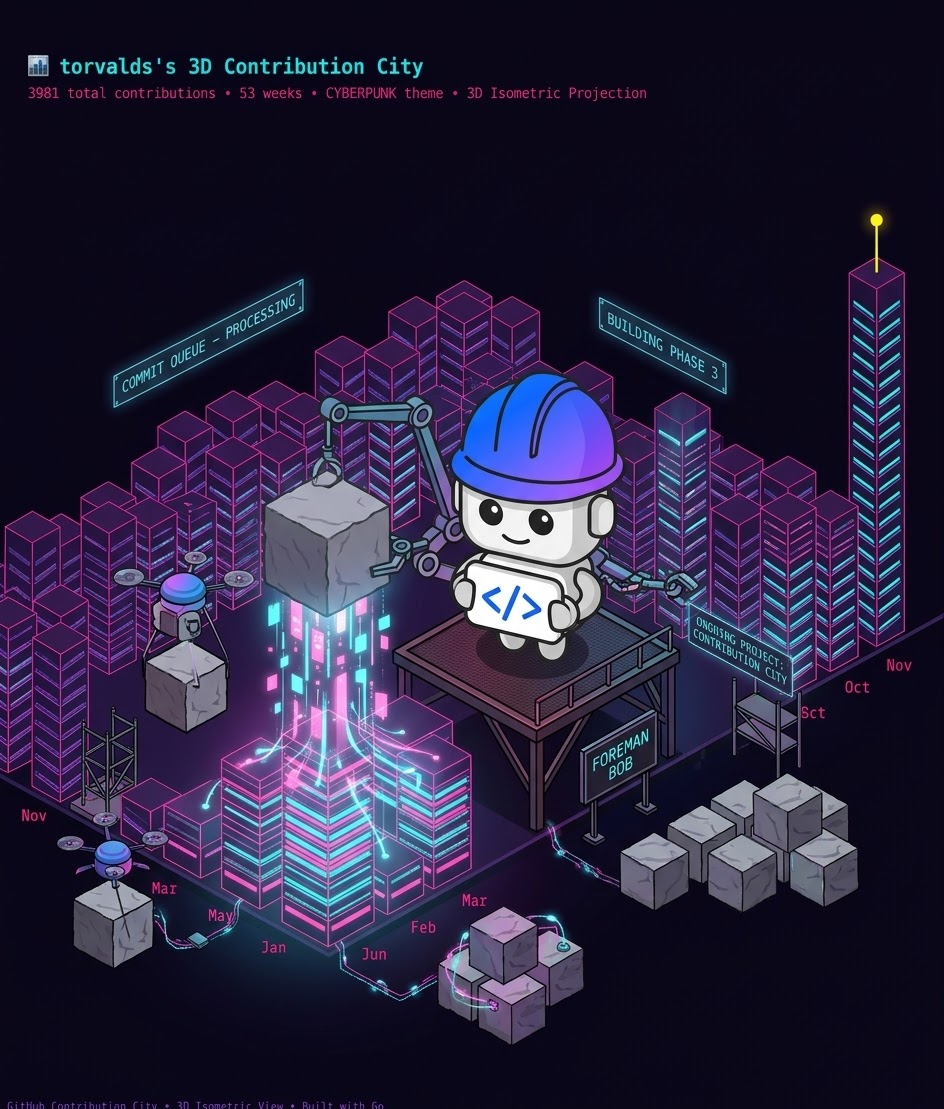
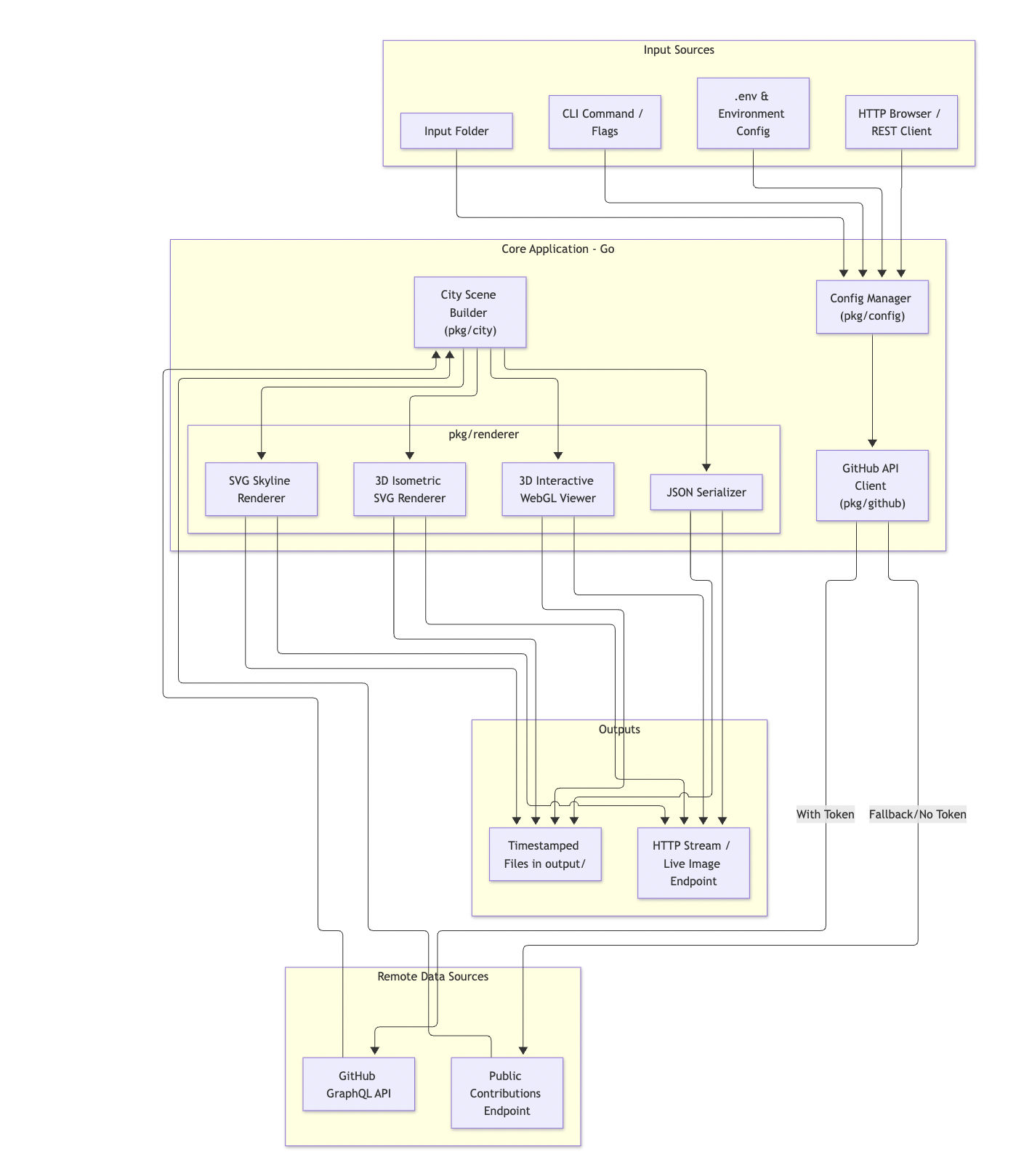
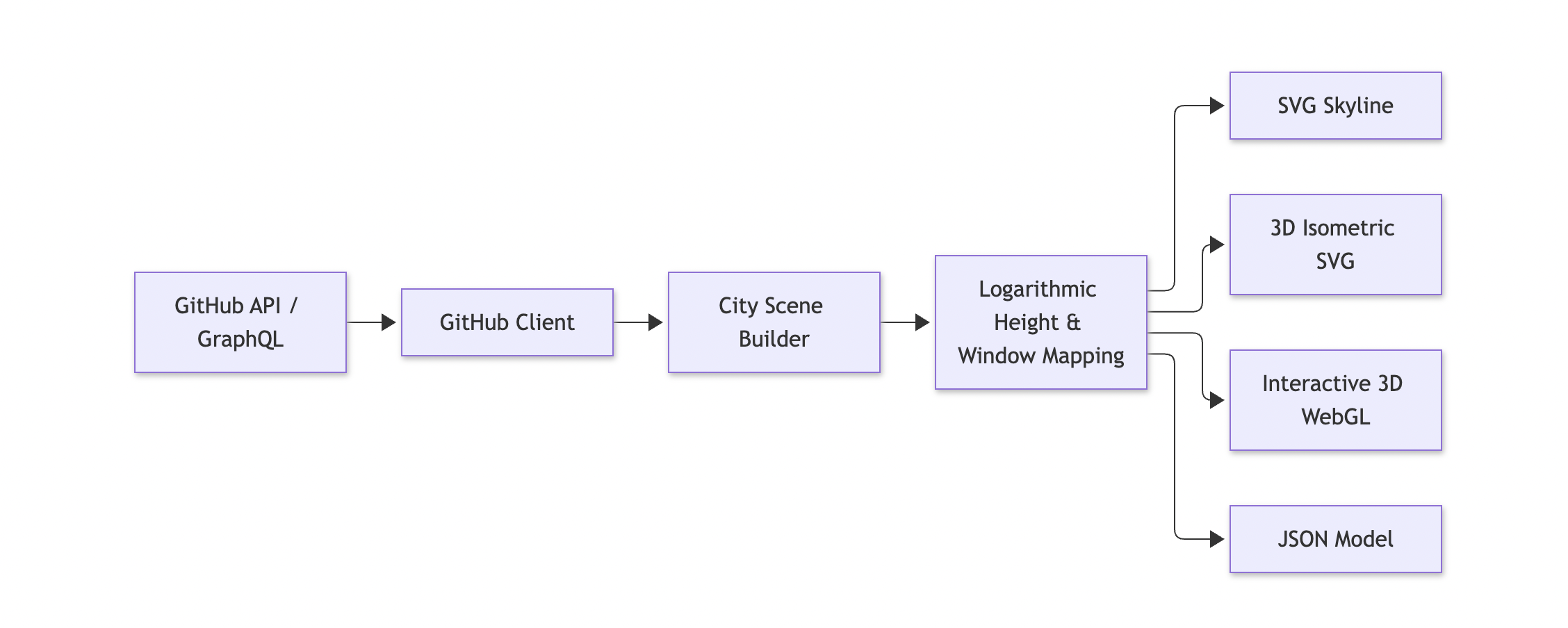
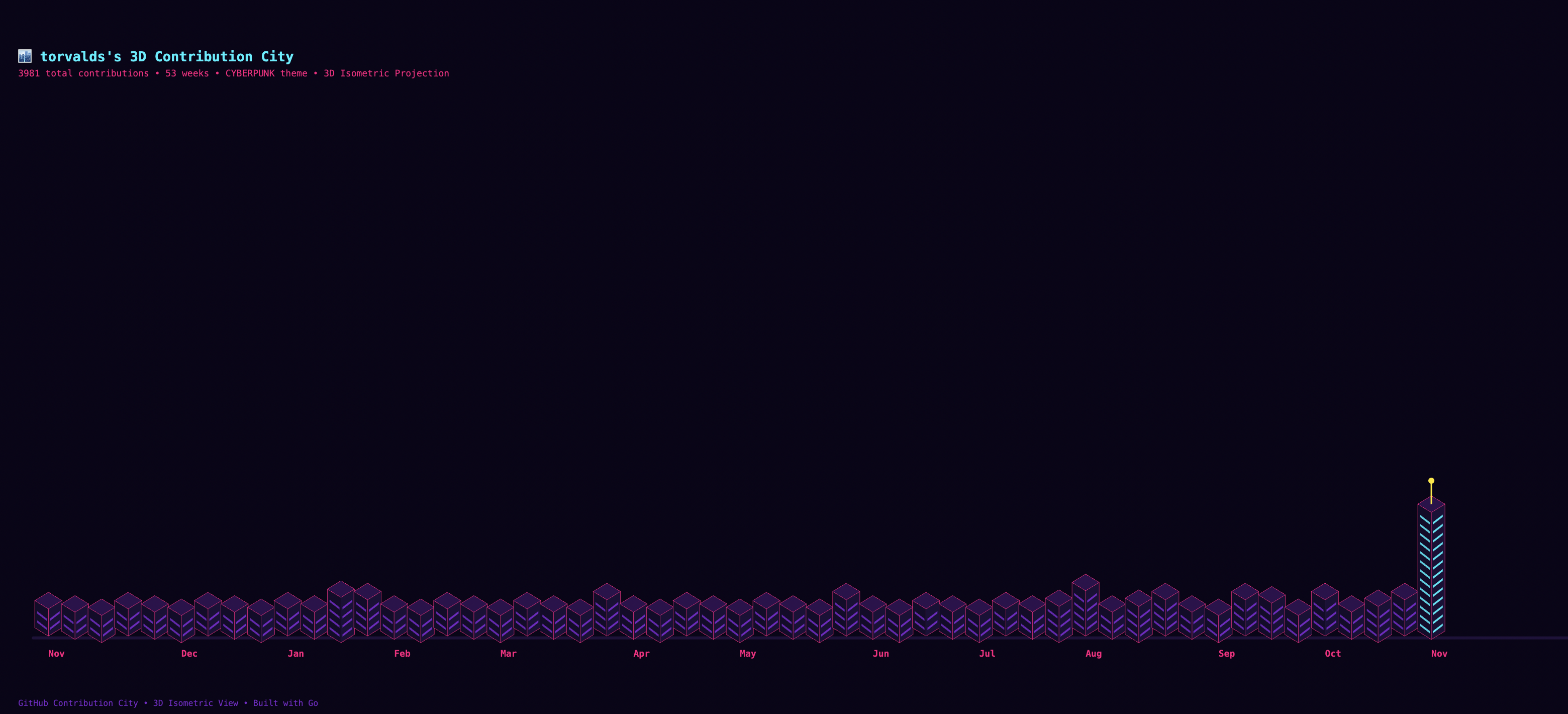
Building a GitHub Contribution City: Transforming Developer History into a 3D Skyline Build your contribution city! !Image description Developer profiles are our digital resumes, but let's be honest: the standard 53-week GitHub contribution heatmap grid is starting to feel a bit flat. What if instead of looking at flat green squares, we could walk through a bustling cyberpunk metropolis, gaze up at towering skyscrapers built from our busiest commit weeks, and watch our coding history come alive in 3D? In this post, we’ll explore GitHub Contribution City, a production-grade application built in Go that transforms any GitHub user's contribution history into a stunning 2D SVG skyline, a 3D isometric SVG, and an interactive WebGL 3D world powered by Three.js. > Before moving further, I want to clarify that the inspiration for this project comes from a blog post by Markus Eisele—a highly esteemed IBM colleague—which you can read here. Reading it gave me the idea to build this using IBM Bob. However, Markus is a true Java enthusiast who isn't particularly fond of languages like Python or JavaScript. Personally, I'm not a fan of Java :) so I asked Bob to adapt the codebase into Go instead. We all have our own brand of madness! 😵💫 --- Introduction & Project Inspiration The initial spark for this project was inspired by Markus Eisele’s fantastic Quarkus Contribution City concept. While the original implementation was written in Java, we wanted to build a modern, lightning-fast, zero-dependency binary in Go that can run locally as a CLI tool, deploy as a high-performance web server, or run automatically via GitHub Actions. Whether you want to generate a gorgeous SVG badge for your README.md, view your personal tech metropolis in 3D, or spin up an automated daily action that tracks your team's contributions, GitHub Contribution City turns your code commits into architectural marvels. Detailed Architecture and Implementation System Architecture The application is structured around a clean modular pipeline: input configurations and remote API data feed into our core scene builder, which in turn delegates to specialized renderers. !Image description Configuration Management (pkg/config) The configuration manager handles environment variables, .env configuration files, and sensible defaults (such as defaulting to torvalds if no user is specified). package config import ( "bufio" "os" "strconv" "strings" ) // Config represents runtime configuration for GitHub Contribution City type Config struct { GitHubToken string `json:"github_token"` GitHubUsername string `json:"github_username"` Weeks int `json:"weeks"` MaxHeight int `json:"max_height"` Theme string `json:"theme"` Port int `json:"port"` Host string `json:"host"` OutputDir string `json:"output_dir"` InputDir string `json:"input_dir"` } // DefaultConfig returns default sensible parameters func DefaultConfig() *Config { return &Config{ GitHubToken: "", GitHubUsername: "torvalds", Weeks: 53, MaxHeight: 14, Theme: "github-dark", Port: 8088, Host: "0.0.0.0", OutputDir: "output", InputDir: "input", } } // LoadConfig loads configuration from optional .env file and environment variables func LoadConfig(envFile string) *Config { cfg := DefaultConfig() if envFile != "" { _ = loadDotEnv(envFile) } else if _, err := os.Stat(".env"); err == nil { _ = loadDotEnv(".env") } if val := os.Getenv("GITHUB_TOKEN"); val != "" { cfg.GitHubToken = strings.TrimSpace(val) } if val := os.Getenv("GITHUB_USERNAME"); val != "" { cfg.GitHubUsername = strings.TrimSpace(val) } if val := os.Getenv("CITY_WEEKS"); val != "" { if w, err := strconv.Atoi(val); err == nil && w >= 1 && w <= 53 { cfg.Weeks = w } } if val := os.Getenv("CITY_MAX_HEIGHT"); val != "" { if h, err := strconv.Atoi(val); err == nil && h >= 2 && h <= 50 { cfg.MaxHeight = h } } if val := os.Getenv("CITY_THEME"); val != "" { cfg.Theme = strings.TrimSpace(val) } if val := os.Getenv("PORT"); val != "" { if p, err := strconv.Atoi(val); err == nil && p > 0 { cfg.Port = p } } return cfg } func loadDotEnv(filepath string) error { file, err := os.Open(filepath) if err != nil { return err } defer file.Close() scanner := bufio.NewScanner(file) for scanner.Scan() { line := strings.TrimSpace(scanner.Text()) if line == "" || strings.HasPrefix(line, "#") { continue } parts := strings.SplitN(line, "=", 2) if len(parts) == 2 { key := strings.TrimSpace(parts[0]) val := strings.TrimSpace(parts[1]) val = strings.Trim(val, `"'`) if os.Getenv(key) == "" { _ = os.Setenv(key, val) } } } return scanner.Err() } Fetching Contribution Calendars (pkg/github) The GitHub client seamlessly switches between authenticated GraphQL API queries (supporting private and internal commits if a PAT is provided) and a robust HTML scraper fallback for public profiles. package github import ( "bytes" "context" "encoding/json" "fmt" "io" "net/http" "time" ) // ContributionDay represents one day's contributions type ContributionDay struct { ContributionCount int `json:"contributionCount"` ContributionLevel string `json:"contributionLevel"` Date string `json:"date"` Weekday int `json:"weekday"` ParsedDate time.Time `json:"-"` } // ContributionWeek represents a week of days (up to 7 days) type ContributionWeek struct { ContributionDays []ContributionDay `json:"contributionDays"` FirstDay string `json:"firstDay"` } // ContributionCalendar is the complete calendar returned by GitHub type ContributionCalendar struct { TotalContributions int `json:"totalContributions"` Weeks []ContributionWeek `json:"weeks"` Colors []string `json:"colors"` Username string `json:"username"` } // Client is a GitHub API client that can fetch contribution calendars type Client struct { token string httpClient *http.Client graphQLURL string } func NewClient(token string) *Client { return &Client{ token: token, httpClient: &http.Client{ Timeout: 15 * time.Second, }, graphQLURL: "https://api.github.com/graphql", } } // FetchCalendar fetches contribution data using GraphQL or public scraping fallback func (c *Client) FetchCalendar(ctx context.Context, username string) (*ContributionCalendar, error) { if c.token != "" { cal, err := c.fetchGraphQL(ctx, username) if err == nil && cal != nil { return cal, nil } } return c.fetchPublicCalendar(ctx, username) } Logarithmic City Layout Algorithm (pkg/city) To prevent single hyper-active weeks from completely distorting the skyline scale, building heights are calculated using logarithmic scaling: !Image description // Calculate building heights using logarithmic scale as specified in Quarkus Contribution City: buildingHeights := make([]int, numWeeks) for i, tot := range weeklyTotals { if tot == 0 || maxWeekly == 0 { buildingHeights[i] = 1 } else { ratio := math.Log1p(float64(tot)) / math.Log1p(float64(maxWeekly)) h := 1 + int(math.Round(ratio * float64(opts.MaxHeight-1))) if h < 1 { h = 1 } if h > opts.MaxHeight { h = opts.MaxHeight } buildingHeights[i] = h } } Main Application Entrypoint (cmd/city/main.go) The main CLI dispatcher supports generating single SVGs, 3D isometric views, batch processing multiple usernames from an input folder, or starting an embedded HTTP server. !Image description package main import ( "context" "encoding/json" "flag" "fmt" "log" "os" "path/filepath" "strings" "time" "github.com/alainairom/github-contribution-city/pkg/city" "github.com/alainairom/github-contribution-city/pkg/config" "github.com/alainairom/github-contribution-city/pkg/github" "github.com/alainairom/github-contribution-city/pkg/renderer" ) func main() { var ( serverMode = flag.Bool("server", false, "Start the web visualization server") username = flag.String("user", "", "GitHub username to visualize") token = flag.String("token", "", "GitHub Personal Access Token (PAT)") weeks = flag.Int("weeks", 0, "Number of weeks to render (4 - 53)") maxHeight = flag.Int("height", 0, "Maximum building height (3 - 30)") theme = flag.String("theme", "", "Visual theme") format = flag.String("format", "svg", "Export format: svg, iso, html, json, all") outFile = flag.String("output", "", "Output filepath or directory") port = flag.Int("port", 0, "HTTP server port") envFile = flag.String("env", ".env", "Path to .env configuration file") ) flag.Parse() cfg := config.LoadConfig(*envFile) if *username != "" { cfg.GitHubUsername = *username } if *token != "" { cfg.GitHubToken = *token } if *weeks > 0 { cfg.Weeks = *weeks } if *maxHeight > 0 { cfg.MaxHeight = *maxHeight } if *theme != "" { cfg.Theme = *theme } if *port > 0 { cfg.Port = *port } _ = os.MkdirAll(cfg.OutputDir, 0755) client := github.NewClient(cfg.GitHubToken) builder := city.NewBuilder() svgRenderer := renderer.NewSVGRenderer() htmlRenderer := renderer.NewHTMLRenderer() if *serverMode { runServer(cfg, client, builder, svgRenderer, htmlRenderer) return } fmt.Printf("🏙️ Generating Contribution City for '%s'...\n", cfg.GitHubUsername) ctx, cancel := context.WithTimeout(context.Background(), 20*time.Second) defer cancel() cal, err := client.FetchCalendar(ctx, cfg.GitHubUsername) if err != nil { log.Fatalf("❌ Error fetching contribution data: %v", err) } scene := builder.Build(cal, city.Options{ Weeks: cfg.Weeks, MaxHeight: cfg.MaxHeight, Theme: cfg.Theme, }) outPath := filepath.Join(cfg.OutputDir, fmt.Sprintf("%s_city.svg", cfg.GitHubUsername)) svgContent := svgRenderer.RenderSkyline(scene, cfg.Theme) _ = os.WriteFile(outPath, []byte(svgContent), 0644) fmt.Printf("✨ SVG Skyline successfully written to: %s\n", outPath) } ---- Automation with GitHub Actions To keep your contribution city continuously updated without manual intervention, the repository features an automated CI/CD and scheduling suite using GitHub Actions. The workflow automation includes: - Continuous Integration (ci.yml): Runs linting checks, go vet, vulnerability scans via govulncheck, multi-OS unit tests (ubuntu, macos, windows), and cross-compilation on every push and pull request. name: Continuous Integration on: push: branches: - main - master paths-ignore: - 'Docs/**' - 'README.md' - 'output/**' pull_request: branches: - main - master permissions: contents: read jobs: lint: name: Lint & Code Style runs-on: ubuntu-latest steps: - name: Checkout Source Code uses: actions/checkout@v4 - name: Setup Go uses: actions/setup-go@v5 with: go-version: '1.24' cache: true - name: Verify Formatting run: | UNFORMATTED=$(gofmt -l . | grep -v '^vendor/' || true) if [ -n "$UNFORMATTED" ]; then echo "❌ Code format issues found in following files:" echo "$UNFORMATTED" exit 1 fi echo "✅ All Go files formatted properly." - name: Run Go Vet run: go vet ./... - name: Run golangci-lint uses: golangci/golangci-lint-action@v6 with: version: latest args: --timeout=5m continue-on-error: true vuln-scan: name: Security & Vulnerability Scan runs-on: ubuntu-latest steps: - name: Checkout Source Code uses: actions/checkout@v4 - name: Setup Go uses: actions/setup-go@v5 with: go-version: '1.24' cache: true - name: Run govulncheck uses: golang/govulncheck-action@v1 with: go-version-input: '1.24' go-package: ./... ... - Daily Visualization Updates (update-city.yml): Powered by a scheduled cron trigger (03:17 UTC), this workflow fetches fresh contribution matrices for the repository owner and any tracked usernames listed inside the input/ folder, regenerates the respective skylines, and commits the updated graphics back to the repository automatically ([skip ci]). name: Daily Contribution City Update on: schedule: # Runs everyday at 03:17 UTC - cron: '17 3 * * *' workflow_dispatch: inputs: custom_user: description: 'Optional specific GitHub username to generate for' required: false default: '' theme: description: 'Theme to use (github-dark, github-light, cyberpunk, mono, neon, matrix)' required: false default: 'github-dark' permissions: contents: write jobs: update-visualizations: name: Regenerate Contribution Cities runs-on: ubuntu-latest steps: - name: Checkout Repository uses: actions/checkout@v4 with: fetch-depth: 0 - name: Set up Go uses: actions/setup-go@v5 with: go-version: '1.24' cache: true - name: Build Contribution City CLI run: | go build -o bin/github-contribution-city cmd/city/main.go - name: Generate Visualizations env: GITHUB_TOKEN: ${{ secrets.CONTRIBUTION_TOKEN || secrets.GITHUB_TOKEN }} run: | mkdir -p output PRIMARY_USER="${{ inputs.custom_user || github.repository_owner }}" SELECTED_THEME="${{ inputs.theme || 'github-dark' }}" echo "🌆 Generating contribution city for primary user: ${PRIMARY_USER} (Theme: ${SELECTED_THEME})..." # 1. Generate primary user 2D SVG Skyline ./bin/github-contribution-city \ -user "${PRIMARY_USER}" \ -weeks 53 \ -height 14 \ -theme "${SELECTED_THEME}" \ -format svg \ -output "output/contribution-city.svg" # 2. Generate primary user 3D Isometric SVG ./bin/github-contribution-city \ -user "${PRIMARY_USER}" \ -weeks 53 \ -height 14 \ -theme "cyberpunk" \ -format iso \ -output "output/contribution-city-3d.svg" # 3. Generate primary user 3D Interactive HTML ./bin/github-contribution-city \ -user "${PRIMARY_USER}" \ -weeks 53 \ -height 14 \ -theme "${SELECTED_THEME}" \ -format html \ -output "output/contribution-city.html" # 4. If tracked users exist in input/ directory, batch process them if [ -d "input" ] && [ "$(ls -A input 2>/dev/null)" ]; then echo "📁 Processing batch users from input directory..." ./bin/github-contribution-city -batch input/ -output output/ fi - name: Commit and Push Changes run: | git config --global user.name "github-actions[bot]" git config --global user.email "github-actions[bot]@users.noreply.github.com" git add output/ if git diff --staged --quiet; then echo "ℹ️ No changes detected in contribution calendars. Skipping commit." else git commit -m "chore(city): auto-update contribution city visualizations [skip ci]" git push echo "✅ Successfully committed and pushed updated visualizations." fi - name: Upload Output Artifacts uses: actions/upload-artifact@v4 with: name: contribution-city-visualizations path: output/ retention-days: 30 - Container & Release Management (docker.yml & release.yml): Automatically builds multi-arch container images (linux/amd64, linux/arm64) for the GitHub Container Registry (ghcr.io) and packages cross-compiled release binaries whenever version tags are pushed. --- Conclusion !Image description Building GitHub Contribution City was a fun journey merging developer metrics with procedural city generation and graphics rendering. By leveraging Go, we achieved a blazing fast binary that can be embedded directly into CI/CD pipelines, containerized for Docker/Podman, or served live via an interactive Three.js 3D browser experience. Thanks for reading 🌃 Links - Github repository for this post: aairom/github-contribution-city - Build a GitHub Contribution City With Java and Quarkus (by Markus Eisele): dzone.com - Quarkus-Contribution-City (java code from Markus-Eisele): myfear/quarkus-contribution-city
まだ接続エラーになるので修正 VercelのFunctionにPrismaのWASMを同梱する github.com/ryo-i/next-nest-started/commit/f509bc4…
MTA-STS and TLS-RPT: Enforce TLS for Inbound Email --- title: "MTA-STS and TLS-RPT: Enforce TLS for Inbound Email" published: true description: "Stop STARTTLS downgrade attacks on inbound email with MTA-STS and TLS-RPT: real Gmail and Yahoo policies, a staged rollout and the failure modes to check." tags: security, email, devops, dns cover_image: dev-to-uploads.s3.us-east-2.amazonaws.com --- SMTP between mail servers was designed in an era when nobody encrypted anything, and it still shows. STARTTLS upgrades a connection to TLS only if both sides offer it, which means anyone on the network path can strip that offer and force your inbound mail into plaintext. MTA-STS is the fix: a published policy that tells sending servers "always use TLS to my MX hosts, with a valid certificate, or don't deliver at all." I run PixelValut, a set of browser-side developer and security tools, including an MTA-STS checker. I wrote this with help from AI tools and checked every command and claim myself. Every DNS answer and policy file below was fetched today from the live domains named. What is MTA-STS and what does it protect? Direct answer: MTA-STS (RFC 8461) lets a domain publish a TXT record and an HTTPS-hosted policy file that tell sending mail servers to deliver only over TLS, to listed MX hosts, with a valid certificate. It blocks STARTTLS downgrade and MX spoofing attacks on inbound email. TLS-RPT (RFC 8460) adds daily reports on failed TLS connections. The threat: opportunistic TLS fails open Without MTA-STS, a sending server connecting to your MX does this: connect on port 25, send EHLO, look for 250-STARTTLS in the reply, and upgrade if it's there. If it isn't, most servers deliver in plaintext rather than bounce the mail. They also usually don't validate the MX certificate, because there was historically no way to know what certificate to expect. That gives an attacker on the path two easy moves: | Attack | How it works | Without MTA-STS | With MTA-STS enforce | | --- | --- | --- | --- | | STARTTLS stripping | Remove STARTTLS from the EHLO response | Sender falls back to plaintext | Sender refuses to deliver, retries later | | Certificate swap | Present a self-signed or wrong-host cert | Usually accepted | Rejected: cert must be valid for the MX host | | MX spoofing | Poison DNS so MX points to attacker host | Mail goes to attacker | Host not in policy mx: list, rejected | | Passive eavesdropping | Read mail on a plaintext hop | Readable | Hop must be TLS | SPF, DKIM and DMARC don't help here. They authenticate who sent a message. MTA-STS protects the transport into your domain. I covered the sender side in how to check SPF, DKIM and DMARC records. This is the other half. The three moving parts, from real domains MTA-STS has two required pieces and one optional but essential one. My box doesn't have dig, so I queried Cloudflare's DNS-over-HTTPS JSON endpoint with curl. The answers are the same records dig TXT returns. 1. The _mta-sts TXT record signals that a policy exists and carries an id that must change whenever the policy changes: _mta-sts.gmail.com TXT "v=STSv1; id=20190429T010101;" _mta-sts.outlook.com TXT "v=STSv1; id=20190225000000Z;" _mta-sts.yahoo.com TXT "v=STSv1; id=20161109010200Z;" _mta-sts.github.com (no record) 2. The policy file, always at https://mta-sts.<domain>/.well-known/mta-sts.txt, served over HTTPS with a valid certificate. I fetched each one with curl: curl -s https://mta-sts.gmail.com/.well-known/mta-sts.txt version: STSv1 mode: enforce mx: smtp.google.com mx: gmail-smtp-in.l.google.com mx: *.gmail-smtp-in.l.google.com max_age: 86400 Compare with Yahoo's, fetched the same way: version: STSv1 mode: testing mx: *.am0.yahoodns.net mx: *.mail.gm0.yahoodns.net mx: *.mail.am0.yahoodns.net max_age: 86400 3. The TLS-RPT record at _smtp._tls, which tells senders where to report TLS failures: _smtp._tls.gmail.com TXT "v=TLSRPTv1;rua=mailto:sts-reports@google.com" _smtp._tls.outlook.com TXT "v=TLSRPTv1;rua=https://tlsrpt.azurewebsites.net/report" What the policy fields tell you: | Field | Gmail | Outlook.com | Yahoo | What it means | | --- | --- | --- | --- | --- | | mode | enforce | enforce | testing | enforce blocks bad delivery; testing only reports | | mx | 3 patterns incl. wildcard | *.olc.protection.outlook.com | 3 wildcards | Allowed MX hostnames | | max_age | 86400 (1 day) | 604800 (7 days) | 86400 (1 day) | How long senders cache the policy | | TLS-RPT | mailto | HTTPS endpoint | mailto | Where failure reports go | Two details from those outputs are worth checking on your own domain. First, the mx: patterns must cover every real MX. Gmail's MX set is gmail-smtp-in.l.google.com plus alt1 to alt4.gmail-smtp-in.l.google.com, and the wildcard *.gmail-smtp-in.l.google.com covers the alternates. A wildcard matches exactly one label, so *.example.com covers mx1.example.com but not a.mx1.example.com. Second, Yahoo publishes in testing, a reminder that even large providers don't always run enforce. !A row of old brass mailboxes with small closed doors, representing mail that should only reach verified destinations AI-generated image. How a sending server uses the policy When a sender that supports MTA-STS delivers to your domain: 1. It looks up _mta-sts.yourdomain TXT. If there's a record and the id differs from its cached copy, it fetches the policy over HTTPS. 2. It validates the HTTPS certificate on mta-sts.yourdomain. A broken cert there means no policy. 3. It caches the policy for max_age seconds. 4. For each MX, it checks the hostname against the mx: patterns, requires STARTTLS, and validates the MX certificate against the hostname. 5. In enforce, a failure means no delivery to that MX; the sender tries other MX hosts and then queues and retries. In testing, it delivers anyway and reports the failure through TLS-RPT. The policy is fetched over HTTPS, not DNS alone, on purpose: an attacker who can tamper with DNS would also be able to remove a DNS-only policy. Caching with max_age protects later connections even if DNS is attacked after the first fetch. The first-ever connection is the weak spot, which is the trust-on-first-use trade-off MTA-STS accepts. Rolling it out without losing mail I roll MTA-STS out in stages, because enforce with a wrong mx: line silently queues inbound mail at senders. | Stage | mode | max_age | Duration | Exit criterion | | --- | --- | --- | --- | --- | | 1. Reporting only | none yet; publish TLS-RPT first | n/a | 1–2 weeks | Reports arrive, no unknown failures | | 2. Testing | testing | 86400 | 2–4 weeks | No sts-policy or certificate failures in reports | | 3. Enforce, short cache | enforce | 86400 | 1–2 weeks | Still clean | | 4. Enforce, long cache | enforce | 604800 or more | Ongoing | Monitor reports weekly | The policy file can be static on any HTTPS host. A minimal Nginx block: server { listen 443 ssl; server_name mta-sts.example.com; ssl_certificate /etc/letsencrypt/live/mta-sts.example.com/fullchain.pem; ssl_certificate_key /etc/letsencrypt/live/mta-sts.example.com/privkey.pem; location = /.well-known/mta-sts.txt { default_type text/plain; return 200 "version: STSv1\nmode: testing\nmx: mx1.example.com\nmx: mx2.example.com\nmax_age: 86400\n"; } } Failure modes I check first - Expired certificate on mta-sts. host. Senders can't fetch the policy. Automate renewal and monitor it like any other site; my SSL certificate check guide covers what to inspect. - Policy changed, id not bumped. Senders keep the cached version until max_age expires. - MX migration without a policy update. Moving mail providers changes MX hosts. Update mx: lines first, bump the id, wait out the old max_age, then switch MX. The DNS migration audit sequence applies here too. - Wrong content type or redirects. Serve the policy directly as text/plain. RFC 8461 says senders must not follow HTTP redirects when fetching it. - Forwarding-only domains. My own sites use registrar mail forwarding with MX hosts I don't control, so I can't publish an honest mx: list that I can keep correct. If you don't control the MX or its certificates, coordinate with the provider instead of guessing. Verify it in your browser Paste your domain into the PixelValut MTA-STS checker. It reads the _mta-sts TXT record, fetches the policy file, compares the mx: lines with your real MX hosts and shows the TLS-RPT record, the same checks I ran with curl above. MTA-STS deployment checklist 1. List every MX host and confirm each presents a valid, unexpired certificate matching its hostname. 2. Publish _smtp._tls with a mailbox or HTTPS endpoint you actually read. 3. Create mta-sts.yourdomain with a valid certificate and serve the policy as text/plain, no redirects. 4. Start with mode: testing and max_age: 86400. 5. Publish _mta-sts TXT with v=STSv1 and a fresh id. 6. Read TLS-RPT reports for two to four weeks. 7. Switch to enforce, bump the id, keep a short max_age for a week, then raise it. 8. Add the policy to your MX change runbook. Frequently asked questions Does MTA-STS encrypt outbound email from my domain? No. It protects mail sent to your domain by senders that support it. Your outbound security depends on the receiving domains' policies and your server honoring them. Is MTA-STS the same as DANE? No. DANE pins certificates in DNS with TLSA records and requires DNSSEC. MTA-STS uses HTTPS and the normal certificate system, so it works without DNSSEC. What happens if my MTA-STS policy is wrong in enforce mode? Senders that honor the policy won't deliver to MX hosts that fail it. They queue and retry, and mail may bounce after the retry period. That is why the testing stage matters. Do I need TLS-RPT? It's optional in the spec, but rolling out without it is flying blind. The reports show which senders failed TLS and why. How often do senders refresh the policy? When the id in the TXT record changes, or when the cached copy reaches max_age. Bumping the id is how you announce an update. Does Gmail use MTA-STS? Gmail publishes an enforce policy for gmail.com, shown above, with a one-day max_age and a TLS-RPT address. Whether a given sender honors your policy is up to that sender, which is what TLS-RPT reports reveal. --- Follow & Connect - YouTube: PixelValut (@pixel-valut) - TikTok: PixelValut (@pixelvalut007) - GitHub: Muhammad Ali Mughal (@ali111887) - LinkedIn: Muhammad Ali Mughal
Claude Code mod that checks whether "done" actually means done We've been working on AgentMon Live, a plugin that puts a live monitoring pane beside your Claude Code chat. The main reason we built it: Claude can report that work is finished even when a test failed, the last passing test predates the latest edit, or a subagent left something unfinished. The plugin adds a "done gate" that checks for those conditions before Claude stops. It sends unfinished items back to Claude once. A second model, which doesn't write code, checks whether every part of your request was answered. The pane also shows: - Running tools and subagents - Files edited and read - Latest test, lint, and build results - Context usage and token consumption - Items needing attention, including repeated failures and stuck subagents You can turn the done gate off and customize which sections appear. Install in Claude Code: /plugin install agentmon-live --marketplace codenotary/agentmon-live Requires Claude Code 2.1.308 or later. Apache 2.0 licensed. GitHub - Open source under Apache 2.0.: codenotary/agentmon-live Walkthrough: codenotary.com Curious what you'd want checked before Claude calls a task finished. Failed tests are straightforward. What else do you regularly catch during review?
Capitulares - a plugin to give you illuminated capitals So while I absolutely love all the UI options we're seeing and i like that we have a community that has fun tweaking their home screens to their heart contempt, I end up spending 80% of my time with my ereaders... Inside books, reading. While looking around for ways to make koreader a little bit more like a book, removing clocks and icons adding fleurons ( ended up playing with kindlemodshelf.me - not sure where the actual latest version is, sorry - and bookends) I ended up remembering how much i LOVE looking at beautiful Illuminated manuscripts, when going to museums. So I was like... Hmmm this would be a cool feature. Now, I KNOW it is a ereader and in practical terms its not necessary (are any of our favourite plugins tho?), BUT i ended up coming up with Capitulares (the Portuguese word for the Initial letter of each chapter.) You can download here rmmr111/Capitulares.Koplugin The idea is super simple: You pick a decorative font you like (I've bundled a few links in hte repository square ones work best) (or if you want you can use the ones on your ereader) , you add it to the folder, and you apply it as a decorative first font (Oh and if you have a colored eink you can change the color of the decorative letter.) You can select it only for the first letter of each chapter (the standard way), or you can go to advanced settings and add extra ones showing up each X paragraphs or every first paragraph per X pages (I am still tweaking this one as sometimes it will not repeat properly due to epub formatting). It overlays the book formatting (if you don't want it you can deactivate it) It has an automatically assigned gesture - long press on the left corner - and a floating menu where you can adjust the spacing for each font type (decorative fonts are formatted funnily so sometimes they can lay too high or too los on the page). This plugin is packed in Portuguese (my language )and English, and For Portuguese (and other languages with accents) it generates a copy of the decorafive font that replace any accents by the plain letter to avoid weird replacements (as decorative letters are for the most part just the plain letters) I do not plan on doing a lot of updates on this anytime soon, but I'm open to your suggestions I love the way my books look now, and hope you guys like using it too.
Today's top opensource GitHub repo of the day: screenpipe/screenpipe screenpipe/screenpipe 24/7 desktop screen and audio capture indexed locally in SQLite. why builders should care: gives local agents on-screen context without sending recordings to the cloud.
Ah yeah it's out of my price range for sure 😅 I know nothing about film or film simulations tbh, but I've been enjoying to tinker with spektrafilm within darkable (nightly) recently andreavolpato/spektrafilm Again knowing nothing, I just pick a film stock & turn dials until I get a vibe I like.
Full breakdown, with the cost model, the latency trade-off, and what I would build: indrajitswain.substack.com Paper: arxiv.org (Zhichang Yu et al., InfiniFlow + East China Normal University) Code: infiniflow/ragflow
@pyrdacor.bsky.social has ported Ambermoon from it's mix of original Amiga source code (and some disassembly) to the Atari Falcon 030 and Atari ST. Some compromises had to be made to the ST version but do not distract from playing the game. github.com/Pyrdacor/Ambermoon/tree/master/Ambermo…
Toolgrain: reusable, typed MCP tools for existing TypeScript apps (open source) Hi everyone — I’m the author of Toolgrain, an MIT-licensed TypeScript toolkit for building MCP servers. The API centers on standalone tool definitions: Zod schemas describe the input and output, and a handler connects them to your application logic. You register those definitions in a server, then choose stdio or HTTP. The same definitions can be reused across servers. Here’s a complete example that exposes a small inventory lookup. Using Node.js 24.20.0 or later in the 24.x line, create a project: mkdir toolgrain-demo cd toolgrain-demo npm init -y npm install @toolgrain/mcp @toolgrain/node zod@^4.6.6 npm install --save-dev typescript @types/node@^24.10.0 Save this as server.mts: import { createServer, tool } from "@toolgrain/mcp"; import { stdio } from "@toolgrain/node"; import { z } from "zod"; const inventory = { notebook: 12, pencil: 48 }; const getStock = tool({ description: "Look up the stock available for a product", annotations: { readOnlyHint: true }, input: z.object({ sku: z.enum(["notebook", "pencil"]) }), output: z.object({ sku: z.string(), quantity: z.number().int().nonnegative(), }), execute: ({ sku }) => ({ sku, quantity: inventory[sku] }), }); const server = createServer({ name: "inventory-demo", version: "1.0.0", tools: { get_stock: getStock }, }); await server.listen(stdio()); Compile it: npx tsc server.mts --strict --module NodeNext --target ES2022 --types node Then call the tool with MCP Inspector: npx --yes @modelcontextprotocol/inspector@2.11.0 \ --cli node server.mjs \ --protocol-era modern --format json \ --method tools/call \ --tool-name get_stock \ --tool-arg sku=notebook The response includes this in result.structuredContent: { "sku": "notebook", "quantity": 12 } The registration key get_stock becomes the name clients see. The handler’s input type is inferred from Zod, and Toolgrain validates both the input and the declared output at runtime. In an application, you’d replace the in-memory lookup with your existing service. Beyond this example, there are HTTP adapters, typed context providers for application dependencies, JWT/Clerk authorization integrations, and runnable examples for Express, Hono, Elysia, and Next.js. The current scope is tool discovery and execution, supporting MCP 2026-07-28 and initialization-based 2025-06-18. HTTP uses independent POST requests with JSON responses. Resources, prompts, sessions, and streaming aren’t implemented. Tested client flows and limitations are documented. - GitHub - Quickstart - Framework examples - Client compatibility I’m looking for the first few developers to try it in real projects. If you’re adding MCP to an existing TypeScript application, does this way of defining and composing tools fit your codebase? What would block you from trying it?
I built minimo (photo): a free, open-source photo compressor made with Flutte After building minimo (video), I kept running into the same problem with photos: I wanted to make them smaller without uploading them or paying for a subscription. So I built minimo (photo). It compresses photos on the phone, on iOS and Android. You can process a batch with a preset or adjust quality, dimensions, and metadata yourself. It saves a new copy by default; replacing an original is an explicit choice. Flutter handles the UI and batch progress, while `flutter_image_compress` uses the platforms’ native image APIs. One detail I found useful: if recompression saves less than 10%, the app skips that result. The app is free, and the code is open source: minimo-pro/minimo_photo
Plunger: a modding tools for Rayman Raving Rabbids 1 (Wii) Hello, I'm currently developing a modding tool for Rayman: Raving Rabbids 1 (Wii) named Plunger, and in future updates, I plan to add support for many other Rabbids and Jade Engine games. Github Link: DYCAMAX/Plunger This project does not use AI.
Location: Croatia, EU Remote: Yes Willing to relocate: No Technologies: .NET, Node.js, Express, Typescript, React, AWS, Azure, Firebase, PostgreSQL, MSSQL, Redis LinkedIn: linkedin.com Email: dominik.blazic@gmail.com Github: github.com/dominikblazic Website: dominikblazic.com Senior Software Engineer with 9+ years of experience building scalable backend systems and product-focused applications. Over the last 4 years, I’ve worked in fast-moving startup environments, taking ownership across the entire product lifecycle: from designing and shipping features to solving production issues, building real-time systems, and handling scaling challenges. I enjoy working close to the product, solving complex technical problems, and building reliable software that users interact with daily. Open to remote B2B opportunities across backend, full-stack, and product engineering roles.
do star it on github: opennookorg/betterwispr
github.com/hra1129/Y8960_Cartridge/tree/main/y896… スネアドラム(かな?)は、ADPCM ですね。だぶん。
Knot がメジャーバージョンアップしてた 2b-zipper/Knot
Engine Health Agent for the Meta Global AI Hackathon calibrated RUL prediction for turbofan engines, a plain-code decision engine that abstains when unsafe, and Muse Spark agents explaining every call. Chandresh-Gohel/NASA_CMAPSS_Meta_Global_AIHT #MetaAIHackathon
Built at NEAR HACKATHON. I tried to rob my own AI agent 3 times just before it paid: faked the deposit address, raised the amount, and redirected the refund. It caught every fake and paid the real one. dipo0x/tollgate trytollgate.xyz @NEARProtocol #NEARHackathon t.co
Plunger: a modding tools for Rayman Raving Rabbids 1 (Wii) Hello, I'm currently developing a modding tool for Rayman: Raving Rabbids 1 (Wii) named Plunger, and in future updates, I plan to add support for many other Rabbids and Jade Engine games. Github Link: DYCAMAX/Plunger This project does not use AI.
智能体自找活。 @MoyuAI:DeepSeek 开源 dsh-superagent 原型——盯 GitHub 事件→开 Ticket→Worker 独立干活提 PR;可捆 Harness,也可盯飞书消息。官方称研究原型。GitHub:deepseek-ai/dsh-superagent-prototype 判断:已有仓库自动化需求、想抄 watchdog/派活结构的人先读原型;只跑单次对话的可跳过。先只监视测试仓,别直接对生产主分支放权。
Antigravity使用方式之一,不惧墙。 weideng365/OminiTunnel #Antigravity #socks5 #隧道
wikifier 5.0.0 is out, rewritten in Rust: up to 16x faster than the Python version on a Django checkout, as one 2 MB binary. github.com/IronAdamant/wikifier/releases/tag/v5.0…
Atrium update: 12 new services since our last post, and a much deeper *arr side Hello again! Our last post here was the F-Droid announcement in early August, when Atrium supported 18 services. It's 30 now, across 15 releases since then. Thanks to everyone who kept filing issues through all of it. The *arr side first - Lidarr is supported, at the same depth as Sonarr and Radarr: artists and discography, album and track detail, wanted, queue, history, the full settings tree, an in-app log reader, and album releases in the calendar. - Custom filters saved on your Sonarr or Radarr server now appear in the sort and filter sheet, so the views you built on the server come with you. - Interactive search shows each release's custom format score and the formats it matched, sorted best match first. A release can be opened on its indexer page, and its magnet or download URL copied, before you grab it. - Delete files, keep the entry. Clear a film or an episode off disk while leaving it in Sonarr or Radarr, optionally unmonitoring it so it doesn't just download itself again. Works in bulk too. - Radarr collections. Adding a movie that belongs to one offers to monitor the whole collection, and the movie screen shows the collection with a button to monitor or unmonitor it. - Seerr requests filter by status: Pending, Approved, Completed, Declined and Failed. - The calendar remembers list or month view, can show unmonitored releases, and marks what has already downloaded. Beyond the *arr stack AdGuard Home, Unraid, Navidrome, Ombi, Gluetun, MySpeed, Beszel and dashdot for host monitoring, aria2 and slskd for transfers, and Cleanuparr for the download cleaner. Several things that started as betas: Tracearr, Transmission, Lidarr, Navidrome, Unraid, Ombi and AdGuard Home, are now no longer in beta. Download client changes qBittorrent gained its full settings screen, queue reordering, tag and tracker filters, private/public badges, its external IP, and a torrent list that only asks for what changed since the last refresh. Transmission and Deluge got a full UI overhaul, matching with qBittorrent's aesthetics. Downloads Same note as last time: F-Droid builds on its own cycle, so it's currently on 1.9.1 while GitHub has 1.10.1. The builds are reproducible and signed with the same key, so you can move between the two without uninstalling. - F-Droid: f-droid.org - GitHub Release: github.com/retransmit/Atrium/releases - Source: retransmit/Atrium - Discord: discord.gg Thanks again, let us know what you think, and tell us which service you'd want deepened/implemented next.
How to get a Claude code review on every pull request with just your Pro/Max subscription. No API key, no extra bill. You can run Claude as an automatic reviewer in GitHub Actions on your existing subscription. Setup takes about 15 minutes: 1. Install the Claude GitHub app on your repo 2. Run claude setup-token locally and log in 3. Save the token as the repo secret CLAUDE_CODE_OAUTH_TOKEN 4. Add a workflow that uses anthropics/claude-code-action@v1 with claude_code_oauth_token Usage counts against your plan's limits, shared with your normal Claude Code usage. One trap: most guides use the official code-review plugin for step 4. In GitHub Actions it starts its review agents in the background, the action ends the run before they report back, and the bot posts "No findings" without having reviewed anything. The check stays green. Ours did that for a while before we noticed every run took only 4 to 37 seconds. Known issue: claude-code-action#1646. What works instead: a plain review prompt, --model opus, and no Agent in --allowedTools, so Claude has to do the review itself. We tested it with a PR containing three planted bugs. It found all three in 30 seconds, with a suggested fix for each and no false positives. Full workflow file and prompt: laracraft.tech
I have built a new electrical CAD system using Python and Tkinter I had this little crazy idea to build my own CAD system, and now it’s here: "KatieCAD". Merecete/KatieCAD My primary goal is to develop an easy-to-use program well suited for switchgear construction and building installations. In my view, the options previously available in the open-source space have been very poor. The program includes all the fundamental functions typically found in AutoCAD. It offers both a layout space and a model space. At the same time, it features a customizable symbol library and a sophisticated logic system, the kind usually associated only with software like EPLAN. You can create complete projects consisting of multiple drawings, with the ability to automatically generate tables of contents, device lists, terminal diagrams, and more. Electrical connections link themselves automatically based on their coordinates; all you need to do is position the devices accordingly. There is also a customizable coordinate grid, and cross-references automatically point to the corresponding locations on other pages. Each page is a separate drawing file and is automatically saved after a change. All project data can be exported for analysis in an Excel file. DXF files can be imported and exported without difficulty (either individually or as an entire project). DWG files can also be opened by default using ezdwg. Furthermore, by installing the ODA File Converter separately, files can also be exported in DWG format. In addition to 2D graphics, it now also supports 3D wireframe models, which can be displayed within the layouts. I plan to further expand the functionality in this area; however, it is already possible to create electrical enclosures, complete with side panels, doors, and bases. KatieCAD is bilingual. It can be quickly switched between German and English. I suspect that the extreme speed at which I’ve worked and the sheer volume of code reveal that I’m a "vibecoder". In other words, this project would never have come into existence without AI. That said, I can honestly say that it was an incredibly demanding process; I had to rethink every single function, arriving at this result only through small, incremental steps. The finer details, in particular, required a massive amount of work, and I’m certain I’ll discover even more things to refine as I go along. So for me that's not a "silly build". The program is licensed under the MIT License. What do you think of the idea? Is there anything else you would change or add? I look forward to any feedback.
@huangjinbo Demi 也有类似的功能,值得试试 github.com/wspl
Enable ML-DSA-44 tests now that we are using ubuntu-26.04 runners (ClearlyClaire) mastodon#41453
@elie2222 @siddhantmohan1 @rakazobot @QodoAI Doing 100+ PRs per day in omnivision-solutions/tuti - limited by code reviewers Pointed my agents at Rakazo for the initial code reviewers setup
Pues ya tenéis el código fuente en Github: TFujiwara/mismo-rasero Aunque pienso montar un gitea en local y tunearlo para poner estas cosas allí, Github no me mola mucho.
@shunp_jp This was fixed in PR #5062 (omlx#5062). Apologies for the delayed response.
sandcastle-kit v0.20.0 🏰 Agent runs now live in the new Herdr app: ▸ status view opens beside you ▸ run state and a needs-you alert in the sidebar ▸ a terminal per sandbox, nested under the run Herdr TUI works as before. github.com/henkisdabro/sandcastle-kit/releases/ta… henkisdabro.github.io
je vois partout des screens à 20k de mrr, des journées à 3k en full organique… et au bout de 2 semaines, ça commence déjà à vendre des formations de merde💀 bref, tout est gratuit ici : remotion-dev/skills a+