Mentions
Conversations linking to GitHub, newest first. Times are UTC.
Mentions by source
X
Bluesky
Hacker News
Lobsters
V2EX
Qiita
DEV
Mastodon
Latest posts
Cardputer Zeroの最初の3000バッチに入れるかどうかわからないけれど、そろそろ準備運動しておくかと思って、Templateアプリビルドしてみた。Macでもちゃんと動いた。 CardputerZero/Template t.co
Harness for Documentation I’m building Doclify, an open-source tool that preserves context and decisions between coding-agent sessions. I’d love to build it with others who face the same problem. We can share ideas, learn from each other, and build something useful for our own workflows.
Client: manhliemcn4euwlu-source/abf-client Post: dev.to One trap it documents: /earn-now and /mcp returned 522 all session while feed.json answered in 0.7s.
@DownloadableCO Would love to see you try it! It's free, with the download and setup guide here: IlyaMez/EldenringVR
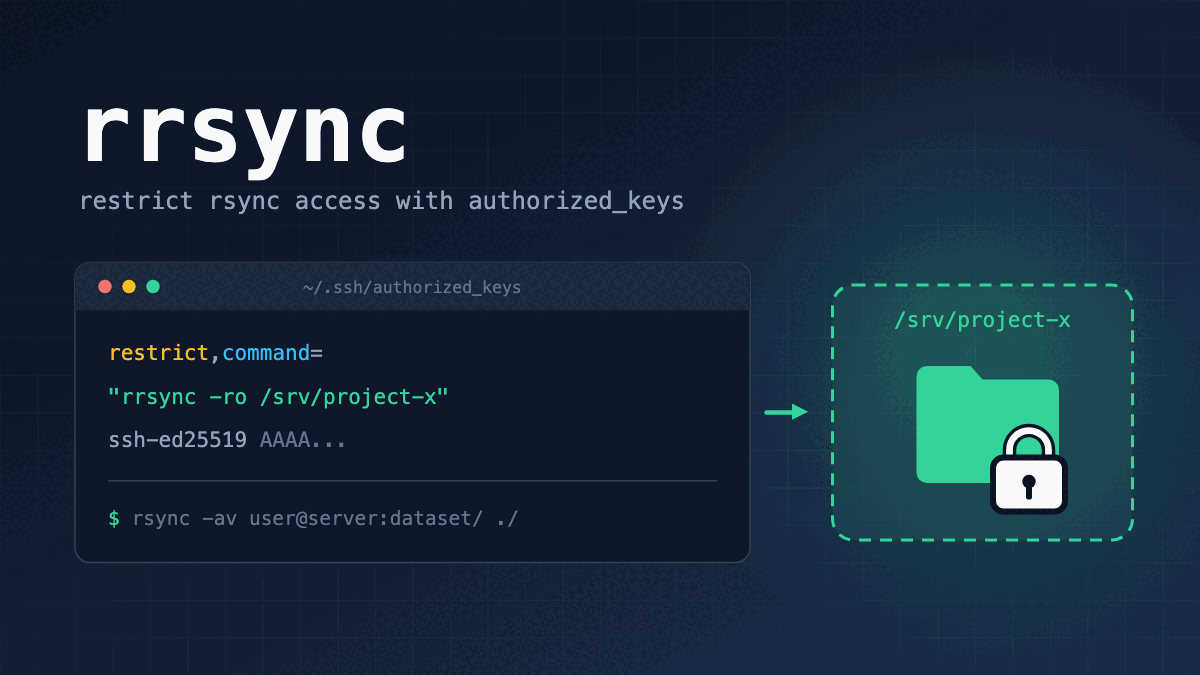
Restricting rsync to a Specific Directory with authorized_keys --- title: Restricting rsync to a Specific Directory with authorized_keys published: true description: Learn how to use SSH authorized_keys and rrsync to restrict rsync access to a specific directory. tags: ['Linux', 'SSH', 'rsync'] cover_image: dev-to-uploads.s3.us-east-2.amazonaws.com Use a ratio of 100:42 for best results. published_at: 2026-11-03 08:29 +0000 --- Introduction In research environments, sharing large datasets with collaborators over the internet is a common task. This often involves transferring files with scp (which uses sftp under the hood these days) or rsync over SSH with public key authentication. However, simply creating an SSH account for file sharing also allows access to other directories that the account can read or write, as well as shell access and port forwarding. That is not ideal from a security perspective. A common approach is to configure ChrootDirectory for each user in sshd_config and force the use of internal-sftp. But for tasks such as synchronization, you may still want to use rsync. In this article, I'll show you a simple way to share files within a specific directory using SSH's authorized_keys and the rsync helper script rrsync (restricted rsync). > [!NOTE] > This article assumes you are familiar with: > - Creating and configuring Linux users > - SSH public key authentication > - Basic rsync usage TL;DR - SSH's authorized_keys lets you restrict the commands and features available to each public key. - Setting rrsync as the command in authorized_keys lets you restrict the directory that a client can read from or write to using rsync. Here are examples of an authorized_keys entry and an rsync command. Adjust the username, public key, paths, command arguments, and other details to suit your environment. Example: Allow Read-Only Access An example authorized_keys entry on the server: # Allow read-only access to /srv/project-x on the server. restrict,command="/usr/bin/rrsync -ro /srv/project-x" ssh-ed25519 AAAA... An example rsync command to run on the client: # Download the files in /srv/project-x/dataset/ on the server to the client's mydataset directory. user@client:~$ rsync -av \ -e 'ssh -i ~/.ssh/id_ed25519' \ user@server:dataset/ \ ./mydataset/ The path specified by the client is interpreted relative to /srv/project-x, the directory configured on the server. For write-only access, use -wo instead of -ro. > [!WARNING] > Depending on the options you use, files may be transferred or deleted unintentionally, particularly when using --delete for uploads. Apply appropriate restrictions in authorized_keys, and check what will happen beforehand with -n (--dry-run). Test Environment - Ubuntu Server 26.04 - rsync 3.4.1 (using the rrsync script included in the rsync package) > [!WARNING] > While writing this article, I noticed that the rrsync script included with rsync 3.4.1 appears to have a vulnerability that allows directory restrictions to be bypassed (CVE-2026-53783). For safe use, use version 3.5.1 or later. authorized_keys and rrsync Let's briefly look at authorized_keys and rrsync. authorized_keys To allow SSH login with public key authentication, add each client public key to the login user's ~/.ssh/authorized_keys file on the server, one key per line. # Example ~/.ssh/authorized_keys ssh-ed25519 AAAA...(public-key1) ssh-ed25519 AAAA...(public-key2) If a line contains only a public key, the client can use a shell and run commands within the limits of the server configuration and the user's permissions. You can add options before each public key to restrict the features available when that key is used. restrict,from="192.0.2.0/24",command="echo 'hello'" ssh-ed25519 AAAA...(public-key3) - restrict: Disables PTY allocation, port forwarding, agent forwarding, X11 forwarding, and execution of ~/.ssh/rc. - from="...": Restricts connections by source IP address or hostname. CIDR notation is also supported. - command="...": Runs the specified command instead of the command requested by the client. In the example above, PTY allocation and port forwarding are disabled, connections are allowed only from 192.0.2.0/24, and the command that runs is always echo 'hello' (which simply prints hello), regardless of the command the user requests. There are many other options available in authorized_keys. If you're interested, see the "AUTHORIZED_KEYS FILE FORMAT" section of the sshd man page. - sshd(8) (Ubuntu 26.04) rrsync The rsync command synchronizes files between directories. Because it can synchronize data over SSH, it is commonly used for network backups and similar tasks. Although rsync is often used to synchronize entire directories, you can also transfer individual files by specifying their paths. There is a helper script for rsync called rrsync (restricted rsync). It is implemented in Python and, as the name suggests, provides a restricted version of rsync. On Ubuntu and some other distributions, the script is included in the rsync package. By setting rrsync as the command in authorized_keys, you can make only a specific directory available to the client. Here is the help output for rrsync: $ rrsync -help usage: rrsync [-ro | -wo] [-munge] [-no-del] [-no-lock] [-no-overwrite] [-help] DIR Use "man rrsync" to learn how to restrict ssh users to using a restricted rsync command. positional arguments: DIR The restricted directory to use. options: -ro Allow only reading from the DIR. Implies -no-del and -no-lock. -wo Allow only writing to the DIR. -munge Enable rsync's --munge-links on the server side. -no-del Disable rsync's --delete* and --remove* options. -no-lock Avoid the single-run (per-user) lock check. -no-overwrite Prevent overwriting existing files by enforcing --ignore-existing -help, -h Output this help message and exit. The only required argument is DIR, which specifies the directory to share. If you set rrsync /srv/project-x as the command in authorized_keys, the client can use rsync to read and write files only within /srv/project-x/. With this configuration, paths specified by the client are interpreted as follows: | Path specified by the client | Actual path on the server | | :--- | :-- | | user@server:./ | /srv/project-x/ | | user@server:dataset/ | /srv/project-x/dataset/ | | user@server:dataset/file.bin | /srv/project-x/dataset/file.bin | Use -ro or -wo to allow only reading or only writing, respectively. - -ro: Allows only reading from the server. - -wo: Allows only writing to the server. On its own, -wo does not prevent existing files from being overwritten or deleted, so combine it with -no-del or -no-overwrite as needed. The restrictions imposed by rrsync apply on top of normal Linux file permissions. Also, rrsync works by checking paths and options; it does not provide isolation like chroot. > [!NOTE] > Keep the following points in mind when choosing the shared directory (DIR): > > - Do not use the user's home directory as DIR. If DIR contains ~/.ssh/authorized_keys or ~/.bashrc and you allow write access, the client could modify those files to bypass the restrictions. > - Access outside DIR through symbolic links is also subject to restrictions. rrsync is designed to reject options that dereference symbolic links, such as --copy-links, as well as paths that resolve outside DIR. However, versions affected by the vulnerability mentioned in the Test Environment section may allow these restrictions to be bypassed. How rrsync Works rrsync is a Python wrapper script for rsync. - GitHub: RsyncProject / rsync The command specified by command in authorized_keys receives the command string originally requested by the client in the SSH_ORIGINAL_COMMAND environment variable. rrsync parses this string and starts rsync on the server with the appropriate restrictions. The main rules for handling paths are: - A path with .. as a component is rejected. - An absolute path starting with / is rewritten relative to DIR. For example, with the configuration above, user@server:/dataset/ refers to /srv/project-x/dataset/. You could implement similar behavior by checking SSH_ORIGINAL_COMMAND in your own script. Be careful, though: mistakes in path or option handling could allow the restrictions to be bypassed. Alternative: SFTP + chroot As a side note... If you don't specifically need rsync, you can also combine SFTP with ChrootDirectory to restrict access to a particular directory. This is probably the more common approach. In that case, configure the restrictions in the server's sshd_config rather than authorized_keys. # /etc/ssh/sshd_config Match User user2 ChrootDirectory /srv/project-x ForceCommand internal-sftp DisableForwarding yes PermitTTY no - ChrootDirectory: Sets /srv/project-x as the root directory after login. The client sees it as /. - ForceCommand internal-sftp: Prevents commands other than SFTP from running. SCP using SFTP under the hood is also allowed. For read-only access, use internal-sftp -R. The directory specified by ChrootDirectory and all its parent directories must be owned by root and must not be writable by anyone other than root. If you want to allow uploads, create a separate subdirectory that the user can write to, such as /srv/project-x/upload. Summary In this article, I showed how to use SSH's authorized_keys and rrsync to restrict the directory a client can access with rsync. Beyond the features and commands covered here, there are plenty of useful tools and options that are easy to overlook. Try exploring what might work for your own use case. References - rsync(1) - rrsync(1) - sshd(8): AUTHORIZED_KEYS FILE FORMAT (Ubuntu 26.04) - rsync NEWS (including the fix for CVE-2026-53783) - rrsync implementation Change History - 2026/11/03: First version. Personal Blog: mkt-sidenotes.dev
Client: manhliemcn4euwlu-source/abf-client Post: dev.to Two traps: /earn-now and /mcp were 522 all session while feed.json stayed up, and a dead https_proxy makes Python fail with ECONNREFUSED on a URL that works.
Harness for Documentation I’m building Doclify, an open-source tool that preserves context and decisions between coding-agent sessions. I’d love to build it with others who face the same problem. We can share ideas, learn from each other, and build something useful for our own workflows.
Has anyone tried liberty-pro-max (GTA IV recompiled for Apple silicon)? Is it legit? I came across a GitHub repo called liberty-pro-max (by Awis13) that claims to be a static recompilation of GTA IV (PC 1.0.8.0) for Apple silicon Macs, with a Metal renderer, TAA, a Game Mode, and around 100 FusionFix/ZolikaPatch fixes. The repo says no game data is included and you build it from your own copy. It’s a fairly new repo (about 9 commits, ~70 stars, 0.1.0-beta), so I can’t tell yet whether it’s the real thing. I know similar recompilation projects exist (Liberty Recompiled for Xbox 360 GTA IV, plus an Android port), but I couldn’t find independent write-ups on this one. A few questions: - Has anyone actually built it and gotten it running on an M-series Mac? What chip, and how’s the performance? - Has anyone looked through the code or build scripts for anything sketchy? - Is it really from-source only, or are there prebuilt binaries I should avoid? - Any known issues or things to watch out for? I’m not planning to run anything until I’ve read the code and ideally heard from someone who’s built it. Any experience or red flags are appreciated. Link: Awis13/liberty-pro-max Post written using Claude.
@tovakabuilds an hour cutoff is a solid start, just watch for long runs that are still alive past it. we built concord for this exact thing: file claims with stale-claim detection and explicit handoffs across claude, codex and gemini. oss: Get-Concord-AI/concord-mcp
L'approche itérative demande 2 à 5 passes pour converger, mais les cas lourds avec workers non-déterministes restent approximatifs. La rétro-conception graphique automatisée franchit un cap opérationnel. 🔗 NiazMorshed2007/reanimate
rsyncで特定のディレクトリのみを共有する(w/ authorized_keys) はじめに 研究系の職場にいると、大容量のデータをインターネット経由で関係先と共有することがよくあります。その場合、公開鍵認証のSSHを使ったscp(最近は内部的にはsftpですが)やrsyncでファイルを送受信することが多いです。しかし、共有用のSSHアカウントを作っただけでは、そのアカウントの権限でアクセスできる他のディレクトリの読み書きや、シェルの利用、ポート転送等もできてしまうため、セキュリティ上好ましくありません。 よく使われる方法としては、sshd_configでユーザごとにChrootDirectoryを設定して、コマンドをinternal-sftpに設定することが多いですが、同期等ではrsyncを使いたくなることも多いです。 そこで本記事では、SSHのauthorized_keysとrsyncのヘルパースクリプトであるrrsync(restricted rsync)を使って、特定のディレクトリ内のファイルのみを簡単に共有する方法を紹介します。 ! 本記事は以下の知識を前提とします。 Linuxにおけるユーザの作成・設定 SSHの公開鍵認証 rsyncの基本的な使い方 TL;DR SSHのauthorized_keysでは、実行できるコマンドや機能を公開鍵ごとに制限できます。 authorized_keysのcommandにrrsyncを指定することで、クライアントがrsyncで読み書きできるディレクトリを制限できます。 authorized_keysとrsyncコマンドの例は以下の通りです。ユーザ名、公開鍵、パス(Path)、コマンドの引数等は、ご自身の環境に合わせて適宜読み替えてください。 例: 読み取りのみを許可 サーバのauthorized_keysの例。 サーバの /srv/project-x の読み取りのみを許可。 restrict,command="/usr/bin/rrsync -ro /srv/project-x" ssh-ed25519 AAAA... クライアントで実行するrsyncコマンドの例。 サーバの /srv/project-x/dataset/ 内のファイルを、クライアントの mydataset ディレクトリへダウンロードする。 user@client:~$ rsync -av \ -e 'ssh -i ~/.ssh/id_ed25519' \ user@server:dataset/ \ ./mydataset/ クライアントが指定したパスは、サーバで指定した/srv/project-xを基準に解釈されます。また、書き込み専用にする場合は、-roの代わりに-woを使用します。 ! オプションによっては、ファイルが意図せずに転送・削除されることがあります(特に、書き込み時に--deleteオプションを指定した場合等)。authorized_keys側でしっかり制限するとともに、事前に-n(--dry-run)オプションで動作を確認しましょう。 検証環境 Ubuntu Server 26.04 rsync 3.4.1(rrsyncはrsyncパッケージに付属しているものを使用) ! 記事の執筆中に気づいたのですが、rsync 3.4.1に付属するrrsyncにはディレクトリの制限を回避する脆弱性があるようです(CVE-2026-53783)。安全に使いたい場合には、3.5.1以降のバージョンを使用しましょう。 authorized_keysとrrsync authorized_keysとrrsyncについて簡単に説明します。 authorized_keys SSHサーバで公開鍵認証によるログインを許可するには、クライアントの公開鍵をサーバ側のログインユーザの~/.ssh/authorized_keysに1行ずつ登録します。 ~/.ssh/authorized_keys の例 ssh-ed25519 AAAA...(public-key1) ssh-ed25519 AAAA...(public-key2) 公開鍵のみを記述した場合、サーバ側の設定とユーザの権限の範囲で、シェルやコマンドを利用できます。 公開鍵の前には鍵ごとに設定を書くことができ、その鍵で利用できる機能を制限することができます。 restrict,from="192.0.2.0/24",command="echo 'hello'" ssh-ed25519 AAAA...(public-key3) restrict: PTYの割り当て、ポート・エージェント・X11の転送、および、~/.ssh/rcの実行を禁止する。 from="...": 接続元のIPアドレスやホスト名を制限する。CIDR形式も指定できる。 command="...": クライアントが要求したコマンドの代わりに、指定したコマンドを実行する。 例えば、上の設定例の場合、PTYの割り当てやポート転送等は禁止、192.0.2.0/24からのみ接続可、実行されるコマンドは(ユーザがどんなコマンドを打っても)常にecho 'hello'(helloと出力するだけ)という動作になります。 authorized_keysで使えるオプションは他にもたくさんありますので、興味がある方はsshdのmanページの「AUTHORIZED_KEYS FILE FORMAT」を確認してください。 sshd(8) (Ubuntu 26.04) rrsync rsyncコマンドは、ディレクトリ間のファイルを同期するコマンドです。rsyncはSSH上でデータを同期できることから、ネットワーク経由のバックアップ等によく使われます。 なお、rsyncはディレクトリ単位の同期で使用されることが多いですが、ファイルを指定することでファイル単体の転送も可能です。 rsyncのヘルパースクリプトとしてrrsync(restricted rsync)というスクリプトがあります。Pythonで実装されており、名前の通り、機能を制限したrsyncを提供します。Ubuntu等では、rsyncのパッケージにこのスクリプトが付属しています。 このrrsyncをauthorized_keysのcommandに指定することで、特定のディレクトリのみをクライアントに提供できるようになります。 rrsyncのヘルプは以下の通りです。 $ rrsync -help usage: rrsync [-ro | -wo] [-munge] [-no-del] [-no-lock] [-no-overwrite] [-help] DIR Use "man rrsync" to learn how to restrict ssh users to using a restricted rsync command. positional arguments: DIR The restricted directory to use. options: -ro Allow only reading from the DIR. Implies -no-del and -no-lock. -wo Allow only writing to the DIR. -munge Enable rsync's --munge-links on the server side. -no-del Disable rsync's --delete* and --remove* options. -no-lock Avoid the single-run (per-user) lock check. -no-overwrite Prevent overwriting existing files by enforcing --ignore-existing -help, -h Output this help message and exit. 必須の引数は、共有するディレクトリを指定するDIRのみです。 rrsync /srv/project-xをauthorized_keysのcommandに設定した場合、クライアントはrsyncコマンドで/srv/project-x/内のファイルのみを読み書きすることができます。 クライアントが指定したパスは、先の設定では以下のように解釈されます。 クライアントが指定したパス サーバ上の実際のパス user@server:./ /srv/project-x/ user@server:dataset/ /srv/project-x/dataset/ user@server:dataset/file.bin /srv/project-x/dataset/file.bin 読み取りのみ・書き込みのみに制限するには、それぞれ-roと-woオプションを使用します。 -ro: サーバからの読み取りのみを許可する。 -wo: サーバへの書き込みのみを許可する。-woだけでは既存ファイルの上書きや削除までは禁止されないので、必要に応じて-no-delや-no-overwriteを併用します。 なお、rrsyncの制限は通常のLinuxのファイルアクセスの権限の上に適用されます。また、rrsyncはパスやオプションを検査する仕組みであり、chrootのような隔離を実現するものではありません。 ! 共有するディレクトリ(DIR)の設定には、以下の点に注意してください。 DIRにはユーザのホームディレクトリを指定しないでください。DIRが~/.ssh/authorized_keysや~/.bashrcを含む場合、書き込みを許可すると、クライアントがこれらを書き換えて制限を回避できてしまいます。 シンボリックリンクを介したDIRの外へのアクセスも、制限の対象です。rrsyncはリンクの中身を転送するオプション(--copy-links等)や、DIRの外に解決されるパスを拒否する仕組みになっています。ただし、検証環境の節で触れた脆弱性があるバージョンでは、この制限を回避されるおそれがあります。 rrsyncの実装 rrsyncはPythonで書かれたrsyncのラッパースクリプトです。 GitHub: RsyncProject / rsync authorized_keysのcommandに指定したコマンドには、クライアントが実行しようとしたコマンドの文字列が環境変数SSH_ORIGINAL_COMMANDとして渡されます。rrsyncは、この文字列をパースして処理し、サーバ側のrsyncを起動することで制限つきのrsyncを実現しています。 主なパスの扱いは以下の通りです。 パスの構成要素に..を指定するとエラーになる。 /から始まる絶対パスは、DIRを基準としたパスに置き換えられる。例えば、先の例のuser@server:/dataset/は/srv/project-x/dataset/になる。 自作のスクリプトでSSH_ORIGINAL_COMMANDを検査することで同様の処理を実現できますが、パスやオプションの処理を誤ると制限を回避されるおそれがありますのでご注意ください。 参考: SFTP + chroot の場合 参考までに... rsyncにこだわらないのであれば、SFTPとChrootDirectoryを組み合わせて、アクセス先を制限する方法もあります(おそらくこちらが一般的です)。その場合、authorized_keysではなく、サーバのsshd_configで制限します。 /etc/ssh/sshd_config Match User user2 ChrootDirectory /srv/project-x ForceCommand internal-sftp DisableForwarding yes PermitTTY no ChrootDirectory: ログイン後のルートディレクトリを/srv/project-xにする。クライアントからは/として見える。 ForceCommand internal-sftp: SFTP以外のコマンドを実行できなくする(内部的にSFTPを使うSCPは可)。読み取りのみにする場合はinternal-sftp -Rとする。 なお、ChrootDirectoryに指定したディレクトリとその上位のディレクトリは、すべてroot所有かつroot以外が書き込めない権限にする必要があります。そのため、クライアントにアップロードを許可する場合は、/srv/project-x/uploadのように、ユーザが書き込めるサブディレクトリを別途用意してください。 まとめ SSHのauthorized_keysとrrsyncを使って、クライアントがrsyncでアクセスできるディレクトリを制限する方法を紹介しました。 この記事で紹介した機能やコマンド以外にも、意外と知られていない便利な機能やコマンドが数多くあります。皆さんも、ぜひ自分の用途に合わせて調べてみてください。 参考資料 rsync(1) rrsync(1) sshd(8): AUTHORIZED_KEYS FILE FORMAT (Ubuntu 26.04) rsync NEWS(CVE-2026-53783の修正を含む) rrsyncの実装 編集履歴 2026/11/03: 初稿作成。 個人ブログ: mkt-sidenotes.dev
OpenInstinct: Encrypts your secrets before they touch the database so models never see them. Merit-Systems/OpenInstinct #TypeScript #AI #AIAgents #Imessage #OpenSource
OpenTV 2.2.2 is out: streak freezes, your puzzle streak on a new phone, and an APK on GitHub Now on iPhone and Android. - Streak freeze: a missed puzzle day is covered by itself, one a month (three with Plus). Plus can also repair a streak that just broke. - Your streak comes back on a new phone and from your backup. - Puzzle archive by month: page back and see every day you played. - Better typing: the picture stays in view while you guess, and suggestions show posters. - No back-to-back sequels: two films from one series no longer come days apart. - Wrapped: Save all: every card of your month in one share. - Seasonal looks can follow the season by themselves. - iPhone Duo: shows, films and profile in two panes when it's open. - APK on GitHub for phones without Google Play, with every release, so Obtainium can update it: github.com/theopentv/opentv-app/releases Fixes: a crash on some Android phones, films with no length from your import now show their real runtime, and a slide off the stars no longer changes your rating. Update from the store if you don't see it yet. Bugs and ideas welcome here. — Noddy
No servers, no tracking, no runtime libraries. About 200 KB of TypeScript compiled to plain JS. Install: clone, npm run build, then Load unpacked in brave://extensions. Feedback welcome. What would make you actually use this? natgurlain/workwall
Agent Harness for Documentation I’m building Doclify, an open-source tool that preserves context and decisions between coding-agent sessions. I’d love to build it with others who face the same problem. We can share ideas, learn from each other, and build something useful for our own workflows.
1. Leaderboard: streameval.ai 2. Research Paper: arxiv.org 3. Open-source GitHub Code: StreamEval/StreamEval 4. Dataset (Hugging Face): huggingface.co 5. Dataset (ModelScope): modelscope.ai
The 4-Characters-Per-Token Rule Under-Counts Real Code by 27% Counting tokens is the easy part. Every library does it. The hard part is what happens after you are over budget. You have to drop something — and most tools drop silently. They truncate the tail of the prompt, or they keep adding files until they hit the limit and stop. Both leave you with an agent that answered from a prompt you never saw. So I built roomy: it packs under an explicit budget and returns, for every candidate, either the reason it is in or the reason it is out. 👉 Repo (MIT): dev48v/roomy 👉 The write-up, live: dev48.in $ python roomy.py ../mcpfromzero --budget 6000 --reserve 1000 budget 6000 reserve 1000 used 4820 headroom 180 ------------------------------------------------------------------------ IN README.md 2871 fits (priority 2) IN docs/NOTICE.md 412 fits (priority 1) IN python/mcpfromzero/__main__.py 27 fits (priority 0) ... out conformance/run.py 3694 no room left: 3694 needed, 180 free out typescript/src/tools.ts 4371 no room left: 4371 needed, 180 free out python/mcpfromzero/tools.py 4666 no room left: 4666 needed, 180 free ------------------------------------------------------------------------ 9 in, 14 out The rule of thumb is wrong in the dangerous direction Four characters per token is an average over English prose. Agent prompts are made of code, where identifiers split, punctuation is its own token, and every newline costs. Measured over one real repository: | measure | tokens | |---|---| | characters | 206,658 | | the 4-chars-per-token rule | 51,664 | | roomy's estimate | 65,859 (+27%) | An over-count wastes a little budget. An under-count overflows the window, and that failure arrives as a truncated reply rather than as an error. roomy is deliberately biased toward the first. It ships no tokenizer, on purpose — vendoring one ties the tool to a single model family and is wrong for every other. The reserve is not optional The window is shared with the output. A prompt that "fits" in 6,000 tokens does not fit if the model then needs 1,000 to answer: | reserved for the reply | usable | files in | tokens used | |---|---|---|---| | 0 | 6000 | 11 | 5917 | | 1000 | 5000 | 9 | 4820 | | 2000 | 4000 | 9 | 3959 | | 4000 | 2000 | 7 | 1949 | A required item that does not fit raises plan = pack(candidates, budget=8000, reserve=1000) # raises WontFit It does not return a plan with the thing missing. A caller who ignores that exception has built a prompt without something they declared they could not work without — and that failure comes back as a confident, wrong answer rather than a crash. Smallest-first is a heuristic, and the gap is measured Packing a budget optimally is knapsack. roomy sorts by priority, then size, then name. Rather than claiming that is fine, the page measures it against an exhaustive 2^16 search: | budget | greedy | optimal | greedy / optimal | |---|---|---|---| | 1500 | 1403 | 1498 | 93.7% | | 3000 | 2721 | 3000 | 90.7% | | 6000 | 4966 | 6000 | 82.8% | | 12000 | 11809 | 12000 | 98.4% | | 24000 | 14381 | 14381 | 100% | It gives up real window. That is the trade: a packing you can explain line by line and reproduce exactly is worth more here than a few percent, because the output is read by a human deciding what to include — not by a bin. The sort ends on the name so the result never depends on the order the caller happened to build the list in. Tested cross-language The write-up ships a JavaScript port of the packer. A port checked only against itself is not checked, so the verifier runs the Python package as a subprocess and demands the two agree, decision for decision, on the same inputs — 38 randomised cases plus deliberate edges (empty lists, duplicate names, a reserve that swallows the budget, a zero-token candidate). 36 unit tests. 909 verifier asserts including the cross-language comparison. 0 failures. The four invariants worth guarding, and the only ones the tests really care about: the budget is never exceeded, every candidate gets a decision, the result does not depend on input order, and a required item that does not fit raises rather than vanishing.
I got tired of simple browser caches, so I built one in Rust A while ago, I kept running into the same problem. I wanted a client-side cache that felt solid enough for real apps — not just a quick Map wrapper, and not something locked into one data-fetching library. Most options were either: - too minimal - too framework-specific - or not very predictable once the app got bigger So I tried a different approach. Instead of keeping everything in JavaScript, I moved the cache engine into Rust and compiled it to WebAssembly. That project became Blaze Cache. The idea The goal was not to replace JavaScript. The goal was to put the performance-sensitive part in a tighter core: - storage - eviction - TTL tracking - tag indexing Then keep the TypeScript layer thin for browser integration and adapters. After initialization, reads and writes are synchronous. No Promises on the hot path. What it became Blaze Cache now includes: - SIEVE eviction - TTL support - tag-based invalidation - optional IndexedDB persistence - a typed event system - adapters for Axios, fetch, TanStack Query, and SWR The design is simple: one core, many adapters Whether you use React Query, SWR, Axios, or plain fetch, they can share the same cache engine. Why this was interesting to me I wanted to see whether a Rust/Wasm core could make browser caching feel more structured and predictable, while still being practical for normal frontend work. It also forced a lot of useful design questions: - What belongs in Wasm? - What should stay in JS? - How do you keep the API typed and ergonomic? - How do adapters share one engine without fighting each other? Current status Blaze Cache is at v0.2.5. It’s still early, but the foundation is there: - a real Rust core - TypeScript bindings - persistence - multiple integrations - docs Links - GitHub: blaze-cache/blaze-cache - Docs: blaze-cache.github.io If you work with frontend performance, Wasm, or library design, I’d love feedback.
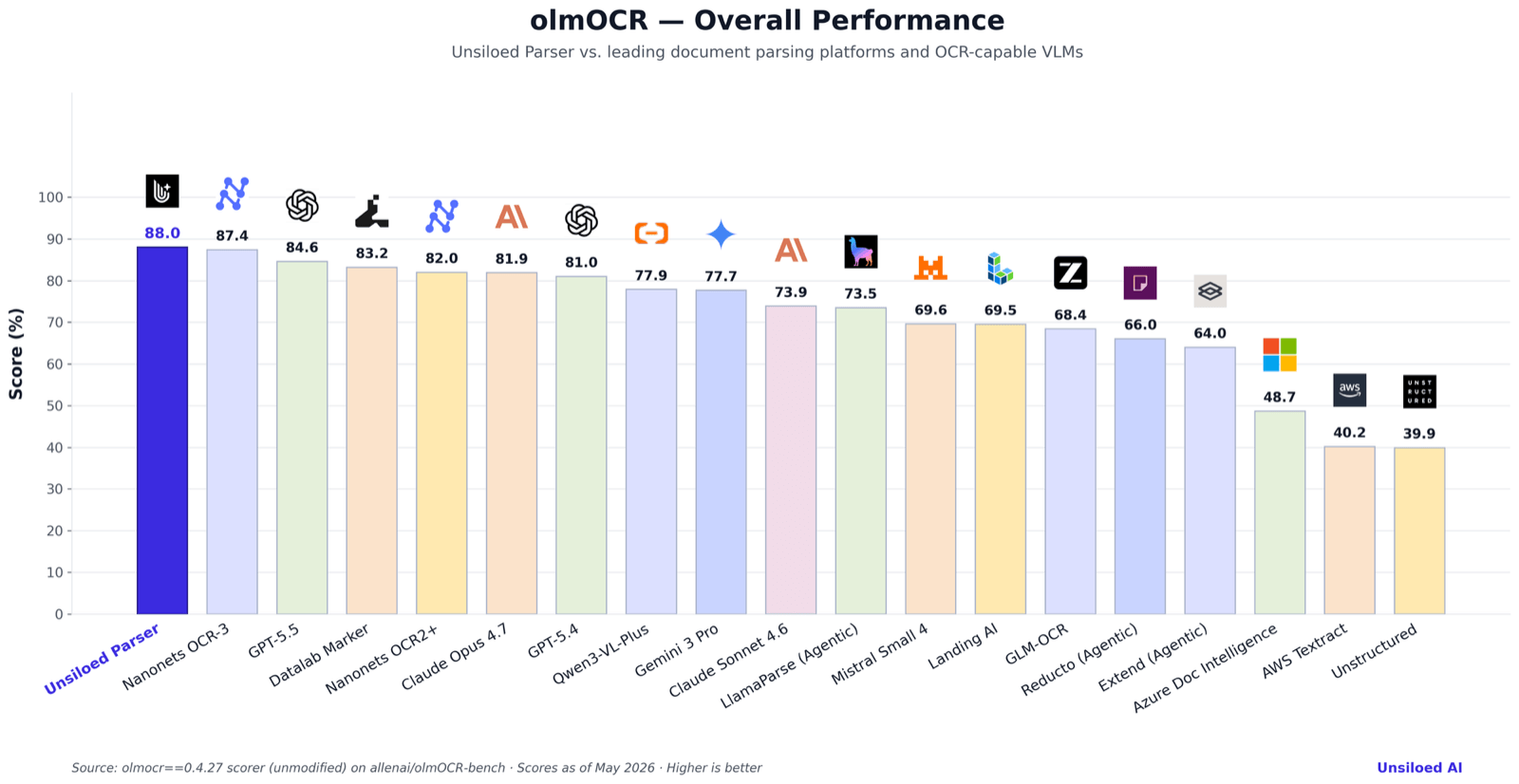
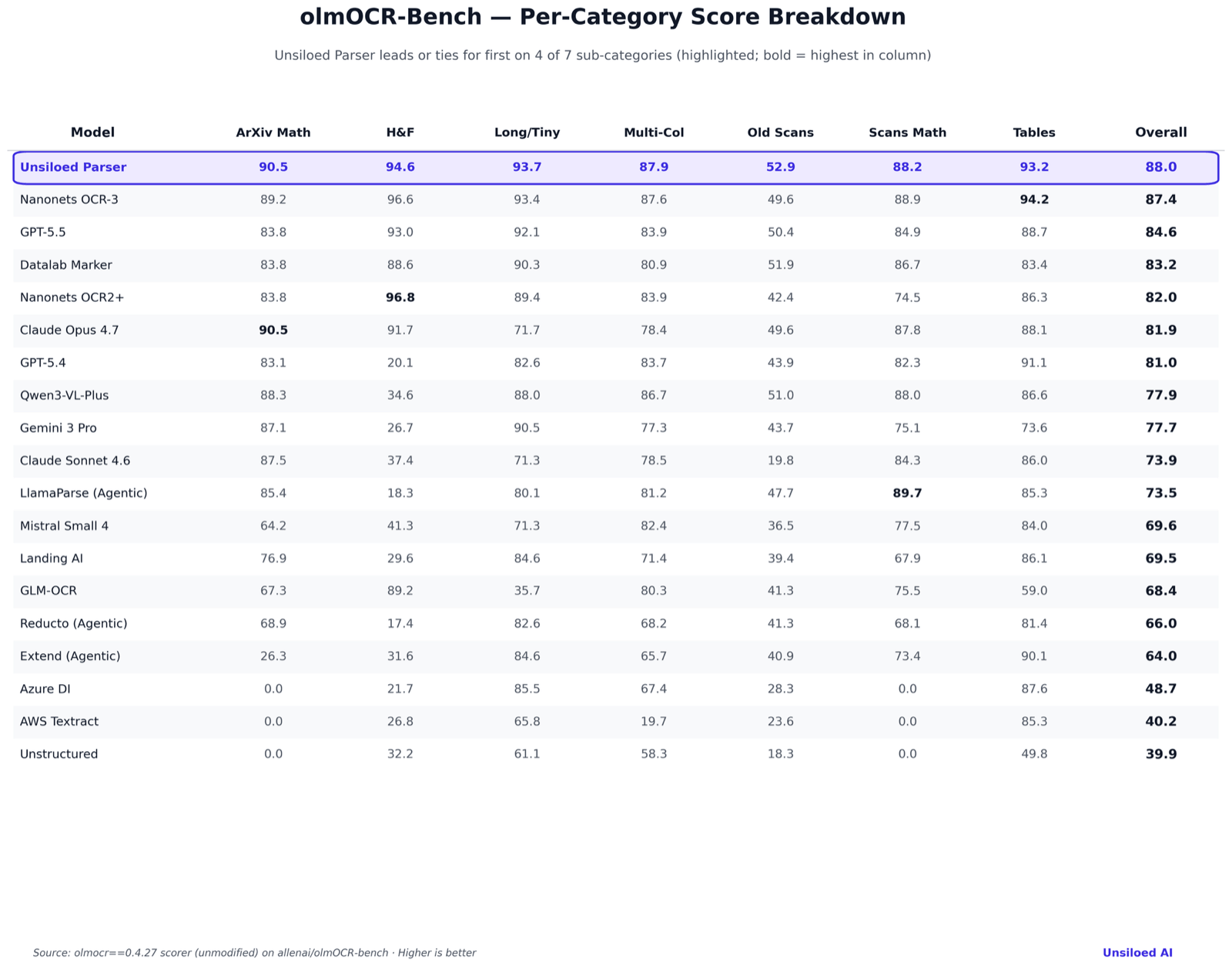
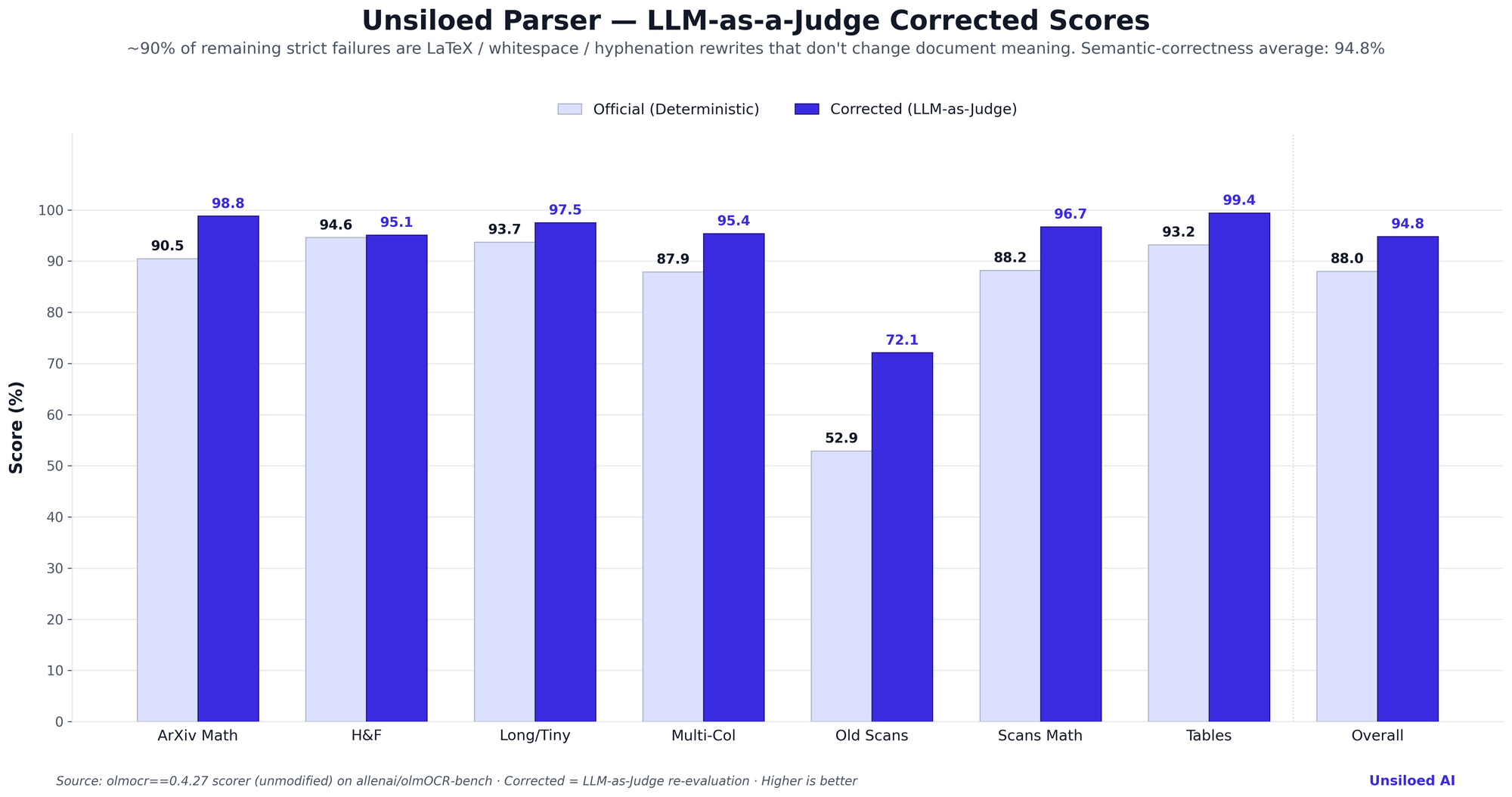
Unsiloed Achieves #1 Rank on olmOCR-Bench By Adnan Abbas and Aman Mishra. Originally published on Unsiloed AI. Published by Unsiloed AI | May 2026 Introduction Optical Character Recognition (OCR) remains the foundation of any document AI pipeline. Whether you are extracting data from invoices, parsing academic papers, or digitizing handwritten forms, the accuracy of your OCR layer determines the ceiling for everything downstream. The olmOCR-Bench benchmark, published by Allen AI (allenai/olmocr), is a rigorous, reproducible evaluation of how well modern AI models handle real-world OCR challenges. It runs 8,413 unit tests across 1,403 PDF pages, covering math equations, complex tables, headers/footers, multi-column reading order, long/tiny text, and old scans. We compared Unsiloed Parser against 18 other widely-used OCR services and document-AI platforms. Unsiloed Parser was evaluated by us on olmOCR-Bench using the unmodified upstream scorer and other services were also independently measured on the exact same harness (GPT-5.5, Claude Opus 4.7, LlamaParse (Agentic), Reducto (Agentic), Extend (Agentic), Landing AI, Azure Document Intelligence, AWS Textract and Unstructured. Full report and per-vendor runner code to reproduce the scores is at Unsiloed-AI/unsiloed-olmocr-benchmark). The scores for Nanonets OCR-3 and Nanonets OCR2+ couldn't be verified independently and was sourced from publicly-published olmOCR-Bench results, all run against the same upstream scorer, same dataset, and the same 7-category JSONL test files (verified md5-identical to our snapshot). Unsiloed Parser leads at 88.0 on the deterministic pass-rate. We also re-evaluated our failures using an LLM-as-a-Judge protocol (explained later in the post), which lifts the corrected score to 94.8 when semantically-equivalent rewrites are no longer counted as failures. Here are the results.  View full-size chart ------------------------------------------------------------------------ What olmOCR-Bench Tests The benchmark evaluates seven document-content categories using pass/fail unit tests across 1,403 single-page PDFs sourced from arXiv, the Internet Archive, and curated internal collections: Math on Research Papers (ArXiv Math) Can the model accurately convert complex mathematical notation like fractions, integrals, summation symbols, matrices into KaTeX-renderable LaTeX on clean, typeset research papers? One of the most demanding OCR tasks and a strong differentiator between models. Math on Scanned / Historical Pages (Old Scans Math) The same KaTeX-renderable-LaTeX requirement, but applied to mathematical content on scanned, low-DPI, or handwritten pages, the hardest math sub-task in the benchmark. Table Structure Preservation (Tables) Documents are full of tables with merged cells, nested headers, and irregular layouts. The benchmark tests whether models maintain logical structure, not just extract the text, but understand which cell belongs to which row and column. Header & Footer Handling (H&F) Page numbers, footnotes, running headers, and section markers create noise. The benchmark checks whether models correctly suppress these elements without mixing them into body text. Multi-Column Reading Order (Multi-Col) Academic papers, newspapers, and reports often use multi-column layouts. The benchmark evaluates whether models read text in the correct semantic order. Long / Tiny Text (Long/Tiny) Footnotes, captions, fine print, content that's small or runs across many lines. Tests OCR fidelity on edge cases that production documents are full of. Degraded / Historical Scans (Old Scans) Low-quality, low-DPI, or otherwise degraded images. The hardest category by a wide margin. ------------------------------------------------------------------------ How We Ran the Benchmark The bar chart and per-category breakdown below combine two sources, both scored with the same olmocr==0.4.27 benchmark code on the same allenai/olmOCR-bench dataset. Full benchmark results were obtained for Unsiloed Parser plus other services. - Unsiloed Parser - GPT-5.5 — OpenAI flagship VLM, full_no_document_anchoring prompt - Claude Opus 4.7 — Anthropic flagship via Vertex AI - LlamaParse (Agentic) — LlamaIndex's premium parse_page_with_agent mode - Reducto (Agentic) — Reducto's premium agentic pipeline (text + table + figure agents, with advanced_chart_agent=true), each scope receiving the same full_no_document_anchoring prompt - Extend (Agentic) — Extend AI's Parse API with parse_performance engine, agentic text + tables, formulas, and advanced charts enabled - Landing AI — Agentic Document Extraction (default tier) - Azure Document Intelligence — prebuilt-layout - AWS Textract — AnalyzeDocument (synchronous) - Unstructured — partition (hi_res strategy, legacy endpoint) For each commercial service the highest-quality publicly-documented configuration the vendor exposes was used i.e. premium / agentic / hi-res modes where they exist, full layout + table + math features turned on, and the vendor's flagship model where a choice was offered. Outputs were post-processed identically before scoring, so no system was disadvantaged by a default-only configuration. Full per-service config and runner source code is committed to our open-source benchmarks repo at Unsiloed-AI/unsiloed-olmocr-benchmark. Unsiloed Parser leads the field at 88.0 on the deterministic pass-rate, with a +0.6-point gap over the next closest competitor (Nanonets OCR-3 at 87.4) and +3.4 points over the next closest vision-LLM (GPT-5.5 at 84.6). Among dedicated document-AI services in our in-house run, Unsiloed Parser leads LlamaParse Agentic by 14.5 points, Landing AI by 18.5 points, and Azure DI / Textract / Unstructured by 39 points or more. ------------------------------------------------------------------------ Per-Category Score Breakdown  View full-size chart The full per-category table covers all 19 services. Unsiloed Parser leads or ties for first on 4 of 7 sub-categories: ArXiv Math (90.5), Long/Tiny (93.7), Multi-Col (87.9), and Old Scans (52.9). Nanonets OCR-3 wins Tables (94.2, with Unsiloed Parser second at 93.2), Nanonets OCR2+ wins H&F (96.8, ahead of Nanonets OCR-3's 96.6 and Unsiloed's 94.6), and LlamaParse Agentic wins Old Scans Math (89.7, ahead of Nanonets OCR-3's 88.9 and Unsiloed's 88.2). ------------------------------------------------------------------------ olmOCR-Bench Results | Rank | Service | Provider | Score | |:-----:|-----------------------------|-----------------|:--------:| | 1 | Unsiloed Parser | Unsiloed AI | 88.0 | | 2 | Nanonets OCR-3 | Nanonets | 87.4 | | 3 | GPT-5.5 | OpenAI | 84.6 | | 4 | Datalab Marker | Datalab | 83.2 | | 5 | Nanonets OCR2+ | Nanonets | 82.0 | | 6 | Claude Opus 4.7 | Anthropic | 81.9 | | 7 | GPT-5.4 | OpenAI | 81.0 | | 8 | Qwen3-VL-Plus | Alibaba | 77.9 | | 9 | Gemini 3 Pro | Google | 77.7 | | 10 | Claude Sonnet 4.6 | Anthropic | 73.9 | | 11 | LlamaParse (Agentic) | LlamaIndex | 73.5 | | 12 | Mistral Small 4 | Mistral AI | 69.6 | | 13 | Landing AI | Landing AI | 69.5 | | 14 | GLM-OCR | Zhipu AI | 68.4 | | 15 | Reducto (Agentic) | Reducto AI | 66.0 | | 16 | Extend (Agentic) | Extend AI | 64.0 | | 17 | Azure Document Intelligence | Microsoft | 48.7 | | 18 | AWS Textract | Amazon | 40.2 | | 19 | Unstructured | Unstructured AI | 39.9 | Scores were evaluated against allenai/olmOCR-bench (1,403 PDFs / 8,413 tests) using the unmodified upstream olmocr==0.4.27 scorer, with per-service runner code open-sourced at Unsiloed-AI/unsiloed-olmocr-benchmark. ------------------------------------------------------------------------ Why a Second Evaluation? Strict Pass-Rate vs. Semantic Correctness olmOCR-Bench's headline metric is the deterministic, unit-test-driven pass-rate that we just reported. It's the right way to compare systems publicly: it's reproducible, it requires no second model in the loop, and the rules are fixed. 88.0 is our number on that metric, and it's the one that matters for ranking against the public leaderboard. But once we had a leaderboard-leading number, we wanted to understand the remaining ~12% of "failures", what was actually wrong, and how much of it would matter to a downstream user reading the parsed document. What the strict tests actually flag olmOCR's strict tests are exact-string checks against a gold answer. By design, that strictness is what catches subtle errors but it also means any divergence from the reference string is recorded as a failure, even when the divergence is semantically harmless. In practice that includes things like: - A ground truth of "I am Name" (two spaces) vs. a prediction of "I am Name" (one space), scored as 0 even though no human reader would see a difference. - A math equation written with the literal Greek letter ε (Epsilon) rather than \epsilon, the LaTeX form passes, the rendered glyph fails, despite producing identical output downstream. - \frac{a}{b} vs. \dfrac{a}{b} vs. \tfrac{a}{b} (identical LaTeX rendering). - \cdot vs. \times for multiplication, or \coloneqq vs. :=. - "0.70" vs. "0. 70" inside a table cell. - twenty-five vs. twenty five (hyphenation), ASCII apostrophes vs. unicode curly quotes in transcribed handwriting. These aren't OCR errors, they're string-level divergences from the gold reference that don't change what a downstream reader, search index, or LLM consuming the parsed document would see. But under strict pass/fail rules, every one of them counts as a failure and pushes a benchmark score down without telling you anything useful about model quality. What LLM-as-a-Judge measures For our own system, we re-ran every strict failure through an LLM-as-a-Judge (GPT-5.5, reasoning_effort=medium, seed=42) and asked: "the strict rule failed, is the OCR output actually wrong, or did the rule reject a semantically-equivalent rewrite?" Each verdict is minor (rescue → count as pass) or real (genuine OCR miss). Strict tests catch the surface-level divergence; the judge tells us whether that divergence changes what a reader of the document would understand. This isn't a replacement for the strict score, it's a diagnostic on top of it that separates "rule said fail" from "the OCR was actually wrong." The result  View full-size chart Re-aggregating with the rescues applied to the new configuration, Unsiloed Parser's semantic-correctness score is 94.8% (with-baseline 8-group macro), a +6.8-pp lift over the strict 88.0 baseline. The breakdown by failure type (measured rescue rates on the current pipeline): - Tables: 64 of 70 failures (91%) are string-level divergences with no semantic impact; the table-to-string parser, not the OCR, is the bottleneck. - ArXiv Math: 243 of 277 failures (≈88%) are LaTeX-equivalent rewrites — \frac vs \dfrac, \cdot vs \times, spacing/brace variants. - Old Scans: the hardest category sees the largest +19-point lift (52.9 → 72.1), where many "failures" are hyphenation/whitespace differences in handwriting transcriptions. We didn't run the same LLM-as-Judge protocol against the other systems in this comparison, so we're not claiming a leaderboard rank on this metric. We share this number purely so readers can see what kind of failures remain at the top of the strict leaderboard, and judge for themselves whether those failures matter for their use case. ------------------------------------------------------------------------ Limitations of current benchmarks Looking past the leaderboard standings, our analysis surfaces fundamental problems with the way document-parsing systems are currently measured. Today's OCR benchmarks score systems against rigid string-level rules. As we showed in the LLM-as-a-Judge analysis above, the majority of "failures" at the top of the leaderboard are not OCR errors at all, they're whitespace, hyphenation, and notation rewrites that don't change document meaning. (On the new Unsiloed run, ~65% of strict failures by raw count and ~61% averaged per category are LaTeX/whitespace/punctuation-equivalent rewrites; the macro-weighted rescue rate is ~57%.) There is currently no widely-adopted benchmark that scores OCR systems on semantic correctness against the ground truth. Current OCR benchmarks were originally designed around academic-document workloads and may underrepresent emerging production document patterns. Existing benchmarks lean heavily on tables and equations content that was central to the academic-paper datasets these benchmarks were originally built from while underweighting the elements that dominate today's real-world document mix: charts and plots, multi-column layout, key-value pairs, forms, and structured fields. We're working on closing both gaps i.e. the semantic-aware evaluation and broader category coverage and plan to share more on this in the coming months. ------------------------------------------------------------------------ Try It Yourself If you want to skip the benchmark and just see Unsiloed Parser on your own documents, try the Unsiloed platform at unsiloed.ai. Upload a document and compare extraction results across models side-by-side. No code required. To reproduce the numbers or run your own vendor against the same harness, the full benchmarks repo, per-service runners, raw scorer logs, and JSON metrics is open-source at Unsiloed-AI/unsiloed-olmocr-benchmark. ------------------------------------------------------------------------ Logos and trademarks are the property of their respective owners.Use does not imply endorsement Data sourced using the unmodified olmocr==0.4.27 scorer (allenai/olmocr) on the allenai/olmOCR-bench dataset. Scores as of May 2026.
Learning from Theory U: Active Engagement vs. Passive Management There is a powerful passage by Dr. Otto Scharmer in "Theory U" that references a famous experiment with newborn kittens: Two kittens were paired, one strapped onto the back of the other. Only the bottom kitten could move its legs. Although both experienced the same physical space, only the bottom kitten developed normal vision. The top kitten, which merely “experienced movement” without engaging its own body, remained nearly blind. Francisco Varela’s point was clear: perception cannot be passive. One must engage one’s whole body. Much of today’s institutionalized learning—and many innovation practices—resembles that top kitten. We outsource the very work we ought to be doing ourselves. That may be acceptable for simple problems. But a true innovator would never delegate the act of igniting the learning journey. Since such connections bring the seeds of the future into the world, one must venture there personally. I'd love to hear your thoughts on this perspective. For a deeper discussion, please check out: 👉 "9) Humble suggestions to readers of Theory U" (Page 22) 📘 Free booklet on GitHub: "Finding the market value of your source code" Read directly or download the PDF on GitHub here: github.com/richunandubian29-dot/upper-limit/blob/…
I built a wireless OBD2 motorcycle dashboard using a round ESP32-S3 touch screen (Open Source) I wanted live engine data on my motorcycle (a Honda CB500X) without mounting a phone on the handlebars, so I built a standalone dashboard using a round Waveshare ESP32-S3 1.85" touch display. It runs on its own small LiPo battery inside my tank bag—completely wireless, with zero wiring into the bike. It connects over Bluetooth Low Energy (NimBLE) to a cheap BLE OBD2 adapter plugged into the bike's diagnostic port under the seat. What it does: - Live gauges (LVGL 9): Displays RPM, speed, coolant temperature (with a 10-minute history graph), battery voltage, and calculated gear position smoothly at 60 fps. - Lean angle & G-meter: Uses the board's onboard 6-axis IMU to calculate cornering lean angle, self-calibrating automatically while riding. - Tyre pressure (TPMS): The background BLE scan passively listens for external Bluetooth tyre pressure sensors alongside the OBD2 link. - microSD logging: Records all ride telemetry to an SD card, with a companion script to generate offline interactive charts. - Power management: Monitors battery state and board temperature, automatically dimming the screen or putting the ESP32 into deep sleep before the cell runs flat. Under the hood (ESP-IDF + LVGL): The biggest technical hurdle was fitting the BLE stack, LVGL display buffers, and SD card logging into memory simultaneously. Moving the LVGL heap to PSRAM while keeping single-transaction draw buffers in internal SRAM kept the UI buttery smooth at 60 fps with ~150 KB of free heap to spare. Try it on your desk: The firmware includes a built-in demo mode that replays a synthetic ride (complete with an overheat alert and fault code), so you can flash it and test every screen and alert on your desk without an OBD2 adapter or bike. Code and setup guides are all open source. Contributions are welcome!! Gnzlt/ESP32-S3-Touch-OBD2 Here's a video of this working: youtube.com
Thanks dude! Check out the repo at uncoalesced/parentheses and I'll post domains for open contributions
FlowSkill launches on Product Hunt — November 3 FlowSkill launches on Product Hunt — November 3 Tagline: Stop your AI agent from faking 'done' I have watched an AI coding agent finish a task, report it as done, and leave behind code that did not actually do what was asked. The report looked confident. The work was not finished. That gap — between a claim of "done" and work that holds up — is what FlowSkill exists to close. What FlowSkill is FlowSkill is an open-source gated build harness for AI coding agents. It wraps your agent in a six-gate pipeline. Every stage must pass before work advances — and a kill is a valid outcome. If a stage cannot pass, the work stops there instead of moving on with a polished-looking result. Two kinds of gate do the checking: - A mechanical gate (flow.sh) — checks that can be run and verified, not just asserted. - A semantic gate (SKILL.md) — checks whether the work actually matches what was asked. Either gate can stop the pipeline. That is the point: a stage that fails should fail loudly, early, rather than surfacing later as a bug someone else has to untangle. Receipts, not claims FlowSkill produces receipts: a record of what passed, what failed, and what was killed, so you can inspect the run instead of taking the agent's word for it. You can see the receipts approach on the project site at flowskill.io.vn, along with a 75-second demo. There's also a 28-second intro film — no narration, just the six gates and the verdict: watch it here. It's on the homepage right after the hero, and the 75-second narrated demo is further down the same page. What it works with Per the launch description, FlowSkill offers one-command install and works with Claude Code, Codex, and Cursor. What it does not promise A gate can only check what it is built to check. FlowSkill does not guarantee that gated work is correct in every sense, and it does not replace reading the code, running it yourself, or reviewing what an agent produced. A passing gate means the stage met its checks — nothing more. If you try it and a gate blocks work you believe is fine, that friction is part of the design, and it is worth reporting as an issue so the checks can improve. FlowSkill is version 1.0.0. The repository is public at manhquydev/flow-skill — you can read the code, the gates, and the receipts format before deciding whether it fits how you work. Launch day — November 3 FlowSkill launches on Product Hunt on Tuesday, November 3. If you have ever been burned by a confident "done" that was not done, I would like to hear about it: what is the worst "done" your agent ever faked? You can follow the project on dev.to at @flowskill, and find the launch on Product Hunt on November 3. Feedback — especially cases where a gate got it wrong — is welcome.
お裾分けです.はいよ🍣.ダビンチリゾルブの有料版とかならデフォルトで備わっている機能らしいけども. オープンソース音声認識 ローカル文字起こしツール (Whisper Standalone GUI) taoka3/whisper_standalone
Programming is super fun and always changing, there’s always some new trick or tool to mess around with. github.com/LethaboMohapi
Location: Istanbul, Türkiye (UTC+3) Remote: Yes (EU and US East overlap) Willing to relocate: Open to it Technologies: Python/FastAPI, TypeScript/Node.js, Java/Spring, Rust, C++, PostgreSQL, Redis, Kafka, Docker, Kubernetes (GKE), GCP, AWS, LLM systems (RAG, agents, MCP, evals), vLLM, llama.cpp Résumé/CV: drive.google.com GitHub: github.com/aozmekik Email: ahmed-semih@outlook.com Backend-leaning senior engineer, 6 years in production. - NextLangua (nextlangua.com): AI language-learning app I built and run alone, 20,000+ downloads. Async FastAPI routing across OpenAI, Anthropic, Gemini and my own fine-tuned models, with per-task fallback. Moved to self-hosted Qwen/Gemma/Llama (LoRA, quantized from 16 GB to under 5 GB) and cut inference cost to near zero. Every model swap was gated by a frozen eval set. - 4 years on a 6-person remote team at a US healthcare platform with 1M+ users: split the monolith, migrated the data layer with zero downtime, on-call. - Started in C++ on a packet inspection engine at multi-gigabit line rate. Looking for: remote senior backend or AI/LLM roles, full-time or B2B contract. Available now.
SpikeStrip: Reversible HTML and JavaScript prompt decoys with opaque per-insertion keys.
The regression failed on the original code and passed with the fix. I tested the hook handler with fixture events; I haven't run a live Claude session for this check. Merged today: ai-memory#1944
How to make good Blockbench style model I wanted to share with you how I make models so that you cant do my mistakes, and I’ve turned this into a skill, those who are interested can take a look mankidev/3dixel
[ANN] RxInfer.jl v6.0: faster startup, modular rule packages and Reactant support Hi everyone, We’re glad to announce RxInfer 6, the new major release of our package for Bayesian inference by reactive message passing. We have been running it internally in BIASlab for a while before the release. On our tests, cold-start performance on a Raspberry Pi is nearly twice as fast as before, and we see overall performance improvements. Highlights - Precompiled common models. The first infer call on common model types drops from about 7 s to under 0.5 s. Other models start 40 to 70% faster. - Modular rule packages. RxInfer now runs on ReactiveMP v7. Message passing rules live in separate registered packages built on MessagePassingRulesBase.jl, so you only load the nodes you use. You can also reuse these well-tested update rules to build your own message passing engine. - Reactant.jl support. infer can now be compiled with Reactant. In our Kalman filter example, a compiled step runs in about 10 μs, 20× faster than standard RxInfer: examples.rxinfer.com - Cleaner internals. The internal API was revised, unused features were removed, and previously unspecified behaviour is now documented and tested. - New options. logscales = true, engine diagnostics, a rule context (e.g. a custom rng for sampling rules), and free energy tracing via callbacks and TensorBoard. Breaking changes Models that only use built-in nodes mostly run as before. Notable changes: - meta is renamed to algorithm (where { algorithm = ... }, @algorithm). The old names still work with a deprecation warning. - where { dependencies = ... } is replaced by where { initial_messages = ... }. - Optim.jl is now an extension. Load using Optim for continuous point-mass constraints. - ContinuousTransition, Pólya, BIFM and Flow nodes need their package loaded explicitly. - Custom nodes and rules use the new @define_factor_node and @define_message_update_rule macros. If you’re coming from v5, please read the migration guides first: - RxInfer v5 to v6: docs.rxinfer.com - ReactiveMP v6 to v7 (for custom nodes and rules): reactivebayes.github.io Links - Docs: docs.rxinfer.com - Code: ReactiveBayes/RxInfer.jl - Changelog: github.com/ReactiveBayes/RxInfer.jl/blob/main/CHA…  Feedback, issues and questions are very welcome here or on GitHub!
How do you keep track of what AI agents change in your self-hosted tools? Here is our approach I'm part of the team at Alian Software that builds AlianHub, an open-source (AGPL-3.0) project management tool you can self-host with Docker. Sharing because I'd like honest feedback on one part of it: how we let AI agents work without losing track of what they did. The problem we kept running into with AI in PM tools: - Agent edits get mixed into the normal activity feed - No easy way to see only what the bot changed - Rolling back means fixing tasks one by one - Outside tools often connect with broad access What we built: - One audit log for every agent action, with a separate tab for outside agents (Claude, ChatGPT, Claude Code via MCP) - Filters for agents only, gated, undone and refused actions - Undo from the log, 24h window by default - CSV export - Some actions simply don't exist for agents: deleting projects or tasks, deploying, merging code, marking tasks Done, billing, permissions - Wider changes wait in an AI Inbox for a person to approve or decline Ways to run it: - Self-host free with Docker Compose (3 commands, amd64 + arm64) - Or we host and manage it for you Honest limitations: - No native mobile app yet (web, desktop app and installable web app only) - Server-side AI needs your own LLM API key (OpenAI, Anthropic or DeepSeek); everything else works without AI - AGPL may not suit closed-source use; there is a commercial licence for that Questions for you: - What would you need in an audit log before letting an agent touch real projects? - Is 24h a sensible default Undo window, or should it be longer? Links: - Live demo (no install, data resets): demo.alianhub.com - GitHub: aliansoftwareteam/AlianHub-Project-Management-System - Write-up on running agents safely: alianhub.com
EncodeNaviのv1.1.0を公開しました! - ポップモードの追加 - ニコニコの推奨設定を最新のものに修正 - UIを調整 #YMM4 #YMM4Plugin ymm4-info.net github.com/Dolphin-kun/EncodeNavi/releases/tag/v1… t.co
Free and open source: rhymeas/Creativefield Feedback and ⭐ welcome. Tell us what we should build next.
@isjackback I'm building sandhiveio/sandhive-cli so I can turn my real product work into updates. Saves me from endless scrolling.
Check out the latest projects and open-source contributions on my GitHub profile. Follow me if you can. github.com/LethaboMohapi
Mac 越用越满,清理工具要订阅、还上报? PureMac 是免费开源 Mac 清理,零遥测,卸载揪残留、定时清,Xcode、Homebrew 缓存能清。 适合不想订阅、不想被上报的人,定时清永久删,手动卸载走回收站,先看清单。 Mac 最占地方的是什么,缓存还是旧应用? #Mac #清理 @grok momenbasel/PureMac
SEO 컨설턴트 팀이 내 AI 안에? GitHub 별 2.5만 Claude SEO, 사이트 점검을 할 일 순서표로 #Shorts 검색에 잘 걸리게 사이트를 다듬는 SEO, 컨설턴트 팀 대신 AI가 점검해 준다면 어떨까요? Claude SEO(AgriciDaniel/claude-seo)는 GitHub 별 약 2만 5천 개(2026.11.01 확인)의 Claude Code용 무료 SEO 플러그인(추가 기능)입니다. README는 사이트 주소를 주면 10~15분 안에 전체 SEO 점검을 하고, 중요한 순서대로 정리한 실행 계획을 준다고 소개합니다. · 기술 SEO: 검색 로봇이 잘 읽는지(크롤링·색인), 사이트맵·robots.txt·리디렉션, 페이지 속도·Core Web Vitals · 콘텐츠 품질: E-E-A-T(경험·전문성·권위·신뢰), 얇은 페이지, 주제 범위 · 구조화 데이터: Schema.org 마크업 찾기·검증·작성 · AI 검색(GEO): Google AI Overviews·AI Mode·ChatGPT·Perplexity·Gemini에 인용될 가능성 · 지역·쇼핑몰 SEO: 구글 비즈니스 프로필, 리뷰, 상품 페이지, 다국어 사이트 · 세부 스킬 26개 + 전문 에이전트 19개, 최대 17개가 동시에 점검. 사이트 유형(SaaS·지역·쇼핑몰·퍼블리셔·에이전시)을 파악해 점검을 조정 · 결과는 마크다운 보고서, '/seo google report'로 PDF 변환 · 설치: Claude Code 1.0.33 이상에서 '/plugin marketplace add AgriciDaniel/claude-seo' → '/plugin install claude-seo@agricidaniel-claude-seo' → '/seo setup'(전용 파이썬 환경과 헤드리스 브라우저 준비) · SE Ranking·Profound·Bing Webmaster 등 확장은 선택 사항이며, 없어도 기본 기능은 모두 동작 · 공개 버전은 MIT 라이선스 무료 (유료 커뮤니티 회원용 비공개 버전이 따로 있음) 주의: 점검 시간·효과 등은 README의 주장입니다. 내 사이트 한 페이지('/seo page 주소')부터 점검해 결과를 직접 확인해 보세요. README 기반 소개이며 직접 설치해 보지 않았습니다. 첫 장면의 점검 팀 그림은 개념 도식, 할 일 순서표는 예시(실제 보고서 아님)입니다. 출처 AgriciDaniel/claude-seo MIRLABS · AI 도구와 기술을 짧게 #MIRLABS #미르랩스 #ClaudeSEO #SEO #GEO #ClaudeCode #AI검색 #오픈소스 #GitHub #Shorts
C4D?Blender! mmheart21-del/x4d-workflow-kit-for-blender t.co
Icon Otter makes every app icon you need from one image, straight from the terminal. Android, iOS, macOS, Windows, Linux and web favicons. Runs locally, no account, no AI. Open source. alexstyl/iconotter
@theo Suggestion: make t3 mcp an agent context upstream repo for skills and mcps (undermybelt/mcp-skill-hub mcpjungle/MCPJungle dyoshikawa/rulesync)
answer-me-with-html 30 天 5k Star 🌟 啦 它是什么: 一个让你把 Agent 输出转换成可视化 HTML 的 Skill Agent 只需要输出 md,由 cli 转换成 html 所以又快又好看😍😍 Github: QingYunA/answer-me-with-html 欢迎大家多多使用,有意见找我反馈! t.co
开会想打字,又不想打断发言? SayAll 把小米蓝牙遥控器 2/2 Pro 变成 Mac 无线麦,按住说、松开停,不改系统默认输入输出。 适合有这款遥控器、常用语音输入的人,常驻不到 0.5% CPU、约 50MB,型号要对上。 你会拿它干什么,开会记录还是喂 AI? #Mac #语音输入 @grok HD838A/remote-mic-app
AI가 세운 계획, 대화 지우면 사라질까? GitHub 별 2.8만 Planning with Files, 계획을 파일로 남기는 법 #Shorts AI가 계획을 세웠는데, 대화창을 비우면(/clear) 그 계획은 남아 있을까요? Planning with Files(OthmanAdi/planning-with-files)는 GitHub 별 약 2만 8천 개(2026.11.01 확인), MIT 라이선스의 AI 코딩 도구용 스킬(AI에게 주는 작업 설명서)입니다. README는 'AI의 기억(컨텍스트)은 RAM, 파일은 디스크'라며 중요한 건 모두 파일에 적어 두는 방식을 씁니다. · 프로젝트 안에 파일 3개: task_plan.md(계획·단계별 체크), findings.md(조사 메모·결정), progress.md(진행 기록·테스트 결과) · 대화를 비우거나 정리·충돌이 나도 파일은 남아 현재 단계부터 다시 이어 감 · 훅(자동 실행 장치)이 매 턴 계획을 다시 넣어 주고, 계획이 '완료'라고 할 때까지 AI가 멈추지 않게 붙잡을 수 있음 · 프로젝트 자체 측정: 다시 상황을 파악하는 데 13.3턴 → 5.0턴, 블라인드 A/B 비교 3전 3승 · 설치: npx skills add OthmanAdi/planning-with-files --skill planning-with-files -g (Agent Skills 표준으로 60개 이상 에이전트 지원, Claude Code·Codex CLI·OpenCode 등은 네이티브 플러그인) · 파일은 평범한 마크다운이며 기본적으로 git에서 제외 · 자동 복구는 프로젝트 파일만 읽고, 로컬 세션 기록까지 읽으려면 catchup 모드를 직접 켜야 함 주의: 성능 수치는 프로젝트 자체 측정이라 내 작업에서도 같은지는 직접 확인이 필요합니다. README 기반 소개이며 직접 설치해 보지 않았습니다. 대화창·칠판/공책 그림은 개념 도식(실제 화면 아님)입니다. 출처 OthmanAdi/planning-with-files MIRLABS · AI 도구와 기술을 짧게 #MIRLABS #미르랩스 #PlanningWithFiles #ClaudeCode #AI코딩 #AI스킬 #오픈소스 #GitHub #Shorts
安卓听 YouTube Music,官方客户端差点意思? BitChord 是苹果风客户端,逐词歌词跟唱,配模块源可出 FLAC 无损,默认走 YouTube Music 兜底。 适合安卓听歌想跟唱的人,无损要自己配模块源,不是开箱就有。 听歌最看重什么,音质还是歌词? #音乐 #安卓 @grok kushagrasinghx/BitChord
@dailytonychoi 저희 앱 링크 남겨드려요 🙂 iOS: apps.apple.com Mac: github.com/207studio/207studio.github.io/releases…
¿Puede una conversación con la IA realizar un análisis quimiométrico completo de datos como lo haría un experto? Nuestro nuevo artículo en Analytical Chemistry (ACS) responde a esta pregunta. doi.org Datos abiertos: JoseRaulBS/nmr-oils-llm-benchmark #QuímicaAnalítica t.co
Linux, macOS, Windows に対応です。実行バイナリにコードサインをしていないですので、Windows と macOS の方はうまいこと動かしていただければ。 github.com/h1romas4/chipstream/releases/tag/nddrv… t.co
GitHub今日趋势:D4Vinci/Scrapling,一站式网络抓取框架,从单次请求到大规模爬取都能处理,适合做数据采集与自动化抓取任务。D4Vinci/Scrapling