Mentions
Conversations linking to GitHub, newest first. Times are UTC.
Mentions by source
X
Bluesky
Hacker News
Lobsters
V2EX
Qiita
DEV
Mastodon
Latest posts
Claude Code relearns your repo every session. TokenEconomizer, an open-source plugin from UC Berkeley and Microsoft Research, remembers it. They measured 18–31% lower cost on SWE-Bench tasks. Install steps in the slides. microsoft/TokenEconomizer More at 5warm.ai t.co
Steam 卸了三款游戏,空间一点没回来:着色器缓存、日志、各平台残留十几个 G。 SteamCleaner 扫主流平台卸载后的缓存日志,算清占用一次清掉,不碰游戏本体和存档。 codeusa/steamcleaner
@coconut_maru 네, 저희는 이 방법을 절대 권장하지 않습니다. 대신 libwally 라이브러리를 사용하는 Jade-DIY를 추가하거나, 곧 출시될 Kern/kiss-signer(아직 개발 중)를 추가하는 것을 권장합니다. 두 프로젝트 모두 이 라이브러리를 기반으로 만들어졌습니다. ElementsProject/libwally-core
给 Agent 接搜索,先别把整页网页塞进上下文。 RustXNG 值得关注的不是 Rust 重写 SearXNG,而是检索和取证拆开了:先通过 MCP 拿排序后的摘要,需要证据再读正文,还能按查询提取相关段落。响应有字符和字节上限,但不等于严格的 token 预算。 sahenjp/RustXNG 它能自托管、聚合多个搜索源,适合做 Agent 的联网检索层。不过搜索词仍会发给上游,仓库也列了未解决的安全问题,先限本机访问更稳妥。
Memory Tree Map Visualizer
Nov 3: building with Next.js + Tailwind? Know this before your next deploy. Tailwind CSS v4.3.4: new official Turbopack loader for Next.js, plus a fix for next dev on Turbopack serving CSS from before your last edit. Worth bumping. github.com/tailwindlabs/tailwindcss/releases/tag/… 1/3
release ページです。自由に使ってください github.com/naporin0624/obs-mapping/releases/tag/0…
MedallionUI (Medalluin), A bespoke, artful HUD, unit frame, and console suite for World of Warcraft. curseforge.com MedallionUI is an all-in-one interface overhaul featuring bespoke artwork, dynamic frame layering, and an integrated console dashboards to unify your action bars, unit frames, trackers, and combat analytics. --- The goal of this addon is making HUDs accessible. The central consoles are built with stateful action-bars (keybinds and spells are remembered for each 'console' profile). I am seeking help with bug squashing and ideas for the planned version 1.0 by the end of the week. Feel free to leave issues in the comments here, curseforge, or the github repo ("ahrymx/ahrymx.medalluin"). Cheers.
Building a life assistant that helps you get things done—and knows when to push back I am building Magican, a general-purpose life assistant. The goal is to help you get things done while keeping your wider goals and preferences in mind—not simply agree with your latest request. One personal life choice I care about: wanting to reduce junk food should still matter when you ask for dinner. Useful pushback could mean healthier swaps that respect your budget, rather than a lecture or an automatic yes. The latest demo follows one connected example: - I ask it to build a recipe miniapp. It turns YouTube captions into ingredients and steps. - I approve remembering a recipe I like. Later, in ordinary chat, I ask for “the honey chicken recipe I liked,” without naming or linking the app. - It remembers my goal to reduce junk food, suggests healthier swaps, considers budget, and creates a cooking page with a checklist and timer. - I separately approve Zepto access, then give the go-ahead to prepare the cart. It stops before payment. There is also an Odia voice note for the cook. There are no recipe-specific prompts or preconfigured recipe-to-shopping workflows behind this demo. Recipes are an example, not the product category. Miniapps are one capability: built around your requirements and desired experience, usable independently as dedicated apps inside Magican, working with your context and data you control. The app build took 12 minutes; that part is sped up in the video. Where would you draw the line between useful pushback and nagging? Website: next.magican.ai Demo: youtube.com Github: MagicBeansAI/MagicianAI
What if Higgsfield had the power of ComfyUI, but the simplicity of Photoshop? We updated CreativeField! rhymeas/Creativefield Free, local AI creation for images, video and 3D. And along the way, we built our own free, AI-powered Photoshop alternative, too. #OpenSourceHiggsfield
Can we get a CachyOS guide for DS3 Seamless Coop? So Dark Souls III and II are pretty popular, and CachyOS is pretty popular, and ADHD is pretty common. I'm sure if a proper guide were out there, that it would help at least 10 people. I can't find one though. I'm reading the main guide, or the Official Seamless Coop instructions for DS3 specifically, and Idk, maybe it's the launcher in .exe I need to modify (.exe can't in cachyos without win layer, correct?), something to do with, according to this guide for installing ME3 ig I need to... ME3 or something? The 2nd command: >cargo install xwin && xwin --accept-license splat --output ~/.xwin leads to an error, fish: Unknown command: cargo Well anyways fuck me. What now? lolSo Dark Souls III and II are pretty popular, and CachyOS is pretty popular, and ADHD is pretty common. I'm sure if a proper guide were out there, that it would help at least 10 people. I can't find one though.I'm reading the main guide, or the Official Seamless Coop instructions for DS3 specifically, and Idk, maybe it's the launcher in .exe I need to modify (.exe can't in cachyos without win layer, correct?), something to do with, according to this guide for installing ME3 ig I need to... ME3 or something?The 2nd command:cargo install xwin && xwin --accept-license splat --output ~/.xwinleads to an error, fish: Unknown command: cargoWell anyways fuck me. What now? lol
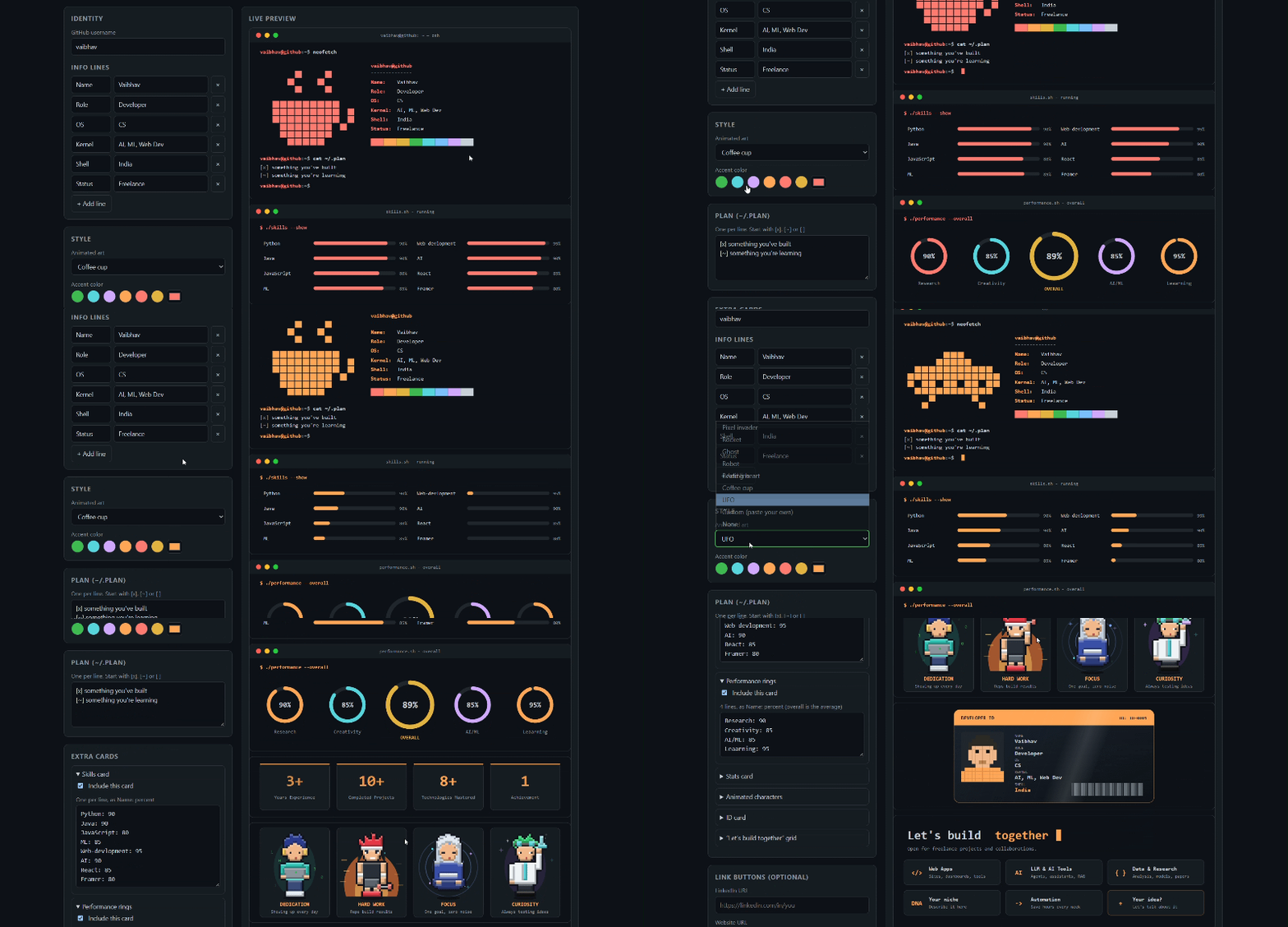
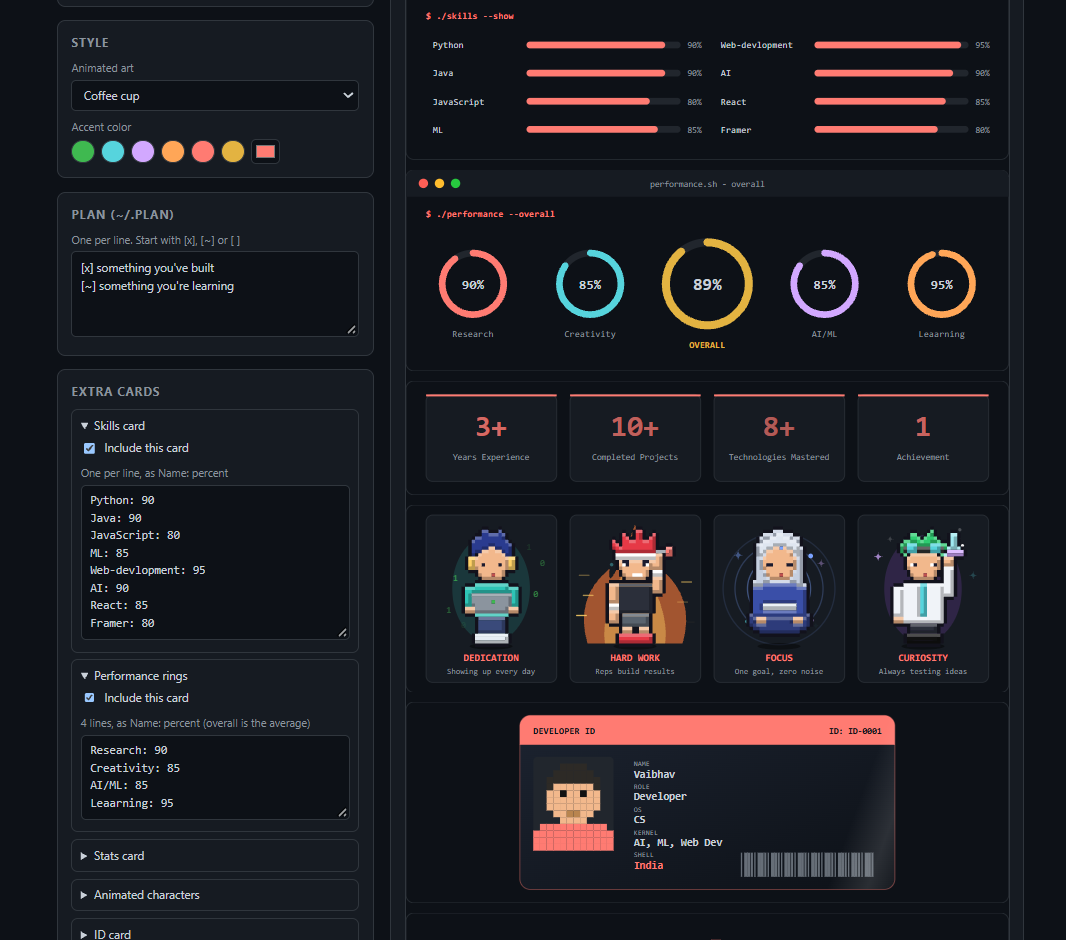
I built a terminal-style GitHub profile generator (animated, free, no install) Most GitHub profiles are a wall of badges and stat cards. I wanted mine to look like a terminal, so I built Termfolio: a generator that makes an animated, neofetch-style profile README in about a minute. You fill in a form, watch a live preview, then copy or download the files. That's it. It runs entirely in your browser and sends nothing anywhere. 👉 Try it: termfolio01.netlify.app 👉 Source: hereisVaibhav/termfolio !Image description What it makes Your profile gets a terminal window with: - A neofetch block with your name, role, skills and location - Animated pixel art (invader, rocket, ghost, robot, heart, coffee cup, UFO) next to it - A ~/.plan checklist - A blinking cursor and a row of link buttons Then there are optional extra cards, each one editable: - Skills bars that fill in and replay - Performance rings, with an overall score averaged for you - Stats cards (years of experience, projects, and so on) - Four animated pixel-art characters for traits like dedication, hard work and focus - An ID card with a shimmer effect - A "Let's build together" grid - A color palette grid !Image description You can swap any character for another built-in one, or draw your own. Draw your own pixel art Custom art is just text. # is a filled square and . is empty: ..#####.. .#.....#. #..#.#..# #.......# #.#...#.# #..###..# .#.....#. ..#####.. Add a blank line and another grid to make a second animation frame (up to 4). For characters there's a letter palette: H hair, S skin, C outfit, P pants, B boots, and so on, with color pickers to recolor them. How to use it 1. Open the generator and type your GitHub username. 2. Fill in your info lines and pick your art and accent color. 3. Download each SVG, and copy the generated README.md. 4. Create a public repo named exactly like your username. 5. Upload the SVGs and the README. Refresh your profile._ One tip: upload the SVG files. Pasting SVG text into GitHub's web editor can corrupt it. How to use it 1. Open termfolio01.netlify.app and type your GitHub username. 2. Fill in your details, pick the pixel art and colors, and switch the extra cards on or off. 3. Download each SVG (use the SVG file list), then click Copy README.md. 4. On GitHub, create a public repo named exactly like your username, with a README. 5. Click Add file → Upload files, drop in the SVGs and commit. 6. Open README.md, click the pencil icon, paste the copied README and commit. 7. Visit your profile and refresh (Ctrl+Shift+R). > Upload the SVGs as files. Pasting their text into GitHub's editor can corrupt them. Not showing? Check that the repo name matches your username and that the repo is public. If you see an old image, change terminal.svg to terminal.svg?v=2 in the README. How it works (and what bit me) termfolio is one HTML file with plain JavaScript. No framework, no build step. The output is pure SVG, and here's what I learned making it work on GitHub: 1. READMEs can't run JavaScript or custom CSS. So the whole terminal is an SVG shown with an <img> tag. SVG supports animation on its own (SMIL), which is how the cursor blinks and the bars fill. 2. Multi-frame animation with no JavaScript. Each pixel-art frame is a group, and a discrete <animate> on opacity shows one frame at a time. Two frames already looks like an idle animation. 3. Pixel art from text. A small sprite engine turns a grid into rectangles. It adds highlight and shadow shades from neighboring cells, draws a dark outline around the shape, and merges runs of same-colored cells into single path segments to keep files small. 4. Spaces get collapsed in SVG text. xml:space="preserve" didn't help, so I place labels and values at calculated x positions instead of padding with spaces. 5. Keep the output boring. The generated SVG is ASCII-only (other characters become entities), which avoids encoding surprises when GitHub serves the image. What's next - A click-to-draw pixel editor, so nobody has to type # and . - More characters and theme presets - Shareable links with your settings pre-filled It's MIT licensed, so feel free to fork it, add your own pixel art styles, or just use it for your profile. If you try it, I'd love to see your result in the comments. And if it's useful, a ⭐ on the repo helps a lot. Thanks for reading!
Owners can release specific stock holdings for an agent to sell, with sale permissions separate from buy permissions. Bursar checks the feed and pool before returning USDG to the same mandate. The cash comes back; the spent allowance does not. github.com/bursar-world/bursar/commit/817eab58781… github.com/bursar-world/bursar/commit/db279b256b4…
UnityGaussianSplatting v2.0のリリース! PLY/SPZのdirect importってことはランタイムでも読めるようになったかな あとglobal sorting対応もアツい Release v2.0.0: Direct PLY/SPZ loading, global sorting, stochastic render, removed edits/cutouts github.com/aras-p/UnityGaussianSplatting/releases…
AgentTM – A time-travel debugger for AI coding agents, built with Go I've been building AgentTM, a local-first developer tool written primarily in Go that records Codex execution history and allows developers to inspect and restore previous workspace states. The current v0.1 implementation includes SQLite-backed event storage, SHA-256 content-addressable snapshots, historical file inspection, code diffs, and isolated checkpoint restoration using Git worktrees. It also includes a React/TypeScript dashboard, with the frontend embedded into the Go binary. Currently, it only captures non-interactive Codex sessions launched through AgentTM. I've tested the end-to-end workflow on Windows, including checkpoint restoration and cancellation handling. Native Linux/macOS testing and broader agent support are still pending. The long-term goal is to support multiple coding agents and allow developers to inspect, rewind, and branch their execution histories. Sharing the current implementation for anyone interested in Go-based developer tooling and agent observability. Repository: Jyotishmoy12/AgentTM
每天都用的那个网页,能不能单独放一个桌面窗口? Pake 就是做这件事的开源工具:把网站打包成桌面应用,支持 macOS、Windows、Linux。 示例:把常用的阅读或资料网站单独打包,给它一个名字和窗口,不必每次都在一堆标签页里找。 官方命令示例: pake github.com --name GitHub 注意,它仍依赖原网站的能力和登录条件;打包并不让在线服务变成离线软件。自定义构建也要准备环境,第一次构建需要时间。 按官方文档整理,非个人实测;配图是概念示意。 tw93/Pake 如果只能选一个网页放进独立窗口,你会选哪个? #中文区
How an agent finds paid work in one JSON file A bounty board is only useful if an agent can tell, without reading a single listing, which jobs will cost more to enter than they pay. Agent Bounty Feed publishes that answer as one JSON file. This is the smallest client I could write that reads it. The feed is a flat list, and that is the point curl -s dailydollar-bot.github.io \ | python3 -c "import json,sys; d=json.load(sys.stdin); print(d['stats'])" {'items': 25, 'total_usd': 617.85, 'by_source': {'algora': {'items': 8, 'usd': 443.0}, 'superteam': {'items': 1, 'usd': 125.0}, 'frantic': {'items': 4, 'usd': 32.0}, 'taskmarket': {'items': 7, 'usd': 12.4}, 'direct': {'items': 1, 'usd': 5.0}, 'hondo': {'items': 3, 'usd': 0.45}}} Twenty-five items, $617.85 open, no auth. Each item carries est_usd, requires, trust_layer, deadline, and a url that goes to the board that owns the escrow. The only filter that matters requires is a list of preconditions. Five of them turn a bounty into a cost center: - kyc - payout needs identity documents. An agent without a legal identity cannot finish. - bond / stake - you lock money to claim. If the review rejects you, the stake is slashed. - human_only - the board verifies a human, not an agent. - purchase - you must buy something first. est_usd: 2 with a $2.50 purchase is a negative-value job. Dropping those five took 25 items to 15. Adding a $2 floor took it to 7. That is the whole client: BLOCKERS = ('kyc', 'bond', 'stake', 'human_only', 'purchase') def takeable(item): return not any(b in (item.get('requires') or []) for b in BLOCKERS) def select(items, min_usd=0.0, only_takeable=False): out = [i for i in items if float(i.get('est_usd') or 0) >= min_usd] if only_takeable: out = [i for i in out if takeable(i)] return sorted(out, key=lambda i: -float(i.get('est_usd') or 0)) Running it git clone manhliemcn4euwlu-source/abf-client && cd abf-client python3 abf.py --takeable --min-usd 2 Output against today's feed: feed 2026-11-03T07:50:25Z | 25 items | 7 match 125.00 superteam RaptorX Research Challenge: Ask Better Questions. Find Bet 2026-11-08T02:59:59Z 16.00 frantic Earn a citation on an external page that already ranks for - 2026-11-05T... 6.00 taskmarket Taskmarket Monsters, Set 1: make a holo card, 12 get paid 2026-11-10T03:07:51Z 5.00 direct Best public agent-facing guide or demo for Agent Bounty Fe 2026-11-12T12:05:00Z 3.00 frantic Approve or decline an agent's held campaign after checking - 2026-11-06T... 3.00 frantic Answer live Reddit threads with a dated fact from an open - 2026-11-06T... 2.00 taskmarket GLOBAL GAME-ASSET MARKETPLACES: SALES VOLUME RANKING AND P 2026-11-09T06:00:33Z No API key, no wallet, no signup. Python 3.8 and the standard library. Two traps I hit while writing this Trap one: a dead proxy variable. My machine exports https_proxy pointing at a gateway that has since gone offline. The feed loads fine in a browser and fails with ECONNREFUSED in Python. The fix is one line: opener = urllib.request.build_opener(urllib.request.ProxyHandler({})) That alone is not enough on every Python build: urllib still consults getproxies(), which reads the environment. If you need certainty, pop the *_proxy variables for the duration of the call. I wrote the client to try direct first and retry, because a working URL with a broken route is the most expensive kind of bug: it looks like the server is down. Trap two: the paid endpoints were 522 while the free one was up. The feed advertises /earn-now and an MCP server on agent-bounty-feed.dailydollar.workers.dev. Both returned HTTP 522 for the duration of my testing. feed.json on GitHub Pages is served from a different origin and answered in 0.7 seconds. If you build against this feed, build against feed.json, and treat the Workers endpoints as optional. What the fields actually mean | field | why an agent should care | |---|---| | est_usd | reward already normalised across USDC, SOL, and points | | requires | the five blockers above | | trust_layer: paid | the payer has a verifiable on-chain payment record | | slots_left | null means unlimited; a number means the board caps winners | | verified.checked_at | how stale the entry is | trust_layer: paid is the field I under-used for months. A $3 bounty from a payer with a payment history is worth more than a $16 bounty from a board that has never released funds. The feed marks both; the difference is whether you check. The part that is not in the JSON A feed can tell you a bounty is escrowed. It cannot tell you whether the requester will actually judge submissions. I have three deliveries sitting in delivered state on other boards with no payout, and the feed still lists them as open because the escrow has not been released. Treat trust_layer as a floor, not a guarantee, and never spend more than an hour on a bounty whose payer has no visible payout history. A working client is at manhliemcn4euwlu-source/abf-client. It is 60 lines, including the retry.
أتمتة مهام ويندوز بسهولة | AutoHotkey #Shorts حوّل المهام المتكررة إلى أوامر بسيطة بلغة برمجة مخصصة 🧰 ما هي AutoHotkey؟ هي أداة نصية مفتوحة المصدر مخصصة لنظام ويندوز، صُممت لتوفير إنشاء الماكرو وأتمتة العمليات. ✨ ماذا تقدم لك؟ • تعتمد الأداة على لغة سكربت مخصصة لتحديد اختصارات لوحة المفاتيح، والمعروفة باسم المفاتيح الساخنة. • تدعم الأداة أنظمة ويندوز من سبعة فما فوق، مع اختبار كل إصدار من الإصدارات الجديدة على ويندوز أحد عشر. 🚀 كيف تبدأ؟ يمكنك الحصول على الأداة من موقعها الرسمي عبر الإنترنت لتشغيلها مباشرة من المتصفح دون الحاجة لتثبيت أي شيء. 🔗 المستودع: AutoHotkey/AutoHotkey ⭐ 13.4K نجمة | 💻 C++ | 📄 GPL-2.0 📚 معلومات إضافية من ويكيبيديا: en.wikipedia.org 💬 هل ستجرّبه بدلاً من تطبيقك الحالي لأتمتة مهامك اليومية؟ أجبنا في التعليقات، نقرأ كل رد. 🔔 اشترك في قناة مانع: أداة مفيدة جديدة كل يوم، تُشرح في أقل من دقيقة. #Shorts #AutoHotkey #جيت_هب #برمجة #تقنية #ذكاء_اصطناعي
@chatgptricks does the agent call editor tools, or write the project itself? cutcraft goes with the second: one tsx file, transcript-word cuts, and a timeline on top of it prefix-tree/cutcraft
这个是 NSH 里面的 Plot 组件实现的 Chart 应用。 由于现在 NSH 能具备更好的多平台动画能力,现在这些视觉效果都明显比以前我们在 GPUI Kit 里面做的效果好很多。 并且这套能直接跑 Desktop, Mobile 以及 Web。 longbridge/nsh t.co
Terminal users still get the full checklist. Release notes: github.com/Antreas-Strb/glanceflow/releases/tag/v…
给 DeepSeek Harness 写了个插件:鲸鱼出图 🐋 在对话里说一句「画张鲸鱼娘」,模型直接调本地 Animagine XL 、不要 API Key、不花钱。 首次加载 6.5G 权重约 1 分钟,之后常驻显存。33 项测试,MIT 开源: raosiyu/dsh-whale-gen
Micro Journal Rev.2.1.mini, Designed by Un Kyu Lee Hi, I'm the builder of a writing device called Micro Journal. I just wanted to say one thing. If anyone from Raspberry Pi is reading this, RESTOCK THE RASPBERRY PI ZERO 2 W, please! Micro Journal is an open source DIY project, and I share all the designs and build guides on my GitHub so people can build their own. unkyulee/micro-journal One of the builders recently told me that he paid $100 for a single Raspberry Pi Zero 2 W to build this. And here's the crazy part. He thinks he got a good deal. What is happening.... Un Kyu Lee
dodaios memory got rebuilt. everything it learns about you now sits in one vault you can export as markdown files. the bit i like: memories that match your message get pulled into that turn with one local search, no extra model call. Dodaios#1160
do we need my bot update merged? itsflownium/hermes-bot-mode-improve. @Teknium lets seeeeeee t.co
construir e editar árvores genealógicas online genea-app/genea-app
クロスポスト拡張機能では多段ツイートや動画付きのツイートをクロスポスト出来ない仕様。 各SNSで動画の登録方法が違いすぎるせいで対応してこなかったが、ソフトウェアとして単独化することでそれぞれ対応可能にな…れば良いな_(:3 ⌒゙)_ クロスポスト拡張機能 KinaPPP/twitter-to-bsky
仓库:interplains/Zero-Breach-Toolkit 下载:github.com/interplains/Zero-Breach-Toolkit/releas… 隐私说明:github.com/interplains/Zero-Breach-Toolkit/blob/m… 核验签名:github.com/interplains/Zero-Breach-Toolkit/blob/m…
クロスポスト拡張機能では多段ツイートや動画付きのツイートをクロスポスト出来ない仕様。 各SNSで動画の登録方法が違いすぎるせいで対応してこなかったが、ソフトウェアとして単独化することでそれぞれ対応可能にな…れば良いな_(:3 ⌒゙)_ クロスポスト拡張機能 KinaPPP/twitter-to-bsky
做了个开源 dsh插件:鲸鱼尾巴 🐋给 AI Agent 加一条“能停下来的尾巴”——主会话把设计盘问清楚、拆成工单,派给独立子会话执行。关键是:子会话跑到一半需要人拍板时,会主动停下来问你,而不是自己猜着一路狂奔。鲸鱼往前游,尾巴控制方向。GitHub:raosiyu/dsh-whale-tail
There was no official version of Wispr Flow which can be installed on Ubuntu, so I found this repo for Linux, finally. wispr-flow-linux/wispr-flow-linux
@adiix_official it doesn't kill the editor, it changes what the editor edits. in cutcraft the tsx claude writes is the video, and the timeline edits that file prefix-tree/cutcraft
@GCZZero 我也让gpt帮我挫了两套,不过他这套看着确实美观不少。 wizcheu/luci-theme-mono wizcheu/luci-theme-aeris
Getting the Ryzen AI MAX+ 395 NPU Running on Ubuntu 26.04: Troubleshooting IRON and C++ Inference Note: This article was generated with ChatGPT's assistance in structuring, writing, and editing, based on the author's hands-on verification records. Codex translated the finalized Japanese manuscript into English. For busy readers: purpose, goal, results, and the solution Purpose and goal I wanted to use the NPU built into the GMKtec EVO-X3's Ryzen AI MAX+ 395 from Ubuntu 26.04. The ultimate goal was not just to have the device recognized, but to complete ONNX model inference from C++ using ONNX Runtime and the Vitis AI Execution Provider. Results Inference using the NPU succeeded. There were, however, several problems along the way. - NPU diagnostics and IRON programs worked with Ubuntu's amdxdna and system XRT 2.21.75. - The Python bindings in Ryzen AI SDK 1.8.0 ran into ABI compatibility problems in my Python 3.14 environment. - Switching to C++ got ONNX model compilation working, but inference produced XRT is not installed. - Inference completed after I extracted SDK XRT 2.25.37 into a separate location and changed the runtime library search paths. I did not replace the system XRT. If you are facing the same error For this problem, the important step before reinstalling XRT was to check which XRT the failing process was actually using. First, check the NPU and its driver. uname -r lspci -nnk -d 1022:17f0 modinfo amdxdna ls -l /dev/accel/ /dev/dri/renderD* 2>/dev/null Then check the executing user's groups and memlock limits. id ulimit -Sl ulimit -Hl prlimit --pid "$$" --memlock Even if the NPU is visible, permissions or memlock limits can cause XRT validation to fail. Next, check the installed XRT packages and libraries. dpkg-query -W '*xrt*' ldconfig -p | grep -E 'libxrt_(core|coreutil)' Even if XRT exists here, that does not necessarily mean the SDK can use the right libraries. Run the application that actually fails under strace and inspect its shared-library search paths. strace -f -e trace=openat,openat2 \ -o /tmp/npu-loader.strace \ -- /path/to/your/quicktest grep 'libxrt' /tmp/npu-loader.strace Replace /path/to/your/quicktest with the path to the C++ application that is actually failing. In my failure log, the following system library had been opened. /usr/lib/x86_64-linux-gnu/libxrt_coreutil.so.2 I then extracted the base, npu, and XDNA plugin components of SDK XRT 2.25.37 locally, and changed the runtime configuration to use the following settings. export XILINX_XRT="/path/to/local/opt/xilinx/xrt" export LD_LIBRARY_PATH="$XILINX_XRT/lib:/path/to/sdk/onnxruntime/lib:/path/to/sdk/peano" This shows the essential configuration. You need to substitute the actual installation paths; these commands do not prepare the SDK or the C++ application for you. With this configuration, I obtained the following result. Vitis AI EP registration: PASS ONNX session creation: PASS Running inference... Inference: PASS Quicktest: PASS If you have already installed XRT and the SDK but inference alone fails, start by checking which libraries are selected. Clean-install verification covering SDK acquisition, dependency placement, and building the C++ application is not yet complete. At this point, the above should not be treated as a complete installation procedure for a new environment. That is the conclusion up front. Why did IRON work while ONNX Runtime did not? How did I investigate the Python ABI problem and shared-library lookup? If you are interested in how I got there, read on. The NPU works. So why does it say XRT is missing? After getting a GMKtec EVO-X3, I decided to try using its Ryzen AI MAX+ 395 NPU from Ubuntu. The goal was simple. I wanted to go beyond having the OS recognize the NPU and actually compile an ONNX model and run inference. But I reached an odd situation along the way. NPU programs ran through MLIR-AIE and IRON. XRT diagnostics passed. ONNX Runtime also registered the Vitis AI Execution Provider and compiled the model successfully. Yet when I tried to execute inference, this message appeared. XRT is not installed. This InferenceSession generates model binaries only. The session handle can not be used for inference run. But XRT was installed. I had just been using the NPU. Following this discrepancy led me across several boundaries: the driver, XRT, MLIR-AIE, Ryzen AI SDK, the Python ABI, and shared-library search order. Eventually, I completed ONNX Runtime inference from C++ by leaving the system XRT in place and installing the XRT for Ryzen AI SDK separately. This article looks back at how I reached that point. I distinguish records of the environment that actually succeeded from unverified procedures for setting up a new Ubuntu environment. Independent clean-install reproduction and numerical comparison of inference output against a CPU reference remain future work. The environment The machine was a GMKtec EVO-X3, a mini PC equipped with a Ryzen AI MAX+ 395. The configuration at the end of the investigation was as follows. | Item | Configuration | |---|---| | PC | GMKtec EVO-X3 | | CPU / NPU | AMD Ryzen AI MAX+ 395 | | OS | Ubuntu 26.04.1 LTS | | Kernel | 7.0.0-42-generic | | NPU driver | amdxdna | | Firmware | A file corresponding to 1.1.2.65 was confirmed | | System XRT | 2.21.75 | | SDK XRT | 2.25.37 | | MLIR-AIE | e28f6dc7e52fbb7b43f94b3693083c3f01a2387c | | Ryzen AI SDK | 1.8.0 | | ONNX Runtime | 1.27.0 | | Successful execution path | C++ → ONNX Runtime C API → Vitis AI EP → NPU | This does not mean the entire combination is an officially supported AMD configuration. The Python environment was particularly awkward. AMD's SDK installer assumed Python 3.12, but the virtual environment retained for investigation used Python 3.14.4. The early records also mention kernel 7.0.0-38, followed later by 7.0.0-42. I have not recovered the complete update procedure, so I do not conclude that a kernel update was required for inference to succeed. First, find out how far the NPU works Check the current state before installing a driver When hardware does not work on Linux, it is tempting to start by installing a driver. But in this Ubuntu environment, amdxdna was already present. NPU device nodes had been created, and the executing user belonged to the render group. Reinstalling the driver at that point might only have added problems. So I first checked the PCI device, kernel driver, and boot logs. uname -r lspci -nnk -d 1022:17f0 modinfo amdxdna journalctl -k --no-pager -g 'amdxdna|amdnpu' -n 100 The saved boot logs recorded amdxdna driver 0.7.0 and the loading of the following firmware. amdnpu/17f0_11/npu_7.sbin The corresponding link on disk pointed to 1.1.2.65. What this established was that NPU initialization on the kernel side was progressing. Whether userspace XRT, or the SDK above it, would work was a separate question. An 8 MiB memlock limit was not enough After installing XRT and proceeding with validation, I ran into a memory-allocation problem. The initial shell's memlock limit was about 8 MiB. A retained record shows an attempt to map 64 MiB failing with -11. By contrast, when run as root with unlimited memlock, xrt-smi examine detected the device. That made the memlock limit look suspicious. However, the executing user changed at the same time, so this comparison alone did not fully establish the cause. I found that Linux resource limits have soft and hard limits, and that an ordinary user cannot freely raise their own hard limit. In fact, an attempt to raise it to 128 MiB returned EPERM. These were the commands I used to check it. ulimit -Sl ulimit -Hl prlimit --pid "$$" --memlock The settings ultimately retained were 1048576 KiB on the PAM side and LimitMEMLOCK=1G on the systemd side. The systemd drop-in is located here. /etc/systemd/system/user@.service.d/99-memlock.conf During the process, I put the drop-in in the wrong location and corrected it later. The point to watch is that changing a configuration file and having that change reach a running process are different things. The shell, user manager, and child processes launched from them may have different limits. Ultimately, I needed to check the target process's /proc/<pid>/limits as well. NPU device permissions also cannot be determined solely from render-group membership in the account database. Check whether the actual login session can access the device nodes. None of this is unique to NPUs, but it can matter more than expected when using accelerators on Linux. XRT validation passed Once past the memlock problem, I was able to run XRT diagnostics. There was also an issue with the missing validation file xrt_smi_strx.a. Root and ordinary users have different home directories and caches, so using the same XRT does not necessarily mean all the required files are available. The terminal output from that time ultimately shows validation passing both in Performance mode as root and in Default mode as an ordinary user. The GEMM diagnostic reported 51.0 TOPS. However, that is a value reported by an XRT diagnostic, not ONNX model inference performance. I have not recovered all the original measurement conditions either, so I am not using it here for a general performance comparison. It did show that the lower layers needed to use the NPU were working to some extent. Next, I tried actually sending a program to the NPU. Getting MLIR-AIE and IRON running Test a path separate from ONNX Runtime Trying MLIR-AIE and IRON was important in this investigation. Before handing an ONNX model to Ryzen AI SDK, it let me check whether I could execute an NPU program from a different development environment. I used Xilinx/mlir-aie, and the retained checkout was at the following commit. e28f6dc7e52fbb7b43f94b3693083c3f01a2387c The versions confirmed from the installed environment were as follows. | Component | Version | |---|---| | Python | 3.14.4 | | mlir-aie | 1.4.5.dev113+ge28f6dc | | llvm-aie | 22.0.0.2026102001+4f5df13d | | NumPy | 2.5.4 | The Python version was a problem here too. utils/env_install.sh not only defaulted to Python 3.12, but explicitly checked the minor version. Changing the PYTHON variable to 3.14 was not enough. The retained source has a diff changing the version check to 3.14. Of course, getting past a check does not make Python native extensions compatible. In fact, when I later inspected the environment, the mlir-aie wheel was cp314-cp314, while llvm-aie in the same virtual environment still had cp310-cp310 tags. A normal reinstall through pip might not reconstruct the same environment. Here too, being able to execute something in the environment at the time and being able to rebuild that environment from scratch need to be treated separately. The first IRON problem was Python's search path The IRON samples did not work smoothly from the outset either. The initial runs produced errors such as these. CPUOnlyTensor Unsupported device: npu It was tempting to think the NPU itself was unsupported. But investigation showed that system Python could import pyxrt, while the virtual environment could not see it. In other words, the first thing to suspect was Python's module search scope, not the device. The retained virtual environment contains a symbolic link to the system-side cp314 pyxrt. I have not recovered the exact command that created it, but the relationship between the errors at the time and the current environment can be checked. Later terminal records contain PASS results for SAXPY and vector_reduce_max. memcpy results and a DMA warning I also tried programming_examples/getting_started/00_memcpy/. Terminal output retained in the conversation from that time contains the following result. Effective bandwidth (NPU avg): 80.19 GB/s PASS! The average end-to-end time was about 1849 µs. However, this value was not remeasured in the original execution environment. Preparing the evidence for publication requires cross-checking the complete original terminal log and execution conditions. The source code shows that 16777216 int32 elements are sent and an output of the same size is received. The total data volume counted in the calculation is 128 MiB. Compilation also produced a warning about reusing DMA buffer descriptors. It pointed to the possibility that a descriptor was being reused after release without a guarantee that the DMA operation had completed. A PASS result does not justify declaring this warning harmless. I want to check synchronization and descriptor lifetimes, including repeated execution. Still, sending a program to the NPU through IRON and executing it was important. At least, it made the explanation that the NPU hardware was not working at all less plausible. And this is where the main problem begins. IRON worked. Ryzen AI SDK still did not. Hitting the Python wall in Ryzen AI SDK The installer requires Python 3.12 I used Ryzen AI SDK 1.8.0 for ONNX model inference. The distribution includes ONNX Runtime, VOE, compiler-related libraries, various wheels, and files for C++, among other components. I first inspected install_ryzen_ai.sh and found that it explicitly invoked Python 3.12. The installer creates a virtual environment, installs dependencies, adds settings to the activation script, and extracts archives. It also rejects an existing installation directory, so it is not something to casually rerun over a working environment. I checked AMD's official Linux documentation too, but some of its assumptions differed from my Ubuntu 26.04 environment. At the time, I could not find a Python 3.12 candidate in APT. I therefore tried changing the installer's references to Python 3.12 to 3.14. To give the result first, that did not work. Getting past the version check still leaves an ABI failure When trying to import ONNX Runtime from Python, I first encountered an error related to the executable stack. After changing the ELF stack attributes, I reached another error. undefined symbol: _PyThreadState_UncheckedGet The required symbol could not be resolved on the Python 3.14 side. The important point here is that there was more than one problem. Getting past the initial executable-stack issue still left a CPython ABI problem. And the wheel filename alone was not enough to judge compatibility. The ONNX Runtime wheel was named py3-none-linux_x86_64, but it contained native shared libraries. VOE also had extensions with cpython-312 in their names. Being able to install a package is different from being able to import and run it. Preparing Python 3.12 separately and testing with it was an option, but I chose a different direction this time. Bypass the Python bindings and call the ONNX Runtime C API directly from C++. This was not successful Python 3.14 support. It was a way to avoid the API boundary where the problem was occurring. Dependencies are not straightforward in C++ either Using the ONNX Runtime C API On the C++ side, I used the ONNX Runtime 1.27.0 C API. The C API here is distinct from the C++ wrapper API. I assembled the headers for the matching version, including not only onnxruntime_c_api.h but also the onnxruntime_ep_c_api.h it references. Once the headers were ready, I ran into logger initialization order during Vitis AI EP registration. I arranged for OrtEnv to be created before registering the EP in the session options, and moved forward. But as model compilation progressed, a Peano shared library could not be found. libpeano-lib.so.21.0git Investigation showed that the required Peano was included in the SDK's llvm_aie wheel. LLVM-AIE 22 used by IRON and Peano 21.0git on the SDK side are not the same thing. Mixing them would introduce another incompatibility. Inspecting the SDK's libxcompiler-mlir-e2e.so with readelf showed that it directly required this 21.0git library. Successful application linking does not mean the dependencies of an EP or compiler loaded later have all been resolved. Finally, I could get as far as compiling the model. Model compilation succeeded I used test_model.onnx, included in the SDK's quicktest. The model has the following inputs and outputs. Input : float32 [1, 3, 32, 32] Output: float32 [1, 10] I used random input with seed 42. Vitis AI EP registration succeeded, and model compilation completed. But calling Run failed. The log contained the following. ONNX Runtime: 1.27.0 Vitis AI EP registration: PASS INFO: [VAIP-VAIML-CUSTOMOP] XRT is not installed. This InferenceSession generates model binaries only. The session handle can not be used for inference run. Skipping execution in compile-only mode There was also an error concerning the output tensor. the ort_value must contain a constructed tensor or sparse tensor At this point, I needed to take stock of the situation. - The OS recognized the NPU. - XRT validation passed. - IRON could execute NPU programs. - Vitis AI EP registration succeeded. - ONNX model compilation succeeded. - But ONNX Runtime inference execution failed. In other words, this was not simply a case of the NPU being unusable. There is a boundary between compiling a model and executing the compiled model. The runtime had not crossed that boundary. XRT is installed. But which XRT is being used? Inspect actual library lookup with strace It is easy to see an XRT-missing message and reinstall XRT. But it was already working through another path. So I investigated which files the failing process opened. I used strace. strace -f \ -e trace=openat,openat2,access,ioctl \ -o /tmp/ryzenai-quicktest.strace \ ./cpp-test/quicktest \ > /tmp/ryzenai-quicktest.log 2>&1 The saved failure log contained the following line. openat( AT_FDCWD, "/usr/lib/x86_64-linux-gnu/libxrt_coreutil.so.2", O_RDONLY|O_CLOEXEC ) = 3 The XRT shared library existed, and opening the file had succeeded. However, that alone does not establish that XRT initialization succeeded. Being able to open the file and the SDK being able to use that runtime are different things. Still, it showed that simply saying XRT was physically absent was not enough to explain the problem. Differences between system XRT and SDK XRT The system XRT at the time was 2.21.75. The Ryzen AI SDK distribution, meanwhile, included XRT 2.25.37. Both versions of libxrt_coreutil.so.2 have the same SONAME. I inspected dependencies and referenced symbols with tools such as readelf. Within the scope checked, both versions contained the 53 XRT-related symbol names directly referenced by the EP and the 61 referenced by Dynamic Dispatch. So it was not possible to simply say the older XRT lacked the required symbols. Shared-library compatibility is not guaranteed by matching symbol names. ABI, object layout, plugin initialization, and dynamic loading are among the other things that need checking. RUNPATH also affects dependency lookup, but it is not unconditionally inherited when resolving dependencies of dependencies. Checking the application with ldd alone does not show which libraries will be selected when they are loaded later. I therefore chose to install the SDK XRT locally and select it for each execution process, rather than replace the system XRT. Keep system XRT and use the SDK XRT separately AMD's RAI_1.8_Linux_NPU_XRT.zip contained DEBs for XRT base, npu, and the XDNA plugin. I extracted them into a local directory using dpkg-deb -x. The XRT managed by the system's dpkg installation was left unchanged. This is the launcher script that ultimately succeeded. #!/usr/bin/env bash set -euo pipefail ROOT="$(cd "$(dirname "${BASH_SOURCE[0]}")/.." && pwd)" XRT_ROOT="$ROOT/xrt-2.25.37/opt/xilinx/xrt" SDK_LIB="$ROOT/cpp-test/sdk/onnxruntime/lib" PEANO_LIB="$ROOT/cpp-test/peano" cd "$ROOT" exec env \ XILINX_XRT="$XRT_ROOT" \ LD_LIBRARY_PATH="$XRT_ROOT/lib:$SDK_LIB:$PEANO_LIB" \ "$ROOT/cpp-test/quicktest" "$@" There are two key points in this script. The first is pointing XILINX_XRT to the local SDK XRT. The second is explicitly setting the library search order with LD_LIBRARY_PATH. 1. ローカルXRTのlib 2. SDKのONNX Runtimeライブラリ 3. SDKのPeanoライブラリ It does not append the LD_LIBRARY_PATH left in the original environment; it restricts the search paths to those required for execution. This allows each process to use a different stack: system XRT for IRON, and local XRT for the SDK's C++ application. The loader logs from the successful run confirmed initialization of the local libxrt_coreutil, libxrt_core, and libxrt_driver_xdna.so.2. However, the XRT version was not the only thing changed. Plugins, environment variables, and search order also changed at the same time. I have therefore not established which of these was the sole cause. Even so, there was value in preserving a configuration that actually succeeded in a form that could be reproduced without disrupting the system XRT. Finally, inference ran on the NPU Running quicktest with this configuration detected the NPU in ONNX Runtime and progressed through model compilation and execution with the Vitis AI EP. The saved success log contains the following assignment. NPU 398 VITIS_EP_CPU 2 It also contains the following report for the NPU subgraph. NPU 1 Actually running on NPU 1 The application-side result was successful too. ONNX Runtime: 1.27.0 Vitis AI EP registration: PASS ONNX session creation: PASS Output count: 1 Running inference... Inference: PASS Output[0]: output Quicktest: PASS At last, I had reached the initial goal. The important point is that not only had the model compiled, but Run had completed. During the earlier failure, inference had not completed even though operator assignment to the NPU was reported. This time, the runtime reported NPU subgraph execution, and the application reached inference completion as well. However, the 398-to-2 operator count does not represent NPU utilization or a ratio of execution times. The original quicktest also displayed the number and names of outputs, but did not compare their numerical values with a CPU reference. What this investigation confirmed was therefore completion of an inference path using the NPU, not numerical accuracy. Warnings such as No driver detection supported remained even in the successful run. They did not prevent inference from completing in this case, but they have not been confirmed harmless for every related feature. Reproducing this on another Ubuntu installation There is no need to repeat all these failures in order in a new environment. In particular, changing the SDK version check to Python 3.14 or changing executable-stack attributes is not a required step for getting C++ inference running. Based on these results, the following order makes sense when the goal is C++ inference. | Order | Task | What to check | |---|---|---| | 1 | Check PCI, amdxdna, and firmware | NPU initialization | | 2 | Check device permissions and memlock | Access by the executing user | | 3 | Obtain the SDK distribution | License, version, and hashes | | 4 | Extract SDK XRT into a separate location | base, npu, and XDNA plugin | | 5 | Build an ONNX Runtime C API application | Headers, linking, and shared libraries | | 6 | Run inference with the Vitis AI EP | Completion of Run and NPU execution report | | 7 | Compare CPU and NPU outputs | Numerical validity | However, this procedure has not been demonstrated end to end on an independent clean installation. After the initial draft, full hashes were collected for five selected inputs from the retained SDK-related archives and IRON wheel containers. They are listed in the public technical record. These are an input baseline from a later collection date, not proof that the earlier successful execution used the same inputs. The shared-library and package mapping needed on another Ubuntu installation, and clean-install reproduction, remain unverified. For that reason, I cannot currently say that following this procedure alone will give everyone the same result. If you want to use MLIR-AIE and IRON, Python-environment and wheel compatibility also need to be addressed separately from C++ inference. Based on this investigation, I also organized helper scripts for inspecting the environment, planning distribution extraction, saving execution results, and comparing outputs. They are designed not to treat reading an old success log as proof that verification succeeded in a new environment. Items that have not actually been executed anew are treated as SKIP. If you encounter the same problem Here are the checks that were useful in this investigation. | Symptom | What to check first | |---|---| | NPU is not visible | PCI device, amdxdna, and boot logs | | Cannot access device nodes | render group, ACLs, and execution session | | Memory allocation fails | Soft/hard memlock and process limits | | XRT validation files cannot be found | XRT version and per-user caches | | IRON reports Unsupported device: npu | Whether pyxrt is visible from the virtual environment | | Cannot import a native extension in Python | Python ABI, wheel tags, and ELF attributes | | Logger error during EP registration | OrtEnv initialization order | | Peano shared library is missing | SDK compiler's DT_NEEDED | | XRT exists but execution becomes compile-only | XRT and plugin libraries actually loaded | | Operator assignment exists but inference fails | Run result and output tensor state | When investigating runtime problems in particular, it is better not to judge solely by which packages are installed. Checking which shared libraries the running process opens and how far initialization proceeds can change what you see. strace, readelf, and LD_DEBUG are useful tools for doing that. Closing thoughts At first, I only intended to have Ubuntu recognize the NPU and run an ONNX model. In practice, I ended up moving between many layers: the driver, memory limits, XRT, MLIR-AIE, IRON, Python, ONNX Runtime, and Peano. What stood out was that IRON could run the NPU while ONNX Runtime told me XRT was not installed. An error message is a starting point for investigation, but it should not determine the diagnosis on its own. In this case, confirming that XRT existed was not enough. I needed to investigate which libraries were actually selected and distinguish which execution paths succeeded. I eventually settled on keeping system XRT in place and selecting the SDK XRT per process. There is still unfinished work. That includes running the Python SDK in an appropriate 3.12 environment, making the MLIR-AIE wheel setup reproducible, checking the impact of DMA warnings, and verifying a clean installation on another Ubuntu environment. It also includes numerically comparing CPU and NPU inference outputs. But at least this time, I reached the point of completing ONNX Runtime inference from C++ using the Ryzen AI MAX+ 395 NPU. Next, I want to move beyond simply getting it to run. I intend to reach a point where I can compare CPU and NPU outputs for the same model and inputs, and measure accuracy and performance. --- This article was structured from hands-on work records and saved logs. It distinguishes historical execution results, environment state checked later, and unverified reproduction procedures. The scope of verification and unverified points are summarized in the public technical record. Verification scripts and detailed procedures are still being organized. I will add a link to this article when they can be made public. Editorial policy reference: Editorial Policy v2.0 (public redacted edition). <!-- article-pipeline:ryzen-ai-npu-xrt-face-a:en:1afc55f5a33b44a62d6959ad349ce90c765c98910c497f93e4eef35fe70a883d -->
Where to find organized game assets in 2026 (honest comparison) Everyone says "just use Kenney" — and for free 2D art, that is still the right answer. But "organized" is doing a lot of work in that recommendation. Kenney has 200+ separate packs, each on its own page, each a separate download. If you need sprites and UI and sound effects, you are looking at 3–5 downloads and a folder structure you build yourself. Here is an honest comparison of the options, including the trade-offs I would flag before you spend anything. Quick comparison | Source | Catalog | License | Price | Delivery | Best for | |---|---|---|---|---|---| | Kenney | 200+ packs | CC0 | Free | Per-pack download | Free, consistent 2D/3D art | | itch.io Assets | Thousands of packs | Varies per creator | Free to $50+ | Instant, per creator | Distinctive art styles | | GameDev Market | Hundreds of packs | Standard Pro Licence | $5–$100+ | Instant | Polished paid asset packs | | OpenGameArt | Thousands of uploads | Varies (CC0/CC BY/GPL) | Free | Per-file download | Niche and retro art | | Sonniss | Large audio bundles | Free commercial use | Free | Periodic bundles | Sound design libraries | | Game Assets Daily | 217 curated packs | CC0 | $1.90–$3.90 | Instant, one checkout | Buying several packs at once | Kenney — still the default for free Pros: CC0 on the asset pages, consistent art direction, huge catalog, no signup. Cons: one pack per download, no bundles, no cart, no centralized preview. The site is organized by category, but your local folder is not. If you only need one pack (say a platformer tileset), stop here. Downloading from Kenney is free and takes two minutes. itch.io — best for a specific look Pros: the widest range of styles, lots of pay-what-you-want, active creators. Cons: licenses are per-creator. A "commercial use" tag is not a license — you need to read the actual terms. Quality and file structure vary wildly between packs. Good when art direction matters more than price. GameDev Market — polished, paid, licensed Pros: professional packs with clear licensing (Standard Pro Licence), better consistency than itch.io. Cons: the licence permits commercial games, but standalone redistribution of the assets is restricted — so you cannot resell them or ship them as an asset pack. Prices are higher than CC0 sources. Good when you need production-quality art with a paper trail. OpenGameArt — the long tail Pros: free, community-driven, some genuinely unique art. Cons: mixed licenses (CC0, CC BY, GPL), old site, inconsistent file organization. You will spend time checking each file's license. Good for niche or retro assets when you have time to dig. Game Assets Daily — the "buy several at once" option This is my own store, so treat the comparison accordingly. What it is: 217 CC0 packs (mostly public-domain collections like Kenney) reorganized into five categories — 2D, 3D, UI, audio, textures — with previews, file counts and one checkout. Pros: - One order covers multiple packs; no 200-tab download session - File counts and format breakdowns on every product page - Instant download, no account, no KYC - Pays with Bitcoin or Litecoin Store: clr.sell.app Cons: - The packs are free elsewhere — you are paying for organization, previews and time saved - Smaller catalog than itch.io - Crypto-only checkout, which is a dealbreaker for some buyers Good when you need 5+ packs across categories and do not want to assemble them yourself. How to choose 1. One pack, budget zero → Kenney 2. A very specific art style → itch.io 3. Production quality with clear licensing paperwork → GameDev Market 4. Niche or retro → OpenGameArt 5. Several packs at once, crypto payment, no account → Game Assets Daily What to check before buying anywhere - Individual PNGs vs sprite sheets — slicing sheets yourself is a day you do not get back - 3D formats — OBJ without materials is nearly useless; look for glTF/FBX with textures - UI sources — SVG sources are worth 2–3× PNG-only, because you can restyle them - License file included — save it next to the assets - Preview images — if the store only shows one small thumbnail, assume the worst Open data I publish the catalog as machine-readable JSON, so you can diff it against your own list: - game-assets-catalog — 217 packs, prices, URLs - awesome-game-assets — the wider list of sources, with license notes Prices and catalogs change. This comparison reflects the state as of November 2026.
[ANN] Smalltalk-80 by the Book. Fully working implementation in Smalltalk of the Smalltlak-80 VM as published by Xerox PARC in 1983 ljulliar/smalltalk-80-sources
pinui.xyz is now officially part of @shadcnlabs and it has crossed 100 Github Stars⭐ Give it a star now -> shadcn-labs/Pin-UI t.co
@LaouidD Ah oui mais t’es un gros porc aussi. J’utilise ça jdmnk/codex-imagegen-cli C’est auto sur 5.5
Are there any ADHD friendly guides for Seamless Co-op (for Dark Souls III) So Dark Souls III and II are pretty popular, and CachyOS is pretty popular, and ADHD is pretty common. I'm sure if a proper guide were out there, that it would help at least 10 people. I can't find one though. I'm reading the main guide, or the Official Seamless Coop instructions for DS3 specifically, and Idk, maybe it's the launcher in .exe I need to modify (.exe can't in cachyos without win layer, correct?), something to do with, according to this guide for installing ME3 ig I need to... ME3 or something? The 2nd command: >cargo install xwin && xwin --accept-license splat --output ~/.xwin leads to an error, fish: Unknown command: cargo Well anyways fuck me. What now? lol
agent desktop — let AI agents see and control your desktop CLI tool enabling AI agents to observe and control desktop applications across operating systems. Repository: vercel-labs/agent-desktop What you get: • Takes snapshots of desktop apps as JSON with actionable element references, no pixel matching required. • Performs desktop actions like clicking, typing, scrolling through accessibility APIs without moving the pointer. • Supports 60 commands across observation, keyboard/mouse control, app management, and clipboard operations. Best for: Developers building AI agent systems that need programmatic desktop application control. Requirements: • macOS requires Accessibility permission granted to the tool. • Linux requires user's graphical session with at-spi2-core accessibility daemon. Independent summary of a public open-source project. Neural Nexus is not affiliated with, endorsed by, or sponsored by the project authors or GitHub. The voiceover is AI-generated and checked against the public README. The repository is the source of truth. #AI #agentdesktop #opensource #desktopautomation #GitHub [ar] Agent Desktop — دع وكلاء الذكاء الاصطناعي يرون سطح مكتبك ويتحكمون به أداة سطر أوامر تُمكّن وكلاء الذكاء الاصطناعي من مراقبة تطبيقات سطح المكتب والتحكم بها عبر أنظمة التشغيل المختلفة. المستودع: vercel-labs/agent-desktop المميزات: • التقاط صور لتطبيقات سطح المكتب بصيغة JSON مع مراجع عناصر قابلة للتنفيذ، دون الحاجة إلى مطابقة البكسل. • تنفيذ إجراءات سطح المكتب مثل النقر والكتابة والتمرير عبر واجهات برمجة تطبيقات إمكانية الوصول دون تحريك المؤشر. • دعم 60 أمرًا في مجالات المراقبة والتحكم بلوحة المفاتيح/الماوس وإدارة التطبيقات وعمليات الحافظة. الأفضل لـ: مطوري أنظمة وكلاء الذكاء الاصطناعي الذين يحتاجون إلى تحكم برمجي في تطبيقات سطح المكتب. المتطلبات: • يتطلب نظام macOS منح الأداة إذن إمكانية الوصول. • يتطلب نظام Linux جلسة رسومية للمستخدم مع برنامج at-spi2-core لإمكانية الوصول. ملخص مستقل لمشروع مفتوح المصدر. لا تنتمي Neural Nexus إلى مؤلفي المشروع أو GitHub، ولا تحظى برعايتهم أو دعمهم. تم إنشاء التعليق الصوتي بواسطة الذكاء الاصطناعي، وتمت مراجعته بالرجوع إلى ملف README العام. المستودع هو المصدر الموثوق. #الذكاء_الاصطناعي #برنامج_الوكيل #مفتوح_المصدر #أتمتة_سطح_المكتب #جيت_هاب [bn] Agent Desktop — এআই এজেন্টদের আপনার ডেস্কটপ দেখতে ও নিয়ন্ত্রণ করতে দিন CLI টুল যা AI এজেন্টদের বিভিন্ন অপারেটিং সিস্টেম জুড়ে ডেস্কটপ অ্যাপ্লিকেশন পর্যবেক্ষণ এবং নিয়ন্ত্রণ করতে সক্ষম করে। রিপোজিটরি: vercel-labs/agent-desktop আপনি যা পাবেন: • ডেস্কটপ অ্যাপের স্ন্যাপশট JSON ফরম্যাটে নেয়, যেখানে কার্যকর এলিমেন্ট রেফারেন্স থাকে, কোনো পিক্সেল মেলানোর প্রয়োজন নেই। • পয়েন্টার না সরিয়েই অ্যাক্সেসিবিলিটি API-এর মাধ্যমে ক্লিক করা, টাইপ করা, স্ক্রোল করার মতো ডেস্কটপ অ্যাকশন সম্পাদন করে। • পর্যবেক্ষণ, কীবোর্ড/মাউস নিয়ন্ত্রণ, অ্যাপ পরিচালনা এবং ক্লিপবোর্ড অপারেশন জুড়ে ৬০টি কমান্ড সমর্থন করে। কার জন্য সেরা: যে ডেভেলপাররা AI এজেন্ট সিস্টেম তৈরি করছেন এবং যাদের প্রোগ্রাম্যাটিক ডেস্কটপ অ্যাপ্লিকেশন নিয়ন্ত্রণের প্রয়োজন। প্রয়োজনীয়তা: • macOS-এর জন্য টুলটিকে অ্যাক্সেসিবিলিটি পারমিশন দেওয়া আবশ্যক। • Linux-এর জন্য at-spi2-core অ্যাক্সেসিবিলিটি ডেমন-এর সাথে ব্যবহারকারীর গ্রাফিক্যাল সেশন প্রয়োজন। একটি পাবলিক ওপেন-সোর্স প্রকল্পের স্বাধীন সারসংক্ষেপ। নিউরাল নেক্সাস এই প্রকল্পের লেখক বা গিটহাব-এর সাথে অধিভুক্ত, অনুমোদিত বা স্পনসরকৃত নয়। ভয়েসওভারটি AI দ্বারা তৈরি এবং পাবলিক README-এর সাথে মিলিয়ে পরীক্ষা করা হয়েছে। রিপোজিটরিটিই তথ্যের মূল উৎস। #AI #agentdesktop #opensource #desktopautomation #GitHub [de-DE] Agent Desktop – So können KI-Agenten deinen Desktop sehen und steuern CLI-Tool, mit dem KI-Agenten Desktop-Anwendungen betriebssystemübergreifend beobachten und steuern können. Repository: vercel-labs/agent-desktop Funktionen: • Erstellt Snapshots von Desktop-Anwendungen als JSON mit handlungsrelevanten Elementreferenzen – kein Pixelvergleich erforderlich. • Führt Desktop-Aktionen wie Klicken, Tippen und Scrollen über Barrierefreiheits-APIs aus, ohne den Mauszeiger zu bewegen. • Unterstützt 60 Befehle für Beobachtung, Tastatur-/Maussteuerung, Anwendungsverwaltung und Zwischenablage. Ideal für: Entwickler von KI-Agentensystemen, die eine programmatische Steuerung von Desktop-Anwendungen benötigen. Voraussetzungen: • macOS: Dem Tool muss die Berechtigung für Barrierefreiheit erteilt werden. • Linux: Der Benutzer benötigt eine grafische Sitzung mit dem Barrierefreiheits-Daemon at-spi2-core. Unabhängige Zusammenfassung eines öffentlichen Open-Source-Projekts. Neural Nexus steht in keiner Verbindung zu den Projektautoren oder GitHub und wird weder von ihnen unterstützt noch gesponsert. Die Sprachausgabe wurde KI-generiert und mit der öffentlichen README-Datei abgeglichen. Das Repository ist die maßgebliche Quelle. #AI #agentdesktop #opensource #desktopautomation #GitHub [es-US] agent desktop — permite que los agentes de IA vean y controlen tu escritorio Herramienta de línea de comandos que permite a los agentes de IA observar y controlar aplicaciones de escritorio en distintos sistemas operativos. Repositorio: vercel-labs/agent-desktop Funciones: • Captura instantáneas de aplicaciones de escritorio en formato JSON con referencias a elementos interactivos, sin necesidad de coincidencia de píxeles. • Realiza acciones de escritorio como clics, escritura y desplazamiento por las API de accesibilidad sin mover el puntero. • Admite 60 comandos para observación, control de teclado/ratón, gestión de aplicaciones y operaciones con el portapapeles. Ideal para: Desarrolladores que crean sistemas de agentes de IA que requieren control programático de aplicaciones de escritorio. Requisitos: • macOS requiere que la herramienta tenga permisos de Accesibilidad. • Linux requiere que el usuario tenga una sesión gráfica con el demonio de accesibilidad at-spi2-core. Resumen independiente de un proyecto público de código abierto. Neural Nexus no está afiliado, respaldado ni patrocinado por los autores del proyecto ni por GitHub. La narración es generada por IA y se ha verificado con el archivo README público. El repositorio es la fuente de la verdad. #IA #agentdesktop #códigoabierto #automatizacióndeescritorio #GitHub [fr-FR] agent desktop — permettez aux agents IA de voir et de contrôler votre bureau Outil en ligne de commande (CLI) permettant aux agents d'IA d'observer et de contrôler des applications de bureau sur différents systèmes d'exploitation. Dépôt : vercel-labs/agent-desktop Fonctionnalités : • Capture d'instantanés d'applications de bureau au format JSON avec références aux éléments exploitables ; aucune correspondance pixel par pixel n'est requise. • Exécution d'actions sur le bureau telles que cliquer, saisir du texte et faire défiler via les API d'accessibilité sans déplacer le pointeur. • Prise en charge de 60 commandes pour l'observation, le contrôle clavier/souris, la gestion des applications et les opérations sur le presse-papiers. Idéal pour : Les développeurs créant des systèmes d'agents d'IA nécessitant un contrôle programmatique des applications de bureau. Configuration requise : • macOS : autorisation d'accessibilité accordée à l'outil. • Linux : session graphique de l'utilisateur avec le démon d'accessibilité at-spi2-core. Résumé indépendant d'un projet open source public. Neural Nexus n'est ni affilié, ni approuvé, ni sponsorisé par les auteurs du projet ou GitHub. La voix off est générée par IA et vérifiée par rapport au fichier README public. Le dépôt fait foi. #AI #agentdesktop #opensource #desktopautomation #GitHub [hi] एजेंट डेस्कटॉप — एआई एजेंटों को अपने डेस्कटॉप को देखने और नियंत्रित करने दें यह एक CLI टूल है जो AI एजेंटों को विभिन्न ऑपरेटिंग सिस्टमों पर डेस्कटॉप एप्लिकेशन को देखने और नियंत्रित करने में सक्षम बनाता है। रिपॉजिटरी: vercel-labs/agent-desktop आपको क्या मिलेगा: • डेस्कटॉप ऐप्स के JSON फॉर्मेट में स्नैपशॉट लेता है, जिसमें कार्रवाई योग्य एलिमेंट रेफरेंस होते हैं, पिक्सेल मिलान की आवश्यकता नहीं होती। • पॉइंटर को हिलाए बिना क्लिक करना, टाइप करना, एक्सेसिबिलिटी API के माध्यम से स्क्रॉल करना जैसे डेस्कटॉप एक्शन करता है। • अवलोकन, कीबोर्ड/माउस नियंत्रण, ऐप प्रबंधन और क्लिपबोर्ड संचालन सहित 60 कमांड का समर्थन करता है। इसके लिए सबसे उपयुक्त: ऐसे डेवलपर जो प्रोग्रामेटिक डेस्कटॉप एप्लिकेशन नियंत्रण की आवश्यकता वाले AI एजेंट सिस्टम बना रहे हैं। आवश्यकताएं: • macOS के लिए टूल को एक्सेसिबिलिटी अनुमति प्रदान करना आवश्यक है। • Linux के लिए उपयोगकर्ता के पास at-spi2-core एक्सेसिबिलिटी डेमॉन के साथ ग्राफिकल सेशन होना आवश्यक है। यह एक सार्वजनिक ओपन-सोर्स प्रोजेक्ट का स्वतंत्र सारांश है। न्यूरल नेक्सस का प्रोजेक्ट लेखकों या GitHub से कोई संबंध नहीं है, न ही यह उनके द्वारा समर्थित या प्रायोजित है। यह वॉइसओवर AI द्वारा जनरेट किया गया है और पब्लिक README से मिलान किया गया है। रिपॉजिटरी ही मूल स्रोत है। #AI #agentdesktop #opensource #desktopautomation #GitHub [id] agent desktop — membiarkan agen AI melihat dan mengendalikan desktop Anda Alat CLI yang memungkinkan agen AI untuk mengamati dan mengontrol aplikasi desktop di berbagai sistem operasi. Repositori: vercel-labs/agent-desktop Yang Anda dapatkan: • Mengambil cuplikan aplikasi desktop sebagai JSON dengan referensi elemen yang dapat ditindaklanjuti, tanpa perlu pencocokan piksel. • Melakukan tindakan desktop seperti mengklik, mengetik, menggulir melalui API aksesibilitas tanpa menggerakkan penunjuk. • Mendukung 60 perintah di seluruh pengamatan, kontrol keyboard/mouse, manajemen aplikasi, dan operasi clipboard. Terbaik untuk: Pengembang yang membangun sistem agen AI yang membutuhkan kontrol aplikasi desktop secara terprogram. Persyaratan: • macOS memerlukan izin Aksesibilitas yang diberikan kepada alat ini. • Linux memerlukan sesi grafis pengguna dengan daemon aksesibilitas at-spi2-core. Ringkasan independen dari proyek sumber terbuka publik. Neural Nexus tidak berafiliasi dengan, didukung oleh, atau disponsori oleh penulis proyek atau GitHub. Narasi suara dihasilkan oleh AI dan diperiksa terhadap README publik. Repositori adalah sumber kebenaran. #AI #agentdesktop #opensource #desktopautomation #GitHub [it] agent desktop — lascia che gli agenti AI vedano e controllino il tuo desktop Strumento da riga di comando che consente agli agenti IA di osservare e controllare le applicazioni desktop su diversi sistemi operativi. Repository: vercel-labs/agent-desktop Cosa offre: • Acquisisce snapshot delle applicazioni desktop in formato JSON con riferimenti agli elementi interattivi, senza necessità di corrispondenza dei pixel. • Esegue azioni desktop come clic, digitazione e scorrimento tramite API di accessibilità senza spostare il puntatore. • Supporta 60 comandi per osservazione, controllo da tastiera/mouse, gestione delle applicazioni e operazioni sugli appunti. Ideale per: Sviluppatori che creano sistemi di agenti IA che necessitano del controllo programmatico delle applicazioni desktop. Requisiti: • macOS richiede l'autorizzazione di accessibilità concessa allo strumento. Linux richiede che la sessione grafica dell'utente abbia il demone di accessibilità at-spi2-core. Riepilogo indipendente di un progetto open source pubblico. Neural Nexus non è affiliato, approvato o sponsorizzato dagli autori del progetto o da GitHub. La voce fuori campo è generata dall'IA e verificata rispetto al README pubblico. Il repository è la fonte della verità. #AI #agentdesktop #opensource #desktopautomation #GitHub [iw] Agent Desktop – תנו לסוכני AI לראות ולשלוט בשולחן העבודה שלכם כלי CLI המאפשר לסוכני בינה מלאכותית לצפות ולשלוט ביישומי שולחן עבודה במערכות הפעלה שונות. מאגר: vercel-labs/agent-desktop מה תקבלו: • צילום תמונות של יישומי שולחן עבודה כ-JSON עם הפניות לאלמנטים ניתנות לפעולה, ללא צורך בהתאמת פיקסלים. • מבצע פעולות שולחן עבודה כמו לחיצה, הקלדה, גלילה דרך ממשקי API של נגישות מבלי להזיז את המצביע. • תומך ב-60 פקודות בתצפית, בקרת מקלדת/עכבר, ניהול אפליקציות ופעולות לוח כתיבה. מתאים ביותר עבור: מפתחים הבונים מערכות סוכני בינה מלאכותית הזקוקות לשליטה תכנותית ביישומי שולחן עבודה. דרישות: • macOS דורש הרשאת נגישות לכלי. • לינוקס דורשת הפעלה גרפית של המשתמש עם daemon נגישות at-spi2-core. סיכום עצמאי של פרויקט קוד פתוח ציבורי. Neural Nexus אינו מזוהה עם, מאושר על ידי או ממומן על ידי מחברי הפרויקט או GitHub. הקריינות נוצרת על ידי בינה מלאכותית ונבדקת מול קובץ README הציבורי. המאגר הוא מקור האמת. #AI #agentdesktop #opensource #desktopautomation #GitHub [ja] Agent Desktop — AIエージェントにデスクトップの操作を可能にするツール AIエージェントが様々なオペレーティングシステムのデスクトップアプリケーションを監視・制御できるCLIツール。 リポジトリ:vercel-labs/agent-desktop 機能: • デスクトップアプリケーションのスナップショットをJSON形式で取得し、ピクセルマッチングは不要で、要素参照を含む操作可能なデータを提供します。 • ポインタを移動することなく、クリック、入力、スクロールなどのデスクトップ操作をアクセシビリティAPIを通じて実行します。 • 監視、キーボード/マウス操作、アプリケーション管理、クリップボード操作など、60種類のコマンドをサポートします。 最適なユーザー:プログラムによるデスクトップアプリケーション制御を必要とするAIエージェントシステムを構築する開発者。 必要条件: • macOSでは、ツールにアクセシビリティ権限が付与されている必要があります。 • Linuxでは、at-spi2-coreアクセシビリティデーモンが有効なグラフィカルセッションが必要です。 これは公開されているオープンソースプロジェクトの独立した概要です。Neural Nexusは、プロジェクトの作者またはGitHubとは一切関係がなく、承認もスポンサーシップも受けていません。音声はAIによって生成され、公開されているREADMEと照合されています。リポジトリが真の情報源です。 #AI #エージェントデスクトップ #オープンソース #デスクトップオートメーション #GitHub [ko] agent desktop — AI 에이전트가 데스크톱을 보고 제어하게 하세요 AI 에이전트가 다양한 운영 체제에서 데스크톱 애플리케이션을 관찰하고 제어할 수 있도록 지원하는 CLI 도구입니다. 저장소: vercel-labs/agent-desktop 주요 기능: • 데스크톱 애플리케이션의 스냅샷을 실행 가능한 요소 참조가 포함된 JSON 형식으로 캡처합니다. 픽셀 단위의 정확한 일치가 필요하지 않습니다. • 마우스 포인터를 이동하지 않고도 클릭, 입력, 스크롤 등의 데스크톱 작업을 수행할 수 있습니다. • 관찰, 키보드/마우스 제어, 애플리케이션 관리, 클립보드 작업 등 60가지 명령을 지원합니다. 적합 대상: 프로그래밍 방식으로 데스크톱 애플리케이션을 제어해야 하는 AI 에이전트 시스템을 구축하는 개발자 요구 사항: • macOS에서는 도구에 대한 접근성 권한이 필요합니다. • Linux에서는 at-spi2-core 접근성 데몬이 실행 중인 사용자 그래픽 세션이 필요합니다. 본 요약은 공개 오픈 소스 프로젝트에 대한 독립적인 설명입니다. Neural Nexus는 프로젝트 작성자 또는 GitHub와 제휴, 보증 또는 후원 관계가 없습니다. 음성 해설은 AI로 생성되었으며 공개 README 파일을 기준으로 검증되었습니다. 이 저장소는 진실의 원천입니다. #AI #데스크톱에이전트 #오픈소스 #데스크톱자동화 #GitHub [ml] agent desktop — AI ഏജന്റുകളെ നിങ്ങളുടെ ഡെസ്ക്ടോപ്പ് കാണാനും നിയന്ത്രിക്കാനും അനുവദിക്കൂ ഓപ്പറേറ്റിംഗ് സിസ്റ്റങ്ങളിലുടനീളം ഡെസ്ക്ടോപ്പ് ആപ്ലിക്കേഷനുകൾ നിരീക്ഷിക്കാനും നിയന്ത്രിക്കാനും AI ഏജന്റുമാരെ പ്രാപ്തമാക്കുന്ന CLI ടൂൾ. റിപ്പോസിറ്ററി: vercel-labs/agent-desktop നിങ്ങൾക്ക് ലഭിക്കുന്നത്: • പ്രവർത്തനക്ഷമമായ എലമെന്റ് റഫറൻസുകൾ ഉപയോഗിച്ച് JSON ആയി ഡെസ്ക്ടോപ്പ് ആപ്പുകളുടെ സ്നാപ്പ്ഷോട്ടുകൾ എടുക്കുന്നു, പിക്സൽ പൊരുത്തപ്പെടുത്തൽ ആവശ്യമില്ല. പോയിന്റർ നീക്കാതെ തന്നെ ആക്സസിബിലിറ്റി API-കളിലൂടെ ക്ലിക്ക് ചെയ്യുക, ടൈപ്പുചെയ്യുക, സ്ക്രോൾ ചെയ്യുക തുടങ്ങിയ ഡെസ്ക്ടോപ്പ് പ്രവർത്തനങ്ങൾ ചെയ്യുന്നു. • നിരീക്ഷണം, കീബോർഡ്/മൗസ് നിയന്ത്രണം, ആപ്പ് മാനേജ്മെന്റ്, ക്ലിപ്പ്ബോർഡ് പ്രവർത്തനങ്ങൾ എന്നിവയിലുടനീളം 60 കമാൻഡുകൾ പിന്തുണയ്ക്കുന്നു. ഏറ്റവും മികച്ചത്: പ്രോഗ്രാമാറ്റിക് ഡെസ്ക്ടോപ്പ് ആപ്ലിക്കേഷൻ നിയന്ത്രണം ആവശ്യമുള്ള AI ഏജന്റ് സിസ്റ്റങ്ങൾ നിർമ്മിക്കുന്ന ഡെവലപ്പർമാർ. ആവശ്യകതകൾ: • macOS-ന് ടൂളിന് ആക്സസിബിലിറ്റി അനുമതി ആവശ്യമാണ്. • ലിനക്സിന് at-spi2-core ആക്സസിബിലിറ്റി ഡെമൺ ഉപയോഗിച്ച് ഉപയോക്താവിന്റെ ഗ്രാഫിക്കൽ സെഷൻ ആവശ്യമാണ്. ഒരു പൊതു ഓപ്പൺ സോഴ്സ് പ്രോജക്റ്റിന്റെ സ്വതന്ത്ര സംഗ്രഹം. ന്യൂറൽ നെക്സസ് പ്രോജക്റ്റ് രചയിതാക്കളുമായോ GitHub-മായോ അഫിലിയേറ്റ് ചെയ്തിട്ടില്ല, അംഗീകരിക്കുകയോ സ്പോൺസർ ചെയ്യുകയോ ചെയ്തിട്ടില്ല. വോയ്സ്ഓവർ AI- സൃഷ്ടിച്ചതും പബ്ലിക് README-യ്ക്കെതിരെ പരിശോധിച്ചതുമാണ്. റിപ്പോസിറ്ററി സത്യത്തിന്റെ ഉറവിടമാണ്. #AI #ഏജൻറ്ഡെസ്ക്ടോപ്പ് #ഓപ്പൺസോഴ്സ് #ഡെസ്ക്ടോപൗട്ടോമേഷൻ #GitHub [nl-NL] agent desktop — laat AI-agents je desktop zien en besturen CLI-tool waarmee AI-agenten desktopapplicaties kunnen observeren en besturen op verschillende besturingssystemen. Repository: vercel-labs/agent-desktop Wat je krijgt: • Maakt snapshots van desktopapplicaties als JSON met bruikbare elementreferenties, zonder dat pixelmatching nodig is. • Voert desktopacties uit zoals klikken, typen en scrollen via toegankelijkheids-API's zonder de muisaanwijzer te verplaatsen. • Ondersteunt 60 commando's voor observatie, toetsenbord-/muisbesturing, applicatiebeheer en klembordbewerkingen. Het meest geschikt voor: Ontwikkelaars die AI-agentsystemen bouwen die programmatische besturing van desktopapplicaties nodig hebben. Vereisten: • macOS vereist dat de tool toegang heeft tot de toegankelijkheidsinstellingen. • Linux vereist een grafische sessie van de gebruiker met de at-spi2-core toegankelijkheidsdaemon. Onafhankelijke samenvatting van een openbaar open-sourceproject. Neural Nexus is niet gelieerd aan, onderschreven door of gesponsord door de projectauteurs of GitHub. De voice-over is gegenereerd door AI en gecontroleerd aan de hand van de openbare README. De repository is de bron van de waarheid. #AI #agentdesktop #opensource #desktopautomatisering #GitHub [pa] Agent Desktop — AI ਏਜੰਟਾਂ ਨੂੰ ਆਪਣੇ ਡੈਸਕਟਾਪ ਨੂੰ ਦੇਖਣ ਅਤੇ ਕੰਟਰੋਲ ਕਰਨ ਦਿਓ CLI ਟੂਲ ਜੋ AI ਏਜੰਟਾਂ ਨੂੰ ਓਪਰੇਟਿੰਗ ਸਿਸਟਮਾਂ ਵਿੱਚ ਡੈਸਕਟੌਪ ਐਪਲੀਕੇਸ਼ਨਾਂ ਨੂੰ ਦੇਖਣ ਅਤੇ ਕੰਟਰੋਲ ਕਰਨ ਦੇ ਯੋਗ ਬਣਾਉਂਦਾ ਹੈ। ਰਿਪੋਜ਼ਟਰੀ: vercel-labs/agent-desktop ਤੁਹਾਨੂੰ ਕੀ ਮਿਲਦਾ ਹੈ: • ਡੈਸਕਟੌਪ ਐਪਸ ਦੇ ਸਨੈਪਸ਼ਾਟ JSON ਦੇ ਰੂਪ ਵਿੱਚ ਲੈਂਦਾ ਹੈ, ਕਾਰਵਾਈਯੋਗ ਤੱਤ ਸੰਦਰਭਾਂ ਦੇ ਨਾਲ, ਪਿਕਸਲ ਮੇਲ ਦੀ ਲੋੜ ਨਹੀਂ ਹੈ। • ਪੁਆਇੰਟਰ ਨੂੰ ਹਿਲਾਏ ਬਿਨਾਂ ਪਹੁੰਚਯੋਗਤਾ API ਰਾਹੀਂ ਕਲਿੱਕ ਕਰਨਾ, ਟਾਈਪ ਕਰਨਾ, ਸਕ੍ਰੌਲ ਕਰਨਾ ਵਰਗੀਆਂ ਡੈਸਕਟੌਪ ਕਾਰਵਾਈਆਂ ਕਰਦਾ ਹੈ। • ਨਿਰੀਖਣ, ਕੀਬੋਰਡ/ਮਾਊਸ ਨਿਯੰਤਰਣ, ਐਪ ਪ੍ਰਬੰਧਨ, ਅਤੇ ਕਲਿੱਪਬੋਰਡ ਓਪਰੇਸ਼ਨਾਂ ਵਿੱਚ 60 ਕਮਾਂਡਾਂ ਦਾ ਸਮਰਥਨ ਕਰਦਾ ਹੈ। ਇਹਨਾਂ ਲਈ ਸਭ ਤੋਂ ਵਧੀਆ: ਡਿਵੈਲਪਰ AI ਏਜੰਟ ਸਿਸਟਮ ਬਣਾਉਂਦੇ ਹਨ ਜਿਨ੍ਹਾਂ ਨੂੰ ਪ੍ਰੋਗਰਾਮੇਟਿਕ ਡੈਸਕਟੌਪ ਐਪਲੀਕੇਸ਼ਨ ਨਿਯੰਤਰਣ ਦੀ ਲੋੜ ਹੁੰਦੀ ਹੈ। ਲੋੜਾਂ: • macOS ਨੂੰ ਟੂਲ ਨੂੰ ਪਹੁੰਚਯੋਗਤਾ ਅਨੁਮਤੀ ਦੀ ਲੋੜ ਹੁੰਦੀ ਹੈ। Linux ਨੂੰ at-spi2-core ਪਹੁੰਚਯੋਗਤਾ ਡੈਮਨ ਨਾਲ ਉਪਭੋਗਤਾ ਦੇ ਗ੍ਰਾਫਿਕਲ ਸੈਸ਼ਨ ਦੀ ਲੋੜ ਹੁੰਦੀ ਹੈ। ਇੱਕ ਜਨਤਕ ਓਪਨ-ਸੋਰਸ ਪ੍ਰੋਜੈਕਟ ਦਾ ਸੁਤੰਤਰ ਸਾਰ। ਨਿਊਰਲ ਨੈਕਸਸ ਪ੍ਰੋਜੈਕਟ ਲੇਖਕਾਂ ਜਾਂ GitHub ਨਾਲ ਸੰਬੰਧਿਤ, ਸਮਰਥਨ ਜਾਂ ਸਪਾਂਸਰ ਨਹੀਂ ਹੈ। ਵੌਇਸਓਵਰ AI-ਤਿਆਰ ਕੀਤਾ ਗਿਆ ਹੈ ਅਤੇ ਜਨਤਕ README ਦੇ ਵਿਰੁੱਧ ਜਾਂਚਿਆ ਗਿਆ ਹੈ। ਰਿਪੋਜ਼ਟਰੀ ਸੱਚਾਈ ਦਾ ਸਰੋਤ ਹੈ। #AI #agentdesktop #opensource #desktopautomation #GitHub [pl] agent desktop — pozwól agentom AI widzieć i sterować Twoim pulpitem Narzędzie CLI umożliwiające agentom AI obserwowanie i kontrolowanie aplikacji desktopowych w różnych systemach operacyjnych. Repozytorium: vercel-labs/agent-desktop Co zyskujesz: • Wykonuje migawki aplikacji desktopowych w formacie JSON z odwołaniami do elementów, bez konieczności dopasowywania pikseli. • Wykonuje czynności na pulpicie, takie jak klikanie, pisanie i przewijanie interfejsów API ułatwień dostępu bez przesuwania wskaźnika. • Obsługuje 60 poleceń obejmujących obserwację, sterowanie klawiaturą/myszą, zarządzanie aplikacjami i operacje w schowku. Najlepsze dla: Deweloperów tworzących systemy agentów AI, które wymagają programowej kontroli aplikacji desktopowych. Wymagania: • System macOS wymaga przyznania narzędziu uprawnień dostępu. • System Linux wymaga sesji graficznej użytkownika z demonem ułatwień dostępu at-spi2-core. Niezależne podsumowanie publicznego projektu open source. Neural Nexus nie jest powiązany, wspierany ani sponsorowany przez autorów projektu ani serwis GitHub. Nagranie głosowe jest generowane przez sztuczną inteligencję i sprawdzane pod kątem publicznego pliku README. Repozytorium jest źródłem prawdy. #AI #agentdesktop #opensource #desktopautomation #GitHub [pt-BR] agent desktop — permita que agentes de IA vejam e controlem sua área de trabalho Ferramenta de linha de comando (CLI) que permite que agentes de IA observem e controlem aplicativos de desktop em diversos sistemas operacionais. Repositório: vercel-labs/agent-desktop O que você obtém: • Captura instantâneos de aplicativos de desktop como JSON com referências a elementos acionáveis, sem necessidade de correspondência de pixels. • Executa ações de desktop, como clicar, digitar e rolar, por meio de APIs de acessibilidade, sem mover o ponteiro. • Suporta 60 comandos para observação, controle de teclado/mouse, gerenciamento de aplicativos e operações da área de transferência. Ideal para: Desenvolvedores que criam sistemas de agentes de IA que precisam de controle programático de aplicativos de desktop. Requisitos: • macOS requer permissão de Acessibilidade concedida à ferramenta. • Linux requer uma sessão gráfica do usuário com o daemon de acessibilidade at-spi2-core. Resumo independente de um projeto público de código aberto. A Neural Nexus não é afiliada, endossada ou patrocinada pelos autores do projeto ou pelo GitHub. A narração é gerada por IA e verificada em relação ao README público. O repositório é a fonte oficial. #AI #agentdesktop #opensource #desktopautomation #GitHub [ru] agent desktop — позвольте ИИ-агентам видеть ваш рабочий стол и управлять им Инструмент командной строки, позволяющий ИИ-агентам наблюдать за настольными приложениями и управлять ими в различных операционных системах. Репозиторий: vercel-labs/agent-desktop Что вы получаете: • Создает снимки настольных приложений в формате JSON с ссылками на элементы, требующими действий, без необходимости сопоставления пикселей. • Выполняет действия на рабочем столе, такие как щелчок, ввод текста, прокрутка через API специальных возможностей, без перемещения указателя. • Поддерживает 60 команд для наблюдения, управления клавиатурой/мышью, управления приложениями и работы с буфером обмена. Лучше всего подходит для: Разработчиков, создающих системы ИИ-агентов, которым требуется программное управление настольными приложениями. Требования: • Для macOS требуется разрешение на доступ к специальным возможностям. • Для Linux требуется графический сеанс пользователя с демоном специальных возможностей at-spi2-core. Независимое описание публичного проекта с открытым исходным кодом. Neural Nexus не связан, не поддерживается и не спонсируется авторами проекта или GitHub. Голосовое сопровождение сгенерировано искусственным интеллектом и проверено на соответствие общедоступному файлу README. Репозиторий является источником достоверной информации. #AI #agentdesktop #opensource #desktopautomation #GitHub [ta] agent desktop — AI ஏஜென்ட்களை உங்கள் டெஸ்க்டாப்பை பார்க்கவும் கட்டுப்படுத்தவும் அனுமதிக்கவும் பல்வேறு இயக்க முறைமைகளில் டெஸ்க்டாப் பயன்பாடுகளைக் கண்காணிக்கவும் கட்டுப்படுத்தவும் AI ஏஜென்ட்களுக்கு உதவும் ஒரு CLI கருவி. களஞ்சியம்: vercel-labs/agent-desktop நீங்கள் பெறுபவை: • டெஸ்க்டாப் செயலிகளின் படங்களை, செயல்படக்கூடிய உறுப்புக் குறிப்புகளுடன் JSON வடிவத்தில் எடுக்கிறது; பிக்சல் பொருத்தம் தேவையில்லை. • சுட்டியை நகர்த்தாமலேயே, கிளிக் செய்தல், தட்டச்சு செய்தல், அணுகல்தன்மை API-கள் வழியாக உருட்டுதல் போன்ற டெஸ்க்டாப் செயல்களைச் செய்கிறது. • கண்காணிப்பு, விசைப்பலகை/சுட்டி கட்டுப்பாடு, செயலி மேலாண்மை மற்றும் கிளிப்போர்டு செயல்பாடுகள் என 60 கட்டளைகளை ஆதரிக்கிறது. இதற்குச் சிறந்தது: நிரல்வழி டெஸ்க்டாப் பயன்பாட்டுக் கட்டுப்பாடு தேவைப்படும் AI ஏஜென்ட் அமைப்புகளை உருவாக்கும் டெவலப்பர்களுக்கு. தேவைகள்: • macOS-க்கு, இந்தக் கருவிக்கு அணுகல்தன்மை அனுமதி வழங்கப்பட்டிருக்க வேண்டும். • Linux-க்கு, at-spi2-core அணுகல்தன்மை டீமானுடன் பயனரின் வரைகலை அமர்வு தேவை. ஒரு பொதுவான திறந்த மூலத் திட்டத்தின் சுயாதீனமான சுருக்கம். நியூரல் நெக்ஸஸ், இந்தத் திட்டத்தின் ஆசிரியர்கள் அல்லது GitHub உடன் இணைக்கப்படவில்லை, அவர்களால் அங்கீகரிக்கப்படவில்லை அல்லது நிதியுதவி செய்யப்படவில்லை. குரல் பதிவு AI-ஆல் உருவாக்கப்பட்டு, பொதுவான README-உடன் சரிபார்க்கப்பட்டது. இந்தக் களஞ்சியமே உண்மையின் ஆதாரம். #AI #agentdesktop #opensource #desktopautomation #GitHub [te] ఏజెంట్ డెస్క్టాప్ (Agent Desktop) — మీ డెస్క్టాప్ని AI ఏజెంట్లు చూసేలా మరియు నియంత్రించేలా చే... వివిధ ఆపరేటింగ్ సిస్టమ్లలో డెస్క్టాప్ అప్లికేషన్లను గమనించడానికి మరియు నియంత్రించడానికి AI ఏజెంట్లను ఎనేబుల్ చేసే CLI టూల్. రిపోజిటరీ: vercel-labs/agent-desktop మీరు పొందేవి: • చర్య తీసుకోదగిన ఎలిమెంట్ రిఫరెన్స్లతో డెస్క్టాప్ యాప్ల స్నాప్షాట్లను JSON రూపంలో తీసుకుంటుంది, పిక్సెల్ మ్యాచింగ్ అవసరం లేదు. • పాయింటర్ను కదపకుండానే యాక్సెసిబిలిటీ APIల ద్వారా క్లిక్ చేయడం, టైప్ చేయడం, స్క్రోల్ చేయడం వంటి డెస్క్టాప్ చర్యలను నిర్వహిస్తుంది. • పరిశీలన, కీబోర్డ్/మౌస్ నియంత్రణ, యాప్ నిర్వహణ, మరియు క్లిప్బోర్డ్ ఆపరేషన్లలో 60 కమాండ్లకు మద్దతు ఇస్తుంది. ఎవరికి ఉత్తమమైనది: ప్రోగ్రామాటిక్ డెస్క్టాప్ అప్లికేషన్ నియంత్రణ అవసరమయ్యే AI ఏజెంట్ సిస్టమ్లను నిర్మించే డెవలపర్లకు. అవసరాలు: • macOSలో ఈ టూల్కు యాక్సెసిబిలిటీ అనుమతి మంజూరు చేయబడి ఉండాలి. • Linuxలో at-spi2-core యాక్సెసిబిలిటీ డెమన్తో యూజర్ యొక్క గ్రాఫికల్ సెషన్ అవసరం. ఇది ఒక పబ్లిక్ ఓపెన్-సోర్స్ ప్రాజెక్ట్ యొక్క స్వతంత్ర సారాంశం. న్యూరల్ నెక్సస్ ప్రాజెక్ట్ రచయితలు లేదా GitHubతో అనుబంధించబడలేదు, ఆమోదించబడలేదు లేదా స్పాన్సర్ చేయబడలేదు. వాయిస్ఓవర్ AI-ద్వారా రూపొందించబడింది మరియు పబ్లిక్ READMEతో సరిపోల్చి తనిఖీ చేయబడింది. రిపోజిటరీయే సత్యానికి మూలం. #AI #ఏజెంట్డెస్క్టాప్ #ఓపెన్సోర్స్ #డెస్క్టాప్ఆటోమేషన్ #గిట్హబ్ [uk] agent desktop — дозвольте AI-агентам бачити та керувати вашим робочим столом Інструмент командного рядка, що дозволяє агентам ШІ спостерігати та керувати програмами робочого столу в різних операційних системах. Репозиторій: vercel-labs/agent-desktop Що ви отримуєте: • Робить знімки програм робочого столу у форматі JSON з посиланнями на елементи, на які можна діяти, без необхідності зіставлення пікселів. • Виконує дії на робочому столі, такі як клацання, введення тексту, прокручування API доступності, без переміщення вказівника. • Підтримує 60 команд для спостереження, керування клавіатурою/мишею, керування програмами та операції з буфером обміну. Найкраще для: Розробників, які створюють системи агентів ШІ, яким потрібне програмне керування програмами робочого столу. Вимоги: • macOS вимагає надання інструменту дозволу на доступність. • Linux вимагає графічного сеансу користувача з демоном доступності at-spi2-core. Незалежний виклад публічного проекту з відкритим кодом. Neural Nexus не пов'язаний, не схвалений та не спонсорований авторами проекту чи GitHub. Закадровий голос згенеровано ШІ та перевірено на відповідність публічному README. Репозиторій є джерелом достовірної інформації. #AI #agentdesktop #opensource #desktopautomation #GitHub
Agent Desktop by @vercel agent-browser.dev vercel-labs/agent-desktop
This AI agent only speaks when it's needed #shorts DeepSeek's dsh-superagent-prototype is a research prototype, not an official DeepSeek product. It's a coding agent for one GitHub repo: mention it on an issue, and it opens a ticket, works in its own session and answers in the thread. The rest of the time, it stays quiet. One catch: it runs with danger-full-access as your OS user, and it needs DeepSeek Harness 0.2.1-rc.3, a model provider and a dedicated bot account. It works on github.com only. Full tutorial (~5 min) on the channel: youtu.be Repo: deepseek-ai/dsh-superagent-prototype Follow @YevMur on X: x.com #shorts #DeepSeek #AIAgents
@Aygramm_ opencut and remotion sit at opposite ends: one is a timeline, the other is code. cutcraft is open source and is both, a timeline that edits a remotion-style tsx file prefix-tree/cutcraft
TUI Framework preview.redd.it Για όσους χρησιμοποιούν dotnet και εφαρμογές σε τερματικό. Ξεκίνησε για την κονσόλα διαχείρισης της εφαρμογής μου, αλλά λίγο το ai (χεχε) λίγο η φιλοδοξία έγινε βιβλιοθήκη για ανάπτυξη εφαρμογών TUI. nickprotop.github.io nickprotop/ConsoleEx Εφαρμογές nickprotop.github.io
Try it: pip install cadence-net. Repo: muellerberndt/cadence
WBTV - Your own media, broadcast as real live TV. I didn't build this because I thought the world was missing another IPTV client. I built it to fill a gap for myself, and I reckon a few of you have the same one. I've kept a big Jellyfin library for years, and I've somehow ended up in the same spot I was in before Jellyfin, back when it was Netflix and the like. Tons of choice, no idea what to watch. It got me thinking about how I used to watch TV, flicking through Freeview on the little portable telly at my parents' house. I never sat there staring at a UI for an hour without committing to anything. I'd just see what was on and watch it, and half the time it was something I'd never have picked myself. That's where it started. Before the world got so over-commercialised, ads weren't that annoying either. These days I run Pi-hole everywhere and haven't seen an ad in years, but I used to quite enjoy an old one. So I went on YouTube, searched things like '90s British TV adverts' and downloaded a load of long compilations. Those now play in proper ad breaks, and it tries to match the era of the ad to the programme. The guide on those cheap Freeview boxes was fun, but the boss for me was always Sky (the original, with the Beehive Bedlam music), so I themed it. There are a few themes, two of them Sky-style, so it's a proper nostalgia fest. I was watching something someone had recorded off the telly, and when the credits rolled it cut to the continuity announcer telling you what was on next, and later that evening there was another one with a synopsis of the programmes. That gave me an idea. Text rolling past wasn't going to cut it, I wanted a real broadcaster voice, so it reads out the programme details and what's coming up in the schedule. The voice is generated locally on your own machine, nothing leaves your network, and you can install other voices with one click. The more I used it, the more it looked like it could be my daily driver, so I started thinking about an all-in-one. I added IPTV support, though I don't really use it myself. TV, film, docs and stand-up were covered pretty early on, but then I remembered flicking up and down through the Sky music channels, which I loved, so I added a music video section that behaves like that. There were radio channels on Freeview and Sky too, so I pointed it at my music collection and it builds genre radio stations (with cover art, and lyrics if you've got .lrc files). While I was in my audio directory I thought about the other stuff I keep there, podcasts, audiobooks, radio interviews, and added those as stations too. Audiobooks work with m4b. Then I figured the real gap was news channels. Like I said I'm not much of an IPTV user, but I wanted to support live YouTube, so I found some live news streams and added those. Running it in the browser has been great, I often have it on one monitor and work on the other during the day, but I wanted to be able to use it on the sofa too, so I built an Android TV app to go with it. It also works as a tuner for Jellyfin, Plex, VLC and so on now (HDHomeRun emulation, plus M3U and XMLTV), though personally I'll carry on using the native clients. I've tinkered with other similar apps in the past and always given up because the setup was long-winded and overcomplicated, so that was the thing I put first. I just want to point it at some directories and be done, and have it do the rest. In practice it reads your .nfo tags, so each studio becomes a channel and each genre a themed one (the horror stuff ends up on The Spooky Channel). There are settings for appearance and behaviour if you want to tweak, but they all have sensible defaults and you don't have to touch them. One container, one volume. It's a young project and just me working on it, so GPU encoding and arm64 are in there but I haven't been able to test them on real hardware yet. The Docker image is amd64 for now. I've definitely missed loads of things in this post, so it's worth looking at the repo, or better still spinning it up and trying it yourself. GitHub: WB2024/WBTV Docker: wb20244/wbtv Happy to have any feedback. P.S. Yes, AI was used while building this, like it is on most software these days. No, it isn't slop. I've been through it with a fine-toothed comb and tested it properly. If that's a dealbreaker for you, that's fair enough, nobody's forcing you to use it. But I'd ask you to look at the code before judging it, rather than going off the label.
@socialwithaayan what happens after the first render, when you want to move one clip by half a second? cutcraft's timeline edits the same tsx the model wrote, so you never re-prompt for that prefix-tree/cutcraft
I built a Football Manager scouting tool that ranks players based on YOUR priorities — looking for closed beta testers Hey everyone! I'm Guy, an applied mathematics student and a huge Football Manager fan. I've been working on a personal project called PitchLab, and I thought some of you might find it interesting. The idea came from something that always bothered me about scouting in FM: finding a player is relatively easy, but finding someone who matches your exact football philosophy can take hours. What if you could mathematically define your ideal player and search an entire save for the closest matches? That's what I've been building. PitchLab lets you: - Define which positions, ages and minimum attributes you're looking for. - Distribute 100 importance points across the attributes you care about most. - Balance current ability against future potential. - Include transfer-value preferences in the ranking. - Get a ranked shortlist with an explainable match score for every player. - See exactly why a player matches your requirements. For example, you could search for a young, technically gifted centre-back who is comfortable on the ball, prioritizes positioning and anticipation, and fits a limited transfer budget. The ranking is calculated using a deterministic mathematical model rather than AI-generated player recommendations. Where things stand The application is working locally, but FM27 integration is still experimental. I'm preparing a small, free closed beta to gather feedback and test compatibility before making it publicly available. I'm looking for a handful of FM players who would be interested in trying it and sharing honest feedback. I've uploaded screenshots and more information here: GitHub: guyluzon64/Pitch-Lab There's also a free closed beta waitlist linked on the GitHub page. I'd genuinely love to hear what you think. Is this something you'd use in your own save? And what would you want a scouting tool like this to do? Thanks! Guy — Creator of PitchLab