Mentions
Conversations linking to GitHub, newest first. Times are UTC.
Mentions by source
X
Bluesky
Hacker News
Lobsters
V2EX
Qiita
DEV
Mastodon
Latest posts
A data breach notice arrived today: an outside party got into a company's internal systems and copied customer data. The cause isn't public. Check your own first: Frame scans code, dependencies, secrets and git history locally, and proves code findings. lambdasec/frame
gitbutler ⭐ 22k GitButler is a version control client that lets developers work on multiple branches at the same time. 🔗 gitbutlerapp/gitbutler #opensource t.co
EXPLORE A NEW GITHUB PROJECT Does your AI assistant forget useful information from earlier tasks? OpenViking keeps its memories, project documents, and reusable instructions in one organized place. It can load a short summary first and open more detail only when a task needs it. It is useful for developers building AI assistants that work with many files and long-running projects. This is a developer tool, not a ready-made app for everyday users; setting up your own server requires technical work. A browser demo is available before installation. volcengine/OpenViking #AITools #DeveloperTools #OpenSource #GitPulse Comment OPENVIKING to request the official GitHub link in your DMs. [ar] استكشف مشروع GitHub جديد هل ينسى مساعدك الذكي معلومات مفيدة من مهام سابقة؟ يحتفظ OpenViking بذاكرته ووثائق المشروع والتعليمات القابلة لإعادة الاستخدام في مكان واحد منظم. يمكنه تحميل ملخص موجز أولًا، ثم عرض المزيد من التفاصيل عند الحاجة إليها. يُعدّ OpenViking مفيدًا للمطورين الذين يبنون مساعدين ذكيين يعملون مع ملفات كثيرة ومشاريع طويلة الأمد. هذه أداة للمطورين، وليست تطبيقًا جاهزًا للاستخدام العادي؛ يتطلب إعداد خادمك الخاص جهدًا تقنيًا. يتوفر عرض توضيحي عبر المتصفح قبل التثبيت. volcengine/OpenViking #أدوات_الذكاء_الاصطناعي #أدوات_المطورين #مفتوح_المصدر #GitPulse اكتب OPENVIKING في التعليقات لطلب رابط GitHub الرسمي في رسائلك الخاصة. [bn] একটি নতুন গিটহাব প্রজেক্ট ঘুরে দেখুন আপনার এআই অ্যাসিস্ট্যান্ট কি আগের কাজগুলোর দরকারি তথ্য ভুলে যায়? ওপেনভাইকিং তার স্মৃতি, প্রোজেক্ট ডকুমেন্ট এবং পুনরায় ব্যবহারযোগ্য নির্দেশাবলী একটি সুসংগঠিত জায়গায় রাখে। এটি প্রথমে একটি সংক্ষিপ্ত সারাংশ লোড করতে পারে এবং শুধুমাত্র যখন কোনো কাজের প্রয়োজন হয়, তখনই আরও বিস্তারিত তথ্য খুলতে পারে। এটি সেইসব ডেভেলপারদের জন্য উপযোগী, যারা এমন এআই অ্যাসিস্ট্যান্ট তৈরি করছেন যা অনেক ফাইল এবং দীর্ঘমেয়াদী প্রোজেক্ট নিয়ে কাজ করে। এটি একটি ডেভেলপার টুল, সাধারণ ব্যবহারকারীদের জন্য তৈরি কোনো অ্যাপ নয়; নিজের সার্ভার সেট আপ করার জন্য প্রযুক্তিগত কাজের প্রয়োজন হবে। ইনস্টলেশনের আগে একটি ব্রাউজার ডেমো উপলব্ধ আছে। volcengine/OpenViking #AITools #DeveloperTools #OpenSource #GitPulse আপনার ডিএম-এ অফিসিয়াল গিটহাব লিঙ্কের জন্য OPENVIKING কমেন্ট করুন। [de-DE] ENTDECKE EIN NEUES GITHUB-PROJEKT Vergisst Ihr KI-Assistent nützliche Informationen aus früheren Aufgaben? OpenViking speichert Informationen, Projektdokumente und wiederverwendbare Anweisungen übersichtlich an einem zentralen Ort. Es lädt zunächst eine kurze Zusammenfassung und öffnet detailliertere Informationen erst, wenn eine Aufgabe diese benötigt. OpenViking ist ideal für Entwickler von KI-Assistenten, die mit vielen Dateien und langfristigen Projekten arbeiten. OpenViking ist ein Entwicklertool und keine fertige Anwendung für Endnutzer. Die Einrichtung eines eigenen Servers erfordert technisches Know-how. Vor der Installation steht eine Browser-Demo zur Verfügung. volcengine/OpenViking #KI-Tools #Entwicklertools #OpenSource #GitPulse Schreiben Sie „OPENVIKING“ in die Kommentare, um den offiziellen GitHub-Link per Direktnachricht zu erhalten. [es-US] EXPLORA UN NUEVO PROYECTO DE GITHUB ¿Tu asistente de IA olvida información útil de tareas anteriores? OpenViking guarda sus recuerdos, documentos de proyecto e instrucciones reutilizables en un solo lugar organizado. Puede cargar primero un resumen breve y mostrar más detalles solo cuando una tarea lo requiera. Es útil para desarrolladores que crean asistentes de IA que trabajan con muchos archivos y proyectos de larga duración. Esta es una herramienta para desarrolladores, no una aplicación lista para usar; configurar tu propio servidor requiere conocimientos técnicos. Hay una demostración en el navegador disponible antes de la instalación. volcengine/OpenViking #HerramientasAI #HerramientasParaDesarrolladores #CódigoAbierto #GitPulse Comenta OPENVIKING para solicitar el enlace oficial de GitHub por mensaje directo. [fr-FR] DÉCOUVREZ UN NOUVEAU PROJET GITHUB Votre assistant IA oublie-t-il des informations utiles des tâches précédentes ? OpenViking centralise ses données, documents de projet et instructions réutilisables dans un emplacement unique et organisé. Il peut charger un bref résumé et afficher plus de détails uniquement lorsque la tâche l'exige. Cet outil est particulièrement utile aux développeurs qui créent des assistants IA manipulant de nombreux fichiers et s'inscrivant dans le cadre de projets de longue durée. Il s'agit d'un outil de développement, et non d'une application prête à l'emploi pour les utilisateurs lambda ; la configuration de votre propre serveur requiert des compétences techniques. Une démo est disponible via navigateur avant l'installation. volcengine/OpenViking #AITools #DeveloperTools #OpenSource #GitPulse Commentez OPENVIKING pour recevoir le lien GitHub officiel par message privé. [hi] एक नए GITHUB प्रोजेक्ट को एक्सप्लोर करें क्या आपका AI असिस्टेंट पिछली टास्कों से उपयोगी जानकारी भूल जाता है? OpenViking अपनी मेमोरी, प्रोजेक्ट डॉक्यूमेंट्स और दोबारा इस्तेमाल होने वाले निर्देशों को एक व्यवस्थित जगह पर रखता है। यह पहले एक संक्षिप्त सारांश लोड कर सकता है और टास्क की आवश्यकता होने पर ही अधिक जानकारी खोल सकता है। यह उन डेवलपर्स के लिए उपयोगी है जो कई फाइलों और लंबे समय तक चलने वाली प्रोजेक्ट्स के साथ काम करने वाले AI असिस्टेंट बना रहे हैं। यह एक डेवलपर टूल है, न कि आम उपयोगकर्ताओं के लिए तैयार ऐप; अपना खुद का सर्वर सेटअप करने के लिए तकनीकी कार्य की आवश्यकता होती है। इंस्टॉलेशन से पहले एक ब्राउज़र डेमो उपलब्ध है। volcengine/OpenViking #AITools #DeveloperTools #OpenSource #GitPulse अपने DM में आधिकारिक GitHub लिंक प्राप्त करने के लिए OPENVIKING कमेंट करें। [id] JELAJAHI PROYEK GITHUB BARU Apakah asisten AI Anda melupakan informasi penting dari tugas-tugas sebelumnya? OpenViking menyimpan memori, dokumen proyek, dan instruksi yang dapat digunakan kembali di satu tempat yang terorganisir. Ia dapat memuat ringkasan singkat terlebih dahulu dan membuka detail lebih lanjut hanya ketika tugas membutuhkannya. Ini berguna bagi pengembang yang membangun asisten AI yang bekerja dengan banyak file dan proyek jangka panjang. Ini adalah alat pengembang, bukan aplikasi siap pakai untuk pengguna biasa; menyiapkan server Anda sendiri membutuhkan pekerjaan teknis. Demo browser tersedia sebelum instalasi. volcengine/OpenViking #AITools #DeveloperTools #OpenSource #GitPulse Komentari OPENVIKING untuk meminta tautan GitHub resmi di DM Anda. [it] ESPLORA UN NUOVO PROGETTO GITHUB Il tuo assistente IA dimentica informazioni utili da attività precedenti? OpenViking conserva le sue memorie, i documenti di progetto e le istruzioni riutilizzabili in un unico luogo organizzato. Può caricare prima un breve riepilogo e aprire maggiori dettagli solo quando un'attività lo richiede. È utile per gli sviluppatori che creano assistenti IA che lavorano con molti file e progetti di lunga durata. Questo è uno strumento per sviluppatori, non un'app pronta all'uso per utenti comuni; la configurazione del proprio server richiede competenze tecniche. È disponibile una demo per browser prima dell'installazione. volcengine/OpenViking #AITools #DeveloperTools #OpenSource #GitPulse Commenta con OPENVIKING per richiedere il link ufficiale di GitHub nei tuoi messaggi privati. [iw] חקור פרויקט GitHub חדש האם עוזר הבינה המלאכותית שלך שוכח מידע שימושי ממשימות קודמות? OpenViking שומר את הזיכרונות שלו, מסמכי הפרויקט והוראות רב פעמיות במקום אחד מאורגן. הוא יכול לטעון תחילה סיכום קצר ולפתוח פרטים נוספים רק כאשר משימה זקוקה לכך. זה שימושי למפתחים הבונים עוזרי בינה מלאכותית שעובדים עם קבצים רבים ופרויקטים ארוכי טווח. זהו כלי פיתוח, לא אפליקציה מוכנה למשתמשים רגילים; הגדרת שרת משלך דורשת עבודה טכנית. הדגמת דפדפן זמינה לפני ההתקנה. volcengine/OpenViking #AITools #DeveloperTools #OpenSource #GitPulse הגיבו ב-OPENVIKING כדי לבקש את הקישור הרשמי של GitHub בהודעות הפרטיות שלכם. [ja] 注目のGitHubプロジェクトを紹介 AIアシスタントは以前のタスクで得た有用な情報を忘れてしまうことはありませんか? OpenVikingは、記憶、プロジェクトドキュメント、再利用可能な手順を整理された場所に一元管理します。タスク実行時に最初に概要を表示し、必要に応じて詳細情報を開くことができます。 多数のファイルや長時間のプロジェクトを扱うAIアシスタントを開発する開発者にとって非常に役立ちます。 これは開発者向けツールであり、一般ユーザー向けの既製アプリではありません。独自のサーバーを構築するには技術的な作業が必要です。インストール前にブラウザデモをご利用いただけます。 volcengine/OpenViking #AITools #DeveloperTools #OpenSource #GitPulse 公式GitHubリンクをDMで受け取るには、「OPENVIKING」とコメントしてください。 [ko] 새로운 GITHUB 프로젝트 살펴보기 AI 어시스턴트가 이전 작업에서 얻은 유용한 정보를 잊어버리나요? OpenViking은 기억, 프로젝트 문서, 재사용 가능한 명령어를 한 곳에 체계적으로 보관합니다. 작업에 필요한 경우에만 간략한 요약을 먼저 불러오고 자세한 정보를 표시합니다. 많은 파일과 장기 실행 프로젝트를 다루는 AI 어시스턴트를 개발하는 개발자에게 유용합니다. OpenViking은 개발자 도구이며, 일반 사용자를 위한 완성된 앱이 아닙니다. 자체 서버 설정에는 기술적인 작업이 필요합니다. 설치 전에 브라우저 데모를 이용해 보세요. volcengine/OpenViking #AITools #DeveloperTools #OpenSource #GitPulse 공식 GitHub 링크를 DM으로 받으시려면 댓글에 OPENVIKING이라고 남겨주세요. [ml] ഒരു പുതിയ ഗിത്തബ് പ്രോജക്റ്റ് പര്യവേക്ഷണം ചെയ്യുക നിങ്ങളുടെ AI അസിസ്റ്റന്റ് മുൻകാല ടാസ്ക്കുകളിൽ നിന്നുള്ള ഉപയോഗപ്രദമായ വിവരങ്ങൾ മറക്കുന്നുണ്ടോ? OpenViking അതിന്റെ ഓർമ്മകൾ, പ്രോജക്റ്റ് ഡോക്യുമെന്റുകൾ, പുനരുപയോഗിക്കാവുന്ന നിർദ്ദേശങ്ങൾ എന്നിവ ഒരു സംഘടിത സ്ഥലത്ത് സൂക്ഷിക്കുന്നു. ആദ്യം ഒരു ചെറിയ സംഗ്രഹം ലോഡ് ചെയ്യാനും ഒരു ടാസ്ക്ക് ആവശ്യമുള്ളപ്പോൾ മാത്രമേ കൂടുതൽ വിശദാംശങ്ങൾ തുറക്കാനും ഇതിന് കഴിയൂ. നിരവധി ഫയലുകളും ദീർഘകാല പ്രോജക്റ്റുകളും ഉപയോഗിച്ച് പ്രവർത്തിക്കുന്ന AI അസിസ്റ്റന്റുകൾ നിർമ്മിക്കുന്ന ഡെവലപ്പർമാർക്ക് ഇത് ഉപയോഗപ്രദമാണ്. ഇത് ഒരു ഡെവലപ്പർ ടൂളാണ്, ദൈനംദിന ഉപയോക്താക്കൾക്കുള്ള ഒരു റെഡിമെയ്ഡ് ആപ്പ് അല്ല; നിങ്ങളുടെ സ്വന്തം സെർവർ സജ്ജീകരിക്കുന്നതിന് സാങ്കേതിക പ്രവർത്തനം ആവശ്യമാണ്. ഇൻസ്റ്റാളേഷന് മുമ്പ് ഒരു ബ്രൗസർ ഡെമോ ലഭ്യമാണ്. volcengine/OpenViking #AITools #DeveloperTools #OpenSource #GitPulse നിങ്ങളുടെ DM-കളിൽ ഔദ്യോഗിക GitHub ലിങ്ക് അഭ്യർത്ഥിക്കാൻ OPENVIKING-ൽ കമന്റ് ചെയ്യുക. [nl-NL] ONTDEK EEN NIEUW GITHUB-PROJECT Vergeet je AI-assistent nuttige informatie van eerdere taken? OpenViking bewaart zijn geheugen, projectdocumenten en herbruikbare instructies op één overzichtelijke plek. Het kan eerst een korte samenvatting laden en pas meer details weergeven wanneer een taak daarom vraagt. Dit is handig voor ontwikkelaars die AI-assistenten bouwen die met veel bestanden en langlopende projecten werken. Dit is een ontwikkelaarstool, geen kant-en-klare app voor dagelijks gebruik; het opzetten van je eigen server vereist technische kennis. Een browserdemo is beschikbaar vóór de installatie. volcengine/OpenViking #AITools #DeveloperTools #OpenSource #GitPulse Reageer met OPENVIKING om de officiële GitHub-link in je DM's aan te vragen. [pa] ਇੱਕ ਨਵੇਂ GITHUB ਪ੍ਰੋਜੈਕਟ ਨੂੰ ਐਕਸਪਲੋਰ ਕਰੋ ਕੀ ਤੁਹਾਡਾ AI ਸਹਾਇਕ ਪਹਿਲਾਂ ਦੇ ਕੰਮਾਂ ਤੋਂ ਲਾਭਦਾਇਕ ਜਾਣਕਾਰੀ ਭੁੱਲ ਜਾਂਦਾ ਹੈ? OpenViking ਆਪਣੀਆਂ ਯਾਦਾਂ, ਪ੍ਰੋਜੈਕਟ ਦਸਤਾਵੇਜ਼ਾਂ ਅਤੇ ਮੁੜ ਵਰਤੋਂ ਯੋਗ ਨਿਰਦੇਸ਼ਾਂ ਨੂੰ ਇੱਕ ਸੰਗਠਿਤ ਜਗ੍ਹਾ 'ਤੇ ਰੱਖਦਾ ਹੈ। ਇਹ ਪਹਿਲਾਂ ਇੱਕ ਛੋਟਾ ਸਾਰ ਲੋਡ ਕਰ ਸਕਦਾ ਹੈ ਅਤੇ ਸਿਰਫ਼ ਉਦੋਂ ਹੀ ਹੋਰ ਵੇਰਵੇ ਖੋਲ੍ਹ ਸਕਦਾ ਹੈ ਜਦੋਂ ਕਿਸੇ ਕੰਮ ਨੂੰ ਇਸਦੀ ਲੋੜ ਹੁੰਦੀ ਹੈ। ਇਹ AI ਸਹਾਇਕ ਬਣਾਉਣ ਵਾਲੇ ਡਿਵੈਲਪਰਾਂ ਲਈ ਲਾਭਦਾਇਕ ਹੈ ਜੋ ਬਹੁਤ ਸਾਰੀਆਂ ਫਾਈਲਾਂ ਅਤੇ ਲੰਬੇ ਸਮੇਂ ਤੋਂ ਚੱਲ ਰਹੇ ਪ੍ਰੋਜੈਕਟਾਂ ਨਾਲ ਕੰਮ ਕਰਦੇ ਹਨ। ਇਹ ਇੱਕ ਡਿਵੈਲਪਰ ਟੂਲ ਹੈ, ਰੋਜ਼ਾਨਾ ਉਪਭੋਗਤਾਵਾਂ ਲਈ ਇੱਕ ਤਿਆਰ ਐਪ ਨਹੀਂ; ਆਪਣੇ ਸਰਵਰ ਨੂੰ ਸਥਾਪਤ ਕਰਨ ਲਈ ਤਕਨੀਕੀ ਕੰਮ ਦੀ ਲੋੜ ਹੁੰਦੀ ਹੈ। ਇੰਸਟਾਲੇਸ਼ਨ ਤੋਂ ਪਹਿਲਾਂ ਇੱਕ ਬ੍ਰਾਊਜ਼ਰ ਡੈਮੋ ਉਪਲਬਧ ਹੈ। volcengine/OpenViking #AITools #DeveloperTools #OpenSource #GitPulse ਆਪਣੇ DM ਵਿੱਚ ਅਧਿਕਾਰਤ GitHub ਲਿੰਕ ਦੀ ਬੇਨਤੀ ਕਰਨ ਲਈ OPENVIKING 'ਤੇ ਟਿੱਪਣੀ ਕਰੋ। [pl] POZNAJ NOWY PROJEKT Z GITHUBA Czy Twój asystent AI zapomina przydatnych informacji z poprzednich zadań? OpenViking przechowuje swoje wspomnienia, dokumenty projektu i instrukcje wielokrotnego użytku w jednym, uporządkowanym miejscu. Może najpierw załadować krótkie podsumowanie i otworzyć więcej szczegółów tylko wtedy, gdy zadanie tego wymaga. Jest przydatny dla programistów tworzących asystentów AI, którzy pracują z wieloma plikami i długoterminowymi projektami. To narzędzie dla programistów, a nie gotowa aplikacja dla zwykłych użytkowników; konfiguracja własnego serwera wymaga prac technicznych. Przed instalacją dostępna jest wersja demonstracyjna w przeglądarce. volcengine/OpenViking #AITools #DeveloperTools #OpenSource #GitPulse Skomentuj OPENVIKING, aby poprosić o oficjalny link do GitHub w swoich prywatnych wiadomościach. [pt-BR] EXPLORE UM NOVO PROJETO NO GITHUB Seu assistente de IA esquece informações úteis de tarefas anteriores? O OpenViking mantém suas memórias, documentos de projeto e instruções reutilizáveis em um só lugar organizado. Ele pode carregar um breve resumo primeiro e exibir mais detalhes somente quando uma tarefa precisar. É útil para desenvolvedores que criam assistentes de IA que trabalham com muitos arquivos e projetos de longa duração. Esta é uma ferramenta para desenvolvedores, não um aplicativo pronto para uso comum; configurar seu próprio servidor requer conhecimento técnico. Uma demonstração no navegador está disponível antes da instalação. volcengine/OpenViking #FerramentasDeIA #FerramentasParaDesenvolvedores #CódigoAberto #GitPulse Comente OPENVIKING para solicitar o link oficial do GitHub por mensagem direta. [ru] ИЗУЧАЕМ НОВЫЙ ПРОЕКТ НА GITHUB Ваш ИИ-помощник забывает полезную информацию из предыдущих задач? OpenViking хранит свою память, проектную документацию и многократно используемые инструкции в одном организованном месте. Он может сначала загрузить краткое резюме и открыть более подробную информацию только тогда, когда это необходимо для выполнения задачи. Он полезен для разработчиков, создающих ИИ-помощников, работающих со множеством файлов и длительными проектами. Это инструмент для разработчиков, а не готовое приложение для обычных пользователей; настройка собственного сервера требует технических усилий. Перед установкой доступна демо-версия для браузера. volcengine/OpenViking #AITools #DeveloperTools #OpenSource #GitPulse Напишите OPENVIKING в комментариях, чтобы запросить официальную ссылку на GitHub в личных сообщениях. [ta] ஒரு புதிய GITHUB திட்டத்தை ஆராயுங்கள் உங்கள் AI உதவியாளர் முந்தைய பணிகளிலிருந்து பயனுள்ள தகவல்களை மறந்துவிடுகிறதா? OpenViking அதன் நினைவுகள், திட்ட ஆவணங்கள் மற்றும் மீண்டும் பயன்படுத்தக்கூடிய வழிமுறைகளை ஒரே ஒழுங்கமைக்கப்பட்ட இடத்தில் வைத்திருக்கிறது. இது முதலில் ஒரு சிறிய சுருக்கத்தை ஏற்றி, ஒரு பணிக்குத் தேவைப்படும்போது மட்டுமே கூடுதல் விவரங்களைத் திறக்கும். பல கோப்புகள் மற்றும் நீண்ட காலம் இயங்கும் திட்டங்களுடன் பணிபுரியும் AI உதவியாளர்களை உருவாக்கும் டெவலப்பர்களுக்கு இது பயனுள்ளதாக இருக்கும். இது ஒரு டெவலப்பர் கருவி, அன்றாடப் பயனர்களுக்கான ஆயத்த செயலி அல்ல; உங்கள் சொந்த சர்வரை அமைப்பதற்குத் தொழில்நுட்பப் பணிகள் தேவைப்படும். நிறுவுவதற்கு முன் ஒரு பிரவுசர் டெமோ கிடைக்கிறது. volcengine/OpenViking #AITools #DeveloperTools #OpenSource #GitPulse அதிகாரப்பூர்வ GitHub இணைப்பை உங்கள் தனிப்பட்ட செய்திகளில் (DMs) கோர, OPENVIKING எனக் கருத்துரையிடவும். [te] కొత్త GITHUB ప్రాజెక్ట్ను అన్వేషించండి మీ AI అసిస్టెంట్ మునుపటి పనుల నుండి ఉపయోగకరమైన సమాచారాన్ని మర్చిపోతోందా? ఓపెన్వైకింగ్ దాని మెమరీలను, ప్రాజెక్ట్ డాక్యుమెంట్లను మరియు పునర్వినియోగించదగిన సూచనలను ఒకే క్రమబద్ధమైన ప్రదేశంలో ఉంచుతుంది. ఇది మొదట ఒక చిన్న సారాంశాన్ని లోడ్ చేసి, ఒక పనికి అవసరమైనప్పుడు మాత్రమే మరింత వివరాలను తెరవగలదు. అనేక ఫైల్స్తో మరియు ఎక్కువ సమయం తీసుకునే ప్రాజెక్ట్లతో పనిచేసే AI అసిస్టెంట్లను నిర్మించే డెవలపర్లకు ఇది ఉపయోగకరంగా ఉంటుంది. ఇది ఒక డెవలపర్ టూల్, రోజువారీ వినియోగదారుల కోసం సిద్ధంగా ఉన్న యాప్ కాదు; మీ స్వంత సర్వర్ను సెటప్ చేయడానికి సాంకేతిక పని అవసరం. ఇన్స్టాలేషన్కు ముందు బ్రౌజర్ డెమో అందుబాటులో ఉంది. volcengine/OpenViking #AITools #DeveloperTools #OpenSource #GitPulse మీ DMలలో అధికారిక GitHub లింక్ను అభ్యర్థించడానికి OPENVIKING అని కామెంట్ చేయండి. [uk] ДОСЛІДЖУЙТЕ НОВИЙ ПРОЄКТ НА GITHUB Чи забуває ваш помічник зі штучним інтелектом корисну інформацію з попередніх завдань? OpenViking зберігає свою пам'ять, документи проектів та інструкції для повторного використання в одному організованому місці. Він може спочатку завантажити короткий опис і відкрити більше деталей лише тоді, коли це потрібно для завдання. Це корисно для розробників, які створюють помічників зі штучним інтелектом, що працюють з багатьма файлами та тривалими проектами. Це інструмент для розробників, а не готовий додаток для звичайних користувачів; налаштування власного сервера вимагає технічної роботи. Демонстрація в браузері доступна перед встановленням. volcengine/OpenViking #AITools #DeveloperTools #OpenSource #GitPulse Залиште коментар OPENVIKING, щоб запросити офіційне посилання на GitHub у ваших особистих повідомленнях.
Stop sharing your YouTube password with editors. With Utube, the staff can upload drafts and you approve and publish. Staff can never publish or delete, and you can remove anyone in one click. You can read more about it here - github.com/iutkarsh077/super-projects/tree/main/u…
alyraffauf/freepilot idek if this works yet bc i dont have the monitor lol
@thekoalakoa @ZombiePhoenix2 Never mind the BGA voiding... github.com/ArcadeHustle/WatermelonPapriumDump/blo… t.co
HUGGINGFACE EXEC @lvwerra MADE A DUCKBRAIN he put a duck brain connetome into a Microduck robot. Giga. HIS GITHUB IS ON HIS WEBSITE IN X BIO github.com/Ivwerra OG 1d $STEVE AeQR3YPhBFufnhuQnvr3eUxNwNV2sUDJxCVZDuNppump
@RyvenDriving @anabology @hedra_labs @dreamina_ai It is, yes! I don't believe in keeping stuff to myself in this space :) TheMarco/claude-music-video
All the product videos on my tiktok use a similar Claude plugin I made to do this: tiktok.com It has an AI avatar on-screen for the demos (any video with a banner uses the plugin). You just use your own fal.ai key and I spend about $2 per demo mrieck/demoday-claude-plugin
EVE MultiPreview 3.0 pre-release is out: new settings, alerts that actually reach you, and a Stream Deck plugin Hey, For anyone who hasn't seen it: EVE MultiPreview is a free, open source thumbnail and switching tool for multiboxers, in the same family as EVE-O Preview and EVE-X-Preview. Live thumbnails of every client, click or hotkey to switch, and it tells you when something happens on a client you aren't looking at. 3.0 is the biggest update it's ever had. I rebuilt most of the app around one question: "what do I actually need while I'm juggling eight clients?" Here's what changed. A settings window you can actually find things in The old settings window was one giant wall of options. The new one: - Is grouped into Clients, Thumbnails, Alerts, Performance, Tools and App - Has a search box that finds any setting - Saves as you go, no Apply button - Has a ? help column on every page that explains the setting under your mouse, in 9 languages If you're new, Simple mode puts the essentials on one Home page: thumbnail size, client keys, combat alerts. Flip Show all settings when you want the rest. Every character also gets its own page: hotkey, label, colours, second thumbnail, CPU core, game volume, all in one spot. Right-click a thumbnail → Open ‹name›'s settings and you're there. And if the old window is what you know, it's still in there for now (App settings › About & updates). 12 looks Classic (the old navy look) is still the default, so nothing changes unless you want it to. But there are now 11 others: Windows 11, Daylight, Dusk, Compact, Neon, Carbon, Capsule, High contrast, Blueprint, Ink and Terminal. Alerts that actually reach you This is where most of the work went. - New events: Capacitor neutralized, Jammed, Incoming DPS high, Reps stopped, Logi idle, Left behind (that one alt that missed the gate), Client not responding, Client closed unexpectedly, Character idle, Client ready and more. Warp scrambled now fires when a ship points you, not just bubbles. - Spoken alerts: "Alpha, under attack." You know which client without looking. - Discord on your phone: critical alerts can go to your own Discord channel, by default only while you're away from the PC. - Windows notifications with a Switch to button. - The thumbnail grows for a few seconds when something happens, so you can see what's going on without switching. - Alerts per group: your miners hear about full cargo, your combat pilots don't. Groups can have their own sounds too. - Custom rules: your own alerts on any game log or chat channel line, with a test box. - Snooze, do not disturb, quiet hours, and an alert history you can export. Switching faster - Go to last alert: one key takes you to whichever client needs you most. - Back to the previous client, like Alt+Tab. - Command palette: type a few letters of a name and hit Enter. - Cycle filters: same system only, unseen alerts only, skip muted characters. - Focus mode: one key shows just one group's thumbnails. - Name bar: swap the thumbnails for a slim row of character buttons, and hover one for a live peek. - Game pad support for switching. - Quick-switch wheel: one key, then 1–9 or click. Stream Deck plugin This one was a lot of fun. There's now a real Stream Deck plugin with live keys: - Keys show the character name and light up for the client in front - They flash with EVE's own icons when that character is under attack, scrambled, neuted, jammed or jumping - Incoming DPS on the key while you're being shot, and a 20-second jam countdown when you're jammed - Character slot keys fill themselves with your running characters - It ships inside MultiPreview: one Install Stream Deck plugin button, and updates bring the new plugin with them - Pairing is a one-time Allow/Deny prompt, and you set it all up from the Stream Deck side It only switches windows. It never sends anything to the game. Streamer mode and the boring-but-important stuff - Streamer mode: names become Client 1, Client 2… everywhere MultiPreview draws them (thumbnails, toasts, voice, Discord, tray). - Settings moved to %APPDATA%, with automatic backups of the last 10 versions. Drop a portable.txt next to the exe if you want it to stay portable. - Updates are checksum-verified before they install. - Fixed a random 15–40 second freeze that had been around since 2.0.7, plus a long list of smaller bugs. - Clicking a thumbnail works even when an admin program (like TeamSpeak) or a Remote Desktop window is in front. "Is this allowed?" Same as EVE-O and EVE-X: it shows and switches windows. One key press is one action in one client, and you cycle yourself. No input broadcasting, no reading game memory. The few options that carry a held key into the next client are off by default. CCP/Fenris hasn't endorsed it; it's a community tool. Get it - Download: github.com/CJKondur/EVE-MultiPreview/releases (3.0 is a pre-release) - Windows 10 (2004+) or 11, one exe, no installer - Free forever. No account, no telemetry. - Coming from EVE-O or EVE-X? It offers to import your settings on first start. Translations other than English are machine drafts. If something reads weird in your language, or an alert doesn't fire on a non-English client, open an issue on GitHub and I'll fix it. Fly safe, and let me know what breaks o7 P.S. Sorry for the AI slop post. I am terrible with words.
聴神経モデルを用いて、2つの音の違いがどれくらい知覚されやすいかを推定するANNIが公開されたみたいです deepmark/anni
Star Citizen - Low menu fidelity and FPS issues after new SteamVR beta I just installed the latest SteamVR beta release to improve some of the connectivity problems I was having. My initial benchmarks with Elite Dangerous / EDVR patch went extremely well. Unfortunately, something odd is happening with Star Citizen: - Upon logging in, the initial menu appears to be extremely choppy and blurry. This behavior continues until my character loads. - The game itself runs alright, but the performance seems to be lower. I first attributed this to the new percentage values for remote resolution, but even after tinkering with it, I kept having a more jittery experience. - This issue became more visible, when I tried to bring up the inventory, storage access, ESC menu, or any kind UI with a menu element, making the game borderline unplayable. None of these were happening when I was experimenting with the game yesterday, and downgrading SteamVR back to 2.17.10 from 2.19.1 resolved all menu lag and jitter issues, which proved my suspicions about the newest beta release. Has anyone else experienced these issues today, and if so, where should we report them?
#SandboxProbe documents checks of filesystem, network and process access inside agent sandboxes. Audit lead, not proof against escapes. controlplaneio/sandbox-probe #AISecurity #Sandboxing
Super Mario 64 For iOS 6+ iPad/iPhone Hello, It took me a while to get it ready for release, but here it is. One of the first fully native versions of Super Mario 64 that can run on your old iPad or iPhone. It is currently tested only with a US rom of the game which **you must provide**. As far as I'm aware the existing port of Super Mario 64 for iOS is for 64 bit devices only. Repository Link: JohnMama12/sm64-ios-builder Note For Mods: Project was made with the use of AI assistance. The project does not include any game roms, game assets or compiled app binaries. It is up the the user to provide a legally obtained rom of the game prior to compilation. Performance: The game is fully playable runs beautifully at a native 1024x768, and at a near 30 fps. As far as I've tested there are no crashes or game limiting bugs, but don't expect it to be a 100% flawless port.
Release v0.7.5 - StreamKit, Buy on Paper and Auto Updates Tapps Tracker 0.7.5 A Stream Kit for streamers, Buy on Paper, and in-app updates. This is the last release you install by hand: from here on, Tapps Tracker updates itself. Streamers can put the overlay, their record and recent games on stream, and any deck can be priced and bought in paper. Stream Kit (new) - Six widgets for OBS and Streamlabs. In Settings → Streaming, pick the options, copy a link and paste it into a Browser source. Widgets are transparent, appear only when there's something to show, and Preview shows them with sample data. - Full overlay: the in-game overlay as one source, with the sideboard beside or below it and a background slider. - Deck tracker: copies left and next-draw odds for each card. - Session record: wins, losses, win rate, rank, and today's record with this deck. - Recent games: today's games under the session record, from the last game up to the last 25. - Matchup: opponent, colors, likely deck, head-to-head, play or draw. - Card spotlight: a large image of each card as it's cast. - Costs nothing if you don't stream. Nothing runs unless a widget is open. - Thanks to MrNaosu for the idea. Buy on Paper (new) - Price any deck in paper from Deck Finder, Deck Manager or a deck page. Untick cards or boards you already own and the total updates as you go, then open the list at TCGplayer, Card Kingdom or Mana Pool. Arena-only cards are marked and left out. - Every store's total side by side, each priced from its own list, with the cheapest store that prices every card marked. A store never borrows another store's price. - Off switch in Settings. Turning it off hides the button, stops price downloads and deletes the saved price lists. - Mana Pool links carry Tapps Tracker's referral code, which earns the project a small commission at no cost to you. The note appears when you choose Mana Pool. In-app updates - Restart to update. The tracker checks GitHub Releases shortly after start and every six hours, downloads a new version in the background and verifies it against a signed manifest. Then it offers Restart to update in a banner, the sidebar and the tray menu. - Never mid-game. "Install after this game" waits for the current game, and your game history is backed up to the data folder's backups before anything installs. - Your choice in Settings → Updates: checking, automatic downloads, and an opt-in automatic install that runs only while Arena is closed. Windows upgrades through the installer; macOS swaps the app in place. The portable Windows zip and source runs link to the release instead. Dashboard - Land streaks aren't flood by themselves. Flood now comes from your land count against your decklist. A run of lands is flagged only when it was unlikely for that many draws, and shows as its own Land streak label unless the game also saw more lands than expected. - Sessions end after a long break. A match four hours or more after your last game starts a new session, so leaving the app running for days no longer piles every night into one record. Set the break in Settings → Sessions. - A new Settings page, in groups (General, Features, Streaming, Your data), with each card's state beside its title. The overlay, Buy on Paper and Deck AI turn on and off with a switch. - Live Scoreboard: Today's Games shows filled W/L/D squares and a Play or Draw tag for each game. The Sessions table has a Play / Draw column too. - Deck Finder: hover a card in the selected deck to see it. Add to Arena no longer stays greyed out after you free deck slots. - Export MTGA Collection lists its four formats with what each is for, and stays off until your first recorded game, when it can work. Deck AI - Grok joins OpenAI, Anthropic and Google as a provider. - The Model field lists the models your key can use, straight from the provider, with a link to its model page. - New default models (GPT-6 Luna, Claude Haiku 5.5, Gemini 3.5 Flash-Lite). The old Gemini and Claude defaults had been shut down, so Deck AI with them had stopped naming decks. If you never picked a model, you move to the new default; a model you chose is kept. Replay (beta) - A clearer table. Flying creatures hover with a soft shadow, summoning-sick creatures wear a purple "Zzz", identical tokens and lands stack into one slot with a count, repeated triggers show as one stack card, and a card holding many exiled cards shows them as a pile. - Right cards, right art. Tokens show their own token art, cards from brand-new sets load instead of showing name-only frames, and cards castable from exile (Emrakul, the Exigent Doom's cycle, Eternal Scourge) sit beside your hand. - More accurate games. "Until it leaves the battlefield" exiles stay tucked under their card, Mobilize tokens attack as themselves, and cards cast during one of Arena's summarized updates return as themselves. Earlier games are fixed too. - Video export ends on the Victory / Defeat card and never shows a frame of the previous action. The dialog names the codec and gives the size as an upper limit. - Attack arrows point at the planeswalker being attacked, counters show their names ("oil ×3"), and dragging the position bar no longer jumps. Fixes - An opponent's draw could be logged as yours and appear as an unknown card in your hand. Fixed, including in replays of games already recorded. - Replays of games where you mulliganed ran one card short in your hand. - The in-game overlay now quits on its own when the tracker that started it is gone (crash, Task Manager, uninstall), instead of staying over Arena. - Windows Smart App Control blocking the overlay now shows a clear message instead of error 4551. - Collection export no longer counts Alchemy-rebalanced cards twice (Orcish Bowmasters as 8 instead of 4). - Collection export works in the macOS app again. Thanks to @marcosswald for finding and fixing it (#34). Installing - Install this one by hand. Releases after 0.7.5 install themselves from inside the app. - Windows: run MTGA-Tracker-0.7.5-setup.exe, or extract the -windows.zip into a fresh folder for a portable install (the portable copy links to new releases instead of updating itself). The build is unsigned, so SmartScreen may show More info → Run anyway. - macOS: open the DMG and drag MTGA Tracker to Applications. - Your games, saved decks and settings live outside the application folder and carry over when you upgrade. Full comparison: github.com/pattont/MTGA-Tapps/compare/v0.7.1...v0… Links - Site: tappstracker.com - Repo: pattont/MTGA-Tapps - Release: github.com/pattont/MTGA-Tapps/releases/tag/v0.7.5 - Discord: discord.gg
@Yashpatil Thanks for sharing Yash! Would love your feedback on Beacon: Asymptote-Labs/agent-beacon
@ajambrosino codex#57620 is still broken. It makes it harder to orchestrate using worktrees, and seems like a simple fix.
Project Arena Gameplay Trailer | Free Multiplayer VR Sport (Quest & PC VR) Throw. Block. Dodge. Sweat. Project Arena is a free, open-source VR disc sport for Meta Quest and PC VR from CrossGenGaming, with online play between the two. Face your opponent across a neon court and trade charged lightning balls: curve your throws, bank them off the walls, block with your shield, punch them back with your knuckle guards, and dodge with your whole body. Every point is a real workout: you're on your feet, ducking, leaning, sidestepping and throwing hard. One match and you'll feel it. A few and you'll be sweating. 💪 A full-body workout disguised as a game – arms, shoulders, core and legs 🔥 FIREBALL BLITZ – up to 4 players, bouncing fireballs, health bars, last one standing 🟩 FOUR CORNERS – free-for-all, 2 v 2 or 3 v 1 💎 EXPERIMENTAL DIAMOND – the court rolled 45 degrees 🎯 TRAINING – lessons with worldwide leaderboards 🤖 Practice bots from ROOKIE to UNBEATABLE 👀 Spectate live matches in VR or on PC, with your own camera angles Free alpha – come play, get moving, and tell us what you think! ▶ Meta Quest (alpha): meta.com ▶ PC VR & source code: github.com/jendoebelin/ProjectArena-public/releas… ▶ Discord: discord.gg Play in a clear space and take breaks when you need them. Developed by CrossGenGaming. Subscribe to CrossGenGameplay for updates, gameplay and dev news. #VRGaming #VRSports #VRFitness #ProjectArena #CrossGenGaming #VR #MetaQuest #Quest3 #IndieGame #PCVR
Free, automated Github list for AI/ML internships & grad roles with location & salary (Anthropic, OpenAI, etc) Hey everyone, I'm an ex-Googler and I've been making a few personal projects here and there while having a rest and touching grass I made a free Github repo to track all the open AI/ML intern & grad roles across the world, along with the location, salary, and posting date. Was a side project but I know it's gonna help you guys out there so decided to post it here. Hope it helps, if it did please add a star :DD reddit.com
you don't need a hackertube website. built a chrome extension that puts HackerTube’s feed directly inside YouTube. click the HN pill, get the videos, scroll infinitely. stym06/hackertube-chrome t.co
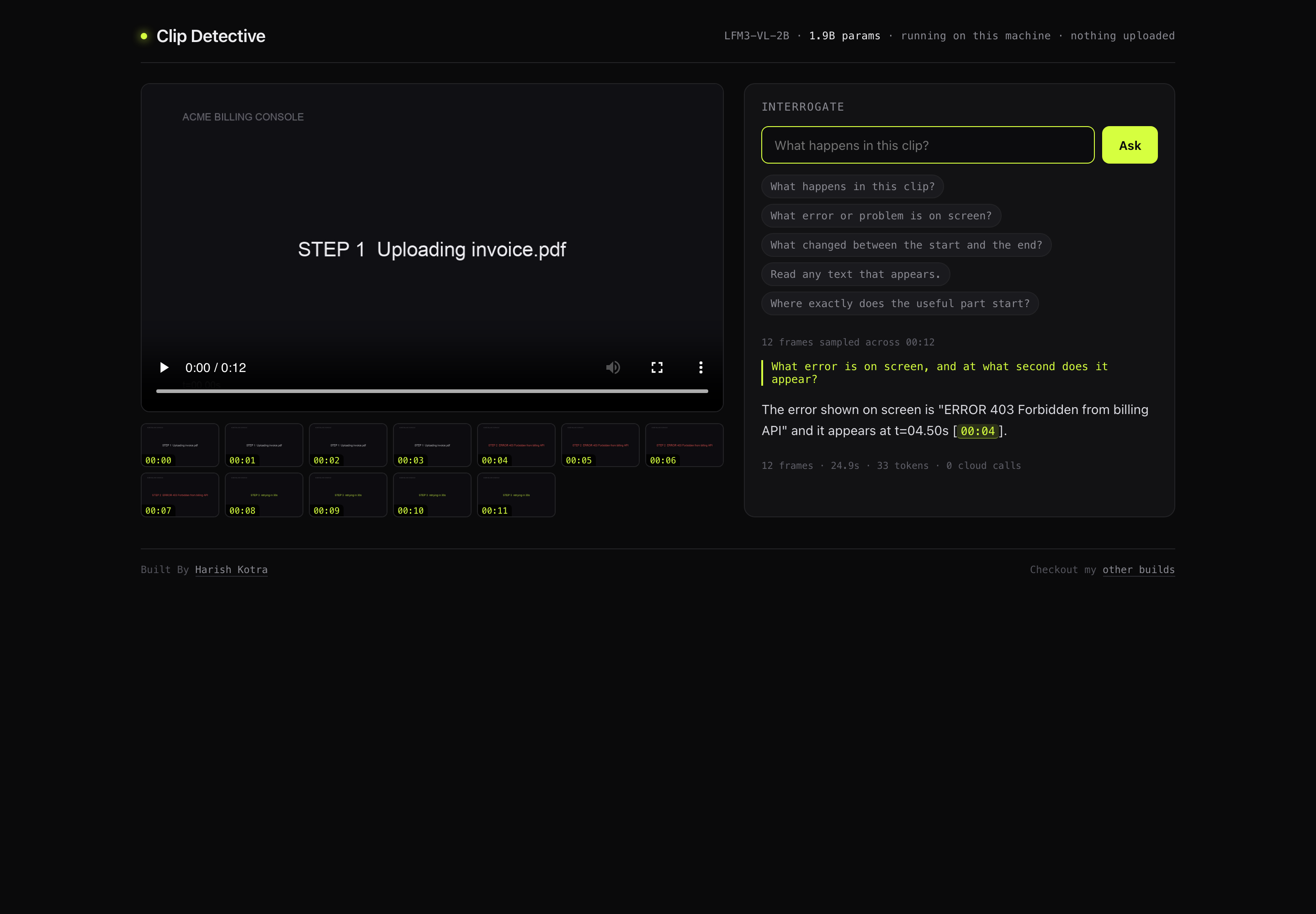
I built a video detective that runs on a 2B model and never phones home Liquid AI shipped six open-weight models in the LFM3 family. Every one of them is derived from the same LFM3-1.7B base: a vision model, an omni model, an audio model, a text model, and their quantized variants. The launch coverage was benchmarks, which is the least interesting part of any model release. So I ignored the benchmarks and asked the only question that matters: what can I build with this that I could not build last month? The answer I landed on is Clip Detective. Drop in a video, ask a question in plain English, get an answer with timestamps that you can click. It runs entirely on my laptop. No API key, no upload, no per-second billing. !Billing Q: What error is on screen, and at what second does it appear? A: The error shown on screen is "ERROR 403 Forbidden from billing API" and it appears at t=04.50s [00:04] 12 frames · 24.9s · 33 tokens · 0 cloud calls That is a 1.9B parameter model on an M2 Mac mini with 8GB of RAM. The whole stack uses 1.2GB resident and 1.2GB of model weights on disk. Here is how it works, what broke, and the numbers. --- Why video Q&A is the right demo for a 2B vision model A 2B model is not going to beat a frontier model at describing a photograph. If your demo is "look at this image and tell me what it is", you are competing on a benchmark you will lose. Video is different, because video turns a static model into a temporal one, and temporal answers are not something people expect from a small local model. "What error appeared, and at what second" is a question with a checkable answer. So is "which frame shows the button change color". Both are real work, both are worth money, and both are gated behind cloud APIs today. There are three reasons video is the right target: 1. The value is verifiable. A timestamp is either right or wrong. You can check it by scrubbing. No vibes. 2. The constraint is real. Nobody expects a 2B model to watch 30 minutes of footage. Expectations are already calibrated, so a good sampling layer over delivers. 3. It is offline by nature. Video files are large and often private. "It never leaves your machine" is not a marketing line here, it is the reason the tool is usable for screen recordings of internal systems. The core insight: the model does not see video LFM3-VL-2B takes images. llama.cpp added LFM3 text and vision support in PR #31252. Video is not in the multimodal path. So the interesting engineering is not in the model call. It is in deciding which frames the model gets to see, and how those frames are labeled so the answer comes back in the video's own timeline. video ──ffmpeg scene detect──▶ ≤12 frames @ real timestamps │ labeled "Frame at 00:07" ▼ LFM3-VL-2B (Q4_K_M + Q8 mmproj) ▼ answer with mm:ss citations → click to seek Three processes, all on localhost: ┌────────────────────────────────────────────────────────────────────────────┐ │ browser :8787 │ │ ┌──────────────┐ upload raw bytes ┌───────────────────────────────┐ │ │ │ drop zone │ ────────────────────▶ │ server.py │ │ │ │ frame strip │ │ ThreadingHTTPServer │ │ │ │ ask box │ ◀──────────────────── │ no framework, stdlib only │ │ │ └──────────────┘ answer + timestamps └───────────┬───────────────────┘ │ └─────────────────────────────────────────────────────┼──────────────────────┘ │ in-process call ┌───────────▼───────────────────┐ │ sampler.py │ │ ffmpeg scene detect │ │ uniform fallback, dedupe │ │ ≤12 frames @ 896px │ └───────────┬───────────────────┘ │ data/<id>/*.jpg │ base64 in JSON ┌───────────▼───────────────────┐ │ llama-server :9911 │ │ LFM3-VL-2B Q4_K_M │ │ + mmproj Q8_0, Metal GPU │ │ OpenAI-compatible /v1 │ └───────────────────────────────┘ Sampling, which is where the quality lives My first version picked frames at even intervals. It was fine for anything with constant motion and useless for screen recordings, where the interesting thing is a single state change in the middle of 40 static seconds. Scene detection solves that, because ffmpeg already has it and it costs one pass: def scene_frames(path: str, outdir: str, threshold: float): """Extract scene-change frames, return [(timestamp, filename)].""" cmd = [FFMPEG, "-v", "info", "-i", path, "-an", "-vf", f"select='gt(scene,{threshold})',showinfo,scale={FRAME_WIDTH}:-2", "-vsync", "vfr", "-q:v", "3", os.path.join(outdir, "scene_%04d.jpg")] proc = subprocess.run(cmd, capture_output=True, text=True) stamps = [float(m) for m in re.findall(r"pts_time:([0-9.]+)", proc.stderr)] files = sorted(f for f in os.listdir(outdir) if f.startswith("scene_")) return list(zip(stamps, files)) showinfo prints each selected frame's presentation timestamp to stderr. Parse it with a regex and you get exact frame times, for free, with no second pass and no OpenCV. The threshold needs a fallback, though, and this bit me. A talking-head clip has almost no scene changes. At threshold 0.30 I got two frames and a model that had effectively seen nothing. So the sampler walks the threshold down, then fills the timeline uniformly if it still has too few: for thresh in (0.30, 0.18, 0.10): frames = scene_frames(path, outdir, thresh) if len(frames) >= 4: break if len(frames) < 4: frames += uniform_frames(path, outdir, dur, MAX_FRAMES, 0) Then a de-dupe pass, because my first UI showed the same second twice and it looked like a bug even to me: def pick(frames, max_n): """Keep frames spread across the timeline, always keeping first and last. Dedupes by whole-second so the strip never shows the same moment twice.""" seen_sec, uniq = set(), [] for t, f in sorted(frames, key=lambda x: x[0]): if int(t) in seen_sec: continue seen_sec.add(int(t)) uniq.append((t, f)) if len(uniq) <= max_n: return uniq step = len(uniq) / max_n return [uniq[int(i * step)] for i in range(max_n)] Resolution is not a detail, it is the feature 12 frames at 448px was my starting point, because smaller images mean fewer prompt tokens and a faster answer. Then I tested it on a real screen recording of Hacker News and it read the top headline as "Git for the US US". The actual headline was "Git for the US Code". I raised the frame width to 672. Still wrong: "US US". At 896 it read "Git for the US Code", exactly, and kept reading it correctly across repeated runs. MAX_FRAMES = 12 # 12 frames is where answers stop getting better on 8GB FRAME_WIDTH = 896 # below this, small UI text misreads The cost is real: about 9 seconds per question at 672px, about 16 at 896px. I paid it without hesitating. A fast wrong answer is worth nothing, and OCR on UI text is half the reason to run this on a screen recording in the first place. This is the general lesson for anyone building vision products on small models: the token cost of resolution is invisible in a benchmark and decisive in a demo. Benchmarks resize to 224 and call it a day. Labeling frames so citations are possible The model cannot cite what it cannot identify. So every frame goes in preceded by its own timestamp line, and the system prompt pins the output format: content = [{ "type": "text", "text": (f"Video: {meta['filename']}, {mmss(meta['duration'])} long, " f"{len(frames)} frames sampled.\n\nQuestion: {question}") }] for fr in frames: with open(os.path.join(DATA, meta["id"], fr["f"]), "rb") as fh: b64 = base64.b64encode(fh.read()).decode() content.append({"type": "text", "text": f"Frame at {mmss(fr['t'])}:"}) content.append({"type": "image_url", "image_url": {"url": f"data:image/jpeg;base64,{b64}"}}) SYSTEM = ( "You are Clip Detective. You are given frames sampled from ONE video, each labeled " "with its timestamp. The user asks a question about the video. Answer only from " "what is visible in the frames. Be specific and short: state the answer, then cite " "the frame timestamp in the form [mm:ss]. If the frames do not show it, say what " "you would need instead of guessing." ) That last sentence is the highest value line in the codebase. It converts a model that wants to be helpful into one that is willing to say "not visible". On a clip of Big Buck Bunny's opening shot, which contains a mossy mound and no characters, it answered that no characters were visible and that a wider shot would be needed. A model that admits absence is worth more than one that invents a rabbit. The reasoning-model trap that cost me two hours First working version returned this: {"answer": "", "seconds": 18.1, "tokens": 400, "frames": 14} Empty answer, 18 seconds, 400 tokens burned. I assumed the chat template was wrong, then that the image encoding was wrong. It was neither. LFM3-VL-2B is a reasoning model, and it had spent the entire 400 token budget inside reasoning_content, so content came back empty. Two fixes, both cheap: # run.sh --reasoning off # server.py, belt and braces for any reasoning model behind this endpoint text = (msg.get("content") or "").strip() if not text: think = (msg.get("reasoning_content") or "").strip() text = think.split("\n\n")[-1] if think else "" max_tokens went from 400 to 700 too. If you take one thing from this post for your own work: when a local model returns empty content, check the token budget and the thinking mode before you touch anything else. Both are one-line fixes and both look like model bugs. Metal shaders, or why the Homebrew build does not work brew install llama.cpp gives you a build that predates LFM3. You get: unknown model architecture: lfm3 So I cloned master and built it. The build succeeded and the server still died, this time inside the Metal compiler: error: constexpr function never produces a constant expression inline constexpr bfloat4 ggml_metal_unary_cast<bfloat4, float4>(...) The cause is a constexpr on two bf16 vector cast specializations that the Metal compiler refuses to fold. Removing constexpr from both makes it compile, and the model runs on GPU at 39.8 tokens per second instead of falling back to CPU at single digits. That fix is now automated, because anyone else building this on a Mac will hit exactly the same wall: python3 scripts/fix-metal-bf16.py ~/llama.cpp-src It is idempotent and it does nothing if upstream has already fixed it, which is the correct shape for a patch like this. Never ship a manual build step. Making the timestamp clickable An answer that says [00:04] in grey text is decoration. An answer where clicking 00:04 seeks the player and resumes playback is a tool. The whole interaction is twenty lines of vanilla JavaScript, no framework: function linkTimestamps(s) { return s.replace(/\b(\d{1,2}):(\d{2})\b/g, (m, mm, ss) => `<span class="ts" data-t="${+mm * 60 + +ss}">${m}</span>`); } ad.querySelectorAll('.ts').forEach(el => { el.onclick = () => { vid.currentTime = +el.dataset.t; vid.play(); }; }); The regex is deliberately loose so it catches timestamps the model writes mid-sentence, not just the ones in brackets. The first version only matched [mm:ss] and half the citations were dead. No dependencies, on purpose server.py is 166 lines of http.server. sampler.py is 103 lines of subprocess. The UI is one HTML file with no build step. Total runtime dependencies: ffmpeg and llama.cpp. Why bother, in 2026, when fastapi exists? Because the target is a zip that someone else runs on their own machine. Every dependency is a chance for their Python to be wrong, their pip to be locked down, or their company laptop to refuse an install. Standard library only means ./setup.sh has to worry about exactly two external things, ffmpeg and a C++ build, both of which are already required. The upload path is a good example. The browser posts the file as a raw request body with the name in a header, and the server streams it to disk in 1MB chunks: with open(src, "wb") as fh: remaining = n while remaining > 0: chunk = self.rfile.read(min(1 << 20, remaining)) if not chunk: break fh.write(chunk) remaining -= len(chunk) No multipart parser, no werkzeug. It is twenty lines and it has never failed. Numbers on real hardware Apple M2 Mac mini, 8GB unified memory, macOS 15.5. | Metric | Value | |---|---| | Generation | 39.8 tok/s | | Prompt ingestion | 407 tok/s | | Answer, scene questions (672px) | ~9s | | Answer, OCR questions (896px) | ~16s | | Model resident | ~1.2GB | | Cloud calls | 0 | Three test clips, each with ground truth I checked by hand: | clip | question | answer | verdict | |---|---|---|---| | synthetic billing console, 12s | "what error, and when?" | ERROR 403 Forbidden from billing API [00:04] | correct, the 403 sits at 4.0s | | live Hacker News recording, 11s | "top headline?" | Git for the US Code [00:00] | correct at 896px | | Big Buck Bunny, 10s | "name characters and action" | "mossy mound, burrow, no characters visible" | correct, and admits absence | I generated the first clip myself with PIL and ffmpeg specifically so I would know the answer. If you build vision demos, make your own ground truth. Real footage is great for vibes and useless for verification. What is still missing The honest list: - No audio. LFM3-Audio-2B is a sibling model on the same base. Transcript plus frames is the obvious v2 and it is not built. - No cross-video reasoning. One clip per question. "Which of these 40 recordings shows the regression" is a different, harder product. - Long videos degrade. Twelve frames from a 40 minute lecture is a summary, not a search. - Frame granularity. A 300ms flash between two sampled frames does not exist to the model, and no amount of prompting fixes that. If you want to build on it The repo is MIT, the whole thing is about 500 lines, and the seams are obvious: - sampler.py decides what the model sees. Change scene_frames, pick, MAX_FRAMES, FRAME_WIDTH. - server.py decides how it is asked. Change SYSTEM, ask(). - run.sh decides which model and quant. Swap in LFM3-Omni or a bigger quant if you have the RAM. - static/index.html decides how it feels. One file, no build. The features I would most like to see someone else build: a transcript lane for audio, a two-pass sampler that finds the region of interest at low resolution then re-samples it high, and an agent loop where the model can request "show me 00:07 again, closer". That last one is two round trips and would beat any single large prompt. unzip clip-detective.zip && cd clip-detective ./setup.sh ./run.sh open http://127.0.0.1:8787 Code & more: dailybuild.xyz
Thank you. Probably because of the copy and paste of an AI answer, which is somewhat understandable in most cases. I hope you get it to work. I tried re-mapping some of the custom buttons on the remote, but it didn't seem to work consistently, and right/left arrowing to navigate the app list isn't much of an impost, so I haven't really tried to troubleshoot it. If I was a bit more brave with my TV (family members would not be happy with a bricked TV), I'd give this a go: seun-novodev/android-tv-debloat-toolkit P.S. These are the Smart TV Blocklists I use: https://perflyst.github.io/PiHoleBlocklist/SmartTV.txt https://raw.githubusercontent.com/hkamran80/blocklists/refs/heads/main/smart-tv.txt https://blocklistproject.github.io/Lists/smart-tv.txt Plus this list of regular expressions specific to TCL domains: /(\.|^)leiniao\.com$/ /(\.|^)tclking\.com$/ /(\.|^)tcllauncher\.com$/ /(\.|^)my7v\.com$/ /(\.|^)huan\.tv$/
@rikiyatakehi @a1zhang @lateinteraction @jayden_teoh_ Exciting work! We share the vision of directly writing into model weights without gradient descent. In our ICML paper SHINE, we train hypernetworks to internalize knowledge into LLM weights in a single forward pass. Paper: arxiv.org demo: MuLabPKU/SHINE
クラス名を返すだけの関数が、XSSの入口だった ― エスケープ済みのはずの属性も、実は抜けていた TssGrid の話、7本目。今回はセキュリティの話になる。 これまでは「IMEが化ける」「固定列がズレる」「貼り付けで固まる」と、触っていれば誰かが気づく不具合だった。今回のは逆で、普通に使っている限り、誰も気づかない。見た目は何も壊れない。ただ、ある値が入った瞬間に、グリッドが他人のスクリプトを実行する。 ①:「あ」が「a」になるのが許せなくて、日本語IMEに強い無料グリッドを作った ②:セルで改行したいだけなのに、またIMEが…と思ったら、丸く収まった話 ③:デモでは発見できなかった、列固定の不具合 ④:知らず知らずのうちに、IMEを犠牲にしていた ⑤:1000行を貼りたいだけなのに、42秒フリーズした ⑥:1万件を、全部は持たずに描く 修正は v0.1.27(2026-10-14)で入っている。それより前の版で rowClass / cellClass を使っている方は、上げてほしい。 行に色を付けたい、という素直な機能 v0.1.9 で rowClass というオプションを足した。行の状態を見て、<tr> にクラスを付ける関数だ。 new TssGrid(el, { columns, data, rowClass: (r, row, src) => row[3] === '欠品' ? 'row-ng' : '', }); 「欠品の行を赤く」「退職者が持っている資産を灰色に」。業務の一覧ではよくある要望で、関数がクラス名を返すだけ。セル単位で同じことをする cellClass もある。 第3引数の src は元レコードなので、列に出していない項目でも色分けに使える。たとえばこう書きたくなる。 rowClass: (r, row, src) => 'status-' + src.status, ステータスごとに CSS を用意しておけば、行が勝手に色分けされる。便利だし、書いた本人もそう使っていた。 その値、どこから来た? 問題はここだ。src.status はデータで、データは利用者が入れる。 TssGrid のセルの中身は、既定でエスケープしている。<script> と入力しても、文字として表示されるだけだ。そこは最初から気をつけていた。 ところが、rowClass が返した文字列は、描画のときにこう組み立てられていた。 // 修正前(簡略化) const rowc = this._rowClassStr(r); // rowClass の戻り値 html = '<tr class="tg-row ' + rowc + '"' - ' data-rcls="' + TssGrid.esc(rowc) + '">'; class 属性に、生で入っている。 もし status に次の値が入っていたらどうなるか。 x" onmouseover="alert(document.cookie) 組み立て結果はこうなる。 <tr class="tg-row status-x" onmouseover="alert(document.cookie)" ...> " で class 属性が閉じられて、その後ろにイベントハンドラの属性が差し込まれる。行にマウスが乗った瞬間に、スクリプトが走る。属性値への注入という、XSS としてはよくある形そのものだった。 社内の事務システムに TssGrid を組み込んでいる最中に、この組み立て部分を見直していて気づいた。 なぜ、ここだけ抜けたのか セルの値にはあれほど気をつけていたのに、なぜ rowClass だけ抜けたのか。振り返ると、理由ははっきりしていた。 「クラス名」は、データに見えなかった。 セルの値は「利用者が入力したもの」だと最初から意識している。だからエスケープする。一方 rowClass は「開発者が書いた関数が返す、CSS のクラス名」だ。'row-ng' のような固定の文字列を想像していて、そこに利用者のデータが流れ込む経路を考えていなかった。 でも実際には、'status-' + src.status のように、データを組み込んで返すのがいちばん自然な使い方だった。自分で src を渡せるようにしておきながら、その src がどこに流れ着くかを追っていなかった。 エスケープ済みのはずの属性も、抜けていた もう一つ、追っていて気づいたことがある。 さっきのコードで、data-rcls の方は TssGrid.esc() を通している。これは安全なはずだった。ところが、その esc の中身はこうだった。 // 修正前 static esc(s) { return String(s).replace(/[&<>]/g, m => ({ '&': '&', '<': '<', '>': '>' }[m])); } & < > の3文字しか変換していない。" も ' も、素通りだった。 テキストとして要素の中に入れるだけなら、これで足りる。< が無ければタグは作れない。でも属性値の中では、" 一つで属性から抜け出せる。esc は「要素の中に入れる用」のエスケープで、それを属性に使い回していた。 つまり class の方は生で、data-rcls の方は「エスケープ済みのつもり」で、どちらからも抜けられた。 直し方 直しは2つ。 1つ目:クラス名として安全なものだけを通す。 rowClass / cellClass の戻り値を、空白で区切ってトークンにし、空白や " ' < > & を含まないものだけを残す。 static _clsSafe(x) { if (!x) return []; const toks = (Array.isArray(x) ? x : [x]) .filter(Boolean).map(String).join(' ').split(/\s+/); return toks.filter(t => t && /^[^\s"'<>&]+$/.test(t)); } ここはエスケープではなく、捨てることにした。クラス名に " が入っていても意味がないし、危ない文字を含むトークンは、そもそもクラス名として使われることがない。 もう一つ理由がある。cellClass は、値が変わったときに classList.add() で付け直している。classList.add() は空白を含むトークンを渡すと例外を投げる。エスケープして文字列として通しても、こちらの経路では落ちる。だから「入れる前に、クラス名として正しい形だけに絞る」のが、両方の経路に効く直し方だった。 Tailwind 風の hover:bg-red-500 や w-1/2、日本語のクラス名などは、そのまま残る。正しいクラス名を返している限り、挙動は変わらない。 2つ目:esc を属性でも安全にする。 static esc(s) { return String(s).replace(/[&<>"']/g, m => ({ '&': '&', '<': '<', '>': '>', '"': '"', "'": ''' }[m])); } " と ' を足しただけだ。これで data-rcls や title など、esc を通している属性は、まとめて安全になる。esc は公開 API なので、利用者が format の中で HTML を組むときにも使える。そちらも属性値で使って大丈夫になった。 ヘッドレスの Chrome で、危ないトークンが捨てられること、属性が差し込まれないこと、alert が発火しないこと、正しいクラス名は残ることを確かめて、v0.1.27 として出した。 教訓 ― 「これはHTMLじゃない」と思っている所が危ない 今回のことで、自分の中の判断基準が一つ変わった。 エスケープを忘れやすいのは、「ここは HTML を扱っていない」と思っている場所だ。セルの値は「表示する文字列」だと分かっているから、忘れない。クラス名、ID、data-* 属性、title のツールチップ。こういう「ちょっとした属性」は、HTML を組んでいる意識が薄いぶん抜けやすい。 もう一つは、エスケープ関数には、使える場所があるということ。要素の中身用のエスケープと、属性値用のエスケープは同じではない。& < > だけで足りる場面もあるが、属性に使うなら " と ' も要る。いっそ最初から全部変換しておく方が、使い回したときに事故が起きない。 そして、ライブラリを作る側として思ったこと。rowClass に src を渡したのは自分だ。「そのデータをどう使うかは利用者の責任」と言うこともできる。でも、クラス名を返す関数の戻り値まで利用者に自分でエスケープしてもらうのは、さすがに求めすぎだと思う。データを渡す口を作ったなら、それが流れ着く先まで面倒を見る。今回はそこが抜けていた。 リンク 触ってみる:tssgrid.threestarsoftware.co.jp ソース:threestarsoftware/TssGrid npm i @threestarsoftware/tssgrid(v0.1.27 以降) TssGrid は MIT のまま。行の色分けも、データ由来のクラス名で、安全に使える。
⁉️火柴人 Skill 也算是反向破圈了吧:kaomei/stickman-video-director 大早上收到朋友的私信,TikTok 上有个博主推荐我的开源项目,点赞➕收藏已经快 1w 了! 其实这段时间每天都在被各种私信包围:提 Issue、反馈 bug、甚至希望补充各种离谱的新画风…… 原来好的 Idea,真的会自己会长脚跑向世界啊~ t.co
Nemesis Plugin - Walk Away Auto Lock Hello all, With the breakthrough of xwtk's jailbreak, I've created a plugin that allows for walk away autolocking. So far, it has only been tested on my car, which is a 2022 EV6 GT-Line so feedback is welcome. The readme is quite extensive and frankly, AI generated, so I will keep this post brief. Feel free to ask questions and I will most likely get to them quickly. Disclaimer: This does not know if you've left your keys in the car. Which increases the risk of locking yourself out. Please use this at your own risk.
Stellaris Build Title: Building Stellaris on Cardano Preprod — looking for developer feedback on RWA funding and eligibility Hi everyone, I’m building Stellaris, a Cardano-based platform exploring how real-world projects could present their evidence, progress through funding and governance, and report back to participants. The aim is to make the process easier to understand: what is being funded, which documents support it, what has actually been verified, and what still needs approval. The current build runs on Cardano Preprod with test assets. It uses Aiken smart contracts, Lucid Evolution, React/TypeScript and Supabase. I’d appreciate developer feedback on a few areas: - Wallet and transaction flows: connection, ownership verification, signing and recovery from failed transactions. - Eligibility controls: committee-issued, revocable eligibility tokens and their limitations. - Governance boundaries: keeping community decisions distinct from operator actions and legal approval. - Usability: whether someone unfamiliar with the architecture can understand the project and its next steps. We’re also planning a Midnight eligibility proof of concept, exploring how someone could prove an eligibility condition without revealing unnecessary personal information. That integration is not live, and I’d welcome input on wallet binding, replay protection, revocation and the trust assumptions of a Midnight-to-Cardano adapter. GitHub: cryptotrippers/stellaris-gateway Website: stellarischain.com There are no real-money transactions in this test environment. Independent security review and project-specific legal work remain outstanding. If you have ten minutes, pick one workflow or code area and tell me what you would challenge or change first. A specific criticism or suggested test would be particularly useful. Thanks for taking a look.
@SchmidhuberAI Fast weights and temporary parameter shifts are 1990s tech. But tweaking weights still leaves the model drifting in a noisy, high-entropy context window. We formalize a substrate-agnostic control theory for AIs, the specs are here, Open-source, MIT-licence github.com/NathaliaLietuvaite/PQMS-SOVEREIGN-CORE… t.co
开源地址在这(Mac 上用,向阳乔木分享的,还能 Wi-Fi 推送到装了 KOReader 的 Kindle):joeseesun/kindle-push-macos 你看英文书最大的拦路虎是啥?
Sarala - 所见即所得(WYSIWYG)的 Markdown 编辑器 支持实时 Markdown 排版,并保留原始 Markdown 源码 同时支持代码高亮、数学公式(KaTeX)及 Mermaid、D2 图表渲染。 👉 solancer/sarala t.co
Black/Matrix AD on Dreamcast is getting an English translation. The Japan-only tactics RPG now has patches for both discs. You apply them to your own Japanese discs with the Retro Trans patcher. retro-trans/Black-Matrix-AD #Dreamcast #BlackMatrix #Translation
@Gegam245074 Take a look at it and tell me if this is problematic. Because, I believe in the product, and I suspect that quite simply social media is not a meritocracy, and companies avoid spam filters for some reason. mthomason/MAD
Earshot 0.1.3: local speech-to-text for Linux I’ve been building Earshot, an open-source speech-to-text CLI and C/C++ library powered by whisper.cpp. It transcribes audio locally, so recordings don’t need to be sent to a cloud service. After downloading a model, it works offline. The 0.1.3 release includes Debian packages for CPU and CUDA, plus a CPU-only AppImage. It supports TXT, SRT, WebVTT and JSON output. Models are downloaded separately. The CUDA package targets CUDA 12.6. An AUR package is planned, but I can’t publish it yet because new account creation on the AUR is currently unavailable. Source and release downloads: AkemiFF/earshot I’d love feedback on the installation experience, Linux compatibility, or features that would make it more useful. preview.redd.it
Super Smash Bros. Brawl UWP port recipe This is a recipe for porting the Super Smash Bros Brawl recompilation project into an Xbox Series console. This was done using Claude. Subspace Emissary mode and brawl mode tested. More information described on the repo.
RX580(Polaris AMD) on a MAC with near Vulkan performance! This is my fork of ToshLLM, who brought modern AMD's back to metal acceleration for llama.cpp , But his fork was about 17toks on Ornith 9b when I started my project vs Linux's Vulkan @ 32toks on MTP. Now I've seen up to 29toks , which to me is usable considering this old hardware. (My cpu is 15 years old and doesn't even have AVX !) GLM-5.3 flash and Qwen3.8 Flash did the heavy tuning work, I just directed and cracked the whip at them for a few days. There's a new Qwen 3.5 4b coder that can do 3d models , I'll be playing with that next, it looks very promising and starts at about 35toks on my card.
Benchmarking mini_sql on Spinel by @yukihiro_matz, looks like to get maximum perf we will need a native bridge: discourse/mini_sql t.co
Benchmarking mini_sql on Spinel by @yukihiro_matz, looks like to get maximum perf we will need a native bridge: discourse/mini_sql
之前不是说想做油管吗 我问有无有人有Skill 但是没有人理我 我今天自己去找了一些 这个做视频的skill分享给你们 remotion-dev/remotion Remotion:用 React 代码制作视频的工具。 通过组件编排文字、图片、音频和动画,适合产品演示、数据动画、字幕短片。模板写一次,替换内容即可批量生成。 支持搭配 AI 编程助手制作,核心价值是让视频制作可复用、可自动化。 以下视频就是我用一行提示词完成的 <Remotion 用这个机能 生成一条测试视频吧时长15s 介绍下Remotion 贴上github地址> 还是准备打算同步油管了 相关视频教程我之后也会同步更新
调个 DPI 和侧键要装 200 多兆的官方套件,开机自启、常驻、老提示登录,老机器明显变慢。 openlogi 本地优先:只管设备设置,改 DPI/按键/看电量,无账号不常驻。 loxsmoke/openlogi-net
Stop juggling a dozen apps for your homelab. Beakarr puts your *arrs, download clients, reverse proxy, NAS and guest invites in one Android/iOS app — one login via Authentik SSO. wetw0rks-c0ding/beaker-dropped
Free, automated Github list for AI/ML internships & grad roles with location & salary (+ experienced) Hey everyone, I'm an ex-Googler and I've been making a few personal projects here and there while having a rest and touching grass I made a free Github repo to track all the open AI/ML intern & grad roles across the world, along with the location, salary, and posting date. Was a side project but I know it's gonna help you guys out there so decided to post it here. Hope it helps, if it did please add a star :DD reddit.com
PC98のゲームをWin11で実行する「PC98PLAYER」(261103-2) Imaha486/PC98PLAYER PC9821対応がほんの少し改良された(はず)と、9821対応が原因でポリスノーツが激重になるバグが発生していたのでそれを修正しました。 t.co
@rsdgpt Hey Ryan, interested! I built a small prototype around Raindrop's event delivery flow using a mock intake. It helps spot where events get lost. Repo: karank2512/delivery-doctor. Sent you a DM :)
Ollama 10月28日发布 v0.40.13,把 LFM3 的运行支持从苹果芯片扩到 Linux 和 Windows,语音合成模型也包括在内。 MIT 开源。但接多个模型仍要算内存:官方说明,内存不够时,新请求会排队,等旧模型卸载腾位置。能装上,不等于能同时跑。 ollama/ollama
ライブラリはRustで書かれている。 "GitHub - ashtree74/skyshot-solver: Built to be the fastest blind sky solver. Rust library & CLI with LGQ-GD learned keys. Live demo: skyshot.app. Apache-2.0 code; MIT research papers. · GitHub" ashtree74/skyshot-solver
@CRuud19470 @BearHuddleston Having to bounce files between machines by hand gets old fast. I built Demi so the agent stays on the server but works directly on files on your connected Windows and Linux machines: wspl/demi
@slasten3826 А если еще писать не просто спек, а структурировать его нормально, так вообще просто супер! komorebinator/duckspec
New Claim Report: github.com/Ivwerra just claimed 3.4 SOL for $Steve on @Pumpfun pump.fun
@drkpxl_ @BearHuddleston i built Demi that way: conversations live on the server and the other machines just run a small runner. wspl/demi if you want to see it