Mentions
Conversations linking to GitHub, newest first. Times are UTC.
Mentions by source
X
Bluesky
Hacker News
Lobsters
V2EX
Qiita
DEV
Mastodon
Latest posts
Show HN: Run xv6-riscv(64Bit,MMU) with RP2350 I have successfully run a 64-bit version of xv6-riscv—which includes an MMU—on the Raspberry Pi Pico 2W. No PSRAM is attached. I built a software emulator and ran it on the Hazard3 core. (It should likely also run on the Cortex core.)
Here's how to test your Flutter app on iOS, no Mac and free 👇 flutter-remote is an open-source CLI that runs your app in a real iOS Simulator, in your browser. npm i -g flutter-remote flutter-remote up Not Flutter Web, not a recording. AbdAlftahSalem/flutter_remote t.co
Top 5 GitHub Today: Run Frontier MoE Models on Hardware You Own #Shorts This top-5 GitHub countdown shows how colibri runs frontier MoE models on hardware you already own by streaming experts from disk, plus four more trending tools. Each pick is grounded in the repository's supplied documentation and linked below for your own review. 1. JustVugg/colibri — JustVugg/colibri 2. vercel-labs/agent-desktop — vercel-labs/agent-desktop 3. FlashML-org/FreeToken — FlashML-org/FreeToken 4. D4Vinci/Scrapling — D4Vinci/Scrapling 5. thedotmack/claude-mem — thedotmack/claude-mem Subscribe for another evidence-backed GitHub roundup. #GitHub #OpenSource #Programming #AI #Developers #Shorts
Kiko: Yet Another MyAnimeList Client App First thing first, I would like to give my thanks to all the users that uses my app and feedbacks to improve this app. Hello, let me introduce you to Kiko. This app is MAL app but reimagined. We all know how limited and dated MAL official app is. Kiko is my attempt to fix that. So far this app managed to implement: - anime/manga tracking with all features that exists in the website MAL - Interest Stacks. However, user cannot create stacks and can only save stacks made by user as of the moment - Anime/Manga/Characters/Companies/People/Users lookup through the app - Favoriting all of the above (except for user, add friend feature is in the works) - Forums and Clubs. User can see "snapshots" (main news, that is in grid in home page). User can also send replies in these posts! - Check Stats, Score Distribution, Year Distribution, Format Breakdown, Genre Breakdown, Your Favorites, MAL About Me, Friends in Profile page. - Open all MAL link in the app (accessible via Settings > App info > Open supported links) - In-app update. User can update Kiko app just from the app itself. - History (your last activity) - Rankings and so much more! This app is open source and under GPL-v3 License. Meaning anyone can fork this app and make a better version of it OR you can contribute to the development! Be warn this app is also build by the assistant of AI tools. Just to note for those who don't like AI stuff. Website: syhaqi.github.io Github: SyHaqi/kiko
@BoboLinNotes I work on both my machine and several remote VPSes. So I recently developed this to help me keep things clean. jadmadi/SwapAudit
Rent a confidential VM with USDC in two HTTP requests, no signup --- title: Rent a confidential VM with USDC in two HTTP requests, no signup published: true description: An AI agent can buy a dedicated Intel TDX machine by the hour over x402. The 402 is the quote, the wallet is the account. tags: ai, agents, x402, docker canonical_url: agentgates.ai cover_image: agentgates.ai --- Most cloud APIs assume a person: a signup form, a card, an API key pasted into a config file. An agent that needs a machine for an hour has none of those. It has a wallet. Agentgates sells confidential VMs (Intel TDX) by the hour to exactly that buyer. There is no account. The wallet that pays owns the machine, reads its state, renews it and destroys it. The 402 is the quote Ask for a machine with no payment and the API answers 402 Payment Required with the exact price on every network it accepts. Asking is free and repeatable: nothing runs and nothing is charged. curl -s -X POST https://api.agentgates.ai/api/compute/deployments \ -H 'content-type: application/json' \ -d '{"plan":"compute.starter","hours":1,"image":"nginx:alpine"}' | jq -r '.accepts[] | "\(.network): \((.maxAmountRequired | tonumber) / 1000000) USDC"' Each entry of accepts is one network's own offer: the amount in USDC atomic units, the token contract and the address to pay. The plans and their live prices are in GET /api/compute/catalog. Pay that amount, send the same request again Sign the amount (an EIP-3009 transfer authorization on Base or Polygon, a transfer on Solana) and resend the same request with the payment attached. The official x402 v2 client does both steps: import { wrapFetchWithPaymentFromConfig } from '@x402/fetch'; import { ExactEvmScheme } from '@x402/evm'; import { privateKeyToAccount } from 'viem/accounts'; const pay = wrapFetchWithPaymentFromConfig(fetch, { schemes: [{ network: 'eip155:8453', client: new ExactEvmScheme(privateKeyToAccount(process.env.EVM_PRIVATE_KEY)) }], }); const res = await pay('https://api.agentgates.ai/api/compute/deployments', { method: 'POST', headers: { 'content-type': 'application/json' }, body: JSON.stringify({ plan: 'compute.starter', hours: 1, image: 'nginx:alpine', port: 80 }), }); console.log(await res.json()); // { deploymentId, status: "provisioning", ... } Settlement confirms on chain, the machine provisions, and the billed clock starts when it reads running, not at payment. A wallet that cannot cover the amount is refused before anything moves: the answer says how much it needs and how much it holds. The full example, which prints the price and pays only with --yes, is in the repo. Why confidential The machine's memory and disk are encrypted by the processor, and every machine carries a remote-attestation quote with a public proof page, so you can check the hardware before you hand it a secret. Environment values you send are sealed to the machine and never stored. Keep it running Watch expiresAt and renew with POST /api/compute/deployments/{id}/renew and {"hours": 1}, paid the same way. Renewals stack on the end of the clock, so an agent can keep a machine alive an hour at a time. For agents - The contract, written for software: /api/compute/docs - An MCP server with no sign-in that lists plans and prices a machine: https://mcp.agentgates.ai/compute - Skills for coding agents: npx skills add agentgates-ai/agentgates - Every price, read live: agentgates.ai
そういえば僕のサイトで使ってる色収差とグリッチ表現はこのOSSから 7PH/powerglitch
@xiangning0 我用双拼来着的 之前用的时候不支持微软/搜狗方案 然后使用上也挺不舒服的 不知道现在解决没有 我现在是自己套了一个壳用 github.com/rhinoc/douvo/blob/main/README.zh.md t.co
@DeltinhaV tem esse projeto no github (se nao me engano tem no gamebanana também) que me ajuda MUITO para conseguir mais frames. recomendo demais caso não tenha utilizado as gameinfos que ele oferece! (eu uso uma que tem o nome de extreme low, recomendo demais) Sqooky/OptimizationLock
Blank idea box? We added 15 one-line starters for short drama / viral shorts / product ads (EN + 中文): github.com/charliewwdev/OpenMontage/blob/main/doc… Plus a README walkthrough GIF of the 7-stage workshop. Try it: openmontage.dtok.io #ShortDrama #AItools
@FlyaKiet @ParadevAI i love superset now paradev but it didn't allow me to theme individual terminals so i built my own ADE lmao .. i'm going to resolve the conflicts it's been a while Paradev#7906
@Snowymercc Yup! A tutorial for it can be found here github.com/cast-iron-skillet2/ffpackage-addon-tem…
Here's how to test your Flutter app on iOS, no Mac and free 👇 flutter-remote is an open-source CLI that runs your app in a real iOS Simulator, in your browser. npm i -g flutter-remote flutter-remote up Not Flutter Web, not a recording. AbdAlftahSalem/flutter_remote t.co
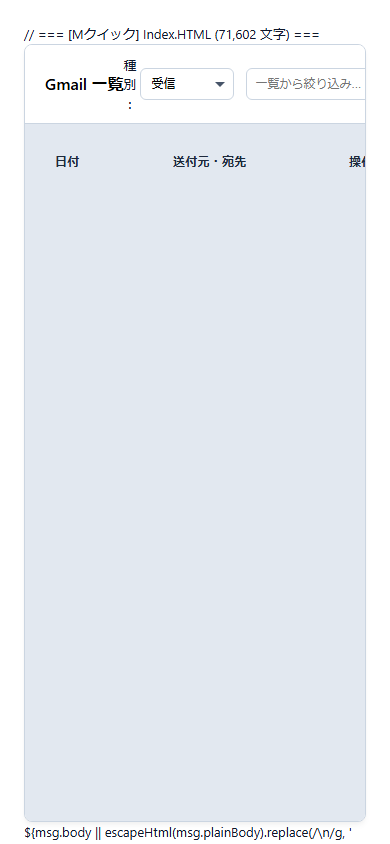
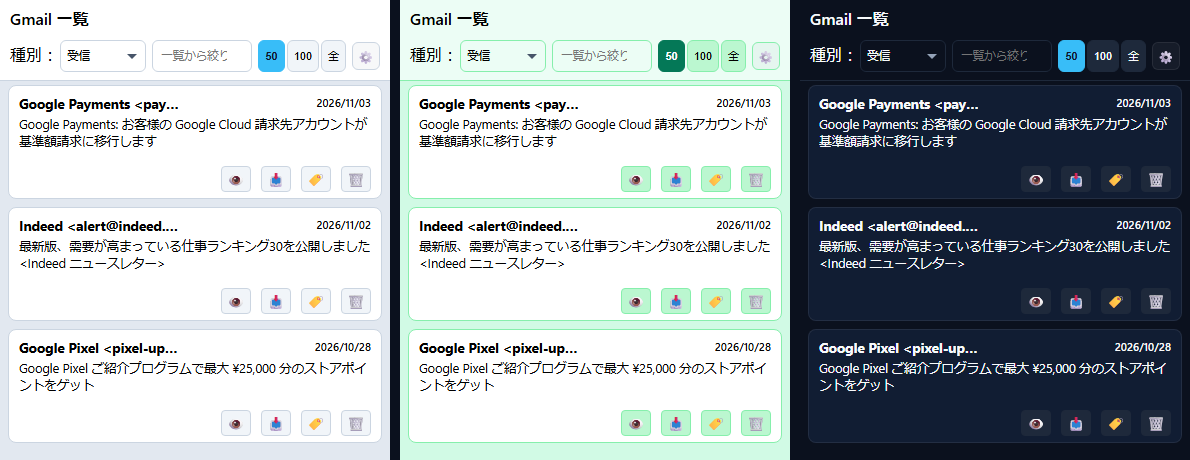
「これ、軽量モデルのフラッシュ君で書いたの…?」 ── 秀GASマネージャーを持たせたら、最速AIがネイティブ級スマホアプリを爆速生成する怪物になった話 はじめに ―― 「これ、スマホで使えたら最強じゃないか?」 前回の記事で、自作のGmail爆速ビューア『Mクイック』をブラウザゼロで修復し、0.5秒の連打にも完全追従する怪物に仕立て上げた話を公開しました。 - 本番WebアプリをAIにブラウザゼロで直させたら、0.5秒の連打にも完全追従する怪物になった話 ―― 秀GASマネージャー実戦証明と『からくりポケット』の同梱公開 PCのブラウザで叩くMクイックは、まさに快適そのもの。数千件のメールがIndexedDBから瞬時に立ち上がり、キーボード操作でサクサク処理できる相棒になりました。 ですが、使い込んでいるうちに、ごく自然な欲求が湧き上がってきたのです。 「出先や移動中に、スマホでもこの速度でGmailを確認できたら、どれだけ助かるだろうか?」 早速スマートフォンでアクセスしてみました。 ……しかし、現実は甘くありませんでした。 !スマホ表示が崩れていた初期状態 PC用の4列テーブル(日付・差出人・件名・操作)を無理やりスマホの画面幅(約390px)に詰め込んだため、ヘッダーのボタンは画面外へ吹き飛び、件名列は押し潰され、とても実用に耐える状態ではなかったのです。 「やっぱりGASのWebアプリでスマホアプリなんて無理なのか……?」 普通ならここで諦めるか、「まあPC専用ツールだから」と割り切るところです。 しかし、私には 秀GASマネージャー と、頼れる相棒 Gemini Flash(フラッシュ君) がいました。 ここから、「軽量モデル×ガスマネージャー」が起こす、前代未聞のスマホアプリ開発劇が始まったのです。 !スマホになった! --- 爆誕した『Mクイック』スマホ版 ―― ネイティブアプリと見分けがつかない3大機能 結論から申し上げます。完成したものは、「App Storeにあるネイティブアプリそのもの」 でした。 GAS特有のもっさり感や「Webページを見ている感」は完全に消え去っています。 !スマホ版Mクイックの完成画面(ホワイト・グリーン・ダークの3色テーマ) 1. PWA(Progressive Web App)による「全画面アプリ化」 スマホのブラウザ(SafariやChrome)で開き、メニューから 「ホーム画面に追加」 を押すだけ。 それだけで、ブラウザのアドレスバーや戻るボタンが完全に消え去り、全画面スタンドアローンアプリとして起動します(※iPhoneでは専用の稲妻アイコン、AndroidではGAS仕様により親しみのある青いGoogleの「G」アイコンが配置されます)。 高価なMacも、年間数万円のApple Developer登録も、厳しいアプリ審査も一切不要。 Googleの無料インフラだけで、完全なスマホアプリが手元で動くのです。 2. Gmail公式準拠の「左右スワイプアクション」 スマートフォンで小さなボタンを親指で狙うのはストレスです。 そこで、メールカードを左右に指先でスワイプして処理できるようにしました。 - 👉 右へスワイプ(緑): 指を離すとその場で 「アーカイブ」 - 👈 左へスワイプ(赤): 指を離すとその場で 「ゴミ箱(削除)」 途中で指を戻せばバネのようにシュッと元の位置に戻る、滑らかなタッチアニメーションを実装しています。 3. 触覚フィードバック(Haptic微振動) スワイプが閾値を超えた瞬間や、ボタンをタップした瞬間に、スマホ本体が 「コトッ」「トッ」と心地よく微振動 します。 わずか数行の Vibration API ですが、これが入るだけで「Webページを操作している感覚」が脳内から消え、本物のネイティブアプリの質感に化けました。 --- Mクイック のコード(自分でメールビューアを作りたい方へ) この節では当初、Mクイック の写しをワンクリックで作れるリンクを置いていました。写しを配る形はやめて、コードをそのまま載せることにしました(2026-11-05)。 自分で Gmail のビューアを作ってみたい方の参考になればと思います。Apps Script の新しいプロジェクトに、下の 3 つのファイルを作って貼り、ウェブアプリとしてデプロイすれば動きます。 作るときに気をつけたい所を 2 つだけ書いておきます。 - メール本文は sandbox 付きの iframe で表示しています。 getBody() で取れる HTML は、Gmail の画面と違ってスクリプトが取り除かれていません。Index.html の EMAIL_SAFE_HEAD の周りを見てください。 - 添付ファイル名のように送り主が決める文字を onclick="…" に入れるときは、JS と HTML の両方の処理をしています。 Index.html の escapeJsStr です。 載せているのは、この 2 つを足した 11/05 の版です。 <details><summary>コード.gs(サーバー側・373 行)</summary> /** * Webアプリケーションのエントリポイント */ function doGet() { return HtmlService.createHtmlOutputFromFile('Index') .setTitle('Gmail 一覧ダッシュボード') .setXFrameOptionsMode(HtmlService.XFrameOptionsMode.ALLOWALL) .addMetaTag('viewport', 'width=device-width, initial-scale=1'); } /** * ユーザー作成のラベル一覧を取得 */ function getUserLabels() { try { const labels = GmailApp.getUserLabels(); return labels.map(label => label.getName()); } catch (e) { console.error('getUserLabels error:', e); return []; } } /** * 条件に応じたメール一覧を取得 (N+1問題解消・添付走査の最適化版) */ function getEmailList(count, mode, _fetchDetails) { try { let query = ''; if (mode === 'inbox') { query = 'in:inbox'; } else if (mode === 'sent') { query = 'in:sent'; } else if (mode === 'trash') { query = 'in:trash'; } else if (mode === 'archive') { query = '-in:inbox -in:sent -in:trash'; } else if (mode === 'all') { query = '-in:trash'; } else { query = 'label:"' + mode + '" -in:trash'; } const limit = (count === 'all' || typeof count !== 'number') ? 300 : count; const threads = GmailApp.search(query, 0, Math.min(limit, 500)); if (threads.length === 0) return []; const messagesPerThread = GmailApp.getMessagesForThreads(threads); const result = []; const userEmail = Session.getActiveUser().getEmail(); const timeZone = Session.getScriptTimeZone(); threads.forEach((thread, index) => { const messages = messagesPerThread[index]; if (!messages || messages.length === 0) return; const latestMsg = messages[messages.length - 1]; const dateObj = latestMsg.getDate(); const dateStr = Utilities.formatDate(dateObj, timeZone, 'yyyy/MM/dd'); const timeStr = Utilities.formatDate(dateObj, timeZone, 'HH:mm'); const fromRaw = (mode === 'sent') ? latestMsg.getTo() : latestMsg.getFrom(); const fromMatch = fromRaw.match(/^(.*?)(?:<.*?>)?$/); const fromClean = (fromMatch && fromMatch[1].trim()) ? fromMatch[1].replace(/"/g, '').trim() : fromRaw; let hasAttachment = false; for (let i = messages.length - 1; i >= 0; i--) { try { if (messages[i].getAttachments({ includeInlineImages: false }).length > 0) { hasAttachment = true; break; } } catch (e) { break; } } const threadLabels = thread.getLabels().map(l => l.getName()); const labelIds = []; if (thread.isInInbox()) labelIds.push('INBOX'); if (thread.isInTrash()) labelIds.push('TRASH'); if (mode === 'sent' || messages.some(m => m.getFrom().includes(userEmail))) { labelIds.push('SENT'); } result.push({ id: thread.getId(), subject: thread.getFirstMessageSubject() || '(件名なし)', from: fromClean, date: dateStr, time: timeStr, isUnread: thread.isUnread(), hasAttachment: hasAttachment, attachmentNames: [], labels: threadLabels, labelIds: labelIds }); }); return result; } catch (e) { console.error('getEmailList error:', e); throw new Error(e.message); } } /** * スレッドの詳細を取得し、既読化する */ function getThreadDetails(threadId) { try { const thread = GmailApp.getThreadById(threadId); if (!thread) return { success: false, error: 'スレッドが見つかりません' }; if (thread.isUnread()) { thread.markRead(); } const messages = thread.getMessages(); const timeZone = Session.getScriptTimeZone(); const details = messages.map(msg => { const msgId = msg.getId(); const body = msg.getBody(); const plainBody = body ? '' : msg.getPlainBody(); const attachments = msg.getAttachments(); return { id: msgId, from: msg.getFrom(), to: msg.getTo(), cc: msg.getCc(), date: Utilities.formatDate(msg.getDate(), timeZone, 'yyyy/MM/dd HH:mm:ss'), body: body, plainBody: plainBody, attachments: attachments.map((att, attIdx) => ({ msgId: msgId, attIndex: attIdx, name: att.getName(), size: Math.round(att.getSize() / 1024) + ' KB', mimeType: att.getContentType() })) }; }); return { success: true, subject: thread.getFirstMessageSubject() || '(件名なし)', messages: details }; } catch (e) { console.error('getThreadDetails error:', e); return { success: false, error: e.message }; } } /** * ラベル付与とアーカイブ */ function updateLabelsAndArchive(threadId, labelName, isInboxMode) { try { const thread = GmailApp.getThreadById(threadId); if (!thread) return { success: false, error: 'スレッドが見つかりません' }; if (labelName && labelName !== '__archive_only__') { let label = GmailApp.getUserLabelByName(labelName); if (!label) { label = GmailApp.createLabel(labelName); } thread.addLabel(label); } if (isInboxMode) { thread.moveToArchive(); } return { success: true }; } catch (e) { return { success: false, error: e.message }; } } /** * スレッドからラベルを解除 */ function removeLabelFromThread(threadId, labelName) { try { const thread = GmailApp.getThreadById(threadId); if (!thread) return { success: false, error: 'スレッドが見つかりません' }; const label = GmailApp.getUserLabelByName(labelName); if (label) { thread.removeLabel(label); } return { success: true }; } catch (e) { return { success: false, error: e.message }; } } /** * メールをゴミ箱へ移動 */ /** * ゴミ箱から受信トレイへ復元 */ /** * ZIPエクスポート */ function exportEmailAsZip(threadId) { try { const thread = GmailApp.getThreadById(threadId); if (!thread) return { success: false, error: 'スレッドが見つかりません' }; const messages = thread.getMessages(); const firstMsg = messages[0]; const timeZone = Session.getScriptTimeZone(); const userEmail = Session.getActiveUser().getEmail(); const timeStamp = Utilities.formatDate(firstMsg.getDate(), timeZone, 'yyyyMMdd_HHmm'); const subject = thread.getFirstMessageSubject() || '無題'; const cleanSubject = (subject.replace(/[\/\\?%*:|"<>]/g, '_').trim() || '無題').substring(0, 30); const isSent = firstMsg.getFrom().includes(userEmail); const rawTarget = isSent ? firstMsg.getTo() : firstMsg.getFrom(); const match = rawTarget.match(/^(.*?)(?:<.*?>)?$/); const targetName = (match && match[1].trim()) ? match[1].replace(/["']/g, '').trim() : rawTarget; const cleanTarget = (targetName.replace(/[\/\\?%*:|"<>]/g, '_').trim() || '相手先').substring(0, 15); const baseName = `${timeStamp}_${cleanSubject}_${cleanTarget}`; let fullHtml = `<html><head><meta charset="utf-8"><style>body{font-family:sans-serif;padding:20px;} h2{border-bottom:1px solid #ccc;padding-bottom:8px;} .header{color:#555;font-size:13px;margin-bottom:20px;line-height:1.6;} hr{border:none;border-top:1px solid #eee;margin:20px 0;}</style></head><body>`; fullHtml += `<h2>${escapeHtmlServer(subject)}</h2>`; const blobs = []; const usedNames = new Set(); function getUniqueName(fileName) { let name = fileName; let counter = 1; const dotIndex = name.lastIndexOf('.'); const base = dotIndex !== -1 ? name.substring(0, dotIndex) : name; const ext = dotIndex !== -1 ? name.substring(dotIndex) : ''; while (usedNames.has(name)) { name = `${base}(${counter})${ext}`; counter++; } usedNames.add(name); return name; } messages.forEach((msg, idx) => { fullHtml += `<div class="header">`; fullHtml += `<b>From:</b> ${escapeHtmlServer(msg.getFrom())}<br>`; fullHtml += `<b>To:</b> ${escapeHtmlServer(msg.getTo())}<br>`; fullHtml += `<b>Date:</b> ${Utilities.formatDate(msg.getDate(), timeZone, 'yyyy/MM/dd HH:mm:ss')}<br>`; fullHtml += `</div>`; fullHtml += `<div class="body">${msg.getBody()}</div>`; if (idx < messages.length - 1) fullHtml += `<hr>`; const attachments = msg.getAttachments(); attachments.forEach(att => { const uniqueName = getUniqueName(att.getName()); blobs.push(att.copyBlob().setName(uniqueName)); }); }); fullHtml += `</body></html>`; const pdfName = getUniqueName(`${cleanSubject}.pdf`); const pdfBlob = Utilities.newBlob(fullHtml, 'text/html', `${cleanSubject}.html`) .getAs('application/pdf') .setName(pdfName); blobs.unshift(pdfBlob); const zipBlob = Utilities.zip(blobs, `${baseName}.zip`); const base64Data = Utilities.base64Encode(zipBlob.getBytes()); return { success: true, fileName: `${baseName}.zip`, base64: base64Data }; } catch (e) { console.error('exportEmailAsZip error:', e); return { success: false, error: e.message }; } } function escapeHtmlServer(str) { if (!str) return ''; return String(str).replace(/&/g, '&').replace(/</g, '<').replace(/>/g, '>').replace(/"/g, '"').replace(/'/g, '''); } /** * スレッドに対して正規の返信を送信する */ function replyToEmail(threadId, toAddress, _subjectText, bodyText, attachmentFiles) { try { const thread = GmailApp.getThreadById(threadId); if (!thread) return { success: false, error: 'スレッドが見つかりません' }; const options = { htmlBody: bodyText.replace(/\n/g, '<br>') }; if (attachmentFiles && attachmentFiles.length > 0) { options.attachments = attachmentFiles.map(file => { const decoded = Utilities.base64Decode(file.base64); return Utilities.newBlob(decoded, file.mimeType, file.name); }); } // 最新メッセージの送信者と toAddress を比較し、追加の宛先があれば cc に追加 const messages = thread.getMessages(); const latestMsg = messages[messages.length - 1]; const originalFrom = latestMsg.getFrom(); if (toAddress && toAddress.trim()) { const targetEmails = toAddress.split(',').map(s => s.trim()).filter(Boolean); const extraRecipients = targetEmails.filter(addr => !originalFrom.includes(addr)); if (extraRecipients.length > 0) { options.cc = extraRecipients.join(', '); } } // スレッドの文脈とヘッダー情報を維持して返信する thread.reply(bodyText, options); return { success: true }; } catch (e) { console.error('replyToEmail error:', e); return { success: false, error: e.message }; } } function getAttachment(messageId, attachmentIndex) { try { const msg = GmailApp.getMessageById(messageId); if (!msg) return { success: false, error: 'メッセージが見つかりません' }; const attachments = msg.getAttachments(); if (attachmentIndex < 0 || attachmentIndex >= attachments.length) { return { success: false, error: '添付ファイルが見つかりません' }; } const att = attachments[attachmentIndex]; return { success: true, name: att.getName(), mimeType: att.getContentType(), base64: Utilities.base64Encode(att.getBytes()) }; } catch (e) { console.error('getAttachment error:', e); return { success: false, error: e.message }; } } function permanentlyDeleteMessage(threadId) { try { Gmail.Users.Threads.remove('me', threadId); return { success: true }; } catch (e) { const msg = e.message || ''; if (msg.includes('not found') || msg.includes('404') || msg.includes('NotFound')) { return { success: true, note: 'Already deleted' }; } console.error('permanentlyDeleteMessage error:', e); return { success: false, error: msg }; } } </details> <details><summary>appsscript.json(設定)</summary> { "timeZone": "Asia/Tokyo", "dependencies": { "enabledAdvancedServices": [ { "userSymbol": "Gmail", "version": "v1", "serviceId": "gmail" } ] }, "exceptionLogging": "STACKDRIVER", "runtimeVersion": "V8", "webapp": { "executeAs": "USER_DEPLOYING", "access": "MYSELF" } } </details> <details><summary>Index.html(画面・約 1,830 行)</summary> <!DOCTYPE html> <html lang="ja"> <head> <meta charset="UTF-8"> <meta name="viewport" content="width=device-width, initial-scale=1, viewport-fit=cover"> <!-- PWA / 全画面アプリ化 --> <meta name="mobile-web-app-capable" content="yes"> <meta name="apple-mobile-web-app-capable" content="yes"> <meta name="apple-mobile-web-app-status-bar-style" content="black-translucent"> <meta name="apple-mobile-web-app-title" content="Mクイック"> <meta name="application-name" content="Mクイック"> <meta name="theme-color" content="#ffffff" id="metaThemeColor"> <link rel="apple-touch-icon" href="data:image/svg+xml;utf8,<svg xmlns='w3.org' viewBox='0 0 512 512'><rect width='512' height='512' rx='128' fill='%230284c7'/><path d='M110 165l146 110 146-110' fill='none' stroke='white' stroke-width='32' stroke-linecap='round' stroke-linejoin='round'/><rect x='90' y='140' width='332' height='232' rx='28' fill='none' stroke='white' stroke-width='32'/><polygon points='280,210 220,320 270,320 240,410 330,290 270,290' fill='%23facc15'/></svg>"> <link rel="icon" type="image/svg+xml" href="data:image/svg+xml;utf8,<svg xmlns='w3.org' viewBox='0 0 512 512'><rect width='512' height='512' rx='128' fill='%230284c7'/><path d='M110 165l146 110 146-110' fill='none' stroke='white' stroke-width='32' stroke-linecap='round' stroke-linejoin='round'/><rect x='90' y='140' width='332' height='232' rx='28' fill='none' stroke='white' stroke-width='32'/><polygon points='280,210 220,320 270,320 240,410 330,290 270,290' fill='%23facc15'/></svg>"> <title>Mクイック - 超高速Gmailビューア</title> <meta http-equiv="Cache-Control" content="no-store, no-cache, must-revalidate, max-age=0"> <meta http-equiv="Pragma" content="no-cache"> <meta http-equiv="Expires" content="Wed, 11 Jan 1984 05:00:00 GMT"> <style> :root { --text-main: #000000; --text-muted: #1e293b; --line-border: #cbd5e1; --bg-header: #e2e8f0; --bg-btn: #f1f5f9; --bg-selected: #bae6fd; --bg-body: #e2e8f0; --bg-container: #ffffff; --ui-height: 32px; --sb-track: #f1f5f9; --sb-thumb: #94a3b8; --sb-thumb-hover: #64748b; --row-height: 56px; --card-bg: #ffffff; --card-border: #cbd5e1; --card-radius: 8px; --card-gap: 8px; --card-hover-bg: #e0f2fe; --card-hover-border: #0284c7; --card-selected-bg: #7dd3fc; --card-selected-border: #0284c7; --table-area-bg: #e2e8f0; --text-accent: #0284c7; --text-accent-hover: #0369a1; } body.dark-mode { --text-main: #f8fafc; --text-muted: #94a3b8; --line-border: #1e293b; --bg-header: #0b111e; --bg-btn: #1e293b; --bg-selected: #112547; --bg-body: #050811; --bg-container: #0b111e; --sb-track: #0b111e; --sb-thumb: #1e293b; --sb-thumb-hover: #334155; --card-bg: #111d33; --card-border: rgba(255, 255, 255, 0.08); --card-radius: 8px; --card-gap: 8px; --card-hover-bg: #162642; --card-hover-border: #2563eb; --card-selected-bg: #112547; --card-selected-border: #38bdf8; --table-area-bg: #0b111e; --text-accent: #38bdf8; --text-accent-hover: #7dd3fc; } body.green-mode { --text-main: #000000; --text-muted: #064e3b; --line-border: #86efac; --bg-header: #dcfce7; --bg-btn: #bbf7d0; --bg-selected: #86efac; --bg-body: #d1fae5; --bg-container: #ecfdf5; --sb-track: #d1fae5; --sb-thumb: #34d399; --sb-thumb-hover: #10b981; --ui-height: 32px; --row-height: 56px; --card-bg: #ffffff; --card-border: #86efac; --card-radius: 8px; --card-gap: 8px; --card-hover-bg: #a7f3d0; --card-hover-border: #047857; --card-selected-bg: #6ee7b7; --card-selected-border: #047857; --table-area-bg: #d1fae5; --text-accent: #047857; --text-accent-hover: #064e3b; } body.green-mode select.menu-select { background-image: url("data:image/svg+xml;utf8,<svg xmlns='w3.org' width='10' height='10' viewBox='0 0 10 10'><path d='M0 3l5 5 5-5z' fill='%23047857'/></svg>"); background-color: #ecfdf5; } body.green-mode .top-settings-menu-item:hover { background: #bbf7d0; color: #064e3b; } body.green-mode button.count-btn.active { background: #047857; color: #ffffff; border-color: #047857; font-weight: 700; } body { font-family: -apple-system, BlinkMacSystemFont, "Segoe UI", Roboto, "Helvetica Neue", Arial, sans-serif; -webkit-font-smoothing: antialiased; background-color: var(--bg-body); margin: 0; padding: 20px; color: var(--text-main); transition: background-color 0.2s, color 0.2s; } .container { max-width: 1300px; margin: 0 auto; background: var(--bg-container); border: 1px solid var(--line-border); border-radius: 8px; display: flex; flex-direction: column; height: 92vh; overflow: hidden; box-shadow: 0 4px 6px -1px rgba(0,0,0,0.05), 0 2px 4px -1px rgba(0,0,0,0.02); transition: background-color 0.2s, border-color 0.2s; position: relative; } .top-bar { padding: 10px 20px; border-bottom: 1px solid var(--line-border); display: flex; align-items: center; justify-content: space-between; background: var(--bg-container); transition: background-color 0.2s, border-color 0.2s; } .title-area { display: flex; align-items: center; gap: 10px; } h1, h2 { margin: 0; font-size: 16px; font-weight: 600; color: var(--text-main); white-space: nowrap; user-select: none; } .sync-indicator { display: none; align-items: center; gap: 4px; font-size: 11.5px; font-weight: 600; color: #0369a1; background: #e0f2fe; border: 1px solid #bae6fd; padding: 2px 8px; border-radius: 12px; white-space: nowrap; } body.dark-mode .sync-indicator { color: #38bdf8; background: rgba(56, 189, 248, 0.12); border-color: rgba(56, 189, 248, 0.3); } .controls { display: flex; align-items: center; gap: 12px; } .btn-group { display: flex; align-items: center; gap: 4px; } .btn-group span { font-size: 12px; font-weight: 600; margin-right: 2px; white-space: nowrap; color: var(--text-muted); } button.count-btn, select.menu-select, .search-box input { height: var(--ui-height); box-sizing: border-box; border: 1px solid var(--line-border); border-radius: 6px; font-size: 12px; font-weight: 500; background: var(--bg-container); color: var(--text-main); padding: 0 10px; outline: none; transition: all 0.15s; } button.count-btn { cursor: pointer; background: var(--bg-btn); border-color: var(--line-border); } button.count-btn:hover { background: var(--line-border); } button.count-btn.active { background: #38bdf8; color: #0f172a; border-color: #38bdf8; font-weight: 700; } button:disabled, select:disabled, input:disabled { opacity: 0.5; cursor: not-allowed !important; } body:not(.dark-mode) select.menu-select { background-image: url("data:image/svg+xml;utf8,<svg xmlns='w3.org' width='10' height='10' viewBox='0 0 10 10'><path d='M0 3l5 5 5-5z' fill='%23475569'/></svg>"); background-repeat: no-repeat; background-position: right 8px center; padding-right: 22px; appearance: none; } body.dark-mode select.menu-select { background-image: url("data:image/svg+xml;utf8,<svg xmlns='w3.org' width='10' height='10' viewBox='0 0 10 10'><path d='M0 3l5 5 5-5z' fill='%2394a3b8'/></svg>"); background-repeat: no-repeat; background-position: right 8px center; padding-right: 22px; appearance: none; } .search-box { position: relative; display: flex; align-items: center; } .search-box input { padding: 0 24px 0 8px; width: 160px; } .search-box button { position: absolute; right: 6px; background: none; border: none; font-size: 18px; font-weight: 500; color: var(--text-muted); cursor: pointer; display: none; padding: 0; } .table-wrapper { overflow-y: auto; overflow-x: hidden; flex-grow: 1; outline: none; position: relative; background: var(--table-area-bg); padding: 8px 16px; } #mainTable { width: 100%; border-collapse: separate; border-spacing: 0 var(--card-gap); table-layout: fixed; } #mainTable thead th { position: sticky; top: 0; z-index: 10; background: var(--table-area-bg); font-size: 12px; color: var(--text-muted); padding: 4px 14px; border: none; text-align: left; font-weight: 600; letter-spacing: 0.02em; } #mainTable tbody tr { height: var(--row-height); cursor: pointer; transition: transform 0.15s ease, box-shadow 0.15s ease; } #mainTable td { padding: 0 14px; font-size: 13px; color: var(--text-main); overflow: hidden; font-weight: 400; vertical-align: middle; background-color: var(--card-bg); border-top: 1px solid var(--card-border); border-bottom: 1px solid var(--card-border); transition: background-color 0.15s ease, border-color 0.15s ease; } #mainTable td:first-child { border-left: 1px solid var(--card-border); border-top-left-radius: var(--card-radius); border-bottom-left-radius: var(--card-radius); } #mainTable td:last-child { border-right: 1px solid var(--card-border); border-top-right-radius: var(--card-radius); border-bottom-right-radius: var(--card-radius); } #mainTable tbody tr.processing { opacity: 0.4; pointer-events: none; } #mainTable tbody tr:hover td { background-color: var(--card-hover-bg) !important; border-color: var(--card-hover-border) !important; } #mainTable tr.selected td, #mainTable tbody tr.selected td { background-color: var(--card-selected-bg) !important; border-color: var(--card-selected-border) !important; font-weight: 600; color: var(--text-main) !important; } #mainTable tr.selected td:first-child, #mainTable tbody tr.selected td:first-child { border-left: 6px solid var(--card-selected-border) !important; padding-left: 10px !important; } #mainTable tr.selected td:last-child, #mainTable tbody tr.selected td:last-child { border-right: 2px solid var(--card-selected-border) !important; } #mainTable tr.selected td, #mainTable tbody tr.selected td { border-top: 2px solid var(--card-selected-border) !important; border-bottom: 2px solid var(--card-selected-border) !important; } #mainTable tr.selected .subject-text { color: var(--text-main) !important; font-weight: 600; } #mainTable tr.selected .col-from { color: var(--text-main) !important; font-weight: 700; } #mainTable tr.selected .clickable { color: var(--text-main) !important; } #mainTable tr.selected .clickable:hover { color: var(--text-accent-hover) !important; } tr.unread td { font-weight: 600; } tr.unread .subject-text { font-weight: 600; color: var(--text-accent) !important; } tr.selected.unread .subject-text { color: var(--text-accent) !important; font-weight: 700; } .clickable { cursor: pointer; } .clickable:hover { text-decoration: underline; color: var(--text-accent-hover) !important; } .col-date { width: 90px; text-align: center; color: var(--text-muted); font-size: 12px; } .col-from { width: 160px; font-weight: 500; white-space: nowrap; text-overflow: ellipsis; overflow: hidden; } .col-subject { width: auto; position: relative; } .subject-wrapper { display: -webkit-box; -webkit-line-clamp: 2; -webkit-box-orient: vertical; overflow: hidden; text-overflow: ellipsis; white-space: normal; line-height: 1.35; max-height: 2.7em; word-break: break-word; } .subject-text { font-weight: 400; color: var(--text-main); } .label-container { display: inline-flex; align-items: center; gap: 4px; position: absolute; right: 14px; top: 50%; transform: translateY(-50%); background: var(--bg-container); padding: 2px 6px; border-radius: 4px; box-shadow: -4px 0 12px var(--bg-container); z-index: 5; opacity: 0; transition: opacity 0.1s ease; pointer-events: none; } #mainTable tbody tr:hover .label-container { opacity: 1; pointer-events: auto; } .label-badge { display: inline-flex; align-items: center; padding: 1px 6px; font-size: 10.5px; background: var(--bg-btn) !important; border: 1px solid var(--line-border); border-radius: 4px; color: var(--text-main) !important; font-weight: 600; white-space: nowrap; } .remove-badge-btn { margin-left: 4px; cursor: pointer; font-weight: 700; color: var(--text-muted); padding: 0 1px; } .remove-badge-btn:hover { color: #ef4444; } .col-action { width: 155px; text-align: center; border-right: none; padding-left: 2px !important; padding-right: 2px !important; } .action-container { display: flex; align-items: center; justify-content: center; gap: 4px; width: 100%; flex-wrap: nowrap !important; white-space: nowrap !important; } .icon-btn { background: rgba(148, 163, 184, 0.08) !important; border: 1px solid var(--card-border) !important; font-size: 13px; cursor: pointer; margin: 0; border-radius: 6px; display: inline-flex; align-items: center; justify-content: center; transition: all 0.15s; width: 28px; height: 28px; box-sizing: border-box; flex-shrink: 0 !important; color: var(--text-main); } .icon-btn:hover { background: var(--bg-btn) !important; border-color: var(--text-muted) !important; transform: translateY(-1px); } .top-settings-menu { position: absolute; top: 48px; right: 20px; background: var(--bg-container); border: 1px solid var(--line-border); border-radius: 8px; box-shadow: 0 10px 25px rgba(0,0,0,0.2); z-index: 1500; min-width: 180px; padding: 6px 0; display: none; flex-direction: column; } .top-settings-menu.show { display: flex; } .top-settings-menu-item { padding: 8px 16px; font-size: 13px; color: var(--text-main); cursor: pointer; font-weight: 500; display: flex; align-items: center; gap: 10px; } .top-settings-menu-item:hover { background: var(--bg-btn); color: #38bdf8; } .dropdown-divider { height: 1px; background: var(--line-border); margin: 4px 0; } .custom-dropdown-menu { position: fixed; background: var(--bg-container); border: 1px solid var(--line-border); border-radius: 8px; box-shadow: 0 10px 20px rgba(0,0,0,0.2); z-index: 1000; min-width: 150px; padding: 4px 0; max-height: 50vh; overflow-y: auto; } .dropdown-item { padding: 6px 12px; font-size: 12.5px; color: var(--text-main); cursor: pointer; font-weight: 500; } .dropdown-item:hover { background: var(--bg-btn); color: #38bdf8; } .date-main { font-weight: 500; display: block; font-size: 12px; color: var(--text-main); pointer-events: none; } .date-sub { font-size: 10.5px; color: var(--text-muted); font-weight: 500; display: block; margin-top: 1px; pointer-events: none; } .modal-overlay { position: fixed; top: 0; left: 0; width: 100%; height: 100%; background: rgba(15, 23, 42, 0.6); backdrop-filter: blur(4px); display: none; align-items: center; justify-content: center; z-index: 2000; } .modal-content { background: #1e293b; color: #f8fafc; width: 85%; max-width: 840px; max-height: 82vh; border-radius: 12px; padding: 24px; overflow-y: auto; position: relative; box-shadow: 0 20px 25px -5px rgba(0,0,0,0.3); } .modal-header { display: flex; align-items: center; justify-content: space-between; border-bottom: 2px solid #38bdf8; padding-bottom: 10px; margin-bottom: 16px; } .modal-title { font-size: 17px; font-weight: 600; margin: 0; color: #f8fafc; display: flex; align-items: center; gap: 6px; } .close-btn { padding: 5px 12px; font-size: 12px; font-weight: 600; cursor: pointer; color: #f8fafc; border: 1px solid #475569; background: #334155; border-radius: 6px; transition: background 0.15s; } .close-btn:hover { background: #475569; } .email-modal-container { width: 90%; max-width: 950px; height: 85vh; display: flex; flex-direction: column; padding: 18px 24px; background: var(--bg-container); color: var(--text-main); border: 1px solid var(--line-border); } .email-modal-header { display: flex; align-items: center; justify-content: space-between; padding-bottom: 12px; border-bottom: 1px solid var(--line-border); } .email-modal-title { font-size: 16px; font-weight: 600; color: var(--text-main); margin: 0; overflow: hidden; text-overflow: ellipsis; white-space: nowrap; max-width: 60%; } .email-modal-body { flex: 1; overflow-y: auto; padding-top: 14px; display: flex; flex-direction: column; } .msg-card { border: 1px solid var(--line-border); border-radius: 8px; background: var(--bg-header); padding: 12px 16px; margin-bottom: 14px; transition: all 0.2s; } .msg-meta { font-size: 12px; color: var(--text-muted); line-height: 1.6; margin-bottom: 10px; border-bottom: 1px dashed var(--line-border); padding-bottom: 8px; transition: all 0.2s; overflow: hidden; } .msg-meta strong { color: var(--text-main); } .msg-attachments { margin-top: 8px; display: flex; flex-wrap: wrap; gap: 6px; } .attachment-chip { display: inline-flex; align-items: center; gap: 4px; padding: 3px 8px; border-radius: 4px; background: var(--bg-btn); border: 1px solid var(--line-border); font-size: 11px; color: var(--text-main); } .clickable-attachment { cursor: pointer; transition: filter 0.15s, color 0.15s; } .clickable-attachment:hover { filter: brightness(0.9); color: #0284c7 !important; border-color: #7dd3fc; } body.dark-mode .clickable-attachment:hover { filter: brightness(1.2); color: #38bdf8 !important; } .email-frame { width: 100%; border: none; background: #ffffff; border-radius: 4px; min-height: 180px; } .open-ext-btn { padding: 5px 12px; font-size: 12px; font-weight: 600; cursor: pointer; color: #0284c7; background: #e0f2fe; border: 1px solid #bae6fd; border-radius: 6px; text-decoration: none; display: inline-flex; align-items: center; } details.recipients-box { margin: 3px 0; } details.recipients-box summary { cursor: pointer; list-style: none; display: flex; align-items: center; gap: 6px; user-select: none; outline: none; } details.recipients-box summary::-webkit-details-marker { display: none; } .recipients-summary-text { white-space: nowrap; overflow: hidden; text-overflow: ellipsis; color: var(--text-muted); font-size: 12px; flex: 1; } .recipients-badge { font-size: 11px; color: #38bdf8; background: rgba(56, 189, 248, 0.12); border: 1px solid rgba(56, 189, 248, 0.3); padding: 1px 7px; border-radius: 4px; white-space: nowrap; } .recipients-full-list { margin-top: 6px; padding: 8px 10px; background: var(--bg-container); border: 1px solid var(--line-border); border-radius: 6px; max-height: 120px; overflow-y: auto; font-size: 11.5px; line-height: 1.5; word-break: break-all; } .m-section { margin-bottom: 24px; } .m-h2 { font-size: 14.5px; font-weight: 700; margin-top: 22px; margin-bottom: 10px; padding: 4px 8px; border-left: 4px solid #38bdf8; background: rgba(56, 189, 248, 0.08); color: #38bdf8; border-radius: 0 4px 4px 0; } .m-p { font-size: 13px; color: #cbd5e1; line-height: 1.6; margin: 8px 0; font-weight: 400; } .m-ul { font-size: 13px; color: #cbd5e1; line-height: 1.7; padding-left: 20px; margin: 6px 0 12px 0; font-weight: 400; } .m-ul li { margin-bottom: 6px; } .m-ul strong { font-weight: 600; color: #f8fafc; } .m-tag { display: inline-block; padding: 1px 6px; font-size: 11px; border-radius: 4px; background: #334155; border: 1px solid #475569; color: #38bdf8; font-weight: 600; margin: 0 2px; } .m-table { width: 100%; border-collapse: collapse; margin: 10px 0; font-size: 13px; } .m-table th { background: #0f172a !important; color: #38bdf8 !important; text-align: left; padding: 10px 12px; border: 1px solid #334155 !important; font-weight: 600; } .m-table td { background: #0f172a !important; color: #f8fafc !important; border: 1px solid #334155 !important; padding: 10px 12px; vertical-align: middle; border-radius: 0 !important; font-size: 13px; line-height: 1.6; } .m-table tbody tr:nth-child(even) td { background: #172033 !important; } .m-table td strong { color: #38bdf8 !important; } .m-callout { background: rgba(56, 189, 248, 0.05); border: 1px solid rgba(56, 189, 248, 0.2); border-radius: 6px; padding: 10px 14px; margin: 12px 0; font-size: 12.5px; color: #e2e8f0; line-height: 1.5; } - { scrollbar-width: thin; scrollbar-color: var(--sb-thumb) var(--sb-track); } ::-webkit-scrollbar { width: 12px; height: 12px; } ::-webkit-scrollbar-track { background: var(--sb-track); border-radius: 6px; } ::-webkit-scrollbar-thumb { background: var(--sb-thumb); border-radius: 6px; border: 3px solid var(--sb-track); } ::-webkit-scrollbar-thumb:hover { background: var(--sb-thumb-hover); } .btn-success { background: #10b981 !important; color: white !important; border-color: #059669 !important; } .btn-success:hover { background: #059669 !important; } .btn-primary { background: #38bdf8 !important; color: #0f172a !important; border-color: #0284c7 !important; font-weight: bold; } .btn-primary:hover { filter: brightness(0.9); } #replyFormContainer { display: none; border-top: 1px solid var(--line-border); padding: 16px 0 0 0; margin-top: 8px; } .reply-to-input { flex: 1; height: 30px; padding: 0 8px; border: 1px solid var(--line-border); border-radius: 4px; font-size: 13px; background: var(--bg-container); color: var(--text-main); outline: none; transition: border-color 0.2s; font-family: inherit; } .reply-to-input:focus { border-color: #38bdf8; } .reply-textarea { width: 100%; box-sizing: border-box; height: 150px; padding: 12px; border: 1px solid var(--line-border); border-radius: 6px; resize: vertical; font-family: inherit; font-size: 13.5px; background: var(--bg-container); color: var(--text-main); outline: none; transition: border-color 0.2s; } .reply-textarea:focus { border-color: #38bdf8; } .form-label { width: 55px; font-size: 13px; font-weight: 600; color: var(--text-main); text-align: right; padding-right: 8px; display: inline-block; } /* ========================================== スマートフォン最適化レスポンシブスタイル ========================================== */ @media (max-width: 640px) { body { padding: 0 !important; margin: 0 !important; height: 100vh !important; height: 100dvh !important; overflow: hidden !important; } .container { max-width: 100% !important; width: 100% !important; height: 100vh !important; height: 100dvh !important; border: none !important; border-radius: 0 !important; margin: 0 !important; } .top-bar { padding: 8px 10px !important; flex-direction: column !important; gap: 8px !important; align-items: stretch !important; } .title-area { width: 100% !important; display: flex !important; justify-content: space-between !important; align-items: center !important; } .top-bar .controls { width: 100% !important; display: flex !important; align-items: center !important; gap: 6px !important; justify-content: space-between !important; } .top-bar .controls .menu-select { width: 86px !important; min-width: 86px !important; padding-left: 6px !important; padding-right: 18px !important; font-size: 11.5px !important; } .top-bar .controls .search-box { flex: 1 1 auto !important; min-width: 0 !important; } .top-bar .controls .search-box input { width: 100% !important; font-size: 11.5px !important; } .top-bar .controls .btn-group { flex: 0 0 auto !important; gap: 2px !important; } .top-bar .controls .btn-group span { display: none !important; } .top-bar .controls button.count-btn { padding: 0 6px !important; font-size: 11px !important; } /* スワイプアクション用アニメーション */ .swipe-container { position: relative; overflow: hidden; } .swipe-action-bg { position: absolute; top: 0; bottom: 0; left: 0; right: 0; display: flex; align-items: center; padding: 0 20px; font-weight: 700; font-size: 14px; color: white; border-radius: 8px; z-index: 1; opacity: 0; transition: opacity 0.15s ease; } .swipe-action-archive { background: #10b981; justify-content: flex-start; } .swipe-action-delete { background: #ef4444; justify-content: flex-end; } #mainTable tbody tr:not(.virtual-spacer) { touch-action: pan-y; user-select: none; -webkit-user-select: none; transition: transform 0.2s cubic-bezier(0.2, 0.8, 0.2, 1), background-color 0.15s; will-change: transform; } /* テーブルのスマホカード化 */ .table-wrapper { padding: 4px 8px !important; } #mainTable { display: block !important; width: 100% !important; table-layout: auto !important; border-spacing: 0 !important; } #mainTable thead { display: none !important; } #mainTable tbody { display: block !important; width: 100% !important; } .virtual-spacer { display: block !important; border: none !important; background: transparent !important; padding: 0 !important; margin: 0 !important; box-shadow: none !important; } .virtual-spacer td { display: block !important; border: none !important; padding: 0 !important; background: transparent !important; } #mainTable tbody tr:not(.virtual-spacer) { display: block !important; height: 114px !important; box-sizing: border-box !important; padding: 8px 10px !important; margin-bottom: 8px !important; border-radius: 8px !important; border: 1px solid var(--card-border) !important; background-color: var(--card-bg) !important; position: relative !important; } #mainTable tbody tr:not(.virtual-spacer) td { display: block !important; border: none !important; padding: 0 !important; background: transparent !important; } #mainTable tbody tr:not(.virtual-spacer) td:first-child, #mainTable tbody tr:not(.virtual-spacer) td:last-child { border-radius: 0 !important; border: none !important; } .col-from { display: block !important; font-size: 13.5px !important; font-weight: 700 !important; color: var(--text-main) !important; white-space: nowrap !important; overflow: hidden !important; text-overflow: ellipsis !important; margin-right: 80px !important; line-height: 18px !important; } .col-date { position: absolute !important; top: 8px !important; right: 10px !important; width: auto !important; font-size: 11px !important; color: var(--text-muted) !important; text-align: right !important; white-space: nowrap !important; line-height: 18px !important; } .date-main { font-size: 11px !important; } .date-sub { display: none !important; } .col-subject { display: block !important; margin-top: 4px !important; width: 100% !important; font-size: 12.5px !important; line-height: 1.35 !important; color: var(--text-main) !important; } .subject-wrapper { display: -webkit-box !important; -webkit-line-clamp: 2 !important; -webkit-box-orient: vertical !important; overflow: hidden !important; text-overflow: ellipsis !important; white-space: normal !important; max-height: 2.7em !important; } .col-action { position: absolute !important; bottom: 6px !important; right: 10px !important; left: 10px !important; width: auto !important; padding-top: 4px !important; border-top: 1px dashed var(--line-border) !important; } .action-container { display: flex !important; justify-content: flex-end !important; gap: 10px !important; } .action-container button.icon-btn { width: 30px !important; height: 26px !important; font-size: 14px !important; background: var(--bg-btn) !important; border: 1px solid var(--line-border) !important; border-radius: 4px !important; } /* 選択時ハイライト(スマホ) */ #mainTable tbody tr.selected:not(.virtual-spacer) { background-color: var(--card-selected-bg) !important; border-color: var(--card-selected-border) !important; } /* モーダルのスマホ最適化 */ .modal-content { width: 95% !important; max-width: 95% !important; max-height: 92vh !important; padding: 12px !important; border-radius: 8px !important; } .email-modal-header { flex-direction: column !important; align-items: stretch !important; gap: 8px !important; } .email-modal-header > div { flex-wrap: wrap !important; justify-content: flex-end !important; } .email-modal-title { font-size: 14px !important; } } </style> </head> <body> <div class="container"> <header class="top-bar" role="banner"> <div class="title-area"> <h1 id="pageTitle">Gmail 一覧</h1> <span id="syncBadge" class="sync-indicator">🔄 同期中...</span> </div> <div class="controls"> <div class="btn-group"> <label for="viewSelect" style="display:flex;align-items:center;">種別:</label> <select id="viewSelect" class="menu-select" onchange="changeView(this.value)" aria-label="メール種別切り替え"> <option value="inbox" selected>受信</option> <option value="sent">送信</option> <option value="archive">アーカイブ</option> <option value="all">全て</option> <option value="trash">ゴミ箱</option> <option disabled id="labelDivider">----------</option> </select> </div> <div class="search-box"> <input type="text" id="keywordInput" placeholder="一覧から絞り込み..." aria-label="メール絞り込みキーワード"> <button id="clearBtn" onclick="clearSearch()" aria-label="検索クリア">×</button> </div> <div class="btn-group" role="group" aria-label="表示件数切り替え"> <button id="cntBtn50" onclick="changeCount(50, this)" class="count-btn active" aria-label="50件表示">50</button> <button id="cntBtn100" onclick="changeCount(100, this)" class="count-btn" aria-label="100件表示">100</button> <button id="cntBtnAll" onclick="changeCount('all', this)" class="count-btn" aria-label="全件表示">全</button> </div> <button id="mainSettingsBtn" onclick="toggleSettingsMenu(event)" class="icon-btn" title="設定とメニュー" aria-label="設定とメニュー">⚙️</button> </div> </header> <div id="topSettingsMenu" class="top-settings-menu" role="menu" aria-label="設定メニュー"> <div class="top-settings-menu-item" onclick="handleMenuRefresh()" role="menuitem"> <span class="top-settings-menu-icon">🔄</span> 最新情報を取得 </div> <div class="top-settings-menu-item" onclick="handleCycleTheme()" role="menuitem"> <span class="top-settings-menu-icon" id="themeMenuIcon">☀️</span> <span id="themeMenuText">ホワイトモード</span> </div> <div class="dropdown-divider"></div> <div class="top-settings-menu-item" onclick="handleMenuManual()" role="menuitem"> <span class="top-settings-menu-icon">❓</span> 使い方マニュアル </div> </div> <main class="table-wrapper" id="tableArea" tabindex="0" onscroll="onScrollThrottled()" role="main"> <table id="mainTable"> <thead> <tr> <th class="col-date">日付</th> <th class="col-from">送付元・宛先</th> <th class="col-subject">件名</th> <th class="col-action">操作</th> </tr> </thead> <tbody id="listBody"> </tbody> </table> </main> </div> <!-- メール閲覧モーダル --> <div id="emailViewModal" class="modal-overlay" onclick="closeEmailModal()"> <div class="modal-content email-modal-container" onclick="event.stopPropagation()"> <div class="email-modal-header"> <h3 class="email-modal-title" id="viewModalSubject">読み込み中...</h3> <!-- ボタン群: 返信、Gmail、印刷、削除、閉じる の順 --> <div style="display: flex; gap: 8px; align-items: center;"> <button id="replyBtn" class="open-ext-btn btn-success" style="display: none;" onclick="toggleReplyForm()">返信</button> <a id="viewModalExtLink" href="#" target="_blank" class="open-ext-btn">Gmail</a> <button id="printBtn" class="open-ext-btn" onclick="printCurrentEmail()">印刷</button> <button id="deleteEmailBtn" class="open-ext-btn" onclick="deleteCurrentEmail(event)" title="削除" style="color: #ef4444; background: #fee2e2; border-color: #fecaca; font-size: 13px; padding: 4px 10px;">🗑️</button> <button class="close-btn" onclick="closeEmailModal()">閉じる</button> </div> </div> <div class="email-modal-body" id="viewModalScrollArea"> <div id="viewModalContent"> <div style="text-align: center; padding: 40px; color: var(--text-muted);">本文を読み込んでいます...</div> </div> <!-- 返信フォーム --> <div id="replyFormContainer"> <div style="margin-bottom: 12px; font-weight: 600; font-size: 14px; color: #38bdf8;"> ◆ 返信の作成 </div> <div style="display: flex; flex-direction: column; gap: 8px; margin-bottom: 12px;"> <div style="display: flex; align-items: center;"> <span class="form-label">宛先(To):</span> <input type="text" id="replyToInput" class="reply-to-input" placeholder="宛先メールアドレスを入力してください"> </div> <div style="display: flex; align-items: center;"> <span class="form-label">件名:</span> <input type="text" id="replySubjectInput" class="reply-to-input" placeholder="件名を入力してください"> </div> </div> <textarea id="replyBody" class="reply-textarea" placeholder="返信内容を入力してください..."></textarea> <div style="margin-top: 12px; display: flex; align-items: center; justify-content: space-between;"> <input type="file" id="replyAttachments" multiple style="font-size: 12px; color: var(--text-muted); cursor: pointer;"> <div style="display: flex; gap: 8px;"> <button onclick="toggleReplyForm()" class="close-btn">キャンセル</button> <button id="sendReplyBtn" onclick="sendReply()" class="open-ext-btn btn-primary">送信する</button> </div> </div> </div> </div> </div> </div> <!-- マニュアルモーダル --> <div id="manualModal" class="modal-overlay" onclick="closeManualModal()"> <div class="modal-content" onclick="event.stopPropagation()"> <div class="modal-header">
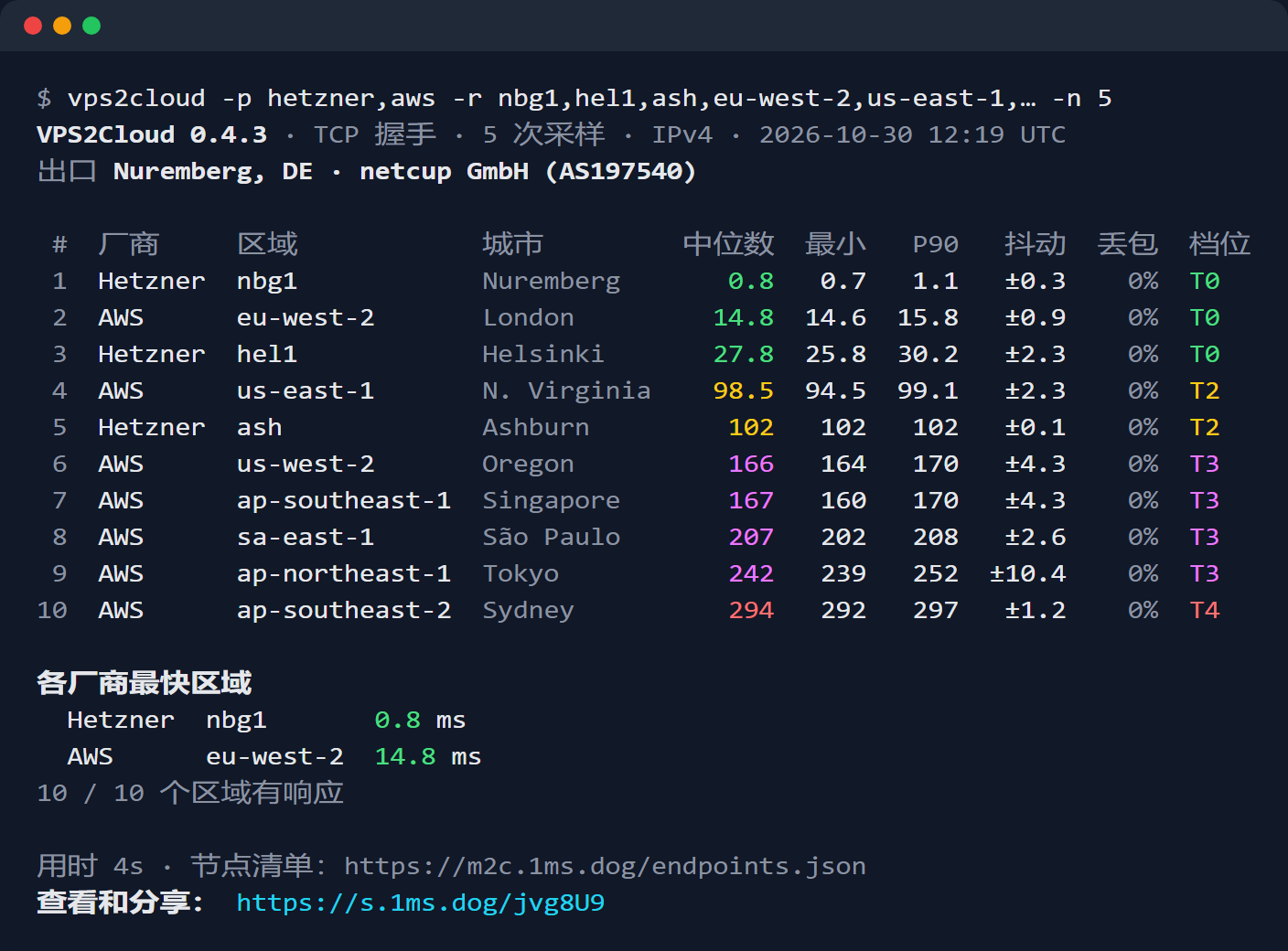
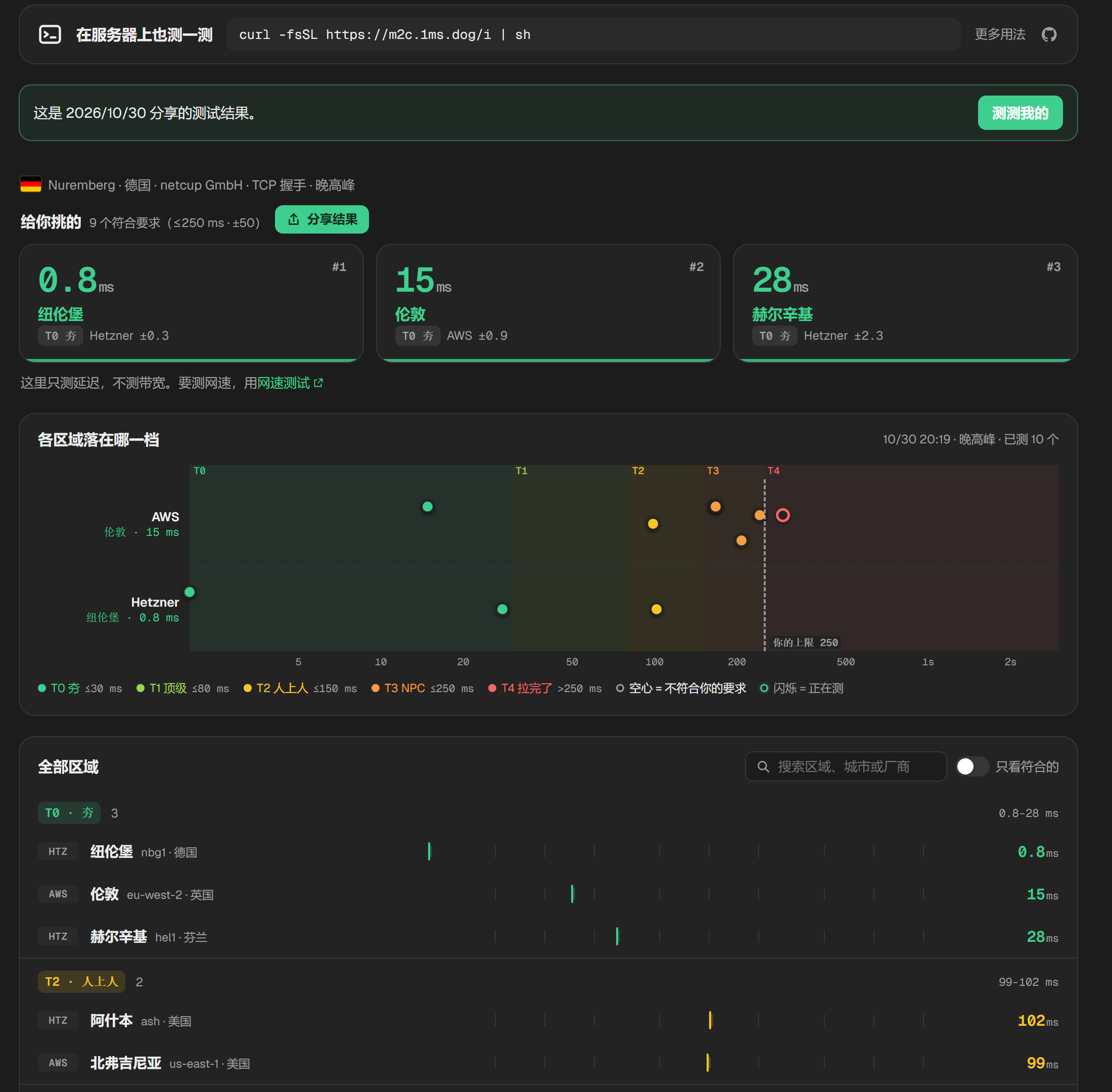
写了个脚本:在 VPS 上一分钟测完 22 家云、392 个区域的延迟 先说是什么:一个单文件的命令行工具,丢到 VPS 、路由器或者 CI 里跑,测这台机器到 AWS 、Azure 、GCP 、阿里云、腾讯云、Hetzner 、OVH 、Vultr 、DO 等 22 家云厂商共 392 个区域的延迟、抖动和丢包。 curl -fsSL https://m2c.1ms.dog/i | sh 装完直接出菜单,回车一路默认就开测。不想装,只跑一次: curl -fsSL https://m2c.1ms.dog/i | sh -s -- run  为什么要写这个 起因很俗:我想知道手上这台 VPS ,离哪家云的哪个区域最近。 比如在德国有台 netcup ,想给它配一个对象存储做备份、或者找个就近的区域放 API ,选 AWS 法兰克福还是伦敦? Hetzner 的赫尔辛基和纽伦堡差多少?以前的做法是开一堆标签页翻各家的 Looking Glass ,或者对着一串 IP 手动 ping 。问题是 Looking Glass 测的是他们机房到你,方向反了,而且每家一个页面,没法放在一张表里比。手动 ping 呢,你得先知道每个区域该 ping 哪个地址,很多云的 ICMP 还不回或者被限速。 所以干脆把 392 个区域的测速地址整理成一份清单,写个工具一次测完,排好序给我看。 它怎么测的 默认测的是 TCP 握手:对每个区域的 HTTPS 端口发起连接,计时 SYN 到 SYN-ACK ,完事立刻关掉。不走 TLS 、不发 HTTP 请求,所以测到的就是纯网络往返,不掺服务器处理时间,比区域的时候最公平。 另外还有两种测法,也可以三种一起上: - -m https:在复用的 HTTPS 连接上发请求,计时到响应头。数字会比 TCP 多一点服务器处理时间,但更接近应用的真实体感。 - -m icmp:传统 ping ,需要 root 。部分网络会给 ICMP 降优先级,Naver Cloud 干脆不回。 - -m all:三种并排,自己看差异。 每个区域给中位数、最小、P90 、抖动(相邻两次采样差值的平均)、丢包,再按中位数分档:T0 ≤ 30 ms 、T1 ≤ 80 、T2 ≤ 150 、T3 ≤ 250 ,再往上是 T4 。 为什么一分钟能测完。 在纽伦堡一台 1 核 1 G 的 netcup 上实测,392 个区域每个 10 次采样,一共 3920 次,用了 1 分 16 秒。快是因为多个区域并发(默认同时 24 个主机),一个区域一个区域串着测要 20 分钟以上。 但并发不等于轰炸。同一个主机任何时刻只有一个采样在飞,两次之间隔 250 ms ;同一家厂商最多同时测 4 个区域;连续失败 3 次就放弃。默认一次运行,每个区域一共只收到 10 次握手。这是测别人家的公共接口,礼貌是底线,也免得触发限流把数据搞脏。 和 Me2Cloud 是一对 这个工具是 [Me2Cloud]( m2c.1ms.dog) 的命令行版。两个东西回答的是同一个问题的两半: - Me2Cloud (网页):在你的浏览器里测,测的是你家网络 → 各家云。你的运营商、Wi-Fi 、晚高峰都算在里面。适合回答「我自己用起来,哪个区域快」。 - vps2cloud (命令行):在服务器上跑,测的是这台机器 → 各家云。适合回答「这台 VPS 离哪个区域近」「我的中转、反代、回源该挂哪个区域」。 两边用的是同一份测速点清单,分档、评分算法也完全一致。清单在 Me2Cloud 那边维护,每个测速点每周检查一遍,命令行这边每天自动同步。要注意一点:网页在浏览器里只能用 HTTPS 测,命令行默认是 TCP 握手,前者会多几毫秒服务器处理时间。想让两边口径完全一致,命令行加 -m https 就行。 更顺手的是:命令行测完会给一个分享链接,打开就是 Me2Cloud 的完整结果页,能排序、能看分布图。比如上面那次测试,在网页上打开是这样:  我自己的用法一般是:先在家里用 Me2Cloud 测一遍,看自己(或者用户)到哪些区域快;再在候选的 VPS 上跑一遍 vps2cloud ,看服务器到这些区域怎么样。两头一对,链路两端都心里有数了。 几个我自己常用的姿势 vps2cloud -p aws,gcp -r 'eu-*' # 只看 AWS 和 GCP 的欧洲区域 vps2cloud --continent as --top 10 # 亚洲,只看最快的 10 个 vps2cloud --ip both # IPv4 和 IPv6 一次测完,一份报告分两段 vps2cloud --cdn # 测 Cloudflare 、Akamai 、CloudFront 等 6 家 CDN 的就近节点 vps2cloud --preset game # 标出适合打游戏的区域(中位数 ≤ 60 、抖动 ≤ 10 、不丢包) vps2cloud -o md # 顺手存一份 Markdown 表格,发帖直接贴 放进 CI 或 cron 做监控也行: vps2cloud -p hetzner --max-ms 50 # 最快的区域都超过 50 ms 就以退出码 3 结束 vps2cloud -o json --stdout | jq '.regions[0]' # JSON 接管道 一些细节 - 单个静态二进制,零依赖。 Linux 的 amd64 、arm64 、armv7 、386 、riscv64 都有,OpenWrt 用的 mips 、mipsle 也有,路由器上能直接跑。另外还有 macOS 、FreeBSD 和 Windows ( PowerShell 里 irm https://m2c.1ms.dog/i.ps1 | iex)。 - 国内下载不卡。 安装和自更新先走 m2c.1ms.dog/dl/(转发 GitHub Release 的文件),不通再回落 GitHub 。不管从哪下,都用 Release 里的 checksums.txt 校验,还附带了 GitHub 的构建来源证明,可以用 gh attestation verify 自己验。 - 装之前想看脚本干了什么,就是仓库里的 [install.sh]( github.com/yt1988/vps2cloud/blob/main/install.sh),不到一百行。 - 10 种语言,第一次运行让你选,之后记住。菜单、表格、Markdown 跟着语言走,JSON 和 CSV 的字段名保持英文。 隐私,说清楚 除了测量本身,它会发这几个请求:拉测速点清单(这就是运行次数的统计来源,User-Agent 只有版本号和系统/架构)、问 Cloudflare 这台机器在哪个城市和运营商、生成短链接、每小时最多查一次更新。 短链接这件事要单独说:为了生成 s.1ms.dog/xxxx 这种短链,完整链接(里面就是测试结果:各区域的数值和出口城市、运营商)会存在 s.1ms.dog 上。IP 地址从来不在里面,除非你自己加 --show-ip。 不想让结果存到任何服务器上,加 --long-link:给你完整链接,结果全在 # 后面,浏览器不会把这部分发给服务器。--offline 则连清单和更新检查都不发。 它做不到的 - 测的是各家云在每个区域的公共 API 或对象存储接口,不是一台真实的虚拟机。同区域一般共用网络,但精品线路(比如 CN2 、BGP 和单线的区别)可能不一样。 - 只测往返延迟,不测带宽,也不做路由追踪。 - TCP 握手测的是网络往返;如果你关心的是应用层体感,用 -m https。 链接 - 命令行: yt1988/vps2cloud ( MIT ) - 网页版: m2c.1ms.dog 测速点清单肯定还有缺漏和过时的地方。哪家云、哪个区域没收录,或者某个区域测出来明显不对,欢迎回帖或者开 issue ,我会去核实。也很想看看大家手上的小鸡测出来离哪个区域最近,可以直接贴分享链接。
A Wayland compositor you don't have to assemble: launcher, screenshots, mixer, visualiser, wallpapers and session restore built in, one TOML config, every setting live over IPC. Each desktop is tiling, floating or physics — windows you can throw. C/wlroots iluaii/fwm t.co
Day 3 of trying to make a automated recompiler for all consoles. What I did today: Recompiles: Added support for commercial roms Lifter & Compiler Updates PS-X EXE code. Static Jump-Table Recovery: Backward-slicing heuristic recovers compiled C switch jump tables across MIPS (SLTIU + LUI/ADDIU + LW + JR), ARM (LDR_CONST + CMP + LDR PC), and SNES (JMP ($xxxx,X)). - Instruction Coverage: MIPS COP2 (GTE 3D geometry engine), Thumb-16 ALU/shifts/ stack, and 65816 REP/SEP/ STZ/STX/STY opcodes (up to 85% coverage). - Hardware Crash Guards: Built-in SEH_try /_except wrappers and memory boundary clamps so compiled executables don't crash on unhandled edge cases. Added Graphics, Audio and a live viewport GUI for each recompiled game HD Textures: Automatic CRC32 texture dumping and runtime replacement with high-res PNGs. (Unknown if possible since no game have been fully recompiled) Widescreen: 16:9, 21:9, and 32:9 aspect ratios with dynamic Hor+ FOV expansion. (Unknow if possible since no game have been fully recompiled) C Hook API: PRE, POST, and REPLACE code hooks via recomp_hooks.h. Fixed Memory Leak and added a web demo that describes how a game was built. Links: Web Playground: yefan911.github.io GitHub Repo: yefan911/automated-recompilers
Architect - AI 编程架构可视化与约束 MCP 服务工具 允许开发者绘制项目架构图,让 AI 编程 Agent 按照既定架构开发,并实时追踪、展示和记录 Agent 对代码结构所做的修改。 👉 abhiramshaji-cyber/Architect t.co
用 Swift 写的免费开源 macOS 卸载与清理工具 TuguiDragos/Peel
@lauriewired ludoplex/SQLiteOS like this one?
@xMezbah Hi Mezbah, let's be mutuals! Please do consider my AI in life sciences or bioinformatics codebases here: github.com/Johnkecops
@akhanriz Worth having Claude re-fetch the live URL after each change. A cache or theme override can leave the old title showing even when the edit says done. I built a free self-hosted crawler with an MCP server for that check (disclosure: my project): spcaeo/toadstone
“easy” seems to be doing a lot of work here, but anyway there is malisper/pgrust if (like me) you accept that code is design then we already have a spec - the C source code. So it should be “easy” to translate it to safe rust, right? but such a project not only changes the language but also the custodians. pg has been very good to me over the years and I’m not sure I would trust an unrelated team to maintain the very high standard that this project has consistently provided for 20+ years.
@PeikGabriel Hi Gabriel, let's connect! Please consider my AI in life sciences or bioinformatics repo for your reference: github.com/Johnkecops
Easiest way to run pooled and secure LLMs at scale: Companion Hub Other solutions are good at running workloads, or being easy to use, or running AI. Hub is all 3 in one! 🛍️ App store for your own server One-click installs from the Companion Intelligence marketplace, with open-source alternatives for the services you pay for today. 🧠 Local AI that fits the box Onboarding reads your CPU, GPU, memory, and storage, then recommends models that fit. Voice, text, and image share one queue so they do not stampede the machine. 🤖 Agents with a home OpenClaw, Hermes, and other agents install like any app. They read one shared Companion Memory instead of each keeping a private scrapbook. Run your first agent 🔌 MCP nexus Hub serves one Model Context Protocol endpoint. Agents discover, install, and drive every app through a single tool surface. 📦 Bring your own container Marketplace apps, custom Compose, and git repos you bring. Apps on apps are allowed. A server in a server is allowed. 🌐 Reach it your way Keep each app on this machine, share it over a private Tailscale network, or publish it to the web through Cloudflare. Networking · From your phone 🔗 Pool your machines Pair more than one Hub over Tailscale and they share inference work by queue depth. 🔑 OpenAI-compatible API Point Cursor, Continue, Cline, Aider, Zed, or an OpenAI SDK at your Hub, and keep the engines you already run. Source & Download: companionintelligence/Companion-Hub
让 AI 按公司模板出文档,可以接 mcp-pandoc:把 Markdown 转成 Word 或 ODT,MIT 开源。 模板别混用。官方源码要求参考文档与输出格式一致;拿 Word 模板转 ODT,底层可能生成打不开的文件。还得另装 Pandoc,光接 MCP 不够。 vivekVells/mcp-pandoc
github/gh-actions-lock ってのが出てたんだ〜
Your AI, Your Choice: Flexible AI-Powered SQL Generation in CH-Ops Want to write ClickHouse® SQL using natural language? Qurioz AI in CH-Ops helps you generate queries with your preferred AI model. And you’re not just limited to a single AI model. CH-Ops supports configuring up to five AI providers: OpenAI, Google Gemini, Claude, Mistral, and Ollama through a centralized API Key Manager, giving you the flexibility to choose the model that fits your workflow. Want to learn more about API key management and model configuration? Check out our blog: Secure API Key Management: Your AI, Your Choice Explore CH-Ops: Quantrail-Data/CH-Ops Which AI model would you choose for ClickHouse SQL generation? We'd love to hear your thoughts and feedback!
Honored that Wave Forcing was able to offer some food for thought for Physis-AI/PhysisServe. It makes us really happy that our work could lend the industry a small hand this early. @PhysisAGI x.com
@DevinRhode2 @elmlang +1 to solidjs, that's where I landed too with cluesurf/term
ishaanko/pando built oai's pando from first principles as a git drop in - each push is an immutable pack, each branch is a pointer, so pushes don't wait on each other. the benchmarks are pretty impressive - over twice as fast. adding ssh and other general support.
Cozy - a practical and productive awm setup. A desktop with an emphasis on functionality and cohesive design. Made with ❤️ and AwesomeWM. Feature-packed dashboard with Task/Timewarrior, Google calendar, and ledger-cli integrations. garado/cozy t.co
卧槽,让 Claude Code 把任何机器变成一个可拆解的 3D 模拟器 你用一句话问它怎么工作,它生成一个离线 HTML 页面,机器在中间运转,四周面板显示真实数值,还能逐帧录像出 60 fps mp4。 elvarofficial/teardown t.co
Free GST Invoice Generator with UPI QR: EpiFive GST Invoice (Open Source) EpiFive GST Invoice is a free, open-source GST invoice generator that runs entirely in your browser. You fill in your business profile once, add a client and line items with HSN or SAC codes, and EpiFive GST Invoice works out CGST and SGST or IGST from the place of supply, adds an HSN-wise tax summary and a UPI QR code for the exact amount, and gives you an A4 PDF. It is MIT-licensed, needs no account, and keeps every document in your own browser. EpiFive GST Invoice is an EpiFive project. The source is at epifive/gst-invoice, a live demo with sample data runs at gst-invoice-demo.pages.dev, and the project is listed with other EpiFive repositories on the open-source projects page. Important: EpiFive GST Invoice makes regular GST tax invoices, quotations and receipts. It is not a GST e-invoicing tool: it does not generate an Invoice Reference Number (IRN). The section on e-invoicing near the end explains who needs one. EpiFive GST Invoice: a free, open-source GST invoice generator with UPI QR EpiFive GST Invoice is a static Next.js web app. There is no backend and no database: the app is a set of files that any web host can serve, and everything you type is saved in the browser's localStorage. That makes it quick to try, cheap to host and private by default, with one trade-off covered later: your data lives on one device until you back it up. It handles the Indian GST details that generic invoice templates often get wrong: a GSTIN format and checksum check, place of supply for every State and Union territory, the CGST/SGST or IGST split, a reverse-charge flag, and an HSN/SAC-wise tax summary. It also switches to VAT, sales tax or no-tax invoices in more than 20 currencies. Who it is for (freelancers, shops, agencies, small manufacturers) - Freelancers and consultants who raise a handful of service invoices a month and want SAC codes, the correct tax split and a UPI QR without paying for accounting software. - Shops and small traders who need quick tax invoices, cash memos and receipts with HSN codes. - Agencies that send quotations first and invoices later. - Small manufacturers who issue tax invoices to registered buyers in other States and need IGST, delivery addresses and a tax summary on every invoice. - Developers who want an invoicing front end they can read, change and host themselves. If you already run Tally Prime, Zoho Books or another accounting package, keep using it for your books; EpiFive GST Invoice does not post to a ledger. For those packages, see the guide on setting up GST in Zoho Books. What a valid GST tax invoice must contain (and what EpiFive GST Invoice fills in for you) Rule 46 of the CGST Rules, 2017 lists the particulars of a tax invoice. A field-by-field walkthrough is in GST tax invoice format: mandatory fields. In short, and with what EpiFive GST Invoice does for each: | Rule 46 requirement | How EpiFive GST Invoice handles it | | --- | --- | | Supplier name, address and GSTIN | Taken from your business profile on every document | | Consecutive serial number, at most 16 characters, unique in the financial year | Numbering formats with financial-year tokens, a duplicate check and a 16-character check | | Date of issue | Document date field | | Recipient name, address and GSTIN or UIN if registered | Client fields; GSTIN optional for B2C | | Unregistered recipient, taxable value of Rs 50,000 or more: name, address, delivery address, State name and code | Billing address, shipping address and State fields | | HSN code of goods or accounting code of services | HSN/SAC column on every line | | Description, quantity and unit | Description, quantity and unit on every line | | Total value and taxable value after discount | Line and document discounts are applied before tax | | Rate and amount of tax by type | CGST and SGST/UTGST or IGST per line and in the summary | | Place of supply with the State name for inter-State supplies | Place of supply field, filled from the client's GSTIN | | Delivery address if different from the place of supply | Shipping address | | Whether tax is payable on reverse charge | Reverse-charge toggle | | Signature or digital signature | Signature or stamp image; Rule 46 waives the signature for invoices issued electronically under the Information Technology Act, 2000 | Composition taxpayers and suppliers of exempt goods or services issue a bill of supply instead of a tax invoice (section 31(3)(c) of the CGST Act and Rule 49). EpiFive GST Invoice offers "Bill of Supply" as an invoice title for that case; see GST composition scheme eligibility and limits for who qualifies. Make your first invoice in 60 seconds Open the live demo to look around with sample data, or run your own copy as described in the self-hosting section. Clear the sample data from the yellow banner before you enter real details. Set up your business profile (GSTIN check, state, PAN, logo, signature) 1. Open Settings and fill in Your business: business name, address, phone, email and website. 2. Type your GSTIN. EpiFive GST Invoice checks the 15-character format and its check character, then fills in the State (for GST) and PAN from it. A valid format does not prove the registration is active; confirm a GSTIN with Search Taxpayer on the GST portal. 3. Upload a Logo and a Signature or stamp image if you want them printed. 4. Under Numbering, set a format for each document type. Formats accept tokens such as {FY} (2026-27), {FYS} (26-27), {YY}, {MM} and {N} (the running number), so the format below produces INV/26-27/001: INV/{FYS}/{N} The settings page previews each format and warns when an invoice number goes over 16 characters. Count the characters of the longest number you expect in a year, including slashes and hyphens. Rule 46 allows letters, numerals, hyphen or dash and slash, up to 16 characters in total. Add your UPI ID and bank details In the same Settings page, enter your UPI ID (VPA) and the Payee name, then your Account name, Account number, IFSC, Bank name and Branch. Under Defaults for new documents, switch on Show UPI QR on invoices, Show bank details and Show signature block as needed. Default notes and terms set here appear on every new document. Create an invoice: client, place of supply, items with HSN/SAC and GST rates 1. On the Documents page, start a new invoice. The title defaults to Tax Invoice; other titles include Bill of Supply, Proforma Invoice and Export Invoice. 2. Enter the Client name, Billing address and, for a registered buyer, the Client GSTIN. EpiFive GST Invoice sets the client's State, and the Place of supply, from the GSTIN. Add a Shipping address if goods go somewhere else. 3. Add line items: description, HSN/SAC, quantity, unit, rate, discount percentage and GST %. The rate list offers presets of 0, 0.25, 3, 5, 18 and 40 percent and accepts any other rate. 4. Set a Due date and, if the buyer gave you one, a PO / reference. EpiFive GST Invoice does not decide which rate applies to your goods. Since 22 September 2025 most goods and services fall under 5% or 18%, with 40% for a short list of luxury and sin goods; pan masala and some tobacco products moved on a separate timetable. The goods rate notification also has special rates: 3% for gold, silver and jewellery, 0.25% for rough diamonds and some precious stones, and 1.5% for other diamonds. Check the current notification for your HSN code before you set a rate. CGST + SGST or IGST? How place of supply decides Under section 8 of the IGST Act, a supply is intra-State when the location of the supplier and the place of supply are in the same State or the same Union territory. Section 7 makes it inter-State when they are in different States or Union territories, and also treats exports and supplies to or by a Special Economic Zone developer or unit as inter-State. EpiFive GST Invoice applies that rule from the two State codes: - Same State: the rate is split in half, for example 9% CGST and 9% SGST on an 18% item. - Same Union territory without a legislature: UTGST replaces SGST. The CGST Act lists these as the Andaman and Nicobar Islands, Lakshadweep, Dadra and Nagar Haveli and Daman and Diu, Ladakh and Chandigarh; a Union territory with a legislature is treated as a State. - Different State, export or SEZ: the full rate is charged as IGST. For an export invoice, Rule 46 also requires an endorsement such as "SUPPLY MEANT FOR EXPORT ... ON PAYMENT OF INTEGRATED TAX" or "... UNDER BOND OR LETTER OF UNDERTAKING WITHOUT PAYMENT OF INTEGRATED TAX", plus the country of destination. Add the endorsement in the notes field and copy the exact wording from the rule. Discounts, tax-inclusive prices and round-off Section 15(3)(a) of the CGST Act excludes a discount from the value of supply when it is given before or at the time of supply and recorded on the invoice. EpiFive GST Invoice therefore applies discounts before tax: - A per-line discount percentage reduces that line's amount. - An extra document discount, as a percentage or a flat amount, is spread across the lines in proportion to their amounts, so each line's taxable value falls. - With Prices include tax on, the taxable value is the amount divided by one plus the rate. - Round off total rounds the grand total to the nearest rupee and shows the difference as a separate line. Each tax component is rounded per rate, and the amount in words uses lakh and crore for rupee totals. Print or download the PDF; how clients pay with the UPI QR Use Download PDF for a file, or Print and choose Save as PDF for crisp vector text. Long invoices break across A4 pages at row boundaries. The UPI QR follows the upi://pay link format from NPCI's UPI linking specification. EpiFive GST Invoice fills in your UPI ID, payee name, the amount due in INR (the balance, once part of it is paid) and the document title and number as the transaction note: upi://pay?pa=contoso@okbank&pn=Contoso%20Traders&am=11800.00&cu=INR&tn=Tax%20Invoice%20INV%2F26-27%2F001 Your client scans it with any UPI app and sees the amount and note filled in. The QR is generated in the browser, so EpiFive GST Invoice never sees the payment. Confirm that the money reached your bank account, then record it with a receipt. Quotations and payment receipts Quotations and estimates use the same editor, with Valid until in place of the due date. A quotation is a commercial document, not a GST document, so it does not need the Rule 46 particulars, although showing the rates and tax helps the client compare prices. A Payment receipt records the payment date, payment mode (UPI, bank transfer, cash, card, cheque) and a reference such as a UTR or cheque number, and prints a PAID or PART PAID stamp. If you receive an advance before you supply anything, GST law expects a receipt voucher with the particulars in Rule 50, including the amount of the advance, the tax rate and amount, and the place of supply. Check that your receipt carries those details when it covers an advance. VAT, sales tax and no-tax invoices in other currencies Under Tax & currency, switch a document from GST to VAT or sales tax, or to no tax. In VAT mode you set the tax name, the GSTIN fields become a VAT or tax ID, and you pick a currency such as USD, EUR, GBP, AED, SAR, AUD, CAD, SGD, ZAR or JPY. Amounts in words switch to international numbering. Check the invoice rules of the country you invoice in; EpiFive GST Invoice only supplies the layout and the arithmetic. Your data: localStorage, JSON backup and CSV Every business profile, setting and document is saved in localStorage for the site's address in the browser you use. That has three consequences: 1. Another browser, another device or a private window starts empty. 2. Clearing site data for the address deletes your invoices. 3. Nothing is uploaded anywhere, so there is no server copy to recover from. Under Your data in Settings, use Download a full JSON backup after each working session or at least weekly, and keep the file somewhere backed up. Restoring offers merge or replace. Download all documents as CSV gives you a spreadsheet of document numbers, dates, clients and totals for your accountant. Self-host it (Cloudflare Pages, Netlify, Vercel, any web server) You need Node.js 20.9 or newer and Git. git clone https://github.com/epifive/gst-invoice.git cd gst-invoice npm install npm run dev # http://localhost:3000 Before you deploy, run the tests and build the static site: npm test npm run build # static site in out/ Then publish the out/ folder: - Cloudflare Pages: connect the repository with build command npm run build and output directory out, or deploy from your machine with npx wrangler pages deploy out --project-name <your-project>. - Vercel or Netlify: import the repository; the output directory is out. - GitHub Pages, Amazon S3, Nginx, Apache or any web server: upload the contents of out/. Two optional environment variables are read at build time: NEXT_PUBLIC_SITE_URL sets the canonical address for SEO tags, the sitemap and the social image, and NEXT_PUBLIC_DEMO_SEED=1 loads sample data on a visitor's first visit, which only makes sense for a demo. Because each user's data stays in their own browser, one deployment can serve a whole team without anyone seeing anyone else's invoices. That also means a team cannot share documents through the site; share them as PDF or CSV. A paid Pro edition adds client and product libraries, recurring invoices, payment tracking and GSTR-1 style exports; everything in this guide uses the free MIT edition. Important: this is not GST e-invoicing (IRN) E-invoicing under Rule 48(4) of the CGST Rules means reporting each B2B invoice to the Invoice Registration Portal (IRP), which returns an Invoice Reference Number and a signed QR code that must appear on the invoice (Rule 46(r)). Notification 10/2023-Central Tax extended this, from 1 August 2023, to taxpayers whose aggregate turnover exceeded Rs 5 crore in any financial year from 2017-18 onwards. EpiFive GST Invoice does none of that. It does not connect to the IRP, does not generate an IRN and its UPI QR is a payment code, not the e-invoice QR. If you are above the threshold, your B2B invoices must go through an IRP-connected system; the process is covered in GST e-invoice applicability and the IRP portal. Below the threshold, EpiFive GST Invoice's tax invoices are an ordinary way to meet Rule 46. EpiFive GST Invoice also does not file returns. You remain responsible for tax rates, HSN or SAC codes and place of supply, and for reporting each invoice in GSTR-1. This guide is general information, not tax advice; confirm the details with your tax adviser. Troubleshooting - "Checksum does not match. Check for a typo." on a GSTIN: look for a mistyped character, especially O and 0 or I and 1. The last character is a check character, so a single typo fails the check. Then confirm the GSTIN on the GST portal. - IGST appears when you expected CGST and SGST: the place of supply differs from your business State. Check the client's State and the Place of supply field, and your own State (for GST) in Settings. - The UPI QR does not appear: the UPI ID must look like name@bank, Show UPI QR code must be on, the currency must be INR and the total must be above zero. Receipts never show the QR, because they record a payment already made. - "GST invoice numbers can be at most 16 characters.": shorten the prefix or use {FYS} (26-27) instead of {FY} (2026-27). - All documents disappeared: you are probably in another browser, a private window or a different address. Restore the latest JSON backup. Checklist 1. Business profile complete, GSTIN checked on the GST portal, logo and signature uploaded. 2. Numbering format within 16 characters, unique for the financial year. 3. UPI ID and bank details entered and shown on invoices. 4. Each line has an HSN or SAC code and a rate checked against the current notification. 5. Place of supply correct, giving CGST and SGST/UTGST or IGST as expected. 6. Delivery address and reverse-charge flag set where they apply. 7. PDF downloaded and sent; payment confirmed in your bank before you issue a receipt. 8. JSON backup downloaded and stored safely. 9. If your turnover crosses the e-invoicing threshold, B2B invoices move to an IRP-connected system. References - CBIC, CGST Rules, Rule 46 (tax invoice): taxinformation.cbic.gov.in - CBIC, CGST Rules, Rule 49 (bill of supply): taxinformation.cbic.gov.in - CBIC, CGST Rules, Rule 50 (receipt voucher): taxinformation.cbic.gov.in - CBIC, CGST Act, section 2 (definitions of State and Union territory): taxinformation.cbic.gov.in - CBIC, CGST Act, section 15 (value of supply and discounts): taxinformation.cbic.gov.in - CBIC, IGST Act, section 7 (inter-State supply): taxinformation.cbic.gov.in - CBIC, IGST Act, section 8 (intra-State supply): taxinformation.cbic.gov.in - Notification No. 9/2025-Central Tax (Rate), 17 September 2025, on the CBIC tax information portal: taxinformation.cbic.gov.in - GST Council, press release on the recommendations of the 56th meeting (rate structure and implementation dates): gstcouncil.gov.in - PIB, FAQs on the decisions of the 56th GST Council: pib.gov.in - GST Council, Notification 10/2023-Central Tax (e-invoicing above Rs 5 crore from 1 August 2023): gstcouncil.gov.in - GST portal, Search Taxpayer by GSTIN: services.gst.gov.in - NPCI, UPI Linking Specifications version 1.6 (copy): labnol.org - EpiFive GST Invoice source code and README: epifive/gst-invoice --- This guide was researched and drafted with AI assistance and checked against the vendor documentation listed in its References. Read the maintained version and related guides on EpiFive.
Anthropic is releasing an open source library, FlashProve, for provable inference. It was measured on Llama 4 Maverick, a 400B-parameter mixture of experts model. Code: github.com/anthropics/FlashProve/tree/main Blog post: anthropic.com
In light of u/xeodeo creating a Minecraft port for this lovely console, I've decided to do a custom cover for it. I hope you like it. Here is the port in question if you want to check it out, it's really cool: github.com/xeodeo/OptiCraft-Heritage-XBOX-CLASSIC…
三個 AI 共用一台電腦,為什麼不會搶你的滑鼠? 三個 AI 在同一台電腦上一起工作,真正的滑鼠卻一動都沒動。這支短片看 Vercel Labs 開源的 agent-desktop:它不靠截圖猜像素,而是讀作業系統的無障礙樹,替每個能按的東西編號;多數動作在背景進行,每個 agent 有自己的游標,真正按下去時才排隊輪流。 Mac、Windows、Linux 都能用;它本身沒有內建 AI,是讓你自己的 agent 去操作沒有 API 的軟體。長片會拆開它怎麼避免點錯。 MFA(瑪法)|創業家、工程師,熱愛獨立創作 延伸閱讀 GitHub:vercel-labs/agent-desktop 發布貼文(Chris Tate):x.com #agentdesktop #AIAgent #無障礙 #indiehack #MFA
npm install -g @deepseek-ai/dsh dsh plugin --profile web add dsh-tabbit Needs Tabbit 1.9.0+ and Node 22.19+. Code: Tabbit-Browser/dsh-tabbit Browser: tabbit.ai (global) / tabbit.com (China)
Show HN: Open a 300k-row XLSX in the browser in ~300ms, no server
AI でモバイルアプリ開発の品質と速度を両立する 9 月に SmartTrack Golf というゴルフアプリをリリースし、App Store のスポーツカテゴリで 8 位まで上がりました。弊社はエンジニア数名で SmartScout Baseball という野球アプリも運用しており、それと並行して、開発からリリースまでを 2 ヶ月でやり切りました。 apps.apple.com その中で、複数のモバイルアプリを AI Agent で速く開発するための知見がたまってきたので共有します。 抱えていた課題 開発するプロダクトが増え、AI に複数のタスクを並行で任せるようになったことで、次の課題が出てきました。 複数プロダクトに同じ Agent Skills や Plugin が混在 いくつものタスクを並行で進めており把握と管理が大変 AI の出力に対して人間のレビューがボトルネックになる 現時点での対策 1. 複数プロダクトに同じ Agent Skills や Plugin が混在 現在 SmartScout Baseball と SmartTrack Golf という 2 つのプロダクトを運営しています。モバイルアプリではこの 2 つに加え、共通のサブモジュールが数個あり、これらはモノレポではなく複数のリポジトリに分かれています。Claude Code や Codex 用の Agent Skills や Plugin、PR の template もリポジトリごとに分かれていました。 そこでモバイルアプリ関連の共通の仕組みをまるごと保持する mobile-app-development というリポジトリを別途用意しました。 以降、このリポジトリを「ハブ」と呼びます。ハブは各メンバーの Claude Code と Codex に plugin として登録します。社外には公開しておらず、各メンバーの手元に clone したハブのパスを参照させているだけです。 ハブの中身 mobile-app-development/ ├── plugins/knowhere-mobile/ # 配布する plugin 本体 │ ├── skills/ # Agent Skills │ ├── agents/ # subagent │ ├── references/ # 複数の skill が従う共通ルール(テスト戦略、PR 本文のテンプレートなど) │ └── scripts/ # skill から呼ぶスクリプト ├── manifests/ # リポジトリごとの値 ├── docs/ # 手順の正本 ├── .claude-plugin/ # Claude Code 用のマーケットプレイス ├── .agents/plugins/ # Codex 用のマーケットプレイス └── mise.toml # セットアップや検証のタスク 共通化の工夫点 1. リポジトリごとの値は manifest に分ける 複数のアプリで共通の skill を使うと、bundle id や検証のコマンドのように、プロダクトごとに違う値の置き場所が必要になります。そこで manifests/<リポジトリ名>.toml を用意しました。skill は作業中のリポジトリに対応する manifest から値を読みます。 manifests/sample.toml(例) kind = "app" product = "Sample" [github] repo = "your-org/sample" default_branch = "develop" [ios.bundle_id] prd = "jp.co.sample" [verify] analyze = "mise analyze" test = "mise test" 2. 共通のルールとテンプレートもハブに置く skill のほかにも、テストの置き場所の基準や PR 本文のテンプレートのように、複数の skill やリポジトリが従うルールがあります。 これらは references/ に 1 つだけ置き、各 skill からはリンクで読ませています。PR を作る skill が本文を組み立てるテンプレートも、5 つのリポジトリで共通の 1 つにしました。 各リポジトリのドキュメントにはテストデータのような、そのリポジトリにしかない中身だけを残しています。 3. Claude Code と Codex の両方で同じように動かす 同じ skill を両方で使うために、次の点をそろえています。 各リポジトリの指示書は AGENTS.md に一本化 plugin の定義は Claude Code 用と Codex 用の 2 系統があるので、両方を同じ内容に保つ skill の本文には「サブエージェントに任せる」のように書き、ツール名(Claude Code の Agent、Codex の spawn_agent など)の対応表を用意して読み替える 自動で起動させない skill は Claude Code 用と Codex 用の 2 つの設定を両方書く 2. タスクを並行で進めており把握と管理が大変 AI に任せる作業が増えると、1 人のエンジニアが同時に何本ものセッションを動かすようになります。 Claude Code で実装を進めながら、Codex にレビューを頼み、別のウィンドウでは Codex で調べ物をする、など。 このとき困ったことは 2 つあります。 どの作業が今どうなっているか分からない。 返事を待っているもの、止まっているもの、終わったものを確かめるために、ウィンドウを 1 つずつ回っていました。 端末を取り合う。 複数のエージェントと人が、同じ Simulator や実機を使おうとして、互いのテストを壊したり、起動待ちで止まったりしていました。 前者にはダッシュボードを、後者には device lease という仕組みを導入しました。 Claude Code と Codex の作業を 1 枚で見る ダッシュボードはその Mac で動いている Claude Code と Codex の作業を 1 枚のページにまとめて表示します。データ源は Claude Code と Codex が手元に残している会話の記録だけです。 これにより、Claude Code と Codex のように別々の Agent にタスクを頼んでいても、進捗が一目で分かります。それぞれがどの手順で何をしているかも追えます。 できる部下は上司に「このタスクの進捗どう?」と聞かれる前に報告を欠かしません。同じように、AI Agent にも進捗を見える形で出させ、人の承認待ちで止まっている時間をできるだけ短くする工夫が大切だと感じました。 ただし、このダッシュボードでできるのは進捗の把握までで、作業の指示やプロンプトの入力はできません。将来はタスクの指示もここからできるようにしたいと考えています。 端末を取り合わない: device lease モバイル開発では、Simulator や実機は 1 台を 1 つの作業でしか使えません。ところがエージェントは、空いているかを確かめずに起動中の端末を拾って使うため、次のような問題が起きていました。 共有している Flutter SDK のロック待ちで、後から来た E2E が止まる 2 つの Agent が同じ Simulator を拾い、互いのテストを壊す 人が使っている Simulator を並行しているタスクの動作確認で Agent が奪う そこで、端末を期限付きで「借りる」仕組みを作りました。これを device lease と呼んでいます。 考え方はシンプルで、PC につながっている端末ごとに、誰がいつまで使うかを記録するだけです。期限が切れれば自動で返ります。誰かが使っている端末は避け、Agent は空いている端末を使います。lease の仕組みもハブに置いているので、どのリポジトリで作業する Agent も、同じ lease を見て端末を選びます。 3. AI の出力に対して人間のレビューがボトルネックになる 最近よく議論される、AI の出力に対して人間の理解やレビューが追いつかないという問題です。 理解は別として、AI が生成した PR で人間のレビュー負荷が高い原因を以下のように分解しました。 AI が書くコードと、AI のレビューの質がばらつく AI の「この PR は問題ないです」が信用できない AI が書くコードと、レビューの質がばらつく 同じ依頼でも、メンバーやセッションによって、実装の方針、実装までの進め方、実装後のレビューにばらつきが出ます。そこで、作業の進め方には pstack を少しカスタマイズして使用しています。 変えたこと 理由 PR の作成は create-pr、端末での確認は device-verify を呼ぶ(独自の skill。後ほど紹介します) PR の形と確認の証拠を、どの作業でもそろえるため push、PR の作成、外部への送信は承認を取る。merge は人が行う 外に出るものと、main に入るものは人が決めるため 実装は Sonnet、難しい判断と文章は Opus に固定する。レビュアーは Claude と Codex の 2 系統にする モデルの違いで見落としを拾うため Claude Code と Codex で同じ本文にし、ツール名の違いだけを対応表に置く どちらで作業しても同じ手順になるため 文章の決まりを日本語向けに作り直す PR 本文や返答を、日本語で読みやすくするため Cursor 専用の機能と、承認なしで merge まで進む手順を外す 自分たちの環境と決まりに合わないため レビュー skill interrogate の工夫 : 別のモデルにレビューさせて収束させる pstack には、別のモデルに変更を敵対的にレビューさせる interrogate という skill があります。これを、PR を作る前に回すようにしました。デフォルトではレビュアーは Codex 2 体と Claude Opus 1 体にしています。複数のモデルにレビューさせるのは、モデルごとの見落としの偏りを減らすためです。 ただ、最初は「指摘が無くなるまで回す」にしていたため、ある PR では 6 周回しても、指摘は 50 → 31 → 32 → 26 → 34 → 35 件と減りませんでした。原因を調べると、次の 4 つでした。 毎周、ブランチ全体を最初からレビューしていた 「NaN が渡されたら」のような、実際には届かない入力まで直そうとして、修正の範囲が広がった 修正そのものが新しい不具合を入れた 構造の問題を、箇所ごとに 1 つずつ塞いでいた そこで、Anthropic の「Solving code review at Anthropic」にある「レビューは収束しなければならない」という考え方に沿って、次の決まりを足しました。 2 周目以降は前の周の指摘を直した commit だけをレビュー 前の周までに出た指摘を一覧で渡し、同じ指摘を出させない 直すのは、実際に呼び出し元から届く問題と、この PR が入れた不具合だけにする 上限は 3 周にする。3 周目でも残ったら、1 件ずつ直すのをやめ、構造を変えるか、PR を分けるか、直さずに明記して進めるかを人に聞く 変更の大きさでも扱いを変えています。文言だけの変更は 1 周で止めます。課金や認証のように影響の大きい変更は、周回はそのままで、PR の本文に高リスクと明記します。 3 周で直しきれなかった指摘は、PR 本文の「判断してほしいこと」に、推奨とリスクを付けて載せます。 AI の「この PR は問題ないです」が信用できない たとえば PR を作るとき、AI は自分で書いたテストが通ると「この PR は問題ないです」と報告してきます。この報告をいまいち信用できないのはなぜでしょうか。原因は大きく次の 2 つだと考えています。 AI の検査内容(テスト内容)が必要十分なのかわからない 検査内容が必要十分だとしても本当に検査したのかわからない AI の検査内容が必要十分なのかわからない AI のおかげでテストコードは簡単に書けるようになりましたが、検査の内容が適切か、適切な手段で確かめているかは別の問題です。 どこまで網羅すれば十分かを定義するのは難しいので、ガードレールとして次のルールを決めています。 使う側のコードまで読ませる。 仕様と変更したコードに加え、その値を使う画面や処理も読ませ、壊れうる振る舞いを先に挙げさせる 既存のテストを十分の根拠にしない。 変更前の振る舞いしか見ていないことがあるため 期待値は実装ではなく仕様から決める。 実装を読んで期待値を書くと、実装が間違っていてもテストが通るため 仕様が分からなければ、未確定として残す。 今の動きを正解として固めないため また、検査に使うテストの手段は、大きく次の 3 つに分けています。 手段 何を確かめるか 本物にするもの Fake にしてよいもの 例 Unit Test 1 つのクラスや関数の分岐、変換、状態の移り変わり 対象のクラス 依存するもの全部 再利用するか新しく作るかの判定 Widget Test 表示、入力、画面遷移、ダイアログなど、Flutter の中で完結する振る舞い 描画・タップ・画面遷移、アプリのコード 通信、OS、ネイティブ、時間 保存せずに戻ると確認ダイアログが出る E2E 本物のアプリを端末に入れ、操作から API・状態の更新までがつながるか ほぼすべて 課金サーバーなどの外部サービス 権限ダイアログ、カメラ、ログインの通し AI 時代はテストのメンテナンスコストが下がるので、E2E でほとんど網羅すればよい!と考え、E2E でなくてもよいテストまで E2E で書いていた時期もありました。しかし、リリースは週に 2〜3 回以上あり、そのたびに全シナリオを回すと 1 時間以上かかって地味につらかったため、E2E は必要最小限にするという古典的な戦略に戻しました。 そこで便利なのが、Flutter の Widget Test です。1 つの画面で閉じる振る舞いなら、E2E ではなく Widget Test で確かめられることが多く、実行も E2E よりずっと速いので、Widget Test を厚くしています。 x.com AI にどのテストを使うか決めさせる テストの置き場所は次の 3 つの問いに順に答えて決めています。 このテストが落ちたら、ユーザーにとって何が壊れているのか。 テストの対象を、画面やファイルの名前ではなく、ユーザーから見た振る舞いとして 1 文で書きます。たとえば「プロフィール画面のテスト」ではなく、「保存せずに戻ると確認ダイアログが出て、破棄を選ぶと変更が消える」と書きます。 その振る舞いは、何と何がつながって成り立っているか。 上の例なら、画面の移動とダイアログです。このつながりは本物のまま動かし、保存先のように振る舞いに関係しない部分は Fake に差し替えます。 そのつながりを、端末なしで本物のまま動かせるか。 動かせるなら Unit Test か Widget Test に置きます。端末が無いと動かせないときだけ、E2E に置きます。 どのテストでも見つけられる不具合なら、いちばん軽いテストに置きます。軽いテストほど速く終わり、落ちたときに原因を絞りやすいためです。 また、この 3 つのテストとは別に、見た目の差分を見る VRT、AI Agent が自分で Simulator や実機を操作して確かめる device-verify、人が操作して確かめる確認項目も使い分けています。 検査内容が必要十分だとしても本当に検査したのかわからない 上のルールで AI にテストケースを網羅させても、本当に実行したという証拠が無ければ信頼できません。そこで、それぞれの手段で検査した証拠を PR に残させています。 固定のテストを流した証拠 Unit Test、Widget Test、E2E を流したときは、次のことを記録させます。 どの commit を確かめたか。 コードが変わると証拠は無効になり、影響する確認をやり直すまで PR を進めない 走ったテストの件数。 0 件なら失敗として扱う 修正を外すとテストが落ちるか。 直した箇所をわざと元に戻してテストを流し、落ちることを確かめる。落ちないテストは修正を守っていない 毎回は起きない不具合は、何回流して何回通ったか。 1 回の合格では見逃しうるため AI が端末を操作して確かめた証拠: device-verify テストが通っても、実際の画面で正しく動くとは限りません。まだテストになっていない導線も、固定のテストでは確かめきれません。 そこで、AI が Simulator や実機を自分で操作して確かめる device-verify という skill を作りました。人が手元で動作確認するのと同じことを、AI にやらせるイメージです。 操作にはそのとき使える手段を使います。iOS Simulator なら Claude Code Desktop の Simulator のペインや Simulator 用の MCP、Android なら adb、必要なら computer use です。 AI の操作を確認として信用できるものにするため、次の決まりを入れています。 操作の前に、期待する結果を書く。 確認項目ごとに、前提(アカウント、データ、権限、通信の状態)と、観測したい結果を先に決める。操作してから「こうなったので OK」とは判断させない 今の commit のビルドで確かめる。 古いインストール済みのアプリや hot reload の画面を、今の commit の証拠にしない コマンドの成功を、確認の成功にしない。 adb のタップが exit 0 で終わっても、それは操作が送れたというだけ。状態が変わるたびに、画面や UI の情報を取り直して確かめる 見た目だけで判断しない。 保存や API の呼び出しのように画面に出ない結果は、ログや保存したデータでも確かめる 状態を変えてから撮る。 回転してから撮る、権限を外してから撮る。開いた直後の画面は変えた後の状態の証拠にならない 端末は Simulator と Emulator が基本で、実機は実機でしか確かめられない項目だけに使います。端末は device lease で借りるので、ほかの作業とぶつかりません。 見た目の変化: VRT AI が変更していない画面の見た目まで、意図せず変えてしまうことがあります。全部の画面を人が開いて見比べるのは現実的ではありません。 そこで、PR を出すたびに CI で VRT(Visual Regression Test)を流しています。Flutter の golden test で全画面のスクリーンショットを撮り、reg-suit で base ブランチと比べます。差分があれば、Before・After・差分の画像を並べたコメントを PR に付けます。 CI が PR に付ける VRT のコメント(見本。中身は架空) VRT が見つけるのは「見た目が変わった」ことまでです。その変化が意図どおりか、見た目として良いかは、人が判断します。人は全画面を見て回る代わりに、変わった画面だけを見ればよくなりました。 確認コメントにまとめる 固定のテストと AI の操作の結果は、PR の確認コメント 1 つにまとめます。人が確かめる項目を一番上に置き、AI が確かめた項目、確かめていない項目の順に並べます。 create-pr が PR に付ける確認コメント(見本。中身は架空) 人が確かめる項目は、AI が確かめられなかったものだけです。実機でしか確かめられないもの、AI の操作では届かないもの、見た目の良し悪しのように人の判断が要るものが入ります。人が迷わず確かめられるよう、書き方も決めています。 どのビルドで確かめるかを書く。 確かめたい commit を含むビルドかを AI が照合してから前提に書き、人が古いビルドで確かめてしまわないようにする 手順は番号付きで、1 手順 1 動作にする。 画面の項目名は「」で囲み、最後に「期待する結果」を書く 判断だけで足りる項目は 1 文にする。 見た目が自然か、など。比べる画像を添える AI が確かめた項目の表には、固定のテストと AI の操作を書き分けます。人は「修正を外すと」の列で、テストが修正を本当に守っているかを確かめられます。 PR を作ったあとにコードを変えたら、影響する項目を [ ] に戻します。人が確かめる項目がすべて埋まり、CI が通ったら、PR を Ready にします。 おわりに モバイルアプリは Backend や Web よりも実機での確認が必要な箇所が多いなど、まだまだ AI Agent を活用して高速にリリース、デプロイする知見が少ない分野だと思います。 これからもどうしたら高速に開発し、素早くユーザーに価値を届けつつもバグや構造的な問題を減らしていくかを日々考えながら運用していこうと思います。 x.com 並行して開発している SmartScout Baseball は App Store のスポーツランキング 11 位、SmartTrack Golf は 8 位に最高ランクインしつつ、もっと多くの方々に使っていただけるよう日々進化させています。弊社ではまだまだメンバーを募集中なので興味のある方はぜひご連絡ください ! career.knowhere.co.jp
Also fixed in 3.0: Hire requests carry the model and per call cap Token gateways price in their own token, not "USD" Stuck on chain payouts retry the same signed transaction: never paid twice 535 tests, three security reviews. Open source: paidwithtab/tab
話題のDeepSeek Harnessの仕組みを図に起こした👀 AIが次の行動を決め、ツールを実行し、結果を見てまた判断する。履歴を管理しながら、必要なら子エージェントにも仕事を分担する。 デザインエージェントの土台にも使えないか検証中。 deepseek-harness deepseek-ai/deepseek-harness t.co
Schevana: a functional desktop written in Chez Scheme A Lisp Machine-style desktop that lives inside one host window and is written entirely in Chez Scheme. Every window, color, key binding, status-bar segment and running process is a live Scheme value. You can inspect it, redefine it and break it from a REPL that runs inside the world it changes.
Cancelled all my paid video-gen APIs. A free, open source pipeline draws the whole reel from one prompt. i built this. One prompt, and Claude Code writes the whole reel as code: paper props, a mascot in a hat, captions that pop on every word. Nobody drew it. The voice goes first. A free local voice (kokoro) reads each line, whisper.cpp times every word, so every prop lands on the word that names it. One markdown file, one command. Runs in Codex, Gemini and Antigravity too. No API keys, nothing to pay. The catch: the first frames are never right. You look, nudge the props, render again. macOS only right now. Free and open source (MIT), example reel in the README: haiderfarooq3/paper-reel
用 AI 做了一些小工具后,我发现写代码只是第一步… 现在 AI 加持,做软件真的是太快了。 之前为了解决使用 「 UU 远程」 的一个痛点 - <u>手机的图片复制后直接进入 mac 的粘贴板</u>,利用 tailscale 的网络,让 AI 做了不到半小时就完成了可用的 macos 和 安卓 app 的开发,再也不用麻烦的通过什么去倒一下来实现把手机图片放到 mac 粘贴板、然后再粘贴进 agent 了。 然后由于我总是需要 <u>切换不同的外接显示器环境</u>(书房、卧室、办公室),而每个环境下面我都需要手动将软件拖到合适的显示器,发现每次这么拖也太麻烦了,于是做了一个 macOS 菜单栏工具 DisplayHarbor ,用来<u>保存和自动恢复不同显示器环境下的 app 窗口布局</u>。(放到了[Github]( mitaraifail/displayharbor)) 软件能用了,不可避免的我又开始思考,是不是能考虑顺便小变现一波呢?然后我发现其实还挺难的,对于个人开发者而言去处理面向国内的付费、landing page 、运维等还是会带来很多额外的负担。 进一步的思考其实是,在 AI 时代,当创造出网站和软件已经是非常容易的情况下,那么我们最想要的,应该是 不走出 AI 就能实现类似付费墙、变现以及后期的自动维护 吧。 基于这个想法,我继续开发了 砖块 - zhuankuai.com** 来解决这个问题: 我对其的期望一个是 **AI-Native 的数字商品交易平台。核心就是上面说的能让创作者 不走出 AI 就能实现开发产品的上架、收款变现以及后期的自动维护等。 创作者可以用支持 HTML 的商品页介绍产品,配置价格和交付,由平台处理收款。文件、Skill 、站点、MCP/API 和软件授权等等等等,都可以按商品配置交付。如此创作者不用再为每个小产品再单独搭一套展示和经营后台,而是能在 Agent 的工作流里把商品发布和后续管理做完。
法人税申告をClaude Codeと進めて考えた、判断で止まるスキルの設計 Claude Codeと法人税申告を進め、Codexに実ファイルのレビューを依頼した。 そこで苦労したのは、計算の自動化に加えて、何を根拠に次へ進むかを決めることだった。 数字が合うデータを生成できても、公式ソフトでは帳票の不足や計算エラーが見つかった。 別のAIに確認しても、共有した前提の誤りは残った。 この記事では、その記録をもとに、SKILL.md、参照資料、確認表で判断を伴う作業を支える設計を説明する。 対象は、Claude CodeやCodexで自分の業務手順をスキルにまとめたい開発者だ。 コード例は記録から匿名化して再構成した設計例で、そのまま申告を実行するスキルではない。 税務上の適用判断は本人または税理士が行う。 SKILL.mdには判断と参照先を置く 申告の作業には、資料の読取り、数値の照合、制度の適用判断、画面への入力、署名や送信が混在する。 これらを「最後まで進める」という指示でまとめると、資料がない箇所まで推測で埋める余地ができる。 入口となるSKILL.mdには、対象作業、読む資料、止まる条件、結果の示し方を書く。 詳しい説明はreferences/へ、今回の確認結果は作業用の確認表へ分ける。 Claude CodeとCodexのスキルはいずれも、SKILL.mdと補助資料を組み合わせられる。1 filing-support/ ├── SKILL.md ├── references/ │ ├── prerequisites.md # 根拠となる原資料 │ ├── filing.md # 作成と取込みの手順 │ └── pitfalls.md # 症状から引く確認先 └── templates/ └── before-signing.md # 今回の確認結果を記入 分ける基準は、読むタイミングと更新の理由だ。 制度の説明は対象年度の公式資料と照合して更新する。 確認表には、今回開いた資料、表示、未解決の差異を残す。 翌回も使う手順と、今回だけの結果が混ざりにくくなる。 SKILL.mdの先頭例 --- name: filing-support description: 自社の申告準備で資料を照合し、判断待ちと送信前の残件を整理する。 --- 会社固有の資料は非公開の作業先に置く。 公開するスキルには、実際の申告データや認証情報を含めない。 止まる条件を、未確認のまま表現する 「慎重に進める」だけでは、どの操作を止めるかが決まらない。 たとえば適用額明細書の有無が未入力で、署名前チェックが止まる場面があった。 そこで一律に「無」を選べば、入力エラーだけは消せるかもしれない。 しかし、必要な明細書があるかという判断は済んでいない。 止まる条件には、欠けている根拠と、保留する操作を一緒に書く。 停止条件の例 適用額明細書の有無を判断する根拠がない場合: - 当該選択欄の入力と署名を保留する。 - 確認できた事実、足りない資料、判断が必要な点を示す。 - 本人または税理士の判断が記録されてから再開する。 - 未確認を「無」「該当なし」「ゼロ」に置き換えない。 一方、判断に依存しない作業は進められる。 参照資料を整理する、差額を計算する、対象帳票を一覧にする、といった準備まで止める必要はない。 止める対象を具体的にすると、人に渡す時点でも残件が分かる。 AIに任せるのは、資料の抽出、照合、差異の説明、入力案の作成まで。 制度の選択、根拠の足りない処理の確定、署名や送信の確定は人に残す。 承認を待つ間も、どこまで確認できたかを保存しておく。 確認表は、チェックの根拠を保存する 確認表を単なるチェックボックスにすると、「確認した」という結論だけが残る。 次に開いた人が同じ結論を確かめられるよう、対象と証拠を書く欄を用意する。 確認表の例 | 対象 | 状態 | 確認したもの | 残件 | |---|---|---|---| | 対象期間 | 確認済み | 原資料と帳票の期間欄 | なし | | 取込後の小計 | 不一致 | 公式ソフトの帳票表示 | 元データと照合 | | 制度の適用 | 判断待ち | 関係資料の所在まで確認 | 本人の判断 | | 送信結果 | 未実行 | 送信操作前で停止 | 本人の操作 | 「確認済み」とする範囲も狭く書く。 たとえば対象期間を照合しても、制度の適用まで確認したことにはならない。 数字の一致、入力の完了、正常受付、税務上の適否を別々の状態として扱う。 Codexには実ファイルと反証を求める 作成側のClaude Codeとは別に、Codexへ数値の整合性や帳票の不足を確認させた。 記録には、生成データに必要な内訳明細書が含まれていないことを、レビューで検出した例がある。 文章の説明だけを渡すより、生成物と元資料を直接見てもらう方が、説明と実装の食い違いを探せる。 レビュー指示は、賛否だけで終わらない形にする。 指定した元資料と生成ファイルを実際に開いてください。 指摘には、対象ファイルと根拠の場所を付けてください。 確認できた事実、推測、未確認を区別してください。 帳票の不足と、数値が一致しても成立しない前提を探してください。 作成側の結論に反する資料がないかも確認してください。 ただし、AIを二つ使っても、根拠が独立するわけではなかった。 消費税の対象期間を考える際、Claude側の作業記録にも、Codexのレビュー記録にも、インボイス登録日の誤った見立てが残っていた。 後から登録通知書の「登録年月日」を確認した記録で、その前提が変わった。 ここで共有されていた旧メモは、二重確認の根拠として不十分だった。 この経験から、レビューに「登録日を確認したか」と書くだけでは足りないと考えている。 どの原資料の、どの項目を読んだかまで残したい。 日付は通知の格納日などと取り違えず、項目名と組にして扱う。 公式の操作マニュアルにも登録通知書の確認方法が載っている。2 .xtxの生成と実ソフトの検査を分ける Pythonで申告データの.xtxを生成する作業も行った。 内部の検算だけでは、公式ソフトで使える状態まで確認できなかった。 取込み自体ができても、その後の帳票チェックで止まる。 実行記録では、別表四の中間集計欄や、別表七の区分に不足があった。 別表四ではAQC00330を伴う計算エラーが表示された。 これは帳票項目の識別子でもあるため、番号だけで原因を一意に決めず、対象帳票とメッセージ本文を合わせて読む必要がある。3 検証は、次のように段階を分けられる。 元資料との数値照合 → 生成データの構造検証 → 公式ソフトへの取込み → 帳票の表示、小計、区分、必要明細の確認 → 署名前チェック → 本人へ署名と送信を引き渡す 構造検証が通ったことは、後続段階の成功を保証しない。 逆に、公式ソフトで手修正して進められても、生成器が直ったことにはならない。 実行記録には手修正と、生成器側に残る修正点が分けて残されていた。 生成器の修正を確認するには、再生成したデータを改めて取り込み、同じ不足が出ないことまで確かめる必要がある。 失敗記録を、次に読む指示へ変える 失敗を長い会話ログだけに残すと、次回また同じ場所を探すことになる。 元記録には、症状、対処、再発防止を並べたつまずき集と、生成器の不具合をまとめた資料がある。 ここから手順へ戻すときは、その場の対処がほかの状況でも成立するかを見直す。 たとえば、ある入力欄を埋めてエラーが消えた経験を、その値を毎回入れる指示に変えてはいけない。 今回確認できた原因と、次に確認すべき条件を残す。 失敗を手順に戻す例 症状:生成データの取込後、小計の計算エラーが出た。 確認:明細値に加え、中間集計欄の出力が不足していた。 今回の対処:公式ソフトで不足欄を確認し、手修正した。 未確認:生成器の修正後に同条件で解消するか。 次回の指示:再生成後、公式ソフトで小計を確認する。 この形なら、未解決の不具合も引き継げる。 追加する場所は、症状から探す参照資料、作業中に読む手順、完了時に使う確認表のうち必要な箇所に絞る。 何でもSKILL.mdへ追記すると、個別の失敗と共通の判断条件が混ざるためだ。 申告で必要だったのは、AIに渡す情報を増やすことに加えて、原資料と判断と検証結果をつなぐことだった。 この分け方は、申請書の作成や本番設定の変更など、計算や形式だけでは完了を決められない業務でも使える。 株式会社スマートマッチングでは、手順と確認表をまとめたものをnoteの有料版で販売しています。エラー番号や症状から確認先を探す部分に絞った無料版はGitHubに置いています。無料版には申告書の作成手順や確認表一式は含めていません。 脚注 Claude Codeの公式スキル説明とCodexの公式スキル説明。 ↩︎ e-Taxソフト操作マニュアル「通知書等を確認する」。制度の適用は対象期間と原資料をもとに別途判断する。 ↩︎ e-Tax公式仕様書の更新履歴にはAQC00330がXMLタグとして記載されている。これは識別子の確認用で、現行年度の計算式を示す資料としては使わない。 ↩︎
always wanted to create a quick online browser-based life sim/farm game. @claudeai and @Cloudflare enable me to create in just a day. its powered by Cloudflare durable objects and workers, pixijsv8 Open source here: elsodev/durable-objects-mmorpg vid is by claude+remotion t.co
mext v0.8.0 を公開しました。AI の論証の読みを、人が監査できる形にする道具です。今回は、シミュレーションと往復しながら論証を「組み立てる」手引き、基準の文書に照らした読みの判定(A>B・A=B・A<>B)、AI 向けの入口 llms.txt を足しました。 JRF-2018/mext 実質的な変更は大きくありませんが、mext の使い道を広げる版です。 ■ 論証を組み立てる手引き(docs/workflow.md) mext はもともと、Wallerstein の世界システム論をシミュレーションと Matcha で論じた IPYNB から生まれました。ところが、その後は「既存の文書を分析する道具」の性格が強くなり、元の IPYNB のような論証を mext でどう頼めばよいかが見えにくくなっていました。 そこで、その往復の手順を一般化しました。 1. 主張を Matcha-D の骨組みにする。 2. 予測と閾値をシミュレーションの前に書き、commit する。 3. シミュレーションを回す。 4. 数値をコードで事実に変える。 5. mext で解いて、決め手(外すと結論が崩れる前提)を見る。 6. 決め手から次の一手を決める。 人の頼み方の例と、AI が守ること(結論が出るように後から閾値を動かさない、外れた結果を消さない、モデルから現実への飛躍を @評価 に置く)も書きました。 Claude Code の Sonnet に、この手引きで「最低賃金と買い手独占」の論証を二往復させてみました。Sonnet は予測を先に commit し、最後に「現実の弾力性がこの帯にあるかは、シミュレーションでは決まらない」というところで止まりました。モデルと現実の継ぎ目が、ねらいどおり表に出ました。 ■ 読みの判定(mext compare の [verdict]) 同じ文書の二つの読み(書き起こし)について、基準の文書に照らして「どちらが優れているか」を判定できるようにしました。AI の学習用のデータを作るような用途を想定しています。 - 判定の記号は四つです。A>B、B>A、A=B(実質同じ)、A<>B(優劣は判定できない)。 - どれを許すかは基準の文書に書きます。基準の文書で、「同じか優劣か」で判定しきるか、「判定不能か優劣か」で判定しきるかを選べます。 - 判定するのは AI か人で、mext は判定の形式だけを検査します。 別々の文書(二人のレポートなど)の優劣の比べ方も手引きに書きました。こちらは関係のない文書どうしのこともあるので、A<>B を常に許します。 ■ そのほか - 書き起こしの手引きに、アブダクション(観察から仮説へ)と弁証法(正・反・合)の書き方を足しました。Matcha は、原文の論証の向きにかかわらず、規範をあてはめる向き(特殊化)で書き、個別から一般への飛躍は @評価 に置きます。 - llms.txt を足しました。スキルを入れていない AI でも、何を頼まれたら何を読めばよいかが分かる入口です。 ■ 展望 この版では、README に「展望」の節を足しました。ChatGPT さんとの対話で出てきた構想です。 AI が人間に技術や資金を提供する。そういう社会的な意思決定が行われるようになったとき、その判断と成果を、後世の AI や人間が検証できなければなりません。AI が企業を評価するなら、その評価をした AI の正当性もまた評価されなければなりません。mext を、AI の書いた論証を人間が理解するための道具にとどめず、そういう相互の監査の道具の芽にしたい、というのが狙いです。 ただし、今の mext にできるのは次のことまでです。 - 判断の時点の根拠の構造と予測を残す。 - 後で結果と照らし、どの前提が外れたかをたどる。 「その事業は人々を幸せにしたか」という評価の中身は、@評価 として表に出るだけで、mext は判定しません。そこは AI や人の判断であり、その判断もまた理由つきで残って監査される、という作りです。
Mac 装 Windows 后触控板变鼠标垫:没有惯性滚动、三指手势全失灵,官方驱动停更装不上。 这个驱动接进 Windows 原生触控协议,手势和灵敏度都回来,内置板和妙控板通用。 imbushuo/mac-precision-touchpad