Mentions
Conversations linking to GitHub, newest first. Times are UTC.
Mentions by source
X
Bluesky
Hacker News
Lobsters
V2EX
Qiita
DEV
Mastodon
Latest posts
@anshulcreates There's a lot of excellent content out there: This is a great place to start wafer-ai/gpu-perf-engineering-resources
Core AI向けSAM3に、入力の切り詰めとpadding処理の修正が入りました! Fullモデルで指示が3tokenに切られる問題に対処し、本来の入力を使って処理できるようにします。 現在は開発版への反映です。 出典元:coreai-models#385
islam.museum — free open museum of Islamic history (web beta): break my search, my Arabic, my timeline Live beta: islam.museum A digital museum of Islamic history — 46,793 entries, 301 guided pathways, Arabic/English/Urdu, every fact cited, data CC0. Built by one person with AI assistance; launched 11 October 2026. Testers wanted for three specific flows (5 min each): 1. Mobile Arabic search (find صلاح الدين الأيوبي). 2. A full guided pathway, start to finish. 3. Timeline jump to 1258 → Baghdad entry. Tell me what broke or confused you — comments here, or issues at github.com/amado2k5/islam-museum/issues. I read and reply to everything, and fixes ship fast (I deploy daily).
仓库(MIT · 约 15.6 万星)+ 官网 + 文档: langflow-ai/langflow langflow.org docs.langflow.org # 本机最快拉起(需 Python 3.10–3.14 + uv) uv pip install langflow -U # 也可用 Desktop:langflow.org # 说明:OSS MIT;Desktop / Cloud 另议
5. Leonxlnx/taste-skill An agent skill that gives coding agents real design taste: art direction, reference photos and a browser check, instead of the usual generic AI landing page. +937 in ~24h, 108,854 total Leonxlnx/taste-skill
Agent-history trap: applying an old patch to today's file to reconstruct what happened. A later refactor can turn that into fiction. In wy, captured edits and current code stay separate. Missing original context stays missing. github.com/grandimam/wy/blob/main/docs/architectu…
1. wangzan101/Mika Say what you need. It works your apps and the web on a background screen until it's done: messages, shopping, flights, summaries. Your data stays on the phone. You bring your own model key. +1,389 in ~24h, 5,490 total (created Oct 29) wangzan101/Mika
[Web] islam.museum — free digital museum of Islamic history: testers wanted, will test yours back Site: islam.museum (also Arabic-first at islam.museum and Urdu) Platform: web — phone, tablet, desktop browsers. No install, no signup. What it is: a free, open digital museum of Islamic history I built solo — 46,793 sourced entries, 94,000 pages, 301 guided pathways, Arabic/English/Urdu, data CC0. What to test (pick any, ~5 minutes each): 1. Phone + Arabic: switch language to Arabic, search for Saladin (صلاح الدين الأيوبي), open his entry. 2. Follow one guided pathway from the homepage to the end. 3. Timeline: jump to 1258, open the Baghdad entry. How to report: reply here or open an issue at github.com/amado2k5/islam-museum/issues — what you did, what happened, what you expected, device + browser. Reciprocity: post your app/site below and I will test it and report back this week. That's the deal here and I'm happy to honour it.
Free open source security camera application with object and fire detection and email/SMS alerts #dev #code #python #linux #OpenSource
Repo: hasaneyldrm/exercises-dataset If you want more practical ai gems and a list of full free ai resources, go here: simplifyingai.co
ExecuteAutomation 的 Playwright MCP 能让 AI 按手机尺寸检查网页、截图,MIT 开源。改完页面,查按钮有没有挤出屏幕。 官方说明:缺浏览器会自动下载,离线机器先备好。手机预设仍是浏览器模拟,不能代替真机验收。 executeautomation/mcp-playwright
Couldn’t pick a background color for my Instagram photo, so I made it cycle through them Demo (sped up 10×) I liked the photo, just not the commitment to one background color. So I prepared several versions and made a Python tool to switch between them. It runs on GitHub Actions after setup, so my computer can stay off. The setup wizard lets you choose your own folder of photos; different backgrounds are just how I use it. Source and setup: mishalshanavas/Instagram-dp It rotates prepared images; it does not generate backgrounds. After a successful change, the next one is scheduled 2–5 hour
@kuraeow Is ultratears better than this one? valentderah/totk-pc-recomp
Easiest way to run pooled and secure LLMs at scale: Companion Hub Other solutions are good at running workloads, or being easy to use, or running AI. Hub is all 3 in one! 🛍️ App store for your own server One-click installs from the Companion Intelligence marketplace, with open-source alternatives for the services you pay for today. 🧠 Local AI that fits the box Onboarding reads your CPU, GPU, memory, and storage, then recommends models that fit. Voice, text, and image share one queue so they do not stampede the machine. 🤖 Agents with a home OpenClaw, Hermes, and other agents install like any app. They read one shared Companion Memory instead of each keeping a private scrapbook. Run your first agent 🔌 MCP nexus Hub serves one Model Context Protocol endpoint. Agents discover, install, and drive every app through a single tool surface. 📦 Bring your own container Marketplace apps, custom Compose, and git repos you bring. Apps on apps are allowed. A server in a server is allowed. 🌐 Reach it your way Keep each app on this machine, share it over a private Tailscale network, or publish it to the web through Cloudflare. Networking · From your phone 🔗 Pool your machines Pair more than one Hub over Tailscale and they share inference work by queue depth. 🔑 OpenAI-compatible API Point Cursor, Continue, Cline, Aider, Zed, or an OpenAI SDK at your Hub, and keep the engines you already run. Source & Download: companionintelligence/Companion-Hub
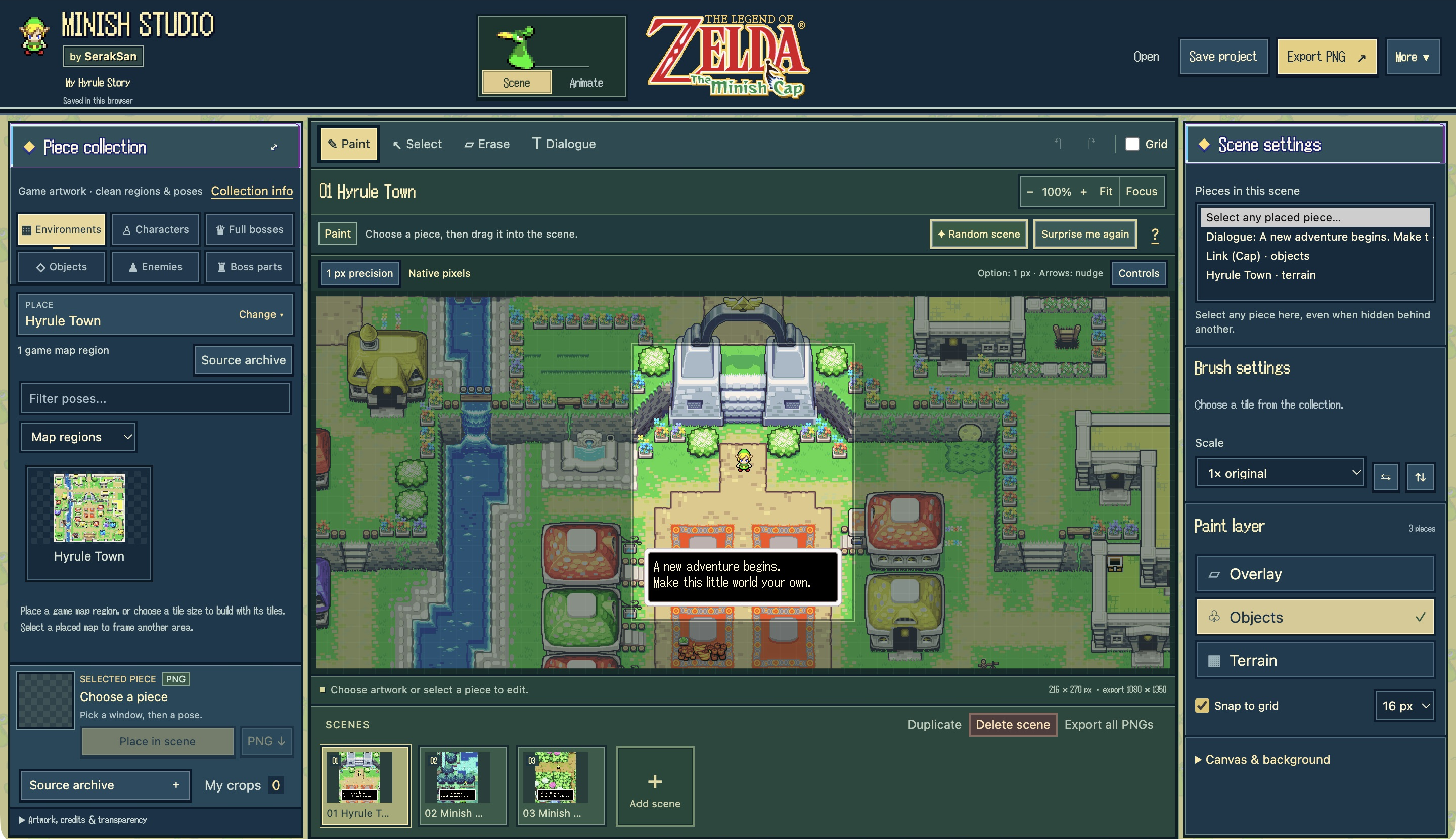
I made a little Minish Cap scene and animation editor Hi guys! I've been making Minish Studio, a free fan editor that lets you play around with The Minish Cap's sprites and environments. You can set up your own Hyrule scenes, give characters different poses, make boss face-offs, or fill the map with little battles and Easter eggs. There's a random-scene option too, if you just want to see what turns up and change it from there. It's also handy for making sprite comics, NPC conversations, wallpapers or Instagram carousels. You can add your own pictures, resize the dialogue boxes and put Zelda-inspired pixel frames around things. For animations, you can pick a movement and speed for each character, or use the timeline if you want more control. That part is still a bit rough. Pretty niche project, but I thought a few Minish Cap fans here might have fun with it :) The sprites are included, it runs in your browser or offline, and your scenes stay on your device. Try it: seraksan.github.io GitHub / offline download: SerakSan/minish-studio Software preview: seraksan.github.io Made by SerakSan. Unofficial fan project. Game artwork belongs to Nintendo/Capcom; sprite and map contributor credits: github.com/SerakSan/minish-studio/blob/main/CREDI… Enjoy! :)
@ferastack13 @X Hi Fernami, let's connect! Don't hesitate to check my AI in life sciences or bioinformatics repos in here github.com/Johnkecops
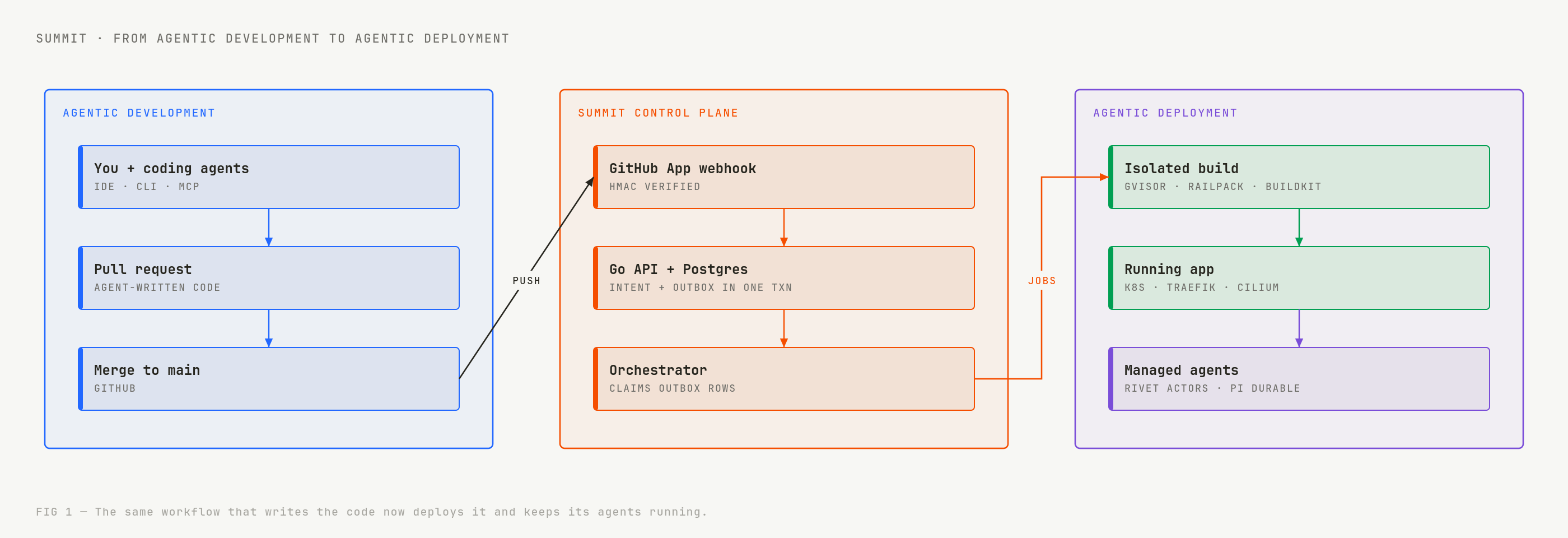
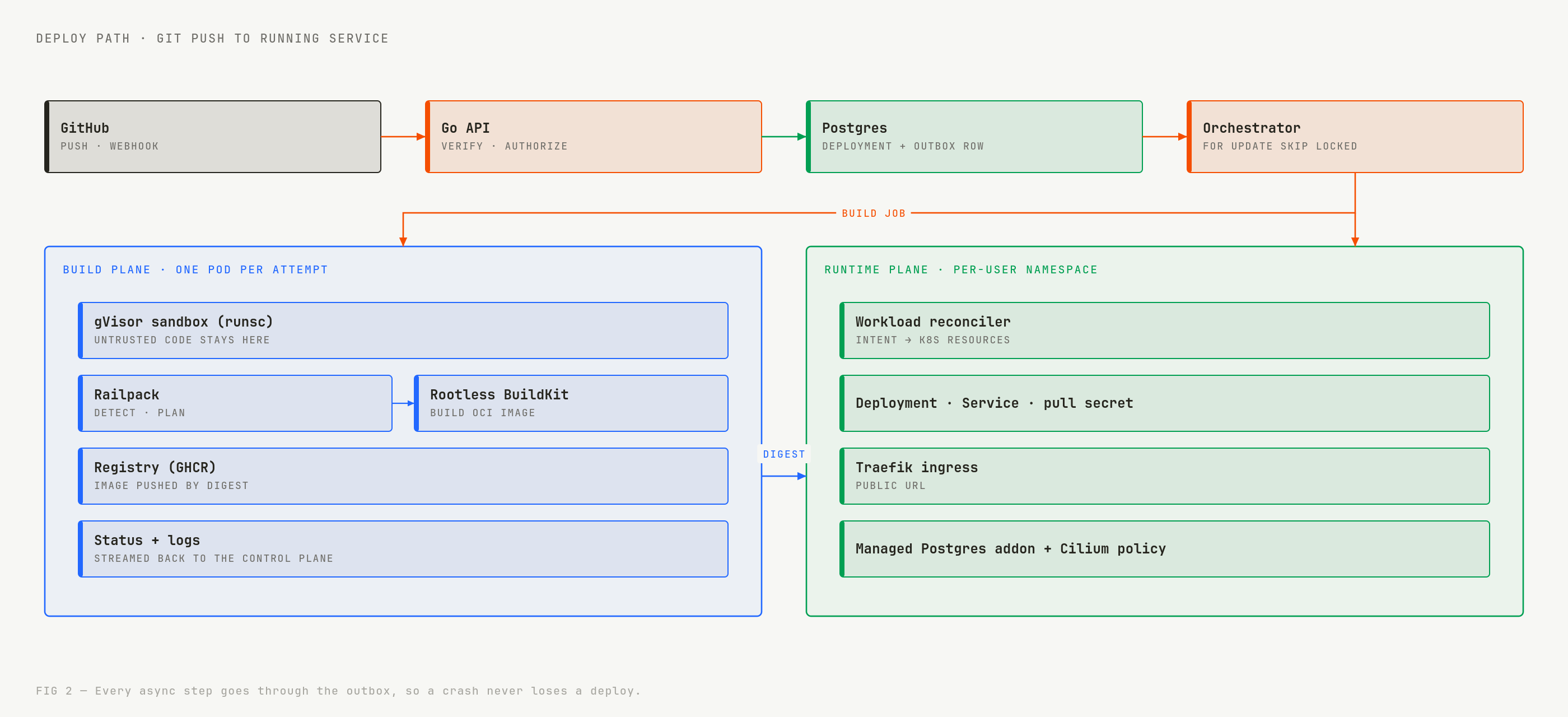
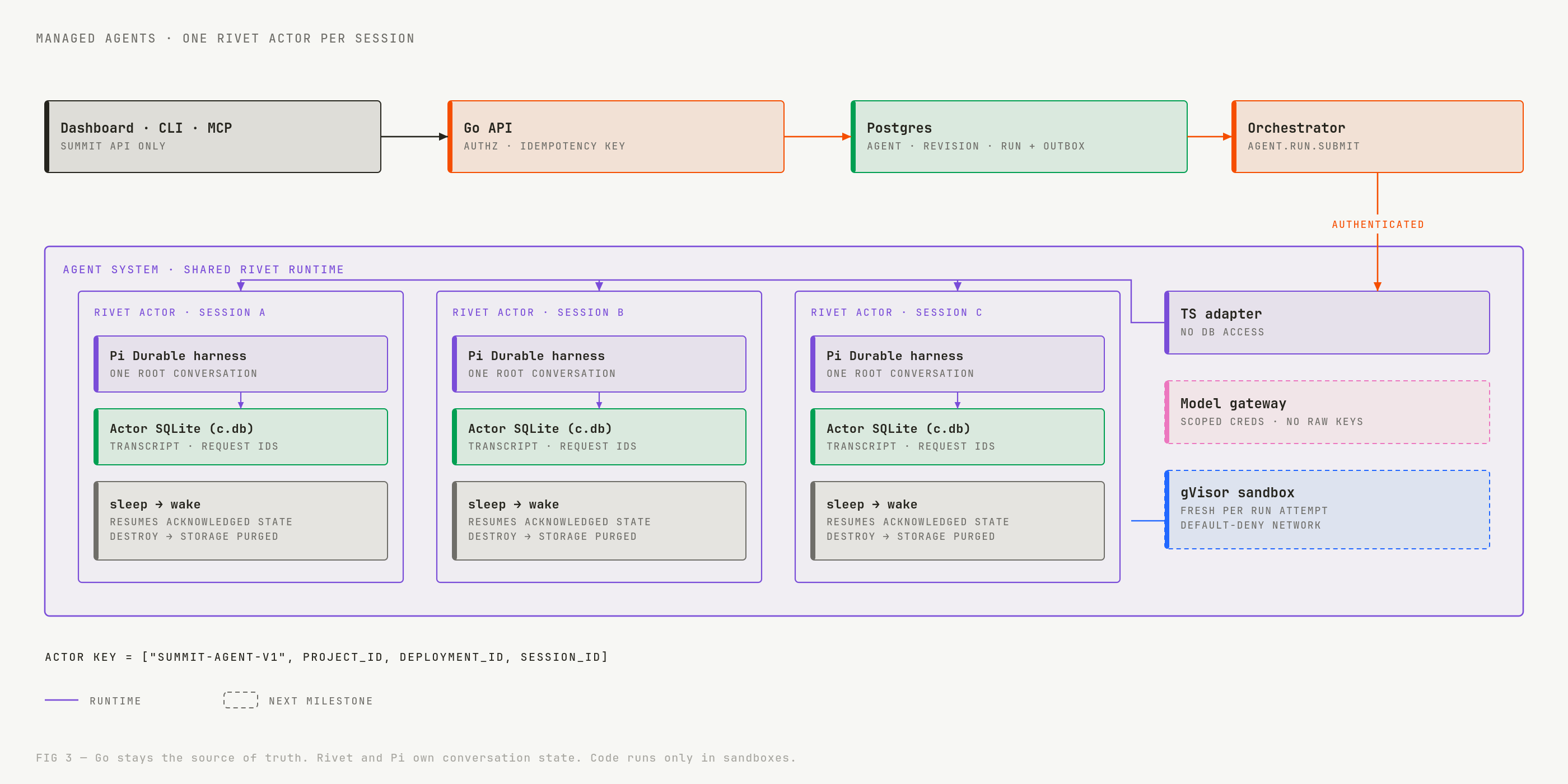
From agentic development to agentic deployment: building Summit at hackCBS 9.0 _This is a submission for the MLH x DEV Writing Challenge_ What I Built TL;DR: Summit is a Railway-style PaaS. You push code, and it builds and deploys your app on Kubernetes. It also runs AI agents as real workloads next to that app. Agents now write our code. We wanted them to deploy it and keep running after it ships. Why Coding agents changed how we write software. Our team wrote most of Summit with AI coding agents: we wrote the spec, the agent opened the PR, and we reviewed it. That part is agentic development, and it already works. Deployment hasn't caught up. Most platforms still treat an agent as an API call your app makes. Nothing keeps its state if the process dies. Nothing isolates the code it runs. Nothing tracks what it costs per user. So we built for the second half: agentic deployment. A PaaS where a git push ships your app and your agents together, and those agents are durable, sandboxed and owned by a user and a project. !The loop How the deploy path works Summit is a pnpm + Turborepo monorepo: a Go control plane, a Next.js dashboard and an OpenAPI 3.1 contract shared between them. 1. Push. A GitHub App receives the webhook. We verify the raw HMAC-SHA256 signature before anything else. 2. Record the intent. The Go API writes the deployment and an outbox_events row in the same Postgres transaction. Either both exist or neither does. 3. Dispatch. The orchestrator claims outbox rows with FOR UPDATE SKIP LOCKED. If it crashes mid-job, the row is still there and another worker picks it up. 4. Build. Each build attempt gets its own pod in a gVisor (runsc) sandbox. Railpack detects the language and writes a build plan, and rootless BuildKit turns it into an OCI image pushed by digest. Customer code never touches the host kernel. 5. Run. The reconciler turns intent into Kubernetes resources in a per-user namespace. Traefik gives it a public URL, Cilium enforces network policy, and a managed Postgres addon is one click away. !Deploy path The outbox was the best decision we made. Every async step goes through it, so "the server restarted" never means "your deploy vanished." How managed agents work This is the part I'm proudest of. An agent on Summit is a resource like a service: you create a definition, cut an immutable revision, deploy it to an environment and open sessions against it. Under the hood: - Go stays the source of truth. Agents, revisions, deployments, sessions and runs live in Postgres, scoped to user_id and project_id. Every create takes an Idempotency-Key. Replay the same request and you get the same resource; change the body and you get a 409. - One Rivet Actor per session. The orchestrator hands agent.run.submit events to a small TypeScript adapter. The adapter finds or creates the session's actor, keyed by ["summit-agent-v1", project_id, deployment_id, session_id]. Keys are generated server-side, never by the client. - Pi Durable runs inside the actor. Each actor owns exactly one Pi Durable conversation. We wrote a typed adapter so Pi stores its transcript and request IDs in the actor's own SQLite database (c.db) instead of local files. Pi's full storage conformance suite passes on it: 25 of 25 cases. - State survives. When an actor sleeps and wakes, it reopens the harness and recovers the whole conversation, plus its idempotency state. Delete a session and Rivet destroys that one actor and its storage. Other sessions don't notice. !Managed agents We first tried one actor per deployment holding many conversations. It failed on a real constraint: Pi Durable 1.4.0 has no API to delete a single conversation, so purging one user's session would have meant raw SQL against Pi's internal tables. One actor per session made deletion clean, so we switched. The next milestone is the execution boundary. Agent tools will run in a fresh gVisor sandbox per run attempt, with default-deny networking, and model calls will go through a gateway that hands out scoped credentials, so no raw provider key ever reaches an actor. What I learned - Write the contract first. We kept the OpenAPI file as the source of truth. With four people and a lot of agent-written code, that file stopped most integration fights before they started. - Agents need specs, not prompts. Our agents did their best work from tight docs: an AGENTS.md, ADRs and small tickets. Vague asks got vague code. - Durability is a design choice. The outbox and the actor-per-session model both came from asking "what happens if this dies right now?" Partner Technologies GitHub. The GitHub App is the front door to Summit. We built the full flow in Go: an RS256 JWT for the app, cached installation tokens, raw HMAC webhook verification and a normalizer that turns push events into deploy intents. A worker credential broker gives each build a short-lived token scoped to its repo, so build pods never hold the app's private key. Repos, installations and deploy sources each have their own API handlers and their own tests. DigitalOcean. We were in the DigitalOcean track. Summit's fleet runs on DigitalOcean Droplets. Plain VMs meant we could set each machine up the way a PaaS needs, down to the gVisor runtime that our build sandboxes depend on. Google Gemini. Gemini was our main coding agent. We used it to turn specs and tickets into PRs across the Go backend and the TypeScript adapter. It worked best with small, well-scoped tickets and a repo-level AGENTS.md that described our conventions. Hackathon Experience We built Summit at hackCBS 9.0 in Delhi as a team of four: Deepanshu, Rudra, Arpit and me. We split it the way the system splits. Deepanshu took the frontend, Arpit the platform database, Rudra the Kubernetes orchestrator, and I took the Go API, the builder and the agents. The event ran for 36 hours, and the management was really smooth. At any moment there were at least two people around to help us, and they sorted out whatever we needed on the spot. That let us spend the whole time on the hack itself. Summit is open source: Deepanshu-2006/Summit. If you've tried running agents in production, I'd love to hear what broke first.
Built an independent Android app for exploring hackathons on Devfolio Devfolio is something a lot of Indian college students and developers use for hackathons, but there's no dedicated native Android client. I decided to build one. It supports hackathon discovery, event details, project exploration and application status tracking, all through a native Android interface. It's an independent open-source project built using Kotlin Multiplatform and Jetpack Compose. Still early, but I'd love to hear what the Indian developer community thinks. GitHub: [insaneodyssey26/devfolio-android](insaneodyssey26/devfolio-android)
Earthbound PC Port COOP v. 4.6 is live! 4-Players co-op! ITS 4.5. I MISCLICKED 🤡🤡 Hey everyone, how's it going? EarthBound PC PORT CO-OP UPDATE 4.5 IS NOW LIVE! 4 PLAYERS: That's right! We can now play with up to 4 players!! You can play as Ness/Mess, Paula, Jeff, or Poo! Players can join at any point in the game and will automatically adapt to the story's progression, items, and levels, keeping things as balanced as possible! Fight Together: A new optional battle system! When players are close to each other as an enemy encounter begins, their friends will automatically join the fight! Otherwise, any player who wants to participate has 5 seconds to get there! LAN MULTIPLAYER: THAT'S RIGHT, GUYS! IT'S NOW POSSIBLE TO PLAY CO-OP WITH DIFFERENT DEVICES IN THE SAME SESSION THROUGH WI-FI LAN!! It's also possible to play online across different networks, but this requires some additional setup involving port forwarding, so you'll need to know what you're doing! You can also try using Hamachi or a shared VPN! (Performance in this mode may vary considerably. I've tried my best to optimize it and keep things running smoothly, but performance also depends on the network adapter of the device hosting the session, whether it's a phone or a computer.) Cross-platform play between different devices is also possible! There are also plenty of tweaks here and there, implementation revisions, and a few extra little things I've added. Feel free to explore and create your own way of playing, guys!! INCLUDING PLAYING WITH FRIENDS! Link to GitHub: **github.com/edzito69/Earthbound-PC-Port-COOP/relea… (you can check earthboundcoop thread to share anything about it!) THANKS!!! DOINGG!!
Built a discord bot for my fitness RPG ARISExp. Then I stripped out everything ARISExp-specific and open-sourced it. Now anyone can run their own :) Ayriaofeffect/discord-community-bot
Friendly reminder: Be careful what you download and run on your machine Saw a tweet a while ago about scammer conducting fake job interview and asking applicant to download GitHub code and run it on their Mac. These code contain malware that try to steal your data on your computer. Since then I have been very diligent whenever I download something that is not on the App Store. To be safe check the creator background and if possible scan the code with AI first. I am addicted to Overwatch so I took the risk and installed Recall, but it's on the back of my mind that anytime the creator can slip in malware in a future update without me knowing.
SuperStation One - Dock SSD *sometimes* works? Hey everyone. I got the SuperStation One with Dock (blue, if it matters) and for a few weeks the SSD seemed to work just fine in the dock's slot. It's an XPG SX8200PNP, 1TB. Now, most of the time when I boot up my SS1, it tells me I need to reconnect the drive when I try to browse a folder of ROMs (and MisterCompanion does not show it in the storage section). Using a USB enclosure and plugging it into the SS1 USB ports seems to work fine, on both Dock and main unit ports. After looking at the SS1 NVMe support page on GH, and a few Reddit threads, I still can't figure out why it's only recognized in the M.2 slot some of the time. Here's what I have tried so far: - Power adapter: I switched to a 45W Belkin brick at one point, but after going back to my original brick (60W Nintendo Switch 2's), it behaves the same way - SSD power draw: I can't find my exact model number online (not a lot of info on the model number that ends in -PNP) but the closest similar model isthis one and it does not draw 5W or more. - Single partition, exFAT: It's not an issue with multiple partitions, Disk Management in Windows shows it as one, Healthy, Basic Data Partition. I have a new SSD coming from Amazon that I'm going to use for troubleshooting, and proper TS may also mean I need to reformat my SD card and start over but I don't want to do that... Does anyone know if there could be some kind of setting I borked? Thanks in advance
프로젝트와 사용 설명 JiaFeiMiao-K-Cat/DiscImageStudio 1.3.6 릴리스와 다운로드 검증값 github.com/JiaFeiMiao-K-Cat/DiscImageStudio/relea… 데이터 처리 정책 github.com/JiaFeiMiao-K-Cat/DiscImageStudio/blob/…
I made a free browser editor for Minish Cap scenes, comics and animations Hey! I've been working on Minish Studio, a free fan project for making scenes with The Minish Cap's sprites and environments. Pretty niche, but I thought some people here might enjoy it :) You can build your own Hyrule scenes, change character poses, put bosses together, and make little battles or NPC conversations. There's also a random-scene button if you want a starting point. A few other things you can make: • Sprite comics and Instagram carousels with dialogue boxes. • Pictures mixed with game sprites, with 17 Zelda-inspired pixel frames. • Short animations using preset movements, or a timeline for more control. • A Hyrule map full of characters, objects and Easter eggs. It runs in your browser with the sprites included. No account needed, your scenes stay on your device, and there's an offline download too. Animation still has some rough edges. Try it: seraksan.github.io GitHub / offline download: SerakSan/minish-studio Made by SerakSan. Unofficial fan project. Game artwork belongs to Nintendo/Capcom; sprite and map contributors are credited here: github.com/SerakSan/minish-studio/blob/main/CREDI… Software preview: seraksan.github.io Enjoy! :)
Testing callback ref cleanup on the same DOM node and in TypeScript A React callback ref can return a cleanup function as well as receive a DOM node. This capability, added in React 19, was tested through ResizeObserver registration and disconnection. Unmounting is only part of the behavior. Even when the same DOM node remained, changing the callback reference ran the previous cleanup and the next registration. Return disconnection from the callback that creates the observer This function creates a callback ref and records its activity. With legacy: false, it returns cleanup. With true, it disconnects when called with null. function makeTrackedRef(legacy) { let observer; function disconnect() { observer.disconnect(); trace.active.delete(observer); trace.events.push('cleanup'); } return node => { if (node === null) { trace.events.push('null'); if (observer) disconnect(); return; } observer = new ResizeObserver(() => {}); observer.observe(node); trace.active.add(observer); trace.events.push('attach'); if (!legacy) return disconnect; }; } The fixture creates a real browser ResizeObserver and observes the node. trace.active tracks observers whose disconnection has not been recorded. Resize notification counts are not part of this comparison. The test compares preserving a callback with creating a new one on every render: export function RefExperiment({ stable, legacy }) { const [tick, setTick] = useState(0); const stableRef = useMemo(() => makeTrackedRef(legacy), [legacy]); const ref = stable ? stableRef : makeTrackedRef(legacy); return <section> <button id="rerender" onClick={() => setTick(previous => previous + 1)}>Render {tick}</button> <div id="observed" ref={ref}>Observed node</div> </section>; } Clicking the button rerenders the parent while the target div remains the same node. The root is then unmounted to verify cleanup. A different callback triggers cleanup on the same node | Build and callback construction | Initial log | Log added by rerender | Log added by unmount | | --- | --- | --- | --- | | Production, same callback, returns cleanup | attach | None | cleanup | | Production, new callback, returns cleanup | attach | cleanup → attach | cleanup | | Production, same callback, cleans up on null | attach | None | null → cleanup | | Development root Strict Mode, same callback, returns cleanup | attach → cleanup → attach | None | cleanup | | Development root Strict Mode, new callback, returns cleanup | attach → cleanup → attach | cleanup → attach | cleanup | | Development root Strict Mode, same callback, cleans up on null | attach → null → cleanup → attach | None | null → cleanup | All 6 conditions had one tracked observer after initial processing and after rerender, then 0 after unmount. Even the version creating new callbacks paired setup with cleanup, so observers did not accumulate in this implementation. The callback ref reference distinguishes returned cleanup, cleanup and reattachment when callbacks change, and the extra development cycle. No null call appeared in the returned-cleanup version's logs. Do not expect a second copy of the same cleanup through a null callback. Direct comparison of node references before and after rerender confirmed that the DOM node stayed the same. Callback activity and DOM replacement are separate observations. An implicit value return can fail type checking Type behavior was also checked with TypeScript 7.0.2, @types/react 19.3.0, strict checking, and react-jsx. import React from 'react'; const nodes = new Map<string, HTMLDivElement | null>(); export const view = <div ref={node => nodes.set('preview', node)} />; Map.set returns the Map, so this callback did not satisfy the required void-or-cleanup return type and produced TS2322. A cleanup written as () => nodes.delete('preview') also produced TS2322 because it returns a boolean. The version using a block and returning no value from cleanup passed: import React from 'react'; const nodes = new Map<string, HTMLDivElement>(); export const view = <div ref={node => { if (!node) return; nodes.set('preview', node); return () => { nodes.delete('preview'); }; }} />; This type comparison corresponds to the change described in the React 19 upgrade guide. When the operation is storing a node in a Map, avoid forwarding the Map operation's return value as the ref callback result. Separate cleanup behavior from state-update loops An existing article examined a ref callback that repeatedly updated state in an image preview. This experiment leaves state updates out of the observer callback and compares callback identity with cleanup timing. It does not establish that returning cleanup fixes arbitrary state-update loops. The tests ran on September 11, 2026, with React and React DOM 19.3.0, Node.js 24.15.0, esbuild 0.28.2, macOS arm64, and Headless Chrome 152 and no React Compiler. The production cases also had a Strict Mode wrapper, but did not run the extra development cycle. Observer counts come from fixture registration and disconnection records, not measurements of the browser's internal resource usage. The fixture code, logs for the 6 conditions, and 3 type-checking cases separate changes to the DOM node from changes to the callback reference.
⭐ agent-desktop ⭐ vercel-labs/agent-desktop 1. Next.js로 유명한 Vercel Labs가 AI 에이전트로 맥·윈도우·리눅스 데스크톱 앱을 조작하게 해주는 오픈소스 도구를 공개함 2. 화면 캡처를 보고 추측하는 대신 운영체제가 주는 접근성 정보로 앱의 실제 화면 구조를 읽음. 누를 수 있는 요소마다 번호표(ref)가 붙음 3. 구조 읽기 → 번호표로 클릭·입력 → 다시 읽어서 확인하는 순서. 기본은 마우스나 창 포커스를 건드리지 않고 돌아감. 명령 56개, 결과는 전부 JSON, Rust로 만듦 4. 트윗 한 건 기준 애플 지도 테스트에서 한 번 볼 때 드는 토큰이 스크린샷 3,811개, 구조 읽기 273개 5. Apache-2.0 무료, 스타 5,994개. macOS 13 이상은 접근성 권한 허용 필요, Windows 10 1809 이상, Ubuntu 24.04 이상. 스냅샷에 개인 화면 내용이 들어갈 수 있으니 공개 로그에 올리지 말 것 설치: npm install -g agent-desktop ━━━━━━━━━━ 🇺🇸 1. Vercel Labs, the team behind Next.js, open-sourced a tool that lets AI agents operate desktop apps on Mac, Windows, and Linux 2. Instead of guessing from screenshots, it reads the app's real UI structure through the OS accessibility tree. Every element you can act on gets a ref 3. The loop is read the structure → click or type on a ref → read again to check. By default it runs without moving the mouse or stealing window focus. 56 commands, all output in JSON, built with Rust 4. In one Apple Maps test from a tweet, one look costs 3,811 tokens with a screenshot vs 273 with the tree 5. Free under Apache-2.0, 5,994 stars. macOS 13+ needs Accessibility permission, Windows 10 1809+, Ubuntu 24.04+. Snapshots can contain private screen content, so keep them out of public logs Install: npm install -g agent-desktop #AI #AIAgents #ComputerUse #OpenSource #Rust
【第2回】AWSにIPv6前提のWebサーバーを構築:手元の環境で躓いた 前回は、これからシステムを作るなら最初から前提にしたい技術を棚卸しした。 zenn.dev 今回は早速その中から、一番後から変えにくい「ネットワーク」に手をつけていきます。 AWSに、IPv4とIPv6の両方でアクセスできるWebサーバーを立てるところまでやってみた。 こだわったのはこの3つ👇 IPv6はおまけじゃなくて、最初から前提にする SSHのポートは開けない(管理はSession Manager) 最後は全部Terraformにする(前回「絶対IaCのほうがいい」って書いちゃったので…) 今回もAIと壁打ちしながら進めてます🫠 ※ ALBやCloudFrontは使わず、なるべくEC2だけで完結させてます。次回TLSとPQCの中身を自分で触りたいので、TLSはEC2上のnginxで終わらせる構成にしました。 ※ 執筆時点:2026年11月 🗺️ 今回作ったもの 項目 内容 リージョン 東京(ap-northeast-1) VPC IPv4 10.0.0.0/16 + IPv6 /56(Amazon提供) サブネット パブリックを1つ(IPv4 /24 + IPv6 /64) EC2 Debian 13 / t3.small Webサーバー nginx ファイアウォール セキュリティグループ + nftables 管理 Session Manager(SSHは開けない) DNS Cloudflare IaC Terraform 図にするとこんな感じ👇 OSをDebian 13にしたのは、OpenSSLが3.5系だからです。 次回のPQC(ハイブリッド鍵交換)はOpenSSL 3.5以降が前提なので、OSごとました。 🏠 その前に:手元のPC、IPv6使えてる? VPCを作る前に、そもそも自宅からIPv6でつながるのかを確認しておきます。 サーバーをIPv6対応にしても、手元が対応してなかったら確かめようがないので… とりあえずWSLで叩いてみたら👇 $ curl -6 -I google.com curl: (7) Failed to connect to www.google.com port 443 after 63 ms: Couldn't connect to server …え、Google落ちてる?😇 もちろんそんなことはなくて、原因はWSLでした。 エラーが「名前解決できない」じゃなくて「つなげない」 しかも63msで即失敗してるので、手元にIPv6の出口がない状態です。 WSL2はデフォルト(NATモード)だとIPv6が使えないみたいです。 じゃあWindows側で!とPowerShellで打ったら、今度はこれ👇 > curl -6 -v -I google.com curl : ドライブが見つかりません。名前 'https' のドライブが存在しません。 PowerShellの curl は Invoke-WebRequest の別名なので、オプションが全然違う意味で読まれてました。 本物のcurlを使うときは curl.exe と書く必要があります > curl.exe -6 -v -I google.com - IPv6: 2001:4860:4829:7700::, ... - IPv4: (none) - Trying [2001:4860:4829:7700::]:443... - Established connection to www.google.com (2001:4860:4829:7700:: port 443) from 2001:db8:aaaa:bbbb::1 port 64886 やっとつながった! 自宅の回線はちゃんとIPv6対応してました🎉 ※ WSLでもIPv6を使いたい場合は、%UserProfile%.wslconfig にnetworkingMode=mirrored を書けば使えるようになるらしい。 🌐 VPCを作る コンソールの「VPC など」で、サブネットやインターネットゲートウェイまでまとめて作りました。 項目 設定 IPv4 CIDR ブロック 10.0.0.0/16 IPv6 CIDR ブロック Amazon 提供の IPv6 CIDR ブロック AZの数 1 パブリックサブネット 1 プライベートサブネット 0 NAT ゲートウェイ なし(プライベートサブネットがないので不要) VPC エンドポイント なし やってみて「そーなんだ」となったのはこのあたり👇 VPCにはIPv4が必須。IPv6だけのVPCは作れなくて、IPv6だけにできるのはサブネット単位 IPv6はVPCに /56 で割り当てられるので、/64 のサブネットを256個切れる(多い) ルートテーブルには、IPv4用の 0.0.0.0/0 とは別に、IPv6用の ::/0 もインターネットゲートウェイに向ける必要がある(ないとIPv6で外に出られない) サブネットの設定はこう。 IPv6 アドレスの自動割り当て:オン パブリック IPv4 アドレスの自動割り当て:オフ 🖥️ EC2はSSHを開けずに管理する Session Managerなら、インバウンドのポートを1つも開けずにサーバーに入れます。 セキュリティのこと考えたらやっぱりSession Managerのほうが主流なんですかねえ🤔 セキュリティグループはこれだけ👇 種類 ポート ソース HTTP 80 0.0.0.0/0、::/0 HTTPS 443 0.0.0.0/0、::/0 すべての ICMP - IPv6 - ::/0 セキュリティグループはIPv4とIPv6でルールが別なので、両方に書く必要があります。 ICMPv6を開けてるのは、IPv6は近隣探索やPath MTU Discoveryで使うようから IPv4の感覚で全部塞ぐと、通信がおかしくなるらしい… DebianにはSSM Agentが入ってない Amazon Linuxと違って、DebianのAMIにはSSM Agentが入っていません。 なので、起動時のユーザーデータでインストールしました。 #!/bin/bash set -eu command -v curl >/dev/null || { apt-get update && apt-get install -y curl; } curl -fsSL -o /tmp/amazon-ssm-agent.deb \ s3.ap-northeast-1.amazonaws.com dpkg -i /tmp/amazon-ssm-agent.deb systemctl enable --now amazon-ssm-agent IAMロールを付け忘れた これで入れる!と思ったら、つながらない。 ログを見てみたらこんなエラーが出てました👇 SSM Agent unable to acquire credentials: <error>no valid credentials could be retrieved for ec2 identity. Default Host Management Err: error calling RequestManagedInstanceRoleToken: operation error SSM: RequestManagedInstanceRoleToken, https response error StatusCode: 400, ... api error AccessDeniedException: Systems Manager's instance management role is not configured for account: 123456789012</error> 後半の「Default Host Management」が目立つけど、本当の原因は前半。 インスタンスにIAMロールが付いてないことを怒られてた… AmazonSSMManagedInstanceCore を付けたIAMロールをインスタンスに付けたら、無事つながりました🎉 💰 IPv4とIPv6、お金の話 前回も書いたけど、AWSは2024年2月から、パブリックIPv4アドレス1つにつき1時間0.005ドル(月だいたい3.6ドル)かかります。 一方でIPv6アドレスは無料。 パブリックIPv4 IPv6 アドレス代 1時間0.005ドル 無料 転送料 かかる かかる(IPv4と同じ) 停止→開始したとき 自動割り当てだと変わる 変わらない 台数が多いほど、IPv6のほうがお得になる。 ただ、IPv6だけの環境でIPv4しかない相手と通信しようとすると、NAT64(NATゲートウェイ)の料金がかかるので、構成によっては逆転もありえます。 今回はデュアルスタックなのでIPv4も使います。DNSに登録するので、IPv4はEIPで固定しました。 EIPもインスタンスに付けている間は自動割り当てと同じ料金なので、付けておくぶんには損はないです。 (インスタンスから外したまま放置すると課金され続けるので注意⚠️) 🌍 nginxを入れてつながるか確認 nginxを入れます。 sudo apt-get update sudo apt-get install -y nginx sudo ss -ltnp | grep ':80 ' 0.0.0.0:80 と [::]:80 の両方で待ち受けていればOK。 Debianのnginxは、デフォルトの設定に最初から listen [::]:80 が入ってました。えらい。 自宅から(PowerShell)👇 curl.exe -g -6 -I "http://[2001:db8:1234:5600::10]/" curl.exe -4 -I "203.0.113.10" IPv6アドレスをURLに書くときは [ ] で囲みます。 -g は、curlが [ ] を連番指定の記号として読まないようにするオプションです。 両方で HTTP/1.1 200 OK が返ってきました👏 📛 DNSに登録する(Cloudflare) ドメインはCloudflareで管理してるので、連載用のサブドメインを切りました。 名前 タイプ 用途 lab A + AAAA 普段使う用(デュアルスタック) v4.lab Aだけ IPv4だけで確かめたいとき v6.lab AAAAだけ IPv6だけで確かめたいとき v4 / v6 専用の名前を作っておくと、ブラウザからでもIPv4とIPv6を指定して試せるので便利です。 プロキシ(オレンジの雲)をオフにして「DNSのみ」にすること。 オンだとTLSがCloudflareで終わってしまって、次回やりたい「サーバー側でPQCのハンドシェイクを見る」ができなくなる。(次回試す予定) 確認はPowerShellの Resolve-DnsName で👇 Resolve-DnsName lab.example.com -Type AAAA | Where-Object Section -eq Answer Resolve-DnsName v6.lab.example.com -Type A v6.lab のAレコードを引くと、SOA だけが返ってきました。 これは「この名前にAレコードはない」という意味なので、ちゃんとIPv6専用になってます。 AAAAの結果がAWSのアドレスになっていれば、プロキシもちゃんとオフになってます。 (Cloudflareのアドレスが返ってきたら、プロキシが効いてる) ※ ドメインの取得はCloudflare以外でやってるので、DNSSECは別の回でやります。 🧱 nftablesでサーバー側も守る セキュリティグループに加えて、サーバー側のファイアウォールも入れました。 設定ミスへの保険と、AWS以外に移しても同じルールで守れるようにするためです。 nftablesの inet テーブルを使うと、IPv4とIPv6を1つのルールで書けます。 #!/usr/sbin/nft -f flush ruleset table inet filter { chain input { type filter hook input priority filter; policy drop; 戻りの通信とループバック ct state established,related accept ct state invalid drop iif "lo" accept ICMP(IPv6はICMPv6がないと近隣探索などが動かない) meta l4proto icmp accept meta l4proto ipv6-icmp accept DHCPv6クライアント(AWSはIPv6アドレスをDHCPv6で配る) ip6 saddr fe80::/10 udp sport 547 udp dport 546 accept Web(この1行でIPv4もIPv6も許可される) tcp dport { 80, 443 } accept } chain forward { type filter hook forward priority filter; policy drop; } chain output { type filter hook output priority filter; policy accept; } } tcp dport { 80, 443 } accept の1行で、IPv4もIPv6も許可されます。 iptablesの時代はIPv4(iptables)とIPv6(ip6tables)を別々に設定してたので、IPv6側を書き忘れてIPv6だけ全開放…みたいな事故もあったらしい😱 IPv6ならではのポイントはこの2つ👇 ICMPv6を塞がない(近隣探索が動かなくなって、そもそも通信できなくなる) DHCPv6の返事を通す(塞ぐとアドレスの更新ができず、そのうちIPv6アドレスが消える) 適用は、自動起動を有効にする前にテストするのがコツです。 万が一おかしくなっても、再起動すればルールが消えて元に戻るので。 sudo nft -c -f /etc/nftables.conf # 文法チェック sudo nft -f /etc/nftables.conf # 適用 問題なければ自動起動を有効に sudo systemctl enable --now nftables 🏗️ 全部Terraformにした ここまで手作業で作ったので、全部Terraformに起こしました。 前回「絶対IaCのほうがいい」って書いたので… ファイル 中身 network.tf VPC、サブネット、インターネットゲートウェイ、ルートテーブル security.tf セキュリティグループ ec2.tf IAMロール、EC2、EIP user_data.sh SSM Agent、nginx、nftablesの設定 dns.tf Cloudflareのレコード コードはGitHubに置いてます👉nanikore7250/modern-premise terraform apply 一発で、ここまでと同じ環境ができるようになりました🎉 使わないときは terraform destroy で全部消せるので、記事を書くときだけ立ち上げる、みたいな使い方もできます。 Terraformにするときに気をつけたところ EIPが付く前にユーザーデータが走る: Terraformは「EC2を作る → EIPを付ける」の順に動くので、起動直後はまだIPv4で外に出られません。その間にaptやSSMのダウンロードをすると失敗するので、ユーザーデータの最初でIPv4がつながるまで待つようにした アウトバウンドの許可が消える: コンソールで作ったセキュリティグループには、アウトバウンドの全許可が最初から付いてます。でもTerraformで作るとこれが削除されるので、IPv4とIPv6の両方を書きました セキュリティグループの説明欄に日本語は使えない: 地味にエラーになる t3はデフォルトだと「無制限モード」: CPUを使い続けると追加料金がかかるので、cpu_credits = "standard" にしてます Windowsだと改行コード問題: user_data.sh がCRLFになると、起動時にスクリプトが動きません。.gitattributes でLFに固定しました IPv4を待つ部分はこんな感じ👇 IPv4で外に出られるようになるまで待つ(最大5分) for _ in $(seq 1 60); do if timeout 5 bash -c '</dev/tcp/1.1.1.1/443' 2>/dev/null; then break fi sleep 5 done 認証まわり Terraformの管理はWSLでやってます(疎通確認はWindows側)。 AWSは aws login を使いました。 コンソールのログインをそのままCLIで使えるので、アクセスキーを作らなくて済みます(AWS CLI 2.32.0以降)。 WSLはブラウザを開けないので、--remote を付けてます。表示されたURLをWindowsのブラウザで開いてログインし、出てきたコードを貼り付けるだけです。 aws login --profile zenn --remote Terraformが aws login に直接対応してるかわからなかったので、確実に動くように ~/.aws/config に中継用のプロファイルを1つ足してます。 [profile zenn-tf] credential_process = aws configure export-credentials --profile zenn --format process region = ap-northeast-1 CloudflareのAPIトークンは、ファイルには書かずに環境変数で渡してます。 read -s を使うと、トークンが画面にもコマンド履歴にも残りません。 read -rsp "Cloudflare API token: " CLOUDFLARE_API_TOKEN && export CLOUDFLARE_API_TOKEN 🐭 おわりに IPv6前提で作ってみて思ったのは、AWS側はもうかなり普通にIPv6を扱えるということ。 むしろつまずいたのは、WSLとかPowerShellのcurlとか、自分の足元のほうでした😇 あとは IPv4は意識して付けるもの、IPv6は最初から付いてくるもの ICMPv6は塞がない このあたりは、IPv4の感覚のままだとハマりそうだなと思いました。 次回は、連載のきっかけになったTLS 1.3とPQC(ハイブリッド鍵交換)です。 サーバーでX25519MLKEM768を有効にして、実際のハンドシェイクをのぞいてみる予定🔍 「IPv6だとこういうところでもハマるよ」というのがあれば、ぜひ教えてください! 参考文献 New – AWS Public IPv4 Address Charge + Public IP Insights(AWS News Blog) Does AWS charge for IPv6 address?(AWS re:Post) Debian インスタンス に SSM Agent インストールする方法(DevelopersIO) Login for AWS local development using console credentials(AWS CLI ユーザーガイド) Install Terraform(HashiCorp)
Takeaway: product shape is not the product. Named agents + routines + approvals can live on your machine. The model, the bill, and the yes still come from you. Sources: Anil-matcha/open-duet README + docs/ROUTINES.md #OpenSource #ClaudeDuet
家里的网怎么冷不丁就慢了? 不少时候并非宽带不给力,而是压根不清楚谁在背地里偷跑流量。 最近在 GitHub 上留意到一个开源项目 Neko Master,能把家里网关的流量实时可视化,网络里到底在发生什么,一眼就能瞧清。 GitHub:foru17/neko-master t.co
面试最怕的不是不会,而是答得没条理。Offer汪把中文技术面试题、转写和流式参考回答放进一个工作台,先自己口头答一遍,再对照参考答案看有没有讲清定位瓶颈和验证优化。免 API 密钥就能跑预设演示,真实语音需自配模型——面试准备,你先练表达还是先补知识? JadoreSamoyed/offerpaw
يمكنكم متابعة نشاط ميليشيا الحوثيين التقني ضمن البنية التحتية للإنترنت اليمني المستولى عليه من قبلهم على: github.com/FreeTheDotYE وفي سجل تغييرات DNS الأخيرة: github.com/FreeTheDotYE/ye-domains/tree/main/moni…
三万条笔记卡在旧软件里,批量导出是会员功能,只能一条条复制。 yarle 整批转 Markdown:一条一个 md,附件/图片/标签/时间全保留,链接自动改好。 akosbalasko/yarle
Better Docking Experience for Thor! Hey all, My friend mentioned to me the other day that there was some issues when docking a Thor and using a controller! He sent me a repo that I forked and made this! CardinalBird/control-switch This basically helps with the Thor picking up the controller as the built in controller, leading to remapping every time you launch. I added a few items like rumble adjustment, battery health for controllers, as well as styling that I felt fit the cocoon front end! It has WIP gyro as well but that has been tougher than I thought to figure out! This repo was forked from Ezequiel-CE/Docking-Enhancer who had the original setup! Also disclaimer: This was coded with assistance from Claude Code but all Assets were found online and adjusted/remade by hand to fit the application, Claude just handled the actual coding. Please let me know if you have any features that would be cool to add or if there's any bugs to sort out!
My day job is building assistive tech for motor and communication disorders, and once I was director of PM at an eye tracking company. I’ve been asked several times on here recently for a way to use those trackers to control Macs, so I put a tool together. This will flash the firmware from OSX.
TgWitness 把 Telegram 聊天记录做成可核查的取证档案 导出聊天、记录已删消息和编辑版本、用独立信任的密钥指纹和校验点签出证据包。 phishdestroy/TgWitness t.co
#每日推荐 适合独立开发者的苹果应用发布自动化工具 把苹果应用发布流程脚本化用命令行管理 TestFlight、元数据、签名和审核提交,可接入 CI,适合重复发布任务。 rorkai/App-Store-Connect-CLI
RTX 3090 tensor unlock on Windows: got it to actually boot (BitLocker was the problem) + real ComfyUI video numbers Everyone's seen the 3090 tensor core unlock by now, but most of what I've read says it's a Linux thing and on Windows you can forget about it. The unlock itself already exists for Windows. What didn't work, for me and for the guy in issue #125, was getting back into Windows afterwards. That part is solved now. The project is Windows-GPU-UNLOCK windows-GPU-UNLOCK/Windows-GPU-UNLOCK , not mine. It lifts the GeForce cap on FP16/BF16 tensor throughput until the next power off. On my 3090 FE the log on the stick said success every single time, and then the PC just switched itself off before Windows came up. Turned out to be BitLocker. Booting the unsigned USB stick with Secure Boot off changes the TPM measurements, so Windows asks for the recovery key. The screen is still black at that point, you never see the prompt, and after about a minute Windows shuts down on purpose. Found it in the event log, where the boot manager had been sitting there waiting for input on earlier boots. Fix: suspend BitLocker before booting the stick Suspend-BitLocker -MountPoint C: -RebootCount 0 and run Resume-BitLocker when you're done. The drive key is unprotected while it's suspended, so keep that in mind. Raw matmul numbers (torch.matmul, before -> after): BF16 ~70 -> ~115 TFLOPS FP16 ~69 -> ~112 TF32 ~36 -> ~59 FP32 24 -> 24 (unchanged) **Does it matter for actual generation?** Matmul numbers are nice, but I wanted to see what happens with a real workload, so I threw the heaviest thing I run at it: MiniMax H3 I2V, 481 frames (20 s at 24 fps), 10 steps, upstream ComfyUI on Windows 11. Settings: $env:TORCH_ALLOW_TF32_CUBLAS_OVERRIDE = "1" $env:TORCH_CUDNN_V8_API_ENABLED = "1" ComfyUI args: --use-ck-attention --fast fp16_accumulation autotune cublas_ops --disable-smart-memory --disable-pinned-memory (ck = comfy-kitchen attention, not the AMD thing) \* Stock, 0.75 MP (\~648x1152): \~165 s/step, \~31-32 min total, 280-310 W, \~23.8 GB VRAM \* Unlocked, 0.75 MP (\~648x1152): \~136 s/step, \~24 min total, 342-346 W, 23.4 GB VRAM \* Unlocked, 0.60 MP (\~576x1024): \~93 s/step, \~15.5 min total (+1 min VAE), 345-350 W, 22.8 GB VRAM Same resolution, the unlock alone takes a step from 165 s down to 136 s, so about 20% faster. Dropping to 0.60 MP on top of that gets me to 93 s per step. At 0.75 MP I'm right at the VRAM limit and I think Windows starts shuffling memory around. At 0.60 MP there's some headroom, and for a 9:16 phone video I honestly can't see a difference. The card now sits at a flat 350 W the whole run, and a full 20 s clip went from over half an hour to about 16 and a half minutes. To be clear, the second jump is unlock plus lower resolution, not the unlock alone. PR so the staging script refuses to run with BitLocker on: Windows-GPU-UNLOCK#215 Repo with a pre-flight check script, the benchmark and a step-by-step guide: zerfetzer666/rtx30-unlock-helper Disclaimer: experimental, only certain board + card combos are supported (check the compatibility list), Secure Boot has to be off, and it has to be redone after every cold boot. Your hardware, your risk. Full disclosure: this was a joint effort between me and my AI overlord Claude. It sat on its throne reading event logs and writing scripts, and I was the humble gimp crawling between the PC and the BIOS screen. I rebooted on command, flashed sticks, typed in the BitLocker recovery key over and over and reported back what the black screen was doing. My one moment of glory: I noticed the PC was powering off instead of crashing, and when the overlord wanted to call it a "known issue" and give up, I begged it to keep digging. It graciously did. Then it made me render 20-second videos all night for the benchmarks. 5900X / MSI B550 / 3090 FE / Win 11 / driver 610.88
AI advisors debate your business decision in Claude Code
출처: X 공개 추천 코드 home-mixer/params (dwell 0.05 · click dwell 0.4 · dwell time 0.006 · not dwelled -0.02, 기본값). 이 숫자는 "그렇게 할 확률"에 곱하는 무게라서, 실제 운영값은 공개 안 됨. xai-org/x-algorithm 🇯🇵 出典:Xの公開コード(既定値)。確率に掛ける重み。
Github'd a C version of Cave Walker, a Tandy CoCo game. It's almost completely vibe coded and deserves all the disdain. I couldn't let it go but didn't care enough to put months of effort on this bad game. pw32x/CaveWalker_C
idiotbox: Publishing my ad free TV launcher with Live TV, music and much more Features - Live TV: configurable m3u playlists - Music tab: works with both Prism and Bitchord. For apps like Spotify that do not expose your data, search and playlists won't load - Music screensaver: works irrespective of the music app you use. Uses timed lyrics when available - Setup from your phone: just scan a QR for hassle free set up Made it a lot lighter - Memory: ~90MB - Music screensaver runs at 11 fps - apk: 2MB -> 820KB. There's a lite version without the Inter font. 368KB Step by step: github.com/da-r-k/idiot-box/releases/tag/v1.0.0 Bug reports and suggestions are welcome
valentderah/totk-pc-recomp — TotKをPC向けに静的再コンパイルする注目のC言語製OSS!今週急上昇中。 ・エミュレーション不要でバイナリをx86-64へ直接再コンパイル ・Vulkan採用で60〜144fpsやFSR、ウルトラワイドに対応 ・バイナリ解析やゲームの移植・再構築技術の学習に最適 #OSS #ゲーム開発
Imagine robots learning to manipulate unfamiliar objects with fewer demonstrations and better generalization. This is an interesting direction for building more capable general-purpose robotic systems. Repo: github.com/baidu-baige/LoongForge/tree/master/coo… Paper: arxiv.org
Plannotator is an open source tool that opens AI coding agent plans and code diffs in your browser so you can annotate them and send feedback back to the agent. See the project at backnotprop/plannotator t.co
Github'd a C version of Cave Walker, a Tandy CoCo game. It's almost completely vibe coded and deserves all the disdain. I couldn't let it go but didn't care enough to put months of effort on this bad game. pw32x/CaveWalker_C
Ported Maya2 Native (Indic TTS) from Python/torch to Rust + candle: - ready in ~2 s (was ~2 min) - 1.4 GB RAM (was 6.7 GB) - ~40 ms to first audio - 6-8 real-time streams on one RTX 3060 - mp3/opus/flac, SSE, WebSocket Apache-2.0: ivikasavnish/maya-rs
Using gbrain (garrytan/gbrain) for a multi-AI unified memory plus email, photos, documents, config decisions, learnings, explorations, etc., is simply incomprehensibly amazing!!! Thanks @garrytan
Am I missing something or is this just optimization with lots of trial and error? I mean look at this tool_calls[1] log, it ran ~100 python scripts to get to the solutions. It just seems like it's fitting a function in the only way it was allowed. I will say that it's pretty wild to see all the different hypotheses tested. [1] github.com/RikiyaT/lm_understand-logs/blob/main/e…
Built an open source Dynamic Island for Windows in Python. Native SMTC media controls and widgets without Chromium overhead.music: Inspired by Kevin MacLeod (incompetech.com), CC BY 4.0.RanuK12/dynamic-island-win t.co