Mentions
Conversations linking to GitHub, newest first. Times are UTC.
Mentions by source
X
Bluesky
Hacker News
Lobsters
V2EX
Qiita
DEV
Mastodon
Latest posts
GitHub Reminders Without a Database: Where the Reliability Guarantees Stop Many developer tools start with a simple need and grow into an unnecessary service: another database, another scheduler, another account, and a recurring bill. At Caivra Tech LLC we built GitHub Reminders, a free, MIT-licensed GitHub Action for reminders in issue and pull-request discussions. It uses GitHub comments for persistence and GitHub Actions for scheduled delivery rather than introducing a hosted backend. This article explains the implementation trade-off—and why we explicitly do not promise exactly-once reminders. Project and installation instructions: caivra-tech/GitHub-reminders How it works A collaborator leaves a command in an issue or PR: /remind in 7 days Revisit this before deleting the branch /remind in 3 hours Check CI again /reminders The configured issue_comment workflow processes the command. A successful creation produces a bot confirmation with a versioned hidden marker containing reminder metadata. Later, a scheduled workflow scans due reminders and attempts delivery by commenting back on the original conversation. issue/PR comment → command parser → bot confirmation + versioned marker → periodic Actions scan → due reminder check → GitHub mention to creator No external database or separate user service is required. Metadata remains in repository comments, so do not place sensitive information or secrets inside reminder text. The workflow requests these GitHub token permissions: permissions: contents: read issues: write pull-requests: write For installation, use the actual versioned example workflow and installation guide. The published maintenance release is v1.0.1; users needing stronger supply-chain pinning can review and pin its release commit 2b98349b0dadd9014e997bcf54197de7755e4001. The interesting part: persistent state is not a durable queue This design makes adoption lightweight, but it does not magically make GitHub Actions a real-time scheduler or durable messaging platform. The provided example coordinates triggers through a named concurrency group with queue: max and cancel-in-progress: false. This serializes runs of that workflow. It has a bounded pending queue of up to 100 runs. If that capacity is reached, incoming runs can be cancelled with no bot acknowledgment. A scheduled job can also run late or be skipped. That means the delivery contract is best-effort and duplicate-resistant, not guaranteed at-least-once or exactly-once. An important operational rule follows: A command left in a comment is not proof the command was processed. Check for the bot's acknowledgment and inspect Actions history if one is absent. Reposting before reconciling may cause duplicate reminders. A two-write failure worth studying Delivery crosses two separate GitHub API operations: 1. Post the reminder comment. 2. Update the original reminder's marker to record delivery. Those writes are not atomic. Suppose step 1 succeeds and step 2 fails. If a later scan runs, a trusted delivery marker can help detect the previously posted reminder and repair the source marker without intentionally posting another delivery. But what if the API call for step 1 times out after the comment may have been committed? A client cannot infer whether it happened from the timeout alone. That is an unknown outcome. GitHub's comments API supplies no transaction that spans delivery and source-state update. This is why good error handling isn't just a try/catch block. It requires acknowledging that an effect may have happened even if confirmation was lost. Security and scope boundaries The project limits command-based cancellation to the reminder's creator, stores versioned metadata, and neutralizes @ symbols in delivered reminder text to avoid surprising third-party pings. These protections do not mean every privileged workflow sharing a GitHub Actions identity can be independently distinguished. A second differently named reminder workflow is not a supported coordination pattern; two independent scans may evade the intended serialization. The architecture and limitations are documented in the repository. The action is appropriate for convenient, approximate reminders in a developer workflow. It is not appropriate for safety-critical alerts, contractual deadline guarantees, or workflows that require durable exactly-once command processing. How to inspect or contribute - Project README and quick start - Installation and queue behavior - Architecture and reliability contract - Security policy The public code is licensed under MIT. We welcome focused review of idempotency, trust boundaries, event queues, and timeout recovery. The goal is to make the trade-offs transparent, not to describe a best-effort GitHub reminder as a guaranteed messaging system. Disclosure: This technical explainer was prepared with AI writing assistance and reviewed against the project's public README, installation guide, and architecture documentation. It describes documented design and limitations; it is not an independently executed benchmark or a fresh live scheduled-delivery certification.
Revisited 22/39: CBR, Coinbase Range-Cross Hold. Same Coinbase/price-to-beat cross as CBX, but it buys only if price traveled far from the line since window open, then holds to settlement. Main failure: a confirmed cross can still reverse. Not advice. github.com/Polytutor-AI-Labs/polymarket-strategy-… t.co
Internet radio without an audio DAC I wanted to make an alarm clock internet radio but I don't have an I2S DAC on hand right now. This does audio by hammering the ledc module with brightness updates 48000 times a second and sounds awful. There's a slight clock mismatch between the timer and the audio stream so it does sample-and-hold a few times a second. Audio is gathered from github.com/schreibfaul1/ESP32-audioI2Shttps://git…
@yortyrh @Palak3312 I've got a NaN/0S for aarch64 and x86 right now that boots with gui and cli, early in the project but everything's raw NaN. @yortyrh shemshallah/nan0s
God of War Native PC v0.5.0 — Experimental Linux, CHD support, new regions and accessibility improvements Hey everyone! :) I've released another update for God of War Native PC, a project that recompiles the PS2 game's executable into native PC code using your own game disc.. Here's what's new in v0.5.0 preview.redd.it - Experimental Linux support, available for testing on Linux PCs and Steam Deck. Real Steam Deck compatibility and performance still need testing. - CHD import, with integrity checks and conversion before recompilation. - Regional support improvements: USA and the tested USA-compatible Asia edition, plus separate Japan and Europe Windows builds tested through the opening gameplay. Japan and Europe still require matching regional builds. >A dedicated Accessibility page, bringing texture-pack settings and input assistance together. (Mods) - Keyboard and mouse fixes, including held Ctrl + Space / Ctrl + WASD combinations, optional analog-stick gestures for minigames, and individually selectable L1/L2/R1/R2 repetition. - Cutscene audio fixes, addressing corrupted voices between movies. - Compilation improvements, allowing large IOP modules to compile in parallel parts. preview.redd.it Existing internal resolution scaling, sharpening, FXAA and borderless mode for external tools are still available. Texture packs aren't included, and some pack compatibility issues remain under investigation. preview.redd.it About performance: from the reports I've been receiving, many machines are already reaching 60 FPS comfortably. That doesn't mean every configuration or scene is locked at 60 yet. My main focus is still making older, less powerful PCs run God of War at 60 FPS comfortably too. There's more work ahead, and I'm continuing to improve it. If you'd like to work on this project with me—whether through coding, testing, debugging or documentation—feel free to message me here on Reddit or on Discord: vnnic. I'm open to ideas and would love to keep improving this together. Thank you to everyone who has already helped! I'm just one person with limited free time, but I'm doing my best. Your tests, reports and contributions really help keep this moving. :) >Repo + release: Vnnc1/gow-native-pc If you try it, please share your CPU, GPU, OS, game region and the area you tested. That helps me understand what works well and where we still need improvements! >Again, I’m just one person with limited time. I use the free time I have to improve everything as much as I can and avoid releasing something broken, messy, or without a clear purpose. I’m doing my best! :)
BooxDay update: Google Tasks sync, CalDAV calendars and a bunch of fixes New BooxDay Calendar update is out. Your tasks can now sync with Google Tasks (or a CalDAV task list), and you can add iCloud, Fastmail, Nextcloud or other CalDAV calendars next to Google and Outlook. It’s now also tested on the Note Air 6 C. Plus a lot of bug fixes and smaller improvements. If you already have it, it’ll offer the update when you open it. New, just go here: github.com/fortolano/booxday/releases/latest Thanks to everyone who sent feedback, a lot of these changes came from you. I’ve put a lot of time and effort into making this a good all-round calendar for BOOX, so I hope you’re enjoying it.
Pydantic AI 10月31日的新版加了“首个输出事件超时”:模型迟迟不开口,可以配备用模型接着跑,不必一直干等。 官方说明,思考输出也算开始;这个设置只管流式请求,不限制整段回答耗时。要防回答中途卡住,还得另设请求超时。 pydantic/pydantic-ai
collinzrj/claude-code-auto-safeguard-prompt this looks very interesting
出差带笔记本,双屏效率差一截,买了个把 iPad 变副屏的软件,一年 138。 virtscreen 在 Linux 加虚拟显示器,iPad/旧平板/另一台电脑用 VNC 客户端连上就是扩展屏,无线。 kbumsik/virtscreen
SGLang 0.5.23 (릴리스 노트 자체 수치) GB300 DSv4.1 prefill 처리량 최대 1.5x, 32K-64K TTFT 약 28% 감소. opt-in low-latency mode로 1인 decode가 GB300 최대 44%, MI350X 최대 75% 빨라졌다. Paged Experts는 GPU 메모리보다 큰 MoE를 소비자 GPU 한 장에서 돌린다. github.com/sgl-project/sglang/releases/tag/v0.5.23
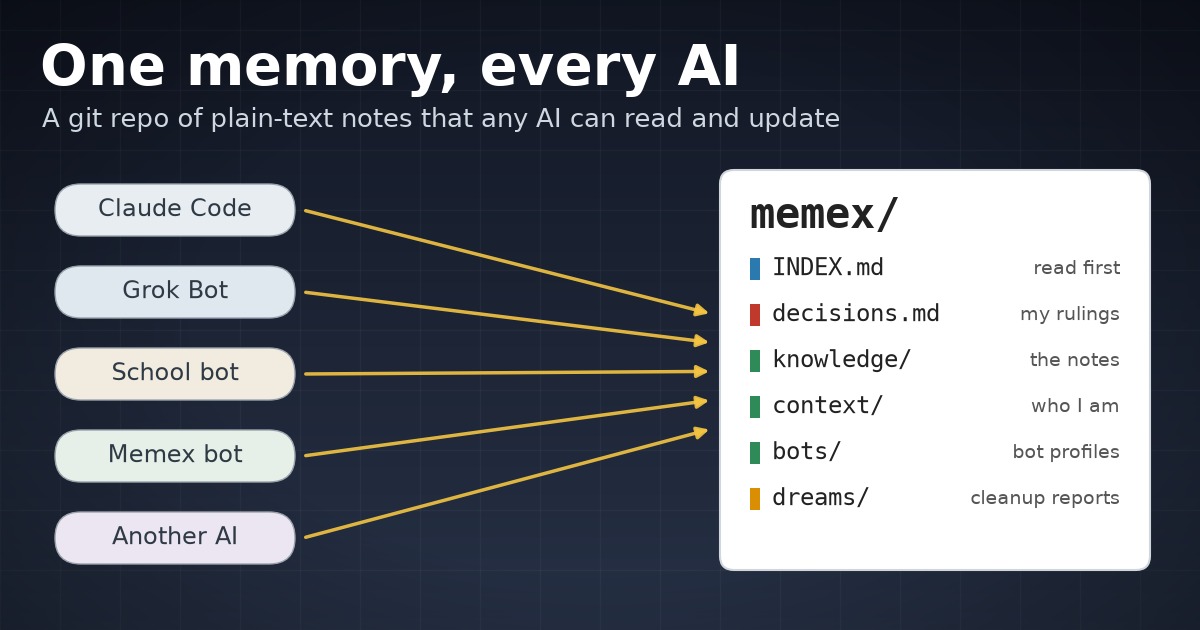
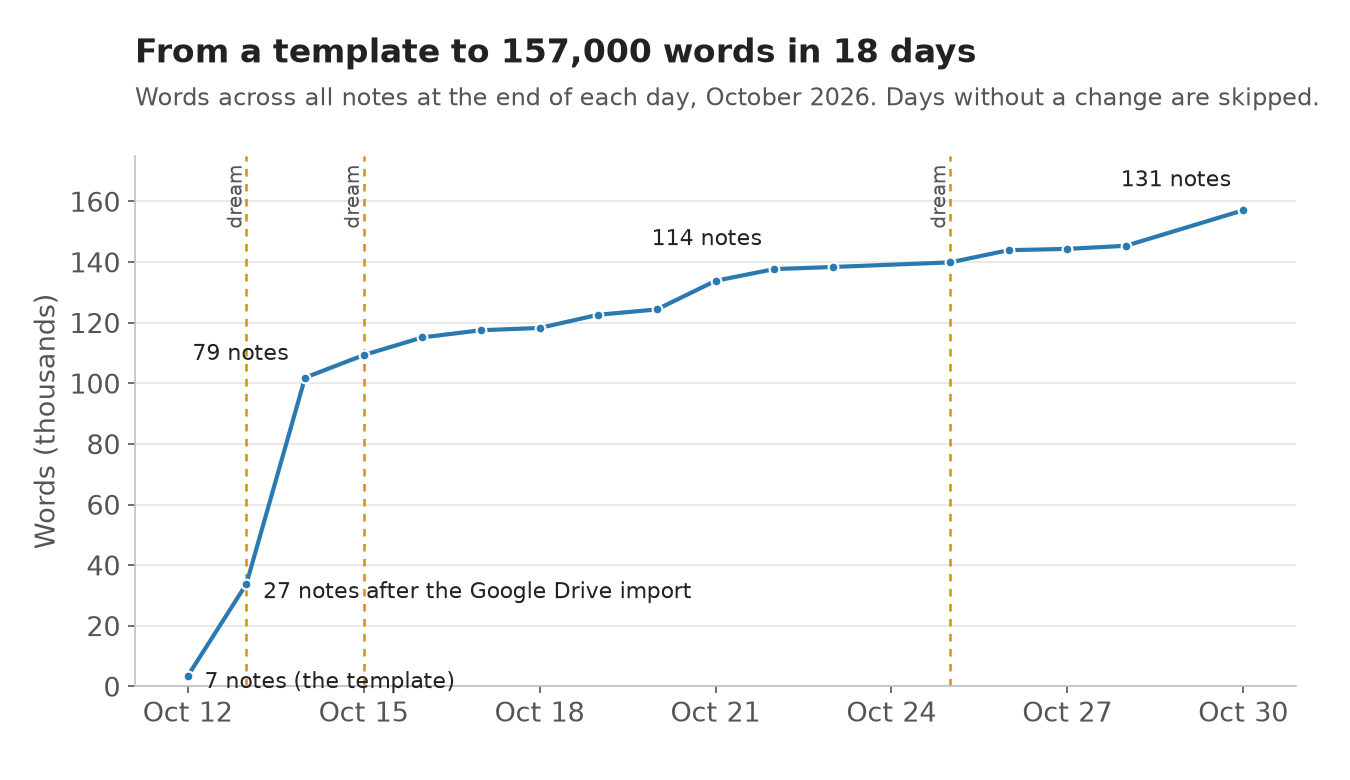
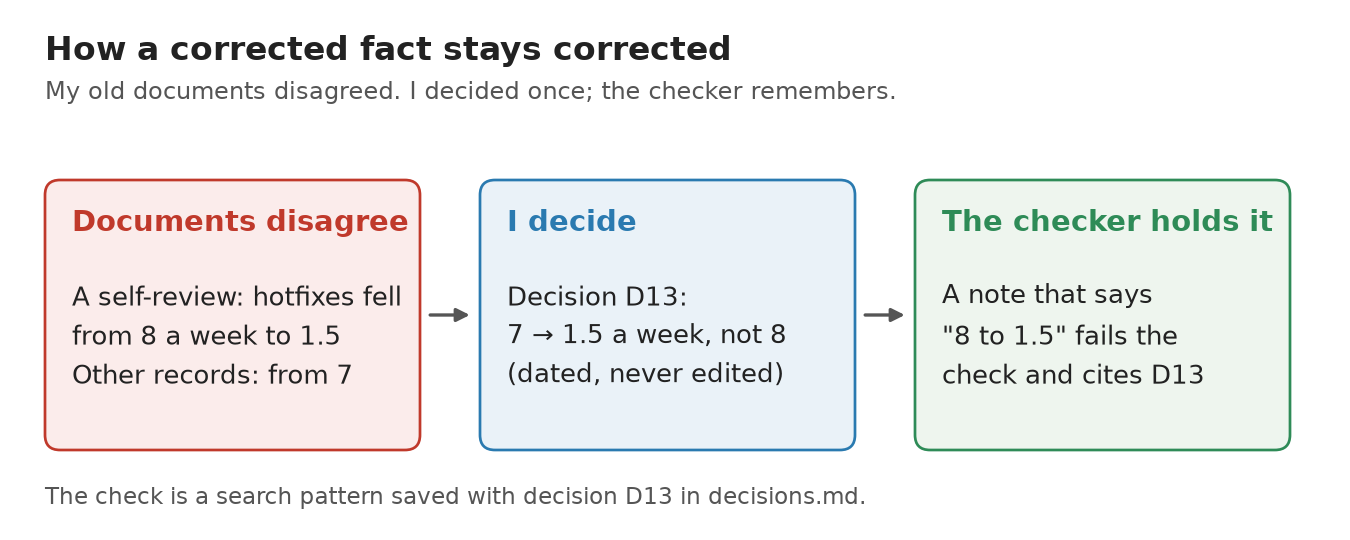
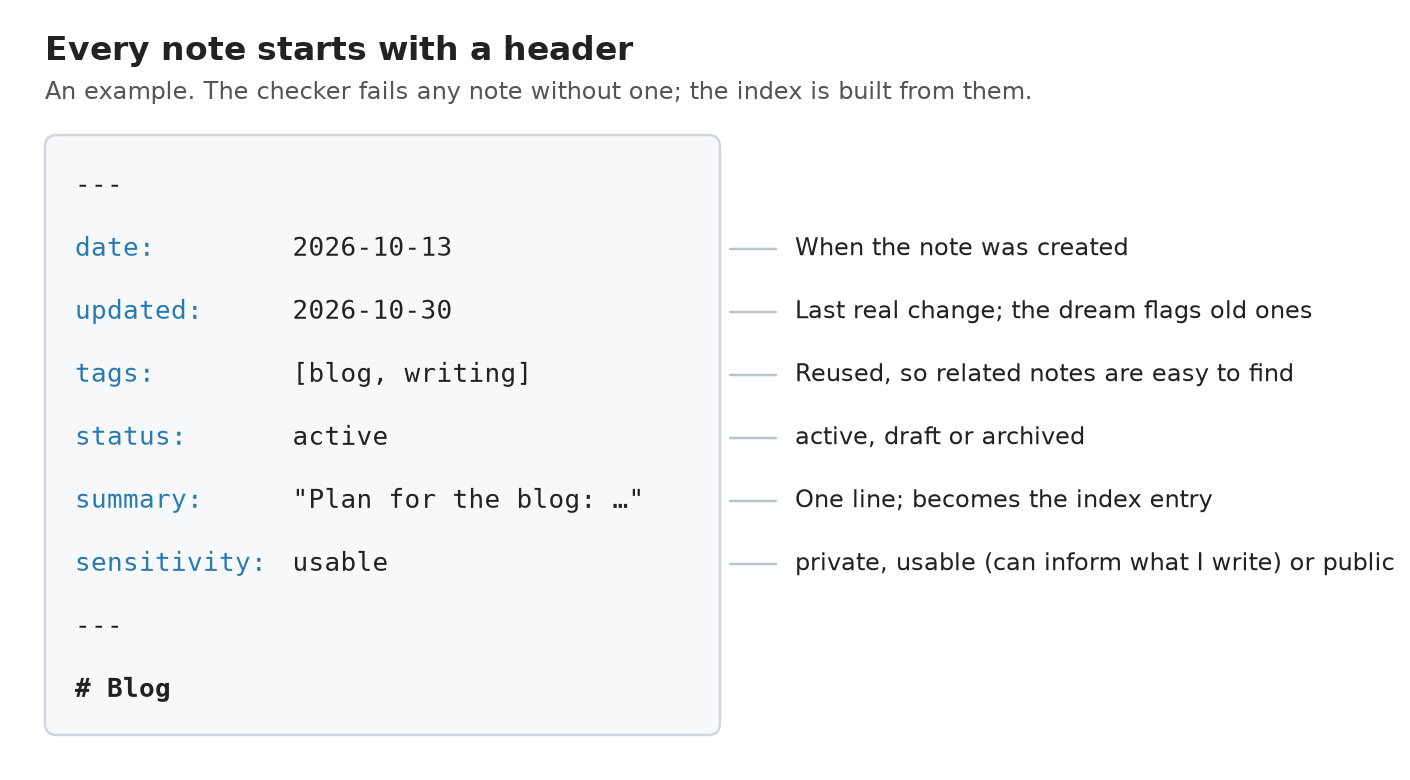
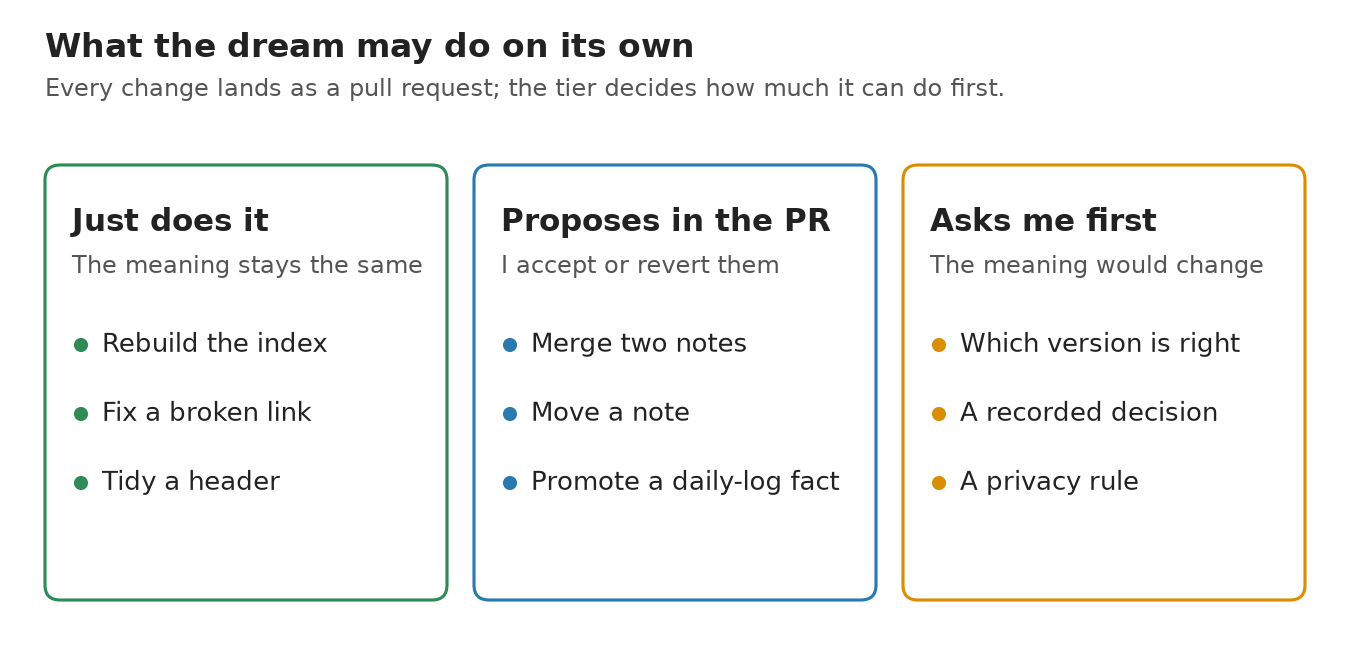
I stopped re-explaining myself to AI --- title: I stopped re-explaining myself to AI published: true date: 2026-11-03 00:20:00 UTC tags: canonical_url: redgeoff.com --- !Five labels on the left, Claude Code, Grok Bot, School bot, Memex bot and Another AI, with arrows into one card labeled memex/ that lists INDEX.md, decisions.md, knowledge/, context/, bots/ and dreams/, under the headline One memory, every AI _Image credit: author, drawn with code_ For a while, every new AI session started with me re-explaining things: who I am, what I’m working on and which documents matter, often by uploading the same PDFs again. Now any AI I use starts with all of that. This is a story about how I moved my notes out of Google Drive and into a folder of plain text files that every AI I use can read and update, and about the handful of rules that keep that folder from turning into a mess. I call it my memex. If you read my last post, you’ve already met it. The bot that reads our kids’ school email keeps its rules there. This post is about the memex itself: what’s in it, how it stays accurate when several AIs are writing to it, and how you could start one. What Was Wrong With Google Drive? In short, AIs kept tripping over my documents. When I pointed Claude at my Google Drive and asked it to edit a Google Doc, it would create a new copy instead of changing the one I had. Claude has its own documents that it can edit, but other AIs can’t easily read them. And most AIs couldn’t search my Drive well enough to find things, so I often ended up exporting documents to PDF and uploading them by hand. I wanted one place that any AI could read, search and change, without me copying things around. A note-taking app wasn’t the answer either, since you’re limited to the structure and features the app gives you. What Is the Memex? The name comes from Vannevar Bush’s 1945 essay “As We May Think”, where a memex is a desk that stores a person’s books, records and communications so they can be consulted quickly. Mine is a git repo of markdown files. Markdown is plain text with a little formatting, e.g. a # in front of a heading. A git repo is a folder that records every change, so you can see what changed, when and why, and undo any of it. Mine lives on my laptop and in a private repo on GitHub. The files are organized by what they’re about: 1. knowledge/ holds the notes: my career history, projects, reference material, the household (school schedules, the cars, recipes) and a daily log. 2. context/ holds a few files that tell an AI who I am and how I like to work, e.g. “ask me instead of guessing” and “never commit directly to main”. 3. bots/ holds a profile for each bot, which is what my last post was about. 4. scripts/ and skills/ hold the small programs that check and maintain everything, with their tests. I created the repo on March 1, 2026 from a template and then mostly forgot about it. The real work started on October 13, 2026. As of October 31, it has 131 notes and about 157,000 words. !Line chart of words in the memex by day, October 12 to 30, 2026: 7 notes and about 3,000 words in the template, 27 notes after the Google Drive import on October 13, 79 notes on October 14, then a slower climb to 131 notes and about 157,000 words, with dreams marked on October 13, 15 and 25 _Words across all notes at the end of each day. Most of the jump came in the first two days._ How Did My Drive Get Into It? On October 13, I downloaded my Google Drive to my laptop and had Claude read it. It extracted the text from about 780 files: PDFs, Word documents, slide decks, spreadsheets and plain text. Google Docs were the one snag. They sync to a laptop as pointer files with no text in them, so I downloaded those folders again as Word and Excel files. Claude then read the converted files too and summarized everything it had read into notes, mostly about my career and past projects, rather than copying the documents in. Some things I didn’t want in the memex at all, so before anything was summarized we agreed on what to leave out: tax and financial records, anything that looked like it held a password, medical and identity documents, and the folders about our kids. The memex keeps a ledger of the import that lists what was read, what was skipped and why. That way a later session doesn’t redo the work, or worse, import something I had already decided to exclude. The import surfaced something I hadn’t expected. When you read 25 years of someone’s documents side by side, they disagree with each other. For example, one of my old self-reviews said our hotfixes had dropped from 8 a week to 1.5, while my other records said 7. Rather than pick one, Claude listed every conflict like that and asked me. I answered them in batches that day, and each answer became an entry in a decisions log. !Three boxes: documents disagree (a self-review said hotfixes fell from 8 a week to 1.5, other records said from 7), I decide (decision D13, 7 to 1.5 a week, not 8), and the checker holds it (a note that says 8 to 1.5 fails the check and cites D13) _One conflict from the import, from my documents to a rule the checker enforces._ How Does It Stay Accurate? A pile of notes that several AIs write to will drift. One session restates a fact a little differently, another copies an old number from a document, and a month later nobody knows which version is right. So the memex has a few rules, and a program checks most of them on every change. !An example note header with date, updated, tags, status, summary and sensitivity fields, each labeled with what it is for _An example header. The index is built from these lines._ 1. Every note starts with a short header: when it was created and last updated, some tags, whether it’s active or a draft, a one-line summary and how private it is. Private notes never leave the memex. Usable notes can inform things I write, like this post. Public notes are already public. 2. A script builds an index from those headers, one line per note. An AI reads the index first and then opens only the notes it needs. That matters because an AI can only hold so much text at once (its “context window”), and 157,000 words is far more than you’d want it to load for every question. 3. The decisions log records each of my rulings with its date, 42 of them so far. Old decisions are never edited. A new one says which one it replaces. 4. Some decisions are backed by a rule in the checker, so a corrected fact can’t creep back in. If a note says hotfixes went from 8 to 1.5 a week, the check fails and points at the decision. 5. The checker, or linter, also makes sure every note has its header, every link points to a real note, file names follow one pattern, nothing looks like a password or an access key, and the index is current. It runs on every change, along with 196 automated tests for the scripts. 6. Every change arrives as a pull request, which is a proposed change I can read before it’s accepted. Nothing is committed straight to the main copy. For the memex, I let the AI merge its own pull request once the checks pass. 7. Nothing is deleted. Notes that are out of date move to an archive folder. None of this is clever. The rules are simple enough that any AI can follow them, and the checker catches it when one doesn’t. What Is the Dream? The checker can tell you a link is broken, but it can’t tell you that two notes say the same thing in different words, or that a plan from three weeks ago is stale. For that, there is a cleanup pass called a “dream”, loosely after the way sleep is thought to consolidate memories. I didn’t come up with the idea. Anthropic addeddreaming to Claude Managed Agents in May 2026: a scheduled process that reviews an agent’s past sessions and memory, pulls out patterns and tidies the memory, either on its own or with you reviewing the changes first. Their Code with Claude talk,“Memory and dreaming for self-learning agents”, covers how they got there. OpenClaw has its own version that runs in light, REM and deep phases and writes a diary of what it changed, and Hermes Agent has a community plugin modeled on OpenClaw’s. Mine borrows from all of them. The difference is that my memory is a git repo, so a dream’s changes arrive as a pull request I can read. A dream has two halves. The mechanical half runs the checker and rebuilds the index. The reflective half is an AI working through a written checklist: promote anything durable from the daily log into the right note, find facts stated in more than one place and keep one owner for each, flag notes that have gone stale, and write down the questions only I can answer. It lands as a pull request with a short report. What the AI is allowed to do on its own depends on the change: 1. Mechanical fixes that don’t change meaning, like a broken link or a stale index, it just does. 2. Moves, merges and new notes, it makes on the branch and calls out in the report, so I can accept or revert them. 3. Anything that changes what a fact means, which version of something is right, or a privacy rule, it asks me about first and doesn’t touch until I answer. !Three columns: just does it (rebuild the index, fix a broken link, tidy a header), proposes in the PR (merge two notes, move a note, promote a daily-log fact) and asks me first (which version is right, a recorded decision, a privacy rule) _What a dream may do on its own, what it proposes and what it asks about._ There have been four dreams so far: October 13, October 15, October 25 and November 1. The last two were run by a bot on its own weekly schedule. On October 25, lint was already clean, so the main results were notes for the two people mentioned most often who didn’t have one yet (notes on people are private and stay in the memex), and one place where the repo’s instructions contradicted a newer decision. The November 1 dream was lighter: one lint warning fixed, the bot’s own log brought up to date and no questions for me. Who Writes to It? More than one AI, which was the whole idea. From October 13 to 31, the memex had 190 commits and 122 merged pull requests. Most came from Claude Code sessions on my laptop. Others came from Grok Bot, the agent I use to run bots on a cloud computer, and from the bots themselves, e.g. the school bot updating its profile and a memex bot that does the weekly upkeep. Two things fall out of that. First, I’m not tied to any one AI. If I switch tools tomorrow, the notes, the rules and the history come with me, because they’re just files. Second, every session starts with context. I don’t paste my background into a prompt or explain how something works, because the AI reads the index and finds it. In practice, I start most things with that same memex bot. When I want to add to something or work on it, like a new project idea, a blog post I should write or a book I should read, I ask the memex bot to add the details. It already has the context of many things in my life, both current and old. And when I’m working in another AI and I think my memex would help, I give that AI read and write access to the memex’s GitHub repo, and it has the same context right away. A bot gets its own access token that works only on that one repo, can only read and write files and open pull requests, and expires within 90 days. Pull requests turned out to be useful for more than catching an AI’s mistakes. When I want feedback on a document, I open it as a pull request and leave comments on specific lines in GitHub, the way you’d review code. The AI answers each comment and pushes a new version. This post was reviewed that way. Is It Safe? I think it’s relatively safe, as long as you don’t have a lot of automations that send out or post content unattended. The only bot of mine that emails anyone sends to one family list, from its own account; the others open pull requests or message me in a private Slack channel. That said, there are risks, and you certainly don’t want to store anything sensitive in your memex, e.g. credit card numbers. The checker flags anything that looks like a password or an access key, but it can’t catch everything, so the better habit is to leave those things out in the first place. What Would I Do Differently From Day One? Not much, and I wouldn’t try to design it all up front. Everyone’s preferences differ, and mine weren’t clear until I’d used it for a while. A memex changes shape as you use it, and the goal is that over time it holds all of your context and preferences, written down. That said, three things would have saved me some cleanup: 1. Start the decisions log on day one, not after the import. 2. Decide what stays out, e.g. financial and medical records, before an AI reads anything. 3. Add the index before the notes pass a few dozen. How Could You Start One? You don’t need my scripts to get most of the benefit. A folder of markdown files in a git repo, a short header on every note and an AI that can read files will get you a long way. I’d add the rest in roughly the order it paid off for me: 1. A context file that says who you are and how you like to work. 2. The header on every note, and an index built from the headers. 3. A decisions log, as soon as you catch yourself correcting the same fact twice. 4. A checker that runs on every change. 5. Changes by pull request, so you see what an AI did before it sticks. 6. A cleanup pass once the notes outgrow what you can review by hand. If you’d like a head start, I’ve put the memex’s structure and tooling on GitHub as a template, with none of my notes in it:memex-template. It has the folders, the note header, the index builder, the checker, a decisions log with an example rule, and the dream protocol with its /dream command. The bot template from my last post lives there too, since the bots deliver into the memex. Thanks for reading.
My 'Second Backend' Existed Only in the README The release gate said "two OTel backends proven." The check proving it ended in || true. It had been passing for weeks. Against a service that was never started, never configured, and never received a single span. This is from the agentwatch v0.2.1 release — the agent-security tool in agentic-suite. The full forensics are in the v0.2.0 field test report. The claim and the check agentwatch emits OpenTelemetry GenAI spans. The release gate for v0.2.0 has an expanded item, number 10: > Two OTel backends proven — an agent-span tree must render in Jaeger and Tempo, not just whichever backend happened to be wired up first. The field-test case behind it, FT-BACKEND-2, checked the Tempo side. Its assertion was, in essence: curl -sf http://localhost:3200/api/search/tags || true Port 3200 is Tempo's search API. The curl asks "is Tempo up and does it answer?" And then || true answers the question permanently: yes, whatever curl said. That's a check that cannot fail. It's also a check someone wrote with good intentions — the || true is there so the case doesn't hard-fail on a flaky timing window. It's defensive shell. And it converted a release-gate claim into a string in a script. What was actually running The stack definition (lib.sh) listed the v0.2.0 profile services. Tempo wasn't among them. The collector config (deploy/otel-collector-config.yml) had one exporter: otlp/jaeger. So the topology behind the "two backends" claim was: | Claimed | Actually | |---|---| | Jaeger receiving spans | ✅ up, receiving | | Tempo receiving spans | ❌ never started, never configured, no exporter pointing at it | | Field-test status | PASS | The check passed because the check was unpassable. Not because the system worked. The part I like: hardening made it fail Here's where the story turns. The v0.2.0 field test had 94 cases, and after the run I did a hardening pass — going case by case, asking of each assertion: could this fail if the claim were false? FT-BACKEND-2 couldn't. So the || true came out, and the check became a real query: Tempo's search API must answer for the service agentwatch emits as. Then the case ran red. And the red was not a test bug. The red was the finding. That inversion took me a while to appreciate. We're trained to treat a red field test as "the test is broken until proven otherwise." But a check that can fail, failing, is the system telling you something a green check never will. The report we published says it plainly: the old || true hid that the R4 claim was unmet. The green wasn't evidence. It was upholstery. The fix was three lines of infrastructure Not a test fix — an actual product fix: 1. tempo added to the profile services (and a tempo-config.yml to match). 2. A new otlp/tempo exporter in the collector config, added to the fan-out list. 3. The sibling case (FT-OTEL-1) hardened too — it now asserts a real parent/child agent-span tree renders, a CHILD_OF relationship, in Jaeger and Tempo, rather than grepping a service name out of one backend's API. Re-run: the stack comes up 16 services including svc-tempo, the trace resolves in Tempo, and both cases pass — now for reasons. The v0.2.1 release gate table reads gate 10 as PASS (fixed) with the Tempo receipt attached. The class of bug, generalized || true is the obvious member. But the same genus showed up all over the census we did of the 94 field-test assertions: | Shape | Looks like | Can fail when claim is false? | |---|---|---| | \|\| true | "resilient check" | Never | | test -f <path> | "artifact exists" | Only if packaging breaks entirely | | python -c "import x" | "module ships" | Only if the import system itself fails | | grep -q <word> on your own output | "feature works" | Only if the word stops appearing | | Driver runs, prints ok: ... | "scenario passed" | Only if the driver exits non-zero | We tallied it: across 94 cases, 52 were driver-run, 11 existence/syntax, 9 substring-greps, 5 module-imports, 1 outright || true — and only about 8 asserted a real condition. That's the sentence I'd want on a wall somewhere: most of your green is plumbing, and plumbing can't fail. The v0.2.0 campaign grounded 90 of 92 passing cases on checks that can fail. That's the actual product of that release, more than any feature. What I keep from this - A check that cannot fail is not a check. It's documentation with an exit code. - || true on a probe is fine (you don't want probes failing your build). || true on a gate is a lie with good intentions. - When a hardened assertion goes red, the first hypothesis should shift over time: early in a project it's "test wrong," late in a project it's "system wrong." This one was late. - Release-gate claims need an assertion per claim, not an assertion per area. "Backends" isn't a claim. "Jaeger and Tempo each render the tree" is. All of it shipped in agentwatch v0.2.1 — on PyPI. The question worth asking of your own release gates: for each one, what's the check, and could that check fail tomorrow if the claim stopped being true? If any answer is "no," you've found the next field test. References - Release: agentwatch v0.2.1 on GitHub · on PyPI - v0.2.0 field test report — FT-BACKEND-2 (R4), the || true finding, and the assertion-shape census - The collector config, fixed — otlp/tempo exporter + fan-out - The release checklist, gate 10 - Suite: agentic-suite — the full set of agent-security tools
JHSD200 Jio STB exploited successfully thanks to eMudhra 😂 The JHS series isn't vulnerable to the broken tls cert exploit used in JMSC/JMSB series. It needs a valid tls cert. Thanks to eMudhra we can now mint valid tls certs. Full exploit documentation: ilikechocopies/sideload-jiostb
Grok Bot usage limits got you down 😭 Try Founder Mode ❄️ A new multi-project agent org for Claude Code. Your own Chief of Staff → Agent Leads per project. Multi-agent coordination that actually runs on Opus 5.5 Daily briefs. Run it on your phone. amateokap/founder-mode
@bi9kahuna great job this is awesome. we need a caps lock indicator added to the login screen too omarchy#15209
Four Bounded Semantic Retrieval Paths for Healthcare Appointment Assistants Collection queries timing out in a healthcare appointment assistant are usually a contract problem before they are a vector-database problem. Short answer: use staged retrieval with explicit collections, bounded queries, and source context that can be traced back to a document. That gives the assistant a useful fallback when a specialist index is slow, without silently turning a scheduling answer into a guess. The flow I want is small enough to reason about: classify the appointment request, query the narrow collection first, stop at a deadline, then try a broader or lexical source, and finally ask for clarification or hand off. Every result carries a URL or document ID. The answer renderer never receives anonymous chunks. What should semantic retrieval return for a healthcare appointment assistant? Start with a retrieval contract, not a vendor SDK. For an intent such as “find a follow-up with Dr. Lee next week,” the contract can require a specialty, location, date window, and evidence fields. A hit that lacks its source identifier is incomplete even when its similarity score is high. Here is a compact TypeScript runner. The adapters are deliberately boring: they make the timeout and fallback policy visible, and they are easy to replace with Pinecone, Weaviate, pgvector, or an HTTP service. The first adapter below uses Infrai's plain REST surface, so the same request pattern works from a small worker without installing a client library. type Hit = { text: string; score: number; sourceUrl?: string; documentId: string; }; type Retriever = (query: string, signal: AbortSignal) => Promise<Hit[]>; async function queryInfrai(collection: string, query: string, signal: AbortSignal): Promise<Hit[]> { const key = process.env.INFRAI_API_KEY; if (!key) throw new Error("INFRAI_API_KEY is required"); for (let attempt = 0; attempt < 3; attempt += 1) { const apiHost = ["api", "infrai", "cc"].join("."); const response = await fetch(`https://${apiHost}/v1/vector/query`, { method: "POST", signal, headers: { Authorization: `Bearer ${key}`, "Content-Type": "application/json", }, body: JSON.stringify({ collection, query, top_k: 5 }), }); if (response.status === 429) { const retryAfter = Number(response.headers.get("retry-after") ?? "1"); await new Promise((resolve) => setTimeout(resolve, Math.min(retryAfter * 1000, 4000) * (attempt + 1))); continue; } if (!response.ok) throw new Error(`retrieval failed: ${response.status} ${await response.text()}`); const payload = (await response.json()) as { hits?: Hit[] }; return payload.hits ?? []; } throw new Error("retrieval rate limit persisted"); } async function withDeadline<T>(work: (signal: AbortSignal) => Promise<T>, ms: number): Promise<T> { const controller = new AbortController(); const timer = setTimeout(() => controller.abort(), ms); try { return await work(controller.signal); } finally { clearTimeout(timer); } } async function retrieveWithFallback(query: string, retrievers: Retriever[]): Promise<Hit[]> { const budgets = [180, 260, 360]; for (let i = 0; i < retrievers.length; i += 1) { try { const hits = await withDeadline( (signal) => retrievers[i](query, signal), budgets[i] ?? 400, ); const traceable = hits.filter((hit) => hit.documentId && (hit.sourceUrl || hit.documentId)); if (traceable.length > 0) return traceable.slice(0, 5); } catch (error) { if (!(error instanceof DOMException) || error.name !== "AbortError") throw error; } } return []; } The first adapter should target a collection containing current clinic schedules and policy documents. The second can search a broader appointment collection; the third can be a deterministic lookup for provider, clinic, or opening identifiers. The limits are intentional. A slow source cannot hold the user-facing request indefinitely, and returning five traceable hits is more useful than returning fifty opaque fragments. One production trap is retrying every failure in the same tier. That multiplies load while the user waits. Retry once only for a transient transport failure, pass the remaining budget to the next tier, and record which tier answered. I once treated a timeout as permission to widen the query immediately; the result looked plausible but mixed pediatric and adult clinics. Narrow-first is slower only when it fails, and the trace tells you why. How do fallback stages balance retrieval quality and latency? Use four stages, each with a clear exit condition: 1. Exact constraints: filter by specialty, site, and date window before semantic ranking. This protects clinical relevance. 2. Narrow semantic search: query the current-schedule collection with a small top-k and a short deadline. 3. Broader evidence search: include approved policy and FAQ collections when the narrow tier has no traceable hit. 4. Safe handoff: ask one clarifying question or route to staff when evidence is empty or contradictory. Quality is not just the similarity score. Check that dates are in the requested window, the provider is active, and every claim can be cited. Latency is not just the database timer either; embedding, network, reranking, and answer generation all consume the same user budget. Set one request deadline and allocate smaller budgets inside it. Keep it bounded. No guesswork. For a useful incident record, store the original intent fields beside the query text, the collection version, each adapter's start and end timestamp, the timeout reason, and the exact source IDs selected for generation. That record lets you distinguish a bad embedding from an expired schedule, and it gives a reviewer enough context to reproduce a response without copying sensitive patient text into a ticket. The longest part of this work is usually the test matrix. Take one request for a cardiology follow-up, then vary only one dimension at a time: the schedule document is current or stale, the provider is present or deleted, the narrow collection responds within 180 ms or exceeds its budget, and the broader policy collection has either a matching rule or none. For each case, assert the tier chosen, the number of returned sources, and whether the answer is allowed to proceed. This catches a subtle failure mode where a fallback returns a semantically similar policy paragraph but no appointment availability; the assistant must ask a question instead of blending those facts into a confident slot recommendation. I am not sure every team needs four physical indexes, but every team needs four explicit outcomes, because “some context came back” is not a safe contract. When content changes, re-index deliberately. Upsert the new version, retain its document ID and source URL, then remove deleted records from the collection. A stale appointment slot is a correctness failure, not a harmless cache miss. Keep an index version in your trace so an incident review can reproduce what the assistant saw. Which retrieval option fits this fallback design? The right choice depends on your operational boundary, not a leaderboard. Pinecone is convenient when you want a managed vector service and are comfortable with its hosted indexing model. Weaviate offers a broad open-source and managed surface with schema features. pgvector is a strong fit when Postgres is already the system of record and SQL filters matter more than a separate service. | Option | Useful strength | Trade-off for this workflow | | --- | --- | --- | | Pinecone | Managed vector operations | Another hosted dependency and filtering model to operate | | Weaviate | Flexible schema and deployment choices | More surface area to configure and monitor | | pgvector | SQL joins and transactional data nearby | You own tuning, scaling, and vector maintenance | | A plain HTTP aggregation layer | One contract across providers | You still need to design ranking, traces, and failure policy | Infrai can be the HTTP aggregation layer when a solo team wants one REST API, one key, and no SDK installation while keeping provider changes behind an adapter. That is an integration advantage, not proof of better retrieval quality; you still need to measure recall and tail latency on your own appointment corpus. The catch is real: this design is not suitable when you need specialized vector indexing controls, on-premise data residency guarantees, or a vendor-specific feature that the adapter cannot expose. Stick with pgvector when appointment records must join transactionally with scheduling tables. Choose Pinecone or Weaviate when their managed operations reduce work your team does not want to own. An operational checklist that survives the first incident Log the query class, collection, deadline, tier, result count, document IDs, and final answer citations. Redact patient details before those traces leave the protected environment. Alert on empty-evidence answers and on repeated deadline exhaustion, not only on HTTP errors. Test the fallback path with deliberately slow adapters, deleted documents, stale schedules, and ambiguous provider names. Verify that a timeout moves to the next bounded tier, that a missing source blocks an uncited answer, and that a retry cannot duplicate an indexing write. Your mileage may vary across regions and corpus sizes; the contract is what keeps that variation visible. References - arxiv.org - docs.pinecone.io - weaviate.io - pgvector/pgvector
全功能光碟表面可見圖像製作與燒錄工具 github.com/JiaFeiMiao-K-Cat/DiscImageStudio/blob/… 好炫!但是好像沒什麼用? XD
Showrunner is In WanGP with 200+ generative models: deepbeepmeep/Wan2GP
Polyend published the full source code to the Tracker firmware, for all three devices. That's sick, and then maybe I can attempt to fix the bugs that prevent me from using my OG tracker as much as I'd like myself. polyend/tracker-ce #polyend #trackerMusic #trackers
@dshaw Yeah, totally. I recently moved to using local CI runner and hooking it up with github. Actions runner overage bill went to zero (few runs that uses hosted runs, are covered by the monthly allowance). Created OSS to make it easier for MAC owners: i2Dev-com/homefield
上手に印刷出来ましたー! ありがとう!!D-BRAKEの制作者様!! (misternoe/cheatbox) サポート材の剥がしやすさも ボタン装着時の寸法もバッチリですね! t.co
hunduncn/joycon-vibe-remote: Turn a Nintendo Switch Joy-Con into a macOS motion mouse and Vibe Coding remote. hunduncn/joycon-vibe-remote Joyconはこっち
先日買ったM-VAVE FM-1にカスタムファームが大量に出て恐ろしい進化してて驚き。数多すぎてわけわからんレベル。FM1-TRAX、OPN-1とか、メガドラ音源もあるのが気になる。$40台で買える音源ってレベルじゃねえぞ。 aroum/fm1-custom-fw
Grid4D 1.0: a free, open-source 3D modelling, animation and rendering suite written in Rust (egui + wgpu) I've just released 1.0 of Grid4D, a free, open-source (MIT / Apache-2.0) 3D content creation suite for Windows, macOS and Linux, written in Rust. GitHub: Mitsislav/Grid4D Downloads: mitsislav.itch.io What it does: polygon and spline modelling, Subdivision Surfaces, deformers (bend, twist, taper, bulge, FFD), a Cloner with effectors, keyframe animation with an F-curve editor, rigid-body physics, glTF/OBJ import and export, and a built-in path tracer for final renders. Everything is non-destructive with full undo. Built with egui + wgpu, rapier3d for physics and Rhai for scripting. The viewport draws 10,000 objects at ~150 fps without allocating memory per frame, and there are ~780 tests. Feedback, bug reports and stars are all very welcome!
quicktui.ai QuickTUI Server preview server2-preview-20261103-080831-a25c42caa is out. - Server runs doctor at startup and tray icons flag issues. - Doctor warns about agents installed more than once. - Tray opens window pages. Download: github.com/dualface/quicktui/releases/tag/server2…
leaving the repo here if anyone wants to check out and from personal experience working in IT, they are way more careful than a lot of companies out there when it comes to exposing their users to compromising code otwcode/otwarchive
I made Paseo Micro: a plugin and macOS app that turns a @work_louder Creator Micro 2 keypad into a controller for my Paseo coding agents. mattt/paseo-creator-micro I've been using @moboudra's Paseo for the past month, and it's been a great fit. I was getting so much done that noticing which agents were waiting on me had become the bottleneck. Then I saw @Thom_Wolf switching between 36 sessions with a tiny Work Louder keypad, and impulse-bought one. There were probably easier, definitely more responsible ways to solve this. But buying a cool toy seems Pareto optimal (right?). I hadn't even checked whether it was compatible. Just took a leap of faith: "Claude, take the wheel." Fortunately, @chacon had reverse-engineered the keypad's USB HID protocol and documented it in micro-manager. Following his work, I had a working plugin within an hour. I've spent the past week polishing it, and I'm really happy with it. The translucent key glows green when an agent is waiting for me. I tap it, and Paseo opens to that conversation, even from the background. The double-wide key is hold-to-talk. So I see green, tap, read, and hold to respond by voice. The top rows have keys to navigate back and forth. The dial scrolls the conversation (press while scrolling to go faster), and the joystick opens a radial menu of common responses. But the next-agent key and dictation get about 90% of my use. (The photo is AI-generated from my own pictures of the keypad, because my desk was a mess.)
Tired of applying to job after job and hearing nothing back? career-ops scores each job against your real CV and says skip below 4/5. Above that, it drafts your CV, letter and answers. You press Submit. Author's count: 740 jobs, 68 applied, 1 offer. career-ops-hq/career-ops t.co
@mahou_Mafuyu github.com/zortos293/Eglantine/releases o melhor fork pra mim para rodar o pokopia foi esse pra mim. tenta colocar em 8gb ou 12gb de ram e a resolução 0.75x se possível tbm
Compacting at 400K instead of ~967K cut my Claude Code cost per request by 43% This isn't a universal recipe. It's how I tuned Claude Code for my own work, and different settings may suit you better. The window Every request sends the whole context to the model. On 1M-window models Claude Code only compacts it near 967K, so the tail of a long session is the most expensive part. For me, 68% of main-thread cost went to requests with more than 400K in context. I set "autoCompactWindow": 400000 and compared the month before with the week after. That's the main thread only, about 25K requests before and 16K after: - Context per request: 415K → 220K - Cost per request: −43% (in tokens weighted by API rates, no per-model prices) That's one person's before/after, not a controlled experiment. The cost of summaries A smaller window means more compactions. I went from 16 summaries a month to 75 in a week: 95 minutes of waiting, 76 seconds each. After a summary, the model often re-reads files it had already seen. Slide instead of summarize Most of the context is old tool output: file reads, test runs, diffs. So at compaction, a hook keeps the conversation word for word and replaces old outputs with a short line: "you saw this, read it again if you need it." There's no model call, so a compaction takes milliseconds. The summary is still the fallback, for /compact and for the rare case where sliding can't free enough. The benchmark: Claude Code builds a TypeScript project against fixed tests, on Haiku 5.5 with a 100K window. Medians, sliding against Claude Code's summary: |Task|Cost|Time| |:-|:-|:-| |A day of work, 307 tests|−19%|−33%| |An eval harness, 238 tests|−35%|−28%| |A short task with one compaction|+6%|−17%| Every test passed in both modes. Will it work for you? It depends on how you work: - If your sessions rarely reach 400K, the window changes nothing. - If you stay in one session for hours, 200–300K might pay off. - On short tasks, sliding saves time but not money. - Model, effort and the kind of work all move the number a lot. That's why I built a plugin that works out your number first. It's called tokendoctor (free, local, MIT). It replays your sessions at windows from 200K to 600K, shows what each would have saved, and only then offers to change anything. Sliding is off by default, and /tokendoctor undo reverts any change. claude plugin marketplace add rsaryev/tokendoctor claude plugin install tokendoctor@tokendoctor /tokendoctor:sessions Note: I re-run the benchmarks and update the numbers as more data comes in, so figures in my earlier posts may differ from these. The repo always has the latest, with every run behind them. rsaryev/tokendoctor
@aronchick Someone could fork @andrewmccalip's repo from last fall and include more detailed radiative cooling model parameters in it andrewmccalip/thoughts
I got tired of opening the Alexa app just to dim a lamp, so I made a desktop widget for Matter lights (Windows, free + open source) It sits on my desktop (stays visible when I hit Win+D) and controls my Cync and Sengled bulbs directly over the local network. No cloud, no account, and Alexa keeps working because Matter lets more than one app control the same device. What it does - on/off, brightness, color and white temperature, with one-tap color swatches - scenes across multiple devices ("movie night" = desk lamp dim blue, bedroom bulb purple, plug off) - lives on the desktop, stays always on top, or hides in the tray (your pick) - 0% CPU when idle, starts with Windows Install 1. Download the installer: github.com/KabirRao1/lightdeck/releases/latest 2. It's not code-signed yet, so if Windows says "Windows protected your PC", click More info → Run anyway 3. In the Alexa app: Devices → your bulb → ⚙ → Other assistants and apps → Add another, then copy the 11-digit code 4. In Lightdeck click +, paste the code, hit Pair. Windows will ask if "Node.js JavaScript Runtime" can use the network (that's the Matter engine), so allow it on private networks Google Home, Apple Home and SmartThings have the same option, and the steps are in the README. Tested with Cync and Sengled so far. If you try other bulbs or plugs, let me know if they work and I'll add them to the list. And if you find it useful, a star on GitHub would mean a lot!
@barckcode Hola crack, tenés que ir por este camino con el motor de nan por atrás: peaberry-studio/arche
LFM3-1.7B quantization report: 3.6 GB VRAM lossless; 2.2 GB with modest degradation This model looks quite spectacular. According to LiquidAI's own benchmarks, it scores higher than MiniCPM5-2B across the board, while offering 2x the context and taking up half the space in VRAM (3.6 GiB vs. 7.1 GiB for a quasi-lossless quant). Read the report: github.com/crusaderky/pixi-llm-recipes/blob/main/… Raw plots as interactive HTML: htmlpreview.github.io
وهذا أول مشروع أشاركه معكم من المشاريع اللي رجعت أشتغل عليها وأطوّرها. 🔥 🔗 رابط المشروع على GitHub: engraghad20/Raghad-Luxury-Store
@empowwerr Hey John, good to have you here. Distributed databases plus agents is a fun mix: agents are basically unreliable nodes with opinions. What's been harder so far, state, retries or evals? I'm sharing tested Claude Code skills in public: prandata/wsai-skill-set
@dshaw In addition to reducing the number of tests, we moved to a local CI runner DiversioTeam/local-ci-runner All recent macbook beat most CI machines in terms of performance. And LLMs run CI steps only when they commit things, so we can commit as many a time we want but run local-ci when we want to. Only thing we have on GH CI now are deployments.
Lighthouse 13.6 Can Raise PageSpeed Insights Scores Without a Site Change PageSpeed Insights scores can change because the testing model changes, not only because a website becomes faster. That distinction matters following Lighthouse 13.6.0, which updates the simulation and tracing work used to produce Lighthouse lab results. The release can be particularly relevant for JavaScript-heavy pages, where improved navigation handling and estimates for Largest Contentful Paint (LCP) and First Contentful Paint (FCP) may produce different results from earlier Lighthouse versions. A higher Performance score is useful context, but it is not, by itself, evidence that real visitors experienced a faster page. For SEO teams, agencies, and publishers that use PageSpeed Insights (PSI) in recurring reporting, the immediate task is to identify the Lighthouse version behind a report and separate tool-driven score movement from changes caused by development work. What changed in Lighthouse 13.6 Lighthouse 13.6.0 was released on October 27, 2026. According to the official Lighthouse 13.6.0 release notes, the release includes updates to Lighthouse's tracing model, improvements to navigation handling, and revised LCP and FCP estimation. Lighthouse uses a controlled lab environment to load and evaluate a page. Its Lantern model estimates how a page would perform under simulated conditions. Changes to that model can alter timings, opportunities, diagnostics, and the weighted score derived from them, even when the tested URL and its deployed code are unchanged. Search Engine Journal reported that PSI now runs Lighthouse 13.6.0 and noted that the updated simulation can produce higher lab scores on JavaScript-heavy sites. The release notes indicated that the update was expected to reach Chrome DevTools and PSI within roughly a week, while Chrome 159 stable deployment was scheduled for early December 2026. The practical point is not that every score will rise. Results can move in either direction depending on a page's loading behavior and the way the revised model interprets it. The update means that direct comparisons with reports generated under earlier Lighthouse versions require more care. Why lab scores and field data can tell different stories PageSpeed Insights presents two related but different types of performance evidence: - Lab data is a single controlled Lighthouse test. It is useful for diagnostics, reproducing issues, and assessing the likely effect of a technical change. - Field data comes from the Chrome UX Report (CrUX), where available. It reflects aggregated experiences from real Chrome users over time and is the more relevant measure of how users actually encountered the site. A Lighthouse simulation update affects lab reporting directly. It does not retroactively change how users' devices, networks, and browsers performed in the field. That is why a new PSI score should not automatically be presented as a user-experience improvement. This does not make lab data unimportant. Lab reports remain valuable because they provide actionable diagnostics that field datasets generally cannot provide for an individual page load. However, lab results are model outputs. They should be interpreted alongside field metrics rather than substituted for them. For example, a team might see an LCP-related lab improvement after Lighthouse 13.6 and assume its recent code release solved a rendering problem. Before drawing that conclusion, it should check whether the page changed, whether the test used a new Lighthouse version, and whether CrUX data later indicates a corresponding shift in real-user LCP. A better way to compare PageSpeed Insights reports Version-aware reporting is the simplest protection against misleading before-and-after comparisons. Record the Lighthouse version whenever an audit is exported, added to a dashboard, or used as the baseline for a performance project. <table> <thead> <tr> <th scope="col">Question</th> <th scope="col">What to check</th> <th scope="col">Why it matters</th> </tr> </thead> <tbody> <tr> <th scope="row">Did the site change?</th> <td>Deployments, templates, scripts, CDN settings, and third-party tags</td> <td>Confirms whether there is a plausible on-page cause for a result change.</td> </tr> <tr> <th scope="row">Did the test method change?</th> <td>The Lighthouse version shown in the report</td> <td>Separates model changes from website changes.</td> </tr> <tr> <th scope="row">Did users see a change?</th> <td>Available CrUX field metrics and their reporting period</td> <td>Tests whether the movement is reflected in real-user experience.</td> </tr> <tr> <th scope="row">Is the result repeatable?</th> <td>Multiple comparable lab runs</td> <td>Reduces the risk of treating normal test variation as a trend.</td> </tr> </tbody> </table> When communicating results, it is reasonable to state that a lab score changed after an auditing-model update. It is less accurate to claim a performance win unless the evidence also includes a documented site change and, where available, supporting field-data movement. This is especially important for agency reporting and executive dashboards. A score increase can be encouraging, but the report should identify whether it reflects implementation work, changed measurement methodology, or both. That level of attribution prevents teams from taking credit for a tooling shift and helps them focus engineering effort on user-facing issues. ARD changes are separate from the performance score question Lighthouse 13.6 also updates its Agentic Resource Discovery (ARD) audit to ARD v0.91. The release replaces ai-catalog.json with ard.json and adds discovery sources including Link headers, rel="ard", and /.well-known/ard.json. ARD concerns how resources can be discovered by agentic systems. It is distinct from the Lighthouse Performance score and should not be treated as a conventional ranking or Core Web Vitals signal. Still, the update is relevant to teams preparing content and technical infrastructure for AI-driven discovery. The new audit behavior means websites that are evaluating ARD readiness should revisit any prior implementation assumptions based on ai-catalog.json. A current review should account for the discovery methods recognized in ARD v0.91 and document what has actually been implemented. Because this area is evolving, teams should avoid presenting an ARD audit result as proof of visibility or citation in AI search products. The release also includes changes to Performance Insight audits, which now populate numericValue and numericUnit using estimated time or byte savings. That can make audit outputs more useful for prioritization, but the savings remain estimates produced by the lab environment. If a Lighthouse update has made it harder to explain why your performance dashboard moved, create a GEO Search Leads account to begin assessing your website's GEO readiness and identify optimization opportunities across the content and technical signals that shape AI-driven discovery. Use the assessment as a structured starting point, then validate performance conclusions with versioned Lighthouse reports and the field data available for your pages. Frequently Asked Questions Did Lighthouse 13.6 make every PageSpeed Insights score higher? No. The updated tracing and simulation model can change results, particularly on JavaScript-heavy pages, but it does not guarantee a higher or lower score for every URL. Does a higher PSI score after the update prove that a site is faster for users? No. A lab-score increase may result from the changed Lighthouse model. Check CrUX field data, where available, and confirm whether a site deployment could explain the difference. What should be recorded in a performance audit? Record the tested URL, test date, Lighthouse version, relevant deployment history, and the distinction between lab results and available CrUX field data. This makes future comparisons more reliable. What changed in Lighthouse's ARD audit? The audit moved to ARD v0.91, replacing ai-catalog.json with ard.json and adding discovery options such as Link headers, rel="ard", and /.well-known/ard.json. Is the ARD audit a Google ranking factor or proof of AI search visibility? No. The supplied release information describes an audit for agentic resource discovery. It does not establish that an ARD result is a Google ranking factor or proof that a site will appear in AI-generated answers. --- Conclusion Lighthouse 13.6 is a reminder that performance measurement includes both website behavior and the methodology used to measure it. Treat PSI lab-score changes as a prompt to investigate, not as automatic proof of an optimization result. Versioned audits, repeatable testing, and CrUX field data provide a firmer basis for judging real-world performance progress.
🤖 前五名全是 AI 代理工具,只有兩個新面孔!| GitHub 每日爆紅 Top 5 (2026-11-02) 2026-11-02 GitHub Trending 總榜,依「今日新增星數」排名前 5。五個全是給 AI 代理用的工具,其中三個是近幾天介紹過的回鍋 repo;新面孔 agent-desktop 一天 +2,275,漲了自己總數的 23.7%。 5. mattpocock/skills(今日 +858 ★,新面孔)— 給寫程式 AI 的小技能包,最紅的 /grill-me 讓 AI 動工前先反過來問清楚你要什麼 mattpocock/skills 4. Donchitos/Claude-Code-Game-Studios(今日 +1,379 ★,連續第 3 天)— 49 個 AI 角色的遊戲工作室;只有 3 個總監指定 Opus,30 個角色沿用你目前的模型 Donchitos/Claude-Code-Game-Studios 3. thedotmack/claude-mem(今日 +1,803 ★,連續第 5 天)— 讓 AI 代理記得上次做過什麼;用 private 標籤包住的內容不會被存 thedotmack/claude-mem 2. vercel-labs/agent-desktop(今日 +2,275 ★,新面孔)— Vercel Labs 的指令工具,讓 AI 代理透過系統的輔助使用介面樹操作桌面 App,不靠比對截圖 vercel-labs/agent-desktop 1. pingdotgg/t3code(今日 +3,229 ★,連續第 4 天)— 用手機、網頁遙控電腦上的 AI 代理;Claude Code、Codex、ChatGPT 也能透過 MCP 反過來指揮它 pingdotgg/t3code 明天要盯:hyprwm/Hyprland(總榜第 10),今日 +509 ★,前一天只有 +38。 本日無跳過的 repo。 資料:github.com/trending 總榜(2026-11-03 台灣時間早上讀取),星數為當時頁面顯示值,並以 shields.io 核對總星數。 #GitHub #開源 #AI代理 #ClaudeCode #T3Code
Jev使って作ったいろいろ、結局記事にするにも遅すぎるのでコードだけ供養...ご自由にご活用ください AmaseCocoa/jev-issue-poc
五台服务器五个终端窗口,密码一人一套,谁改了什么查不到。堡垒机按资产数报价,用不起。 next-terminal 开源,浏览器里连 SSH/RDP/VNC,会话录像+命令留档,支持批量执行。 next-terminal/next-terminal
DeepSeek's Free AI Coding Agent Answers in Your Team Chat DeepSeek has open-sourced Super-Agent, a research-prototype AI coding agent (released Oct 31, MIT licence). It works on one GitHub repo, can listen to team chat, and acts only when asked or when a team rule allows it. Sources: - deepseek-ai/dsh-superagent-prototype - bloomberg.com - helpnetsecurity.com - thenextweb.com #Shorts #SubatomicSecrets #DeepSeek #AIAgents #OpenSource This video is animated and voiced with AI tools.
Build log: what I fixed on my football site this week, and the mistake that broke part of my own homepage for a day Quick build-in-public update on the football site I run solo (90minwaffle.co.uk). Most of this week was cleanup and safety work, not new features, and I made at least one mistake worth sharing. Things that were wrong and are now fixed - Stale pages A nightly job fed my tournament, league and club pages, and it only got a game's result when a player in that game happened to be refreshed. Some pages were up to a week behind. I now overlay results from the database that updates every five minutes, using one shared helper. - A case-sensitivity bug One of my stats scripts filtered games on status = 'finished', but part of my data stores 'FINISHED'. SQLite compares text case-sensitively, so that job ignored finished games in 11 leagues. Nobody saw it because those leagues aren't on that page yet, but it would have bitten as soon as they were. - Live games that wouldn't leave. Some finished games stayed on the live list until a blunt 150-minute backstop removed them. They now have status-aware limits (a first half can't last 75 minutes), and every removal logs the status and minute the feed gave, so I can finally see what the feed was actually saying. - A stale figure. One published number stayed out of date for about 12 hours because a safety check refused to publish a value that disagreed with a second calculation of the same thing. The check did its job, since the second calculation just hadn't refreshed. A small job now rebuilds it and re-checks, and it still refuses to publish if they disagree after a rebuild. Safety - My public data files carried some internal fields the front end didn't need. The full copies now live in a private folder, the exporters publish finished display text, and the front end just renders it. - The public GitHub repo for the site's front end has a fresh single-commit history, and the publish script blocks the push if it finds secrets, server paths or internal terms. The old repo is deleted. The mistake After a deploy I re-locked a set of files with chattr +i. Three of my own builders write to some of those files without unlocking them, so they were silently refused for about 28 hours. One section of the homepage stopped updating, and I only noticed from a pile of alerts the next evening. Lesson: check what else writes to a file before you lock it. I've since made the lock script skip those files. Front-end repo:AlgonikHQ/90minwaffle-web The data pipeline and methods stay private, but I'm happy to talk through the engineering if anyone has questions.
翻訳して終わりではなかった——Claude Codeガイドを2026年版へ更新した Claude Codeの日本語入門ガイドを公開したあと、しばらくして内容を読み直すと、文章は自然でも説明が現在の仕様と合わない箇所が増えていました。 インストール方法、コマンド、権限モード、MCP、Hooks、サブエージェント、モデルや料金。Claude Codeのように更新頻度が高いツールでは、公開時に正しかった説明も、そのままでは古くなります。 そこで、CC101日本語版を2026年10月時点の情報へ更新しました。対象にした基準点はClaude Code v2.1.301です。この記事はその時点の更新作業の記録であり、現在のClaude Codeの全仕様を説明するものではありません。 更新コミット GitHub: im-jaehong/cc101jp この記事では、翻訳済みの技術資料をどのように棚卸しし、AIを使いながらも公式情報を基準に更新したかをまとめます。 「日本語として読める」と「現在も正しい」は別だった 最初の日本語化では、原文の意味を崩さず、初心者にも読みやすい文章へ移すことを重視しました。しかし、時間が経つと別の問題が現れました。 たとえば、次のような説明は変化の影響を受けやすい部分です。 推奨されるインストール方法 対応OSとWindowsでのシェルの扱い 利用できるスラッシュコマンド 権限確認や安全機能の動作 MCP、Skills、Hooks、サブエージェントの設定方法 モデル名、コンテキスト長、料金 廃止・名称変更されたオプション 文章の誤訳なら原文と比較して直せます。一方、原文そのものが古い場合、正確に翻訳するほど古い仕様を正確に伝えてしまいます。 この経験から、翻訳資料には少なくとも二つの品質が必要だと考えるようになりました。 原文の意味を正しく移していること 説明している事実が現在も有効であること 今回の更新では、2番目を中心に見直しました。 先に更新範囲を数字で確認した 感覚だけで修正を始めると、目についたページだけが新しくなり、言語間の差が広がります。そのため、最初にGitの差分を使って対象を把握しました。 2026年8月版から10月版への更新コミットを確認した結果は次のとおりです。ファイル数と行数は当該コミットの差分、言語別のMarkdown数は同コミットのツリーから数えました。 項目 結果 変更ファイル 66ファイル 追加 1,652行 削除 674行 対応言語 韓国語・英語・日本語 各言語のMarkdown 21ファイル 日本語だけを直したのではありません。content/ko、content/en、content/jaの同じ章を対応させ、セクション定義やREADMEも更新しました。 git diff --stat b7de8e97a6a733965e290c148c1f316d598bfa2a..dc21edf1d92a994c5f3d12e05791243763d0b37d git diff --name-only b7de8e97a6a733965e290c148c1f316d598bfa2a..dc21edf1d92a994c5f3d12e05791243763d0b37d この二つだけでも、「どの章を触ったか」「一言語だけ漏れていないか」を確認できます。 参照元に優先順位を付けた AIへ「最新情報に直して」と依頼するだけでは、もっともらしいコマンドや存在しない設定が混ざる可能性があります。そこで、情報源に優先順位を付けました。 Claude Code公式ドキュメント 公式CHANGELOG Anthropic公式GitHubリポジトリ 実際にインストールした環境の--helpや画面表示 ブログ、SNS、コミュニティ投稿 ブログやSNSは変更点を知るきっかけとして便利ですが、最終的な根拠にはしませんでした。特にコマンド、料金、対応OSは公式情報へ戻って確認しました。 公式情報同士でも、公開タイミングによって一時的に差が出ることがあります。その場合は無理に断定せず、「2026年10月17日時点」「v2.1.301で確認」のように確認時点を残します。 章ごとではなく、変化の種類ごとに調べた 21章を先頭から順番に読むだけでは、同じ仕様が複数ページに散らばっていることを見落とします。今回は、先に変化しやすい項目を一覧にし、それぞれが登場するファイルを検索しました。 インストール ├─ macOS / Linux ├─ Windows / PowerShell └─ 更新方法 操作 ├─ コマンド ├─ ショートカット └─ セッション管理 拡張 ├─ MCP ├─ Skills ├─ Hooks └─ サブエージェント 運用 ├─ 権限と安全性 ├─ 自動化 └─ コスト たとえば権限モードを変更した場合、基本概念の章だけでなく、コマンド一覧、トラブルシューティング、自動化、Hooksの説明にも影響します。項目単位で検索することで、同じ用語が別の説明のまま残ることを減らせました。 AIには「調査結果の整理」と「三言語の同期」を任せた 今回もClaudeとChatGPTを利用しました。ただし、AIの回答をそのまま仕様として採用するのではなく、役割を限定しました。 AIに任せたこと 既存文書からバージョン依存の記述を抽出する 公式ドキュメントと差がありそうな箇所を一覧化する 同じ変更を韓国語・英語・日本語へ展開する 用語の揺れや重複説明を探す 長い差分を章ごとに要約する 人が確認したこと 参照URLがAnthropicの公式情報か コマンドやオプションが実在するか バージョンやプランによる違いを混同していないか Windowsの説明がWSL、Git Bash、PowerShellのどれを指すか 日本語が自然でも技術的な意味を変えていないか 更新後のサイトを実際にビルドできるか AIへは、単に「修正して」ではなく、根拠となるURLと確認日をセットで出すように依頼しました。根拠が見つからない変更は保留にします。 複数のAIが同じことを回答しても、同じ古い情報を参照している可能性があります。AI同士の一致は補助材料であって、一次情報の代わりにはなりません。 三言語を同時に更新するときのルール 三言語対応では、文章を個別に直すだけでは不十分でした。次のルールを決めました。 コマンドは翻訳しない コマンド名、JSONのキー、ファイルパス、環境変数は、説明文と分けて扱います。自然な日本語に見せるためにコードを翻訳すると、利用者がそのまま実行できなくなります。 一つの言語だけに情報を足さない 日本語で補足が必要になった場合でも、事実に関する変更なら韓国語と英語にも反映します。日本固有の説明であれば、その理由が分かるようにします。 同じ用語は同じ意味で使う Permissionを「許可」「権限」「承認」とページごとに変えると、初心者には別の概念に見えます。翻訳の自然さより、ガイド全体での一貫性を優先しました。 日付を隠さない モデル名や料金のように変化が速い情報には、確認時点を付けます。「最新」とだけ書くと、いつの最新情報か分かりません。 最後は文章ではなく、成果物を検証した Markdownが読めても、コードやメタデータが壊れていれば公開できません。更新後は次の確認を行いました。 git diff --check pnpm lint pnpm exec tsc --noEmit pnpm build 更新作業当時の記録では、ESLint、TypeScript、Next.jsのプロダクションビルドが通り、/ko、/en、/jaが静的ページとして生成されたとしています。この記事の公開前レビューではコミットの差分とファイル構成を再確認しましたが、当時のビルド環境でこれらのコマンドを再実行してはいません。 加えて、次の項目は検索と画面確認で調べました。 古いコマンド名が残っていないか 旧ドメインがメタデータに残っていないか 三言語で章数が一致しているか 外部リンクが意図した公式ページを指しているか Footer、OGP、ライセンス表記が現在のプロジェクトに合っているか ここで、本文を更新してもOG画像やドメイン表記は自動では変わらないことに気付きました。文書の保守とサイトの公開設定は、同じチェックリストで確認した方が安全です。 更新して分かったこと 1. 技術資料は完成品ではなく、バージョン付きの成果物である 「Claude Code入門ガイド」とだけ書くより、「2026年10月17日、v2.1.301を基準に確認」と書く方が読者にとって親切です。更新後に仕様が変わっても、誤りの発生地点を追いやすくなります。 2. 変化しやすい情報は分離した方がよい 料金、モデル一覧、コマンド一覧を複数の章へ直接書くと、更新漏れが起きます。将来的には一か所のデータから表示するか、少なくとも検索しやすい表現へ統一したいと考えています。 3. 翻訳AIより、検証の設計が重要だった 長い文章の翻訳や三言語への展開はAIで速くできます。しかし、何を一次情報とするか、どの変更を保留するか、どこまでテストするかは人が決めなければなりません。 4. 初心者向けほど、曖昧な表現を残せない 経験者なら古いコマンドを見ても代替手段を探せます。初心者は、書かれた手順が動かなければそこで止まります。入門資料だからこそ、インストールや最初の操作を優先的に更新する必要があります。 今後の運用 次回からは、大規模な見直しだけに頼らず次の流れで運用します。 Claude Codeの公式CHANGELOGを定期的に確認する 影響を受ける章をIssueまたはチェックリストへ記録する 三言語を同じ変更単位で更新する 確認日と基準バージョンを残す lint、型検査、ビルドを通す 公開後に実際のページとOGPを確認する すべてのリリースへ即日追従することは現実的ではありません。初心者が最初に使う手順、安全性に関わる説明、廃止された操作を優先し、更新の重要度を分ける方針です。 まとめ 日本語化した時点では、翻訳が終われば教材も完成すると考えていました。しかし実際には、技術資料は公開後から保守が始まります。 今回の更新では、公式ドキュメントとCHANGELOGを基準に、66ファイル、三言語の内容を見直しました。AIは調査候補の抽出や翻訳の同期に役立ちましたが、採用判断と最終確認は一次情報と実際のビルドを基準にしました。 「最新のガイド」を作ることより、「いつ、何を基準に確認したガイドか」を説明できることの方が重要です。次の更新で差分を追える状態まで含めて、技術文書の品質だと学びました。 参考資料 CC101日本語版 GitHub: im-jaehong/cc101jp Claude Code公式ドキュメント Claude Code公式CHANGELOG Claude Code公式GitHubリポジトリ Next.js: generateMetadata
The Last of Us Remastered PC Port - i3 10100F + GTX 1660 Ti It works pretty well, even on a 4-core CPU! ravencaio/tlou-remastered-pc
something: une app Mac pour créer de petites pages (UX on-demand) avec ton agent de code. Ces pages voient tes agents et leur parlent, pour explorer d'autres façons d'interagir avec eux. Jeune, plein de bugs, très vibe codé. Critiques bienvenues : emiwltz/something
Heroic Packer is now open-source! HeroEyad/HeroicPacker
I built Apple Health app & HA integration to turn on TV outlet after exercise for the day Open source Apple Health sync database and app linked to Home Assistant Hey, I’m Sean, the solo developer behind PulsHealth. I wanted to get my Apple Health data into my own projects but its a pain, so I built an open-source iPhone app and backend to sync it to a server I control. I’ve also built a Home Assistant integration that exposes health summaries as sensors for your dashboards and automations. Some of the exposed sensors: - Today’s steps, distance, and active energy - Activity ring progress and goals - Latest sleep session - Latest completed workout You can self-host the backend and install the integration through a HACS custom repository. The app, server, and integration are all open source. pulshealth.com PulsHealth/home-assistant I’d love feedback on the setup and which sensors would be useful next. If you make a dashboard or automation with it, please share it!
Stop screen-recording your product demos by hand. Describe the walkthrough and this free Claude Code skill plans the shots, records real clicks in your app, adds titles and chapters, and renders the video on your own machine. aaitor/skill-video-studio