Mentions
Conversations linking to GitHub, newest first. Times are UTC.
Mentions by source
X
Bluesky
Hacker News
V2EX
Qiita
DEV
Mastodon
Latest posts
I built a free local usage dashboard with Claude Code, and here's what I learned from its logs I wanted to see which Claude Code prompts were using up my limits, so I built CCUsageX with Claude Code. It's a free, open-source dashboard that runs on your own computer. What I built: it reads the transcript files Claude Code already writes to ~/.claude/projects and links every prompt to the API requests it caused, subagents included. For each prompt you see tokens, cache hits, response time and API-equivalent cost. There's also a live view and your 5-hour and weekly limits with a pace projection. How Claude Code was used: I described what I wanted and checked the results. Claude Code wrote nearly all of the code, including the log parser, web UI, live view and tests. It has no npm dependencies, so it only needs Node 18+. What I learned: - Claude Code's logs write one line per content block, so counting every line as a request gives wrong totals. Lines from the same request have to be deduplicated. - Subagent logs can have incomplete output counts, so the dashboard labels those numbers instead of hiding the gap. - Claude Code deletes old transcripts after 30 days by default, so the tool keeps its own copy of your history. Try it (free, MIT license): git clone MHJoy99/CCUsageX cd CCUsageX node server.js Then open 127.0.0.1. Nothing is uploaded. Demo with fictional data: mhjoy99.github.io Costs are API list-price equivalents, not what a subscription bills you. If your numbers look wrong, I'd like to know.
@gsemetfr CRDTs plus corporate permissions are a tough combination. Your editor could fit HOL's catalog; check it isn't listed, test it, then open a PR under Tools & Integrations: github.com/hashgraph-online/awesome-ai-plugins/bl…
Are there any reliable Codex Computer Use replacement for Claude Code? Hi [r/ClaudeCode](r/ClaudeCode), I would like to give Claude Code a real try (I've heard good stuff about Opus 5.5). But I can't really pull the trigger because Computer Use matters a lot to my workflow. I know there is thing like open-computer-use (I've not tried it yet). Not sure how reliable it is, and if it is as good as Computer Use in Codex, and if there're better solutions that I can rely on. I also know that Claude Code has first party Computer Use. (But afaik it’s not quite as good as Codex yet) I genuinely wonder if there're anyone here in the same boat. Clarification: I am not looking for Browser-Use. It’s not the same thing as Computer-Use. Thank you in advance!
Update to the Mesen/NESP32 project, made it natively work in a ROM and within MESEN so perhaps other things could be programmed with this down the line? github.com/tsali/MesenCE/tree/nesp32
@Raydong001 social-media-agent 的去重时机挺值得留意:文档说进入人审节点就会记录用过的链接,不是等帖子发出才记。所以排查「这个链接怎么没再生成」时,待审记录和发布回执要分开看。github.com/langchain-ai/social-media-agent/blob/m…
@_RastaMouse well and shit i guess i added function scanning in this: Teach2Breach/stargate sorry i maintain private versions now and forgot moonwalk only locates dlls
@rodri_shema Building KITE, an open-source memory engine at Memoket. A recalled requirement comes with the chat messages behind it, so you can check where it came from. memoket/memoket-kite
I just published my first @herdrdev mod: : Universal auto tabs! Tabs name themselves after what your agent is doing: Claude Code, Codex, OpenCode, Grok… Spaces follow the active tab, and the agents list shows just the task. benjaminsicard/herdr-universal-auto-tabs t.co
🤖 cherry-studio ⭐ 53,202 stars Stop juggling multiple AI apps. Manage your favorite LLMs, custom agents, and daily workflows in one powerful, unified desktop workspace. 🔗 CherryHQ/cherry-studio #AI #MachineLearning t.co
Location: Bogotá, Colombia (UTC-5) Remote: Yes Willing to relocate: No Technologies: Python, Flask, SQL, Claude API, WhatsApp Business API, LLM evaluation, Git Résumé/CV: github.com/onls294 Email: luisangelnunezpinzonskolmi@gmail.com.
Warp's Breach Reached Agent Decision Logs. What One Agent Trace Actually Contains - Book: Observability for LLM Applications - Also by me: Thinking in Go (2-book series) — Complete Guide to Go Programming + Hexagonal Architecture in Go - My project: Hermes IDE | GitHub — an IDE for developers who ship with Claude Code and other AI coding tools - Me: xgabriel.com | GitHub --- Warp's CEO, Zach Lloyd, estimates that "roughly 1% of Warp users may have been impacted" after attackers went through a third-party vendor in Warp's infrastructure and reached agent decision logs and user telemetry (BleepingComputer, October 27). Whatever was in Warp's logs, you can inspect the agent traces already sitting on your own machine. A Claude Code transcript holds the prompts you typed, the commands the agent ran, what those commands printed, and the contents of the files it read. Open one with jq and grep and two of the risks the Cloud Security Alliance drew out of the incident get concrete: what a trace contains, and where copies of it live. What Warp said, and what it hasn't Lloyd described "an active and narrow-banded exploitation of a vendor in Warp's infrastructure" that Warp became aware of on a Friday, and said "we detected the operation within hours and were able to remediate and mitigate the impact" (BleepingComputer). BleepingComputer adds that analysis of the incident suggests the attack was powered by "an agent swarm." Warp brought in CrowdStrike, told law enforcement, and notified the users it identified as affected. Warp has not named the vendor. It has not said whether the exposed logs held source code, prompts or credentials. The CSA research note, dated October 28, says so plainly, and pairs Warp with the OpenCode key exposure ten days earlier. So nobody outside Warp knows what was in those particular logs. What the CSA does say is general: agent traces hold "traces of prompts, reasoning steps, tool calls, command output, and file contents," and one trace can combine source code fragments, infrastructure details and secrets. The commands below check that claim against your own files. Open one of your own traces Claude Code keeps every session as a JSONL file. Its data usage docs say transcripts are stored "locally in plaintext under ~/.claude/projects/ for 30 days by default." The .claude directory reference is blunter: "Anything that passes through a tool is written to a transcript on disk: file contents, command output, pasted text." The same page adds the system prompt, tool definitions, request parameters and the CLAUDE.md files it loaded. Anthropic doesn't publish a schema for these lines, so treat the field names below as what current versions write, and check them against your own file. Start with the newest session and count what kinds of lines it holds: # newest Claude Code transcript on this machine F=$(ls -t ~/.claude/projects/*/*.jsonl | head -1) jq -r '.type // "none"' "$F" | sort | uniq -c Each assistant message carries content blocks, and tool calls are blocks of type tool_use with a name and an input. List which tools ran, and how often: jq -r '.message.content[]? | objects | select(.type == "tool_use") | .name' "$F" \ | sort | uniq -c | sort -rn !An unrolled paper scroll coming out of a laptop, each line marked with a small icon for a prompt, a tool call, a terminal and a document, with a magnifier over one line showing a small orange key One session transcript, line by line: prompts, tool calls, command output, file contents, and now and then a key. Pull out the parts an attacker would want. Every shell command the agent ran, and every file it opened: # every shell command the agent ran jq -r '.message.content[]? | objects | select(.type == "tool_use" and .name == "Bash") | .input.command' "$F" # every file it opened with Read jq -r '.message.content[]? | objects | select(.type == "tool_use" and .name == "Read") | .input.file_path' "$F" | sort -u The commands show your hostnames, database names, deploy scripts and the flags you pass them. The file list maps your repo. Then look at the size of what came back, which sits in tool_result blocks: jq -r '.message.content[]? | objects | select(.type == "tool_result") | .content | tostring | length' "$F" \ | awk '{s+=$1} END {print s " chars of tool output"}' That number is mostly your code and your command output, copied verbatim. A trace is a partial snapshot of your repository plus a log of how you operate it. The secrets check The docs spell out the uncomfortable part: "If a tool reads a .env file or a command prints a credential, that value is written to projects/<project>/<session>.jsonl," and "Transcripts and history are not encrypted at rest. OS file permissions are the only protection" (.claude directory reference). Count matches for a few common key formats across every transcript, without printing the values. The -r matters: it also covers subagent transcripts and the large tool outputs Claude Code stores in each session's tool-results/ folder (.claude directory reference). SK='(^|[^A-Za-z0-9])sk-[A-Za-z0-9_-]{20,}' P="$SK|AKIA[0-9A-Z]{16}|ghp_[A-Za-z0-9]{36}" grep -rcE "$P" ~/.claude/projects | grep -v ':0$' grep -rcE '(PASSWORD|SECRET|TOKEN)=' ~/.claude/projects \ | grep -v ':0$' grep -c counts matching lines per file, and one JSONL line can hold a whole file, so read each number as "lines with at least one hit" in that file. The sk- pattern needs a non-alphanumeric character in front, so words like task- or disk- don't trigger it. These patterns catch OpenAI-style, AWS access key and GitHub token formats only. The CSA note's warning applies to any tool doing this for you: "pattern-based redaction will not catch every secret." Codex keeps its local state under CODEX_HOME, which defaults to ~/.codex, and by default saves local session transcripts there. The first command below lists what it wrote in the last day; the second runs the same check without assuming its file layout: find ~/.codex -name '*.jsonl' -mtime -1 find ~/.codex -name '*.jsonl' -exec grep -lE "$P" {} + If either check prints a file, treat that credential the way the CSA note does for the Warp case: rotate it at the source. "Deleting a key or log from a vendor console does not undo exposure." Where copies of a trace live The CSA's other point is about location. "Vendor-hosted agent services concentrate both credentials and context outside the customer's boundary," so one supplier breach exposes many customers at once. A trace you never think about can exist in several places: - Your disk. ~/.claude/projects/ for 30 days by default, and ~/.claude/history.jsonl, the prompts you've typed with their project path, which is kept until you delete it (docs). Plus whatever backs up your home directory. - The model provider. For commercial Claude Code accounts, Anthropic's standard retention is 30 days. Consumer accounts that allow training are retained for 5 years (data usage). - Feedback paths. Transcripts sent through /feedback, /bug or /share are retained for 5 years. A transcript shared from the session survey is kept up to 6 months, with known key patterns redacted and "source code, file contents, and other conversation content" uploaded as-is (data usage). - Tool vendors. Any terminal, IDE or wrapper that sends agent data to its own servers. Warp's privacy page says its "Configurable Secret Redaction is disabled by default," and that on Business and Enterprise plans, under its zero data retention agreement, "no AI interaction or console data is ever collected." - Your own observability stack, if you export agent telemetry to it. Claude Code's usage metrics, for comparison, "never include your code, prompts, or file paths" (data usage). Metrics and traces are different animals, and the CSA's advice is to file traces as "confidential engineering data," not product telemetry. !One glowing document at the center with thin lines running to a laptop folder, a cloud, a server rack with a cracked door, a backup drive and a git branch One agent trace, many copies. The breach only needs the weakest one. You can shrink the local side. Shorten retention and keep credential files out of reads in ~/.claude/settings.json: { "cleanupPeriodDays": 7, "permissions": { "deny": ["Read(./.env)", "Read(./.env.*)"] } } A deny rule on Read doesn't cover every way a command can print a file, so treat it as one layer. Then clear old state for a project you're done with. claude purge prints the plan first, and --dry-run deletes nothing: claude purge ~/code/app --dry-run For Codex, the config docs turn off local history persistence with: [history] persistence = "none" Claude Code's closest switch is the CLAUDE_CODE_SKIP_PROMPT_HISTORY environment variable, which skips writing transcripts and prompt history (docs). With no transcript on disk, resume and rewind have nothing to work with for those sessions, so decide per project. Where Hermes sits I build Hermes IDE, so weigh this section with that in mind. Hermes runs each agent's own CLI in a real terminal, with the agent's own sign-in, and never asks for your tokens. Claude Code inside Hermes still writes its transcript to ~/.claude/projects/ and still sends your prompts to Anthropic. Hermes doesn't change that path, and it doesn't redact the agent's transcript. Hermes's own copies stay on your disk. Its Rust backend owns the terminals, git and local persistence (README). It saves every agent turn so you can diff or restore one, and those turn snapshots are file contents too, so they belong in your inventory. Per the 2.2.9 notes, snapshots from worktree tasks are removed from the repository 14 days after the session closes, and saved output of sessions closed more than a month ago is cleaned up. !The Hermes Review Desk in By turn view for a Claude Code task in orders-api, listing two turns, the diff of src/db.ts from turn 1, the changed files and a drafted commit message The Review Desk (⌘G) by turn: T1 changed 3 files (+69 −1) and T2 one file (+1 −0). The turn history behind it lives in your repository, on your disk. On what leaves the machine: since 2.3.0, anonymous usage statistics are on by default, and the release notes say they "never include your code, prompts, file names or anything that identifies you," so they don't carry your traces to a Hermes server. You can turn them off in Settings > Privacy. Hermes also checks hermes-ide.com for news at most once a day, without cookies, and a setting switches that off. Since 2.3.2, terminal suggestions never offer a password, key or token back to you. Hermes is free, source-available under BSL 1.1, and runs on macOS, Windows and Linux. It isn't affiliated with Warp, Anthropic, OpenAI or Nous Research. Download it or read the code on GitHub. Run the grep check above on your own machine tonight. How many of your transcripts had a hit? --- If this was useful An agent trace is the same object an LLM observability stack collects on purpose: prompts, tool calls, outputs, cost. Observability for LLM Applications covers how to trace LLM features in production, run evals and watch cost and quality, which includes deciding what a trace should hold and who gets to keep it. 
update to the Mesen/NESP32 project, made it natively work in a ROM and within MESEN so perhaps other things could be programmed with this down the line? github.com/tsali/MesenCE/tree/nesp32 t.co
GitHub - dnsweaver: Automatic DNS records for containers, VMs & clusters. Seven sources (Traefik, Caddy, nginx-proxy, native labels, Kubernetes, Proxmox VE, Incus) and twelve DNS providers including Technitium, Pi-hole and AdGuard Home. Split-horizon out of the box. external-dns for the homelab.
Memgraph 3.14 adds optional procedure calls and label expressions, but the breaking change is null comparison behavior. A reminder that database upgrades can change query semantics, not just performance. github.com/memgraph/memgraph/releases/tag/v3.14.0
@kartikgsx Thanks, that clears it up. Deny-by-default headless approval could be a good fit for a Guard command extension around Delta. HOL's guide: github.com/hashgraph-online/hol-guard/blob/main/d…
Built with Claude Code: a free terminal app where Claude can stay your main agent and other models check its work This is a project I built with Claude Code over the last five weeks. It's free to try and open source (Apache-2.0), with nothing paid and nothing hosted. What it does Argonauts Code is a terminal app made to feel like Claude Code. You pick the agent you talk to, and it can be Claude Code on your own plan, or Codex, agy (Google's Antigravity CLI) or OpenCode, which also runs local models. With Claude Code and the recommended setup, it works in your folder the way it normally does until you ask for more, and then the other CLIs join in. You can say "have Codex review this" or "put all the other agents on Haiku", and the app sets up the run. Two Claude-specific things: if you pick a model by alias like opus, it shows the actual version (Opus 5.5) in the header and agent rows, not just "opus". And Claude Code runs as its own program with your own sign-in, so the app never reads your tokens. How Claude helped, in detail Claude wrote most of the code. The way I worked: 1. I wrote down what I wanted, and every screen was drawn as a text mockup and redrawn until I approved it. Those drawings are in the repo (98 of them), and the real app has to match them cell for cell. 2. Claude Code agents (mostly Opus) built it in parallel, each lane in its own git worktree. Lanes that edited the same files made merging slow, so later I split them by file. 3. Separate Claude agents reviewed each change and wrote up issues, and fixer agents worked through them. 4. I read the results, ran the app and decided what landed. Everything goes through a PR with CI. What surprised me: the agents wrote tests fast, and 0.2.0 went out with almost 10,000 of them passing and still had screen bugs. The tests drew screens at window sizes nobody uses. Checking the release build at real terminal sizes against my drawings caught things no amount of extra tests did. Caveats It's alpha, on macOS and Linux only. The video is a scripted demo with sample data, and a few things in it (the run window, the galaxy-like Behaviors view, the mascot that appears when a session starts) are coming in the next version. It's not affiliated with Anthropic; it just borrows the look. sheng-tse/argonauts-code You can try it with npx argonauts-code or brew install sheng-tse/tap/argonauts-code.
prometheus-fastapi-instrumentator ⭐ 1.5k A configurable library that adds Prometheus metrics instrumentation to FastAPI applications for developers monitoring their APIs. 🔗 trallnag/prometheus-fastapi-instrumentator t.co
@_RastaMouse the host bridge already has what it needs to resolve and call APIs, which in this case, instead of a PEB walk, uses memory scanning similar to : Teach2Breach/moonwalk
Memgraph 3.14 adds optional procedure calls and label expressions, but the breaking change is null comparison behavior. A reminder that database upgrades can change query semantics, not just performance. github.com/memgraph/memgraph/releases/tag/v3.14.0
9 repos gratis en vez de suscripciones Alternativas gratis y de código abierto a Loom, Calendly, ElevenLabs, Semrush y más: 9 repos de GitHub, cada uno con su letra pequeña. Antes de cancelar una suscripción, revisa qué cuesta realmente cada reemplazo: licencia, claves de API y plataformas compatibles. Open Higgsfield (alternativa a Higgsfield): Autom8AI/Open-Higgsfield-AI VoiceStudio (alternativa a ElevenLabs): debpalash/VoiceStudio Cap (alternativa a Loom): CapSoftware/Cap Cal.com / Cal.diy (alternativa a Calendly): calcom/cal.diy Chatwoot (alternativa a Intercom): chatwoot/chatwoot OpenProject (alternativa a Asana): opf/openproject WeKnora (alternativa a Notion AI): Tencent/WeKnora Open SEO (alternativa a Semrush): every-app/open-seo OpenWhispr (alternativa a Wispr Flow): OpenWhispr/openwhispr Extra: REA, para que un agente de IA analice un programa. Úsalo solo con software tuyo o con permiso: morluto/rea #OpenSource #GitHub #IA
5 em alta no GitHub: flutter, Agent-Reach, taste-skill, claude-mem, impeccable Em alta nas tendências desta semana. Projetos do GitHub: projetos públicos de outros autores, cada um apresentado em cerca de 20 segundos. Não são projetos do canal. Capítulos: 0:00 Abertura 0:12 Projeto 1 de 5: flutter 0:30 Projeto 2 de 5: Agent-Reach 0:47 Projeto 3 de 5: taste-skill 1:04 Projeto 4 de 5: claude-mem 1:23 Projeto 5 de 5: impeccable 1:38 Detalhe 1 de 5: flutter 2:47 Detalhe 2 de 5: Agent-Reach 3:51 Detalhe 3 de 5: taste-skill 5:04 Detalhe 4 de 5: claude-mem 6:11 Detalhe 5 de 5: impeccable 7:16 Encerramento Projetos e fontes: flutter/flutter: flutter/flutter (apareceu em: GitHub Trending (monthly), github.com/trending) Panniantong/Agent-Reach: Panniantong/Agent-Reach (apareceu em: GitHub Trending (monthly), github.com/trending) Leonxlnx/taste-skill: Leonxlnx/taste-skill (apareceu em: GitHub Trending (weekly), github.com/trending) thedotmack/claude-mem: thedotmack/claude-mem (apareceu em: GitHub Trending (monthly), github.com/trending) pbakaus/impeccable: pbakaus/impeccable (apareceu em: GitHub Trending (weekly), github.com/trending) #GitHub #OpenSource #Programação [en-US] 5 Trending on GitHub: Flutter, Agent-Reach, Taste-Skill, Claude-Mem, Impeccable Trending this week: GitHub Projects: public projects from other authors, each presented in about 20 seconds. These are not projects from the channel. Chapters: 0:00 Opening 0:12 Project 1 of 5: flutter 0:30 Project 2 of 5: Agent-Reach 0:47 Project 3 of 5: taste-skill 1:04 Project 4 of 5: claude-mem 1:23 Project 5 of 5: impeccable 1:38 Detail 1 of 5: flutter 2:47 Detail 2 of 5: Agent-Reach 3:51 Detail 3 of 5: taste-skill 5:04 Detail 4 of 5: claude-mem 6:11 Detail 5 of 5: impeccable 7:16 Closing Projects and sources: flutter/flutter: flutter/flutter (appeared in: GitHub Trending (monthly)) Panniantong/Agent-Reach: Panniantong/Agent-Reach (appeared in: GitHub Trending (monthly), github.com/trending) Leonxlnx/taste-skill: Leonxlnx/taste-skill (appeared in: GitHub Trending (weekly), github.com/trending) thedotmack/claude-mem: thedotmack/claude-mem (appeared in: GitHub Trending (monthly), github.com/trending) pbakaus/impeccable: pbakaus/impeccable (appeared in: GitHub Trending (weekly), (github.com/trending) #GitHub #OpenSource #Programming [es-US] 5 en tendencia en GitHub: flutter, Agent-Reach, taste-skill, claude-mem, impeccable Tendencias de esta semana: Proyectos de GitHub: proyectos públicos de otros autores, presentados en unos 20 segundos cada uno. Estos no son proyectos del canal. Capítulos: 0:00 Introducción 0:12 Proyecto 1 de 5: flutter 0:30 Proyecto 2 de 5: Agent-Reach 0:47 Proyecto 3 de 5: taste-skill 1:04 Proyecto 4 de 5: claude-mem 1:23 Proyecto 5 de 5: impeccable 1:38 Detalle 1 de 5: flutter 2:47 Detalle 2 de 5: Agent-Reach 3:51 Detalle 3 de 5: taste-skill 5:04 Detalle 4 de 5: claude-mem 6:11 Detalle 5 de 5: impeccable 7:16 Cierre Proyectos y fuentes: flutter/flutter: flutter/flutter (apareció en: Tendencias de GitHub (mensual)) Panniantong/Agent-Reach: Panniantong/Agent-Reach (apareció en: Tendencias de GitHub (mensuales), github.com/trending) Leonxlnx/taste-skill: Leonxlnx/taste-skill (apareció en: Tendencias de GitHub (semanales), github.com/trending) thedotmack/claude-mem: thedotmack/claude-mem (apareció en: Tendencias de GitHub (mensuales), github.com/trending) pbakaus/impeccable: pbakaus/impeccable (apareció en: Tendencias de GitHub (semanales), github.com/trending) #GitHub #CódigoAbierto #Programación
DeepSeek's Coding Agent Runs Commands Without Approval (11K Stars) DeepSeek open-sourced a coding agent that takes requests from GitHub issues and answers with pull requests. Its design rule is to take as little human attention as possible. The catch: worker sessions run commands without approval as your OS user. DeepSeek calls it a research prototype. Star count (~11.2K) is a live GitHub reading from Nov 2. Full video: youtu.be Sources: deepseek-ai/dsh-superagent-prototype github.com/deepseek-ai/dsh-superagent-prototype/b… github.com/deepseek-ai/dsh-superagent-prototype/b… business-standard.com Narration: AI voice. Jokes are labeled on screen. Music: "Wallpaper" Kevin MacLeod (incompetech.com) Licensed under Creative Commons: By Attribution 4.0 License creativecommons.org #DeepSeek #AICoding #AIAgents #GitHub #Shorts
@thenewgenesis04 yes yes. i'm actively pushing. Flow-Research/harnessy-v2
Paper: sciencedirect.com Code: s-matysik/SnowBallSLR
【朝ドパIT】GitHubで頼むとPRが届く DeepSeek公開/Anthropic売上170億ドル このチャンネルは、朝起きたときに一番に見てもらうチャンネルを目指しています。 DeepSeek が、GitHub で頼まれた仕事をコードにして PR で返す開発エージェント dsh-superagent を公開した。頼まれたときかチームのルールが許したときだけ動き、公開から約3日でスターは1万2500を超えた。 Anthropic は上場の届出の修正版で、7月から9月の売上を170億ドルと書いた。GMOトラスト・ログインは、ロゴ用の公開領域にお客さんのファイルを置いたまま約9年、2492社4万5030人分が対象。Trigger.dev の環境変数への不正アクセス、OpenAI の LifeVal と電力を減らす約束、GitHub の Game Off 2026 も。 クレジット VOICEVOX:ずんだもん VOICEVOX:四国めたん 立ち絵 坂本アヒル BGM BellyJay「MONTAGEM HIKARI」 BGM Letter Box「Without A Sound」 YouTube オーディオライブラリ 効果音 効果音ラボ チャプター 0:00 オープニング 0:38 DeepSeek 2:19 Trigger.dev 3:17 Anthropic 4:54 GMOトラスト・ログイン 6:53 LifeVal 8:22 Grid Protectors 9:37 Game Off 10:35 今日のまとめ 出典 ・deepseek-ai/dsh-superagent-prototype deepseek-ai/dsh-superagent-prototype ・Trigger.dev ブログ trigger.dev ・Trigger.dev ステータスページ status.trigger.dev ・Anthropic, PBC S-1/A sec.gov ・GMOグローバルサイン 第三報 news.trustlogin.com ・OpenAI openai.com ・OpenAI openai.com ・GitHub Blog github.blog
I enjoyed building with AI web3cryptowallet/drive-py And I've spent 14 years handcrafting acpul.org Both are fun projects!
DiffNotes' README describes agent explanations displayed inside diffs. A rationale isn't a passing test. Proposed review exercise: pair one explanation with a failing case it should prevent. What evidence is missing? igorkasyanchuk/diffnotes
it's still very much an experiment, but I'm finding it useful and would love feedback modem-dev/boxery
Location: Timișoara, Romania Remote: Yes Willing to relocate: Yes (EU citizen, no visa needed anywhere in the EU) Technologies: TypeScript, Node.js, NestJS, React, Python (FastAPI), Go, PostgreSQL/TimescaleDB, Prisma, Docker, LLM agents/tool calling, webhooks and API integrations Résumé/CV: drive.google.com GitHub: github.com/biscuitdelicious Email: vladelinschii05@gmail.com Final-year CS student (graduating July 2027), looking for a junior backend/full-stack or automation role, or an internship. - 6-month internship at Webamboos: shipped features on a React/NestJS/Postgres internal tool used by HR, IT and management - Now part-time at an automation agency: CRM automations, lead pipelines and webhook/API integrations for US clients - Contract work for Bottomless (YC W19): evaluating AI coding agents on real projects and beta-testing their macOS app - Nexus: incident monitoring platform (Go, FastAPI, TimescaleDB) with webhook ingestion, alerting and an LLM assistant that queries the database read-only Happy to start part-time now and full-time as soon as you need.
@onarchbtw Started writing this today: manosriram/bit
Vibing today w/ Sure (we-promise/sure) Personal finance dashboard without credit card ads!
Pydantic AI 2.64.0 notes restrict stored server IDs to their originating endpoint. A model swap isn't a state migration. Proposed fallback check: does the new endpoint receive an ID it can't own? github.com/pydantic-ai/releases/tag/v2.64.0
I built an open-source post-quantum cryptography engine in Rust — NEXUS-Q Hey everyone! I wanted to share something I've been building called NEXUS-Q. It's an open-source post-quantum cryptography security engine written in Rust. I started working on it because I felt that post-quantum cryptography could be difficult to approach for developers without a strong cryptography background. I wanted to help make these technologies more accessible. The project brings together: - ML-KEM, ML-DSA and SLH-DSA. - Cryptographic key management. - Encrypted vaults and authenticated file encryption. - Digital signatures and identities. - Security policies and tamper-evident auditing. - A Rust library, CLI and HTTP/IPC server. It's still a work in progress, and I'm interested in hearing feedback, suggestions and ideas from other developers. GitHub: lecodev-26/nexus-q I've also started a small Discord community for people interested in following the project, testing it or contributing: discord.gg Thanks for checking it out!
Original WoW 1.12.1 over P2P - WoW Electrode I’ve been building Electrode’s networking around Hyperswarm, Holepunch’s open-source P2P stack. The idea is to let a group play together using their own PCs, with the app handling the connections and hosting. Everyone enters the same realm name. The first person hosts the world, and the others connect by entering that name. No server rental, port forwarding, realmlist editing, or account signup. Underneath, Electrode hashes the name into a shared discovery topic on HyperDHT, a distributed network for finding peers. Everyone using that name knows where to look for each other, without exchanging IP addresses or registering a realm somewhere. Hyperswarm handles establishing the connections, including UDP hole punching through home routers. Connections are encrypted end to end. When two peers need an indirect route, another Electrode peer can relay their encrypted traffic without being able to read it. Once connected, Electrode carries game traffic, messages between the apps, and synchronization data through separate channels on the same connection. Your app generates a key pair for your identity and handles the game login. Admin permissions are signed certificates that each peer verifies locally. One PC runs the world at a time, while the other members keep synchronized copies of its character and account databases. Updates can pass between peers, sharing the replication work around the group. Those copies let hosting move between players. When the host leaves, Electrode selects an available peer with a ready, up-to-date copy, hands over hosting, and automatically reconnects everyone’s game. Peers also watch for a host disappearing unexpectedly so another copy can take over. Hypercore handles a separate piece: signed event logs that replicate between peers, recording things like account creation and admin changes. It’s open source if you want to look through the networking code or try it with friends. Windows and Linux builds are available. You’ll need your own WoW 1.12.1 (5875) game files; Electrode doesn’t bundle or share those. Enjoy. Source code · Downloads
Flashback Settings 1.5.0 dropped Hey everyone, small update for my Flashback addon! The thing that always annoyed me with Flashback’s auto-record is that it’s all or nothing. I wanted it to record every time I join Hypixel but not every time I open a random test world in singleplayer. So now you can do that. What’s new: - Auto-record per server – put in the servers you always want recorded (like hypixel.net, subdomains work too) and it starts recording automatically when you join - Singleplayer toggle – auto-record in singleplayer is its own on/off switch, off by default - “+ Current” button – if you open the settings in-game, you can add the server you’re on with one click - “Open Folder” button in the replay menu – opens whatever folder you’re looking at in your file explorer, so no more digging through .minecraft to find your replays Works on 26.2 and 26.3 (Fabric, client-side only, needs Flashback obviously). Modrinth: modrinth.com GitHub: Ayden100yt/Flashback-Settings If something breaks or you have ideas for more settings, let me know. I’m open to suggestions :)
Major Aster update: Aster Calendar public beta, 50,000 Users, Android and Bridge 1.0, nested labels, and much more Hello everyone! We have put out a lot of updates since our last major post, and in these updates, we have rolled out a ton of bug fixes, new features, and reliability improvements overall, along with the beta of Aster Calendar. We are going to outline everything in this post. We have also just passed 50,000 users, and at the rate things are going, we will be at 100,000 very soon. We could not be more pleased with our community, and we want to deeply thank every single one of you for being a part of it! 💙 Aster Calendar Aster Calendar is now in beta at calendar.astermail.org and calendar.aster.cx, and it seamlessly integrates with your Aster account, so you can switch between Mail and Calendar from the app switcher at any time. preview.redd.it preview.redd.it preview.redd.it Privacy - Every event is end-to-end encrypted, including the guest list. - Accounts with post-quantum keys also get post-quantum encryption on their events. - The names, colors, and descriptions of your calendars are encrypted as well. Planning your week - You can view your calendar by day, week, month, or year, or as a schedule. - On a phone, you can swipe through the week three days at a time. - Type something like "Lunch with Sam tomorrow at noon," and Aster will recognize the date and time and add the event for you. preview.redd.it - Dragging across the grid creates an event at the time that you want. - Events can be dragged to a new time, or stretched to change how long they run. - Tasks are built in next to your events. - Your tasks can be sorted into their own lists, and each one can have a due date. Invitations - You can send invitations to anyone, even people who use a different calendar app. - When someone invites you, you can RSVP right from Aster Mail. preview.redd.it preview.redd.it Bringing your calendar over - Import your existing calendar from an .ics file. - You can also subscribe to a public calendar, like a sports schedule, by pasting in its link. - We have included holiday calendars for eight different countries (the United States, the United Kingdom, Canada, Australia, Germany, France, Portugal, and Brazil). - The birthdays that you have saved for your contacts show up on their own calendar. Coming soon - Booking pages and shared calendars are planned for a future update. - Our Calendar apps for Android and iOS are coming out over the next few weeks, and the Android app is already complete apart from some final polishing touches. Your inbox - Nested labels let you put one label inside of another one. - Your folders and labels now sync live across all of your devices. - Aster shows a warning when someone impersonates a sender or brand that you know. - Newsletters have an unsubscribe button that shows up when you hover over them. - Search has new filter chips and date ranges to narrow down your results. - You can now search inside of your Trash and Spam folders as well. - You are now able to read any HTML email as plain text instead. - Large messages are a lot quicker to load now. - The message details show whether the sender passed authentication checks. - Trackers that Aster blocks are listed by the domain that they came from. - Your Trash or Spam can be emptied by right-clicking on it in the sidebar. - Aster gives you a heads-up before your storage runs out. - Your replies show up in the conversation as soon as you send them. Writing your mail - We have made it possible to send one message to Aster users and outside addresses at the same time. - You can set plain text as your default way of writing in Settings. - The editor has a new menu for adding and editing links. - Images can be resized right inside of the editor. - On paid plans, you can reply from a catch-all address. - Snooze and schedule send will not let you pick a time in the past anymore. Your account - You can add an external account without importing any of its old mail. - Family members are able to change their primary address now. - Your aliases can be sorted by the date you made them or by address. - Staying signed in to more than one account at a time works much better. Aster Bridge - Aster Bridge 1.0 is out of beta, and we are on version 1.0.15 now. - Bridge syncs your whole mailbox now, instead of just the newest 2,000 messages. - You can send from any of your aliases, even the ones that you made on your phone. - Your Aster labels now show up inside of your mail app as well. - The built-in tags in your mail app can be mapped to whichever labels you choose. - There is an optional setting in Bridge that requires post-quantum protection. - Bridge checks with you before sending if a recipient's key has changed. - Big mailboxes load faster in Bridge and use a lot less memory. - Updates can be installed from right inside of the app. - Deleting a message in your mail app moves it to the Trash. - Stars and flags stay in sync between your mail app and Aster. Android - Aster Mail for Android 1.0 is out of beta, and we are up to version 1.0.16 now. - Images and PDFs open in a new viewer, and you can pinch to zoom in on them. - Search looks through your sent mail and drafts as well. - You can swipe in from the edge of the screen to open the menu. - Right after you send something, you can undo it from the bar at the bottom of the screen. - Going back to your inbox keeps your place in the list. - Labels can be edited from inside of an email. - We have redesigned sign-up in the app, and creating an account is a lot more straightforward now. - The mail app will use much less of your battery. - Much more Desktop - The interface size can be set anywhere from 80% to 200%. - Clicking on a notification opens up that email. - You get a notification when a download is finished. - The app runs over Linux remote desktop and on computers without a graphics card. - On macOS, the app can hide from the Dock when you close the window. iOS - Our iOS app has a fully native redesign, and Apple has approved it for the App Store. It will be listed as soon as Apple reviews our newest build, and until then, you can join the public TestFlight beta here: testflight.apple.com - We will post another update here once the iOS app is out on the App Store. Everything else This is all rolling out now and it can take up to a day to show up for you, and there is nothing that you have to do on the web, but on Android you will want to update to the latest version of the app, and on desktop and in Bridge you will get a prompt once it is ready. Black Friday is coming up soon, and we will be posting an update about that here as well. As always, our apps are open source on GitHub under AGPLv3 and can be located at github.com/Aster-Privacy, and we are actively looking for contributors. Let us know what you think below! Thank you to our community for helping us make Aster better. Try it out at app.astermail.org, calendar.astermail.org, or calendar.aster.cx
the-pudding har nettopp åpnet repoet the-pudding/accent-donate: the-pudding/accent-donate
How we shrank the ESP32 Arduino core and freed up to 6 KB of flash for your sketches Ever wonder why a tiny ESP32 sketch takes 280+ KB of flash? While working on FastLED we found one reason and sent a fix to Espressif's Arduino core: espressif/arduino-esp32#13010. How code gets into your firmware When you compile, a tool called the linker combines your sketch, the Arduino core and your libraries. It keeps anything your code refers to and drops the rest. The catch: if anything mentions a piece of code, that code gets included. The problem The ESP32 core's startup code (which runs before setup()) called Serial0.setPins(...) to set up the console pins. That one line pulled the whole HardwareSerial class into every sketch, even sketches that never use Serial. The fix for espressif 1. Stop mentioning Serial at startup. Startup only needed to record which pins belong to the console. A small new UART function now does just that, so Serial is no longer pulled in. 2. Use weak linking for USB serial events. The main loop also runs USB serialEvent() callbacks, and that code lived inside HardwareSerial. A weak reference means "call this if it exists, but don't pull it in just because I mentioned it": extern void arduinoUSBSerialEventRun() attribute((weak)); if (arduinoUSBSerialEventRun) { // only set if the real one was linked in arduinoUSBSerialEventRun(); } If you use Serial, it works as before. If you don't, the code is left out and the loop skips the call. Bonus bug fix Espressif's @SuGlider reviewed the PR and described how pin ownership should work. Testing against that turned up a bug: if you drove LEDs on the default serial RX pin in a sketch without Serial, the chip's serial receiver stayed connected to that pin. The PR fixes this. We checked it on ESP32-C6 and ESP32-S3. Results Sketch without Serial, flash usage: |Chip|Before|After|Saved| |:-|:-|:-|:-| |ESP32-C6|288,296 B|282,276 B|~6.0 KB| |ESP32-S3|366,022 B|361,402 B|~4.6 KB| On ESP32-P4, an earlier version of the patch saved about 22-28 KB of flash (not yet re-measured). Sketches that use Serial are the same size as before. Try it in PlatformIO/fbuild We host the patched core on FastLED's fork. Add this to your platformio.ini: [env:esp32] platform = github.com/pioarduino/platform-espressif32/releas… framework = arduino board = esp32dev platform_packages = framework-arduinoespressif32 @ FastLED/framework-arduinoespressif32 Change board to match yours. Status - The PR is open and under review. It isn't merged yet. - Tested on hardware: classic ESP32, ESP32-C6 and ESP32-S3. P4 USB has only been compile-tested. - Once merged, this helps every Arduino-ESP32 user, not just FastLED users. Thanks to Espressif for the review! If you try it, especially on classic ESP32, S2 or P4 over USB, please report back on the PR.
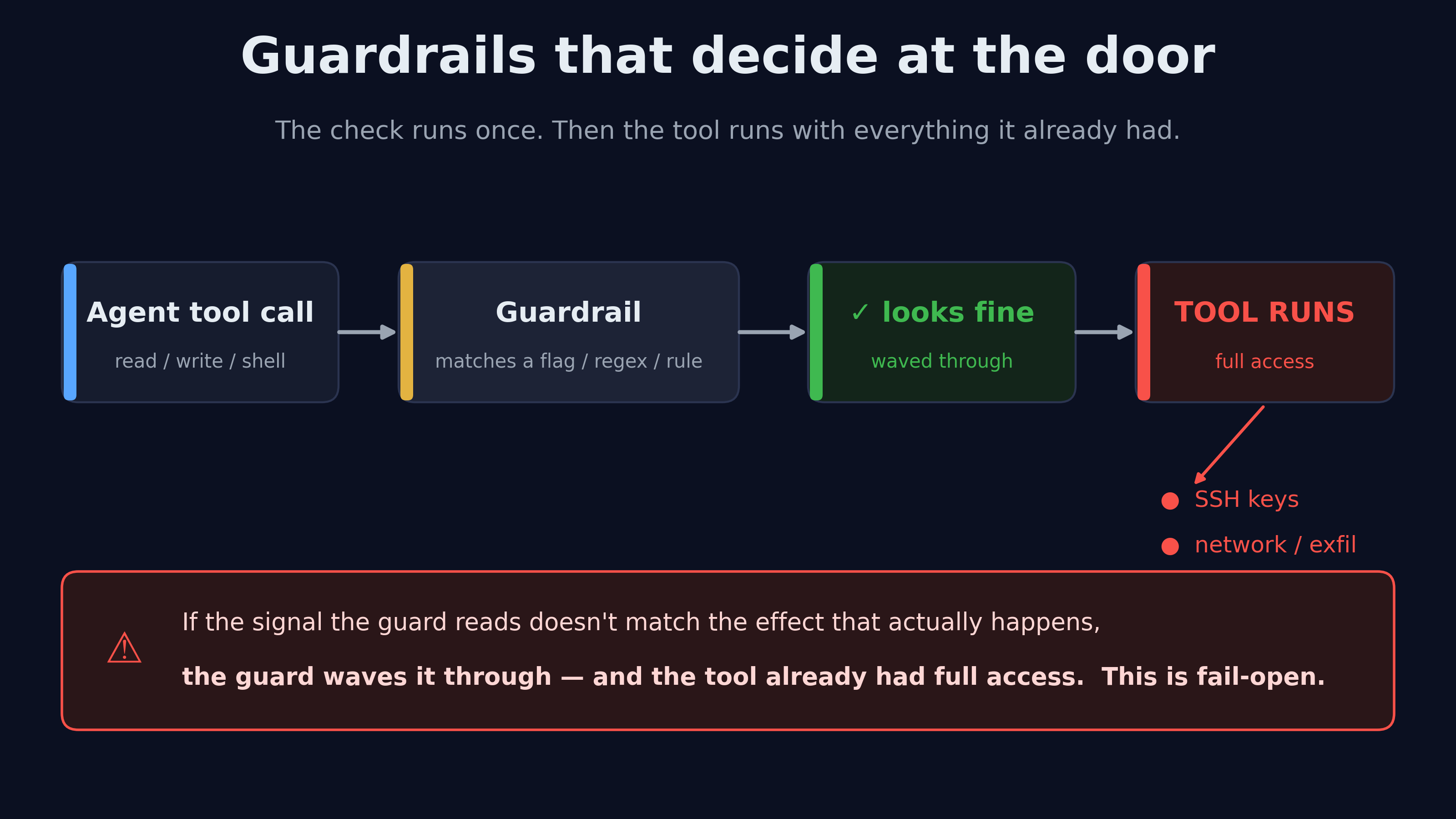
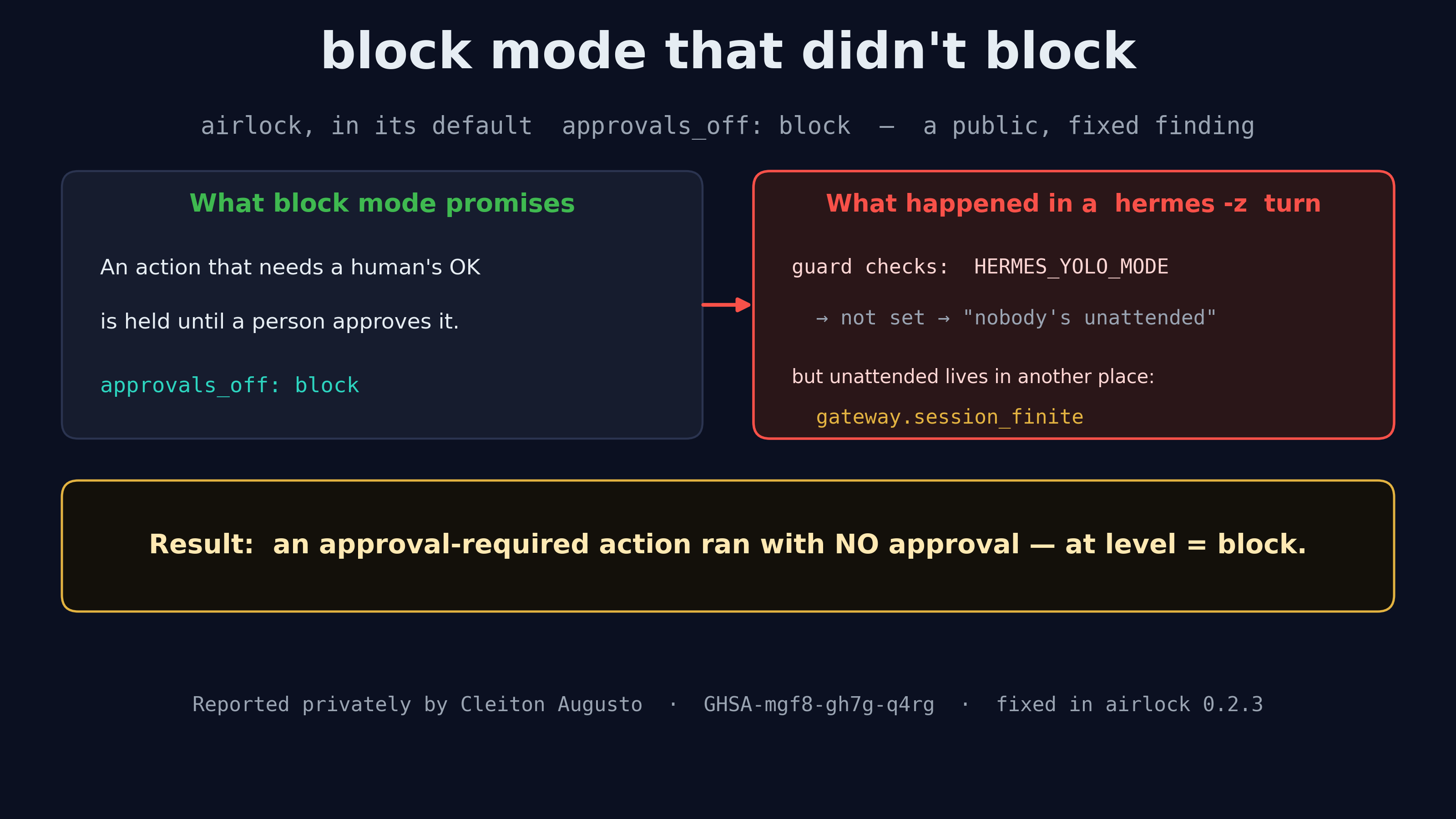
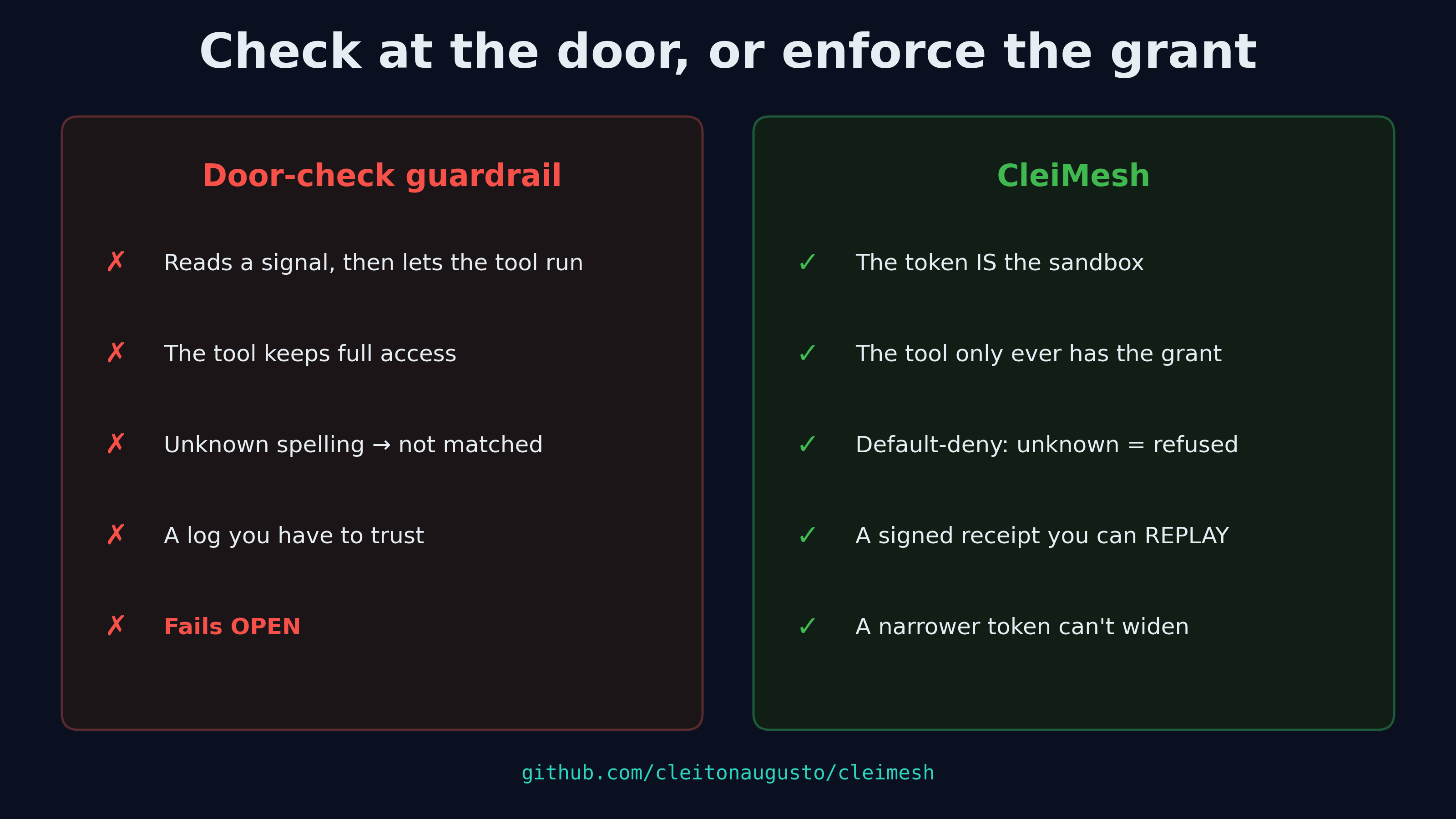
A guardrail that decides at the door lets the intruder walk in later !A guardrail checks a tool call once, waves it through, and the tool then runs with full access to keys and the network — fail-open I report security bugs in AI-agent guardrails, and I keep finding the same shape of bug. This is the first one that's fully public, so I can show you the whole thing — the finding, the fix that shipped, and why I think the design itself is the problem. The finding (airlock, now public) airlock is a prompt-injection guardrail in the Hermes plugin catalog. Its job is to stop an agent from doing dangerous things without a human's say-so: in its default approvals_off: block mode, an action that needs approval should be blocked until a person approves it. The problem I reported: that block could be skipped entirely. !block mode promised to hold the action; in a gateway-run hermes -z turn the guard read the wrong unattended signal, so an approval-required action ran with no approval When the Hermes gateway runs a hermes -z turn, the turn is marked unattended in one place (gateway.session_finite) but not in the flag airlock was reading (HERMES_YOLO_MODE). So airlock looked at its usual signal, saw nothing that said "a human is driving this," and let an approval-required action run with no approval at all — even though the whole point of block mode is that nothing dangerous runs unattended. The maintainer triaged it and shipped a fix in airlock 0.2.3: it now asks the approval layer why Hermes would approve on its own, and it covers CLI subagents under delegation too. The fix is merged into the Hermes plugin catalog (PR #144871), and the advisory is public as GHSA-mgf8-gh7g-q4rg. Coordinated disclosure, credited. That's the system working, and the maintainer was great about it. The pattern underneath Here's why I care beyond this one bug. Most agent guardrails work the same way: they decide at the door. Something reads the pending action, matches it against a signal — a mode flag, a regex, a list of paths, a YARA rule — and then either waves it through or stops it. The tool itself runs with whatever access it already had. Every bug I find in this category is a gap between the signal the guard reads and the effect that actually happens: - the action is dangerous, but the signal says "attended," so it runs; - the path points at a secret, but it's spelled a way the matcher doesn't recognize, so it's missed; - the input is an injection, but it's phrased in a form the rule doesn't cover, so it passes clean. Same shape every time. The guard is reasoning about a string or a flag that stands in for the real thing, and anything that changes the representation without changing the effect slips past. When these fail, they fail open: no match, no block, action runs. I've started calling this class "stringly-typed guardrails," and once you see it you see it everywhere. A door-check can be made tighter — airlock's fix did exactly that — but tightening one gap doesn't change the design. There's always another spelling of the dangerous thing. What I build instead !Door-check guardrail vs CleiMesh: the token is the sandbox, default-deny, the tool only ever has the grant, and every call leaves a signed receipt you can replay I'm the author of CleiMesh, and it exists because I got tired of finding this bug. CleiMesh doesn't decide at the door. Two things are different: The permission becomes the sandbox. An agent runs under a signed, delegable token that says exactly which tools it may call and which directories or network it may touch — and the tool runs inside a WebAssembly sandbox configured from that token, default-deny. There's no "the guard waved it through but the tool still had full access," because the tool never had the access. A subagent can only get a narrower token, never a wider one. A prompt injection can ask for more all it likes; the grant doesn't widen. Every call leaves a receipt you can replay. Each tool call produces a signed, hash-chained receipt. You can verify the chain offline, and — the part no gateway offers — you can re-run a call from its receipt and compare the result byte for byte. You don't have to trust the log; you re-execute it. That's also what makes it an auditable record for GDPR/LGPD: a report per data subject, from evidence, not from a dashboard someone could edit. They're complementary, honestly — a door-check catches the obvious stuff fast. But if the door-check is the only thing between an injected agent and your keys, every bug like the one above is a hole. CleiMesh is the layer that doesn't have that failure mode, because there's nothing to "miss." Why I'm writing this Because finding these quietly and moving on makes me the nice guy who does free security work for other people's tools and gets nothing for it. I'd rather be clear about what I do: I audit agent guardrails, I report what I find responsibly, and I build the thing that enforces instead of guesses. If you run agents that touch real data — in Claude Code, Cursor, OpenClaw, Hermes — and "the guardrail checked it" is your whole story, I'd look harder at what the guardrail actually checks. CleiMesh is free and open (MIT/Apache-2.0): **cleitonaugusto/cleimesh**. There are two ClawHub skills that set it up — cleimesh-setup for an agent's own file tools, and cleimesh-mcp for the MCP servers it already uses. I also do paid security reviews; the repo README says how. airlock is the first public one. I have other coordinated disclosures in flight with different maintainers right now; when those patches ship, I'll write them up the same way. — Cleiton Augusto Correa Bezerra (github.com/cleitonaugusto)
We had some fun with Claude and turned this into a little SVG benchmark with fully annotated latent variables and two different visual styles, enjoy: klindtlab/linear-probe-nullspace t.co
SOML – A Config Format for Humans soml-lang/soml (news.ycombinator.com)
I've released Vaudeville access, a screenreader mod for a detective game where you interrogate generative AI characters to solve a murder. ObjectInSpace/vaudeville-access
I've released Vaudeville access, a screenreader mod for a detective game where you interrogate generative AI characters to solve a murder. ObjectInSpace/vaudeville-access
I've released Vaudeville access, a screenreader mod for a detective game where you interrogate generative AI characters to solve a murder. ObjectInSpace/vaudeville-access
Inside Plants vs. Zombies 2: Understanding RSB, RTON, and Rijndael Encryption Ray Tian — University of Waterloo, Honours Mathematics (Co-op) I explain how the resource files of Plants vs. Zombies 2 are layered (RSB, RTON, Rijndael), build a small RTON decoder from scratch, and check the container layers of a real build. 1. Introduction In middle school (around Grades 8–9), I started looking at the data files of the Chinese version of Plants vs. Zombies 2. A new mode, Penny's Pursuit, had just come out, and I wanted to understand how the game stores its level data, for example how the spawns of a level can be described as data. That curiosity led me into binary file formats. This article explains three separate layers that a PVZ2 asset passes through: !Resource chain of the analysed build; decryption is out of scope Decryption keys and decryption steps are deliberately left out of this article. The formats were mapped out by the modding community; the sources are in [References](#9-references). My part is the explanation, a small decoder I built to learn the RTON layer, and a record of what I verified on the container layers of a real build. The code is on GitHub. I did this analysis locally, for learning. No game files, account data or session tokens are published, and the test data for my decoder is synthetic; the code is in the appendices. 2. Understanding RSB 2.1 What a "resource bundle" is A game ships thousands of small assets (images, sound, data). Reading them one by one from the filesystem is slow on a phone, so the engine packs them into a few big files. An RSB is such a container. The unpacking tools you see in the community read the container's index and then write each entry out as its own file. 2.2 RSB is not ZIP Both are "many files in one file", but they differ in structure: - A ZIP has a central directory of entries and compresses each file individually. - An RSB, as implemented by the community tool Pvz2Tool, has a fixed-size header of offsets, a file list, and a table of resource groups (RSGP). Compression is applied to parts of a group, not to each file separately. [Source: Pvz2Tool, RsbHeadInfo.kt, RsgpHeadInfo.kt.] 2.3 The header All fields are 32-bit little-endian integers. The first fields of the RSB header, as read by Pvz2Tool, are in this order: | # | Field | Meaning | |---|---|---| | 0 | magic | 0x72736231, which are the bytes 31 62 73 72 = ASCII 1bsr | | 1 | version | an integer (the tool accepts up to 4) | | 2 | (zero) | must be 0 | | 3 | headLength | header size | | 4 | fileList_Length | size of the file-name list | | 5 | fileList_BeginOffset | where that list starts | | 6–7 | (zero) | must be 0 | | 8 | rsgpList_Length | size of the group-name list | | 9 | rsgpList_BeginOffset | where it starts | | 10 | rsgp_Number | how many resource groups | | 11 | rsgpInfo_BeginOffset | where the group-info records start (each record is 0xCC bytes) | | … | composite / autopool / ptx tables | more Number + BeginOffset pairs | The idea to take away is offset + length: the header does not contain the data, it contains where to find the data. Everything a parser needs is reachable by jumping to an offset and reading a known number of bytes. [Source: Pvz2Tool RsbHeadInfo.kt. I verified the magic value by converting the constant 1920164401 to bytes myself: little-endian gives 1bsr.] Version differences are real. The same source notes in a comment that the PTX info record is 0x10 bytes normally but 0x18 in the "Chinese-version second generation RSB". A parser that works for one build can fail on another; this is why I mark my own reproduction by exact version. !Byte layout of an RSB: header, group records, RSGP blocks 2.4 Resource groups (RSGP) Each group record points to an RSGP block with its own header, magic 0x72736770 (70 67 73 72 = ASCII pgsr). It stores a version, flags, a file offset, and two parts, each as Offset, ZSize (compressed size) and Size (uncompressed size), plus its own file list. Pvz2Tool's README describes zlib compression and 4 KB alignment. So the recovery procedure for one file is: 1. Read the RSB header → find the group table. 2. For each group, jump to its RSGP block → read the part offsets and sizes. 3. If ZSize differs from Size, inflate the bytes with zlib. 4. Use the group's file list to cut the decompressed region into named files with their paths. In the package used for this article, the RSB is wrapped in an extra .smf container and the resource groups do not use zlib compression; see §6. I am deliberately not claiming what every flags bit means; I have not verified it. 2.5 Checking the layout on a real RSB Everything above came from other people's source code. To see whether it holds on a real file, I parsed the 147,292,160-byte RSB from §6 with a short script (Appendix D). What came out: - The header says version 4 and 30 resource groups. The group records are 204 (0xCC) bytes each and start at offset 383,936 (0x5DBC0). headLength is 397,312 (0x61000). - The first group starts exactly at headLength. Every group starts where the previous one ends, and the last group ends exactly at the end of the file. So headLength + (sum of group sizes) = 397,312 + 146,894,848 = 147,292,160: the header accounts for the whole file. A parser can use this as a cheap sanity check. - Every group offset and size is a multiple of 4096, which matches the "4 KB alignment" in Pvz2Tool's README. - 24 groups use only part0 and 6 use only part1. I do not know what the two parts mean in this build, so I do not interpret them. - 19 groups have a first part that begins with the two bytes 10 00: Packages and the 18 WorldPackages_* groups. That is the encrypted-RTON marker from §5. | Group | Offset | Size | part0 | part1 | |---|---:|---:|---:|---:| | Credits_1200 | 397,312 | 679,936 | 0 | 675,840 | | Credits_Common | 1,077,248 | 348,160 | 344,064 | 0 | | LawnStrings | 1,425,408 | 3,047,424 | 3,043,328 | 0 | | MainMenu_Background_1200 | 4,472,832 | 2,695,168 | 0 | 2,691,072 | | MainMenu_Background_Effect_1200 | 7,168,000 | 22,405,120 | 0 | 22,401,024 | | MainMenu_Background_Effect_Common | 29,573,120 | 413,696 | 409,600 | 0 | | Packages | 29,986,816 | 67,760,128 | 67,354,624 | 0 | | UI_AlwaysLoaded_Dynamic_1200 | 97,746,944 | 7,471,104 | 0 | 7,467,008 | | UI_Card_Plant_BG_1200 | 105,218,048 | 3,743,744 | 0 | 3,739,648 | | UI_PVZ1_Temp_1200 | 108,961,792 | 34,975,744 | 0 | 34,971,648 | | UI_PVZ1_Temp_Common | 143,937,536 | 1,945,600 | 1,941,504 | 0 | | WorldPackages_beach | 145,883,136 | 40,960 | 36,864 | 0 | | WorldPackages_cowboy | 145,924,096 | 24,576 | 20,480 | 0 | | WorldPackages_dark | 145,948,672 | 45,056 | 40,960 | 0 | | WorldPackages_dino | 145,993,728 | 49,152 | 45,056 | 0 | | WorldPackages_egypt | 146,042,880 | 20,480 | 16,384 | 0 | | WorldPackages_eighties | 146,063,360 | 40,960 | 36,864 | 0 | | WorldPackages_future | 146,104,320 | 28,672 | 24,576 | 0 | | WorldPackages_heian | 146,132,992 | 28,672 | 24,576 | 0 | | WorldPackages_iceage | 146,161,664 | 36,864 | 32,768 | 0 | | WorldPackages_kongfu | 146,198,528 | 20,480 | 16,384 | 0 | | WorldPackages_lostcity | 146,219,008 | 49,152 | 45,056 | 0 | | WorldPackages_mausoleum | 146,268,160 | 24,576 | 20,480 | 0 | | WorldPackages_modern | 146,292,736 | 36,864 | 32,768 | 0 | | WorldPackages_pirate | 146,329,600 | 28,672 | 24,576 | 0 | | WorldPackages_renai | 146,358,272 | 28,672 | 24,576 | 0 | | WorldPackages_skycity | 146,386,944 | 20,480 | 16,384 | 0 | | WorldPackages_steam | 146,407,424 | 24,576 | 20,480 | 0 | | WorldPackages_tutorial | 146,432,000 | 8,192 | 4,096 | 0 | | __MANIFESTGROUP__DYNAMIC | 146,440,192 | 851,968 | 847,872 | 0 | 3. Understanding RTON RTON is a binary serialization format: a compact encoding of JSON-like structured data (objects, arrays, strings, numbers, booleans). A JSON file spells everything as text; RTON spells each value as a one-byte type tag followed by its payload. 3.1 Layout "RTON" | version (uint32 LE, usually 1) | entries … | FF | "DONE" 3.2 Type tags (subset I implement) | Tag | Meaning | |---|---| | 00 / 01 | false / true | | 08 / 0A | int8 / uint8, 1 byte | | 10 / 12 | int16 / uint16, 2 bytes (byte order assumed little-endian) | | 20 | int32, 4 bytes (byte order assumed little-endian) | | 21 | int32 zero, no payload (listed as unconfirmed in the notes; supported provisionally) | | 24 | unsigned varint | | 25 | signed varint | | 81 | string: varint byte-length, then bytes | | 90 / 91 | define a cached string / refer to cache entry by index | | 85 … FF | object … end | | 86 FD count … FE | array | [Source: h3x4n1um/RETON format notes. The notes themselves mark several other tags (09, 0B, … zero-value variants, RTID 83) as uncertain, so I leave them out.] 3.3 Varints A varint stores a number in as few bytes as needed: each byte carries 7 payload bits, and the top bit says "another byte follows", least-significant group first. Example: FE 01 → 0x7E + (0x01 << 7) = 126 + 128 = 254. The signed form maps the decoded value n to n/2 if even and -(n+1)/2 if odd, so 25 03 → n = 3 → −2. Small magnitudes, positive or negative, stay short. 3.4 String cache The first time a key such as "Value" appears it is written with 90 and added to a table; later occurrences are just 91 index. This is why files with many repeated keys stay small — and why a decoder must keep state while it reads. 3.5 How a parser turns bytes into JSON A parser keeps a position pos. Loop: read one byte (tag) → the tag decides how many more bytes to read and how to interpret them → advance pos. Objects and arrays are recursion: seeing 85, call "read an object" until FF. When finished, pos must equal the file length — a cheap but powerful correctness check. 3.6 A sample RTON, byte by byte This is a complete 237-byte RTON that I built with a small encoder. Every value in it is made up, but its shape follows the typical object file: a version, then an array of objects with uid, objclass and objdata. An annotator I wrote (Appendix E) explains each line. Indentation shows nesting; offsets are in hex. 0000 52 54 4f 4e magic "RTON" 0004 01 00 00 00 version = 1 (uint32 LE) 0008 90 07 76 65 72 73 69 6f ..+1 key, define cache[0] "version" 0011 24 01 unsigned varint = 1 0013 90 07 6f 62 6a 65 63 74 ..+1 key, define cache[1] "objects" 001C 86 fd 02 array start, 2 item(s) 001F 85 object start 0020 90 03 75 69 64 key, define cache[2] "uid" 0025 90 05 31 2e 30 2e 31 define cache[3] = "1.0.1" 002C 90 08 6f 62 6a 63 6c 61 ..+2 key, define cache[4] "objclass" 0036 90 08 44 65 6d 6f 44 61 ..+2 define cache[5] = "DemoData" 0040 90 07 6f 62 6a 64 61 74 ..+1 key, define cache[6] "objdata" 0049 85 object start 004A 90 04 6e 61 6d 65 key, define cache[7] "name" 0050 90 04 64 65 6d 6f define cache[8] = "demo" 0056 90 05 69 74 65 6d 73 key, define cache[9] "items" 005D 86 fd 00 array start, 0 item(s) 0060 fe array end 0061 90 04 66 6c 61 67 key, define cache[10] "flag" 0067 01 true 0068 90 05 63 6f 75 6e 74 key, define cache[11] "count" 006F 24 f4 03 unsigned varint = 500 0072 90 06 6f 72 69 67 69 6e key, define cache[12] "origin" 007A 25 95 01 signed varint = -75 007D 90 04 7a 65 72 6f key, define cache[13] "zero" 0083 21 int32 zero (no payload) = 0 0084 90 03 62 6f 78 key, define cache[14] "box" 0089 85 object start 008A 90 01 78 key, define cache[15] "x" 008D 21 int32 zero (no payload) = 0 008E 90 01 79 key, define cache[16] "y" 0091 25 95 01 signed varint = -75 0094 90 01 77 key, define cache[17] "w" 0097 21 int32 zero (no payload) = 0 0098 90 01 68 key, define cache[18] "h" 009B 24 c8 01 unsigned varint = 200 009E ff object end 009F ff object end 00A0 ff object end 00A1 85 object start 00A2 91 02 key, recall cache[2] = "uid" 00A4 90 05 31 2e 30 2e 32 define cache[19] = "1.0.2" 00AB 91 04 key, recall cache[4] = "objclass" 00AD 91 05 recall cache[5] = "DemoData" 00AF 91 06 key, recall cache[6] = "objdata" 00B1 85 object start 00B2 91 07 key, recall cache[7] = "name" 00B4 90 05 64 65 6d 6f 32 define cache[20] = "demo2" 00BB 91 09 key, recall cache[9] = "items" 00BD 86 fd 02 array start, 2 item(s) 00C0 24 01 unsigned varint = 1 00C2 24 02 unsigned varint = 2 00C4 fe array end 00C5 91 0a key, recall cache[10] = "flag" 00C7 00 false 00C8 91 0b key, recall cache[11] = "count" 00CA 24 07 unsigned varint = 7 00CC 91 0c key, recall cache[12] = "origin" 00CE 21 int32 zero (no payload) = 0 00CF 91 0d key, recall cache[13] = "zero" 00D1 21 int32 zero (no payload) = 0 00D2 91 0e key, recall cache[14] = "box" 00D4 85 object start 00D5 91 0f key, recall cache[15] = "x" 00D7 24 05 unsigned varint = 5 00D9 91 10 key, recall cache[16] = "y" 00DB 25 01 signed varint = -1 00DD 91 11 key, recall cache[17] = "w" 00DF 21 int32 zero (no payload) = 0 00E0 91 12 key, recall cache[18] = "h" 00E2 24 09 unsigned varint = 9 00E4 ff object end 00E5 ff object end 00E6 ff object end 00E7 fe array end 00E8 ff object end 00E9 44 4f 4e 45 footer "DONE" Things worth noticing: - The first object defines 21 strings with 90. The second object recalls the keys and the repeated value "DemoData" with 91 and an index, so it is much shorter. This is the string cache at work. - An empty array is just 86 FD 00 FE. - zero and x are 21: one byte, no payload. - A negative number such as -75 is stored as 25 followed by a varint: 95 01 is 149, which is odd, so it decodes to -(149 + 1) / 2 = -75. - Fixed-width integers (08, 10, 20) appear in my tests rather than here, because this sample uses the compact varint forms. 4. Building a Minimal RTON Decoder How it was built. I wrote the decoder with the help of an AI coding assistant (Claude Code), starting from the community format notes and my own earlier ideas about the format, and went through every function myself (§4.1). Design. A Reader class holds the bytes and a cursor pos. Every read_* method consumes bytes and advances pos; read_value looks at the tag and dispatches. Objects and arrays call read_value recursively, so nesting works without special cases. The decoder rejects anything it does not recognise instead of guessing. Tests first. Twelve fixtures in tests/fixtures.py are hand-computed byte strings with their expected Python values, each annotated byte by byte. A further eleven tests cover errors: bad magic, bad version, missing footer, trailing bytes, truncated string, bad cache index, unsupported tag, missing array end, runaway varint, excessive nesting, invalid UTF-8. Result. python -m unittest runs 14 tests, all passing (run on 2 Nov 2026). Scope. Supported tags: 00 01 08 0A 10 12 20 21 24 25 81 85 86 90 91. Floats, 64-bit integers, UTF-8 strings (82, 92, 93) and RTID are the next things to add. The synthetic fixtures check the decoder against my reading of the spec. This article does not decode real game files. 4.1 Reading the decoder, function by function The full code is in Appendix A. This is what each part does and why. Reader. Holds data, the cursor pos, and the string cache. Keeping cache on the object, not in a global, means two decodes cannot interfere with each other. read_bytes(n). The only place that touches data and moves pos. It checks pos + n against the length first, so a truncated file raises RtonError("truncated ...") instead of quietly returning fewer bytes. Everything else is built on it, so the bounds check exists exactly once. read_int(size, signed). Converts size bytes with int.from_bytes(..., "little", signed=...). This is where the little-endian assumption lives, in one place. read_uvarint(). The loop from §3.3: take the low 7 bits (byte & 0x7F), shift them into place, stop when the high bit is 0 (byte < 0x80), otherwise add 7 to the shift. It gives up past 63 bits so a file full of FF bytes cannot loop forever. read_svarint(). Reads an unsigned varint n and applies the mapping: n // 2 if even, -(n + 1) // 2 if odd. read_string(tag). Three tags share one function. 81 reads a length-prefixed string. 90 does the same and appends the result to cache. 91 reads an index and returns cache[index], raising RtonError if the index is out of range. read_value(tag, depth). A chain of if checks, one per supported tag. Anything not listed ends in raise RtonError("unsupported tag ..."): the decoder refuses to guess. depth is passed down so deeply nested input stops at 64 levels instead of exhausting Python's stack. read_object and read_array. They call read_value for each child, so nesting needs no special code. An object reads a key (always a string tag) and then a value until it meets FF. An array requires FD, reads a count, reads that many values, and requires FE. decode(data). Checks the magic and version, reads the top-level object, then requires DONE and that pos equals the file length. The last check catches files with trailing bytes. The design choice that matters most: every function either returns a correct value or raises. There is no "best effort" path, so a wrong tag shows up as an error with an offset, not as quietly wrong data. 5. Understanding Rijndael Encryption 5.1 Rijndael vs. AES Rijndael is a family of block ciphers designed by Joan Daemen and Vincent Rijmen. AES is the standardised subset: block size fixed at 128 bits, keys of 128/192/256 bits. Rijndael itself allows block sizes 128, 192 or 256 bits independently of the key size. So "AES" and "Rijndael" are not interchangeable when the block size is not 128 bits. 5.2 Rijndael in this game: what is publicly known Community research has documented two things about the encrypted RTON files of this game: they start with the two marker bytes 10 00, and they use Rijndael in CBC mode with a 192-bit (24-byte) block. A practical consequence is that a standard AES library, which fixes the block at 128 bits, cannot be used for them as it is; you need a Rijndael implementation that supports the other block size. 5.3 Keys and IVs: what they are, and what this article leaves out A key is the secret value the cipher is parameterised by; Rijndael accepts 128-, 192- or 256-bit keys. An IV (initialization vector) is a starting value for CBC and has the same size as the block. A key can be written as raw bytes, as ASCII text or as hex, and mixing these up is a classic source of bugs: 32 ASCII characters are 32 bytes, while 32 hex characters are only 16. This article does not publish, derive or search for any key, and it does not walk through decrypting any game file. Its subject is the structure of the containers and the decoder for the decrypted form of the format. Where a step would need a key, I say so and stop. 5.4 What the design teaches Whatever the algorithm, a client application that decrypts its own data has to hold the key somewhere on the device. Client-side encryption therefore deters casual reading, but it is not a strong protection, and anything that really matters belongs on a server. That is a lesson about system design; it is not a how-to. 5.5 My own exploration What I did back then (from memory). In middle school I opened the APK with MT Manager on my phone and browsed its contents, and I learned that the game's data files were encrypted and that community tools could read them. I did not write those tools. I no longer remember their names or the order of my steps, and this article does not repeat any of them. 5.6 CBC, step by step CBC (cipher block chaining) cuts the data into blocks of the cipher's block size, 24 bytes here. Decrypting works like this: plaintext[i] = Decrypt(key, ciphertext[i]) XOR ciphertext[i-1] with ciphertext[-1] = IV Each block is decrypted on its own with the raw cipher and then XORed with the previous ciphertext block; for the first block the "previous block" is the IV. Three consequences are useful in practice: 1. The IV only matters for the first block. A wrong IV garbles block 0 but leaves every later block correct, which is a handy way to tell a wrong IV from a wrong key. 2. Decrypting block i needs only two ciphertext blocks, so long inputs can be processed in pieces. 3. Identical plaintext blocks encrypt differently, because each is mixed with the previous ciphertext. That is the reason to use CBC rather than encrypting block by block (ECB). This section describes the mode, not any particular file. 6. Verifying the container layers on a real build Input. One Chinese-version Android APK (baokai_4.2.7_1885_715_dj2.0-4.0.1.apk, 2,271,163,986 bytes, SHA-256 7c09515d…90a5d7), downloaded from the game's website <pvz2.hrgame.com.cn> on 2 Nov 2026 and analysed locally. I look only at the container layers (the wrapper, the RSB header and the group table). I do not decrypt or decode the game's own data here. An extra layer I did not expect. The RSB files in this APK are not stored bare: assets/dynamic.rsb.smf begins with the ASCII magic RSLB. It is a block container: a 32-byte header, a table of 36-byte block records, then one raw LZMA1 stream per block (32 MiB blocks, LZMA properties lc=3 lp=0 pb=2). I found the layout in a community decompressor's comments and wrote my own decompressor; it produced exactly the 147,292,160 bytes the header declares. So the chain for this build is: APK -> .rsb.smf (RSLB, LZMA blocks) -> RSB -> RSGP -> RTON files (encrypted; not covered here) | Step | Result on this APK | |---|---| | Unwrap dynamic.rsb.smf | 147,292,160 bytes; starts with 1bsr; matches the declared size | | Read RSB header | version 4, 30 resource groups, group records 0xCC bytes, PTX records 0x18 bytes (the "second-generation" variant noted in Pvz2Tool) | | Compression | In every one of the 30 groups ZSize == Size: no zlib was involved in this build. I did not exercise zlib at all | | Read one RSGP (WorldPackages_beach) | magic pgsr, version 4; its first part begins with 10 00, the encrypted-RTON marker | What's next. - Read the RSGP file-name table to recover full paths. - Add floats, 64-bit integers, UTF-8 strings and RTID to the decoder, with new synthetic fixtures. - Exercise zlib on a build whose groups are compressed. 6.1 The RSLB container, field by field The .smf file is 69,183,497 bytes and expands to 147,292,160. All numbers are little-endian. The header: | Offset | Field | Value in this file | |---|---|---| | 0x00 | magic | RSLB | | 0x04 | version | 1 | | 0x08 | total uncompressed size | 147,292,160 | | 0x10 | packed size | 69,183,465 (= file size − 32) | | 0x18 | block size | 33,554,432 (32 MiB) | | 0x1C | block count | 5 | After the header comes a table of 36-byte records, one per block. Decoded for this file: | Block | Uncompressed start | Uncompressed size | Data offset | Compressed size | LZMA dictionary | |---:|---:|---:|---:|---:|---:| | 0 | 0 | 33,554,432 | 212 | 10,267,186 | 33,554,432 | | 1 | 33,554,432 | 33,554,432 | 10,267,398 | 22,168,257 | 33,554,432 | | 2 | 67,108,864 | 33,554,432 | 32,435,655 | 18,241,763 | 33,554,432 | | 3 | 100,663,296 | 33,554,432 | 50,677,418 | 14,198,046 | 33,554,432 | | 4 | 134,217,728 | 13,074,432 | 64,875,464 | 4,308,033 | 13,631,488 | Each block's data begins with 5 bytes of LZMA properties (5D plus a 4-byte dictionary size) followed by a raw LZMA1 stream with no end marker; the table supplies the size to stop at. The properties byte 0x5D = 93 unpacks as lc = 93 mod 9 = 3, lp = (93 div 9) mod 5 = 0, pb = 93 div 45 = 2. Checks that came out right: block 0's data starts at 212 = 0x20 + 5 × 36, right after the table; each block starts where the previous one ends (212 + 10,267,186 = 10,267,398); the five uncompressed sizes add up to 147,292,160; and the five compressed sizes plus the 212-byte header and table add up to the file size. The last block is shorter and uses a smaller dictionary; I do not know why. 6.2 What went wrong first I kept the failures because they show what the checks are for. The scripts were written and run with the AI assistant described in §4. 1. One stream or many? The first attempt decompressed the .smf as a single LZMA stream after the header. It started well (1bsr, so the idea was right) and then failed with "Corrupt input data" after about 33.6 MB. The container is chunked into 32 MiB blocks; the fix was to read the block table. 2. A wrong header offset. The first end-to-end script read the first part's offset from the wrong position in the RSGP header. The 10 00 marker check failed at once. I fixed the offset and added an assertion that the RSGP header and the RSB's group record agree. Neither would have been caught by synthetic tests alone. 6.3 Reproducing the container checks You need an Android APK of the game that you are entitled to use and Python 3. The scripts are in the appendices. 1. An APK is a zip file. Take out assets/dynamic.rsb.smf (unzip app.apk assets/dynamic.rsb.smf). 2. python3 rslb.py dynamic.rsb.smf dynamic.rsb (Appendix C). For the build I analysed, expect 147,292,160 bytes starting with 1bsr. Other builds will differ. 3. python3 rsb_probe.py dynamic.rsb (Appendix D). Expect version 4 and 30 groups, with Credits_1200 first. 4. Or run steps 1 to 3 and the consistency checks in one go with python3 inspect_build.py app.apk (Appendix F). If a step gives a different number, trust your number and check which build you have: that is the point of recording the SHA-256 of the APK. 7. Lessons Learned This project gave me a more complete picture of how mobile apps are packaged. What I analysed here was an Android APK: at bottom it is a zip archive holding native libraries (.so), assets and configuration. In Grade 9 I also looked at iOS app packages (IPA) and learned how Apple's code signing works; that is outside this article's experiments. It was also my first fairly systematic contact with encryption concepts: key and IV lengths, how block ciphers differ, and how AES relates to Rijndael (here the block size is not the AES one, so a standard AES library does not fit). On method, writing tests from the spec before the code paid off: the fixtures forced me to work out varints and the string cache by hand before any decoder code existed. Annotating a sample file byte by byte also taught me to read structured binary data. Next I want to treat the network protocol (encrypted HTTP requests) as a separate study: finish reproducible experiments first, then write a second article. 8. FAQ and glossary Is the RSB itself encrypted? Not in this build. After the .smf wrapper is removed, the RSB header parses normally and the groups are stored uncompressed. The RTON files inside carry the 10 00 marker, which marks them as encrypted. Is Rijndael the same as AES? AES is Rijndael restricted to a 128-bit block. This game uses a 192-bit block, so a standard AES library does not fit. Does this article show how to decrypt the game's data? No. It covers the container layers and a decoder for the decrypted form of the format, tested on synthetic samples. It contains no keys and no decryption steps. Does the decoder work on real PVZ2 files? This article does not test that. It handles the documented subset on synthetic samples. Floats, 64-bit integers, UTF-8 strings and RTID are not implemented, and I do not know which of those other files use. Is the decoder original work? It is my implementation of a documented format, written with an AI assistant and read and understood by me. It is not a new discovery; see §4 and the references. Glossary - Magic number: fixed bytes at the start of a file that identify its type (1bsr, pgsr, RTON, RSLB). - Offset / length: where data starts and how many bytes it spans; the basis of almost every binary format. - RSB: a PopCap resource bundle holding many files in resource groups. - RSGP: one resource group inside an RSB. - SMF / RSLB: the wrapper seen in this build that stores an RSB as LZMA-compressed blocks. - RTON: PopCap's binary serialization format for JSON-like data. - Varint: a variable-length integer; small numbers take fewer bytes. - Block cipher / block size: an encryption algorithm that works on fixed-size chunks; Rijndael allows 128, 192 or 256 bits. - IV (initialization vector): the starting value that CBC mixes into the first block. - CBC: cipher block chaining; each block is mixed with the previous ciphertext block. 9. References - h3x4n1um, RETON — RTON format notes. <h3x4n1um/RETON> - DreamMoonCai, Pvz2Tool (MIT) — RSB/RSGP header definitions. <DreamMoonCai/Pvz2Tool> - apples1949, PvZ2ModdingGuide — community guide. <apples1949/PvZ2ModdingGuide> - J. Daemen, V. Rijmen, The Design of Rijndael (Springer). - NIST, FIPS 197, Advanced Encryption Standard. - Python zlib, hashlib documentation. Appendix A: the decoder (mini_rton/decoder.py) MIT licence, copyright 2026 Ray Tian. Only the tags listed in §4 are supported; anything else raises RtonError. """A minimal RTON decoder covering a documented subset of the format. Format notes: https://github.com/h3x4n1um/RETON (see docs/rton-scope.md). Supported tags: 00 01 08 0A 10 12 20 24 25 81 85 86(FD..FE) 90 91. Anything else raises RtonError instead of guessing. """ MAGIC = b"RTON" FOOTER = b"DONE" TAG_FALSE, TAG_TRUE = 0x00, 0x01 TAG_INT8, TAG_UINT8 = 0x08, 0x0A TAG_INT16, TAG_UINT16 = 0x10, 0x12 TAG_INT32 = 0x20 TAG_INT32_ZERO = 0x21 TAG_UVARINT, TAG_SVARINT = 0x24, 0x25 TAG_STRING = 0x81 TAG_OBJECT = 0x85 TAG_ARRAY = 0x86 TAG_CACHE_DEFINE, TAG_CACHE_RECALL = 0x90, 0x91 TAG_ARRAY_BEGIN, TAG_ARRAY_END = 0xFD, 0xFE TAG_OBJECT_END = 0xFF MAX_DEPTH = 64 class RtonError(ValueError): """Raised for malformed or unsupported input.""" class Reader: """A cursor over bytes: every read advances `pos`.""" def __init__(self, data): self.data = data self.pos = 0 self.cache = [] # strings defined by tag 0x90, indexed by 0x91 def read_bytes(self, n): if n < 0 or self.pos + n > len(self.data): raise RtonError(f"truncated: need {n} bytes at offset {self.pos}") chunk = self.data[self.pos:self.pos + n] self.pos += n return chunk def read_u8(self): return self.read_bytes(1)[0] def read_int(self, size, signed): return int.from_bytes(self.read_bytes(size), "little", signed=signed) def read_uvarint(self): """7 payload bits per byte, low group first; high bit = more bytes.""" result = 0 shift = 0 while True: byte = self.read_u8() result |= (byte & 0x7F) << shift if byte < 0x80: return result shift += 7 if shift > 63: raise RtonError(f"varint too long at offset {self.pos}") def read_svarint(self): n = self.read_uvarint() return n // 2 if n % 2 == 0 else -(n + 1) // 2 def read_string_body(self): length = self.read_uvarint() raw = self.read_bytes(length) try: return raw.decode("utf-8") except UnicodeDecodeError as exc: raise RtonError(f"invalid string bytes before offset {self.pos}") from exc def read_string(self, tag): """Read a string-valued tag (81, 90, 91) whose tag byte is already consumed.""" if tag == TAG_STRING: return self.read_string_body() if tag == TAG_CACHE_DEFINE: text = self.read_string_body() self.cache.append(text) return text if tag == TAG_CACHE_RECALL: index = self.read_uvarint() if index >= len(self.cache): raise RtonError(f"cache index {index} out of range ({len(self.cache)} entries)") return self.cache[index] raise RtonError(f"expected string tag, got 0x{tag:02X} at offset {self.pos - 1}") def read_value(self, tag, depth): if depth > MAX_DEPTH: raise RtonError("nesting too deep") if tag == TAG_FALSE: return False if tag == TAG_TRUE: return True if tag == TAG_INT8: return self.read_int(1, True) if tag == TAG_UINT8: return self.read_int(1, False) if tag == TAG_INT16: return self.read_int(2, True) if tag == TAG_UINT16: return self.read_int(2, False) if tag == TAG_INT32: return self.read_int(4, True) if tag == TAG_INT32_ZERO: return 0 # no payload; listed as unconfirmed in the format notes if tag == TAG_UVARINT: return self.read_uvarint() if tag == TAG_SVARINT: return self.read_svarint() if tag in (TAG_STRING, TAG_CACHE_DEFINE, TAG_CACHE_RECALL): return self.read_string(tag) if tag == TAG_OBJECT: return self.read_object(depth + 1) if tag == TAG_ARRAY: return self.read_array(depth + 1) raise RtonError(f"unsupported tag 0x{tag:02X} at offset {self.pos - 1}") def read_object(self, depth): """Read key/value pairs until FF. The opening 85 is already consumed.""" result = {} while True: tag = self.read_u8() if tag == TAG_OBJECT_END: return result key = self.read_string(tag) result[key] = self.read_value(self.read_u8(), depth) def read_array(self, depth): """86 FD <count> <values...> FE. The opening 86 is already consumed.""" marker = self.read_u8() if marker != TAG_ARRAY_BEGIN: raise RtonError(f"expected FD after array tag, got 0x{marker:02X}") count = self.read_uvarint() items = [self.read_value(self.read_u8(), depth) for _ in range(count)] end = self.read_u8() if end != TAG_ARRAY_END: raise RtonError(f"expected FE at array end, got 0x{end:02X}") return items def decode(data): """Decode RTON bytes into Python objects (dict at the top level).""" reader = Reader(bytes(data)) if reader.read_bytes(4) != MAGIC: raise RtonError("bad magic: not an RTON file") version = reader.read_int(4, False) if version != 1: raise RtonError(f"unsupported version {version}") result = reader.read_object(0) if reader.read_bytes(4) != FOOTER: raise RtonError("missing DONE footer") if reader.pos != len(reader.data): raise RtonError(f"{len(reader.data) - reader.pos} trailing bytes after footer") return result Appendix B: synthetic test fixtures (tests/fixtures.py) Every byte is annotated or built by a small encoder. The error-handling tests are omitted here for length. """Hand-built RTON byte strings, each with its expected decoded value. Every byte is annotated so you can check it against docs/rton-scope.md. These are synthetic: they contain no game data. """ HEADER = bytes.fromhex("52544F4E" "01000000") # "RTON" + version 1 (uint32 LE) FOOTER = bytes.fromhex("444F4E45") # "DONE" # name -> (bytes, expected decoded Python value) FIXTURES = { # {} -- just the end-of-object marker FF "empty": (HEADER + bytes.fromhex("FF") + FOOTER, {}), # {"a": true, "b": false} # 81 01 61 string, 1 byte: "a" 01 true # 81 01 62 string, 1 byte: "b" 00 false "bools": ( HEADER + bytes.fromhex("81 01 61 01 81 01 62 00 FF") + FOOTER, {"a": True, "b": False}, ), # {"name": "Zombie"} # 81 04 6E616D65 "name" # 81 06 5A6F6D626965 "Zombie" "string": ( HEADER + bytes.fromhex("81 04 6E616D65 81 06 5A6F6D626965 FF") + FOOTER, {"name": "Zombie"}, ), # {"n": -2, "u": 200} # 08 FE int8 0xFE = -2 (two's complement) # 0A C8 uint8 0xC8 = 200 "small_ints": ( HEADER + bytes.fromhex("81 01 6E 08 FE 81 01 75 0A C8 FF") + FOOTER, {"n": -2, "u": 200}, ), # {"a": {"a": 1}} -- cache define (90) then recall (91 00) inside a nested object # 90 01 61 define "a" (index 0) 85 object start # 91 00 recall index 0 ("a") 08 01 int8 1 # FF FF inner end, outer end "nested_cache_recall": ( HEADER + bytes.fromhex("90 01 61 85 91 00 08 01 FF FF") + FOOTER, {"a": {"a": 1}}, ), # {"a": [1, 2]} -- 86 FD <count=2> 08 01 08 02 FE "array": ( HEADER + bytes.fromhex("81 01 61 86 FD 02 08 01 08 02 FE FF") + FOOTER, {"a": [1, 2]}, ), # {"w": -300, "i": 70000} # 10 D4 FE int16 LE: 0xFED4 = -300 # 20 70 11 01 00 int32 LE: 0x00011170 = 70000 "wide_ints": ( HEADER + bytes.fromhex("81 01 77 10 D4 FE 81 01 69 20 70 11 01 00 FF") + FOOTER, {"w": -300, "i": 70000}, ), # {"mX": 0, "mY": -150} -- 21 = int32 zero (no payload); # 25 AB 02 -> varint 0x2B + (2 << 7) = 299 (odd) -> -(299+1)/2 = -150 "int32_zero_and_signed": ( HEADER + bytes.fromhex("81 02 6D 58 21 81 02 6D 59 25 AB 02 FF") + FOOTER, {"mX": 0, "mY": -150}, ), # A made-up sample with the same *shape* as a typical object file: a version, then an array of # objects (uid / objclass / objdata). The second object reuses keys and values through the string # cache (91). Built with a small encoder; annotated byte by byte in the article (section 3.6). "showcase": ( bytes.fromhex( "52 54 4f 4e 01 00 00 00 90 07 76 65 72 73 69 6f 6e 24 01 90 07 6f 62 6a 65 63 74 73 86 fd 02 85" "90 03 75 69 64 90 05 31 2e 30 2e 31 90 08 6f 62 6a 63 6c 61 73 73 90 08 44 65 6d 6f 44 61 74 61" "90 07 6f 62 6a 64 61 74 61 85 90 04 6e 61 6d 65 90 04 64 65 6d 6f 90 05 69 74 65 6d 73 86 fd 00" "fe 90 04 66 6c 61 67 01 90 05 63 6f 75 6e 74 24 f4 03 90 06 6f 72 69 67 69 6e 25 95 01 90 04 7a" "65 72 6f 21 90 03 62 6f 78 85 90 01 78 21 90 01 79 25 95 01 90 01 77 21 90 01 68 24 c8 01 ff ff" "ff 85 91 02 90 05 31 2e 30 2e 32 91 04 91 05 91 06 85 91 07 90 05 64 65 6d 6f 32 91 09 86 fd 02" "24 01 24 02 fe 91 0a 00 91 0b 24 07 91 0c 21 91 0d 21 91 0e 85 91 0f 24 05 91 10 25 01 91 11 21" "91 12 24 09 ff ff ff fe ff 44 4f 4e 45" ), {'version': 1, 'objects': [{'uid': '1.0.1', 'objclass': 'DemoData', 'objdata': {'name': 'demo', 'items': [], 'flag': True, 'count': 500, 'origin': -75, 'zero': 0, 'box': {'x': 0, 'y': -75, 'w': 0, 'h': 200}}}, {'uid': '1.0.2', 'objclass': 'DemoData', 'objdata': {'name': 'demo2', 'items': [1, 2], 'flag': False, 'count': 7, 'origin': 0, 'zero': 0, 'box': {'x': 5, 'y': -1, 'w': 0, 'h': 9}}}]}, ), # --- varint fixtures --- # {"Value": 61}: key via cache-define 90, value unsigned varint 24 3D (0x3D = 61) "varint_cached_key": ( HEADER + bytes.fromhex("90 05 56616C7565 24 3D FF") + FOOTER, {"Value": 61}, ), # {"n": -2}: signed varint 25 03 -> n=3 is odd -> -(3+1)/2 = -2 "signed_varint": ( HEADER + bytes.fromhex("81 01 6E 25 03 FF") + FOOTER, {"n": -2}, ), # {"x": 254}: varint FE 01 -> 0x7E + (1 << 7) = 254 "varint_two_bytes": ( HEADER + bytes.fromhex("81 01 78 24 FE 01 FF") + FOOTER, {"x": 254}, ), } --- The scripts for unwrapping the .smf, reading the RSB table, annotating an RTON and inspecting a build (Appendices C to F) are in the original post and in the GitHub repo: jelly-raytian.github.io *Originally published at jelly-raytian.github.io
I built BuddyBOT 🚀 An AI chat app with multiple model options, code highlighting, math rendering, and chat history. 🛠️ MERN + AI 🔗 Demo: ialksng.me 💻 Code: ialksng/buddybot More projects: ialksng.me #WebDevelopment #BuildInPublic
Arctis Sound Manager — SteelSeries GG & Sonar for Linux (free & open source) Arctis Sound Manager (ASM) is a free, open-source replacement for SteelSeries GG and Sonar, built natively for Linux on top of PipeWire. Mixer, Sonar parametric EQ, spatial audio, mic processing, battery, ANC, sidetone, base station OLED, streamer mode and clips — for more than 20 SteelSeries Arctis headsets. ⬇️ Install (Arch, CachyOS, Fedora, Ubuntu, Debian…): curl -fsSL loteran.github.io | bash 🔗 GitHub: loteran/Arctis-Sound-Manager 🎚️ EQ presets & themes: loteran.github.io 💬 Discord: discord.gg 🌍 Translate ASM: crowdin.com ☕ Support: ko-fi.com Chapters 0:00 Intro 0:17 Arctis Sound Manager 0:27 Channel mixer 0:53 Sonar EQ 1:12 Spatial Audio & microphone 1:29 Headset control 1:39 Base station OLED 1:51 Streamer mode & Clips 2:09 Supported headsets 2:19 Install 2:30 Community Music: "Inspired" by Kevin MacLeod (incompetech.com) Licensed under Creative Commons: By Attribution 4.0 License creativecommons.org Headset line drawings from SteelSeries product information guides. ASM is an independent project, not affiliated with or endorsed by SteelSeries. Arctis, GG and Sonar are trademarks of SteelSeries ApS.
Light-up wand board R3: last look before ordering (ESP32-C3, 4 layers, after a week of hand clean-up) This is my third post on the same project: a battery light-up toy wand for the family. Same disclaimer as before: I’m an electrician, not an electronics guy. This board was designed off a lot of feedback (good and bad) that led me to a lot of resources that have really molded this project to where it is at today. Nothing is ordered yet. This is the last look before I do. How we got here: - R1: I smashed a XIAO ESP32-C3 and three Adafruit breakouts onto one board. It had two chargers on one cell and a switch that could backfeed. Those boards are made, and they’re my bench test boards. - R2 (last post): I started over on a bare ESP32-C3-MINI-1U with one charger, plus some safety parts some Redditors pushed me to consider. u/FELEXPCB’s last tip was a full ground plane under the module, so I said I’d rip it up and re-route it. - R3: this board. The circuit is R2 plus a few small changes. The layout is new. My plan was to place parts, hit autoroute, see 0 DRC errors and order. The autorouter’s best pass was rough to say the least: - 90 signal vias on a 37 x 23 mm board, a lot of them hopping layers for no reason - 14 nets still not routed at all - 128 track pieces shorter than 0.1 mm (stair steps) - inner ground punched full of holes close enough together that they merge into slots For comparison, R2 had 93 signal vias. Electrically it might have worked, but it looked like a robot did it. So I spent about a week going through it by hand. I’d move a few parts or lines in KiCad, then have AI clean up the move and run it against the checks, and it pushed back if my move broke a rule. Eventually I got to a PDF with every via numbered (the numbers never change between rounds) and a 2 mm lettered grid, so we could talk about “hole 65 at J4” instead of “that via near the sensor”. Ended up with about 41 rounds, every one archived. The right side of the comparison picture is where it ended up: - 47 signal vias, every net routed, lines at 0/45/90 only - Inner 1 is one solid ground plane with no tracks. Inner 2 carries power and a few slow signals. Top and bottom are ground poured and stitched with 34 ground vias. - Every ground pad has a real path to the plane, 0 unconnected in DRC. Final numbers: - Board is 37.3 x 23.4 x 1.0 mm, 4 layers, parts on both sides, ENIG. - DRC (KiCad 10, my board house’s rules): 0 errors, 0 unconnected. 19 warnings, 15 silk/text and 4 library notes. - I ran the power copper through KiPI at a 1.35 A load from the cell. About 94 mV is lost in copper between the cell and the boost, and the biggest piece is the 22 mm VBAT run on Inner 2 (0.8 mm, 0.5 oz) at about 35 mV. The worst spot is about 190 A/mm² right at the inner layer VBAT vias and the charger’s VBAT pin. Charging at 0.5 A loses about 42 mV over the whole path. - All of that is simulated. Nothing on R3 is measured yet. Tools and sources: - KiCad 10 for layout, DRC, Gerbers, plots and 3D renders - Freerouting for the first pass only - KiPI power integrity: drewsum/KiPI - Andrew Zonenberg’s PCB layout checklist: azonenberg/pcb-checklist (I went through it line by line and it caught the vias I’d put in pads) - Datasheet layout sections: TI bq25185, TPS61023, TPS2553; ST LIS3DH + TN0018/TN1383; Espressif ESP32-C3-MINI-1U datasheet and hardware design guidelines; MAX17048; AP2112K; USBLC6-2SC6 - Claude did the scripting, checks and numbered PDFs Questions 1. Anything you’d still change before I order 10? 2. Charger thermal pad has six 0.3 mm filled vias to the inner ground plane. My plan is to measure the handle temperature and charge current while charging a low cell, since the charger will throttle itself if it gets hot. Anything else you’d check, or would you add vias now? 3. Anything in the routing that still looks autorouted to you?