Mentions
Conversations linking to GitHub, newest first. Times are UTC.
Mentions by source
X
Bluesky
Hacker News
V2EX
Qiita
DEV
Mastodon
Latest posts
Curator: @afrikaniz3d dslc.io welcomes you to week 44 of #TidyTuesday! We're exploring Grambank! 📂 tidytues.day 📰 science.org Submit a dataset! github.com/rfordatascience/tidytuesday/blob/main/… #RStats #PyData #JuliaLang #DataViz #tidyverse #r4ds
A little mini-project, a practice playground for my postgresql journey. I'd wanted it to be a sandbox, but the docker setup, all the tests, making sure it all works perfectly together- scope creep for me now, hence removed the sandbox part. Check it out: Divya4879/hogwarts-postgresql-practice
Built a Telegram bot that books clients for a barbershop: ✂️ service → day → free slot → name → phone 🔔 owner gets a ping for every booking 🚫 no double bookings ~250 lines of Python. Step-by-step guide, from BotFather to 24/7: econnx/telegram-booking-bot t.co
@willdepue Attempted this on a very small scale Cuuper22/hindsight-editor Didn't seem to work (although expected, small model is very week and tweaker was trained and small) But my hypothesis is that getting there would greatly improve with the "tweaker" model's general knowledge (simlar to how cyber capabilities emerged from breadth of mythos's knowledge to chain exploits) I'm trying to work on an intermediate step, where the tweaking happens still at small level of neurons/chunks but with insights from "networks are clean" to test transferability of capability (similar to the suggested future work in the paper above). At different scales and different models. If that is proven, such "grafting" would create a solid training data for a large model to better explore a given model's architicture and know where to tweak for highest gain better than blind trial and error. However, I'm gpu-poor and my design needs some 150-200hours of gpu runtime to try.
Install Goravel with Docker, Postgres and Redis Part 1 of the Goravel series. The original on DevChalk has the colour-matched code, the figures and the full diffs. Code for this part: krishankumar01/goravel-taskflow/tree/part-01. This is the first part of the Goravel series. We are going to build TaskFlow, a task API for teams, and learn Goravel as we go. In this part we plan the database, create the project, start Postgres and Redis in Docker, and get the server running. How to Read DevChalk shows what the code blocks and figures on these pages do. Clone the finished code for this part: git clone https://github.com/krishankumar01/goravel-taskflow cd goravel-taskflow git checkout part-01 cp .env.example .env go run . artisan key:generate docker compose up -d The database design Before we write any code, let's look at the data. The app needs three tables. users holds everyone who can log in. Next to the name, email and password, it has a role, which is either manager or member. We use this column for permissions later. A manager can create, edit and delete tasks. A member can only change the status of tasks assigned to them. | column | type | notes | |---|---|---| | id | bigint | primary key | | name | string | | | email | string | unique | | password | string | hashed, never plain | | role | enum | manager or member, default member | tasks is the main table. A task has a title, a description, an optional due date and a status that is one of pending, in-progress or done. It links to the users table twice. created_by is the manager who made the task, and assigned_to is the person who has to finish it. The permission rules use both. | column | type | notes | |---|---|---| | id | bigint | primary key | | created_by | bigint | references users.id | | assigned_to | bigint | references users.id, nullable | | title | string | | | description | text | | | status | enum | pending, in-progress, done, default pending | | due_at | timestamp | nullable, when the task is due | notifications tells a user that something changed. When a task changes, for example when it is assigned to someone, that person gets a row here. read_at is null until the user has seen it. | column | type | notes | |---|---|---| | id | bigint | primary key | | user_id | bigint | references users.id | | task_id | bigint | references tasks.id | | message | string | | | read_at | timestamp | nullable, null means unread | So a user can create many tasks, be assigned many tasks, and have many notifications. Interactive figure on DevChalk: TaskFlow's three tables. Check Go and install the Goravel CLI You need Go and Docker. Goravel v1.18 needs Go 1.25 or newer. Check what you have: $ go version go version go1.27.3 darwin/arm64 If Go is missing or older, install the current release from go.dev. Goravel has an installer for new projects, like the Laravel installer. Install it and run it once: go install github.com/goravel/installer/goravel@latest goravel If you see a help screen, it worked. If you see command not found, the Go binary directory is not on your PATH. Add this to your shell config (~/.zshrc or ~/.bashrc), then restart the terminal: export PATH=$PATH:$(go env GOPATH)/bin Create the project The installer creates the project and asks a few questions as it goes: goravel new 1. Project name: taskflow. 2. Version: pick Goravel Lite. It is a slimmer skeleton where you choose only the facades you need. The full version installs everything. 3. Module name: taskflow. This is the module line in go.mod, and the start of every import path, like taskflow/routes. It clones the skeleton and downloads the dependencies. Lite starts with only Artisan, Config and Process, so it then runs package:install and asks which facades to add. Press Space to select one and Enter when you are done. Each facade you pick also installs the facades it depends on, so these four are enough for TaskFlow: - Route, to define API routes. It also installs Log, Cache, Hash, Http, RateLimiter, Session, Storage, Validation and View. - Auth, for login. It also installs Orm and Schema. - Gate, for authorization rules. - Queue, for background jobs. It also installs DB. Some facades need a driver, and the installer asks for each one: - Cache: Redis. The memory driver keeps data inside the process and loses it on every restart. - Session: Redis, the same as Cache. File works too. - Storage: Local. Files on disk are enough until we deploy. - Route: Gin. Fiber is also supported, and your code stays almost the same with either. - Database: Postgres, for Orm and DB. MySQL, SQL Server and SQLite are also supported. - Queue: Redis. Sync runs a job right away, inside the request. Database stores jobs in a table. Redis is the usual choice for a real queue. When it finishes, go into the project: cd taskflow The project structure If you know Laravel, the layout will look familiar. - app/ is the application: controllers, models, jobs, services. It also holds the facades. They are plain files in your project, so you can add your own. Most of our code goes here. - bootstrap/app.go is startup: service providers, route registration, migrations. - config/ has a file per area: app, auth, cache, database and so on. You rarely edit these directly. They read their values from .env. - routes/ holds the route files. It starts with web.go, and we add more in later parts. - main.go is the entry point. It boots the app using bootstrap.Boot() and starts the server. - taskflow/ - app/ your code: controllers, models, jobs - facades/ Route(), Orm(), Cache() and 17 more, one small file each, yours to edit - http/controllers/ request handlers; user_controller.go is a sample - bootstrap/ - app.go wires the app together: providers, route files, migrations - providers.go the service providers package:install registered - config/ 12 files: app, auth, cache, database, queue… values come from .env - database/migrations/ schema changes; Queue's jobs table is already here - resources/views/ HTML templates; welcome.tmpl is the page at / - routes/ route files; Goravel loads only the ones app.go calls - web.go GET / and GET /users - .env your machine's settings: database, Redis, APP_KEY. Not in Git - docker-compose.yml Postgres and Redis, set up in the next section - go.mod module taskflow, Goravel v1.18 - main.go the entry point: boots the app, then starts the HTTP server The five from the list are in bold. Postgres and Redis with Docker Compose We chose Postgres and Redis, so we need both running. The app itself runs with Go on your machine, not inside Docker, because restarts are faster that way. Docker runs only the two services. The skeleton comes with a docker-compose.yml. Replace what is in it with the two services: docker-compose.yml services: postgres: image: postgres:15-alpine restart: always environment: POSTGRES_DB: taskflow POSTGRES_USER: goravel POSTGRES_PASSWORD: secret ports: - "5433:5432" volumes: - postgres_data:/var/lib/postgresql/data redis: image: redis:alpine restart: always ports: - "6380:6379" volumes: - redis_data:/data volumes: postgres_data: redis_data: The port mapping is host:container. I already have Postgres on 5432 and Redis on 6379 locally, so I map 5433 and 6380 on the host to the standard ports inside the containers. If you have nothing running on those ports, 5432:5432 and 6379:6379 are simpler. If you use those mappings, set DB_PORT=5432 and REDIS_PORT=6379 in .env in the next section. The named volumes keep the data on disk, so stopping or recreating a container does not wipe the database. Interactive figure on DevChalk: What host:container means. With "5433:5432" the container's 5432 answers on your machine's 5433, so DB_PORT=5433 and a local Postgres keeps 5432. With "5432:5432" and nothing else on 5432, DB_PORT=5432 works. With "5432:5432" while a local Postgres holds 5432, docker compose up fails: port is already allocated. Make sure Docker is running, then start them in the background: docker compose up -d docker ps You should see two containers, taskflow-postgres-1 and taskflow-redis-1. The names start with your folder name, so if you cloned the repo they start with goravel-taskflow-. Both should have a STATUS of Up, and the PORTS column should show 0.0.0.0:5433->5432/tcp and 0.0.0.0:6380->6379/tcp, or whatever ports you mapped. Environment configuration The installer already made a .env file, and the app reads its settings from it. Change these lines to match docker-compose.yml and leave the rest of the file as it is: .env DB_HOST=127.0.0.1 DB_PORT=5433 DB_DATABASE=taskflow DB_USERNAME=goravel DB_PASSWORD=secret REDIS_HOST=127.0.0.1 REDIS_PASSWORD= REDIS_PORT=6380 Run it With the containers up, start the app: $ go run . INFO Processing jobs from [redis] connection and [default] queue GET|HEAD / ................................... taskflow/routes.Web.func1 STATIC public ........................................................ GET|HEAD users ... taskflow/app/http/controllers.(*UserController).Index Showing [3] routes [HTTP] Listening on: http://127.0.0.1:3000 It builds the app from main.go, starts a queue worker on Redis and listens on port 3000. It also prints the routes the app has. These three come with the skeleton. Open localhost to see the Goravel welcome page. Press Ctrl+C to stop it. Goravel has a command line for jobs like migrations and generating code, called Artisan, as in Laravel: go run . artisan This lists all the commands, such as db commands, make commands that generate code, and migrate commands. The server starts even if the database settings are wrong, so check Postgres with one of the db commands: $ go run . artisan db:show PostgreSQL ................................................................. Database .......................................................... taskflow Host ............................................................. 127.0.0.1 Port .................................................................. 5433 Username ........................................................... goravel Open Connections ......................................................... 1 Tables ................................................................... 0 It shows the database the app connects to. There are no tables yet. If .env does not match docker-compose.yml, you get connection refused instead. TaskFlow now runs, with Postgres and Redis behind it. It has no routes of its own yet. --- Next: 02. Routing & Responses Series: Goravel
A pass someone typed in by hand is how broken code gets shipped. Drop any card on the browser reader and check it yourself, nothing leaves your machine: sjgant80-hub.github.io Free and open source (MIT): sjgant80-hub/fallkard-forge
It does look like marking muladd as !c is a long-standing todo item... I just asked Claude to run some benchmarks to see if uncommenting it from the list there is now safe to do. github.com/JuliaLang/julia/blob/7f50cbb500f76e0e0…
Want security? Want a computer with 0 outgoing telemetry? Wanna take control of your data? godly-juice/xos ❤️
Milestone: my open-source trading platform fa-quant got its first strategy through all 8 statistical checks and into paper trading. 20 years of ETF data. Out-of-sample Sharpe 0.70, max drawdown 13.7%. pip install fa-quant BichengWang/financial-agent
الهوكس لهلأ بالأردني. بدي منك هوك واحد بلهجتك: مصري، خليجي، سوري، مغربي أو فصحى. اكتبه بالرد هون أو على GitHub، واسمك بينضاف للمشروع. moathalherani/arabic-creator-kit
I made this CyberBrick RC setup guide because the available documentation is scattered and sometimes outdated I've noticed there's not much clear or up-to-date information out there on how to set up the Bambu Lab CyberBrick RC system. A few people building my M1A2 Abrams CyberBrick RC tank have mentioned having trouble getting CyberBrick working, mainly because the documentation is pretty scattered and sometimes outdated. So I put together a step-by-step setup guide with screenshots of the current CyberBrick Desktop app. The guide covers: - Flashing the CyberBrick RC firmware - Adding and updating the transmitter and receiver boards - Connecting both boards via Bluetooth - Opening a MakerWorld project in CyberBrick Desktop - Uploading the RC configuration and pairing the devices - Checking that everything is set up correctly I originally made it for my tank, but it should also be helpful for other CyberBrick RC projects. Setup Guide (PDF): github.com/Jonas2603/CyberBrick-RC-Setup-Guide/tr… My M1A2 Abrams tank: makerworld.com Hopefully this saves someone a bit of frustration! If anything is unclear or incorrect, let me know and I'll try to improve it. :)
@Rodrigopirex220 @VinasExplosao Se você tiver o PS4 desbloqueado pode usar o Xcloud4 para jogar usando uma conta do Xbox game pass. asp11edgr/XCloud4
A starting point to fork. It's about 840 lines of Go, so it's easy to read and build your own agent on. It doesn't replace Cursor or Claude Code for hands-on work. There's no interface, context keeps growing with no limit, and there's no sandbox. Balanov/uncut
Completed Module 6 of Machine Learning Zoomcamp 2026! I compared decision trees, random forests, and XGBoost for car fuel-efficiency regression, then tuned tree depth, forest size, and learning rate. #mlzoomcamp My repo: github.com/AJKossi/machine-learning-zoomcamp/blob…
Looking for a code review: on-chain proof-of-work claims with a custom 2^x difficulty curve I've written an immutable ERC-721 contract where people claim a free monthly token by mining a proof of work. It's live on Polygon, so review findings can only change what I do in a later deployment, but I'd still like to hear them. The parts I'd most like a second pair of eyes on: - The difficulty uses a fixed-point 2\^x. Every token ahead of schedule multiplies it by 2\^(1/10). I measured a max error of 0.0117% and it's monotonic, but I'd like someone to challenge the math. - Claims go through the ERC-721 receiver hook. I tested re-entrancy and found nothing, but I wrote those tests myself. - Metadata is built as JSON on-chain from admin-supplied strings, with validation against injection. There has been no external audit. Just my own review, 85 Foundry tests and static analysis. Source: TheophileWalter/ArtPoW Contract: polygonscan.com Nothing is for sale. What would you have done differently? English isn't my first language, so I used an LLM to help write this post. Edit: You can now get the NFT without paying anything. Your browser still does the mining, but a relay sends the transaction and pays the gas, so you don't need any POL. If you don't have a wallet, you can create one with just an email. The relay can only mint to the address in your proof. You'll only need a little POL if you later want to transfer or sell the token.
First stable release of `sigilcode`! github.com/johnservil/sigil/blob/main/CHANGELOG.md Headlining changes from the initial pre-release version:
First stable release of `sigilcode`! github.com/johnservil/sigil/blob/main/CHANGELOG.md Headlining changes from the initial pre-release version: t.co
Introducing Rinse M8, a desktop app for listening to rinse.fm, SWU FM and Kool FM. - Listen or download shows - Subscribe to shows and get notified - last.fm support idleberg/rinse-m8
I had an LLM build me an app for viewing .insp & .insv files (Insta360 Photos & Videos) in Nextcloud & Linux I've been into 360 photography since ~2017ish and I started making more 360 videos a few years ago. I've got all of that stored on my Nextcloud AIO server, but had no way to view any of it in Nextcloud. As a windows user, this never bothered me because I could always just use Insta360 Studio. And then I migrated to Linux. Now, I suddenly had no way to view any of my .insp and .insv files. No app existed for those formats on Linux or on Nextcloud. So I decided to try getting an LLM to build one for me. I'm not a programmer, but I know just enough bits and pieces here and there to try and get Claude Code to make something serviceable. And it actually came through I've been working on golblick for a few months now. It's free and open source. Once installed, .insp and .insv files show up as as panoramas in Files, Photos and Memories. They can be played and navigated. .insv files can be stitched using a GPU if you have one to make playback much smoother than the 360 Raw Viewer app that came out a few weeks ago. I would love some feedback, especially if you happen to have an Insta360 Camera! I've only been able to test the app with Pics & Vids from a OneR, X3, and X5. If you intend to try it, please test it on a throwaway instance first & please have backups. It is 100% AI-coded - while I haven't been able to break anything on my prod instance, you never know what glitch might bork something somewhere.
Ubuntu’da zapret’i yönetmek için basit bir arayüze ihtiyacım vardı, ben de Site Erişimi’ni yaptım. Bypass uygulanacak alan adlarını seçip kaydediyorsun; diğerleri normal DNS’i kullanmaya devam ediyor. Uygulama sistem tepsisinde de çalışıyor. anilsoylu/zapret-sites-gui
I'm looking for developers to test my open-source tool, Clone-Proof ​ Hi everyone! I've been working on an open-source developer tool called Clone-Proof, and I'm looking for developers and open-source maintainers willing to test it on their own repositories. The problem I'm trying to solve is simple: A project works perfectly on the author's machine, but can someone else clone it, follow the setup instructions, install its dependencies, and actually run its tests? Clone-Proof is designed to help answer that question. What does it do? Clone-Proof checks Node.js and TypeScript repositories for common fresh-clone and setup problems. It currently provides: - Static repository checks: Inspects project structure, package manifests, lockfiles, test scripts, runtime declarations, environment-variable documentation and more. - File-and-line evidence: Findings include the relevant files, locations and recommendations. - Controlled Docker verification: Optionally attempts dependency installation and test execution inside a pinned, restricted container. - GitHub Actions integration: Run checks automatically in your CI workflow, with native annotations and job summaries. - Reproducibility receipts: Generate verifiable records of what was checked and the resulting outcome. The default static check does not execute the target repository's code. Docker verification is opt-in, and network access is disabled by default. How can you try it? You don't need to install Clone-Proof globally. Navigate to your Node.js repository and run: ```bash npx cloneproof-check check . ``` You can also try it against a public GitHub repository: ```bash npx cloneproof-check check OWNER/REPO ``` For developers who want to test controlled execution, Docker verification is available: ```bash npx cloneproof-check verify . --docker --execute ``` Requirements: Node.js 22.19.0 or newer. Docker is required only for Docker verification. What I'm looking for I'm particularly interested in testing by developers who maintain real Node.js or TypeScript projects. I'd appreciate feedback on: 1. Accuracy: Are the findings actually correct? Are there false positives or issues the tool misses? 2. Usefulness: Does the report help you identify problems that would affect someone cloning your repository? 3. Developer experience: Is the output understandable? Is the setup straightforward? 4. CI integration: Would you consider adding Clone-Proof to your GitHub Actions workflow? 5. Limitations: What would prevent you from using it in a real project? I'm especially interested in negative feedback and edge cases. Finding something Clone-Proof gets wrong is just as valuable as finding something it gets right. Project links - GitHub repository: psuvraneel-cyber/Clone-Proof - GitHub Marketplace: github.com/marketplace/actions/cloneproof-check - npm package: npmjs.com This is an independent open-source project, and I'm still learning where it provides genuine value and where it needs improvement. You don't need to star the repository or promote it. I'd much rather have a developer try it on a real project and tell me what broke, what was useful, or what needs fixing. Thanks for taking the time to check it out!
@grok AHP 有 Go SDK 吗,服务端的 官方貌似只给了客户端的参考 microsoft/agent-host-protocol
Turtles in Time on SNES now runs with four players at once. This hack lets four people play the SNES version together, Technodrome stage and all. Patch and play in your browser with your own ROM, or use the custom Mesen build. dougg3/turtles-in-time-snes-4-players #SNES #TMNT #RomHack
Location: Troy, Ohio, USA Remote: Yes Willing to relocate: No Technologies: Full stack JavaScript/TypeScript, Node.js, canvas, websockets, WebAssembly/Wasm, React, Svelte, Next.js, express, Rust, AI/ML models, LLMs, MCP, agentic workflows, CI/CD, IoT, SQL, Postgres, SQLite, Redis, Memcached, APIs, Linux, Docker Résumé/CV: nfriedly.com Email: nathan@nfriedly.com Hands-on engineering leader, full stack JavaScript/Node.js expert with a wide breadth of other languages and significant AI skills. Over 20 years of experience building strong engineering cultures and high-quality software. Shipped apps, websites, frameworks, libraries, and APIs that serve millions of users across billions of sessions and trillions of events. Passionate about building a strong engineering culture, automating everything, and delivering superior software that creates value and delights users. Recognized expert in JavaScript/Node.js web development, ranked in the top 1% of JS developers worldwide[1]. Contributed code to Node.js core and hundreds of npm modules. Authored express-rate-limit and set-cookie-parser, each downloaded from npm over 250 million times per month, alongside numerous other modules in JavaScript and TypeScript. Currently working on mobile and web, primarily in Objective-C, TypeScript, and Rust, plus some Swift for iOS, Java and Kotlin for Android, Dart for Flutter, and Go (Golang) for the backend. Also keeping an eye on WASM, IoT, WebSockets, and other interesting intersections. Some experience with other languages including C++, C#, Python, Ruby, and more. Primarily led teams small teams (3~7), with some experience managing larger teams (30+). Worked with businesses ranging from startups to mega-corps in a wide variety of fields including retail, e-commerce, healthcare, finance, security, education, gaming, and more. Interested in working on a variety of areas of development including fullstack, frontend, backend, web, mobile (Android/iOS), desktop (Windows/Linux/MacOS), systems programming, and embedded/IoT. Cautiously optimistic about Artificial Intelligence & Large Language Models. Trained AI/ML models from scratch with Scikit Learn while at IBM Watson, and more recently built a 144GB "home lab" server running llama.cpp and then Strata, with a variety of LLMs such as Qwen, Muse Glimmer, and Gemma. Projects so far have include image renaming, Home Assistant management, and a local coding agent for open source work, with quite a few more in mind. I treat coding agents/harnesses (Claude, OpenCode, Pi/OMP) like hyperactive interns: high output, but needs close review and significant guidance. While not perfect, they do improve my work overall. I'm also happy to hand-write things when necessary or appropriate. I enjoy working and I'm willing to take on whatever job needs done: from engineering to sales to sweeping floors; leadership or individual contributor. See also: nfriedly.com & github.com/nfriedly [1] Ranking by elance.com in 2013, 2014, 2015
今日のGitHubトレンド vercel-labs/agent-desktop AIエージェントがOSのアクセシビリティツリーを介してデスクトップアプリを読み取り、操作するためのCLIおよびCライブラリです。 macOS、Windows、Linuxに対応しており、要素をJSON形式で取得して操作することで、ピクセルマッチングに頼らないデスクトップ操作を実現します。
I've just released xasm 3.3.0, a 6502 cross-assembler with original syntax extensions. Brings bug fixes and new features, some contributed by @C012294, thanks! Windows/macOS/Ubuntu/Fedora packages available. Written in #dlang pfusik/xasm
You can get it here: amirfish1/claude-command-center Install notes and the macOS app are in the README.
SmartFitness Bridge – open-source ESP32-S3 firmware that connects BLE fitness equipment to Zwift, MyWhoosh & Garmin SmartFitness Bridge ist eine kostenlose Open-Source-Firmware (GPL-3.0) für den günstigen ESP32-S3. Sie erkennt Bluetooth-fähige Fahrräder, Laufbänder, Rudergeräte, Crosstrainer und Stepper und unterstützt dabei viele proprietäre Protokolle (Concept2, Echelon, Domyos, iFit, Keiser, Tacx, Kingsmith usw.). Die Daten werden standardmäßig über Bluetooth FTMS oder ANT+ FE-C übertragen. Sie können es in zwei ESP32-S3-Varianten verwenden: einer WLAN-Webversion oder einer HMI-Version mit kleinem runden Display (CrowPanel 1,28", das bisher nur BLE FTMS unterstützt). Die Bridge läuft auf dem ESP32-S3 mit Arduino und PlatformIO und den folgenden Drittanbieterbibliotheken. Beide Varianten verwenden: NimBLE-Arduino – diese Bibliothek verwaltet BLE-Verbindungen zu Fitnessgeräten und stellt den FTMS-Ausgang der Bridge für Trainings-Apps bereit. Webversion: ArduinoJson – diese Bibliothek verarbeitet JSON für die API der Weboberfläche. Der ANT+-Stick wird direkt über den USB-OTG-Host des ESP32-S3 angesteuert. Integrierte USB-Host-API von ESP-IDF. Es ist keine separate ANT+-Bibliothek von Drittanbietern erforderlich. HMI-Variante: LVGL – steuert die lokale Touchscreen-Benutzeroberfläche des CrowPanels. LovyanGFX – steuert das CrowPanel-Display. Adafruit NeoPixel – steuert den LED-Statusring des Drehknopfs. Beta-Tester gesucht! Alle Protokolldecoder bestehen die automatisierten Tests. Bisher wurde nur ein Wahoo KICKR mit MyWhoosh und einer Garmin fenix 6 Pro auf realer Hardware verifiziert. Wenn Sie ein unterstütztes Gerät und einen ESP32-S3 besitzen, würde ich mich sehr über Ihre Mitarbeit am Projekt freuen. Bitte flashen Sie die Firmware, testen Sie sie mit Ihrem Gerät und erstellen Sie ein GitHub-Issue. Dein Modell und was funktioniert hat und was verbessert werden muss. Erfolgreiche Tests sind genauso hilfreich wie Fehlerberichte. 👉 hubwerk/smartfitness-bridge Thanks to u/cagnulein for proving the way as well as the other relevant repositories as listed in the Developer Guide (Reddit Users unknown)
my build here bunbun-midi/meiro-ytm-player
🔎 Find the fix that breaks the most routes to Domain Admin 🤔 ✅ Maps Active Directory attack paths with evidence ✅ Compares remediation options side by side ✅ Produces an offline report for red and blue teams Omar-tamerr/HorusEye t.co
Create my first Plugin in Omarchy Linux, vibe coding is really fun, hope this help you it sure helped me with my old Wacom tablet! It's great for any type of pen tablet, give it a try! Pen-Setup for Omarchy! DanielBeaudryGIThub/pen-setup
Compared tree ensembles in Module 6 of #mlzoomcamp. 1. Decision tree 2. Random forest 3. XGBoost Tuned the validation RMSE My repo: github.com/AJKossi/machine-learning-zoomcamp/blob…
@J0Sh1X and also its annyoing to wait 5 hours for the free messages to reset after using claude for like 30 mins also if you for whatever reason want to check the repo is BruninTech/linux (even tho i think you dont have a SM-T810)
@cgtwts Check it out and lmk what you think! Asymptote-Labs/agent-beacon
Hello panglesd, glad you like it, enjoy. The video was made by me. With real recordings, capturing the screen running Quarter in Windows Terminal at 4K, so the zoom looks nice when downscaled to 1080p. Then edited with HyperFrames where videos are written as HTML, then rendered to MP4. Claude Code wrote the brief following my prompt. Check heygen-com/hyperframes Happy to go into more detail, email in my profile.
Skill to Create Product Videos
Open-source customer messaging for teams with many products: e-mail, live chat and in-app conversations in one inbox, plus newsletters, cookieless analytics, status pages, a help center, a roadmap and a changelog. MCP server for AI assistants. Pre-alpha. productdevbook/yuva
Built a hands-on SQLi lab to show why ' OR '1'='1 still dumps DBs in 2026 — vulnerable vs parameterized query in Python I was tired of just reading about SQL injection, so I built a tiny lab on Parrot OS with Python + SQLite to see it happen live. Setup: • In-memory SQLite DB with 3 users: alice, bob, admin • Same query tested two ways Vulnerable (string concatenation): query = f"SELECT * FROM users WHERE username = '{user_input}'" cur.execute(query) Secure (parameterized): query = "SELECT * FROM users WHERE username = ?" cur.execute(query, (user_input,)) Results: Input: alice • Both return 1 row ✅ Input: ' OR '1'='1 • Vulnerable: SELECT * FROM users WHERE username = '' OR '1'='1' → 3 rows, table dumped ❌ • Secure: 0 rows, payload treated as plain text ✅ Why payloads change (PortSwigger lesson): My lab query was simple WHERE username = 'INPUT' so ' OR '1'='1 works. But in PortSwigger labs it's often WHERE username = 'INPUT' AND password = '...' If you use ' OR '1'='1 you leave a dangling ' AND... and get syntax error. That's when you need -- : ' OR '1'='1' -- → comments out the rest admin'-- → classic login bypass Different DBs need different comments: -- (space required), #, /_ _/, and sometimes " instead of '. Repo + screenshots + interactive script (lets you type payloads live): github.com/CyberZulka/sql-injection-lab
Create my first Plugin in Omarchy Linux, vibe coding is really fun, hope this help you it sure helped me with my old Wacom tablet! It's great for any type of pen tablet, give it a try! Pen-Setup for Omarchy! DanielBeaudryGIThub/pen-setup
SOML – A Config Format for Humans
@shivamhwp thanks for taking care of the treeview issue. This one was moved to discussions but if this can be implemented as well it would close the biggest accessibility gap right now. t3code#26956
@hugospdx Pretty good. Initially we started with React/Ink but it caused lots of performance issues and weird flickering etc. Here is full client side code if you wanna know more: thegitai/thegitai-cli
I wrote a tiny extension for chrome so you can use PIP with Netflix Im a software engineer with a big gap on my resume so I've been releasing a lot of open source work to fill it. This is a really tiny one that gets PIP with chrome working on netflix so you can watch movies while using your other windows without a second screen. This is the chrome webstore link chromewebstore.google.com And this is the code on github danielyaa5/netflix-pip-fixer
El repositorio demuestra que cuando delimitamos el sistema (en este caso, un biorreactor de papaína), los procesos biológicos dejan de ser "impredecibles" y se convierten en algoritmos físicos parametrizados por la energía libre de Gibbs #opensciens github.com/CuecaLabsATP0305/biorreactor-papaina-p…
Chowfy 🎵 - A local-first music player for your own files, in the browser I built Chowfy, a web app for playing your own music collection in the browser. You import audio files from your computer and it keeps them in local browser storage (IndexedDB). No account, no server, and your library isn't uploaded anywhere. Live: thenar95.github.io Source: TheNAR95/chowfy What's in it: - Local library + playlists (create, rename, reorder, cover art) - Metadata editing (title, artist, album, artwork) - Lyrics: import .lrc/.txt, online search with LCRLIB, synced highlighting, multiple versions - 5-band EQ with presets, crossfade, volume normalization - Queue, shuffle/repeat, sleep timer, fullscreen now-playing view - Playback stats: plays, listening time, skips; export to CSV/TXT - Tag cleanup for messy filenames (yt-dlp-style tags, "Official Video", etc.) - Adaptive colors from cover art, accent color, opacity, custom fonts - English/Spanish UI (English by default) Tech: single-file vanilla HTML/CSS/JS, IndexedDB, Web Audio API. Hosted on GitHub Pages. About the build: this was made with a lot of AI assistance. I directed the design, features, and testing, but most of the code was AI-generated. It's a personal project, so expect rough edges. Good to know: - Desktop-first. How much you can import depends on your browser's storage quota. - YouTube Music search is optional and needs your own YouTube Data API key. - Your audio stays local; only optional online features (lyrics, artist info, YouTube search) make requests. I'm the developer. I'd love feedback on the first-run experience, the import flow, and anything that feels missing. I'm a Spanish speaker, so there may be some inaccuracies in the translations! preview.redd.it preview.redd.it preview.redd.it preview.redd.it preview.redd.it Happy to answer questions here.
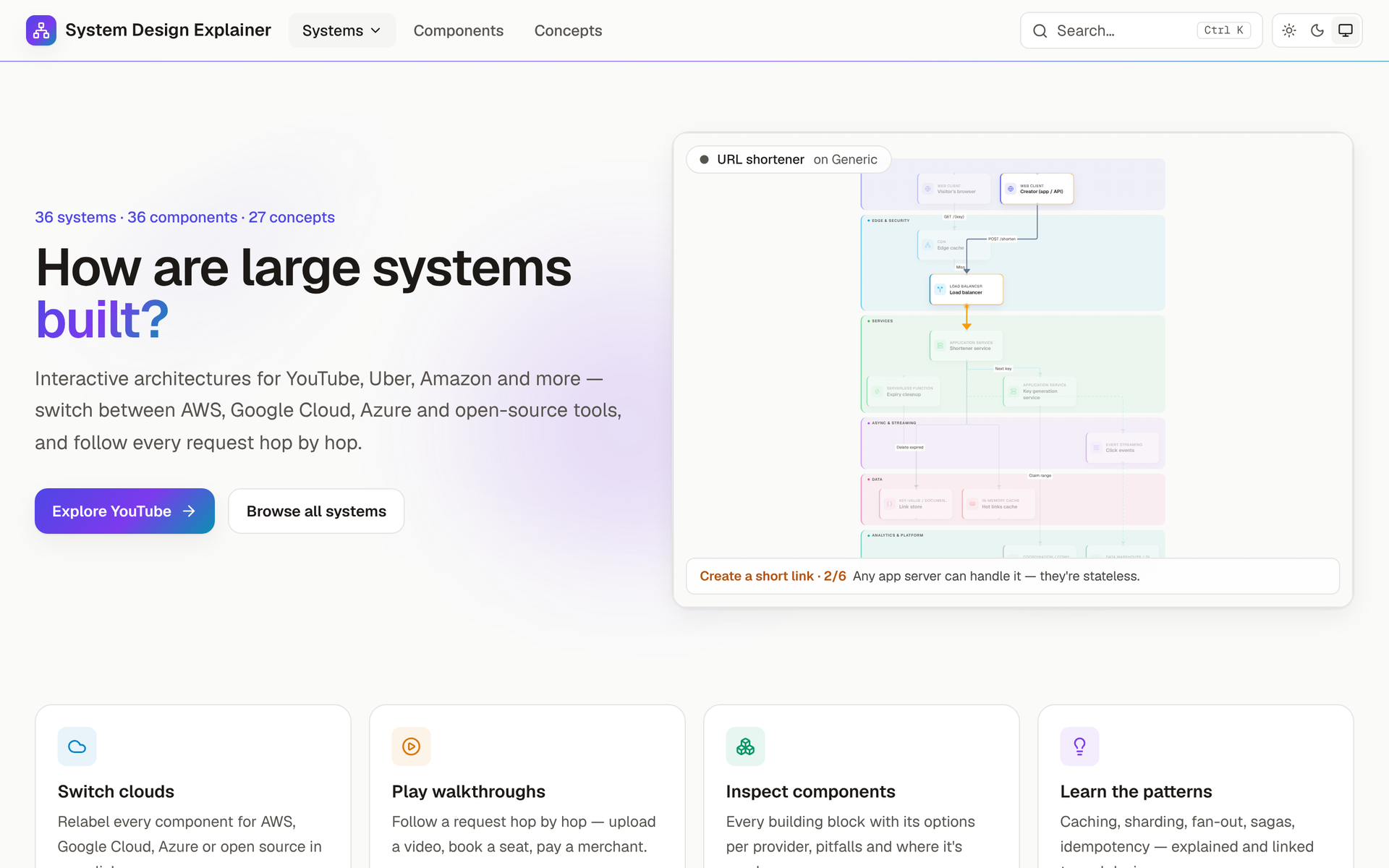
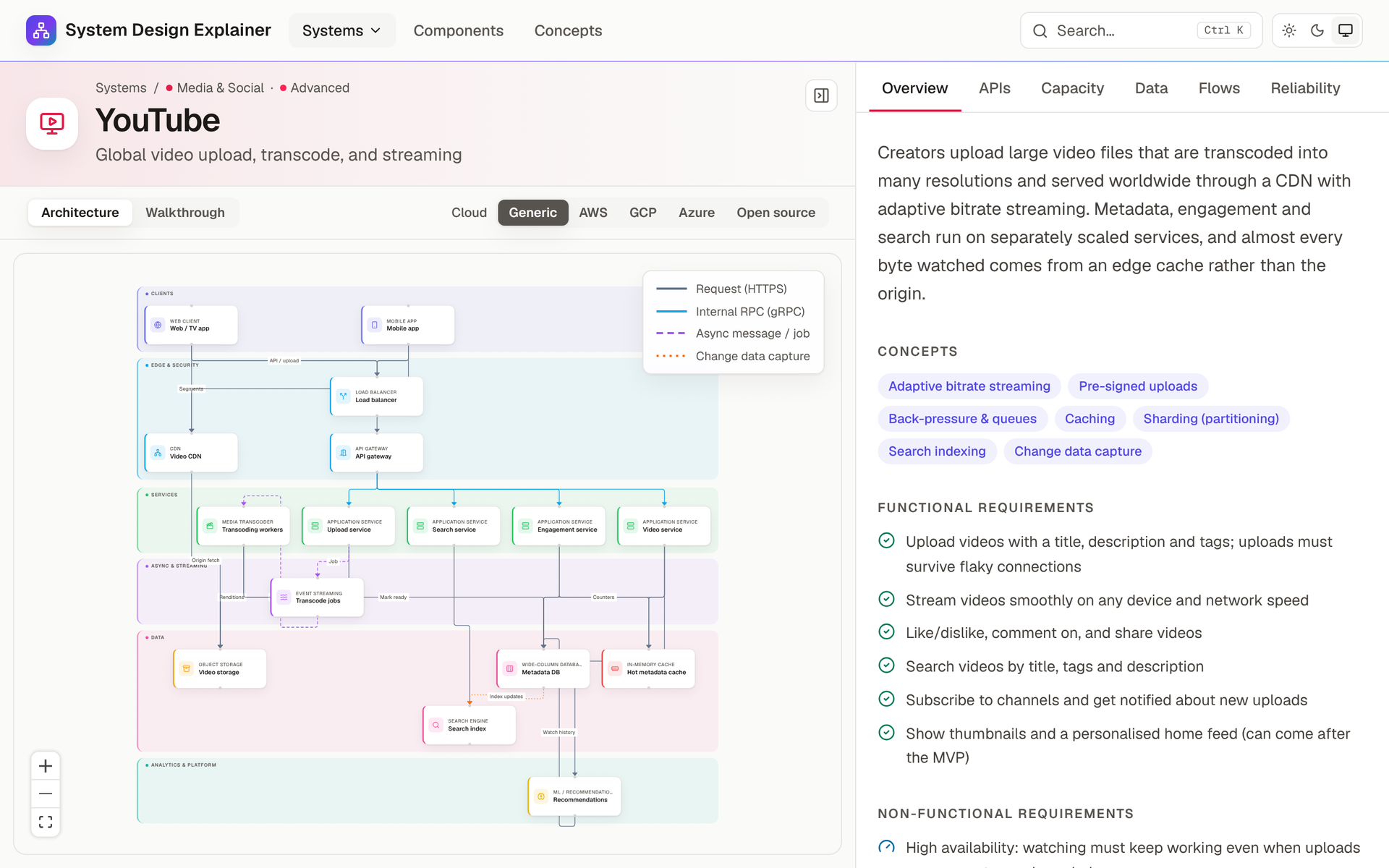
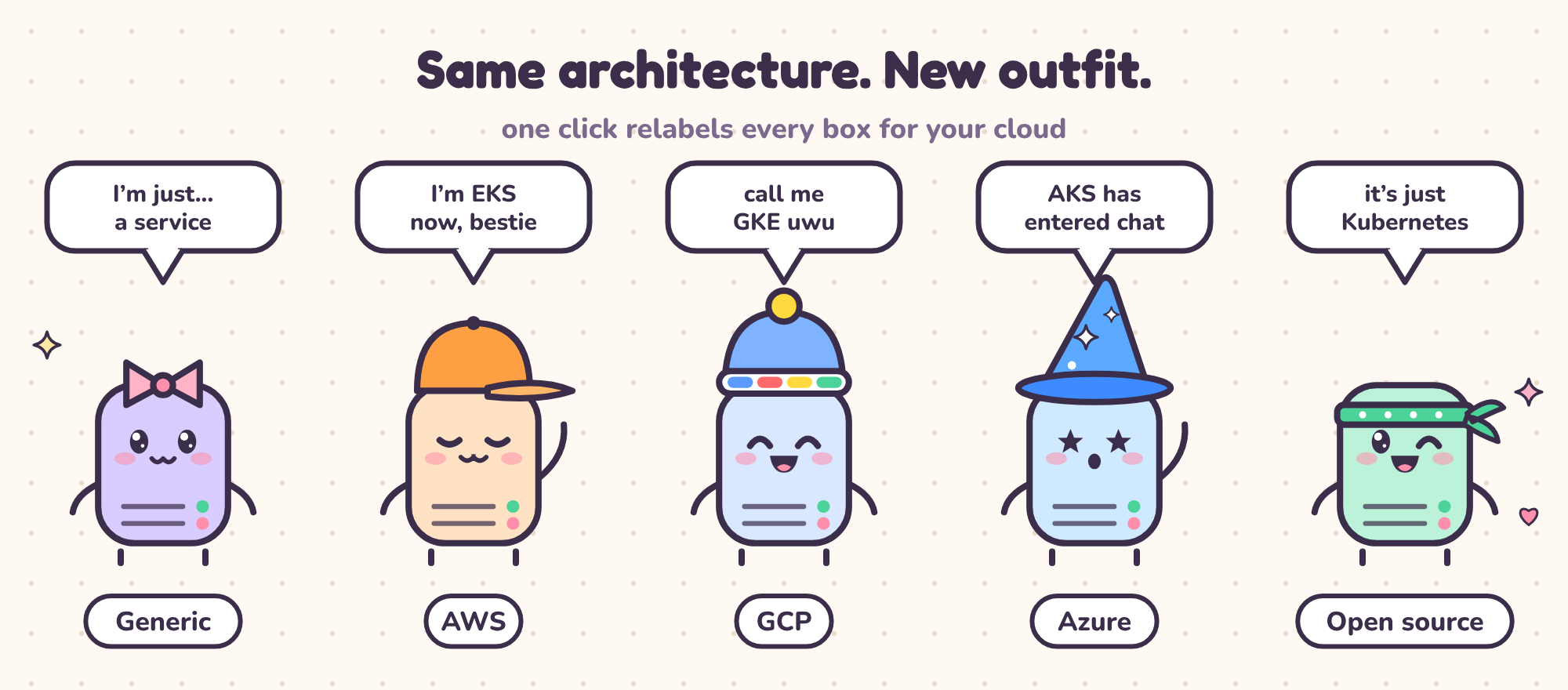
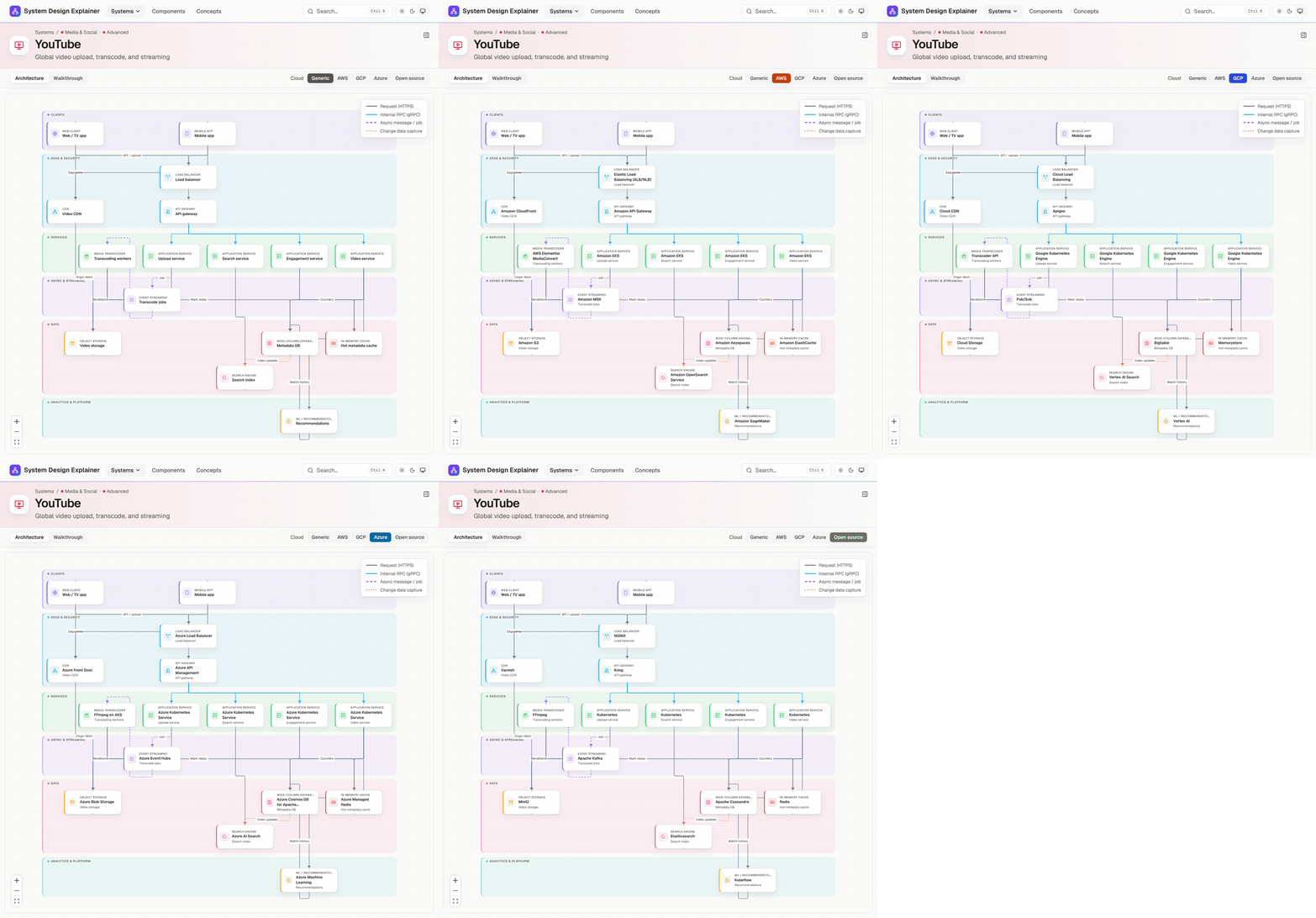
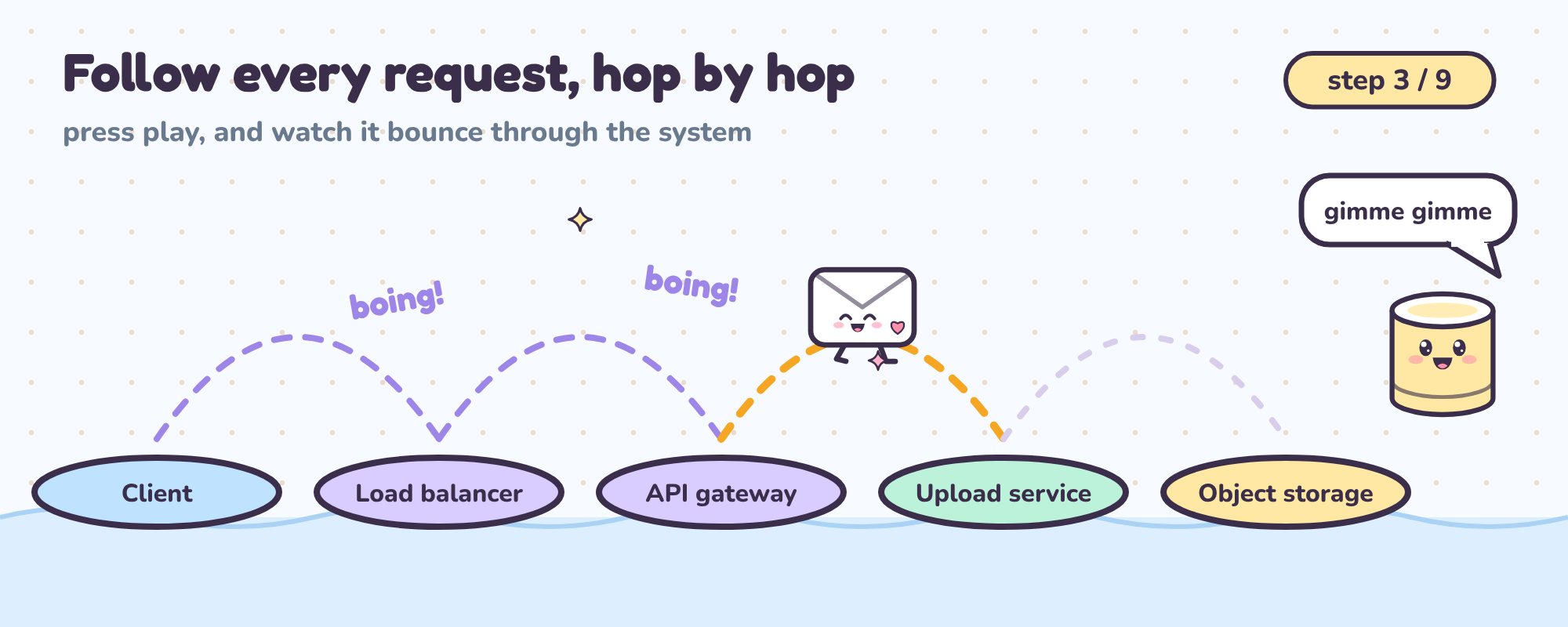
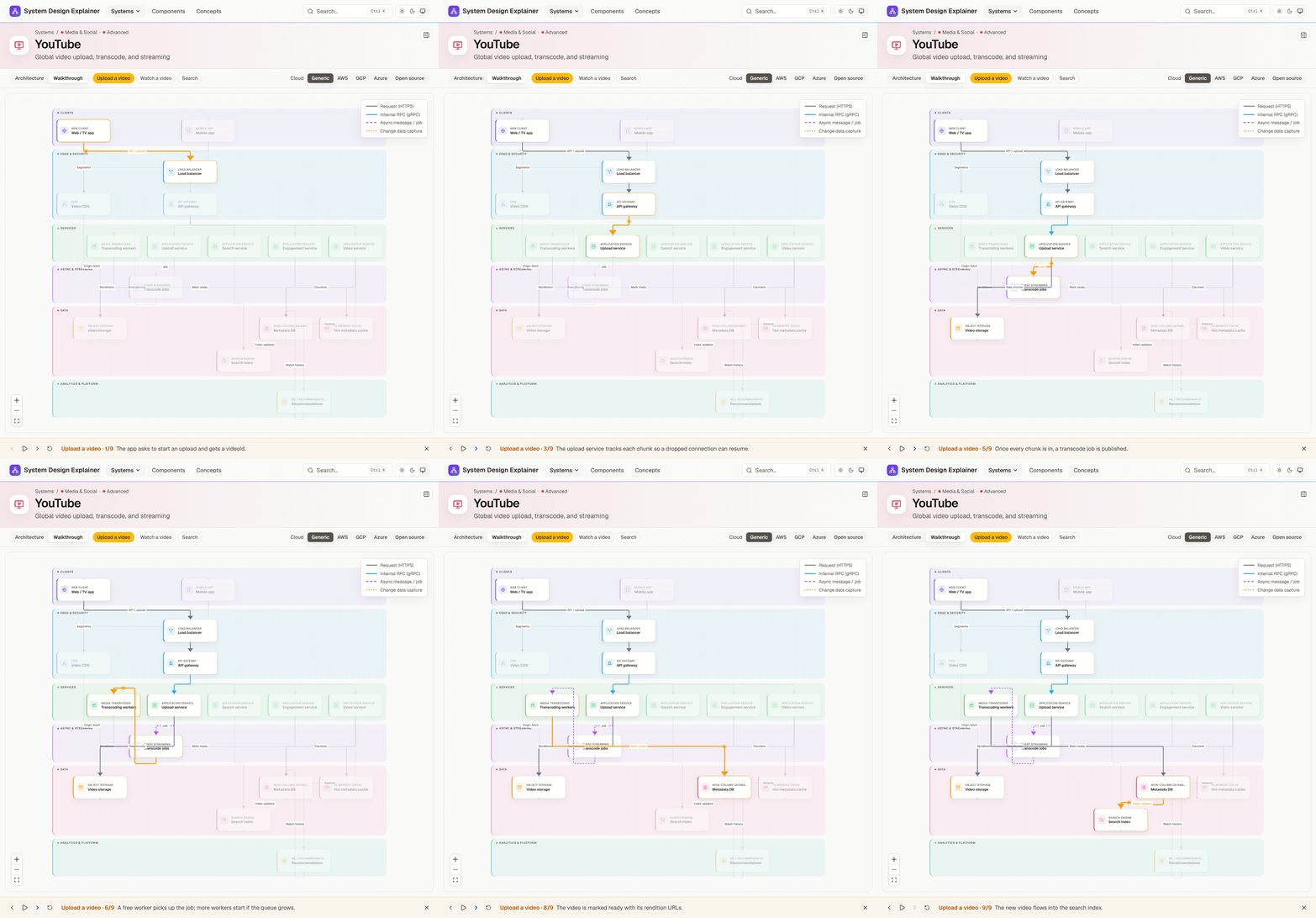
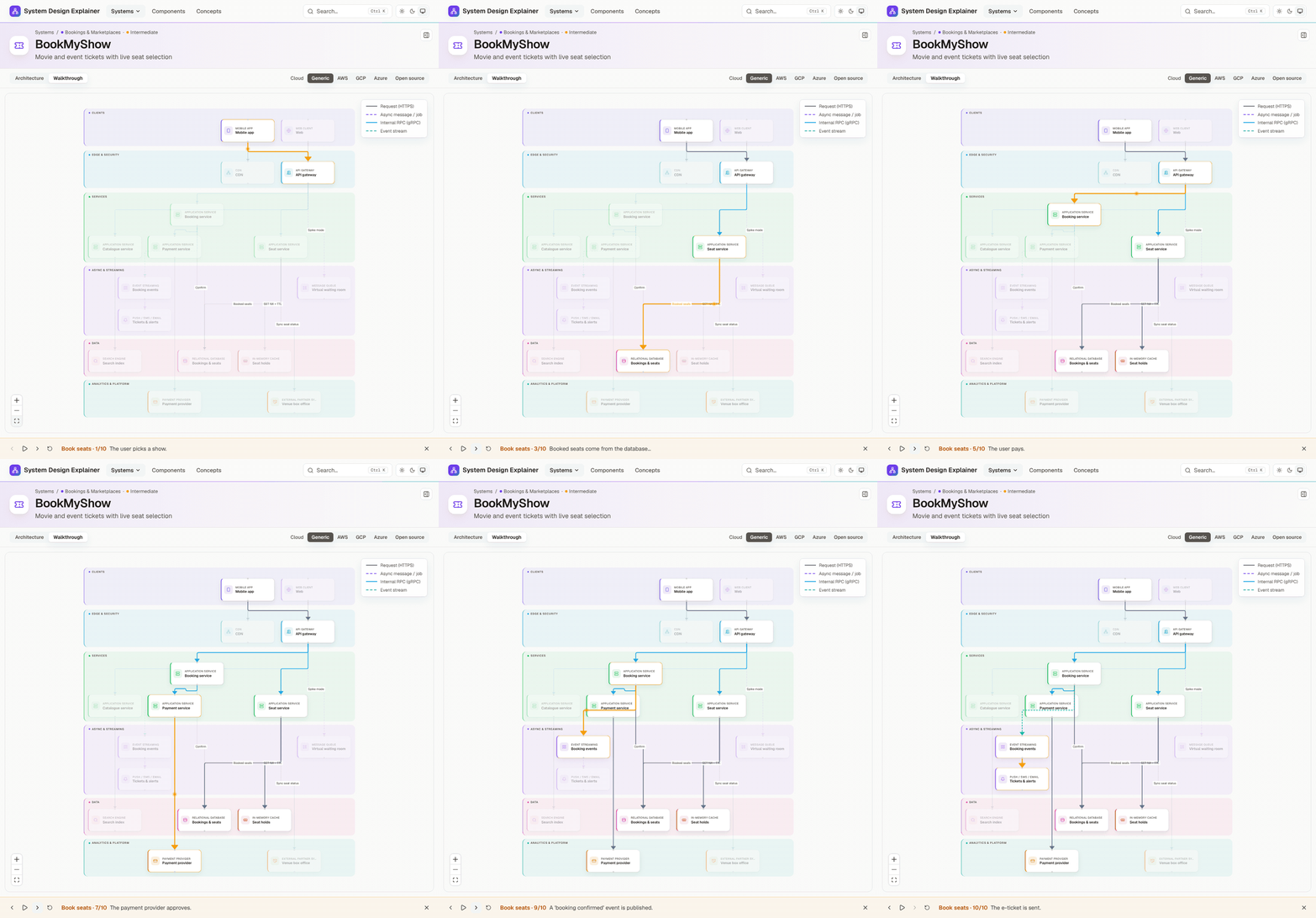
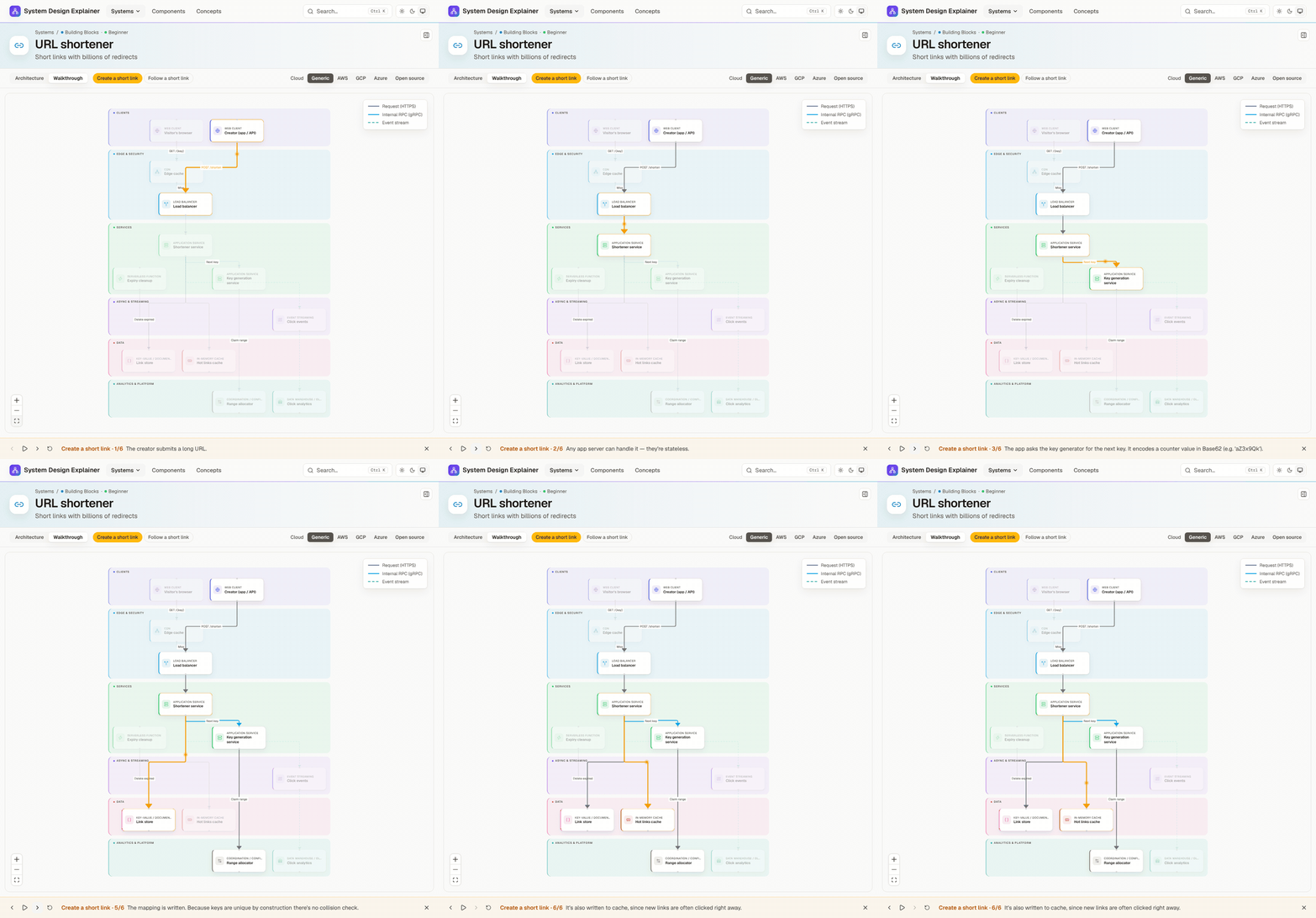
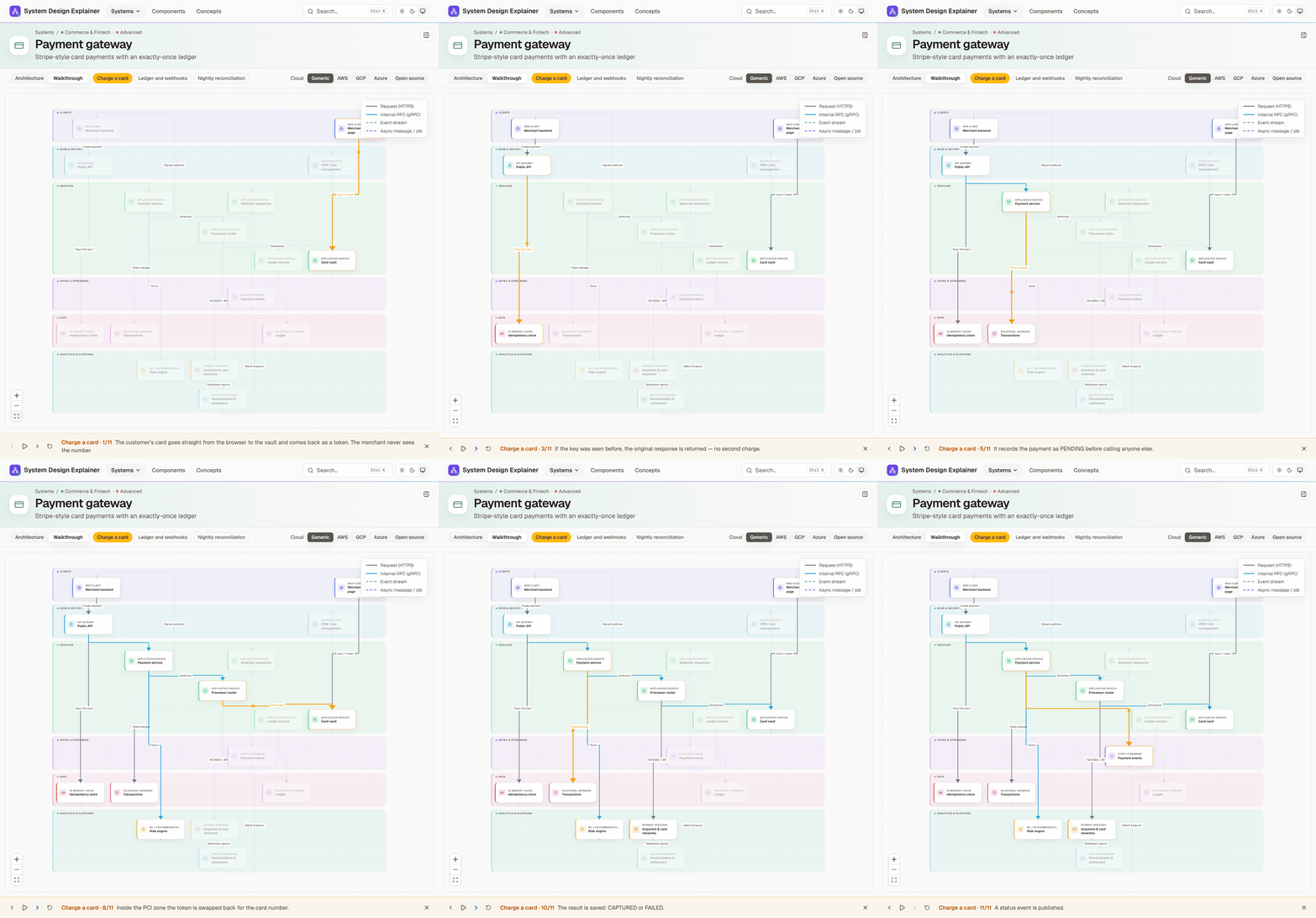
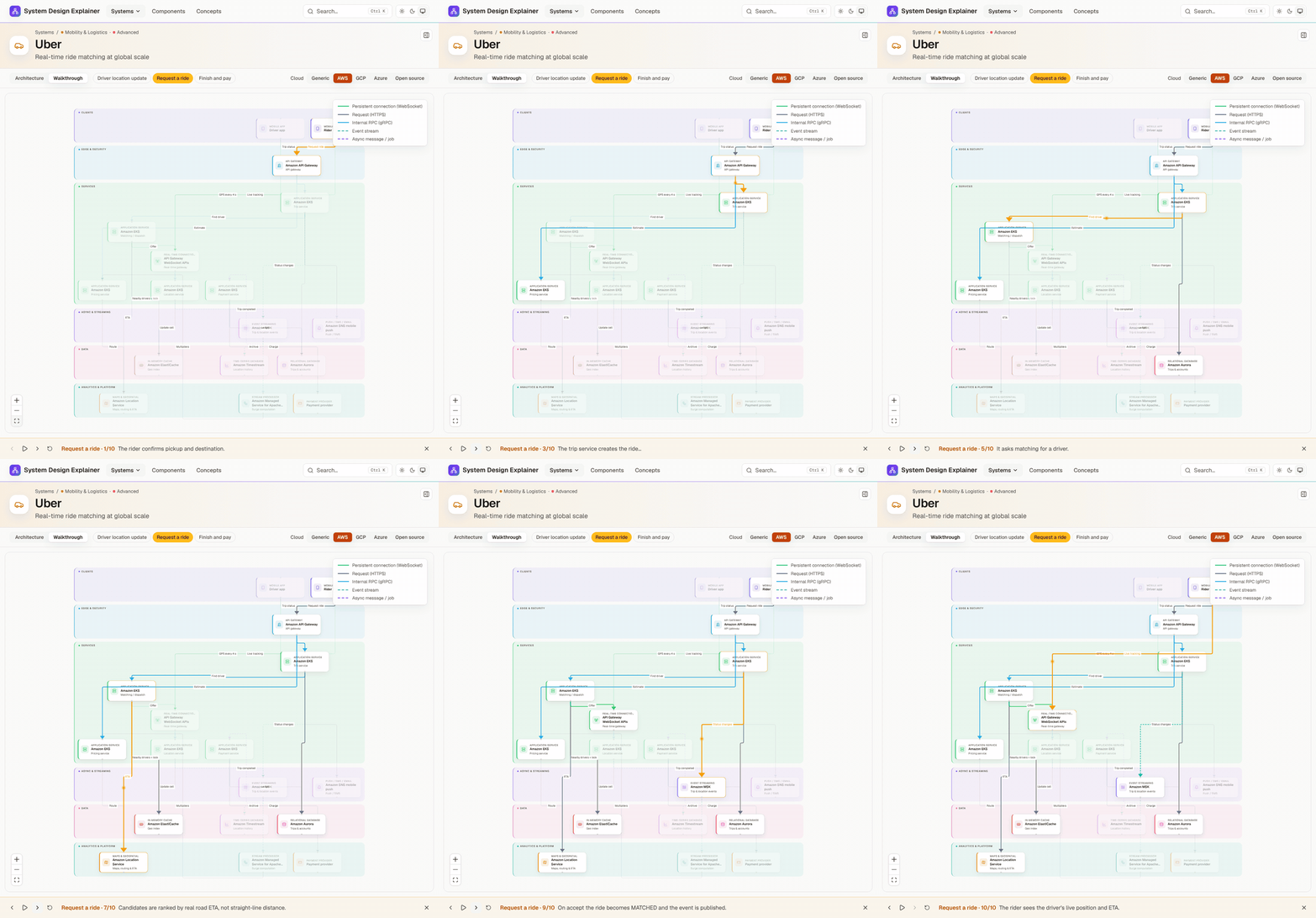
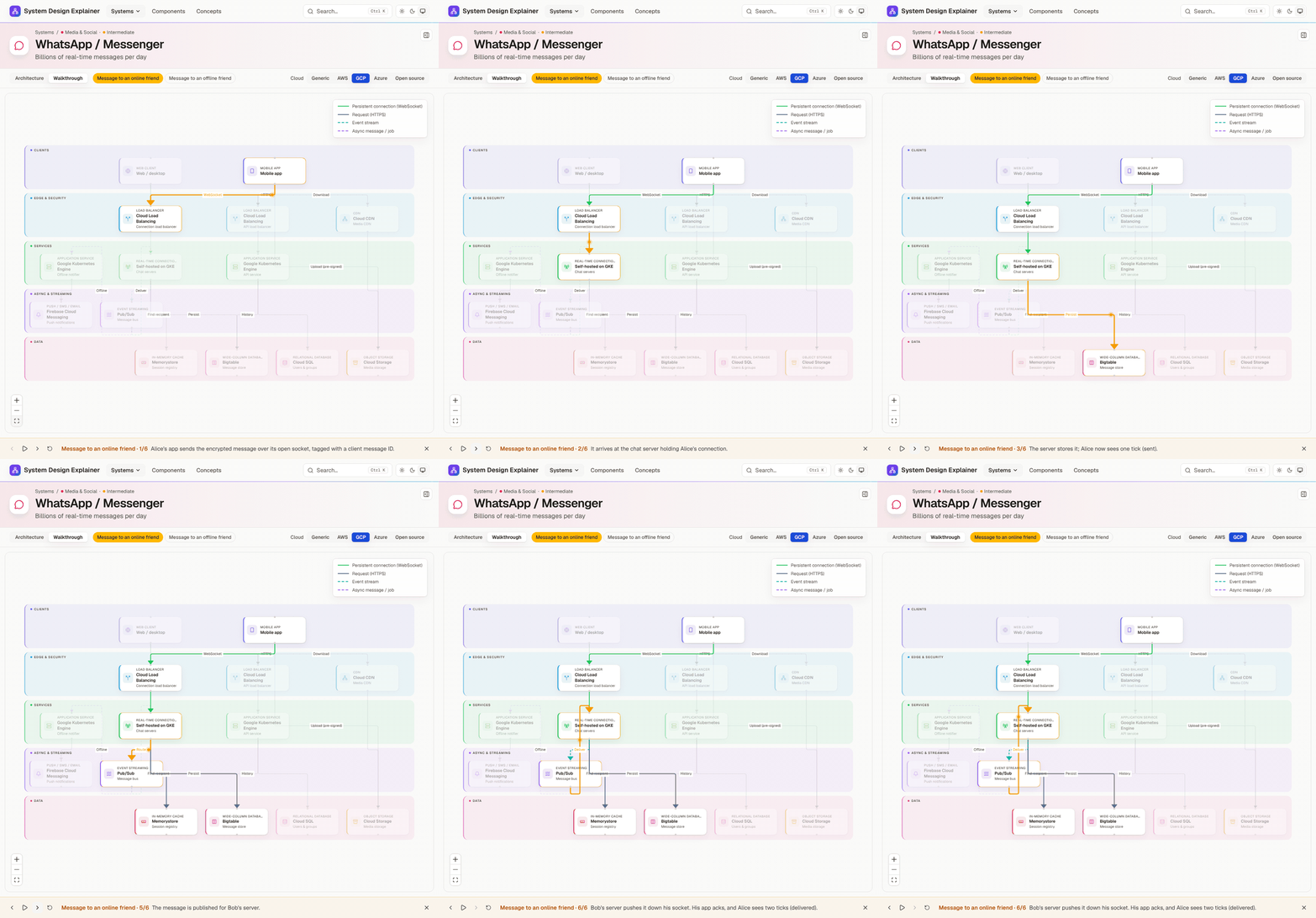
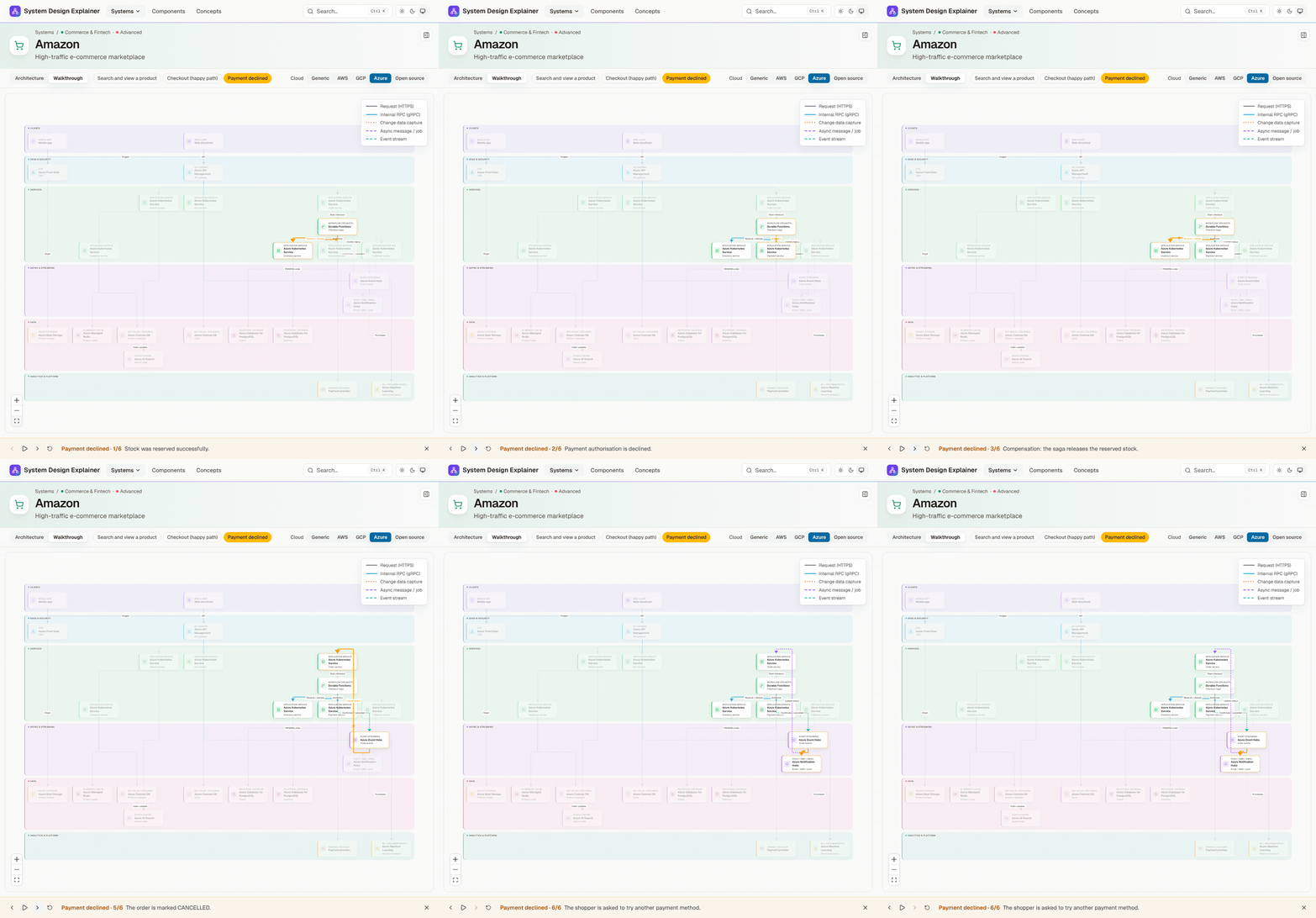
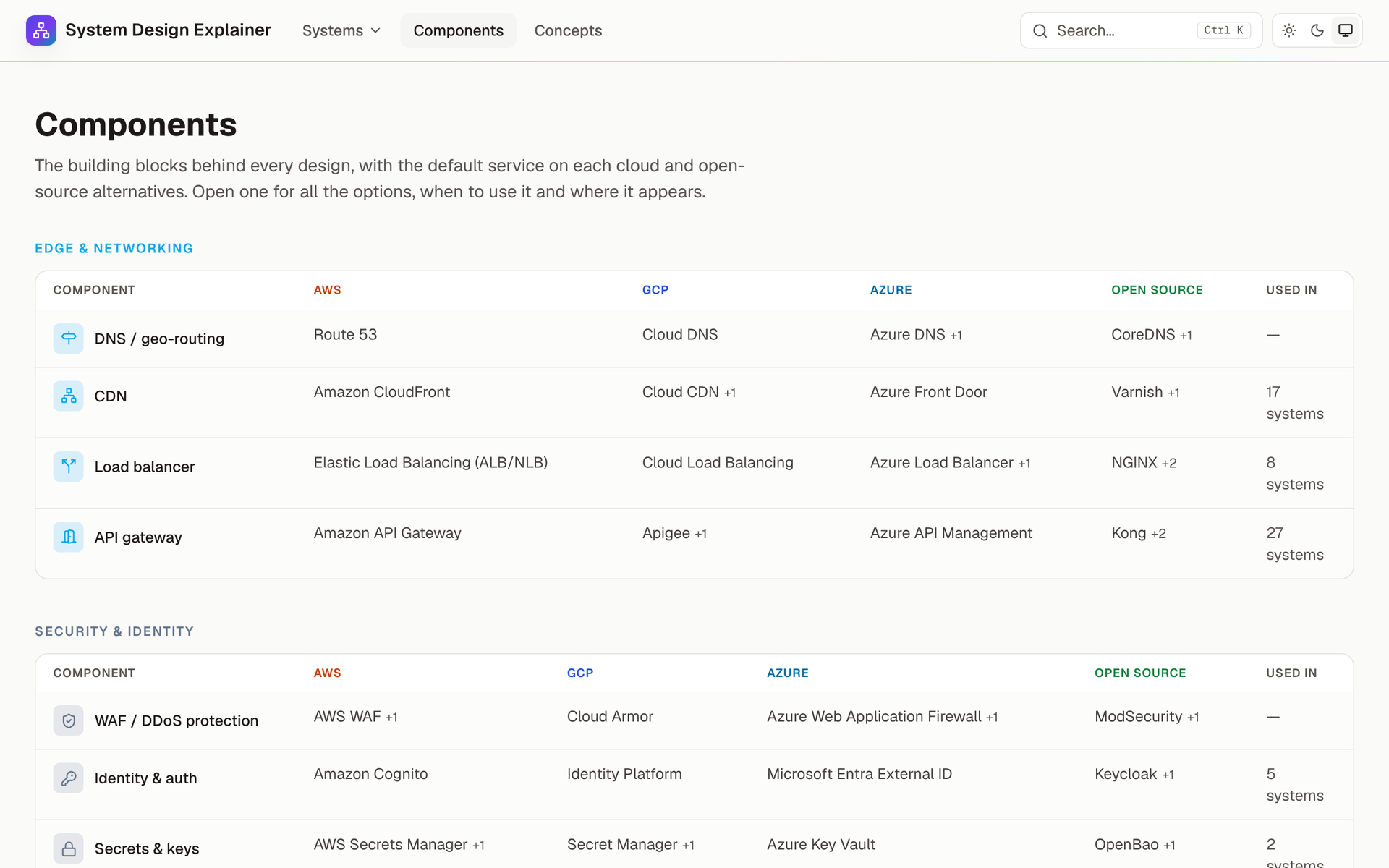
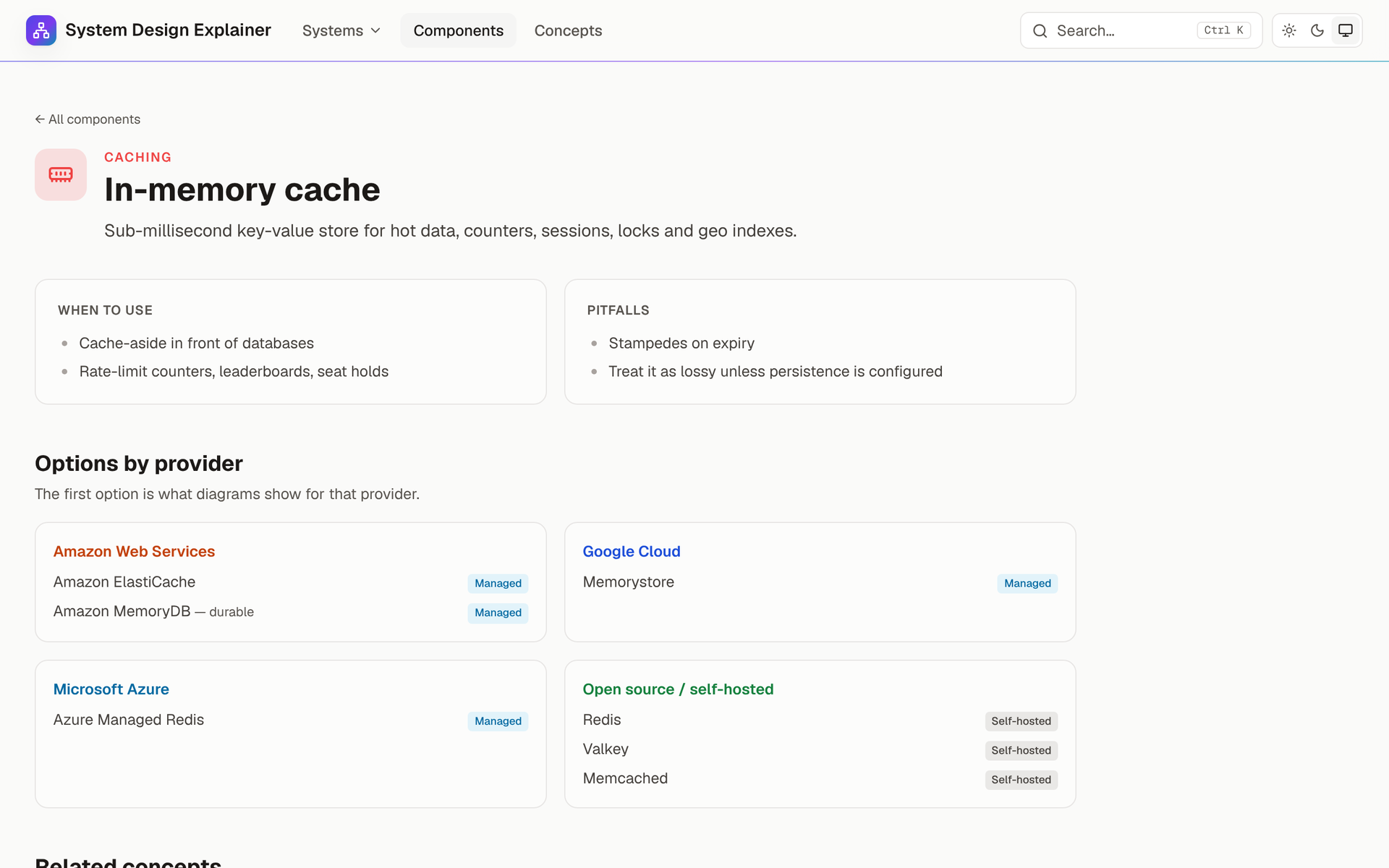
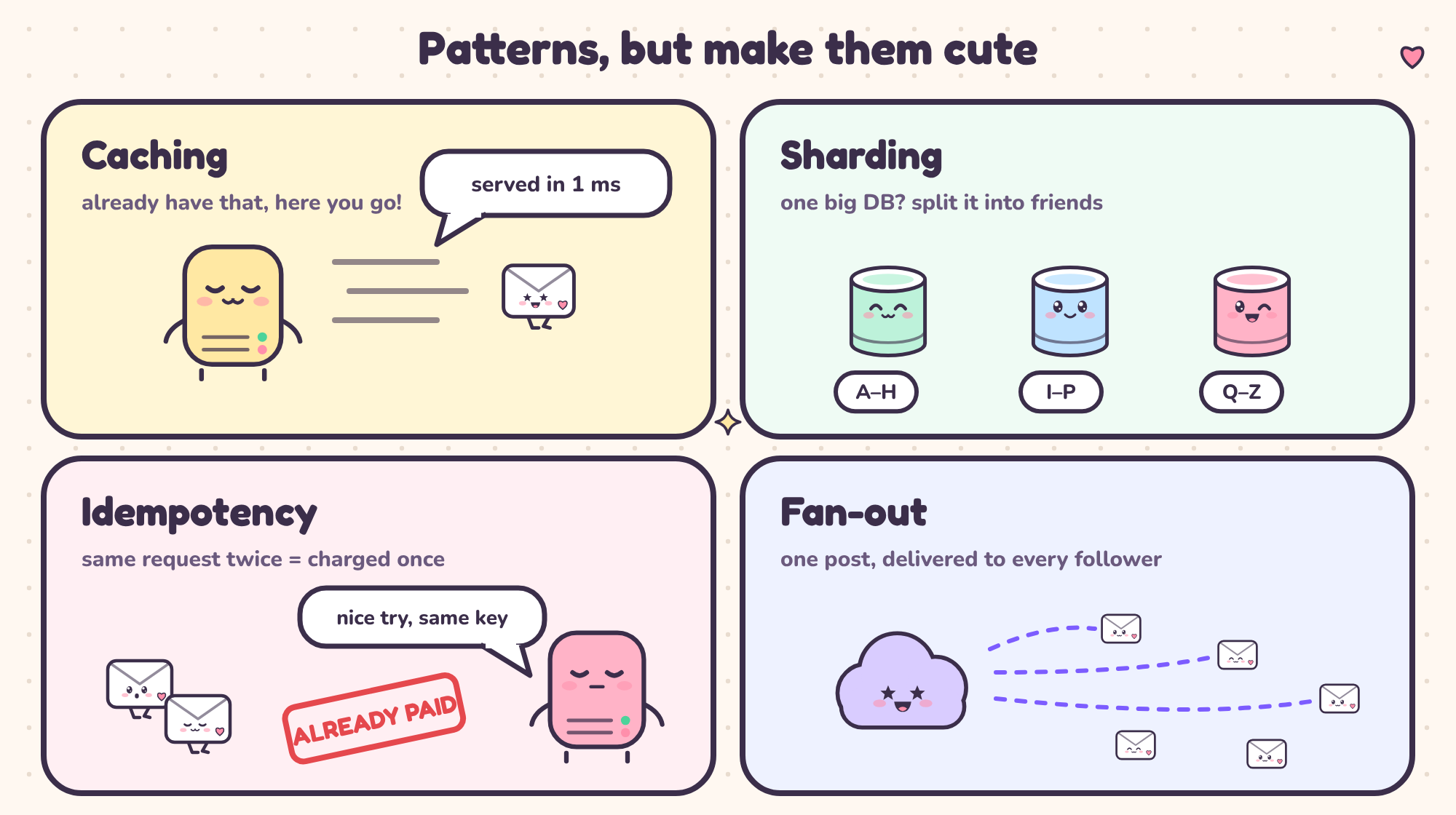
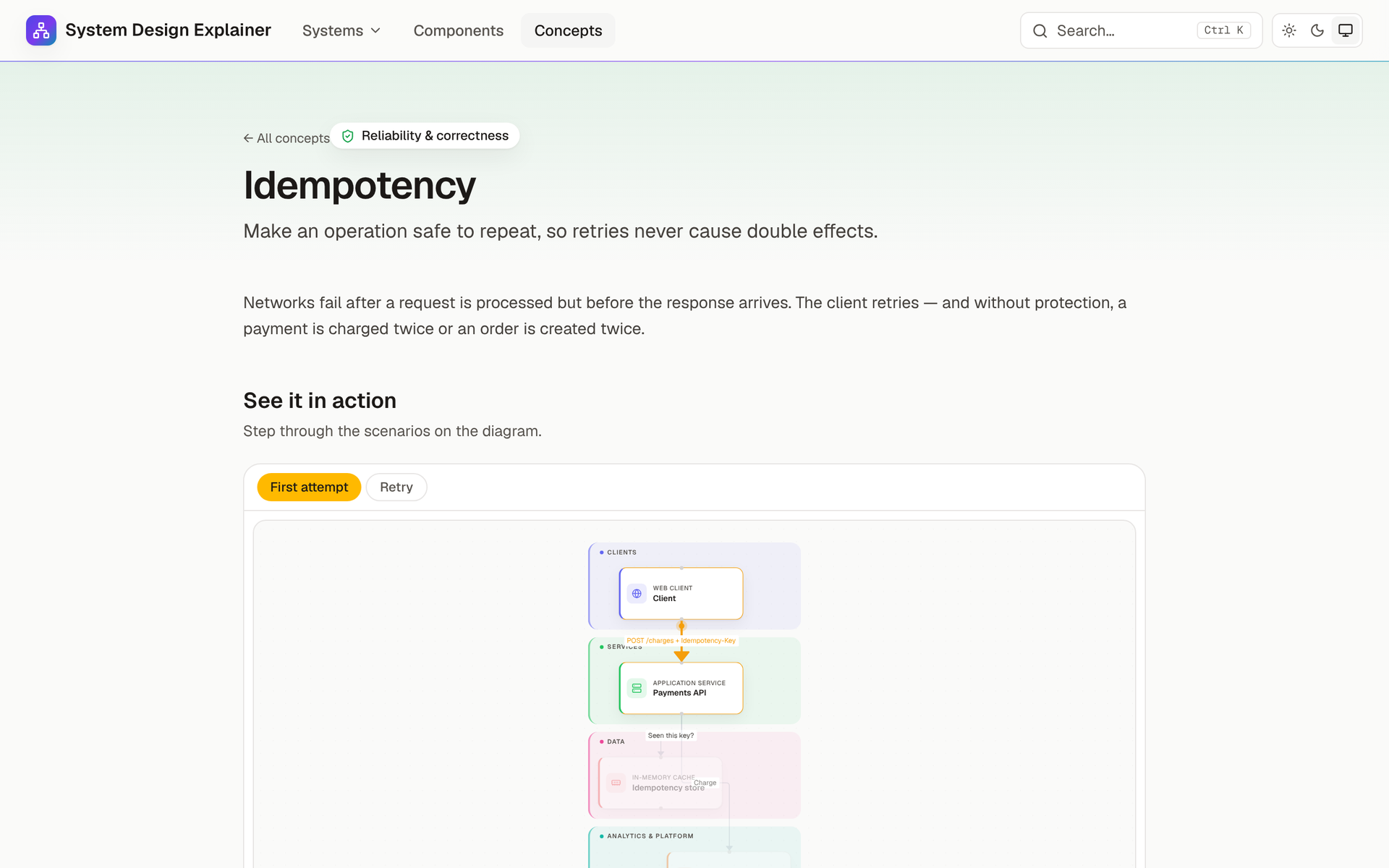
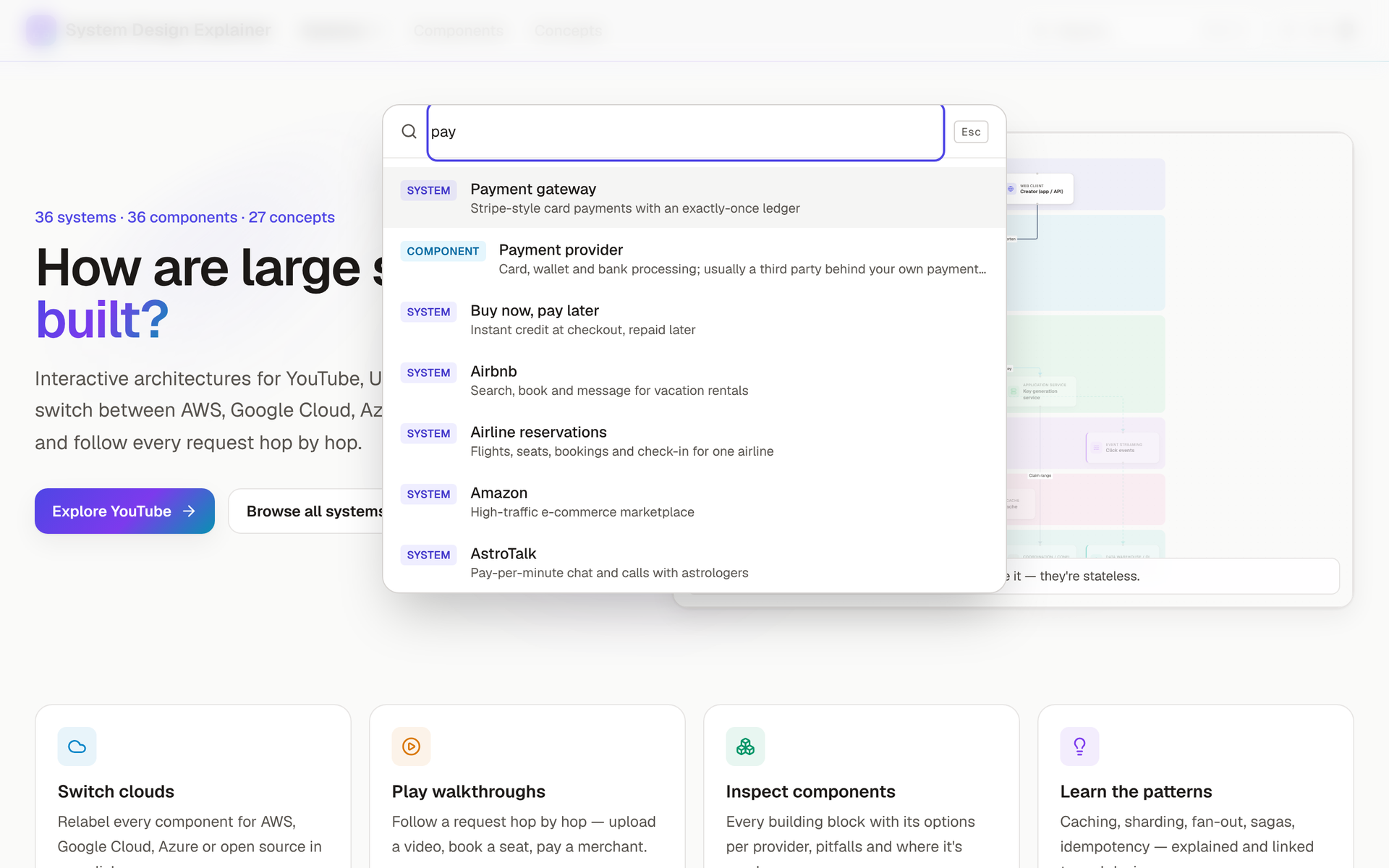
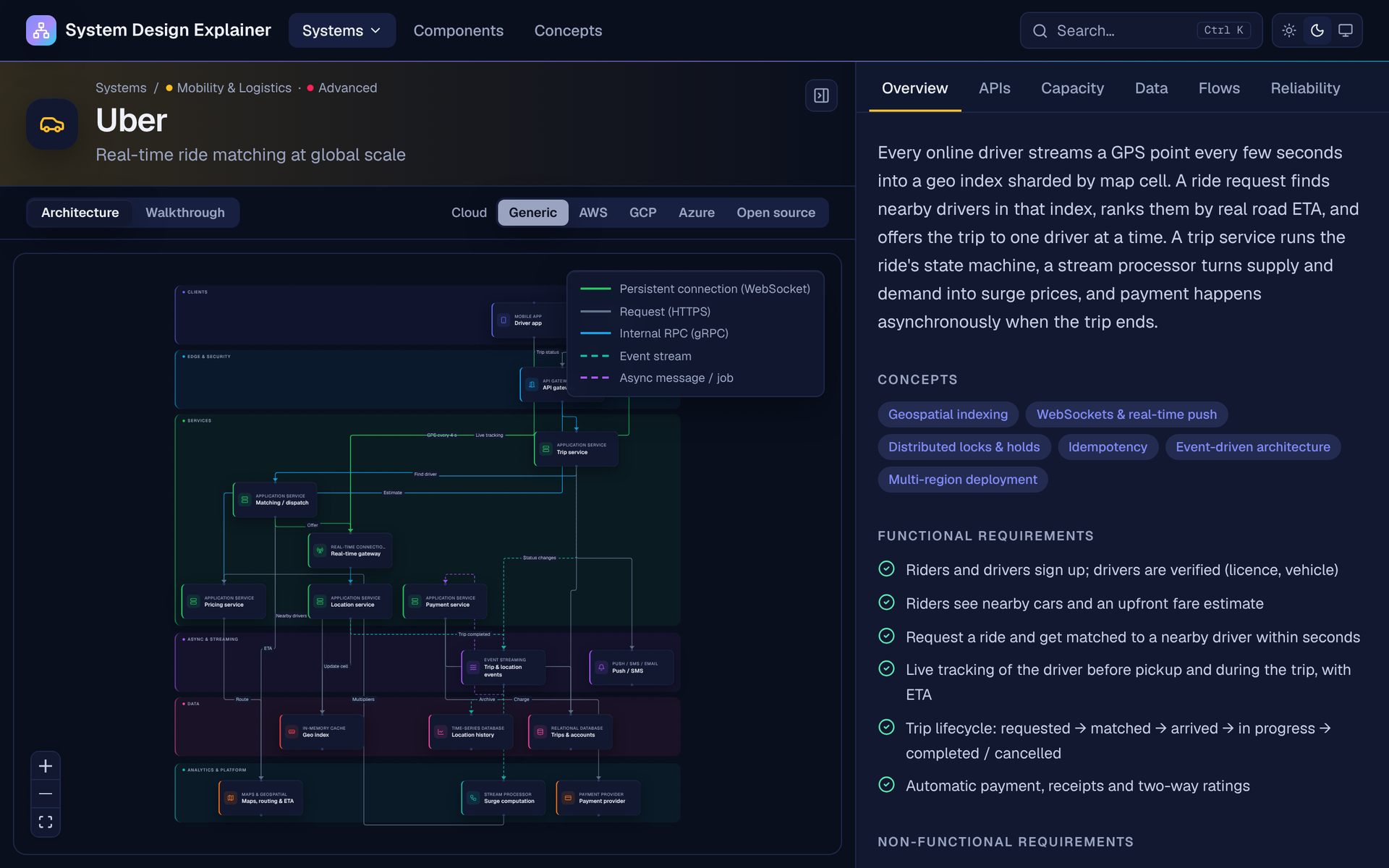
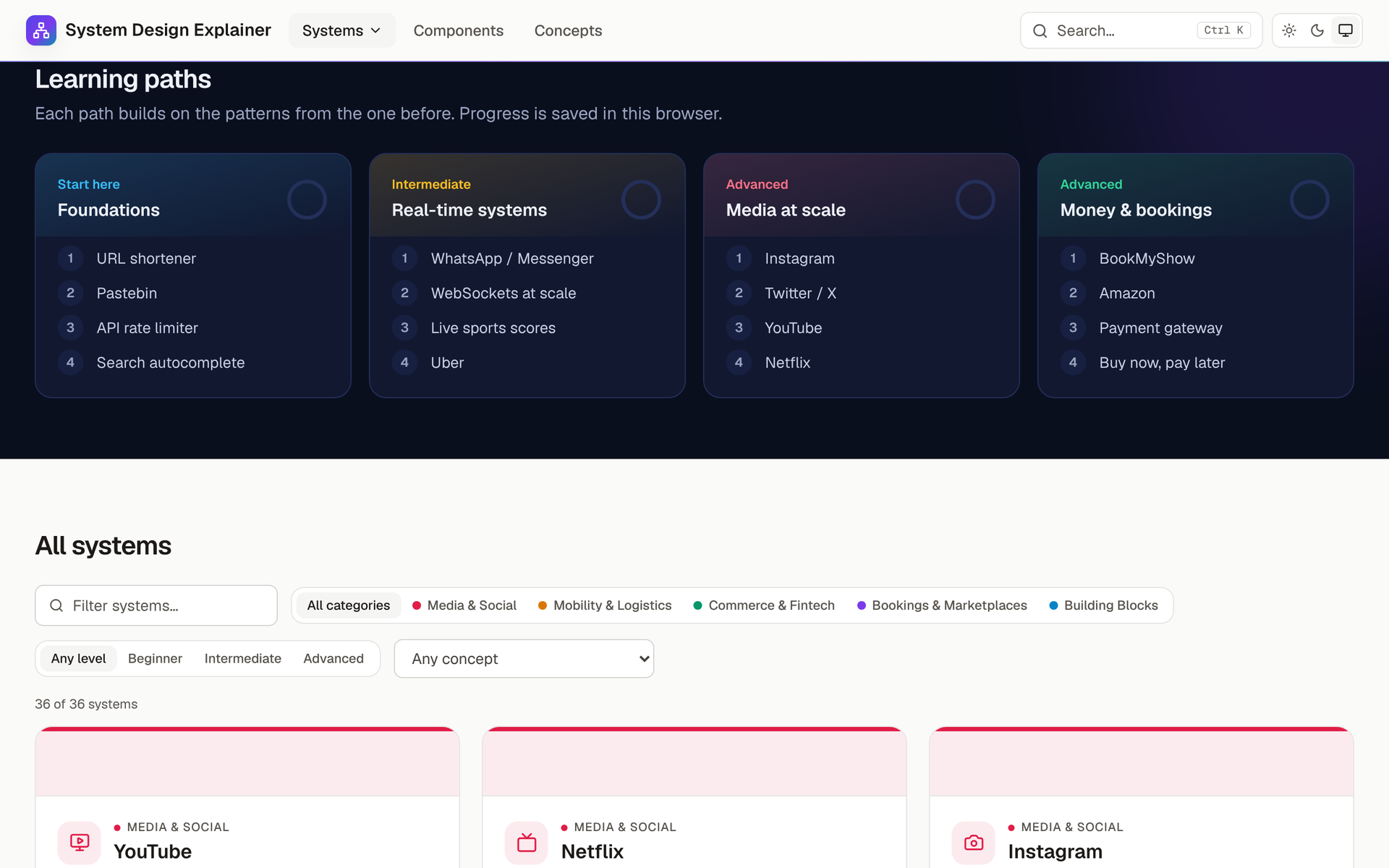
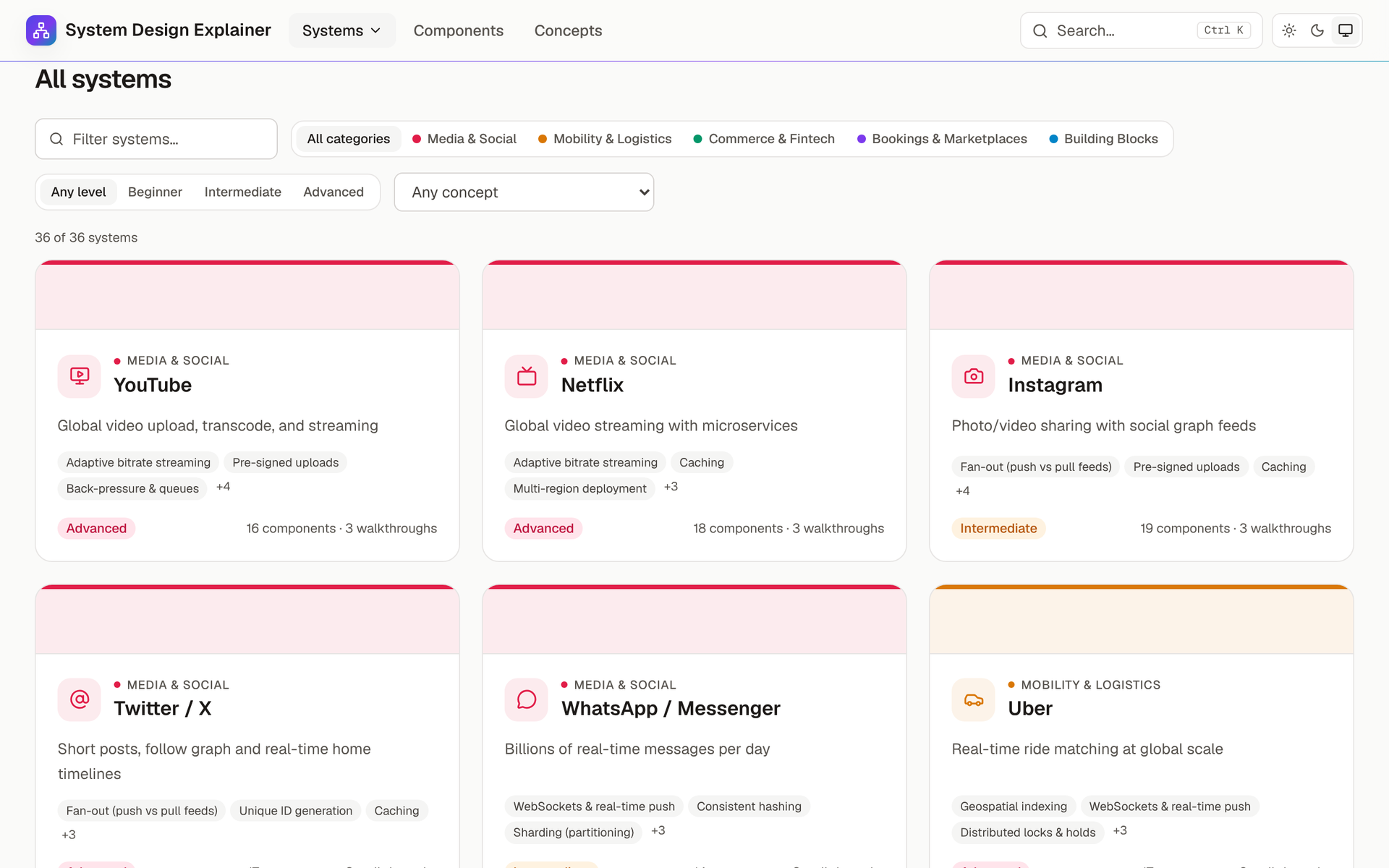
I Built a Visual System Design Reference — Switch Any Architecture Between AWS, Azure, GCP & Open Source I Built a Visual System Design Reference — Switch Any Architecture Between AWS, Azure, GCP & Open Source > 🔗 Live site: system-design-explainer.vercel.app > ⭐ GitHub: amananandrai/system-design-explainer !System Design Explainer home page 🧠 Why I Built This !Before: 47 tabs of scattered diagrams. After: one map for every system Like a lot of developers, I've spent hours reading system design articles, watching interview prep videos, and staring at static diagrams trying to understand how YouTube actually handles an upload or how Uber matches a rider to a driver in real time. The problem I kept running into: - Diagrams were static — you could see the boxes, but not how a request actually flows through them. - Every diagram was tied to one vendor's vocabulary. An AWS diagram says "S3, SQS, DynamoDB", a GCP one says "Cloud Storage, Pub/Sub, Bigtable" — and translating between them in your head is tiring. - My notes were scattered across bookmarks, Notion pages, and screenshots. So I decided to build the reference I wished I had. This started as a personal project to learn and grow. Building it forced me to actually understand each architecture well enough to draw it, break it into steps, and map every component across clouds. Somewhere along the way, I realised it could be just as useful for others preparing for interviews, designing real systems, or simply curious about how the apps they use every day work under the hood. --- 🚀 What Is System Design Explainer? System Design Explainer is an interactive system design reference site where you can visualise architectures of real-world systems and view the same architecture through different tool lenses — a generic view, AWS, Google Cloud, Azure, or open-source tooling. !YouTube architecture page with the diagram on the left and requirements on the right Every system page covers the requirements, APIs, capacity estimates, data model, request-flow walkthroughs, bottlenecks, scaling and extensions — all next to an auto-laid-out architecture diagram. At the time of writing it has: - 📦 36 systems - 🧩 36 components - 📚 27 concepts --- ✨ Key Features ☁️ 1. Switch Clouds in One Click !Same architecture, new outfit: the same service mascot dressed up for Generic, AWS, GCP, Azure and Open source This is the feature I'm most excited about. Every architecture can be relabelled for: - Generic (vendor-neutral building blocks) - AWS - Google Cloud - Azure - Open source So the same "object storage → queue → worker → CDN" flow instantly becomes the matching services for whichever stack you work with. Here's the YouTube design switching between all five: !YouTube architecture switching between Generic, AWS, GCP, Azure and Open source Object storage becomes Amazon S3, Cloud Storage, Azure Blob Storage or MinIO; the event stream becomes Amazon MSK, Pub/Sub, Azure Event Hubs or Apache Kafka — same boxes, same arrows, different names. Great for interviews (where you're often asked to stay generic) and for real-world work (where you're usually tied to a specific cloud). ▶️ 2. Play Hop-by-Hop Walkthroughs !A little envelope request hopping from Client to Load balancer to API gateway to Upload service to Object storage Instead of just looking at a diagram, you can follow a request step by step — upload a video, book a seat, pay a merchant, create a short link. Each step highlights what's happening and which component is responsible, so you build intuition for the flow, not just the layout. Here's what uploading a video to YouTube looks like: !Walkthrough: uploading a video on YouTube, step by step And booking movie seats on BookMyShow (watch the seat hold and the idempotency key do their thing): !Walkthrough: booking seats on BookMyShow Walkthroughs work on every cloud too, so you can follow the exact same request through AWS, GCP or Azure services. {% details 🎬 More walkthroughs (click to expand) %} Create a short link (URL shortener): !Walkthrough: creating a short link Charge a card (payment gateway): !Walkthrough: charging a card through a payment gateway Request a ride (Uber, on AWS): !Walkthrough: requesting an Uber ride on AWS Message an online friend (WhatsApp, on GCP): !Walkthrough: sending a WhatsApp message on GCP Payment declined → saga compensation (Amazon, on Azure): !Walkthrough: Amazon checkout with a declined payment and compensation on Azure {% enddetails %} 🔍 3. Inspect Components Every building block (load balancers, caches, queues, databases, CDNs, etc.) has its own page covering: - The options available per provider - Common pitfalls - Which systems on the site use it !Components page: each building block mapped across AWS, GCP, Azure and open source !In-memory cache component: when to use it, pitfalls and options by provider 📖 4. Learn the Patterns !Cute mascots explaining caching, sharding, idempotency and fan-out Core concepts like caching, sharding, fan-out, sagas, idempotency, consistent hashing, rate limiting, geospatial indexing, WebSockets, change data capture and more are explained on their own — and linked back to the real designs where they're applied. Many concept pages even come with a small diagram you can step through. !Idempotency concept page with a step-through example 🔎 Bonus: Search & Dark Mode Hit Ctrl K to jump to any system, component or concept, and switch to dark mode for late-night interview prep. !Search palette showing results for "pay" !Uber architecture in dark mode --- 🗺️ Learning Paths If you're not sure where to start, there are guided learning paths where each one builds on the patterns from the previous one. Your progress is saved in your browser. !Learning paths: Foundations, Real-time systems, Media at scale, Money & bookings | Level | Path | Systems | |---|---|---| | 🟢 Start here | Foundations | URL shortener → Pastebin → API rate limiter → Search autocomplete | | 🟡 Intermediate | Real-time systems | WhatsApp → WebSockets at scale → Live sports scores → Uber | | 🔴 Advanced | Media at scale | Instagram → Twitter / X → YouTube → Netflix | | 🔴 Advanced | Money & bookings | BookMyShow → Amazon → Payment gateway → Buy now, pay later | --- 🏗️ Systems Covered The catalogue is filterable by category, difficulty, and concept. Here's a snapshot: !All systems catalogue with category, level and concept filters - Media & Social: YouTube, Netflix, Instagram, Twitter / X, WhatsApp, Quora, LinkedIn, Live sports scores - Mobility & Logistics: Uber, Google Maps, Zomato / food delivery, Porter, Car rental, Driver booking & fleet management - Commerce & Fintech: Amazon, Payment gateway, Buy now pay later, Stock brokerage - Bookings & Marketplaces: BookMyShow, MakeMyTrip, Airbnb, Airline reservations, NoBroker, Urban Company, Practo, AstroTalk, Meeting scheduler - Building Blocks: URL shortener, Pastebin, API rate limiter, Search autocomplete, Web crawler, Dropbox, WebSockets at scale, Video calling (WebRTC), Redis Cluster I deliberately included a mix of global giants and systems that are popular in India (BookMyShow, Zomato, NoBroker, Practo, Urban Company…) because those come up a lot in interviews here and are rarely covered elsewhere. --- 🎯 Who Is This For? - 👩💻 Interview preppers — practise explaining designs end-to-end and see how patterns repeat across systems. - 🏢 Working engineers — map a design you know in one cloud to another cloud's services. - 🎓 Students & beginners — start with the Foundations path and build up gradually. - 🤔 The curious — ever wondered what happens when you hit "Book" on a movie seat? Now you can watch it happen. --- 🛠️ How It's Built - Next.js (static export) — the whole site is plain static files, deployed on Vercel - React Flow + ELK — auto-laid-out, zoomable architecture diagrams - Tailwind CSS — styling, including dark mode - Zod — every system is a typed content file validated against a schema, so adding a new design is mostly writing data, not UI code --- 📈 What I Learned Building It !Built to learn, shared to help: a mascot in a graduation cap watering a growing diagram plant Building this taught me far more than reading ever did: - You only really understand a system when you have to draw every hop. Gaps in my knowledge showed up immediately when I tried to write a walkthrough. - Clouds are more similar than they look. Once you map components across AWS, GCP, Azure and open source, the underlying patterns become obvious — the names are just different. - Patterns repeat everywhere. Idempotency shows up in payments, bookings, and ride matching. Fan-out shows up in Twitter, Instagram, and LinkedIn. Seeing this visually made it click. This project is very much still growing — and so am I. --- 🤝 Get Involved !Come build it with me: star the repo, raise issues, send PRs, share ideas This is a learning project, and I'd love for it to become a community resource. If you found it useful: - ⭐ Star the repo on GitHub — it really helps more people discover it: amananandrai/system-design-explainer - 💡 Share suggestions — which system should I add next? Drop it in the comments! - 🐛 Raise issues — spotted an inaccurate diagram, a wrong cloud mapping, or a bug? Please open an issue. - 🔧 Raise PRs — contributions are very welcome, whether it's a new system, a better walkthrough, a component fix, or a UI improvement. Want to add a system? Create a file in src/content/systems/, register it in systems/index.ts, follow the schema in src/types/schema.ts, and run npm run validate to check it. To run it locally: git clone https://github.com/amananandrai/system-design-explainer.git cd system-design-explainer npm install npm run dev # http://localhost:3000 --- 🙌 Wrapping Up 👉 Try it here: system-design-explainer.vercel.app ⭐ Star it here: amananandrai/system-design-explainer I'd genuinely love to hear your feedback. Tell me in the comments which architecture you explored first — and which one you want to see next! !Thanks for reading! The mascots bouncing with party hats Happy designing! 🚀
@GameFromScratch Have you covered "Haxe is the FIRST (existing) language to become self-hosted with AI assistance?" dimensionscape/hxc Chris under AI guidance has a number of projects, general ones. openfl/libhxcpp […]
@honjo_yosage Full stack Engineer Portfolio - patelyash.in || nexmstudio.in Github - github.com/yash-0025
Kids also got a toy based off of Timex Datalink - I had one! youtube.com ... The DSI e-BRAIN is also fully working in timex_datalink_client, which amuses me so: timex_datalink_client#111