Mentions
Conversations linking to GitHub, newest first. Times are UTC.
Mentions by source
X
Bluesky
Hacker News
V2EX
Qiita
DEV
Mailwal
Mastodon
Latest posts
CivSwitch Control Center I’ve been working on turning the Civ7 Remote JS Loader into something that works more like an on-console utility instead of just sending one-off scripts from a terminal. The result is CivSwitch Control Center, a controller-driven interface running directly over Civilization VII. I renamed the original project from Civ7 Mod Menu to the current name and released everything on Github. Current features include: - Read-only Civ7 save extraction with a live progress screen - Host-side chunk validation, CIV7 magic checking, metadata, and SHA-256 verification - Save Browser for viewing files and sizes without modifying them - Installed Content Browser for inspecting official and user content - Input Monitor showing live semantic controller events - Payload Mode with visible chunked transfers, filename, size, progress, and SHA-256 - Manual payload confirmation with A, or optional autostart - A controller-friendly UI that returns after supported operations complete Payload Mode is probably the most useful part: the loader gets released for transfer while the status screen remains visible on the console. Once the payload finishes transferring, you can review it and press A to launch it. This does not install the entry point or Remote JS Loader, you need an existing CivSwitch loader running on port 9026. Save access is read-only (for now), while Payload Mode intentionally executes whatever JavaScript you choose to send. The v1.0.0 release includes the payload, host launcher, verified-save receiver, staged-payload sender, checksums, and full documentation. GitHub and release: MatthewKuKanich/CivSwitch-ControlCenter
Challenge DEFI-R2: the C2-R campaign is validated at L = 4 and L = 5, not at L = 6 (compute budget at about 17% of what is needed). Got spare compute? This point moves forward directly with you. #HPC The-blob-Principle#9
RAG keeps chunks in a vector store. If a replaced file's chunks stay, answers quote the old file. App Nº 39 in our app-a-day series with Pixeltable: chat over manuals. Delete one and its chunks leave search. Try it: pierrebrunelle/pixeltable-equipment-manual-chat All the apps: pixeltable.com t.co
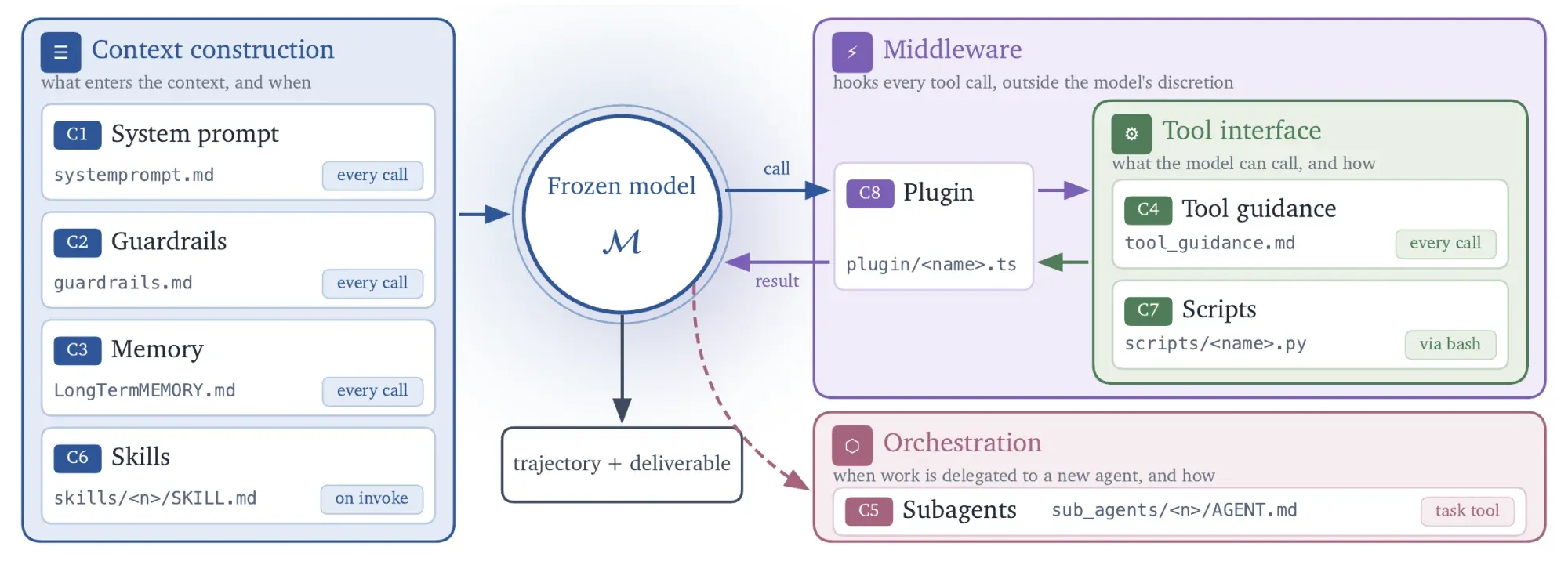
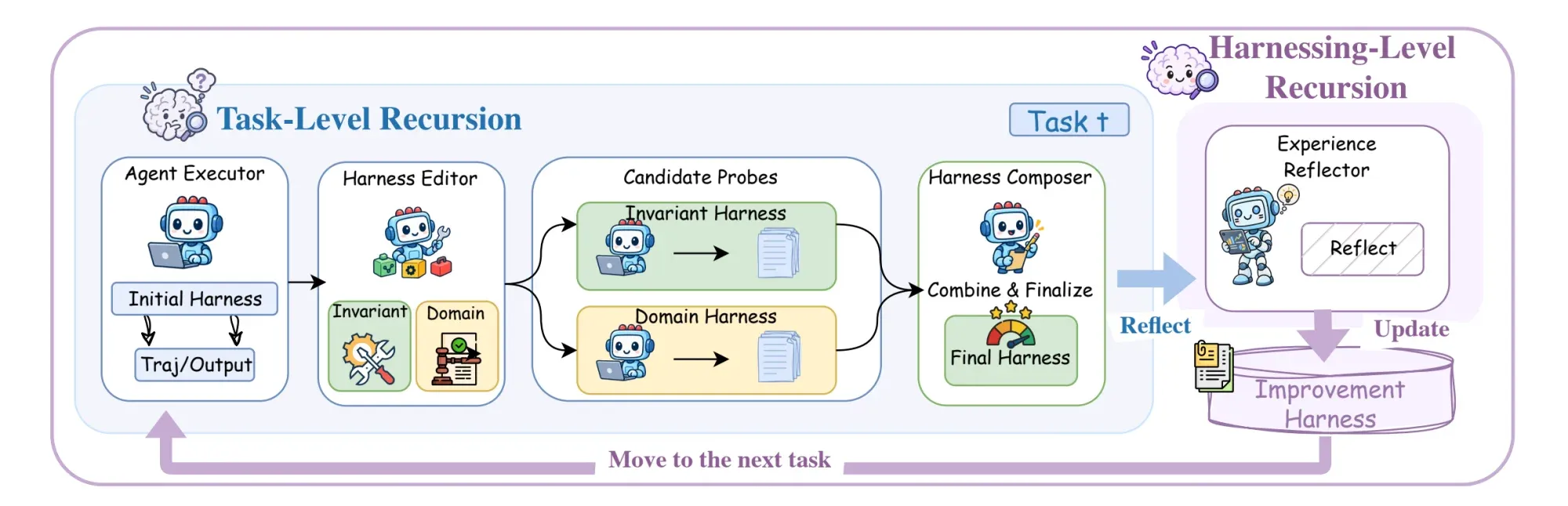
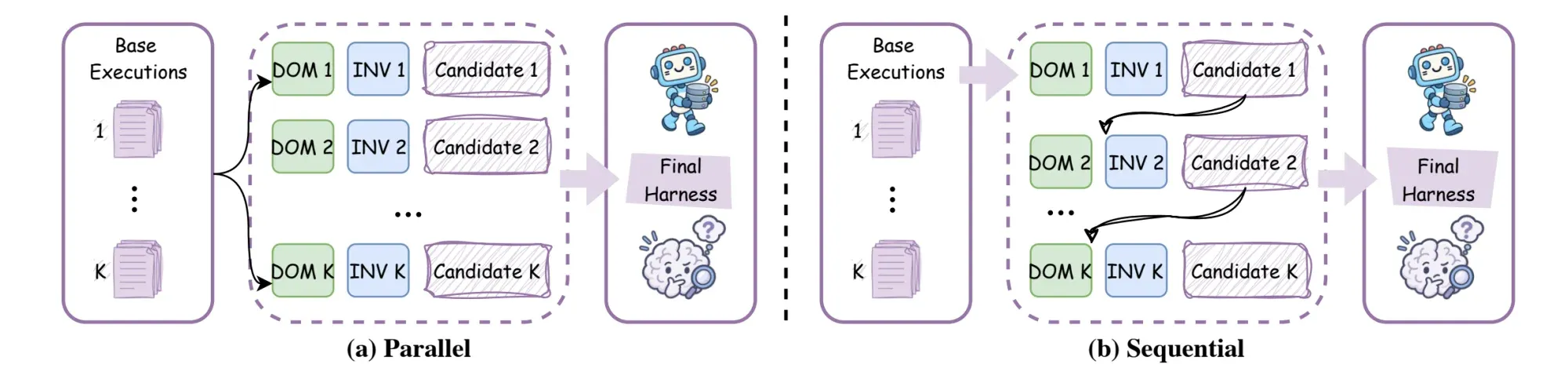
Harness : quand l'agent améliore lui-même le harness qui l'entoure Quand un agent déçoit, le premier réflexe est de changer de modèle. Pourtant, un même modèle peut passer de décevant à convaincant selon son prompt système, les outils qu’on lui décrit ou sa façon de relire son travail avant de rendre un livrable. Cet environnement a un nom : le harness. Google Research vient de publier en open source Harness², un framework qui le fait évoluer automatiquement, sans toucher aux poids du modèle. Le papier et le site du projet détaillent la méthode, les chiffres et les limites. > TL;DR > > - Harness² optimise le harness d’un agent (prompt, mémoire, outils, sous-agents…) au lieu du modèle. > - Deux boucles : une par tâche (Propose, Probe, Compose), une qui apprend de tâche en tâche. > - Selon Google, une seule étape suffit à améliorer GLM-5 et Gemini 3.5 Flash sur trois benchmarks. Le coût en calcul et la vérification sans réponse de référence restent les points à surveiller. Nous verrons ce qu’est un harness, comment fonctionnent les deux niveaux de récursion, puis nous lancerons la démo locale avant de regarder les limites. Le harness : tout ce qui entoure le modèle Un modèle seul ne fait que produire du texte. Ce qui en fait un agent, c’est le système autour : prompts, outils, mémoire, orchestration. Harness² en expose huit composants modifiables : - Construction du contexte : prompt système, garde-fous, mémoire, skills - Interface d’outils : consignes d’utilisation des outils, scripts - Orchestration : sous-agents - Middleware : plugins !Les huit composants du harness regroupés par rôle à l’exécution : contexte, outils, délégation et middleware L’optimisation de ce système s’appelle le _harnessing_. Les équipes qui maintiennent un AGENTS.md ou des skills à la main font déjà cette boucle : observer un échec, réécrire une consigne, relancer. Harness² la confie à des agents. Premier niveau : Propose, Probe, Compose Pour la tâche en cours, le framework enchaîne trois étapes : 1. Propose : un éditeur analyse une première exécution et propose des modifications du harness. Il en existe deux familles : des règles générales de comportement (par exemple relire un fichier après l’avoir écrit) et des conseils propres au domaine de la tâche. 2. Probe : chaque variante est exécutée sur la même tâche. 3. Compose : un composeur compare les trajectoires obtenues (appels d’outils, observations, fichiers produits) et assemble un harness final à partir des changements dont l’effet est observable. Aucune réponse de référence n’est utilisée : le composeur s’appuie uniquement sur la comparaison des comportements entre exécutions. !Pipeline de Harness² : l’exécuteur lance le harness initial, l’éditeur propose des modifications, les sondes les testent et le composeur produit le harness final Second niveau : apprendre à améliorer Sans mémoire, chaque tâche repartirait de zéro. Après chaque tâche, Harness² conserve donc deux choses dans un _improvement harness_ persistant : le harness qui a été adopté, et les leçons que les traces d’exécution permettent d’appuyer (par exemple, relire le fichier final avant de le rendre). Ces leçons guident les propositions faites sur les tâches suivantes. En revanche, une nouvelle tâche ne reprend pas le harness spécialisé de la précédente : elle repart du harness de base. Un réglage pensé pour analyser un contrat pourrait gêner sur une tâche de tableur, donc le framework garde ce qu’il a appris, pas la configuration elle-même. Parallèle ou séquentiel Le budget de récursion se règle avec --k, de deux façons : | Mode | Comportement | | --- | --- | | --mode parallel | Teste K candidats généraux et K candidats de domaine, puis produit K compositions | | --mode sequential | Enchaîne K étapes Propose, Probe, Compose, en reportant le harness affiné et les preuves | Le mode parallèle explore plus large, le séquentiel affine plus en profondeur. Dans les deux modes, dès que K dépasse 1, un sélecteur compare à l’aveugle les livrables obtenus et n’en garde qu’un, sans savoir de quel harness il vient. !Les deux modes de récursion : parallèle avec k candidats testés simultanément, séquentiel avec k étapes successives Essayer en local La démo ne demande aucun identifiant de modèle : elle lance les deux modes avec des éditeurs déterministes et de vraies exécutions Python. Le dépôt indique Linux et Python 3.12 comme prérequis, mais la démo a aussi tourné sur macOS lors de nos essais. # Environnement Python 3.12 avec uv uv venv --python 3.12 .venv source .venv/bin/activate # Installation du projet depuis la racine du dépôt cloné uv pip install -e '.[render]' # Démo locale, budget de récursion k=2 harness2-demo --output runs/demo --k 2 Pour les benchmarks, Harness² ne remplace pas votre agent : il le pilote. Cet agent s’appelle l’exécuteur. C’est OpenCode par défaut, ou Codex (l’agent de code d’OpenAI) avec l’option --substrate cx. Il faut aussi accéder à des modèles via Vertex AI, et installer Node.js 20+ et gcloud. L’exemple du README lance une tâche du benchmark LAB, puis l’évalue et produit le rapport : harness2-setup lab harness2-check --bench lab harness2 --bench lab --k 1 --mode parallel --only-domains antitrust-competition --max-tasks 1 harness2-judge --bench lab --k 1 --mode parallel harness2-report --bench lab --k 1 --mode parallel Ces runs consomment des appels API : le README recommande de commencer par une petite sélection. Attention, --max-tasks plafonne le nombre de tâches par domaine, pas sur l’ensemble du run. Résultats annoncés et limites Google a évalué Harness² sur trois benchmarks : JobBench (travail professionnel), LAB (tâches juridiques) et WorkBuddy-Bench (bureautique, web et code). Selon ses auteurs, une seule étape améliore GLM-5 et Gemini 3.5 Flash par rapport à leur harness de base : jusqu’à +11,5 points sur WorkBuddy-Bench, +4,5 sur JobBench et +11,8 points de pourcentage sur le taux de réussite partielle de LAB. Un budget de récursion plus élevé (un --k plus grand) apporte des gains supplémentaires. Deux détails pèsent dans la lecture de ces résultats, détaillés dans le papier. L’éditeur et le sélecteur sont Claude Opus 4.8, et le juge de JobBench aussi : un biais est possible. Les échantillons sont petits : 34 tâches de test pour JobBench et 100 pour LAB, avec des scores moyennés sur 3 runs. Le calcul d’abord : chaque proposition, chaque sonde et chaque composition est une exécution de plus de l’agent, donc des tokens et du temps. Plus --k est élevé, plus la facture grimpe. Le choix du meilleur candidat ensuite. Aucune bonne réponse n’est connue pendant l’exécution : le composeur s’appuie sur le comportement observé et, dès que --k dépasse 1, le sélecteur final choisit sans connaître la bonne réponse. Il peut se tromper. Les auteurs relèvent eux-mêmes des régressions : sur une tâche de code de WorkBuddy-Bench, le sélecteur a retenu une sortie notée 55 alors qu’une autre atteignait 95. La sécurité enfin. Garde-fous, scripts et plugins font partie du harness, donc l’éditeur automatique peut les modifier. Côté exécution, l’agent a un accès réseau sans restriction, et l’exécuteur Codex tourne sans sandbox. Le README demande de restreindre le réseau avant toute évaluation, car les critères de notation des benchmarks peuvent se trouver en ligne. Reste le statut du projet : le README précise que ce n’est pas un produit officiellement supporté par Google. À traiter comme un projet à expérimenter avant de l’envisager en production. Et ensuite ? Harness² propose de traiter le harness comme un ensemble de fichiers que l’on peut lire et mesurer, plutôt que comme un réglage fait une fois à la main. Son point faible est la vérification : sans bonne réponse connue, rien ne garantit qu’un harness « amélioré » le soit vraiment. Pour tester sans risque, une équipe peut garder un harness de base figé, laisser les révisions se faire dans un environnement isolé, puis comparer la qualité obtenue au calcul dépensé. 🎓 Aller plus loin avec les agents Vous voulez construire votre propre agent IA ? En une journée, la formation Développer son propre agent de TechTown couvre : - la différence entre un agent et un chatbot ; - l’architecture d’un agent : sessions, mémoire, grounding et MCP ; - les tests, les guardrails et le déploiement ; - trois ateliers pour créer un agent avec ADK, lui ajouter des tools et le brancher à un serveur MCP.
Claude skill that finds trending GitHub repos and checks them before installing
MatchViewerLog V1.2.5 MatchViewerLog V1.2.5 — A new way to manage your Battle Pets! Hi everyone! I'd like to introduce MatchViewerLog, an alternative to Rematch, designed to make managing your Battle Pets easier with useful features and quality-of-life improvements. With MatchViewerLog, you can: - Create, organize, import and export pet teams. - Import teams directly from Xu-Fu, including multiple teams at once. - Manage team categories and specific pet breeds. - Configure how pets are selected for XP slots. - Manage battle scripts directly from the addon. - Quickly see which teams your pets belong to. Version 1.2.5 brings several improvements: - New Pet Cards: Detailed information about your pets, including abilities, descriptions and how to obtain them. - Blizzard-inspired interface: A cleaner and more familiar design, closer to the original WoW interface. - Automatic Script Generator: Generate battle scripts automatically. - Quality-of-life improvements: Many other additions and refinements. Coming from Rematch? MatchViewerLog includes a migration system to help transfer your existing teams and scripts. I've also prepared a detailed step-by-step guide explaining every stage of the migration and why each step is necessary: Step 1 Download MatchViewerLog from CurseForge. Step 2 In-game, enable MatchViewerLog, ReMATH, and, if you use scripts, Pet Battle Scripts. Step 3 Open your Pet Journal. If the MatchViewerLog interface appears, this means that your ReMATH teams have been recovered. Step 4 Open the Scripts tab and click Import ReMATH. Your scripts will be converted and directly associated with your teams. Step 5 Disable ReMATH and Pet Battle Scripts, then check that your teams and scripts are still present and working correctly. Once you have verified that everything is working properly, you can even uninstall the two old addons if you no longer need them. About AI usage: I want to be transparent about the development process. AI was used extensively to write a significant part of the code and implement some of the features. The source code is publicly available on GitHub: GitHub — MatchViewerLog Links: - MatchViewerLog — CurseForge - MatchViewerLog — Wago If you run into any issues or have questions, feel free to reach out to me in the Reddit comments or on Discord. I'll be happy to help! Feedback, suggestions and bug reports are always welcome. Thanks for taking the time to check out MatchViewerLog!
[Fix] Logitech PRO X 2 LIGHTSPEED Wireless– get Dolby Atmos for Headphones working while keeping the Logitech driver/G HUB The reason why I started this was just that I wanna keep the blue voice working and make the footsteps clearer to hear, since I'm an FPS game enjoyer...Ig, and... you know how terrible the original sound is if you own one. Everything sounds blurry and stuffy to me. So, I solved the problem that G HUB is incompatible with the Dolby Atmos service. Ofc, with AI. It really sounds better than it did with only the USB driver, imp Here are the solution steps generated by AI: The PRO X 2 driver registers the headset as a 7.1 speaker (8-channel format, Logitech "HX2E" surround APO, and a logi_audio_surround kernel upper filter on the USB audio interface). Windows doesn't offer headphone spatial sound / Dolby Atmos on a 7.1 speaker endpoint, so "Dolby Atmos for Headphones" never shows up in Sound settings. What the fix does (registry only, no driver edit, nothing unsigned) 1. Rewrites the 8-ch / 7.1 format blobs on the PRO X 2 playback endpoint to 2-ch stereo. 2. Removes the two HX2E APO values ({d04e05a6-...},1 and ,5). 3. Removes the logi_audio_surround upper filter. 4. Installs a SYSTEM scheduled task that re-applies this at boot/logon, because the Logitech driver writes the 7.1/HX2E settings back. The Logitech driver and G HUB stay installed and working (EQ, lighting, battery etc.). Only G HUB's own 7.1 surround is gone, which Atmos replaces anyway. Manual steps (if you don't want to run a script) All keys need you to take ownership first (even SYSTEM is denied write access): - HKLM\SOFTWARE\Microsoft\Windows\CurrentVersion\MMDevices\Audio\Render\{your endpoint GUID}\Properties and \FxProperties: change the 8-channel WAVEFORMATEXTENSIBLE binary values to 2 channels (channel mask 3, adjust nBlockAlign / nAvgBytesPerSec), and delete {d04e05a6-594b-4fb6-a80d-01af5eed7d1d},1 and ,5. - HKLM\SYSTEM\CurrentControlSet\Enum\USB\VID_046D&PID_0AF7&MI_00\<instance>: delete UpperFilters. - The matching DeviceClasses\{6994ad04-...}\...\#GLOBAL\Device Parameters\EP\0 and FX\0 keys get the same treatment. Doing this by hand is fiddly, hence the script. One-click version Download: https://github.com/Bancrii/prox2w-atmos-fix (zip contains atmos-fix.ps1, Enable-Atmos.bat, Restore-Logitech.bat, README). 1. Install Dolby Access from the Store, plug in the headset. 2. Run Enable-Atmos.bat (UAC prompt). Reboot if Atmos doesn't appear. 3. Settings > Sound > PRO X 2 > Spatial sound > Dolby Atmos for Headphones. 4. Undo any time with Restore-Logitech.bat. atmos-fix.ps1 -Check previews changes without modifying anything. Backups of every key it touches go to C:\ProgramData\AtmosFix\backup. Caveats - Tested on one machine: Windows 10 22H2, PID 0AF7. Other firmware/PIDs may differ. - It edits HKLM and temporarily takes ownership of a few keys (original permissions restored afterwards). Read the script before running it, and use at your own risk. - Driver/G HUB updates may rewrite the settings; the scheduled task fixes it on the next boot/logon, or just re-run the bat. Enjoy!
Issue > Error connecting to languagetool api, invalid json response body `Unexpected token 'U', "Upgrade Required" is not valid JSON` · Issue #1011 vscode-languagetool-linter#1011 #vscode #languageTool #extension #grammar #spell #check
Holo4D (Oxford VGG, NeurIPS 2026): reshoot a video along a new camera path. It rebuilds 3D point tracks from the source and uses them as a scaffold for Wan, so only newly visible areas get generated. 14B + 5B checkpoints out, Apache 2.0 code. NIRVANALAN/Holo4D t.co
Blaze: Incremental Rust builds up to 92x faster than cargo/rustc
Compaction is a summary, and summaries drift. The fix: a folder your agent reads before every task. Dated rules, not more memories. Every rule gets a date and a reason, so a stale one is cheap to delete. wilsonwu-ai/the-brain-is-a-folder
I made a Program to use my MIDI Controller on my Computer :) This is one of the bigger project I've worked on, and I'm genuinely so proud of it 😄 DeSynkro/pipeweaver-smc-mixer Story Time: When I moved from Windows to Linux, my biggest loss was my Beacn Mix Create to control my Audio setup, add custom audio channels etc... So I bought a SMC-Mixer, a very neat, affordable MIDI controller. I was able to hook it up with Pipeweaver, an Audio management tool for Linux. Essentially the Beacn software I wanted, but for Linux, and it doesn’t require dedicated hardware. Hooked them up together and now I can control ALL of my audio with my MIDI Controller, and honestly this ended up giving me something arguably better than my Beacn Mix Create ever did. It's incredibly niche. You not only have to use the exact same MIDI controller (M-VAVE SMC-Mixer) but you also have to use Pipeweaver. But anything I make, I Open Source it. So if by any small chance someone falls into the same niche I do or wants to adapt the software to their setup, they’re more than welcome to. I'm just so proud of it, and I really wanted to share it with everyone ❤️ So How does it work? Pipeweaver runs a local service on localhost:14565, The app connects to it over a websocket and watches for live status and meters and It sends volume, mute, link and mix changes back through Pipeweaver’s API. I made it so my MIDI uses Pipeweaver's device order for the layout. Set up your channels in Pipeweaver and the app uses that layout (I made it this way because Muscle Memory had me using the wrong faders when I did it another way 😂) I was also able to assign custom functions to the other buttons, The Play/Pause media buttons, Fast Forward/Rewind, Skip functions all work perfectly. I even added a custom feature to the Record button, If you have it on (Available on the configs) the record button becomes an input shortcut for Hex (Another Opensource tool I use, converts what you say into text) and when it's off, it becomes a mute button for your computer's default microphone. I'm just super excited to share this with you guys. Thanks for reading and thank you for your time ❤️ I actually have Version 1.1 coming out soon 😄
@joeblau love this. we went the other way and threw everything at it: 4 EMG pads on the face, live lip reading, Claude for context, a cloned voice over a phone call. 36 hrs at cal hacks, all open source thaimtl/Silent-Voice t.co
Vool – a local-first agent whose actions are offline-verifiable
Repo: three skills, an install script, 57 runner tests and 50 guard tests. wilsonwu-ai/claude-graph-skills
I created a small open-source VST sampler (no AI slop) aciddm3/micro_sampler ENG: About 4 months ago, I started writing a simple sampler because I wasn't satisfied with the current state of affairs regarding samplers: - Shortcircuit-xt was heavy and bloated - Everything else is either paid or very limited If anyone is interested, feel free to check it out and evaluate it. I welcome any questions, complaints, and suggestions: I'm interested in finding out what can be improved in it. Current plans include adding sample loading via drag-and-drop, pitch bend support, and perhaps changing the envelope shape. Thank you for reading my post. RUS: Месяца 4 назад начал писать простой сэмплер, так как не был доволен тогдашним положением дел относительно сэмплеров: - Shortcircuit-xt был тяжёлым и перегруженным - всё остальное либо платное, либо очень ограниченное Если кому-то интересно, можете его оценить Вопросы, жалобы и предложения жду: мне интересно, что в нём можно улучшить. Сейчас в планах добавить загрузку сэмплов при помощи drug'n'drop, поддержку pitchbend'а, может быть изменение формы огибающей. Спасибо за прочтение моего поста.
Statement Walkthrough guides keep, change, or remove decisions, one statement at a time. github.com/devinat1/skills/blob/main/skills/produ… t.co
长篇、短篇、剧本、互动影游以及翻译这类创作,别再靠着零散的 Prompt 勉强撑场面了。 InkOS 这个开源的故事创作 AI Agent,将世界观、角色、伏笔、审稿、修订和跨语言交付一并纳入统一管理,Studio、TUI、CLI 三种形态均可使用。 GitHub:Narcooo/inkos t.co
The prototype, if you want to poke at it (MIT, research code): deepseek-ai/dsh-superagent-prototype The DeepSeek paper summary I pulled the numbers from: x.com
@Kurou_sun Not on surface duo 2, you can see the full list here: github.com/WOA-Project/SurfaceDuo-Guides/blob/mai…
卧槽,Agent Desktop 居然可以让 AI 直接看懂电脑界面干活。 再也不用靠猜像素截图操作了,它读系统无障碍树、按稳定引用点按验证,兄弟们赶紧用起来。 vercel-labs/agent-desktop
working on v2 kohaku-key next github.com/0xterricola/kohaku-key/blob/main/docs/…
TextFold: an open-source reader for choosing how much of a document to see I'm the developer of TextFold. I started it because I wanted to skim the shape of a long paper, then read a specific part without losing the rest of the document. The video shows the interaction: fold a document into a compact view, then expand passages individually. You can bring in web pages, PDFs and Word files. It also has Obsidian and Zotero integrations. The distinction between the levels matters here. Full keeps the original text, Brief selects original sentences, and the shorter three levels are written by AI. Even a verbatim selection can leave out a caveat, so I want it to stay easy to reopen the source. I haven't established a comprehension or time-saving benefit. A useful part of the workflow is sharing: after preparing a document, you can save it as a standalone HTML file. The recipient can open its reading levels without running TextFold's server. The code is Apache 2.0 and the app is free. A model prepares the layers: Ollama can run locally; hosted providers are optional and may have their own costs. Prepared examples: chenxiachan.github.io Source and installation: chenxiachan/textfold Would you use the different levels while reading, or mainly to share a document with someone else?
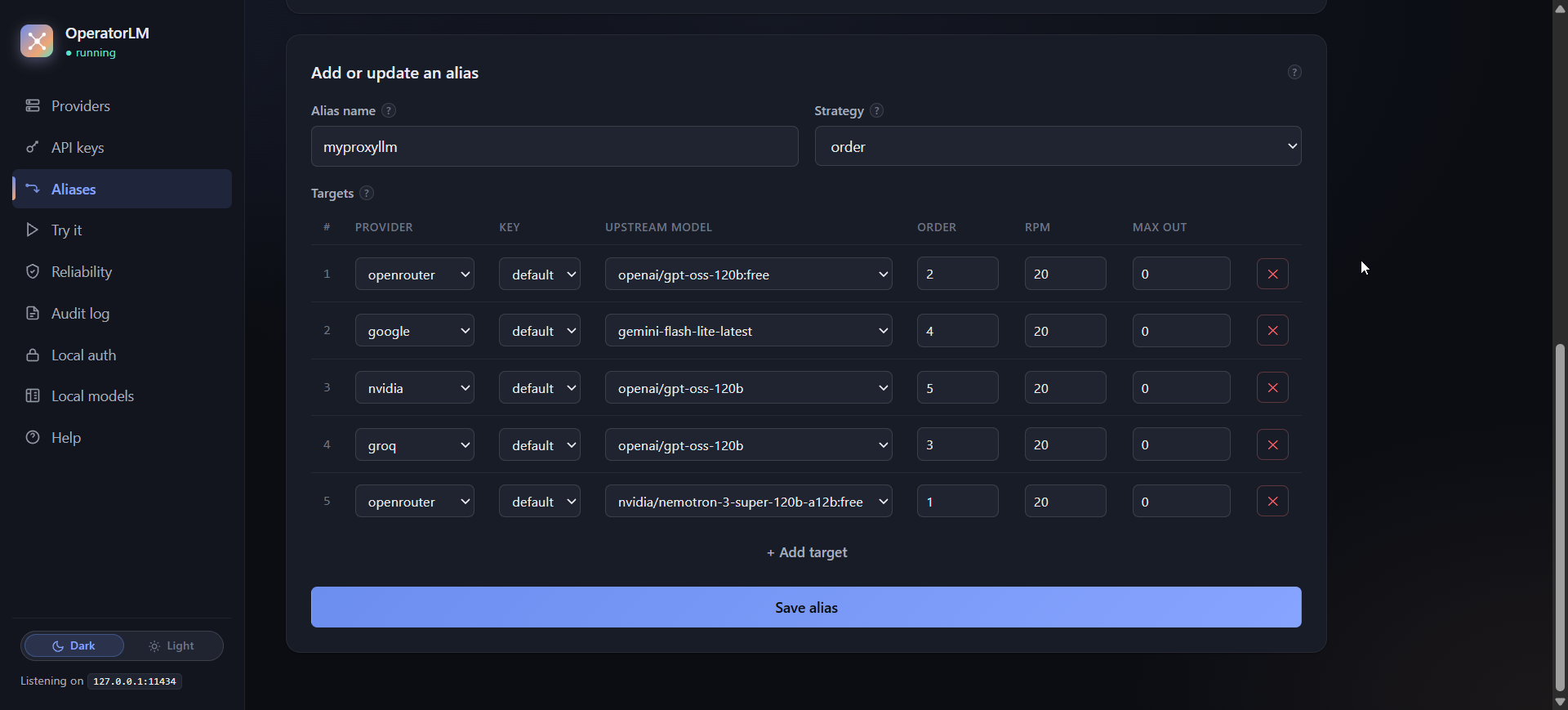
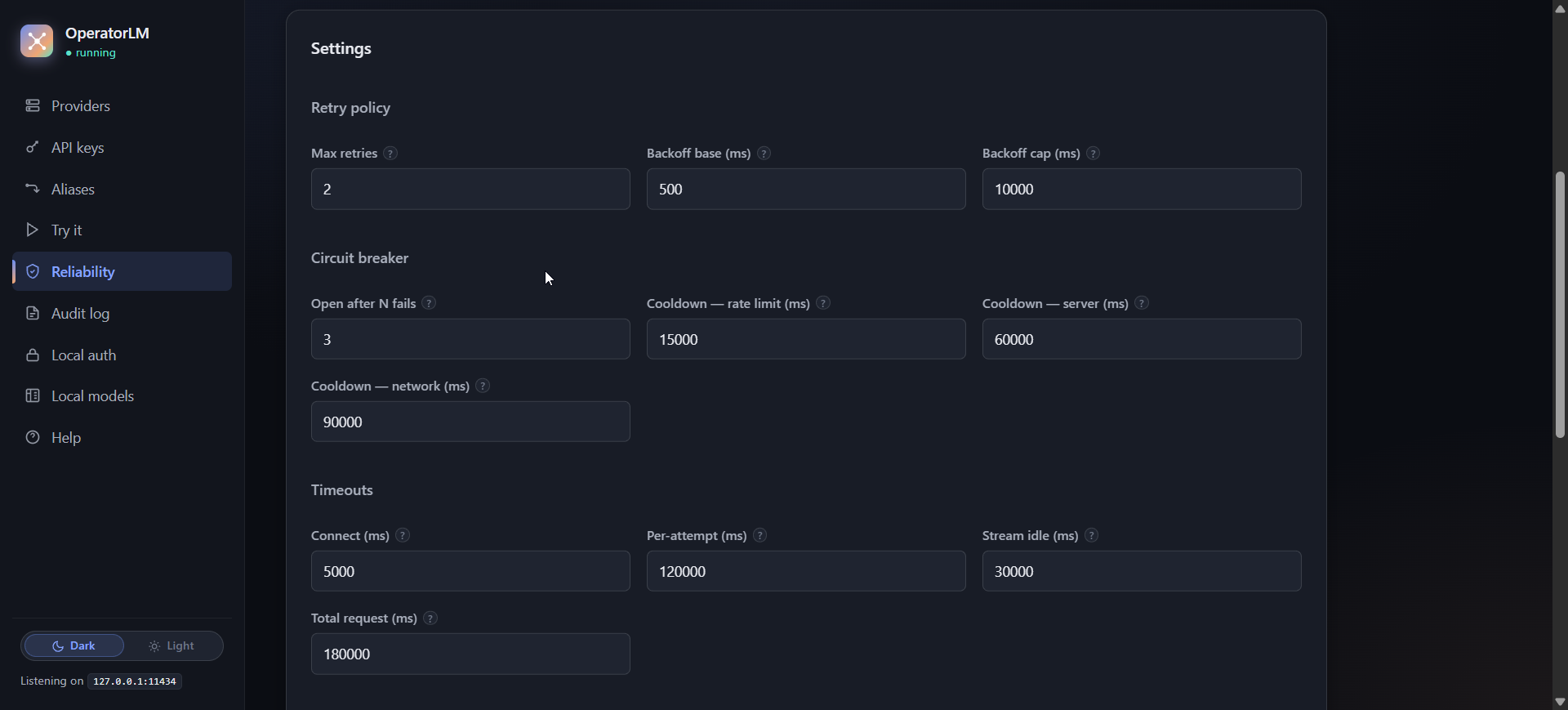
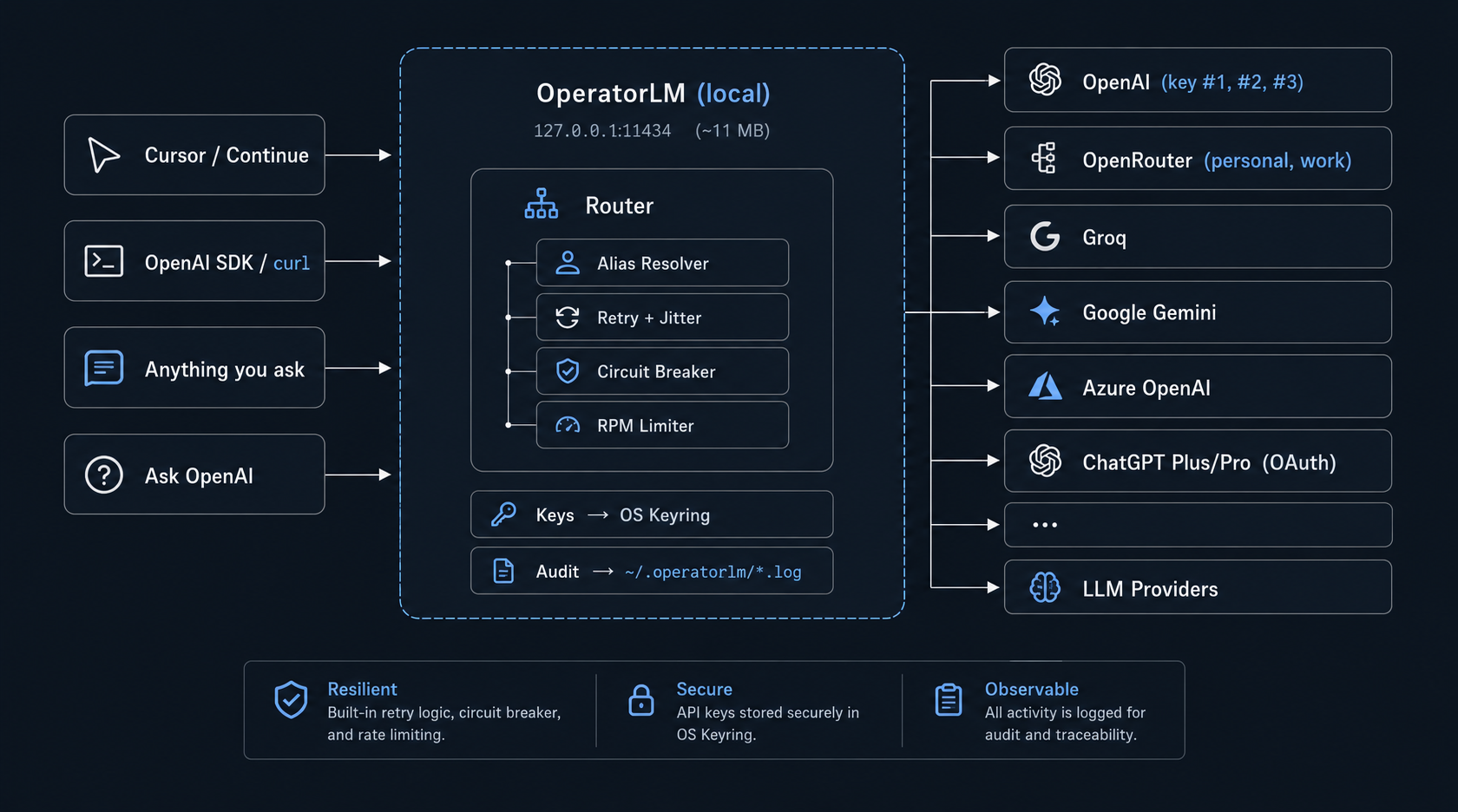
Replacing LiteLLM in Docker (500 MB RAM) with an 11 MB Go binary: fast LLM fallbacks and OS keyring When I started building against the OpenAI API, I iterated a lot. Run the test, change something, run it again. Then it clicked that every word coming back from the model was money. So I went looking at the free tiers of other providers. I went deep enough that I built a page about them: trymodels.aralde.dev. They helped, but each one was limited in its own way, and keeping a stable service on top of them was hard. This post is about what I built to solve this once and for all. The short version: you don't need a 500 MB Docker container running Python just to route local LLM requests. A single 11 MB Go binary can configure multi-provider fallbacks instantly, store your API keys securely in your OS keyring instead of scattered .env files, and dramatically simplify your developer life. Two problems with existing tools The first problem was cost, stability, and resource waste. Because these providers speak the OpenAI-compatible API, in theory you swap a base URL and keep going. In practice you want something smarter: one name for the model, several providers behind it, and when one hits a rate limit or drops, the same call seamlessly falls back to the next. LiteLLM does this, but running it in Docker took about 500 MB of RAM on my machine just to route local HTTP traffic. It felt overkill to keep a full container and Python runtime alive just for proxying requests. I wanted an instant, lightweight tool that does fast multi-provider fallbacks without the bloat. The second problem was keys. Every new project started the same way: # project-a/.env OPENAI_API_KEY=sk-... OPENROUTER_API_KEY=sk-or-... GROQ_API_KEY=gsk_... Then project-b/.env, with the same three lines. Then project-c. Each copy is one more file with a live key in it, sitting in one more folder. I decided to solve both in one place. The result is OperatorLM, a local OpenAI-compatible proxy. It's one Go binary of about 11 MB. No Docker, no Python, no node_modules. What it looks like !Demo of OperatorLM: one model name mapped to three accounts, a test request returning 200 with the circuit-breaker settings beside it, a config file that holds only a keyring reference, the ~11 MB binary, and local models in the admin UI The client side is a base URL. Anything that speaks the OpenAI API can point at it: curl http://127.0.0.1:11434/v1/chat/completions \ -H "Authorization: Bearer anything" \ -H "Content-Type: application/json" \ -d '{"model": "fast-llama", "messages": [{"role": "user", "content": "Hi"}]}' The API key can be any non-empty string. OperatorLM injects the real one. fast-llama is not a model. It's an alias. In the README example it points at Groq first (30 requests per minute), then OpenRouter as the paid fallback. The client asks for one name. The alias walks its targets in order until one answers. !Aliases tab in the admin UI: one alias with strategy "order" and five targets across OpenRouter, Google, NVIDIA and Groq, each with an order and an RPM limit Each alias decides which provider takes the first request. OpenAI, OpenRouter, Gemini, whatever you put at the top of the list. It listens on 127.0.0.1:11434, the same port Ollama uses. So it works as a drop-in for tools that already talk to that address: Cursor, Continue, Cline, Zed and similar. What I learned about failover Retrying the same target is not failover If a provider says you're rate limited, retrying it 500 ms later mostly gets you the same answer. The quota didn't reset because you waited half a second. So an alias has a strategy, order, that walks the target list until one succeeds. Retries still exist (2 by default, backoff starting at 500 ms with jitter, capped at 10 s). Not every failure is the same failure This is the part that surprised me. You have to tell apart network failures, streaming timeouts and quota limits (RPM). If you treat them the same, you block an alias that didn't need blocking. The circuit breaker has three states and opens after 3 failures. The cooldown depends on what failed: - 429 (rate limited): 15 s - 5xx (the provider is broken): 60 s - network error: 90 s It also honors Retry-After when the provider sends it. Streams fail quietly A stream that stops sending tokens doesn't return an error code. The connection is open and nothing arrives. So there are two separate clocks: a stream idle timeout (30 s) and a total request timeout (180 s). Skip a target you already know is full If a free account allows 30 requests per minute, sending the 31st is a wasted round trip. The RPM limiter keeps a sliding 60 s window per target. When a target is full, it gets skipped instead of making the request wait. All of this is tunable live from the Reliability tab, without a restart. !Reliability tab: retry policy, circuit breaker thresholds and cooldowns per failure type, and timeouts Keys belong in the OS keyring The fix for the .env problem was boring, which is why I like it. Keys go into the keyring your OS already has: Windows Credential Manager, macOS Keychain, or Linux Secret Service. The config file at ~/.operatorlm/config.toml only holds references, like operatorlm:openai_work. There's no secret in it. Your projects don't hold keys either. They hold a base URL. A few more things in the same spirit. The audit log is JSONL at ~/.operatorlm/audit.log, with Authorization headers redacted. The proxy only listens on loopback, with host-header validation on the admin API to block DNS rebinding. And v0.2.1 has zero telemetry. !Architecture diagram: editors and SDKs send requests to OperatorLM on 127.0.0.1:11434, which runs alias resolution, retry with jitter, a circuit breaker, an RPM limiter, keyring key injection and an audit log, then forwards to OpenAI, OpenRouter, Groq, Gemini, Azure OpenAI and other providers 1. Receive an OpenAI-compatible request. 2. Resolve the model name, by prefix match or alias. 3. Inject the key from the OS keyring. 4. Try, retry or break, following the rules above. 5. Audit the result to the JSONL log. The admin UI is embedded in the binary with go:embed and lives at http://127.0.0.1:11434/admin/. The codebase is small enough to audit in an afternoon. That's the point. The project kept growing after that. The same binary can now run local GGUF models through a built-in llama.cpp engine (exposed as local/<model>), plus Whisper for speech-to-text and Piper for text-to-speech, all offline. One experiment chains them: a local model answers, and Piper turns the answer into voice, so it behaves a bit like a realtime voice model. Limitations - The binary is not signed. Windows SmartScreen shows "Windows protected your PC" (More info, Run anyway). macOS Gatekeeper blocks the first launch (right-click, Open). - It's built for local development on 127.0.0.1, for one user. No distributed production setup. - Port 11434 clashes with a running Ollama. Change one of them in ~/.operatorlm/config.toml. - On headless Linux, the keyring needs a running Secret Service daemon and a D-Bus session. Running it as a proper Linux service on a server is the next thing I plan to do. - Local models need llama-server and run as a second process. Speed depends entirely on your GPU and RAM. Try it It's Apache 2.0, for Windows x64, macOS (Apple silicon and Intel) and Linux x64. The code is at aralde/operatorlm and the site is operatorlm.aralde.dev. If a provider fails over badly for you (an error that looks like one thing and is another), an issue with the response attached helps the most.
I made TextFold so you can fold a long article and open the detail where you need it Sometimes I want to see what an article covers before reading every paragraph. I built TextFold to give text that kind of zoom. You can start with a short view, open one paragraph, and leave the rest compact. It works with web articles, papers, PDFs and Word documents. The idea comes from Ted Nelson's stretchtext, and this is a short demo of my version. There are five levels. Full is the original; Brief selects original sentences. The shorter Key, Takeaway and Topic levels use AI-written text. You can always expand back to the original. Preparing the levels needs a model, but switching between them doesn't call it again. The app is free and open source (Apache 2.0). You can use Ollama on your own computer, or choose a hosted model. Hosted providers may charge for usage and receive the text you ask them to process. An already-prepared document you can try without setup: chenxiachan.github.io Install or see the code: chenxiachan/textfold I'm especially interested in whether the folding feels natural to read. Welcome any feedback!
great minds, etc. github.com/hexdotexe
since I made stuffs to relieve my problems, one of them is gallery on Android that it's either Google ads or built-in OS app so I created my own OSS android photo gallery that is simple fast clean and minimal Matthew-Eucaristo/plain-gallery for my family's android phones so that they doesn't suffer the ads
Location: Maryland, United States Remote: Open to remote, hybrid, and in person Willing to relocate: Yes Technologies: C, C++, Fortran, Java, Message Passing Interface (MPI), OpenMP, Python (Matplotlib, Numpy, Pandas, Scipy), SQL (especially SQLite) Résumé/CV: Available upon request Email: andrewtrettel.com (to prevent spam, my email address is in the linked image) GitHub: github.com/atrettel Website: andrewtrettel.com Hi, I'm Andrew Trettel. I'm a scientist with a PhD in mechanical engineering looking for any potential opportunities outside of academia and research labs. I am open to many different roles, including being a software developer or data scientist. I have over a decade of experience in scientific research, especially on the numerical side. I have years of experience in writing software for and running large simulations on high-performance computing (HPC) systems. I have also developed software for non-scientific purposes, like creating user interfaces for desktop applications and writing command-line tools. I have extensive experience using commercial and noncommerical computational fluid dynamics (CFD) codes. I have years of experience working with large datasets, including the tasks of calculating statistics and developing hypotheses/models/theories from data. I've worn many hats over the years and love learning new and interesting topics.
feat: add Clover support by Maphist0 · Pull Request #31306 · ggml-org/llama.cpp Built on Qwen3.6-35B-A3B, Clover combines a text-only mixture-of-experts backbone with block diffusion generation: - 35B total parameters, approximately 3B active per token. A hybrid Gated DeltaNet (GDN) / full-attention MoE architecture. - Bidirectional attention within each block. Additional learned GDN parameters support block diffusion while preserving a causal prefix. - 128K context. Up to 131,072 tokens across the prompt and generated response.
I made a reading mode that lets you fold an article down, then open the parts you want to read I spend a lot of time reading papers and long web articles. I kept wanting something between the full page and a summary, where I could choose which parts deserved a closer read. So I built TextFold, an open-source reader inspired by Ted Nelson's stretchtext idea. You paste a page's URL, fold it into an overview, then open individual paragraphs while the rest stay folded. The video shows the interaction. Full keeps the original text. Brief selects original sentences; the three shorter levels are AI-written. A model prepares those layers first, then changing the reading depth doesn't make another model call. You can use Ollama or a hosted provider. The app is free and Apache 2.0. There's also a prepared example you can try in your browser without installing anything. Demo: chenxiachan.github.io Code and setup: chenxiachan/textfold Would you want this kind of control in a browser's built-in reading mode? I'm especially curious about what should stay visible when you fold an article.
Honest take on AI tools for variant analysis - your PhD and domain knowledge still matters I'm curious what folks' experience is like using AI tools for their research, specifically with verifying AI-generated claims and analyses. I wanted to share my experience using Claude Science. The summary: incredible potential, but be careful with interpretation - trust what you know and always be skeptical. My PhD was in hair cell mechanotransduction. I picked a question I could check every step of: where do clinically reported missense variants in TMC1 (the pore-forming subunit of the hair-cell transduction channel) fall on the protein? Are pathogenic ones enriched in the TM helices, and do they sit closer to the pore? I ran it end to end in Claude Science on public data only: ClinVar via gnomAD, Ensembl, UniProt, AlphaFold, and the C. elegans TMC-1 cryo-EM structure (7USW). Repo with prompts, outputs and a notebook: meccaand/TMC1-Variant-Map What I had to catch: 1. Consequences from the wrong transcript. The first pass said no benign missense variant sat in a TM helix (p = 0.025). But two of those six "benign missense" variants weren't missense on the MANE transcript; the labels came from the gnomAD mirror's off-transcript calls. Re-deriving every consequence on MANE turned up 9 bad rows, including five 3′UTR variants labeled missense. Corrected p = 0.11. 2. The main claim was driven by a single outlier. The first pore-distance figure said "35.6 Å closer, p = 0.008." That was a difference of means drawn over median bars, driven by one N-terminal variant (K65E) at 98.7 Å. AlphaFold is locally confident there (pLDDT 73), but PAE shows it doesn't know where that domain sits relative to the pore. 3. Too narrow a pore definition. It used TM4 and TM6 only. By homology to TMEM16/OSCA, it should be TM4–TM7. The built-in reviewer (it re-checks responses against what actually ran) caught two real problems I'd have skimmed past: notebook text that contradicted the output below it, and an off-by-one in a helix-boundary table. It also raised a false positive. It recounted the comparison group using the same bad consequence labels from #1 and told me a non-significant result was significant (p = 0.037 vs 0.053). The checker needs checking too. The main point I'd like to make is that this entire analysis would have taken me days to weeks if I had done this manually. It's incredible what these tools can do, but there's still no substitute (not yet at least) for the years you spent in the lab and hours reading literature. What's your experience been?
RAVEN is open-source: code, paper, and RAVEN-QA benchmark below. We'll be at the SISREN Workshop (#CoRL2026) in Austin on Nov 12. Working on robot memory or embodied navigation? Come say hi! 🤖 🌐 ravenmem.github.io 💻 princeton-prism/RAVEN 📄 arxiv.org
Gregory Kurtzer (créateur de CentOS puis de Rocky Linux) vous présente Ginux, un kernel "not linux" développé en 11 jours avec l’IA (via Pierre Arlais). Ya plus qu'à attendre les CVE ! 👉 gmkurtzer/ginux
Gregory Kurtzer (créateur de CentOS puis de Rocky Linux) vous présente Ginux, un kernel "not linux" développé en 11 jours avec l’IA (via Pierre Arlais). Ya plus qu'à attendre les CVE ! 👉 gmkurtzer/ginux t.co
You can get it here: amirfish1/claude-command-center Install notes and the macOS app are in the README.
Local LLM decode has a hard ceiling: memory bandwidth divided by bytes read per step. On an M4 Max, plain llama.cpp and MLX hit about half of it. llama.cpp's MTP drafting (the model's own draft layer) won back 1.56x on code, 1.07x on chat. wilsonwu-ai/local-llm-decode-ceiling t.co
Notes on getting native iOS web push working in Next.js without an Apple developer account Ran into a bunch of weird quirks wiring up web push on iOS for my habit app, figured I'd write down what actually worked so nobody else wastes a weekend digging through stale threads. You don't need a $99 Apple developer account or Capacitor/Cordova to send push notifications to iPhones anymore. Web push works on iOS 16.4+, but Apple has specific constraints that aren't obvious until you test on a physical device: 1. Safari hides PushManager unless the PWA is installed In regular Mobile Safari, window.PushManager is literally undefined. It only exists when the web app is running in standalone mode (display-mode: standalone). If you just check for "Notification" in window, your UI will break on iOS. You have to check for standalone mode first, and if they're in Mobile Safari, show instructions to tap Share -> "Add to Home Screen". 2. No silent background pushes If your service worker receives a push event and doesn't call self.registration.showNotification(), Apple will quietly invalidate the device subscription. Every push must result in a visible notification. 3. Cleaning up dead subscriptions When someone deletes the PWA icon or turns off notifications in iOS Settings, Apple's APNs endpoint returns an HTTP 410 Gone or 404 Not Found on the next send attempt. If your backend doesn't delete those database rows immediately, you'll end up hammering dead endpoints on every broadcast. 4. Service worker caching quirks Make sure your next.config.ts sends Cache-Control: no-cache for /sw.js. If the browser caches the service worker script aggressively, updates to your push handler won't ship to installed PWAs without manual cache clears. The Implementation 1. Service Worker (public/sw.js) self.addEventListener("push", (event) => { let payload = {}; try { payload = event.data ? event.data.json() : {}; } catch { payload = {}; } const title = payload.title || "DROPPDD"; const body = payload.body || ""; // Guard against protocol-relative open redirects (//evil.com) const url = payload.url?.startsWith("/") && !payload.url?.startsWith("//") ? payload.url : "/checkin"; // Mandatory on iOS: showNotification must be called event.waitUntil( self.registration.showNotification(title, { body, data: { url } }) ); }); self.addEventListener("notificationclick", (event) => { event.notification.close(); const targetUrl = event.notification.data?.url || "/"; event.waitUntil( self.clients.matchAll({ type: "window", includeUncontrolled: true }).then((windows) => { for (const client of windows) { if ("focus" in client) { return client.focus().then((focused) => { if (focused && "navigate" in focused) return focused.navigate(targetUrl); return self.clients.openWindow(targetUrl); }); } } return self.clients.openWindow(targetUrl); }) ); }); 2. Cache-Control in next.config.ts import type { NextConfig } from "next"; const nextConfig: NextConfig = { async headers() { return [ { source: "/sw.js", headers: [{ key: "Cache-Control", value: "no-cache" }], }, ]; }, }; export default nextConfig; 3. Backend delivery with Node web-push (src/lib/push.ts) import webpush from "web-push"; webpush.setVapidDetails( process.env.VAPID_SUBJECT!, process.env.VAPID_PUBLIC_KEY!, process.env.VAPID_PRIVATE_KEY! ); interface PushSub { id: string; endpoint: string; p256dh: string; auth: string; } export async function sendPush(subscription: PushSub, payload: object) { try { await webpush.sendNotification( { endpoint: subscription.endpoint, keys: { p256dh: subscription.p256dh, auth: subscription.auth }, }, JSON.stringify(payload) ); } catch (err: any) { if (err.statusCode === 404 || err.statusCode === 410) { // User uninstalled or revoked permission: prune immediately await prisma.pushSubscription.delete({ where: { id: subscription.id } }); } } } The code is from my habit & wager app, droppdd. - GitHub repo: nunchimangchi-dev/droppdd - (Check public/sw.js, src/lib/push.ts, and src/app/profile/PushSettings.tsx for the full setup). - Live build: droppdd.alwaysgivealwaysget.com - (Note: The live site is currently capped at a 33-user closed beta while I dial in the reminders, but the repo is open if you want to inspect the files or run it locally). Rock on party people. Happy to answer questions about the permission flow, VAPID key generation, or scheduling triggers.
DLNE update, one week later: a 35B model on donated GPUs, free phone & web chat with voice, and our first outside volunteer Hey r/OpenAssistant, A week ago I posted DLNE (Distributed LLM Engine): an open-source project that pools consumer and enterprise GPUs over home internet into one shared inference cluster, so bigger models can run for everyone without a closed API in the middle. It has moved a lot in seven days, so here's an honest update. # ⚡ What changed * **A bigger model.** The backbone server (dual AMD BC-160, 16 GB HBM2, on Arch Linux) went from Qwen2.5-Coder 14B to **Qwen3.6 35B-A3B** (mixture of experts) with a **256k-token context**, served as 4 coding lanes of 64k each at **~32 tok/s**. A third card, an RX 580, now runs vision, image generation and speech. * **It's not just for coders anymore.** There's a **free phone and web chat** for anyone: no account, no GPU, no API key. It can read photos you send, draw pictures (Stable Diffusion), and look things up (weather, news, Wikipedia, web search). * **Voice.** Tap the mic and speak instead of type: speech-to-text runs on our own server (whisper.cpp), the clip is held in memory only and never stored. Turn on **Conversation mode** and your message sends itself and the answer is read aloud by your own device's voice. Works in the web chat (iPhones too), the Android app and VS Code. * **The coding agent grew up.** It can now see pictures you paste in, keep long-term memory per project, and learn reusable "skills" (procedures it writes down and reloads when a task matches). Conversations stay pinned to their lane, so long sessions keep their cache instead of re-reading everything. * **NVIDIA donors get CUDA.** Donating machines with a recent NVIDIA card can switch from Vulkan to a CUDA engine, about 30-50% faster. AMD, NVIDIA and Intel all still work over Vulkan. * **A live, public status page.** A network map of who is being answered right now and what is answering them: dlne.rossgilsonlabs.dev * **First outside volunteer!** This week someone I've never met used the cluster and donated their machine's compute at the same time. That's the whole idea working. Still true: **no port forwarding**. Donating machines connect out through a persistent WebSocket tunnel, so anything behind a home router can join. # 🚀 Try it 1. **Chat in your browser or on Android (no GPU, free):** dlne.rossgilsonlabs.dev (the Android app "DLNE Chat" is a download on that page). 2. **The coding agent in VS Code:** search for **"DLNE Coding Assistant"** in the VS Code Marketplace or Open VSX ([open-vsx.org/extension/dlne/dlne-code-assistant](open-vsx.org)). Every new user gets **100 free requests** to try it before contributing. 3. **Donate an idle GPU or CPU:** one click from the extension, or the **DLNE Donate** tray app for Windows and Linux on the site. Donors keep using it free. # 📦 Links * **GitHub:** RGlabs84/DistributedLLMEngine * **Live status:** dlne.rossgilsonlabs.dev * **Discord:** discord.gg I'd love feedback on decentralized inference, especially where the swarm should go next: more volunteer GPUs mean bigger models for everyone. Happy to answer anything technical in the comments.
TwinDesk turns your computers and phone into one desk. The free, open-source app for Mac, Windows, Linux and Android shares one mouse and keyboard, files and clipboard, with no account or cloud. Note: unsigned builds ask once before opening. GitHub: InukaAsith/TwinDesk
2/ It reads my old applications and the new funding call, builds a reference library as I go, and keeps track of what each claim is based on. I get to spend my time on the science instead of the paperwork. I made it open source: albanlongchamp/grant-tool-public Would love feedback.
My Android TV home screen now turns into a rainy neon city when you walk away (plus 3 new themes) :) Last week I shared Home Deck, the neon home screen I made for my TV. Thanks for all the comments! v0.2 is out: - A rainy city screen saver: the away screen can look out a window at a neon city in the rain, with drops running down the glass, flying traffic and the odd police chase. Two views, Window and Downpour (a storm, with lightning) - Three themes: Normal, Lime and Violet, and your accent color works in all of them - Clock seconds on or off - Five fixes from dineshalphaque on GitHub, including one that keeps a web view crash from taking the launcher down If you already have it, adb install -r homedeck.apk updates it and keeps your favorites and settings. New to it? The README walks you through installing it and switching back to your old home screen: glidiandev/home-deck Tested on my Sharp AQUOS 4K, and someone here got it running on an NVIDIA Shield. If it acts weird on your TV, an issue on GitHub helps a lot.
I made a free, open source spatial desktop for XREAL glasses that runs on your Android phone (Pocket XR) preview.redd.it I've been a member of the XREAL community since the original Nreal Air and I always wanted to do something for this community. Pocket XR started as something I built for myself (with my Aura and a Galaxy Z Flip 7) from the references I could find. I then worked on it with Claude to get it to the point where I think the community can run with it. XREAL has given it their blessing, and today it's public and free. It's a community project, not made by or affiliated with XREAL. What it does - Any Android app as a window around you: drag, resize, snap, curve, push back or pull closer. - Head tracking that keeps windows where you put them; 3D side by side with real depth (the Aura and One switch to 3D by themselves). - Your phone as a trackpad (it also works on a Z Flip's cover screen), a Spatial Mouse, and hand tracking on the Aura. - Both hands up to adjust every window at once; layouts and presets. - A launcher, a Control Center, and recording what you see in 1080p. Glasses: tested on the Aura and the One (on the One, turn Stabilizer off). The One Pro and 1S should work, and I need testers. Hand tracking on the One and One Pro (with the XREAL Eye) and 6DoF are open for anyone who wants to build them. Phone: Android 11+ with USB-C video out. Developed on a Z Flip 7. It needs Shizuku. No ads, no accounts, GPL-3.0. Updates come in the app or through Obtainium. GitHub: pocket-xr/pocket-xr · Video: youtu.be I think anyone with an Android phone and XR glasses can get real use out of this, and I can't wait to see where the community takes it. Feedback, bugs and Glasses reports are all welcome; I'll be in the comments.
Location: Bengaluru, India (UTC+5:30) Remote: Yes, preferred Willing to relocate: Yes, for the right role Technologies: Python, TypeScript/JavaScript, FastAPI, AWS, SQL, PyTorch; LLM agents, RAG, tool calling, evaluations, voice AI Résumé/CV: sauravtom.github.io Email: sauravalgs@gmail.com GitHub: github.com/sauravtom I'm Saurav, a hands-on engineer with 10+ years building and shipping software. I'm looking for a senior or founding engineer role working on applied AI, voice systems, or backend infrastructure. At Delfino AI (YC S22), I was CTO and built voice agents for healthcare operations: navigating IVRs, waiting on hold, speaking with insurance representatives, and returning structured information for eligibility, prior authorization, and claims workflows. That work involved deterministic execution paths, fallbacks, human handoffs, and debugging failures across calls and integrations. Before that, I co-founded Likeo (acquired), where I optimized a virtual try-on pipeline to run 2x faster while reducing AWS GPU infrastructure costs by 10x. At xAGI Labs, I built 12+ production AI systems for startups, combining retrieval, model APIs, structured outputs, and external integrations. I've also led an eight-engineer team and worked directly with founders on product and technical decisions. I can take ownership from backend design and implementation through model integration, evaluation, deployment, and production debugging. If your team needs someone who can build AI features and own the systems around them, I'd be happy to talk.
kDrive support is coming to rclone, with a vault opportunity kDrive support is coming to rclone! Commit: github.com/rclone/rclone/commit/5118e0c32a340d7bc… With the new backend in place, I believe Infomaniak should offer a vault similar to the Koofr vault, which is built on rclone’s crypt backend.: koofr/vault
Nice RC Update @ryanrhughes, @dhh !! Patchwatch keeps the 4.5 RCs livable here: RC3 undid all 3 PR patches I run. One had merged on quattro but missed the RC3 backport, which taught Patchwatch a new warning today. mudiam/omarchy-patchwatch
Linguagem C Aula 20 Expressão Condicional e Operador Ternário em C Nesta Aula 20 da série de Linguagem C, exploramos a fundo o operador ternário nativo (? :), a única estrutura condicional de três operandos da linguagem. Usando um mini-desafio interativo de adivinhação, demonstramos 4 formas distintas de aplicar o operador ternário na prática: Condição direta: Avaliação direto no fluxo de saída do printf. Armazenamento intermediário: Salvando o resultado booleano em uma variável const int. Manipulação de buffers (snprintf): Gravando a string formatada em um array mutável (nossa "lousa"). Ponteiros e literais (const char *ptr): Apontando eficientemente para literais de string imutáveis (nosso "cartaz"). ⏱️ O que você vai ver nesta aula: O que é e para que serve o operador ternário (condição ? verdadeiro : falso). Diferenças fundamentais de uso entre arrays (char buf[]) e ponteiros (const char *ptr) em C. Boas práticas com qualificadores const para garantir segurança e imutabilidade. Geração de números aleatórios com rand(), srand() e time(). 💻 Código-fonte completo e materiais: Acesse o repositório oficial no GitHub: 👉 youtube.com 💬 Participe da comunidade: Tem dúvidas ou quer compartilhar sua solução? Deixe nos comentários ou participe da nossa comunidade no Reddit: r/AulasProgramacao. Se este conteúdo ajudou nos seus estudos ou no seu desenvolvimento, deixe seu like e inscreva-se para acompanhar a sequência das aulas!
It's early bits are here: IlmenAI/ui-atlas
What are people building with MyGo? I put together Awesome MyGo: 250 projects, from coding agents and terminals to music players and Ul kits, plus a searchable site. Know a project that's missing? Contributions are welcome! agnogad/awesome-mygo