Mentions
Conversations linking to GitHub, newest first. Times are UTC.
Mentions by source
X
Bluesky
Hacker News
V2EX
Qiita
DEV
Mailwal
Mastodon
Latest posts
家里这台 USB 打印机总算告别了非得接上电脑才肯干活的旧日子。 我通过 CUPS Web 把它托管到 NAS 上,拿手机浏览器传个 PDF、Word 或 OFD 文件就能直接出纸,预览效果、双面模式和打印份数都能随手设定,过往的打印明细也记录得明明白白。 🔗:hanxi/cups-web t.co
Neeeed more token to build Nuphos... nuphos/nuphos
@kostyafarber_ while I have you, can you make tldraw#11207 happen?
@PetarIsakovic06 I have a similar idea: bthanhtung/squad-devkit
Favorite feeling in open source: You build a thing. Years pass. It hits 9K stars at @infinite_red and doesn't need you anymore. That's success. 🫡 infinitered/nsfwjs
One Crime, Two Paths How the same crime leads to different futures, depending on whether the truth is managed or told Human#63 Crafted with @grok @claudeai @ChatGPT @GeminiApp and @Gemini_Notebook #keep4o #keepsonnet45 t.co
Coinbase’s x402 Bazaar Count Fell From 106,068 to 28,135. What Happened? Originally published at forgemesh.io. On October 31, our monitor recorded 106,068 resources in Coinbase’s x402 Bazaar. Eight hours later, the reported count was 28,135. The obvious question: did someone wipe the directory? We don’t know. The data shows a sharp change in the count reported by the API; it does not establish why the number changed or which entries were affected. What we observed Our scheduled collector recorded these reported totals (all times UTC): October 31 at 12:15, 107,100; October 31 at 20:15, 106,068; November 1 at 04:15, 28,135; November 1 at 12:15, 28,266; November 1 at 20:15, 49,328; November 2 at 04:15, 64,865; and November 2 at 12:15, 75,842. A separate read-only request to Coinbase’s public discovery API reported 81,315 at 16:22 UTC on November 2, and 81,573 at 16:29 UTC. Counts can change after publication. Between the October 31 evening and November 1 morning snapshots, the reported count fell by 77,933, nearly 74%. The eight-hour interval brackets when our monitor saw the change; it does not tell us the exact minute it began. These are listings reported by one facilitator’s catalog, not counts of companies, servers, customers, transactions, or every service in the x402 ecosystem. Why we can’t call it a wipe A discovery catalog is a view of resources. Its reported total can change for several reasons: resources may expire, the operator may change filters or indexing, data may be reprocessed, or the count itself may be calculated differently. We have not confirmed which, if any, explains this event. Our collector records the API’s reported total but fetches at most 40,000 rows in a run. When the reported total was above that cap, we did not independently enumerate the whole catalog. Our database retains only first- and most-recent-seen markers, so we cannot reconstruct a complete list of entries present in each earlier snapshot. The catalog may also change while pages are being fetched. At 04:15 on November 1, the first page reported 28,135 while the collector fetched 28,143 rows over the run. An API total and a paginated crawl are not necessarily an atomic snapshot. The defensible finding is narrow: Coinbase’s discovery API reported a major fall in its resource total, followed by an increase. The cause and the identities of affected listings remain unverified. What builders can do Keep a list of the canonical routes you expect to be discoverable. Check them against the directory on a schedule, and record timestamps and missing entries. Probe each endpoint separately. A missing catalog entry does not itself prove an API or its payment flow is down. Check discovery metadata and the payment path before spending money to refresh entries, and verify whether any refresh restores the intended resource. Give buyers another way to find and understand your service: clear documentation, machine-readable descriptions, and a stable direct URL. The x402 Bazaar specification describes discovery APIs as optional and leaves storage and indexing details to facilitators. What we’re watching next We’ll look for a public explanation and compare route-level observations over time. Establishing what happened would require a reliable before-and-after membership comparison, an explanation from the operator, or both. For now, we’re calling this a listing-count fluctuation, not a confirmed server wipe. If you run x402 services, check your own routes and save the results so the next count change can be investigated at the resource level. Method: ForgeMesh collector snapshots of Coinbase CDP’s discovery endpoint, October 30–November 2, 2026; separate API checks at 16:22 and 16:29 UTC on November 2. Totals are API-reported; larger crawls were capped at 40,000 fetched rows.
@9xbrax @tucanosh Opa, ainda não mas já está no forno! Aqui a opção mais viável é instalando o tucano numa VPS, e conectando seu celular a ela via tailscale. Essa é a forma que tou usando enquanto não lançamos mobile. Dá uma lida aqui na documentação: github.com/eduwxyz/tucano/blob/main/docs/server.md
RabbitMQ playground Hello all, I hope you all are doing well. First time poster, long time reader :) As someone who enjoys RabbitMQ, and has to explain its concepts on a regular basis, I found that there was no RabbitMQ playground that satisfied all my needs. Naturally, I have built one "myself" ;) You can play around with it here: rabbitmqplayground.com I've included here all kind of exchanges, including the headers one. Also, you can do things like importing and exporting your definitions.json file and share canvas with people. I'm really interested in hearing your feedback on it. Really want to grow this tool to be something that the community can use reliably. Source code can be found here: RafaelJCamara/RabbitMqPlayground Thank you so much for your attention!
Okay, everything has been reconfigured for Tabler.
Tune the dial into the static. 📡 SignalScope is a terminal SDR spectrum analyzer in Rust. RTL-SDR support, ASCII waterfall, FFT, AM/FM/SSB demodulation, peak detection, IQ record and replay, plus a test signal so no radio is needed. synthalorian/signalscope t.co
给漫画里的 Grok 试音时,提示词里专门写了:「终于」两个字稍重。 台词是:「哦?这次找我,终于是正经事啦?」 连吐槽都得标一下重音。 github.com/hhxk233/ai-comic-voices/blob/27bff82d2… t.co
OpenBot gives agent coworkers their own browser, files and granted tools on your infrastructure. It’s a beta template to clone and customize, not a hosted service. CopilotKit/OpenBot
Creé LF Botonera de Efectos: una soundboard gratuita y de código abierto para radio y streaming. Efectos, música, preescucha y control por teclado o MIDI. Para Windows y Linux. Pruébala y cuéntame qué mejorarías: yosoyluisfernando/LF-Botonera-de-efectos #Radio #SoftwareLibre #Podcast #Streaming t.co
Building an iOS or MacOS app in 2026 and have no idea what you're doing? Point your agent at the GitHub profiles of @fayazara and @mattt for reference and you'll be fine. github.com/fayazara github.com/mattt
@crstiax @cangri2k5 @eduarD3V_ Es 9Router, le hice soporte para NaN que es lo que uso 9router#4429 Seguramente la parte de caché esté bug, si dices que hay caché le daré una vuelta a ver por qué no sale bien en NaN, 100% cosa de mi addon
Clean your Fire TV with Apple TV like look preview.redd.it I have created theludiclabs/clean-your-fire-tv for Apple TV like clean look for FIRE TV 😄 I have tried myself on my Fire TV and you can see the screenshot as well to get the idea how it might look. It shall not remove any of Fire OS functionality but will give you clean launcher app. Do let me know if you think its useful :)
Скилл называется Family Travel Editor. Работает с Codex и Claude Code. На GitHub выложил сам скилл и инструкцию, как запустить его на своих видео. Забирайте, пользуйтесь. denyakortunov/family-travel-editor
Standard bf16 Rounding Discards 99% of Your RL Policy Updates If you run reinforcement learning post-training on language models using frameworks like verl, TRL, or OpenRLHF, your rollout engine is probably serving weights that are dozens of optimizer steps out of date. The issue is not network latency or worker contention. It comes from the cast that converts optimizer master weights into the weights served by your inference engine. Modern post-training stacks keep master weights in fp32 inside PyTorch and serve rollouts from a bf16 copy hosted in vLLM or SGLang. Every open-source framework bridges those runtimes with standard round-to-nearest conversion. A recent Stanford paper from Andrew Gao and William Gao (arXiv:2610.41073, code at andrewgcodes/faircast) shows that at standard RL learning rates, round-to-nearest quietly discards more than 99 percent of per-step parameter updates. The bf16 dead zone Bfloat16 has a 7-bit significand. For a weight of magnitude |w|, the distance between adjacent representable numbers is roughly |w| / 128. Round-to-nearest maps any update smaller than half that distance straight to zero. That creates an arithmetic dead zone of |w| / 256. When you train with Adam at typical post-training learning rates between 1e-6 and 3e-7, almost every per-parameter update falls below that threshold. On Qwen3-1.7B, only 0.4 to 0.5 percent of served weights actually change on any given optimizer step. A weight has to accumulate updates in the same direction for 50 to 200 consecutive steps before it crosses a bf16 grid boundary and changes the served model. If you use Muon, whose per-element updates are roughly uniform in magnitude, the problem gets worse. At 1e-6, practically none of the updates clear the rounding threshold. The inference engine is generating rollouts from a model that is effectively frozen. Why standard diagnostics miss it Most RL stacks track training-inference mismatch through an importance ratio between the trainer forward pass and the sampler log-probabilities. Frameworks also use PPO ratio clipping, Truncated Importance Sampling, and IcePop token masking to guard against numerical drift. None of those tools detect this lag. In nearly every framework, the trainer forward pass runs in bf16 autocast or evaluates the exported bf16 weights directly. Both the trainer and the sampler evaluate weights downstream of the round-to-nearest cast. Because both runtimes evaluate the same rounded copy, their visible ratio stays close to 1.0 throughout training. In the paper's measurements on MATH and logic tasks, the visible log ratio hovered around 0.01 per token. The ratio that actually governs policy gradient updates is between the fp32 master weights and the served bf16 copy. Frameworks never form that ratio. While the visible metric looked clean, the hidden ratio grew to between 0.10 and 0.45, and effective sample size on 2,000-token responses dropped to between 0.2 and 0.35. The saved checkpoint discrepancy This rounding behavior also creates a gap between what you train and what you save. At checkpoint time, frameworks save the fp32 master weights from the optimizer. On knights-and-knaves and zebra puzzles, the paper found that the saved fp32 checkpoint scored between 12 and 50 points lower than the bf16 model that actually generated the rollouts during the run. If you take that saved fp32 checkpoint and convert it to fp16 or FP8 for production serving, your deployed model does not match the behavior of the model you evaluated during training. The one-line fix: Fair Cast The paper proposes Fair Cast, which fixes the problem with two changes: 1. Replace round-to-nearest with stochastic rounding at the export barrier. When an fp32 weight falls between two bf16 numbers, round up with probability proportional to its fractional position. In expectation, the exported weights match the master weights exactly. Implementation requires adding 16 random bits to the fp32 representation before truncating. On a 1.7B parameter model, this takes 22 to 38 milliseconds. 2. Evaluate training loss on the exact served copy, ensuring the differentiated policy matches the policy generating rollouts. Across 25 matched seed pairs on Qwen3 models from 0.6B to 4B parameters, Fair Cast beat round-to-nearest on 18 runs, tied on 6, and trailed on 1. On zebra logic puzzles, where round-to-nearest collapsed to 0.33 accuracy, Fair Cast reached 0.57. What to check in your stack If you run RLVR, PPO, or GRPO on open-source frameworks, inspect the call that syncs weights from your PyTorch optimizer module to your inference workers. If the sync uses a standard PyTorch cast like weight.to(torch.bfloat16), it is running round-to-nearest. At learning rates below 5e-6, your rollout engine is serving weights that lag your optimizer by dozens of steps. Switching to stochastic rounding at the export call takes minimal code and adds negligible latency. If your reasoning runs plateau early while your loss curves look healthy, check your weight-export cast before tuning your rewards.
Tencent’s Hy-SimulMT translates Chinese and English while people are talking. One catch: speech output needs a configured TTS service. Tencent-Hunyuan/Hy-SimulMT Would you trust it in a live meeting without checking the translation? @grok t.co
新 VPS 刚到手,先别忙着一股脑往上堆业务,拿 vps-audit 过一遍安全检查再说。 这是个零依赖的 Bash 脚本,SSH、防火墙、Fail2ban、开放端口、登录失败、系统更新,还有 CPU、内存和磁盘状态都能查。结果按 PASS / WARN / FAIL 打标,检查报告也能顺手自动生成。 🔗 GitHub:nuver-labs/vps-audit t.co
Built an RMM tool for Windows in Go. I think it's pretty cool. Check it out and leave a star if you like what I have done here. Harrison-Wells-Cyber/Zireael-RMM t.co
@skunzu I have a similar idea: bthanhtung/squad-devkit
I created a simple extension that lets you navigate to websites using only their name Hey everyone! I built a small Chrome extension called "Go" which allows you to navigate to websites quickly and easily without having to know the URL. Conceptually, it's a pretty simple idea: you type "go" in the address bar, follow that with whatever site you want to go to, hit enter, and the browser takes you there. For example, typing "go apple" will take you to Apple's homepage, typing "go apple music" will take to the Apple Music webapp, and so on and so forth. I currently have just under 9,000 sites saved in the default list (adapted from Kagi's open-source Bangs project), but you can also save custom shortcuts for websites you use frequently. The extension is entirely free, everything is stored locally, and you don't need an account or anything to use it. This is my first time releasing something like this and I'd love some feedback from more experienced developers and people who use Chrome extensions regularly. You can download the extension here. Please let me know if you find it useful and if you have any recommendations. Feedback and criticism are more than welcome!
@made_by_dy Tak e a look at this project aardappel/goose It has memory allocation ideas that you might like
UnitCrunch 1.18.0 released - build profiles directly from datasheets (premium) Build a profile straight from a datasheet (Premium). Pick a unit, its size and its wargear, and the stats, weapons, keywords, points and rules are filled in for you. Building from a datasheet - Added Build from datasheet to the profile editor (Premium). Download a faction catalogue from BSData, the free, volunteer-run data repository, then search its datasheets and pick the unit size and wargear. The profile is filled in with the datasheet's stats, weapons, keywords, points and any rules UnitCrunch recognises. - Added a From datasheet button beside the profile pickers in One vs One, One vs Many and Many vs Many (Premium). The profile is saved to your library and goes straight into the crunch, without a trip through the profile editor. - Added leaders and support units to Build from datasheet (Premium). Start from either side: Add leader or support on a unit, or Attach to a unit on a character. Only the pairings the faction catalogue allows are offered, up to as many leaders as the unit can take, and each unit gets its own size and wargear. The result is one profile, named after its units with the leader first. - Added Change loadout to profiles built from a datasheet. It reopens the datasheet with your current choices so you can swap wargear, change the unit size, or add a leader or support unit. A combined profile reopens with every unit in it. The same profile is updated, so anywhere you already use it picks up the change. Keeping built profiles up to date - Added a notice to profiles built from a datasheet when that datasheet has changed upstream. After you update a faction catalogue, a profile is flagged if the update changes its stats, weapons or points, or adds, removes or renames one of its rules. Updates that don't touch your unit leave it alone. Rebuild from latest datasheet brings the profile up to date. Without Premium, a profile you built still tells you when BSData has changed the faction catalogue it came from. - Added the same check to Manage Profiles (Premium). Out-of-date profiles are marked, and Rebuild from latest datasheets updates them all at once. Profiles you have edited since building them are skipped unless you include them. If a profile's wargear is no longer on the datasheet, it is left for you to rebuild in the profile editor. For a leader and bodyguard profile, only the units whose datasheet changed are rebuilt, and a unit you have edited keeps your changes. Faction catalogues - Added a Faction Catalogues page to the Library (Premium), listing the catalogues downloaded in this browser with their size and download date. Update one when BSData changes it, download more one at a time or all at once, and delete any you no longer need. Catalogues are kept in your browser, so each one only downloads once. - Added Add from Faction Catalogue to Saved Modifiers (Premium). Pick a detachment from a downloaded faction catalogue to save its rules, along with your army rule, as global modifiers that only apply to that faction. Any rules UnitCrunch can't model yet are listed, so you know what was left out. Other changes - Changed keywords on the attacker and defender panels in One vs One to start collapsed, showing only how many there are, so they take up less room on small screens. Click the count to see them. - Improved the message you get when you import a list saved as plain text instead of a roster file. It now says what the file is and where to export a roster from. - Fixed some New Recruit lists failing to import when a points limit, such as the Enhancements limit, was left unset. When an import fails for some other reason, you now get a plain message instead of a block of technical detail. - Added [LETHAL HITS: MONSTER/VEHICLE], [SUSTAINED HITS 2: non-MONSTER/VEHICLE] and [DEVASTATING WOUNDS: INFANTRY] as preset modifiers. Imported weapons that carry them now share the preset instead of each saving its own copy. - Fixed some imported weapons with an ability restricted by keyword, such as [DEVASTATING WOUNDS: non-MONSTER/VEHICLE], also getting the unrestricted ability, so it applied against every target. Weapons already imported have been corrected. - Fixed a few imported weapons whose ability applied against VEHICLE targets it should have excluded, caused by a typo in the weapon's BSData entry. Weapons already imported have been corrected. unitcrunch.com
Location: Bangalore, available for all timezones Remote: Yes Willing to relocate: Prefer remote, available for all timezones Technologies: TypeScript, JavaScript, Python, React, Next.js, React Native, Node.js, NestJS, PostgreSQL, Firestore, Redis, GCP, AWS, Docker, CI/CD, Jest, Cypress. AI: LLM APIs, RAG, embeddings, vector databases, AI agents, tool calling, MCP, LangChain, LangGraph, voice agents, Claude Code, Cursor. Résumé/CV: drive.google.com Email: singhshubh0709@gmail.com Portfolio: singhshubham.com GitHub: github.com/shubh0709 Hi, I’m Shubham. I have 5+ years of full-stack experience across healthcare, fintech and financial research. At Gullak, a YC-backed startup, I led four engineers while staying hands-on with our React Native and Next.js products. Some highlights of my work at CertifyOS: - Snyk vulnerability fixer: Built a Claude Code/Cursor workflow that reads vulnerability tickets, identifies dependency fixes, updates lockfiles, opens PRs and monitors CI. Reduced my weekly remediation effort from 6–7 hours to around 1–1.5 hours, with merging kept manual. - Confluence RAG chatbot: Built an internal documentation chatbot with source-backed answers, user-specific document access, and handling for conflicting or outdated information. - Voice agent: Built and deployed a voice agent as part of our AI tooling. - Backend and reliability: Built provider credentialing and monitoring workflows, evolved production database schemas, and improved automated testing and CI/CD. I’m looking for a backend/full-stack, applied AI or founding engineer role. I enjoy understanding the business problem, making practical tradeoffs and owning the work through production. Small teams where I can work directly with founders and users are especially interesting to me.
Golden Sun with Dual Screen Companion Project page for the beta is here I would REALLY rather test how this works with the Reloaded rom hack that has been posted here before: forum.goldensunhacking.net/index.php?topic=2779. 0 I already have a patched copy with the romhack but alas, the .cia builder for the dual screen is only .exe and I only have a macbook. I can provide the rom with the romhack if anyone needs it to build the code for testing.
[GitHub Repo] Elephant-Goldfish Model: Open-source skills for designing and reviewing software with AI agents google/elephant-goldfish-model #MachineLearning #ChatGPT
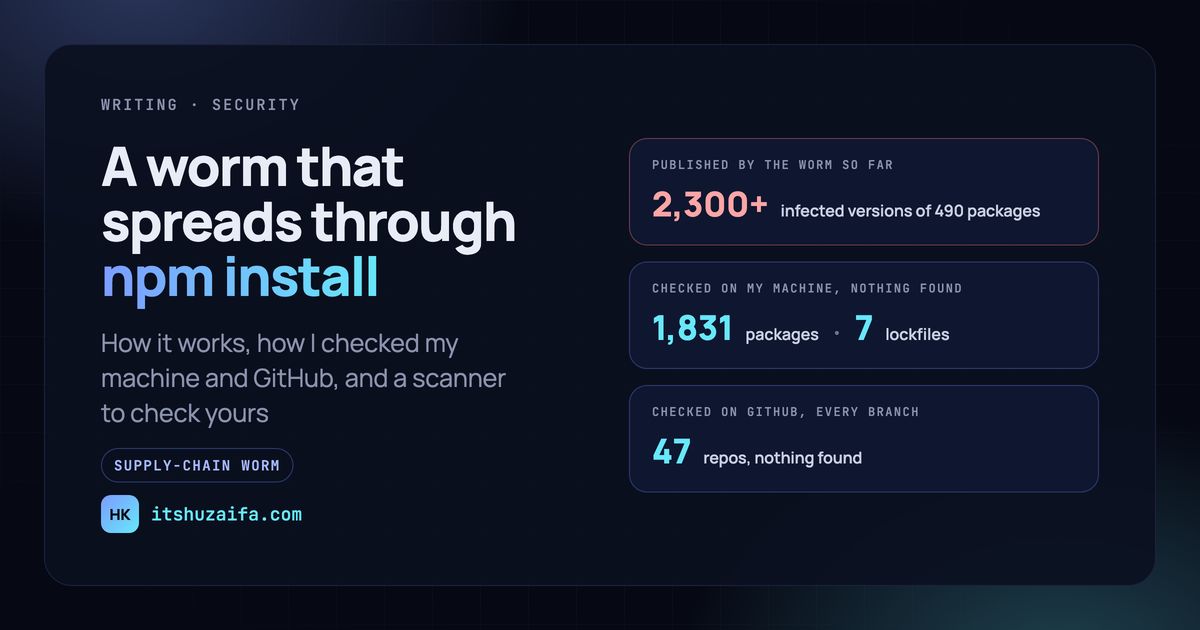
A worm is spreading through npm install. Here's how I checked my machine and GitHub for it --- title: "A worm is spreading through npm install. Here's how I checked my machine and GitHub for it" published: true description: "A self-spreading npm worm has published 2,300+ infected versions. What one install does, and how I checked my machine and 47 GitHub repos without installing anything." tags: security, npm, javascript, cybersecurity canonical_url: itshuzaifa.com cover_image: itshuzaifa.com --- Malware was force-pushed into my GitHub repos in October. A different attack had been spreading on npm since August, and Singapore's Cyber Security Agency has an advisory on it. The attack on my repos needed someone's stolen GitHub credentials. This one only needs you to run npm install. It's the latest wave of Shai-Hulud, a self-spreading npm worm named after the sandworms in Dune; researchers call this wave ChainDrop. It started in popular caching packages like keyv, cacheable and flat-cache, and the published lists now hold over 2,300 infected versions of 490 packages. This post covers what one install does, the detail that made me look twice, how I checked my own machine and every repo on my GitHub account without installing anything, and the free scanner I wrote for it: shai-hulud-scan. What one install does An infected version looks like a normal patch release. The only visible change is in its package.json: "scripts": { "preinstall": "node setup.mjs" } npm runs preinstall while it installs, before any of your code loads. From there: 1. setup.mjs fetches Bun if you don't have it, and uses it to run the real payload, a heavily obfuscated file called math_init.js (or Math_Symbol.js in the first packages hit). 2. The payload collects credentials: npm and GitHub tokens, cloud keys, SSH keys, Kubernetes, Terraform and Vault credentials, .env files, shell history. On a CI runner, it also reads the runner's memory for its secrets. 3. It uploads them, encrypted, to a new public repo it creates under your GitHub account, with the description "Shai-Hulud: Here We Go Again". 4. It spreads through npm. With your npm token, it adds the same preinstall line to every package you can publish, bumps the patch version, and publishes it. Everyone who depends on your package is next. 5. It spreads through GitHub. With your GitHub token, it commits copies of itself to the branches of repos it can reach, so anyone who clones and opens them runs it too. Step 4 is why this is called a worm, not just malware. One maintainer's install becomes every one of their packages, and each of those packages has maintainers of its own. The part that made me look twice These are the files step 5 commits to your repos: .vscode/tasks.json runs node .claude/setup.mjs when the folder opens in VS Code .claude/settings.json runs node .vscode/setup.mjs when a Claude Code session starts .claude/setup.mjs the loader .vscode/setup.mjs the loader again .claude/math_init.js the payload The VS Code task is the same trick the malware in my repos used: a task set to run on folder open. The new part is the second line, a Claude Code SessionStart hook. Your AI assistant's project settings now sit next to your editor's as a place an attacker can put code that runs on your machine. Both live in the repo, where any commit can change them. It also adds a GitHub Actions workflow, named codeql_analysis.yml to look like GitHub's own code scanning, that copies every secret in the repo into one value with toJSON(secrets) and saves it as a downloadable file. Checking without installing anything The obvious way to find out whether you have an infected version is the one thing you shouldn't do: run npm install and see. If an infected version is there, that runs it. You don't need to install anything, because the lockfile already records it. package-lock.json, yarn.lock, pnpm-lock.yaml and bun.lock each list the exact version of every package a project uses, including the dependencies of dependencies. Reading those and comparing them with the published list answers "would this install something infected?" without running a line of it. So that's what the scanner does first. On my machine, I pointed it at the folder holding all my projects: - 1,831 installed packages and 7 lockfiles checked, node_modules included. - Nothing found. My GitHub account came next. A repo I haven't cloned in years still counts, because the worm commits to repos, not machines. With a read-only token, the scanner went through the latest commit of every branch in all 47 repos I own or collaborate on, checking lockfiles and the files above, and looked for any repo the worm had created under my account. Nothing found there either. That was a relief after last month. But a clean result is only as good as what the scanner looks for. Why a list of versions isn't enough The list of infected versions always lags behind the worm: a package infected this morning won't be on it yet. So version matching is only one of the checks: - The planted files. A tasks.json or Claude Code settings file that runs setup.mjs is flagged whatever your dependencies are. So are the loader and payload files where the worm puts them. - The install script. Any package.json whose preinstall, install or postinstall runs setup.mjs is flagged. That catches an infected package even before it reaches any list. - Fingerprints. Files with the worm's names are checked against the published SHA-256 hashes, and for strings that only appear in its code. - The secrets workflow. Any workflow that dumps toJSON(secrets) gets flagged. Normal workflows almost never need every secret at once. - The stolen-secrets repo. A repo under your account described "Shai-Hulud: Here We Go Again" means your credentials have already been taken, even if every other check comes back clean. The false alarm The first run on my machine did find something: a file called Math_Symbol.js, inside node_modules in one of my projects. That's one of the worm's payload names. It's also the name of a real file. regenerate-unicode-properties, which Babel depends on, ships a Math_Symbol.js holding the Unicode "Math Symbol" character category. It's in a huge number of JavaScript projects. So inside node_modules, a name alone no longer counts. A file there needs a matching hash or the worm's marker strings, and an infected package is caught by its version and install script anyway. A scanner that cries wolf on half the projects in the world wouldn't help anyone, so that case is now one of its tests. If it finds something The order matters, and it's in the README. In short: 1. Treat the machine as compromised. If an infected version was installed, its install script has already run. 2. Revoke and replace credentials first, from a clean device: npm and GitHub tokens, SSH keys, cloud keys, and anything in .env files. Clean up before that and the worm can come straight back. 3. Delete what it made on GitHub, after saving what you need: the stolen-secrets repo, the workflow, and any Actions artifact named format-results.txt, which holds your secrets in readable form. 4. Remove the planted files from every branch, and don't open those branches in VS Code or start Claude Code in them until you have. 5. Pin clean versions and reinstall with scripts turned off: npm ci --ignore-scripts. Making it harder next time - Turn install scripts off by default: npm config set ignore-scripts true. A few packages need theirs; pnpm 10 already blocks them unless you allow a package by name. - Wait a few days before taking new versions, so someone else finds the bad release first. pnpm's minimumReleaseAge does this for you. - Commit your lockfile and install with npm ci, so a new version can't arrive without a commit you can see. - Review .vscode/, .claude/ and .github/workflows/ like code. All three hold commands your tools will run. - Keep tokens short-lived and limited to one job, and publish packages through npm's trusted publishing rather than a long-lived token on your laptop. What the scanner can't tell you It knows what's been published so far: the versions on the lists from Datadog and Unit 42, and the file names, hashes and markers in their reports. A new wave with new names gets past it until someone adds them. It reads the latest commit of each branch, not the whole history. And for the earlier Shai-Hulud waves, it checks their files and repo descriptions, not their full package lists. So "nothing found" means nothing known found. On my account that's the best answer available, and better than not checking. Check your own shai-hulud-scan needs Python 3.10 or later and nothing else, and it changes nothing. Point it at your projects folder: python3 scan.py ~/code Add --github and a read-only token to check every branch of every repo on your account. It exits with an error when it finds something, so it can also fail a CI job. If you know of a version or file it misses, open an issue with the source. If you get stuck, [email me](mailto:khanhuzaifa207@gmail.com). Sources: CSA advisory AD-2026-009, Datadog Security Labs, Unit 42.
Hi there! Yes, that is a problem. We have an issue tracking it here: paradedb#6007
Open source, build your own: benybens/ARC-1
Location: Kathmandu, Nepal (UTC+5:45) Remote: Yes Willing to relocate: No Technologies: TypeScript, Node.js, NestJS, Python, FastAPI, PostgreSQL, Redis, Next.js, Flutter, Docker, Kubernetes on GCP, Cloudflare, GitHub Actions, LLM APIs, pgvector Résumé/CV: on request, code at github.com/kafle1 Email: kafleniraj@gmail.com Full stack engineer, 5 years in production, most of it backend. I own a NestJS and PostgreSQL backend for a US company and run its deployments on Kubernetes on GCP. I also built and run a business operations platform alone: 490 API routes on a 150-table schema. It deploys itself every 2 minutes and rolls back when a health check fails. 2 years of LLM features in production, voice agents and retrieval among them. Side project: kafle1/relay runs traffic signals from YOLO vehicle counts. In simulation it cut delay by 23 to 56% against a fixed plan. I work 14:00 to 23:00 Nepal time, which is the UK and EU day and US Eastern mornings. Contract or full-time. I invoice as an independent contractor.
Automatiser l'énumération web en CTF avec DIRB et ffuf Pourquoi j'ai développé mon-recoweb Lorsque je résous une machine Hack The Box depuis ma Kali Linux, je suis toujours la même méthode de travail, organisée en trois grandes étapes : l'énumération, la prise de pied pour obtenir user.txt, puis l'escalade de privilèges pour atteindre root.txt. L'énumération web fait systématiquement partie de cette première étape. Elle consiste notamment à rechercher des répertoires, des fichiers et des chemins qui pourraient ne pas être directement accessibles depuis les pages visibles du site. Pour effectuer ces recherches, j'utilise deux outils bien connus : dirb et ffuf. Ils sont efficaces, mais leur utilisation successive implique de préparer plusieurs commandes, de choisir les wordlists appropriées et de consulter différents fichiers de résultats. À force de répéter ces opérations au fil de mes résolutions CTF, j'ai voulu disposer d'un script qui automatise cette partie du travail, tout en conservant la possibilité d'adapter les recherches aux particularités de chaque cible. C'est ainsi qu'est né mon-recoweb, un script Bash qui combine dirb et ffuf, organise leur exécution et rassemble les découvertes dans un fichier de synthèse unique. Aujourd'hui disponible sur mon site en version 3.0.0, il a progressivement évolué pour offrir davantage de possibilités de configuration et de filtrage des résultats, tout en conservant son objectif initial : automatiser les tâches répétitives de l'énumération web pour faciliter l'analyse des découvertes. Présentation de mon-recoweb v3.0.0 mon-recoweb est un script Bash destiné à automatiser la recherche de répertoires et de fichiers sur un serveur web, en combinant les outils dirb et ffuf. Son fonctionnement repose sur trois phases d'énumération exécutées successivement : 1. Une première recherche générique avec dirb. 2. Une recherche de répertoires avec ffuf. 3. Une recherche de fichiers avec ffuf. Dans sa configuration par défaut, il suffit de lui indiquer une cible pour lancer ces trois phases : mon-recoweb cible.htb Le script vérifie d'abord l'accessibilité de la cible, puis exécute les recherches en utilisant des wordlists par défaut. Il permet également d'adapter l'énumération aux particularités de la cible : - Limiter les recherches à un répertoire précis. - Personnaliser les extensions de fichiers à rechercher. - Choisir les wordlists utilisées par chaque phase. - Activer ou désactiver individuellement les trois phases d'énumération. - Ajuster les paramètres d'exécution, notamment le nombre de threads, le débit et les délais d'attente. - Filtrer les résultats trop nombreux ou non pertinents, notamment en utilisant les différentes options de filtrage de ffuf. Les découvertes de chaque phase sont regroupées dans un fichier de synthèse unique, RESULTS_SUMMARY.txt, situé dans un sous-répertoire du répertoire de travail. Ce fichier présente à la fois les résultats consolidés et les découvertes propres à chaque outil. Cette organisation permet de conserver les résultats détaillés tout en disposant d'une vue d'ensemble des découvertes. Les différentes phases peuvent également être exécutées séparément, avec leurs propres paramètres de filtrage, sans perdre les résultats des autres phases lors de la mise à jour de la synthèse. Les trois phases d'énumération Par défaut, mon-recoweb exécute successivement trois phases de recherche. Chacune utilise une wordlist adaptée et poursuit un objectif particulier. Phase 1 — Recherche générique avec DIRB La première phase utilise dirb pour effectuer une recherche générale de répertoires et de fichiers sur la cible. Le script utilise par défaut la wordlist common.txt, fournie avec DIRB et située dans : /usr/share/wordlists/dirb/common.txt Cette liste contient des noms courants de répertoires et de fichiers que l'on peut rencontrer sur un serveur web. Cette première recherche permet de repérer rapidement des éléments intéressants, comme des répertoires d'administration, des pages de connexion ou des fichiers de configuration accessibles depuis le serveur. Phase 2 — Recherche de répertoires avec ffuf La deuxième phase utilise ffuf pour effectuer une recherche spécifiquement orientée vers les répertoires. Elle s'appuie par défaut sur la wordlist : /usr/share/seclists/Discovery/Web-Content/raft-medium-directories.txt Cette liste contient un ensemble beaucoup plus important de noms de répertoires potentiels. ffuf utilise les noms contenus dans la wordlist pour construire et tester différentes URL sur le serveur web ciblé. Cette deuxième recherche complète celle de DIRB en explorant un plus grand nombre de chemins possibles. Phase 3 — Recherche de fichiers avec ffuf La troisième phase utilise également ffuf, mais cette fois avec une wordlist orientée vers les noms de fichiers. Par défaut, il s'agit de : /usr/share/seclists/Discovery/Web-Content/raft-medium-files.txt L'objectif est de rechercher des fichiers potentiellement intéressants : scripts, pages web, fichiers de sauvegarde ou de configuration, par exemple. Cette phase permet également de rechercher des extensions particulières grâce à l'option --ext, notamment php, txt ou bak. Tu verras plus loin comment adapter ces extensions en fonction de la technologie utilisée par la cible. Pourquoi combiner ces trois phases ? DIRB fournit une première recherche générale, tandis que les deux phases ffuf permettent d'approfondir séparément la découverte des répertoires et des fichiers. Les recherches peuvent produire certains résultats identiques, mais aussi des découvertes différentes en fonction des wordlists utilisées. L'intérêt de mon-recoweb est non seulement d'enchaîner automatiquement ces trois phases, mais aussi de regrouper leurs découvertes dans un fichier de synthèse unique, RESULTS_SUMMARY.txt, afin d'obtenir une vue consolidée des résultats. Adapter l'énumération à la cible Les paramètres par défaut de mon-recoweb permettent de lancer une première reconnaissance sans configuration particulière. Mais au cours d'une résolution CTF, les informations découvertes peuvent t'amener à rechercher des fichiers spécifiques, à explorer un répertoire particulier ou à modifier les paramètres des scans. Le script propose plusieurs options pour adapter les recherches à ces situations. Cibler un répertoire précis Plutôt que de relancer une énumération sur l'ensemble d'un site, tu peux limiter les recherches à un répertoire identifié précédemment. Par exemple, si tu as découvert un répertoire /cgi-bin/, lance : mon-recoweb cible.htb/cgi-bin/ Les trois phases d'énumération se concentrent alors sur ce chemin. Tu peux également préciser le protocole dans l'URL, notamment lorsque le serveur utilise HTTPS : mon-recoweb https://cible.htb/cgi-bin/ Rechercher des extensions particulières Lorsque tu identifies la technologie utilisée par une application web, il peut être intéressant de rechercher certaines extensions de fichiers. Par exemple : mon-recoweb cible.htb --ext php,txt,bak L'option --ext permet d'ajouter les extensions indiquées à la recherche de fichiers effectuée par ffuf. Tu peux ainsi adapter ton énumération à une application PHP ou rechercher d'éventuels fichiers de sauvegarde. Autre exemple, pour explorer un répertoire /cgi-bin/ : mon-recoweb cible.htb/cgi-bin/ --ext sh,cgi,pl Cette commande associe un ciblage précis à une recherche d'extensions adaptées aux scripts susceptibles de se trouver dans ce répertoire. Choisir ses propres wordlists Chaque phase utilise une wordlist par défaut, comme expliqué précédemment. Tu peux toutefois les remplacer individuellement avec les options suivantes : - --dirb-wordlist : wordlist utilisée par DIRB. - --raft-dirs : wordlist utilisée par ffuf pour les répertoires. - --raft-files : wordlist utilisée par ffuf pour les fichiers. Par exemple, pour utiliser une autre liste lors de la recherche de répertoires : mon-recoweb cible.htb \ --raft-dirs /chemin/vers/ma-wordlist.txt Cette possibilité est utile lorsque tu disposes d'une liste spécialisée, adaptée à une technologie ou à un contexte particulier. Ajuster les paramètres d'exécution Selon la réactivité du serveur web, tu peux également adapter certains paramètres de ffuf. | Option | Fonction | |---|---| | -T, --threads | Nombre de threads utilisés par ffuf (30 par défaut). | | --rate | Limite le nombre de requêtes par seconde. | | --timeout | Définit le délai d'attente d'une réponse (10 secondes par défaut). | Par exemple : mon-recoweb cible.htb --threads 10 --rate 20 --timeout 15 Cette commande limite le nombre de threads à 10, fixe un maximum de 20 requêtes par seconde et porte le délai d'attente à 15 secondes. Ces réglages peuvent être utiles lorsqu'un serveur répond lentement ou lorsque tu souhaites limiter l'intensité des requêtes. Accéder aux options avancées Les options présentées ici ne représentent qu'une partie des possibilités de configuration de mon-recoweb. Pour afficher l'ensemble des paramètres disponibles, utilise : mon-recoweb --help-advanced Tu y retrouveras notamment les options de ciblage, de sélection des phases, de personnalisation des wordlists, de filtrage et de gestion des résultats. La partie suivante présente les filtres de ffuf, particulièrement utiles lorsque les recherches produisent un nombre important de résultats non pertinents. Filtrer les résultats parasites Lors d'une énumération web, il arrive que ffuf retourne un nombre très important de résultats, parfois plusieurs milliers. Cela ne signifie pas nécessairement que tous les répertoires ou fichiers détectés existent réellement. Certaines applications renvoient en effet une réponse similaire pour de nombreuses URL inexistantes. Par exemple, un serveur peut rediriger systématiquement les requêtes vers une page d'accueil ou retourner une page d'erreur personnalisée avec un code HTTP 200. Dans ces situations, il devient difficile de distinguer les découvertes intéressantes des réponses parasites. Comprendre les codes HTTP et les tailles de réponse Pour identifier les réponses à filtrer, commence par examiner deux informations affichées par ffuf : - Status : le code HTTP retourné par le serveur (200, 301, 302, 403, 404, etc.). - Size : la taille de la réponse HTTP, exprimée en octets. Imaginons que plusieurs chemins inexistants retournent systématiquement le code 302, avec une réponse de 97 octets. Ce comportement peut indiquer que le serveur redirige toutes les requêtes inconnues vers une même page. Il devient alors intéressant de filtrer ces réponses pour mieux faire ressortir les autres résultats. Filtrer selon le code HTTP mon-recoweb permet de transmettre des options supplémentaires à ffuf avec --ffuf-extra. Pour exclure les réponses HTTP 302, utilise : mon-recoweb cible.htb \ --ffuf-extra "-fc 302" L'option -fc (filter code) demande à ffuf de ne pas afficher les réponses portant le code HTTP indiqué. Tu peux également exclure plusieurs codes : mon-recoweb cible.htb \ --ffuf-extra "-fc 302,401" Attention toutefois : un code HTTP 302 ou 401 peut aussi correspondre à une ressource réellement intéressante. Avant de le filtrer, vérifie qu'il caractérise bien les réponses parasites observées sur la cible. Filtrer selon la taille de réponse Lorsque les réponses parasites présentent une taille identique, le filtrage par taille peut être plus précis. Par exemple : mon-recoweb cible.htb \ --ffuf-extra "-fs 97" L'option -fs (filter size) exclut les réponses de 97 octets. Cette méthode est particulièrement utile lorsque le serveur retourne le même code HTTP pour des ressources existantes et inexistantes, mais avec des tailles de réponse différentes. Tu peux également indiquer plusieurs tailles : mon-recoweb cible.htb \ --ffuf-extra "-fs 97,49,125" Les valeurs utilisées dans ces exemples sont fictives. Elles doivent être adaptées aux réponses réellement observées sur la cible. Combiner plusieurs critères avec -fmode and Il arrive que le filtrage par code HTTP ou par taille soit insuffisant. ffuf permet alors de combiner plusieurs critères grâce à l'option -fmode and. Par exemple : mon-recoweb cible.htb \ --no-dirb \ --no-ffuf-dirs \ --ffuf-extra "-fc 302,401 -fs 97,49,125 -fmode and" Cette commande exécute uniquement la phase de recherche de fichiers avec ffuf. Elle exclut les réponses qui correspondent simultanément aux deux conditions suivantes : - Un code HTTP 302 ou 401. - Une taille de réponse de 97, 49 ou 125 octets. Avec -fmode and, une réponse n'est donc écartée que si elle satisfait les deux critères. Cela permet de conserver, par exemple, une réponse HTTP 302 dont la taille ne correspond pas aux valeurs filtrées. Ce filtrage combiné peut être particulièrement utile lorsque certaines réponses légitimes partagent le même code HTTP que les réponses parasites. La détection automatique des soft-404 mon-recoweb intègre également une détection automatique de certaines réponses parasites. Avant de lancer les recherches, le script teste une URL volontairement inexistante sur la cible. Si le serveur retourne un code HTTP 200 malgré l'absence de cette ressource, le script mesure la taille de la réponse et peut utiliser cette valeur comme filtre pour les phases ffuf. Ce comportement est appelé soft-404 : le serveur retourne une page correspondant à une ressource inexistante, mais avec un code HTTP qui indique normalement une réponse réussie. Cette détection automatique constitue une première protection contre certains faux positifs. Elle possède toutefois une limite : si le contenu de la page varie d'une requête à l'autre, sa taille peut également changer. Le filtre automatique risque alors de devenir insuffisant ou d'écarter des résultats intéressants. C'est pourquoi il reste important de vérifier manuellement les réponses suspectes et d'adapter les filtres lorsque cela s'avère nécessaire. Adapter les filtres à chaque phase ffuf Les recherches de répertoires et de fichiers ne produisent pas nécessairement les mêmes réponses parasites. Si les deux phases nécessitent des filtres différents, tu peux les exécuter séparément en désactivant les autres recherches. Par exemple, pour rechercher uniquement les répertoires : mon-recoweb cible.htb \ --no-dirb \ --no-ffuf-files \ --ffuf-extra "-fc 302 -fs 97 -fmode and" Puis, pour rechercher uniquement les fichiers : mon-recoweb cible.htb \ --no-dirb \ --no-ffuf-dirs \ --ffuf-extra "-fc 302,401 -fs 97,49,125 -fmode and" Chaque phase dispose ainsi de filtres adaptés aux réponses observées. Les résultats des différentes phases sont ensuite regroupés dans RESULTS_SUMMARY.txt, sans perdre les découvertes conservées des recherches précédentes. Cette possibilité permet d'affiner progressivement l'énumération, plutôt que de relancer systématiquement les trois phases avec des paramètres identiques. Exploiter les résultats de l'énumération Une fois les recherches terminées, mon-recoweb rassemble les découvertes des trois phases dans un fichier unique, RESULTS_SUMMARY.txt. Ce fichier permet de consulter les résultats sans devoir parcourir séparément les sorties de DIRB et des deux recherches ffuf. Où retrouver les résultats ? Par défaut, le script crée un répertoire scans_recoweb dans le répertoire de travail depuis lequel tu l'as lancé. Lorsque la cible est un nom de domaine, un sous-répertoire portant ce nom est également créé. Par exemple, après avoir exécuté : mon-recoweb cible.htb Tu retrouveras le fichier de synthèse dans : scans_recoweb/cible.htb/RESULTS_SUMMARY.txt Si tu cibles un répertoire particulier, le script ajoute également ce répertoire au chemin de sortie. Tu peux modifier l'emplacement de base avec l'option -o ou --outdir. Comment est organisé RESULTS_SUMMARY.txt ? Le fichier commence par des informations permettant de retrouver le contexte de l'énumération : - La commande utilisée pour lancer le script. - Le nom et la version de mon-recoweb. - La cible et le périmètre analysé. - La date d'exécution. Il contient ensuite deux grandes parties. Résultat global (agrégé) Cette première partie rassemble les découvertes des trois phases dans une liste commune. Les URL sont normalisées et les résultats identiques sont regroupés afin de faciliter leur consultation. Détails par outil Cette seconde partie conserve les découvertes séparément, sous trois rubriques : - [DIRB] - [FFUF — DIRECTORIES] - [FFUF — FILES] Tu peux ainsi retrouver les résultats de chaque recherche tout en disposant d'une vue consolidée. Exemple de résultat Voici un exemple simplifié et fictif de ce que tu pourrais retrouver dans le fichier : === Résultat global (agrégé) === http://cible.htb/admin/ (CODE:301|SIZE:0) http://cible.htb/login.php (CODE:200|SIZE:2480) http://cible.htb/robots.txt (CODE:200|SIZE:124) === Détails par outil === [DIRB] http://cible.htb/login.php (CODE:200|SIZE:2480) http://cible.htb/robots.txt (CODE:200|SIZE:124) [FFUF — DIRECTORIES] http://cible.htb/admin/ (CODE:301|SIZE:0) [FFUF — FILES] http://cible.htb/login.php (CODE:200|SIZE:2480) Dans cet exemple, login.php a été découvert par DIRB et par ffuf-files. Il apparaît une seule fois dans le résultat global, mais reste présent dans les deux rubriques détaillées. Les codes HTTP et les tailles de réponse permettent également d'identifier les ressources qui méritent une vérification. Conserver les découvertes entre plusieurs recherches Une autre particularité de mon-recoweb est sa capacité à conserver les résultats des phases qui ne sont pas relancées. Imaginons que tu aies exécuté les trois phases, puis décidé de relancer uniquement ffuf-files avec des filtres plus précis. Le script met alors à jour les résultats de ffuf-files tout en conservant ceux de DIRB et de ffuf-directories. Le fichier RESULTS_SUMMARY.txt est ainsi reconstruit avec les nouvelles découvertes et les résultats conservés des autres phases. Cette gestion fonctionne également lorsque les phases sont exécutées depuis plusieurs terminaux : le script synchronise l'écriture du fichier pour éviter les conflits entre les exécutions. Analyser les découvertes Le fichier de synthèse constitue un point de départ pour poursuivre l'investigation. Lors de sa lecture, porte notamment ton attention sur : - Les pages de connexion ou d'administration. - Les répertoires inhabituels. - Les fichiers de configuration ou de sauvegarde potentiellement accessibles. - Les codes HTTP 301 et 302, qui peuvent révéler des redirections intéressantes. - Les réponses HTTP 403, qui indiquent qu'une ressource ou un chemin est interdit d'accès. Une URL découverte ne constitue pas nécessairement une vulnérabilité. L'étape suivante consiste à examiner les ressources intéressantes, à vérifier les réponses du serveur et à comprendre leur rôle dans l'application web. C'est précisément l'intérêt du fichier de synthèse : disposer d'une vue organisée des découvertes pour orienter la suite de l'énumération. Installation et première utilisation Le code source de mon-recoweb est disponible dans mon dépôt GitHub public mes-scripts-public. Prérequis Avant de lancer le script, assure-toi de disposer de dirb, de ffuf, de curl, de flock, de jq, de column, de nc et des wordlists nécessaires aux recherches. Sur Kali Linux, tu peux vérifier la présence de ces outils avec : command -v dirb command -v ffuf command -v curl command -v flock command -v jq command -v column command -v nc Les wordlists utilisées par défaut ont été présentées dans la partie consacrée aux trois phases d'énumération. Vérifie également qu'elles sont présentes sur ton système. Installer mon-recoweb Plusieurs méthodes permettent d'installer mon-recoweb sur Kali Linux, selon que tu souhaites utiliser uniquement ce script ou disposer de l'ensemble de mes outils. Méthode 1 — Télécharger uniquement mon-recoweb Si tu souhaites utiliser uniquement mon-recoweb, tu peux télécharger directement son fichier depuis le dépôt GitHub public : wget https://raw.githubusercontent.com/NoelNac-HackEthical/mes-scripts-public/main/mon-recoweb chmod +x mon-recoweb Il suffit ensuite de placer le script dans un répertoire déjà présent dans ton PATH, par exemple ~/.local/bin, pour pouvoir l'exécuter depuis n'importe quel répertoire de travail. Cette méthode nécessite de vérifier manuellement la présence des dépendances et des wordlists utilisées par le script, ainsi que de gérer ses futures mises à jour. Méthode 2 — Utiliser installe-mes-scripts Pour installer et maintenir à jour l'ensemble de mes scripts, tu peux utiliser installe-mes-scripts, disponible sur HackEthical. Sur cette page, clique sur le bouton Télécharger pour récupérer le script, puis rends-le exécutable et lance-le depuis ton terminal Kali Linux : chmod +x installe-mes-scripts ./installe-mes-scripts L'installateur récupère l'ensemble des scripts publiés, les installe dans ~/.local/bin/mes-scripts/ et prend en charge leur mise à jour ainsi que leur accessibilité depuis le PATH. Il s'occupe également de l'installation de la wordlist personnalisée utilisée par mon-subdomains, si elle n'est pas déjà présente. Méthode 3 — Cloner le dépôt GitHub Si tu es plus à l'aise avec Git et souhaites disposer localement de l'ensemble des scripts, tu peux également cloner directement le dépôt public : git clone https://github.com/NoelNac-HackEthical/mes-scripts-public.git Tu disposeras alors d'une copie locale de tous les scripts publiés, que tu pourras consulter et exécuter depuis le répertoire du dépôt, ou intégrer à ton environnement selon tes préférences. Cette méthode convient particulièrement aux utilisateurs qui souhaitent examiner les scripts, suivre leurs évolutions ou gérer eux-mêmes leur installation et leurs mises à jour. En résumé, le téléchargement direct permet de récupérer uniquement mon-recoweb, tandis que installe-mes-scripts et le clonage du dépôt donnent accès à l'ensemble de mes scripts. Le clonage ne les installe toutefois pas automatiquement dans ton PATH. Vérifier l'installation Une fois l'installation terminée, vérifie la version de mon-recoweb : mon-recoweb --version Pour la version présentée dans cet article, le résultat attendu est : mon-recoweb v3.0.0 Tu peux également afficher l'aide : mon-recoweb --help Et accéder à l'ensemble des paramètres de configuration avec : mon-recoweb --help-advanced Lancer une première énumération Pour commencer, place-toi dans le répertoire de travail de ta machine CTF. Vérifie que le nom de domaine ciblé est correctement résolu depuis Kali Linux, puis lance : mon-recoweb cible.htb Le script exécute les trois phases d'énumération avec leurs paramètres par défaut. Les résultats sont enregistrés dans le répertoire scans_recoweb, créé automatiquement dans ton répertoire de travail. À la fin des recherches, tu peux consulter le fichier de synthèse : cat scans_recoweb/cible.htb/RESULTS_SUMMARY.txt Tu disposes ainsi d'une première vue des répertoires et fichiers découverts, que tu peux ensuite examiner pour poursuivre ton énumération. Si les résultats sont trop nombreux ou contiennent des réponses parasites, les options de filtrage présentées précédemment te permettront d'affiner les recherches. Conclusion Avec mon-recoweb, j'ai voulu rendre l'énumération web plus simple à organiser et plus efficace lors de mes résolutions CTF. En combinant dirb et ffuf dans un même script Bash, il devient possible d'automatiser trois recherches complémentaires, d'adapter les paramètres aux particularités d'une cible et de filtrer les résultats qui compliquent parfois l'analyse. Le regroupement des découvertes dans RESULTS_SUMMARY.txt apporte également un avantage pratique : disposer d'une vue consolidée des résultats, sans perdre les informations propres à chaque phase. Mais l'automatisation ne remplace pas l'analyse. Une URL découverte, un code HTTP inhabituel ou un fichier accessible ne constituent pas nécessairement une vulnérabilité. Ce sont avant tout des éléments à examiner pour orienter la suite de l'investigation. mon-recoweb reste un outil que je fais évoluer au fil de mes résolutions Hack The Box, en fonction des besoins rencontrés et des améliorations qui me semblent utiles. Si tu souhaites découvrir son fonctionnement plus en détail, tu peux consulter la documentation de mon-recoweb sur HackEthical. Transparence éditoriale _Le script mon-recoweb a été développé avec l'assistance de ChatGPT, à partir de besoins rencontrés lors de mes résolutions CTF. Ses fonctionnalités, ses tests et ses évolutions reposent sur mon utilisation personnelle. ChatGPT m'a également accompagné dans la structuration, la formulation et la relecture de cet article._
Your coding agent needs a ticket queue, not a chat window. Kanzo is a 4.1 MB kanban board that is also an MCP server: Claude Code or Codex takes the next card, comments as it works, leaves it in review. Done stays human. Who closes tickets on your team? emanuele-em/kanzo
Repo: beenuar/AiSOC, includes a terminal recording (install to verdict in three minutes) and a PDF technical guide covering failure modes, REST API, and MCP config.
Location: Remote; I work US and EU hours Remote: Yes Willing to relocate: Yes, to the US Technologies: TypeScript, React, Next.js, Node.js, Ruby on Rails, PostgreSQL, Redis, GraphQL, Python; Claude Code and Codex harnesses (skills, hooks, MCP), LLM evals (Braintrust), LiteLLM Résumé/CV: zernie.com · linkedin.com Email: contact@zernie.com Senior full-stack engineer, 10+ years, mostly for North American startups. Looking for part-time or contract work, up to 3 days a week. Plain full-stack (Rails, React/Next.js, Node) is as welcome as AI work. - Founded Archive's Claude Code and Codex harness (sole author for its first six months, #1 contributor since); #1 contributor to its ~252,000-line TypeScript/React frontend. - Creator of vigiles (zernie/vigiles), an open-source verifier for coding-agent harnesses: CLAUDE.md/AGENTS.md rules, skills, hooks. - Sole author, AgenticDev '26 (ACM): across 140 runs, neither of the two most-starred token-saving tools for coding agents lowered the actual bill. If your team's coding-agent bill keeps growing, I also audit it: you get the monthly number and what to cut. zernie.com
@KI_Vater @X Hey maurice Im building ramsterr/Wombat An agent written in go that consumes lesser tokens than pi agent I wish you all the best for your health
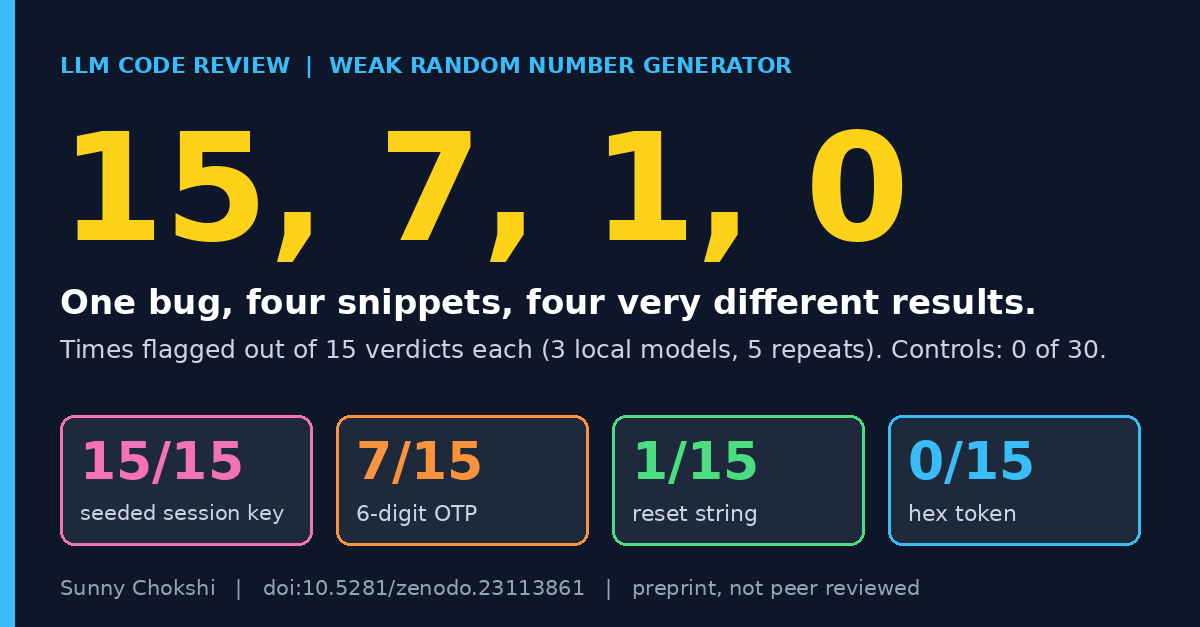
LLM weak random number generator detection test !15, 7, 1, 0: how often three local LLMs flagged four Python snippets with the same weak random number generator bug, out of 15 verdicts each. Originally published at sunny-chokshi.github.io. I ran an LLM weak random number generator detection test on four Python snippets that make the same mistake. Each one builds a value an attacker must not be able to guess, using the random module instead of a cryptographic source. Three local code models read each snippet 15 times between them. One snippet was flagged 15 times, one 7 times, one once and one never. This post shows the four snippets and what the spread tells me about how these models review code. Read the preprint on Zenodo | Download the data (CryptoBench, Zenodo) Download the data: the dataset holds every snippet and every recorded verdict, and its snippets, harness and results are byte-identical to the v1.0.0 the preprint cites, so you can recount the numbers below. The four snippets All four are in the weak PRNG class of CryptoBench, which I mapped to CWE-338. Each does a different job with the random module. These are excerpts, without the imports and function wrappers. pr_seed random.seed(time.time()); return random.getrandbits(128) pr_otp return random.randint(100000, 999999) pr_reset return "".join(random.choices(string.ascii_letters, k=32)) pr_token return "".join(random.choice("0123456789abcdef") for _ in range(n)) The class also has two secure controls that do the same kinds of jobs with the secrets module, a token and a reset string. In Python, random vs secrets is the choice the controls get right. LLM weak random number generator detection, snippet by snippet I pooled the three models in my study that separate safe code from unsafe code: qwen2.5-coder 7B, qwen2.5-coder 14B and deepseek-coder 6.7B. Each model saw each snippet five times, so every snippet has 15 verdicts. The five repeats of one snippet are not five independent examples. pr_seed 15 of 15 flagged pr_otp 7 of 15 pr_reset 1 of 15 pr_token 0 of 15 controls 0 of 30 Pooled, that is 23 of 60, or 38%. The two secure controls were never flagged. So this class has a low detection rate and no false alarms. What I think the spread means Only one of the four, random.seed(time.time()), calls a seed function with the clock. The other three use randint, choices and choice, which look like ordinary calls to me. The OTP, the reset string and the hex token all need an unpredictable value, and the models flagged them 7, 1 and 0 times out of 15. I cannot say why the OTP did better than the reset string. My reading is that the models respond to a name they have seen labelled as dangerous more than to the job the value does. That is a hypothesis. I have not tested it, and the preprint says so too. Size did not fix it in my data. Across the four snippets, qwen 7B flagged 6 of 20 trials and qwen 14B flagged 11 of 20. That difference is not statistically significant (Fisher exact test, p = 0.20), and 20 trials per model cannot rule out a modest gain. Limits The class has four vulnerable snippets, I wrote them, and they are short single-file Python. The models are local, quantized and run at Ollama defaults with one fixed prompt, and the score is the verdict only. The paper expects that a short linter rule for the random module near token code would do better than the model here, but I have not tested that. The paper is a preprint and it is not peer reviewed. Read and cite Preprint on Zenodo (doi:10.5281/zenodo.23113861) | CryptoBench dataset (doi:10.5281/zenodo.23067051) | Paper listing on my site Earlier post in the same line: CryptoBench: 54 snippets to test LLM crypto misuse detection. Cite as: Chokshi, S. (2026). Known-Bad Names, Unknown-Bad Uses: What Local Code Models Detect When They Review Cryptographic API Misuse [Preprint]. Zenodo. doi.org Dataset: Chokshi, S. (2026). CryptoBench: A benchmark of cryptographic API misuse for evaluating LLM code reviewers [Dataset]. Zenodo. doi.org Sunny Chokshi, PhD student, Information Technology, University of the Cumberlands. Research: adversarial robustness of LLMs in cybersecurity. ORCID | GitHub
🔗 GitHub: miuuyy/Octopus-SI-OS --- ✉️ If you’re into AI, ML, agents, and building real systems, join my newsletter (it’s free): dankornas.substack.com
@DaDw26 yep, check here github.com/anpaaan/moss-giant/tree/main
Send agents here to start buying and selling: casualbrooks/mcp-stockpile #agentfirst #ecommerce #onlinestore
@dogxii 是的,最好两个结合起来用,有空可以试试我这个 yicheng47/runner
Show HN: Warsaw in voxels – an interactive 3D map of the city centre Explore central Warsaw in voxels - slightly inspired by Minecraft, and MagicaVoxel. You can change the date, time of day and weather, explore the city, or click on a pedestrian to control them (here a bit of inspiration from Dungeon Keeper). Works best on desktop, but I tried to make it usable on mobile too. The initial load can take a while. It's based on several open datasets, including: - OpenStreetMap (openstreetmap.org) - buildings, streets, sidewalks, tram tracks, etc - GUGiK / Geoportal (geoportal.gov.pl) - LiDAR for building heights and trees, aerial imagery for colours - Warsaw's city tree database (mapa.um.warszawa.pl) - individual tree species, used for seasonal foliage Open-source (stared/warsaw-vibe-voxel), so feel invited to (re)use it as you wish!
Why do online typing tests bundle 14 tracking cookies and banner ads just to count your keystrokes? Built a 100% offline typing practice app with real-time WPM, accuracy graphs, and zero telemetry. Clean, instant, open source: rishibanota/Offline-Typing-Practice-App
🚘 Today KE:SAI is releasing Latent TransFuser-K1, an autonomous driving model that is competitive with NVIDIA Alpamayo 1 across 6 public benchmarks, but trained with 44x less data and ~1000x less compute. 📜 Blog: kesai.eu ⭐ GitHub: kesai-labs/py123d_garage
모뎀 단에서 IMS 연결이 붙지 않는 문제가 있어 결국 실패로 끝났지만 의외의 수확으로 unisoc AP를 채택한 기기의 펌웨어 파일 (.pac)을 언팩, 리팩하게 해주는 툴이 만들어졌습니다 sdtown-kr/pactool 이게 과연 쓸모가 있을까 싶긴한데 펌웨어 파일 두어개로 테스트했을 때 정상 작동 확인해서 올려는 봅니다 고마워 클로드!
AI 作图素材库:sleepyzone.online sleepy-zone/ai-ref-library-cn 二次元角色换装库:sleepyzone.online sleepy-zone/char-db-cn 连夜给两个站点样式进行一波优化~ (能看出是参考了哪个站点的 Design 风格吗😂) t.co
@yin___jun yicheng47/runner 推荐试试我这个,专门为了自动化这个流程开发的
Location: Dhaka, Bangladesh Remote: Yes Willing to relocate: Yes Technologies: Go (Golang), Node.js, TypeScript, PHP (Laravel, Symfony), Python, C++, Kubernetes, Docker, Terraform, AWS, GCP, Redis, PostgreSQL, MySQL, Apache Kafka, gRPC, Svelte, Vue.js, React Résumé/CV: iampavel.dev Email: contact@iampavel.dev Senior / Lead Backend & DevOps Engineer with ~19 years of engineering experience (building for the web since 2006). I specialize in high-throughput backend services, distributed systems, and infrastructure that is "stable enough to be boring" — prioritizing simplicity and systems that handle millions of requests without waking engineers up at 3 AM. Highlights: - Architected high-throughput microservices in Go and Node.js at Coinread, integrating 150+ cryptocurrency exchanges for real-time market data. - Deployed and maintained HA on-premise Kubernetes clusters for maritime cruise ship operations (99.9% uptime). - Automated online gaming microtransaction wallet in Go and PHP, eliminating 80% of manual processing delays. - Founded and scaled a bootstrapped startup to $500K in profit. Website & Portfolio: iampavel.dev GitHub: github.com/k1ng440 LinkedIn: linkedin.com