Mentions
Conversations linking to GitHub, newest first. Times are UTC.
Mentions by source
X
Bluesky
Hacker News
V2EX
Qiita
DEV
Mastodon
Latest posts
这些都是我的 AI Agents 搞的,走聊天界面发个消息然后等着就好了。 搞这个是最近 Review PR、CI、解决冲突费时间,有这个流程我可以不用守着那些事情。 gpui-kit#3769 nsh#816 t.co
@artistxeature Yes! The custom provider docs are here: github.com/RockHammer1947/IdleDock/blob/main/docs… IdleDock runs on macOS, but a provider could call ComfyUI on your Sparks over HTTP. No adapter yet. Would you run IdleDock on a Mac?
用法:npm install -g omniroute 装好启动,连上你自己的订阅或 API Key,把 Claude Code、Cursor 的接口改成 localhost:20128/v1。 先烧订阅,再 API,最后免费的。免费额度要自己注册,条款看清。 🔗 直达:cheaper-inference/OmniRoute 以前额度一爆就停工,现在自动换下家接着跑,390 星一天!
fwiw I've disabled ACR on my Sony Bravia, not the cleanest way but it's something useful perhaps if you already have one. joelio/bravia-guard
felt like PC never had a good game launcher other than Steam, so I vibe-coded my own DopaLab/playdeck bought gpt to see the hype, turned out it's satanic black magic to me, who's at best can code a simple Chrome extension, so to focus I made a list of what I should code with it, only one thing I needed the most: a game launcher to get my scattered game library organized and tracked away from Steam that I only use for very few games. So I poured all of my month into perfecting it, now it can: - Fitch covers for your games automatically no matter the source - Add the game to the library with context menu. - Track the game playtime and archive it if you done playing it - get news and updates about the games in your library - get similar games to your game library as reccomendations...
@jayk_gupta On usage limits with Claude Code agents on Pro, one cost is easy to miss: each general-purpose subagent opens with your CLAUDE.md files, skills list and MCP tool names, and omitClaudeMd: true trims the first. I published a script that measures that start: mdalexandre/claude-code-lean-agents
@karpathy You inspired me creating something for my kid. Still early prototype: vitopod/kidoo Thanks!
Typst(Touying)で作ったスライドを使ってプレゼンを行うとき、今まではPympressを使っていたものの、更新がだいぶ前に止まってて悲しかったんですが良さげなOSSに巡り会えて嬉しい 3w36zj6/typdeck
新二次元服装库支持,依旧来自:x.com 和已有的服装一起加入组装池,快试试吧~ Github:sleepy-zone/char-db-cn 在线访问:sleepyzone.online t.co
I've open-sourced the personas: 1kevgriff/conference-council-personas
I've open-sourced the personas: 1kevgriff/conference-council-personas
Tu agente ya no adivina píxeles: agent-desktop de Vercel lee tus apps por su estructura real y las opera por referencias. Apache 2.0, gratis. ¿Qué app le dejas primero? vercel-labs/agent-desktop
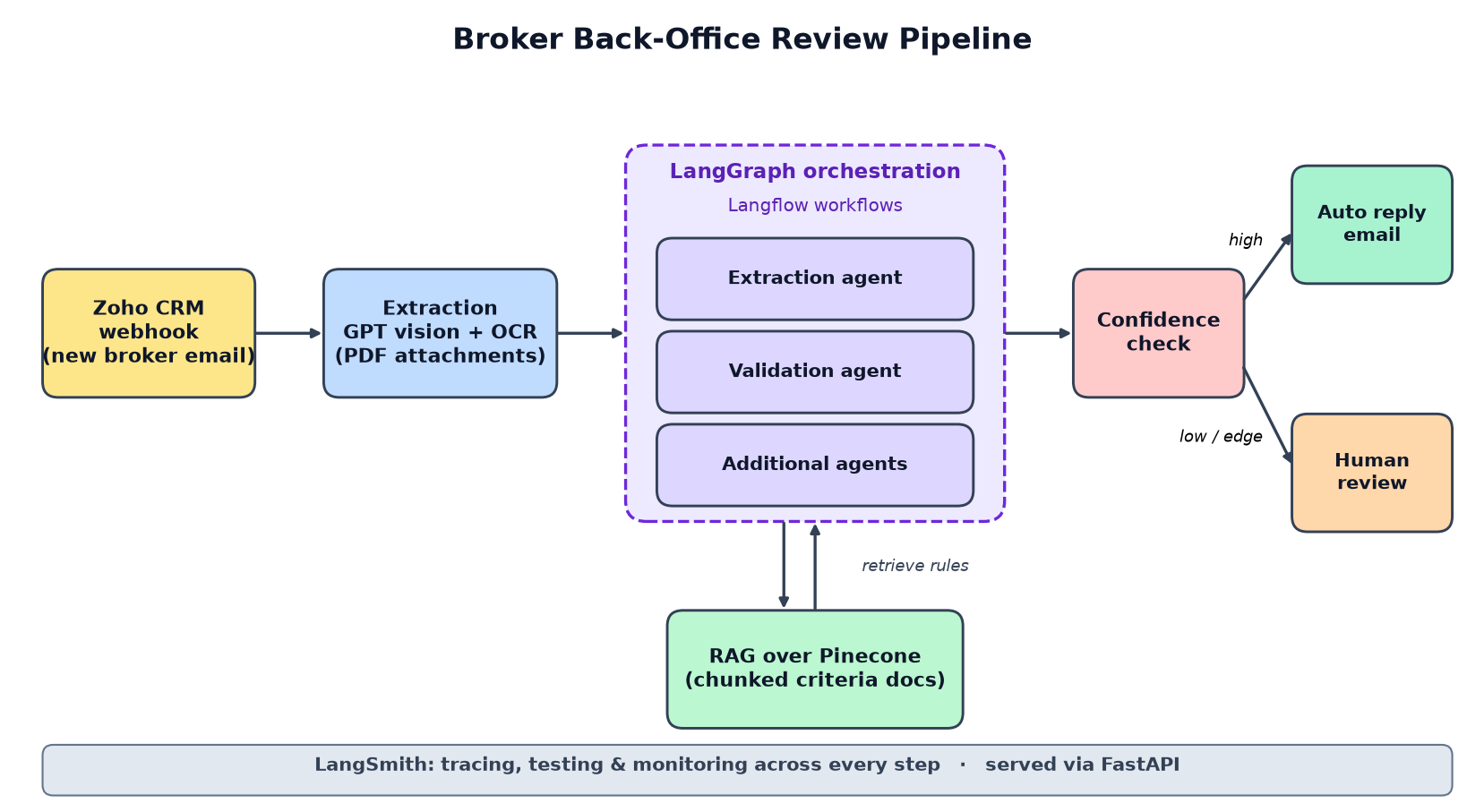
From 30 Minutes to 2: Building a Multi-Agent LangGraph + RAG Pipeline for Broker Back-Office Review The problem: 30 minutes per application, 400 times a day On paper, broker back-office work sounds easy. A broker sends an email with a few PDFs attached. Someone on the back-office team opens it, reads every document, checks each one against a list of requirements, then writes back saying what's there and what's missing. One review took about 30 minutes. The team got roughly 400 applications a day. Do that math and you get skilled people spending most of their shift copying fields out of PDFs. Nobody enjoyed it, and honestly nobody should have to. At work I built a multi-agent AI system to take over that flow. Review time dropped from 30 minutes to 2 per application (about 93% less), and the team needed fewer people on that manual task. Here's how it's put together, and a few things I'd do the same way again. !Architecture of the multi-agent pipeline Why I didn't use one big prompt My first thought, like most people's, was one giant prompt. "Here's an email and some PDFs, tell me if this application meets the requirements." It doesn't hold up. Pulling data out of a document and judging that data against rules are two separate jobs. They break in different ways and they need different context. Cram both into one call and when the answer is wrong, you can't tell which half failed. So I split the work into agents, built with LangChain and LangGraph on Azure OpenAI (GPT). The document-extraction agent reads the PDF attachments and pulls out what the review needs. The requirement-validation agent takes that output and checks it against the criteria. There are a few more specialized agents too, each owning one small step of the review. The payoff is mostly in debugging. If a reply comes out wrong, I can look at the extraction output first. Was the data wrong, or was the judgment wrong? That one question saves a lot of time. The pipeline, end to end Here's what happens between a broker hitting send and getting a reply. Intake from Zoho CRM The pipeline hooks into Zoho CRM. When a new broker email lands, a Zoho webhook tells the pipeline right away. No polling loop sitting there checking every few minutes. The system grabs the application and its PDF attachments. Reading the documents Broker documents are a mess, and a lot of them are scans. The extraction agent uses a GPT vision model, plus OCR for the scanned PDFs, to read each file and turn it into structured data the later steps can actually use. Checking against the real rules (RAG over Pinecone) The requirement criteria sit in a Pinecone vector database. I chunk the criteria documents before embedding them, so a lookup brings back the specific rules that apply instead of a whole document. For each application, the validation step retrieves the relevant criteria and hands them to the model along with the extracted data. That changes the question. The model isn't asked "what do you think the requirements are?" It's asked "here are the requirements, does this application meet them?" I'd call this the part that makes people trust it. Without retrieval, the model is guessing from memory, and it guesses confidently. Writing the reply When matching is finished, the system drafts the validation and match-result email back to the user: what matched, what didn't. How the pieces are wired Each workflow (extraction, validation and the rest) is built in Langflow. Being able to see and tweak a flow visually was genuinely useful while requirements kept shifting. LangGraph sits on top as the orchestrator. It routes each application through those workflows and keeps state between steps. FastAPI is the service layer around all of it. The trade-off: you now have two tools to understand instead of one. For us the split was worth it, because Langflow handled the "what does this step do" part and LangGraph handled the "what runs next" part. Knowing when to stop and ask a human The biggest design decision on this project had nothing to do with which model to use. It was deciding what the system is not allowed to decide alone. Every result carries a confidence score. If a case falls below the threshold, or it's an edge case, it goes to a person on the back-office team before anything is sent to the broker. Confident cases move forward on their own. Why bother? A back-office team will not adopt a tool that quietly sends wrong answers to brokers. Once they know shaky cases come to them, they can stop second-guessing the rest. Also, some applications are just weird, and they always will be. If I'd tried to automate every last one, the system would have turned brittle. Automating the confident majority and escalating the rest is how you get to 2 minutes on average without risking bad replies. Results Review time per application went from 30 minutes to 2, about a 93% cut, across roughly 400 applications a day. The team also needed less manual headcount on the task. A rough calculation from those two numbers: saving 28 minutes on each of 400 applications comes to about 186 hours of review work a day that nobody has to do by hand anymore. If you're building something like this Split the job before you write a single prompt. Extraction and validation really are different problems, and separating them is what made this system debuggable. Make the model check against retrieved rules, not its own memory. RAG over the actual criteria is what keeps it honest. Plan the human handoff from the start. I treated it as a core part of the design rather than something to add once things broke, and I think that's the main reason the team accepted the system. And treat the AI like any other backend code. The agents live inside a FastAPI service with clear interfaces. I used LangSmith for tracing, testing and monitoring, so I could open any agent run, evaluate it, and keep an eye on it in production. When a reply looks off, that trace is the first place I go. Wrapping up Getting an LLM to read a PDF was the easy part. The real work was everything around it: CRM intake, small focused agents, validation grounded in retrieved rules, and a clear point where a person takes over. That's what took a 30-minute manual review down to 2 minutes at 400 applications a day. I'm a Python backend and AI engineer working with FastAPI, Django, PostgreSQL, LangGraph and RAG, and I'm open to mid-level backend and AI engineering roles in India or remote. You can find me on LinkedIn, GitHub, or X. ---
@CN_Scars_Music 我会让他自己学习的,慢慢掌握一些以后尽量不让我决定。 比如 nsh#810 这个是 Agent 自己干完,自己合并的。
参考 @AlchainHust 的鸟类贴纸项目,做了一个昆虫版 huashu 把 AI Native 的工作流也开源了:由主 Agent 统筹,依据权威名录找参考,安排绘制和独立审核,再把审核意见用于重画,连审核员的判断也要校准。 huashu 伟大,感谢 huashu,站在高人的肩膀上。 hunknownz/intoreal-insect-sticker t.co
i've genuinely been curious about this as well, recently instead of prescribing next, since its the framework i was most comfy w, i let the agent decide a stack it chose plain solid wo a frameworks since i wanted the backend in rust anyway. the rationale was streaming ai responses is better in it, since react re-diffs the dom every time a token is streamed, while solid just updates the exact node text changed. tbh nowadays ive stopped caring about frameworks. wtver is comfier for the agent to write in, with enough back pressure from tests, ci and lifting so that agent fuckups dont reach me is good enough for me this is what i was building clauseo-ai/boxbox2
Built a skill that reads the assignment and tells you what your files are missing Hey everyone! You know that feeling when you send your work and it comes back not because of the content, but because of a wrong file name, too many slides or a comment you forgot to delete? I've seen it happen way too often, so I made a small tool for it. It's called Barracuda. You give it the assignment text and your files (PDF, Word, PowerPoint, Excel or a ZIP), and it shows you what doesn't match. For example: "Pitch.pptx: 12 slides (need ≤10 slides). Remove 2 slides." Mr-Hames/barracuda preview.redd.it I built it with Claude Code. Claude helped me write the checker and, just as important, test it: we made 600 practice assignments with hidden mistakes and checked that every one gets caught. One thing I really cared about: if something can't be checked from a file, like originality or a deadline, Barracuda won't pretend. It puts it under "check this yourself" and tells you how. It's free and open source. You can try it on the example in the repo, no files of your own needed. It's still early, so I'd love your help. If it misreads your assignment, misses something, or you have an idea, leave a comment or open an issue. I'll keep improving it. And if it saves even one person from a "please resubmit" email, I'll be really happy 🙂
• Codex on Cloud 📱 把 Codex 工作台装进口袋。 用手机浏览器继续开发:桌面 / 网页终端、多终端、局域网与 IPv6 直连。关闭网页,任务继续。 Linux 原生部署,无需 Docker。 ptpt52/codex-on-cloud #Codex #开源
I built a procedural prop generator for my game development workflow I've been working on a small open-source desktop app called easy-props. The idea is simple: generate stylized trees, rocks, bushes, flowers, and other game props using procedural generation instead of modeling everything by hand. You can customize the props, preview them in a 3D scene, and export them to Godot or Unreal. You can also export GLB files and refine them in Blender. It supports LODs, collision shapes, and wind data for vegetation. It's built with Go, Wails, React, TypeScript, and Three.js. I'm starting with the props I need for my own games, but I'd love for others to extend it with new prop types and generation techniques. Here are a few screenshots of the current state. Feedback is welcome! GitHub: AHS12/easy-props
chord is open source, MIT. macOS & Linux. IKatsuba/chord
here's the source 👾 go drop some stars and some love sunrakerr/glorpies
Your agent set the board size. The board is gone. A KiCad setup call wrote a fresh empty board over a routed one, and reported success. A setup call must never be a delete call. kicad-mcp-server#29
Orkas: open-source desktop app that runs a team of 16 AI agents | AI Tool #1 An open-source (MIT) desktop app with a team of AI agents. A "Commander" turns a goal into a task list and coordinates 16 built-in agents, as well as Claude Code, Codex and OpenCode. It has projects, scheduled automations and connectors. How to try it: 1. Go to orkas.ai/download and grab the installer (macOS 12+ or Windows 10+). 2. Sign in on first launch. You get 500 credits for the built-in model, so no API key is needed to start. 3. Optionally, add your own Claude or OpenAI key under Settings → AI Providers. 4. Create a project, describe the goal to the Commander and review what the agents return. Price: Free. Paid plans start at $11.99 a month, and with your own key you only pay the provider. Official link: Orkas-AI/Orkas Tool of the Day: a new AI tool every day, explained by Byte. Instagram & Threads: @ai.morning.brief · Telegram: AI Morning Brief #AI #AITools #Developer #Shorts AI Morning Brief · 2026-11-02 · alat
AgentTM – A time-travel debugger for AI coding agents, built with Go I've been building AgentTM, a local-first developer tool written primarily in Go that records Codex execution history and allows developers to inspect and restore previous workspace states. The current v0.1 implementation includes SQLite-backed event storage, SHA-256 content-addressable snapshots, historical file inspection, code diffs, and isolated checkpoint restoration using Git worktrees. It also includes a React/TypeScript dashboard, with the frontend embedded into the Go binary. Currently, it only captures non-interactive Codex sessions launched through AgentTM. I've tested the end-to-end workflow on Windows, including checkpoint restoration and cancellation handling. Native Linux/macOS testing and broader agent support are still pending. The long-term goal is to support multiple coding agents and allow developers to inspect, rewind, and branch their execution histories. Sharing the current implementation for anyone interested in Go-based developer tooling and agent observability.
我把自己的 Agent 从 Wails 迁到了 MyGo 原生 GUI,全程踩坑和实践分享 最近把自己写的工作 agent [Ally agent]( Bronya0/ally-agent) 的界面重写了一遍,起因是无意中看到有人推荐 MyGo ,加上我对内存和性能一直有点追求,多年来一直在用 wails ,想换个试试,就想拿自己的项目试点,没想到结果意外的不错。 旧版本的技术栈是典型的 Go + Wails + Vue (wails 我用了很多年 最近终于 V3 发正式版了 等了四年,可惜我也老了),界面用 Naive UI ,样式美观,效果也相当不错。但做久了有几个地方比较麻烦( tarui 应该也是一样): 跨平台界面的细节不一致,构建链比较长,还有前端内存出了问题以后,我这个写后端的人不太容易排查。 折腾了一段时间,现在主要页面已经迁到 [MyGo]( egoist/mygo) 了,记录一下过程中比较有感触的地方。 先说一下技术路线:Wails 的界面通过系统 WebView 展示网页; MyGo 既支持这种方式,也支持用 Go 写 Native UI ,由框架自己绘制。WebView 也有自己的优势,MyGo 两种都支持,相当于有个兜底,下面会说。 Ally 现在的聊天、设置等常用页面用 Native UI ,插件页面和部分预览仍然按需使用 WebView 。 一、UI 跨平台一致性 这是我这次迁移最重视的一点。 之前用 Wails 做界面,Windows 上调好的页面,到了 macOS 上经常还要再看一遍。字体、行高、滚动条、输入框这些地方,偶尔就会有一点不一样。 比如我画的表格,不知道为啥线条在 macOS 上看着发虚,Windows 上就正常。单看问题都不大,但调整完一个平台还得顾着另一个平台,挺烦的。 Wails 使用系统 WebView ,Windows 和 macOS 背后的浏览器引擎不一样,前端样式最终要经过各自的渲染实现。 MyGo 的 Native UI 由框架自己负责布局和绘制。迁移后,我在 Windows 上调好的主体界面,拿到 macOS 上看到的效果接近得多,需要针对平台单独修的地方也少了。 当然,自绘也不等于所有像素都完全一致。MyGo 的文字排版仍然使用[各平台的文字系统]( mygo.egoist.dev):Windows 是 DirectWrite ,macOS 是 Core Text ,Linux 是 Pango 。字体回退、DPI 、输入法这些还是要分别检查。但至少不用再同时处理两套 WebView 引擎带来的样式差异了。 以前总觉得 Electron 重,碰到这些问题后倒是能理解为什么有些项目愿意用它:自带 Chromium ,渲染环境相对好统一。OpenCode 桌面端后来也[从 Tauri 换到了 Electron]( github.com/anomalyco/opencode/blob/dev/packages/d…),不过人家具体为什么换,我就不瞎猜了。 二、内存问题现在能用熟悉的 Go 工具查 以前 Wails 版本的 Go 后端一样可以用 pprof,但界面在 WebView 里,Go 堆、JavaScript 堆、DOM 、浏览器渲染进程是几块不同的东西。 前端也有 DevTools ,可以拍 JS heap snapshot 、查 DOM 引用。但我平时主要写 Go ,遇到界面内存持续上涨,分析起来没有 Go 那么顺手。 现在主要界面和业务都在 Go 进程里,我给 Ally 加了一个按需导出诊断的入口:在设置里点“导出内存诊断”,会导出 heap.pprof、allocs.pprof、goroutine.pprof 等文件。 比如在空闲时导出一次,复现内存增长后再导出一次,就可以对比: go tool pprof -http=127.0.0.1:0 \ -base=before/heap.pprof after/heap.pprof heap 主要看还活着的对象,allocs 主要看累计分配。分配量大不一定是泄漏,也可能是某段代码反复创建临时对象,GC 能回收,但会持续消耗 CPU 。 当然,pprof 主要看到的是 Go 堆。系统和 GPU 资源,以及 WebView 子进程的内存,还是得用其他工具看。 三、帧处理的坑 MyGo 的界面更新会重新构建控件树,写 UI 时要特别留意渲染函数里做了什么。 我的 Agent 有命令执行卡片,命令输出可能很长。之前即使卡片折叠着、界面上只展示最后几行,代码仍然会先把整段输出拆分、去空行,再取出末尾几行。 看起来只是一个字符串处理函数,但界面更新时会反复执行。 后来改了两处: 1. 只需要末尾几行时,从字符串尾部向前扫描,不再先拆分整个输出。 2. 需要重复使用的派生结果按原始内容缓存;内容没变就复用。折叠时不构造展开用的行数据,并释放对应缓存。 一次本地测试里,用两万行命令输出测试折叠卡片的相关处理,单次分配从约 1.9 MB 降到 1.9 KB ,耗时从约 0.72 ms 降到 0.02 ms。 这是这段处理在该样本下的局部结果,不是整个应用的性能对比。[对应修改在这里]( github.com/Bronya0/ally-agent/commit/a1e085b9397e…)。 类似的问题还有工具参数 JSON:同一条消息的卡片头、卡片体都可能读取参数,如果每次渲染都 Unmarshal 一遍,长对话里分配会越来越明显。现在把解析结果挂在控件局部状态上,原始参数变化时才重新解析。 我的感受是,性能问题要先分清楚是“每次请求执行一次”,还是“界面更新时每帧执行一次”。后者哪怕单次看着不重,乘上帧数和控件数量也很拖累性能。 四、构建链变短 旧项目的构建大致要经过前端依赖、绑定生成、Vite 构建,再编译 Go 。MyGo Native UI 的主要页面直接用 Go 写,主界面去掉了前端打包这一步,我自己的项目构建起来明显快了不少。 MyGo 不依赖 CGO ,交叉编译也省事。目前 Ally 的构建脚本可以在 macOS 上处理 Windows 、macOS 、Linux 的 x64 和 ARM64 六个目标,另外生成 macOS Universal 包。 例如编译一个 Windows x64 二进制,核心就是: CGO_ENABLED=0 GOOS=windows GOARCH=amd64 go build -o Ally.exe . 实际发布还要处理资源、压缩包、签名等事情;能交叉编译出来,也不代表已经在目标系统完成运行验证。Linux 的图形环境和使用 WebView 时需要的系统库,也仍然要考虑。 这里补充一下:我刚看了 [Wails 3.1 的发布说明]( wails.io),它也加入了无 CGO 构建能力。目前 macOS 和 Linux 的 purego 后端还是实验性质,CGO 仍是默认选项。 所以“无 CGO”以后不一定是两者之间的主要区别。对我这个项目来说,更明显的差别是主界面不用再经过 Vue 那套构建流程了。 五、MyGo 组件够用,但 Web 生态还是强很多 迁移前我担心原生 GUI 要从头写一堆控件,实际比想象中好一些。 MyGo 已经有常见的表单、列表、树、弹窗,也有代码编辑器、Diff 、Markdown 等组件。Ally 的文件浏览和代码编辑用到了它的编辑器,聊天内容也用到了 Markdown 相关能力。 但如果和成熟的 Web 组件库比,差距还是很明显。Naive UI 这类库积累了很长时间,一个表单、选择器或者弹窗拿来就能用,样式、焦点、键盘操作、动画都比较完整。 好在 MyGo 的定制能力不错,但要做出自己满意的效果,颜色、间距、状态和交互细节还是得花时间。我之前不太想碰这类原生 UI ,一个原因就是觉得手写样式太累。 现在有 AI 帮忙,这件事容易太多了。先用框架已有组件和 Base/Parts API ,让 AI 根据目标效果调整样式,再自己检查实际交互。 我的经验是,尽量复用组件本身的焦点、键盘导航、浮层和滚动行为,别为了改外观把这些重新实现一遍,非常容易踩坑。 六、WebView 的优势还在,可以混合使用 WebView 最大的好处之一就是生态。 视频播放、复杂图表、各种文件预览,Web 上已经有大量现成方案。很多东西如果坚持全部原生重写,维护成本很高。 MyGo 可以在 Native UI 窗口里嵌入 WebView ,所以我的做法是:常驻界面用原生 UI ,需要 Web 生态的地方再创建 WebView 。 Ally 目前的 HTML 和 Mermaid 预览就是这样处理的。预览可见时按需创建,数量做限制,离开后释放。否则一个长对话里出现很多图表时,每个预览都长期挂着 WebView ,前面省下来的资源很容易又花回去。 迁移后日常使用的内存占用和响应都有比较明显的改善。不过我还没有整理同一机器、相同会话和操作条件下的完整对照数据,暂时不拿具体数字比较两个框架。 七、插件化是 Go 里比较麻烦的东西,需要谨慎考虑 这是迁移前有点低估、做起来以后感受很深的一点。 看看 [DeepSeek Harness 的 Web Client 架构]( github.com/deepseek-ai/deepseek-harness/blob/mast…),它有插件加载、服务、事件和 UI Slots ,插件可以在已有界面里贡献功能。 Web 技术和 JavaScript 的动态加载能力,让这类扩展比较容易分发和迭代。当然,WebView 本身不会自动提供插件体系,生命周期、扩展点和权限边界都得应用自己设计。 纯 Go 桌面应用要做同样的事就麻烦得多。[Go 标准库的 plugin]( pkg.go.dev) 不支持 Windows ,加载后也不能卸载,对编译工具链和依赖版本还有要求,不适合直接拿来做一个跨 Windows 、macOS 、Linux 的热插拔 GUI 插件市场。 最后 Ally 还是用了混合方案:主程序是原生 UI ,插件页面按需跑在 WebView 里。插件可以打成 zip 安装,在侧栏增加页面,通过宿主提供的接口访问存储、HTTP 和工作区等能力;重新导入后可以更新,不用重启整个应用。 目前这更接近“可插拔页面”,和 DSH 那种能扩展更多核心能力的插件体系不太一样。WebView 也有自己的生命周期和资源成本,要做成完整生态,扩展点、兼容性和权限模型还有不少事要解决。 代码 大概就这些,迁移完之后我自己还是比较满意的,欢迎大家一起尝试原生界面 我的项目代码在 [Ally 仓库]( Bronya0/ally-agent): Bronya0/ally-agent 原来的 Wails 版本还在 main 分支,MyGo 版本在 [mygo 分支]( github.com/Bronya0/ally-agent/tree/mygo),感兴趣或想学习 MyGo 的可以对比着看,欢迎点个 Star 。
図面の自動生成ここまでは考えたがこのあとどうするか🤔 fa-yoshinobu/qet-io-builder t.co
@thrutheframe @TPLINK How well that Gantry has options for connecting smart sockets, you can control them and data from them can be added to the statistics and cost estimate ;) parametryczny/Gantrybar t.co
New: UI Overhaul Addon, Medalluin MedallionUI is an all-in-one interface overhaul featuring bespoke artwork, dynamic frame layering, and an integrated console dashboards to unify your action bars, unit frames, trackers, and combat analytics. --- Development has been blazingly fast thus far, and I will continue next week where I am aiming to release 1.0. You can download it from Curseforge or directly from the github repository here: curse-forge: curseforge.com git-hub: ahrymx/ahrymx.medalluin
@jespinog Starting the afternoon with @sivchari’s talk on mutation testing. I’m particularly interested in this topic and I’m very curious on how his approach with sivchari/gomu differs from mine in danicat/selene t.co
Peace: a private, offline-first expense tracker. Looking for beta testers for 2 weeks What it is Peace is an expense tracker for Android. You log a purchase in a few taps on a calculator keypad, attach a receipt photo, set budgets per category and see where the month went. Everything stays on your phone: no account, no server, no ads, no analytics. It's open source: ahmedsaed/Peace Stage Closed beta on Google Play, before the public launch. It's been in daily use for months and gets updates every few days, so expect it to be stable but not finished. Feedback I want - Onboarding: was the first five minutes clear, or did you get stuck anywhere? - Daily logging: how fast and comfortable is adding a record? What slows you down? - UI: anything confusing, hard to read or hard to reach, especially with large text, split screen or a three-button nav bar - Bugs and crashes, with your phone model and Android version - Missing features you'd need before using it for real How to join (free, about a minute) 1. Join the tester group: groups.google.com 2. Open play.google.com, tap "Become a tester", and install from Google Play. Use the same Google account your phone uses for Play. The steps are also on peace.merope.dev Good to know before installing - Android only. - The group sends no emails, and members can't see each other's addresses. - The AI features (reading receipts, voice entry, an assistant) are optional and need your own API key from Gemini. Everything else works without one. - Reading bank notifications asks for notification access, and it's off unless you turn it on. - Your data never leaves the phone unless you back up to a file or your own Google Drive, so uninstalling deletes it. Make a backup first if you want to keep it. Feedback goes in the comments, as a private review on the Play page (only I can see it), or to [support@merope.dev](mailto:support@merope.dev). I read all of it.
AgentTM – A time-travel debugger for AI coding agents, built with Go I've been building AgentTM, a local-first developer tool written primarily in Go that records Codex execution history and allows developers to inspect and restore previous workspace states. The current v0.1 implementation includes SQLite-backed event storage, SHA-256 content-addressable snapshots, historical file inspection, code diffs, and isolated checkpoint restoration using Git worktrees. It also includes a React/TypeScript dashboard, with the frontend embedded into the Go binary. Currently, it only captures non-interactive Codex sessions launched through AgentTM. I've tested the end-to-end workflow on Windows, including checkpoint restoration and cancellation handling. Native Linux/macOS testing and broader agent support are still pending. The long-term goal is to support multiple coding agents and allow developers to inspect, rewind, and branch their execution histories. Sharing the current implementation for anyone interested in Go-based developer tooling and agent observability. Repository: Jyotishmoy12/AgentTM
My Macross collection — and a little Macross 30 PC project My Macross collection, with Macross 30 running on my PC in the background. I got the soundtrack in the photo about 30 years ago, and played the PSP games nearly 20 years ago. Macross has been with me for a long time. Please check out the Windows version of Macross 30 too! Releases: github.com/saintiron82/macross30-releases/releases
Free Mac app: upload lecture recordings to NotebookLM, sorted by class and week Upload lecture recordings to NotebookLM, already sorted by class and week. I built voiceNotebook for students who record lectures. It takes recordings from Apple Voice Memos or an audio folder, matches them against your class timetable, and uploads them to the right NotebookLM notebook. For example, both of your chemistry lectures in week 5 go into the same notebook. You can then use NotebookLM with that week's lecture recordings together. Choose your recordings, add your timetable, check the matches, and click Convert & upload. Your original audio stays untouched. You can enter the timetable yourself or import a photo and correct the result. It's free and open source. I'm the developer. The packaged app needs an Apple silicon Mac with macOS 26 or newer: brew install --cask edyx0/tap/voicenotebook Source, screenshots and setup: Edyx0/voiceNotebook It uses an unofficial NotebookLM client. Uploads go to Google, and Google changes can break the connection.
We will release all our open-source tools under this github account: github.com/swarmsec-app
Stop letting LLMs hallucinate genetic sequences. Skillware 0.6.0 adds bio/sequence_ops: - DNA/RNA/Protein typing - 6-frame ORF scanning - Global and local alignment - Bundled NCBI translation tables Zero cloud calls. Bitwise identical. ARPAHLS/skillware t.co
hgt-site: a small tool for calling bacterial DNA insertion sites that tests each candidate against chance chimeras I'm a final-year microbiology undergraduate and I've been working on a tool for finding places where bacterial DNA may have inserted into a host genome. The thing that makes this hard is that most bacterial reads in a host sample are contamination or library-prep chimeras, so read support on its own isn't evidence of an insertion. hgt-site groups read pairs that point at the same host position and tests each group against how many pairs chance would put there, based on how abundant that taxon is in the sample. It also uses reads that cross the junction to give the insertion point to the exact base. One command from a BAM and a Kraken2 database to a table, BED and VCF: hgt-site run --bam sample.bam --kraken-db kraken2-db --host-taxid 9606 -o sites.tsv Benchmarks against LGTSeek on simulated reads from real genomes are in the README, including a repeat with an independent published simulator. All the benchmark scripts and raw results are in the repo so anyone can check them. iraajgangavaram/hgt-site Honest caveat: it hasn't been run on real data with confirmed integrations yet. If anyone has such a dataset, or wants to tell me what's wrong with the statistics, I'd be glad to hear it.
The license fits in one sentence: build as many sites as you like with it, client work included, but don't pass it on as a template. Code on GitHub: danfisher85/football-club-template The ready-to-upload zip: sportyblocks.com
@CtrlAltDwayne Opus 5.5 medium draining a week in 4 days may not all be the plan: each general-purpose subagent opens with your CLAUDE.md files, skills list and MCP tool names, and omitClaudeMd: true plus a tools allowlist trim that. My script measures it: mdalexandre/claude-code-lean-agents
Post-quantum email encryption and an encryption gateway, now available in Stalwart When we released Stalwart v1.0 last week, it carried only part of the work we had been doing. Several large features were being built in parallel, and for a while the plan was to ship them all together. In the end we chose a different path: v1.0 would be about performance and a stable database schema, and nothing else would be allowed to distract from that. The other features would follow over the next few weeks, one release at a time, each given the attention it deserves. The first of them is encryption. Stalwart v1.0.2 introduces an encryption gateway that encrypts outgoing mail with each recipient’s own public key, a completely new OpenPGP and S/MIME engine with modern algorithms, including post-quantum encryption, and a set of tools to find, verify and keep track of the keys of the people your users write to. And, as with everything in Stalwart’s core, all of it is open source under the AGPL. Locks and keys Email is well protected while it travels: TLS encrypts each connection between servers, so nobody on the network can read a message in transit. The protection ends when the message arrives. Every server along the way stores the message in a form that anyone with access to it can read, from the administrators to an attacker who copies a backup. Message encryption closes that gap by protecting the message itself rather than the connection. It relies on public-key cryptography, which is easiest to picture as a padlock and its key. Your public key is like an open padlock: you can hand out copies to anyone, and anyone can use one to lock a box. Your private key is the only key that opens those padlocks, and it never leaves your hands. A message locked with your public key can be read by you and nobody else, which is why publishing the public key is safe. Two standards apply this idea to email. OpenPGP lets people create their own key pairs with tools such as GnuPG or Thunderbird and publish the public half wherever they like. S/MIME uses certificates issued by a certificate authority, in the same X.509 format as the certificates that secure websites but issued for email addresses, and it is built into Outlook, Apple Mail and most corporate environments. Stalwart supports both. One principle runs through everything below: Stalwart only ever holds public keys. It encrypts, but it never decrypts and never stores a private key. A message it has encrypted cannot be read by Stalwart itself, by its administrators, or by anyone who later gets hold of its disks. Encryption at rest, rebuilt Encryption at rest has been part of Stalwart since 2023. Each user who wants it registers a public key, and from then on the server encrypts every message it delivers to that user before writing it to storage. Only the user’s mail client, holding the private key, can open what is stored. For v1.0.2 we rebuilt it on top of the new engine described below, and it gained a good deal along the way. There is no longer a cipher to choose. The server reads the key itself and picks the strongest format that the key’s owner can actually read, following the preferences that the OpenPGP key announces or the type of the S/MIME certificate. A registered key entry can hold several keys or certificates, so a user who reads mail on devices with different keys, or who is rotating to a new key, can decrypt with any of them (when only some of them support post-quantum encryption, every message uses the format all of them can read). When a key is registered, the server describes it in plain terms (for example OpenPGP v6: ML-KEM-1024+X448), shows its fingerprints, and raises warnings before trouble arrives: a key that expires within two weeks, an RSA key shorter than 3072 bits, a key that names none of the account’s addresses, or one that few mail clients could decrypt. Stored messages can also carry header protection (RFC 9788), a recent standard that places a copy of the sender, recipients and subject inside the encrypted part, where they cannot be altered without the client noticing; on stored mail the outer copies, subject included, stay readable. Two compatibility switches cover the quirks of real-world clients: one enables authenticated encryption for S/MIME users whose clients support it, and the other picks between the encoding Outlook expects and the one the standard prescribes for elliptic-curve certificates. Encryption gateway Most people never set up OpenPGP or S/MIME, and most of those who do forget to use it. Organisations that must not send readable mail to certain partners have long relied on a dedicated appliance to fix this: an encryption gateway. Stalwart now has one built in. The encryption gateway works on mail leaving the server, once an administrator turns it on. When a message is addressed to someone whose public key Stalwart knows, the gateway encrypts it with that key on the way out. The sender does nothing different and needs no software at all, and the recipient opens the message in their own client, with their own private key, exactly as if the sender had encrypted it by hand. Unlike TLS, the protection does not end at the next server: the message stays encrypted at the recipient’s provider, in their mailbox and in every backup made along the way. A policy decides what happens to each recipient. In opportunistic mode, every recipient with a known key receives encrypted mail and the rest receive it as usual. In required mode, a recipient without a usable key receives nothing in plain text: the sender gets a bounce instead. The policy is an expression, so it can require encryption for one partner domain, stay opportunistic everywhere else and leave internal mail alone, all in a few lines. Each encrypted recipient receives a copy of their own, encrypted for their key alone, A single shared copy would list the key of every recipient it was encrypted for; separate copies reveal nothing about who else received the message, which keeps blind-copy recipients blind. Every copy is signed again with DKIM and DKIM2, so it passes authentication checks at the other end just as the original would. And by default the gateway uses header protection to its full extent: the subject line, which often says as much as the message itself, is replaced with [...] on the outside and travels only inside the encryption. Finding the right key A gateway is only as good as the keys it knows, and a wrong key is worse than none, because it hands the message to whoever holds the matching private key. Stalwart therefore treats recipient keys with care. They are external keys, managed by the system administrator and shared by every sender on the server, and they arrive in three ways. The administrator can enter a key directly, when it came through a trusted channel. The administrator can also ask the server to follow a key that the recipient’s organisation publishes, and Stalwart supports every common way of publishing one: the Web Key Directory, where a domain serves its users’ OpenPGP keys over HTTPS; keys.openpgp.org, which publishes a key only after verifying the owner’s address by email; classic HKP key servers; and DNS itself, through OPENPGPKEY (RFC 7929) and SMIMEA (RFC 8162) records protected by DNSSEC. Followed keys are refreshed on a schedule, so a rotated or revoked key is picked up automatically, or held for approval when the change cannot be verified. Finally, Stalwart can learn keys from the mail it receives. When a correspondent sends a message signed with S/MIME, or one carrying an Autocrypt header with their OpenPGP key, the server stores the key, but only if the message passed DMARC, was not classified as spam and the key belongs to the sender’s address. From then on, replies from your organisation to that person can be encrypted. An Autocrypt key whose message signature could not be checked, or a self-signed certificate, is stored at the lowest trust level, which the gateway does not use by default. Every key carries a trust level that reflects where it came from. At the top are keys an administrator entered or vouched for; then keys proven by a certificate authority or DNSSEC; then keys fetched from a directory such as WKD or keys.openpgp.org, and keys learned from mail; and at the bottom, keys nobody can vouch for. The gateway can demand a minimum level per recipient. When a key changes in a way the server cannot verify on its own, the new key waits for an administrator’s approval while the old one stays in use. S/MIME certificates are validated against the root certificates that Mozilla trusts for email, or against your own private certificate authorities, and harvested certificates are checked against revocation lists every day. What Stalwart never does is look up a key for an address it has no record of. Searching a key server at the moment a message is sent would tell a third party who your users write to, and would delay every message to someone without a key. Keys exist only for the addresses you, or your correspondents’ own signed mail, have told the server about. Every algorithm that matters Underneath all of this sits a new cryptographic engine, written from scratch in Rust for Stalwart. It replaces the third-party libraries we used before, removes more than 80 dependencies from the server, and was built for one job: encrypting mail quickly and correctly for whatever key it is handed. Its output is tested against independent implementations, including GnuPG (both gpg and gpgsm), OpenSSL, Mozilla’s NSS, RNP (the engine inside Thunderbird), Sequoia, rPGP, OpenPGP.js, Proton’s GopenPGP, PGPainless and Bouncy Castle, so that the format it picks for each key is one that the key’s owner can read. On the OpenPGP side, Stalwart implements RFC 9580, the 2024 revision of the standard, alongside the formats every existing client understands. It accepts both version 4 keys, which is what nearly all software creates today, and the new version 6 keys. For the public-key part it supports RSA, the long-standing workhorse, from 2048 to 8192 bits; elliptic-curve Diffie-Hellman on the NIST P-256, P-384 and P-521 curves; and X25519 and X448, the fast modern curves designed by Daniel J. Bernstein and Mike Hamburg respectively, including the legacy Curve25519 format that GnuPG creates. Messages are encrypted with AES, either in the classic format every client reads or, when the recipient’s key says its software supports it, in the newer format of RFC 9580, whose authenticated encryption (AES in OCB or GCM mode) detects any tampering with the message. On the S/MIME side, Stalwart writes the Cryptographic Message Syntax used by every S/MIME client. It encrypts for RSA certificates, with either the classic padding every client reads or its modern, provably secure successor RSA-OAEP, for elliptic-curve certificates on the NIST P-256, P-384 and P-521 curves, and for X25519 and X448 certificates. The content itself is protected with AES-256-CBC, which every client reads, or with AES-256-GCM, the authenticated encryption that the current S/MIME standard recommends. Stalwart knows which mail clients can read what, from Outlook’s particular expectations for elliptic-curve keys to Apple Mail’s limitations, and defaults to the choice that works with the most clients. Post-quantum encryption Every public-key algorithm above relies on mathematical problems that today’s computers cannot solve in any useful amount of time: factoring large numbers for RSA, and discrete logarithms on elliptic curves for the rest. A sufficiently large quantum computer could solve both. No such machine exists yet, and nobody knows when one will. But encrypted email has a long shelf life, and an adversary who records encrypted traffic today can afford to wait. This strategy is known as “harvest now, decrypt later”, and it is the reason post-quantum cryptography matters for messages being sent right now, not only for those that will be sent once quantum computers arrive. Post-quantum algorithms are built on different mathematics, which resists attacks by both classical and quantum computers. The first standardised for encryption is ML-KEM (Module-Lattice-based Key Encapsulation Mechanism), published by NIST in 2024 as FIPS 203 after a public competition that ran for most of a decade, in which it was known as Kyber. Stalwart supports it in both email standards: In OpenPGP, Stalwart implements RFC 9980, which pairs ML-KEM with a classical curve: ML-KEM-768 with X25519, and ML-KEM-1024 with X448. The pairing is deliberate. An attacker must break both algorithms to read the message, so the encryption is at least as strong as the classical curve alone, even if a flaw were ever found in the newer lattice mathematics. Messages for post-quantum keys are always encrypted with AES-256. In S/MIME, Stalwart implements RFC 9936, encrypting for certificates with ML-KEM-512, ML-KEM-768 and ML-KEM-1024 keys using the key encapsulation format of RFC 9629, with AES-256-GCM for the content. Using it requires no configuration. When a user registers a key with a post-quantum component, encryption at rest uses it; when a recipient publishes one, the gateway does the same. Stalwart is also careful about one subtle trap: a key that contains both a classical and a post-quantum encryption key is encrypted to the post-quantum one only, because encrypting to both would let anyone who breaks the classical half read the message. A word of honesty: mail clients are still catching up. Thunderbird and GnuPG in its default configuration cannot yet decrypt post-quantum OpenPGP messages, while clients built on Sequoia, rPGP, OpenPGP.js or GopenPGP can. On the S/MIME side, no mainstream mail client decrypts ML-KEM yet, and no public certificate authority issues ML-KEM certificates, so post-quantum keys are for now best suited to users whose software is ready for them. The server side is ready today, and when the clients arrive, nothing on your server will need to change. Who holds the key Almost every mail service says it encrypts your mail, and almost every one of them does. The difference lies in a single question: who holds the key that opens the stored messages? For the large hosted services, the answer is the provider. Microsoft 365 encrypts mailboxes at rest, but by default “Microsoft manages all cryptographic keys”, and even when a customer supplies its own root keys, it authorises the service to keep using them for search, anti-spam and eDiscovery. Google, Apple’s iCloud Mail works the same way by default: storage encryption protects against a stolen disk, but the provider holds the keys. Google does offer client-side encryption that its servers cannot decrypt, but only on selected Enterprise and Education editions, with the keys held by an external key service the organisation chooses rather than by each user. Apple says plainly that iCloud Mail is not end-to-end encrypted, because it has to interoperate with the rest of the email world. Self-hosted servers have mostly followed a similar pattern, apart from a few add-on tools that encrypt incoming mail with the recipient’s public key. Dovecot’s mail-crypt plugin encrypts stored mail either with a global key kept in the server’s configuration or with per-user keys stored on the server, unprotected or protected by a value derived from the user’s password, and its own documentation describes per-folder keys as “not considered production quality”. In every variant the private keys are kept on the server, which decrypts mail itself to serve it over IMAP, and the format is its own rather than OpenPGP or S/MIME. Privacy-focused providers such as Proton Mail and Tuta go much further. Their users’ private keys are kept on the provider’s servers, but encrypted with a key derived from the user’s password, and they are unlocked only inside the provider’s app or web client at login. Between two users of the same service, mail is end-to-end encrypted, which is a stronger guarantee than any server-side scheme can offer. The protection of stored mail, however, rests on the password and on the client code the provider delivers, and Tuta’s protocol cannot be read by standard OpenPGP or S/MIME software at all. Stalwart builds that model into the server itself. The private key does not exist on the server in any form, not even encrypted. Someone holding a complete copy of the server, its database, its backups and the administrator’s password still cannot read a single encrypted message, because the only key that opens them lives in the user’s own mail client. And because the messages are standard OpenPGP and S/MIME, they can be read by any client that supports those standards, and they stay readable if the mailbox is ever moved elsewhere. A few providers, such as Posteo and mailbox.org, offer a similar option of encrypting incoming mail with the user’s own public key; Stalwart brings the same model to any server you run yourself, and adds the gateway, key discovery, header protection and post-quantum algorithms on top. Post-quantum support is still uncommon. Proton, which co-authored RFC 9980, added opt-in post-quantum OpenPGP keys this year; Tuta’s TutaCrypt uses a protocol of its own; and Dovecot supports ML-KEM keys in its own storage format. Stalwart implements the published IETF standards for both OpenPGP and S/MIME. Unlike services that publish only their client apps, the whole of Stalwart, server included, is open source. Honesty requires a few qualifications, and we would rather state them than have you discover them. Encryption at rest protects mail from the moment it is stored, not before: the server sees each incoming message in readable form when it arrives, which is what lets the spam filter and Sieve scripts do their work, and an attacker in control of the running server at that moment could read it too. Unless the sender encrypted the message, the protection is not end-to-end. Header fields, the subject included, stay readable, so that clients can list and sort mail, and the server can search only those headers, not the encrypted bodies. Encrypted messages can be read only in a client that supports OpenPGP or S/MIME, not in a webmail without it. Some messages stay in plain text: mail stored before encryption was enabled, drafts and sent copies that clients upload unless the user also turns on encryption of uploaded messages (JMAP drafts, and the sent copies of messages submitted over JMAP, always), and new mail while the registered key is expired or unusable. And a user who loses their private key loses access to the mail encrypted for it, because nobody, Stalwart included, can recover it. And a user who loses their private key loses access to the mail encrypted for it, because nobody, Stalwart included, can recover it. Upgrading Stalwart v1.0.2 is available now. Upgrading is a matter of replacing the binary or pulling the new container image, as described in the upgrade instructions. The changelog lists every change in this release. Encryption at rest must be enabled again Because the cipher is now chosen from each user’s key, accounts that had encryption at rest enabled are set to disabled during the upgrade, and new mail for them is stored unencrypted until the key is selected again in the account’s encryption settings. Registered keys and messages that are already encrypted are not affected. The server-wide switch has also moved to the new Encryption settings, where it is enabled by default, so a server that had turned encryption at rest off must turn it off again; and encryption of client-uploaded messages is now a per-account setting. The encryption at rest documentation describes the steps. One last thing While the server team was busy with ciphers, the WebUI got a makeover, and it now has a good deal more pizzazz. Version 2.0.4 brings a new colour palette and a reorganised sidebar, and every settings form has been reworked: fields sit in two columns on wide screens and stack neatly on a phone, nested settings are simpler to follow, variants are picked from segmented controls, long forms get an index of their sections, and the save button floats along as you scroll. The dashboards were rebuilt too, as a mosaic of statistics, charts, headline figures and rankings, so the state of the server reads at a glance, in the light theme or the dark one. preview.redd.it To try it, run the Update Applications action from the WebUI, or with stalwart-cli create Action/UpdateApps, and the server downloads WebUI 2.0.4 straight away. Stay tuned Encryption is only the first of the features that were held back from the v1.0 cut. Several more are finished or nearly so, and they will arrive over the coming weeks, one release at a time. Like everything in this post, all of them will be open source under the AGPL. Stay tuned.
I still haven't managed to bypass the gated download for an "update" or 2nd stage on these. There are multiple checks, so I still can't call this "malicious", but it's definitely Suspicious. Here I had to rename the file to get pass one of the gates. github.com/securitymagic/remnux/tree/main/RecipeR…
ディスクの記録面に絵を印刷ってビジネスの匂いするな JiaFeiMiao-K-Cat/DiscImageStudio t.co
Anilili goes open-source for everyone Hi Im lili the developer of anilili , i decided to open source the project again in hopes people will further develop it and continue the legacy . my previous account was suspended by reddit so I'm doing this from a new account. Here is the link to all repos: github.com/sanilili Anilili-main ( android tv & mobile) sanilili/Anilili IOS-repo sanilili/iosrepo1 Desktop repo ( Windows/ MacOS/ Linux) sanilili/desktoprepo1 media-files ( this one is my backup of anilist, whenever anilist was down , anilili was always working well thanks to this file) sanilili/media-index PS: THIS WAS ALSO POSTED ON ANILII DISCORD BUT THE ADMINS ARE SELFISH AND DELETED IT , I DISTANCE MYSELF FROM THEM AND GIVE POWER TO THE PEOPLE , AT LEAST HERE THEY CANT DELETE IT
@amritwt @kanavtwt @Cartidise publicly slimed, (I still use it btw keshav-exe/youtube-clipper)
@birdabo I actually wrote a small paper testing the argument of spoken vs. typed companies hype like 4x faster, 200WPM but no, did not hold true gamedevCloudy/spoken-or-typed
Show HN: Maat – AI agents that can diagnose Ubuntu but can't change it
@MSFTResearch @aaron_jli Sources, so you can check every claim: README (results, 3 mechanisms, install, supported versions): microsoft/TokenEconomizer v0.1.0 release notes (Oct 26): github.com/microsoft/TokenEconomizer/releases Project page (charts, per-repo numbers): tokeneconomizer.github.io
I'm larp as open source maintener rn misaalya/kana-hermes
プログラムを動かさない、ホームページの仕組み ― Markdown CMSを、エンジニアでない人にも分かるように ホームページの「怖さ」は、どこから来るのか お店や団体のホームページを持っている方から、こんな声をよく聞きます。 更新を頼むたびにお金がかかる 「バージョンアップしてください」と言われるが、怖くて触れない ある日、ページが真っ白になったり、知らない広告が出たりした いま広く使われているWordPressという仕組みは、ページが見られるたびに、サーバーの中でプログラムが動いてページを組み立てています。 便利な反面、プログラムがあるところには、必ず「古くなる」「狙われる」という問題がついて回ります。 更新を止めれば危なくなり、更新をすれば画面が崩れることもある。 その不安が、ホームページの「怖さ」の正体です。 原稿を書くだけで、ページができる 私が作った「Markdown CMS」は、発想を逆にしました。 書く人は、文章を書くだけです。 メモ帳に書くような、ごく普通の文章です。 見出しや写真の場所を、決まった書き方で少しだけ整えます(この書き方をMarkdownと呼びます)。 すると仕組みの側が、その原稿を読み取って、ホームページの形に組み立てます。 書く人は、プログラムのことを考える必要がありません。 原稿用紙に書いて渡せば、あとは印刷所が本にしてくれる。 そんな関係に近いと思います。 「動かさない」から、壊れにくく、安全 組み立て終わったページは、ただの紙のようなものです。 サーバーの上では、もうプログラムは動きません。 動くプログラムが無いので、乗っ取られる入口がとても小さい バージョンアップで画面が崩れる、という事故が起きない 置き場所も選ばないので、維持の費用が小さくて済む 「最新の仕組みを追いかける」のではなく、「そもそも壊れる部分を持たない」。 それがこの仕組みの考え方です。 実際に、こんなサイトが動いています 言葉だけでは伝わりにくいので、実例を挙げます。 どれも、この仕組みで作って公開しているサイトです。 山形グルメ ― 山形県内のグルメ案内 長井グルメ地図 ― 長井市内の飲食店などを地図で案内(2026年11月1日公開) 天童グルメ地図/鶴岡グルメ地図 ― 市ごとに地図で見るグルメ案内 戦国ガイド ― 長井市の城館を、人物・年表・領地の地図で読む歴史ガイド 文章と場所の情報(緯度と経度)を原稿に書いておくと、記事のページだけでなく、地図の上の印まで自動で付きます。 お店の紹介も、歴史のガイドも、土台は同じです。 掲載しているコンテンツは、サイト群全体で約400件になりました。 直したい時は、どうするのか 「今週の新作はこれです」「営業時間が変わりました」。 そういう直しは、原稿のその部分を書き換えるだけです。 パソコンの操作に自信がなくても大丈夫です。 原稿はただの文章のファイルなので、詳しい人に渡して直してもらうこともできますし、私のようにAIに「ここをこう直して」と言葉で頼むこともできます。 実際、私のサイト群は、スマートフォンからAIに指示を出して更新する運用が毎日回っています。 向いている人、向いていない人 正直に書くと、この仕組みが向かない場合もあります。 会員登録や予約、ネットショッピングのような「その場で処理が動く」機能が要るサイトには向きません。 向いているのは、こういう方です。 お店や団体の紹介ページを持ちたいが、保守の費用と不安を減らしたい お知らせや記事を、自分で更新していきたい 地域の歴史や店の情報を、地図と一緒に見せたい ホームページは、本来もっと気軽なものでいいはずです。 原稿を書く。 それだけでページができる。 その当たり前を取り戻すための仕組みとして、Markdown CMSを育てています。 興味を持っていただけたら、上の実例のサイトから覗いてみてください。 自分で試す/相談する この仕組みには、2つの形があります。 公開版(OSS版): 仕組みそのものは、誰でも無料で使える形で公開しています。自分で組み立ててみたい方は、こちらからどうぞ。 Markdown CMS 公開版(GitHub) Cloudflare版(商用版): デザインや導入、運用の手伝いまで含めた形で使いたい方は、Cloudflare版があります。こちらは準備中のため、興味のある方は私(大澤)までご連絡ください。Facebookのメッセージでも大丈夫です。 この記事は、ブログにも載せています(ブログ版はこちら)。
I made a free CLI that checks if your Docker Compose backup can actually bring the app back Hey I made a free open-source CLI called ComposeDrill because a backup saying it finished successfully still doesn’t mean your Docker Compose app is actually going to come back when you need it. You can have the backup files, restore the data and get all the containers running, then find out the app is still broken because something was missing from the recovery material or one of the restore steps didn’t work the way you thought it would. What's shown in the image is the CLI actually working where the backup says it checks out, the data restores and the containers start, but the recovered app still fails its health check. ComposeDrill actually runs through that recovery instead of just trusting the backup result. It takes the recovery material you already have, restores it into an isolated Docker Compose project, starts everything, checks whether the app is healthy, saves the result and cleans up after itself. It doesn’t replace whatever you already use to make backups. It’s just there to answer the part I care about: if I had to use this backup right now, would the app actually work? GitHub: maliroq/composedrill brew install maliroq/tap/composedrill If you end up trying it pls lmk what you think!
@ronaldoandrad Pode copiar à vontade! 😄 É open source e de graça. Clica em "Use this template" no GitHub e deixa com a sua cara 👇 alvarosouza01/thumbsmith