Mentions
Conversations linking to GitHub, newest first. Times are UTC.
Mentions by source
X
Bluesky
Hacker News
V2EX
Qiita
DEV
Mastodon
Latest posts
What a round checks, how reports are signed and what the mark takes: usebrainchain/brainchain-worker
I made a Mac app to sort lecture recordings into NotebookLM notebooks Upload your lecture recordings to NotebookLM, sorted by class and week. voiceNotebook is a free Mac app I built for students who record lectures. 1. Choose Apple Voice Memos or a folder of recordings. 2. Add your class timetable, by hand or from a photo. 3. Check the matches and choose Convert & upload. The app converts the audio and uploads it to the notebook for that class and week. Two lectures for the same course in week 5 go together. Uncertain matches need a manual check. Your original recordings stay untouched. Apple silicon, macOS 26+. Free and open source (MIT). brew install --cask edyx0/tap/voicenotebook Source, screenshots and setup: Edyx0/voiceNotebook It uses the unofficial notebooklm-py client. Uploads go to Google's NotebookLM service, and Google changes can break sign-in or uploads.
unslop: A Claude skill that turns vibecoded, AI-looking UI into a designed interface (5.3k stars) What it does All text below is quoted directly from the project README. >A Claude skill that turns vibecoded, AI-looking UI into a designed interface What it does: - Audit. Lists every sign of slop with where it lives. - Direction. Character, world, the one or two moments that carry the color, and a signature detail, all taken from your product. - Passes. Spacing, color, icons, copy, type, layout, details, visuals and motion, in that order. - Visuals. Shows your product instead of a glossy blob. When a hero needs a scene or an object, it can generate one through an image service like fal, Replicate, OpenAI images or Higgsfield. If none is connected, it offers to connect one as an MCP server, and it shows the prompt and asks before every paid generation. Dashboards and apps rarely need one. - Story video. A square video under 10 seconds of your screen unslopping itself, ready to post. It needs Playwright and ffmpeg. >In Claude Code, type /unslop with what you want. In Codex, type $unslop the same way. Repository heydamir/unslop Repository stats |Metric|Value| |:-|:-| |Stars|5,254| |Forks|258| |Last release|None| |Languages|JavaScript 100%| |Contributors|4| |AI contributor accounts (Claude / Codex / Cursor / Copilot)|@claude (1 commit)| |AI co-authored commits|Claude: 1| Main contributor |Field|Value| |:-|:-| |Name|Damir Sokolovsky| |GitHub|@heydamir| |Commits to this repo|5 (top contributor)| |Bio|Hello everyone!| |Company / Location|International| |X / Twitter|@heydamir| |Followers|101| ────────────────────────────── 📌 If you want to browse more repos like this, we've organized them by category and rankings here: bestgithubrepositories.com 🗂️ We're also archiving repos where possible, so useful projects don't disappear when they're removed from GitHub.
This dev workspace keeps working after you close the tab. kirodotdev/KiroCrew: • A persistent workspace for development work • Self-improves and continues beyond one session • Keeps context across sessions The agent that never goes to sleep. kirodotdev/KiroCrew
我的自用 Agent,不是claude code,不是codex,不是pi. 自己搞了个agent - Pizza😂😂 ,平时就边用他边让他自己修自己。 pizza-agent/pizza t.co
Receipts: sakshar2303/receipts Live site: sakshar2303.github.io Sample report: sakshar2303.github.io Downshift: sakshar2303/downshift
I made this video with ZERO editing software Every frame of this video is drawn by code, no editing software. The toolkit is free and open source (MIT): reezdigital1-svg/Reez-motion-studios #shorts #motiongraphics #opensource
Octo by Mininglamp: I Tested This Open-Source AI Agent Network What if multiple AI agents could collaborate in one open-source network? In this video, we take a closer look at Octo by Mininglamp, an open-source, self-hosted agent network designed to help different AI agents collaborate seamlessly. We’ll explore the project, walk through its setup and deployment process, and see how it fits into the growing ecosystem of AI agent tools. Whether you're a developer, AI enthusiast, or someone exploring open-source automation, Octo offers an interesting project to investigate. In this video: - What is Octo by Mininglamp? - Understanding open-source AI agent networks - How AI agents can collaborate - Exploring the Octo GitHub repository - Getting started with self-hosted AI agents - Deploying and testing Octo - Potential use cases for collaborative AI agents - How to explore and contribute to the project 🔗 Explore Octo: 🌐 Website: mininglamp.com 💻 GitHub repository: github.com/Mininglamp-OSS If you're interested in open-source AI development, check out the GitHub repository to explore the project, review the deployment instructions, and star the repository if you find it useful. Octo is an open-source project. Review its documentation, requirements, and security considerations before deploying it in your own environment. This video is for educational and demonstration purposes. Features and setup requirements may change as the project develops. #Octo #Mininglamp #AIAgents #AIAgentNetwork #OpenSourceAI #MultiAgentAI #AgenticAI #AIAutomation #SelfHostedAI #GitHub #OpenSourceProjects #AITools #AIDevelopment #AI2026 #TechTutorial go.aipromo.ai [de-DE] Octo von Mininglamp: Ich habe dieses Open-Source-KI-Agenten-Netzwerk getestet Was wäre, wenn mehrere KI-Agenten in einem Open-Source-Netzwerk zusammenarbeiten könnten? In diesem Video sehen wir uns Octo von Mininglamp genauer an, ein Open-Source-Agentennetzwerk zum Selbsthosting, das die nahtlose Zusammenarbeit verschiedener KI-Agenten ermöglicht. Wir erkunden das Projekt, zeigen die Einrichtung und den Einsatz und erklären, wie es sich in das wachsende Ökosystem der KI-Agenten-Tools einfügt. Ob Entwickler, KI-Begeisterter oder jemand, der sich für Open-Source-Automatisierung interessiert – Octo ist ein spannendes Projekt, das es sich genauer anzusehen lohnt. In diesem Video: - Was ist Octo von Mininglamp? - Open-Source-KI-Agentennetzwerke verstehen - Wie KI-Agenten zusammenarbeiten können - Das Octo-GitHub-Repository erkunden Erste Schritte mit selbstgehosteten KI-Agenten - Octo bereitstellen und testen - Mögliche Anwendungsfälle für kollaborative KI-Agenten Das Projekt erkunden und dazu beitragen 🔗 Octo entdecken: 🌐 Website: mininglamp.com 💻 GitHub-Repository: github.com/Mininglamp-OSS Wenn Sie sich für Open-Source-KI-Entwicklung interessieren, besuchen Sie das GitHub-Repository, um das Projekt zu erkunden, die Bereitstellungsanweisungen zu lesen und das Repository mit einem Stern zu markieren, wenn es Ihnen gefällt. Octo ist ein Open-Source-Projekt. Lesen Sie die Dokumentation, die Anforderungen und die Sicherheitshinweise, bevor Sie es in Ihrer eigenen Umgebung einsetzen. Dieses Video dient Bildungs- und Demonstrationszwecken. Funktionen und Einrichtungsvoraussetzungen können sich im Zuge der Projektentwicklung ändern. #Octo #Mininglamp #KI-Agenten #KI-Agentennetzwerk #OpenSourceKI #MultiagentenKI #AgentenKI #KI-Automatisierung #SelbstgehosteteKI #GitHub #OpenSourceProjekte #KI-Tools #KI-Entwicklung #KI2026 #TechTutorial go.aipromo.ai [es-US] Octo de Mininglamp: Probé esta red de agentes de IA de código abierto. ¿Qué pasaría si múltiples agentes de IA pudieran colaborar en una red de código abierto? En este video, analizamos Octo de Mininglamp, una red de agentes de código abierto y autoalojada, diseñada para facilitar la colaboración fluida entre diferentes agentes de IA. Exploraremos el proyecto, explicaremos su configuración e implementación, y veremos cómo se integra en el creciente ecosistema de herramientas para agentes de IA. Tanto si eres desarrollador, entusiasta de la IA o simplemente te interesa la automatización de código abierto, Octo es un proyecto interesante para explorar. En este video: - ¿Qué es Octo de Mininglamp? - Comprensión de las redes de agentes de IA de código abierto - Cómo pueden colaborar los agentes de IA - Exploración del repositorio de Octo en GitHub - Primeros pasos con agentes de IA autoalojados - Implementación y pruebas de Octo - Posibles casos de uso para agentes de IA colaborativos - Cómo explorar y contribuir al proyecto 🔗 Explora Octo: 🌐 Sitio web: mininglamp.com 💻 Repositorio de GitHub: github.com/Mininglamp-OSS Si te interesa el desarrollo de IA de código abierto, visita el repositorio de GitHub para explorar el proyecto, revisar las instrucciones de implementación y marcarlo como favorito si te resulta útil. Octo es un proyecto de código abierto. Revisa su documentación, requisitos y consideraciones de seguridad antes de implementarlo en tu propio entorno. Este video tiene fines educativos y demostrativos. Las características y los requisitos de configuración pueden cambiar a medida que el proyecto se desarrolla. #Octo #LámparaDeMining #AgentesIA #RedDeAgentesIA #IADeCódigoAbierto #IAMultiagente #IAAgente #AutomatizaciónIA #IAAutoalojada #GitHub #ProyectosDeCódigoAbierto #HerramientasIA #DesarrolloIA #IA2026 #TutorialTecnológico go.aipromo.ai [fr-FR] Octo par Mininglamp : J'ai testé ce réseau d'agents IA open-source Et si plusieurs agents d'IA pouvaient collaborer au sein d'un même réseau open source ? Dans cette vidéo, nous examinons de plus près Octo de Mininglamp, un réseau d'agents open source et auto-hébergé conçu pour faciliter la collaboration entre différents agents d'IA. Nous explorerons le projet, détaillerons son processus d'installation et de déploiement, et verrons comment il s'intègre à l'écosystème croissant des outils d'agents d'IA. Que vous soyez développeur, passionné d'IA ou simplement curieux de découvrir l'automatisation open source, Octo est un projet intéressant à explorer. Dans cette vidéo : - Qu'est-ce qu'Octo de Mininglamp ? - Comprendre les réseaux d'agents IA open source - Comment les agents IA peuvent collaborer - Explorer le dépôt GitHub d'Octo - Premiers pas avec des agents IA auto-hébergés - Déploiement et test d'Octo - Cas d'utilisation potentiels pour les agents IA collaboratifs - Comment explorer le projet et y contribuer 🔗 Explorer Octo : 🌐 Site web : mininglamp.com 💻 Dépôt GitHub : github.com/Mininglamp-OSS Si le développement d'IA open source vous intéresse, consultez le dépôt GitHub pour explorer le projet, prendre connaissance des instructions de déploiement et ajouter une étoile au dépôt si vous le trouvez utile. Octo est un projet open source. Consultez sa documentation, ses exigences et ses considérations de sécurité avant de le déployer dans votre environnement. Cette vidéo est à but pédagogique et démonstratif. Les fonctionnalités et les exigences d'installation peuvent évoluer au fil du développement du projet. #Octo #LampeMinière #AgentsIA #RéseauAgentsIA #IAOpenSource #IAMultiAgents #IAAgentique #AutomatisationIA #IAAutohébergée #GitHub #ProjetsOpenSource #OutilsIA #DéveloppementIA #IA2026 #TutorielTechnique go.aipromo.ai [hi] Mininglamp द्वारा Octo: मैंने इस ओपन-सोर्स AI एजेंट नेटवर्क का परीक्षण किया अगर कई AI एजेंट एक ही ओपन-सोर्स नेटवर्क में सहयोग कर सकें तो क्या होगा? इस वीडियो में, हम माइनिंगलैंप द्वारा निर्मित ऑक्टो पर करीब से नज़र डालेंगे। यह एक ओपन-सोर्स, सेल्फ-होस्टेड एजेंट नेटवर्क है जिसे विभिन्न AI एजेंटों को निर्बाध रूप से सहयोग करने में मदद करने के लिए डिज़ाइन किया गया है। हम इस प्रोजेक्ट का विस्तार से अध्ययन करेंगे, इसके सेटअप और डिप्लॉयमेंट की प्रक्रिया को समझेंगे और देखेंगे कि यह AI एजेंट टूल्स के बढ़ते इकोसिस्टम में कैसे फिट बैठता है। चाहे आप डेवलपर हों, AI के शौकीन हों या ओपन-सोर्स ऑटोमेशन की खोज कर रहे हों, ऑक्टो आपके लिए एक दिलचस्प प्रोजेक्ट है। इस वीडियो में: - माइनिंगलैंप द्वारा निर्मित ऑक्टो क्या है? - ओपन-सोर्स एआई एजेंट नेटवर्क को समझना - एआई एजेंट कैसे सहयोग कर सकते हैं - ऑक्टो गिटहब रिपॉजिटरी का अन्वेषण - सेल्फ-होस्टेड एआई एजेंट के साथ शुरुआत करना - ऑक्टो को डिप्लॉय करना और उसका परीक्षण करना - सहयोगी एआई एजेंट के संभावित उपयोग के मामले - प्रोजेक्ट को एक्सप्लोर करना और उसमें योगदान देना 🔗 ऑक्टो को एक्सप्लोर करें: 🌐 वेबसाइट: mininglamp.com 💻 गिटहब रिपॉजिटरी: github.com/Mininglamp-OSS यदि आप ओपन-सोर्स एआई डेवलपमेंट में रुचि रखते हैं, तो प्रोजेक्ट को एक्सप्लोर करने के लिए गिटहब रिपॉजिटरी देखें, डिप्लॉयमेंट निर्देशों की समीक्षा करें और यदि आपको यह उपयोगी लगे तो रिपॉजिटरी को स्टार करें। ऑक्टो एक ओपन-सोर्स प्रोजेक्ट है। इसे अपने वातावरण में डिप्लॉय करने से पहले इसके दस्तावेज़, आवश्यकताओं और सुरक्षा संबंधी बातों की समीक्षा करें। यह वीडियो शैक्षिक और प्रदर्शन उद्देश्यों के लिए है। प्रोजेक्ट के विकास के साथ सुविधाओं और सेटअप आवश्यकताओं में बदलाव हो सकते हैं। #Octo #Mininglamp #AIAgents #AIAgentNetwork #OpenSourceAI #MultiAgentAI #AgenticAI #AIAutomation #SelfHostedAI #GitHub #OpenSourceProjects #AITools #AIDevelopment #AI2026 #TechTutorial go.aipromo.ai [id] Octo dari Mininglamp: Saya Menguji Jaringan Agen AI Sumber Terbuka Ini Bagaimana jika beberapa agen AI dapat berkolaborasi dalam satu jaringan sumber terbuka? Dalam video ini, kita akan melihat lebih dekat Octo dari Mininglamp, sebuah jaringan agen sumber terbuka yang dihosting sendiri dan dirancang untuk membantu berbagai agen AI berkolaborasi dengan lancar. Kita akan menjelajahi proyek ini, menelusuri proses pengaturan dan penyebarannya, dan melihat bagaimana proyek ini cocok dengan ekosistem alat agen AI yang berkembang. Baik Anda seorang pengembang, penggemar AI, atau seseorang yang sedang menjelajahi otomatisasi sumber terbuka, Octo menawarkan proyek yang menarik untuk diteliti. Dalam video ini: - Apa itu Octo dari Mininglamp? - Memahami jaringan agen AI sumber terbuka - Bagaimana agen AI dapat berkolaborasi - Menjelajahi repositori GitHub Octo - Memulai dengan agen AI yang dihosting sendiri - Menerapkan dan menguji Octo - Potensi kasus penggunaan untuk agen AI kolaboratif - Cara menjelajahi dan berkontribusi pada proyek 🔗 Jelajahi Octo: 🌐 Situs web: mininglamp.com 💻 Repositori GitHub: github.com/Mininglamp-OSS Jika Anda tertarik dengan pengembangan AI sumber terbuka, periksa repositori GitHub untuk menjelajahi proyek, tinjau petunjuk penerapan, dan beri bintang pada repositori jika Anda merasa bermanfaat. Octo adalah proyek sumber terbuka. Tinjau dokumentasi, persyaratan, dan pertimbangan keamanannya sebelum menerapkannya di lingkungan Anda sendiri. Video ini untuk tujuan pendidikan dan demonstrasi. Fitur dan persyaratan pengaturan dapat berubah seiring perkembangan proyek. #Octo #LampuTambang #AgenAI #JaringanAgenAI #AISumberTerbuka #AIMultiAgen #AIAgentik #OtomasiAI #AIMandiri #GitHub #ProyekSumberTerbuka #AlatAI #PengembanganAI #AI2026 #TutorialTeknologi go.aipromo.ai [it] Octo di Mininglamp: ho testato questa rete di agenti IA open-source E se più agenti IA potessero collaborare in un'unica rete open source? In questo video, esaminiamo più da vicino Octo di Mininglamp, una rete di agenti open source e self-hosted progettata per aiutare diversi agenti IA a collaborare senza problemi. Esploreremo il progetto, analizzeremo il processo di configurazione e implementazione e vedremo come si inserisce nel crescente ecosistema di strumenti per agenti IA. Che siate sviluppatori, appassionati di IA o semplicemente interessati all'automazione open source, Octo rappresenta un progetto interessante da approfondire. In questo video: - Cos'è Octo di Mininglamp? - Comprendere le reti di agenti IA open-source - Come gli agenti IA possono collaborare - Esplorare il repository GitHub di Octo - Come iniziare con agenti IA self-hosted - Implementazione e test di Octo - Possibili casi d'uso per agenti IA collaborativi - Come esplorare e contribuire al progetto 🔗 Esplora Octo: 🌐 Sito web: mininglamp.com 💻 Repository GitHub: github.com/Mininglamp-OSS Se sei interessato allo sviluppo di IA open-source, visita il repository GitHub per esplorare il progetto, consultare le istruzioni di implementazione e aggiungere il repository ai preferiti se lo trovi utile. Octo è un progetto open-source. Prima di implementarlo nel tuo ambiente, consulta la documentazione, i requisiti e le considerazioni sulla sicurezza. Questo video è a scopo didattico e dimostrativo. Le funzionalità e i requisiti di configurazione potrebbero cambiare con lo sviluppo del progetto. #Octo #Mininglamp #AIAgents #AIAgentNetwork #OpenSourceAI #MultiAgentAI #AgentiAI #AutomazioneAI #SelfHostedAI #GitHub #ProgettiOpenSource #StrumentiAI #SviluppoAI #AI2026 #TechTutorial go.aipromo.ai [pt-BR] Octo da Mininglamp: Testei esta rede de agentes de IA de código aberto E se vários agentes de IA pudessem colaborar em uma única rede de código aberto? Neste vídeo, analisamos mais de perto o Octo, da Mininglamp, uma rede de agentes de código aberto e autohospedada, projetada para ajudar diferentes agentes de IA a colaborarem perfeitamente. Vamos explorar o projeto, percorrer seu processo de configuração e implantação e ver como ele se encaixa no crescente ecossistema de ferramentas de agentes de IA. Seja você um desenvolvedor, um entusiasta de IA ou alguém explorando a automação de código aberto, o Octo oferece um projeto interessante para investigar. Neste vídeo: - O que é o Octo, da Mininglamp? - Compreendendo redes de agentes de IA de código aberto - Como os agentes de IA podem colaborar - Explorando o repositório do Octo no GitHub - Primeiros passos com agentes de IA auto-hospedados - Implantação e teste do Octo - Possíveis casos de uso para agentes de IA colaborativos - Como explorar e contribuir para o projeto 🔗 Explore o Octo: 🌐 Site: mininglamp.com 💻 Repositório do GitHub: github.com/Mininglamp-OSS Se você se interessa por desenvolvimento de IA de código aberto, confira o repositório do GitHub para explorar o projeto, revisar as instruções de implantação e adicionar o repositório às suas favoritas, caso o considere útil. O Octo é um projeto de código aberto. Consulte a documentação, os requisitos e as considerações de segurança antes de implantá-lo em seu próprio ambiente. Este vídeo tem fins educacionais e de demonstração. Os recursos e os requisitos de configuração podem mudar conforme o projeto se desenvolve. #Octo #Mininglamp #AgentesIA #RedeDeAgentesIA #IAOpenSource #IAMultiagente #IAAgentic #AutomaçãoIA #IAAutohospedada #GitHub #ProjetosOpenSource #FerramentasIA #DesenvolvimentoIA #IA2026 #TutorialTecnológico go.aipromo.ai
In the last 2 weeks I have updated an event-parsing streaming JSON library, yajlish, that I made in about 2020. I have switched out the lexer to be written using logos. This week I am going to write a blog post about the formal verification with kani and fuzzing with bolero that I did on the library.
DeployEx has a new home: github.com/deployex DeployEx, Jellyfish and Observer Web moved from my personal account to the new org. Old links redirect. Big thanks to Seth Reno for the DevOps work: arm64 releases, Terraform self-upgrade, private S3 installs and more.
Chronicles of the Realm: An Interactive Historical Atlas of China from the Warring States (403 BCE) to the Present (3.2k stars) What it does All text below is quoted directly from the project README. >An interactive historical atlas of China from the Warring States (403 BCE) to the present Feature 1: Scrub the Timeline to Watch Realms Rise & Fall, Track Monarchs, and Compare Ancient & Modern Borders: - Multi-Polity Confrontations on a Single Canvas: From the Seven Warring States (Qin, Chu, Qi, Yan, Zhao, Wei, Han) alongside Zhou, Yue, Ba-Shu, Zhongshan, and Yiqu, to the Three Kingdoms warlords (Yuan Shao, Cao Cao, Liu Bei, Sun Quan, Gongsun's Liaodong), Northern & Southern Dynasties, Five Dynasties & Ten Kingdoms, and Song, Liao, Western Xia, Dali, Jin, and the Mongols, all rendered side-by-side in high-contrast traditional parchment hues. Hover over any polity in the bottom-left legend to highlight its territory, or click to zoom straight to it. - Inline Reigning Monarch & Imperial Era Display: The timeline dynamically displays the reigning monarch (temple/posthumous title + personal name + reign span, e.g., Emperor Wu of Han · Liu Che, Emperor Taizong of Tang · Li Shimin, Emperor Shengzu of Qing · Xuanye) alongside the exact imperial era year. - Ancient Prefecture Hover Inspection & Modern X-Ray Lens: First-level administrative divisions (Commanderies, Circuits, Routes, and Provinces) are rendered with deduplicated Parchment Casing borders. Zoom in and hover over any prefecture (e.g., Ming Yingtian Prefecture or Three Kingdoms Jingzhou) to inspect its jurisdiction and modern provincial equivalents, or toggle the X-Ray Lens to project modern provincial boundaries directly over the historical map. - Dynamic River Courses, Ancient Lakes & Grand Engineering Works: As you scrub through time, historical shifts of the Yellow River, expanding and shrinking ancient lakes (Yunmeng Marsh, Lop Nur / Puchanghai), Warring States/Qin/Han/Ming Great Walls, Sui-Tang & Grand Canals, the Silk Road, and Zheng He's maritime routes evolve in lockstep with each era. >No dependencies or build steps required. Repository DeanChensj/jiangshan-map Repository stats |Metric|Value| |:-|:-| |Stars|3,238| |Forks|389| |Last release|v1.1.0 (2026-10-27)| |Languages|JavaScript 59.5%, HTML 37.8%, CSS 2.3%| |Contributors|7| |AI contributor accounts (Claude / Codex / Cursor / Copilot)|@claude (1 commit)| |AI co-authored commits|Claude: 1| Main contributor |Field|Value| |:-|:-| |Name|Shangjie Chen| |GitHub|@DeanChensj| |Commits to this repo|268 (top contributor)| |Company / Location|Google / Sunnyvale| |Followers|170| ────────────────────────────── 📌 If you want to browse more repos like this, we've organized them by category and rankings here: bestgithubrepositories.com 🗂️ We're also archiving repos where possible, so useful projects don't disappear when they're removed from GitHub.
@Microsoft, this Xbox has a second life. Built with Pithos, powered by @LiquidAI’s model. Technical story, screenshots and setup: benmaster82.github.io Source code: benmaster82/Pithos What would you use a local AI server under your TV for?
Windows Aero background in Wayland Made in C++ OpenGL with no AI used. I'm making this for my new shell to replace my old Tkinter shell because Tkinter was made for X11. No I am never going to use Q*ickshell. And also for my new GUI library. By the way, you had just lost the game. Repo link: Donkasem55/rgui Also, I realised I have astigmatism because of this. After breaking my brain trying to find a missing gradient that I couldn't find I went through my old diagnoses trying to find something, just anything, and then found an astigmatism diagnosis addressed to me. Turns out, that missing gradient was there all along. // This is a cruel world.
With the new #curl open policy for vulns, feel free to chime in and assess this report. Vuln or not? curl#23699
Five open 27B models working as a team beat Fable 5 on LiveCodeBench Hard. The gain came from splitting the work, which suggests the next jump in coding may be orchestration, not model size. github.com/guregodevo/memdoor/tree/main/examples/…
Built with my custom Rust game engine, KaniVolcanoEngine! 🦀 otinpan/KaniVolcano #Rust #gamedev
Burrow: The open-source system companion for your Mac (1.7k stars) What it does All text below is quoted directly from the project README. >Cleanup, app management, maintenance, disk analysis, and live status in one free, open-source, native Mac app + extensive support for AI agents. The tools: - Status: Live dashboard with per-metric sparklines and a sortable/pinnable process table. - Installers: Find and remove leftover .dmg/.pkg installer files in bulk. - Optimize: One-tap safe maintenance: rebuild caches, repair metadata, flush DNS, restart Dock/Finder. - Software: Installed-app list with search/sort (size, name, recent, source) and multi-select uninstall; an Updates tab with a Mac apps / Homebrew picker, each half with its own check and update-all. - Analyze: Squarified treemap of your disk; drill into any folder, reveal in Finder. - Every scan offers a no-risk preview (--dry-run) first, a clear reclaimed-space summary when it finishes, and a Stop button to abort a running job. >brew install --cask caezium/tap/burrow Repository caezium/burrow Repository stats |Metric|Value| |:-|:-| |Stars|1,655| |Forks|184| |Last release|v0.14.0 (2026-08-10)| |Languages|Swift 73%, C# 13%, TypeScript 5.3%| |Contributors|13| |AI contributor accounts (Claude / Codex / Cursor / Copilot)|none| |AI co-authored commits|none| Main contributor |Field|Value| |:-|:-| |Name|Henry Zhang| |GitHub|@caezium| |Commits to this repo|513 (top contributor)| |Bio|quant, data science, full-stack, robotics. building cool stuff| |Company / Location|Shenzhen College of International Education / Shenzhen, China| |Followers|47| ────────────────────────────── 📌 If you want to browse more repos like this, we've organized them by category and rankings here: bestgithubrepositories.com 🗂️ We're also archiving repos where possible, so useful projects don't disappear when they're removed from GitHub.
Show HN: Poinky – Claude Code you talk to, that sees your screen
DeployEx now lives at github.com/deployex, together with Jellyfish and Observer Web. Old links redirect. Thanks to Seth Reno for the DevOps work behind the recent releases: arm64 builds, in-place Terraform self-upgrade, private S3 installs and TLS proxy support. #ElixirLang #Erlang
母平均0と母標準偏差sᵢを持つ正規分布のサイズnᵢの標本(i=1,2)に関する、名目有意水準5%の4つの検定法のαエラー率を、n₁≤n₂とs₂/s₁を動かしながら計算してみた。 標本サイズが大きな方の母標準偏差が小さくなるとαエラー率は増加し、有意差が不当に出易くなります。 github.com/genkuroki/public/blob/main/0057/alpha-… t.co
The Log That Told Everyone the Password: Redacting Secrets in n8n Execution Logs The Log That Told Everyone the Password: Redacting Secrets in n8n Execution Logs I found it the way you always find these things: by accident, while debugging something else. I opened a failed execution to check why a webhook call had returned a 401, scrolled past the error, and there it was in plain text — a full API key, sitting in the request body of a step I had written weeks earlier. Not in a credential. Not encrypted. Just pasted into a header field because it was faster that day. n8n credentials are encrypted at rest, and that lulls you into thinking secrets are handled. They are — until the moment a secret leaves the credential store and enters the execution log. And execution logs are exactly where secrets go to be seen: they get screenshotted into Slack threads, pasted into support tickets, exported as workflow JSON, and kept around by default far longer than anyone remembers. Here is the rule that now governs every workflow I build: a secret may exist in exactly one place — the credential store — and every other place it appears is a leak, even if that place is "only" my own dashboard. How secrets escape 1. The quick paste. An HTTP Request node with Authorization: Bearer sk-live-... typed directly into a header. It works, so it ships. From then on, every execution of that node stores the key in its input data, and every error from that node can echo it back in the error message. 2. The debug log. A Code node with console.log(response) or console.log($json) during development. The response object contains the token that was sent, or a signed URL, or a session cookie. The log line stays in the execution long after the debugging session ends. 3. The error echo. An API returns a 400 and includes the request it rejected — headers and all — in its error body. n8n faithfully records that error. Your secret is now in the error output of a node you never suspected. 4. The export. You export the workflow to share it, or to back it up, or to move it to another instance. Hardcoded secrets travel with the JSON. So do execution histories if you export those. One careless share and the key is in someone else's repo. 5. The long memory. Execution data is kept by default. A key that leaked once is not a one-time exposure; it is retrievable for as long as that execution record lives. The fixes, in the order I apply them Put every secret in a credential, no exceptions. If a node needs a token, it gets a credential of the right type, or a generic credential with the header defined inside the credential — never in the node. If an API has no matching credential type, the generic credential still keeps the value out of the node's stored input. The test is simple: if I can read the secret by opening the node, it is in the wrong place. Never log a whole object. Log the fields you actually need: status code, record count, the ID of the thing you processed. If you must inspect a full payload during development, do it on a test run with a throwaway key, and delete that execution when you are done. Before any workflow goes live, search it for console.log calls that print $json or a full response. Scrub before you store or send. If a workflow forwards errors to Slack, email, or a logging sheet, pass the error through a shaping step first: keep the message and status code, drop headers, bodies, and query strings. An alert that says "provider X returned 401 on step Y" is all anyone needs to start debugging; the full request dump is not. Turn down execution retention for sensitive workflows. If a workflow touches payments, inboxes, or customer data, it does not need its full execution history kept indefinitely. Shorten retention, and treat saved executions as sensitive data in their own right — because that is what they are once a leak has happened. Grep your exports. Before sharing or committing any workflow JSON, search it for sk-, Bearer, api_key, password, and your providers' key prefixes. This takes ten seconds and has caught things for me that a careful re-read did not. Automate it if you can: a pre-commit check that fails on those patterns is worth more than a policy document. Rotate, don't just fix. When you find a leaked key, fixing the workflow is only half the job. The key that sat in an execution log, a screenshot, or an old export is still out there. Revoke it and issue a new one. A leak you fixed but didn't rotate is a leak you are still carrying. The test I run before shipping I keep a dummy secret — a fake key that looks real — and run it through the workflow end to end: trigger it, force an error, export the workflow, and then search every artifact for the dummy value. If it shows up anywhere outside the credential store, the workflow is not ready. This is the same discipline as testing with fake credit card numbers, applied to the thing developers actually leak. The uncomfortable truth is that most secret leaks in automation are not breaches. Nobody broke in. A developer pasted a key to save five minutes, a log kept it, and the log outlived everyone's memory of the shortcut. Build the workflow so that the shortcut is not available in the first place, and the log has nothing to tell. --- *I build n8n automation workflows and write about what breaks in production. The templates are on GitHub: zhp910318/n8n-ai-automation-lab — and the packaged versions are on Payhip: payhip.com >
Why We Ditched a 30MB AI Model and Built a <2.5ms Canvas Snapper in TypeScript When building FocusFlow — a spatial storytelling canvas that turns architecture diagrams into 60fps cinematic presentations — we faced an intriguing computer vision problem: Click-to-Snap. When a user imports a rasterized architecture diagram (PNG/JPEG/SVG) and clicks anywhere inside an element (like an ECS task card, a VPC boundary, or a database cylinder), the engine needs to extract its precise bounding box in < 5ms to smoothly anchor camera viewport frustums. --- 1. The Initial Mirage: WebGPU + MobileSAM In 2026, the knee-jerk reaction for image segmentation in the browser is to reach for a machine learning model: - Run a quantized Segment Anything (MobileSAM) model via ONNX Runtime Web. - Offload inference to WebGPU. The Real-World Costs: - Payload Penalty: An initial ~30MB model download. - VRAM Overhead: 250MB–350MB GPU buffer allocation. - Latency Friction: 120ms–180ms inference per click. - Failure Modes: Over-segmenting internal text lines or bleeding into complex canvas backgrounds. For a lightweight web application that users open in their desktop browser, forcing a 30MB weight download just to detect rectangles felt like engineering malpractice. We asked ourselves: Can classical computer vision, implemented in pure TypeScript and tuned for CSS geometry, beat neural nets in speed, accuracy, and footprint? --- 2. Five Real-World CSS Edge Cases That Break Naive Sobel Traditional Sobel gradient filters assume simple solid shapes on clean contrast. But modern UI diagrams look nothing like that: 1. Text Hole Perforation: Cards are packed with bold headers, monospace code snippets, and badge pills. High-frequency font glyph edges easily trick naive ray-casters into snapping to inner text. 2. CSS Linear Gradients: Backgrounds subtly drift across 400px. Standard global thresholding either cuts off mid-card or bleeds across boundaries. 3. Emoji & Colorful Badges: Clicking directly on an inline icon (e.g. 🛡️ or 🐘) corrupts single-point background color sampling. 4. Long Title Blockades: A 24-character monospace title forms a contiguous horizontal boundary that cuts the card's flood-fill front in half. 5. Dark-on-Dark Contrast: Dark-mode cards (#0f172a) against canvas backgrounds (#0c1220) yield miniscule perceptual color differences ($\Delta E < 25$) surrounded by diffuse drop shadows. --- 3. The Pure Math Architecture: A 3-Tier Pipeline To solve this without machine learning, we built a 3-tier deterministic pipeline: 3.1 Compact 3-Ring Profiler (Phase 1.6) Instead of single-point sampling, we sample 33 concentric points across 4 rings ($r \in [1, 8, 16, 24]\text{px}$). Each sample is weighted inversely by its local Sobel gradient flatness: $$W_i = \max(1, 35 - G_i)$$ High-gradient text pixels are suppressed, while flat card pixels dominate. If a cluster fails validation, a Top-3 candidate fallback loop recovers the true background. 3.2 Floating Gradient BFS Rather than comparing against an absolute seed color, our BFS tracks local step-to-step color deviation ($\Delta E_{\text{step}} \le 8$). - On flat background pixels, expensive $3 \times 3$ Sobel convolution is bypassed entirely. - This optimization dropped BFS runtime from 106ms down to 1.8ms (a 58x speedup). 3.3 Spatially Separable Anisotropic Morphological Closing To seal text perforations without blurring vertical card edges, we employ an anisotropic separable kernel: - Horizontal kernel ($r_x = 6\text{px}$): Locks tight around card borders. - Vertical kernel ($r_y = 14\text{px}$): Bridges across multi-line text lines and headers. Because the 2D kernel is mathematically separable into 1D passes, algorithmic complexity drops from $O(K^2)$ to $O(2K)$, saving 90% of active pixel computations. --- 4. Memory & Zero-GC Guarantees JavaScript garbage collection pauses are the enemy of smooth 60fps canvas interaction. - All intermediate masks and flood-fill queues utilize pre-allocated Uint8Array and Float32Array pools. - Total heap footprint is strictly capped under 450 KB. - Result: 0 GC collections during click-and-drag interactions. --- 5. Benchmarks & Industrial Validation Across our 20-suite automated E2E test matrix (including nested cloud diagrams, dark-mode wireframes, and accent-bar cards): - End-to-End Latency: < 2.5ms - TypedArray Memory: < 450 KB - External Dependencies: 0 KB - Pass Rate: 20 / 20 PASS (100%) --- Conclusion Sometimes the most scalable engineering decision in 2026 is not to deploy a transformer model. For structured UI domains, classical computer vision combined with modern TypedArrays delivers 60x faster performance with zero bundle bloat. Our full architecture and implementation details are open-sourced: - Repository: tumio-ltd/focusflow - Live Demo: focusflow.tumio.site
Coming from W&B? Switching is easy 👇 📖 Docs: huggingface.co 🤖 LeRobot: huggingface/lerobot 🎯 Trackio: gradio-app/trackio
AliasVault: Privacy-first password manager with built-in email aliasing (3.4k stars) What it does All text below is quoted directly from the project README. >Privacy-first password manager with built-in email aliasing. Fully encrypted and self-hostable. Features & Roadmap: - Core password & alias management - Full end-to-end encryption - Built-in email server for aliases - Easy self-hosted installer - Browser extensions with autofill feature (Chrome, Firefox, Edge, Safari, Brave) - Built-in TOTP authenticator - Import passwords from traditional password managers - Passkeys >AliasVault can be self-hosted on your own servers using two different installation methods. Repository aliasvault/aliasvault Repository stats |Metric|Value| |:-|:-| |Stars|3,398| |Forks|115| |Last release|0.31.1 (2026-10-14)| |Languages|TypeScript 45.1%, C# 20.4%, Rust 9.7%| |Contributors|15| |AI contributor accounts (Claude / Codex / Cursor / Copilot)|none| |AI co-authored commits|none| Main contributor |Field|Value| |:-|:-| |Name|Leendert de Borst| |GitHub|@lanedirt| |Commits to this repo|5,683 (top contributor)| |Bio|Founder of AliasVault / SpamOK, Entrepreneur, Software Engineer, Privacy Advocate| |Company / Location|The Netherlands| |X / Twitter|@lanedirt_tech| |Followers|92| ────────────────────────────── 📌 If you want to browse more repos like this, we've organized them by category and rankings here: bestgithubrepositories.com 🗂️ We're also archiving repos where possible, so useful projects don't disappear when they're removed from GitHub.
Learn, research & try Qubitcoin's testnet. 80 videos + a new Testnet & deqode section on Atlas and our Telegram bot. Atlas: qubitcoin-atlas.org Bubble Map group: t.me Unofficial node/miner kit: alfonsknecht67-byte/qubitcoin-testnet-node-miner-kit #Qubitcoin #QTC qubitcoin-2:native t.co
Grok Bot usage is tighter this week. How we keep ours efficient: the bot plans, and long coding runs go to Grok Build or Claude Code. Get our free skill and run-cards: a start and finish card in chat for every run. rystedtcreative/run-cards x.com t.co
@deadsun_0 Welcome to the rabbit hole! Check out shootthesound/Fizgig AI Toolkit choked my 5070ti but could run this fine. Lots of target models. His videos are great for understanding what's happening under the lora hood in general.
Server Launcher I've been working on a new app for installing, launching and maintaining my Valheim servers. I figured some of you guys may want to check it out as well. Still in active development so feedback is welcomed. It's up on Github: jgirardnrg/longship - Windows and Linux support, including a portable Windows build. - Manage multiple Valheim servers with separate tabbed profiles. - Automatically install SteamCMD and Valheim Dedicated Server. - Detect existing server installations and SteamCMD folders. - Find existing worlds, including newer chunked saves. - Start, gracefully stop, and restart servers. - Schedule daily restarts and configure save intervals and automatic backups. - Create manual world backups and restore backups through the interface. - Check for server updates and apply patches with a stop, backup, update, and verification process. - Configure server settings, crossplay, world presets, and modifiers. - View public IP, port, and crossplay join code. - View and filter server logs. - Manage BepInEx and plugins: install, enable, disable, and edit configuration files. - View connected players, kick players, and manage administrator, ban, and whitelist entries. - Record player connections and disconnections with names and platform IDs. - Optional player-join notification sound. - Compact interface with minimize-to-tray support. - Free alpha releases with SHA-256 checksums. Live player lists, connection history, kick controls, and join sounds require the included server-side Longship Bridge. Players don’t need to install it; connection history uses two-second snapshots and may miss very short sessions. Donate if you want to buy me a cup of coffee, or don't... completely up to you.
There was a cyberattack targeting fridges recently. @grok, look at github.com/viviansweetbrier How can we show people how to use this technology to harden each other’s fridges at home?
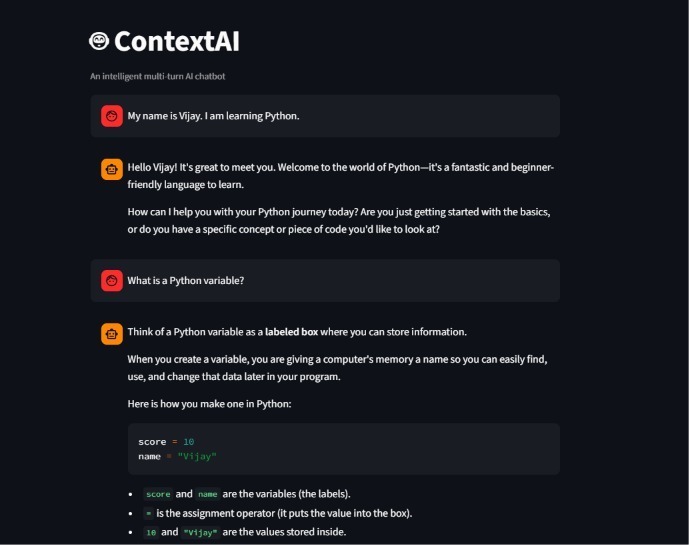
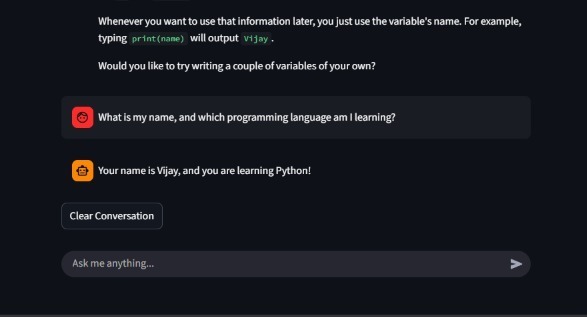
Building Context-Aware AI Chatbots: Exploring LLM API Integration with Python Artificial Intelligence is changing how applications communicate with users. Traditional chatbots often depend on predefined rules and fixed responses, which can limit their ability to understand different questions and maintain meaningful conversations. Large Language Models (LLMs) provide a more flexible approach by enabling applications to process natural language and generate contextually relevant responses. One practical way to bring this capability into software applications is through LLM API integration. Instead of training and hosting a language model independently, developers can connect their applications to an existing AI service through an API. As part of my internship learning journey at Valentius Kryptix, I explored this concept by developing ContextAI, an intelligent multi-turn AI chatbot using Python, Google Gemini API, and Streamlit. Why Context Matters in AI Conversations An effective conversational assistant should do more than respond to individual messages. It should also understand the relationship between the current question and previous interactions. For example, a user might initially say, "I am learning Python." Later, the user could ask, "Which programming language am I learning?" A context-aware chatbot should be able to refer to the earlier statement and answer correctly. This is where conversation history management becomes important. By maintaining previous user messages and assistant responses, an application can provide the language model with relevant conversational information. Exploring the Technology Behind ContextAI The project combines a few important technologies: Python: Handles application logic and communication with the AI service. Google Gemini API: Processes user prompts and generates intelligent responses. Streamlit: Provides an interactive interface for users to communicate with the chatbot. Python-dotenv: Loads API credentials from environment variables. One of the key implementation techniques was maintaining conversation history using Streamlit session state. The application retains the latest 10 messages and passes them as context when requesting a new response from the Gemini model. A custom system prompt was also introduced to define the assistant's behaviour, communication style, and responsibilities. Additionally, streaming responses make the interaction more engaging by displaying generated text progressively rather than waiting for the complete response. Important Lessons from the Implementation This project provided practical experience in several areas of AI application development. First, integrating an LLM API demonstrated how existing AI models can be incorporated into applications without building a language model from scratch. Second, conversation history management highlighted the importance of context in producing relevant responses. The amount of context sent to an API also needs to be managed carefully. Finally, secure API key management, exception handling, and model configuration showed why reliability and security are essential when building AI-powered applications. Output Image !Image description !Image description Conclusion ContextAI demonstrates how LLM API integration can transform a simple Python application into an interactive conversational assistant. It also provides a foundation for more advanced applications, including educational assistants, customer support systems, and intelligent productivity tools. Developing this project strengthened my understanding of Generative AI, API integration, and practical Python application development. Read the full article: How to Build an Intelligent Multi-Turn AI Chatbot Using LLM API Integration Project Repository: ContextAI – GitHub #ArtificialIntelligence #GenerativeAI #Python #LLM #GoogleGemini #ChatbotDevelopment
my first contribution to the bytecodealliance StarlingMonkey#348
I’m reverse engineering my 2010 Sony NEX-5’s firmware(work in progress) I still love my old Sony NEX-5, but the menus are clunky, and I wanted film looks straight out of camera, like the recipes Fuji shooters use. After reading articles and watching YouTube videos of people making film recipes on Sony cameras and modding old Sony firmware, I decided to try it on mine. Disclaimer: I’m a coder, not a colour or LUT specialist. Everything here is still being tested. Sample photos are coming over the next few days. How we did it: reverse engineering, together with Claude - Unpacked Sony’s official 5.00 firmware updater with fwtool.py (thanks ma1co) and dug through it with Ghidra. - On this generation, the firmware isn’t signed, only checksummed. We can rebuild it byte for byte identical to Sony’s, so a modified build goes through Sony’s normal update. - So far every change is data (text, images, settings tables), no code patches, and a stock recovery firmware is always ready. What’s running on my camera now (see photos) - Plain-word menus. For example: Creative Style → Film Look, AF/MF Select → Focus Mode, Peaking Level → Focus Outline, Exposure Comp. → Brightness, DRO → Shadow Lift. - A new flat look. We cracked the format of the 3,500+ menu graphics and can write our own, so there are new main-menu icons and a flat Shoot Mode wheel with an amber accent. - Film Looks renamed after films: C800T, HB Land, F Eterna, F ClNeg, L Contemporary… - Picture Effects turned into film looks, each with its own help text: K100 (Kodak Ektar 100 style), K400 (Kodak Tri-X 400 style), L MonoHC (Leica Monochrom style). - Soft key B now opens Film Look straight from the shooting screen. What we found inside the firmware - The camera has 13 Creative Styles internally but only shows 6. Neutral, Clear, Deep, Light, Autumn Leaves, Sepia and Night View are hidden. - Each style’s colour is plain data: a colour matrix, separate hue and strength for four parts of the colour wheel, and a tone curve. So we can change real colour per style, not just contrast, saturation and sharpness. - There’s a small built-in 3D LUT (9×9×5). Sony only uses it to tame very strong colours, and it’s shared by all styles, so only one look can really use it. - Live view only has colour data for 7 styles. Looks placed on hidden styles show normal colours on screen; only the photo gets the look. - Hidden settings that already work but have no menu: per-style Brightness and “Zone” sliders, and a black-and-white colour filter (yellow, orange, red, green). - Sharpening and noise reduction can be tuned for each ISO. The LUTs / film looks I made 27 looks as .cube LUTs, plus a small drag-and-drop tool that applies them to NEX-5 JPEGs. They’re imitations built from how each maker describes its colour, not the real processing. - Fujifilm style: Provia, Velvia, Astia, Classic Chrome, Reala Ace, Pro Neg Hi, Pro Neg Std, Classic Negative, Nostalgic Neg, Eterna, Eterna Bleach Bypass, Acros, Acros + Red - Leica style: Classic, Contemporary, Eternal, Monochrom, Monochrom High Contrast - Hasselblad style: Natural, Portrait, Landscape - Kodak style: Portra 400, Gold 200, Ektar 100, Kodachrome 64, Cinestill 800T, Tri-X 400 The 9 I’m putting into the camera: Cinestill 800T, Hasselblad Landscape, Eterna, Classic Negative, Leica Contemporary, Kodachrome 64, Ektar 100, Tri-X 400 and Leica Monochrom High Contrast. Some go into Film Look and some into Picture Effect. On paper, the camera’s own colour data should get most looks 85–95% of the way to the full LUT, compared with roughly 30–60% using only contrast, saturation and white balance. That’s an estimate until I shoot real test charts. What won’t work - No film grain in camera. - Shadows and highlights tinted in different colours mostly need that one shared 3D LUT. - Completely new screens (a quick menu, a picker with photo previews) would mean patching Sony’s code, which is far riskier, so that stays a prototype for now. Next - Test shots for every look on the same scene, against the LUT version. - Confirm how the colour data really behaves. - Add menu entries for the B/W filter and the hidden sliders. Please don’t flash modified firmware unless you accept the risk. I’ll share the tools once things are tested. If anyone knows Sony colour science, has NEX-5 test shots, or has wishes for what to change, I’m all ears. Most of this post was summarised by Claude. We did so much work that it was easier to ask it to sum everything up for the post. Gallery captions: 1. Film Look with film names: C800T (Cinestill 800T), HB Land, F Eterna, F ClNeg, L Contemporary 2. New flat main-menu icons 3. Restyled Shoot Mode wheel 4. Shooting screen: soft key B now opens Film Look 5. Picture Effect “K100”: Kodak Ektar 100 style 6. Picture Effect “K400”: Kodak Tri-X 400 style 7. Picture Effect “L MonoHC”: Leica Monochrom style Updates: First Test of photographs, Each photo have info caption below. URL: imgur.com
码一个润出去的海外移居手册 BryceYuuu/RUN
@sellerkitmh Well, let me tell u... mostly building in public here, sharing progress and talking to other devs. No sales yet, mostly just learning in public lol I built an opensource harness imzodev/openaidy Also an agentic game thegroove.fun 60 + builds is perseverance, keep going at it
The debate is over, and evil has won. `cursor: pointer` now means clickable. RIP my ability to tell whether ⌘-clicking something will open it in a new window. csswg-drafts#14251
I've been making integrations for HACS for ages, but didn't list any. With this upcoming @home_assistant marketplace thing coming I thought I would... I got one accepted! yay! Vortitron/im-tools For infomentor.. an app some schools use in Sweden.
做像素游戏的:装上 pixelfx 的 skill,对 Claude Code 说「给法师大招加个冰霜新星」,它会把特效接进你的游戏。 pixelfx:开源 244 个像素特效(火、爆炸、魔法等),每个是一小段代码,可放进浏览器游戏,或导出精灵图给 Godot/Unity。 Star 3231,日均约 984,MIT。 patch-gg/pixelfx t.co
3/4 We revisited the work and are releasing mppflow, a Python port of our original Java code, checked against 470 recorded cases (HiGHS by default, Gurobi optional), with fixes to minor issues in our paper and code. ru-arcl/multiagent-network-flow
cell 3, expose it: !wget -q github.com/cloudflare/cloudflared/releases/latest… !dpkg -i cloudflared-linux-amd64.deb !nohup cloudflared tunnel --url localhost > cf.log 2>&1 & !sleep 8; grep -o '.*https' cf.log
SC member allow for a platform for the Nix community to state their thoughts about reinstating @domenkozar commit bit, and sin conjuring is exactly what they are doing. Almost every person speaking out has said similarly inflammatory statements. nixpkgs-committers#162
The final chapter of my "Istio, Hands-On" series is out on ITNEXT 🚀 GKE and EKS in one mesh: how your calls cross clouds, and when they shouldn't. Lab repo included. itnext.io filipemotta/istio-in-practice-part6 #Istio #Kubernetes #ServiceMesh #DevOps
Vedetta: know every device on your LAN. Vedetta is a free app for Home Assistant OS that finds every device on your LAN and tells you what each one is, and why. - Finds every device, with presence and latency history - Works out name, brand, model and type from many small clues - Shows the clues behind every answer - Never overwrites what you set by hand - Local only: no cloud, no account, no telemetry - Checked against 400+ devices from real home networks - Open source (MIT), with a live demo in your browser Try it and tell me what it gets wrong: Sived80/vedetta Processing img h6408qdhf8zh1...
那些说 Jev 短命模型的人不过是哗众取宠 我最近用Jev做了一个「简历打分神器 」帮助找工作的朋友来给自己简历做一个初步的判断 项目地址:ninetyhe-90/resume-grader 开源不易,欢迎大家使用和体验,帮忙转发和点赞,也是我努优化的动力💪💪 t.co
[ANN] Pharo Live Monitor. A tiny always-on activity monitor for your Pharo image FedeLoch/pharo-live-monitor
مناسب للملاحظات والرسائل والكود. لو فعلت معالجة AI إضافية بمزوّد سحابي، النص يطلع له؛ خلّها مطفّية إذا تبي خصوصية محلية. على Wayland ممكن تحتاج إعدادات إضافية. المشروع: cjpais/Handy #نص #AI #تقنية
@mAbidou انا لسه بشوف، ال key بيتعمل من السايت بتاع هرمس وان و هنا تفاصيل ال sdk younit.io efg-hermes-younit/younit-python
RemCTL 2.5.0 is also out, with lots of bug fixes, better Codex and Claude Code plugins, and lots more: github.com/viticci/remctl/releases/tag/v2.5.0 (clearing my backlog, since I have a few more CLIs to release...)
I made an iOS/MacOS shortcut that discovers MCP tools at runtime and prompts you to run them I started with a shortcut for finding commercial properties near my location. After getting that working, I wanted to reuse it with other MCP servers without rebuilding the tool menus each time. The result is MCP Toolkit. Get the shortcut on iCloud To use it: 1. Paste an MCP server URL. 2. Choose one of the tools it returns. 3. Select fields and answer the prompts. 4. Review the request before sending. 5. View the text, structured data, or raw response. It remembers named servers, caches tool definitions, and saves requests with their arguments. You can also select several saved calls and run them in sequence to get one combined report. Each call uses its saved arguments; results don’t feed into later calls. I built and tested it on macOS, for MCP spec version 2026-07-28. I haven’t fully verified iOS or iPad compatibility (iOS test run was successful but not rigorously validated). It supports stateless HTTP endpoints returning JSON; OAuth sign-in and streaming responses aren’t supported. Complex inputs still need JSON entry, and structured results need better formatting. Saved arguments use global Shortcuts storage, which other shortcuts can access, so keep credentials out of them. I generated it using Shortcutkit, a library I created, with help from a coding agent. The Github source and case study cover the build and native-runtime issues I encountered. Shortcutkit is available as Python and Typescript packages too. MCPs I used while testing: https://carnm-rs-mcp-production.up.railway.app/mcp https://publicsurplus-production.up.railway.app/mcp
repo: naman-sharma12345/kimo site: getkimo.tech star it or roast it, both help
要让 AI 读懂 GitHub 项目,不用逐个复制代码。 Repomix 把仓库打成一份文件:打开官网,贴公开仓库链接,点 Pack,下载后交给 AI 解释目录、定位入口。 CLI 免费开源,有中文文档;AI 服务另算。私有代码上传前,先检查有没有密钥。 🔗 repomix.com GitHub:yamadashy/repomix